

Page 1
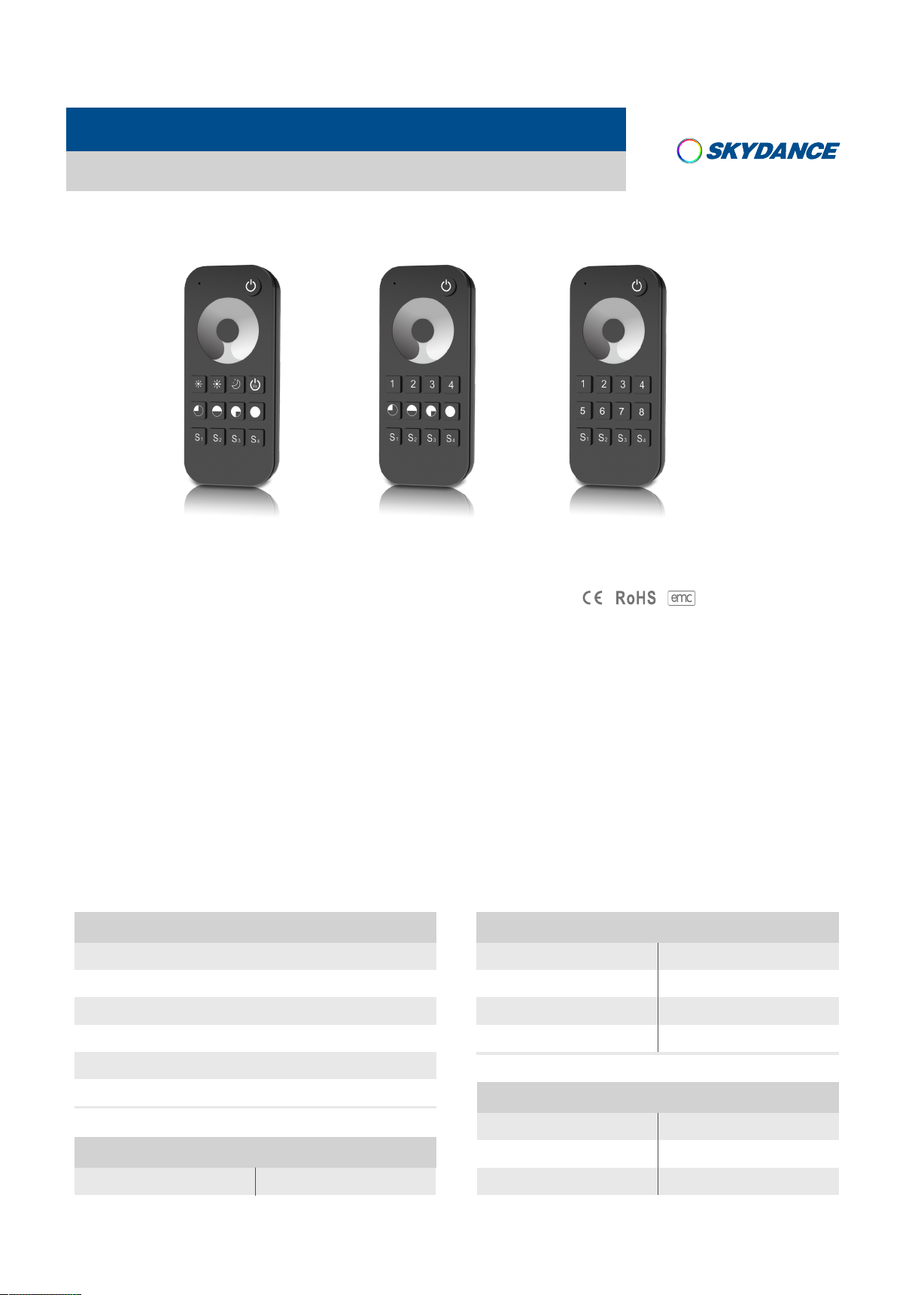
Touch Wheel RF Remote Controller
Model No.: RT1/RT6/RT8
1,4 ,8 zone dimming/Touch color wheel/Wireless remote 30m distance/AAAx2 battery/Magnet stuck fix
RT1 RT6
1 Zone Dimming
4 Zone Dimming
RT8
8 Zone Dimming
Features
● Apply to single color LED controller.
Ultra sensitive color adjustment touch wheel.●
● Each remote can match one or more receiver.
● AAAx2 b atter y powered.
● Operate with LED indicator light.
● Magnet on the back which can be easily stuck on back holder or any metal surfaces.
Technical Parameters
Input and Output
Output signal RF 2. 4GHz( )
Working voltage 3VDC AAAx2( )
Working current <5mA
Standby current <10μA
Safety and EMC
EMC standard (EMC) EN301 489,EN 62479
Safety standard(LVD)
Radio Equipment(RED)
Certification
LVD RED
EN60950
EN300 328
CE,EMC,LVD,RED
Standby time 1 year
Remote distance 30m
Warranty
Warranty
User Manual Ver 1.0.2
5 years
Environment
Operation temperature
Case temperature (Max.)
IP rating
www.iskydance.com
Ta: -30OC ~ +55OC
O
+85
T c:
IP20
C
Page 1
Page 2
Mechanical Structures and Installations
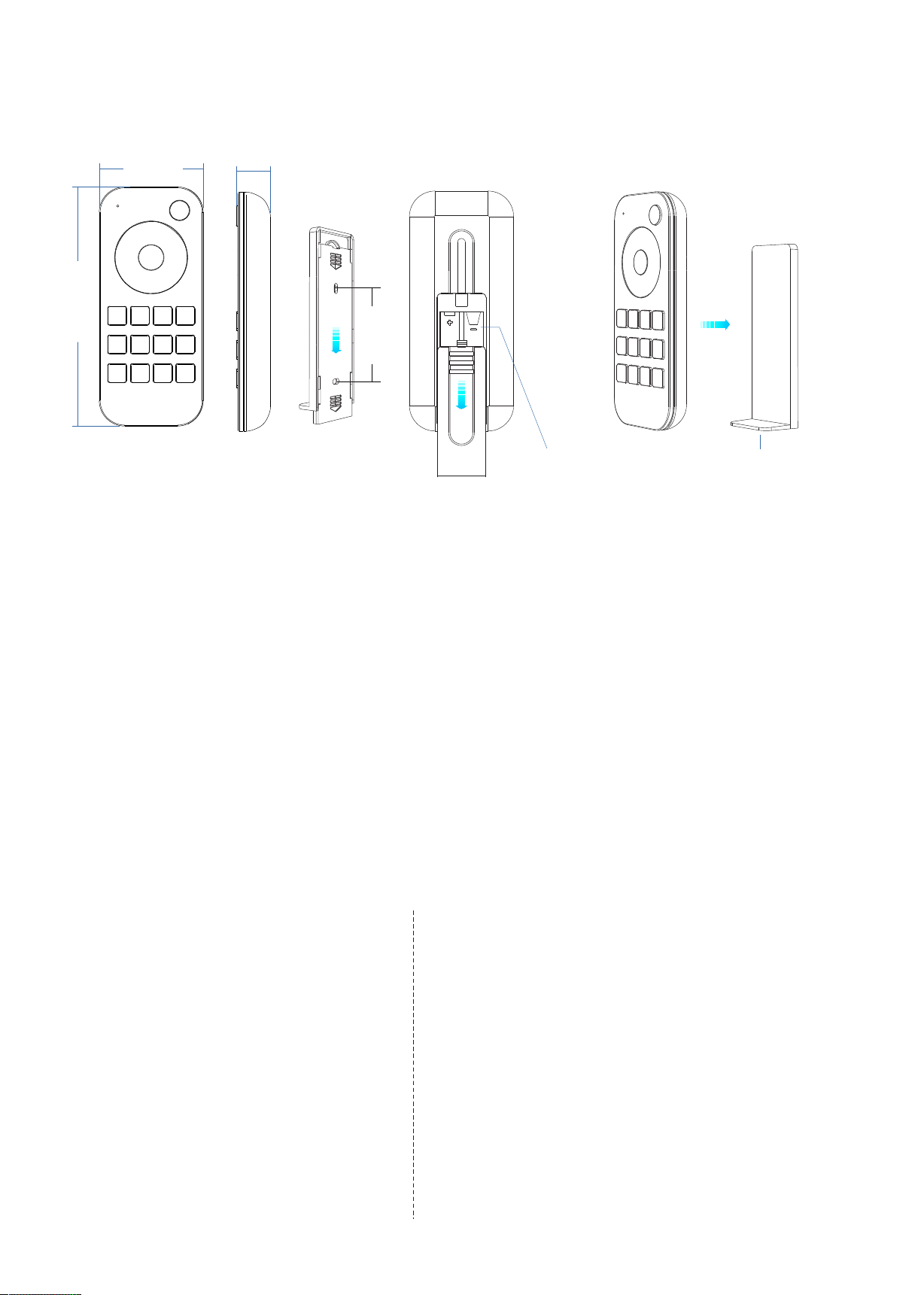
RT1,RT6,RT8 Touch Wheel RF Remote Controller
53 .00 mm
12 2.00 mm
17 .50 mm
53 .50 m m
To x the remote, three options are offered for selection:
Option 1: stuck the remote on any metal surfaces directly.
Option 2: fix the remote' back holder on the wall with two screws.
Option 3: adhere the remote' back holder to the wall with paster.
3VDC(AAAx2) Battery
Back holder with magnet
Operation
● When turn on light, the indicator display blue. when turn off light, the indicator display red.
● When touch the color wheel, the indicator will display the same color.
● When press or touch operation is invalid (If the light is off), the indicator display red.
● To extend battery life, no touch or press key operation after a few seconds,
the touch wheel will enter sleep state, you need press any key to make touch wheel quit sleep state.
Match Remote Control (two match ways)
End user can choose the suitable match/delete ways. Two options are offered for selection:
Use the controller’s Match key
Match:
Short press match key, immediately press on/off
key (single zone remote) or zone key (multiple zone
remote) of the remote.
Delete:
Press and hold match key for 5s to delete all match,
The light blinks 5 times means all matched remotes
were deleted.
User Manual Ver 1.0.2
Use Power Restart
Match:
Switch off the power, then switch on power again,
immediately short press on/off key (single zone remote)
or zone key (multiple zone remote) 3 times on the remote.
The light blinks 3 times means match is successful.
Delete:
.
Switch off the power, then switch on power again,
immediately short press on/off key (single zone remote)
or zone key (multiple zone remote) 5 times on the remote.
The light blinks 5 times means all matched remotes were
deleted.
www.iskydance.com
Page 2
Page 3
Key function
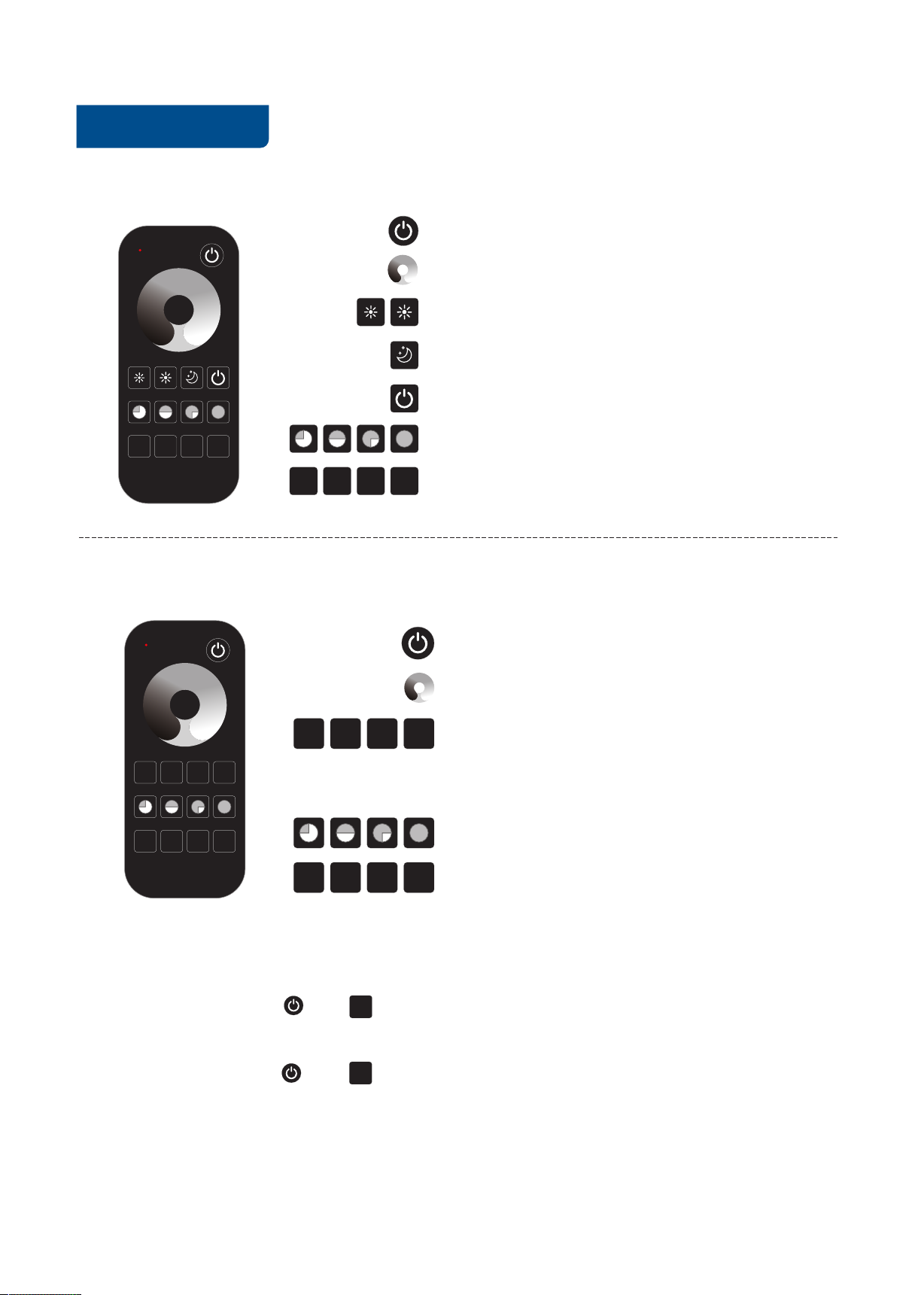
● RT1 1 zone dimming remote
30s
RT1,RT6,RT8 Touch Wheel RF Remote Controller
: Turn on/off light.
: Touch to change brightness.
: Adjust brightness, short press 10 levels,
long press 1-6s for continuous 256 levels adjustment.
: Small night brightness (10%).
30s
: Turn off light after 30s, long press 2s will turn off light after 60s.
S1 S2 S3 S4
S1 S2 S3 S4
● RT6 4 zone dimming remote
2
1
3
2
1
S1 S2 S3 S4
4
S1 S2 S3 S4
: 25%, 50%, 75%,100% brightness.
: Short press recall the scene,
long press 2s save current brightness into S1/2/3/4.
: Short press turn on/off all zone light.
: Touch to change current zone brightness.
3
: Short press select and turn on zone light,
4
long press 2s turn off zone light.
Short press multiple zone key fastly,
will select multiple zone synchronously.
: 25%, 50%, 75%,100% brightness for current selected zone.
: Short press recall the scene,
long press 2s save current state into S1/2/3/4.
4 zone recall or save synchronously.
Note: The remote RT6 can be used as 4 zone dimming remote or single zone 4 channel dimming remote.
Operation: Long press " " + " " at the same time for 2 seconds as 4 channel dimming remote,
only match with one or multiple receiver of 4 channel, such as V4,VP or V4-L controller.
Operation: Long Press " " + " " key at the same time as 4 zone dimming remote,
each zone match with one or multiple receivers.
When set ok, the green indicator will light on longer.
User Manual Ver 1.0.2
4
1
www.iskydance.com
Page 3
Page 4
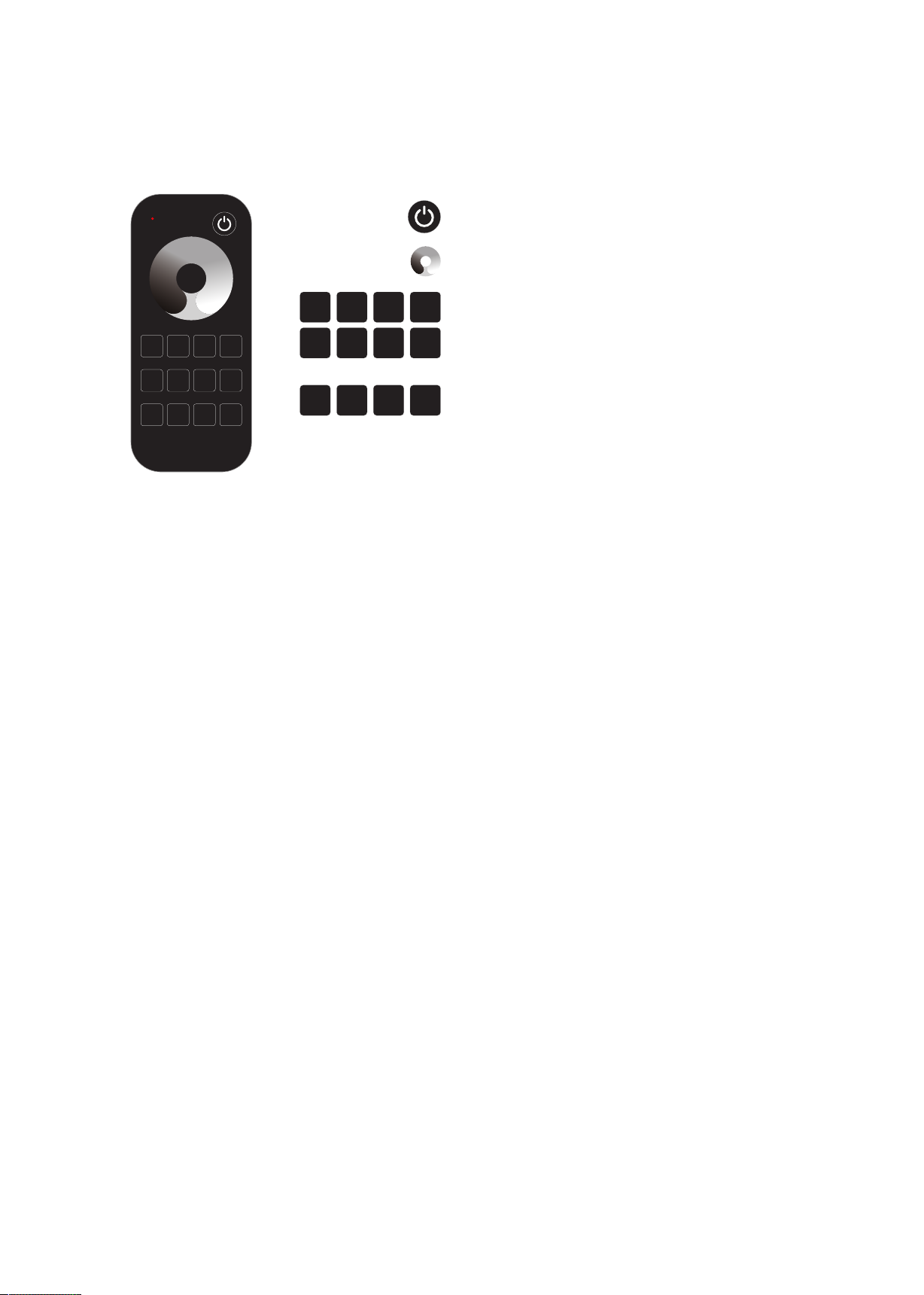
● RT8 8 zone dimming remote
RT1,RT6,RT8 Touch Wheel RF Remote Controller
: Short press turn on/off all zone light.
: Touch to change current zone brightness.
: Short press select and turn on zone light,
4
long press 2s turn off zone light.
Short press multiple zone key fastly,
8
will select multiple zone synchronously.
: Short press recall the scene,
long press 2s save current state into S1/2/3/4.
8 zone recall or save synchronously.
3
2
1
7
6
5
S1 S2 S3 S4
3
2
1
7
6
4
8
5
S1 S2 S3 S4
Safety information
1. Read all instructions carefully before you begin this installation.
2. When installing battery, pay attention to the battery positive and negative polarity.
A long time without the remote control, remove the batter y.
When remote distance becomes smaller and insensitive, replace the batter y.
3. If no response from the receiver, please re-match the remote.
4. Gently handle remote, beware of falling.
5. For indoor and dr y location use only.
User Manual Ver 1.0.2
www.iskydance.com
Page 4
 Loading...