

Page 1
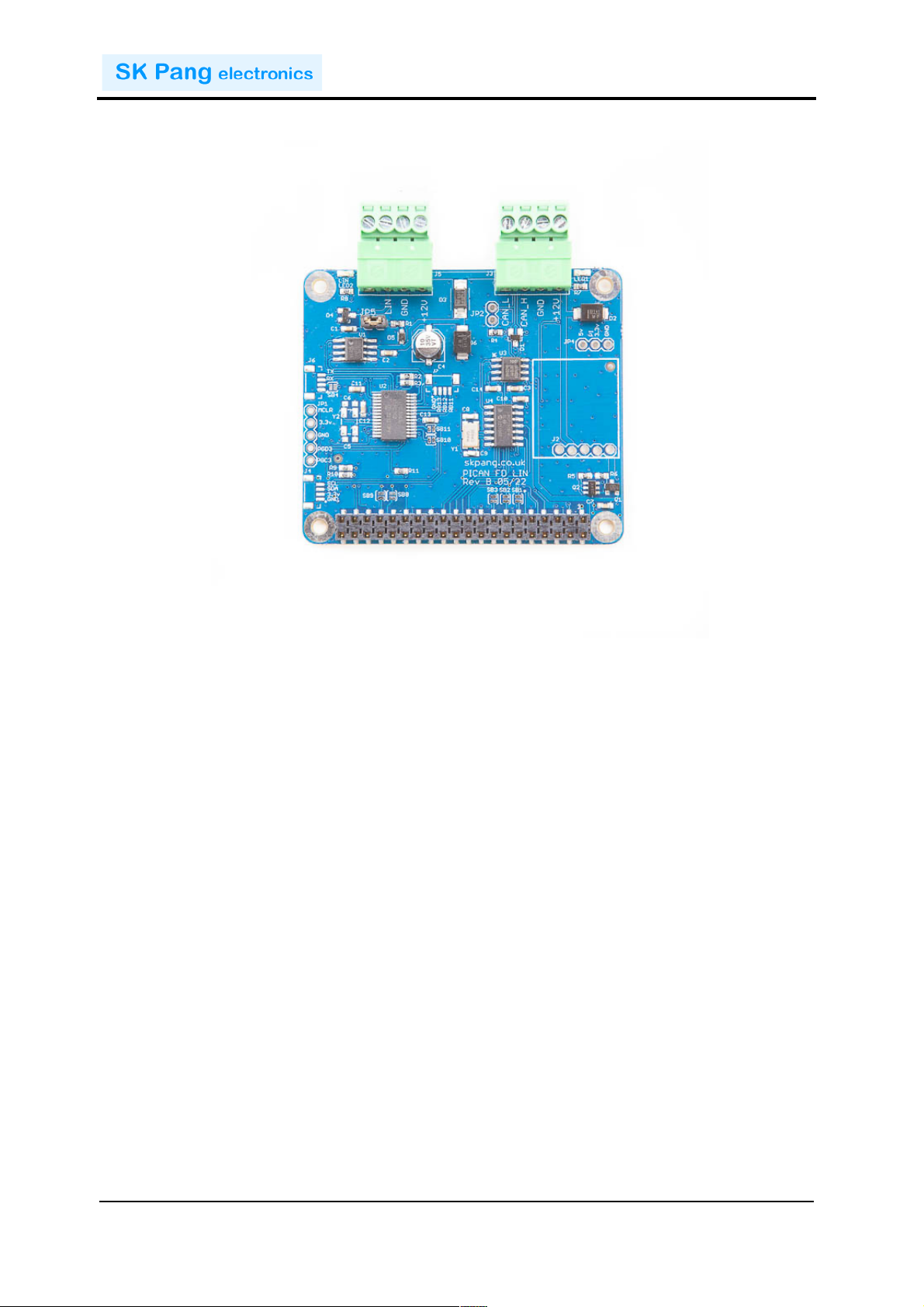
!!!!!!!!!!!!!!!!!!!!!!!!!!!!!!!!!!!!!!!!!!!!!!!!!!!!!!!!!!!!!!!!!!!!!!!!!!PiCAN FD LIN Rev B 1.0
!
SK Pang Electronics Ltd Ó 2022
www.skpang.co.uk
1
PiCAN FD and LIN-Bus
USER GUIDE V1.0
Product name PICAN FD and LIN-Bus Board for Raspberry Pi
Model number RSP-PICANFDLIN
Manufacturer SK Pang Electronics Ltd
!
Page 2

!!!!!!!!!!!!!!!!!!!!!!!!!!!!!!!!!!!!!!!!!!!!!!!!!!!!!!!!!!!!!!!!!!!!!!!!!!PiCAN FD LIN Rev B 1.0
!
SK Pang Electronics Ltd Ó 2022
www.skpang.co.uk
2
Contents
Table of Contents
1.! Introduction ........................................................................................................... 3!
1.1.! CAN&Features&...................................................................................................................................................&3!
1.2.! LIN-Bus&Features&...........................................................................................................................................&3!
2.! Hardware Installation ............................................................................................. 3!
1.3.! Screw&Terminals&............................................................................................................................................&4!
1.4.! CAN-BUS&120W&Terminator&......................................................................................................................&4!
1.5.! LEDs&....................................................................................................................................................................&4!
1.6.! Optional&.............................................................................................................................................................&4!
3.! Software Installation .............................................................................................. 4!
1.7.! Installing&CAN&Utils&.......................................................................................................................................&5!
1.8.! Bring&Up&the&Interface&.................................................................................................................................&5!
4.! Python Installation and Use .................................................................................... 6!
1.9.! LIN-Bus&Usage&.................................................................................................................................................&7!
1.10.! ASCII&Command&Set&......................................................................................................................................&8!
1.11.! LIN-BUS&GUI&.....................................................................................................................................................&9!
!
!
!
Page 3
!!!!!!!!!!!!!!!!!!!!!!!!!!!!!!!!!!!!!!!!!!!!!!!!!!!!!!!!!!!!!!!!!!!!!!!!!!PiCAN FD LIN Rev B 1.0
!
SK Pang Electronics Ltd Ó 2022
www.skpang.co.uk
3
1. Introduction
This!PiCAN!FD!board!with!LIN-bus.!Classic!CAN!and!CAN!FD!is!provided!by!the!
Microchip!MCP2518FD!IC.!!
LIN-bus!is!provided!by!a!dsPIC33!micro-controller.!Communication!to!the!Pi!is!over!
UART!on!ttyS0!using!ASCII!text!commands.!Example!LIN-bus!GUI!app!is!available!
written!in!Python3!and!tkinter.!
The!firmware!is!updatable!using!the!Microchip!UnifiedHost!java!app.!This!requires!the!
Raspberry!Pi!running!in!GUI!mode.!
Easy!to!install!SocketCAN!driver.!Programming!can!be!done!in!C!or!Python."
Optional!3A!SMPS!module!which!can!power!the!PiCAN!FD!LIN-bus!board!and!
Raspberry!Pi!from!7!to!24v!external!supply!
1.1. CAN Features
• Arbitration!Bit!Rate!upto!1Mbps!
• Data!Bit!Rate!up!to!8Mbps!
• CAN!FD!Controller!modes!
• Mixed!CAN2.0B!and!CANFD!mode!
• Conforms!to!ISO11898-1:2015!
• High!speed!SPI!Interface!!
• CAN!connection!via!4way!screw!terminal!
• 120Ω!terminator!ready!
• LED!indicator!!(GPIO04)!
• Four!fixing!holes,!comply!with!Pi!Hat!standard!
• SocketCAN!driver,!appears!as!can0!and!can1!to!application!
• Interrupt!RX!on!GPIO25!
1.2. LIN-Bus Features
• LED!indicator!
• LIN!master!or!slave.!Setting!via!jumper!
• LIN!provided!by!dsPIC33!micro-controller!with!updatable!firmware!
• Communicate!to!the!Pi!via!ASCII!text!commands!on!ttyS0!
2. Hardware Installation
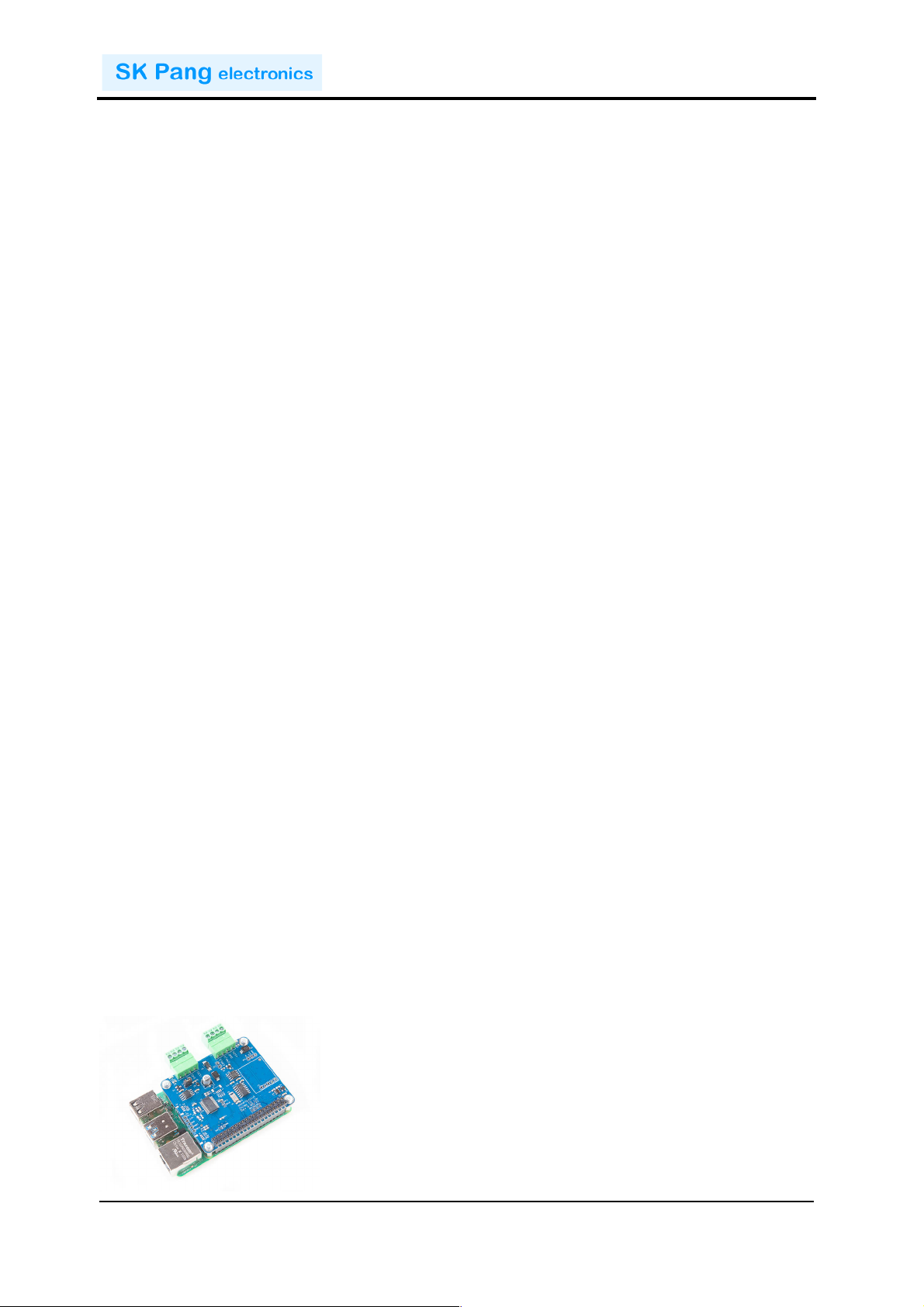
Before!installing!the!board!make!sure!the!Raspberry!Pi!is!switched!off.!Carefully!align!
the!40way!connector!on!top!of!the!Pi.!Use!spacer!and!screw!(optional!items)!to!secure!
the!board.!!
!
!
Page 4
!!!!!!!!!!!!!!!!!!!!!!!!!!!!!!!!!!!!!!!!!!!!!!!!!!!!!!!!!!!!!!!!!!!!!!!!!!PiCAN FD LIN Rev B 1.0
!
SK Pang Electronics Ltd Ó 2022
www.skpang.co.uk
4
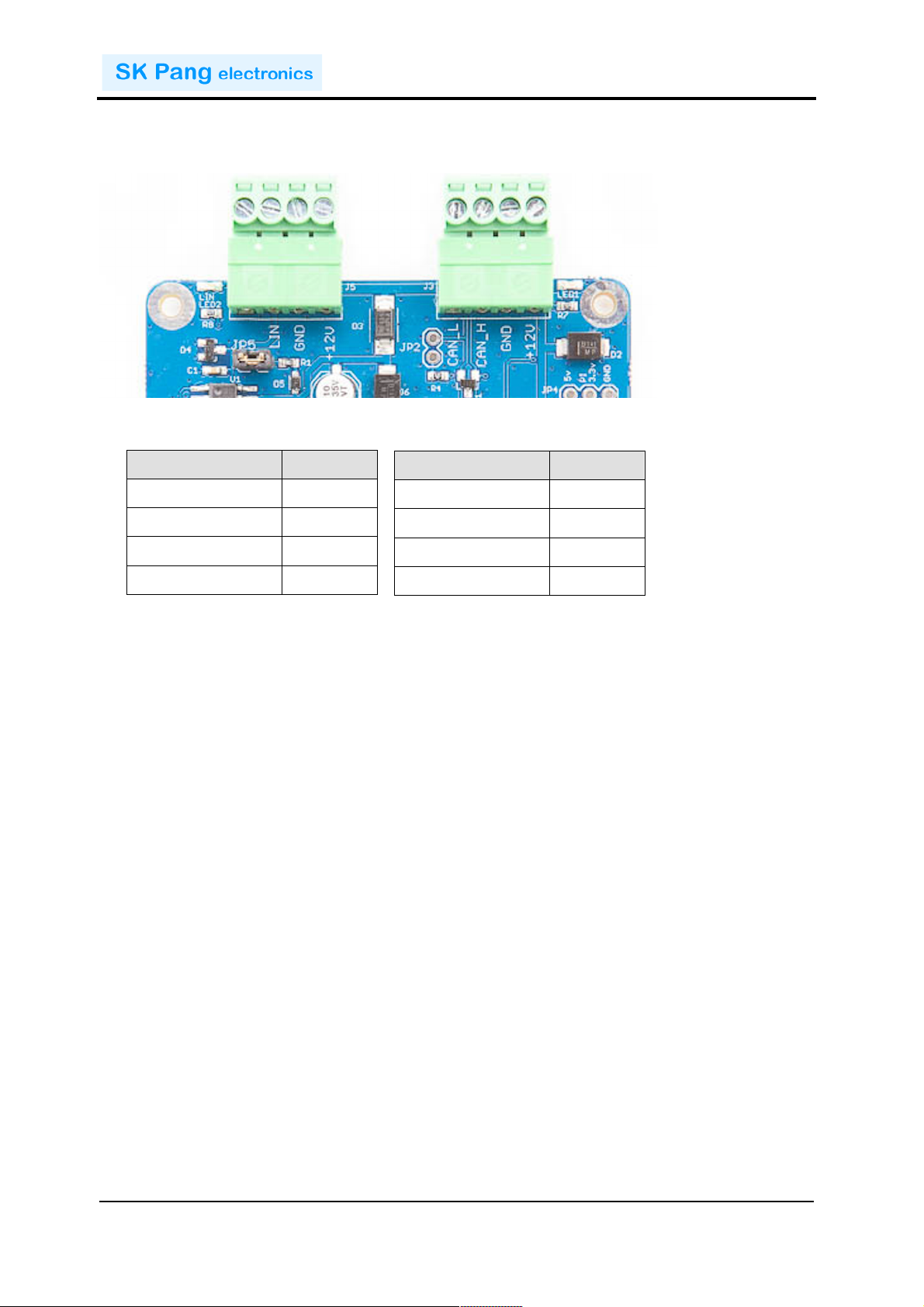
J3"CAN-Bus"
Function"
1!
CAN_L!
2!
CAN_H!
3!
GND!
4!
+12v!
J5"LIN-Bus"
Function"
1!
!
2!
LIN!
3!
GND!
4!
+12v!
1.3. Screw Terminals
The!CAN!connections!are!made!via!the!4way!screw!terminals!on!J3!and!LIN!on!J5.!
!
!
!
!
!
!
!!!!!
1.4. CAN-BUS 120W Terminator
There!is!a!120W!fitted!to!the!board.!To!use!the!terminator!solder!a!2way!header!pin!to!
JP2!then!insert!a!jumper.!
1.5. LEDs
There!is!a!red!LED!(LED1)!fitted!to!the!board.!This!is!connected!to!GPIO04.!LED2!is!
LIN-bus!indication!which!is!controlled!by!the!dsPIC33.!
1.6. Optional
SMPS.!Switch!mode!power!supply!module!option,!this!is!a!5v!module!that!can!power!
the!board!and!the!Raspberry!Pi.!It!has!an!input!voltage!range!of!7v!to!24v.!
3. Software Installation
It!is!best!to!start!with!a!brand!new!Raspbian!image.!Download!the!latest!from:!
After!first!time!boot!up,!do!an!update!and!upgrade!first.!
sudo apt-get update
sudo apt-get upgrade
sudo reboot
Add!these!lines!to!the!end!of!file:!
enable_uart=1
dtparam=spi=on
!
Page 5

!!!!!!!!!!!!!!!!!!!!!!!!!!!!!!!!!!!!!!!!!!!!!!!!!!!!!!!!!!!!!!!!!!!!!!!!!!PiCAN FD LIN Rev B 1.0
!
SK Pang Electronics Ltd Ó 2022
www.skpang.co.uk
5
dtoverlay=mcp251xfd,spi0-0,interrupt=25
Reboot!Pi:!
sudo reboot
1.7. Installing CAN Utils
Install!the!CAN!utils!by:!
sudo apt-get install can-utils
1.8. Bring Up the Interface
You!can!now!bring!the!CAN!interface!up!with!CAN!2.0B!at!500kbps:!
sudo /sbin/ip link set can0 up type can bitrate 500000
or!CAN!FD!at!500kpbs!/!2Mbps.!Use!copy!and!paste!to!a!terminal.!
sudo /sbin/ip link set can0 up type can bitrate 500000 dbitrate 2000000 fd on sample-point .8 dsample-point .8
Connect!the!PiCAN!FD!LIN!board!to!your!CAN!network.!
To!send!a!CAN!2.0!message!use!:!
cansend can0 7DF#0201050000000000
This!will!send!a!CAN!ID!of!7DF.!Data!02!01!05!–!coolant!temperature!request.!
To!send!a!CAN!FD!message!with!BRS!use!:!
cansend can0 7df##15555555555555555
To!send!a!CAN!FD!message!with!no!BRS!use!:!
cansend can0 7df##05555555555555555
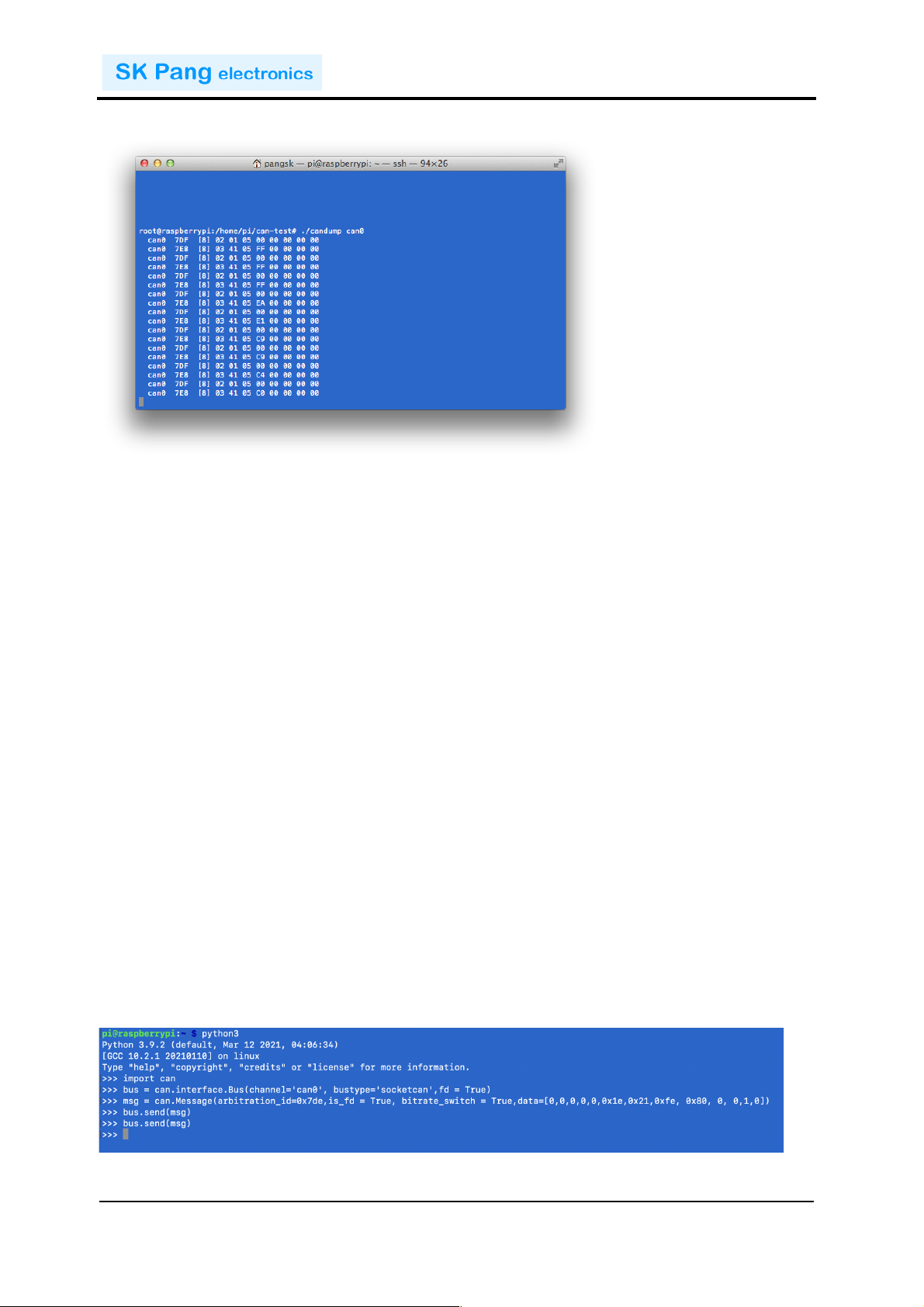
Connect!the!PiCAN!to!a!CAN-bus!network!and!monitor!traffic!by!using!command:!
candump can0
!
Page 6
!!!!!!!!!!!!!!!!!!!!!!!!!!!!!!!!!!!!!!!!!!!!!!!!!!!!!!!!!!!!!!!!!!!!!!!!!!PiCAN FD LIN Rev B 1.0
!
SK Pang Electronics Ltd Ó 2022
www.skpang.co.uk
6
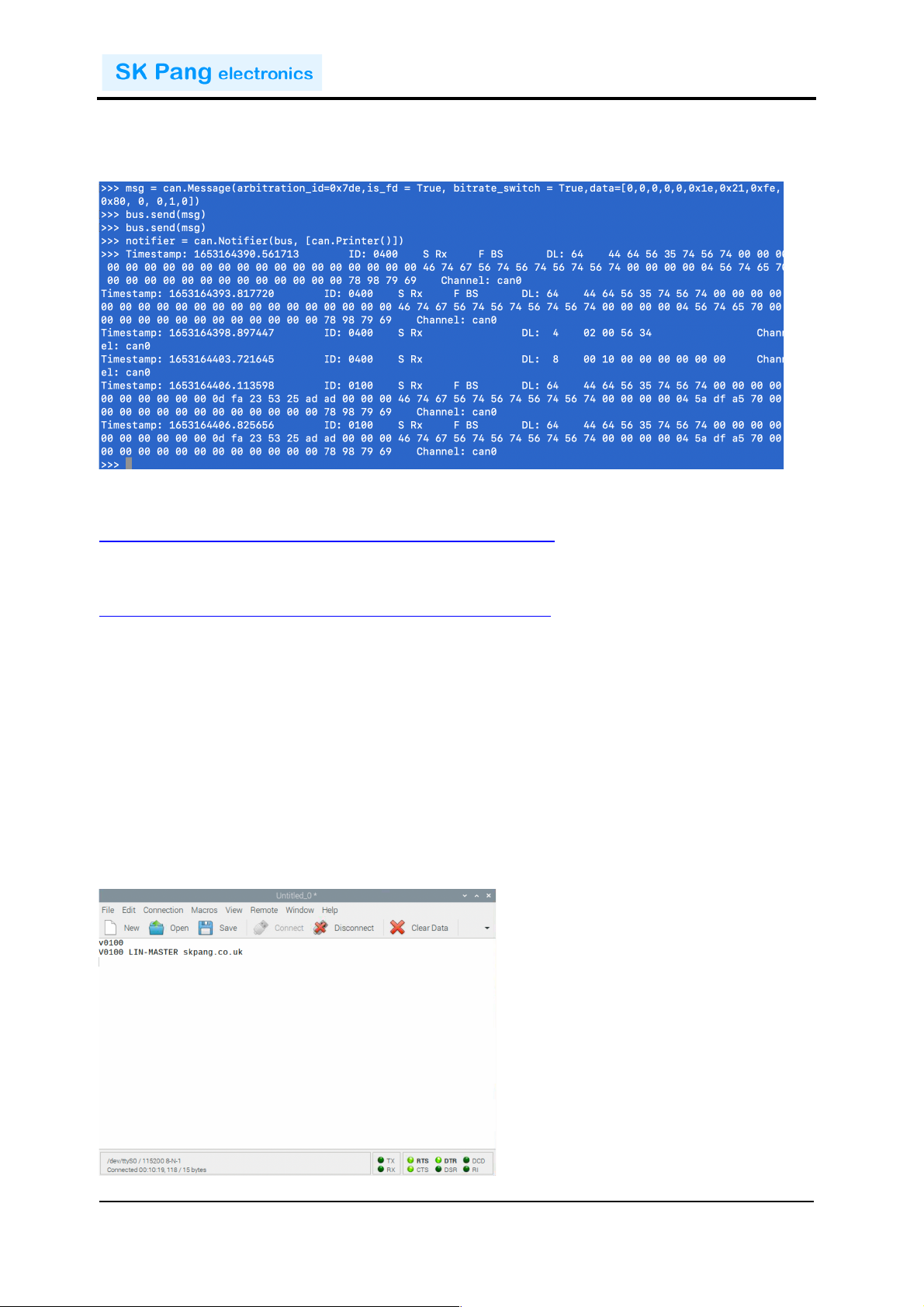
You!should!see!something!like!this:
4. Python Installation and Use
Ensure!the!driver!for!PiCAN!FD!is!installed!and!working!correctly!first.!
Clone!the!pythonCan!repository!by:!
git clone https://github.com/hardbyte/python-can
cd python-can
sudo python3 setup.py install
Check!there!is!no!error!been!displayed.!
Bring!up!the!can0!interface:!
sudo /sbin/ip link set can0 up type can bitrate 500000 dbitrate 2000000 fd on sample-point .8 dsample-point .8
Now!start!python3!and!try!the!transmit!with!CAN!FD!and!BRS!set.!
python3
import can
bus = can.interface.Bus(channel='can0', bustype='socketcan',fd = True)
msg = can.Message(arbitration_id=0x7de,is_fd = True, bitrate_switch =
True,data=[0,0,0,0,0,0x1e,0x21,0xfe, 0x80, 0, 0,1,0])
bus.send(msg)!
!
!
!
Page 7
!!!!!!!!!!!!!!!!!!!!!!!!!!!!!!!!!!!!!!!!!!!!!!!!!!!!!!!!!!!!!!!!!!!!!!!!!!PiCAN FD LIN Rev B 1.0
!
SK Pang Electronics Ltd Ó 2022
www.skpang.co.uk
7
To!received!messages!and!display!on!screen!type!in:!
notifier = can.Notifier(bus, [can.Printer()])
Documentation!for!python-can!can!be!found!at!:!!
https://python-can.readthedocs.io/en/stable/index.html!
More!expamles!in!github:!
https://github.com/skpang/PiCAN-FD-Python-examples!
!
1.9. LIN-Bus Usage
LIN-bus!is!communicated!to!the!Pi!over!the!UART!on!ttyS0!port!at!115200!8-N-1!
setting.!
Using!Coolterm!for!Raspberry!Pi!or!a!text!base!terminal.!Set!the!port!to!/dev/ttyS0!/!
115200!8-N-1!and!connect.!
On!the!terminal!type!in!‘v’!and!press!enter.!Type!in!‘V’!and!press!enter.!
You!should!see!a!reply!like!this!screen:!
!
!
Page 8

!!!!!!!!!!!!!!!!!!!!!!!!!!!!!!!!!!!!!!!!!!!!!!!!!!!!!!!!!!!!!!!!!!!!!!!!!!PiCAN FD LIN Rev B 1.0
!
SK Pang Electronics Ltd Ó 2022
www.skpang.co.uk
8
1.10. ASCII Command Set
To!control!the!LIN-bus!port!a!simple!ASCII!command!is!sent!from!the!Pi!to!the!PICAN!
FD!LIN!board.!
Commands"
The!command!requires!a!carriage!return!character!(0x0D).!All!values!are!in!hex.!
V! Get!hardware!version!
v! Get!firmware!version!
O! Open!LIN!port!
C! Close!LIN!port!
S" Set!LIN!baudrate!
S1! Set!baudrate!to!9600!!
S2!! Set!baudrate!to!10400!
S3! Set!baudrate!to!19200!(default)!
t! Transmit!a!LIN!frame!with!Classic!checksum!
! taaxdddddddddddddddd!
! aa! LIN!address!in!hex!
! x! Data!length!0!to!8!bytes!
! dd! Data!byte!value!in!hex!
T! Transmit!a!LIN!frame!with!Enhanced!checksum!
! Taaxdddddddddddddddd!
! aa! LIN!address!in!hex!
! x! Data!length!0!to!8!bytes!
! dd! Data!byte!value!in!hex!
m! Monitor!mode.!All!LIN!traffic!will!be!sent!to!the!Pi!with!a!prefix!of!M!
r! Request/respond!mode.!An!address!value!will!be!sent!on!the!bus!and!respond!
will!pass!onto!the!Pi.!
! raa!
! aa!LIN!address!in!hex!
!
Example"1.!Controlling!NCV7430!RGB!LED!
!
Page 9

!!!!!!!!!!!!!!!!!!!!!!!!!!!!!!!!!!!!!!!!!!!!!!!!!!!!!!!!!!!!!!!!!!!!!!!!!!PiCAN FD LIN Rev B 1.0
!
SK Pang Electronics Ltd Ó 2022
www.skpang.co.uk
9
To!set!the!NCV7430!first!it!needs!to!be!initialized!with!these!values!23!C0!00!00!7F.!
Command!string:!
O
t234C000007F
To!set!the!LED!to!blue,!sent!this!string!24!C0!00!00!10!31!00!00!FF!
Command!string:!
t248C0000010310000ff
To!set!the!LED!to!red,!sent!this!string!24!C0!00!00!10!31!00!FF!00!
Command!string:!
t248C00000103100ff00
Example"2.!Reading!a!window!mirror!switch!
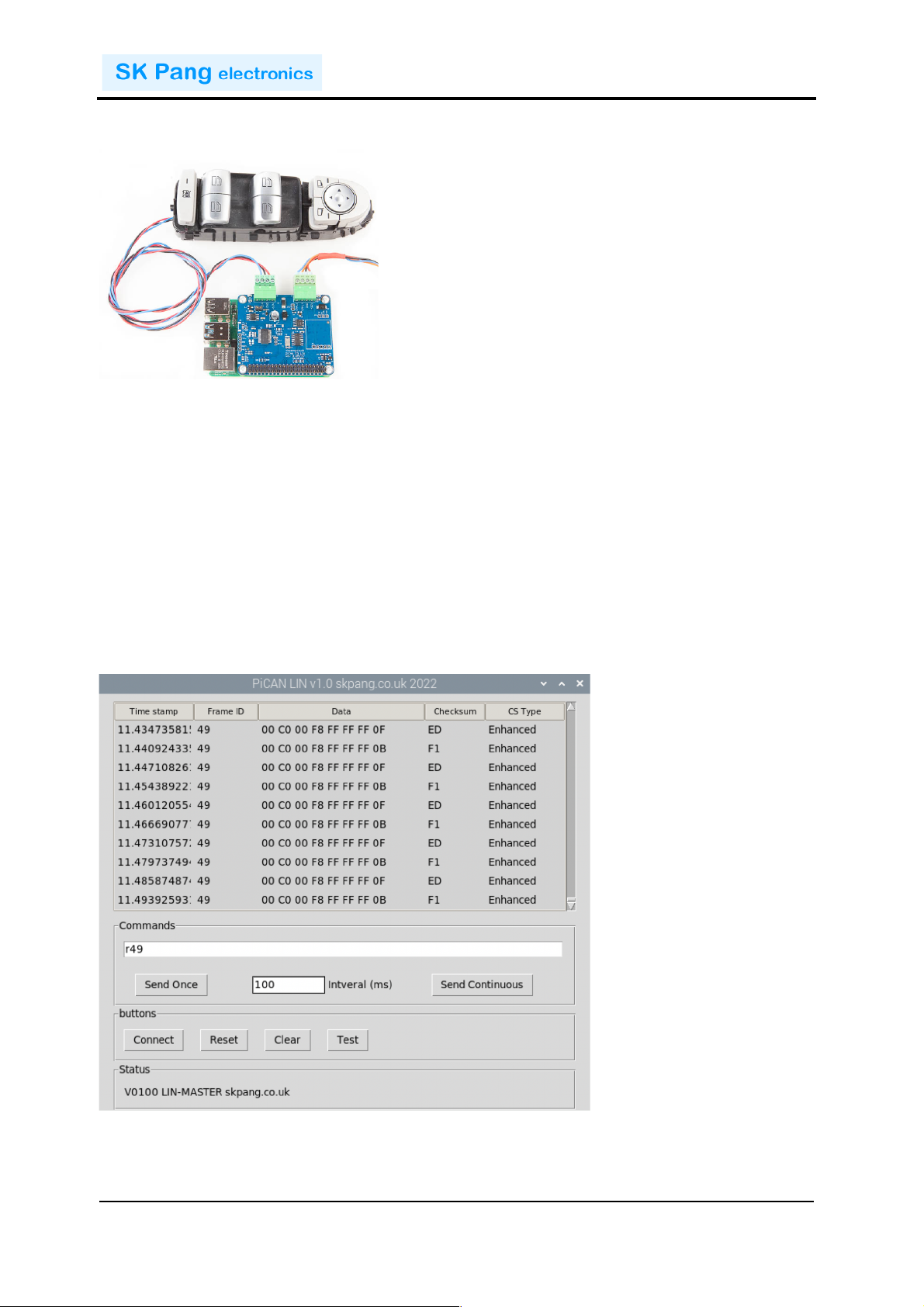
To!read!the!status!of!a!window!mirror!switch!we!need!to!use!the!r!command!with!an!
address!of!0x49.!
Command!string:!
O
r49
Expected!respond:!
M0A4900C000F8FFFFFF0BF1
! M!! Monitor!command!
! 0A! 0x0A!in!hex!means!10!bytes!responds!length!including!the!address!
! 49! Address!in!hex!
!!!!!!!!!!!! dd! Data!in!hex!
1.11. LIN-BUS GUI
A!simple!GUI!interface!is!available!to!download!from!github:!
https://github.com/skpang/PiCAN_LIN_GUI_demo
To!run!the!program!start!a!terminal!and!type!in:!
python3 pican-lin.py
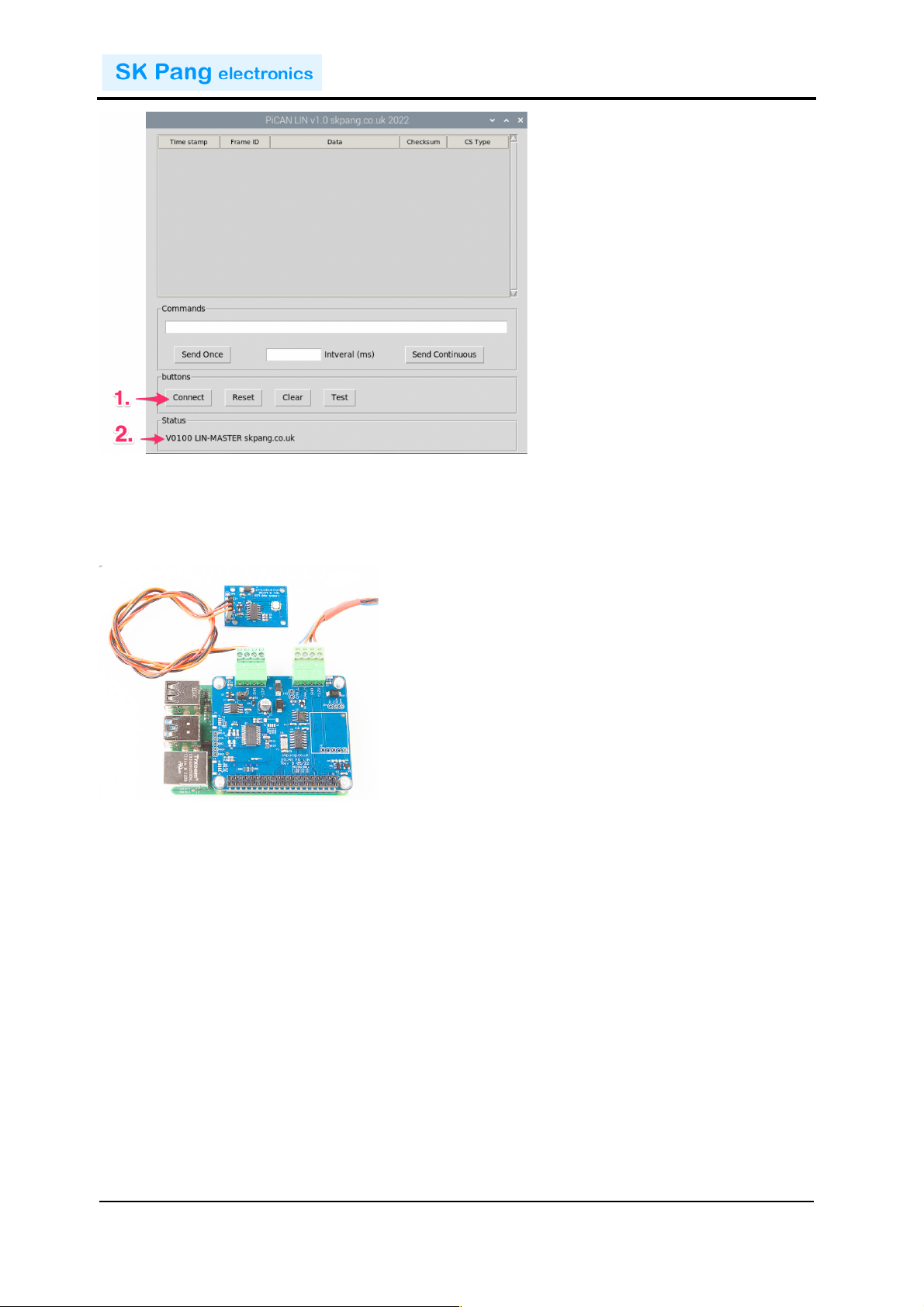
You!should!see!a!screen!shown!below:!
!
Page 10
!!!!!!!!!!!!!!!!!!!!!!!!!!!!!!!!!!!!!!!!!!!!!!!!!!!!!!!!!!!!!!!!!!!!!!!!!!PiCAN FD LIN Rev B 1.0
!
SK Pang Electronics Ltd Ó 2022
www.skpang.co.uk
10
!
1. Click!the!Connect!button!to!connect!to!the!PiCAN!FD!LIN!board.!
2. Check!the!Status!box!is!updated.!
Example"1.!Controlling!NCV7430!RGB!LED!
!
To!set!the!NCV7430!first!it!needs!to!be!initialized!with!these!values!23!C0!00!00!7F.!
First!open!the!port.!In!the!Commands!box!type!in:!
O
Click!‘Send!Once’!then!type!in:!
t234C000007F
Click!‘Send!Once’!
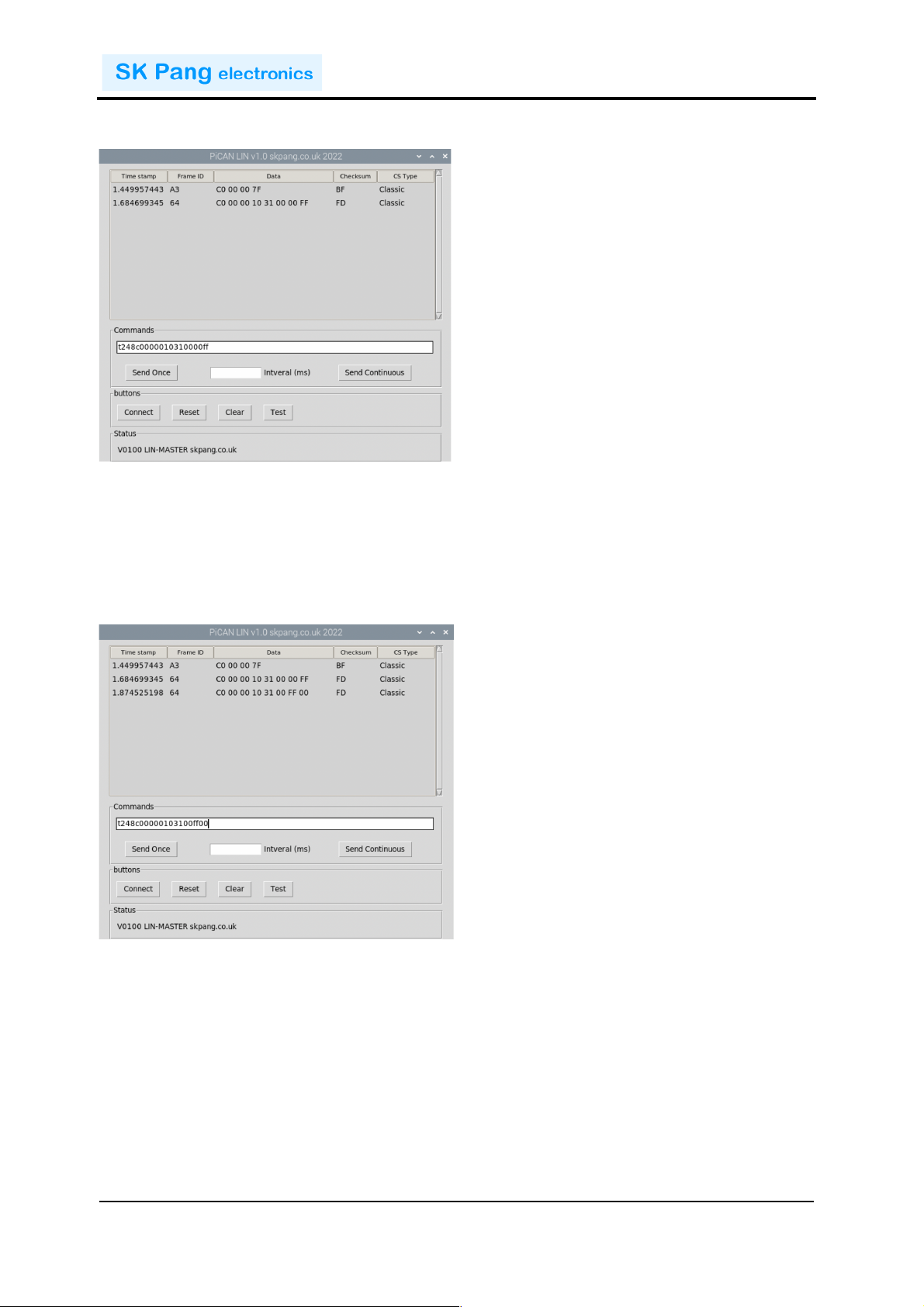
To!set!the!LED!to!blue,!sent!this!string!24!C0!00!00!10!31!00!00!FF!
In!the!Commands!box!type!in:!
t248C0000010310000ff
Click!‘Send!Once’!
!
Page 11
!!!!!!!!!!!!!!!!!!!!!!!!!!!!!!!!!!!!!!!!!!!!!!!!!!!!!!!!!!!!!!!!!!!!!!!!!!PiCAN FD LIN Rev B 1.0
!
SK Pang Electronics Ltd Ó 2022
www.skpang.co.uk
11
Check!the!LED!turned!blue.!
!
To!set!the!LED!to!red,!sent!this!string!24!C0!00!00!10!31!00!FF!00!
In!the!Commands!box!type!in:!
t248C0000010310000ff
Click!‘Send!Once’!
Check!the!LED!turned!red.!
!
!
!
!
!
!
!
Page 12
!!!!!!!!!!!!!!!!!!!!!!!!!!!!!!!!!!!!!!!!!!!!!!!!!!!!!!!!!!!!!!!!!!!!!!!!!!PiCAN FD LIN Rev B 1.0
!
SK Pang Electronics Ltd Ó 2022
www.skpang.co.uk
12
Example"2.!Reading!a!window!mirror!switch!
!
To!read!the!status!of!a!window!mirror!switch!type!in!the!Commands!box:!
O
Click!‘Send!Once’!
r49
Click!‘Send!Once’!
100!in!the!Interval!box!and!Click!Start.!You!should!see!the!request!is!sent!out!every!
100ms!with!reply!on!the!list!box.!
Press!the!window!switches!and!you!should!see!the!data!value!return!changes.!
!
!
 Loading...