

Page 1

AUTORÁDIO STREAM
AUTORADIO STREAM
CAR RADIO STREAM
SIMPLY CLEVER
ŠkodaOctavia
Page 2
A5_Stream-obal kopie kopie1.indd 2A5_Stream-obal kopie kopie1.indd 2 4.5.2005 10:56:414.5.2005 10:56:41
Page 3

The device complies with the protective
requirementsof EMV(DirectiveEG 89/336EWG
and Directive 93/68 EWG) according toEN
55013and EN55020standards.
BriefIntroduction 2
Important Precautions 3
Operationof the Radio 4
Operationof CD player 9
Operationof external
CDchanger* 11
UserSettings 12
CautionsandInstructions,
Warranty 15
BriefTechnicalDescription 17
Operating Instructions
1
DearCustomer,
If you have not received a security code for
yourradio, it meansthatyour carisfitted with
comfort coding system, which does not
require a code. In case of disconnection and
reconnection of car battery, first switch on
the power by the starting key,then switch on
the radio. If you need a code, contact your
Škodaservice
E
D
F
GB
I
S
PL
CZ
Page 4

Section.............................................................page
.................................................................4
- radioon/off (by pressing)
- volumecontrol (by turning)
- othersettingfunctions in variousmenus
.....................................................9,11
- CD- DA/CD- R/RWdiscplayback activation
- selecta discusingthe preset button12
....................................................4,10
- FMradio activation
............................................................5
- stores 6 most powerful stations into presets
ineach band
.............................................7,8,10
- fastsearchthroughthe selectedradio band
- searchthroughthe CD
...............................................5,10
- tunermode: manualtuning
- CDmode: selectsatrack
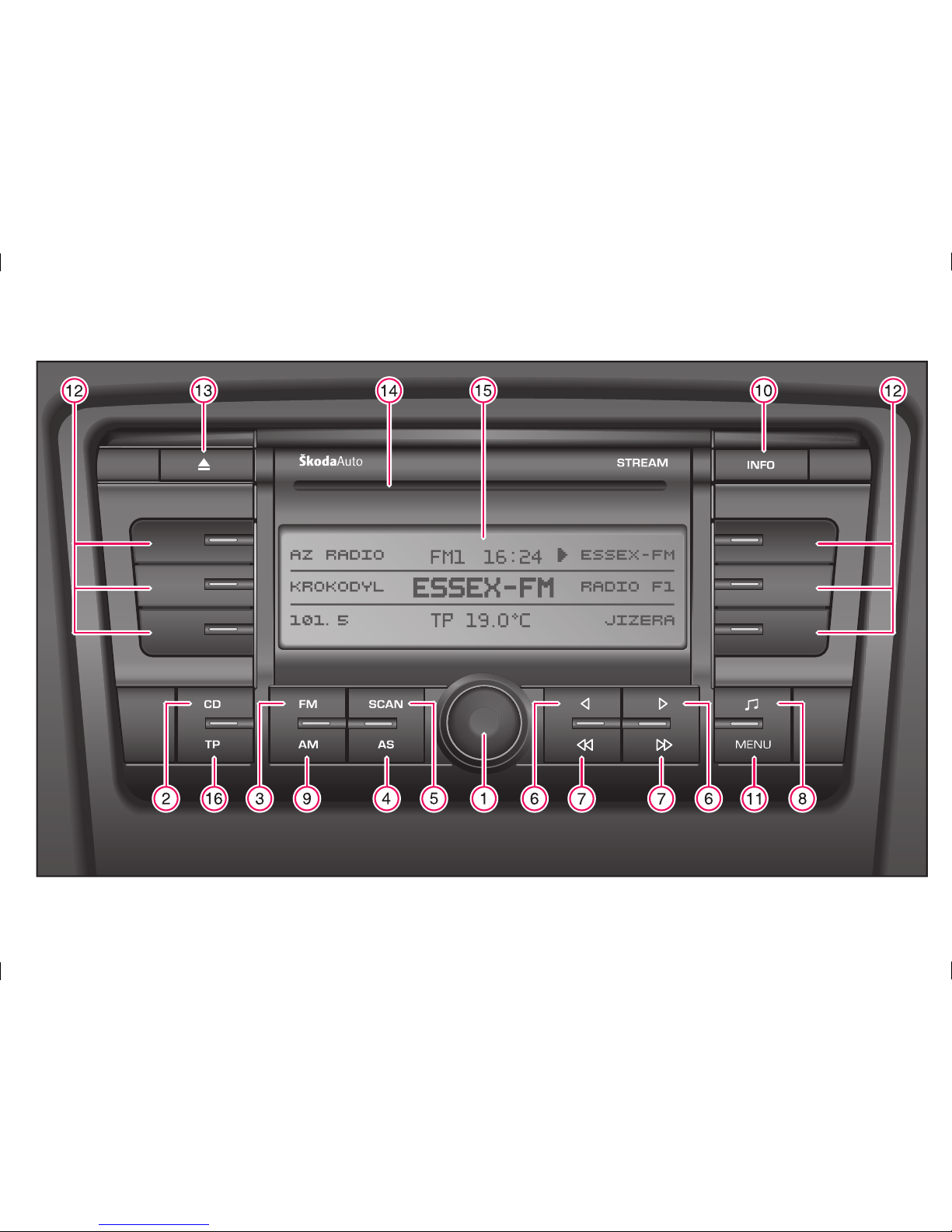
1.Button
2.CDbutton
3.FMbutton
4.AS button
5.SCAN button
6. Buttons
34
Section............................................................page
...............................................5,10
- faststation search: SEEK
- fast forward/rewind F.FWD / F.RWD within a
track
.....................12
- activatesthe soundsettingmenu
- activationof menuforsoundbalance
....................................................4,10
- MW/LWradio activation
..................................................7
- tunermode: displaysRadioText information
.....................................6,10,11
- activates a menu for radioor CD parameters
setting
.........................................5,11
- tunermode: recalls stored presets
- tunermode: stores presets
- selectsuser settingparametersection
7. Buttons
8.Sound settingsbuttonAUDIO
9.AMbutton
10.INFO button
11.MENU button
12.Preset buttons
78
Section............................................................page
................................................10
- ejectsthe discfromthebuilt- inchanger
..............................9
- allows loading and subsequent playback of
CD- DA/CD- R/RW discs
- displaysoperating information
- displays the meaning of preset buttons in
variousmodes
.........................................................8
- activatesthe traffic messagemode (TP,EON)
- activates automatic switching to traffic
messages
- initiates the search for transmitters with
trafficinformation
13.EJECT button
14.Slot forloading CDdiscs.
15.Display
16.TPbutton
2
Brief introduction
Page 5

Current road traffic is more and more
demandingon adriver'sattention.
Modern car radios offer extensive and
sophisticated functions, offering both fun and
varioustraffic information.
You should only operate the radio and its
featureswhen thetrafficsituation allowsyouto
doso.
For example: changing the discs, reading the
booklets etc. when driving has resulted in
manycritical situations.
Always setthevolume ata levelwhich doesnot
preventyou from hearing outsidesounds.
Alwaysconcentrate primarily ondriving!
If you are uncertain about some functions of
the radio, or if unexpected behaviour appears,
always consult the manual after stopping the
carat asafelocation,or contactyour Škoda
Note: the texts marked with * are applicable
only to selected car models, or to cars with
extra(optional) equipment
Important Precautions
Operating the Radio when driving
3
GB
Page 6
Switchingthe radio on/off
Switchthe radio on oroffby pressing button .
If you switch the radio off by switching off the
ignition, the radio will be switched on
automatically when the ignitionis switched on
again
If the radio is switched onby pressing button
when the ignition is switched off, the radio will
remainswitched on for60 minutes.
After switching the radio on, e.g. to the tuner
(FM) mode, a display similar to the following
picturewill appear:
1
1
Selectionof aband andofa memorylevel
FM
FM1- FM2- FMAS
AM
AM1- AM2- AMAS
The radio has FM and AM bands. These are
divided into 6 memory layers, 3 for the FM
bandand 3fortheAM band.Each memory
layerhas 6presets.
Push of the button activates theFM wave
band. Second push switches among memory
levels .
Push ofthe button activatesthe AMwave
band. Second push switches among memory
levels .
The display indicates the currently selected
waveband.
3
9
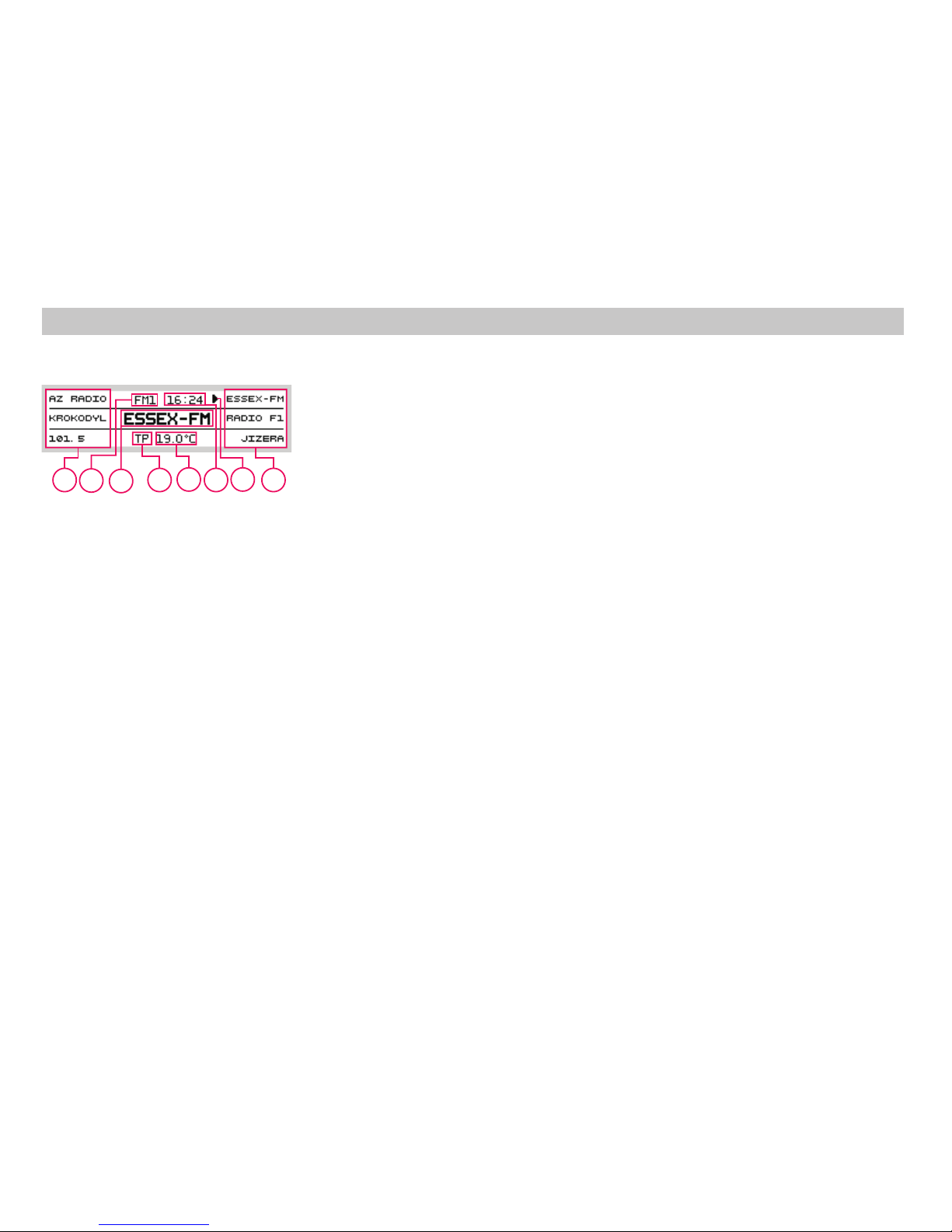
A Currentstation (name or frequency).
B Names or frequenciesof resetstations.
C A pointer showing which station or
frequencyarecurrentlytuned.
D Indicator- traffic messages active.
E Current time.
F Currentexterior temperature.
G Indication ofthe selected wave band
You can set the volume by turning button .
The display always shows the current volume
setting.
Volumecontrol
1
Switching the radio on/off Switching the Bands
4
Operation of the Radio
A
B
D
F
B
C
E
G
Page 7
Manualtuning
Automatictuning - SEEK
You can set the frequency of a requested
station by pressing button or . The
frequency keeps changing when you keep
button or pressed. Release the button
to stop tuning. The display will show the set
frequency.
You can skip to thenext available station in the
currently selected band by pressing button
or The tuner will automatically stop
when the next station is found in the desired
direction.
34
34
78
6
7
6
Storingthe stationsto presets
Recallingthe presets
Automatictuning andstoring ofstations
AS
STORING
Use buttons or to tune thestation you want
to store. Press and hold (for approx. 2s)
selected preset button to memorise the
station. (The sound volume is lowered
temporarily and a beep sounds; then the
stationis stored.) You canuse6x6presets.
Having stored the stations using the preset
buttons ,you canpress anyofthe buttons
brieflyto recall therespective station.
Theautomatic tuningandstoragesystem seeks
all stations within a selected band, selects 6
stations with the strongest signal, and stores
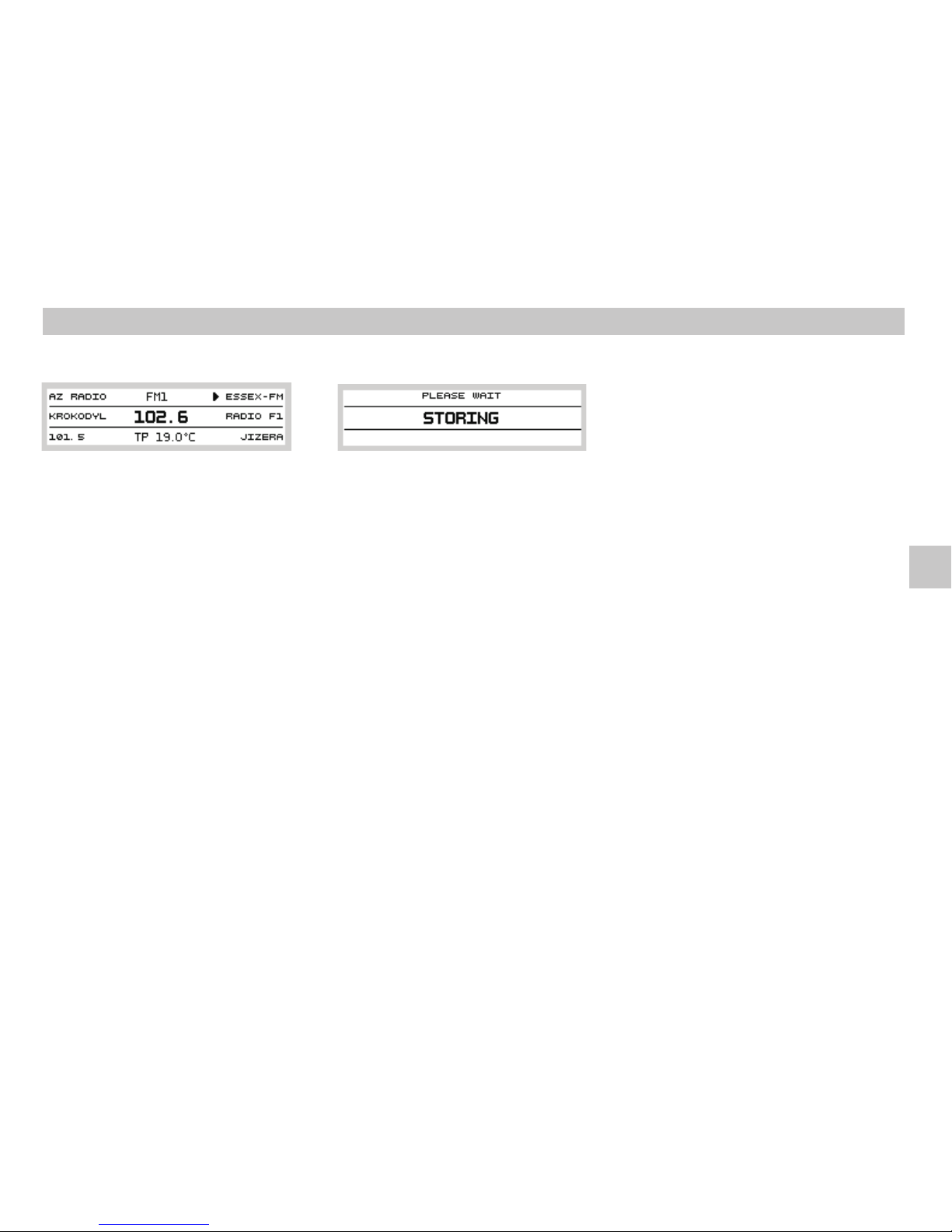
them as presets. Press (AutoStore) button
to start the process. The display shows a
message and the sound is muted
(seepicture).
67
12
4
12 12
If you select the band, memory
layer will include 6 stations with the strongest
signal inthe FM band. As soonas theprocess is
complete, the FM- AS memory layer is
selected, and preset is chosen.Youcan switch
to other presets by pressing one of the preset
buttons .
If you select the band, memory
layer will include 6 stations with the strongest
signal inthe AMband. Assoon asthe process is
complete, the AM- AS memory layer is
selected, and preset is chosen.Youcan switch
to other presets by pressing one of the preset
buttons .
Each use of the function updates and
rewrites the presets in the currently selected
band(FM- ASor AM- AS).
FM FM- AS
1
AM AM- AS
1
AS
12
12
Tuning and Storing the Stations
5
Operation of the Radio
GB
Page 8
LEARNON
LEARN
LEARNOFF
LEARN
REGIONAL
REGIONALON
The tuner continuously tunes, updates and
sorts all available signals, thus updating the
memory, for the area where you are
currently driving. This process causes very
short dropouts; and thisisnot amalfunction.
Under certain circumstances, operation of the
function can be annoying. You can
switch off the function, and the tuner then has
to check any frequency thatyou want itto tune
to.
Some stations offer nationwide programming
and also local programmes with modified
content.
You can listen to local content to get
information about local traffic situation and
localevents.
Ifthis functionisactive, the tunerwillnot switch
to an alternative frequency of a nationwide
station whenever a regional programme has
been tuned; even if the alternative frequency
hasstronger signal.
REGIONALOFF
SEEK
SEEKLOCAL
SEEK
SEEKDX
SEEK
The tuner will tune to alternative frequencies
with stronger signals, regardless of local
content.The received programmecan change.
Tuning sensitivity.
stops at local stations with stronger
signal.
stopsat allavailablestations.
Pressone of thepresetbuttons toselect.12
RDSsystem
StationName display(PS)
AlternativeFrequencynetwork (AF)
Tuner parameters setting
MODE
LEARN
Your radio includes aRDS (Radio Data System)
decoder, which receives additional data
transmittedby the majorityofFM transmitters.
Your radio displays thenames of the stations it
istuned to.
Nationwide stations use a network of
transmittersoperatingon different frequencies
to cover the whole country without
interferencebetweentransmitters.
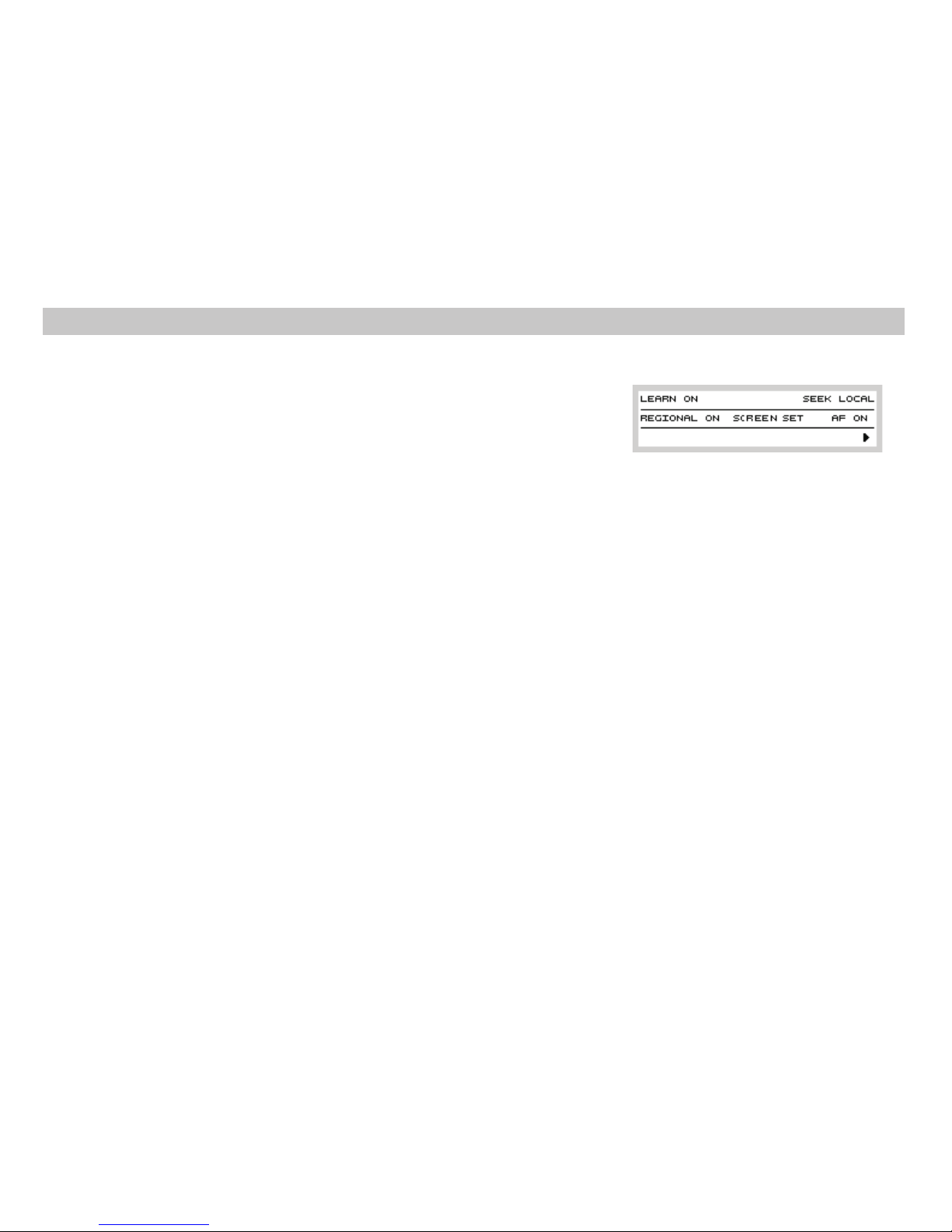
Press button to display the tuner
menu. Use preset buttons to select and to
changethe options.
Your radio offersa functionwhichreducesdrop
outs, allows for better reception and faster
tuning. The radio creates a list of available
signals sorted by program identifier (PI) and
signal strength. This allows the radio to tune to
other frequency with the same program, using
a list of alternative frequencies used by
nationwidestations.
11
12
6
Operation of the Radio
RDS System
Page 9
AF
AFON
AFOFF
A network of transmitters is used to cover a
broaderarea.Yourradio automaticallytunes
to a stronger transmitter, based on received
informationabout alternativefrequencies.
If this function is activated, the tuner
automaticallytunes toastrongertransmitter.
If this function is deactivated, the tuner stays
tunedto asetfrequency.
Move to Special functions setting (see
chapterSpecial functions).
The displayed data disappear after 10 seconds
ofinactivity.The selectedvalues remainstored.
4
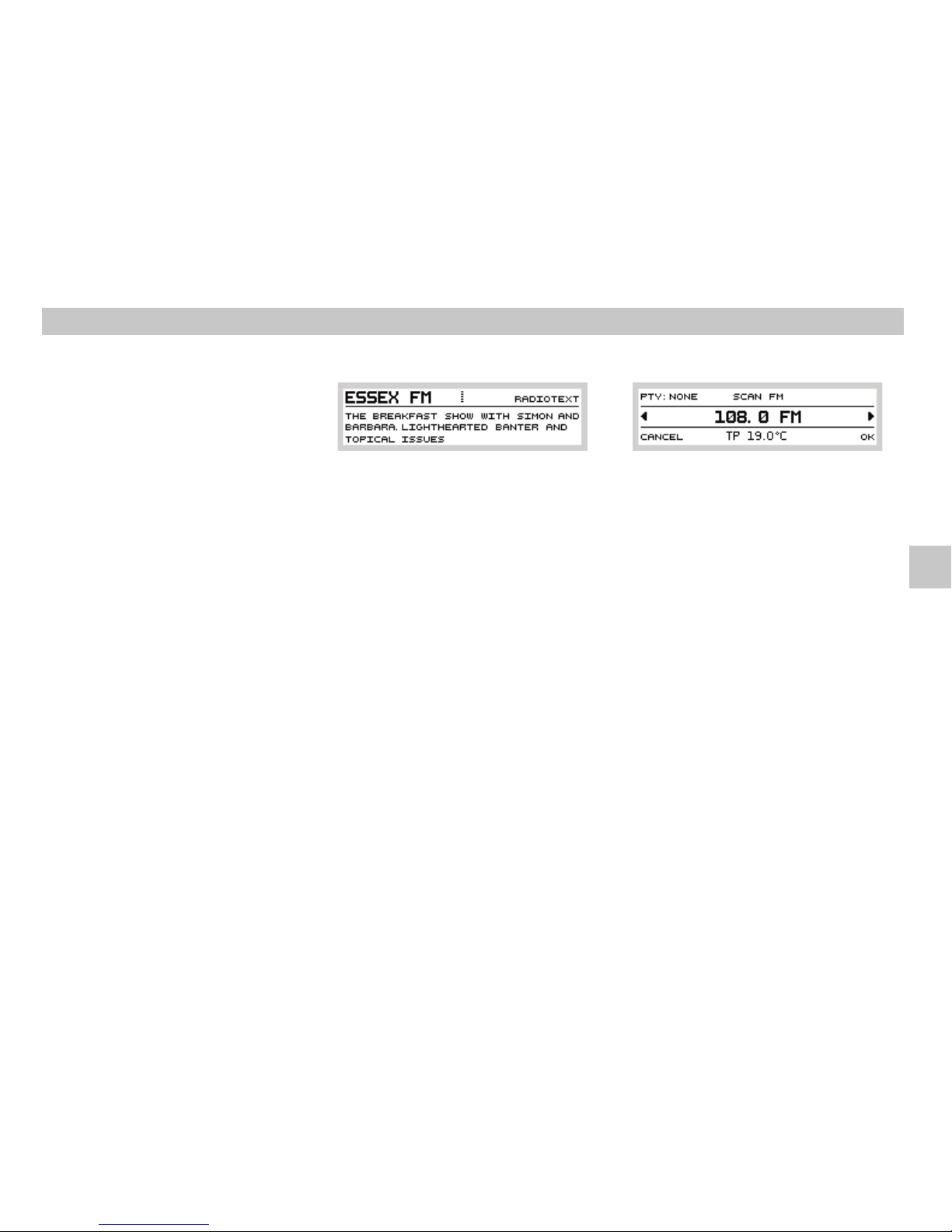
Radiotext
Some stations transmit additional text
information, called Radiotext. Press
buttonto review theradiotext information.
This textinformation may not be available at all
stations, even if a particular station transmits
RDS data. Dependingon thequality ofreceived
signal, the radio may need some time to
receive all characters correctly before displayingthem.
If the selected station does not transmit
radiotext,or thetext isstill beingread, the
messageappears.
INFO
TEXT
UNAVAILABLE
10
SCANfunction
SCAN
OK
CANCEL
Press button to activate an automatic
searchforall stationsin theselected band.
Press button or to switch to other
stations. 10 second sample of each station is
played, and then the radio tunes to the next
station. Press button to end automatic
scanning.The laststationfoundis played.
Press button to return to the
station which was playing before activating the
SCANfeature.
34
5
12
12
12
7
Operation of the Radio
GB
Page 10
NONE unspecified
NEWS news
AFFAIRS currentaffairs
INFO information
SPORT sport broadcasts
EDUCATE education
DRAMA drama
CULTURE culture
SCIENCE science
VARIED variousmusic
POP popularmusic
ROCK rock music
EASY easylistening
LIGHT lightmusic
CLASSICS classicalmusic
OTHER othergenres
WEATHER weatherforecast
FINANCE financialprogrammes
CHILDREN childrenprogrammes
SOCIAL social programmes
RELIGION religious programme
PHONEIN phone inprogrammes
TRAVEL travelprogrammes
LEISURE leisure
JAZZ jazz music
COUNTRY countrymusic
NATION nationalmusic
OLDIES oldies music
FOLK folkmusic
DOCUMENT Documentaries
Programtype ALARM isused for nationwide or
localemergency broadcasts.
Useof ProgrammeType(PTY)selection
SCAN
PTY
OK
NONE
OK
CANCEL
OK
CANCEL
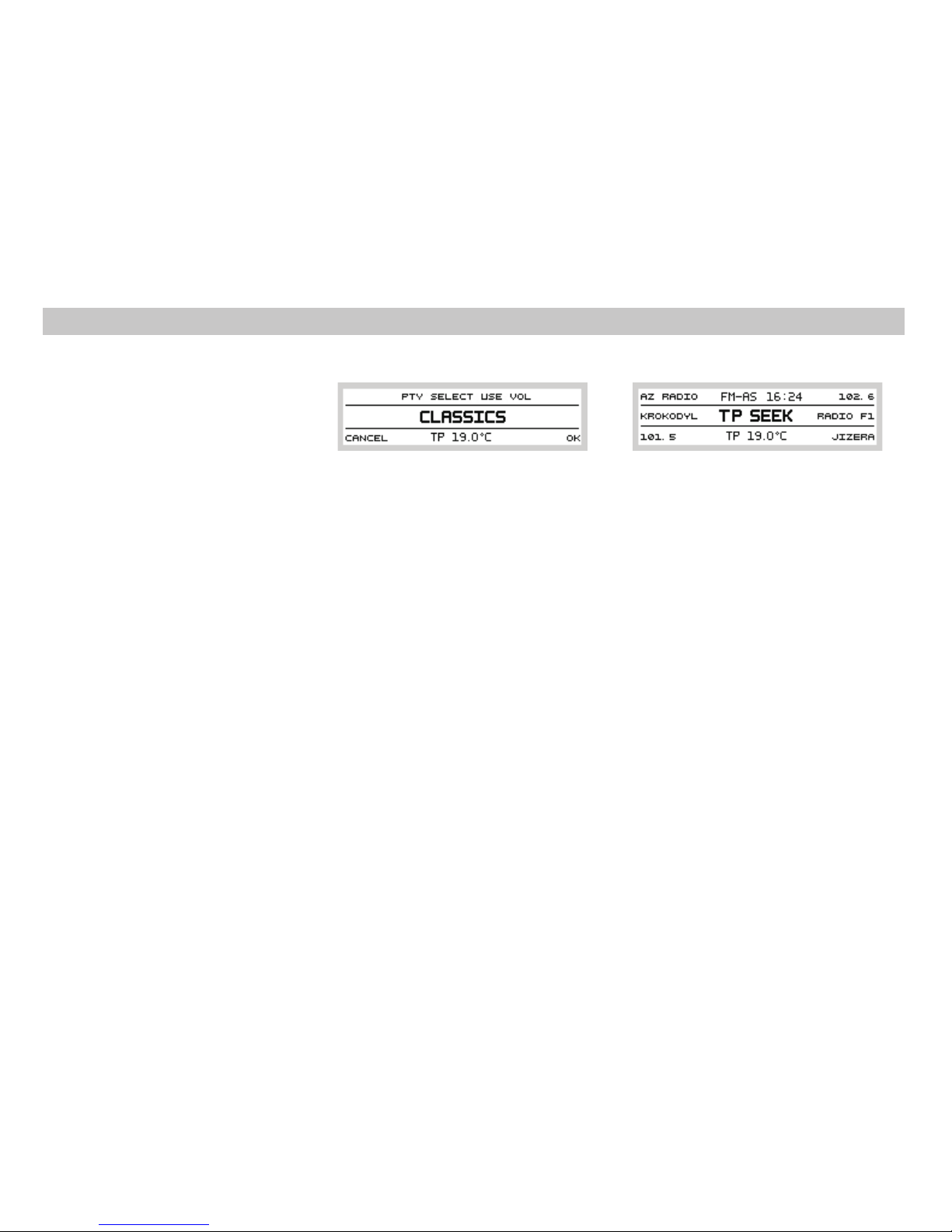
Press button and use preset button
to select . Turn button to select the
desired programme type on the display.
Confirm your selection by pressing the preset
button . Press one of the preset buttons
or to activate the search for the
requestedprogrammetype. Duringthe search,
thesound ismuted.
If you select , the tuner stops at each
station found.The display remains active until
you press either preset button or preset
button . You can change the
programme type selection while the search is
active. Press preset button to end the
searchand tolisten to a newly found station,or
press presetbutton to return back
tothe originalstation
If no station with the desired programme type
is found, the tuner returns to the original
station.
Programme type selection is not available in
MWand LW bands.
34
512
1
12
12
12
12
12
Some stations transmit traffic messages,
describing the currenttraffic situation, besides
standard RDS data. This information is
displayed when button is pressed. If the
radio is tuned to a station which does not
transmit traffic information, it will search for
one,displaying .
If no station transmitting traffic information is
found, is displayed. The radio stays
tunedto theoriginalstation.
Incoming traffic messages automatically
interrupt the sound of a CD or other station
broadcasts. isdisplayed.
RDS- EON (Enhanced Other
Networks) links certain stations so that the
traffic information transmitted by one station
can be received while another station is tuned
in. If any problems prevent the traffic
information from being received, the sound
will be muted and the message is
displayed.
TP
TPSEEK
NO INFO
TRAFFIC
Trafic information within the RDS- EON
network
NO INFO
16
Operation of the Radio
Programme Type (PTY) Traffic Information
8
Page 11
Trafficinformationend
TP
TP
Recordingtraficinformation
After the traffic information ends, thesound of
the originalstation,or ofa CD,will beRestored.
You can press button at any time to
cancel the playback of traffic information. The
symbolwill disappear.
Your radio has a special memory which allows
the recording of traffic information for
subsequent replay. Recording is only possible
in the FM band. Recording works even when
youare listening toaCD.
16
Discloading slot
Activationof CDplayback mode
CD
NOCD
Your radiois fitted witha built- in CD player. To
Listen to a CD, insert the disc into the slot
with printed side up. Disc contents will be read
andplayback begins.
While listening tothe radio, press button .
If a CD hasbeen inserted, playback starts from
the pointwhere ithas beeninterrupted thelast
time. Ifno CDis inserted,you willbe notified of
thefact by message.
14
2
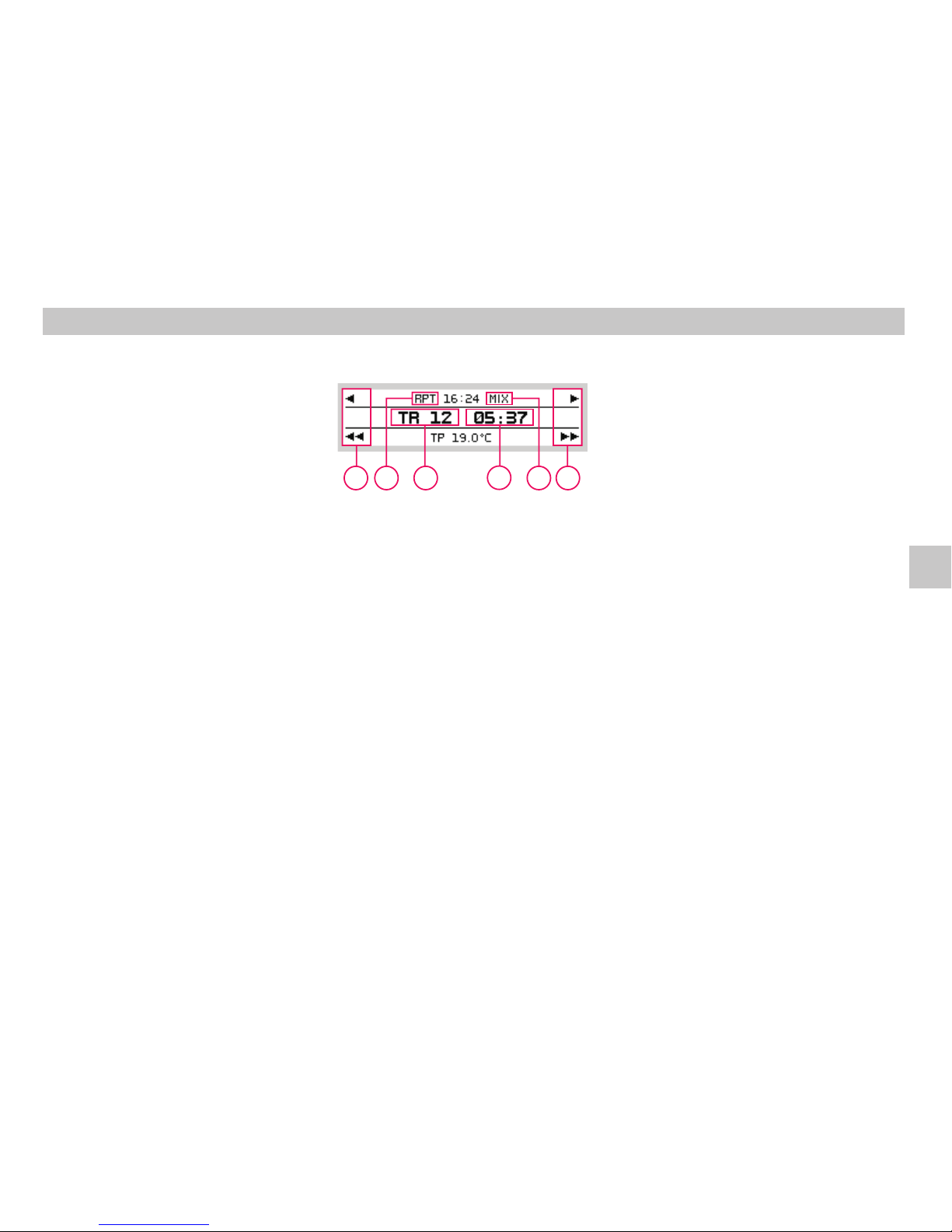
Displayindications inthe CDmode
REPEAT
MIX
A Currenttracknumber
B Play time indication
C Areareservedforpresetbuttons .
Previous/nexttrack.
Fastforward /rewindwithina track.
D Icon - mode active See chapter
Optionalfunctions intheCD mode
E Icon - mode active See chapter
Optionalfunctions intheCD mode
34
78
12
9
Operating of CD player
Replaying CD
A
D
B
E
C
C
GB
Page 12
SCAN function
SCAN
OK
Stoppingplayback
FM AM
Trackselect buttons
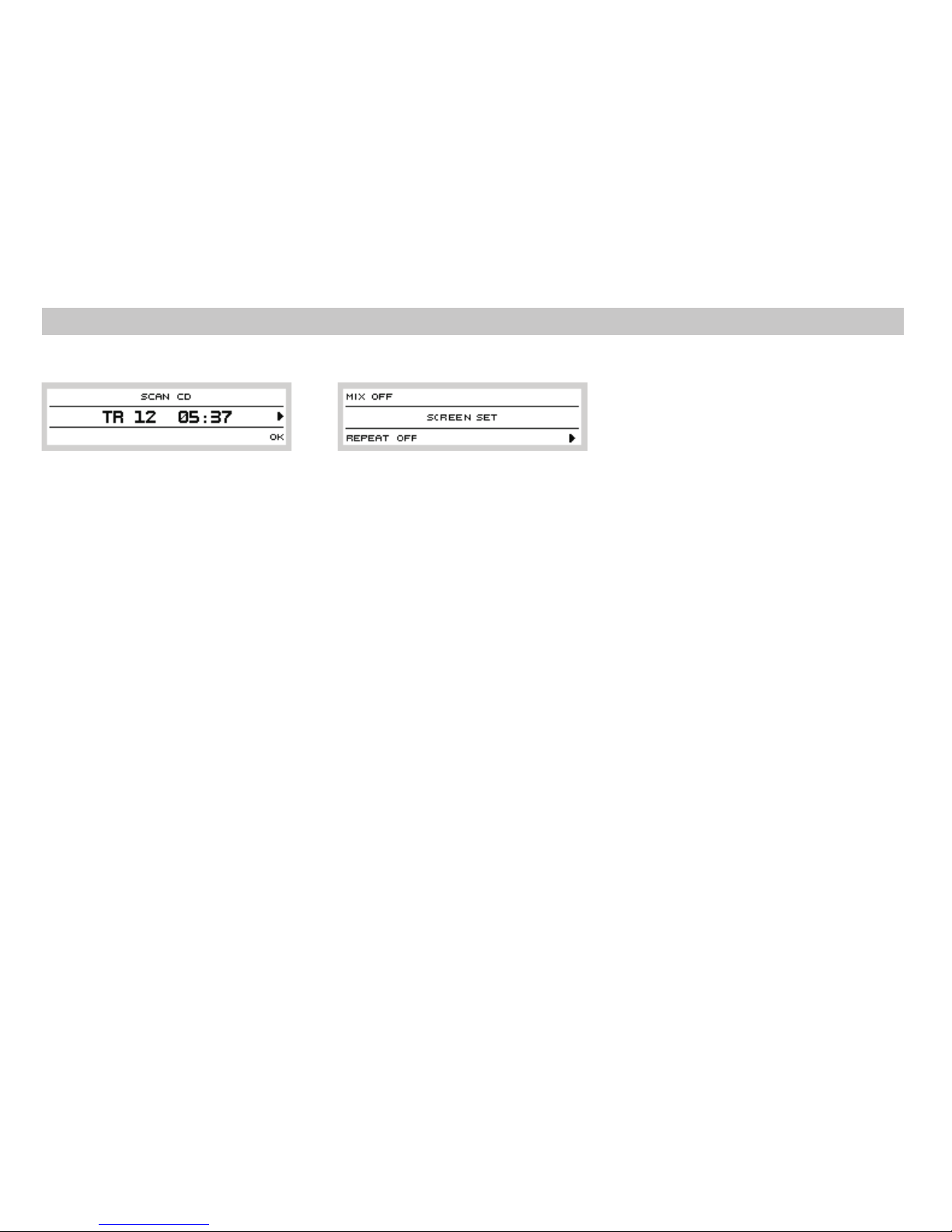
Pressbutton tostart searchingthrough
the disc.A 10- second sample of the beginning
of each track is played. The sequence number
of thetrack onthe disc isdisplayed at the same
time.
Press preset button to end the scan
mode.Current track will beplayednormally.
To stop disc playback and to switch on the
radio,pressbutton or .
Thelast selectedstationwillplay.
During CD playback, press button to skip
toprevious track.
Pressbutton to skip tonext track.Playback
starts from the beginningofselected track.
3
4
5
12
39
6
6
Seekbuttons
Discejection button(EJECT)
EJECT
NOCD
Pressand holdbutton or for fast rewind
or fastforwardwithin a track ofthe CD. Normal
playbackresumes after youreleasethebutton.
Pressbutton to ejectthe disc.If discis
currently being played, playback stops and
radio is switched on. If no disc is in the drive,
isdisplayed.
If youdonot removeejecteddisc fromtheunit,
it will be drawn back to the unit automatically
forsafetyreasons.
787
13
MENUsetting button
MENU
MIX
MIX
OFF
TRACK
MIX
REPEAT
REPEAT
OFF
TRACK
REPEAT
RPT
Press button in the CD playback
modeto displaythefollowingpicture:
Playbackin random order.
Press preset button to set required
parameter:
playbackin normalorder
playbackin random order
appears on the display when random
playbackis active.
Select repeat mode. Press preset button
toselect:
playbackin normalorder
repeatedplayback of current track
When mode is active, top line of the
displayshows .
By pushing the preset button you will
move to the second level, see chapter Special
features.
4
11
12
12
12
Operating of CD player
Optional functions in the CD mode
10
Page 13
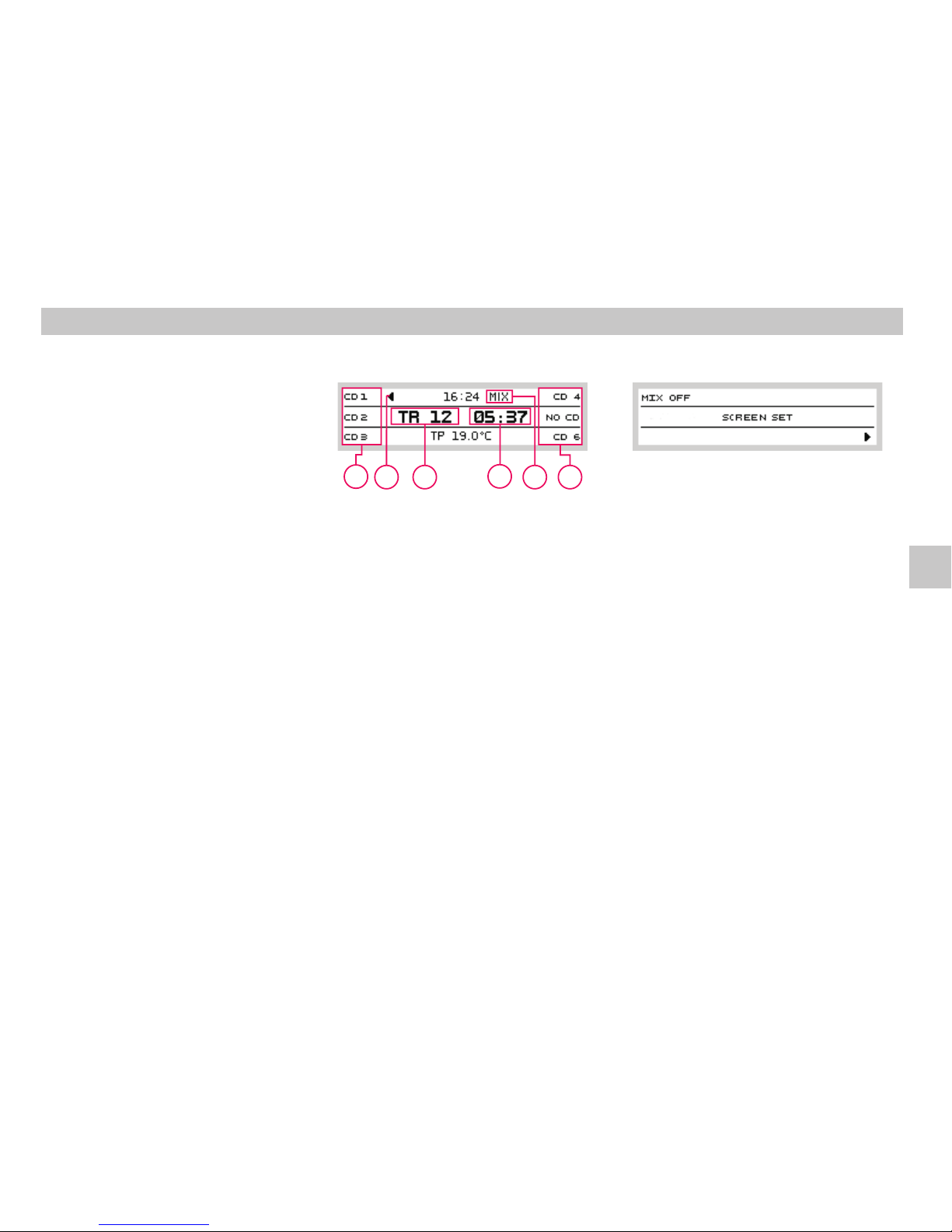
MENUsetting button
MENU
MIX
MIX
OFF
TRACK
MIX
Press button in the CD playback
modeto displaythefollowingpicture:
Playbackin random order.
Press preset button to set required
parameter:
playbackin normalorder
playbackin random order
appears on the display when random
playbackis active.
By pushing the preset button you will
move to the second level, see chapter Special
features.
4
11
12
12
Operating of external CD changer*
Playback of discs Optional functions
Displayin theexternal CDchangermode
MIX
A Currenttracknumber
B Elapsed play timeindication
C Area reserved for preset buttons 12; press
a button to select the disc to be played
back
D Currentlyplayed disc indication
E Icon - mode active; See chapter
Optionalfunctions intheCD mode
Your radio offers comfortable control of
original originálního CD changer, if your car is
fitted with one (optional extra). The operation
of the changer is described in a separate
instructionmanual.
Press button while operating the builtin
CD player to operate external CD changer, if
your car is fitted with one. Press the button
again to play a CD in the built- in player. If no
CD changer isconnected, appears on
thedisplay.
When playing a CD from the external changer,
press preset buttons to select the disc for
playback. After selection, the CD is played.
When positionwith no CDinserted is selected,
appearson thedisplay.
CDplayback modeactivation button
CD
NO CDC
Presetbuttons
NOCD
2
12
11
A
D
B
E
C
C
GB
Page 14
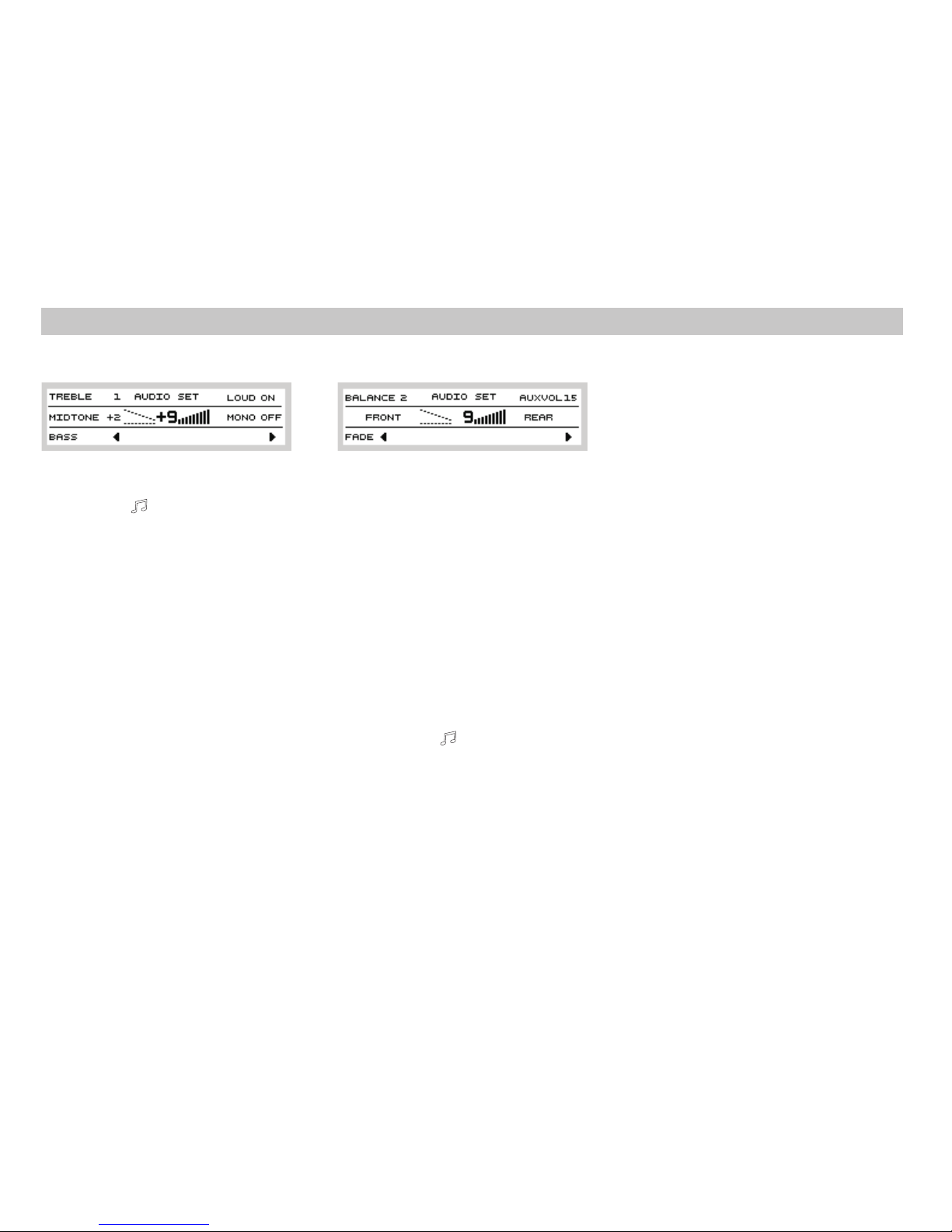
AUX
AUX VOL
Thirdlevelof AUDIO settings
GALA
GALA
PDCVOL*
PDC VOL
Your radio has an external input allowing
playbackfrom other audiosources.
setssensitivity oftheexternal input.
Passagetothe nextlevel ofsettings
Your radio automatically increases the volume
with increasing drive speed so that perceived
volume does not change. The rate of increase
can be set by pressing preset button
and turningof button . Highernumbers mean
sharper increase. When 0 is set, the volume
doesnot change.
Sometimes, excess volume can distract you
when parking your car. If your car is fitted with
“parking aid” device, the radio will lower the
volume to preset level when the “parking aid”
unit is active. Press preset button
and turn button to set the volume level, to
which the volume will be reduced automaticallyduring parking.
4
12
1
12
1
Settingtone
TREBLE
MIDTONE
BASS
Additionalaudio parameters
LOUD
LOUDNESS
LOUD ON
OFF
MONO
Pressbutton and userpresetbutton to
select a parameter; an indicator will mark the
parameter and you can then set the value by
turningbutton .
treblesetting
midsetting
basssetting
At lower volume, function boosts
the bass and treble. Pressing preset button
and selecting activates this function.
Selecting deactivatesit.
The stereo decoder is activated whenever the
input signal is strong enough. The decoder is
switched off when the tuner receives weak
signal.
812
1
12
MONOOFF
MONOON
Secondlevel ofAUDIO settings
AUDIO
BALANCE
FADER
The stereo decoder is activated whenever the
inputsignal isstrongenough.
Under certain circumstances, stereo sound is
interrupted and in low- quality, even if the
input signal is strong. This occurs for example
when driving in urban areas. You can turn off
the stereo decoder and listen to mono sound
withincreased quality.
Passagetothe nextlevel ofsettings
Bypushing the button andpassing to the
second level of settings by the preset
button these settingsare available:
Setting the balance between the right and the
leftspeakers.
Setting the balance between the front and the
rearspeakers.
4
4
8
12
AUDIO settings
User Settings
Page 15
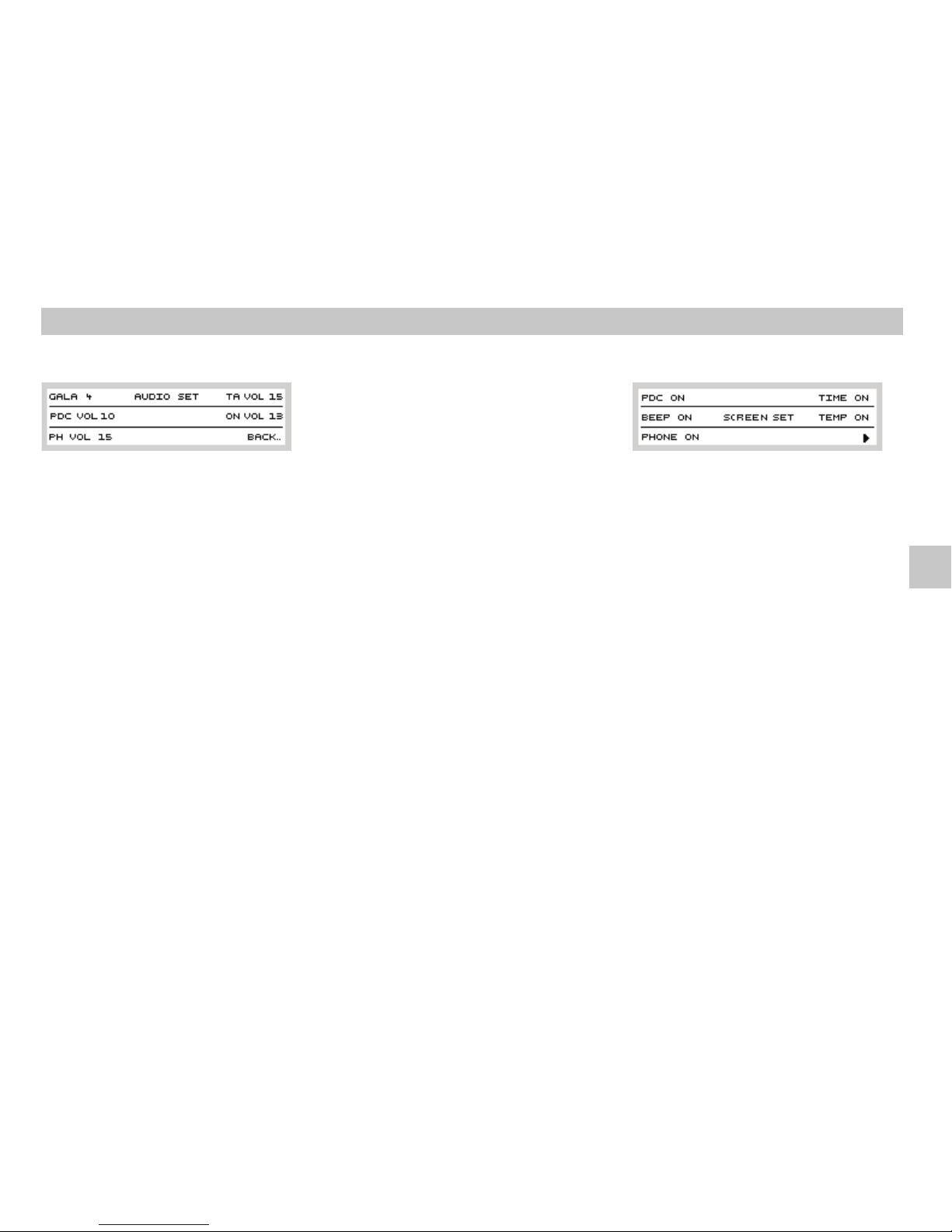
PHVOL*
PHVOL
TA VO L
Original handsfree set (if installed) can play
telephone sound through the radio and its
speakers.Set the desired phone callvolume by
pressing preset button and turning
button .
If volume is turned down for normal listening,
important trafficmessage could bemissed. Itis
thereforeadvisable toset minimumvolumefor
traffic messages. If current volume is lower, it
will be increased to a value set by this
parameter. If current volume is higher, it will
notchange.
12
1
Use function to set minimum volume
of traffic messages. Set this function by
pressing preset button and then
turningbutton .
Your radio remembers the volume, which was
set before switching the radio off. Higher
volume will be lowered to the value set by
parameterwhen the radio isturnedon.
Set this function by pressing preset button
andthen turningbutton .
By pressing preset button you return
toprevious menu level.
TA VOL
TA VOL
ONVOL
ON
VOL
ONVOL
BACK
BACK
12
1
12
1
12
13
MENUbutton
MENU
PDC*
PDC
ON
BEEP
BEEP ON
OFF
Press button and then button
todisplay thesettingof special functions:
Ifyour carisfitted with“parking aid”device, the
display of your radio can display the distance
from an obstacle; the number of displayed
columns increases if the “parking aid” unit is
active. Press preset button and then
set toactivate thisfunction.
When storing tuned frequencies into presets,
the radio beeps. Pressing preset button
and selecting activates this function.
Selecting deactivatesit.
The displayeddata disappear after10 seconds
of inactivity. Push of any button except for the
preset button closes the setting and the
selectedvalues remain stored
411 12
12
12
User Settings
GB
Page 16
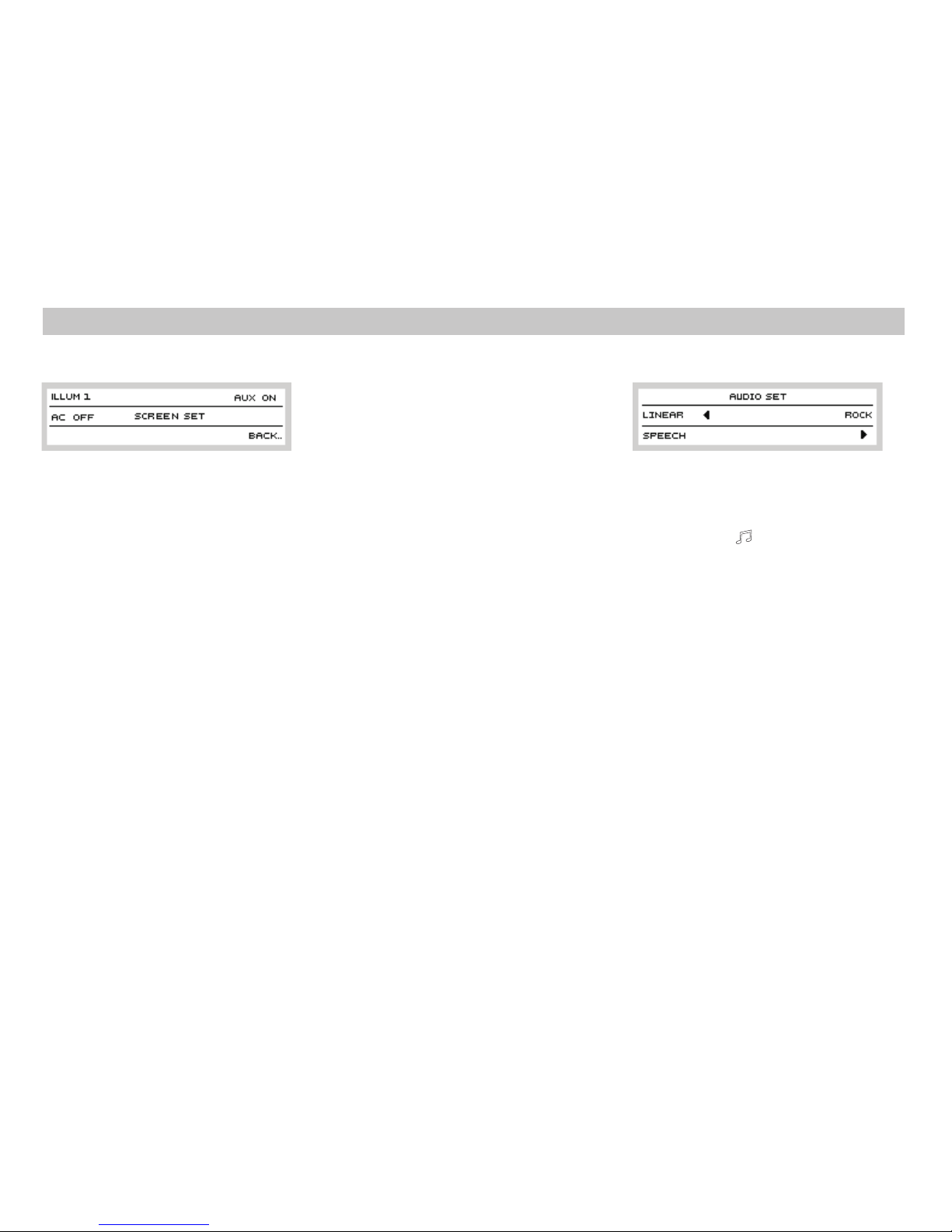
ILLUM
ILLUM 1
2
AC*
AC
ON
AUX
AUX ON AUX OFF
BACK
Press preset button to set if you
want the radio backlight switchedoff when the
headlights are off.If youset , the volume knob
ring will beilluminatedwhenever theignitionis
on.
If your car is fitted withCLIMATRONIC unit, the
display of your radio will display any manual
change of the settings. This you can check
whether the change you performed was
accepted by the unit. If you want this
confirmation, press preset button and
setto .
Note: thedisplay is onlya setting aid.The radio
has no effect on climate unit control, and the
climate unit cannot be controlled from the
radio.
Your radio has an external input allowing
playbackfrom other audiosources.The input is
active, if . If , the input is
deactivated.
Press preset button to return to
previousmenu level.
Thedisplay clears after10s ofinactivity.
12
12
12
If you have external amplifier connected, your
radio can be used to select sound effects
suitable to particular programs you listen to.
Press button to view a display with
available sound effects. External amplifier has
6 implemented sound effect, divided into the
followingmenus:
Standard linear frequency response,
suitable for all types of music or
speech.
A sound effect which boosts the
speech and reduces other sounds,
thusimproving the clarityofspeech.
A sound effect most appropriate for
rockmusic.
To move to other display with
availablesound effects.
LINEAR
SPEECH
ROCK
4
8
Ext. Amplifier control*
14
PHONE
PHONE
ON OFF
TIME
TIME ON/OFF
TEMP
TEMP ON/OFF
If your car is fitted with a handsfree set, the
radio can be muted automatically during
incoming or outgoing call. Activate this
function by pressing preset button
. When is set, incoming calls will have
noeffect onthe radio.
Presspreset button to switch
on/off the time display on the display of your
radio.
Press preset button to
switch on/off the exterior temperature display
onthe displayofyour radio.
Another push of the preset button
displays the last level of special features
settings:
4
12
12
12
12
User Settings
Page 17
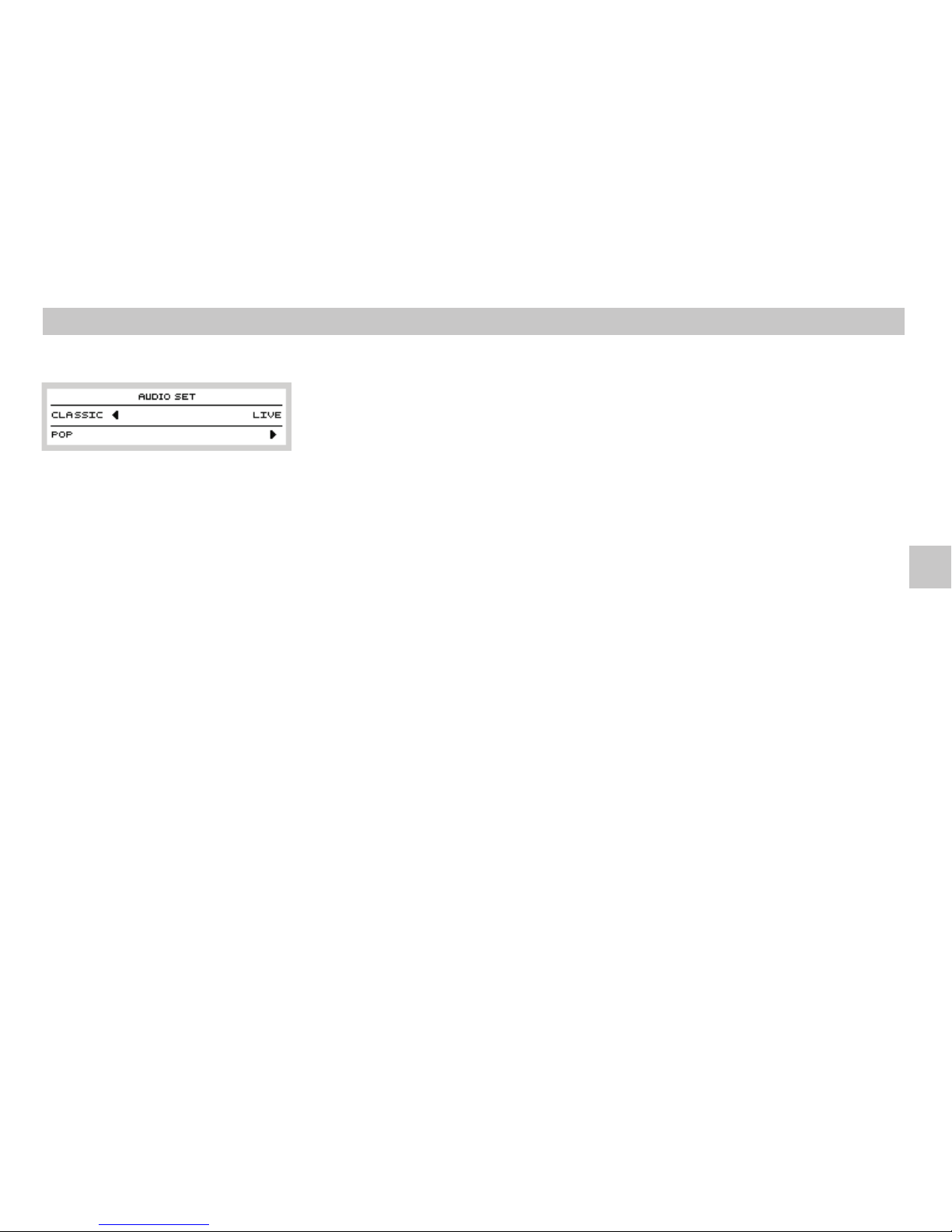
Press preset button to view the following
display:
A sound effect most appropriate or
classicalmusic.
A sound effect most appropriate for
popmusic.
A sound effect most appropriate for
listening to concerts, live broadcasts
orrecordedevents.
To move to the sound settings
display(see chapterUserSettings).
Effects are selected by pressing preset buttons
. Press appropriatedbutton and theexternal
amplifier will be automatically switched to the
desiredmode.
CLASSIC
POP
LIVE
4
12
12
ComfortCoding
Procedurefor enteringthesecurity code:
SAFE 0000
Wrongcode
our radio uses special security code so called
comfort coding - which prevents theft. After
installing the radioin the car, the security code
is entered and the radio is ready for operation.
Thecode needsnotbe entered everagain.
This procedure has been performed by the
dealer before presenting your new car to you.
In case of disconnection and reconnection of
car battery, first switch on the power by the
starting key, then switch on the radio. If you
want to move the radio to other vehicle, or
when theradiorequests the code,contact your
Škoda service. They will provide you with the
code.
As the radio can only be operated after having
enteredthe code, itisunusable whenstolen.
Switch on the ignition and then switch on the
radio. The display shows and then .
Press preset buttons to enter the code.
Checkthe codeforcorrectnessandthen press
Button .
If you make mistake when entering the code,
you can try again. Third entry of wrong code
will block the controls from operation for
1hour. Incase of any problems, please contact
yourŠkoda service.
4
12
6
Careandmaintenance
Informationaboutdisc playback
Your radio requires no special maintenance,
but it can be damaged when foreign objects,
e.g. credit cards or coins, are inserted into the
CDslot.
For the best possibleplayback quality, use only
clean and undamaged discs. The drive is
designedfor ordinary 12cm discs.
Your radio canalso playrecordableCD- R discs
and re- recordable CD- RW discs as long as
each writing session is properly finalized. Full
compatibility with international standard for
CD- DA discs, so- called “Red Book” is
guaranteed. Somecopy protecteddiscs do not
conformto thisstandard andcannotbe played.
Do not play irregularly shaped discs (heartshaped, etc.) or discs fitted with scratch
protection. Do not insert discs to which labels
areattached.
15
Cautions and Instructions
Comfort Coding Information about disc playback
GB
Page 18

Discs, when not used, should be returned to
the box. Alwayshold thediscby theedges orby
an edge and the centre hole, and never touch
the active surface. Fingerprints or scratches
reduce sound quality and may render the disc
unreadable.
CDs exposed to direct sunlight or extreme
temperaturescanwarp and lockinthe player.
Legislation differs from country to country.
When recording from copyrighted media,
checkfor applicablelocal legislation.
Your radio provides you with quality sound
under normal conditions. The following text
will help you to maximize your listening
pleasure with ever increasing number of
availablestations
In most cases, LW and MW signals are
unaffected by tall buildings or natural
obstacles. Someinterference canbe causedby
high voltage lines, bridges or lighting storms.
Thesedisturbances are onlytemporary.
FM transmitters offerhigher signal qualitythan
LWor MWtransmitters.Moreover,stereoHi- Fi
signalis transmitted.
Signalspread
LW/MWreception (AM)
FMreception
Distancefromtransmitter
Signalechoes (multi- wayreception
FM transmitters are usuallylocated at elevated
locations, e.g. tall buildings, hills, or in the
mountains. There is a reason for this - FM
signals areaffected by“line of sight”issues and
their coverage isinherently limited.Usually,the
higher and more powerful the transmitter, the
bigger areais covered. Somelocal transmitters
or repeaters are low powered and can only be
tuned to within a few kilometers' area. More
powerful transmitters (usually operated by
networked stations) can be received at a
distance of up to 100 km. Anyway, when
exceeding a particular distance from the
transmitter, you have to tune your radio to
alternative frequency. When listening to
stations with weak signal, nearby stronger
stations can interfere with the reception. Such
interference usually occurs as you are nearing
the limit of the area covered by the particular
transmitteryou are tuned to.
)
FM signals reflect off buildings, hills and other
objects and these echoes may interfere with
direct signals. This may happen to any signal,
either strong or weak. Multi- way reception
impair the signal, which causes minor audible
faultsor even stronglydisturbed signal.
16
Signallosses
Warranty
FM signals behave like light and cannot
penetrate through buildings, hills, obstacles
etc. Thus places may appear with no signal
coverage, which causes a “crackly” sound
whengoing through these areas
This car radio is backed up by the same
warranty as a new car. Warranty is void in case
of improper handling, operation, or
unauthorized repair.Warrantyis voidin caseof
exteriordamage.
Cautions and Instructions
Useful tips Warranty
Page 19

17
Output power
Tuner
Display
User interface
4 x 20 W at 14.4 V; 25°C; 10% THD,
4 x 35 W peak power
Digital audio processor with equalization set
according to car type
LOUDNESS function
FM, AM (MW, LW) bands
18 FM presets, of which 6 for Autostore
function
18 AM presets, of which 6 for Autostore
function
Automatic/manual tuning
Variable bandwidth
Automatic storage
Automatic switching MONO/STEREO
SCAN function
Positive FSTN
Graphic display, 200 x 47 pixels
Green backlight
Volume knob, push to turn on/off
Independent volume setting and balance for
phone
Green backlight of buttons
Access to user settings
RDS
Built- in CD player
Station name (PS) display
Optional automatic tuning to alternative
frequency (AF)
Optional preference of local stations
Regional traffic messages
Traffic messages in the EON network
Search by program type (PTY)
Receipt of PTY31 (alarm)
Traffic program (TP)
Station names are stored to presets
Independent volume setting for traffic
messages
Update of preset in the EON network
Recording of traffic messages
CD- R, CD- RW, multi session, auto CD reload
after 10s inactivity when disk has been
ejected
Playback of copy- protected discs
Track repeat
Random playback
Tracks SCAN
Skip to next/previous track
FF/REW seek within a track
Car integration
Comfort coding
Diagnostics
Optional control from multi- function
steering wheel (if the car is fitted with one)
Optional use of external display
Automatic volume change according to
driving speed
Auxiliary audio inputs
Phone interface for automatic mute,
loudspeaker output
External CD changer
“Parking aid” unit connection
Display of instructions
Brief Technical Description
GB
Page 20

18
Memo
Page 21

www.skoda-auto.cz
www.skoda-auto.com
Autorádio Stream
Škoda Auto 05.05
S00.5610.35.99
1Z0 012 095 C
*PVP4SBF19A016AC*
*PVP4SBF19A016AC*
A5_Stream-obal kopie kopie1.indd 1A5_Stream-obal kopie kopie1.indd 1 4.5.2005 10:56:224.5.2005 10:56:22
 Loading...