

Page 1
Page 2
Page 3
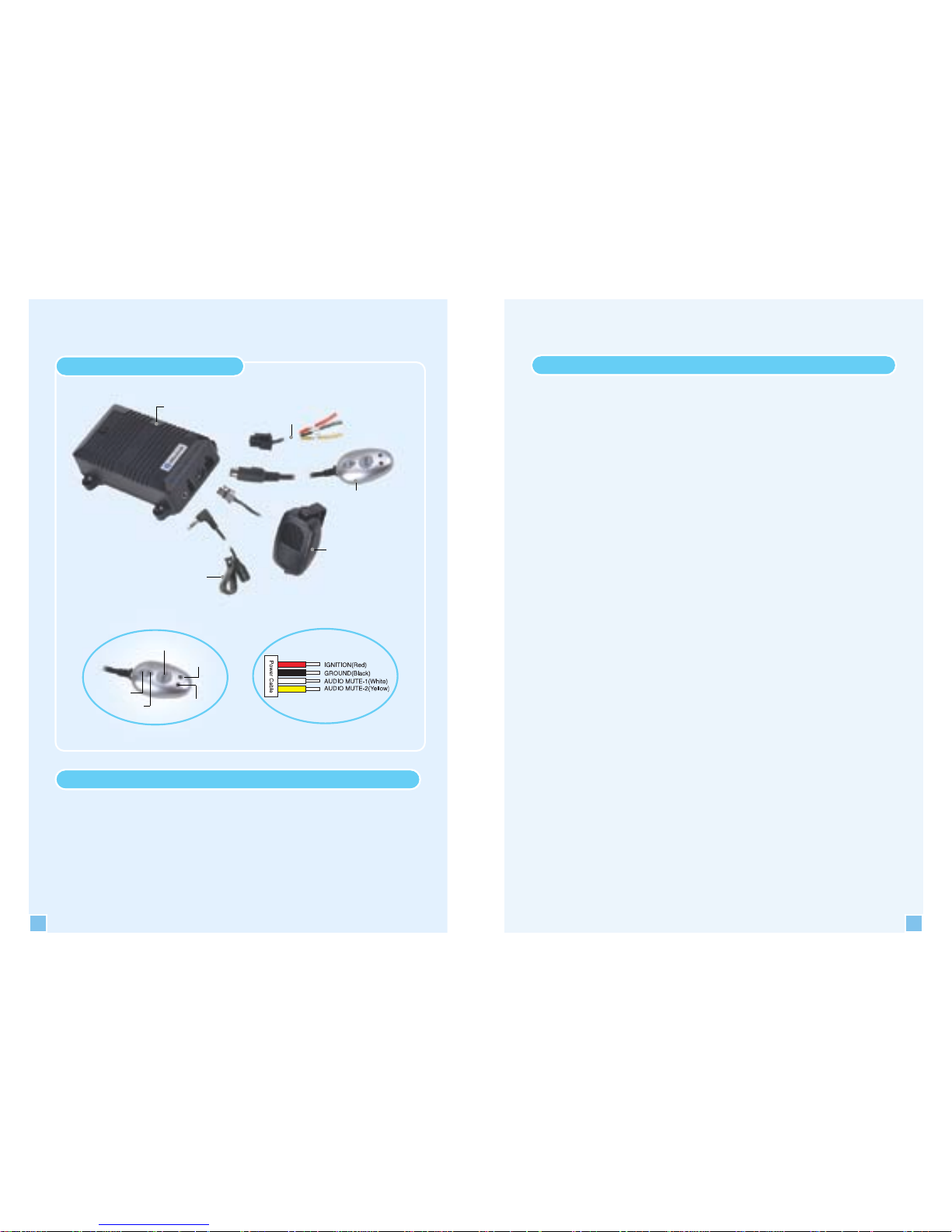
(Figure 3)
Power cable
(Figure 2)
Talk Button
Volume(-)
Green LED
Red LED
(Figure 1)
4
Feature
Noise Cancellation System
Superior Sound Quality
Full Duplex System
Simple Operation
Easy Set Up
Main Control Box
Power Cable
Speaker
Microphone
Remote Controller
Connection Diagram
Volume(+)
5
User Guide
▶
Remote controller function (Figure 2)
BUTTONS
Talk button : Used for accept, end, reject, redial functions
Volume (+) button : For increasing the speaker volume
Volume (-) button : For decreasing the speaker volume
LED
Red light : For indication of the Handsfree device
operation
Green light : For indication of Bluetooth link status
Green flashing light during paring
▶
Installation guide
1. Insert the microphone jack into the control box per Figure 1.
2. Place the microphone in the visor as in Figure 4. Hide the
microphone cable through A Pillar.
Note: Make sure microphone and cable do not interfere with safety of
the vehicle operation. It is highly recommended to place front of
the microphone directly facing the operator for the best result.
3. Connect the Speaker cable jack into the main control box.
Place the speaker in the desirable place in the front passenger
compartment. Strongly recommend placing the speaker under
the passenger side dashboard.
Note : Professional installer should permanently mount the speaker to
the safe area with the screws.
4. Connect the Remote controller jack into the main control box.
Secure the Remote controller near by the driver side or center
console with the Velcro pads where user can easily reach the
remote controller without compromising safety while operating
the vehicle.
Page 4

6
5. Place the Main control box under the desh.
Note : Professional installer should secure the Main control box to
under desh by installing wire tie.
6. Connect the Power cable into the car power source and connect
the radio mute cable.
Professional installation of the power & mute cables
1) Disconnect the power cable from the car battery. 2) Connect the
ground wire to the car ground. 3) Connect the power wire to the
ignition. 4) Connect the audio mute-1 wire to the audio head unit. 5)
Connect the power cable from the car battery. 6) Turn the ignition
ON and confirm that the power of the SJ401A is on (Green LED-on).
7) Turn on the audio and check if you can hear the radio.
a) If so, you are successfully installed the SJ401 unit into the car.
b) If there is no sound, disconnect the power cable from the car
battery and then change the audio mute-1 wire to the audio
mute-2 wire and the audio mute-2 wire connect the audio
head unit.
Note : The car audio manufacturers use either the high or low audio
mute level. Therefore, it is necessary to check the audio mute
level. The audio will automatically mute upon receipt or during
the phone conversation and then return to the previous volume
level after completion of the phone conversation.
If you have the cigar cable you can alternate use the power
cable or the cigar cable for power connection.
Pairing your mobile phone with the SJ401A
Follow the pairing instruction for the first use, after that the unit will
pair automatically.
▶
Pairing as the Handsfree mode
When power is on (confirmed by blue LED light), press the VOL+
button for 5 seconds on the Remote controller. You will hear a
beep tone. The Handsfree device is ready to be paired with the
mobile phone.
The SJ401A Bluetooth device pin code is : 1234
7
▶
Mobile phone manual pairing
1. Browse the mobile phone menu and find connectivity and/or
Bluetooth connection section.
2. Select the search for a new Handsfree device and allow the
mobile phone to find the SJ401A.
Note: Each mobile phone has a different phone menu so you may need
to refer to your manufacturers instruction to find how to connect
a new Bluetooth device.
3. The Bluetooth code for the SJ401 should appear on your
mobile phone screen.
4. Press the connect button with the Handsfree option on your
mobile phone.
Note: Please return to the pairing instructions if the Bluetooth code
does not appear on the mobile phone screen. The green LED
light should flash during pairing.
5. The mobile phone should prompt for the pin code, insert the
SJ401A pin code 1234 by using the mobile phone pin code.
6. The mobile phone should confirm that it is establishing new
connection.
7. Close the menu. The pairing is now completed.
Note: The green LED light illuminated after successful pairing. Please
adjust the volume to your preference by using the volume keys.
Using the SJ401A as the Handsfree device
▶
When the Handsfree is ringing,
To accept call Press TALK button
To reject call Double click TALK button
To end call Press TALK button
To control Volume Press VOL+/VOL-
Page 5

8
▶
Call transfer,
The Call transfer function is for switching the call from
handsfree to the mobile phone for the private conversation
without disconnecting the call.
Switching from Handsfree to mobile phone :
Press and hold TALK button(3 seconds)
Switching back to Handsfree :
Press and hold TALK button(3 seconds)
▶
When the Handsfree is idle,
Voice dial : Press and hold TALK button(3 seconds
)/
Announce name after a beep.
Note: This function works if phone has the voice dialing capability
Last number redial : Double click on TALK button
Note: This function works if phone has the last number dialing
feature.
Using the SJ401A as the Headset device
▶
Pairing as the Headset mode
1. When the power is on, press the VOL+ button for 5 seconds.
2. The beep tone should be heard.
3. After hearing the beep tone, repeat the procedure by pressing
the VOL+ button for another 5 seconds.
4. The second beep tone should be heard indicating the SJ401A
Handsfree unit is ready to be paired with your mobile phone.
▶
Functions are as same as the Handsfree mode
Note: Your phone must contain the special features such as voice
dialing, last number dial, etc to be used in the SJ401A.
※ It is possible the SJ401A buttons might not operated according to
the Handsfree operation manual if your Bluetooth phone has an
unusual Bluetooth program.
9
The user can change position of the
mike dependin on the vehicle type
for the best sound quality. It is
also highly recommended for
user to place correct side of the
mike directly facing the
user(side with more holes). The
user can place the mike either
front or back of the visor by
detaching, rotating and reattaching
mike holder to correct side of the mike.
Installation Microphone
Troubleshooting
▶
No indication from unit?
Check the power cables. Make sure power cables are attached
on both sides.
▶
Experiencing problem during pairing?
Repeat pairing according to the pairing section
▶
Still experiencing problem?
Please turn off the mobile phone and separate the battery from
the mobile phone for about five seconds and then repeat pairing
following the pairing instruction.
Sometimes, there could be a bug in the mobile phone that requires to
be eliminated before pairing.
(Figure 4)
Page 6

10
▶
Each mobile phone has a different function button so it
could be different operated with your mobile phone
according to mobile phones of various kinds.
▶
Too loud?
Please adjust the volume to your preferred sound level by
pressing the volume switches.
▶
People are complaining about hearing noise?
Please check if the mike is secured in place not creating vibration
and noise.
Also check and adjust front of the mike facing toward to the
user’s face.
Safety precautions
▶
Do not expose this unit under humid environment.
▶
Do not drop this unit.
▶
Do not disassemble this unit.
▶
Do not press two buttons at once. This action might cause
sudden Bluetooth disconnection.
▶
Do not clean the unit with any chemical or water.
▶
Keep this unit away from fire and dust.
▶
Please secure the install type control box and the speaker in the
safe place by screws or wire tie.
▶
For safety reasons, please keep your phone conversation short,
do not make any notes or read documents. It is highly
recommended to park the vehicle in the safe place before
continuing the conversation. Using mobile phone while driving
creates a distraction to the drive which may increase the
likelihood of an accident.
11
Warranty
SungJin Techwin Co., Ltd. warrants to purchaser that for a period of one (1) year
after the date of purchase (the “Warranty Period”) of any SungJin Techwin Co.,
Ltd. Product by Purchaser, the product will substantially conform to SungJin
Techwin Co., Ltd. published specifications for the product on the date of
purchaser’s purchase of the product, subject to the terms herein. Purchaser shall
notify SungJin Techwin Co., Ltd. of any nonconformance during the warranty
period and obtain a written return material authorization (“RMA”) from SungJin
Techwin Co., Ltd. for the non-conforming product and return the nonconforming
product to SungJin Techwin Co., Ltd. freight prepaid with a statement describing
the nonconformity. SungJin Techwin Co., Ltd. exclusive obligation with respect to
nonconforming product shall be, at SungJin Techwin Co., Ltd.’s option and
expense, to repair or replace such returned item. The foregoing is purchaser’s sole
and exclusive remedy for breach of warranty by SungJin Techwin Co., Ltd.’s with
respect to the product. The warranty set forth above shall not apply to any product
which has not been properly used or handled in accordance with the instructions
supplied by SungJin Techwin Co., Ltd. In addition, SungJin Techwin Co., Ltd.’s
warranty is void if the product has been repaired, altered, damaged by the faulty
installation, misuse, abuse, or which the product defect is attributable to any failure
or damage which is beyond the reasonable control of SungJin Techwin Co., Ltd.
This warranty applies only to new SungJin Techwin Co., Ltd. products purchased
from authorized retail sellers only. The foregoing warranties are the sole
warranties, express or implied, given by SungJin Techwin Co., Ltd. in connection
with the product, and SungJin Techwin Co., Ltd. disclaims all other warranties,
including warranties of merchantability, fitness for a particular purpose and no
infringement of third party rights. SungJin Techwin Co., Ltd. shall not be liable for
any special, incidental or consequential damages in connection with the product,
even if SungJin Techwin Co., Ltd. has been advised of the possibility of such
damages. The liability of SungJin Techwin Co., Ltd. hereunder for all claims shall
not exceed the amount paid by purchaser to SungJin Techwin Co., Ltd. for the
product giving rise to SungJin Techwin Co., Ltd.’s liability.
 Loading...