

Page 1

C O M P A C T 3
MOBILE SOUND SYSTEM
OPERATION INSTRUCTION
Page 2

This s ymbol w arns th e user of d anger ous vol tage le vels lo caliz ed with in the en closu re.
This s ymbol a dvise s the use r to read a ll acco mpany ing lit eratu re for sa fe oper ation o f the uni t.
Con gratu latio ns on you r purch ase of an S IRUS PR O COMPAC T 3 hig h perfo rmanc e, self -cont ained p ortab le audi o syste m.
Your CO MPACT 3 in clude s every thing y ou will n eed for g reat so und. Any where . Carry y our COM PACT 3 a s a large s ized su it
cas e. Flip o pen the s peake r latch es, and y ou'll d iscov er two fu ll-ra nge spe aker ca binet s, a powe red mix er, dyna mic
mic ropho nes, pl us all th e cable s you nee d to get st arted . Use you r COMPAC T 3's q uick an d easy se t-up, its abi lity to c over
lar ge audi ences a nd simp le oper ation a re the ha llmar ks most d esire d value .
The C OMPACT 3' s contr ol pane l featu res fou r mono mi c / line in puts an d 2 stere o chann els(6 c hanne ls tota l). The s tereo i nput
cha nnels c an be use d for eit her mon o or ster eo oper ation a llowi ng supe rb flex ibili ty in inp ut use. M oreov er, the ta ilore d
spe akers i n each sp eaker e nclos ure del iver cl ear, ful l range s ound wi th exce ption al audi ence co verag e and rem arkab le
fee dback r eject ion. Th e self- power ed mixe r provi des a tot al of 250 w atts of h igh qua lity st ereo so und.
For v ocal op erati on, the C OMPACT 3' s Vocal In put Pri ority f eatur e can be us ed to red uce or lo wer the b ackgr ound mu sic lev el as
you b egin to s peak an d then re store y our bac kgrou nd musi c when yo u have fi nishe d speak ing. Ex perim ent wit h the ton e
con trols , digit al reve rb and sp eaker p lacem ent and d iscov er the CO MPACT 3's i ncred ible po wer and v ersat ility.
IMP ORTANT S AFEGU ARDS:
- WARN ING: TO P REVEN T DAMAG E, FIRE O R SHOCK H AZARD , DO NOT EXP OSE
THI S UNIT TO R AIN OR MO ISTURE .
- NO US ER SERV ICEAB LE PARTS IN SIDE, R EFER SE RVICI NG TO QUAL IFIED
PER SONNE L AUT HORIZ ED.
- THI S UNIT MU ST BE EAR TH GROU NDED.
(2)
SIRUS PRO COMPACT 3
Mobil e Sound S yst em
INTRO DUC TIO N
to/ from y our co mpute r.
8-C hanne l powe red mi xer.
4 XL R MIC i nputs .
2 TR S ster eo Cha nnels with R CA 3.5m m Ster eo inp uts.
Cha nnels with 3 -band EQ, EF X Send , Pan, Level .
USB Port c onnec t to fl ash di sk,MP 3 play er
USB conne ctivi ty: th e USB p ort is used t o conn ect th e COMPAC T 3 to a compu ter fo r reco rding or pla ying b ack
dig ital a udio
Eff ects s end on every chann el wit h ster eo ret urn.
Int ernal 24-bi t DSP e ffect p roces sor wi th 16 s elect ions a nd foo t swit ch jac k, inc ludin g reve rb ,de lay an d voca l
enh ancem ent.
Eff ect pa ramet er adj ustme nt all ows yo u to cu stomi ze eac h effec t sele ction .
2 wi reles s micr ophon e rece iver s lots f or opt ional wirel ess mi croph ones
Dua l 7-ba nd sys tem eq ualiz er wit h swit ch.
2 fi ve-se gment LED me ters.
Per forma nce In dicat ors: S ignal , Clip ,powe r and P rotec t.
300 W (150 W 8ohm s per c hanne l) ste reo po wer am plifi er bui lt-in with d ynami c Dist ortio n proc essor , turn -on/t urn-o ff,
the rmal a nd sho rt .
Spe aker s ystem with 1 " comp ressi on dri ver an d 10" w oofer.
AC po wer or DC-DC coner ter op erati on
sto rage c ompar tment for ca bles a nd acc essor ies.
Two 3 0 feet speak er cab le.
Page 3
SAFET Y PRE CAU TIO NS
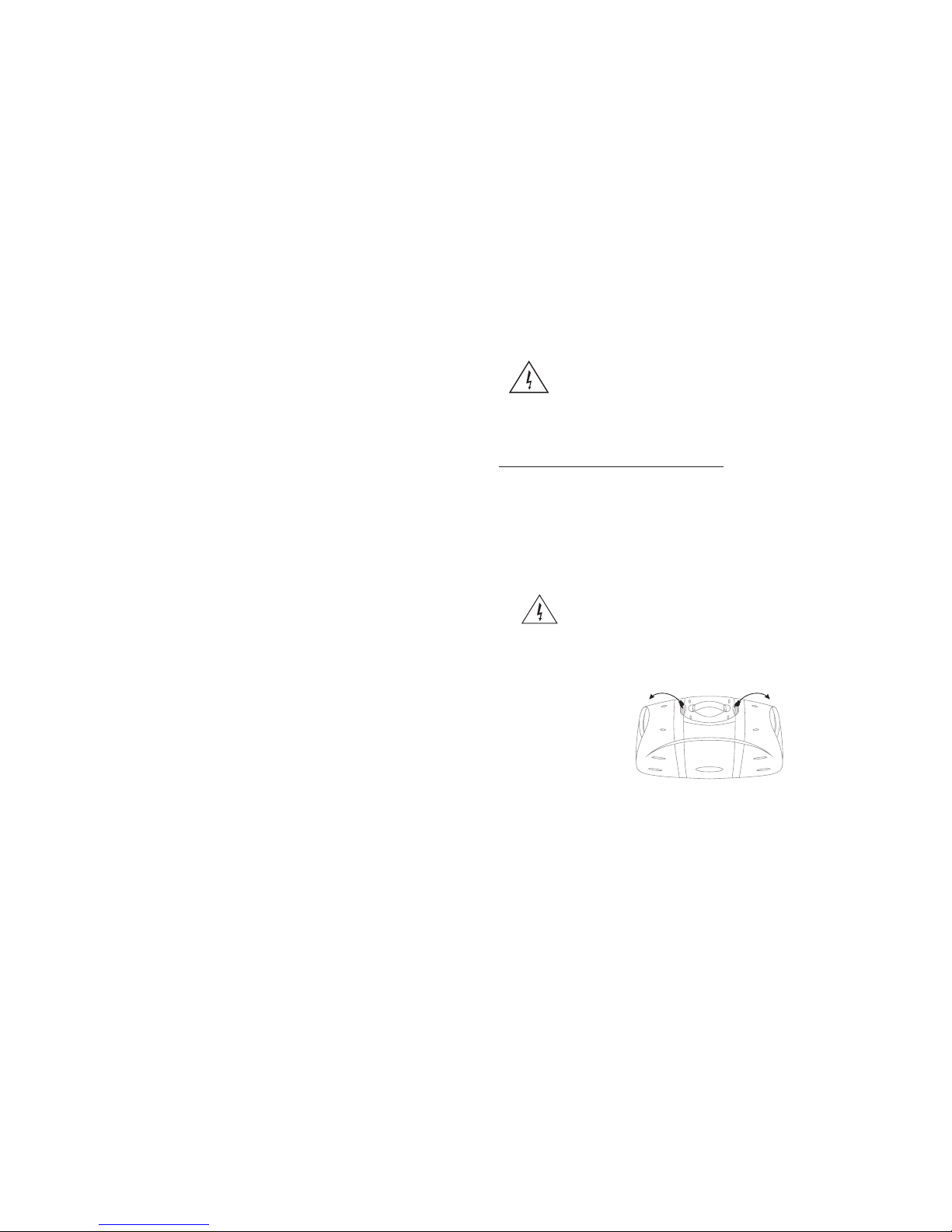
TRANS POR TATION LATCH ES
The SI RUS PRO C OMPACT 3 s ound sy stem is s uppli ed with a d etach able po wer cab le with a n IEC
fem ale con necto r and a mal e AC con necto r. Depen ding on t he terr itory i n which t he COMPA CT 3
sys tem is pu rchas ed, the p ower ca ble wil l be supp lied wi th one of a n umber o f male AC co nnect ors
to ac commo date th e differ ent saf ety and c ode req uirem ents of s pecif ic coun tries . All AC cabl es
sup plied w ith COM PACT 3 prod ucts ar e three p in grou nded ty pes.
Und er no cir cumst ances s hould t he grou nd(ea rth)p in be dis conne cted or r emove d.
Your CO MPACT 3 Sy stem fe ature s a Switc h-Mod e-Pow er-Su pply de signe d to oper ate on an y AC vol tage an d line fr equen cy
to co nvert AC p ower wi th maxi mum eff icien cy.
Whe n trave lling a broad w ith the C OMPACT 3 sy stem, a s a stand ard pre cauti on, alw ays che ck the lo cal vol tage an d set the
vol tage se lecto r switc h locat ed adja cent to t he sock et on the r ear of th e mixer / a mplif ier to th e appro priat e opera ting ra nge.
Thi s check m ust be pe rform ed befo re conn ectin g the pow er cabl e. The SI RUS PRO C OMPACT 3 ha s two ran ge sett ings:
115V o r 230V .
Fai lure to s elect t he appr opria te volt age ran ge will c ause th e unit to g o into pr otect m ode, vo id any wa rrant y and may c ause
dam age to th e unit.
For e xampl e, The Un ited St ates of Am erica i s stand ardiz ed at 117 vol ts / 60 Hz, J apan op erate s on 100 vo lts / 50 Hz . For
bot h of thes e count ries th e range s elect or must b e set to 115 V. Cou ntrie s in the EE C have st andar dized a t 230 vol ts / 50
Hz. , Howev er, ther e are dif feren t types o f AC plu gs used . For all t hese co untri es the se lecto r shoul d be at the 2 30V pos ition .
Whe n using p lug ada pters o r opera ting in a t errit ory oth er than t he one in w hich th e unit wa s purch ased, t ake gre at care t o
com ply wit h local s afety r equir ement s and ele ctric al code s of prac tice.
If yo u are not s ure of th e local v oltag e, wiri ng code s & colou rs, AC gro undin g, or cor rect pr ocedu res for
con necti on, con sult a qu alifi ed tech nicia n.
Warn ing
Und er no cir cumst ances s hould t he grou nd pin on t he COMPAC T 3 or on any o f your el ectri cal
equ ipmen t be lift ed (cut o ff or disc onnec ted). By foll owing t he corr ect pro cedur es and sa fety
pre cauti ons, ri sks of se vere sh ock haz ard can b e minim ized. B est of al l, avoi d opera ting th e
sys tem in co njunc tion wi th ungr ounde d or impr operl y groun ded ele ctric al equi pment .
To open a nd clos e your CO MPACT 3 sys tem, si mply fo llow th ese gui delin es:
1. Pl ace you r finge r tip und er the sa fety la tch and g ently l ift. Wh en the sa fety la tch has d iseng aged, l ift the m ain lat ch to
rem ove the s peake r.
2. To rep lace, p ositi on the sp eaker o n the tow er foot a d bring t he spea ker in to c lose th e engag ement w ith the t ower an d
lat ch. Pos ition t he latc h hook ov er the sp eaker n otch an d close t he latc h. The sa fety la tch wil l autom atica lly eng age.
Not e: Thes e parts a re prec ision e ngine ered an d no forc e is need ed to sec ure the m. Care ful ali gnmen t of part s will en sure
eas y opera tion.
(3)
SET- UP SYST EM VOLU ME AND LEV ELS
To set sy stem vo lume an d opera ting le vels, b e sure to f ollow t hese si mple se t-up gu ideli nes:
1.F irst, slowl y raise t he larg e Left an d Right M aster v olume c ontro ls to the ir 12o' clock n otche d posit ions.
2.U se a micr ophon e(or ot her sou rce)i n the sam e posit ion as it w ill be us ed on sta ge and in t he mann er in whi ch it wil l be
use d for the e vent. S lowly b ring up t he appr opria te chan nel inp ut leve l contr ol list ening f or the on set of fe edbac k or howl ing
or un til the r equir ed leve l is reac hed. Ha ve a help er "wal k"the a udien ce area t o make su re cove rage an d level s are suf ficie nt
for y our nee ds. The s ystem 's over all vol ume can b e raise d simpl y by rota ting th e Left an d Right M aster v olume c ontro ls to
the d esire d level .
3. Co nside r the app licat ion and n eeds of t he even t and set t he Syst em EQ con trol ap propr iatel y. Thi s is best a chiev ed by
pla ying re corde d mater ial of th e same ty pe as you r show pr ogram , or by hav ing an as sista nt spea k into th e micro phone
whi le you li sten in t he audl ence ar ea.
For p ublic a ddres s (spok en voic e), it is a dvisa ble to ro tate th e Syste m EQ stic ks up to en hance t he mid an d high
fre quenc ies, an d limit t he low fr equen cy cont ent. Fo r large o utdoo r space s this wi ll also g ive the m aximu m headr oom and
out put cap abili ty. Care fully c onsid er the in divid ual eve nt's ne eds and s et your c ontro l for the m aximu m effect .
POWER TO WE R
In se tting u p the sys tem, th e COMPAC T 3 Mix ing con sole sh ould id eally b e place d where s ystem p erfor mance c an be
eva luate d by the op erato r. If no ong oing ad justm ents wi ll be nec essar y, the mix er may be p laced c onven ientl y and whe re the
cab le leng ths all ow.
Take ca re to pla ce the Po wer Tower t here th e cable s will no t trip an yone. Al l cable s shoul d be care fully s ecure d.
The s torag e compa rtmen t in the re ar of the Tow er can ho ld cabl es, mic ropho nes and o ther sy stem pa rts. To open s imply
sli de the ca tch upw ards an d pull op en.
The m ains (A C) fuse h older i s under t he IEC (p ower co rd) soc ket on th e right r ear of th e Tower. To ch ange a fu se, rem ove the
IEC p lug and , using a n appro priat e tool pu ll out th e fuse ho lder, No te ther e is a spar e fuse in t he fuse h older ; the COM PACT
3 uti lizes a T 6A 250V fu se. Onl y repla ce fuse s with on e of an ide ntica l value a nd size .
Fre nquen cy Resp onse
20 Hz t o 20 kHz 1d B (at sen d outpu t)
30 Hz t o 20 kHz 1d B (at spe aker ou tput, w ith pro cesso r thres hold ex ceede d)
Dis torti on <0. 05%, 20 H z to 20 kHz , 1 dB belo w rated o utput
Sys tem Sig nal to No ise Rat io > 80 dB @ 1w. " A" WTD
Pow er Outp ut 1 50 W/ch c ontin uous av erate p ower, 8o hm, bot h chann els dri ven wit h THD <1%
Inp ut Impe dance ( Chann els 1-2 -3 and 4) "Mi c" 2 k oh m
"Li ne"
33
k ohm
Inp ut Impe dance Ste reo Cha nnel 5/ 6,7/8 ) 33 k oh m
Max . Input L evel Mic : -7dBu L ine: 30 dBu Ste reo: 26 dBu
Ret urn Inp ut Impe dance 4 7k ohm
Fus e type T6A, 250V
COM PACT 3
Sys tem
Spe akers
Pow er Tower
Mic ropho ne Dynam ic Card ioid, balan ced
Mic ropho ne Cabl e XLR - Ma le to XLR - Femal e
Spe aker Ca bles 1/ 4 in. To 1/4 in . 2x6m
L 280 MM W 3 48 MM H 478 M M
L 274 MM W 3 48 MM H 518 M M
L 778 MM W 3 48 MM H 478 M M
SPECI FIC ATIO NS
Car rier fr equen cy 794. 00 MHz~ 813.6 MHz
(10 )
Thi s wirel ess mic ropho ne can wo rk norm ally wi th in the r ange of 5 0 meter s.
Page 4
BAL BAL
1
2
3
4
5
6
7
8
9
10
11
12
13
14
16
17 18192021222324
25
26
27
29
35
28
30
33 3 4
31
32
38
40
41
42
37
15
44
45
46
4749
48
43
39
36
(4)
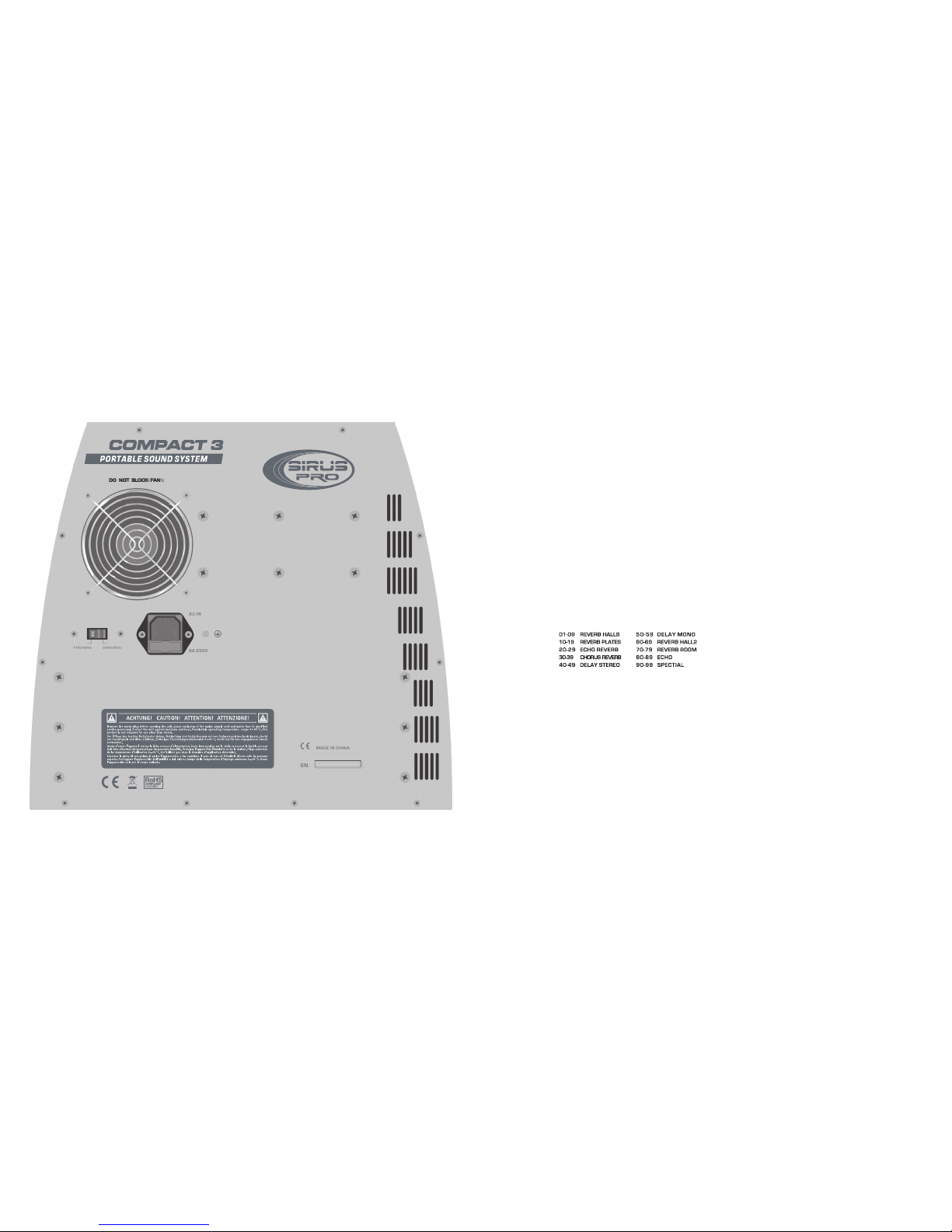
REA R PANEL
REA R STORA GE COMPAR TMENT
SET- UP AND CON NECTI ONS
CON NECTO R / LINE CO RD - The COM PACT 3 is eq uippe d with a gr oundi ng type I EC supp ly cord t o reduc e the pos sibil ity
of sh ock haz ard. Be s ure to co nnect i t to a grou nded AC re cepta cle. DO N OT ALTER TH E AC PL UG.
The po wer mai ns(AC ) fuse an d fuse ho lder ar e under t he IEC( power c ord) so cket Re place ment
fus es must b e of the sa me rati ng(6A 25 0V) and s ize as or igina lly equ ipped . To repl ace a blo wn
fus e, remo ve the IE C power c ord. Pu ll out th e fuse ho lder an d find th e spare f use ins ide.
Your CO MPACT 3 sy stem is c apabl e of runn ing on ba ttery p ower. The o ff-wh ite pla stic co nnect or on the r ear of yo ur
COM PACT 3 is the D C power i nput co nnect or for co nnect ing the C OMPACT 3 w ith +/- 4 8 V batte ry pack .
A smal l stora ge comp artme nt can be f ound on t he rear o f the COM PACT 3 towe r. To acc ess thi s compa rtmen t, simp ly lift t he
lat ch and pu ll open t he stor age doo r. This co mpart ment is i deal fo r stori ng cabl es, mic ropho nes or ot her ite ms when y ou are
tra nspor ting yo ur COMPA CT 3.
Bef ore tur ning on t he Powe r, pleas e read an d heed th e safet y warni ngs on pa ge 3.
It is w ise to es tabli sh a rout ine for c onnec ting an d power ing up yo ur soun d syste m. Prov ided yo u have a pr operl y groun ded
AC ou tlet or o utlet s trip wi th suff icien t power h andli ng capa city, plu g all sou nd syst em equi pment i nto the s ame out let or
str ip. Thi s will en hance s ystem s afety a nd perf orman ce. Take car e that th e AC ci rcuit i s capab le of han dling t he peak p ower
dem ands of y our sys tem. Co nsult t he prod uct han dbook s or a qual ified e lectr ician i f in doub t.
Whe n setti ng up, be s ure to fo llow th ese sim ple set -up gui delin es:
1.F irst, turn al l chann el Leve l, VIP( chann el 1 ONLY) and Eff/ Aux con trols t o their f ull cou nterc lockw ise(O FF) pos ition s. Next ,
pla ce all EQ s ticks i n the mid dle pos ition ( "0" pos ition ), all Pa n and Mas ter con trols a t 12 o'cl ock in th eir cen ter not ched
pos ition s. Be sur e to set th e appro priat e input ( mic / lin e switc h posit ion)f or the so urce yo u are set ting up .
2.N ext,c onnec t each sp eaker c able to t he appr opria te left & R ight Sp eaker o utput s on the re ar towe r and on ea ch spea ker
fro nt pane l with th e enclo sed cab les.
3.C onnec t all sou rces su ch as mic ropho nes, ta pe deck s, keyb oards e tc.,i nto the a pprop riate i nputs .
4.F inall y,chec k the loc al volt age and s et the vo ltage s elect or swit ch loca ted adj acent t o the pow er inpu t socke t on the re ar of
the m ixer/ ampli fier to t he appr opria te oper ating r ange. (See Sa fety Pr ecaut ions on p age 3.) Plug th e power c able in to the
IEC (powe r cord) socke t end to a pr operl y groun ded 3 wir e AC po wer out let.
POW ERING U P
Turn t he Powe r Switc h to the ON p ositi on. The P ower LE D will il lumin ate gre en and th e syste m will tu rn on. If o ther po wered
equ ipmen t is to be at tache d to the sy stem, i t is alwa ys advi sable t o turn on y our COM PACT 3 last . In this w ay any tr ansie nt
spi kes and t humps c aused b y other e quipm ent wil l not be am plifi ed and se nt to you r syste m speak ers. Fo r the sam e
rea sons it i s advis able to t urn off y our COM PACT 3 s ystem f irst be fore tu rning o ff the att ached e quipm ent.
Sho uld the P ower LE D not ill umina te when t he rear p anel po wer swi tch is op erate d, chec k your po wer con necti ons and
ret ry. Shou ld the Po wer LED s till fa il to ill umina te afte r you hav e confi rmed th e power c onnec tions , disco nnect a ll cabl es
and c heck th e COMPAC T 3 fus es. Be su re to rep lace an y blown f uses wi th fuse s of the co rrect v alue. R econn ect the p ower
and s peake r cable s and tur n the rea r panel p ower sw itch on .
Re- set the s ystem b y turni ng on the p ower sw itch. I f the pow er LED il lumin ates re d, the sy stem is i ndica ting a th ermal
pro tect mo de or coo ling pr oblem . Be sure t o check t he air in let fil ter at th e base of t he unit b y remov ing it an d makin g sure it
is cl ear of de bris.
Turn p ower of f and wai t for a few m inute s allow ing hea t to diss ipate a nd the CO MPACT 3 to re set its elf. If a fter do ing
so th e Power L ED cont inues t o glow re d this in dicat es a faul t with yo ur syst em and yo u shoul d consu lt an aut horiz ed SIRU S
PRO s ervic e cente r.
If no a udio is p resen t in one of t he spea kers, c heck to s ee if you r contr ol sett ings ar e corre ct. Nex t, unpl ug the ca ble fro m
you r worki ng spea ker and r econn ect it to t he othe r speak er. If the s econd s peake r now wor ks, thi s indic ates th at the fi rst
cab le is bad , and sho uld be re paire d or repl aced.
(9)
FRONT
Page 5
CONTR OL FU NCT ION S
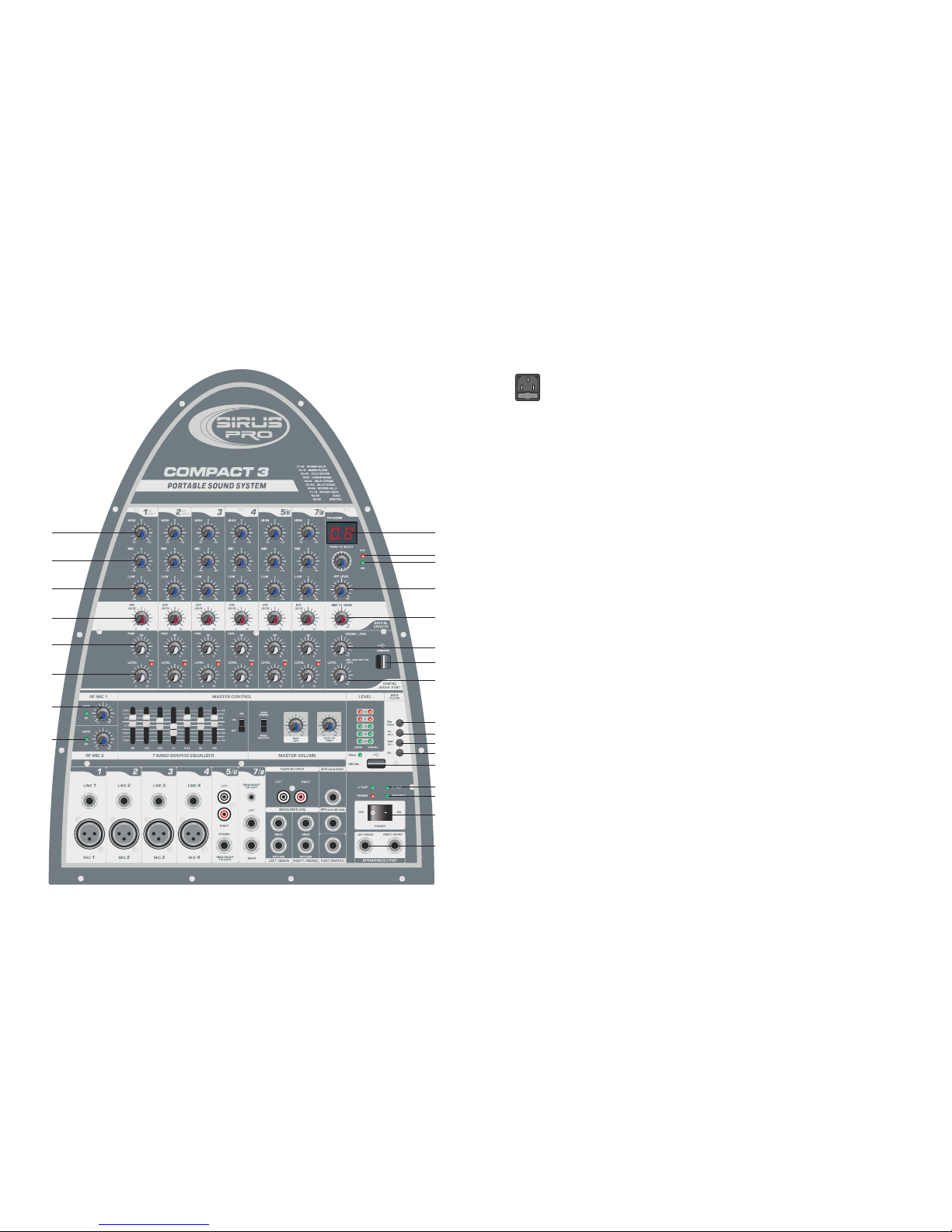
1) HI GH - Adjus ts the re lativ e level o f the hig h frequ ency co ntent . Rotat ing the k nob cou nterc lockw ise dec rease s the hig h or
hig h frequ ency re spons e. Like wise, r otati ng the kn ob cloc kwise i ncrea se the hi gh or hig h respo nse is "f lat" wi th no
fre quenc ies inc rease d or decr eased .
2) MI D - Adj usts th e relat ive lev el of the m id freq uency c onten t. Rota ting th e knob co unter clock wise de creas es the hi gh or
mid f reque ncy res ponse . Likew ise, ro tatin g the kno b clock wise in creas es the hi gh or mid f reque ncy res ponse . When th e EQ
con trols a re set at t heir mi ddle po sitio n,. the c hanne l frequ ency re spons e is "fla t" with n o frequ encie s incre ased or
dec rease d.
3) LO W - Adj usts th e relat ive lev el of the l ow freq uency c onten t of the ch annel 1 . Rotat ing the k nob clo ckwis e incre ases th e
bas s or low fr equen cy resp onse. L ikewi se, rot ating t he knob c ounte rcloc kwise d ecrea ses the b ass or lo w frequ ency
res ponse . Likew ise, ro tatin g the kno b count erclo ckwis e decre ases th e bass or l ow freq uency r espon se.
4) EF F / AUX - Ad justs t he amou nt of sig nal sen t to the Re verb pr ocess or, and to t he EFF / AUX o utput j ack. Re verb ca n be
use d to enha nce the s ound qu ality o f any per forma nce whe re appr opria te and de sired . In the fu ll left p ositi on ther e is no
lev el sent t o the rev erb pro cesso r or EFF / AUX j ack. Ca re shou ld be tak en to set t he Reve rb retu rn mast er cont rol to a
mid dle pos ition o r above , befor e adjus ting le vels fr om the in divid ual cha nnel. W hen the r everb / a uxili ary mix i s set, ov erall
lev els of re verb ca n be adju sted at t he mast er cont rol. Ke ep in min d that wh ile Rev erb or ef fects c an enha nce a mus ical
per forma nce or pr esent ation . Too muc h rever b can mak e the sam e perfo rmanc e or pres entat ion uni ntell igibl e or
"mu ffled ",Kee p your au dienc e in mind w hen set ting re verb le vels.
5) PAN - Th e Pan con trol fe ature s a notch ed posi tion in dicat or and ad justs t he perc eived " posit ion" of t he mono s ignal f rom
the i nput wi thin th e stere o field c reate d by the tw o speak er cabi nets. F ull Lef t or Righ t rotat ion of th is cont rol sen ds the
sig nal to th e that ch annel o nly, wit h no sign al sent t o the oth er. The cen ter pos ition s ends th e same am ount of s ignal t o both
spe akers .
6) LE VEL - Adju sts the v olume l evel of t he indi vidua l chann el. Rot ating t he knob c lockw ise inc rease s the res pecti ve
cha nnel' s contr ibuti on to the " Main Ou t" mix, w hile ro tatin g it coun tercl ockwi se decr eases t he volu me. Adju st this c ontro l
aft er the CO MPACT 3's m aster o utput l evel vo lume ha s been se t.
7) BA L - The bal ance co ntrol f eatur es a notc hed pos ition i ndica tor and a djust s the per ceive d"pos ition " of the mo no sign al
fro m the inp ut with in the st ereo fi eld cre ated by t he two sp eaker s. Full L eft of Ri ght rot ation o f this co ntrol s ends th e signa l to
the t hat cha nnel on ly, with n o signa l sent to t he othe r. The c enter p ositi on send s the sam e amoun t of sign al to bot h speak ers.
DIGITAL E FFE CTS
8) DS P displ ay
9&1 0)CLI P/SIG L ED-Th is LED wi ll illu minat e green w hen a sig nal is pr esent a t the Hig h or Low Z in puts. W hen the s ignal
nea rs chip ping, t he LED wi ll illu minat e red.
11)
12)
13)
14& 15) -Th e USB por t is used t o conne ct the CO MPACT 3 to a
com puter f or reco rding o r playi ng back d igita l audio t o/fro m your co mpute r.
16)
MASTE R CON TRO L
17, 18,40 ,41) Th ese LED m etres m onito r the out put sig nal lev els eit her the m ain or ou tput si gnals . The r ed LED is i llumi nate
whe n the int ernal l imite r is enga ged to pr event t he sign al from b eing cl ipped . (Clip ping re sults i n overd rive di stort ion and
sho uld be av oided .) If the L imite r LED is fl ash con tinuo usly or r emain o n const antly d uring u se, red uce the o utput s ignal
lev els unt il they f lash on ly on str ong sig nal pea ks.
Turn ing the k nob, ch oose th e right e ffect y ou are wi lling t o displ ay, the pr ess dow n once co nfirm ed.
EFF L evel- i nput le vel adj ustme nt
EFF L evel- o utput l evel ad justm ent
USB p ort, an d outpu t level a djust ment fo r recor ding
Inp ut leve l adjus tment f or USB re cordi ng
(5)
(8)
BACK
Page 6

(6)
(7)
32) F OOT SWI TCH - The F oot swi tch con necto r allow s the int ernal r everb r etum to b e muted , or shou t off, thr ough th e use of
a sim ple foo t opera ted swi tch. Th e foot sw itch sh ould be w ired to c onnec t the tip t o the sle eve to tu rn the re verb off , and
req uires a s tanda rd spea ker or in strum ent cab le.
33 & 34 ) AMP LIFIE R SEND / RE TURN JA CKS - Eac h chann el of the a mplif ier has a S end and R etum ja ck. The se jack s
pro vide a po int to pa tch in an e quali zer, or ot her pro cesso r into th e sound s ystem . The sig nal at th e send ja ck is loc ated af ter
the m ixer se ction a nd befo re the po wer amp lifie r. The sen d jack sh ould be c onnec ted to th e outpu t of the ex terna l devic e.
36 ) SP EAKER O UTPUT S - These a re spea ker lev el (pow ered) o utput j acks de signe d to feed e ach of yo ur COMPAC T 3
spe aker en closu res. Us e the enc losed c ables (or oth er spea ker cab le) to co nnect t he COMPA CT 3's spe akers t o the pow er
tow er.
38) E FF/AU X RETUR N - Plug yo ur exte rnal ef fects s ignal p roces sor's o utput s ignal i n here. Th is 1 / 4 inch i nput st ereo ja ck
is de signe d to acce pt sign als fro m an exte rnal pr ocess ing dev ice, su ch as a dig ital de lay or a ch orus un it. Thi s input c an also
be us ed as a ste reo inp ut with t he volu me cont rolle d at the ma ster vo lume kn obs.
39) P OWER SW ITCH - Tur ns the AC po wer ON an d OFF. When t he swit ch is in th e OFF pos ition , your CO MPACT 3 is
com plete ly shut d own.
42) P OWER LE D INDIC ATOR
Thi s LED ill umina tes whe n the pow er is tur ned "ON ".
43) P ROTEC T LED IND ICATOR
Thi s LED ill umina tes if th e power s ound sy stem is o utput c onnec tion is s horte d or the lo ad impe dance i s too low.
MP3 PLAYE R
44)
45)
46)
47)
48)
49)
Pla y and Pau se pres s butto n
Pre ss butt on for th e previ ous aud io item a s well as v olume d ecrea se
Pre ss butt on for th e next au dio ite m as well a s volum e incre ase
Mod e set up fo r MP3 pla yer
USB f lash di sk port - for USB d isk wit h MP3 or ot her mus ic file
LED i ndica tor- sh owing t he work ing sta tus of th e USB por t.
19 & 20 ) M ASTER V OLUME L EVEL CO NTROL S - The L eft and R ight Ma ster Vol ume Con trols a djust t he outp ut volu me of
the C OMPACT 3. T he Mast er cont rols fe ature n otche d posit ion ind icato rs. For t he majo rity of a pplic ation s the COM PACT 3
sys tem has b een bal anced t o opera te with t hese co ntrol s at thei r notch ed 12 o'c lock po sitio ns. In si tuati ons whe re more
vol ume is re quire d the mas ter con trols c an prov ide an ad ditio nal 6 dB of g ain whe n turne d to the ri ght of th e cente r posit ion.
Set t he syst em up in th e norma l manne r and adj ust lev els as ne cessa ry. Rais e the mas ter vol ume con trols b eyond t heir 13
o'c lock po sitio ns only a fter in creas ing the i ndivi dual ch annel l evel co ntrol s. COMPA CT 3's int ernal a mplif iers ha ve on-b oard
pro cessi ng desi gned to o ptimi ze the sy stem ,s p erfor mance w hen use d with th e custo m desig ned COM PACT 3 spea kers.
21) S TEREO / D UAL SEL ECTOR SW ITCH - All ows the C OMPACT 3 's powe r amps to b e confi gured a s stere o or "dua l mon o". In th e Stere o mode, t he syst em oper ates as a t radit ional s tereo p ower mi xer / amp lifie r. In the Du al mode , the
cha nnel le vel con trols c ontro l set the l evel fo r the Mai n mix(L EFT mas ter vol ume con trol) Th e Rev / Aux co ntrol s set the
ind ividu al chan nel lev els for t he Moni tor(R IGHT ma ster vo lume co ntrol ). When t he Dual m ode pos ition i s selec ted wit h the
swi tch, th e Pan and B alanc e contr ols bec ome in op erati ve (you h ave sel ected a m ono set ting fo r the out put). Ad ditio nally,
the i ntern al reve rb is onl y sent to t he MAIN s peake r outpu t. Reve rb is not a vaila ble to th e MONIT OR spea ker out put. The
rev erb lev el send s for the M AIN mix a re also c ontro lled fr om the ch annel D SP / AUX cha nnel co ntrol s. The ove rall re verb
lev el to the M AIN mix i s contr olled b y the Rev erb Mas ter Con trol.
22) EQ CONT ROL - Adju st the EQ s lider s the 7 ban d EQ is con necte d into th e syste m, when t urn off th e EQ butt on, the E Q is
off t he audi o signa l will go d irect ly to the s ystem w ithou t EQ.
23) S YSTEM E QUALI ZER - Adju st the am ount of f reque ncy inc rease o r decre ase in th e chann el. The l eft and r ight ch annel s
are a djust ed simu ltane ously a t same ti me and sa me pace . Set fre quenc ies are a t 60Hz, 160Hz ,400H z,1KH z, 2.5K Hz,6K Hz,
16K Hz , adju sting r ange wi thin +/ -12dB ; When th e slidi ng stic k is at the m iddle p ositi on, the f reque ncy res ponse i s "flat " with
no fr equen cies in creas ed or dec rease d; When s lidin g the sti ck up inc rease s the fre quenc y respo nse of th at band , when
sli ding th e stick d own dec rease t hat ban d's fre quenc y respo nse. To set t he EQ, st art wit h this co ntrol f rom the m iddle ("0dB "
mar ked) po sitio n. Simp ly slid e the sti cks unt il your d esire d sound s are the re.
WIREL ESS M ICR OPH ON E
24) LEVEL - Use thi s contr ol to set t he chan nel is si gnal le vel.
25) R F indic ator li ght
MIC/L INE S TER EO IN PU TS
26) M IC INPU T JACK - Pl ug your m icrop hone in h ere. Th is thre e pin XLR b alanc ed fema le inpu t in put si gnals f rom in pu t
sig nals fr om bass i mpeda nce mic ropho nes.
27) L INE INP UT JACK - P lug you r instr ument i n here. T his 1/ 4i nch bal anced i nput ja ck suit ed for us e with it ems hav ing a
lin e level o utput s uch as hi gh impe dance m icrop hones , keybo ards, d rum mac hines , outbo ard eff ects, e tc. It ac cepts b oth
bal anced a nd unba lance d cable s.
28& 3 7) STER EO INPU TS - Ster eo phon o (7/50 "TRS) i nput ja cks and 1 /4" TRS j acks (w ired fo r Tip= Left, R ing=R ight an d
Sle eve= Gr ound, the sta ndard f ormat o f comme rcial ly avai lable c ables ) desig ned for u se with a t ape pla yer, DVD p layer, o r
any o ther st ereo so urce. U se thes e jacks f or conn ectin g the out put of a co mpute r sound c ard or ot her sim ilar de vice to y our
COM PACT 3. Adap ters th at conv ert an 1 / 8" m ale plu g to RCA mal e phono p lugs ar e readi ly avai lable a t elect ronic s store s.
Not e: Thes e conne ctors a re set at a c onsta nt"li ne leve l".
29& 3 5) STER EO INPU TS - Ster eo phon o (RCA) i nput ja cks and 1 /4" TRS j acks (w ired fo r Tip= Left, R ing=R ight an d Sleev e=
Gro und,t he stan dard fo rmat of c ommer ciall y avail able ca bles) d esign ed for us e with a ta pe play er, DVD pl ayer, or a ny othe r
ste reo sou rce. Us e these j acks fo r conne cting t he outp ut of a com puter s ound ca rd or oth er simi lar dev ice to yo ur COMPA CT
3. Ada pters t hat con vert an 1 / 8 " male pl ug to RCA ma le phon o plugs a re read ily ava ilabl e at elec troni cs stor es. Not e: Thes e
con necto rs are se t at a cons tant" line le vel".
30) S TEREO O UT - The Tape Ou t RCA jack s provi de a mix ou tput th at is ind epend ent of th e Maste r Level C ontro ls. Con nect
the se to the i nputs o f a recor ding de vice, s uch as a ca ssett e or DAT reco rder, to r ecord y our eve nt. Cha nges ma de duri ng
the p erfor mance , to the in put lev el cont rols, c hanne l EQ, and r everb c ontro ls will b e heard i n the Tape Ou t mix. Ch anges
mad e to the ma ster le vel con trols w ill not e ffect t he leve l of the re cordi ng. Adju st reco rding l evels a ccord ing to th e
ins truct ions on y our rec ordin g devic e.
31) E FF / AUX SEN D - Plug yo ur exte rnal ef fects s ignal p roces sor in he re . Altho ugh the C OMPACT 3 is a lread y equip ped
wit h on -boa rd digi tal rev erb, an e xtern al effe cts sig nal pro cesso r in here . Alth ough th e COMPAC T 3 is alre ady equ ipped
wit h on -boa rd digi tal rev erb ,an e xtern al effe cts sig nal pro cesso r can be in corpo rated i nto the C OMPACT 3' s signa l flow.
Thi s 1 / 4 inch ou tput ja ck is des igned t o feed th e COMPAC T 3's e ffect s bus sig nal to an e xtern al sign al proc essin g diver,
suc h as a digi tal del ay or a cho rus.
AUX AND FO OT SW ITCH JA CKS
 Loading...