

Page 1
!
!
!
!
"#$#%!&'(!)*+#,%!!
)#+%'!-&+#'%.!/'01!
!
!
!
!
!
!
!
!
/'2,&33&,#4'!-&'5&3!!
!
)%,5*!/'2,+50,#4'!!
!
62%+!75#(%!
!
Page 2

Contents'
!
1. Installation'and'Setup'Overview'
2. Basic'Setup'
3. Basic'installation'
4. Advanced'Function'Setup'and'Installation'
5. Diagrams'
6. FAQ'
7. Trouble'Shooting'
Page 3

Installation'Setup'and'O v e r v ie w'
!
81 9:%0;!"&0;&<%!94',%',2!
Pixie:'
=1 "#$#%!>&#'!5'#,!
?1 -45',#'<!@+&0;%,!
A1 )>&33!*&+,2!;#,!
&1 -53,#*3%!45,@4&+(!;#33!(#4(%!
@1 )>&33!20+%B(+#C%+!
01 D&>*%+!2B#,0:!*&(!
(1 ?!*&+,!<35%!
E1 D+&'2#%',!F43,&<%!)5**+%224+!
Sprite:'
=1 )*+#,%!>&#'!5'#,!
?1 -45',#'<!@+&0;%,!
A1 )>&33!*&+,2!;#,!
&1 -53,#*3%!45,@4&+(!;#33!(#4(%!
@1 )>&33!20+%B(+#C%+!
01 D&>*%+!2B#,0:!*&(!
(1 ?!*&+,!<35%!
E1 D+&'2#%',!F43,&<%!)5**+%224+!
G1 ):4+%!"4B%+!)%'2%!8(&*,%+!
H1 I?J!=?!C43,!*#<, !
K1 -&<'%,#0!%',+L!2%'24+!
!
M1 80,#C&,%!L45+!)/-!I,:%!@5#3,!#'!0%33*:4'%!>4(53%J!
91 "%+N4+>!@&2#0!2%,5*!N4+!L45+!@4&,!&'(!*:4'%!
O1 O%,%+>#'%!>45',#'<!340&,#4'!!
P1 -45',!&'(!B#+%!,:%!5'#,!
Q1 D%2,!,:%!#'2,&33&,#4'!
Page 4
Basic'Setup'
!
/'!,:%!N4334B#'<!2,%*2.!L45!B#33!<%,!04>>5'#0&,#4'!<4#'<!B#,:!L45+!5'#,1!
!
!
81 80,#C&,%!L45+!5'#,!
=1 74!,4!BBB12#+%'>&+#'%104>!&'(!N4334B!,:%!2#>*3%!4'3#'%!&0,#C&,#4'!2,%*2!,4!
,5+'!4'!L45+!5'#,1!
?1 R45!B#33!'%%(!,:%!=GS(#<#,!2%+#&3!'5>@%+!4N!,:%!5'#,1!!D:#2!'5>@%+!0&'!@%!N45'(!
4'!,:%!5'#,!#,2%3N!4'!,:%!@&0;!&'(!&324!4'!,:%!@4$!4'!&!2>&33!2,#0;%+1!
A1 T'!,:%!B%@2#,%.!%',%+!,:%!2%+#&3!'5>@%+!4'!,:%!&0,#C&,#4'!*&<%.!%',%+!L45+!0+%(#,!
0&+(!#'N4+>&,#4'!N4+!,:%!,%$,#'<!*3&'.!&'(!,:%!*:4'%!'5>@%+!&2240#&,%(!B#,:!,:%!
5'#,!B#33!@%!#225%(!,4!L45!C#&!%>!
M1 "%+N4+>!@&2#0!2%,5*!N4+!L45+!@4&,!&'(!*:4'%1!
=1 T*%'!5*!,:%!5'#,!@L!3442%'#'<!,:%!,B4!20+%B2!4'!,:%!@4,,4>!4N!,:%!5'#,!&'(!
0&+%N533L!*533#'<!,:%!0#+05#,!@4&+(!45,!N+4>!,:%!>&#'!:452#'<1!
?1 "35<!#'!,:%!@&,,%+L1!/'2%+,!,:%!+%(!&'(!@3&0;!B#+%2!#',4!,:%!B:#,%!+%0%*,&03%!4'!
,:%!0#+05#,!@4&+(!'%$,!,4!,:%!@&,,%+L1!!U!O4!'4,!N4+0%!,:%!*35<!#',4!,:%!+%0%*,&03%.!
#,!4'3L!<4%2!4'%!B&L!&'(!2:453(!<4!#'!2>44,:3L!@5,!N#+>3L1!D:#2!#2!,:%!4'3L!4'V4NN!
N4+!,:%!2L2,%>1!W:%'!,:%!@&,,%+L!#2!*35<<%(!#'.!,:%!5'#,!#2!3#C%1!
A1 9&+%N533L!23#(%!,:%!0#+05#,!@4&+(!@&0;!#',4!,:%!:452#'<!&'(!,#<:,%'!,:%!20+%B21!
E1 8((!&!04',&0,!#'!L45+!0%33!*:4'%!N4+!L45+!'%B!"#$#%!4+!)*+#,%1!!W%!+%04>>%'(!
,:&,!L45!'&>%!,:#2!04',&0,!L45+!@4&,2!'&>%1!/'!45+!%$&>*3%.!B%X33!0+%&,%!"/-8Y.!
45+!+4&(!B&++#4+!"#$#%!'&>%(!&N,%+!-&(!-&$.!,:%!53,#>&,%!+4&(!B&++#4+Z!
!
!
!
G1 D%33!,:%!5'#,!B:4!L45!&+%1!!D:#2!2,%*!,%332!,:%!5'#,!B:4!0&'!&00%22!,:%!
#'N4+>&,#4'.!&3%+,2!&'(!+%>4,%!04',+43!,:%!"#$#%!&'(!)*+#,%!5'#,2!&+%!0&*&@3%!4N1!
D%$,!L45+!5'#,!,:#2!04>>&'([!
!
8O"\=!]]]]]]]]!'''''''''''!
!
Q4+!%$&>*3%^!,4!&((!&!0%33!'5>@%+!_=KSAAASEEEE!#'!234,!=.!,:%!2L',&$!B453(!@%[!
!
8O"\=!]]]]]]]]!=_=KAAAEEEE!
Page 5
!
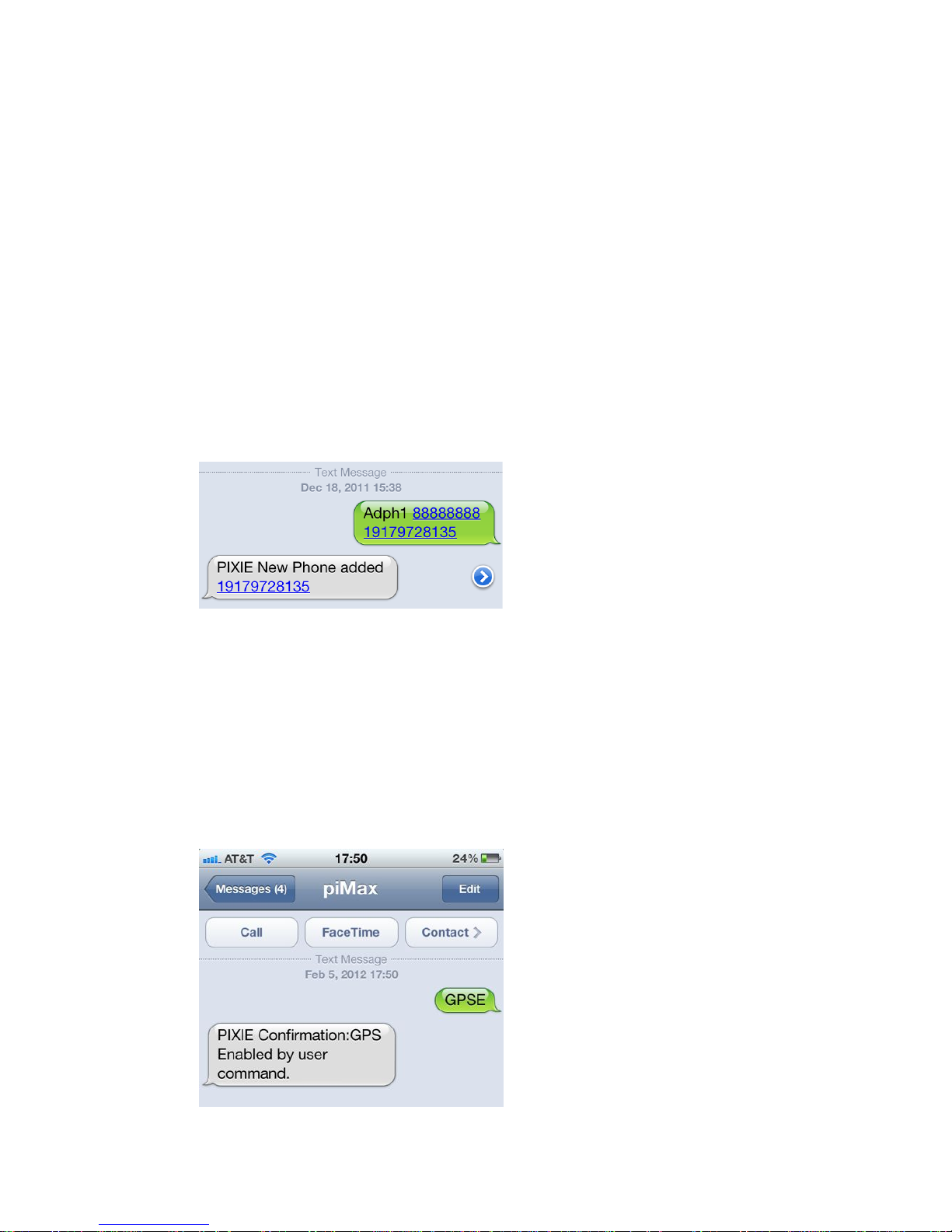
U`4,%!,:&,!/!&((%(!&!=!@%N4+%!,:%!&+%&!04(%1!!D:#2!#2!'4,!'%0%22&+L.!@5,!#'!24>%!
&+%&2!#,!#2.!(%*%'(#'<!4'!,:%!0&++#%+1!!/,!&3B&L2!B4+;2!+%<&+(3%22!4N!0&++#%+!,:#2!
B&L.!24!&3B&L2!#'035(%!,:%!=1!
!
D:%+%!#2!4'%!2*&0%!#'S@%,B%%'!%&0:!2%0,#4'!4N!,:%!>%22&<%1!!D:%!>%22&<%!#2!'4,!
0&2%!2%'2#,#C%1!
!
D:%!04(%!#2!(%0#*:%+%(!&2!N4334B2[!!
!
8O"\=!!!D:#2!&((2!&!*:4'%!'5>@%+!#'!234,!=1!D:%+%!&+%!E!234,2.!=SE1!
]]]]]]]]!!!D:#2!#2!,:%!N&0,4+L!(%N&53,!*&22B4+(!IL45!0&'!0:&'<%!#,!3&,%+J!
'''''''''''!!!D:#2!#2!&'L!>4@#3%!*:4'%!'5>@%+1!D:%+%!&+%!E!234,2.!=SE1!
`4B!,:&,!L45+!5'#,!;'4B2!B:4!L45!&+%.!L45!2:453(!:&C%!+%0%#C%(!@&0;!&!
04'N#+>&,#4'!>%22&<%[!
!
!
!
R45!&3B&L2!<%,!&!04'N#+>&,#4'!N+4>!&!04>>&'(!24!,:%+%!#2!'4!<5%22B4+;!&2!,4!
B:%,:%+!4+!'4,!L45+!,%$,!04>>&'(!B&2!+%0%#C%(Z!
!
H1 D5+'!4'!,:%!7").!,:%L!2:#*!,5+'%(!4NN!,4!04'2%+C%!@&,,%+L!*4B%+!(5+#'<!,:%!
#'#,#&3!2%,5*1!!
!
D%$,!L45+!5'#,!,:#2!04>>&'([!
!
7")P!
!
!
Page 6
!
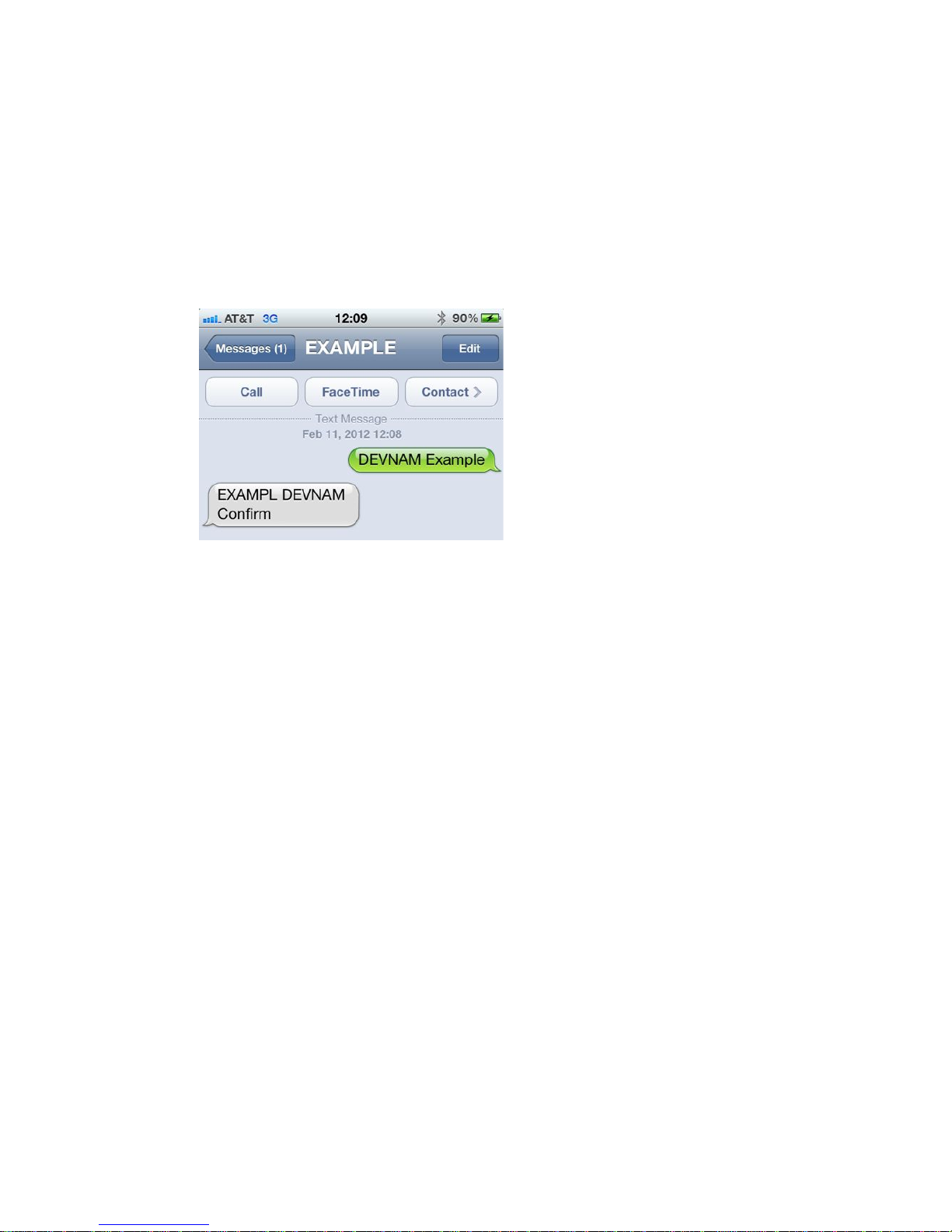
K1 Q#'&33L.!<#C%!L45+!)*+#,%!4+!"#$#%!&!'&>%1!!W%!+%04>>%'(!L45!52%!L45+!@4&,X2!
'&>%1!D:%!'&>%!0&'!@%!5*!,4!H!0:&+&0,%+2!34'<1!/'!,:#2!%$&>*3%.!B%!:&C%!0+%&,%(!
&!04',&0,!0&33%(!PY8-"aP!I,:&,!B453(!'4,!>&;%!&!C%+L!<44(!@4&,!'&>%bJ!&'(!
B%!&+%!'4B!,%33#'<!,:%!"#$#%!,:&,!#,2!'%B!'&>%!#2!%$&>*3%1!D%$,!L45+!5'#,!,:#2!
04>>&'([!
!
OPF`8-!PY8-"aP!
!
!
!
!
!"#$%&''Q4+!@&2#0!4*%+&,#4'.!,:&,X2!#,1!!D:%!5'#,!B#33!@%!B4+;#'<!(#+%0,3L!N+4>!,:%!
#',%+'&3!@&,,%+L1!!
Page 7
!
Basic'Installation'
!
/'!,:%!N4334B#'<!2,%*2.!L45!B#33!3%&+'!,:%!@&2#0!<5#(%3#'%2!L45!'%%(!,4!;'4B!#'!4+(%+!,4!
2500%22N533L!#'2,&33!L45+!5'#,1!
!
81 O%,%+>#'%!>45',#'<!340&,#4'1!D:#2!#2!&'!#>*4+,&',!2,%*!,:&,!+%c5#+%2!&!@#,!4N!
N4+%,:45<:,!#'!4+(%+!,4!<%,!,:%!@%2,!+%253,2!45,!4N!L45+!5'#,1!
M1 94'2#(%+&,#4'2!
&1 D:%!"#$#%!&'(!)*+#,%!:&C%!&33!4N!,:%!&',%''&%X2!%'0342%(!B#,:#'!,:%!
B%&,:%+*+44N!:452#'<1!!D:#2!&NN4+(2!<+%&,!%&2%!&'(!N3%$#@#3#,L!4N!>45',#'<1!
@1 D:%!5'#,!#2!0&*&@3%!4N!,+&'2>#,,#'<!,:+45<:!N#@%+<3&22!&'(!,%&;!(%0;2!4N!>4+%!
,:&'!&'!#'0:!,:#0;1!
01 9:442%!&!2*4,!#'2#(%!,:%!@4&,!4+!#'!&'!%$,%+#4+!340;%+!4+!04B3#'<!,:&,!#2!'4,!
5'(%+!:%&CL!>&0:#'%+L.!>%,&3!@4$%2.!%$0%22#C%!(%0;#'<!4+!0&+@4'!N#@%+1!D:#2!
B#33!2:#%3(!,:%!7")!&',%''&!N+4>!2&,%33#,%!04>>5'#0&,#4'1!!!
(1 /'!<%'%+&3.!,:%!:#<:%+!5*!&'(!,:%!0342%+!,4!,:%!(%0;.!,:%!@%,,%+!,:%!+%0%*,#4'!
B#33!@%1!
%1 8C4#(!>45',#'<!,:%!5'#,!,44!0342%!4+!5'(%+!>%,&3!@4$%2!4+!0&+@4'!N#@%+.!,:#2!
B#33!2:#%3(!,:%!7")!&',%''&!N+4>!2&,%33#,%!04>>5'#0&,#4'1!
N1 D:%!5'#,!2:453(!@%!>45',%(!#'!&!C%+,#0&3!*42#,#4'!&2!#'(#0&,%(!@L!,:%!&++4B!
4'!,:%!5'#,.!&'(!,:%!d,4*e!2,#0;%+!4'!,:%!(%C#0%1!!D:%!&++4B!2:453(!@%!*4#',#'<!
,4!,:%!2;L!&'(!,:%!d,4*e!2,#0;%+!2:453(!@%!4'!,4*!4N!,:%!5'#,1!!
<1 Q#'(!&!25#,&@3%!>45',#'<!340&,#4'!B:%+%!,:%!5'#,!B#33!<%'%+&33L!@%!#'!,:#2!
4+#%',&,#4'!+%<&+(3%22!4N!,:%!@4&,2!,&0;!4+!>4,4+!,+#>!#'!'4+>&3!04'(#,#4'21!
:1 -45',!,:%!5'#,!B:%+%!L45!0&'!&00%22!*4B%+!&'(!%&2#3L!+5'!B#+%2!,4!,:%!
2%'24+2!L45!B#33!@%!>4'#,4+#'<1!
91 9:%0;!,:%!2#<'&3!@%N4+%!L45!04>>#,!,4!&!
340&,#4'!,4!C%+#NL!,:&,!#,!#2!+%0%#C#'<!&!243#(!
7")!&'(!7)-!2#<'&3!#'!,:%!&+%&!L45!*3&'!,4!
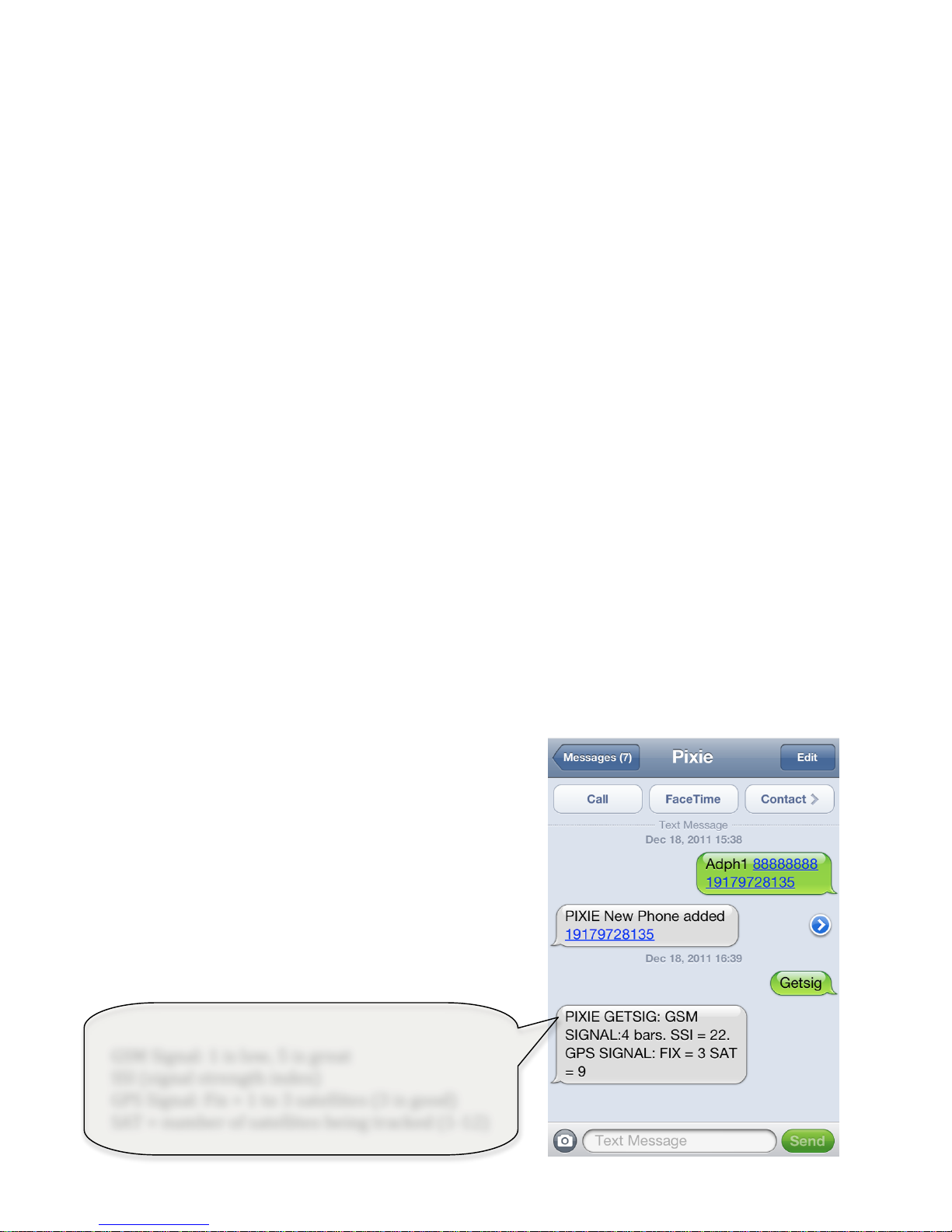
>45',!,:%!5'#,1!)%'(!#,!,:%!7PD)/7!04>>&'(.!
&'(!2%%!B:&,!,:%!5'#,!2%%2Z!!()'*#+',-.',##/'
0-1-2."#3'"3'.4-'$#1%."#3'*#+'14#5-6'%..%14'
".'.#'.4-'7#.#0'#0'8+$94-%/&'!
!
D:%!@4,,4>!>%22&<%!#2!B:&,!,:%!7PD)/7!
04>>&'(!+%,5+'21!/,!,%332!L45[!
!
!
7)-!)#<'&3[!=!#2!34B.!G!#2!<+%&,!
))/!I2#<'&3!2,+%'<,:!#'(%$J!!
7")!)#<'&3[!Q#$!f!=!,4!A!2&,%33#,%2!IA!#2!<44(J!
)8D!f!'5>@%+!4N!2&,%33#,%2!@%#'<!,+&0;%(!I=S=?J!
Page 8
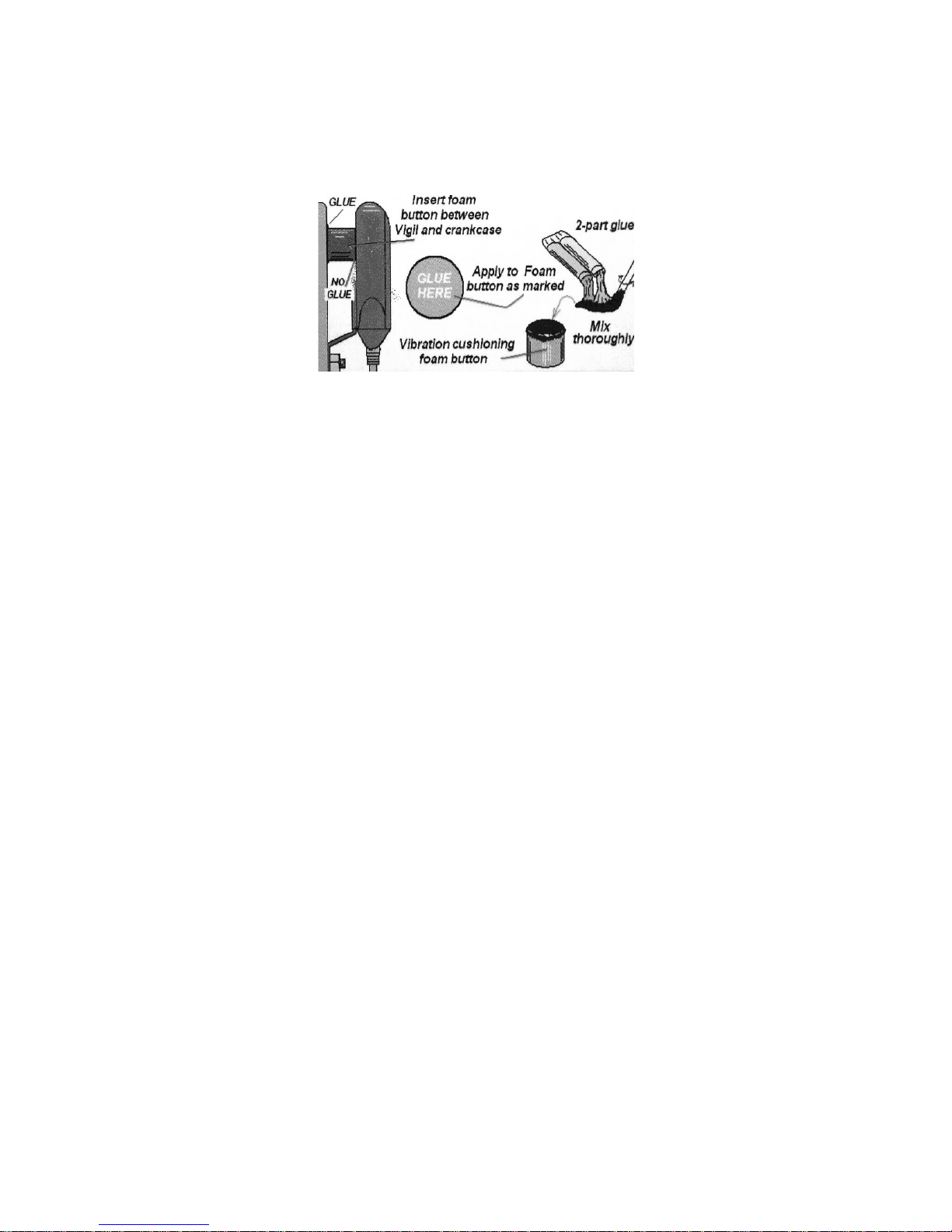
O1 R45+!)#+%'!5'#,!04>%2!%c5#**%(!B#,:!&'!#',%+'&3!D&>*%+!)%'24+!2B#,0:1!-45',!,:%!
>&<'%,#0!*&(!&2!(%20+#@%(!@%34B1!!/N!L45!5'#,!#2!,&>*%+%(!B#,:!&'(!#2!+%>4C%(!N+4>!
#,2!>45',#'<!@+&0;%,.!L45!B#33!@%!#'2,&',3L!'4,#N#%(1'
'
!
'
P1 -&;%!,:%!04''%0,#4'21!!R45+!2#+%'!5'#,!0&'!@%!*4B%+%(!@L!&!=?!4+!?E!C43,!2L2,%>1!!
D:%!#',%+'&3!@&,,%+L!0:&+<%2!4NN!4N!,:%!2:#*2!*4B%+.!&'(!#,!#2!+%04>>%'(%(!,:&,!,:%!
5'#,!@%!04''%0,%(!(#+%0,3L!,4!,:%!@&,,%+#%2!B#,:!&!=S?&>*!234B!N52%!N#,,%(!@%,B%%'!
,:%!5'#,!&'(!,:%!*4B%+!25**3L1!
!
/N!L45!&+%!>45',#'<!,:%!5'#,!(#+%0,3L!4',4!&'!45,@4&+(!>4,4+!#'2#(%!,:%!04B3#'<.!@%!
25+%!,4!52%!,:%!DF)!I,+&'2#%',!C43,&<%!25**+%224+J1!!D:#2!04''%0,2!(#+%0,3L!,4!,:%!
2&>%!04''%0,#4'!*4#',2!&2!,:%!+%(!&'(!@3&0;!*4B%+!B#+%21!
!
`%$,.!+%N%++#'<!,4!,:%!B#+#'<!(#&<+&>.!04''%0,!,:%!B#+%2!N+4>!,:%!)#+%'!5'#,!,4!L45+!
%$,%+'&3!2%'24+2!&'(!&00%224+#%21!!M%0&52%!4N!,:%!5'#c5%!'&,5+%!4N!%C%+L!@4&,!&'(!
,:%#+!%3%0,+#0&3!2L2,%>2.!)#+%'!-&+#'%!:&2!#'035(%(!34,2!4N!25**4+,!(#&<+&>2!&'(!
B#+#'<!25**3%>%',2!#'!,:%!(#&<+&>2!2%0,#4'1!
!
8!N%B!'4,%2!,4!04'2#(%+!B:%'!B#+#'<!L45+!5'#,[!
!
&1 8'L!4N!,:%!2%'24+2!IN34&,!2B#,0:.!>4,#4'!2%'24+.!2>4;%!2%'24+.!%,0J!>52,!@%!&!
(+L!04',&0,!,L*%!2%'24+!4+!2%0!3%22!,:&'!AC!,4!,:%!)#+%'!5'#,!B:%'!,:%!0#+05#,!
#2!0342%(1!
@1 )#+%'!#'*5,!2%'24+!B#+%2!0&'!@%!2%,5*!N4+!'4+>&33L!4*%'!4+!0342%(!
>4'#,4+#'<1!
01 O#2,&'0%!#2!<%'%+& 33L!'4,!&'!#225%!B:%'!+5''#'<!L45+!2%'24+!B#+%21!
(1 M#3<%!2%'2%!B#+%2.!N34&,!2B#,0:%2!&'(!%',+L!2B#,0:%2!I>&<'%,#0!+%%(!2B#,0:%2J!
0&'!@%!(L!0:&#'%(!,4!&004>>4(&,%!>4'#,4+#'<!>53,#*3%!%',+L!4+!@#3<%!
&+%&21!
%1 D:%!45,*5,!B#+%2.!<+%%'!&'(!4+&'<%.!&+%!,:%!+%3&L!2B#,0:%2!N4+!04',+433#'<!
%$,%+'&3!(%C#0%2.!4+!+%>4,%!2:5,4NN!4N!,:%!>4,4+1!D:%2%!+%3&L2!&+%!2%,!,4!@%!
'4+>&33L!4*%'!&'(!0342%!,4!<+45'(1!D:%!+%3&L2!&+%!+&,%(!N4+!=!&>*!&'(!0&'!
*4B%+!2>&33!aPO!,L*%!&**3#0&,#4'2!N+4>!,:%!4'@4&+(!*4B%+1!/N!:#<:%+!
&>*%+&<%!#2!+%c5#+%(.!4+!&!C43,&<%!4,:%+!,:&'!,:%!*4B%+!25**3L!4N!,:%!5'#,.!&!
+%3&L!2:453(!@%!52%(1!g%3&L!B#+#'<!25<<%2,#4'2!&+%!N45'(!#'!,:%!(#&<+&>2!
2%0,#4'1!
!
Page 9

Advanced'Function'setup'and'Installation'
!
/'!,:%!N4334B#'<!2,%*2.!L45!B#33!<%,!>4+%!(%,%(!#'N4+>&,#4'!4'[!
!
o )L2,%>!04>>&'(2!!
o )L2,%>!B#+#'<!
!
Page 10
System'Commands'
!
!
:;;(<='>?@<A'<BCDAEF'
!
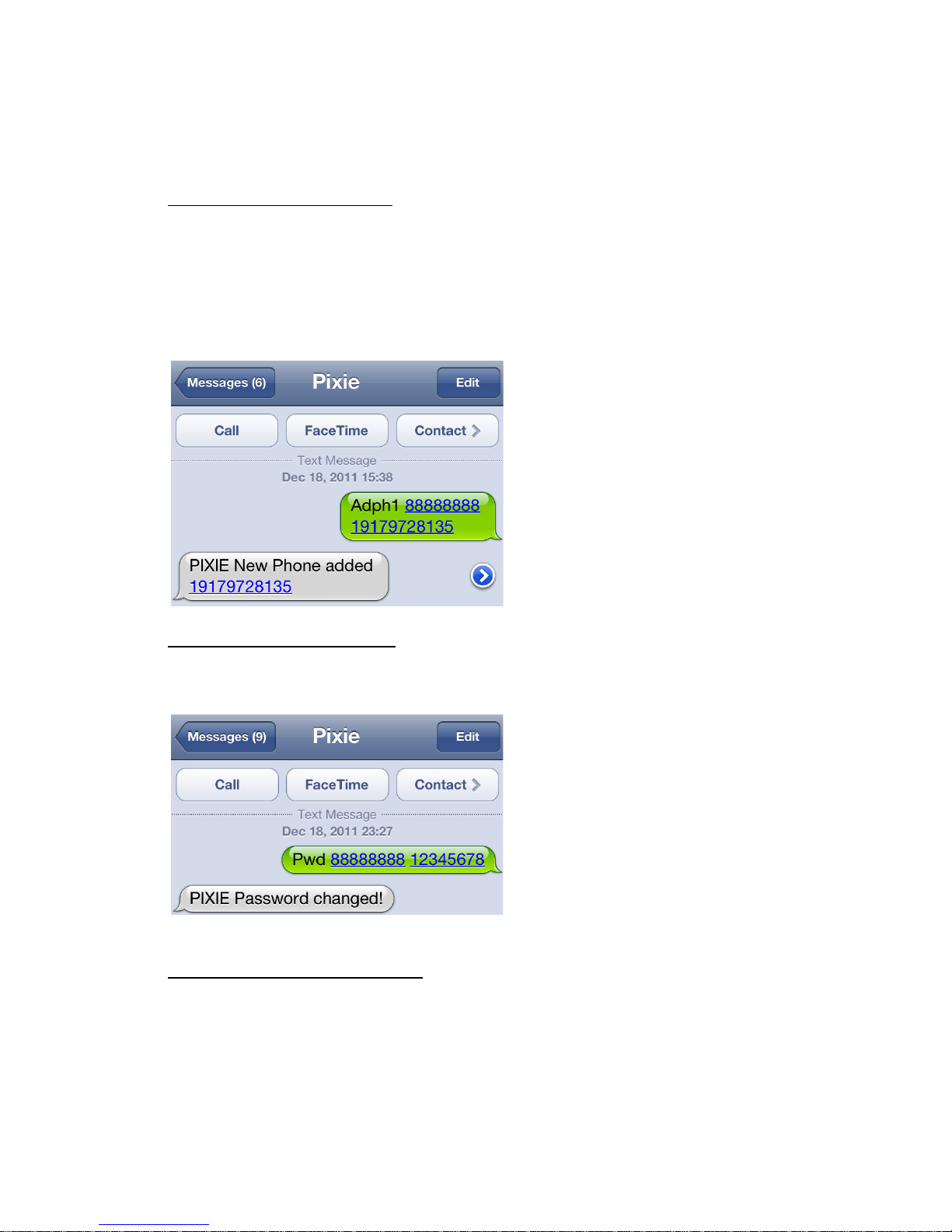
R45!0&'!2,4+%!5*!,4!N45+!*:4'%!'5>@%+21!8((!,:%>!52#'<!!
!
:;>3'>:FFG@E;'HI%0-%'1#/-JI*#+0'1-$$24#3-'3+78-0J'
!
%<![!!8O"\=!]]]]]]]]!=_=K_K?]=AG!!!!!!!!!!ID:#2!'5>@%+!#2!34&(%(!&2!":4'%!h!AJ!
!
!
!
K(FL'EA=(FLAEA;'>?@<AF'
!
=AL>?!! D4!0:%0;!,:%!N45+!+%0#*#%',!*:4'%!'5>@%+2!2,4+%(!#'!R45+!)#+%'!5'#,1!!
'
'
'
'
EAC@!(<='%'>?@<A'<BCDAE'
!
!
EC>?3'>:FFG@E;''D:#2!+%>4C%2!0%33!'5>@%+!#'!234,!'!I=SEJ!
!
%<[!!g-"\?!!]]]]]]]]!!!
Page 11
!
!
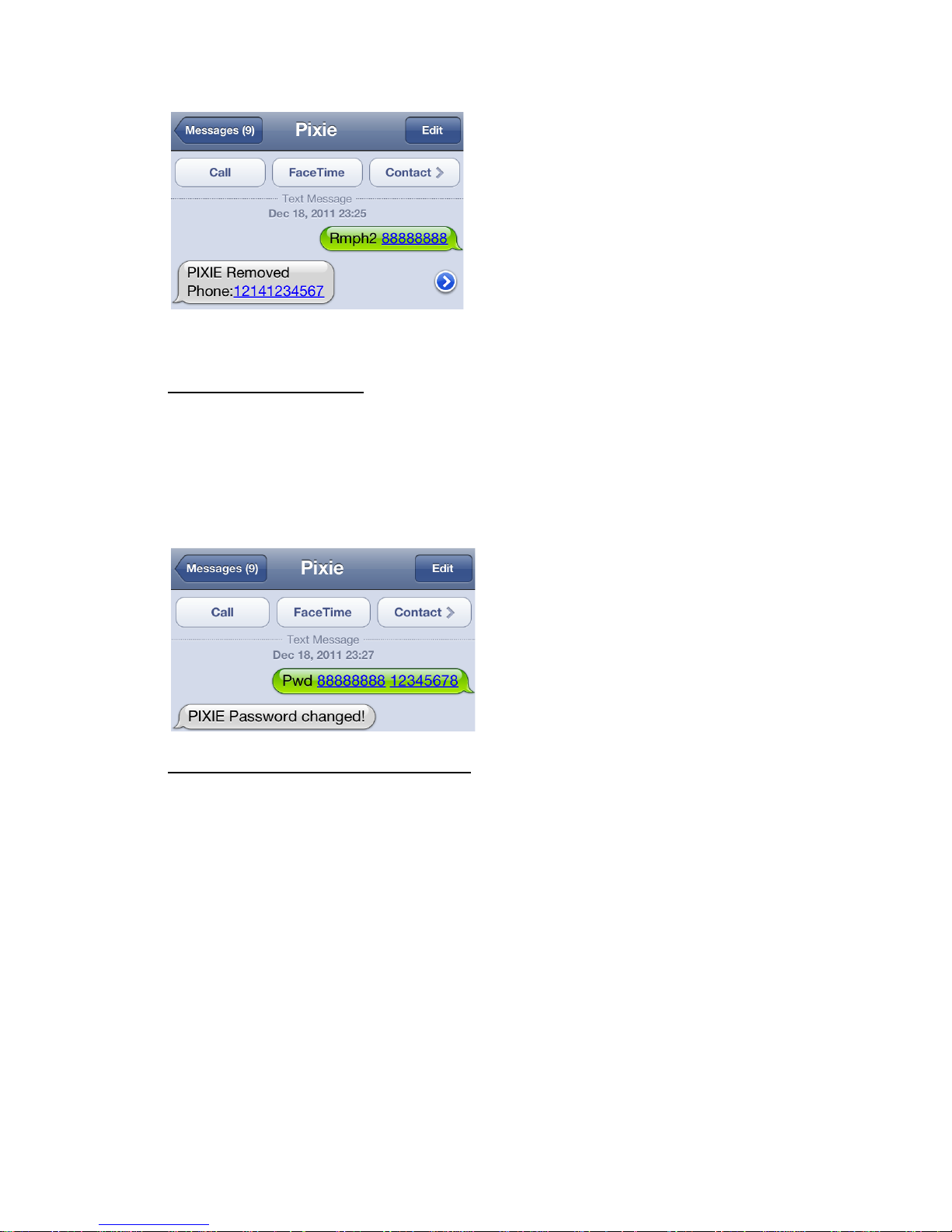
U`4,%!,:&,!L45!(4!'4,!:&C%!,4!*5,!,:%!0%33!'5>@%+!#'!&<&#'1!!!
!
M?:<=(<='>:FFG@E;!
!
D4!0:&'<%!,:%!*&22B4+(.!2%'(!R45+!)#+%'!5'#,!,:%!N4334B#'<!,%$,!>%22&<%^!
!
>G;'#$/'3-N'
!
%1<1[!"8))WTgO!!]]]]]]]]!=?AEGHK]!
!
!
!
FALL(<='%3/'BF(<='.4-'=A@OPA<MA'
!
!R45+!)#+%'!5'#,!0&'!@%!2%,!,4!'4,#NL!L45!#N!#,!>4C%2!@%L4'(!&!*+%2%,!(#2,&'0%!N+4>!
,:%!340&,#4'!2%,!&2!&!d:4>%e!340&,#4'1!D:%!d:4>%e!340&,#4'!#2!2#>*3L!,:%!*42#,#4'!
B:%+%!L45!&0,#C&,%!,:%!7%4SQ%'0%1!D:#2!+&(#52!0&'!@%!2%,!,4!&!>#'#>5>!4N!G!>%,%+21!
Q+4>!L45+!0%33!*:4'%.!2%'(!R45+!)#+%'!5'#,!,:%!N4334B#'<!7%4SQ%'0%!04>>&'([!!!
!
FAL'
!
D:#2!2%,2!,:%!05++%',!*42#,#4'!,4!,:%!'%B!:4>%!*42#,#4'!&'(!,5+'2!4'!,:%!7%4SQ%'0%1!
/,!B#33!+%2*4'(!B#,:!&!04'N#+>&,#4'!)-)!,:&,!#,!:&2!&!'%B!\T-P!340&,#4'!N4+!,:%!<%4S
N%'0%1!
!
<@FAL'
!
D:#2!,5+'2!4NN!,:%!7%4SQ%'0%1!
Page 12
!
!
! !
!
D:&,X2!&33b1!!!R45+!)#+%'!5'#,!B#33!'4B!2%'(!&!,+&'2<+%22#4'!+%*4+,!#N!#,!>4C%2!45,2#(%!
,:%!<%4SN%'0%!+&(#521!!
!
8N,%+!&!<%4SN%'0%!,+&'2<+%22#4'.!L45+!)#+%'!5'#,!B#33!2%'(!&!*42#,#4'!+%*4+,!%C%+L!G!
>#'5,%2.!4+.!L45!0&'!*+4<+&>!R45+!)#+%'!5'#,!,4!2%'(!&!*42#,#4'!+%*4+,!@&2%(!4'!
,#>%.!(#2,&'0%!4+!MTD\!&N,%+!&!,+&'2<+%22#4'Z!8,!&'L!,#>%!L45!0&'!+%c5%2,!&'!
#>>%(#&,%!*42#,#4'!+%*4+,!@L!2%'(#'<[!
!
P(Q'#0'>@F'
!
D:#2!B#33!+%2*4'(!B#,:!&!05++%',!N#$1!!
!
/N!,:%!7")!+%0%#C%+!#2!&3+%&(L!4'!&'(!,+&0;#'<!2&,%33#,%.!L45+!)#+%'!5'#,!B#33!2:4B!
I`PWJ!N4+!,:%!N#$1!/N!#,!#2!'4,!B&+>%(!5*.!#,!B#33!2%'(!&!+%*4+,!2:4B#'<!i!ITaOJ!i.!
B:#3%!#,!2%&+0:%2!,:%!2;L!N4+!2&,%33#,%2!&'(!&!`PW!N#$1!
!
`4,%!,:&,!,:%!7%4SN%'0%!i)PDi!04>>&'(!B#33!+%2*4'(!B#,:!,:%!'%B!\T-P!
aT98D/T`!&'(!&!2%+#%2!4N!*&+&>%,%+2!3#;%[!
!
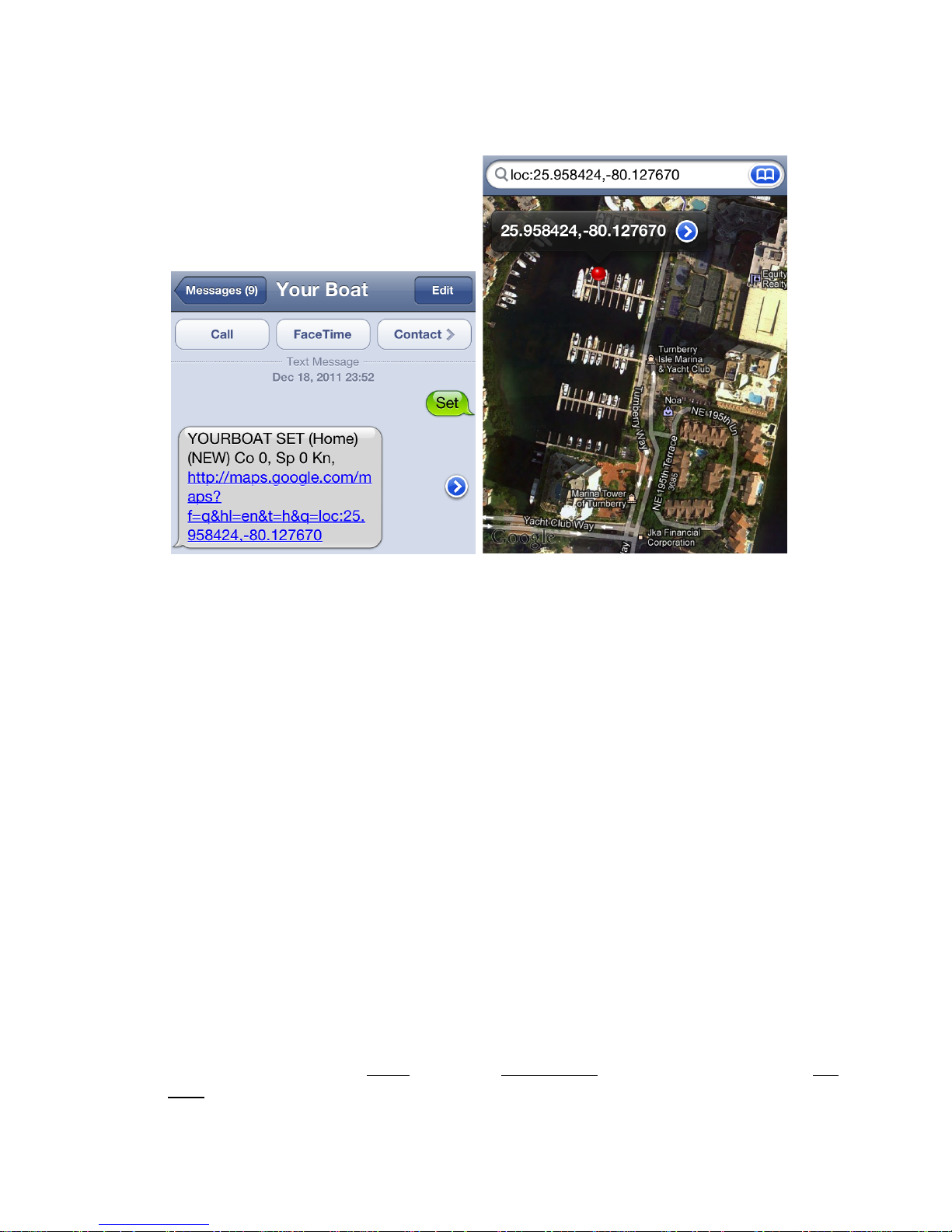
!j?[j]!)#+%'!7QP!I\4>%J!I`PWJ!!94!=K.!)*!j!k,2.!gf!?jj^!7Of!j!!7Df!G^!-7Q^!
:,,*[VV>&*21<44<3%Vbbb1!!
!
W:%+%!g!#2!!,:%!<%4N%'0%!+&(#52!I>J.!7Of.!,:%!(#2,&'0%!@%,B%%'!+%*4+,2!&'(!7Df.!,:%!
,#>%!@%,B%%'!+%*4+,2.!&N,%+!&!N%'0%!,+&'2<+%22#4'!
Page 13

D:%!N&0,4+L!(%N&53,2!,:%!7%4SN%'0%!+&(#52!,4!?jj!>%,%+2.!&'(!2%,2!5*!&!,#>%S@&2%(!
+%*4+,!N4+!%C%+L!G!>#'5,%2!&N,%+!,:%!7%4SN%'0%!!#2!,+&'2<+%22%(1!!/N!L45+!)#+%'!5'#,!
(4%2!'4,!>4C%!>4+%!,:&'!&!N&0,4+LS2%,!Gj!>%,%+2!N+4>!,:%!*+%C#452!+%*4+,%(!
*42#,#4'.!#,!(4%2!'4,!2%'(!&!'%B!+%*4+,1!/,!&225>%2!,:%!&22%,!#2!2,&,#4'%+L1!D:%!N#C%!
>#'5,%!+%*4+,!#2!&33!,:&,!#2!2%',!5',#3!L45!*+4<+&>!#,!4,:%+B#2%1!
!
R45!0&'!0:&'<%!,:%2%!N&0,4+L!*+%2%,2!B#,:!,:%!N4334B#'<!04>>&'(2[!
!
E:;'RRRR!!!B:%+%!$$$$!#2!,:%!'%B!<%4SN%'0%!g8O/6)!#'!>%,%+21!D:%!lm!2#<'#N#%2!&!
2#'<3%!2*&0%1!Q&0,4+L!(%N&53,!#2!?jj!>1!!-#'#>5>!#2!=G!>%,%+21!!!!%1<1^!g8O!=jj!
!
;(FL'RRRR'!B:%+%!$$$$!#2!,:%!'%B!O#2,&'0%!@%,B%%'!+%*4+,2!8QDPg!&!7%4SN%'0%!
,+&'2<+%22#4'1!Q&0,4+L!(%N&53,!#2!j!>!I'4!+%*4+,J1!!-#'#>5>!#2!?jj!>%,%+21!!%1<1[!O/)D!
Gjj!
!
L(CA'RRR''B:%+%!$$$!#2!,:%!D#>%!#'!>#'5,%2!@%,B%%'!+%*4+,2!8QDPg!&!<%4SN%'0%!
,+&'2<+%22#4'1!!Q&0,4+L!(%N&53,!&'(!-#'#>5>!#2!G!>#'5,%21!%1<1[!D/-!?j!
!
W:%'!R45+!)#+%'!5'#,!2%'(2!&!*42#,#4'!Q#$.!#,!(%3#C%+2!,:%!945+2%!I04J!#'!(%<+%%2!
ID+5%J^!)*%%(!I)*J!#'!;'4,2^!,:%!<%4SN%'0%!iO/)Di!*&+&>%,%+!+I7OJ!#'!>%,%+2^!D:%!
<%4SN%'0%!!iD/-i!*&+&>%,%+!I7DJ!#'!>#'5,%2^!-7Q!B:#0:!#2!,:%!:#<:%2,!&3%+,!<%4S
N%'0%!>4'#,4+#'<!>4(%!&'(!3&2,3L!&!:L*%+3#';!,4!744<3%!-&*!,:&,!04',&#'2!,:%!
a&,#,5(%!&'(!a4'<#,5(%!#'!&!(%<+%%2!&'(!(%0#>&3!(%<+%%21!
!
95+24+!L45+!#',%+'%,!%'&@3%(!2>&+,!*:4'%!@+4B2%+!4C%+!,:%!:L*%+3#';!&'(!03#0;!,4!
2%%!,:%!05++%',!*42#,#4'!(#2*3&L%(!4'!744<3%!-&*1!R45!0&'!04*L!,:%!3#';!2,+&#<:,!
4',4!744<3%!P&+,:!#N!+5''#'<!4'!&!"9.!4+!52%!M35%,44,:!,4!,+&'2N%+!,:%!:L*%+3#';!N+4>!
L45+!0%33!*:4'%!,4!L45+!"9.!B:%+%!L45!0&'!03#0;!4'!,:%!:L*%+3#';!&'(!C#%B!,:%!
*42#,#4'!4'!&!>&*1!!
!!
D4!O#2&@3%!,:%!7PTSQP`9P!N5'0,#4'.!2%'(!,:%!04>>&'(!n`T)PDn1!
!
'
OTHER'COMMANDS!
!
P(Q!!B#33!+%2*4'(!B#,:!,:%!#>>%(#&,%!7")!Q#$1!/N!,:%!7")!#2!TQQ!B:%'!,:#2!#2!#225%(.!
#,!>&L!,&;%!2%C%+&3!>#'5,%2!,4!340;!&!2&,%33#,%!2435,#4'!&'(!(%3#C%+!&!N#$1!
!
=ALF(=!!B#33!+%2*4'(!B#,:!,:%!7)-!!=!,4!G!@&+!>%&25+%>%',!&'(!&!))/!2#<'&3!
2,+%'<,:!/'(#0&,4+1!D:%!7")!B#33!2:4B!,:%!'5>@%+!4N!2&,%33#,%2!@%#'<!,+&0;%(!&'(!
N#$%2!4@,&#'%(1!R45!'%%(!&,!3%&2,!A!)&,%33#,%2!N4+!&!N#$1!
!
(<P@!!B#33!+%2*4'(!B#,:!,:%!R45+!)#+%'!5'#,!@&0;5*!@&,,%+L!o.!@4&,!@&,,%+L!F43,&<%.!
&'(!,%>*%+&,5+%2S8>@#%',.!-&$#>5>!+%04+(%(!&'(!-#'#>5>!+%04+(%(!2#'0%!3&2,!
+%2%,!04>>&'(!I!iDP-"giJ1!
Page 14

L:C>AE!&0,#C&,%2!,:%!,&>*%+!2%'2#'<1!D:%!Q&0,4+L!2%,2!R45+!)#+%'!5'#,!#',4!
D&>*%+!>4(%!B:%'!2:#**%(1!!
!
<@L:C>AE!O#2&@3%2!,:%!D8-"Pg!2%'2#'<1!62%!,:#2!#N!B4+;#'<!4'!#'2,&33&,#4'!&'(!
L45!(4'X,!B&',!,4!@%!2%',!>%22&<%21!O4'X,!N4+<%,!,4!%'&@3%!#,!B:%'!N#'#2:%(1!
!
EA>@EL'33SS"3)#! 2%,2!R45+!)#+%'!5'#,!5*!,4!2%'(!&'!86DT-8D/9!n/`QTn!+%*4+,!
%C%+L!n''n!:45+21!!
'
LAC>EAFAL'!&34'%.!+%2%,2!,:%!D%>*%+&,5+%!a4<2!,4!*+%2%',!&>@#%',!,%>*%+&,5+%1!!!
!
LAC>EAFAL'PI4+!9J'C%R'L-72VVC"3'.-72'T!!Q!4+!9!2%3%0,2!5'#,2.!lm!#2!&!2*&0%.!
-&$!&'(!-#'!,%>*2!2%,2!,:%!>&$#>5>!&'(!-#'#>5>!8aPgD!,%>*%+&,5+%2.!g&'<%!#2!
=E!Q!IS=j!9J!,4!=KH!Q!I!]j!9J1Q[!Q&:+%':%#,.!
!9[!9%',#<+&(%1! P1<1[!DP-"gP)PD!Q!==jVVA]!
'
'T?AK>T!!+%2*4'(2!B#,:!!\%3*!#'N4!4'!04>>&'(!2L',&$1!
!
COMPLETE'COMMAND'GUIDE'
!
Command Descriptor
( '+' = dials as '00' )
System controls
PWD old new Change password
ADPHn password Ph-number Add new phone number to phone registry location # n ( 1 to 4)
DEVPH dev ph. Number Set simcard phone #...Will also get the time from first SMS received.
RMPHn password Remove Ph Number in entry #n
REMOVEPHONEn (password) Remove Ph Number in entry #n
GETPH Sends list of active phone numbers
DEVNAM enter device name ..6 characers max
SMSD (password) MASTER SMS Disable ( Use to stop message flood. Then use CSMS
to clear any unsent messages)
SMSE (password) MASTER SMS Enable
CSMS Clear all SMS messages in send queue.
LEDON Turn on LEDs. Red = GPS, Green = GSM Steady = On,
Flashing = signal acquired.
LEDOFF Turn LED's OFF.
TAMP Set tamper sensing ( E5CE + E5OE)
NOTAMP Disable Tamper sensing (E5CD + E5OD)
SNDALL ( Message) Send Message to all phone numbers in p/book
GVER Get Firmware Version.
Page 15

Information Acquisition
STAT Send Status report as STAT packet
INF = INFO Acquire Batteries and Temps.
BATA Acquire batteries
REP nnn.d Send STAT report each nnn.d Hrs STAT is default. D is 1/10hr...
REP nnn.d//opcode,opcode Send Opcode each nn hours. Eg REP 0.5 //BATA,INF,TEMPA
Temperature monitoring
TEMPA Acquire temps ( Temp acquire -40F to 248 F /-40C to 120C)
TEMPR F or C XX//YY Set Tamp alarm set-points xx=Lo YY=high
( -30C to 110C/ -30F to 230F)
TEMPR Reset temp Logs
THEP Temp High alert enable.
THD Temp High alert Disable
TLE Temp Low alert enable
TLD Temp Low alert disable
TNE Temp Normal alert Disable
TEMPDEL nnnn Temp delay of up to 9999 seconds
CTXTL message Change text for Temperature LOW alert
CTXTN message Change text for Temperature NORMAL alert
CTXTH message Change text for Temperature HIGH alert
I/O contact Switches
E1OE Switch 1 OPEN Enable
E1CE Switch 1 CLOSE Enable
E2OD Switch 2 OPEN Disable
E2CD Switch 2 CLOSE Disable
CTXSO<n><space><msg> Change Text message for External Alarm <n> OPEN
CTXSC<n><space><msg> Change text message for External Alarm <n> CLOSED
CTXS1 Change Text for Sw 1 Confirmation
CTXS2 Change Text for Sw 2 Confirmation
EnD tttt Set switch # n DELAY for tttt sec (0 to 9999 sec., 0 = 5sec)
Telemetry ADC
TLnA Telemetry Ch n Acquire reading.
TLnE Enable Telemetry Ch n
TLnD Disable Telemetry Ch n
TELnSET OFF Disable Telemetry on channel n.
CTXTn message // units Change Text message for telemetry Channel n.
Eg: CTXT2 ADC volts ch 2 // volts ( NB. 2 spaces.)
Page 16

Output Control relays
Output setup first requires assigning the functions that are to activate a relay using an OPnXXX function.
Then the relay needs to be armed for operation with a RELnON.
Finally the execution activates the relay from manual or switch commands or Geofence transgression.
Setup commands
OP1REM nn Assign Relay #1 ( O/P # 5) to remote user control. ( Used with switches and
alarms).
OP1REMD Disable Remote manual control ( and switch control)
OP1GFE Assign Relay #1 (O/P # 5) to Geofence Transgression activation. Remains ON.
OP1GFE nn Assign Relay #1 to Geofence Transgression, Hold relay ON for 1 to 99 Minutes.
OP1GFE 0 Assign Relay #1 to Geofence Transgression, Hold relay ON for 1 sec and OFF.
OP1GFD Disable Geofence control of Relay # 1 (O/P # 5)
OP1SOS Assigns Relay #1 to SOS alarm function. Use AKSOS to de-activate manually.
OP1SOSD Disables SOS control of Relay #1.
OP2REM nn Assign Relay #2 ( O/P # 6) to remote user control. Hold relay ON for nn minutes.
OP2REMD Disable Remote manual control ( and switch control)
OP2GFE Assign Relay #2 (O/P # 6) to Geofence Transgression activation. Remains ON.
OP2GFE nn Assign Relay #2 to Geofence Transgression, Hold relay ON for nn minutes.
OP2GFE 0 Assign Relay #2 to Geofence Transgression, Hold relay ON for 5 sec and OFF.
OP2GFD Disable Geofence control of Relay # 2 (O/P # 6)
OP2SOS Assigns Relay #1 to SOS alarm function. Use AKSOS to de-activate manually.
OP2SOSD Disables SOS control of Relay #1.
Arm commands
These override any other command state. They will also reset any active states.
RELnON Allows Relay n to be turned ON/OFF. ( n =1 or2). Main over-ride switch.
RELnOFF Turns Relay n OFF.
Note: relay disablement with a RELnOFF breaks physical access to that relay by all o/p functions.
RELnON, re-ARMS but does not re-activate that connection to the relay for all
preset output functions.
Page 17

Execution commands
WAITnnnn Waits nnnn seconds then executes following command in a string.
Eg: F5E;WAIT20;F5D this executes F5E then waits 10 secs before executing F5D.
F1E Enable O/P #1 . This is the main relay ACTIVATION command. Requires setup.
NB: After a NOKILL, REL1OFF is left set, so a F5E wont work until a REL1ON is first
issued. KILL does a REL1ON automatically, so that will work after a NOKILL.
F1D Disable O/P #1. This is the main relay DE-ACTIVATION command.
KILL ARMS and Activates ( closes) o/p relay #1 (O/P # 5 Ignition Kill function)
KILL = OP1REM;REL1ON;F5E NB: KILL and NOKILL are given full immediate control
of the relay so that no other device can interfere with the high priority action required.
To get overall control, they utilize REL1ON and REL1OFF. This stops anything else
interfering with the function.
NOKILL Deactivate (open) o/p relay #2 (O/P #5 Ignition Kill function)
NOKILL = REL1OFF (De-activates and disables KILL relay.)
SIREN ARMS Siren relay connection but does NOT activate relay. Issues a REL2ON.
( Then use F6E to activate siren relay.)
NOSIREN DISARMS siren relay connection and de-activates Siren relay with REL2OFF. Note,
NOSIREN is a high priority action so uses REL2OFF, which overrides all other devices.
Fast access commands
ENTER //opcode1,opcode2,…Sets up predefined command string for ENTRY. No Passwords.
ENTER<space><password> Activates the ENTRY command string and requires a password.
LEAVE //opcode1,opcode2,…Sets up predefined command string for Leaving. No password.
Eg: SMSE,SET,REL1ON,REL2ON
LEAVE<space><password> Activates the LEAVING command string and requires password.
ANNEXn //opcode1,opcode2,opcode3,etc… where n = 1,2,3 . Extra opcode string when insufficient
space. Eg: ANNEX1 //F1E,F2E,SMSD,ANNEX2
ANNEX2 //F1D,SMSE,ANNEX3 etc
NB: SMSD and SMSE do not need passwords within ANNEX opcode argument.
Page 18

Power settings
PLE Power Loss alert enable
PLD Power loss alert Disable
PGE Power Good alert enable
PGD Power good alert disable
PWRDEL nnn Power sense delay of nnnn secs.
CTXPL Change Text for POWER LOST message
CTXPR Change text for POWER RECOVERY message
EXTVOLT ON //vv.vv Alarm setpoint voltage Note space after ON. Must be over 10 volts.
Geo-Fence
SMSD (password) Disable SMS messages ( only SMSE and CSMS will be obeyed after this)
SMSE (Password) Enable SMS messages
SET Enable Geo-Fence ( = GFE)
NOSET Disable Geo fence ( = GFD. holds GPS Rx OFF)
GFE Enable Geo-Fence
GFD Disable Geo Fence
GPSE Enable GPS receiver
GPSD Disable GPS receiver
GPSA Acquire GPS fix
FIX Acquire immediate fix ( = GPSA)
NOFIX Turn GPS Receiver OFF. ( = GPSD)
GFR ddd Set GeoFence Radius from HOME SET location. ddd in Metres (Min = 200m)
GAD ddd Geofence Automatic Distance based reports every ddd in Metres
GAT mmm Geofence automatic Time based reports every mmm minutes (Min = 5 min)
SPEED U Where U = KN (knots), K ( Km/hr, L ( Miles/hr)
Switch Assignments
Sw # 3: Can be used for Countdown of operating hours.
Sw # 4 SOS call. Must first be activated.
Sw# 5 Tamper switch. Activate i/p sw # 5 for both OPEN OR CLOSE.
Output Assignments
O/P Relay# 1 (O/P # 5) assigned to KILL switch function. See OP1REM , OP1GFE etc
O/P Relay#2 (O/P # 6) assigned to Siren function. See OP2REM, OP2GFE etc.
Page 19

Hour Countdown
SETCOUNTER //<O or C or N> Engine counter uses SW #3 as controlling signal.
<O: Open or C: Closed or N: (Default) to Disable.
Eg SETCOUNTER //C
COUNTDOWN nnnn nnn= 0 to 9999 hours. This STARTS the countdown.
RCOUNT Sends back message with following info:
COUNTDOWN Hours remaining: yyyy, START :nnnn
Automatically sends Alert at zero hrs. Continues
countdown & stops at -999hrs
Report
REP nnn.d//opcode,opcode,opcode.. Where nnn.d = time between reports (Hrs) and 1/10 hr.
nnn.d = Zero to disable.
eg.REP 20//BATA,RCOUNT,TEMPA.
Max 30 chars. Note commas.
Special commands
ASK (Network USSD command) sends command locally & relays to cellphone. Eg *120#
Must have local network USSD support.
Alias commands
FIX = POS = GPSA
NOFIX = NOPOS =GPSD
SET = GFE
NOSET = GFD
INF = INFO
GETPH = GETPHONE
ADPHn = ADDPHONEn
RMPHn = REMOVEPHONEn
PWD = PASSWORD
STAT = STATUS
REP nn = REPORT nn
TAMP = TAMPER
NOTAMP = NOTAMPER
TMPR = TEMPRESET
SIREN = REL2ON
NOSIREN = REL2ON
KILL = OP1REM;REL1ON;F5E
NOKILL = REL1OFF
!
Page 20
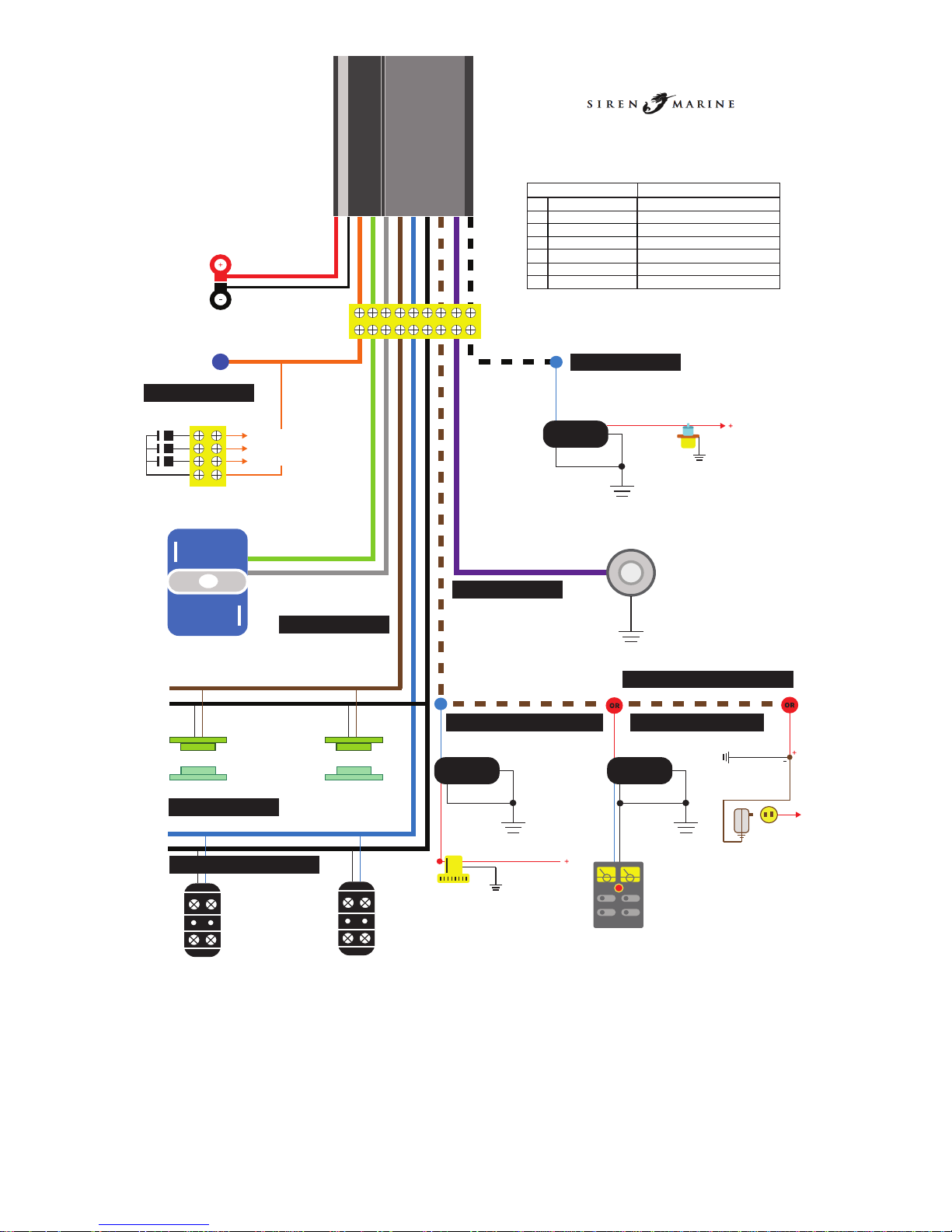
Typical Application Wiring Suggestions
The following wiring ideas are optional. Only requires two wires to
perform its basic monitoring and tracking function (Red & Black).
Use others in any combination that meets your needs.
Contact us for programming commands and hints for each function.
IMPORTANT: Switch inputs are Contact closure and water sensing only. In order
to sense a voltage (eg. 12v), always use a 12v sensor pigtail to isolate the input
circuit from the 12v boat voltage. These senors offer an optically isolated contact
signal to any unit switch input.
1 RED Battery Positive (+) (12v DC)
2 BLACK Battery Negative (-)
3 BLUE Bilge Float Switch
4 BROWN Door / Hatch Entry
5 GREY Siren common
6 GREEN Siren Alarm (N.O.)
7 ORANGE Ignition Kill
Wire Color Function
CABLE
1. RED
2. THICK BLACK
7. ORANGE
6. GREEN
5. GREY
4. BROWN
THIN BLACK
3. BLUE
BLACK & WHITE
PURPLE
BROWN & WHITE
MULTI-ENGINE KILL WIRING
SIREN / STROBE ALARM
(NOT INCLUDED)
ENGINE HOUR COUNTER
SOS ALARM
BILGE PUMP OVER-RUNNING ALERT PANEL WARNING LIGHT ALERT
DOOR / HATCH ENTRY
ELECTRONIC HIGH WATER ALERT
SHORE POWER LOSS / RECOVERY ALERT
REED Switch
MAGNET
Door or Hatch entry sensor not included.
Bilge sensors. Input
sensors terminated
at any convenient
connector. Activate
Alert when wet.
To Port Engine kill wire
Center Engine
To STBD Engine kill wire
To ORANGE 7 for up to
Triple Engine Kill
Ignition KILL tap. Single Engine Kill
Boat Battery Positive
Boat Battery Negative
Red
Blue
Exisiting 12v boat wiring
Engine oil pressure switch or ignition circuit,
senses operating hours for hour counter / alert.
Exisiting 12v electrical panel
Warning lamp for
Bilge pump, engine
trouble, etc.
Exisiting 12v boat wiring
Optional bilge pump sensing
Red
Red
Blue
Blue
110V AC
Shore power
Shore power sensing, AC
adapter with 3v DC output
connects directly to any
free switch input.
12v PIGTAIL*
12v PIGTAIL*
12v PIGTAIL*
* The 12v pigtail, an optional accessory must be used when sensing a
12v circuit to protect the unit. Available from your local dealer or
at www.sirenmarine.com
Page 21

Trouble'Shooting'Guide'
!
!
Trouble Shooting
Symptom
Solution
General
Unit does not respond
to SMS commands
The SIM chip is not activate. Acivate the SIM chip.
No SIM is installed. Install SIM chip.
The SIM chip is defective. Put the SIM into a regular
cellphone and test. Send a text to another cellphone. If
SIM is defective, contact SIM suplier.
The SIM is installed improperly. Orient correctly and
make sure the holder is firmly closed.
The battery is not plugged in. Open the unit and plug in
the battery.
The call to phone number is incorrect in the unit's call list
The call to number was entered incorrectly in the unit.
Verify the syntax and try again. Try 'GETPHONE' to see
the contents of the call list.
The phone number is correct, but in your area you need a
1 in front of the number.
When entering the call to phone numbers, do not use
spaces or formatting. 11234567890. 1+10 digiti phone
number.
Geo-Fence
Frequent false alerts
Your geo-fence is probably too small, try increasing the
radius. Auracy is a variable of many diffeent things,
atmospheric conditions, unit location, time of day, sun
spots, surrounding building & terraine, etc. All Siren
Marine products have very high gain GPS antennas and
can be mounted under cowlings and thin decks
Unit location. Send the GETSIG command and se if the
GPS has a good signal. If the signal is consistantly poor,
try mounting the unit is a different location.
On an outboard installation, when the motor is tilted up
and not in use, it is turned so that the unit is on the
downward facing side, thus the GPS can not see the sky,
turn the motor the opposite direction.
No GPS Fix
Turn on the GPS. SMS = GPSON
On an outboard installation, when the motor is tilted up
and not in use, it is turned so that the unit is on the
downward facing side, thus the GPS can not see the sky,
turn the motor the opposite direction.
The unit not mounted in a suitable location to receive the
GSM signal. Send GETSIG to verify signal strenth.
Relocate unit in a suitable location.
Page 22

The GPS antenna cable has come unplugged from the
circuit board. Open the unit and carefully plug in the
antenna to the circuit board. The GPS antenna is located
above the battery and the plug is on the left side of the
unit, the plug recepticle is located in the upper left corner
of the circuit board.
!
!
!
 Loading...