

Page 1

S310_USER GUIDE_V1 04/07/2013
1
SIP Communicator
Spitfire S310 User Guide
Page 2

S310_USER GUIDE_V1 04/07/2013
2
TABLE OF CONTENTS
Handset Description ………………………………………….. Page 3
Keypad Lock …………………………………………………….. Page 6
Directory …………………………………………………………… Page 6
Adding an Entry …………………………………………. Page 7
Edit or Delete an Entry ……………………………….. Page 7
Black List ………………………………………………….. Page 7
Dialing from Directory ………………………………… Page 7
Making a Call …………………………………………………….. Page 7
Placing call on Hold …………………………………………… Page 7
Making 2nd Call …………………………………………… Page 7
Answering a call ………………………………………………… Page 8
Denying an Incoming Call ……………………………. Page 8
Call History ………………………………………………………… Page 8
Do Not Disturb (DND) …………………………………………… Page 8
Call Pick Up ………………………………………………………... Page 8
Call Forwarding …………………………………………………… Page 9
Call Waiting ………………………………………………………… Page 9
Call Transfer ………………………………………………………. Page 10
Blind Transfer (handset) ……………………………… Page 10
Blind Transfer (speaker/headset) …………………. Page 10
Attended Transfer (handset) ……………………….. Page 10
Attended Transfer (speaker/headset) …………… Page 10
Call Parking ………………………………………………………. Page 10
Parking a call ……………………………………………… Page 10
Retrieving a Parked Call ……………………………… Page 10
Retrieving a Specific Parked Call …………………. Page 11
3 Way Conference ………………………………………………. Page 11
Instant Messaging ……………………………………………… Page 11
Voicemail …………………………………………………………… Page 12
Setting up voicemail …………………………………… Page 12
Retrieving Voicemail Messages …………………… Page 12
Call Intrusion ……………………………………………………… Page 13
Add-Hoc Call Recording ………………………………………. Page 13
Page 3
S310_USER GUIDE_V1 04/07/2013
3
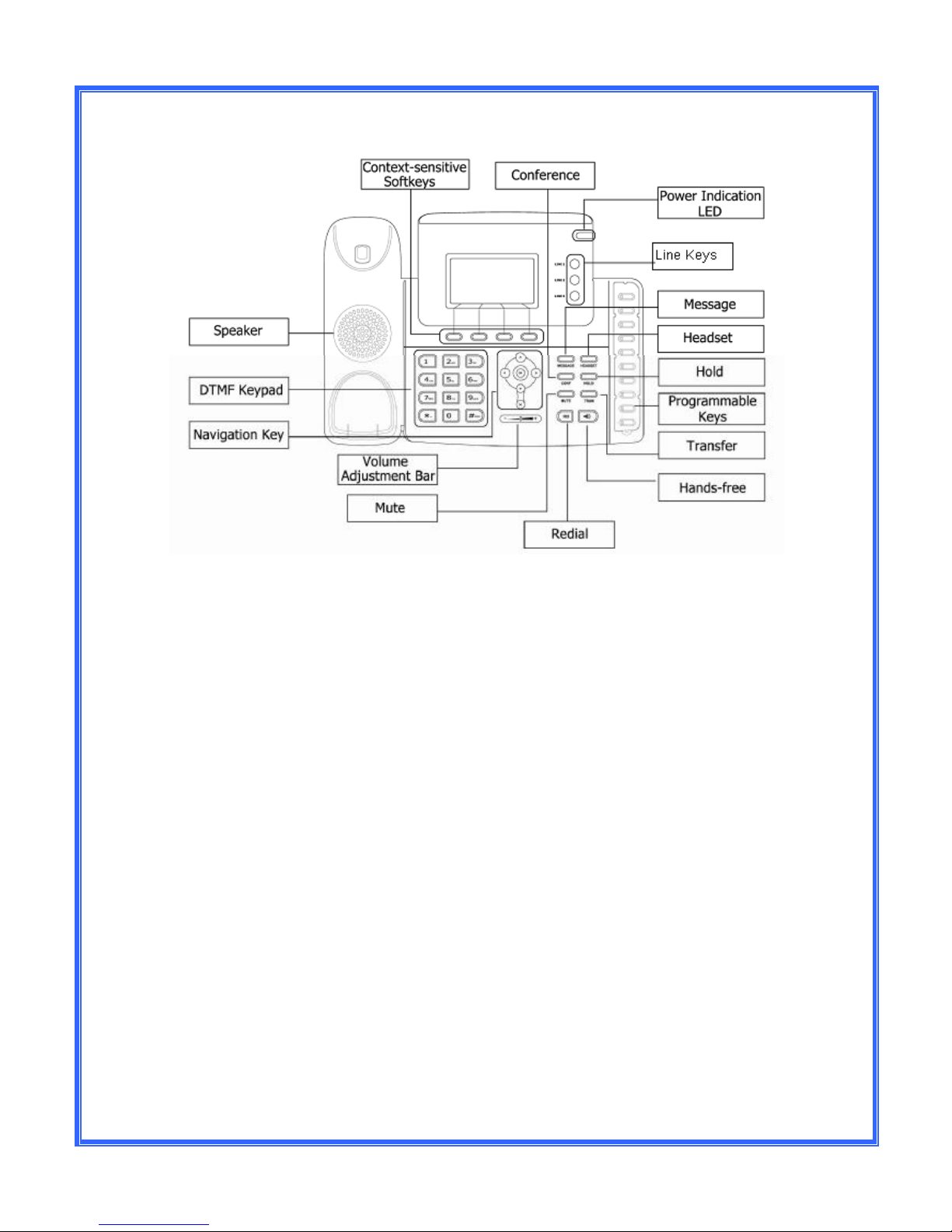
Keypad
The DTMF numeric keypad
• Entry of digits only (e.g., when dialing a phone number)
• Typing in letters and digits.
The Power Indication LED
· On: the phone is powered.
· Off: the phone is not powered.
Line Keys
· 3x Line buttons for making simultaneous call.
Programmable Keys
Used for various functions such as Busy Lamp Fields (BLF), features and speed
dials. These are pre-programmed by the system administrator but can be
changed via the “Menu” key on the handset.
Page 4
S310_USER GUIDE_V1 04/07/2013
4
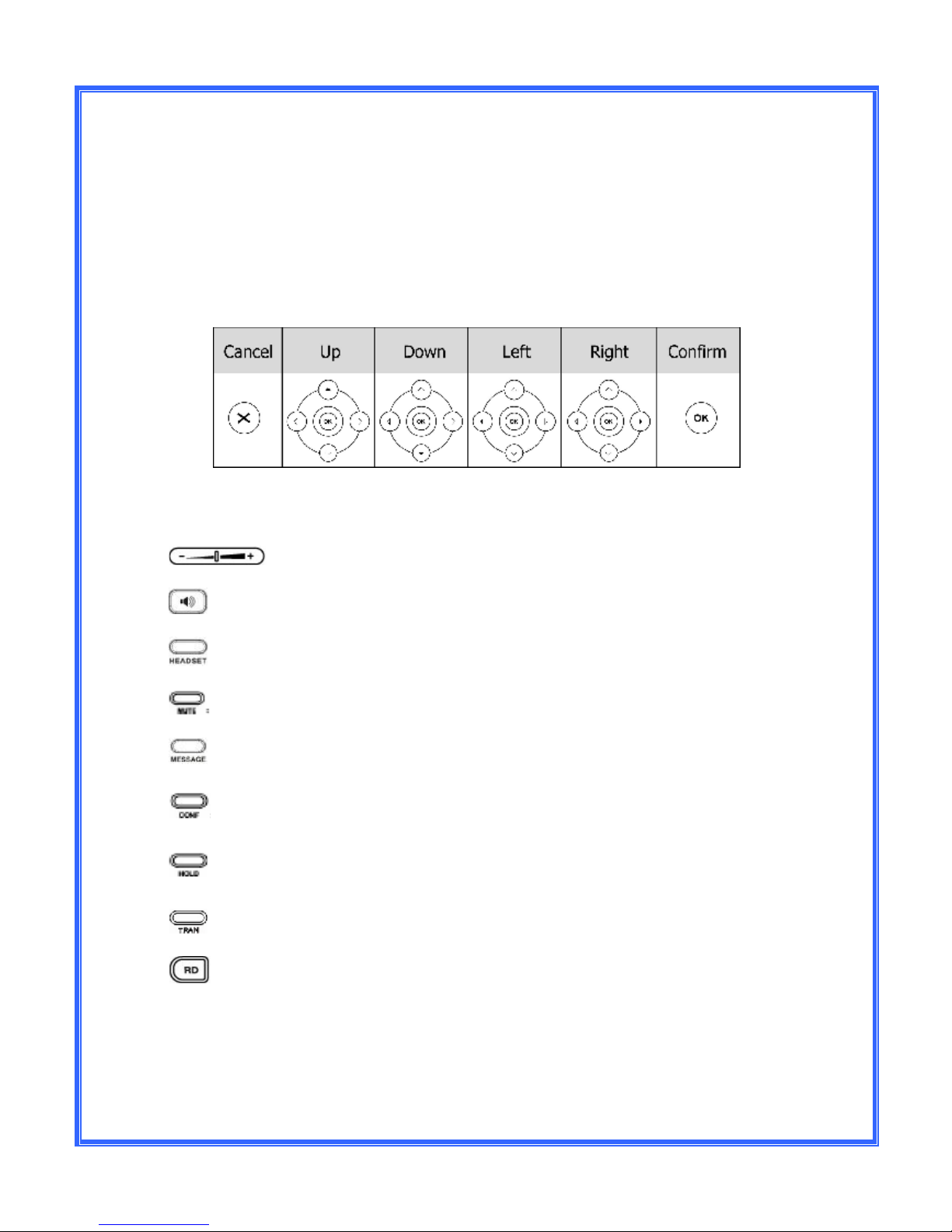
Navigation Keys
Use the navigation keys to navigate in the display menus and confirm/cancel
actions.
The audio device control keys can perform the following actions:
Adjust the volume of the handset, headset, speaker and ring tone.
Allows for hands-free communication during calls;
Place and receive calls through an optionally connected headset.
Mute audio transmission locally during calls.
Allow users to access the voicemail messages.
Enable set-up of 3-way conference.
Place a call on hold or resume it.
Transfer the current call to a third party.
Redial.
Page 5
S310_USER GUIDE_V1 04/07/2013
5
Programmable Keys LED Instruction
LED Status
Description
Steady Red
Busy
Blinking Red
Ringing
Off The phone is in idle
status whatever registered /unregistered
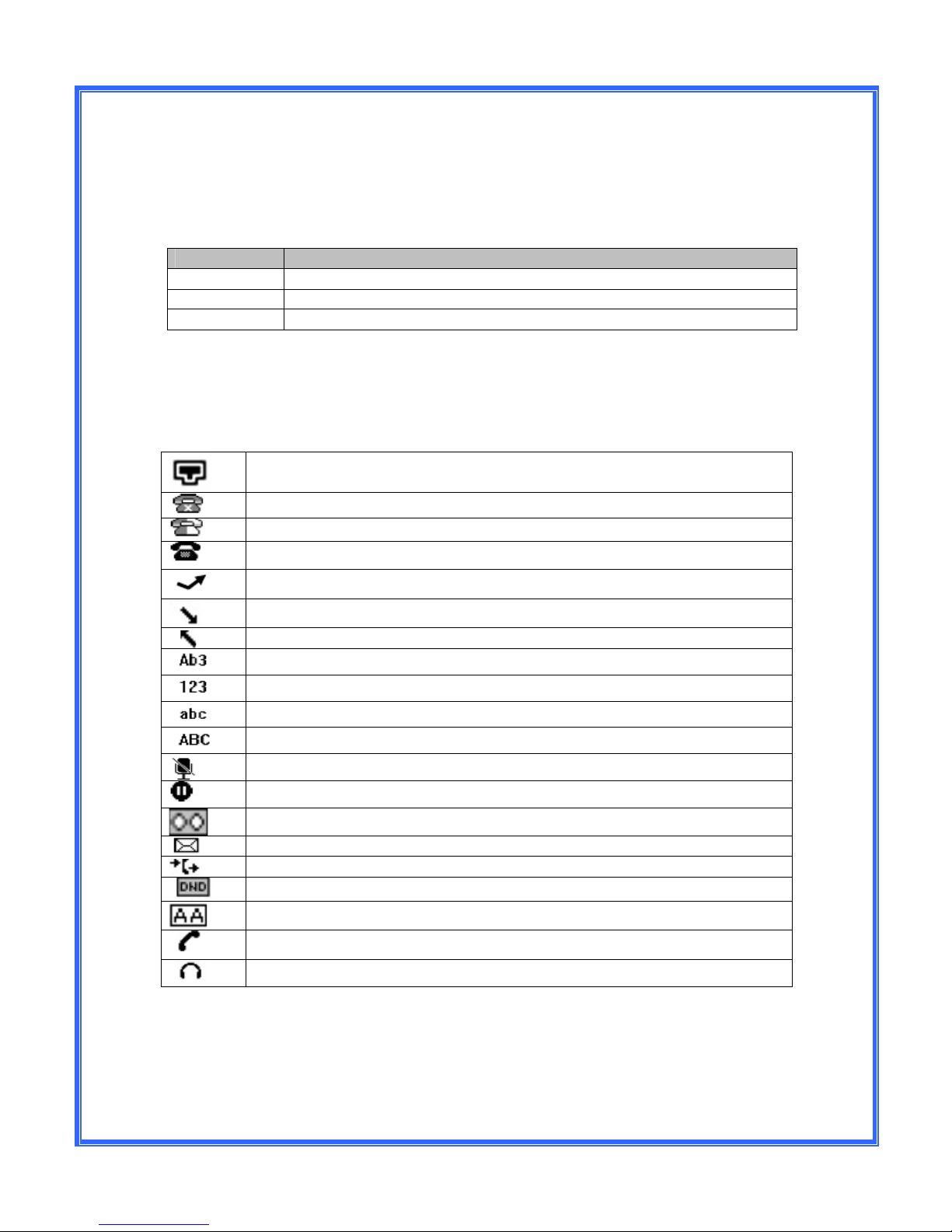
Icon Instruction
The IP Phone displays different kinds of icons on its LCD; you can refer to the
following for their meanings:
Flashes when the internet is disconnected
Account register failed
Account re
gistering
Account register successful
Missed Calls
Call in
Call out
Input Method: all letters and numbers
Input Method: numbers
Input Method: letters in lower case
Input Method: letters in upper case
Call mute
Call hold
V
oicemail
SMS
Call forward
Do not disturb
Auto answer
In handset mode
In headset mode
Page 6

S310_USER GUIDE_V1 04/07/2013
6
Keypad Lock:
You can lock the following specific keys:
MENU Keys: You can not access the MENU of the phone.
Function Keys: You can not access the MESSAGE, HEADSET, CONF, HOLD,
TRAN, and RD Keys.
Talk Call Only: You can only use the phone to answer the incoming calls.
To enable keypad lock via Phone interface:
· Press MENU->Settings->Advanced, enter the password, and then press
Confirm soft key.
· Select Phone Setting->Lock.
· Use the navigation key to highlight the option you want to lock.
· Press Save soft key to active the change, and back soft key to return to
the previous screen.
· The icon will be displayed on the top right corner of the idle screen.
To unlock the phone via Phone interface:
· Press Menu soft key, you are prompted for the password.
· Enter the password, press Confirm soft key, the phone is unlocked.
· The icon will be disappearing from the idle screen.
Directory:
Adding an entry
· Press Addr->Contact List->Ok.
· Press Add soft key; enter the Name, scroll down to enter Office/Mobile
number of the contact. Use the 123 soft key to select between numeric
and upper/lower case alphanumeric modes.
· Press Save soft key to add the contact or Cancel soft key to cancel the
change.
Page 7

S310_USER GUIDE_V1 04/07/2013
7
Edit or Deleting an entry
· Press Addr->Contact List->OK.
· Use the navigation key to highlight the entry you want to edit or delete.
· Press the Option soft key.
· To delete the entry select Delete and press OK.
· To edit the entry, select Detail, make the desired changes and press
Save.
· Press Cancel soft key to return to the Directory.
Black List
Callers added to the Black List will go straight to your voicemail.
Dialing from the Directory
· Press Addr->Contact List->OK.
· Use the navigation key to highlight the entry you want dial.
· Press the Send or OK button.
Making a call:
To make a phone call:
· Pick up the handset, icon will be showed in the idle screen.
· Press the Speaker button, icon will be showed in the idle screen.
· Press the Headset button if the headset is connected to the headset port
in advance. Dial the number and press Send or OK. The icon will be
showed in the idle screen.
Note: You can also dial the number first, and then choose the method you will
use to speak to the other party.
Placing a Call on Hold:
· While on an active call, press the Hold button.
· To retrieve the held call, press the Resume button.
To active a 2nd or 3rd call:
· Place the 1st call on Hold.
· Select another Line Key.
· Dial the number and press Send or OK.
· Toggle between held calls by pressing the associated line button.
Page 8

S310_USER GUIDE_V1 04/07/2013
8
Answering a call:
Answering an incoming call
· If you are not on an active call, lift the handset, press the Speaker button/
Answer soft key to answer using the speakerphone or press the Answer
button to answer using the headset.
· If you are on an active call, press the Line key to answer the 2nd call. This
will place the 1st call on hold and you can toggle between the calls by
pressing the associated Line Key.
Note: During the conversation, you can alternate between Headset, Handset and
Speaker phone by pressing the corresponding buttons or picking up the handset.
Denying an incoming call
· Press Reject soft key to deny the incoming call directly.
Call History:
To access the handset call logs
· Press the History soft key.
· Use the navigation button to scroll to All Call, Dialed Calls, Received
Calls, Missed Calls or Forwarded Calls.
· Use the navigation key to select an entry.
· Press Send to dial the number.
· Press Options to check the detail of the call, add it to the phone book or
black list or to delete the entry.
DND (Do Not Disturb):
Note: All calls will be directed to your voicemail when DND is active.
· Press DND soft key to active DND Mode and the display shows: icon.
· Press DND soft key again to deactivate DND mode.
Call Pick Up
To answer a call ringing at another extension Press *87 or press the Pick Up
Page 9

S310_USER GUIDE_V1 04/07/2013
9
Call Forwarding:
This feature allows you to forward an incoming call to another phone number e.g.
anther extension, a group or an external number. When call forwarding is active
the following icon is displayed in the screen.
The following call forwarding events can be configured:
· Cancel: Call forwarding is deactivated.
· Always: All incoming calls are immediately forwarded.
· Busy: Incoming calls are forwarded when the phone is busy. (Note; for
this feature to work, Call Waiting must be deactivated on the handset)
· No Answer: Incoming calls are forwarded when the phone is not
answered after a specific period.
· Busy/No Answer: Incoming calls are forwarded if the handset is either
busy or is not answered.
To configure Call Forwarding
· Select: Menu->Features->Forward.
· Select the type of forward you want.
· Enter the phone number you want to forward your calls to.
· Press Save to save the changes.
· When selecting No Answer forward, enter the time, in seconds, that the
handset should ring before forwarding the call.
Note: By default all calls will divert to your voicemail if not answered after a
specific time.
Call Waiting:
This call feature allows your phone to accept other incoming calls to an extension
already in an active call.
To enable/disable Call Waiting:
· Select Menu->Features->Call Waiting.
· Use the navigation keys or Disable/Enable soft key to active/inactive call
waiting.
· Press Save soft keys to save the changes.
Page 10

S310_USER GUIDE_V1 04/07/2013
10
Call Transfer:
Blind Transfer (When using the handset)
· Press Tran Button or Tran soft key during the active conversation, the
call will be on hold.
· Dial the extension or telephone number.
· Hang up to complete the transfer.
Blind Transfer (When using the speakerphone or headset)
· Press Tran Button or Tran soft key during the active conversation, the
call will be on hold.
· Dial the extension or telephone number and press the Send or OK button.
· Press the Tran Button.
Attended Transfer (When using the handset)
· Press Tran Button or Tran soft key during the active conversation, the
call will be on hold.
· Dial the extension or telephone number and press send.
· Wait for the 3rd party to answer and announce the call.
· Hang up to complete the transfer.
Attended Transfer (When using the speakerphone or headset)
· Press Tran Button or Tran soft key during the active conversation, the
call will be on hold.
· Dial the extension or telephone number and press send.
· Wait for the 3rd party to answer and announce the call.
· Press the Tran button to complete the transfer.
Note: To transfer a call directly to another user’s voicemail, follow the blind
transfer instructions above but include an “8” before the extension number.
Call Parking:
To park a call
· Press the Call Park button.
· You will hear a message informing you that the call has been parked and
the orbit number.
To retrieve a parked call
· Dial *86 or the Park Pick Up button.
Page 11

S310_USER GUIDE_V1 04/07/2013
11
To retrieve a specific parked call
· Dial *86 and the park orbit number. (The extension number of the user that
parked the call)
3-way Conference:
To establish a conference:
· Press the Conf soft key during an active call.
· The first call is placed on hold. Dial the number to conference in and press
the Send soft key or OK button.
· When the call is answered, the conference call will include you and the
other two parties.
· Hang up to disconnect all parties.
Instant Messaging:
To send an instant message to another user:
· Press the Message key.
· Select Text Message
· Select New Message.
· Type in you message using the keypad. Use the Ab3 soft key to edit the
key entry options.
· Press Send.
· Scroll to the “To” field.
· Enter the destination extension number and press Send.
Receiving Instant Messages:
· When you receive an instant message, you phone will beep, the Message
lamp will come on and the display will show how many new text
messages you have.
· Press the View soft key or the Message button.
· Press Read to view your message.
· You can then reply by pressing the Reply button.
Note: Instant message can also be sent via the user web interface. Please see
Web Interface User guide for instructions on how to use this feature.
Page 12

S310_USER GUIDE_V1 04/07/2013
12
Voicemail:
Setting up your voicemail
Press *97
If it is the 1st time you are accessing your mailbox, you will be prompted to record
your name. Follow the prompts.
You will be directed to the Main Menu of your mailbox.
- Select Option 1 to listen to your messages.
- Select Option 2 to change your access code and press # to save.
- Select Option 3 to record your name and press # to save.
- Select Option 4 to record your personal greeting and press # to save.
Retrieving Voicemail Messages
· When messages are left in your mail box, the message lamp will come on
and the display will indicate that you have a new voice message.
· To access your mailbox press the Message button or the Connect soft
key.
While listening to voicemail messages:
· Dial 1 to rewind the message
· Dial 2 to stop play back
· Dial 3 to fast forward.
· Dial 4 to repeat the message
· Dial 5 to hear the message details
· Dial 6 to send the message to another mailbox
· Dial 7 to delete the message
· Dial 8 to return the call (if caller withheld their number this will not work)
· Dial 9 to save the message.
Page 13

S310_USER GUIDE_V1 04/07/2013
13
Call intrusion:
Note: Permission must be assigned by the system administrator in order to use
this feature.
The call intrusion features enables an extension to “listen in” to another
extensions conversation provided they have been assigned permission to do so.
There are three modes.
1. Call Barge-In: Is this mode a tone will be played to both parties to indicate
that someone has barged into the conversation. Both parties will be able
to hear the user that has barged in.
2. Call Tech Mode: In this mode only the extension on the PBX is made
aware that someone has barged into the conversation. The user joining
the call can speak to the extension user with out the 3rd party being aware.
3. Listen In Mode: Neither party in the conversation is aware that another
user is listening and neither party can hear the user that has barged in.
· To Barge into another extensions call dial *81+extension number and
press Send or OK.
· To Barge in using Tech Mode, dial *82+extension number and press
Send or OK.
· To Barge in using Listen In Mode, dial *83+extension number and press
Send or OK.
Call recording:
The call recording feature allows you to record a call into your web mail mailbox.
· To start recording, press the Record On button if configured or dial *12.
· To stop recording, press the Record Off button if configured or dial *13.
· To access the recordings, log onto your web mail account and go to
lists/mailbox.
Note: For instructions for logging onto your web mail account see the Webmail
user guide.
 Loading...