

Page 1
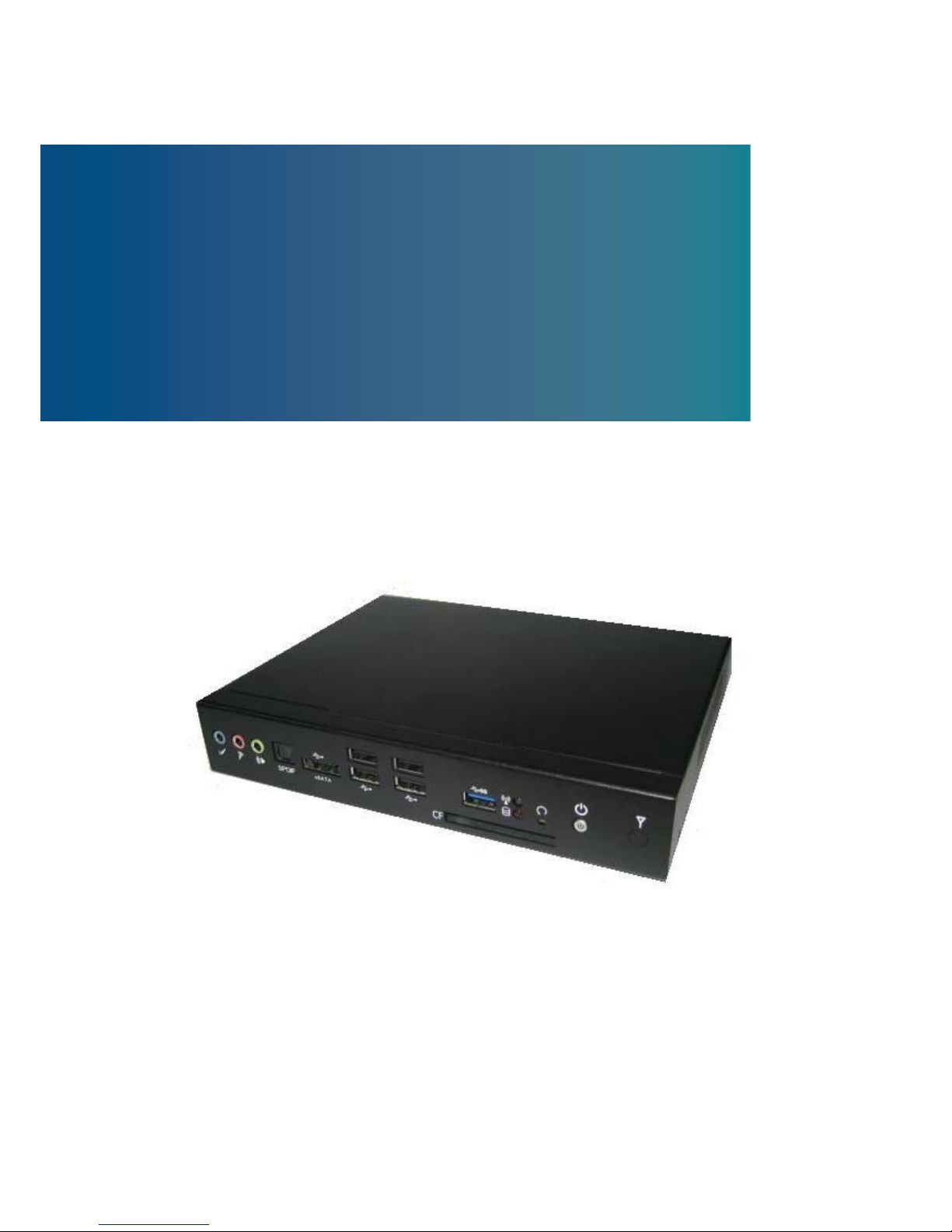
Small PC with 2nd Generation Intel® Core i7/i5/i3 Processors
User’s Guide
DSS-1300
DSS-1300 User’s Manual
Page 2

Contact Info:
Visit our site at:
liability arising out of the application or use of the information or products described herein. This user’s
guide may contain or reference information and products protected by copyrights or patents and does
names used in this user’s guide are the property of their respective owners. All rights reserved. This
guide in other publications. Customers may alter this user’s guide and publish it only after they remove
warranted by evolution in user needs or progress in engineering or manufacturing technology.
Changes which affect the operation of the unit will be documented in the next revision of this user’s
guide.
Revision Date Edited by Changes
1.0 2011/10/05 Zack Initial Release
not convey any license under the patent rights of Sintron, nor the rights of others.
user’s guide contains information proprietary to Sintron. Customers may reprint and use this user’s
DSSP-1300 User’s Manual
SINTRONES Technology Corp.
www.sintrones.com
Tel: +886 2 82280101
Fax: +886 2 82280100
14F.-3, No.736, Zhongzheng Rd., Zhonghe Dist.,
New Taipei City 235, Taiwan (R.O.C.)
© 2011 SINTRONES Technology Corp. All rights reserved.
The information in this user’s guide is provided for reference only. SINTRONES does not assume any
SINTRONES is a registered trademark of Sintron. All trademarks, registered trademarks, and trade
the SINTRONES name, cover, and logo.
SINTRONES reserves the right to make changes without notice in product or component design as
Page 3

Content
Content ....................................................................................................................... 3
Figures ....................................................................................................................... 4
Tables ......................................................................................................................... 5
Safety Instructions ...................................................................................................... 6
Before You Begin ............................................................................... 6
When Working Inside a Computer
..................................................... 7
Preventing Electrostatic Discharge .................................................... 7
Instructions for Lithium Battery ........................................................... 8
Voltage Ratings .................................................................................. 8
Preface ....................................................................................................................... 9
How to Use This Guide
...................................................................... 9
Unpacking .......................................................................................... 9
Regulatory Compliance Statements ................................................... 9
Warranty Policy ................................................................................ 10
Maintaining Your Computer .............................................................. 11
Chapter 1 Introduction ........................................................................................... 14
Overview .......................................................................................... 14
System tour ...................................................................................... 16
Mechanical Dimensions ................................................................... 19
Chapter 2 Getting Started
...................................................................................... 21
Setting up your PC ........................................................................... 21
Mounting your PC to a Monitor ......................................................... 24
Changing Memory and mini-PCIe .................................................... 26
Chapter 3 AMI BIOS Setup
.................................................................................... 29
Overview .......................................................................................... 29
Main Menu ....................................................................................... 30
Advanced Menu ............................................................................... 31
Boot Menu ........................................................................................ 43
Security Menu
.................................................................................. 44
Save & Exit Menu
............................................................................. 45
Chapter 4 Driver Installation .................................................................................. 47
Connecting VESA Mount on DSS-1300 ......................................... 24
DSS-1300 User’s Manual
Page 4

Figures
Figure 1 Front Panel ................................................................................................. 16
Figure 2 Rear Panel ................................................................................................. 18
Figure 3 Mechanical Figures .................................................................................... 20
Figure 4 Connecting the DVI cable .......................................................................... 21
Figure 5 Connecting USB Mouse & Keyboard ......................................................... 22
Figure 6 Network Cable with RJ45 Connector ......................................................... 22
Figure 7 Turing on the System
................................................................................. 23
Figure 8 VESA Mount Assembly .............................................................................. 24
Figure 10 VESA Mounting ........................................................................................ 25
Figure 11 Opening the Cover on the Bottom ............................................................ 26
Figure 12 Bottom View of Main Board
...................................................................... 26
Figure 13 SO-DIMM Installation (1) .......................................................................... 27
Figure 14 SO-DIMM Installation (2) .......................................................................... 27
Figure 15 mini-PCIe Installation ............................................................................... 28
Figure 9 VESA Mount on DDS-1300 ...................................................................... 24
DSS-1300 User’s Manual
Page 5

Tables
Table 2 BIOS Main Menu ......................................................................................... 30
Table 3 BIOS Advanced Menu ................................................................................. 31
Table 4 BIOS Advanced Menu – Display Configuration............................................ 32
Table 5 BIOS Advanced Menu – Super I/O Configuration ........................................ 33
Table 6 BIOS Advanced Menu –Super IO Configuration – Serial Port 1 Conf. ......... 33
Table 7 BIOS Advanced Menu –
Power Management Configuration ....................... 35
Table 8 BIOS Advanced Menu – CPU Advanced Configuration ............................... 36
Table 9 BIOS Advanced Menu – Trusted Platform ................................................... 37
Table 10 BIOS Advanced Menu – SATA Configuration ............................................. 38
Table 11 BIOS Advanced Menu – Intel TXT (LT) Configuration ................................ 39
Table 12 BIOS Advanced Menu –
AMT Configuration .............................................. 39
Table 13 BIOS Advanced Menu – USB Configuration .............................................. 41
Table 14 BIOS Advanced Menu – H/W Monitor ........................................................ 42
Table 15 BIOS Boot Menu ........................................................................................ 43
Table 16 BIOS Security Menu .................................................................................. 44
Table 17 BIOS Save & Exit Menu ............................................................................. 45
Table 1 DSS-1300 Product Specifications ............................................................. 16
DSS-1300 User’s Manual
Page 6
Safety Instructions
Before Y ou Begin
Before handling the product, read the instructions and safety guidelines on the
following pages to prevent damage to the product and to ensure your own personal
safety. Refer to the “Advisories” section in the Preface for advisory conventions used
in this user’s guide, including the distinction between Warnings, Cautions, Important
Notes, and Notes.
Always use caution when handling/operating a computer. Only qualified,
experienced, authorized electronics service personnel should access the
interior of a computer. The power supplies produce high voltages and
energy hazards, which can cause bodily harm.
Use extreme caution when installing or removing components. Refer to the
installation instructions in this user’s guide for precautions and procedures.
If you have any questions, please contact with your dealer for Post-Sales
Technical Support.
Access can only be gained by service persons or by users who have
been instructed about the reasons for the restrictions applied to the
location and about any precautions that shall be taken; and access is
through the use of a tool or lock and key, or other means of security,
and is controlled by authority responsible for the location.
WARNING
High voltages are present inside the chassis when the unit’s power cord is
plugged into an electrical outlet. Turn off system power, turn off the power
supply, and then disconnect the power cord from its source before
removing the chassis cover. Turning off the system power switch does not
remove power to components.
DSS-1300 User’s Manual
Page 7

When Working Inside a Computer
Before taking covers off a computer, perform the following steps:
1. Turn off the computer and any peripherals.
2. Disconnect the computer and peripherals from their power sources or
subsystems to prevent electric shock or system board damage. This does not
apply when hot swapping parts.
3. Follow the guidelines provided in “Preventing Electrostatic Discharge” on the
following page.
4. Disconnect any telephone or telecommunications lines from the computer.
In addition, take note of these safety guidelines when appropriate:
To help avoid possible damage to system boards, wait five seconds after
turning off the computer before removing a component, removing a system
board, or disconnecting a peripheral device from the computer.
When you disconnect a cable, pull on its connector or on its strain-relief loop,
not on the cable itself. Some cables have a connector with locking tabs. If you
are disconnecting this type of cable, press in on the locking tabs before
disconnecting the cable. As you pull connectors apart, keep them evenly
aligned to avoid bending any connector pins. Also, before connecting a cable,
make sure both connectors are correctly oriented and aligned.
CAUTION
Do not attempt to service the system yourself except as explained in this user’s guide.
Follow installation and troubleshooting instructions closely.
Preventing Electrostatic Discharge
Static electricity can harm system boards. Perform service at an ESD workstation
and follow proper ESD procedure to reduce the risk of damage to components. We
strongly encourage you to follow proper ESD procedure, which can include wrist
straps and smocks, when servicing equipment.
You can also take the following steps to prevent damage from electrostatic
discharge (ESD):
When unpacking a static-sensitive component from its shipping carton, do not
remove the component’s antistatic packing material until you are ready to install
DSS-1300 User’s Manual
Page 8
the component in a computer. Just before unwrapping the antistatic packaging,
be sure you are at an ESD workstation or grounded. This will discharge any
static electricity that may have built up in your body.
When transporting a sensitive component, first place it in an antistatic container
or packaging.
Handle all sensitive components at an ESD workstation. If possible, use
antistatic floor pads and workbench pads.
Handle components and boards with care. Don’t touch the components or
contacts on a board. Hold a board by its edges or by its metal mounting bracket.
Do not handle or store system boards near strong electrostatic, electromagnetic,
magnetic, or radioactive fields.
Instructions for Lithium Battery
WARNING
Danger of explosion when battery is replaced with incorrect type. Only replace
with the same or equivalent type recommended by the manufacturer.
Do not dispose of lithium batteries in domestic waste. Dispose of the battery
according to the local regulations dealing with the disposal of these special
materials (e.g. to the collecting points for disposal of batteries)
Voltage Ratings
Input: 100-240 VAC, 50-60 Hz
Output: 75W, +19Vdc, 3.95A
The external power adaptor of the DSS-1300 has the following voltage ratings:
DSS-1300 User’s Manual
Page 9
Preface
How to Use This Guide
This guide is designed to be used as step-by-step instructions for installation, and as
a reference for operation, troubleshooting, and upgrades.
NOTE
Driver downloads and additional information are available under Downloads on
Unpacking
When unpacking, follow these steps:
1. After opening the box, save it and the packing material for possible future
shipment.
2. Remove all items from the box. If any items listed on the purchase order
are missing, notify your customer service immediately.
3. Inspect the product for damage. If there is damage, notify your customer
service immediately. Refer to “Warranty Policy” for the return procedure.
Regulatory Compliance Statement s
This section provides the FCC compliance statement for Class A devices.
FCC Compliance Statement:
This equipment has been tested and found to comply with limits for a Class A digital
device, pursuant to Part 15 of the FCC rules. These limits are designed to provide
reason able protection against harmful interference in residential installations. This
equipment generates, uses, and can radiate radiofrequency energy, and if not
installed and used in accordance with the instructions, may cause harmful
interference to radio communications. However, there is no guarantee that
interference will not occur in a particular installation. If this equipment does cause
interference to radio or television equipment reception, which can be determined by
DSS-1300 User’s Manual
our website: www.sintrones.com
Page 10
turning the equipment off and on, the user is encouraged to try to correct the
interference by one or more of the following measures:
Reorient or relocate the receiving antenna.
Increase the separation between the equipment and receiver.
Connect the equipment to an outlet on a circuit different from that to which the
receiver is connected.
Consult the dealer or an experienced radio/TV technician for help.
Changes or modifications not expressly approved by your dealer could void the
user's authority to operate the equipment.
NOTE
The assembler of a personal computer system may be required to test the system
and/or make necessary modifications if a system is found to cause harmful
interference or to be noncompliant with the appropriate standards for its intended use.
Warranty Policy
Limited Warranty
Please consult your distributor for warranty verification.
The limited warranty is void if the product has been subjected to alteration, neglect,
misuse, or abuse; if any repairs have been attempted by anyone other than your
manufacturer or its authorized agent; or if the failure is caused by accident, acts of
God, or other causes beyond the control of your dealer or the manufacturer. Neglect,
misuse, and abuse shall include any installation, operation, or maintenance of the
product other than in accordance with the user’s guide.
No agent, dealer, distributor, service company, or other party is authorized to change,
modify, or extend the terms of this Limited Warranty in any manner whatsoever. Your
manufacturer reserves the right to make changes or improvements in any product
without incurring any obligation to similarly alter products previously purchased.
Return Procedure
For any Limited Warranty return, please contact with your dealer.
All product(s) returned to your dealer for service or credit must be accompanied by a
Return Material Authorization (RMA) Number. Freight on all returned items must be
prepaid by the customer who is responsible for any loss or damage caused by
DSS-1300 User’s Manual
Page 11

common carrier in transit. Returns for Warranty must include a Failure Report for
each unit, by serial number(s), as well as a copy of the original invoice showing the
date of purchase.
To reduce risk of damage, returns of product must be in a shipping container. If the
original container has been lost or damaged, new shipping containers may be
obtained from your dealer’s Customer Service at a nominal cost.
We own all parts removed from repaired products. We use new and reconditioned
parts made by various manufacturers in performing warranty repairs and building
replacement products. If your dealer repairs or replaces a product, its warranty term
is not extended.
Shipments not in compliance with this Limited Warranty Return Policy will not be
accepted by us.
Limitation of Liability
In no event shall your dealer be liable for any defect in hardware, software, loss, or
inadequacy of data of any kind, or for any direct, indirect, incidental, or
consequential damages in connection with or arising out of the performance or use
of any product furnished hereunder. Our liability shall in no event exceed the
purchase price of the product purchased hereunder. The foregoing limitation of
liability shall be equally applicable to any service provided by us or its authorized
agent.
Maintaining Your Computer
Environmental Factors
Temperature
The ambient temperature within an enclosure may be greater than room
ambient temperature. Installation in an enclosure should be such that the
amount of air flow required for safe operation is not compromised.
Consideration should be given to the maximum rated ambient temperature.
Overheating can cause a variety of problems, including premature aging and
failure of chips or mechanical failure of devices.
If the system has been exposed to abnormally cold temperatures, allow a
two-hour warm-up period to bring it up to normal operating temperature before
turning it on. Failure to do so may cause damage to internal components,
particularly the hard disk drive.
DSS-1300 User’s Manual
Page 12

Humidity
High-humidity can cause moisture to enter and accumulate in the system. This
moisture can cause corrosion of internal components and degrade such
properties as electrical resistance and thermal conductivity. Extreme moisture
buildup inside the system can result in electrical shorts, which can cause
serious damage to the system.
Buildings in which climate is controlled usually maintain an acceptable level of
humidity for system equipment. However, if a system is located in an unusually
humid location, a dehumidifier can be used to maintain the humidity within an
acceptable range. Refer to the “Specifications” section of this user’s guide for
the operating and storage humidity specifications.
Altitude
Operating a system at a high altitude (low pressure) reduces the efficiency of
the cooling fans to cool the system. This can cause electrical problems related
to arcing and corona effects. This condition can also cause sealed components
with internal pressure, such as electrolytic capacitors, to fail or perform at
reduced efficiency.
Power Protection
The greatest threats to a system’s supply of power are power loss, power spikes,
and power surges caused by electrical storms, which interrupt system operation
and/or damage system components. To protect your system, always properly
ground power cables and one of the following devices.
Surge Protector
Surge protectors are available in a variety of types and usually provide a level
of protection proportional with the cost of the device. Surge protectors prevent
voltage spikes from entering a system through the AC power cord. Surge
protectors, however, do not offer protection against brownouts, which occur
when the voltage drops more than 20 percent below the normal AC line voltage
level.
Line Conditioner
Line conditioners go beyond the overvoltage protection of surge protectors.
Line conditioners keep a system’s AC power source voltage at a fairly constant
level and, therefore, can handle brownouts. Because of this added protection,
line conditioners cost more than surge protectors. However, line conditioners
DSS-1300 User’s Manual
Page 13

cannot protect against a complete loss of power.
Uninterruptible Power Supply
Uninterruptible power supply (UPS) systems offer the most complete protection
against variations on power because they use battery power to keep the server
running when AC power is lost. The battery is charged by the AC power while it
is available, so when AC power is lost, the battery can provide power to the
system for a limited amount of time, depending on the UPS system.
UPS systems range in price from a few hundred dollars to several thousand
dollars, with the more expensive unit s allowing you to run larger systems for a
longer period of time when AC power is lost. UPS systems that provide only 5
minutes of battery power let you conduct an orderly shutdown of the system,
but are not intended to provide continued operation. Surge protectors should be
used with all UPS systems, and the UPS system should be Underwriters
Laboratories (UL) safety approved.
DSS-1300 User’s Manual
Page 14

Chapter 1
Chapter 1
Introduction
Overview
everyday computing needs and turn your living room into home theater with ease.
Featuring the 2nd Generation Intel® Core i7/i5/i3 Processors with Intel® QM67
chipset, it provides the powerful computing and graphic performance with the optimal
energy efficiency.
Checklist
Power Adapter
Power Cord
Driver CD
Quick installation Guide
VESA Mounting Kit
Features
2nd Generation Intel® Core i7/i5/i3 Processors with Intel® QM67 chipset
2x DDR3 1066/1333 SO-DIMM, up to 8GB
1x DVI-I, 1x HDMI, 1x DP, 2x GbE and 5.1 channel audio output
SATA HDD, 1x eSATA & USB Combo Connector, 1x CF
1x USB 3.0 and 4x USB 2.0, 1x COM
TPM 1.2 and iAMT 7.0 supported
2x mini-PCIE for expansion
DSS-1300 is a surprisingly affordable, space-saving system that will capably serve
DSS-1300
DSS-1300 User’s Manual
Page 15
Chapter 1
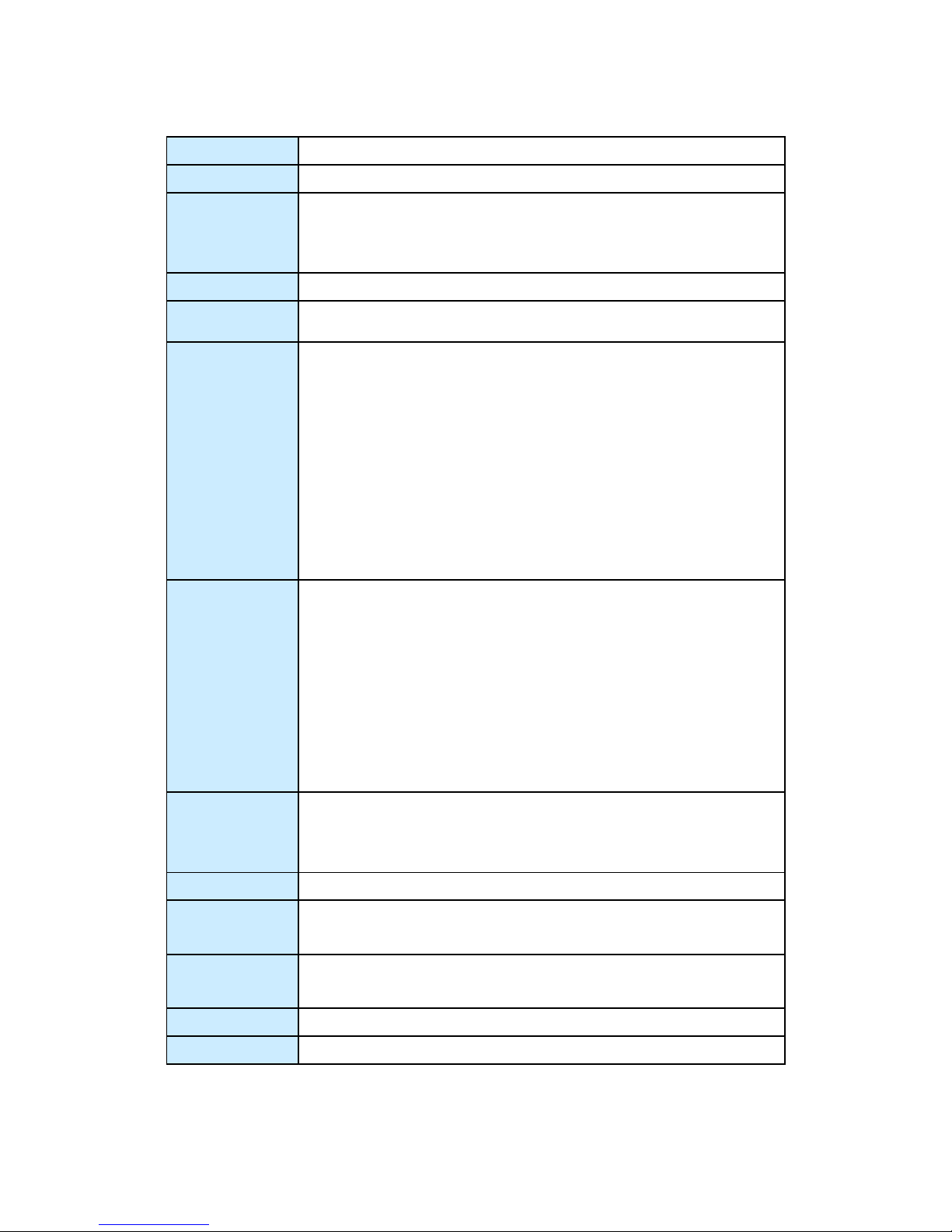
Product Specifications
Dimensions
200 x 35 x 153.1 mm (WxHxD)
Weight
1.1 Kg (Net)/2.5 Kg (Gross)
CPU/ Chipset
Intel® Huron River Platform
2nd Generation Intel® Core™ i3/i5/i7 Processors
Intel® QM67
RAM
2x DDR3 1066/1333 SO-DIMM up to 8GB
Storage
1 x 2.5” SATA HDD or SSD
Front IO
3x 3.5mm Phone Jack, support 5.1 channel audio output
1x S/PDIF Output
1x eSATA and USB 2.0 combo connector
4x USB 2.0
1x USB 3.0
1x CF Slot
1x Power LED
1x Storage status LED
1x WiFi status LED
Rear IO
1x DC JACK for DC19V single power input
1x DVI-I for DVI-D or VGA output
1x HDMI
1x DP
2x RJ-45 GbE port
1x COM Port support RS-232/422/485 (Offer +5V selection)
1x Wifi external antenna
1x 3G external antenna
Expansion
Slot
2 x mini PCIe slot (One full size and one half size)
(Optional for 3G/WiFi/Bluetooth module)
1x SIM card slot (for 3G appliance) support user accessible
Cooling
System Fan with Smart Fan Control
Power Unit
Input: 100-240 VAC
Output: 75 Watt, +19VDC, 3.95A
Temperature /
Humidity
Operating: 0°C to 45°C, 0%-90%, non-condensing
Storage: -20°C to 80°C, 0%-90%, non-condensing
Mounting
VESA-mount
Certifications
CE, FCC Class A
Table 1 DSS-1300 product specifications
DSS-1300 User’s Manual
Page 16
Chapter 1
System tour
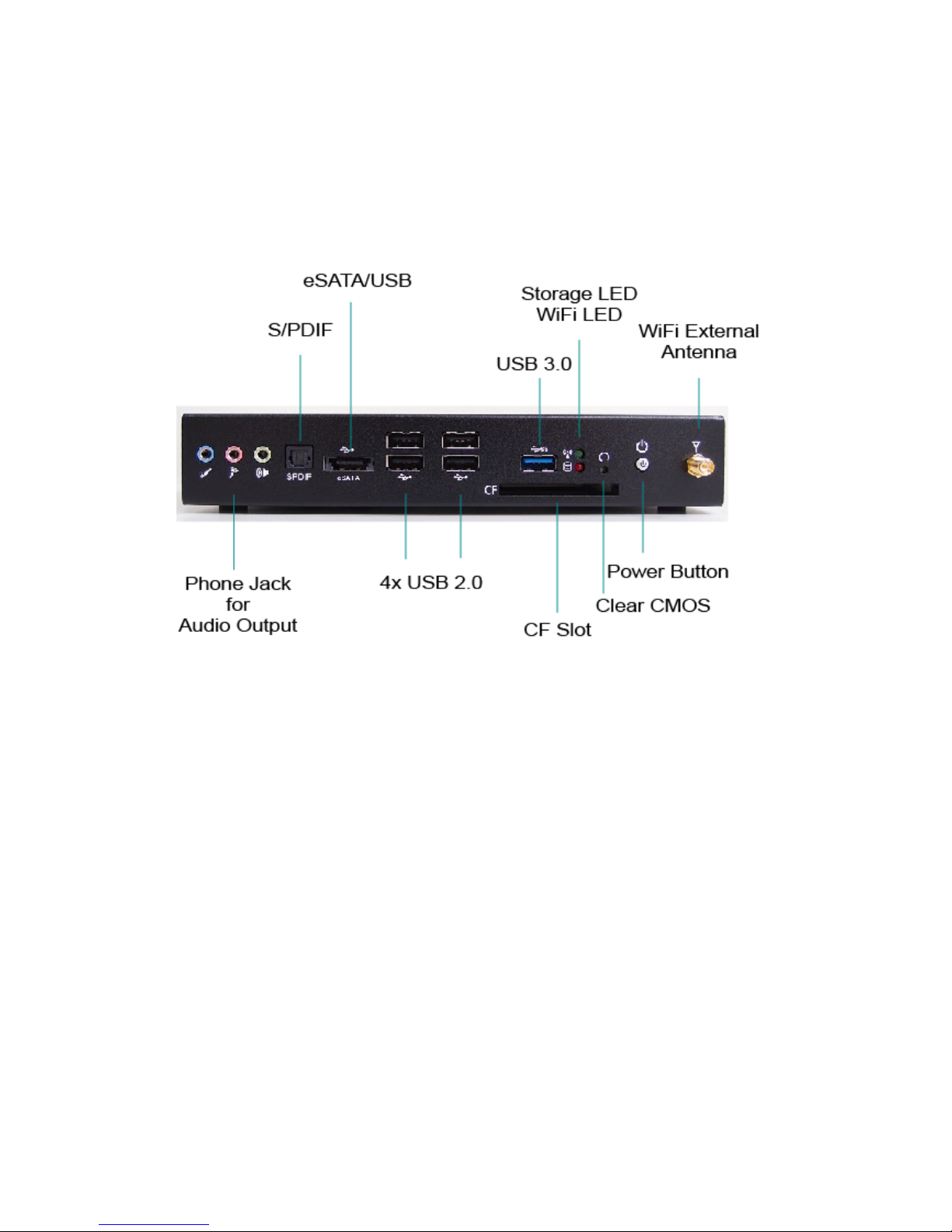
Refer to the figures below to identify the components of the system.
Front Panel
Figure 1 Front Panel
Power Button
The power push button allows powering ON and OFF the system.
Clear CMOS Button
To clear the CMOS, use the tip of a pen to press the button briefly (for less than
three seconds).
Power LED (Green)
The power LED will light when the PC is power-on.
Storage LED (Red)
The hard disk/card reader LED blinks when data is being written into or read
from the HDD/Card Reader.
DSS-1300 User’s Manual
Page 17

Chapter 1
USB
The USB (Universal Serial Bus) port is compatible with USB devices such as
keyboards, mouse devices, cameras, and hard disk drives. USB allows many
devices to run simultaneously on a single computer, with some peripheral
acting as additional plug-in sites or hubs.
S/PDIF
S/PDIF output for carrying digital audio signals out to the device.
eSATA/USB (combo)
This provides eSATA and USB connectivity as a combo connector.
WiFi External Antenna
Spared hole on the casing for connecting WiFi external antenna
CF Slot
CompactFlash Card Slot
Phone Jack
Audio Out
The stereo headphone jack is used to connect the system’s audio out signal to
amplified speakers or headphones.
MIC-IN
The microphone jack is designed to connect the microphone used for video
conferencing, voice narrations, or simple audio recordings.
Line-IN
The Line-in jack is designed to take input from a higher-powered sound source.
CAUTION
This connector do not support hot-swapping. Users should not connect or
disconnect their eSATA/USB (combo) & CF devices from PC when the
system is Working.
DSS-1300 User’s Manual
Page 18
Chapter 1
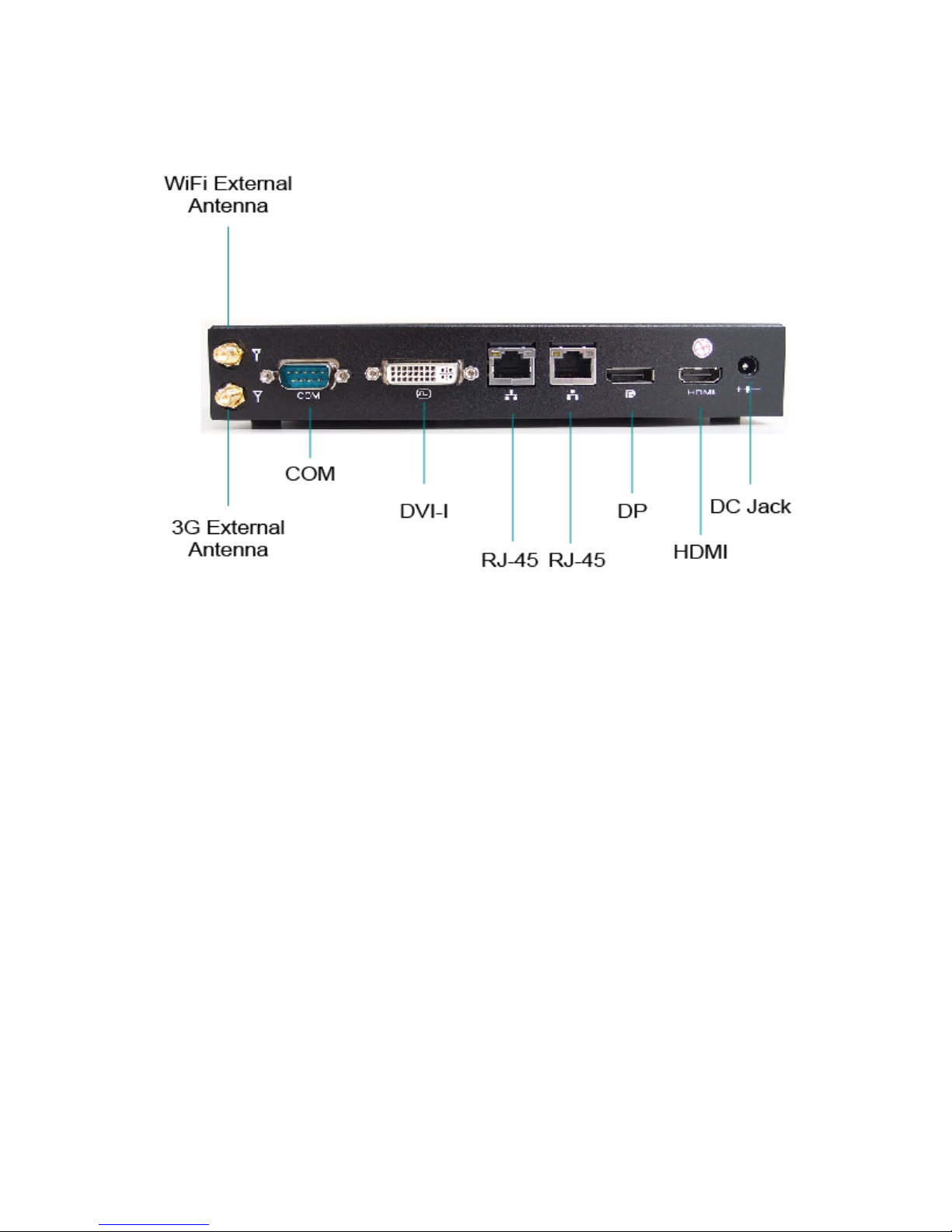
Rear Panel
Figure 2 Rear Panel
DC Jack
The supplied power adapter converts AC power to DC for use with this jack.
Power supplied through this jack supplies power to the PC. To prevent damage
to the PC, always use the supplied power adapter.
HDMI
HDMI connector for display output
DP
Display Port
Ethernet
The eight-pin RJ-45 LAN port supports a standard Ethernet cable for
connection to a local network.
DSS-1300 User’s Manual
Page 19

Chapter 1
DVI-I
DVI-I connector for DVI-D or VGA output
COM
D-Sub 9 pin connector for RS-232 connection
3G External Antenna
Spared hole on the casing for connecting 3G external antenna
WiFi External Antenna
Spared hole on the casing for connecting WiFi external antenna
DSS-1300 User’s Manual
Page 20
Chapter 1
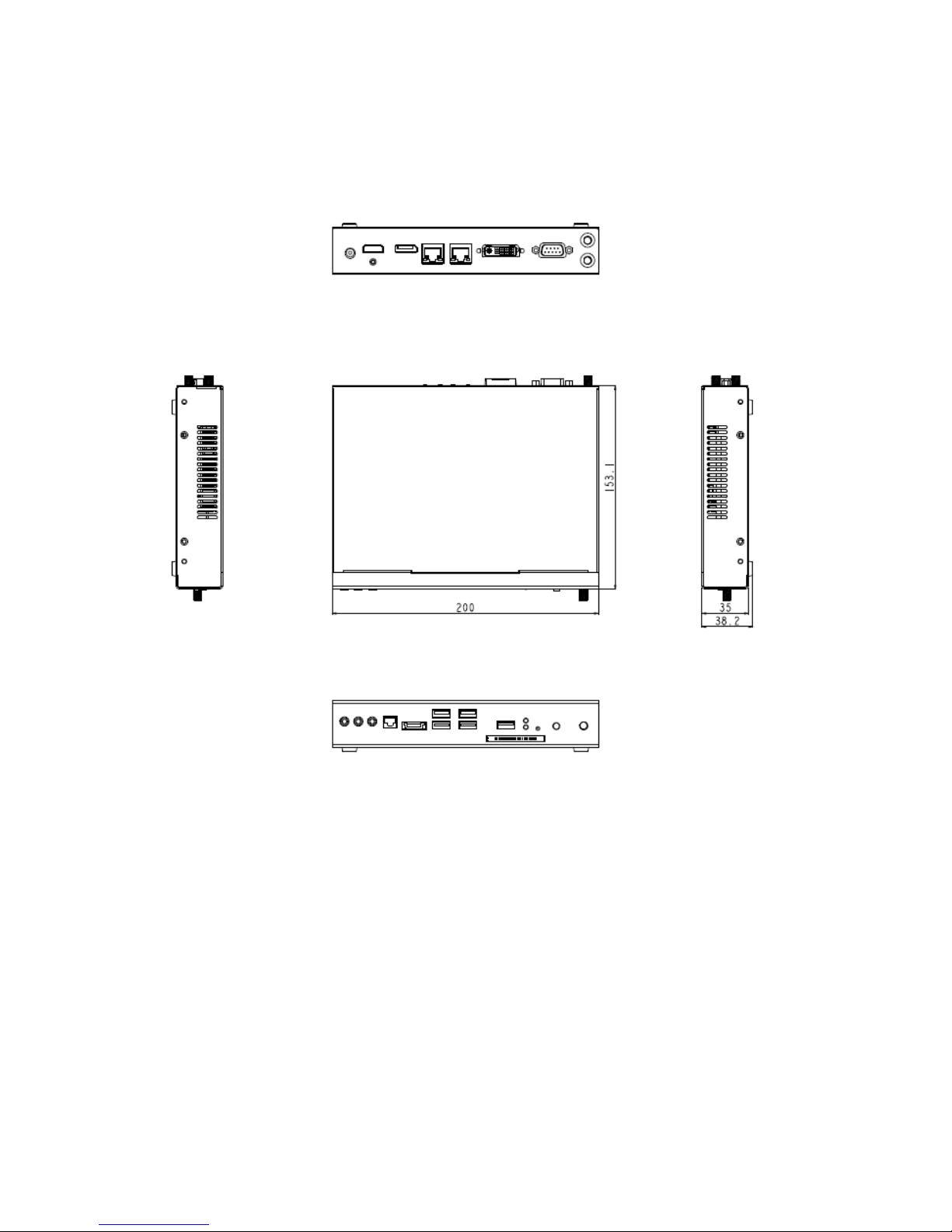
Mechanical Figures
Dimension: 200 x 35 x 153.1 mm (W x H x D)
Figure 3 Mechanical Figures
DSS-1300 User’s Manual
Page 21
Chapter 2
Getting Started
Setting up your PC
Connect the monitor, mouse and keyboard
Connecting the monitor
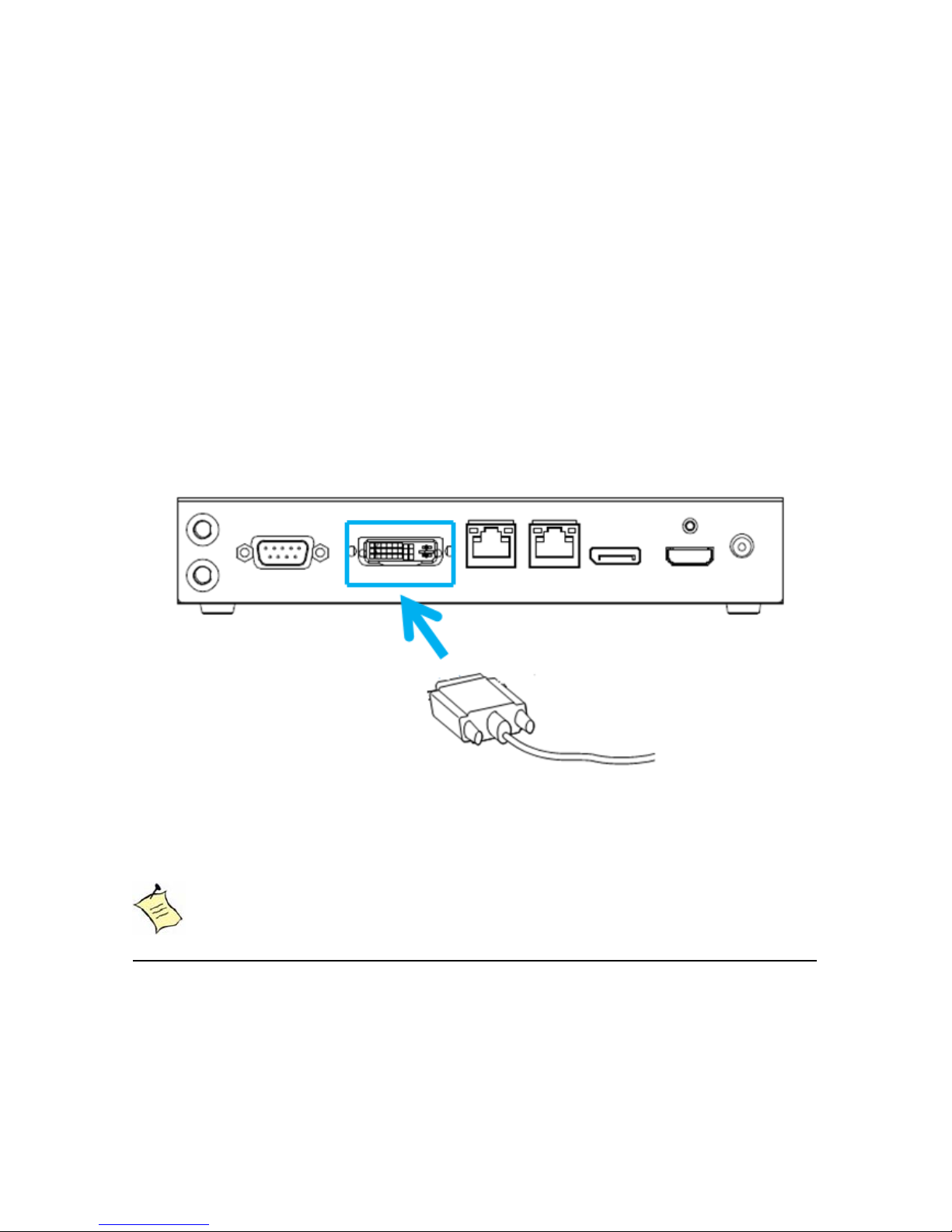
Connect the DVI cable from your display to the DVI port.
Figure 4 Connect the DVI cable
NOTE
When the system reboots without connecting the DVI, there might be no
image on screen when you insert the DVI cable. Please
pressing <Ctrl>+<Alt>+<F4> simultaneously to show the image on screen.
DSS-1300 User’s Manual
Page 22
Chapter 2
Connecting USB mouse & keyboard
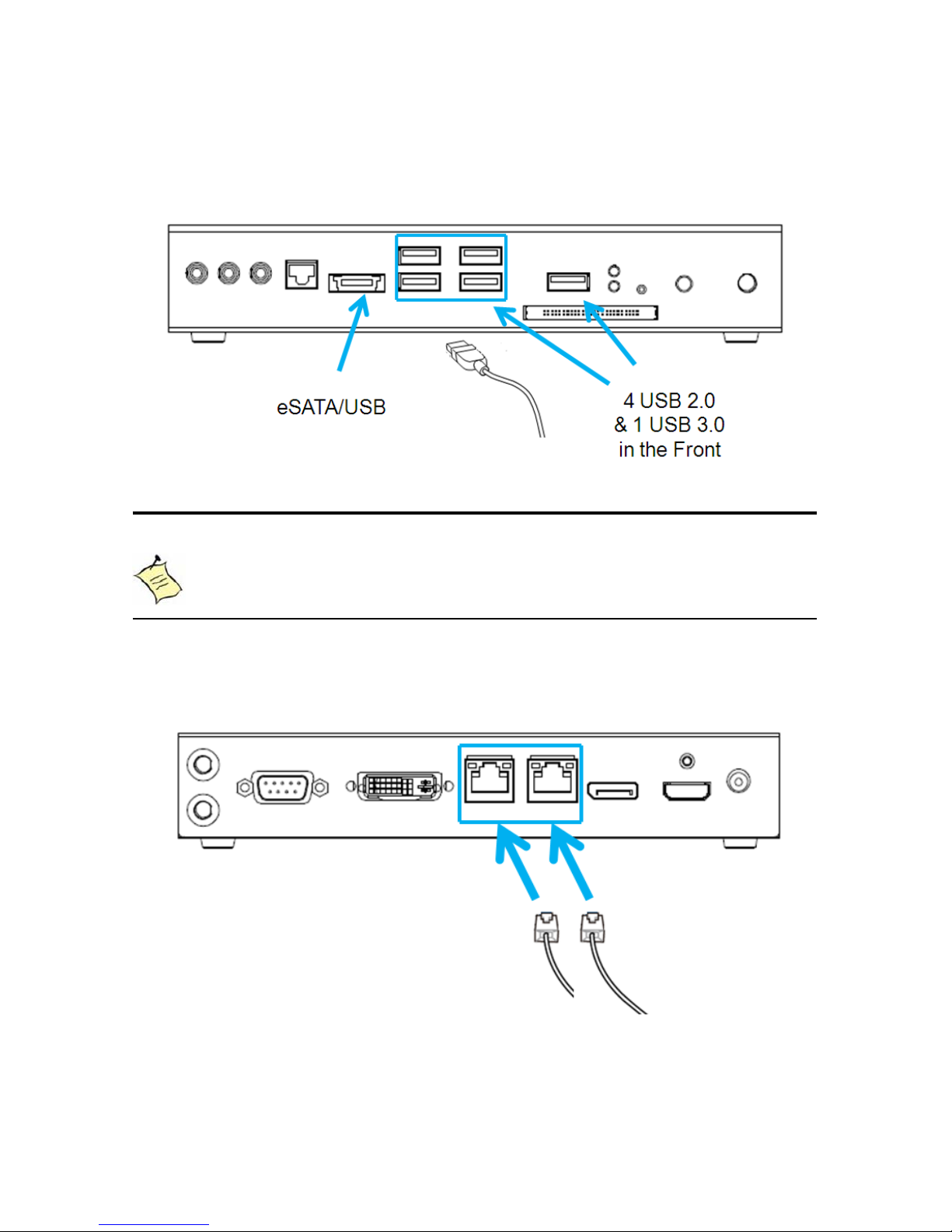
USB keyboard or mouse with your computer.
Figure 5 Connecting USB mouse & keyboard
NOTE
Using a third-party USB mouse or keyboard may require software drivers.
Check the manufacturer’s website for the latest software drivers.
Connecting to a network device
Connect one end of a network cable to the LAN port on the system rear panel and
the other end to a hub or switch.
Figure 6 Network cable with RJ45 connector
Your DSS-1300 does not come with a keyboard and mouse, but you can use any
DSS-1300 User’s Manual
Page 23
Chapter 2
Turning on the system
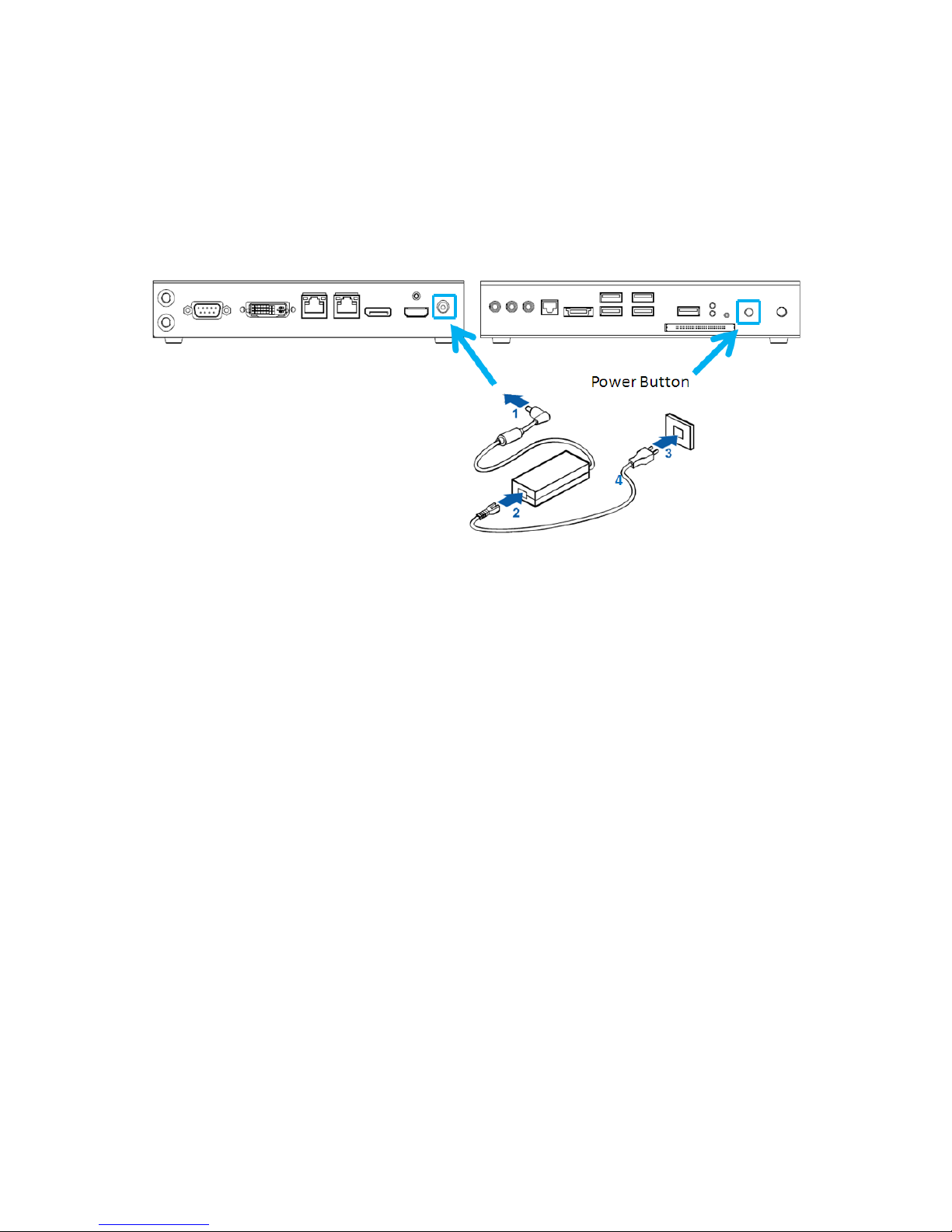
2. Connect the power cable to the power adapter
3. Connect the power cable to a power outlet
4. Press the power switch on the front panel to turn on the system
Figure 7 Turing on the system
1. Connect the power adapter cable to the DC jack (DC IN) of the DSS-1300
DSS-1300 User’s Manual
Page 24
Chapter 2
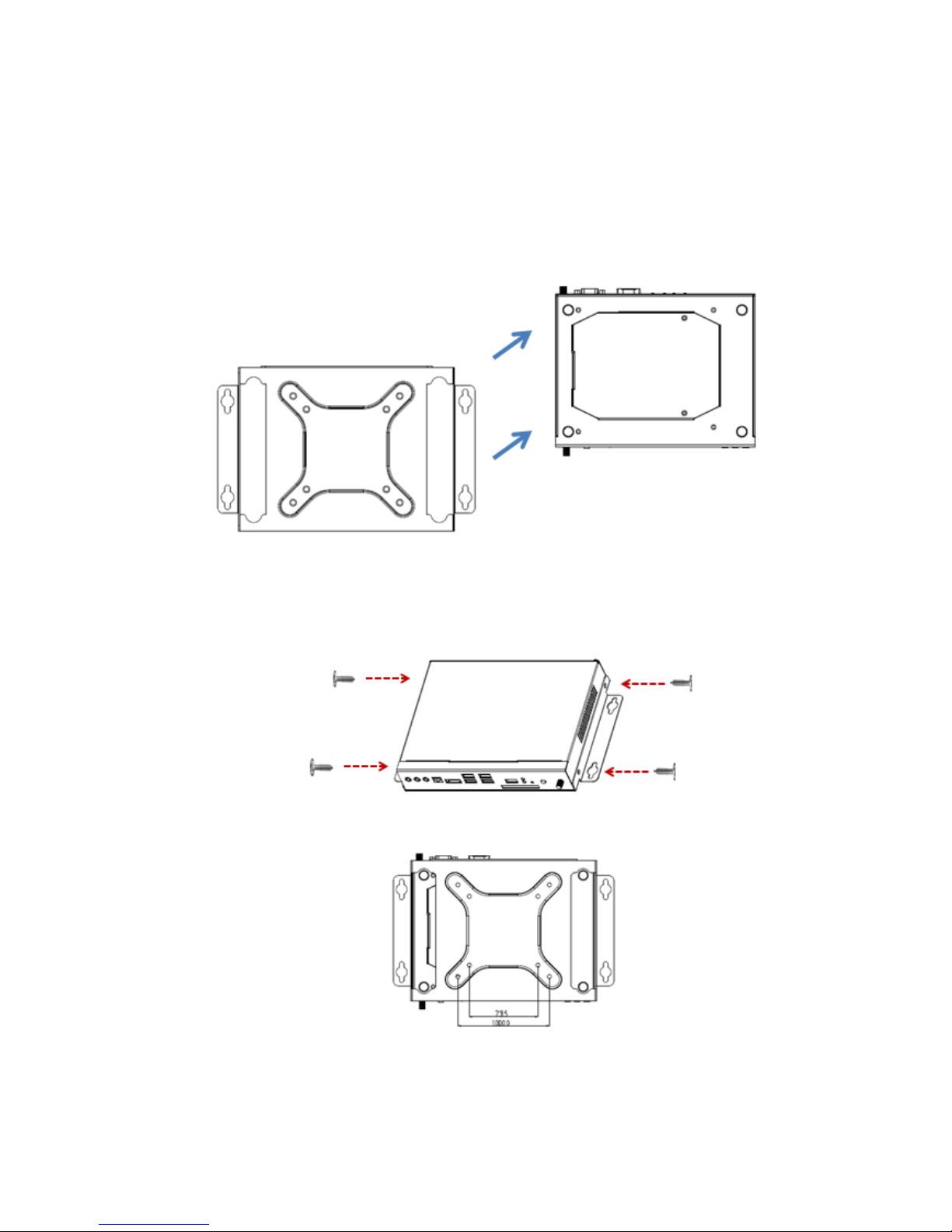
1. Take out the VESA mounting kit form your package and facing it onto the
figures shown below.
Figure 8 VESA Mount Assembly
2. Following figures are the complete status when you done.
Connecting VESA Mount on DSS-1300
bottom of DSS-1300; then tightening the screws on your DSS-1300 as
Figure 9 VESA Mount on DSS-1300
DSS-1300 User’s Manual
Page 25
Chapter 2
Mounting your PC to a monitor
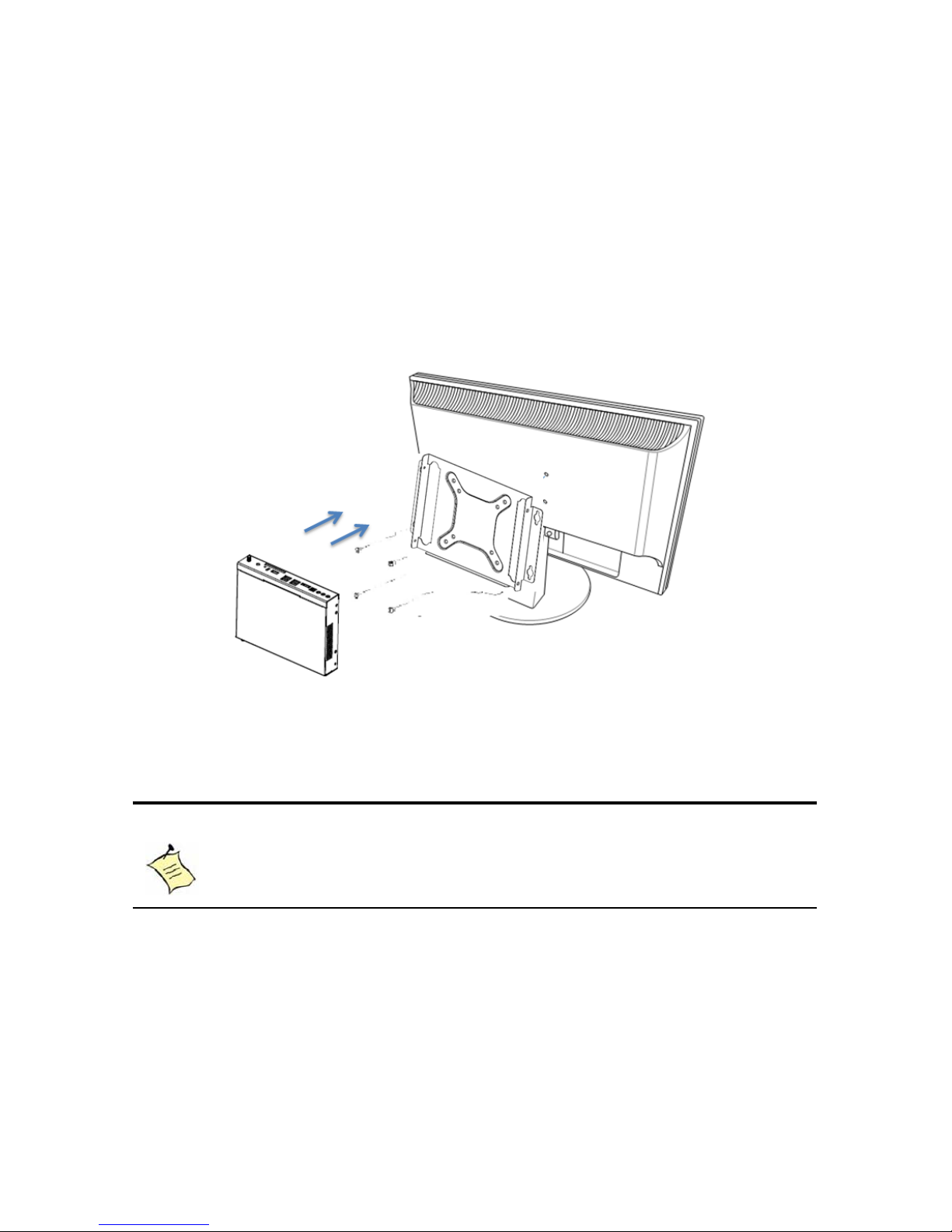
1. Firstly, mount your VESA kit on the backside of the monitor with four
screws in the package.
tightening the screws from the holes on both sides of the VESA bracket -
make sure the computer is fitting well on the bracket.
Figure 10 VESA mounting
NOTE
To fasten the metal shelf, your monitor must comply with VESA75 or
VESA100 standard.
Remarks: VESA mounting kit could be used as wall mounting kit as well.
2. Secondly, place the DSS-1300 on the VESA mounting kit and then
DSS-1300 User’s Manual
Page 26
Chapter 2
Changing Memory and mini-PCIe
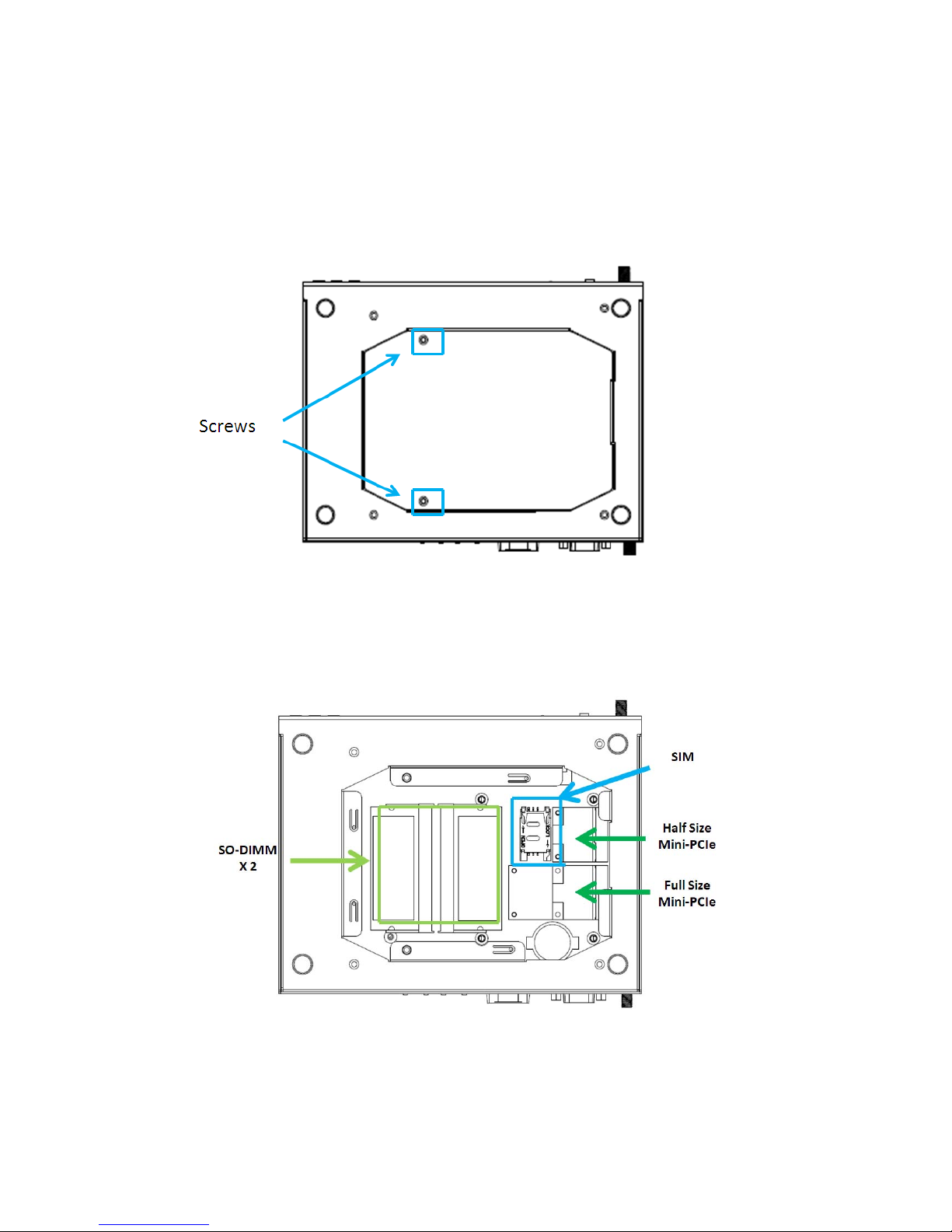
as shown below;
Figure 11 Opening the Cover on the Bottom
Then you may able to change the DDR SO-DIMM and/or mini-PCIe modules.
Figure 12 Bottom view of Main Board
Remarks: Please use Full Size Mini-PCIe slot for expansion if you are using 3G
module.
Firstly, Opening the cover by loosening the two screws on the bottom of DSS-1300
DSS-1300 User’s Manual
Page 27
Chapter 2
Changing Memory
Carefully follow the steps below in order to install the SO-DIMMs:
1. To avoid generating static electricity and damaging the SO-DIMM, ground
yourself by touching a grounded metal surface or use a ground strap before you
touch the SO-DIMM.
2. Do not touch the connectors of the SO-DIMM. Dirt or other residue may cause a
malfunction.
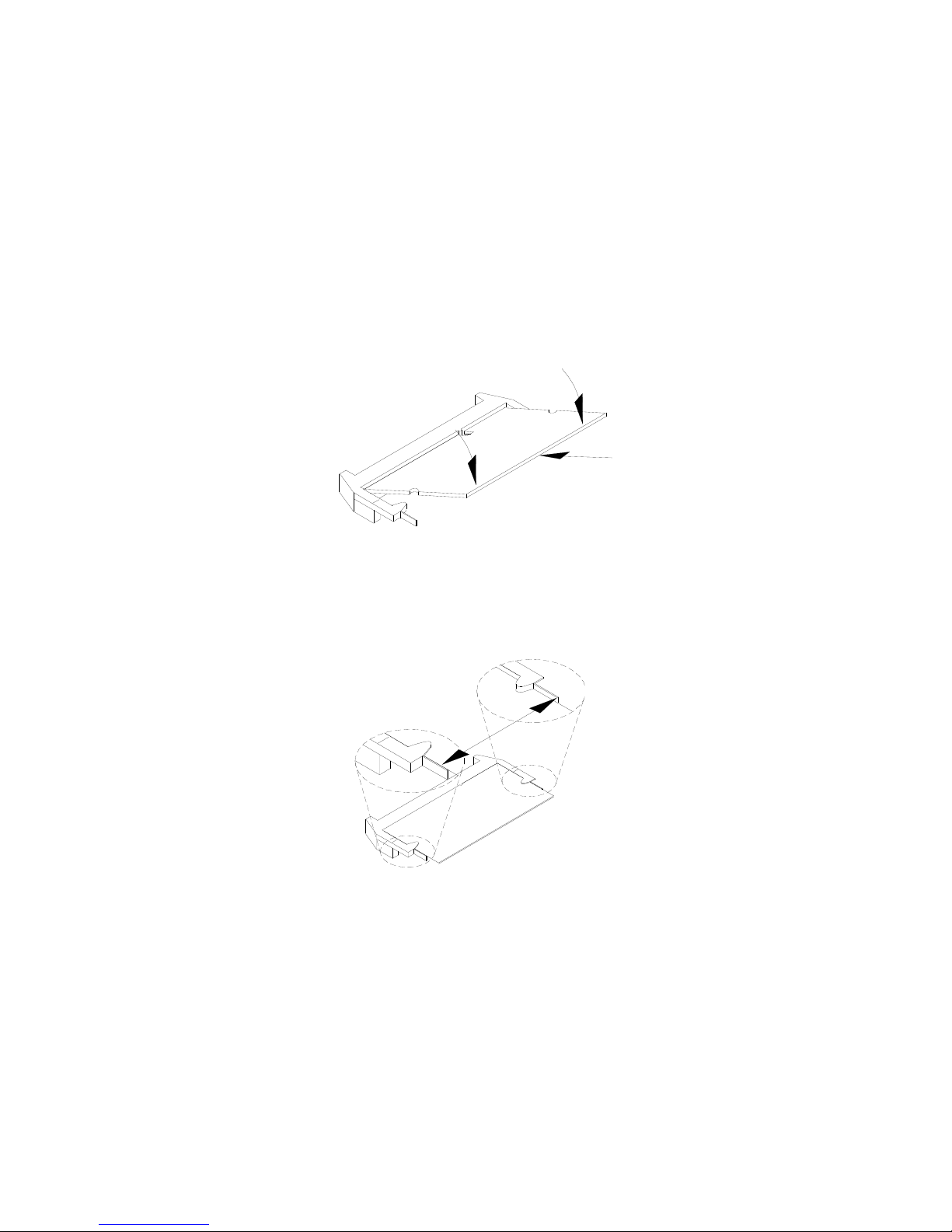
3. Hold the SO-DIMM with its notch aligned with the memory socket of the board
and insert it at a 30-degree angle into the socket.
Figure 13 SO-DIMM Installation (1)
Align the SO-DIMM Memory Module with the onboard socket
4. Fully insert the module into the socket until a “click” is heard.
5. Press down on the SO-DIMM so that the tabs of the socket lock on both sides
of the module
Figure 14 SO-DIMM Installation (2)
Press down on the SO-DIMM Memory Module to lock it in place
Removing a SO-DIMM:
To remove the SO-DIMM, use your fingers or a small screwdriver to carefully push
away the tabs that secure either side of the SO-DIMM. Lift it out of the socket.
Make sure you store the SO-DIMM in an anti-static bag. The socket must be
populated with memory modules of the same size and manufacturer.
DSS-1300 User’s Manual
Page 28
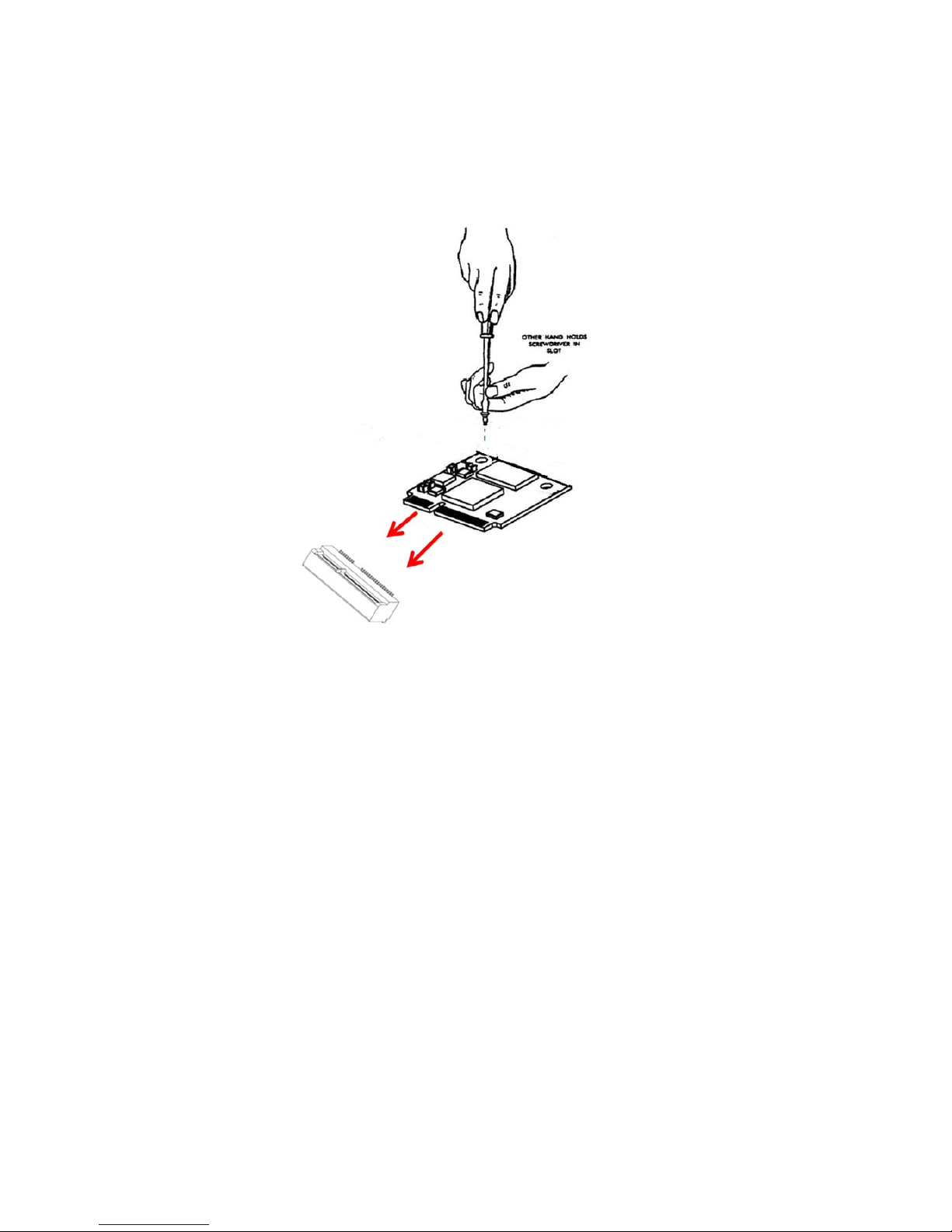
Changing mini-PCIe
(1) Placeyourmini‐PCIemoduletowardthemini‐PCIesocket.
Figure 15 mini-PCIe Installation
(2) Tighteningthescrewontheholeofthemini‐PCIemoduleasshownabove.
DSS-1300 User’s Manual
Page 29
Chapter 3
AMI BIOS Setup
Overview
This chapter provides a description of the AMI BIOS. The BIOS setup menus and
available selections may vary from those of your product. For specific information on
the BIOS for your product, please contact with your dealer.
NOTE: The BIOS menus and selections for your product may vary from
those in this chapter. For the BIOS manual specific to your product, please
contact with us.
AMI's ROM BIOS provides a built-in Setup program, which allows the user to modify
the basic system configuration and hardware parameters. The modified data will
be stored in a battery-backed CMOS, so that data will be retained even when the
power is turned off. In general, the information saved in the CMOS RAM will not
need to be changed unless there is a configuration change in the system, such as a
hard drive replacement or when a device is added.
It is possible for the CMOS battery to fail, which will cause data loss in the CMOS
only. If this happens you will need to reconfigure your BIOS settings.
DSS-1300 User’s Manual
Page 30
Main Menu
The BIOS Setup is accessed by pressing the DEL key after the Power-On Self-Test
(POST) memory test begins and before the operating system boot begins. Once you
enter the BIOS Setup Utility, the Main Menu will appear on the screen. The Main
Menu provides System Overview information and allows you to set the System Time
and Date. Use the “<” and “>” cursor keys to navigate between menu screens.
Table 2 BIOS Main Menu
BIOS SETUP UTILITY
Main Advanced Boot Security Save & Exit
BIOS Information
Version 1.00
Build Date 09/16/2011
CPU Information
Intel® Core ™ i7-2630QM CPU @ 2.00GHz
Microcode Revision 28
Processor Cores 4
Memory Information
Total Size 1024 MB (DDR3)
Frequency 1067 MHz
System date [Wed 09/22/2011]
System time [14:11:16]
Set the Date. Use Tab to
switch between Data
elements.
Æ Å Select Screen
↑↓ Select Item
Enter: Select
+- Change Opt.
F1: General Help
F2: Previous Values
F3: Optimized Defaults
F4 Save & Exit
ESC Exit
Version 2.10.1208. Copyright (C) 2010, American Megatrends, Inc.
DSS-1300 User’s Manual
Page 31

Advanced Menu
Table 3 Advanced Menu
BIOS SETUP UTILITY
Main Advanced Boot Security Server Mgmt Save & Exit
Onboard LAN1 Boot [Disabled]
Onboard LAN2 Boot [Disabled]
>Display Configuration
>Super IO Configuration
>Power Management Configuration
>CPU Advanced Configuration
>Trusted Computing
>SATA Configuration
>Intel TXT(LT) Configuration
>AMT Configuration
>USB Configuration
>H/W Monitor
Enable or Disable Onboard
LAN1.
Æ Å Select Screen
↑↓ Select Item
Enter: Select
+- Change Opt.
F1: General Help
F2: Previous Values
F3: Optimized Defaults
F4 Save & Exit
ESC Exit
Version 2.10.1208. Copyright (C) 2010, American Megatrends, Inc.
Onboard LAN Controller
Options: Disabled, Enabled
Onboard LAN Boot
Options: Disabled, Enabled
Audio Controller
Options: Disabled, Enabled, Auto
Onboard LAN1 Controller [Enabled]
Onboard LAN2 Controller [Enabled]
Audio Controller [Enabled]
DSS-1300 User’s Manual
Page 32

Table 4 Advanced Menu – Display Configuration
BIOS SETUP UTILITY
Main Advanced Boot Security Server Mgmt Save & Exit
Display Configuration
Primary Display [IGFX]
Internal Graphics [Enabled]
Aperture Size [256 MB]
DVMT Pre-Allocated [64M]
DVMT Total Gfx Mem [256 M]
IGFX – Boot Type [VBIOS Default]
IGFX – 2
nd
Boot Type [Disabled]
Select the Aperture Size
Æ Å Select Screen
↑↓ Select Item
Enter: Select
+- Change Opt.
F1: General Help
F2: Previous Values
F3: Optimized Defaults
F4 Save & Exit
ESC Exit
Version 2.10.1208. Copyright (C) 2010, American Megatrends, Inc.
Aperture Size
Options: 128MB, 256MB, 512MB
DVMT Pre-Allocated
Options: 0M, 32M, 64M, 96M, 128M, 160M, 192M, 224M, 256M, 288M, 320M,
352M, 384M, 416M, 448M, 480M, 512M
DVMT Total Gfx Mem
Options: 128M, 256M, MAX
IGFX – Boot Type
Options: VBIOS Default, CRT, DVI, HDMI, DP
IGFX – 2nd Boot Type
Options: Disabled, CRT, DVI, HDMI, DP
DSS-1300 User’s Manual
Page 33
Table 5 Advanced Menu – Super IO Configuration
BIOS SETUP UTILITY
Main Advanced Boot Security Save & Exit
Super IO Configuration
>Serial Port 1 Configuration
Set Parameters of Serial Port 1
(COM1)
Æ Å Select Screen
↑↓ Select Item
Enter: Select
+- Change Opt.
F1: General Help
F2: Previous Values
F3: Optimized Defaults
F4 Save & Exit
ESC Exit
Version 2.10.1208. Copyright (C) 2010, American Megatrends, Inc.
Table 6 Advanced Menu – Super IO Configuration – Serial Port 1 Configuration
BIOS SETUP UTILITY
Main Advanced Boot Security Save & Exit
Serial Port 1 Configuration
Serial Port [Enabled]
Device Settings IO=3F8h; IRQ=4;
Change Settings [Auto]
Serial Port 1 Type [RS232]
COM1 Pin9 Definition [RI]
Enable or Disable Serial Port
(COM)
Æ Å Select Screen
↑↓ Select Item
Enter: Select
+- Change Opt.
F1: General Help
F2: Previous Values
F3: Optimized Defaults
F4 Save & Exit
ESC Exit
Version 2.10.1208. Copyright (C) 2010, American Megatrends, Inc.
DSS-1300 User’s Manual
Page 34

Serial Port
Options: Disabled, Enabled
Change Settings
Options:
Auto
IO=3F8h; IRQ=4;
IO=3F8h; IRQ=3, 4, 5, 6, 7, 9, 10, 11, 12;
IO=2F8h; IRQ=3, 4, 5, 6, 7, 9, 10, 11, 12;
IO=3E8h; IRQ=3, 4, 5, 6, 7, 9, 10, 11, 12;
IO=2E8h; IRQ=3, 4, 5, 6, 7, 9, 10, 11, 12;
Serial Port 1 Type
Options: RS232, RS422, RS485
COM1 Pin9 Definition
Options: RI, +5V
DSS-1300 User’s Manual
Page 35

Table 7 Advanced Menu – Power Management Configuration
BIOS SETUP UTILITY
Main Advanced Boot Security Server Mgmt Save & Exit
Power Management Configuration
ACPI Sleep State [S3 (Suspend to…)
Restore AC Power Loss [Power Off]
Resume By PCIE Device [Disabled]
Resume By RTC Alarm [Enabled]
EUP Power Saving Mode
>Watchdog Timer Configuration
Select the highest ACPI sleep
state the system will enter,
when the SUSPEND button is
pressed.
Æ Å Select Screen
↑↓ Select Item
Enter: Select
+- Change Opt.
F1: General Help
F2: Previous Values
F3: Optimized Defaults
F4 Save & Exit
ESC Exit
Version 2.10.1208. Copyright (C) 2010, American Megatrends, Inc.
ACPI Sleep State
Options: Suspend Disabled, S1 (CPU Stop Clock), S3 (Suspend to RAM)
Restore AC Power Loss
Options: Power Off, Power On, Last State
Resume By PCIE Device
Options: Disabled, Enabled
Resume By RTC Alarm
Options: Disabled, Enabled
EUP Power Saving Mode
Options: Disabled, Enabled
Watchdog Timer Configuration
Options: Suspend Disabled, S1 (CPU Stop Clock), S3 (Suspend to RAM)
DSS-1300 User’s Manual
Page 36

Table 8 Advanced Menu – CPU Advanced Configuration
BIOS SETUP UTILITY
Main Advanced Boot Security Save & Exit
CPU Advanced Configuration
EIST [Enabled]
Turbo Mode [Enabled]
Intel ® Virtualization Tech [Disabled]
Intel ® Hyper Treading Tech [Enabled]
Active Processor Cores [All]
Limit CPUID Maximum [Disabled]
Execute Disable Bit [Enabled]
Enable/Disable Intel ® Speed
Step
Æ Å Select Screen
↑↓ Select Item
Enter: Select
+- Change Opt.
F1: General Help
F2: Previous Values
F3: Optimized Defaults
F4 Save & Exit
ESC Exit
Version 2.10.1208. Copyright (C) 2010, American Megatrends, Inc.
EIST
Options: Disabled, Enabled
Turbo Mode
Options: Disabled, Enabled
Intel ® Virtualization Tech
Options: Disabled, Enabled
Intel ® Hyper Threading Tech
Options: Disabled, Enabled
Active Processor Cores
Options: All, 1, 2, 3
Limit CPUID Maximum
Options: Disabled, Enabled
Execute Disable Bit
Options: Disabled, Enabled
DSS-1300 User’s Manual
Page 37
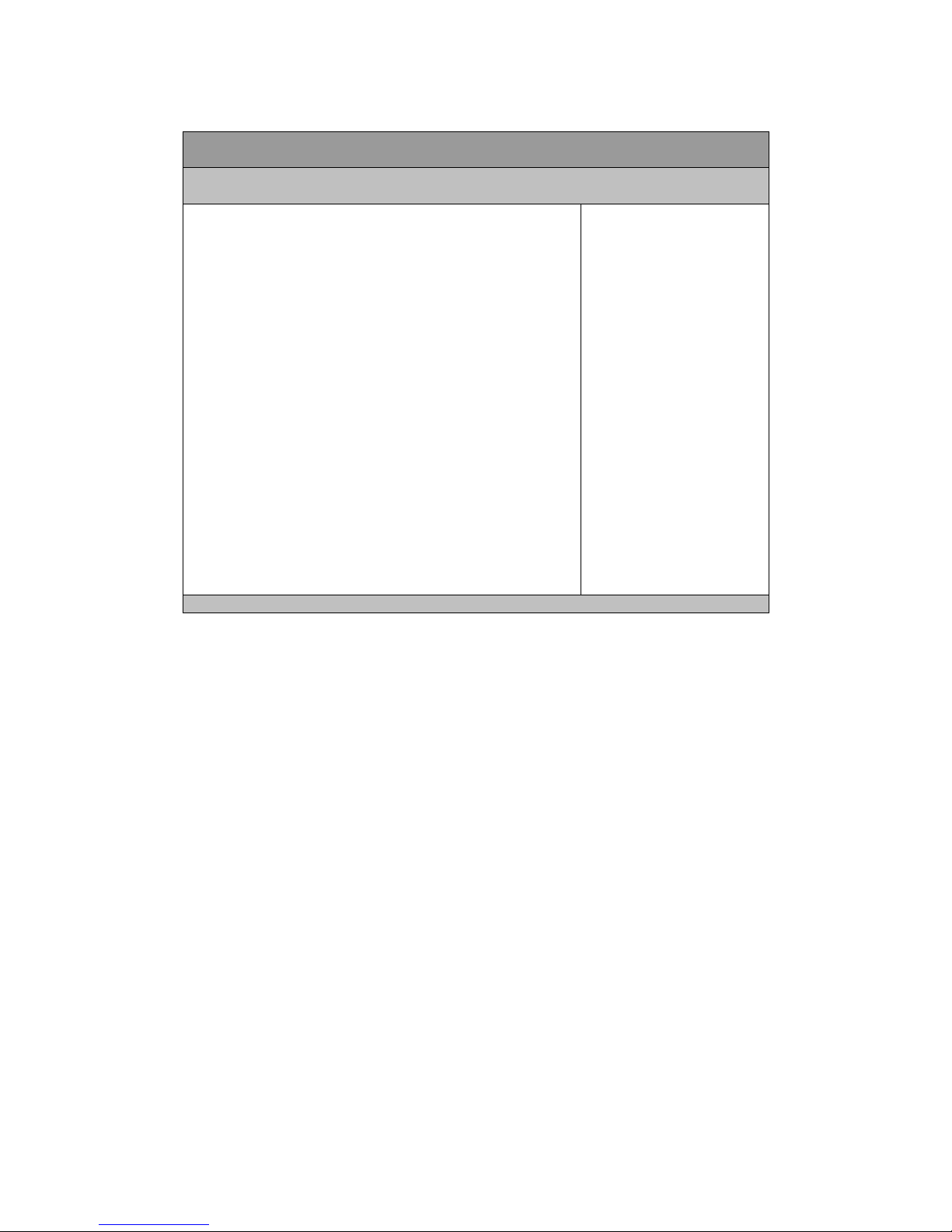
Table 9 Advanced Menu – Trusted Computing
BIOS SETUP UTILITY
Main Advanced Boot Security Save & Exit
TPM Configuration
TPM SUPPORT [Disable]
Current TPM Status Information
TPM SUPPORT OFF
Enable or Disable TPM support.
O.S. will not show TPM. O.S. will
not show TPM. Reset of platform
is required.
Æ Å Select Screen
↑↓ Select Item
Enter: Select
+- Change Opt.
F1: General Help
F2: Previous Values
F3: Optimized Defaults
F4 Save & Exit
ESC Exit
Version 2.10.1208. Copyright (C) 2010, American Megatrends, Inc.
TPM
Options: Disabled, Enabled
DSS-1300 User’s Manual
Page 38
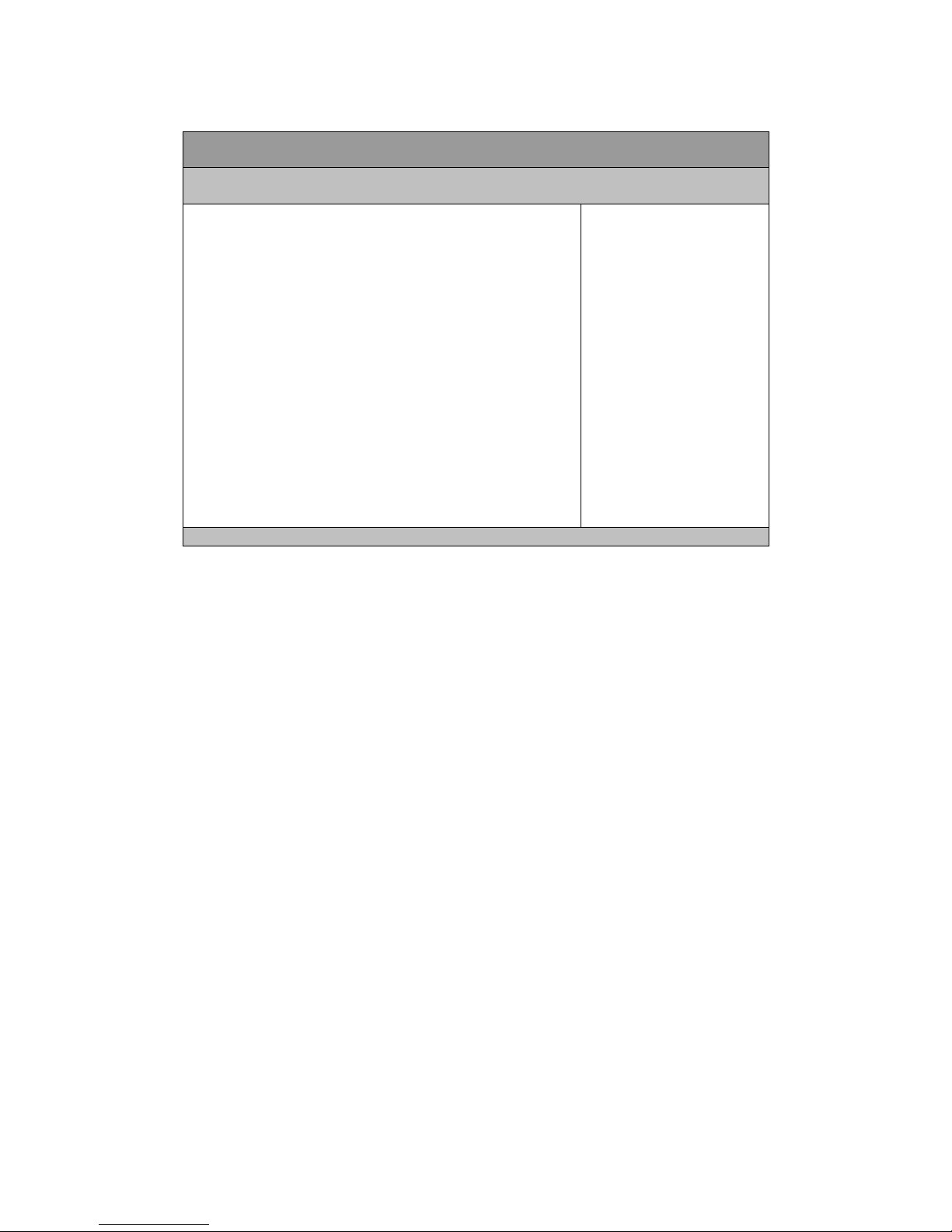
Table 10 Advanced Menu – SATA Configuration
BIOS SETUP UTILITY
Main Advanced Boot Security Save & Exit
SATA Controller(s) [Enabled]
SATA Mode Selection [IDE]
Serial ATA Port 1 Empty
Software Preserve Unknown
Serial ATA Port 2 Empty
Software Preserve Unknown
Enable or Disable SATA Device.
Æ Å Select Screen
↑↓ Select Item
Enter: Select
+- Change Opt.
F1: General Help
F2: Previous Values
F3: Optimized Defaults
F4 Save & Exit
ESC Exit
Version 2.10.1208. Copyright (C) 2010, American Megatrends, Inc.
SATA Controller(s)
Options: Disabled, Enabled
SATA Mode Selection
Options: IDE, AHCI
Remarks:
SATA port 1 is Internal SATA
SATA port 2 is eSATA
DSS-1300 User’s Manual
Page 39
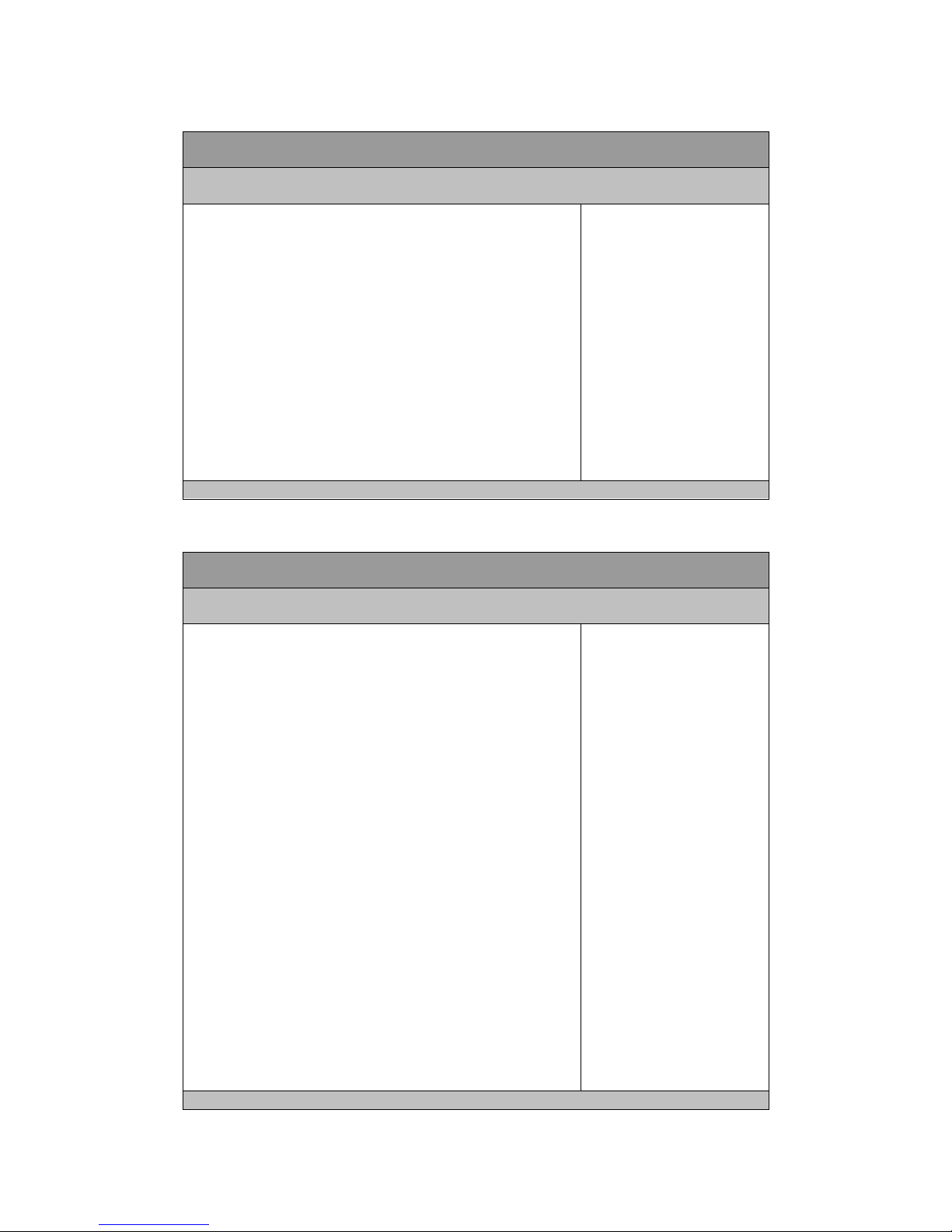
Table 11 Advanced Menu – Intel TXT (LT) Configuration
BIOS SETUP UTILITY
Main Advanced Boot Security Save & Exit
Intel Trusted Execution technology Configuration
Intel TXT support only can be enabled / disabled if SMX enabled.
And must enables the VT support prior to TXT.
Secure Mode Extensions (SMX) [Enabled]
Intel TXT (LT) Support [Disabled]
Æ Å Select Screen
↑↓ Select Item
Enter: Select
+- Change Opt.
F1: General Help
F2: Previous Values
F3: Optimized Defaults
F4 Save & Exit
ESC Exit
Version 2.10.1208. Copyright (C) 2010, American Megatrends, Inc.
Table 12 Advanced Menu – AMT Configuration
BIOS SETUP UTILITY
Main Advanced Boot Security Save & Exit
Intel AMT [Enabled]
Intel AMT Setup Prompt [Enabled]
BIOS Hotkey Pressed [Disabled]
MEBx Selection Screen [Disabled]
Verbose MEBx Output [Enabled]
Hide Un-Configure ME Confirmation [Disabled]
MEBx Debug Message Output [Disabled]
Un-Configure ME [Disabled]
Intel AMT Password Write Enabled [Enabled]
AMT Wait Timer 0
ASF [Enabled]
Activate Remote Assistance Process [Disabled]
USB Configure [Enabled]
PET Progress [Enabled]
Intel AMT SPI Protected [Disabled]
AMT CIRA Timeout 0
Watchdog [Disabled]
OS Timer 0
BIOS Timer 0
Enable/Disable Intel ® Active
Management Technology BIOS
Extension.
Note: iAMT H/W is always
enabled.
This option just controls the BIOS
extension execution.
If enabled, this requires additional
firmware in the SPI device
Æ Å Select Screen
↑↓ Select Item
Enter: Select
+- Change Opt.
F1: General Help
F2: Previous Values
F3: Optimized Defaults
F4 Save & Exit
ESC Exit
Version 2.10.1208. Copyright (C) 2010, American Megatrends, Inc.
DSS-1300 User’s Manual
Page 40

Intel AMT
Options: Disabled, Enabled
Intel AMT Setup Prompt
Options: Disabled, Enabled
BIOS Hotkey Pressed
Options: Disabled, Enabled
MEBx Selection Screen
Options: Disabled, Enabled
Verbose MEBx Output
Options: Disabled, Enabled
Hide Un-Configure ME Confirmation
Options: Disabled, Enabled
MEBx Debug Message Output
Options: Disabled, Enabled
Un-Configure ME
Options: Disabled, Enabled
Intel AMT Password Write Enabled
Options: Disabled, Enabled
AMT Wait Timer
Options: 0 only
ASF
Options: Disabled, Enabled
Activate Remote Assistance Process
Options: Disabled, Enabled
USB Configure
Options: Disabled, Enabled
PET Progress
Options: Disabled, Enabled
Intel AMT SPI Protected
Options: Disabled, Enabled
Watchdog
Options: Disabled, Enabled
DSS-1300 User’s Manual
Page 41

Table 13 Advanced Menu – USB Configuration
BIOS SETUP UTILITY
Main Advanced Boot Security Save & Exit
USB Configuration
USB Devices:
2 Hubs
Legacy USB Support [Enabled]
USB 3.0 Support [Enabled]
XHCI hand-off [Enabled]
EHCI Hand-off [Disabled]
USB hardware delays and time-out:
USB transfer time-out [20 sec]
Device reset time-out [20 sec]
Device power-up delay [Auto]
Enables Legacy USB support.
AUTO option disables legacy
support if no USB devices are
connected. DISABLE option will
keep USB devices available only
for EFI applications.
Æ Å Select Screen
↑↓ Select Item
Enter: Select
+- Change Opt.
F1: General Help
F2: Previous Values
F3: Optimized Defaults
F4 Save & Exit
ESC Exit
Version 2.10.1208. Copyright (C) 2010, American Megatrends, Inc.
Legacy USB Support
Options: Disabled, Enabled, Auto
USB 3.0 Support
Options: Disabled, Enabled
XHCI hand-off
Options: Disabled, Enabled
EHCI hand-off
Options: Disabled, Enabled
USB Transfer Time-Out
Options: 1, 5, 10, 20 sec.
Device Transfer Time-Out
Options: 10, 20, 30, 40 sec.
Device Power-Up Delay
Options: Auto, Manual
DSS-1300 User’s Manual
Page 42

Table 14 Advanced Menu – H/W Monitor
BIOS SETUP UTILITY
Main Advanced Boot Security Save & Exit
PC Health Status
CPU Warning Temperature [Disabled]
System Shutdown Temperature [Disabled]
CPU Smart FAN [Disabled]
CPU Manual PWM 255
CPU Temperature : +57 C
Top Side System Temperature : +31 C
Bottom Side System Temperature : +32 C
CPU Fan Speed : 4702 RPM
+3.3V : +3.328 V
+VCORE : +1.016 V
+VGFX : +0.440 V
+1.05V : +1.056 V
+1.5V : +1.564 V
+5VDUAL : +5.160 V
+VIN : +10.792 V
+3.3VSB : +3.360 V
Æ Å Select Screen
↑↓ Select Item
Enter: Select
+- Change Opt.
F1: General Help
F2: Previous Values
F3: Optimized Defaults
F4 Save & Exit
ESC Exit
Version 2.10.1208. Copyright (C) 2010, American Megatrends, Inc.
CPU Warning Temperature
Options: Disabled, 80 C, 85 C, 90 C, 95 C
System Shutdown Temperature
Options: Disabled, 55 C, 60 C, 65 C, 70 C
CPU Smart Fan
Options: Disabled, Enabled
DSS-1300 User’s Manual
Page 43
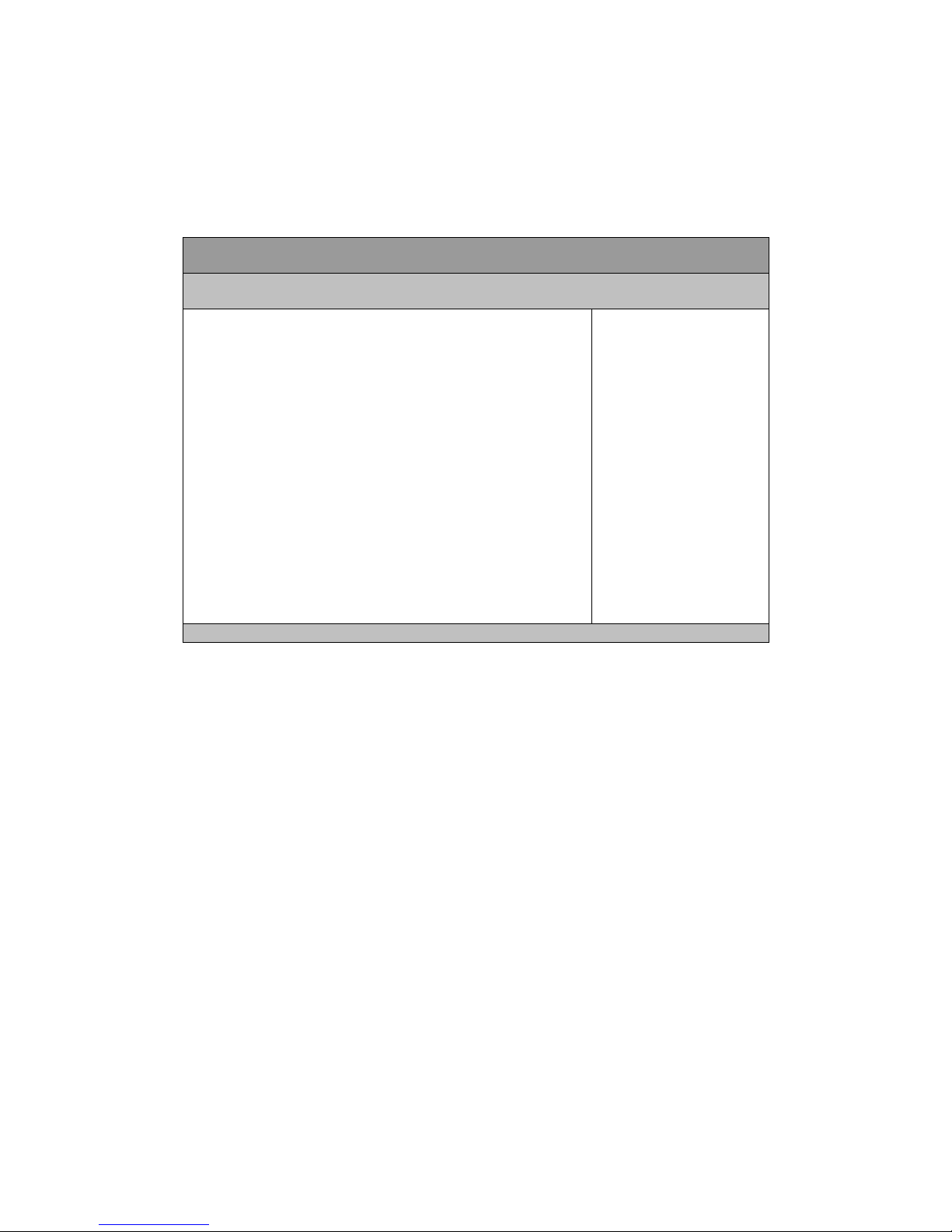
Boot Menu
Table 15 Boot Menu
BIOS SETUP UTILITY
Main Advanced Boot Security Save & Exit
Boot Configuration
Full Screen LOGO Display [Disabled]
Setup Prompt Timeout 1
Bootup NumLock State [On]
Boot Option Priorities
Enables or Disables Quiet Boot
option
Æ Å Select Screen
↑↓ Select Item
Enter: Select
+- Change Opt.
F1: General Help
F2: Previous Values
F3: Optimized Defaults
F4 Save & Exit
ESC Exit
Version 2.10.1208. Copyright (C) 2010, American Megatrends, Inc.
Full Screen LOGO Display
Options: Disabled, Enabled
Bootup Numlock State
Options: On, Off
DSS-1300 User’s Manual
Page 44
Security Menu
Table 16 Security Menu
BIOS SETUP UTILITY
Main Advanced Boot Security Save & Exit
Password Description
If ONLY the Administrator’s password is set, then this only limits access to
Setup and is only asked for when entering Setup
If ONLY the User’s password is set, then this is a power on password and
must be entered to boot or enter Setup. In Setup the User will have
Administrator rights
Administrator Password
User Password
Set Setup Administrator
Password
Æ Å Select Screen
↑↓ Select Item
Enter: Select
+- Change Opt.
F1: General Help
F2: Previous Values
F3: Optimized Defaults
F4 Save & Exit
ESC Exit
Version 2.10.1208. Copyright (C) 2010, American Megatrends, Inc.
DSS-1300 User’s Manual
Page 45

Save & Exit Menu
Table 17 Save & Exit Menu
BIOS SETUP UTILITY
Main Advanced Boot Security Save & Exit
Save Changes and Exit
Discard Changes and Reset
Save Changes and Reset
Discard Changes and Reset
Save Options
Save Changes
Discard Changes
Restore Defaults
Save as User Defaults
Restore User Defaults
Boot Override
Exit system setup after saving
the changes.
Æ Å Select Screen
↑↓ Select Item
Enter: Select
+- Change Opt.
F1: General Help
F2: Previous Values
F3: Optimized Defaults
F4 Save & Exit
ESC Exit
Version 2.10.1208. Copyright (C) 2010, American Megatrends, Inc.
Save Changes and Exit
Exit system setup after saving the changes. Once you are finished making your
selections, choose this option from the Exit menu to ensure the values you selected
are saved to the CMOS RAM. The CMOS RAM is sustained by an onboard backup
battery and stays on even when the PC is turned off. When you select this option, a
confirmation window appears. Select [Yes] to save changes and exit.
Discard Changes and Exit
Exit system setup without saving any changes. Select this option only if you do not
want to save the changes that you made to the Setup program. If you made changes
to fields other than system date, system time, and password, the BIOS asks for a
confirmation before exiting.
Discard Changes
Discards changes done so far to any of the setup values. This option allows you to
discard the selections you made and restore the previously saved values. After
selecting this option, a confirmation appears. Select [Yes] to discard any changes and
DSS-1300 User’s Manual
Page 46

load the previously saved values.
Load Optimal Defaults
Load Optimal Default values for all the setup values. This option allows you to load
optimal default values for each of the parameters on the Setup menus, which will
provide the best performance settings for your system. The F9 key can be used for
this operation.
Load Failsafe Defaults
Load Optimal Default values for all the setup values. This option allows you to load
failsafe default values for each of the parameters on the Setup menus, which will
provide the most stable performance settings. The F8 key can be used for this
operation.
DSS-1300 User’s Manual
Page 47

Chapter 4
Chapter 4
Driver Installation
need to install an operating system and the necessary drivers to operate it. After you
have finished assembling your system and connected the appropriate power source,
power it up using the power supply and install the desired operating system.
If your DSS-1300 does not come with an operating system pre-installed, you will
DSS-1300 User’s Manual
For other operating systems, please contact with your nearest SINTRONES Sales.
 Loading...