

Page 1
Sinorama AG Ahornstrasse 9a CH-9523 Züberwangen Switzerland
Tel: +41-71-9400888 Fax: +41-71-9400889 [email protected] http://www.sinorama.ch
120401 LP02 sinorama GPS TRACKER U/4/1/2012 9:54:00 PM 1/9
sinorama
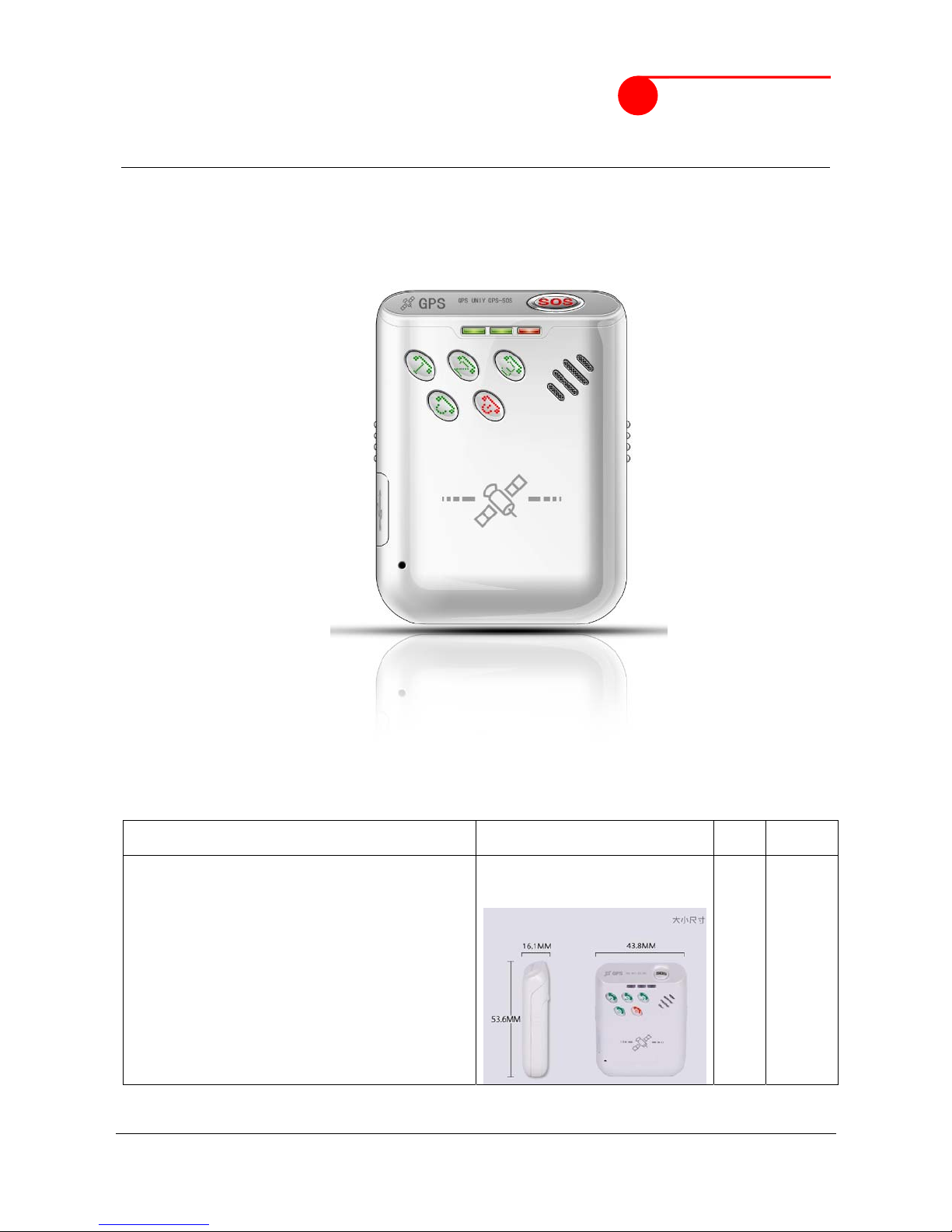
Personal GPS Tracker
with SMS/GPRS functions
U Type
Updated on 2010/06/28
GPS Personal Tracking System U Type (SMS/GPRS)
Standard
Applications:
CHF incl. 8%
VAT
a) SOS
b) better signal
c) GPS tracking
d) Call back with longitude/latitude
e) Setting of two groups contact phone number
f) An emergency call button
g) Hands-free communication
h) Remote monitor
i) history playback by the gprs network
1) for elder people
2) for children,disable people
3) etc.
CHF
95.30
Page 2

Sinorama AG Ahornstrasse 9a CH-9523 Züberwangen Switzerland
Tel: +41-71-9400888 Fax: +41-71-9400889 [email protected] http://www.sinorama.ch
120401 LP02 sinorama GPS TRACKER U/4/1/2012 9:54:00 PM 2/9
sinorama
1. Product Overview
This Tracker provides peace of mind by showing you with your mobile phone or PC the location of your
targets via SMS or GPRS.
TRACKER has the following features
Tracking via SMS or GPRS
Current location report
Tracking by time interval
Two-way conversation
SOS alert
Geo-fencing control
Low battery alert
Speeding alert
Four buttons for making phone call and/or sending message
Removable and rechargeable internal battery
Built-in speaker and microphone
Alert when Track enter/exits GPS blind area
Live Voice monitoring
2. For Your Safety
Read these simple guidelines. Not following them may be dangerous or illegal. Read the full user
manual for more information.
Switch on safely- Do not switch on Track when wireless phone use is prohibited or when it may
cause interference or danger.
Switch off in Hospitals– Follow any restrictions. Switch Track off near medical equipment.
Switch off in Aircraft – Follow any restrictions. Wireless devices can cause interference in aircraft.
Switch off when refueling– Do not use Track when at a refueling point. Do not use near fuels or
chemicals.
Water Resistance –Track is not water resistant. Keep it dry. Use waterproof bag if necessary.
3. Track Parameters& Panel Description
Item Specification
Charging Voltage DC 5V/500mA (Micro USB port)
Internal Battery Rechargeable and removable 830 mAh battery (3.7V)
Operating temperature -20° to 55° C
Humidity 5% to 95% Non-condensing
GSM module GSM 900/1800/1900Mhz
GPS Chipset latest GPS (AGPS)
GPS Sensitivity -158Db
GPS Frequency L1, 1575.42 MHz
C/A Code 1.023 MHz chip rate
Channels 20 channel all-in-view tracking
Position Accuracy 10 meters, 2D RMS
Velocity Accuracy 0.1 m/s
Time Accuracy 1 us synchronized to GPS time
Default datum WGS-84
Reacquisition 0.1 sec., average
Hot start 1 sec., average
Warm start 38 sec., average
Cold start 42 sec., average
Altitude Limit 18,000 meters (60,000 feet) max.
Velocity Limit 515 meters/second (1000 knots) max.
Page 3
Sinorama AG Ahornstrasse 9a CH-9523 Züberwangen Switzerland
Tel: +41-71-9400888 Fax: +41-71-9400889 [email protected] http://www.sinorama.ch
120401 LP02 sinorama GPS TRACKER U/4/1/2012 9:54:00 PM 3/9
sinorama
Acceleration Limit Less than 4g
Jerk Limit 20 m/sec
Work time 60 hours in sleep mode and 10 hours in normal mode
LED 3 LED indicators showing power, GPS, GSM status and other
operation status.
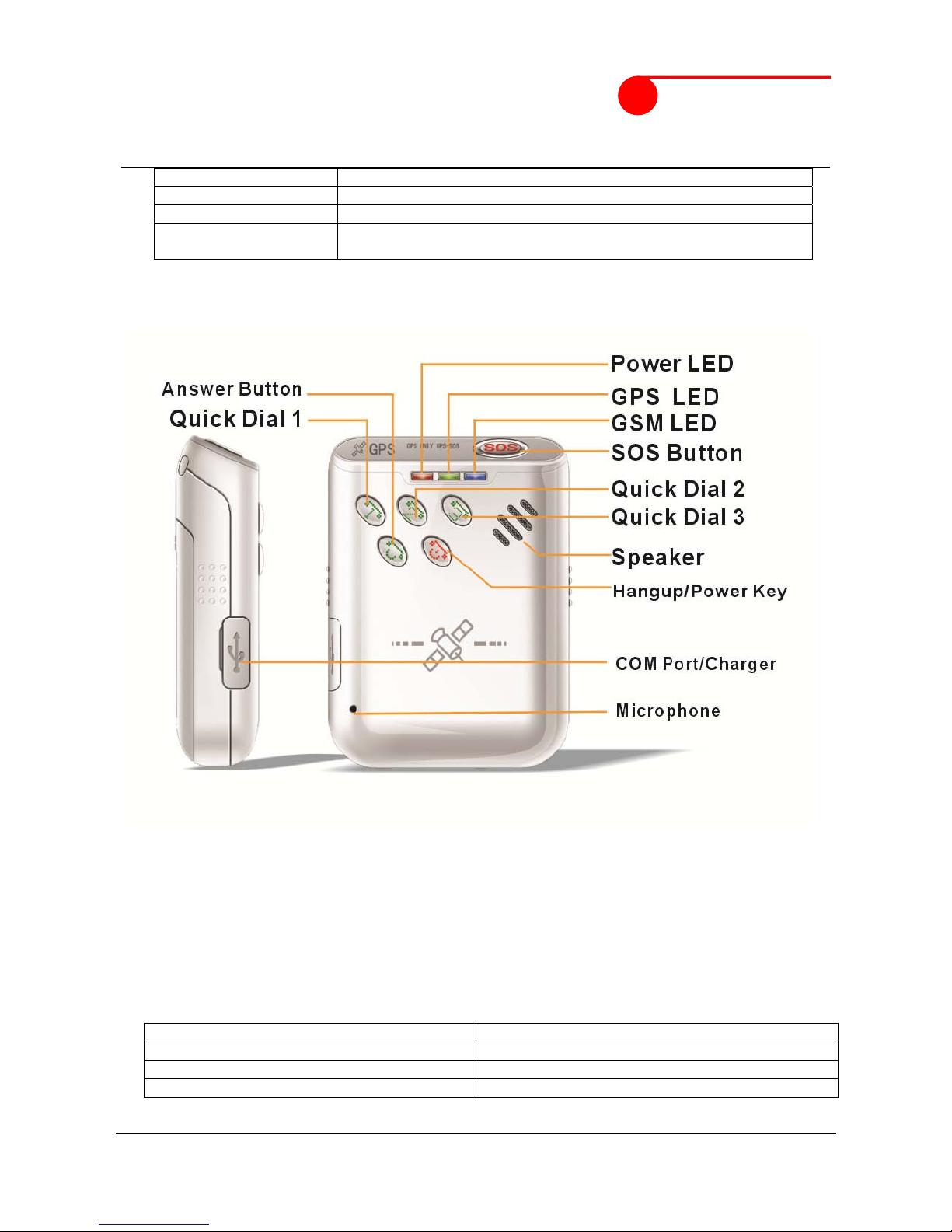
Panel Description
4. Getting Started
4.1 Hardware and Accessories
USB Power Cable
User Manual
Other document or software if required
4.2 Light and Button Functionality
TRACK has four buttons and three LED lights with three different colors to indicate the status of the
unit. All LED is enabled when power on, and short click SOS key to change GSM & GPS LED
enable / disable status.
Red LED Indicating power status
Off Power is off / charging is complete / working
Flashing(on for 0.05sec and off for 4.95 sec) Low power
On Charging
Page 4
Sinorama AG Ahornstrasse 9a CH-9523 Züberwangen Switzerland
Tel: +41-71-9400888 Fax: +41-71-9400889 [email protected] http://www.sinorama.ch
120401 LP02 sinorama GPS TRACKER U/4/1/2012 9:54:00 PM 4/9
sinorama
Green LED-indicating GPS status
Off Device is not ready
On GPS fix
Flashing(on for 1 second and off for 4
seconds)
GPS no fix / GPS power off
Blue LED-indicating GSM status
On One call is coming in / one call is being made
Flashing (on for 0.05 second and off for 4.95
seconds)
TRACK is connected to GSM network
Flashing (on for 1 second and off for 4
seconds)
TRACK is not connected to the GSM network
Power Button To turn on/off
SOS Button Long press SOS button to send an alarm to
location center and make a phone call and/or send
an SMS to the preset phone number.
Short press SOS button to change GSM & GPS
LED enable / disable status.
1 Button Long press 1 button to make a phone call and/or
send an SMS to the preset phone number.
2 Button Long press 2 button to make a phone call and/or
send an SMS to the preset phone number.
3 Button Long press 3 button to make a phone call and/or
send an SMS to the preset phone number.
4.3 First Use
Ensure that Track has a working SIM installed
Check that the SIM has not run out of credit
Check that the SIM Lock code is turned off
Use some other mobile phone to confirm that the PIN code Can not been set ,and that it can
dial out and receive telephone calls, and that it can connect to internet by GPRS.
Charge the battery for at least 3 hours in power-off status using the wall charger or car charger.
Red light is on during charging and is off when charging is complete.
Page 5
Sinorama AG Ahornstrasse 9a CH-9523 Züberwangen Switzerland
Tel: +41-71-9400888 Fax: +41-71-9400889 [email protected] http://www.sinorama.ch
120401 LP02 sinorama GPS TRACKER U/4/1/2012 9:54:00 PM 5/9
sinorama
4.4 Operation Instructions
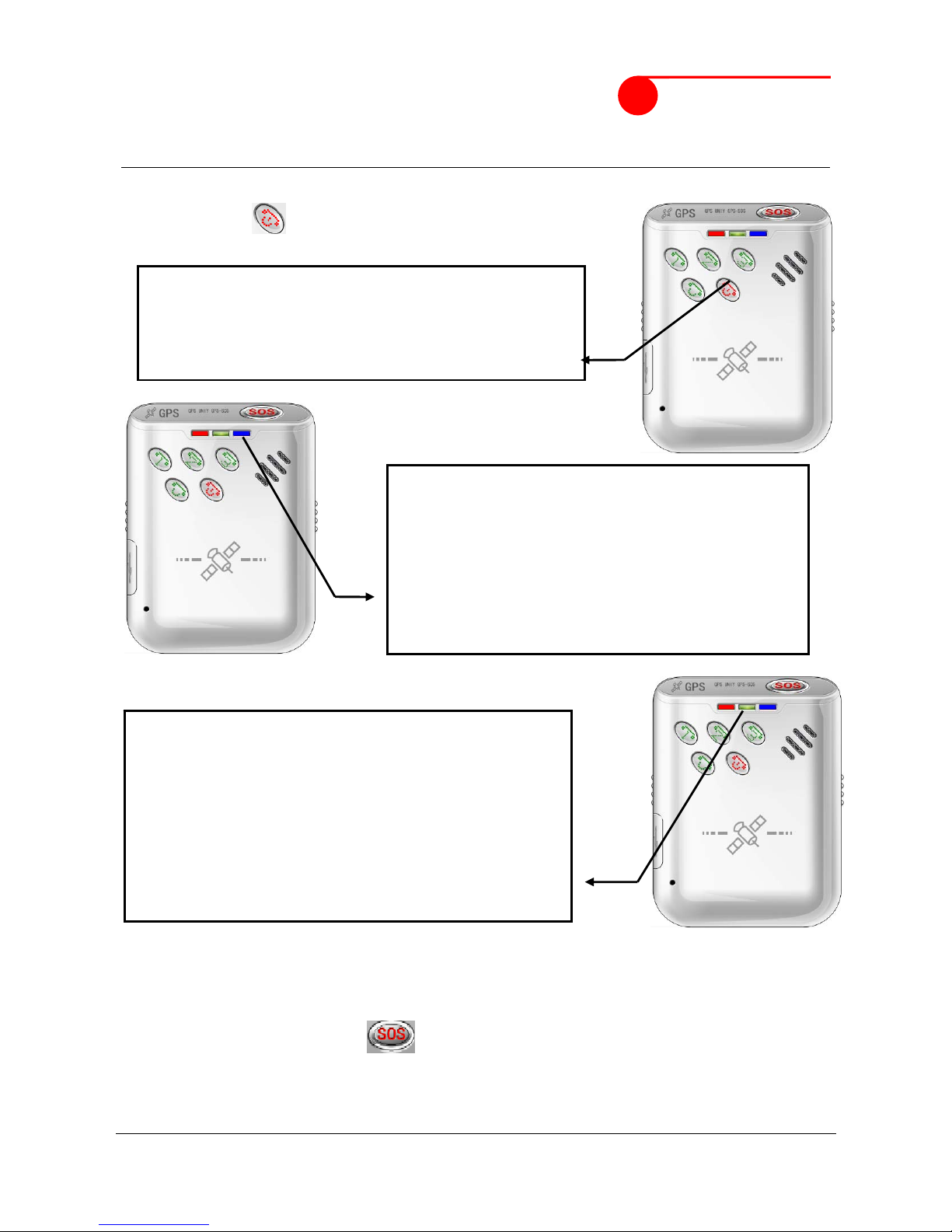
(1) Power On/Off
Power On:
Power Off:
When it is on, press the power button for 3 seconds to switch off the power; Power/GPS/GSM LED will
shut off right now. By then, the device is turned off.
(2) SOS Emergency Help Function
When SOS button is long pressed, Track will send alarm to location center, and send a SMS
message and make phone call for emergency help. The phone number can be set by the users.
When 1 2 3 button is long pressed, Track will make normal phone call. The phone number can be
set by users. The phone number list can be set by SMS command.
Step 1. When it is off, press the power button
for 5 second to switch on the power.
Step 2. After power on, GSM LED will light on first (on
1 second and off 4 seconds for searching
GSM network, or on 0.05 second and off 4.95
seconds after get GSM network).
Step 3. Some 10 seconds later, GPS LED starts to flash
(on 1 second and off 4 seconds for searching
GPS, or always on after GPS fixed). By then, the
device is ready to work.
Page 6
Sinorama AG Ahornstrasse 9a CH-9523 Züberwangen Switzerland
Tel: +41-71-9400888 Fax: +41-71-9400889 [email protected] http://www.sinorama.ch
120401 LP02 sinorama GPS TRACKER U/4/1/2012 9:54:00 PM 6/9
sinorama
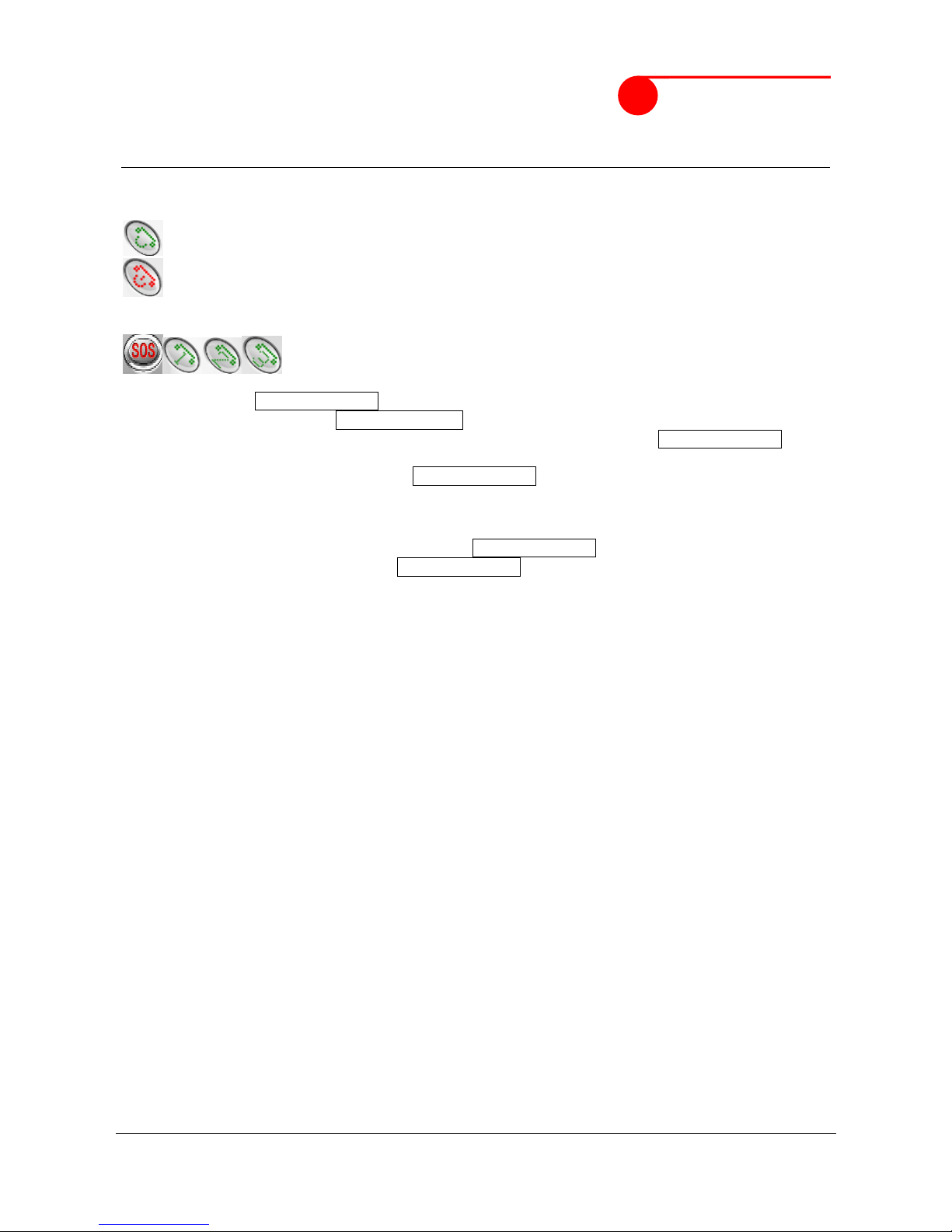
(3) Conversation Function
Call In: One can make phone call to Track by simply dialing the SIM card number.
To receive the incoming phone call.
To refuse the incoming phone call.
Call Out: Track has four speed dial; you can long press preset 4 sets of phone
(4) Connect to our Monitoring Center
TRACK will connect to our Monitoring Center automatically per 10s to report its position info and
fetch the new configuration. Ensure that Track has been registered on the Monitoring Center
Step1. Register your Track device on Monitoring Center to get username and password. The
device IMEI number is required. The IMEI number is printed on the back of Track.
Step2. Check preset APNs list (Appendix 2)
If your GSM operator’s APN is not in this list, please set APN by SMS (Preference 5.2.1)
Step3. When APN is set, Track will connect to Monitoring Center automatically per 5 mins to report
its pos info to center. You can login Monitoring Center website to trace the Track.
5. SMS Command
TRACK will only accept commands from a user with the correct password. Commands with wrong
password are ignored. The default password is 000000.
5.1 Basic SMS Commands
5.1.1 Return the location of the tracker
Description: To know the location of your Track, send an SMS to Track and it will report its
location by SMS.
Command: W<password>, <000>
Notes: The default password is 000000.
Example:
SMS sent: W000000,000
SMS received:
W00,000,$GPRMC,034522,662,A,2232,3126,N,11359,3061,E,000.0,000.0,241209,,,A*6E
5.1.2 SOS/Call 1/Call 2/Call 3
Description: To authorize a mobile phone number for the SOS, 1, 2 or 3 buttons. When the
button is pressed,a message will be sent and/or simultaneously a call will be made to the
authorized number.
Command: W<password>,003,F,P, <telephone number>
Notes:
(a) F =0, cancel this function
=1, set send SMS to the preset number
=2, set call the preset number
=3, set send SMS and also call the preset number
P =1, set a authorized number for SOS button
=2, set a authorized number for 1 button
Page 7
Sinorama AG Ahornstrasse 9a CH-9523 Züberwangen Switzerland
Tel: +41-71-9400888 Fax: +41-71-9400889 [email protected] http://www.sinorama.ch
120401 LP02 sinorama GPS TRACKER U/4/1/2012 9:54:00 PM 7/9
sinorama
=3, set a authorized number for 2 button
=4, set a authorized number for 3 button
(b) When one of the buttons is pressed and a call is made, you can call and talk with the
tracker-holder.
(c) Press END button to hang up the call or cancel a calling
Example:
SMS sent: W000000,003,3,1,123456789
SMS received: W01,003,Set phone number OK
Meaning: When the SOS button is pressed, Track will send an SMS to telephone number “123456789”
and also make a phone call to it.
When a call is coming in, the blue light is on. Press ACCEPT button to receive the incoming call and
then talk with the caller. To complete the conversation, hang up the call by pressing END button.
5.2 GPRS Settings by SMS
Tracking via GPRS, you should set APN for Track
Ensure that your SIM card in Track supports GPRS connection prior to setting.
5.2.1 Set APN
Command: W<password>,011,APN,APN Name,APN Password,APN DNS,APN Second DNS
Note: If no APN name, APN password, APN DNS and APN Second DNS required, input APN only.
Example: W000000,011,CMNET
TRACK will reply with an SMS (like ‘W01,011, Set device APN OK’) to confirm this setting.
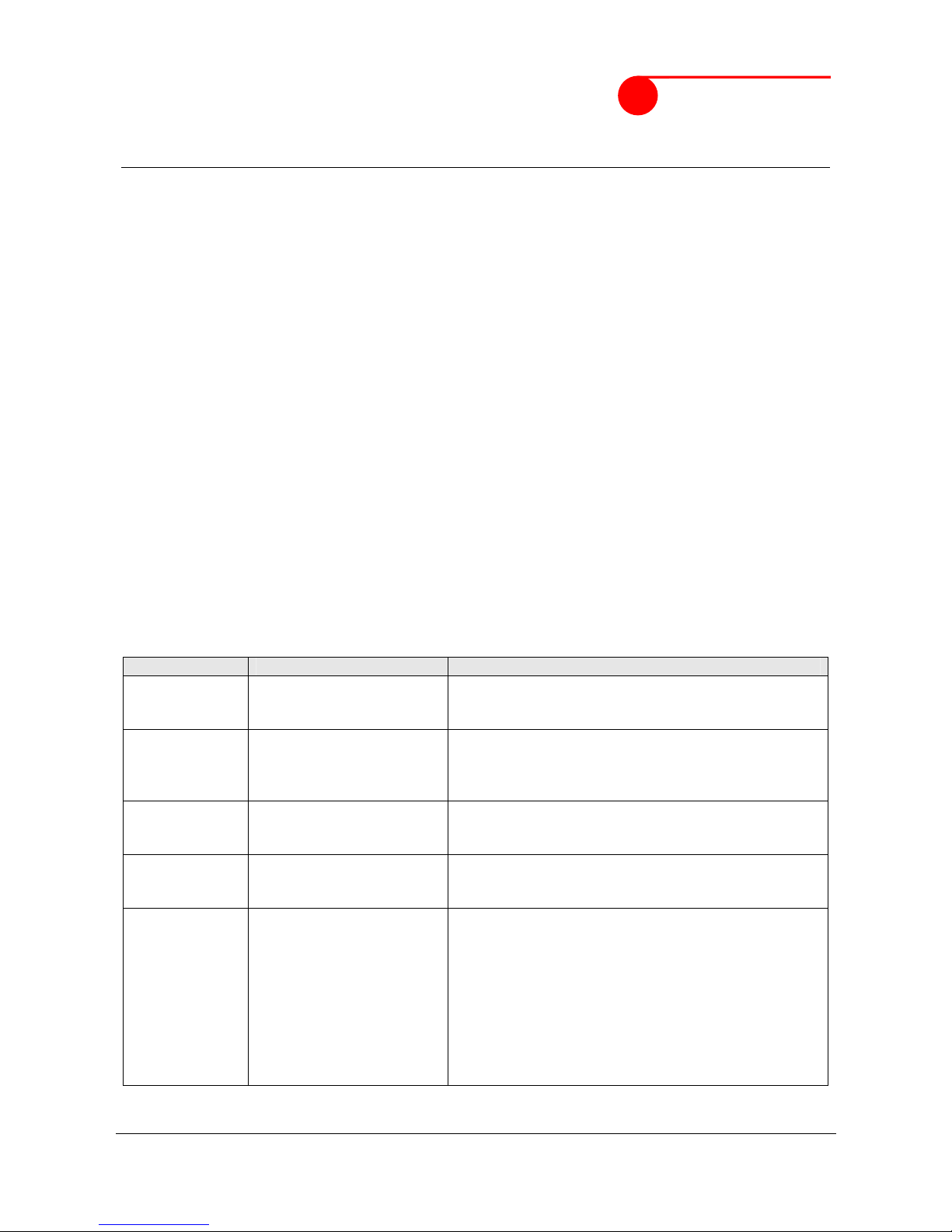
6. Command List
Remarks: ****** is user’s password and the default password is 000000.
Description Command Remarks
Get current
location
NMEA format
W******,000 Get current location of Track, NMEA format
Get current
location
Google Earth
format
W******,051 Get current location of Track, Google Earth format
Get current
location
Plain address
W******,052 Get current location of Track, plain address
Change user’s
password
W******,001,###### ****** is old password
###### is new password
Max 8 characters.
Set preset
phone number
for SOS button
W******,003,F,P,T F=0, to turn off this function;
F=1, set sending SMS;
F=2, set calling preset phone number;
F=3, set SMS and calling (default)
P=1, set a authorized number for SOS
button
P=2, set a authorized number for 1 button
P=3, set a authorized number for 2 button
P=4, set a authorized number for 3 button
T: Preset phone number. Max. 16 digits
Page 8
Sinorama AG Ahornstrasse 9a CH-9523 Züberwangen Switzerland
Tel: +41-71-9400888 Fax: +41-71-9400889 [email protected] http://www.sinorama.ch
120401 LP02 sinorama GPS TRACKER U/4/1/2012 9:54:00 PM 8/9
sinorama
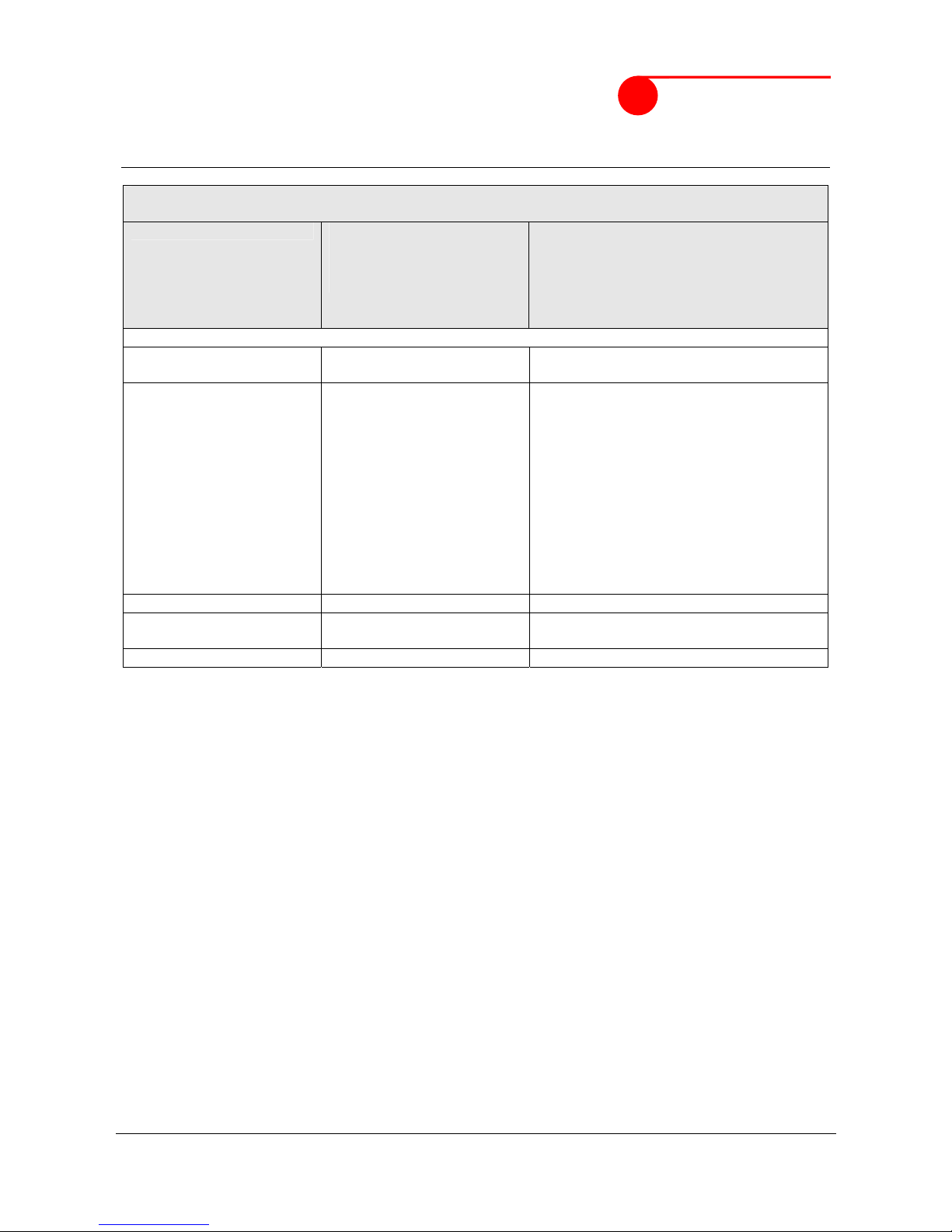
Presetting by SMS for GPRS tracking (Ensure that your SIM card supports GPRS connection
prior to setting)
Set APN W******,011,APN,APN
Name,APN Password,APN
DNS,APN Second DNS
If no APN name and password
required, just insert APN only;
APN defaulted as ‘CMNET’;
APN + APN name + APN password +
APN DNS + APN Second DNS not over
39 characters.
Set phone number for
wiretapping
W******,030,T T is the telephone number for
Wire tapping and max. 16 digits
Set character for SOS
alert message
W******,033,P,Char P is the button number. P=1, 2, or 3.
P=1, SOS button
P=2, 1 button
P=3, 2 button
P=4, 3 button
Char is the character in SOS message
and max 32 characters
Restore factory settings W******,048 Restore factory settings
Get version and serial
number
W******,600 To get version and serial number of
current firmware
Get IMEI W******,601 To get IMEI
Appendix 1
Format of SMS reply: W**,###
** Reply number
### Command number
Reply number:
00: Get location succeed
01: Setting succeed
02: Setting failed
03: Format error
04: Password error
05: Command error
06: Change password error
07: Parameter error
08: No GPS data
09: Protocol not support
10: Over speed
11: Geo-Fence
12: GPS no fix
13: Port open failed
14: Timeout
15: Reject
16: Get GPS data failed
17: Allocate memory failed
18: Automatic alert
19: GPRS login
Page 9

Sinorama AG Ahornstrasse 9a CH-9523 Züberwangen Switzerland
Tel: +41-71-9400888 Fax: +41-71-9400889 [email protected] http://www.sinorama.ch
120401 LP02 sinorama GPS TRACKER U/4/1/2012 9:54:00 PM 9/9
sinorama
Appendix 2
Mobile Operator APN preset by Track
# Albania, vodafone AL
# Argentina, Movistar
# Argentina, Personal
# Austria, A1
# Austria, T-Mobile A
# Austria, telering
# Australia, Optus
# Australia, Telstra Mobile
# Australia, 3
# Australia, vodafone AU
# Azerbaijan, AZE ACELL
# Bangladesh, GramenPhone
# Belarus, Velcom
# Belarus, MTS
# Belgium, BASE
# Belgium, Mobistar
# Belgium, Proximus
# Botswana, MASCOM
# Brazil, Claro
# Brazil, Oi
# Brazil, TIM BRASIL
# Bulgaria, BG GLOBUL
# Bulgaria, M-Tel BG
# China Mobile
# China Unicom
# Cameroon, MTN CAM
# Canada, Fido
# Canada, ROGERS
# Chile, ENTEL
# Costa Rica, I.C.E.
# Croatia, T-Mobile
# Croatia, VIPnet
# Czech Republic, T-Mobile CZ
# Denmark, TDC MOBIL
# Denmark, TELIA DK
# Dominican, orange
# Egypt, Vodafone EG
# Egypt, MobiNiL
# Estonia, EE EMT
# Finland, DNA
# Finland, FI Elisa
# Finland, FI SONERA
# France, Bouygues FR
# France, Orange F
# France, SFR FR
# Ghana, Areeba
# Ghana, Onetouch
# Ghana, Tigo
# Germany, Vodafone.de
# Germany, E-Plus
# Germany, O2-de
# Germany, T-Mobile D
# Greece, COSMOTE GR
# Greece, vodafone GR
# Hong Kong, CSL
# Hong Kong, New World
# Hong Kong, SmarToneVodafone
# Hong Kong, 3 HK
# Hungary, H pannon
# Hungary, T-Mobile H
# Hungary, vodafone HU
# Iceland, Siminn
# India, Airtel
# India, BPL MOBILE
# India, IDEA
# India, MTNL
# Indonesia, XL
# Indonesia, INDOSAT
# Indonesia, Telkomsel
# Ireland, METEOR IRL
# Ireland, O2 IRL
# Ireland, vodafone IRL
# Israel, Cellcom
# Israel, Orange
# Italy, TIM IT
# Italy, vodafone IT
# Italy, WIND IT
# Jamaica, Digicel
# Kazakhstan, Beeline KZ
# Kenya, Safaricom
# Latvia, LMT LV
# Latvia, TELE2 LV
# Lebanon, Alfa
# Lithuania, LT BITE GSM
# Lithuania, OMNITEL LT
# Lithuania, TELE2
# Luxembourg, L LUXGSM
# Luxembourg, L TANGO
# Luxembourg, L VOX
# Malaysia, MY CELCOM
# Malaysia, DiGi
# Malaysia, MY MAXIS
# Malta, go mobile
# Malta, vodafone MT
# Mexico, TELCEL
# Moldova, MOLDCELL MD
# Morocco, MEDITEL
# Nepal, Mero Mobile
# Netherlands, KPN NL
# Netherlands, Orange NL
# Netherlands, T-Mobile NL
# Netherlands, Vodafone NL
# New Zealand, vodafone NZ
# Nigeria, MTN NG
# Norway, N NetCom
# Norway, N Telenor
# Pakistan, Mobilink
# Pakistan, Telenor PK
# Pakistan, PK-UFONE
# Philippines, Globe Telecom
# Philippines, SMART
# Poland, Era
# Poland, Orange PL
# Poland, Plus
# Portugal, Optimus P
# Portugal, TMN P
# Portugal, vodafone P
# Qatar, Qat-Qtel
# Congo Dem. Rep, Vodacom CD
# Romania, RO ORANGE
# Romania, RO Vodafone
# Russia, Beeline RUS
# Russia, MegaFon RUS
# Russia, MOTIV RUS
# Russia, MTS RUS
# Russia, NTC RUS
# Russia, TELE2 RUS
# Russia, Utel RUS
# Saudi Arabia, STC
# Singapore, SSTARHUB
# South Africa, Cell C
# South Africa, MTN-SA
# South Africa, VodaCom-SA
# Spain, vodafone ES
# Sri Lanka, SRI DIALOG
# Sri Lanka, Mobitel
# Sweden, TELIA SE
# Sweden, Telenor SE
# Switzerland, Sunrise
# Switzerland, ORANGE
# Switzerland, Swisscom
# Taiwan, ChungHwa
# Taiwan, FarEasTone
# Taiwan, KG Telecom
# Thailand, AIS GSM
# Thailand, DTAC
# United Arab Emirates, ETISALAT
# Uganda, MTN
# United Kingdom, Orange UK
# United Kingdom, T-Mobile UK
# United Kingdom, Vodafone UK
# United Kingdom, O2 UK
# Ukraine, Beeline
# Ukraine, Kyivstar
# United States, AT&T
# United States, T-Mobile
# Uruguay, Movisar
# Venezuela, Digitel
*Non listed APN can be added
anytime.
 Loading...