

Page 1
Warning
If you use remote start, please put your
gear position on neutral or parking, and
apply hand brake for safety
This design and specifications of this model could be changed
without prior notice for the improvements.
4F, MyungJin Bldg., #978-8, Youngtong-dong, Youngtong-gu,
Suwon-si, Kyunggi-do, Korea
Tel: +82 31 203 0530 Fax: +82 31 203 0532
SPEAR-5000
SPEAR-5000
Advanced Technology Leader
Car Alarm System with
Remote Starter
User's Manual
Car Alarm System with
Remote Starter
User's Manual
The Spearhead
FUZZY TWO-WAY CAR ALARM &
ENGINE STARTING SYSTEM
The Spearhead
FUZZY TWO-WAY CAR ALARM &
ENGINE STARTING SYSTEM
The Spearhead
FUZZY TWO-WAY CAR ALARM &
ENGINE STARTING SYSTEM
The Spearhead
FUZZY TWO-WAY CAR ALARM &
ENGINE STARTING SYSTEM
The Spearhead
FUZZY TWO-WAY CAR ALARM &
ENGINE STARTING SYSTEM
The Spearhead
FUZZY TWO-WAY CAR ALARM &
ENGINE STARTING SYSTEM
The Spearhead
FUZZY TWO-WAY CAR ALARM &
ENGINE STARTING SYSTEM
The Spearhead
FUZZY TWO-WAY CAR ALARM &
ENGINE STARTING SYSTEM
The Spearhead
FUZZY TWO-WAY CAR ALARM &
ENGINE STARTING SYSTEM
The Spearhead
FUZZY TWO-WAY CAR ALARM &
ENGINE STARTING SYSTEM
The Spearhead
FUZZY TWO-WAY CAR ALARM &
ENGINE STARTING SYSTEM
The Spearhead
FUZZY TWO-WAY CAR ALARM &
ENGINE STARTING SYSTEM
The Spearhead
FUZZY TWO-WAY CAR ALARM &
ENGINE STARTING SYSTEM
The Spearhead
FUZZY TWO-WAY CAR ALARM &
ENGINE STARTING SYSTEM
The Spearhead
FUZZY TWO-WAY CAR ALARM &
ENGINE STARTING SYSTEM
The Spearhead
FUZZY TWO-WAY CAR ALARM &
ENGINE STARTING SYSTEM
The Spearhead
FUZZY TWO-WAY CAR ALARM &
ENGINE STARTING SYSTEM
The Spearhead
FUZZY TWO-WAY CAR ALARM &
ENGINE STARTING SYSTEM
The Spearhead
FUZZY TWO-WAY CAR ALARM &
ENGINE STARTING SYSTEM
The Spearhead
FUZZY TWO-WAY CAR ALARM &
ENGINE STARTING SYSTEM
The Spearhead
FUZZY TWO-WAY CAR ALARM &
ENGINE STARTING SYSTEM
The Spearhead
FUZZY TWO-WAY CAR ALARM &
ENGINE STARTING SYSTEM
The Spearhead
FUZZY TWO-WAY CAR ALARM &
ENGINE STARTING SYSTEM
The Spearhead
FUZZY TWO-WAY CAR ALARM &
ENGINE STARTING SYSTEM
The Spearhead
FUZZY TWO-WAY CAR ALARM &
ENGINE STARTING SYSTEM
The Spearhead
FUZZY TWO-WAY CAR ALARM &
ENGINE STARTING SYSTEM
Caution : Any changes or modifications in construction of this device which
are not expressly approved by the party responsible for compliance could
void the user's authority to operate the equipment.
FCC statements
This device complies with part 15 of the FCC Rules. Operation is subject to
the following two conditions: (1) This device may not cause harmful
interference, and (2) this device must accept any interference received,
including interference that may cause undesired operation.
Page 2
◈ Welcome and thank you for choosing SPEAR 5000 of newly
developed and cutting edge car alarm system with remote starter.
◈ Before customers' pointing out, we endeavor to make products
which satisfy ourselves confidently and by doing so, we believe,
we can make customers happier.
◈ For customer's safety and conveniences, we are promised to
develop and advance our technologies continuously.
Acknowledgements for Customers
................................
2
Table of Contents
..........................................................
3
System Contents
............................................................
4
Notice to Customers
......................................................
5
Product & Function Descriptions
...................................
6
Turning System On & Replacing Battery
.....................
6
Installing Program Modes
..............................................
8
Valet Function
.................................................................
9
Standard Functions
........................................................
10
Convenience & Optional Functions
...............................
17
Wiring Diagram of the Main Unit
................................
22
Table of Contents
SPEAR
5000
2
3
Acknowledgements for Customers
The design and specifications of this model could be changed without prior notice for the improvements.
Page 3
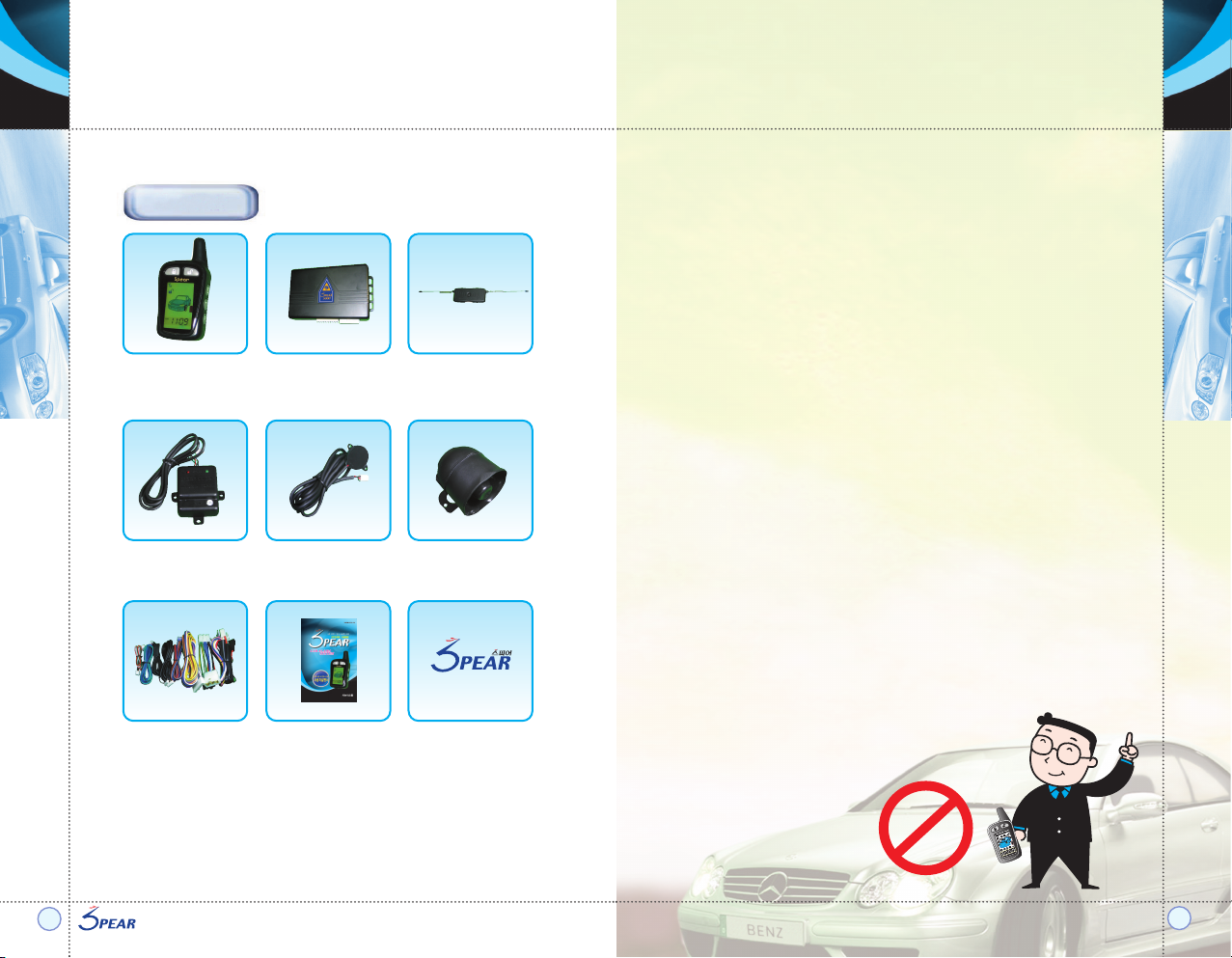
* System contents can be changed without prior notice for the improvements of
specifications and functions.
System Contents
Notice to Customers
SPEAR
5000
4
5
SPEAR
5000
Remote Controller
Shock Sensor
Wiring Harness, Relays User's Manual SPEAR Logo Sticker
Knock Sensor Siren
Main Control Box Transceiver module
with two-way
antenna
1) Users are responsible for car damages and various car accidents
due to their faulty installations, incorrect uses and children's misuse
etc.
Manufacturer and retailers are not responsible for these in civil and
criminal aspects.
2) There can be a difference of remote sending and receiving distance
due to user's surroundings.
3) Warrant period will be 1 year and our headquarters will be
responsible for manufacturing defects and
our service centers will repair installing defects free of charge during
warrant period.
4) Although this product provides car robbery protection and user
conveniences in car uses,
we are not responsible for any car damages and car robberies.
5) Please check the product features regularly and prepare car
damages can be occurred.
6) If car owner changed, our service centers can fix the product for
new owner, but service charge can be happened.
Review the following safety precautions and user instructions to avoid
injury and prevent damage to this product or any products connected
to it.
To avoid potential hazards, use this product only as specified.
Page 4
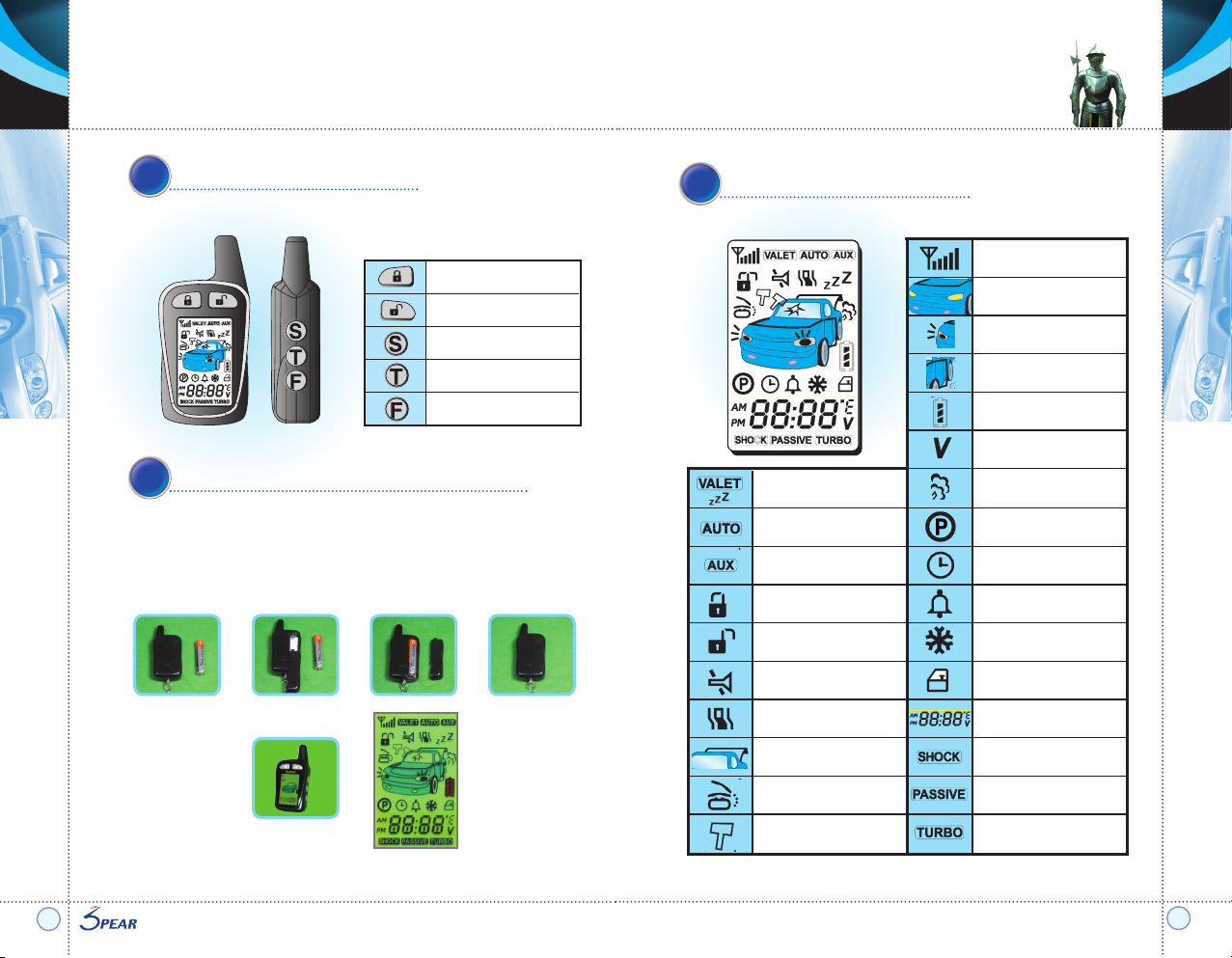
Receiving signal status
Hood
Emergency light
Door opens
Battery status for remote
Car battery's voltage
Valet function
Automatic/
manual transmission
Arm & door lock
Disarm & door unlock
Mute alarm
Vibration mode
Trunk release
Pager for owner
Shock reception display
Engine starting display
Engine start reservation of
manual transmission vehicle
24-hour engine start reservation
Alarm display
5door/4door
Shock sensor on mode
Passive (emergency) mode
Turbocharged vehicle mode
Optional functions
(window roll
up/down & sunroof open/close etc.)
Cold start
(engine protection in winter season)
Clock, ignition, parking, driving,
temperature and voltage display
Product & Function Descriptions
SPEAR
5000
6
7
Remote Controller Buttons
Turning System On & Replacing Battery
Viewing the Display Screen
Arm & door lock
Disarm &
door unlock
Remote engine starter
Trunk release
Car finder
1) Insert AAA 1.5 battery into the opening on the back of remote.
2) All functions displayed in the screen with music and vibration.
3) Set the time
Screen
‘melody’Sound
♬♪
~
~
Page 5
Installing Program Modes
Valet Function
SPEAR
5000
8
9
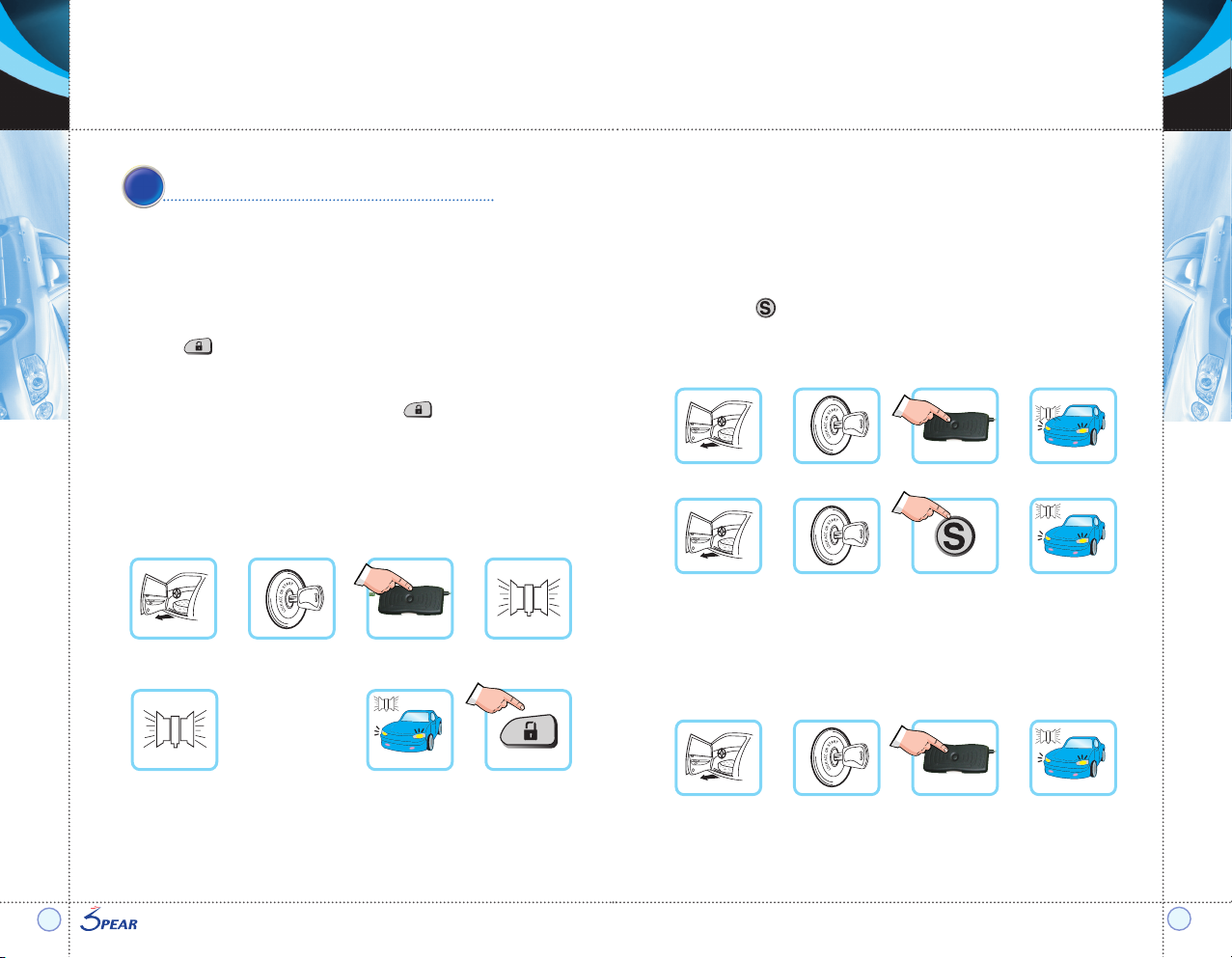
General Remote Code Programming
※ After finish the car installation and power apply to the main unit,
programs can be input within 3 seconds.
▶ Leave the door open.
▶ Turn the key to ON position.
▶ Press valet button 4 times. Beep sounds 1 time.
▶ Press button then program is installed with one beep sound and one
parking light flash. If no input occurs within 7 seconds, programming will be
done.
▶ If you want to set up second remote, press button then program is
installed with two beep sounds.
Third remote can be programmed with same method. And beep sounds 3
times.
▶ You can program total three remotes (two of 2-way remotes first and then
one auxiliary remote).
1) Temporary valet: when parking, washing and maintaining the car
▶ Using valet button : Leave the door open. Turn the key to ON position. And
press valet button for 5 seconds.
Then temporary valet will work with one beep sound and one parking light
flash. In this mode, you can use door lock/ unlock function. If you repeat
same steps, this mode will be inactivated.
▶ Using remote controller : Leave the door open. Turn the key to ON position.
And press button for 2 seconds.
Then temporary valet will work with one beep sound and one parking light
flash. In this mode, you can use door lock/ unlock function. If you repeat
same steps, this mode will be inactivated.
2) Permanent valet : when you lost remote controller
(until you input programs to new remote)
▶ Leave the door open. Turn the key to ON position. And press valet button for
10 seconds. Then permanent alarm disarming will work with one beep sound
and one parking light flash.In this mode, you can not use any function until
you will use new remote. If you repeat same steps, this mode will be
inactivated.
▶ If you use new remote, first inactivate permanent valet mode and input
programs to new remote
(please see General Remote Code Programming instruction).
Door open Key ON
Valet, 4 times
Beep, 1 time
※ Same former
procedures
Beep & parking light, 1 time button
Beep, 2 times
Door open Key ON
S button, 2 sec
Beep & parking light, 1 time
Door open
Key ON
Valet, 10 sec
Beep & parking light, 1 time
Door open Key ON
Valet, 5 sec
Beep & parking light, 1 time
▼ Use valet button
▼ Use remote
Page 6
Beep & parking light, 1 time
Standard Functions
SPEAR
5000
10
11
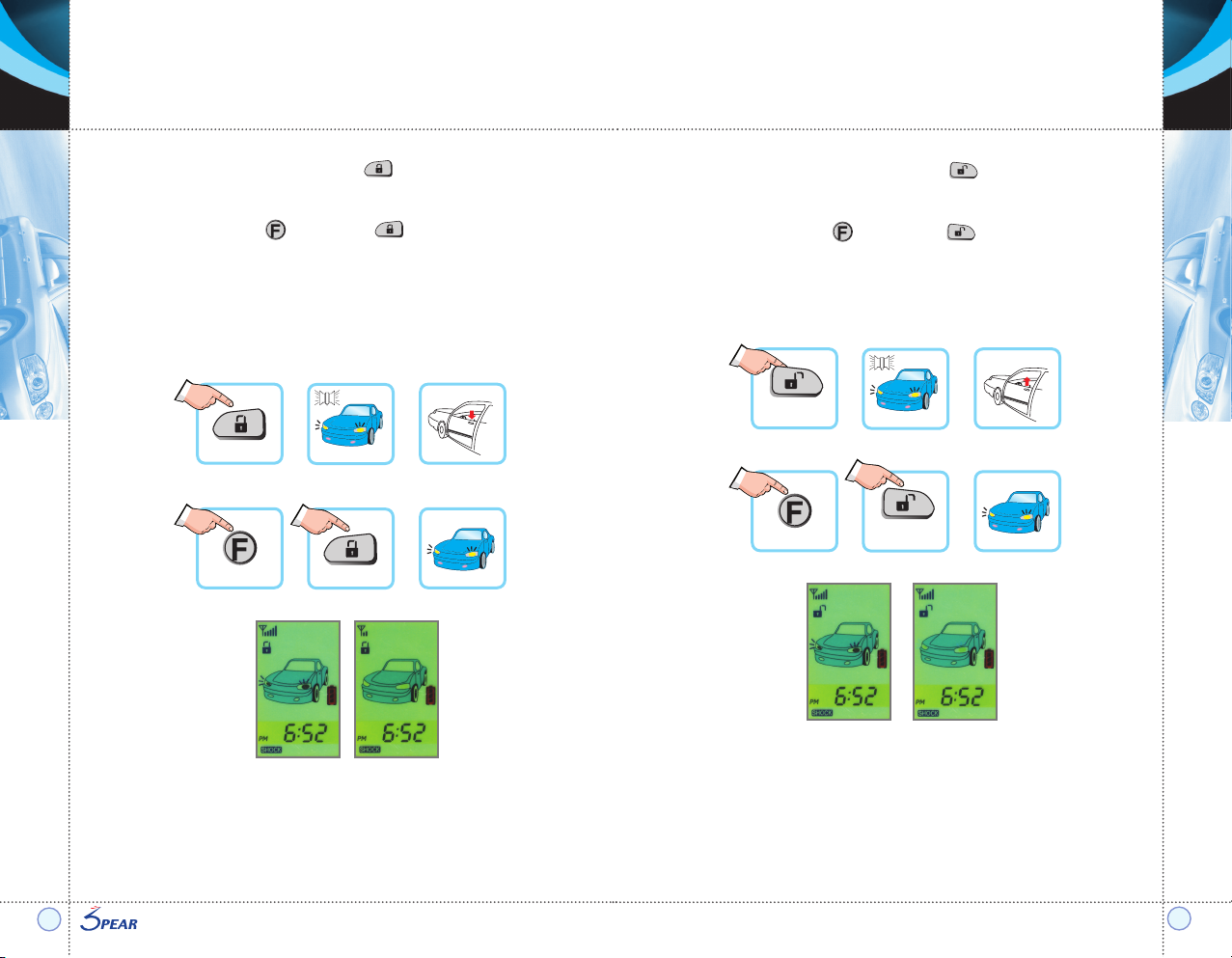
2) Disarming (door unlock) function : press button for 1 second.
▶ Siren 2 times, parking light 2 times
▶ Door will be unlocked
▶ Silent door unlock (press button and then button): parking light, 2 times
▶ Door lock remained during engine starting & driving
▶ At this mode, any alarming modes will be inactivated.
▶ If you do not open the door within 10 seconds, function will be back to alarm
arming mode.
1) Arming (door lock) function: press button for 1 second.
▶ Siren 1 time, parking light 1 time
▶ Door will be locked
▶ Silent door lock (press button and then button): parking light, 1 time
▶ Door lock remained during engine starting & driving
▶ At this mode, if you have door or trunk or hood opens or have a shock,
siren will sound for 30 seconds and parking light flash will be on and off.
This can be occurred total 3 times when same situation continues but it will
not affect battery discharge.
Press any button if you want to stop siren and flash.
▶ In the screen of remote, door lock icon displayed.
▶ Remote's beep sounds 1 time and back lights will be on. (If you are not
connected, beep will sound 3 times and no change of the screen and no
back lights.)
Screen Screen
button
Alarm arming
(door lock)
▶ In the screen of remote, door unlock icon displayed.
▶ Remote's beep sounds 2 times and back lights will be on. (If you are not
connected, beep will sound 3 times and no change of the screen and no
back lights.)
▶ If you do not open the door within 10 seconds, function will be back to
arming mode.
▼ Arming (door lock)
button
F button
Parking light, 1 time
▼ Silent door lock
Beep & parking light,
2 times
Screen Screen
button
Alarm disarming
(door unlock)
▼ Disarming (door unlock)
button
button
Parking light, 2 times
▼ Silent door unlock
 Loading...