

Page 1

SINBON Electronics Co., Ltd.
4F-13, No. 79, Sec. 1, Hsin Tai Wu Rd.,
Hsi-Chih, T aipei Hsien 221, Taiw an
Tel: +886-2 2698-9999 Fax: +886-2 2698-9660
www.sinbon.com
SG-70 Solar Gateway
User's Quick Start Guide
Version: 1.0
Date: Feb/08/2018
DMIS RD Department
User’s Guide Data Sheet Operation Manual
Approved by
Reviewed by
Prepared by
Bruce Lin
Asuka Wu
Happy Chen
This document contains confidential and proprietary information, all information are reserved by SINBON Electronics Co., LTD.
1
Page 2
SINBON Electronics Co., Ltd.
4F-13, No. 79, Sec. 1, Hsin Tai Wu Rd.,
Hsi-Chih, T aipei Hsien 221, Taiw an
Tel: +886-2 2698-9999 Fax: +886-2 2698-9660
www.sinbon.com
Title
SG-70 Solar User's Quick Start Guide
Subtitle
User’s Star t Guide
Doc No.
M-170061
Revision Notes
Date
Status / Comments
1.0
Feb/08/2018
Preliminary release
We reserve all rights in this document and in the information contained there in. Re pr oduc ti on, us e or disclos ur e to
third parties without express authority is strictly forbidden.
This document contains confidential and proprietary information, all information are reserved by SINBON Electronics Co., LTD.
2
Page 3
SINBON Electronics Co., Ltd.
4F-13, No. 79, Sec. 1, Hsin Tai Wu Rd.,
Hsi-Chih, T aipei Hsien 221, Taiw an
Tel: +886-2 2698-9999 Fax: +886-2 2698-9660
www.sinbon.com
1. Introduction………………………………………………………………….………4
2. Package contents………………………………………….……………………….4
3. Hardware overview………………………………………………………………...4
4. Solar Gateway installation………………………………………………………..5
5. The Solar gateway basic local network configurati on……………………..15
6. LED Status descriptions…………………………………………………………17
7. Reset to the factory default setup instruction……………………………….17
8. Troubleshooting……………………………………………………………...…...18
9. Product specifications…………………………………………………………...18
10. Label…………………………………………………………………………..........19
11. Dimension………………………………………………………………………….19
12. Safety Notices…………………………………………………….……………….20
13. FCC Statement…………………………………………………………………….20
Contents
This document contains confidential and proprietary information, all information are reserved by SINBON Electronics Co., LTD.
3
Page 4
SINBON Electronics Co., Ltd.
4F-13, No. 79, Sec. 1, Hsin Tai Wu Rd.,
Hsi-Chih, T aipei Hsien 221, Taiw an
Tel: +886-2 2698-9999 Fax: +886-2 2698-9660
www.sinbon.com
1. Introduction.
This Quick Start Guide is designed to guide, you through the installation and setup of this
product.
2. Package contents.
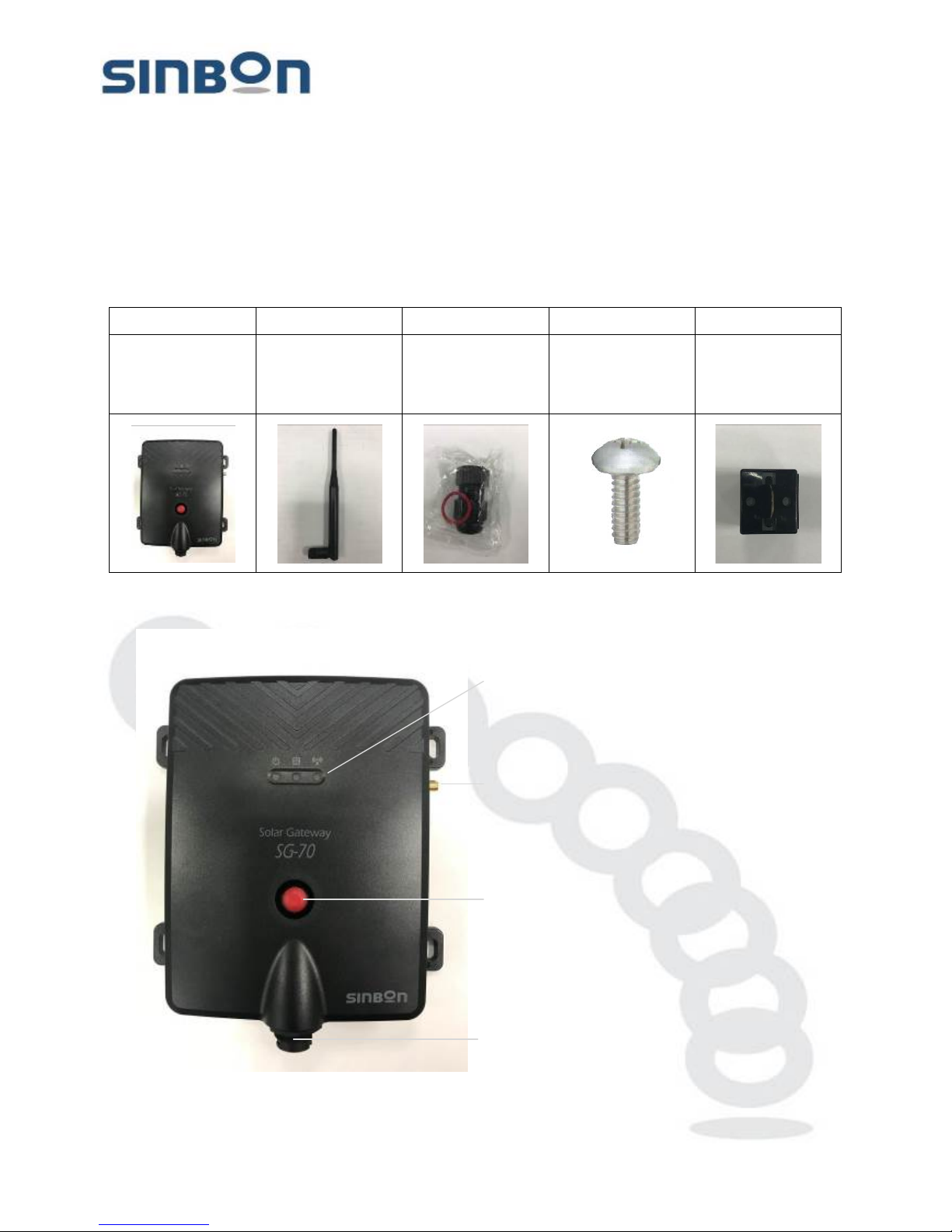
1 2 3 4 5
SG-70 Solar
Gateway
1pcs
5 dBi Dipole
Antenna
1pcs
Waterproof
connector
1set
M4-0.7-12 Brss
screw
4pcs
Clamp core for
Ethernet cable
1pcs
3. H ardware overview.
This document contains confidential and proprietary information, all information are reserved by SINBON Electronics Co., LTD.
4
Page 5

SINBON Electronics Co., Ltd.
4F-13, No. 79, Sec. 1, Hsin Tai Wu Rd.,
Hsi-Chih, T aipei Hsien 221, Taiw an
Tel: +886-2 2698-9999 Fax: +886-2 2698-9660
www.sinbon.com
Status LEDs
Power
When the device is connected to a power source.
The LED is
steady red light.
Database activity
When the device has data transmit to far-
end database system,
The LED is steady blue light.
Wireless activity
When the device wireless interface is link to the solar sensor
device, The LED is steady blue light.
Antenna connector
Install the 2.4GHz Antenna, in the package contents item2 5dBi
Antenna.
Reset button
This button is resets the Solar Gateway back to factory defaults.
Ethernet port
This Ethernet port i s c onn ec t to the "POE "port at th e POE adapter,
the POE "LAN" port connector to your network router or connector
to PC or NB can set-up DHCP.
4. S olar Gateway installation.
Installation Checklist
SG-70 Solar gateway: 1 pcs (In the Solar gateway package).
POE adapter : 1 pcs (without attach, the device need to check installation status).
Antenna: 1 pcs (In the Solar gateway package).
Clamp core: 1 pcs (In the Solar gateway package).
Waterpro o f conn ec tor ki t s : 1 pcs ( In the Sol ar g at eway package).
LAN cable: 2 pcs, The one for LAN port an d other s for WAN port used (without attach, the
cable length, according to the real environment decision).
M4-0.7x12 screw: 4 pcs(In the Solar gateway package).
This document contains confidential and proprietary information, all information are reserved by SINBON Electronics Co., LTD.
5
Page 6
SINBON Electronics Co., Ltd.
4F-13, No. 79, Sec. 1, Hsin Tai Wu Rd.,
Hsi-Chih, T aipei Hsien 221, Taiw an
Tel: +886-2 2698-9999 Fax: +886-2 2698-9660
www.sinbon.com
4.1 Indoor installation.
WARING: This device is not for outdoor application. Please the ins tallation conditions must have at
indoors or inside the outdoor c o n trol box!
WARING: Service should be provided only by a qualified service technician!
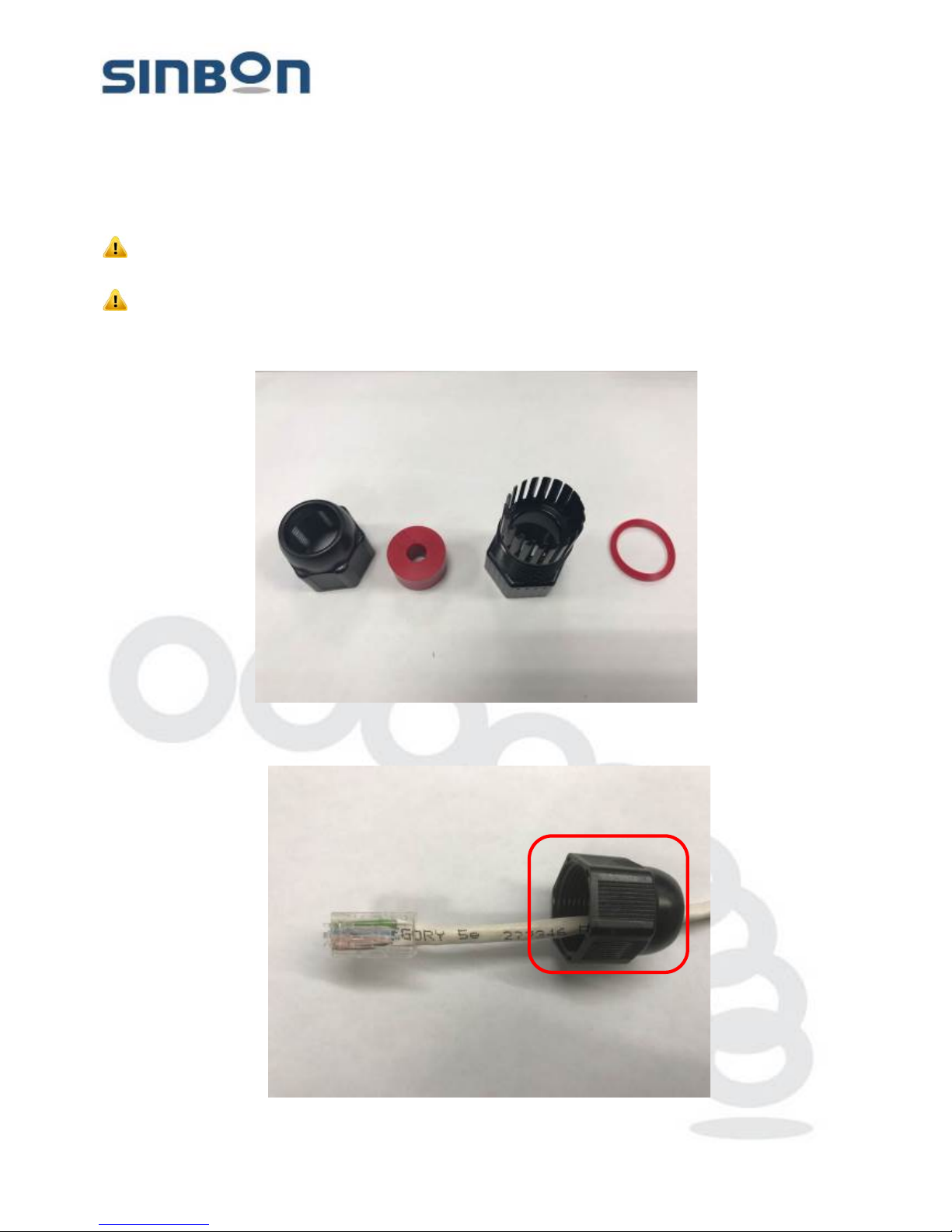
The LAN port used Ethernet cable assembly with waterproof connector; the kits have 4 parts.
*Please do not discard the waterproof washer! It will be used later!
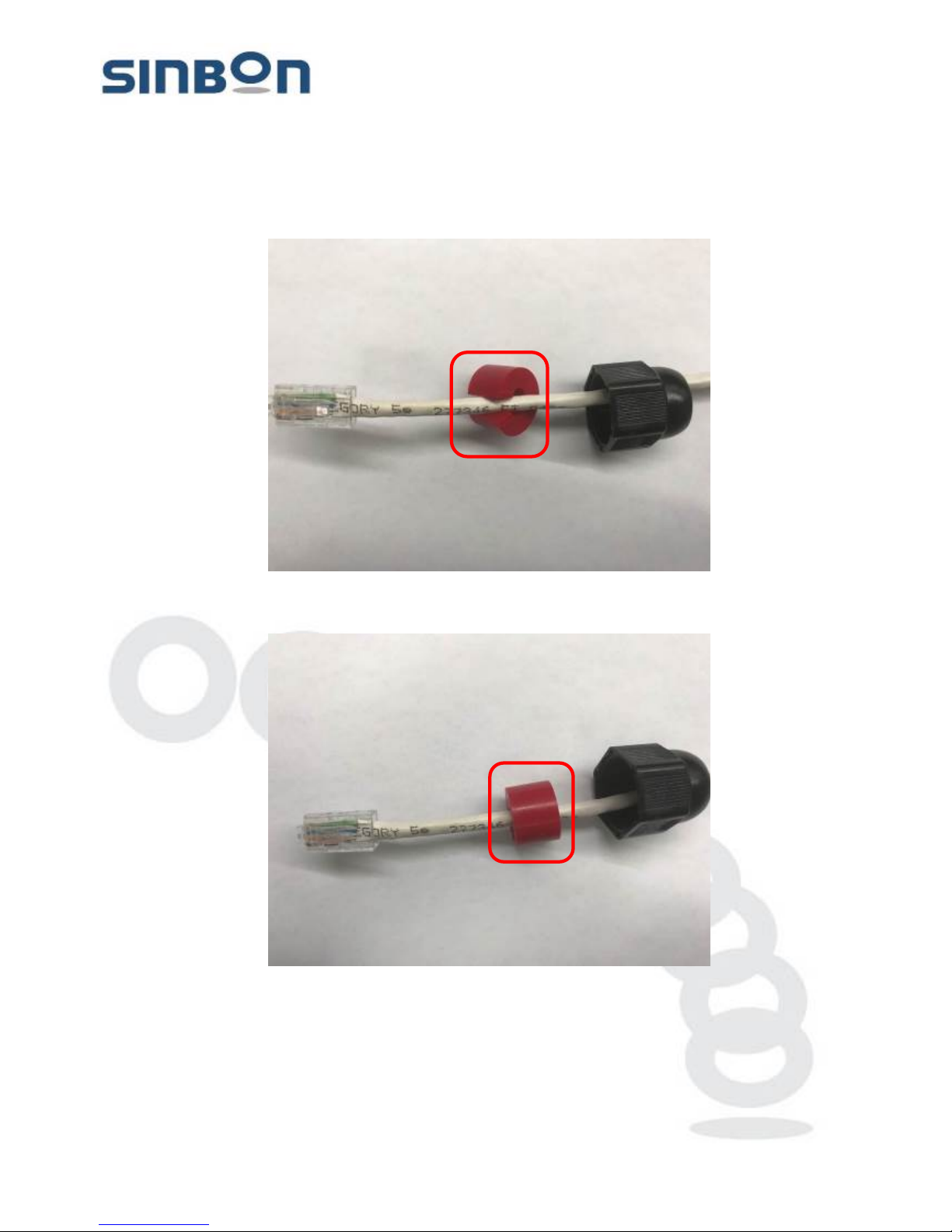
(Step1). The LAN cable through the part 1.
This document contains confidential and proprietary information, all information are reserved by SINBON Electronics Co., LTD.
6
Page 7
SINBON Electronics Co., Ltd.
4F-13, No. 79, Sec. 1, Hsin Tai Wu Rd.,
Hsi-Chih, T aipei Hsien 221, Taiw an
Tel: +886-2 2698-9999 Fax: +886-2 2698-9660
www.sinbon.com
(Step2). The LAN cable through the part 2.
(Step3). The LAN cable through the part 2.
This document contains confidential and proprietary information, all information are reserved by SINBON Electronics Co., LTD.
7
Page 8
SINBON Electronics Co., Ltd.
4F-13, No. 79, Sec. 1, Hsin Tai Wu Rd.,
Hsi-Chih, T aipei Hsien 221, Taiw an
Tel: +886-2 2698-9999 Fax: +886-2 2698-9660
www.sinbon.com
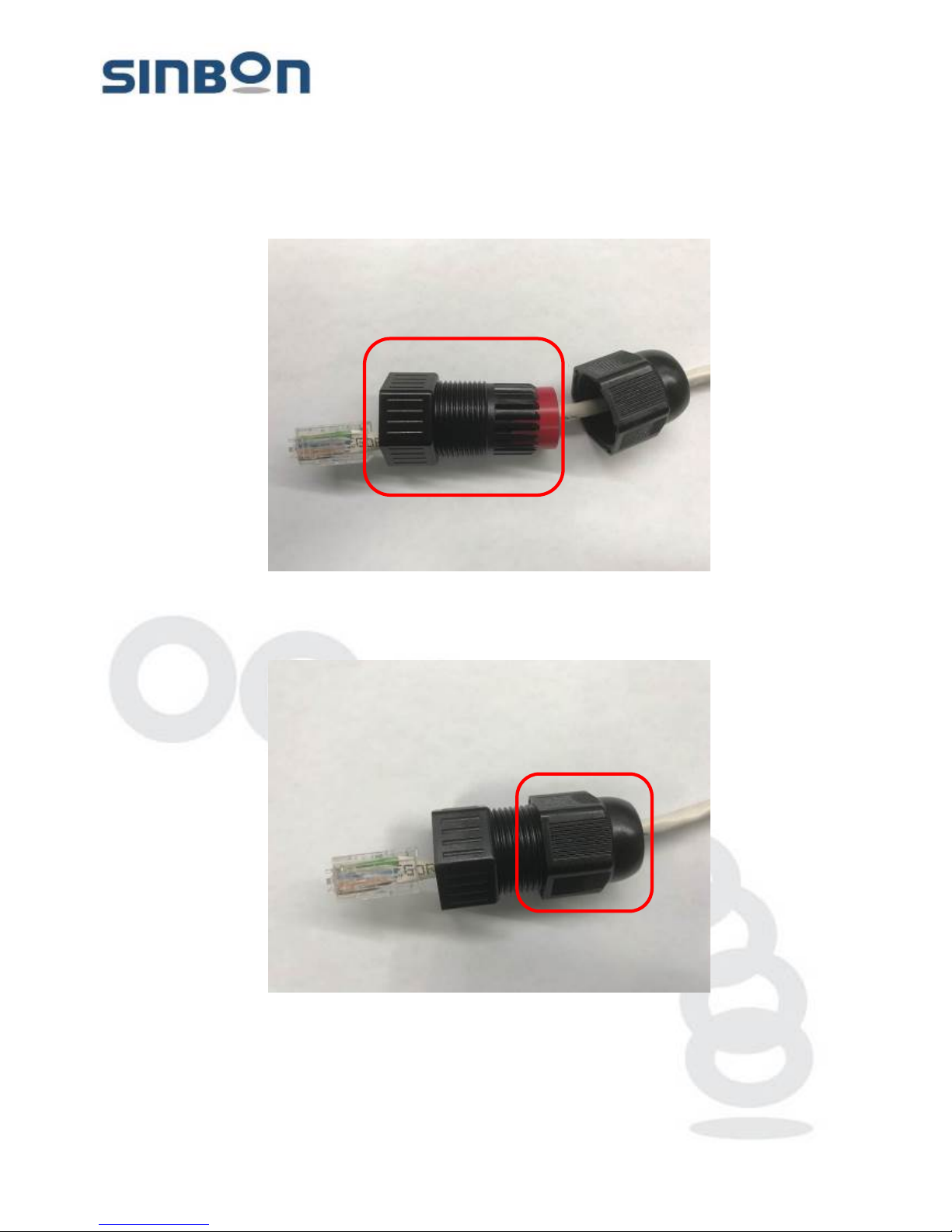
(Step4). The L part 3 through the part 2.
(Step5). The part 1 Spin pre-installation and lock into the part 3, assembly complete.
*Please don’t lock it
This document contains confidential and proprietary information, all information are reserved by SINBON Electronics Co., LTD.
8
Page 9
SINBON Electronics Co., Ltd.
4F-13, No. 79, Sec. 1, Hsin Tai Wu Rd.,
Hsi-Chih, T aipei Hsien 221, Taiw an
Tel: +886-2 2698-9999 Fax: +886-2 2698-9660
www.sinbon.com
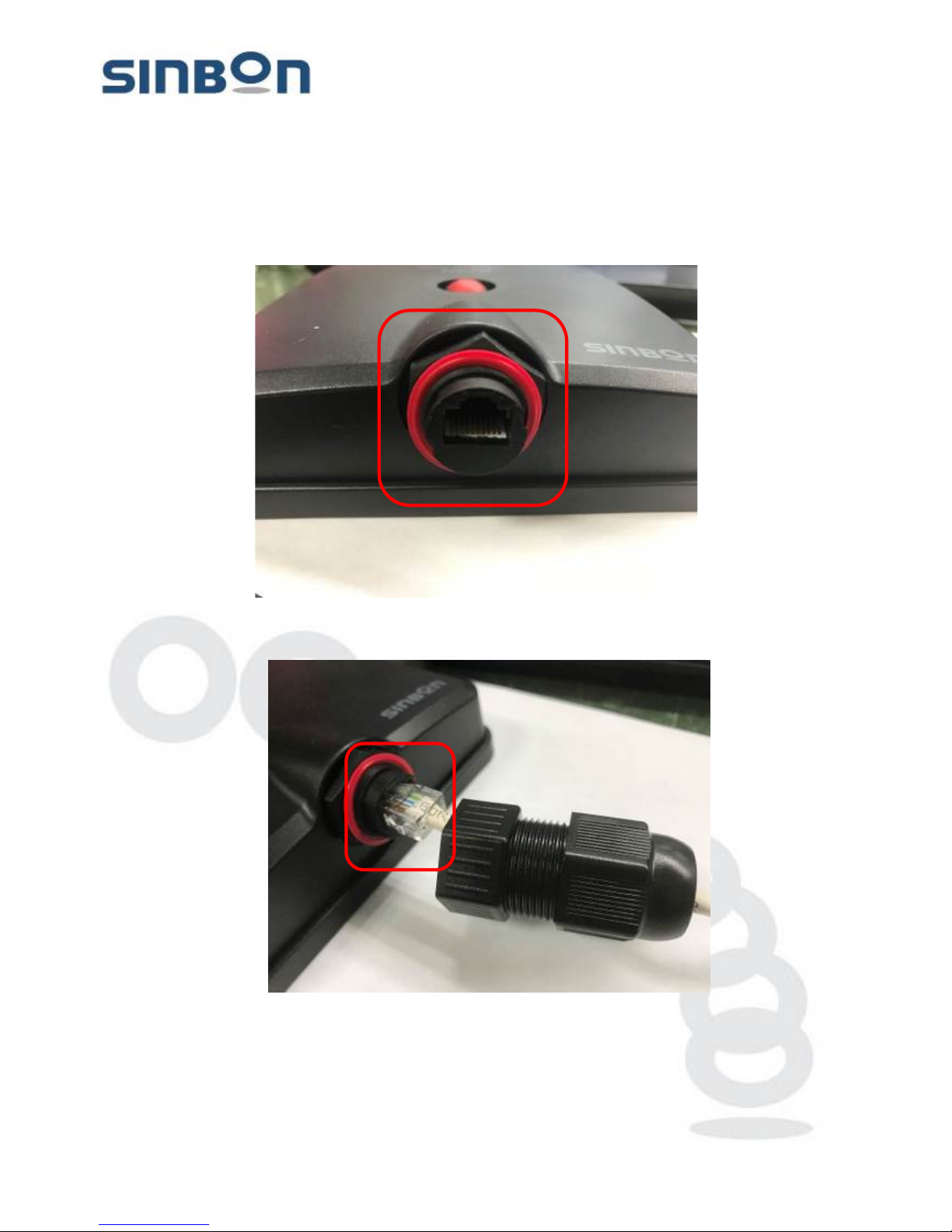
(Step6). The waterproof connector kits p ar t 4 waterproof washer, set on the Ethernet port at the
Solar gateway.
(Step7). Connect the Ethernet cable to the Ethernet port at the Solar gateway.
This document contains confidential and proprietary information, all information are reserved by SINBON Electro n ics Co., LTD.
9
Page 10
SINBON Electronics Co., Ltd.
4F-13, No. 79, Sec. 1, Hsin Tai Wu Rd.,
Hsi-Chih, T aipei Hsien 221, Taiwan
Tel: +886-2 2698-9999 Fax: +886-2 2698-9660
www.sinbon.com
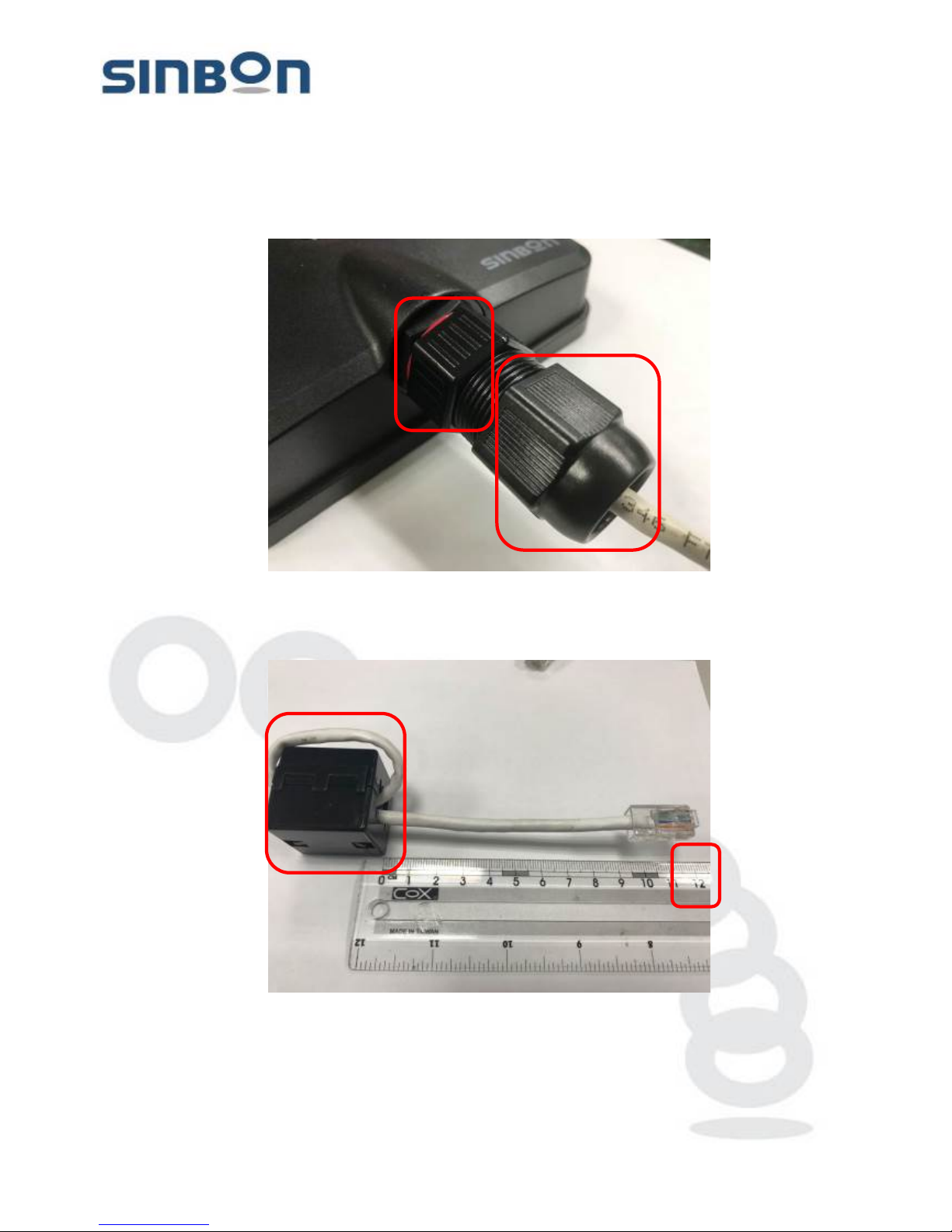
(Step8). First lock the waterproof connector part 3 until to locked, then until locked the part1.
(Step9). The Second LAN cable for WAN port used, a fter the RJ45 c onnect or front e nd 12cm, the
Ethernet cable around 1 circle on the clamp core.
This document contains confidential and proprietary information, all information are reserved by SINBON Electro n ics Co., LTD.
10
Page 11
SINBON Electronics Co., Ltd.
4F-13, No. 79, Sec. 1, Hsin Tai Wu Rd.,
Hsi-Chih, T aipei Hsien 221, Taiwan
Tel: +886-2 2698-9999 Fax: +886-2 2698-9660
www.sinbon.com
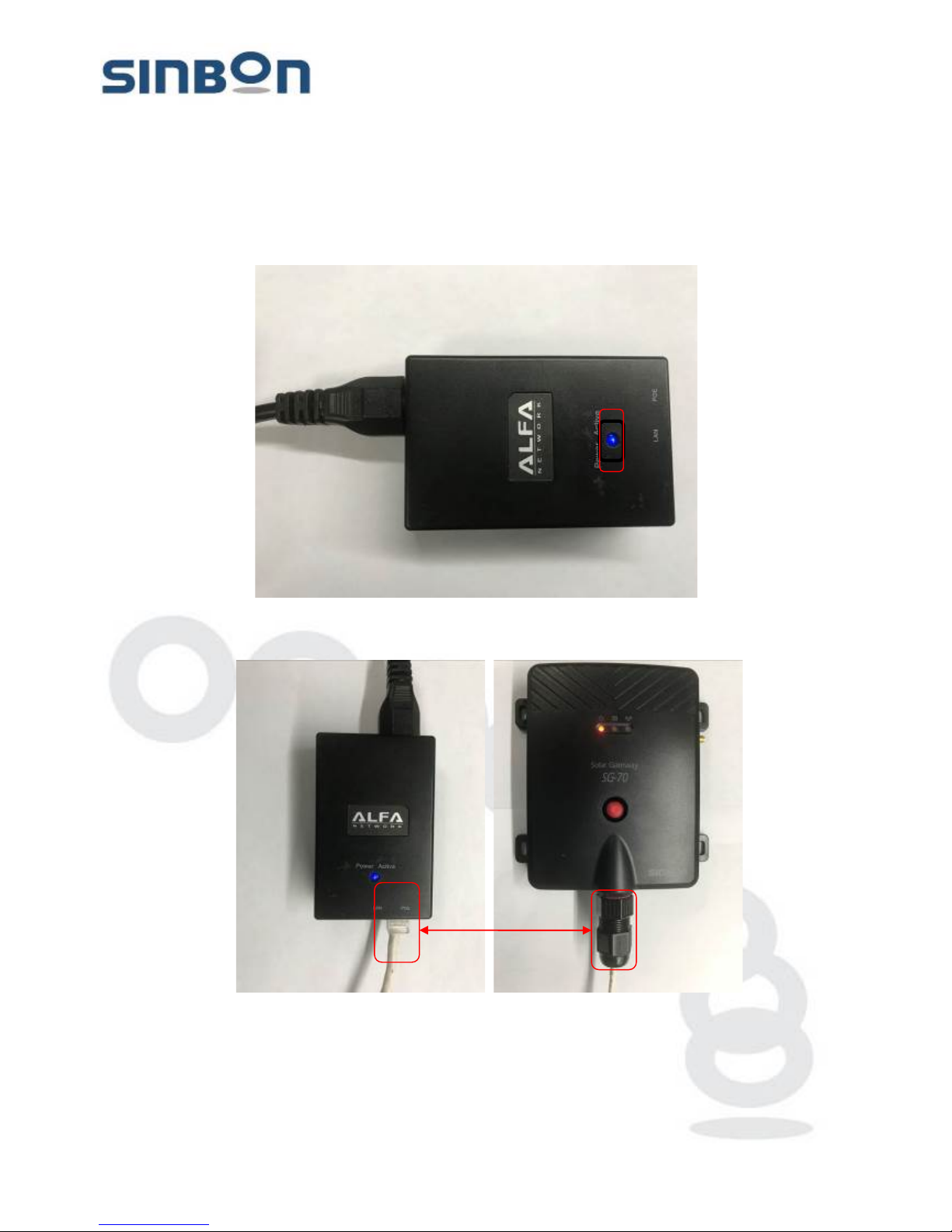
(Step10). Connect the POE Adapter power cord to AC power 100 ~ 240V, 50 ~ 60Hz, after
connecting the blue light LED is fixed light.
(Step11). The LAN ports Ethernet cable is connect with the “POE port” at the POE adapter.
This document contains confidential and proprietary information, all information are reserved by SINBON Electro n ics Co., LTD.
11
Page 12
SINBON Electronics Co., Ltd.
4F-13, No. 79, Sec. 1, Hsin Tai Wu Rd.,
Hsi-Chih, T aipei Hsien 221, Taiwan
Tel: +886-2 2698-9999 Fax: +886-2 2698-9660
www.sinbon.com
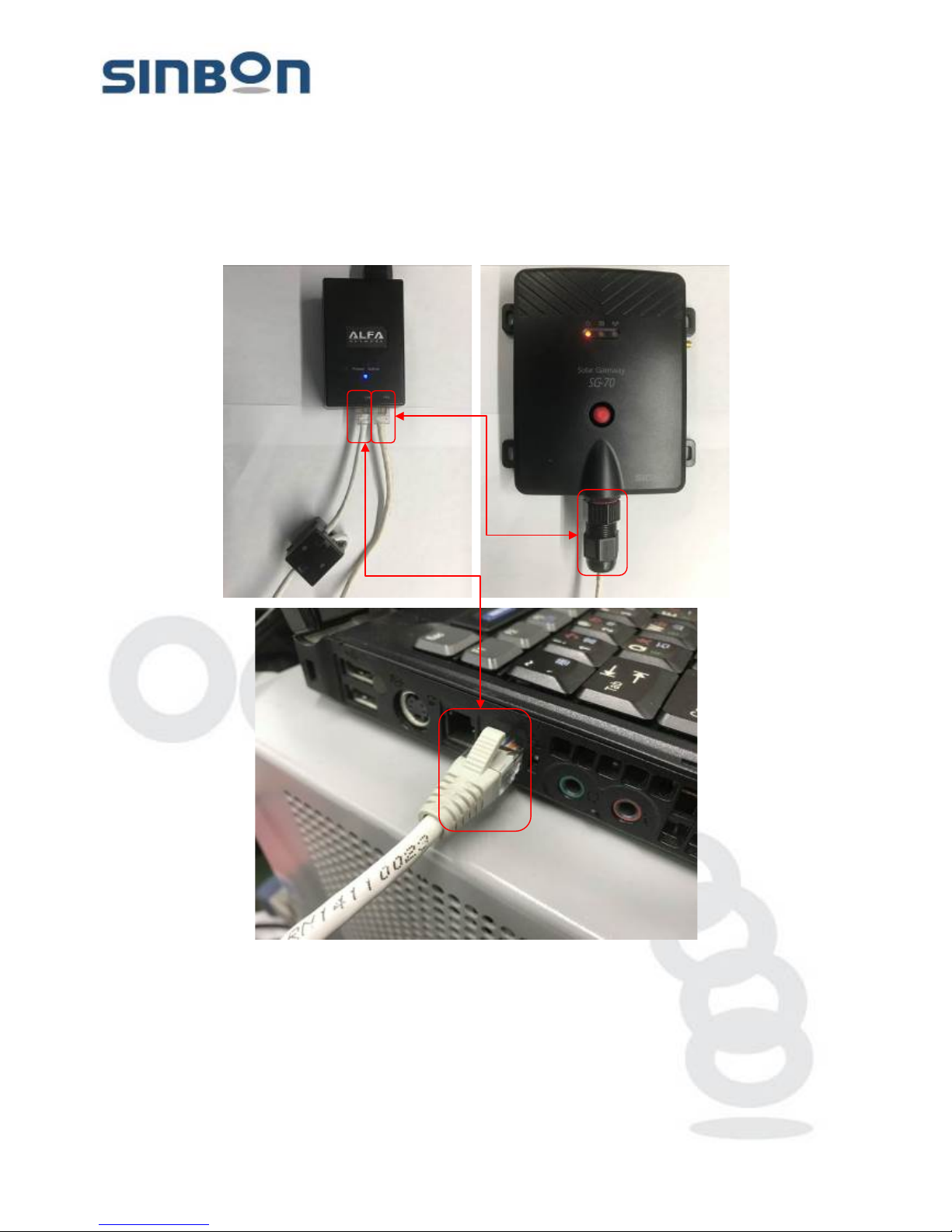
(Step12). The WAN port Ethernet cable is connect with the “LAN port” at the POE adapter and
others side connect to the PC or NB.
This document contains confidential and proprietary information, all information are reserved by SINBON Electro n ics Co., LTD.
12
Page 13
SINBON Electronics Co., Ltd.
4F-13, No. 79, Sec. 1, Hsin Tai Wu Rd.,
Hsi-Chih, T aipei Hsien 221, Taiwan
Tel: +886-2 2698-9999 Fax: +886-2 2698-9660
www.sinbon.com
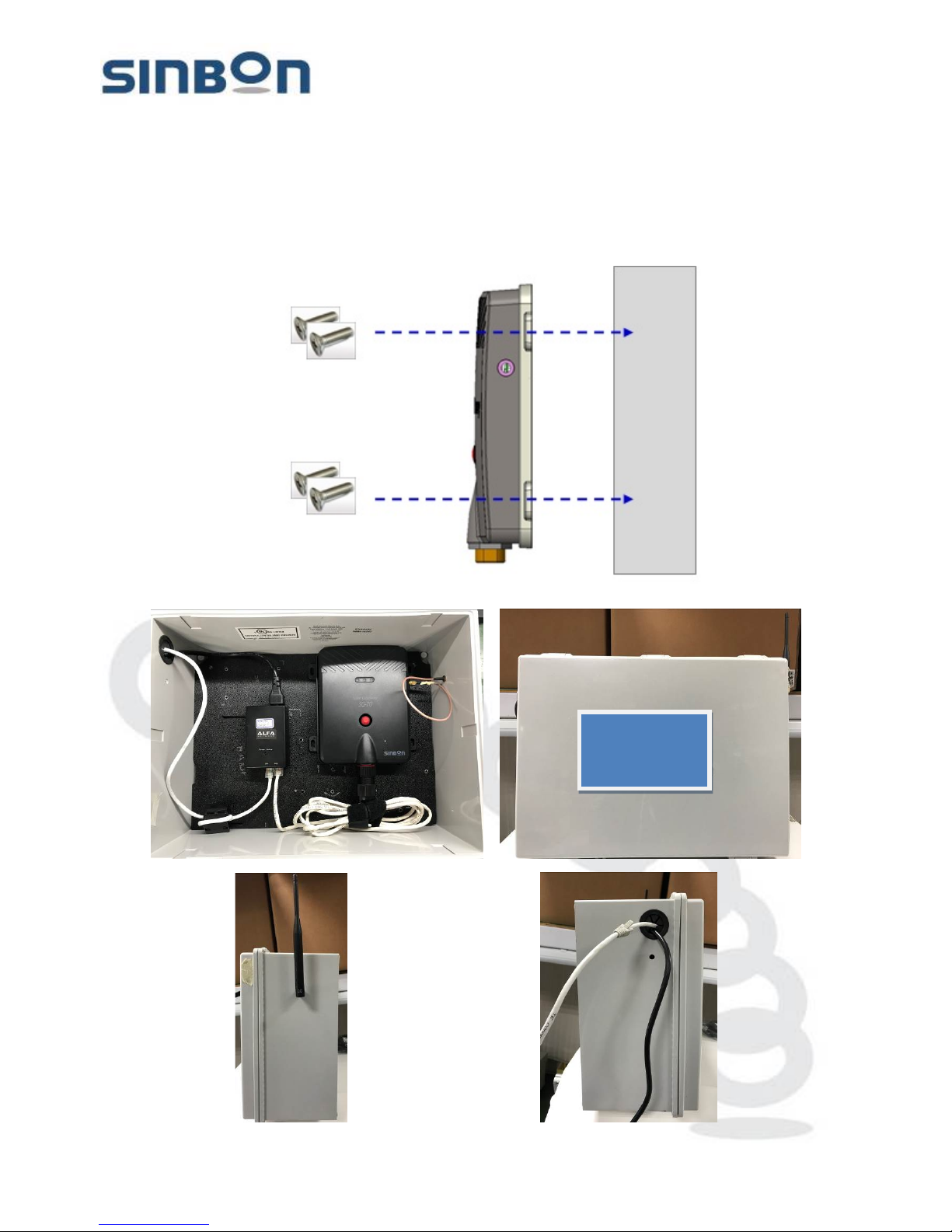
(Step13). Use screws locked the Solar gateway on the wall. (Pure wall hanging type & box
hanging type).
This document contains confidential and proprietary information, all information are reserved by SINBON Electro n ics Co., LTD.
13
Page 14
SINBON Electronics Co., Ltd.
4F-13, No. 79, Sec. 1, Hsin Tai Wu Rd.,
Hsi-Chih, T aipei Hsien 221, Taiwan
Tel: +886-2 2698-9999 Fax: +886-2 2698-9660
www.sinbon.com
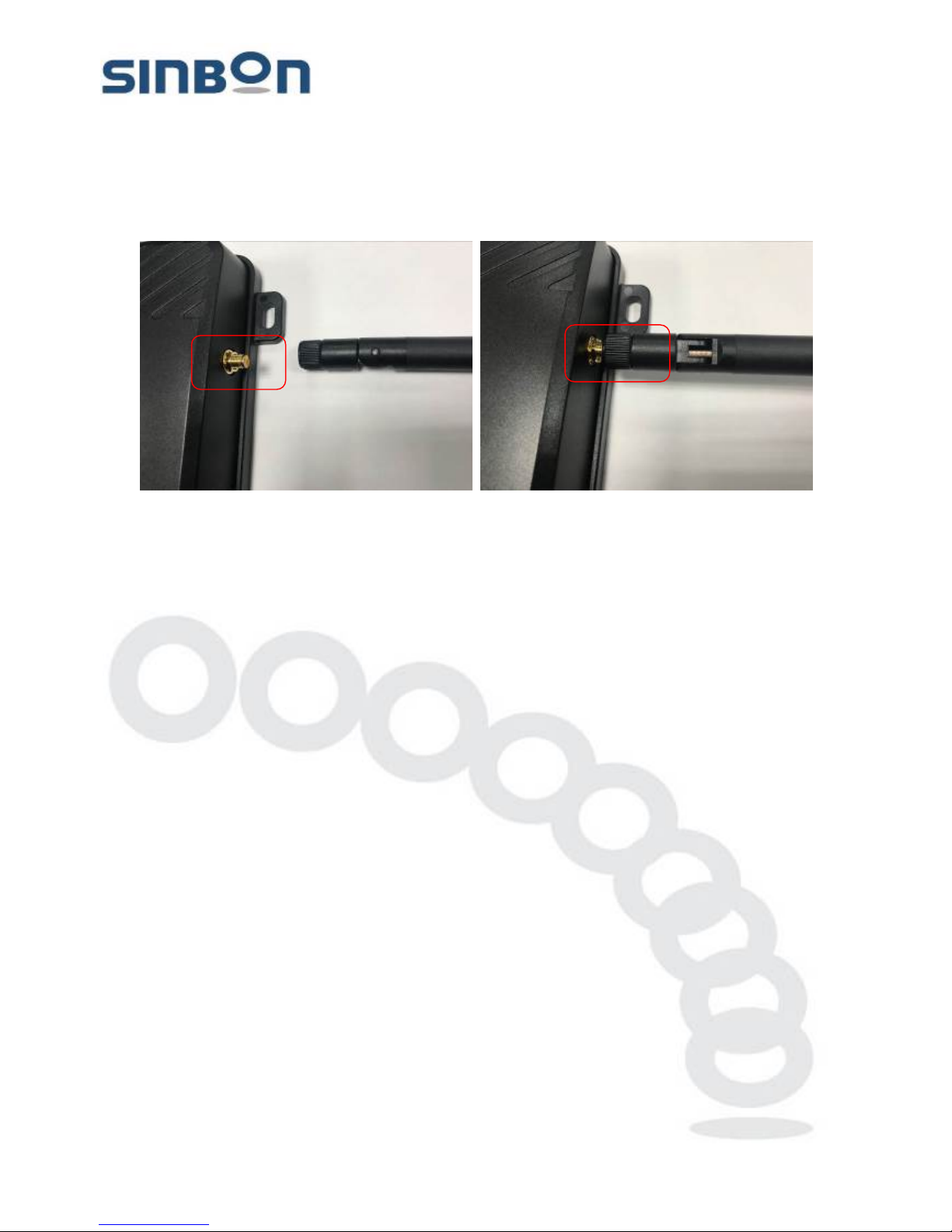
(Step14). Install the antenna on the Solar gateway antenna connector.
(Stpe15).Final checks the Solar gateway installation.
Antenna, c onfirm the locked.
Waterpro o f conn ec tor, confirm the locked.
POE adapter 2 LAN cable, confirm the connected.
POE adapter power cord, confirm the connected.
Solar gateway power LED is light.
*Database activity and Wireless activity LEDS, after complete all system setting, will be function, in the
stage no light is right!
This document contains confidential and proprietary information, all information are reserved by SINBON Electro n ics Co., LTD.
14
Page 15
SINBON Electronics Co., Ltd.
4F-13, No. 79, Sec. 1, Hsin Tai Wu Rd.,
Hsi-Chih, T aipei Hsien 221, Taiwan
Tel: +886-2 2698-9999 Fax: +886-2 2698-9660
www.sinbon.com
5. The Solar gateway basic local network configuration.
WARING: Service should be provided only by a qualified service technician!
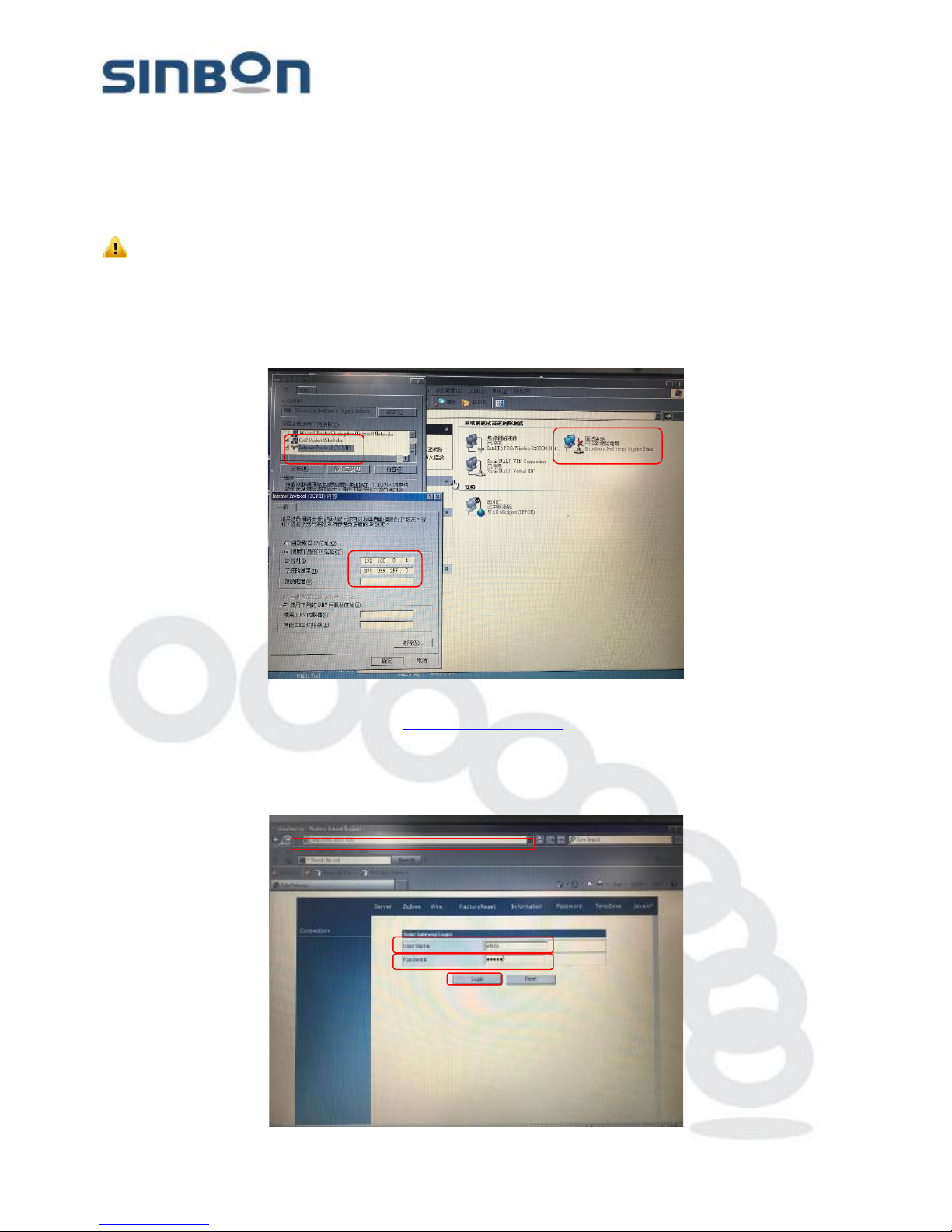
5.1 Fixed IP address mode set-up steps.
(Step1). Change the Router local network TCP/IP address, please enter to the same area as
Gateway.
E.g: IP address: 192.1 68. 0 .1
(Step2) Open browser, key in the URL http://192.168.0.100/ after complete press enter.
In the login page, enter the following information, complete press Log in
User Name: admin
Password: admin
This document contains confidential and proprietary information, all information are reserved by SINBON Electro n ics Co., LTD.
15
Page 16
SINBON Electronics Co., Ltd.
4F-13, No. 79, Sec. 1, Hsin Tai Wu Rd.,
Hsi-Chih, T aipei Hsien 221, Taiwan
Tel: +886-2 2698-9999 Fax: +886-2 2698-9660
www.sinbon.com
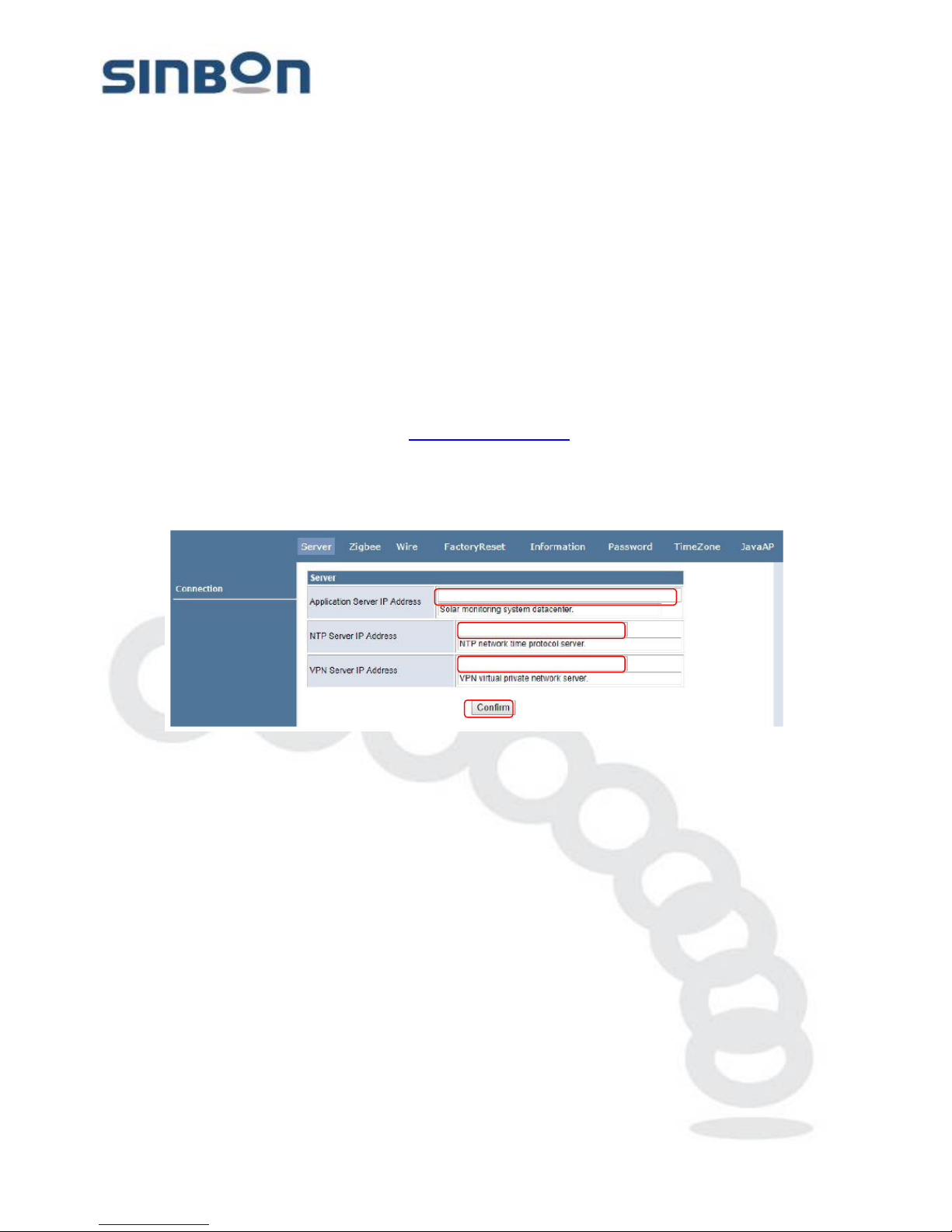
(Step3). In the server page to setup, enter the Application Server IP Address & NTP Server IP
Address finish and Enter Confirm.
Application Server IP Address: Enter the URL for the Solar database.
E.g:solarmsm.sinbon.com/(ProjectName)
NTP Server IP Address: Enter a URL that can compare to time.
E.g:pool.ntp.org
VPN Server IP Address: Enter the URL for the VPN(option)
Confirm: finish to setup, enter confirm.
Automatically link to the new URL: http://192.168.0.100/.
In the login page, enter the following information, complete press Log i n
User Name: admin
Password: admin
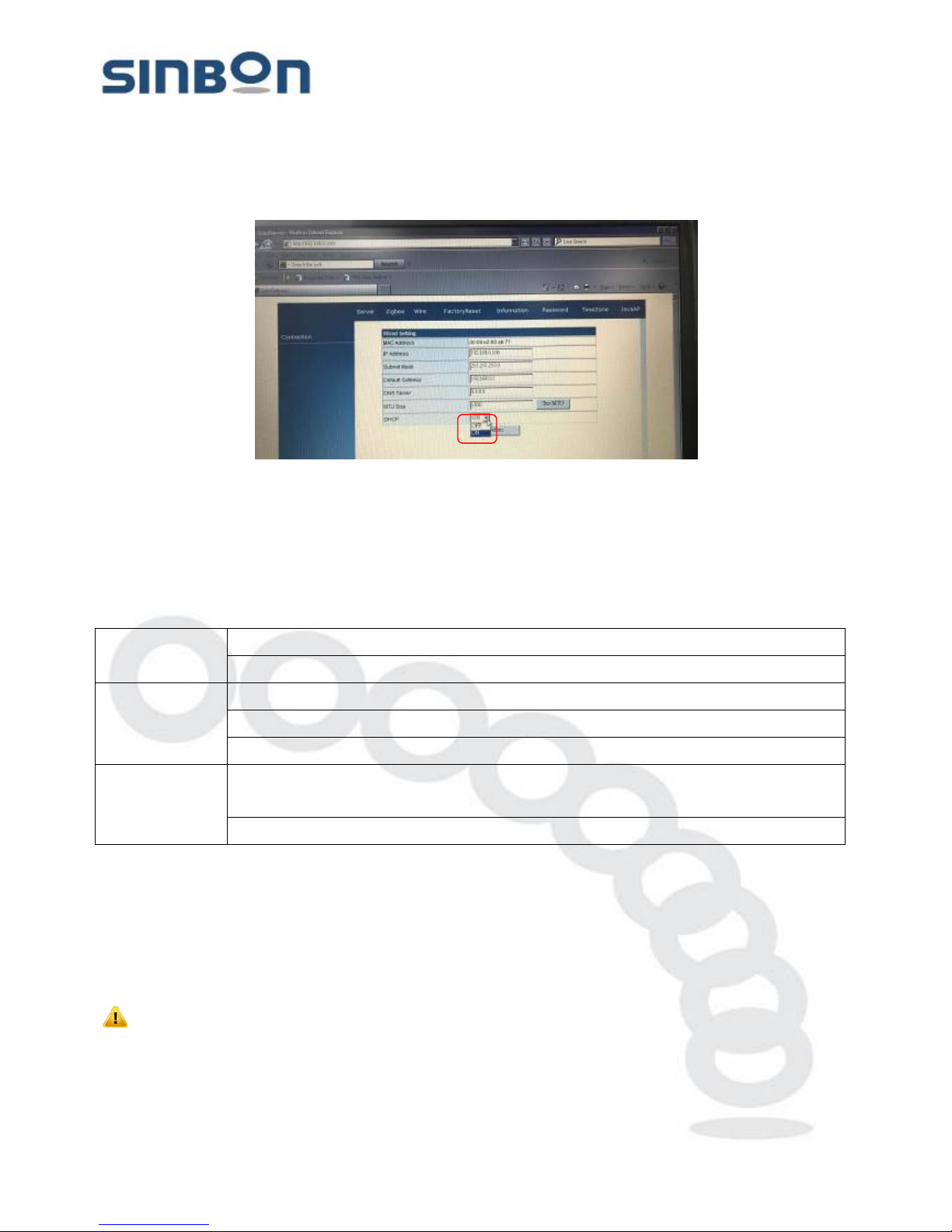
(Step4). In the wire page, the local networks default setting as follows. Change DHCP setup to
ON, finish enter the Confirm
IP Address:192.168.0.100
Subnet Mask:255.250.250.0
Default Gateway :192.168.0.1
DHCP : ON
This document contains confidential and proprietary information, all information are reserved by SINBON Electro n ics Co., LTD.
16
Page 17
SINBON Electronics Co., Ltd.
4F-13, No. 79, Sec. 1, Hsin Tai Wu Rd.,
Hsi-Chih, T aipei Hsien 221, Taiwan
Tel: +886-2 2698-9999 Fax: +886-2 2698-9660
www.sinbon.com
(Step5). After the completion of the configuration can be in the router rights administrator page,
find assigned to the Gateway IP address, then if change the setting the Gateway information,
need to use the IP address.
6. LE D Status descriptions.
Power LED
Fixed light: Input power is success.
Fixed off: Input power have problem need to check.
Status LED
Fixed light: T he device transmits data to database is completed.
Fixed off: The device no connect with database.
Light blinks: The device data is transmitting to database.
Wireless LED
Fixed light: T he device is connect with sensor and transmits data to far-end
database.
Fixed off: No connect with sensor or no data transmits to far-end database.
7. Reset to the factory default se t up instruction.
(Step1). At the system turn on mode, press and hold the SG-70 the reset button.
(Step2). After the Power LED is flash 3 time and w ait ing 10 s econ ds t he sy stem w ill be rest a rt t he
system completed.
*The function only at system turn on used!
WARING: Service should be provided only by a qualified service technician!
This document contains confidential and proprietary information, all information are reserved by SINBON Electro n ics Co., LTD.
17
Page 18
SINBON Electronics Co., Ltd.
4F-13, No. 79, Sec. 1, Hsin Tai Wu Rd.,
Hsi-Chih, T aipei Hsien 221, Taiwan
Tel: +886-2 2698-9999 Fax: +886-2 2698-9660
www.sinbon.com
8. Troubleshooting
Power LED off Check the POE adapter power.
Status LED off
Check the Gateway and Solar sensor devic e sett ing.
Open the browser, and check the Gateway network setting.
Check the Ethernet cable.
Wireless LED off
Check the Gateway and Solar sensor device setting.
Open the Router administrator page, and check the Gateway
status.
9. Product specifications.
SG-70 Solar gateway specifications
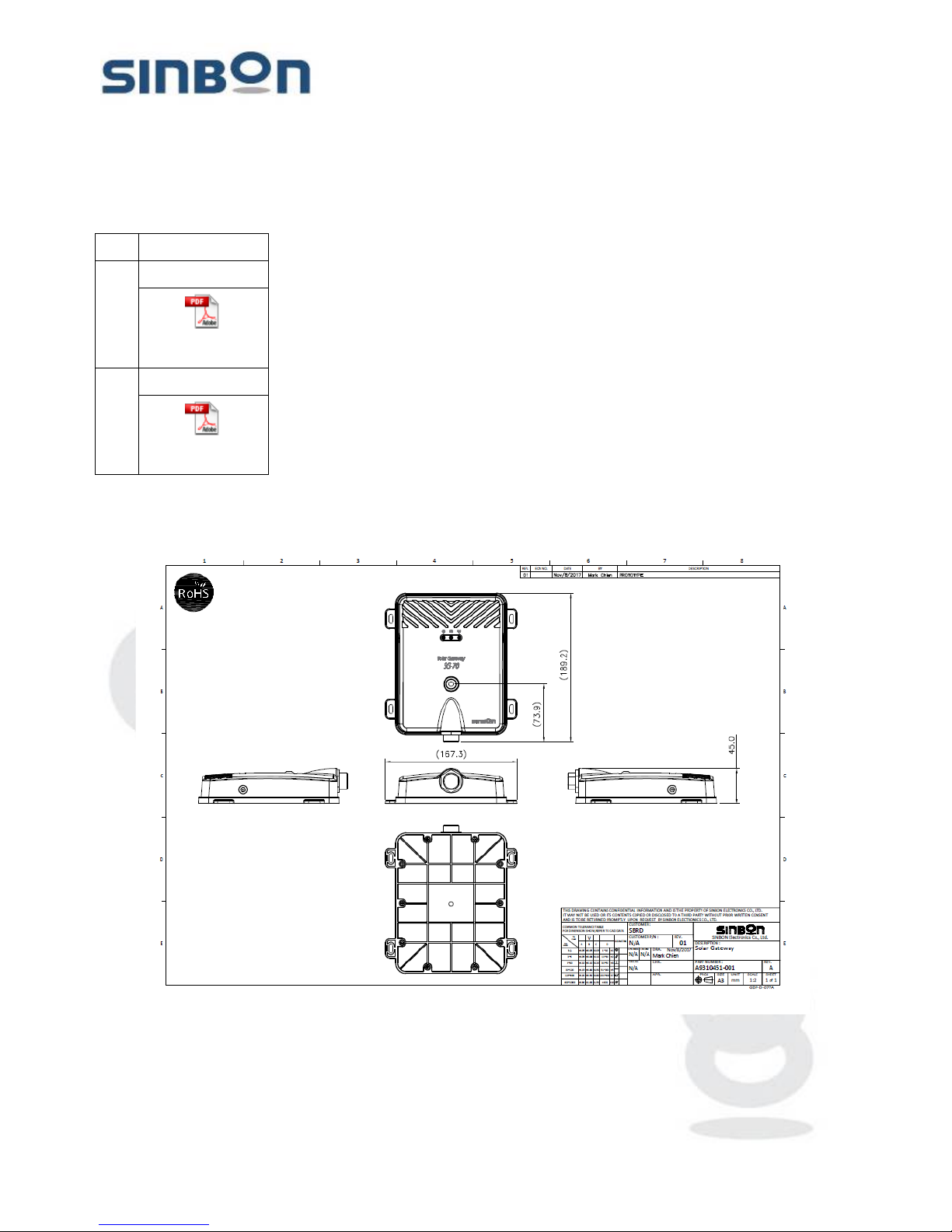
Dimensions L x W x H : 185 x 167 x 45 mm, without cable and antenna length
Weight 0.373 kg
Processor NXP i.MX6 Solo 1GHz
Memory DDR3L 1GB
Storage NAND Flash 8GB
Ethernet 100Mbps RJ45 Ethernet port
Wireless IEEE802.15.4
LEDs 3 LEDS: Power, Database connectivity & Wireless connectivity
Button Reset button
Max power 6W(Max)
Power supply AC 100~240V/50~60Hz
Temperature
Operating : -20ºC to 65ºC
Storage: -30ºC to 70ºC
Humidity 0 % to 95% non-condensing
Ingress Protection Rating IP65
Certifications FCC only
This document contains confidential and proprietary information, all information are reserved by SINBON Electro n ics Co., LTD.
18
Page 19
SINBON Electronics Co., Ltd.
4F-13, No. 79, Sec. 1, Hsin Tai Wu Rd.,
Hsi-Chih, T aipei Hsien 221, Taiwan
Tel: +886-2 2698-9999 Fax: +886-2 2698-9660
www.sinbon.com
10. Label
Item Description
1.
Label location
A9310451-001(SG-7
0) Label location_201
2.
Certification label
A9310451-001(SG-7
0) Reg label_2017120
11. Dimension
`
This document contains confidential and proprietary information, all information are reserved by SINBON Electro n ics Co., LTD.
19
Page 20

SINBON Electronics Co., Ltd.
4F-13, No. 79, Sec. 1, Hsin Tai Wu Rd.,
Hsi-Chih, T aipei Hsien 221, Taiwan
Tel: +886-2 2698-9999 Fax: +886-2 2698-9660
www.sinbon.com
12. Safety Notices.
(1). Follow these instructions.
(2). Heed all warning.
WARING: The installation
and repair service should be provided only by a qualified service
technician!
WARING: The device is not direct for outdoor application. Please t
he installation conditions must
have at indoors or inside the outdoor c o n trol box!
WARNING: Avoid using this product during an electrical storm. There may be a remote risk of
electric shock from lightning!
WARING:
Compliance is required with respect to voltage, frequency, and current requirements
indicated on the manufacturer’s label. Connection to a different power source than those specified
may result in improper operation, damage to the equipment or pose a fire hazard if the limitations
are not followed!
13. FCC Statement
This equipment has been tested and found to comply with the limits for a Class B digital device, pursuant to part 15
of the FCC Rules. These limits are designed to provide reasonable protection against harmful interference in a
residential installation. This equipment generates, uses and can radiate radio frequency energy and, if not installed
and used in accordance with the instructions, may cause harmful interference to radio communications. However,
there is no guarantee that interference will not occur in a particular installation. If this equipment does cause harmful
interference to radio or television reception, which can be determined by turning the equipment off and on, the user
is encouraged to try to correct the interference by one or more of the following measures:
—Reorient or relocate the receiving antenna.
—Increase the separation between the equipment and receiver.
—Connect the equipment into an outlet on a circuit different from that to which the receiver is connected.
—Consult the dealer or an experienced radio/TV technician for help.
FCC Radiation Exposure Statement
This device complies with FCC radiation exposure limits set forth for an uncontrolled environment. This equipment
must be installed and operated in accordance with provided instructions and the antenna(s) used for this transmitter
must be installed to provide a separation distance of at least 20 cm from all persons.
This device complies with Part 15 of the FCC Rules. Operation is subject to the following two conditions:
(1) this device may not cause harmful interference, and
(2) this device must accept any interference received, including interference that may cause undesired operation.
Caution!
Any changes or modifications not expressly approved by the party responsible for compliance could void the user's
This document contains confidential and proprietary information, all information are reserved by SINBON Electro n ics Co., LTD.
20
Page 21

SINBON Electronics Co., Ltd.
4F-13, No. 79, Sec. 1, Hsin Tai Wu Rd.,
Hsi-Chih, T aipei Hsien 221, Taiwan
Tel: +886-2 2698-9999 Fax: +886-2 2698-9660
www.sinbon.com
authority to operate the equipment.
This document contains confidential and proprietary information, all information are reserved by SINBON Electro n ics Co., LTD.
21
 Loading...