

Page 1

S I N A PS I S.r .l .
V i a d el le Quer c e 1 1/ 13
0 6 0 83 B as t i a Um br a ( P G ) It al y
T . + 3 9 07 5 8 0 1 1 60 4 F.+3 9 0 7 5 80 14 60 2
w w w . si na psi t e c h. it | i n f o @s in apsi t e c h. it
SIN.EQRPT868XT
868 MHz W. M-Bus
sinapsitech
℗
repeater
User Guide
Rev 1.6
This manual refers to the 1.23 Firmware
Page 2

SIN.EQRPT868XT – User Guide Rev. 1.6
S IN A PS I S .r . l . | V i a d el l e Q ue r ce 11 / 13 - 0 6 08 3 BA S TI A U M BR A ( PG ) – I t a l y
T .+ 3 9 07 5 8 0 11 6 0 4 - F . +3 9 0 7 5 8 01 4 6 0 2| w w w. si n ap s it e c h . it - i n fo @s i na p si t e ch . it 2
TABLE OF CONTENTS
1. INTRODUCTION ............................................................................................................................................... 3
1.1 Purpose of the document ..................................................................................................................... 3
1.2 Content of the package ......................................................................................................................... 3
2. SIN.EQRPT868XT TECHNICAL SPECIFICATIONS .......................................................................................... 4
3. ASPECT OF THE SIN.EQRPT868XT ................................................................................................................. 5
3.1 Description of the SIN.EQRPT868XT .................................................................................................... 5
3.2 SIN.EQRPT868XT device ......................................................................................................................... 6
4. REPEATER CONFIGURATION THROUGH KEYS FUNCTIONS....................................................................... 7
4.1 Change ID MESH ..................................................................................................................................... 7
4.2 Activate SND_IR mode (Installation Mode) ......................................................................................... 8
4.3 Accept mode activation ALL - SIN.EQRPT868XT ................................................................................. 9
4.4 SIN.EQRPT868XT – S, T, C+T, S & C+T Mode of operation modification ........................................ 10
4.5 Restore factory settings ....................................................................................................................... 11
5. WALL MOUNTING AND PASSING OF CABLES ........................................................................................... 12
6. USB CONNECTION TO THE PC, CONNECTION VIA RADIO TO THE SIN.EQRTU1T AND POSITIONING
13
7. CONFIGURATION OF THE REPEATERS NETWORK .................................................................................... 14
8. TROUBLESHOOTING..................................................................................................................................... 15
Page 3

SIN.EQRPT868XT – User Guide Rev. 1.6
S IN A PS I S .r . l . | V i a d el l e Q ue r ce 11 / 13 - 0 6 08 3 BA S TI A U M BR A ( PG ) – I t a l y
T .+ 3 9 07 5 8 0 11 6 0 4 - F . +3 9 0 7 5 8 01 4 6 0 2| w w w. si n ap s it e c h . it - i n fo @s i na p si t e ch . it 3
1. INTRODUCTION
1.1 Purpose of the document
This document is the complete guide for installation, configuration and commissioning of
repeater/receiver wireless service for meters with W. M-Bus protocol (EN13757-4) / OMS, Cod.
SIN.EQRPT868XT hereinafter also called Smart Repeater sinapsitech℗, able to acquire the signal from
one or more measuring devices communicating according to the W. M-Bus standard 868MHz and
retransmit the received data to a network of other sinapsitech℗ devices in order to extend the wireless
range of the meters themselves. The data shared by the MESH network are stored by the datalogger
SIN.EQRTU1T. Each SIN.EQRPT868XT handles up to 500 W. M-Bus devices. The plastic container, the
electrical connections totally retractable, the integrated antennas in the same device make the Smarts
Repeaters sinapsitech℗ suitable for wall installations also “in view”. Commissioning of SIN.EQRPT868XT
service is facilitated by the software toolkit and on-board LEDs that indicate the signal strength.
Also, the search for the best point of installation is facilitated by the ability to power the device through
its USB port, making possible to move it during the search for the best signal / distance compromise.
1.2 Content of the package
The following are present in the SIN.EQRPT868XT package:
• SIN.RPT868XT Repeater
• 2 x 5x25 plugs
• 2 x 5x30 screws
• 2 x Cable glands
• 2 x 2,2x9,5 screws
• 1 x clamp headband
• Instructions for installation
Page 4

SIN.EQRPT868XT – User Guide Rev. 1.6
S IN A PS I S .r . l . | V i a d el l e Q ue r ce 11 / 13 - 0 6 08 3 BA S TI A U M BR A ( PG ) – I t a l y
T .+ 3 9 07 5 8 0 11 6 0 4 - F . +3 9 0 7 5 8 01 4 6 0 2| w w w. si n ap s it e c h . it - i n fo @s i na p si t e ch . it 4
2. SIN.EQRPT868XT TECHNICAL SPECIFICATIONS
SIN.EQRPT868XT is a repeater and receiver for W. M-Bus devices.
The device’s main technical specifications are given below:
• Operating Temperature: [-20..+55°C]
• Storage Temperature: [-25..+85°C]
• Ingress Protection: IP40 (EN60529)
• Protection Class: II
• Mounting: wall, with screws
• Dimensions: LxHxD (160x160x35 mm)
• Power supply: 100..240Vac 50-60Hz
USB (5Vdc, 500 mA) for commissioning
• Consumption: Max 4.5 W
• Frequency: 868 MHz – max. transmission power 27 dBm
• W. M-Bus mode supported: S / T / C+T / S & C+T
• Max distance between two RPT: 500 m in free field - 40 m in buildings
• W. M-Bus area coverage: 250 mt in free field - 25 meters in building
Page 5
SIN.EQRPT868XT – User Guide Rev. 1.6
S IN A PS I S .r . l . | V i a d el l e Q ue r ce 11 / 13 - 0 6 08 3 BA S TI A U M BR A ( PG ) – I t a l y
T .+ 3 9 07 5 8 0 11 6 0 4 - F . +3 9 0 7 5 8 01 4 6 0 2| w w w. si n ap s it e c h . it - i n fo @s i na p si t e ch . it 5
3. ASPECT OF THE SIN.EQRPT868XT
3.1 Description of the SIN.EQRPT868XT
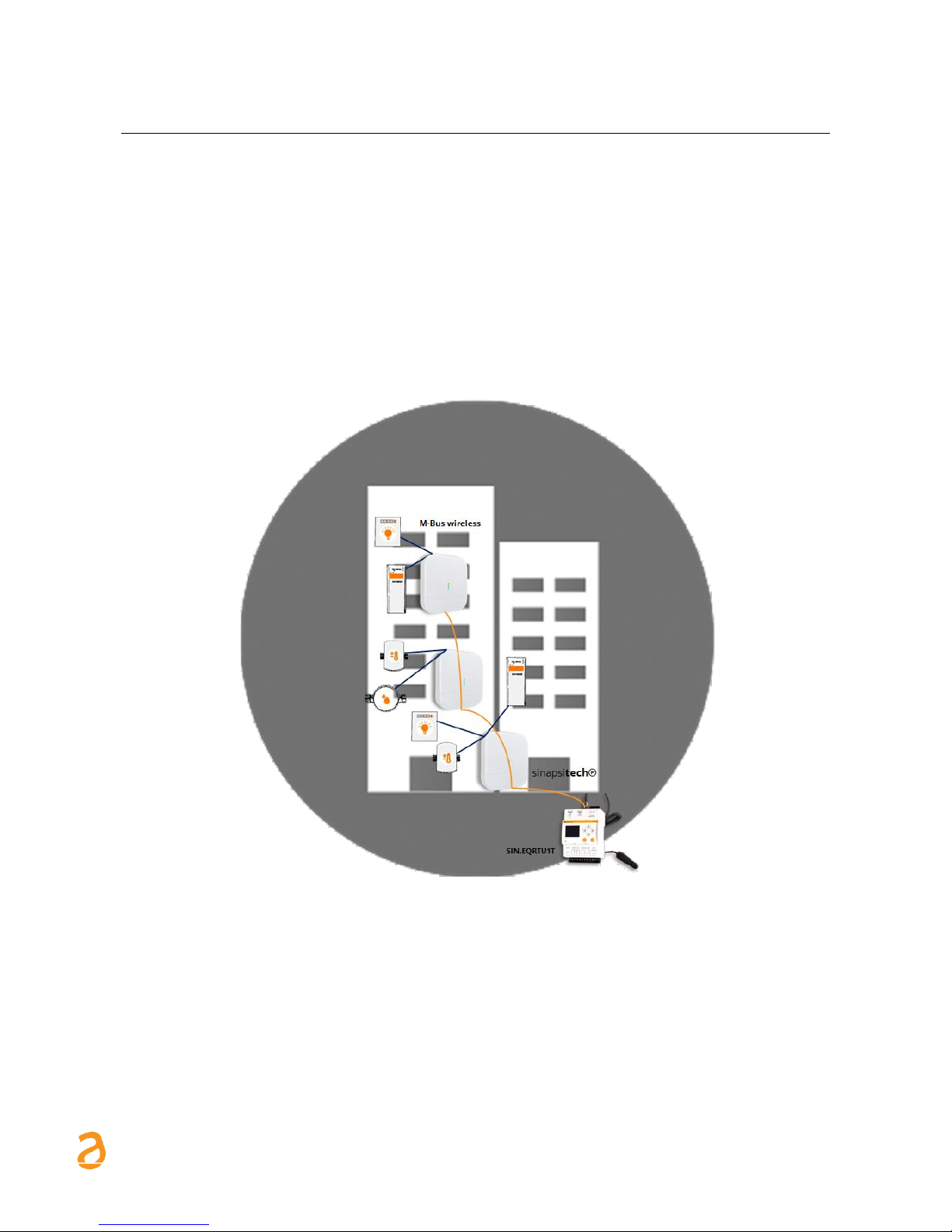
The devices uses a technology that allows you to expand the W. M-Bus networks, in fact, between them,
the antennas will automatically establish the connection that allows the best signal quality and, upon
receipt of the W. M-Bus plots, spread to the datalogger SIN.EQRTU1T. In the case in which one of the
antennas is turned off or blurred, the network, if possible, is re-created so that all the antennas have a
path to follow up to the datalogger. In this way, in fact, the antenna behaves as a multi-hop repeater. To
this functionality is added the possibility of inserting in the Smart Repeater sinapsitech℗ a list of W. MBus devices which represents a white-list, in this way, in the case in which the installation is in an area
where more than 500 W. M-Bus devices are received, the antenna will only take charge of its relevance
devices.
Figure 1 – Example of application of the SIN.EQRPT868XT coupled with a SIN.EQRTU1T
Below find the summary of the main operational features, which will be described in this document:
• Receiver and repeater for W. M-Bus devices (EN13757-4)/OMS
• Multi-hop function mode support
• Easy-to-install thanks to the software supplied
• Wall mounting
• USB interface for local data reading
• WEB interface in conjuction with SIN.EQRTU1T
Page 6
SIN.EQRPT868XT – User Guide Rev. 1.6
S IN A PS I S .r . l . | V i a d el l e Q ue r ce 11 / 13 - 0 6 08 3 BA S TI A U M BR A ( PG ) – I t a l y
T .+ 3 9 07 5 8 0 11 6 0 4 - F . +3 9 0 7 5 8 01 4 6 0 2| w w w. si n ap s it e c h . it - i n fo @s i na p si t e ch . it 6
3.2 SIN.EQRPT868XT device
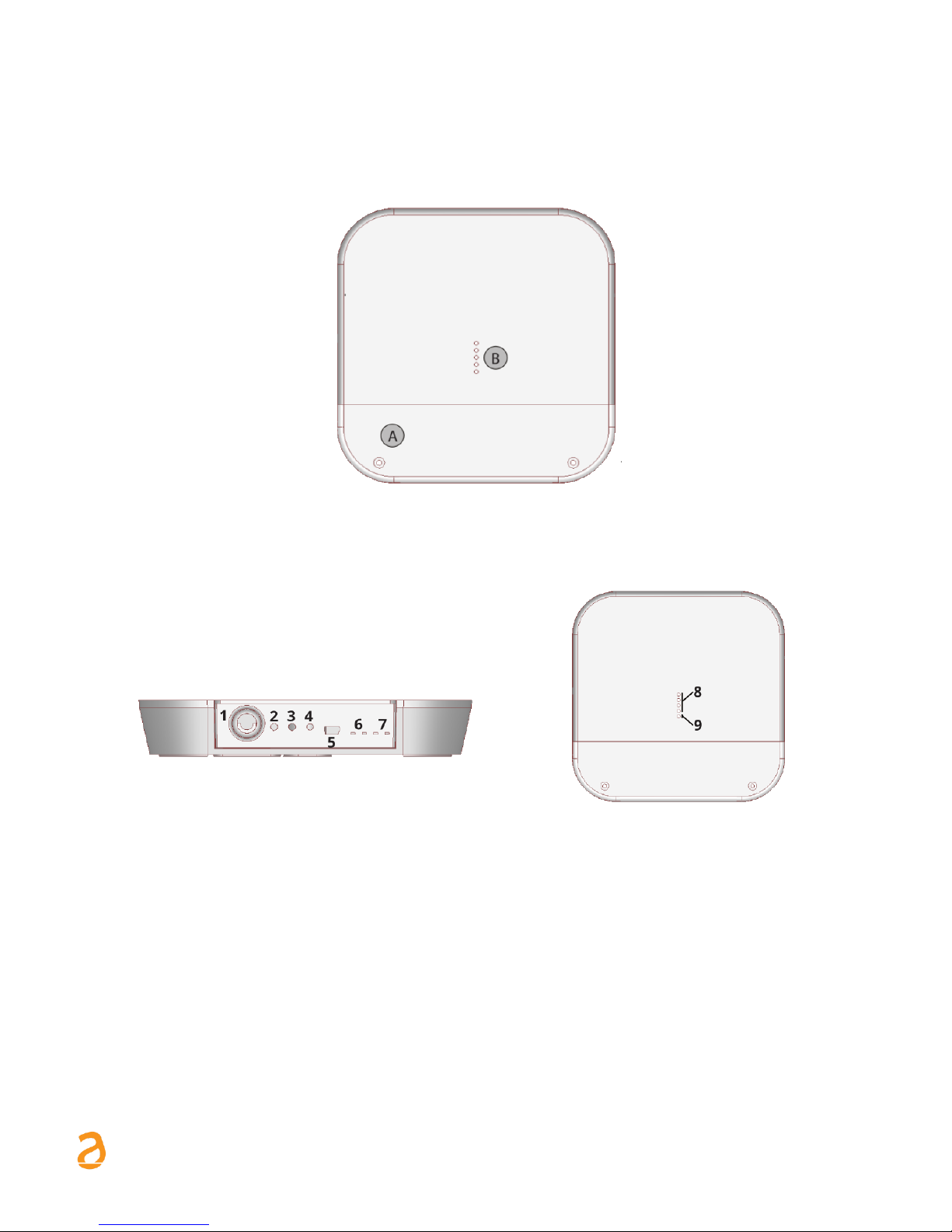
Below find an image of the SIN.EQRPT868XT device with indications regarding its operational parts:
Figure 2 – View of RPT868XT
Figure 3 – Connections/buttons/LEDs
1. 100..240Vac power supply input (screw clamps)
2. “Multi-function” button
3. “Multi-function” button
4. Reset button
5. USB Port
6. MESH network TX-RX LED
7. W. M-Bus network TX-RX LED
8. Signal level LED (green colour; active only in scan mode)
9. Status LED (blue colour)
A. Cables compartment lid
B. LED
Page 7
SIN.EQRPT868XT – User Guide Rev. 1.6
S IN A PS I S .r . l . | V i a d el l e Q ue r ce 11 / 13 - 0 6 08 3 BA S TI A U M BR A ( PG ) – I t a l y
T .+ 3 9 07 5 8 0 11 6 0 4 - F . +3 9 0 7 5 8 01 4 6 0 2| w w w. si n ap s it e c h . it - i n fo @s i na p si t e ch . it 7
4. REPEATER CONFIGURATION THROUGH KEYS FUNCTIONS
4.1 Change ID MESH
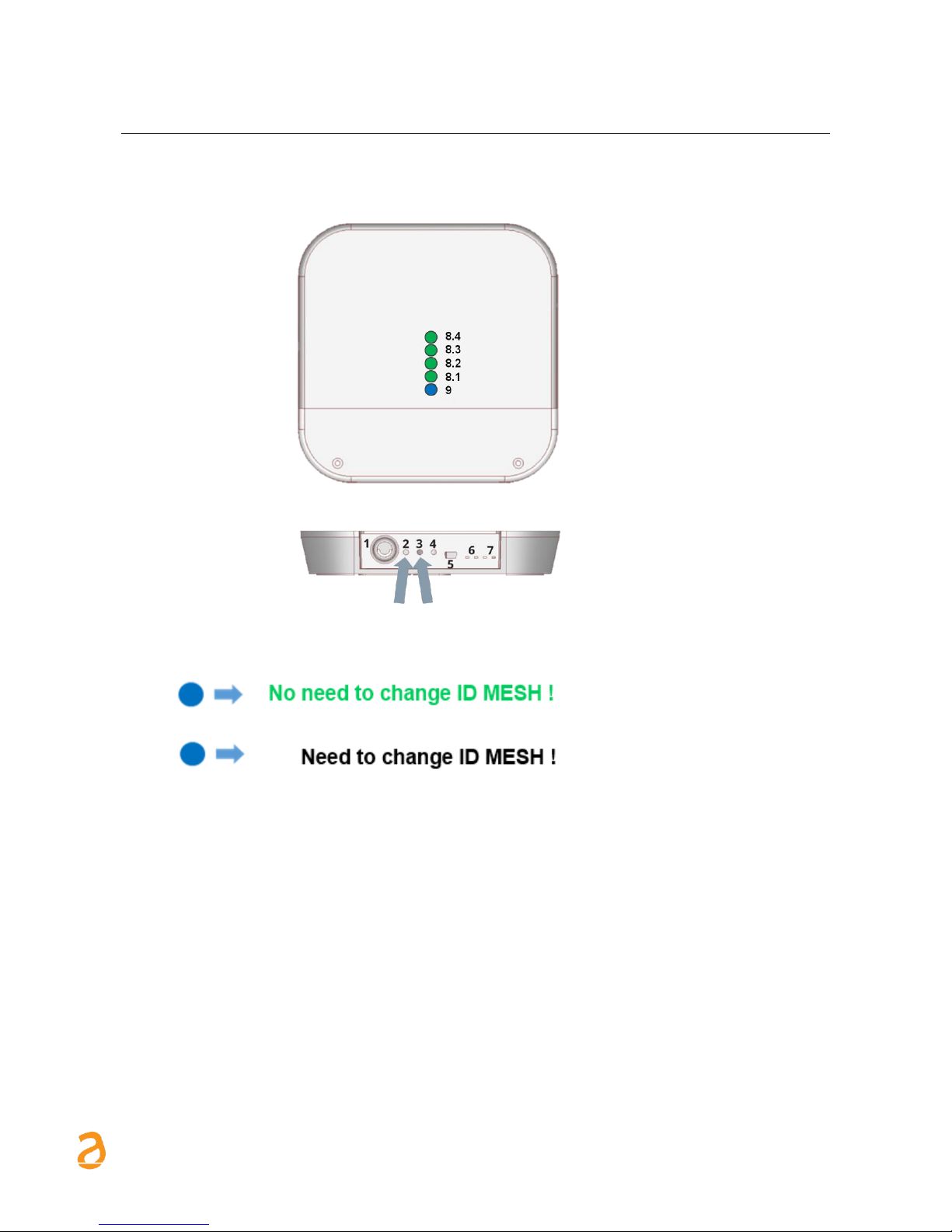
The SIN.EQRPT868XT is considered installed and correctly powered..
- If blue led (9) flashes for more than 5 minutes
- If blue led (9) remains fixed access after a few minutes
1. Press keys 2 and 3 (2s. < T <6s) simultaneously.
2. On release all the LEDs (8) will flash at the same time to indicate that you have entered edit mode
ID MESH
3. Now press button 3 (at least 1s.) to switch the MESH ID.
a. ID MESH 1 → Green LED (8.1) on - the others off
b. ID MESH 2 → Green LED (8.2) on - the others off
c. ID MESH 3 → Green LED (8.3) on - the others off
d. ID MESH 4 → Green LED (8.4) on - the others off
4. To SAVE press keys 2 and 3 simultaneously for more than 1s. Press the 2 button to exit without
saving.
5. Verify that the blue LED does not remain on steady. Otherwise, restart from point 1. by selecting
another MESH ID.
6. If, after switching on all four MESH IDs, the blue LED continues to remain on steady, it will be
necessary to configure the SIN.EQRPT868XT via “Equobox Toolkit” code SIN.EQSW1 software.
7. Repeat for each SIN.EQRPT868XT.
Page 8
SIN.EQRPT868XT – User Guide Rev. 1.6
S IN A PS I S .r . l . | V i a d el l e Q ue r ce 11 / 13 - 0 6 08 3 BA S TI A U M BR A ( PG ) – I t a l y
T .+ 3 9 07 5 8 0 11 6 0 4 - F . +3 9 0 7 5 8 01 4 6 0 2| w w w. si n ap s it e c h . it - i n fo @s i na p si t e ch . it 8
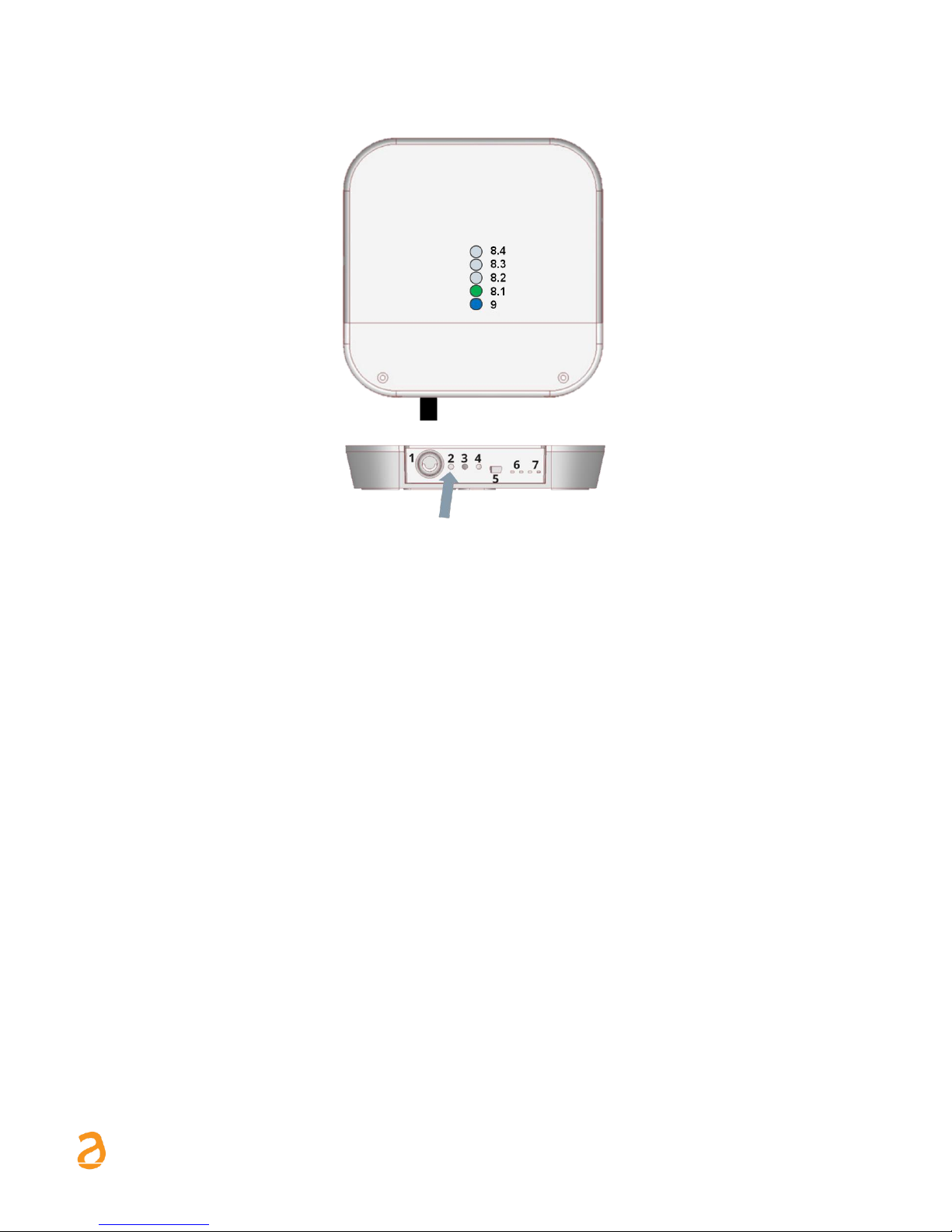
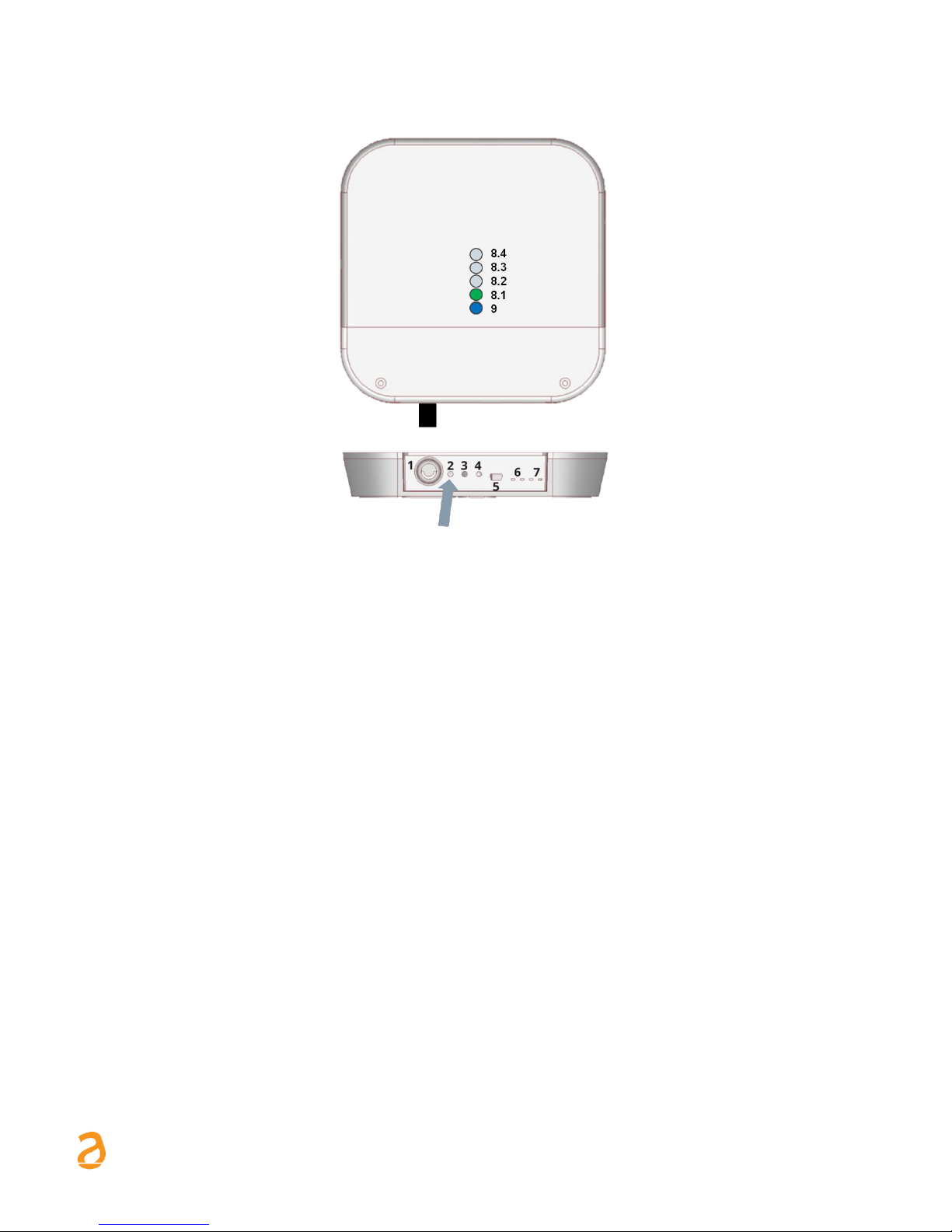
4.2 Activate SND_IR mode (Installation Mode)
a) It typically involves the installation of the AMR system and subsequently the installation of the
heat cost allocators
b) Both the AMR system and the distributors must be configured to work in this mode
c) SND_IR mode activation procedure on a newly installed SIN.EQRPT868XT
1. Press button 2 (t > 6s.). When pressing button 2, the green LED (8.1) flashes every second, until
you are under the 6s. Once the 6s have passed, the LED (8.1) flashes every 500ms → this indicates
that the "SND_IR" scan mode has been changed.
2. RPT enters the "SND_IR" scan mode. RPT receives and takes over all the devices that transmit the
installation W-M-Bus telegram. (This frame contains no data)
3. Scan duration without user intervention 12 hours -> Manual stop of the scan → press key 2 (no
coded pressure time)
Note: SIN.EQRPT868XT automatically exits the SCAN mode after 12 hours.
Page 9
SIN.EQRPT868XT – User Guide Rev. 1.6
S IN A PS I S .r . l . | V i a d el l e Q ue r ce 11 / 13 - 0 6 08 3 BA S TI A U M BR A ( PG ) – I t a l y
T .+ 3 9 07 5 8 0 11 6 0 4 - F . +3 9 0 7 5 8 01 4 6 0 2| w w w. si n ap s it e c h . it - i n fo @s i na p si t e ch . it 9
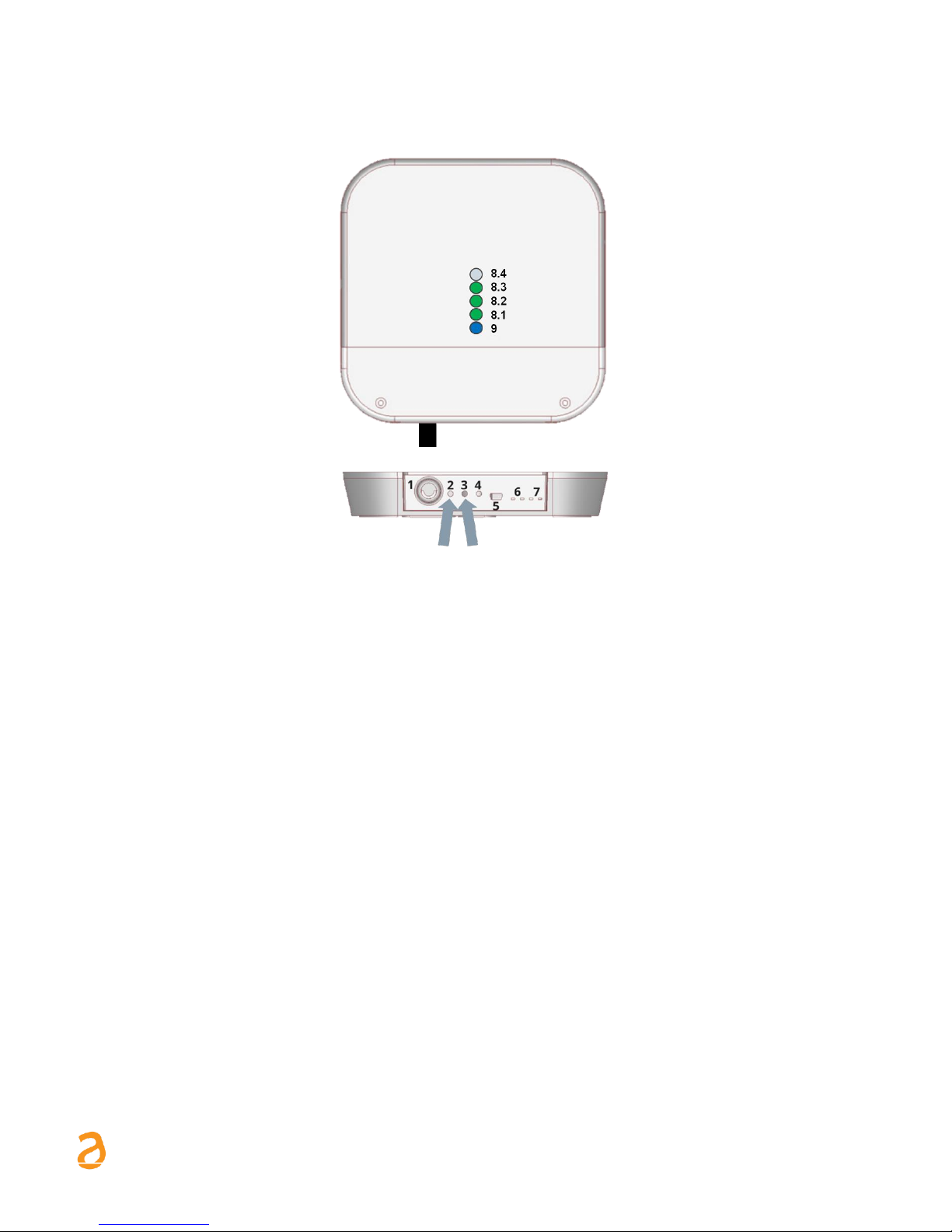
4.3 Accept mode activation ALL - SIN.EQRPT868XT
a) It is used when the commissioning is carried out after with respect to the installation of the heat
cost allocators
b) To activate the accept ALL mode on a newly installed SIN.EQRPT868XT
1. Press button 2 (2s. < T < 6s)
2. When pressing button 2, the LED (8.1) flashes every second. When the key 2 is released, the LED
(8.1.) remains lit to indicate the activation of the accept ALL mode.
3. RPT receives and takes charge of all devices transmitting in W.M-Bus including frames in
Installation Mode (SND_IR) - The first green LED lights up permanently - Scan duration without
user intervention 12 hours
4. press the button 2 (no coded pressure time) to stop the scan manually
Note: if during the scan the RPT connects into the MESH network the mode of operation will automatically
change with the value set on the RTU.
Page 10
SIN.EQRPT868XT – User Guide Rev. 1.6
S IN A PS I S .r . l . | V i a d el l e Q ue r ce 11 / 13 - 0 6 08 3 BA S TI A U M BR A ( PG ) – I t a l y
T .+ 3 9 07 5 8 0 11 6 0 4 - F . +3 9 0 7 5 8 01 4 6 0 2| w w w. si n ap s it e c h . it - i n fo @s i na p si t e ch . it 10
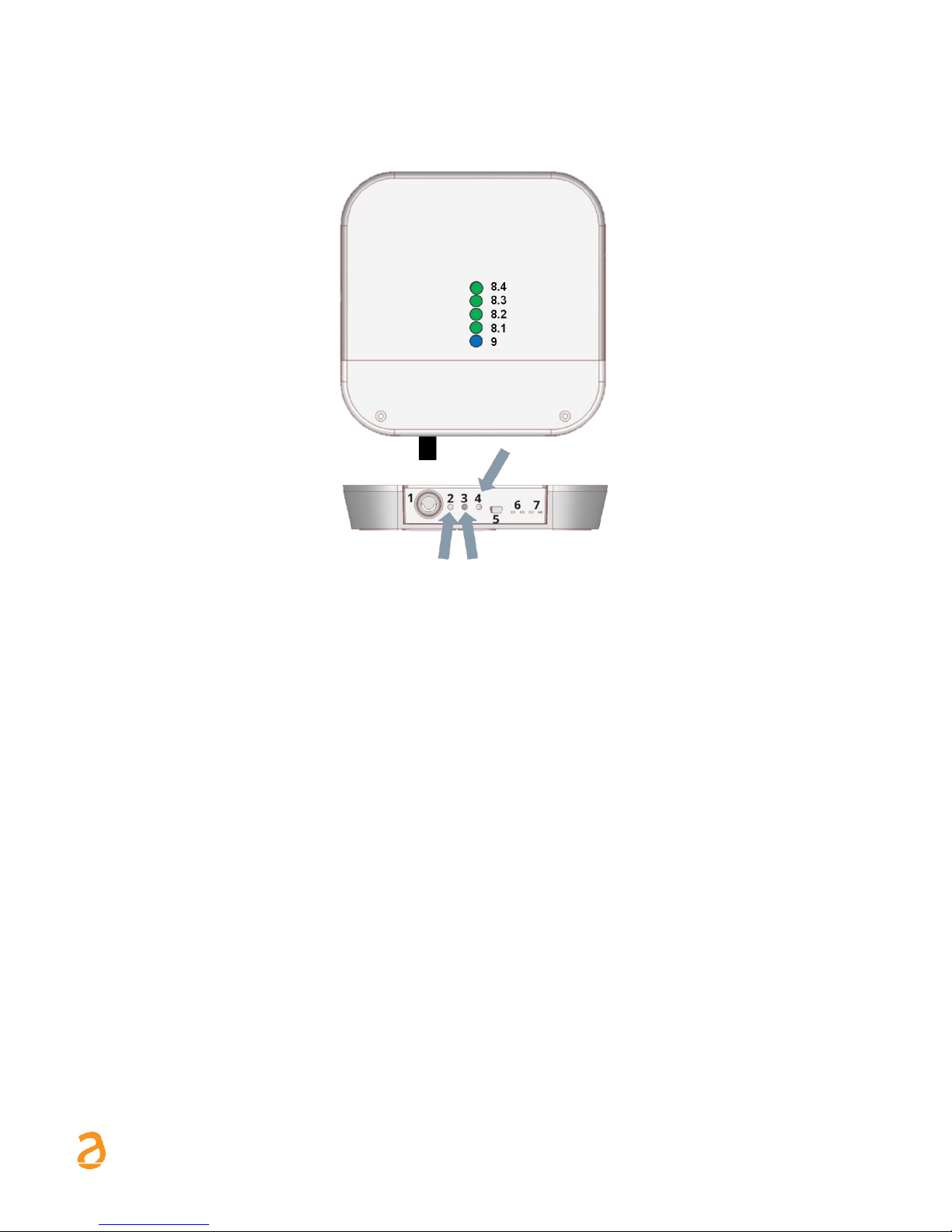
4.4 SIN.EQRPT868XT – S, T, C+T, S & C+T Mode of operation modification
The SIN.EQRPT868XT is considered installed and correctly powered.
1. Press keys 2 and 3 simultaneously (t > 6s.)
─ during the simultaneous pressing of keys 2 and 3, the green LEDs (8.1) and (8.2) will flash every
second, until you are under the 6s. Exceeded the 6s. they flash every 500ms
─ When keys 2 and 3 are released, one of the green LEDs (8) starts to flash (500ms) to indicate the
currently active mode of operation on that SIN.EQRPT868XT
2. The mode of operation is changed by pressing the 3 key briefly
• Mode C+T → Green LED (8.1) on - the other off ➔ Factory setting
• Mode S → Green LED (8.2) on - the other off
• Mode T → Green LED (8.3) on - the other off
3. save settings by pressing the 2 and 3 buttons (t> 2s.)
4. exit → key 2 for ESC function without saving (during programming status). Automatic ESC from
programming status after 10 minutes later.
Note: SIN.EQRPT868XT automatically exits the SCAN mode after 12 hours.
Page 11
SIN.EQRPT868XT – User Guide Rev. 1.6
S IN A PS I S .r . l . | V i a d el l e Q ue r ce 11 / 13 - 0 6 08 3 BA S TI A U M BR A ( PG ) – I t a l y
T .+ 3 9 07 5 8 0 11 6 0 4 - F . +3 9 0 7 5 8 01 4 6 0 2| w w w. si n ap s it e c h . it - i n fo @s i na p si t e ch . it 11
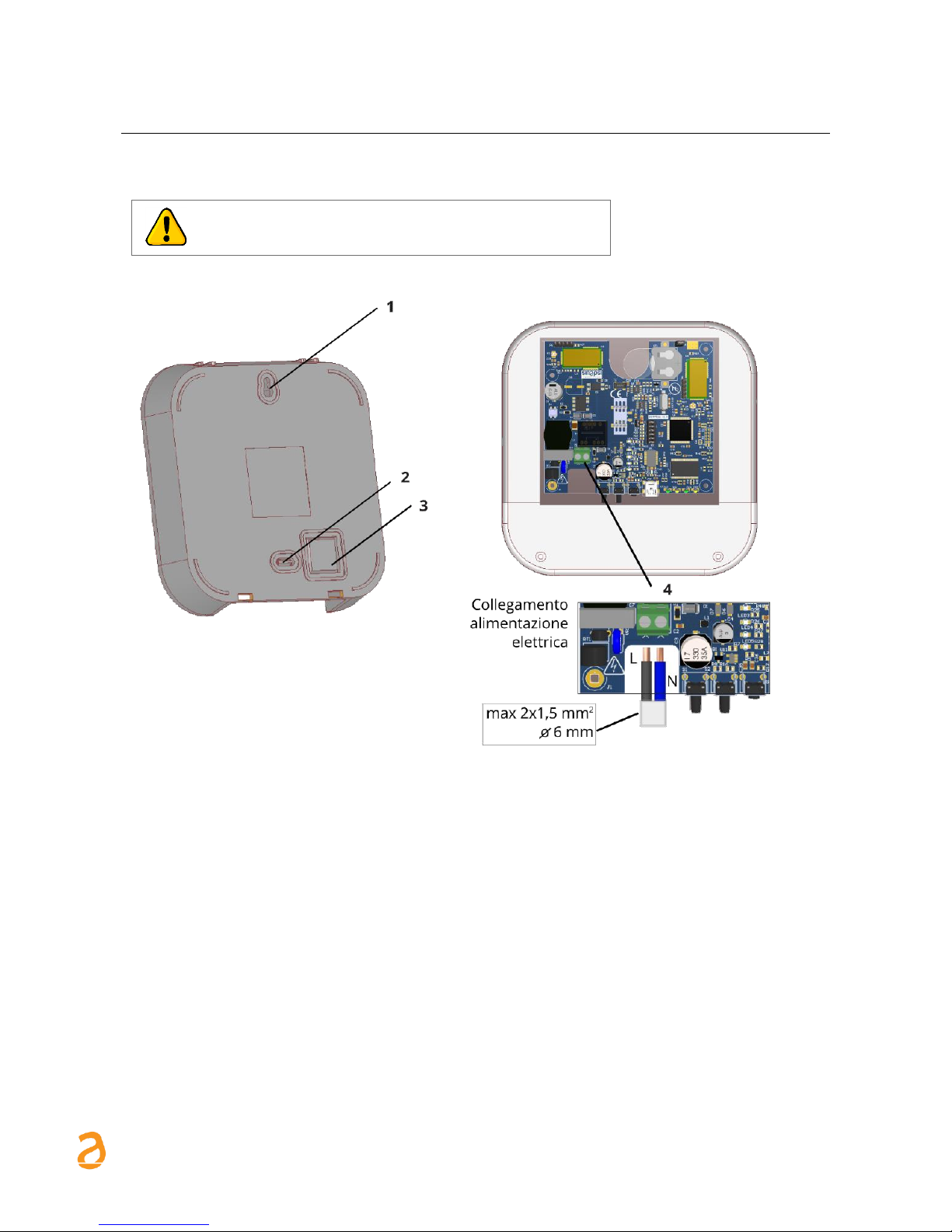
4.5 Restore factory settings
1. Press and hold keys 2 and 3 simultaneously.
2. Then press the reset button 4, without releasing the keys 2 and 3
3. As soon as all the LEDs (8) and (9) flash quickly, release all three keys.
Page 12
SIN.EQRPT868XT – User Guide Rev. 1.6
S IN A PS I S .r . l . | V i a d el l e Q ue r ce 11 / 13 - 0 6 08 3 BA S TI A U M BR A ( PG ) – I t a l y
T .+ 3 9 07 5 8 0 11 6 0 4 - F . +3 9 0 7 5 8 01 4 6 0 2| w w w. si n ap s it e c h . it - i n fo @s i na p si t e ch . it 12
5. WALL MOUNTING AND PASSING OF CABLES
Before making any connection, remove the power supply,
complete the wiring, close the lid of the device and the
power the Repeater.
Figure 4 - wall mounting and passage of cables
1. Hole for upper fixing screw
2. Pre-hole for lower fixing screw
3. Pre-hole for cable passage
4. Electric power supply connection
Page 13
SIN.EQRPT868XT – User Guide Rev. 1.6
S IN A PS I S .r . l . | V i a d el l e Q ue r ce 11 / 13 - 0 6 08 3 BA S TI A U M BR A ( PG ) – I t a l y
T .+ 3 9 07 5 8 0 11 6 0 4 - F . +3 9 0 7 5 8 01 4 6 0 2| w w w. si n ap s it e c h . it - i n fo @s i na p si t e ch . it 13
6. USB CONNECTION TO THE PC, CONNECTION VIA RADIO TO THE
SIN.EQRTU1T AND POSITIONING
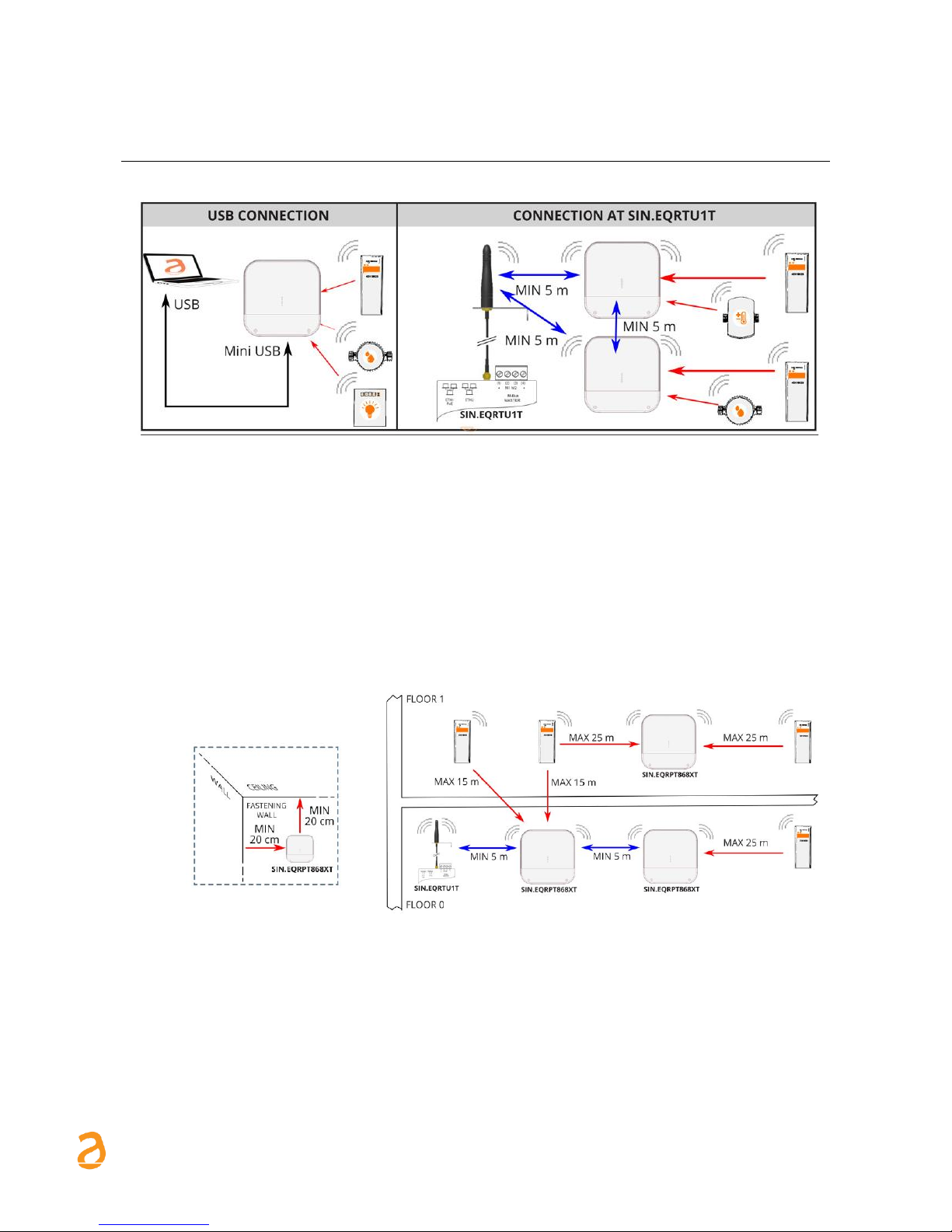
Figure 5 - Connections
1. Fix the SIN.EQRPT868XT repeater on fastening wall at minimum distance of 20 cm from the
ceiling and from the adjacent wall.
2. The maximum operating distance between the devices installed on the same floor is 25
meters, with no major obstacles such as reinforced concrete or metal walls, columns or
beams or other metal structures.
3. The maximum operating distance between the devices installed on different floors is 15
meters.
Figure 6 – Positioning and operating distances
The SIN.EQRPT868XT come with id MESH network = 1 and channel 13. Make sure that all
SIN.EQRPT868XT and/or SIN.EQRTU1T that must be part of the same network, have the same id of
MESH and radio channel network. The verify operation is performed through the SIN.EQSW1
software for SIN.EQRPT868XT and through web interface for SIN.EQRTU1T.
Page 14

SIN.EQRPT868XT – User Guide Rev. 1.6
S IN A PS I S .r . l . | V i a d el l e Q ue r ce 11 / 13 - 0 6 08 3 BA S TI A U M BR A ( PG ) – I t a l y
T .+ 3 9 07 5 8 0 11 6 0 4 - F . +3 9 0 7 5 8 01 4 6 0 2| w w w. si n ap s it e c h . it - i n fo @s i na p si t e ch . it 14
7. CONFIGURATION OF THE REPEATERS NETWORK
1. Place the Smart Repeaters SIN.EQRPT868XT following the instructions in CHAP.5, to ensure radio
coverage of the various W. M-Bus transmitters installed that you want to obtain.
2. Power SIN.EQRTU1T, wait to boot, connect to the web interface and start scanning antennas and
devices following the product manual. Also make sure the W. M-Bus mode (S / T / T+C / S & T+C)
set to be consistent with that of the devices that you want to obtain.
3. Power Smart Repeaters SIN.EQRPT868XT. The blue LED on the front begins to flash. Wait a few
minutes and check that it remains fixed access to indicate a good connection of SIN.EQRPT868XT
with the SIN.EQRTU1T.
4. Once connected, on the front of the Smart Repeaters pay attention to the 4 green LED located
above the blue LED. The LEDs indicate the quality of the MESH radio signal: 1 = receive just
enough, 2 = average, 3 = good, 4 = excellent.
5. Check that the W. M-Bus devices you want to receive, are reaching the SIN.EQRPT868XT through
the WEB interface of SIN.EQRTU1T.
By default, the scanning phase has duration of 12 hours. It can be modified through the
SIN.EQRTU1T and can be however stopped at any moment.
There can be several independent SIN.EQRPT868XT networks in the same building. In this case,
it is necessary that the networks have different MESH ID and/or channel for each group of
SIN.EQRPT868XT and relative SIN.EQRTU1T. These parameters can be modified through the
SIN.EQSW1 software installed on a PC and connected via USB to the SIN.EQRPT868XT. Refer to
the SW manual for details.
Each SIN.EQRPT868XT supports a maximum of 500 W. M-Bus devices. In the case in which it is
positioned in an area where it can receive more than this number, it is necessary to make the x
repeater selective. To do this, you can load a list of W. M-Bus transmitters that stand out in the
list through their serial number, making use of SIN.EQSW1 software. In this way, the repeater
only will filter the devices in the list.
Page 15

SIN.EQRPT868XT – User Guide Rev. 1.6
S IN A PS I S .r . l . | V i a d el l e Q ue r ce 11 / 13 - 0 6 08 3 BA S TI A U M BR A ( PG ) – I t a l y
T .+ 3 9 07 5 8 0 11 6 0 4 - F . +3 9 0 7 5 8 01 4 6 0 2| w w w. si n ap s it e c h . it - i n fo @s i na p si t e ch . it 15
8. TROUBLESHOOTING
1. The device does not switch on:
• In the event of mains power supply, check there is voltage present
• If a USB port is used, check the quality of the USB cable and that the PC can supply a 500mA
current
2. The blue LED does not stop flashing:
• Check that the SIN.EQRTU1T device is on and the antenna is connected and in a favourable
position for the propagation of the radio waves (do not close it inside electric control boards
or particularly shielded environments)
• Check that the SIN.EQRPT868XT is at least 5m from the SIN.EQRTU1T and from the other
SIN.EQRPT868XT devices
• With the aid of the SIN.EQSW1 SW, check that the ID and the MESH network channel is correct
and the same used by the SIN.EQRTU1T
1 blink "RAM memory error"
2 blinks "W.M-Bus radio module error "
3 blinks "MESH radio module error "
4 blinks "FLASH memory error"
5 blinks "Real Time Clock error"
If turning off and restarting the SIN.EQRPT868XT, the error does not reset, the hardware
must be replaced.
3. Not all meters are detected:
• Check that the meters that are not detected are not too far away from the SIN.EQRPT868XT
or that the radio signal is not too attenuated by reinforced concrete/metal walls
• Check that the devices not reached are in the list loaded into the SIN.EQRPT868XT or that
the list of the W. M-Bus devices that can be received by the SIN.EQRPT868XT are not blocked
• Attention: some W. M-Bus device also transmit with intervals of several hours
• With the aid of the SIN.EQRTU1T WEB interface or of the SIN.EQSW1 software, check that the
MESH network is not cut off.
 Loading...