

Page 1
Smiths Medical Publications
This publication has been compiled and approved by Smiths
Medical for use with their respective products. It is supplied in
this format to permit users to access the text and illustrations
for their own use e.g. training and educational purposes.
Users of the equipment must ensure that they have read and
understood the contents of the complete manual including the
warnings and cautions and have been trained in the correct use
of the product.
Smiths Medical cannot be held responsible for the accuracy and
any resulting incident arising from information that has been
extracted from this publication and compiled into the users
documentation.
This publication maybe subject to revision and it is the users
responsibility to ensure that the correct version of manual/
text/illustration is used in conjunction with the equipment.
Page 2
Graseby® Model 500
and Graseby® Micro 505
Volumetric Infusion Pump
Technical User
Manual
Page 3

Published by Smiths Medical MD, Inc.
All possible care has been taken in the preparation of this publication, but Smiths
Medical accepts no liability for any inaccuracies that may be found.
Smiths Medical reserves the right to make changes without notice both to this
publication and to the product which it describes.
2005 Smiths Medical family of companies. All rights reserved.
©
No part of this publication may be reproduced, transmitted, transcribed, or stored
in a retrieval system or translated into any human or computer language in any
form or by any means without the prior permission of Smiths Medical.
Smiths Medical MD, Inc.
1265 Grey Fox Road, St. Paul, MN 55112, U.S.A.
European Representative:
Smiths Medical International Limited
Watford, Hertfordshire, UK, WD24 4LG
www.smiths-medical.com
Registered in England.
Company number 362847
Trademarks and acknowledgements:
Graseby is a trademark of the Smiths Medical family of companies. The symbol ®
indicates that it is registered in the U.S. Patent and Trademark office and certain
other countries. The products described are covered by one or more of the following
Patent Nos.: U.S. 5017192, 5103214, 5401256, 5429485, U.K. 2247765, FRANCE
2715073
All other trademarks are acknowledged as the property of their respective owners.
Page 4

Smiths Medical
Warnings
Warnings tell you about dangerous
conditions, that could lead to death or
serious injury to the user or patient, that
can occur if you do not obey all of the
instructions in this manual.
1. WARNING: You should ensure that the
performance offered by the pump is fit for the
intended purpose. Failure to do so may result
in compromised function of the product,
patient injury or user injury.
2. WARNING: Do not use a faulty pump. If the
pump detects a fault when it is first turned on,
or if it develops a fault during operation then a
continuous system alarm sounds. The pump
must be referred to a suitably qualified
technician or returned to Smiths Medical in
order to have the fault rectified.
3. WARNING: Before using the pump, it should be
inspected for physical damage. The pump
should not be used if damage is evident, and
should be returned to service personnel for
repair before being returned to use. Failure to
do so may result in compromised function of
the product, patient injury or user injury.
4. WARNING: Do not use the pump if you detect
any cracks, chips and loose or bent parts, or
if the buttons do not move in and out freely
when they are pressed. Failure to do so could
cause inadvertent disconnection of the pumps.
5. WARNING: To avoid possible malfunction of the
pump, do
gamma rays or ionizing radiation, or to the RF
interference or strong electric/magnetic fields
emitted (for example) by diathermy equipment
or mobile telephones. If the pump is used in
the presence of, or in combination with
Magnetic Resonance Imaging (MRI) machines
it must be protected from the magnetic field
emitted by such equipment. Malfunction of the
pump can cause incorrect infusion or loss of
infusion resulting in patient injury or death.
6. WARNING: Do not push or pull on the pumps,
or the IV pole may tip over or the pumps fall
to the floor. Do not try to remove modular
connected pumps from the IV pole whilst they
are joined together. Either of these could
cause the administration set to separate from
the fluid container thus spilling the
medication, or the pumps themselves could be
damaged.
7. WARNING: Correct entry of data is essential in
order to ensure that the intended infusion is
performed. Before confirming any displayed
data when setting up an infusion, you should
not expose the pump to X- rays,
Warnings and Cautions
ensure that it is correct. Failure to do so may
result in compromised function of the product,
patient injury or user injury.
8. WARNING: Dose-rate calculation requires
care in entering data. Refer to specific product
drug labelling for information on appropriate
administration techniques and dosages.
Entering incorrect data may result in patient
injury or death.
9. WARNING: When delivering drugs in the
epidural space, use only those medications
specifically indicated for epidural use.
Epidural administration of other drugs could
result in serious patient injury or death.
10. WARNING: The use of administration sets
incorporating injection sites could lead to an
improper or inappropriate infusion resulting in
serious patient injury or death.
11. WARNING: Failure to clearly identify the pump
and administration sets could lead to an
improper or inappropriate infusion resulting in
serious patient injury or death.
12. WARNING: Remove any air to prevent air
embolism. The presence of air within the
infusion can result in complications resulting
in patient injury or death.
13. WARNING: To avoid over infusion, do not
prime the infusion line when the administration set is connected to the patient. Over
infusion can result in patient injury or death.
14. WARNING: The Occlusion alarm level must be
checked before starting an infusion to ensure
that it is appropriate for the infusion. Failure
to do so may result in an unacceptably slow
time to Occlusion alarm, resulting in patient
injury or death.
15. WARNING: Prior to starting an infusion,
inspect the fluid path for a closed clamp or
any other obstructions or restriction. Failure
to do so may result in the infusion not being
delivered correctly, resulting in patient injury
or death.
16. WARNING: If using a blood pressure cuff above
the patient’s venipuncture site take extra care
in setting the Occlusion alarm pressures.
Failure to do so may result in unnecessary
Occlusion alarms, resulting in patient injury
or death.
Volumetric Infusion Pumps
Page 5

Warnings and Cautions
Smiths Medical
17. WARNING: The Occlusion detection system
measures downline pressure in the administration set, but does not detect infiltration. In
accordance with local protocol, you must
periodically inspect the patient’s infusion site
for signs of infiltration. Failure to do so may
result in an unacceptably slow time to
Occlusion resulting in patient injury or death.
18. WARNING: If an Occlusion alarm occurs,
immediately clamp the line to the patient. Then
inspect the fluid pathway to determine what
has caused the obstruction. An unintentional
bolus of medication can result in patient injury
or death.
19. WARNING: Do not run parallel infusion lines
below the pump. Delivering a Secondary
infusion means running a second line
the pump. Failure to do so may result in an
inaccurate delivery of medication, resulting in
patient injury or death.
20. WARNING: Check the Secondary set carefully,
since an occlusion above the pump on the
Secondary line could cause the Primary fluid
to be delivered instead of the Secondary
infusion. Administering the wrong medication
may cause serious patient injury or death.
21. WARNING: The Secondary volume to be infused
must match the amount of fluid in the
secondary container. Primary flow resumes
when the secondary container is empty. If the
volumes do not correspond, the wrong infusion
may be delivered which could cause serious
patient injury or death.
22. WARNING: Delivery rate for secondary
medication must not exceed 300 ml/hr, or fluid
may be delivered from both primary and
secondary container causing delayed delivery
of secondary medication and unintended
mixing of fluids. Failure to do so may result in
patient injury or death.
23. WARNING: Correct management of battery
charging, as described in this documentation
is essential to ensure that the pump can
operate on battery for the time specified.
Failure to do so may result in compromised
function of the product or patient injury.
24. WARNING: If a backup alarm sounds, the pump
should be immediately removed from the
patient and sent to be repaired by a Smiths
Medical qualified technician. Failure to do so
may cause patient injury or death.
above
25. WARNING: Failure to use the power cord
retainer means that the pump may be
accidentally or erroneously disconnected from
the mains. Although there is a battery backup
in case this happens, the battery may not be
charged sufficiently. Consequently, there is a
risk of the pump not functioning which could
lead to patient injury or death.
26. WARNING: Do not open the pump housing.
Refer all service faults only to qualified
technical personnel. Opening the pump
housing may cause electric shock leading to
patient or user injury or death.
27. WARNING: When the pump is carrying out an
infusion, to ensure that electrical safety is
maintained, only items of equipment that
conform to EN60950 are to be connected to the
RS232 connector situated at the back of the
pump, otherwise patient safety may be
compromised.
28. WARNING: While Smiths Medical have taken
all reasonable steps to ensure that the pump
operates correctly while under remote control,
it is the responsibility of the person who
designs and implements the controlling device
to ensure that the resulting system (pump and
controlling device) is fit for its intended
purpose. Failure to do so may result in
compromised function of the product, patient
injury or user injury.
29. WARNING: Use only Smiths Medical
administration sets with this product. Failure
to do so may result in compromised system
accuracy leading to complications resulting in
patient injury or death.
30. WARNING: Ensure that there is no clamp or
other obstruction in the administration set
above the pump. If the line is obstructed, there
will be no flow of fluid and air back to the
Primary fluid reservoir. In this case the pump
cannot eliminate the air from the line above
the pump and a pressure build-up may cause
fluid leakage. Failure to observe this warning
could lead to serious injury or death.
Volumetric Infusion Pumps
Page 6

Smiths Medical
Cautions
Cautions tell you about dangerous
conditions that can occur and cause
damage to the pump if you do not obey all
of the instructions in this manual.
1. CAUTION: Refer all service, repair and
calibrations only to qualified technical
personnel. Unauthorised modifications to the
pump must
2. CAUTION: Do not autoclave, steam sterilize,
ETO sterilise or subject the pump to
temperatures in excess of 55° C (131° F).
Excessive temperatures may cause damage to
the pump.
3. CAUTION: To prevent serious damage to the
pump it must
or exposed to strong organic solvents. Wipe
off spills immediately. Do not allow fluid or
residues to remain on the pump. Additionally,
the pump is not designed to allow it to be
sterilised. Failure to observe these cautions
may cause internal damage to the pump.
4. CAUTION: Carry out periodic cleaning
following the detailed instructions in the
Volumetric Infusion Pumps Service Manual
Do not use unapproved cleaning agents.
not be carried out.
not be immersed in any liquids
Warnings and Cautions
5. CAUTION: When turning the pump on, if
screens similar to those illustrated are not
displayed, do not use the pump, and send the
pump to authorised service personnel.
6. CAUTION: Only carry the pump by the handle.
Failure to do so may result in damage to the
pump, or the pump may be dropped which
could cause internal damage to the pump.
7. CAUTION: The backlight has a limited life and
may, if used constantly, cause the light to dim.
Eventually the message display may then need
to be replaced. To preserve the life of the
message display, you should only turn on the
Message Display Light as described here if it
is specifically required. Misuse of this feature
could lead to both battery and LCD depletion.
.
Volumetric Infusion Pumps
Page 7

Warnings and Cautions
Smiths Medical
Volumetric Infusion Pumps
Page 8

Smiths Medical
Contents
Contents
Who should read this manual ................................................................................. 1
Introduction ....................................................................................................... 1
Contents of the box ........................................................................................... 2
Checking labels and serial number ................................................................. 3
Functional inspections and tests ..................................................................... 4
Setting up .......................................................................................................... 8
Regular testing .................................................................................................. 9
Requirements ..........................................................................................................9
Menus .............................................................................................................. 10
Technician menu ............................................................................................. 11
Technician parameters .......................................................................................... 12
Using Technician parameters ................................................................................ 13
Biomedical menu ............................................................................................ 16
Biomedical menu parameters ............................................................................... 17
Service Functions menu ................................................................................. 19
Service Functions menu parameters ....................................................................20
Sensors screen ...................................................................................................... 21
Specifications .............................................................................................. S - 1
Standards .................................................................................................... S - 9
Trumpet curves ......................................................................................... S - 10
Index ..............................................................................................................I - 1
Volumetric Technical User Guide
i
Page 9

Contents
Smiths Medical
ii
Volumetric Technical User Guide
Page 10

Smiths Medical
Introduction
Technical User Manual
This Technical User Guide accompanies
pump software version 0.71 and above.
The information in this guide
supplements the Volumetric Infusion
Pump Instruction Manual which is
intended for anyone using the pump on
a day-to-day basis. Technical issues,
such as acceptance testing, configuring
the pump and looking at technical
information are not needed by most
users, so they are separated into this
stand-alone manual.
Apart from acting as a reference for use
of the configuration menus, and
providing technical details and a pump
specification, this manual contains a
summary of the initial setting up and
acceptance testing of the pump. For
more detailed information, see the
Volumetric Infusion Pump Service
Manual, available on request from
Smiths Medical.
Who should read this manual
You should be familiar with the use of
the Volumetric Infusion Pump before
reading this manual in order to
understand the effect of changes you
should make with the configuration
menus described in this manual.
As well as training in the use of the
pump, this manual also assumes that
you have appropriate experience of
technical aspects of Volumetric pumps.
In order to understand the significance
of the functions and features described
in this manual, you should have read
the Volumetric Infusion Pump
Instruction Manual. You may also need
to refer to it when using this manual.
You should read this manual if you fall
into one of the following groups of
people who need to configure the pump
rather than using it to run infusions:
• a member of a Biomedical
Engineering / Medical Physics
department who is configuring the
pump for use in a particular
environment;
• a Technician servicing a pump;
• a member of a team setting up
protocols for the use of a pump in a
particular environment;
• a Clinician deciding how a pump
should be configured for specialised
use;
• a trainer who is setting up the
pump.
Volumetric Infusion Pump
1
Page 11
Technical User Manual
Contents of the box
Smiths Medical
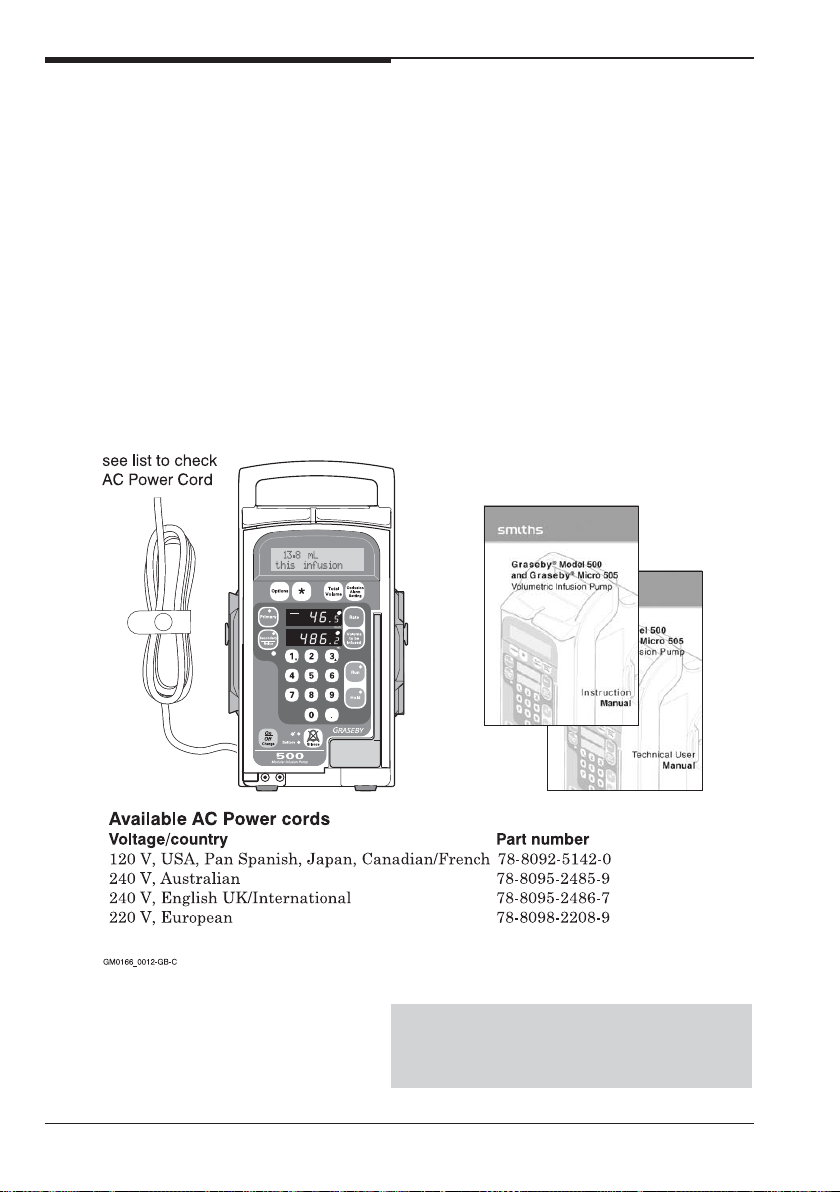
The box should contain the following
items shown in the diagram below.
• two manuals:
an Instruction Manual
and this Technical User Manual
• the Volumetric Infusion Pump
• an AC power cord fitted to the pump
with a power cord retainer and screw.
We suggest you keep the box in case you
have to return the pump for servicing.
When you have unpacked the pump
When you have unpacked the items, do
the following:
• Carry out the Visual checks
described on page 4 to ensure that
no damage has occurred during
transit
• Set up, test and configure the pump
as described on page 4.
The pump should not be used if
damage is evident. Contact your
Smiths Medical Service Department
2
Volumetric Infusion Pump
Page 12
Smiths Medical
Technical User Manual
Checking labels and serial number
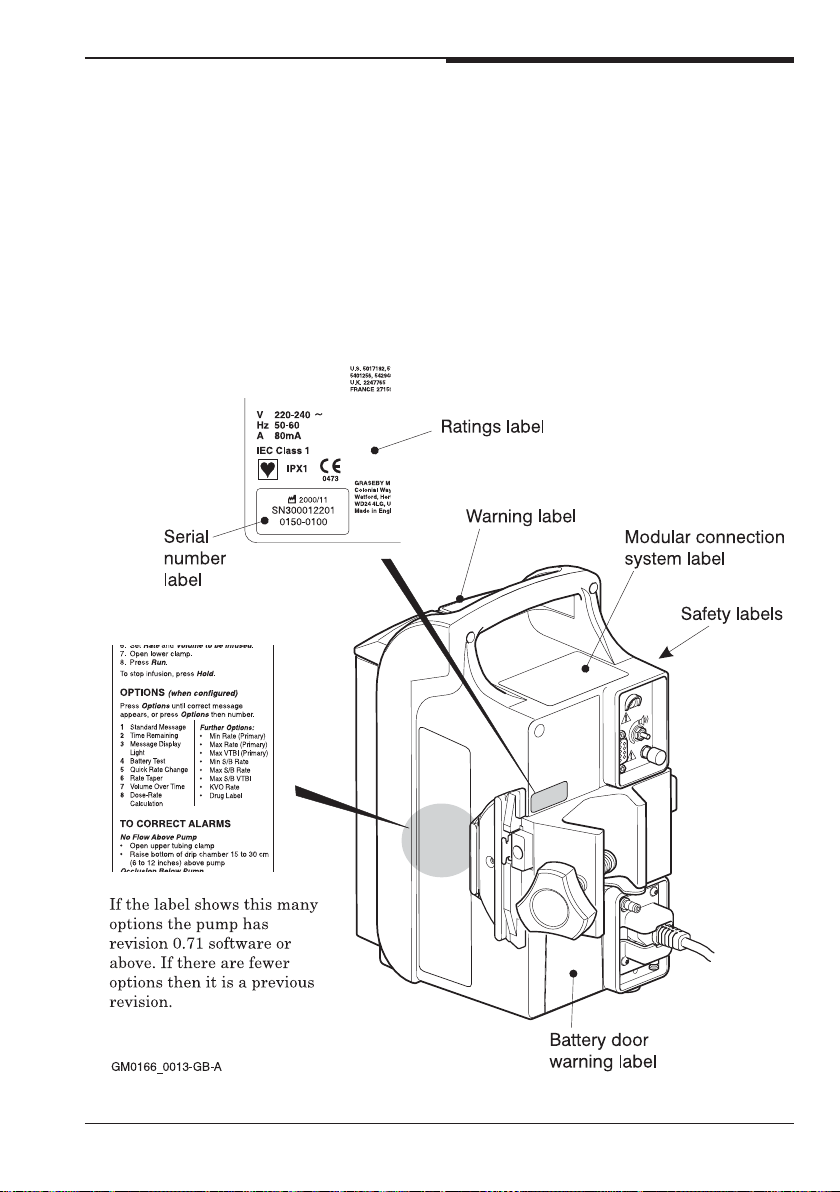
The pump has a number of labels which
should be kept clean and legible. As
shown in the diagram below, the
instructions label on the right side of
the pump can be used to identify the
revision of the pump for ordering
replacement parts.
Optional Labels
To help users to differentiate the pump
and IV set being used for epidural
delivery from those being used for other
routes of administration, a yellow
Epidural Label Set for the Volumetric
Infusion Pump (part number TPF-00306)
is available from Smiths Medical.
Volumetric Infusion Pump
3
Page 13

Technical User Manual
Smiths Medical
Functional inspections and tests
Perform the following tasks when you
have taken the pump out of the
packaging or when following the regular
testing described on page 9.
As you remove the parts from the
packaging, check that the parts match
the description on page 2.
Visual check
Check for damage:
• check for marks on the pump or
other signs of mechanical damage;
• check the appearance of the LCD
screen for damage, when the pump
is switched off;
• check the serial number and the
label as described on page 3.
If you are carrying out routine
functional checking, repair or replace
any parts that are damaged.
Additionally, check for:
• chipping or cracking of the housing
and the modular connector system;
• proper movement of the mechanical
parts;
• damage to the sleeve or plug on the
AC power cord;
• check that the AC power cord
retainer is fitted to prevent the cord
from being pulled out of the IEC
socket.
WARNING: Failure to use the power cord
retainer means that the pump may be
accidentally or erroneously disconnected
from the mains. Although there is a
battery backup in case this happens, the
battery may not be charged sufficiently.
Consequently, there is a risk of the pump
not functioning which could lead to
patient injury or death.
Power up and self test
Test that the pump is functioning
correctly.
Switch on the pump and watch the screen
and listen to the sounds made by the
pump. You should observe the following:
Note: If the pump is switched off and
connnected to AC power and the saftey
keypad lockout feature is active, the
pump cannot be switched on via the
keypad. See Instruction Manual, Safety
keypad lockout, page 2-22.
1. When the pump is connected to the
AC mains supply, the green Mains
LED lights up.
2. When you press the On/Off key on the
keypad, you hear a click to indicate that
you have pressed the key. The pump
then performs a self test.
3. The LEDs on the Primary ,
Secondary/Bolus, Run and Hold
keys light. The Battery LED also
lights.
4. When the self test is complete, the
LCD Message Display shows:
Verify that the backlight is on.
5. Unplug the pump and verify that the
mains LED goes out and that the
battery LED lights.
6. Connect the pump to the AC mains
supply again and, with the pump
switched off, open the door. Verify
that the pump turns on
automatically, and that it does so
with the LED on the Primary key lit.
4
Volumetric Infusion Pump
Page 14

Smiths Medical
Technical User Manual
7. Leave the door open for at least six
seconds and verify that the pump
does not sound the alarm. If it does,
there is a fault.
8. Press the Secondary key and verify
that the LED lights and the Primary
key LED goes out.
Use the following checklist for errors
that might occur in the above steps.
If any of the following faults occur
with a new pump, contact your
Smiths Medical Service Department.
• if any LEDs do not light in steps 1, 3
or 5;
• if no sound is heard in step 2;
• if no display appears in step 4;
• if the backlight does not come on in
step 4.
LCD and LED tests
Run this test with the AC power cord
connected to the AC mains supply.
Test the LCD and the LED ambient
light sensor as follows. With the pump
switched on, you should observe the
following:
1. When you view the pump from the
front at an angle of about 20 degrees,
the LCD message screen should be
clearly readable and have a
minimum contrast.
2. Cover the ambient light sensor
(which is just below the Secondary/
Bolus key) and verify that the LED
display intensity decreases. When
you uncover it the display should
return to the original intensity.
If any of the following faults occur
with a new pump, contact your
Smiths Medical Service Department.
• if the LCD message screen is not
clearly visible;
• if the ambient light sensor does
not respond.
If there is a fault during a routine
service check, repair or replace the
faulty parts.
Load an administration set
Prepare a container of solution and
prime a ‘Standard Adult Set, 8C-820’
(non-checkvalve 20 drop/mL)
administration set Product Code
21-0346-25 for the following tests.
Ensure that a suitable drain is
provided for the expended solution.
Prime the administration set using the
instructions in its accompanying
leaflet.
Verify that the administration set can
be loaded into the pump correctly.
Running checks
1. Press the Rate key and enter 12.3
mL/h. Verify that the correct rate
appears in the rate display.
2. Press the Volume to be Infused key
and enter 4567mL on the Model 500
or 456.7mL on the Micro 505. Verify
that the correct volume appears in
the Volume display.
3. Press the Occlusion Alarm
Setting key and verify that the
message display shows the occlusion
alarm setting. If the pump is new it
will display a Medium setting.
4. Press the Rate key and enter
890mL/h for a Model 500 pump or
89.0mL/h for a Micro 505. Press the
Volume to be Infused key and
enter 88.8mL. Ensure that the lower
roller clamp is still closed and press
the Run key. Verify that the
Volumetric Infusion Pump
5
Page 15
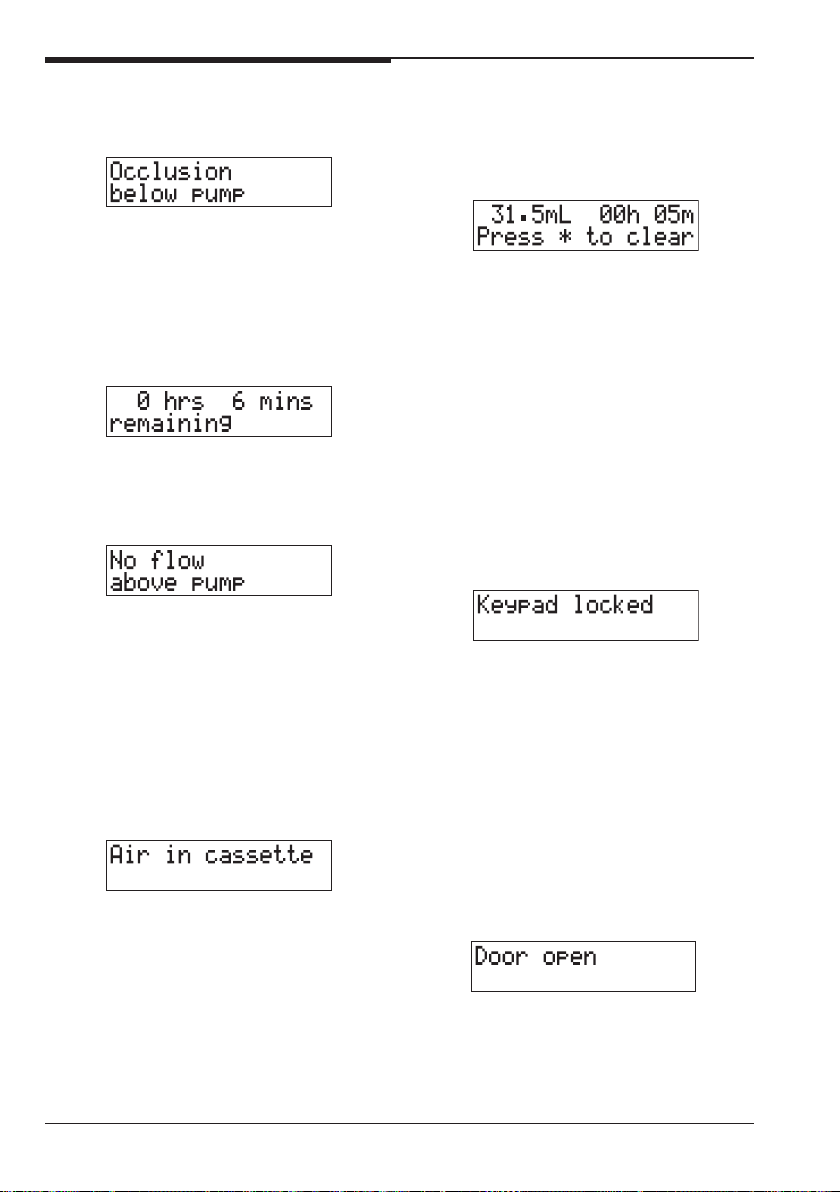
Technical User Manual
Smiths Medical
following message is displayed and
an insistent alarm sounds:
5. Silence the alarm and open the lower
roller clamp.
6. Press the Run key and then press
the Options key. Verify that the
message display shows the time
remaining with a value like the
following:
7. Close the upper tubing clamp or
pinch the tubing above the pump and
verify that the message display
shows:
and the pump alarms. Silence the
alarm and open the upper tubing
clamp, or release the tubing.
8. Press the Run key. Tip the
administration set drip chamber to
introduce air into the line. When the
air reaches the upper cassette
chamber, verify that the pump
alarms and the message display
shows:
Silence the alarm and clear the air
as follows:
Ensure any upper clamp is open
between the pump and reservoir,
then close the lower roller clamp and
open the door. Wait for the cassette
to fill and then slowly close the door.
The air should be expelled up the
tube. If necessary repeat the process
to clear the remaining air.
9. With pump on hold, press the Total
Volume key and verify that the
message display shows a volume
and time like the following:
If you have a new pump and it does
not behave as described here,
contact your Smiths Medical
Service Department.
If there is a fault during a routine
service check, repair the pump as
described in the Service Manual.
Lockout and safety checks
1. Press the Run key and then press
the Keypad lock/unlock button on
the lower right of the panel at the
rear of the pump so that the screen
momentarily shows
2. Press each key, including the On/Off
key, to verify that all keys are
inactive and the above message
appears when you press a key.
3. Press the Keypad lock/unlock button
to enable the keypad again and
press the Hold key and verify that
the pump stops.
4. Press the Run key and then open
the door. When the pump alarms
and this message appears, silence
the alarm.
5. Pull the safety clip from the slot and
then, holding the tubing, pull the
clip towards you so that the clip can
be slid down the tubing.
6
Volumetric Infusion Pump
Page 16
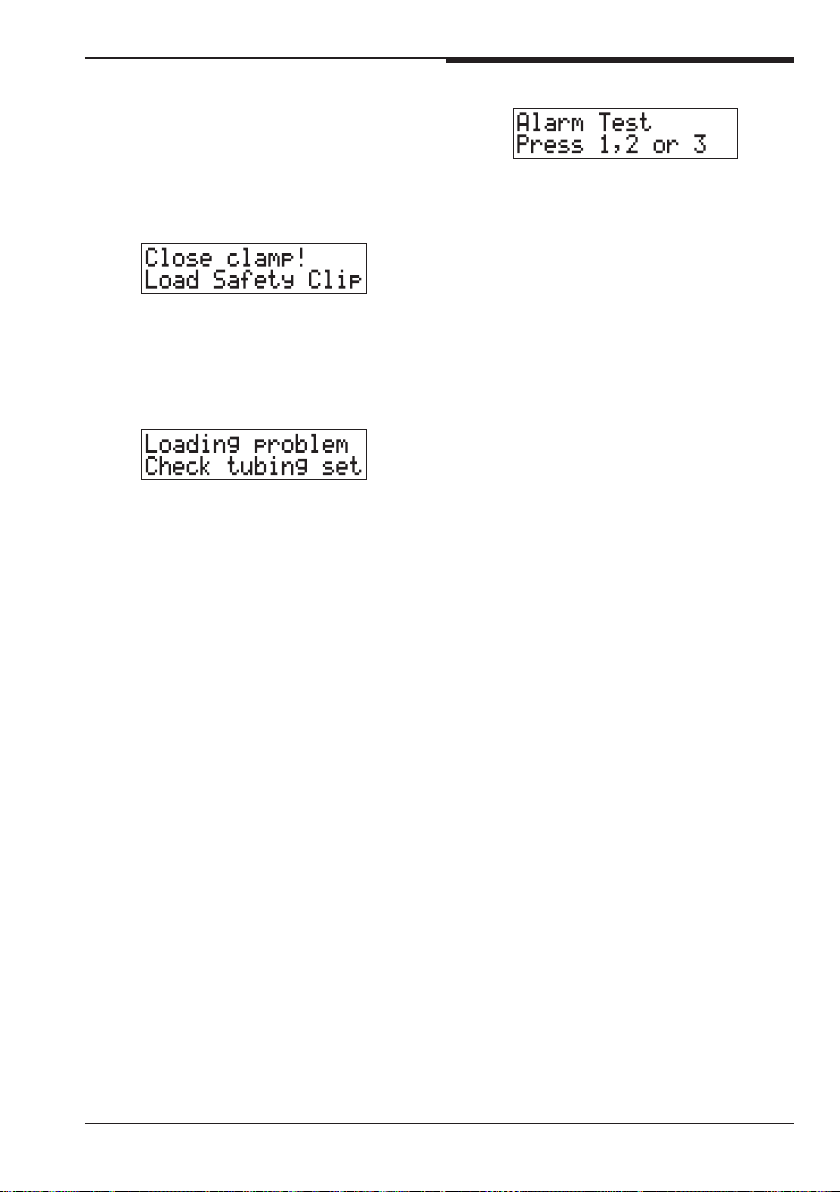
Smiths Medical
Slide it down so that it is clear of
the pump. Ensure that the cassette
is firmly home on the pins and close
the door.
When this message appears, silence
the alarm and open the door:
6. Slide the safety clip up the tubing
and push it into its slot. Close the
clamp above the cassette. Then close
the door and silence the alarm when
this message appears:
Technical User Manual
4. Press 1 to test the non-insistent
alarm, 2 to test the insistent alarm
and 3 to test the continuous backup
alarm. Press the alarm Silence key
to stop each one.
5. Switch off the pump.
If you have a new pump and it does
not behave as described here,
contact your Smiths Medical
Service Department.
If there is a fault during a routine
service check, repair the pump as
described in the Service Manual.
7. Open the roller clamp, open the door
and close it again.
8. When the message disappears,
press the Run key and verify that
the pump is running. Then press the
Hold key.
If the pump does not behave as in
the description above, contact your
Smiths Medical Service
Department.
Audio alarm check
This test uses the Biomedical menu.
Full details of this menu are given on
page 17.
1. Switch the pump off. Then, while
simultaneously holding the
Options key, switch the pump on.
2. When the ID screen is displayed,
enter the number 3031, and then
enter the password 7867. If the
Passwords screen does not come up,
switch off and start again.
3. Press the Options key 9 times to
display the alarm test screen:
Further testing
The above tests are basic tests and are
a subset of the acceptance tests
described in the Service Manual. Carry
out further tests as required by your
internal acceptance protocol.
Instrument Care
Periodic cleaning of the pump housing
and inside surface of the door is
recommended. Unplug the power cord
and use a sponge or cloth lightly
dampened with a solution of warm
water and a mild, non-staining
disinfectant/cleaner. Do not use
cleaning agents which could damage
the outer pump housing.
The Service Manual contains
information on which cleaning agents
may or may not be used, and how to
perform cleaning.
CAUTION: Carry out periodic cleaning
following the detailed instructions in the
Volumetric Infusion Pumps Service
Manual
. Do not use unapproved cleaning
agents.
Volumetric Infusion Pump
7
Page 17

Technical User Manual
Setting up
Smiths Medical
Battery charging
Before using the pump for clinical use,
connect the power cord to the AC mains
supply and charge for at least 10 hours.
Pump configuration
With version 0.71 of the pump
software, additional features can be
configured. The complete list of
parameters is shown in the table on
page 12. The features which are
enabled when the pump leaves the
factory are the same as the ones
enabled on previous versions of the
pump. This allows you to run the pump
as if it had been delivered from the
factory as a previous version, without
having to configure it.
When you have carried out the tests on
pages 4 to 7, if you decide to use
additional features, the pump must be
configured. See the description of the
Technician menu on page 12 for details
of how to enable and disable features
as required.
You may also need to set the date and
time using the Service Functions menu
as described on page 20.
Deciding on the configuration
In most cases, your hospital’s protocol
will have been agreed for the
configuration settings for the use of the
pump in particular locations.
When deciding on features to enable,
bear in mind that to have too many
features enabled may confuse the user
and also that with more parameters
enabled, it may take longer to reach the
one required when pressing the
Options key.
Enabling limits
When enabling limits, and deciding on
the protocol to be used, you should be
aware of the following:
• Primary limits can be enabled
independently of Secondary limits;
this is because rates for Secondary/
Bolus infusions may need to be
higher than Primary limits;
• if limits are enabled, you should
ensure that the clinical protocol
includes checking and/or amending
the values for the minimum and
maximum rate and maximum VTBI
limits using the Options key;
• if limits are enabled, the limits
remain at the pump default values
as described in the Specification
unless the operator has set limits
using the Options key;
• if limits are not enabled, then the
pump VTBI/rate limits are as
described in the Specification; the
operator cannot alter them;
• only Primary limits are displayed
during power up, even if both
primary and secondary limits are
enabled;
You cannot disable the ability to give a
Secondary infusion, although you can
disable the Bolus feature.
However, if Secondary infusions are not
used in a particular environment, you
could enable the Secondary limits on
the Technician Menu and then set the
Secondary max rate limit to 1mL/h.
You cannot set a maximum of zero, but
setting the lowest possible maximum
can reduce the risk of a Secondary
infusion being given.
8
Volumetric Infusion Pump
Page 18

Smiths Medical
Regular testing
In addition to the regular testing
requirements listed below, Smiths
Medical recommends that a qualified
technician should carry out annual
functional and accuracy checks on each
pump as described in the Service
Manual.
Requirements
Technical User Manual
After checking the following, you should
decide whether the pump is fit for use.
1. The safety information and
operating instructions on the side of
the pump must be legible.
2. The mechanical conditions of the
pump must allow safe operation.
3. The pump must be clean.
4. The safety fuses must be of the
specified type and rating.
5. Ground impedance between the
protective contact in the AC mains
plug and the potential equalisation
terminal must be ≤ 0.2 Ohm.
6. Ground impedance between the
protective contact in the pump inlet
and the potential equalisation
terminal must be less than or equal
to 0.1 Ohm.
7. The leakage current must meet the
specification described on page S-3.
8. The functional inspections and tests
described on page 4 are
satisfactorily completed.
Volumetric Infusion Pump
9
Page 19

Technical User Manual
Menus
Smiths Medical
There are several menus on the pump,
some of which have an overlap of
features. This is to keep backwards
compatibility with pump software
versions before version 0.71.
Users familiar with previous versions
of the pump software can continue to
use a familiar menu to set up the
features of pump that existed before
version 0.71.
Which version of software is in the
pump?
You know that a pump has version 0.71
software (or later), if:
• the Secondary infusion key appears
as:
• the label on the right hand side of
the pump, as shown on page 4, lists
more than eight options;
• the Biomedical menu (menu item
number 9) shows V0.71, for
example:
The Biomedical menu
This menu is the one that also exists in
versions of the pump before version
0.71. In previous documentation it has
also been called the “Biomedical
Special Functions”. As well as enabling
or disabling features, it also displays
data for fault finding and calibration.
Parameters on two menus
The common parameters on both the
Technician and Biomedical menus are:
• Rate Taper
• Volume Over Time
• Dose Rate Calculation.
Which menu should you use?
For the parameters that are on both
Technician and Biomedical menus, you
can use either menu. In most instances,
however, you will:
• use the Technician menu, where
parameters for all the features
appear, to configure the pump for
the user;
• use the Biomedical menu only when
you are servicing the pump.
The Technician menu
This menu is only present on pumps
with version 0.71 software and later.
You use the Technician menu to enable
the features of the pump that have
been introduced with version 0.71
software, as well as the features that
existed in earlier versions. These
features and their defaults are
described on page 13.
10
The Service Functions menu
This menu contains a number of
functions for servicing the pump. It is
also where you set the time in the
pump.
The Special Functions menu
This menu is used to initialise the
pump when it is upgraded. A
description of its use is included in the
Service Manual and the Instruction
Worksheet for the 500/3000 Volumetric
Infusion Pump Software Upgrade Kit.
Volumetric Infusion Pump
Page 20

Smiths Medical
Technician menu
Technical User Manual
This menu allows you to define how the
pump behaves by setting values or by
disabling or enabling parameters.
Entering the Technician menu
To enter this menu, first switch off the
pump if it is switched on.
Then press the Total Volume key
while simultaneously pressing the
On/Off key. When you take your fingers
off the keys, the pump switches on and
you are asked to enter the Technician
menu ID.
Enter the numbers 0002.
As you enter the digits, asterisks (*)
are displayed for security protection. If
you make a mistake, you must switch
the pump off to enter the correct ID.
When prompted:
Enter the password 2020.
The Technician menu ID is always
0002 and the password is always 2020.
These cannot be changed.
Using the Technician menu
When you enter the Technician menu,
the first parameter is the one to enable
or disable the display of the Pump
Identifier. Move down the list by
pressing the Options key. Use the *
key to toggle a parameter. Thus if you
see a screen like the following:
You cannot move back through the
menu. If you make a mistake, then you
can continue to move through the list by
continuing to press the Options key
and the first item appears again when
you reach the end. You may find it
faster to switch off and start again.
To move through the list quickly, and
avoid going past the item you want, you
may also find it faster to count the
number of times you press the Options
key. The table on the next page has
been numbered to help you do this.
Leaving the Technician menu
To exit from the menu, switch off the
pump.
then the feature is disabled and you
must press the * key to enable it.
Volumetric Infusion Pump
11
Page 21

Technical User Manual
Smiths Medical
Technician parameters
The numbers on the left of this table show the number of Options key presses to
reach the parameter. The default settings are the factory settings.
Configuration Parameter Operation Default
Pump Identifier Enable or Disable Disabled
1 Drug List Enable or Disable Disabled
2 Primary rate limits Enable or Disable Disabled
3 Primary Max VTBI Enable or Disable Disabled
4 Secondary/Bolus rate limits Enable or Disable Disabled
5 Sec / Bolus Max VTBI Enable or Disable Disabled
6 KVO rate entry Enable or Disable Disabled
7 Occlusion Default High, Medium or Low Medium
8 Secondary Stop Enable or Disable Disabled
9 Bolus Enable or Disable Disabled
10 Quick Rate Enable or Disable Enabled
11 Rate Taper Enable or Disable Enabled
12 Volume over Time Enable or Disable Enabled
13 Dose Rate Calculation (DRC) Enable or Disable Enabled
14 DRC Recovery Enable or Disable Disabled
15 Backlight Enable or Disable Enabled
16 Autolock Keypad Enable or Disable Disabled
17 GMT Timestamp Enable or Disable Enabled
18 Service Date Review or Date Entry 00/00/00 (disabled)
19 Micrograms Selection 1 (µg) or 2 (mcg) 2
12
Volumetric Infusion Pump
Page 22
Smiths Medical
Using Technician parameters
Technical User Manual
Most parameters enable or disable
features that appear when the Options
key is pressed. All only affect one
feature, but for some you may need to
think about making another setting at
the same time. For example, if you
enable Primary rate limits, you might
also enable Primary Max VTBI.
See also page 8 for guidance on creating
protocols for setting parameters.
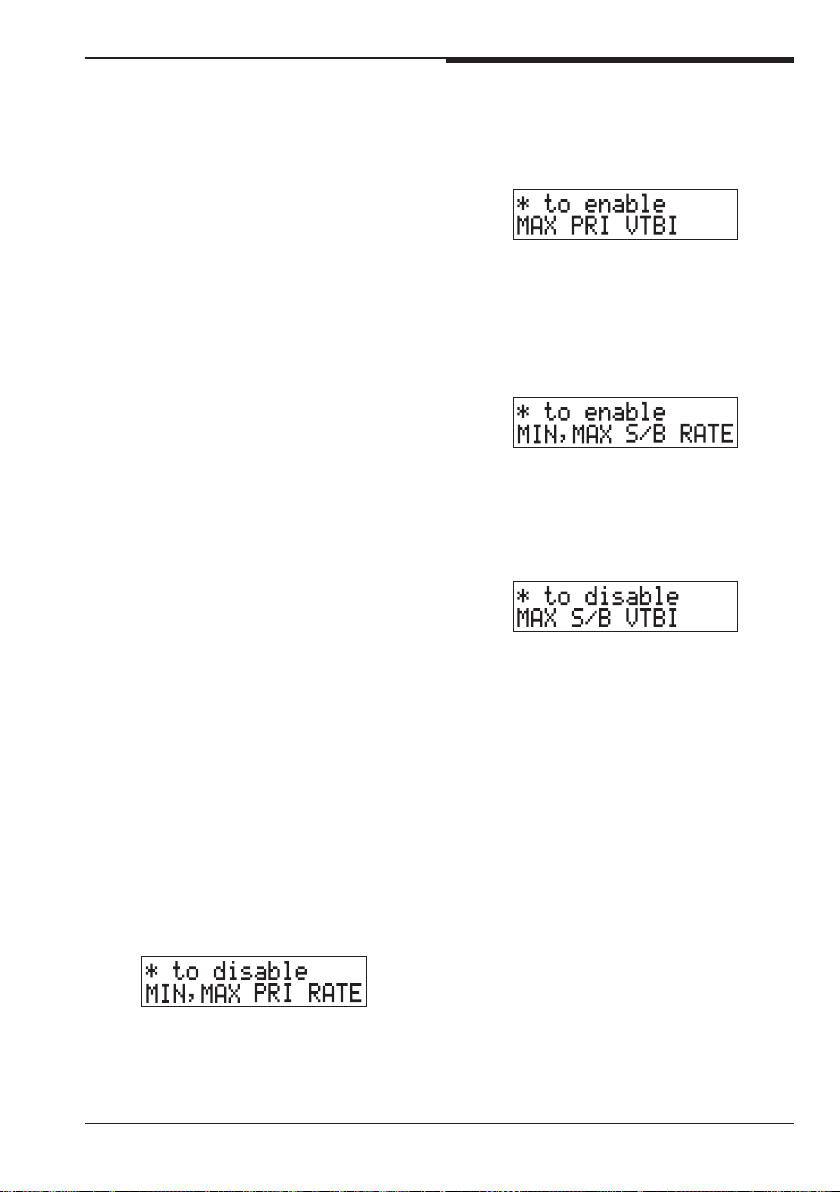
Pump Identifier
If you enable this parameter, when you
press the Options key to move to the
next parameter you can edit the
identifier text. When the pump leaves
the factory, the identifier is set to the
serial number of the pump.
You can change the identifier character
by character by using the up and down
keys (1 and 3) to cycle through
alphanumeric values. Press the * key to
move to the next character. Press the
Options key when you are finished.
Drug list
Enabling this parameter gives the user
the ability to change the displayed
Drug label. If it is disabled, then the
label is not displayed.
Minimum and maximum primary rate
Enabling this parameter allows the
user to define a range to limit the
Primary rate.
Maximum primary VTBI
Enabling this parameter allows the
user to set the maximum volume that
can be infused for a Primary infusion.
Minimum and maximum secondary/
bolus rate
Enabling this parameter allows the
user to define a range to limit the
Secondary rate or Bolus rate.
Maximum secondary/bolus VTBI
Enabling this parameter allows the user
to set the maximum volume that can be
infused for a Secondary or Bolus infusion.
KVO rate entry
If this is enabled, then the user can set
their own KVO rate. If it is disabled,
the default KVO rate is used. KVO rate
ranges and KVO default rates are in
the Specification, see page S-7.
Occlusion default setting
Use this option to set the occlusion
default setting that should be applied
when the pump is switched on. Press *
to change the default.
The user can press the Occlusion
Alarm Setting key to change the
occlusion level for a particular infusion
regardless of this default parameter
setting. However the default setting is
reapplied when the pump is switched
off and on again.
Volumetric Infusion Pump
13
Page 23

Technical User Manual
Smiths Medical
Secondary stop
With this parameter enabled, the pump
stops when a Secondary infusion is
completed. It sounds an insistent
alarm and displays a message to say
that the secondary infusion is complete:
If Secondary Stop is disabled, when a
secondary infusion is complete, the
pump sounds a non-insistent alarm
twice and then automatically restarts
the infusion at the primary rate.
This parameter is independent of the
setting of the Bolus parameter and only
affects a Secondary infusion; at the end
of a Bolus infusion the pump always
reverts to the previously programmed
Primary rate.
Bolus
When this parameter is enabled, the
user is given a choice of whether a
Secondary or a bolus infusion is to be
run when they press the Secondary/
Bolus key. If Bolus is chosen, the
volume infused is deducted from the
Primary VTBI. If Secondary is chosen,
the Secondary volume infused is kept
as a separate total and does not affect
the Primary VTBI.
If Bolus is disabled, the user is not
given a choice when they press the
Secondary/Bolus key: they can only
make settings for a Secondary infusion.
Quick Rate
The Quick Rate Change parameter was
always enabled in software versions
before version 0.71. From version 0.71,
the parameter may be enabled or
disabled on the Technician Menu.
Enabling this feature allows users to
use the Options key to put the pump
into a mode in which they can change
the rate quickly while the pump is
running or on hold.
Rate Taper
Enabling this parameter allows the user
to taper the infusion rate, either up or
down, for the administration of Total
Parenteral Nutrition (TPN), Total
Parenteral Admixture (Three-in-One) or
other applicable therapies.
Volume Over Time
Enabling this parameter allows the
user to set up an infusion using the
volume to be infused and the total
time, with the pump automatically
calculating the infusion rate. This can
be done with either Primary or
Secondary infusions.
Dose-Rate Calculation
Enabling this parameter allows the
user to set the dosing rate, patient
weight, the drug amount in the fluid
bag and the volume in the container,
from which the pump then calculates
the infusion rate.
Note: If you enable Dose-Rate
Calculation, the Micrograms unit
should also be set (using the
Micrograms parameter on this menu)
according to your protocol.
DRC Recovery
Enabling this feature allows a DoseRate Calculation mode infusion to be
accessed quickly when the pump is
switched on.
14
Volumetric Infusion Pump
Page 24

Smiths Medical
Technical User Manual
Backlight
This parameter sets the default for how
the backlight behaves when the pump
is switched on. With the parameter
disabled, the backlight will go off after
a minute of keypad inactivity.
If the parameter is enabled, the user
can use the Options key to control
whether the Message Display Light is
permanently on or behaves as
described above when the option is
disabled.
Autolock Keypad
With this parameter enabled, the
keypad will automatically lock one
minute after a key was pressed.
The user can unlock the keypad by
pressing twice on the Keypad lock/
unlock button on the back of the pump.
GMT Timestamp
Enabling this parameter displays the
message ‘GMT’ to the right of a time
display.
Service Date
This parameter is used to set the
service due date that is displayed
during power up when the pump is
switched on. You can set or clear the
service date when this screen is
displayed with the date flashing on the
Technician Menu:
When the pump is in use, if the date set
is reached or exceeded, then the
following message is displayed with an
insistent alarm when the pump is
switched on:
The alarm must be silenced for the
pump to work, as a reminder to the
user that the pump should be serviced.
Micrograms
Use this feature to determine the units
to be displayed as µg or mcg for the
Dose-Rate Calculation. If you are not
enabling Dose rate calculation, you can
ignore this item.
Note: Since the pump does not confirm
the chosen unit display, test that the
display is set correctly. Switch the
pump on normally and press the
Options key until the Message Display
asks you to set the Dose-Rate
calculation. Then press * to examine
the next screen.
Enter the new date in the format
MM/DD/YY, or to disable the Service
Date feature, set the month, day and
year to zeroes.
Volumetric Infusion Pump
CAUTION: The backlight has a limited life
and may, if used constantly, cause the light
to dim. Eventually the message display
may then need to be replaced. To preserve
the life of the message display, you should
only allow the Message Display Light to be
turned on as described here if it is
specifically required. Misuse of this feature
could lead to both battery and LCD
depletion.
15
Page 25
Technical User Manual
Smiths Medical
Biomedical menu
The Biomedical menu allows you to access
technical information about the pump and
carry out adjustments and tests.
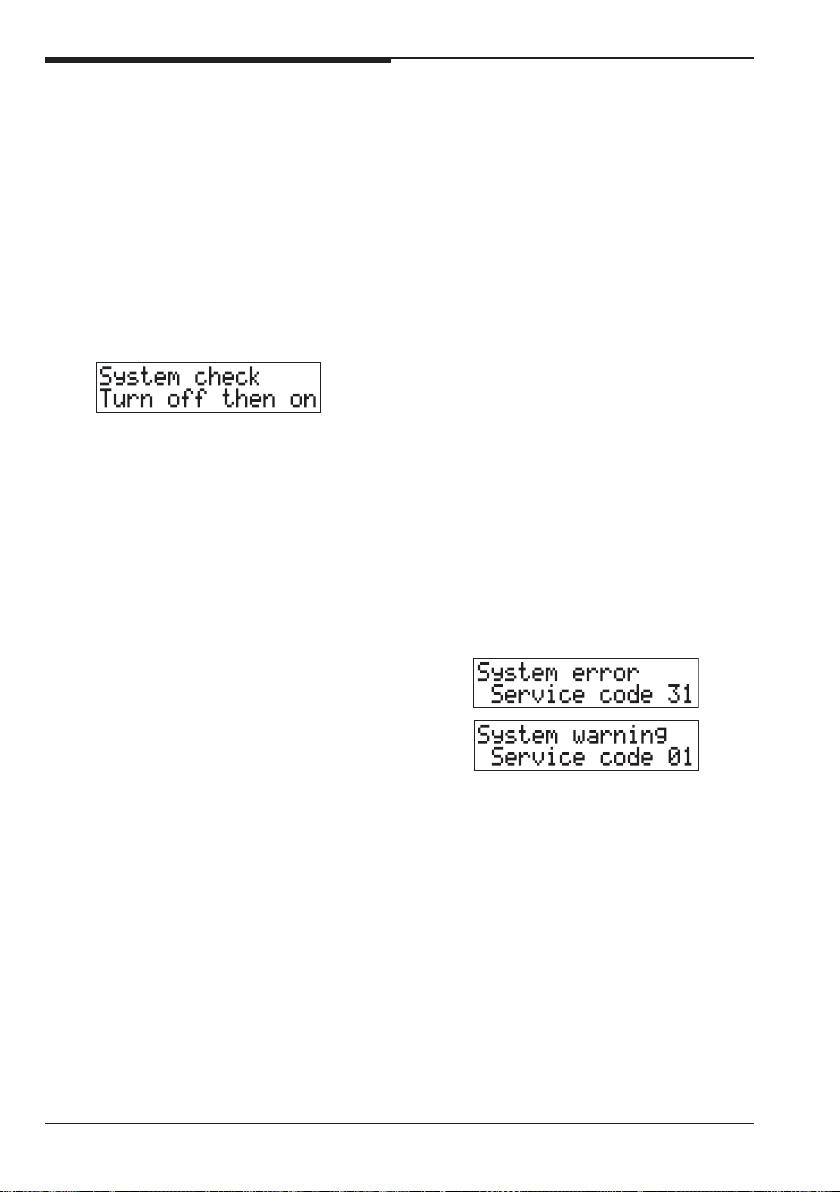
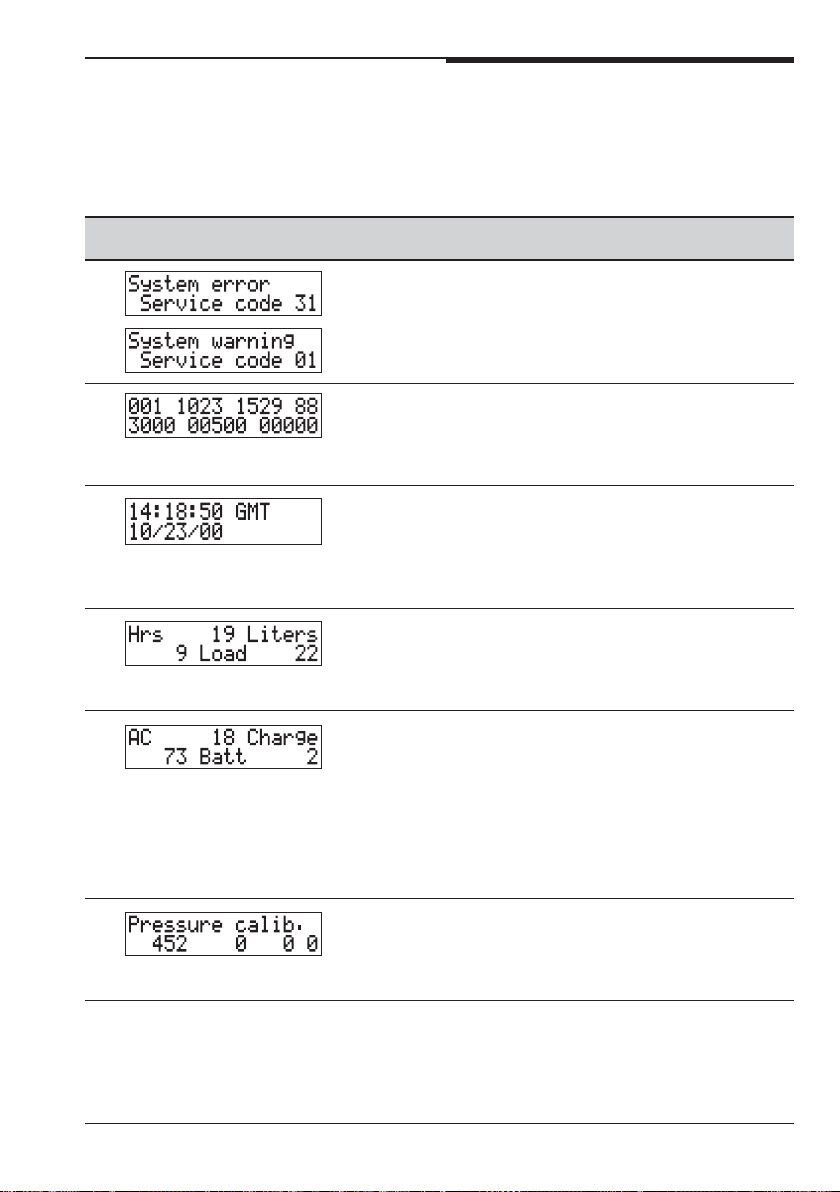
System faults
If a fault occurs while the pump is
infusing on a ward, an error code is
recorded. An audio alarm sounds and
the Message Display shows:
If the system error resulted from a
temporary condition, turning the pump
off then on, clears the alarm and allows
you to continue the infusion. However, if
the above message persists, the pump
must be removed from the ward for
service and repair.
Error codes resulting from system
errors, can be viewed in the Message
Display at a later time by entering the
Biomedical menu and perusing the
menu parameters described overleaf.
The pump defaults to the screen
displaying the error code.
Although the error codes are cleared
when exiting the Biomedical menu,
they are stored as a snapshot event.
Entering the Biomedical menu
To enter this menu, first switch off the
pump if it is switched on.
Press the Options key while
simultaneously pressing the On/Off
key. When the keys are released, the
pump switches on and you are asked to
enter the Biomedical menu ID.
Enter the numbers 3031.
As you enter the digits, asterisks (*)
are displayed for security protection. If
you make a mistake, you must switch
the pump off to enter the correct ID.
When prompted:
Enter the password 7867.
The Biomedical menu ID is always
3031 and the password is always 7867.
These cannot be changed.
Using the Biomedical menu
When you enter the Biomedical menu,
the first screen you see depends on
whether an error has occurred while the
pump was running.
If no error has occurred
Entry into the Biomedical menu takes
you directly into Snapshot screen-a
(item 0 in the table on the next page).
If an error has occurred
If you enter the menu after a fault has
occurred, system errors and warnings
are displayed:
Refer to the Service Manual for details
of the codes. The codes are cleared on
exiting from the Biomedical menu.
Navigate through the list by pressing
the Options key.
The menu items are shown on the next
page. Full details on their use are given
in the Service Manual.
Leaving the Biomedical menu
Switch off the pump to exit the menu
and switch on the pump for use.
16
Volumetric Infusion Pump
Page 26
Smiths Medical
Technical User Manual
Biomedical menu parameters
The numbers in the left hand column of this table indicate the number of Options
key presses to reach the parameter.
Screen Use Notes
These screens only appear Decoding the errors is
when you enter the menu covered in the Service
after a fault has occurred. manual.
0 Two snapshot screens Decoding the screens
are available: a (shown here) is covered in the
and b. Pressing * toggles Technical Service
between the two screens. Manual
1 This screen displays the To set the time and
time and date. It only date, use the Service
displays the message Functions menu as
GMT if this is enabled on described on page 20.
the Technician menu.
2 The display shows:
• cumulative running hours,
• cumulative volume,
• number of loading cycles.
3 The display shows the
cumulative hours that the
pump has been:
• used on AC mains whilst
switched on,
• charging: plugged in but
switched off,
• run on batteries.
4 Allows you to run a See the Service
calibration test. manual for full
details on using this
screen.
Volumetric Infusion Pump
17
Page 27
Technical User Manual
Smiths Medical
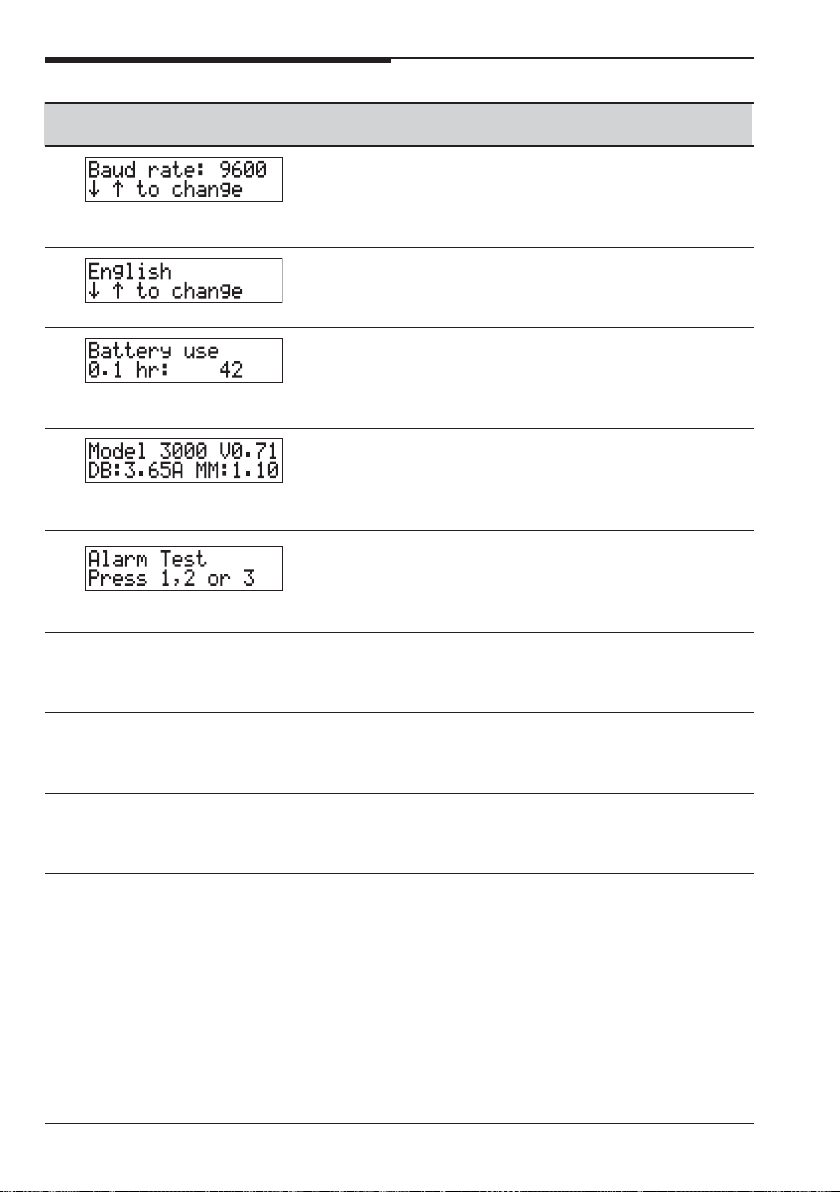
Screen Use Notes
5 Shows the current rate Rates of 300, 600,
setting of the serial port. 1200, 2400
Use the scroll keys to set and 9600 are
the rate. available.
6 Displays the language Only one language is
installed in the pump. supplied in a pump.
7 Displays the number of Use the scroll keys
times a pump was used (1 and 3) to change
on battery for the number the number of hours.
of hours indicated.
8 Displays the model See the Service
number and software manual for full
revision. details on using this
screen.
9 Use this screen to test
the alarms by pressing
1, 2 and 3 on the keypad
in turn.
10 Rate Taper Enable or Disable. Also available on the
Technician menu.
11 Volume Over Time Enable or Disable. Also available on the
Technician menu.
12 Dose Rate Calculation Enable or Disable. Also available on the
Technician menu.
18
Volumetric Infusion Pump
Page 28

Smiths Medical
Service Functions menu
Technical User Manual
The Service Functions menu allows you
to set the date and time on the pump
and to test some pump functions.
Entering the Service Functions
menu
To enter this menu, first switch off the
pump if it is switched on.
Then, press the Occlusion Alarm
Setting key while simultaneously
pressing the On/Off key. When you
take your fingers off the keys, the pump
switches on and you are asked to enter
the Service Function menu ID.
Enter the numbers 7557.
As you enter the digits asterisks (*) are
displayed for security protection. If you
make a mistake, you must switch the
pump off to enter the correct ID. When
prompted:
Enter the password 3796.
The Service Function menu ID is
always 7557 and the password is
always 3796. These cannot be changed.
Using the Service Functions menu
When setting up the pump, the main
use of this menu is to set the date and
time.
Other parameters are shown in the
table on the next page. Further details
are given in the Service Manual.
Leaving the Service Functions
menu
Switch off the pump to exit the menu
and switch on the pump for use.
Volumetric Infusion Pump
19
Page 29
Technical User Manual
Smiths Medical
Service Functions menu parameters
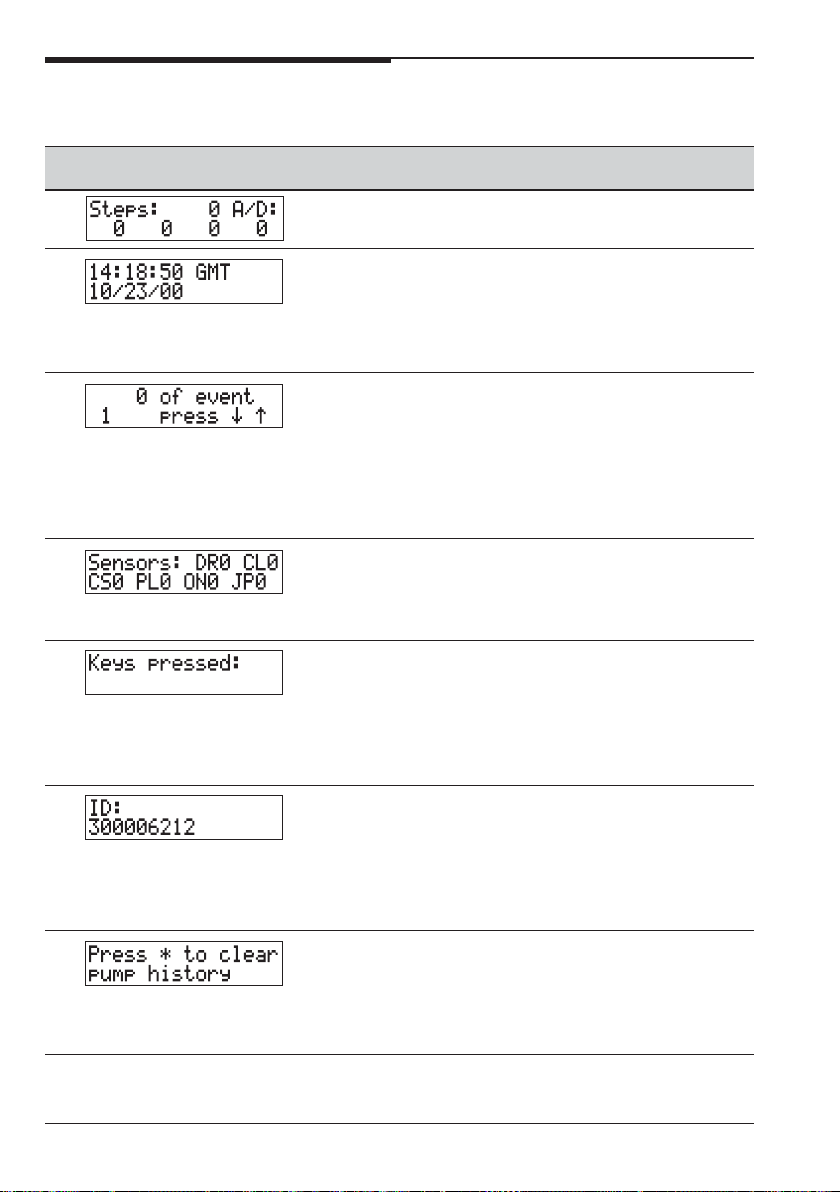
Screen Use Notes
1 Information for Smiths Medical Service Department
use.
2 Use this to set the time 1. In order to set the date,
and date in the format you must enter the time.
MM/DD/YY 2. GMT is only displayed if
the Technician menu
feature is enabled.
3 The top line shows the The event is the snapshot
number of times that event in Snapshot screen a
each event code has of the Biomedical Menu.
occurred. Use the scroll
keys (1 and 3) to select
the snapshot event code
to be displayed.
4 The status of each
sensor is displayed
according to the table
on the next page.
5 Press a key to check Pressing the Options key
each key one is will show that you have
functioning correctly. pressed that key. Pressing
The key pressed shows it again will take you to
on the second line of the the next menu option.
screen.
6 Shows the serial If you need to enter the
number of the pump serial number on a pump
as on the back of the that has been upgraded or
case. had the main board
changed, press * to enter
the number.
7 Take care with this You can download history
option, since the action by using the Volumetric
is irreversible. You are Infusion Pump History
given a chance to Download Kit.
change your mind.
20
Volumetric Infusion Pump
Page 30

Smiths Medical
Technical User Manual
Sensors screen
Value = 0 Value = 1
DR Door Closed Open
CL Clip Out In
CS Cassette None Fitted
PL Keypad Lock Unlocked Locked
ON On/Off key Released Pressed
JP Jumper JP 10 on 500 505 (neonatal)
CPU board
Volumetric Infusion Pump
21
Page 31

Technical User Manual
Smiths Medical
22
Volumetric Infusion Pump
Page 32

Smiths Medical
Specification
Specifications
General
Weight 5 kg (11 pounds).
Dimensions including pole clamp
Height 28 cm (11 inches).
Width 21.5 cm (8.6 inches).
Depth 23.5 cm (9.45 inches).
Temperature Operating 18° to 40° C (64° to 104° F)
Storage -25° to +55° C (-13° to 131° F).
Relative humidity Operating 30% to 75% (non-condensing).
Storage 30% to 75% (non-condensing).
Pressure range Operating 50 kPa to 106 kPa
Storage 19 kPa to 106 kPa
Immunity levels Immunity levels are the full levels specified in
EN60601-1-2 (radiated immunity is 3 V/m and
ESD immunity is 3 kV contact and 8 kV air).
Free flow protection The pump mechanism operates the safety clip on
the administration set.
Head-height From bottom of drip chamber to top of pump
Model 500 15 cm (6 ins) minimum for flow rates <500 mL/h
30 cm (12 ins) minimum for flow rates >500 mL/h
30 cm (12 ins) when using 60 drops/mL sets
30 cm (12 ins) when using thick solutions*
Micro 505 15 cm (6 ins) minimum
30 cm (12 ins) when using 60 drops/mL sets
30 cm (12 ins) when using thick solutions*
* certain cytotoxic agents, lipid-based fluids and
other viscous solutions, for example Total
Parenteral Nutrition.
Self test Dual microprocessors independently test each other.
Volumetric Infusion Pump
S — 1
Page 33

Specification
Smiths Medical
Maximum over infusion Under a single-fault condition, the maximum over
infusion which may occur is 12.5% over the
selected flow rate. Larger inaccuracies are
detected by the pump, and cause the pump to stop
infusing and to alarm.
Air detect system Air bubbles are detected by electronic opto-
encoder detection device (with self-checking
sensors) located on cassette housing.
Accuracy ± 2% of displayed rate and volume to be infused.
The quoted accuracy is ±2% for a long-term
infusion.
Below rates of 1 mL/h this accuracy may not be
achieved for a short-term infusion.
During the total infusion time the accuracy
averages out (see trumpet curves in this chapter).
Accuracy measurement equipment
50 mL glass measurement burette graduated in
0.1 mL increments and traceable to National
Institute of Standards and Technology or
appropriate international standards bureau.
Test solution Sterile water or normal saline at room
temperature (70°F ±5°/21°C ±3°).
Smiths Medical standard (primary), 20 drops/mL,
non-checkvalve administration set (8C820).
Testing conditions
S — 2
Model 500 Fluid level in the solution container 46 cm (18
inches) above top of the pump, rate set at
999 mL/h and volume to be infused of 49 mL.
Micro 505 Fluid level in the solution container 46 cm
(18 inches) above top of the pump, rate set at
99.9 mL/h and volume to be infused of 25.0 mL.
Volumetric Infusion Pump
Page 34

Smiths Medical
Specification
Power
AC power supply Internally configured for either
100-120 V AC, 200 mA, 50/60 Hz.
or,
220-240 V AC, 80 mA, 50/60 Hz.
Battery type Rechargeable, sealed lead-acid, 12 Volt, 1.3 Ah.
Battery operating time 6 hours at 100 mL/h (99.9 mL/h on Micro 505),
with approximately 1/2 hour warning of
discharged battery.
Battery recharge time Approximately 10 hours, depending on the
operating conditions. The batteries will be
charging during an infusion.
Leakage current 100 to 120 V less than 20 microamps ungrounded
or,
220 to 240 V less than 50 microamps ungrounded
This is measured between the ground stud and
the earth protective prong of the AC mains
connector.
Over-current protection
Voltage AC line fuse Thermal fuse Battery fuse
100 to 120 V 200 mA 130° 1.0 amp
220 to 240 V 2 x 80 mA 130° 1.0 amp
Note: All fuses are time delay fuses
Volumetric Infusion Pump
S — 3
Page 35

Specification
Smiths Medical
Primary and Secondary Infusions:
Rate range
Model 500 Range Increment
0.1 to 99.9 mL/h 0.1 mL/h
1 to 999 mL/h 1 mL/h
Micro 505 Range Increment
0.1 to 99.9 mL/h 0.1 mL/h
Volume to be infused
Model 500 Range Increment
0.1 to 999.9 mL 0.1 mL
1 to 9999 mL 1 mL
Micro 505 Range Increment
0.1 to 999.9 mL 0.1 mL
Rate Taper Infusions:
Rate range
Model 500 Range Increment
0.1 to 99.9 mL/h 0.1 mL/h
1 to 400 mL/h 1 mL/h
Micro 505 Range Increment
0.1 to 99.9 mL/h 0.1 mL/h
Volume to be infused
Model 500 Range Increment
0.1 to 999.9 mL 0.1 mL
1 to 4400 mL 1 mL
Micro 505 Range Increment
0.1 to 999.9 mL 0.1 mL
Time range
Model 500 & Micro 505 Range Increment
0 to 59 minutes 1 minute
0 to 48 hours 1 hour
S — 4
Volumetric Infusion Pump
Page 36

Smiths Medical
Volume Over Time Infusions:
Rate range
Model 500 Range Increment
0.1 to 99.9 mL/h 0.1 mL/h
1 to 999 mL/h 1 mL/h
Micro 505 Range Increment
0.1 to 99.9 mL/h 0.1 mL/h
Volume to be infused range
Model 500 Range Increment
0.1 to 99.9 mL 0.1 mL
1 to 9999 mL 1 mL
Micro 505 Range Increment
0.1 to 99.9 mL 0.1 mL
1 to 999 mL 1 mL
Time range
Model 500 & Micro 505 Range Increment
0 to 59 minutes 1 minute
0 to 48 hours 1 hour
Specification
Dose-Rate Calculation Infusions:
Dose range
Range Increment
0.01 to 99.99 0.01
0.1 to 999.9 0.1
1 to 9999 1
Body weight range
Units Range Increment
Kilograms (kg) 0.10 to 99.99 kg 0.01 kg
0.1 to 453 kg 0.1 kg
Pounds (lbs) 0.22 to 99.99 lbs 0.01 lbs
0.2 to 999 lbs 0.1 lb.
Volumetric Infusion Pump
S — 5
Page 37

Specification
Drug amount modes/range
Smiths Medical
Mode Range Increment
MG drug/bag 0.01 to 99.99 0.01
0.1 to 999.9 0.1
1 to 99999 1
Gm drug/bag 0.01 to 99.99 0.01
0.1 to 99.9 0.1
1 to 999 1
mcg drug/bag 0.01 to 9.99 0.01
0.1 to 99.9 0.1
1 to 9999 1
units/bag 0.01 to 99.99 0.01
0.1 to 999.9 0.1
1 to 99999 1
Rate range
Model 500 Range Increment
0.1 to 99.9 mL/h 0.1 mL/h
1 to 999 mL/h 1 mL/h
Micro 505 Range Increment
0.1 to 99.9 mL/h 0.1 mL/h
Volume to be infused range
Model 500 Range Increment
0.1 to 999.9 mL 0.1 mL
1 to 9999 mL 1 mL
Micro 505 Range Increment
0.1 to 999.9 mL 0.1 mL
S — 6
Volumetric Infusion Pump
Page 38

Smiths Medical
Specification
Occlusion sensing
Alarm levels
Pressure units Low Medium High
mmHg 103 mmHg 259 mmHg 517 mmHg
psi 2 psi 5 psi 10 psi
kPa 13.5 kPa 34.5 kPa 68.9 kPa
Time to occlusion
Maximum (measured +25%) delay times for activation of the “Occlusion below
pump” alarm:
Rate Low setting High setting
1 mL/h 11 min, 5 sec. 1 hour, 10 min.
(approximate values)
maximum time maximum time
to alarm to alarm
25 mL/h 15 sec. 2 min, 35 sec.
KVO rate
Default KVO rate
3.0 mL/h, or at the programmed rate if set at less than these values.
Configurable KVO rates
Model 500 0.1 to 10.0 mL/h
Micro 505 0.1 to 3.0 mL/h
Accessories
For a complete list of Administration Sets, please contact Smiths Medical or your
local distributor.
Volumetric Infusion Pump
S — 7
Page 39

Specification
Symbols used on the pump
Smiths Medical
Front panel symbols
Battery is charging/mains
power applied.
Audio alarm silence button.
Side panel symbols
Use pump only in upright
position.
Rear panel symbols
Attention: consult
accompanying documents.
Data input/output.
CF Application
(cardiac floating)
Audio alarm volume control.
Inside battery door symbols
Attention: dangerous
voltages, risk of electric
shock if the housing is
opened.
Equipotential point.
Internal battery.
Dispose of in an
environmentally safe
manner.
Battery symbols
Recycle battery
Dispose of in an
environmentally safe
manner.
~
S — 8
Alternating current.
Nurse call option (only if
option is fitted)
Volumetric Infusion Pump
Page 40

Smiths Medical
Standards
Electrical Safety
Classified as Internally Powered Equipment
Class 1, Type CF (Cardiac Floating) insulation on all inputs.
Design Standards
EN 60601-1, EN 60601-1-2, IEC 601-2-24 (Draft).
Fluid Ingress Protection
IPX 1 Drip proof
CE Marking
The CE mark demonstrates that the pump conforms to the requirements in
the European Council Directive 93/42/EEC concerning medical devices.
0473
The number 0473 identifies the Notified Body under which the Quality
Systems operated within Smiths Medical are assessed.
Disposal
When the time comes to dispose of the pump, its batteries, or any of its
accessories, do so in the best way to minimise any negative impact on the
environment.
Specification
You may be able to use special recycling or disposal schemes. To find out
about these contact your local waste disposal service. Separate any other
parts of the equipment where arrangements can be made for their recovery,
either by recycling or energy recovery.
Important: Existing national or local regulations concerning waste disposal
must take precedence over the above advice.
Patents
USA 5401256
5103214
5429485
GB 2247765
France 2715073
5017192
Volumetric Infusion Pump
S — 9
Page 41
Specification
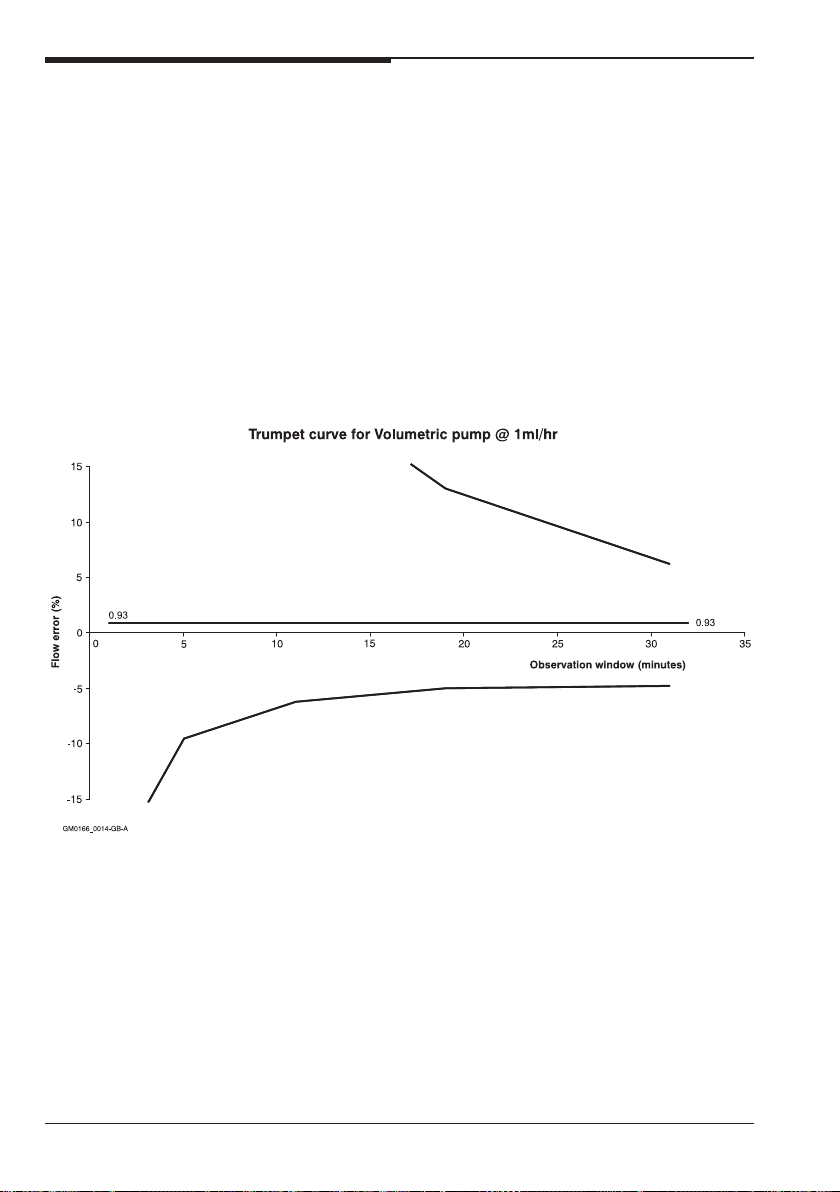
Trumpet curves
Smiths Medical
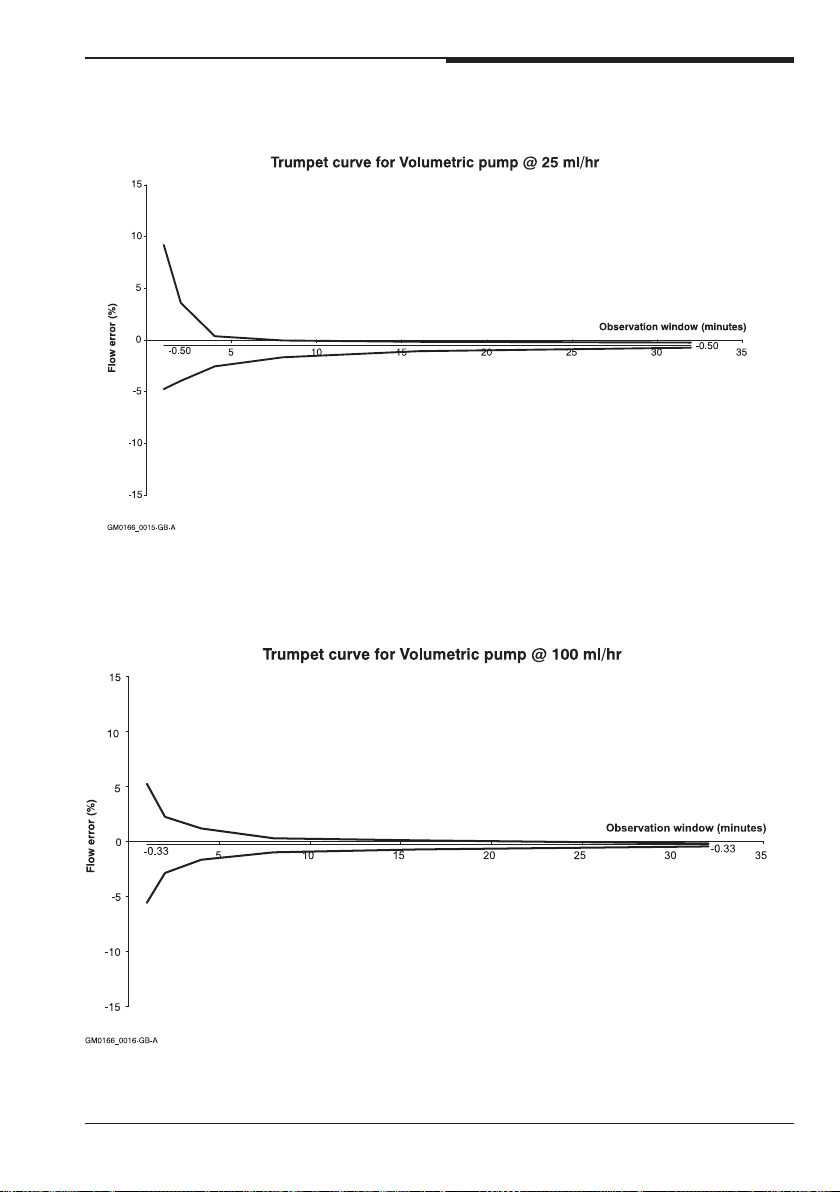
The curves were developed while
testing the Model 500 using a Smiths
Medical Standard Adult Set, 8C-820
administration set.
The curves for the Micro 505 are
identical since both pumps have the
same pumping mechanism.
The trumpet curve represents the worst
case rate error in any given observation
window over the whole infusion period.
These trumpet curves were prepared
according to the requirements of IEC
601-2-24.
S — 10
Volumetric Infusion Pump
Page 42
Smiths Medical
Specification
Volumetric Infusion Pump
S — 11
Page 43

Specification
Smiths Medical
S — 12
Volumetric Infusion Pump
Page 44

Smiths Medical
Index
Technical User Manual - Index
A
AC cord retainer 4
Acceptance test 4
Accessories S - 7
Accuracy
of pump (spec) S - 2
Administration set
loading 5
Air detect system S - 2
Air in cassette test 6
Alarm test 7
Audio alarm check 7
Autolock Keypad parameter 15
B
Backlight parameter 15
Bag height above pump S - 1
Battery
charging 8
specification of S - 3
Battery door warning
labels 3
Battery indicator test 4
Biomedical menu
description 16
overview 10
parameters 17
password 16
Bolus parameter 14
C
CE Marking S - 9
Clip
safety S - 1
Configuring the pump 8
D
Damaged pump 2
Date setting
current date 19, 20
service due date 15
Design standard S - 9
Dimensions of pump S - 1
Disposal of pump S - 9
Dose-Rate Calculation parameter 14
DRC Recovery parameter 14
Drug list parameter 13
E
Electrical safety standard S - 9
Epidural Label Set 3
F
Fluid Ingress protection S - 9
Free flow protection S - 1
Front of the pump
symbols appearing on S - 8
Fuses S - 3
G
GMT Timestamp parameter 15
Graph
trumpet curve S - 10
H
Height
bag above pump S - 1
History, clearing 20
I
Infusion
ranges of rates/times/volumes S - 4
Instructions label 3
Instrument Care 7
IPX1 S - 9
Volumetric Infusion Pump
Index — 1
Page 45

Index - Technical User Manual
Smiths Medical
K
KVO
default rate S - 7
rate entry parameter 13
L
Label
epidural (optional) 3
Labels on pump 3
Leakage current S - 3
LED and LCD
test 5
Limits
enabling 8
max and min primary rate 13
maximum primary VTBI 13
maximum secondary/bolus VTBI 13
Lockout
checks 6
M
Max and min primary rate parameter 13
Max and min secondary/bolus rate 13
Maxi primary VTBI parameter 13
Maximum infusion rate
range available on pump S - 4
Menus
Biomedical 16
overview 10
Service Functions 19
Special Functions 10
Technician 11
Micrograms units parameter 15
Minimum infusion rate
on pump S - 4
Modular connection system
label 3
N
No flow above pump test 6
O
Occlusion Alarm
approx values of settings S - 7
default setting parameter 13
test 5
P
Passwords
biomedical 16
service functions 19
technician 11
Power supply S - 3
Power up 4
Pump Identifier 13
Q
Quick Rate Change parameter 14
R
Rate
limits parameters 13
Rate Taper parameter 14
Ratings label 3
Rear of the pump
symbols appearing on S - 8
Retainer, AC power cord 4
Running checks 5
S
Safety
checks 6
clip S - 1
clip loaded test 6
labels 3
Secondary stop parameter 14
Self test 4, S - 1
Sensors screen 21
Serial number 20
on label 3
Service code screen 16
Service Date parameter 15
Index — 2
Volumetric Infusion Pump
Page 46

Smiths Medical
Technical User Manual - Index
Service Functions menu
description 19
overview 10
parameters 20
password 19
Snapshot screens 17
Solution
thick S - 1
Special Functions menu
overview 10
Standards S - 9
Storage of pump S - 1
System faults 16
T
Technician menu
entering 11
parameters 12
password 11
Test
Air in cassette condition 6
alarm 7
battery indicator 4
conditions S - 2
infusion 5
key function 20
LED and LCD 5
No flow condition 6
occlusion alarm 5
power up 4
regular intervals 9
Thick solutions, warning S - 1
Time
to occlusion S - 7
Time and date setting 20
Trumpet curves S - 10
U
Unpacking pump 2
V
Version of software 8, 10
Visual check 4
Voltage S - 3
Volume Over Time parameter 14
Volumetric
standards S - 9
VTBI limits 13
W
Weight
of pump S - 1
Volumetric Infusion Pump
Index — 3
Page 47

Index - Technical User Manual
Smiths Medical
Index — 4
Volumetric Infusion Pump
Page 48

IN AN EMERGENCY CONTACT:
These products described are covered by one or more of the following Patent Nos.
U.S. 5017192, 5103214, 5401256, 5429485, U.K. 2247765, FRANCE 2715073
Smiths Medical MD, Inc.Smiths Medical MD, Inc.
Smiths Medical MD, Inc.
Smiths Medical MD, Inc.Smiths Medical MD, Inc.
1265 Grey Fox Road, St. Paul, MN 55112, U.S.A.
European Representative:
Smiths Medical International LimitedSmiths Medical International Limited
Smiths Medical International Limited
Smiths Medical International LimitedSmiths Medical International Limited
Watford, Hertfordshire, UK, WD24 4LG
www.smiths-medical.com
Made in Malaysia
Part No. 0166-0202-D
Jan 2005
© 2005 Smiths Medical family of companies. All rights reserved
Smiths Medical - A part of Smiths Group plc
 Loading...