

Page 1
Have questions? Call 0800 920 2420
A
Page 2

Page 3

Welcome to SimpliSafe
The SimpliSafe and SimpliCam logos are trademarks of SimpliSafe, Inc. SimpliSafe and SimpliCam
are registered trademarks of SimpliSafe, Inc. in the US, EU, and other countries and territories.
INSTALL CORE DEVICES
1
INSTALL OTHER DEVICES
2
ACTIVATE MONITORING
3
Base Station
Keypad
1
2
3-13
14
Page 4
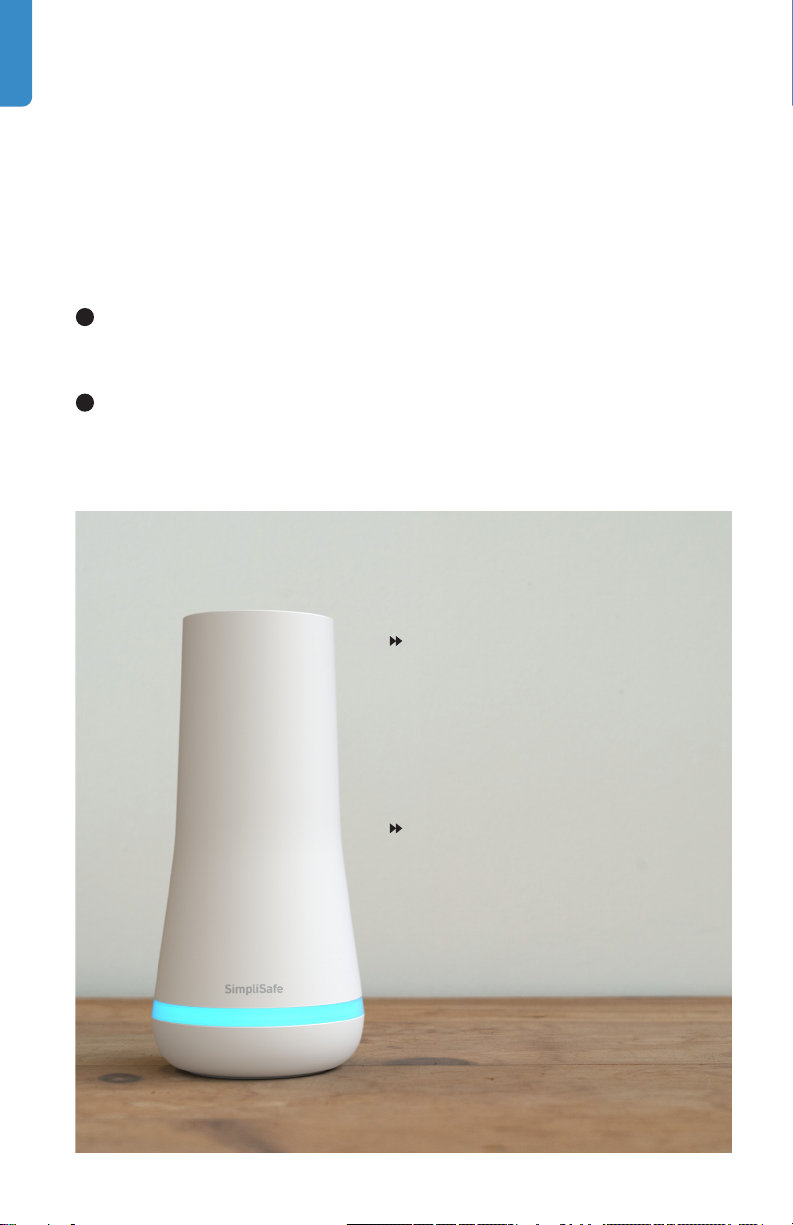
Install your Base Station
The Base Station is the brains and primary siren of your system.
It communicates with all of your devices and sends us your alarm
signals if you have activated alarm monitoring service.
1
Place your Base Station in a central location in your house.
Don’t install it on the floor.
2
Plug the Base Station into a wall socket using the included
power cord.
Make sure the wall socket is
not controlled by a light switch
which could accidentally cut
power to the Base Station.
Your Base Station’s LED
light indicates the status of
the system. Blue means it’s
armed, no light means it’s
disarmed.
1
Have questions? Call 0800 920 2420
Page 5
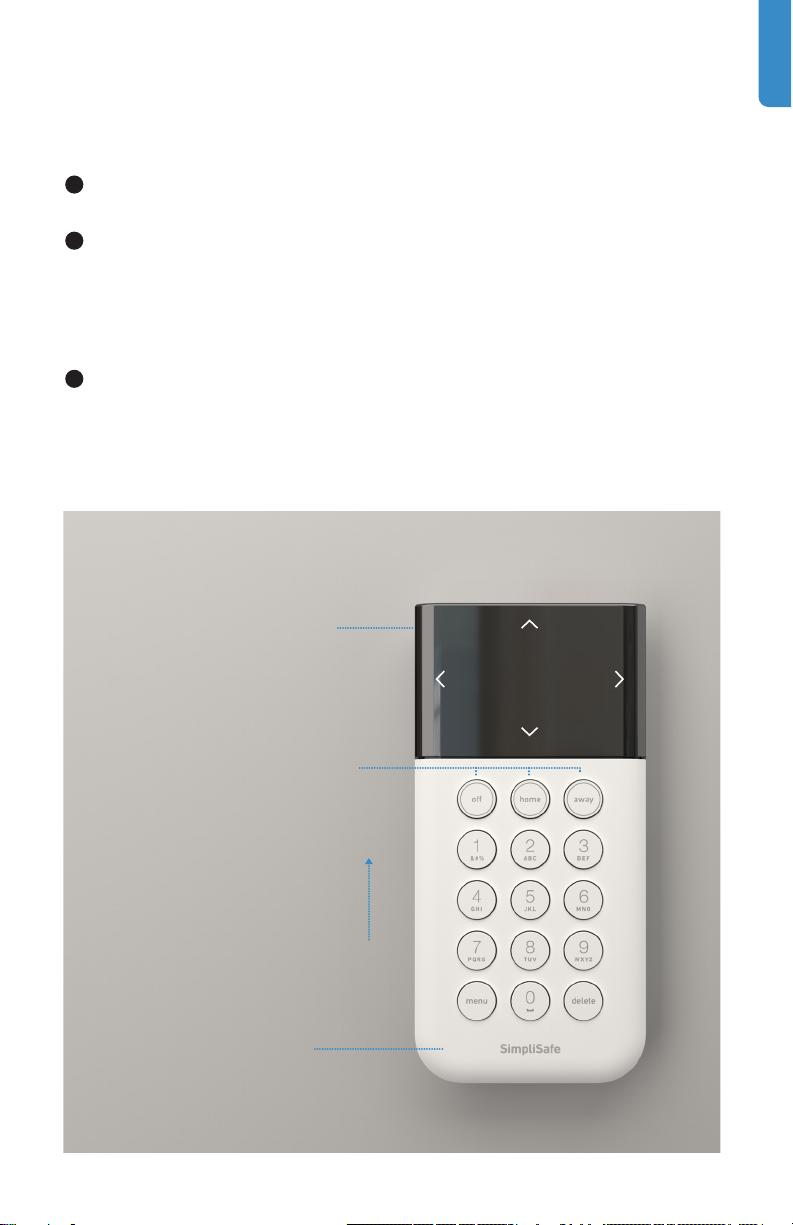
Install your Keypads
1
Follow the onscreen instructions for setting your Master PIN.
2
Adhesive tape has already been installed on the back of
the Keypad —just peel and press it firmly to the wall for 30
seconds. If you make a mistake, see “How do I move a device?”
on page 19.
3
Adhere the Keypad to the wall by your main entrance. You can
take the Keypad with you to name your devices as you install
them. After you adhere the Keypad to the wall just slide it up
and o its bracket.
Press down on the edges of
the screen to navigate the
Keypad menus.
Your system has 3 modes:
O, Home, and Away. Pressing
Home or Away will arm your
system and pressing O will
disarm it.
Slide the Keypad up and
o its bracket to bring it
with you as you install the
rest of your devices.
You can “wake up” the
Keypad by touching the
body of the Keypad.
Have questions? Call 0800 920 2420
2
Page 6

Install and Name
your Devices
with the Keypad
1
Press button
on a device
to test and
name
When the Keypad prompts you, remove
the battery tab on the device you want
to install, then press its Test Button.
done
2
Name Motion
Living Room
Kitchen
Basement
Choose from the list of names on the
Keypad, and then follow the instructions for
installing the device on the following pages.
3
Have questions? Call 0800 920 2420
set
Page 7
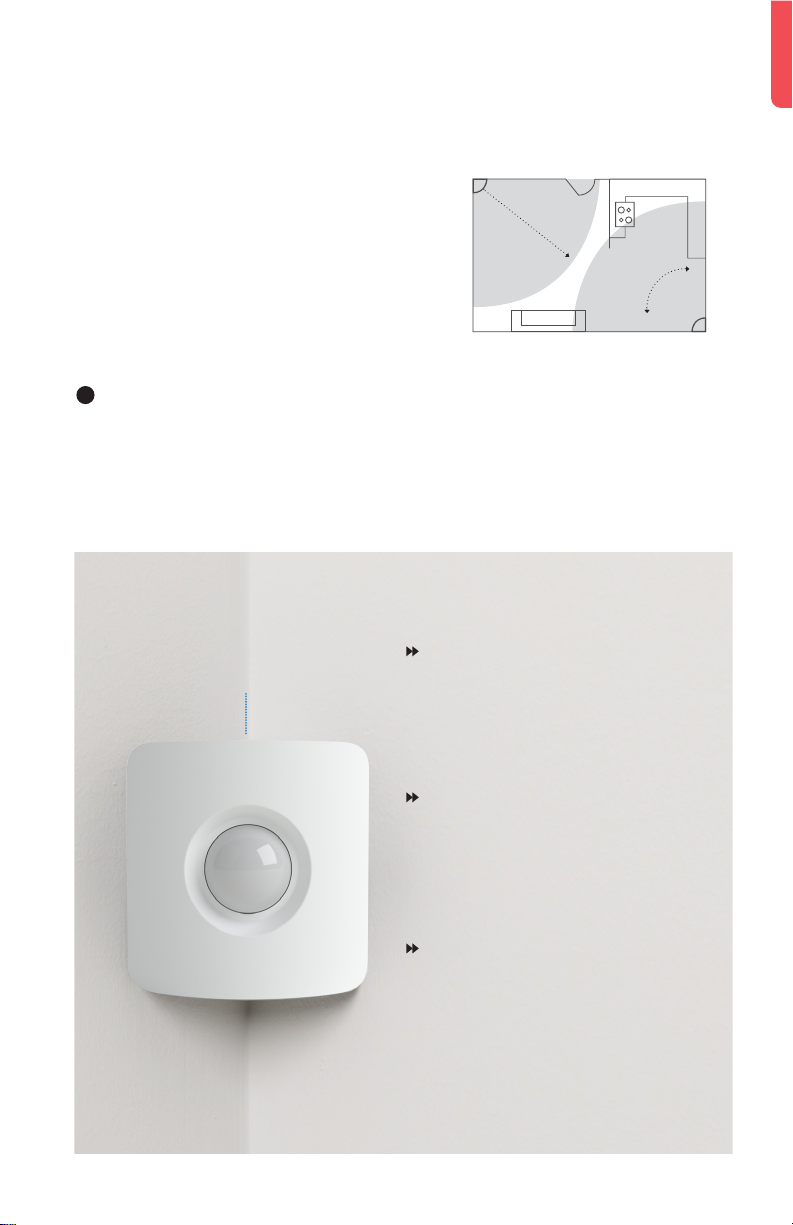
Install your Motion Sensors
Motion Sensors detect motion within
10 metres. They look straight ahead
with a 90° field of view as well as
downward at a 45° angle. Mount it in
a corner for maximum coverage of
your room.
1
Place the Motion Sensor on a shelf or adhere it to a wall,
approximately 1.5 to 2 metres o the ground. Avoid placing
the sensor near a heater, air conditioner, lamp, or electronics
(such as a wifi router).
Test Button:
Install with
button facing
upwards
Dog Owners: For pets over
2 stone, install button-side
down, about 1.2 metres o the
ground.
30 feet
90°
Cat Owners: Place the Motion
Sensor so that cats cannot
climb near it, button-side up, 2
to 3 metres o the ground.
Motion Sensors are active in
Away Mode only by default.
Put the system in Home Mode
and you can move freely about
your home without setting o
an alarm.
Have questions? Call 0800 920 2420
4
Page 8
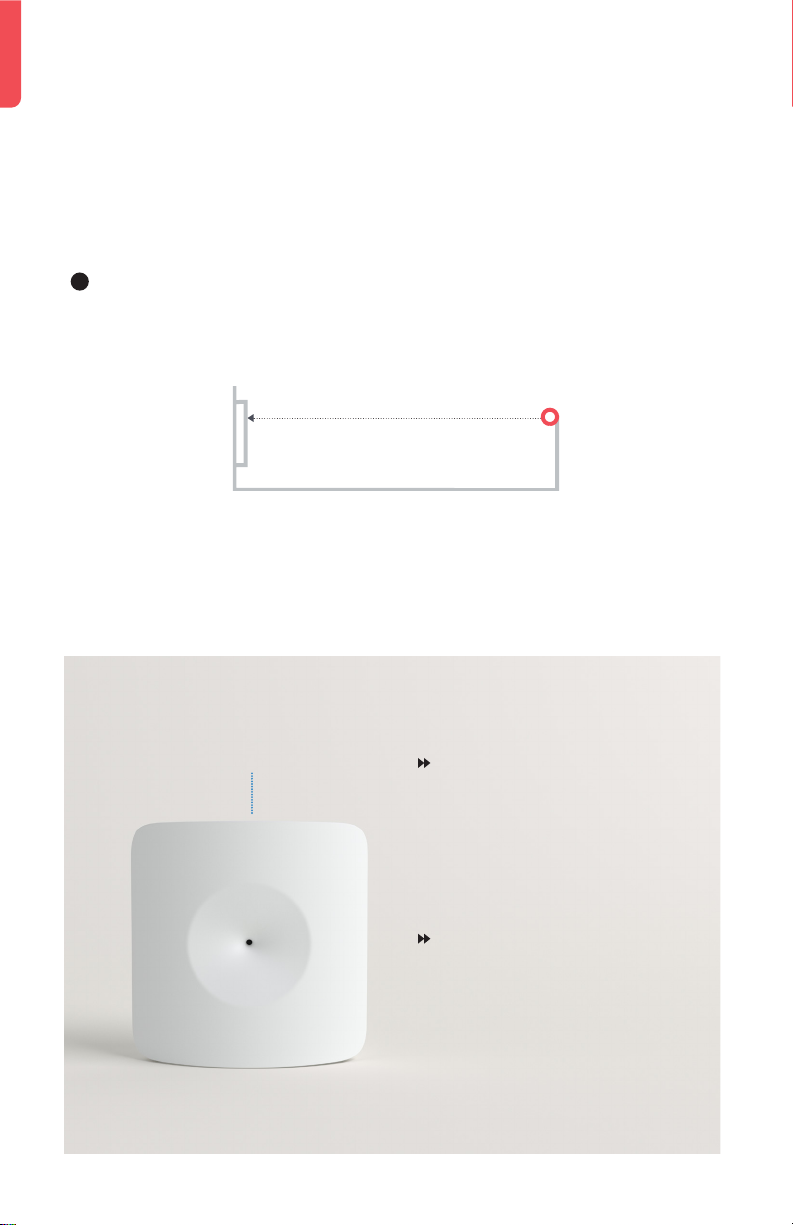
Install your Glassbreak Sensors
Glassbreak Sensors are programmed to “listen” for the specifc
frequency of glass breaking.
1
Place the Glassbreak Sensor on a shelf or adhere to a wall
less than 6 metres from the windows you’d like to protect.
less than 6 metres
from window
Test Button
5
Have questions? Call 0800 920 2420
Avoid placing your
Glassbreak Sensor in
the kitchen, as glasses
knocking into each other
could trigger a false alarm.
Curtains can dull the sound
of glass breaking. If your
windows are covered in
heavy curtains, place your
Glassbreak Sensor within
2-3 metres of your windows.
Page 9
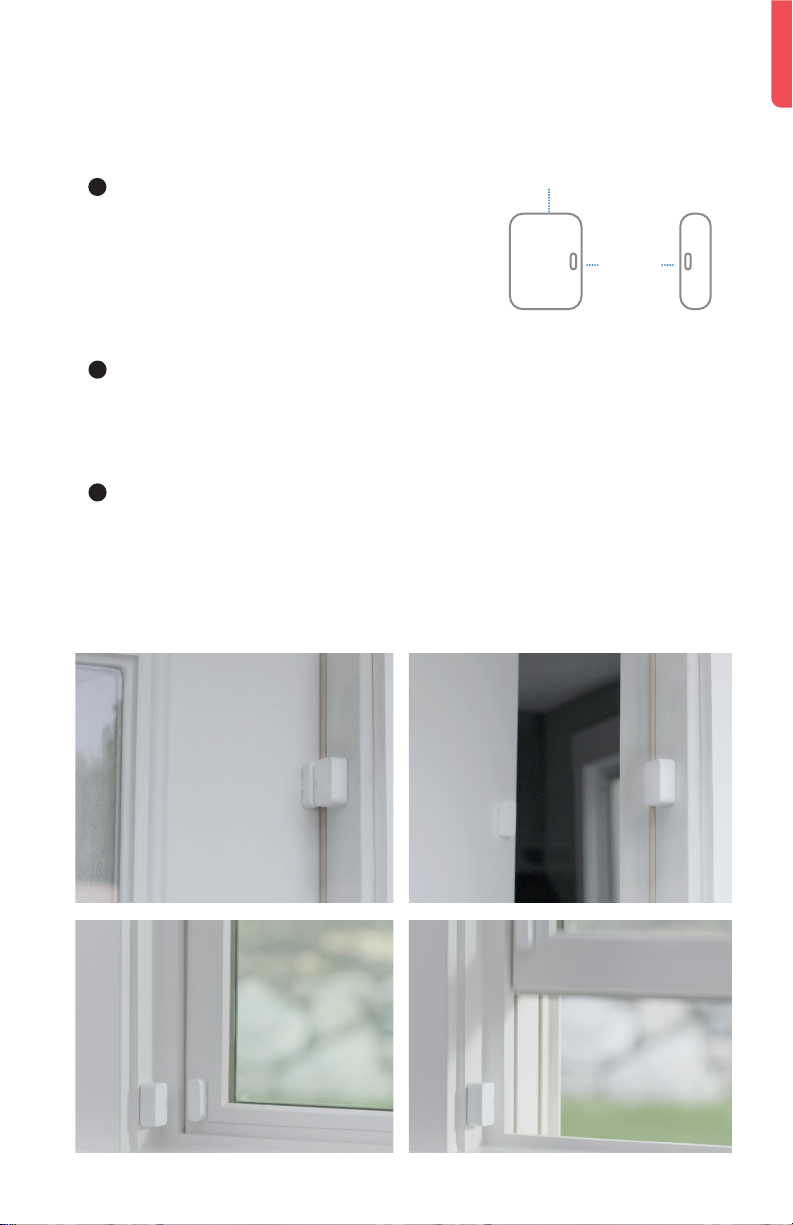
Install your Entry Sensors
1
Line up the magnet and sensor
Test Button
on the door or window so that the
grooves align and the pieces are
less than 5 cm apart when the door
or window is closed.
2
Test the alignment before you adhere each piece. The blue
light should flash once when the door or window opens and
twice when it closes.
3
Adhere the sensor on the door and the magnet on the
door casing, or the other way round. There is no “right
side up.”
EXAMPLES:
CLOSED
5 cm
or less
OPEN
Have questions? Call 0800 920 2420
OPENCLOSED
6
Page 10
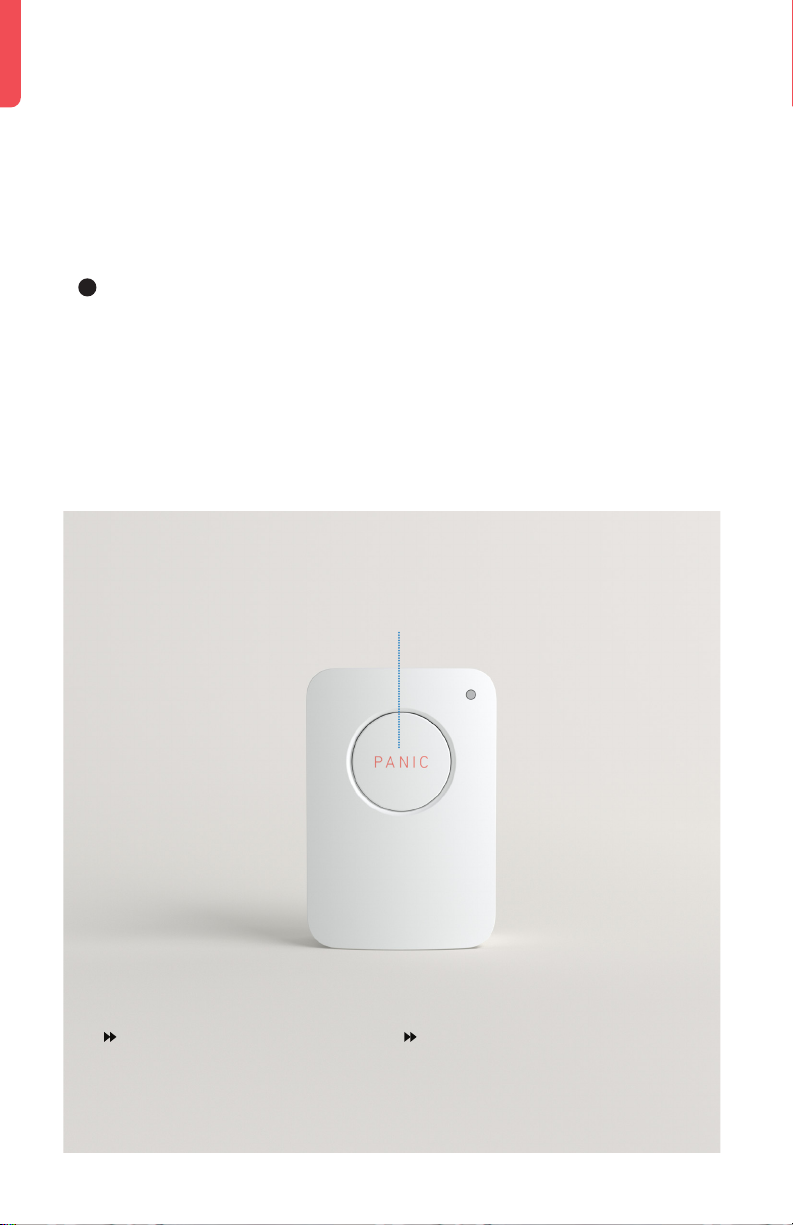
Install your Panic Buttons
Panic Buttons will trigger an alarm when you hold down the
button for 2 full seconds.
1
Adhere the Panic Button to a wall in your master
bedroom or anywhere you want a bit of extra security.
Test Button
Hold for 2 seconds
The red LED in the top right
corner will flash when your panic
signal has been sent.
7
Have questions? Call 0800 920 2420
When you’ve put your system in
test mode, the Panic Button itself
becomes its test button.
Page 11
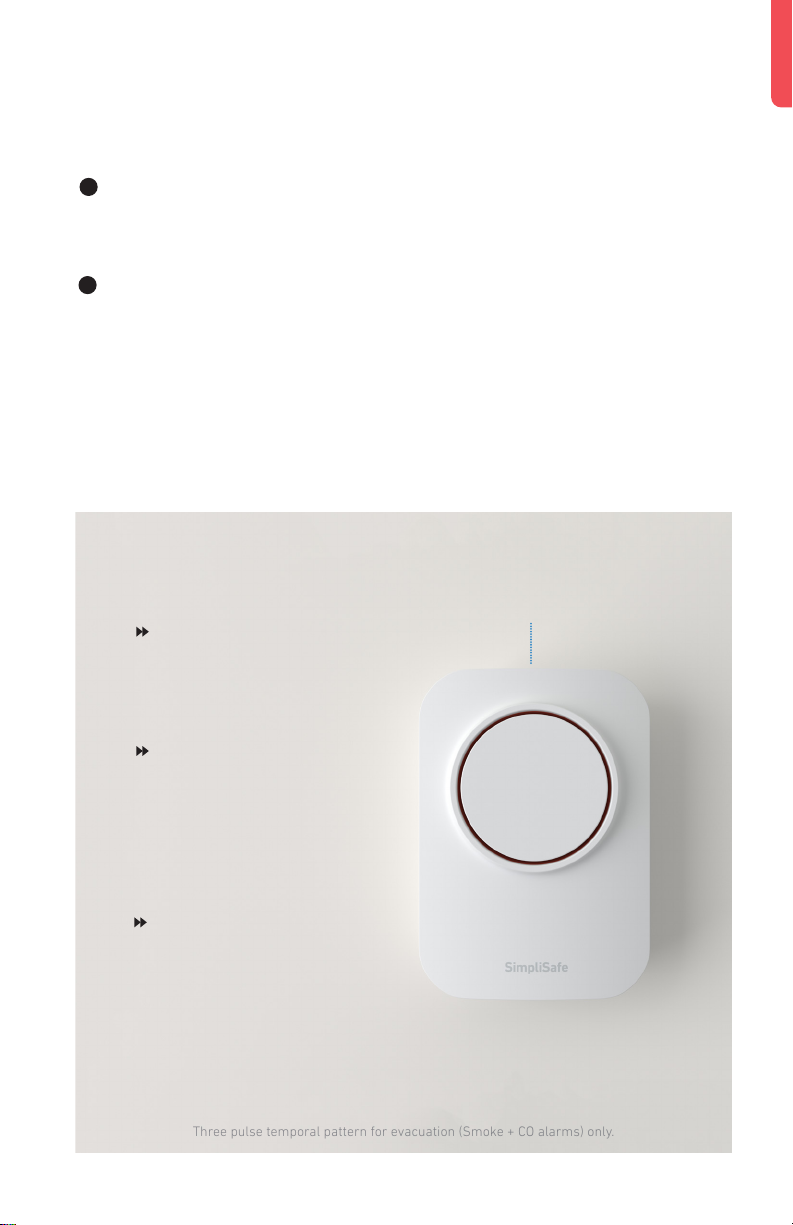
Install your Extra Sirens
Three pulse temporal pattern for evacuation (Smoke + CO alarms) only.
1
Adhere the Siren by pressing and holding it to the wall for
30 seconds to ensure it stays in place.
2
For permanent installation, push up on the Siren to remove
it from its bracket. Then screw the bracket into the wall with
the included screws.
Test Button
Install your Siren by
the front door to scare
away intruders.
Be cautious when
testing your 105 dB
Siren. Prolonged
exposure can cause
hearing damage.
Use your Keypad menu
to configure your Siren’s
volume and settings.
Have questions? Call 0800 920 2420
8
Page 12
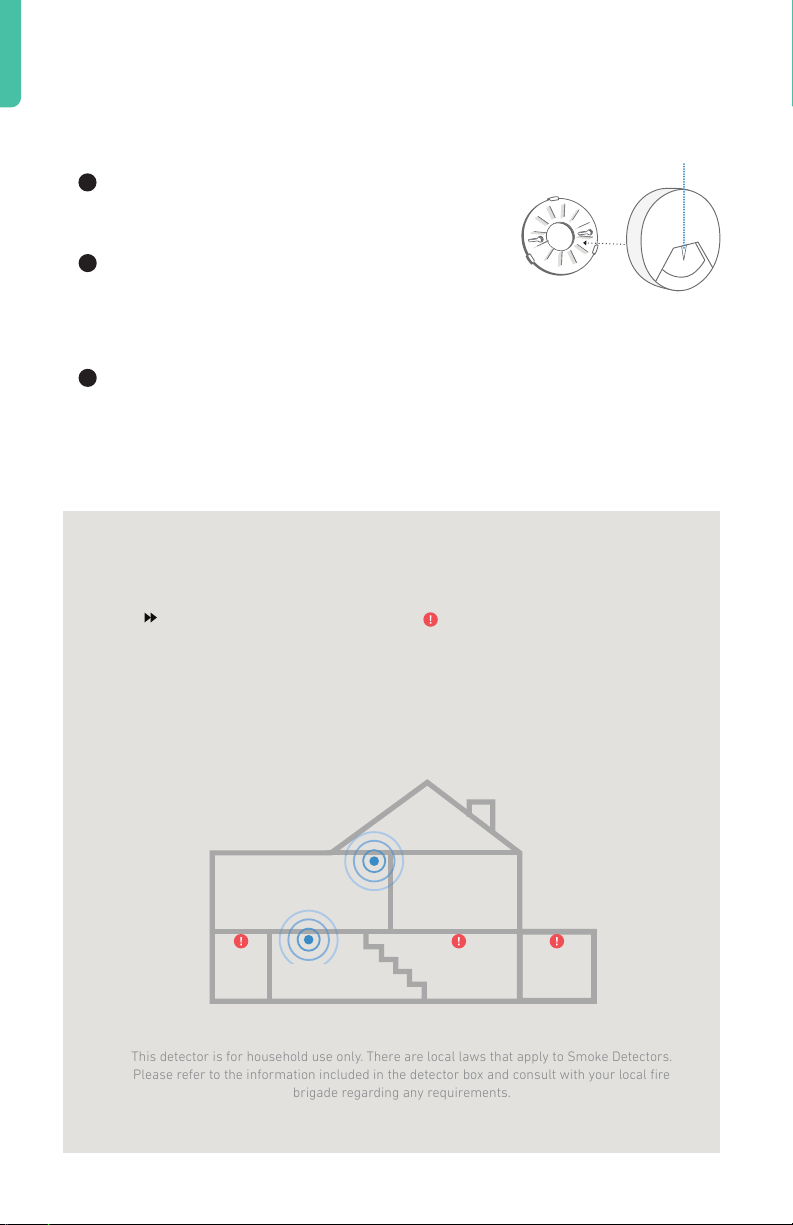
Install your Smoke Detectors
This detector is for household use only. There are local laws that apply to Smoke Detectors.
Please refer to the information included in the detector box and consult with your local fire
brigade regarding any requirements.
1
Remove mounting bracket from the
detector by rotating it counterclockwise.
2
Install the bracket on the wall or ceiling
using the included screws and wall
anchors.
3
Push the Smoke Detector against the mounting bracket and
rotate it clockwise until it snaps into place. A solid yellow light
means it is not snapped in place.
Test Button
Place Smoke Detectors
near your sleeping areas.
For maximum protection,
place one on each level
of your home.
BEDROOM
BATH
9
Have questions? Call 0800 920 2420
Do not install near
your furnace, stove,
fireplace, kitchen,
garage, or bathroom
with a shower.
BEDROOM
KITCHENLIVING ROOM
BOILER
ROOM
Page 13
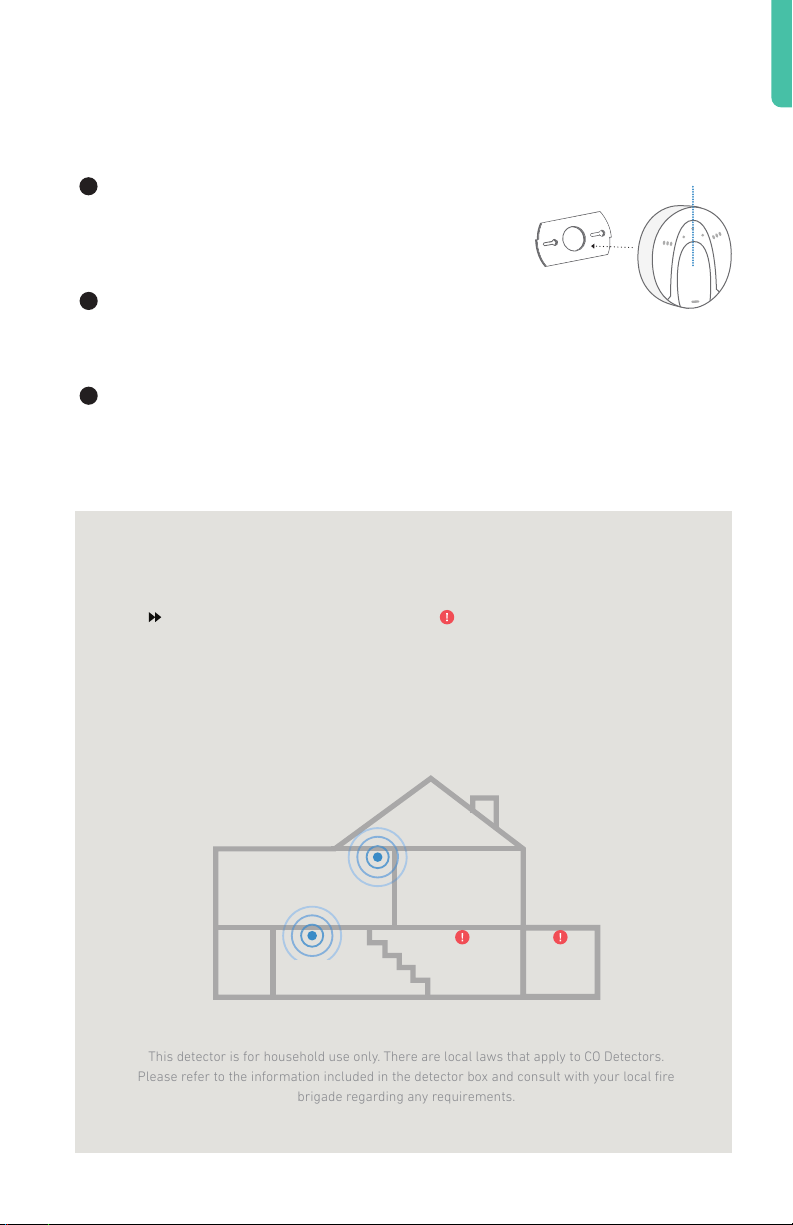
Install your CO Detectors
This detector is for household use only. There are local laws that apply to CO Detectors.
Please refer to the information included in the detector box and consult with your local fire
brigade regarding any requirements.
1
Separate the mounting bracket from the
back of the Carbon Monoxide Detector by
rotating it counterclockwise.
2
Mount the bracket to your wall or ceiling
using the included screws and wall anchors.
3
Push the CO Detector against the mounting bracket and
rotate it clockwise until it snaps into place. A solid yellow light
means it is not snapped in place.
Typical installation locations:
Near bedrooms and on each
level of your home.
Do not install near your
furnace, stove, fireplace,
kitchen or garage.
Test Button
BEDROOM
BATH
Have questions? Call 0800 920 2420
BEDROOM
KITCHENLIVING ROOM
BOILER
ROOM
10
Page 14
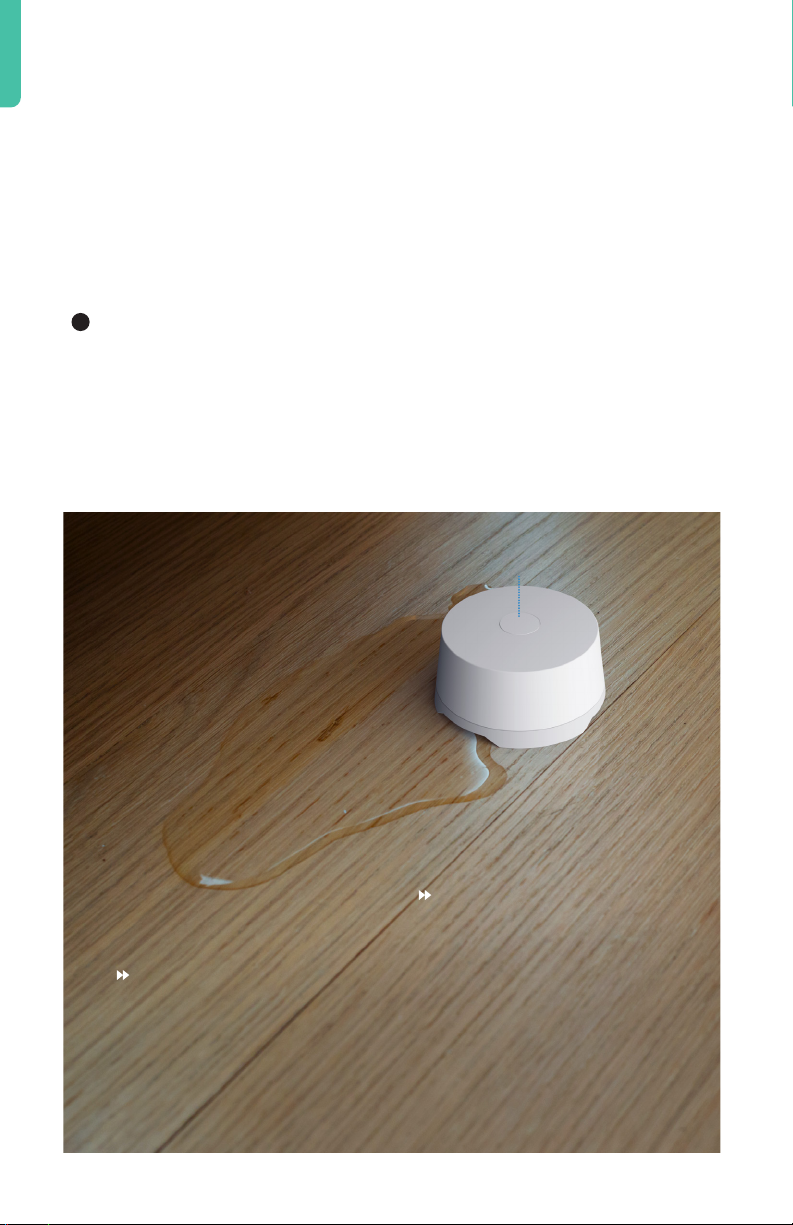
Install your Water Sensors
Water Sensors prevent damage from leaks and floods. You
can place one in the drip pan of your water heater or washing
machine, or near bathroom plumbing to detect any leaks,
overflows or broken plumbing.
1
For the simplest installation, simply place your Water Sensor
on the floor.
Test Button
11
Some homeowners insurance
companies will give you an
extra discount for having Water
Sensors installed.
Have questions? Call 0800 920 2420
Your Water Sensor does not
need to be adhered, but if you
choose to adhere it using the
extra adhesive tabs, make
sure not to cover up any of
the 6 metal contact points on
the bottom of the device.
Page 15
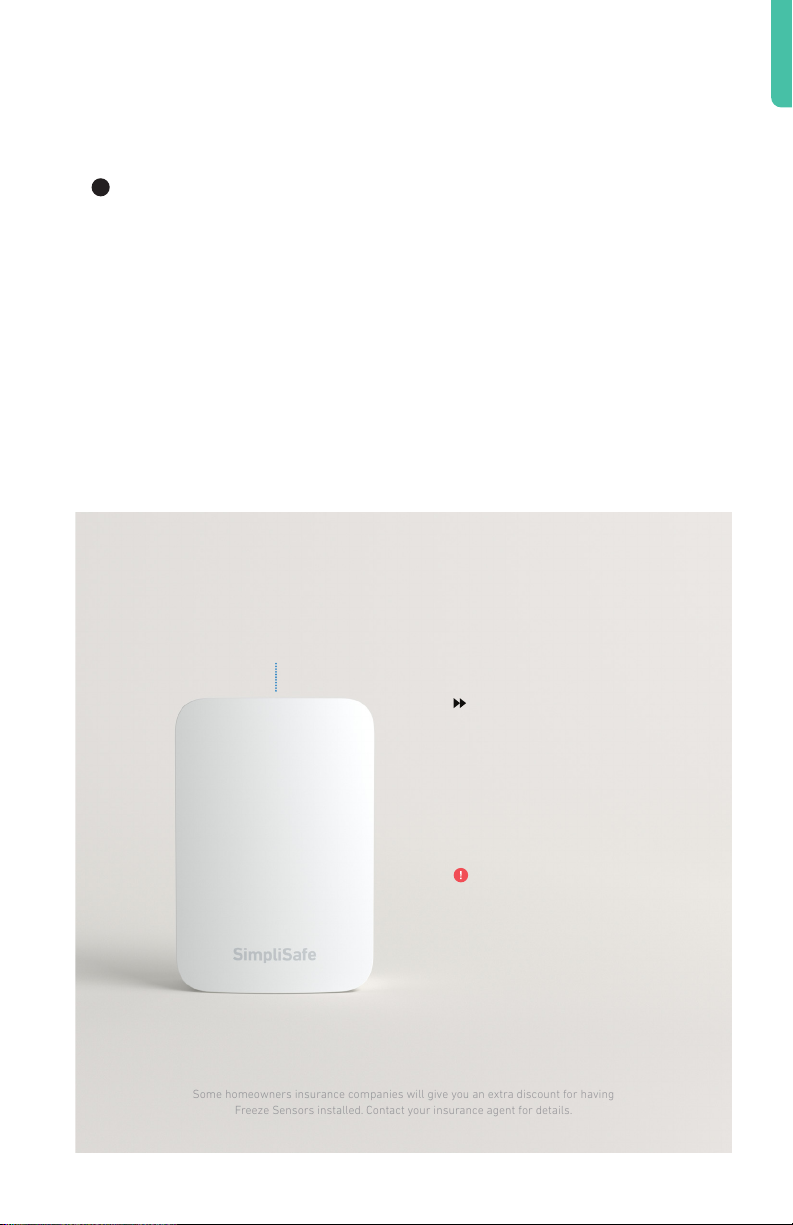
Install your Freeze Sensors
Some homeowners insurance companies will give you an extra discount for having
Freeze Sensors installed. Contact your insurance agent for details.
Adhere the Freeze Sensor on the wall near your home’s
1
main thermostat or near any exposed plumbing that’s
vulnerable to burst during a freeze.
Test Button
Have questions? Call 0800 920 2420
You can change the
sensor’s temperature
thresholds in the
device settings in the
Keypad menu.
Avoid your boiler
room, which may
stay warm long after
a furnace failure.
12
Page 16
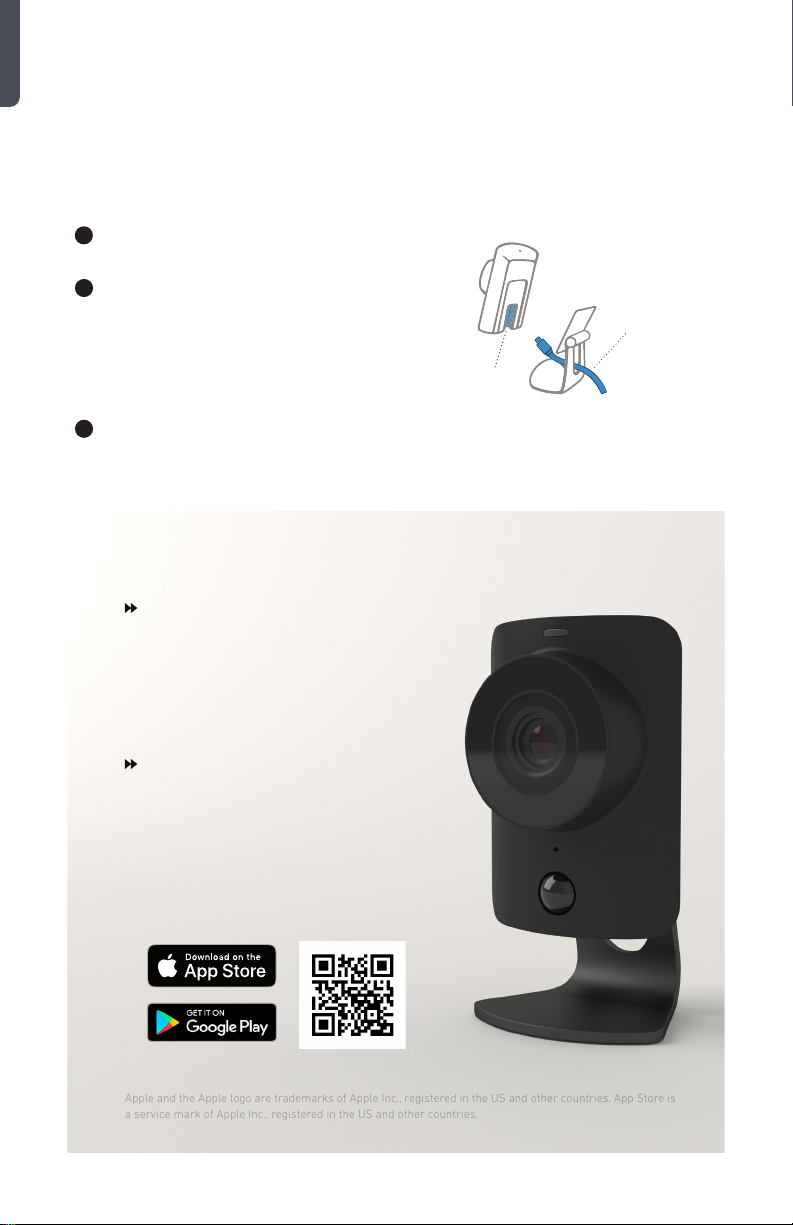
Install your SimpliCams
Apple and the Apple logo are trademarks of Apple Inc., registered in the US and other countries. App Store is
a service mark of Apple Inc., registered in the US and other countries.
Install your SimpliCams after the rest of your system.
1
Slide the stand o the camera.
2
Insert the Micro-USB into the
port on the back of the camera.
Replace the stand, and plug
the cord into a wall socket.
Launch the SimpliSafe app on your
3
smartphone to begin installation.
With a recording plan, SimpliCams
will capture a recording if an alarm
is triggered, if your system is
armed or disarmed, or if there is a
secret alert.
Port
Micro USB
When your SimpliCam is all set up,
the top status light will be blue.
A smaller red light beneath the
status light is used at night to help
illuminate your room.
13
Have questions? Call 0800 920 2420
Page 17

Activate Alarm Monitoring
In the event of an emergency, professionally trained operators will
contact you and dispatch the emergency responders. This service is
not available until you activate your subscription.
1
Write your Base Station serial number here
(located on the bottom of your Base Station)
so you have it handy during activation.
2
Activate at simplisafe.co.uk/activate
After you activate your subscription, your system will be in
Practice Mode for 72 hours while you get used to using your alarm.
The alarm will function normally, but you will not receive emergency
dispatch. After 72 hours, you will be notified that your Dispatch
Service is live.
SERIAL #:
Set Up WiFi
Your sytem has built in cellular and wifi. The cellular will connect
automatically. By setting up wifi, your system will be more secure and
update faster.
1
Press menu on your Keypad, enter your Master PIN, and
navigate to “System Settings” then to “WiFi.”
Have questions? Call 0800 920 2420
14
Page 18
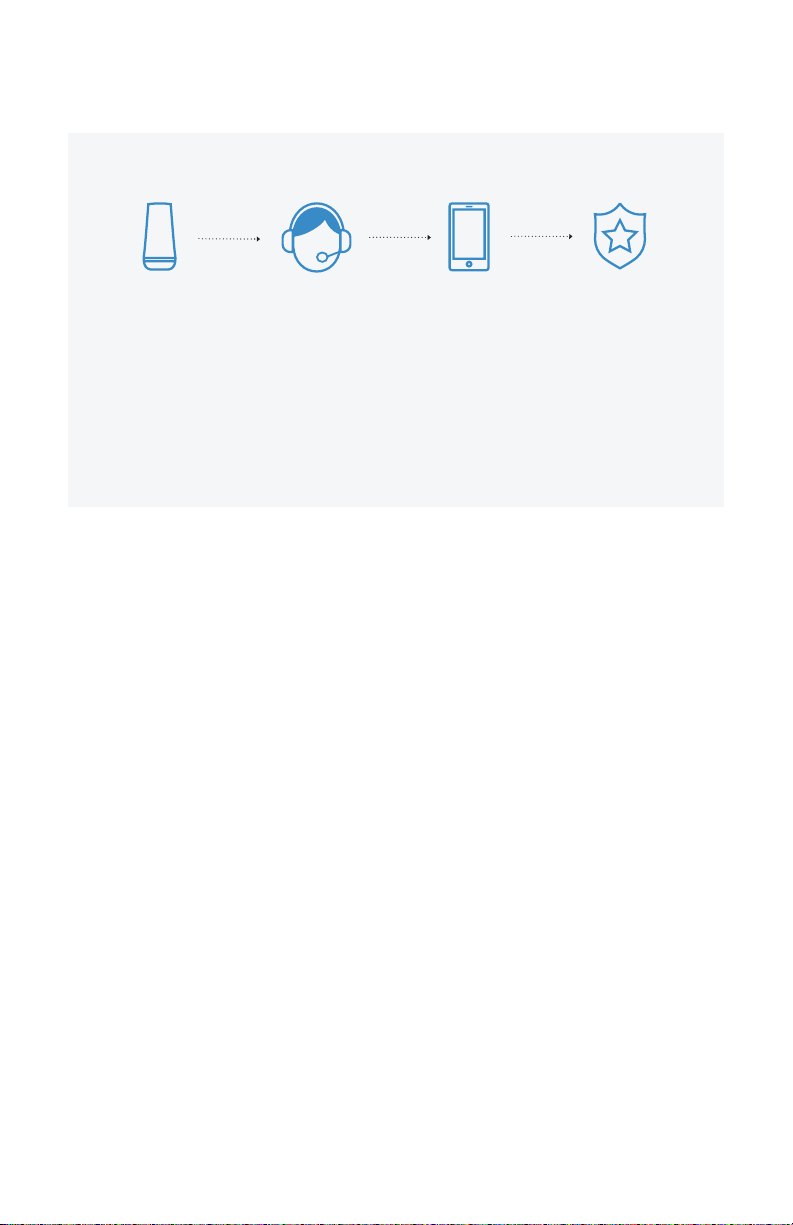
How Monitoring Works
The siren
sounds when
one of your
sensors is
triggered.
Your Base
Station then
wirelessly
contacts the
monitoring
center.
The operator
will contact you
and others you
designate.
If the operator
confirms an
emergency at
your home,
emergency
responders will
be dispatched.
What happens when a sensor is triggered?
1. When your alarm is on and one of your sensors is triggered, the Keypad will
start beeping and prompt you for your PIN. You have 30 seconds to turn the
alarm o—this time is called the Entry Delay and can be customized in the
Keypad menu.
2. If the alarm is not turned o within the 30 second Entry Delay, SimpliSafe will
sound a siren for four minutes and send an alert signal to our Emergency
Dispatch Center (you must activate your service in your online account for this
service to function).
3. Upon receiving the signal, the Dispatch Center will attempt to contact you.
4. If it was a false alarm and you provide your previously chosen Safeword, no
authorities will be dispatched.
5. If it is a confirmed emergency, they will immediately dispatch emergency
responders to your protected location.
6. Your alarm system will automatically re-arm, but the sensor that caused
the burglar alarm will be disabled until the alarm system is dis-armed and
re-armed again.
15
Have questions? Call 0800 920 2420
Page 19

Congratulations!
Setup is complete and you can now start using
your SimpliSafe system. Feel free to read on for
more information about your system.
USING YOUR SYSTEM
KEYPAD WARNINGS
COMMON QUESTIONS
Have questions? Call 0800 920 2420
17-18
18
19-20
16
Page 20

Using your System
Put your system into Away Mode
Use this mode when you are leaving. All of your sensors, including Motion
Sensors, will be active.
• Press “away” on your Key Fob or Keypad.
• You have 60 seconds to exit before the alarm is active. To cancel during the exit
delay, simply press “o”
Put your system into Home Mode
Use this mode when you are staying home. By default, all of your sensors will be
active, except for Motion Sensors. Cameras will have their privacy shutters closed.
• Press “home” on your Keypad.
Turn your system O
Use the same method to turn o your alarm, whether it’s in Home or Away Mode.
• Press “o” on your Key Fob or press “o” on your Keypad followed by your 4 digit PIN.
If a sensor is triggered, there will be a 30 second Entry Delay before the alarm siren
sounds and the Dispatch Service is notified.
Putting your system into Test Mode
We recommend you test your system regularly and after making any changes.
• In “menu” select “Test Mode”
• Follow the instructions below and on the Keypad to test your devices. The Base
Station will announce the sensor type to confirm that it has received the signal.
• Press the left arrow to exit Test Mode.
• If you have a professional monitoring plan, you will receive a phone call confirming
the test.
Motion Sensors: Press the Test Button on the top of the Motion Sensor. For an accurate
test, leave the room for the sensor you are testing then wait 15 seconds. Re-enter the
room and the Base Station will say “Motion Sensor.”
Glassbreak Sensors: Press Test Button on the top of the sensor then clap your hands
loudly near your windows. In Test Mode, the Glassbreak Sensor will be activated by
all loud sounds. When the system is armed, the Glassbreak will only react to glass
breaking.
17
Have questions? Call 0800 920 2420
Page 21

Entry Sensors: Open and close protected doors and windows.
Panic Buttons: Hold the Panic Button down for 2 seconds.
Smoke and CO Detectors: Hold the Test Button on the front of the sensor for
4 seconds. The sensor will beep 3-4 times.
Extra Siren, Water and Freeze Sensors: Press the Test Button on the top of
each sensor.
Keypad Warnings
SimpliSafe will warn you of potential problems with a flashing red light on the Base
Station and/or a displayed on the Keypad. Access these messages by pressing
the right edge of your screen. Here are some common warnings:
Entry Sensor Open SimpliSafe is warning you that you may have left a door or
window open. If they are already closed, make sure each Entry
Sensor and its magnet are less than 5 cm apart.
Low Battery Slide the sensor up and o of the wall (the bracket will remain
adhered to the wall) and replace the batteries.
Keypad Out of Range If you see this message frequently, your Keypad and Base Station
may be too far apart for reliable wireless communication. Try
moving them closer together.
Sensor Error A wireless sensor is not responding. Move the sensor and Base
Station closer together or replace the sensor’s battery. If the
sensor displayed on your Keypad is not one of your sensors or it
is not installed, remove that sensor from your system (page 20).
Power Outage Your Base Station will function as usual for up to 24 hours on its
rechargeable backup battery. If your home has not lost power,
make sure the wall plug is securely inserted into your wall socket
and the Base Station.
No Link to Dispatcher SimpliSafe cannot communicate with the Alarm Monitoring
Service, for one of the following reasons:
• Your Alarm Monitoring Service is not active. Please check your
account on our web or mobile app.
• The Base Station is located in an area with poor cellular
coverage. Move it near a window for better reception.
• Your wifi connection is weak or not yet set up. Wifi can provide a
secondary connection to the Alarm Monitoring center.
Have questions? Call 0800 920 2420
18
Page 22

Common Questions
How do I move a device?
To move a device, push up on the front of the device in the direction of the test
button—the back will stay on the wall and the white adhesive tape tab will be visible.
Pull down (not out) slowly on the tab until the back is removed from the wall.
When you are ready to re-adhere the device in a new location, use a fresh piece of
adhesive tape (extras have been included).
What if I have a door or window open when I turn on the alarm?
Your SimpliSafe alarm will warn you that a door or window is open when you turn the
alarm on. Open doors or windows will not be protected until they are closed. Once
they are closed, the Base Station will start monitoring them.
What happens if I accidentally trigger an alarm? How do I avoid false alarms?
Enter your PIN on the Keypad or press “o” on the Key Fob to stop the siren. If you
cancel the alarm within a few seconds, the Emergency Dispatch Center will abort the
alarm. Otherwise, they will call the numbers you provided to confirm the false alarm.
After the operator has verified your identity (please have your Safeword handy), he or
she will cancel any alarms. To avoid the most common causes of false alarms:
• Do not place Motion Sensors near a heater or air conditioner, or facing an open
window. If you have large pets, please refer to the instructions on page 4.
• If pets continue to set o false alarms, you can lower the sensitivity on your
Motion Sensor. To do so, slide the motion sensor up and o its bracket. On the
back, move the switch to the left towards the “L” setting.
• Make sure that a rattling window or door does not trigger an Entry Sensor. Each
magnet should be as close as possible to the Entry Sensor.
If you’re still having trouble with false alarms, please contact SimpliSafe support.
Can I get a discount on my homeowners or renters insurance?
Some insurance carriers will provide you with a discount for having a monitored
home security system like SimpliSafe. To be eligible for this discount you must be
subscribed to the Emergency Dispatch Service. Contact your insurance carrier for
details.
How can I test my Emergency Dispatch Service?
After your 72 hour Practice Mode is over, select “Test Mode” in your Keypad menu
and follow the prompts. This will cause your Base Station to send a test signal to the
Emergency Dispatch Center. A dispatcher will contact you to let you know the test
signal was successfully received.
19
Have questions? Call 0800 920 2420
Page 23

Will SimpliSafe work in the event of a power outage?
Yes. All of your sensors are battery powered and the Base Station has a built-in
rechargeable backup battery that provides power for up to 24 hours during a power
outage.
How do I add components?
If you need additional components, purchase more online at
SimpliSafe.co.uk/alarm-sensors. Once you’ve received your devices, open the Menu on
your keypad and select “Devices”, then “Add device” and follow the instructions.
How do I remove components?
• Open the menu on your Keypad and select “Devices”
• Find the device you’d like to remove in the list and select it with the right rocker
• Scroll to the bottom of the list and select the option “remove” by pressing the
right side of the screen
• Press “o” to exit the menu
Can I use SimpliSafe without the Dispatch Service?
Yes, but we don’t recommend it. Without the Emergency Dispatch Service, only the
alarm siren will sound and no authorities will be called. The SimpliSafe Emergency
Dispatch Service is easy to set up and can be canceled at any time.
How do I change the batteries?
Voice prompts will warn you when your batteries are low (battery life is approximately
1 year for a Keypad and 5 years for all other sensors). To change batteries, remove the
component from the wall as described above. Replace the batteries behind the back
panel and slide the component back into place. The Base Station backup battery is
rechargeable and does not normally need to be replaced.
What happens if my Key Fob is lost or stolen?
Your Key Fob will work for whoever has it in their possession. If you lose your Key Fob,
you should disable it by going into the menu and removing it from your list of devices
(you can easily add it back later). If you are concerned about the security of your Key
Fob, you can disable its ability to turn the alarm on and o in the device settings. You will
still be able to use it as a portable panic button within your home.
Have questions? Call 0800 920 2420
20
Page 24

System Updates
SimpliSafe may occasionally receive optional system updates to add features and
functionality. If your system is connected to wifi and there is an update available, you will
see a gear symbol on the left side of your Keypad’s screen. Press the o button to
refresh your Keypad’s screen to determine if an update is available. To accept the update,
follow the prompts and wait for your Base Station and Keypad to reboot. The update
process may take between 10 and 20 minutes, during which your system will be oine.
After the update is complete, you will have to select the gear icon on each additional
Keypad you own to update them as well.
Product Safety Information
Warning: Changes or modifications to this unit not expressly approved by SimpliSafe ltd could void the user’s authority to operate the
equipment.
Use only approved batteries and the supplied UL/ULC/EN approved power adapter with your SimpliSafe Home Security System. Any
tampering with the product or other unauthorized use will void your limited warranty. To prevent a fire hazard or electrical shock, do
not expose the Base Station (SSBS3) or other components to water or operate the System while you are wet or standing in water. Be
sure that electrical and telephone cords used are not frayed or placed in a location where they can pose a danger.
Caution: To ensure proper operation, this equipment must be installed according to the enclosed installation instructions. To verify that
the equipment is operating properly and can successfully report an alarm, this equipment must be tested immediately after
installation, and periodically thereafter, according to the enclosed test instructions (pages 17-18).
Caution: Please verify periodically that components remain firmly adhered. A falling component could harm a passing person. Also,
swallowing a small piece, such as a magnet or battery could be harmful. Please keep them away from children.
CAUTION: Risk of explosion if battery is replaced by an incorrect type. Displose of used batteries according to the instructions.
For the purpose of LVD Directive: Importer/Manufacturer: SimpliSafe ltd Address: Link 665 Business Centre Todd Hall Road Haslingden
Rossendale BB4 5HU
21
Operating Temp:
Power Supply:
Batteries:
Base Station: Model SSBS3 Operating Temperature 0°C to 40°C, 90% Max. Humidity
Keypad: Model SSKP3 Operating Temperature 0°C to 60°C, 90% Max. Humidity
Keyfob: Model SSKF3 Operating Temperature 0°C to 60°C, 90% Max. Humidity
Entry Sensor: Model SSES3 Operating Temperature 0°C to 60°C, 90% Max. Humidity
Motion Sensor: Model SSMS3 Operating Temperature 0°C to 60°C, 90% Max. Humidity
Panic Button: Model SSPB3 Operating Temperature 0°C to 60°C, 90% Max. Humidity
Glassbreak Sensor: Model SSGB3 Operating Temperature 0°C to 60°C, 90% Max. Humidity
Smoke Detector: Model SSSD3-0 Operating Temperature 0°C to 60°C, 90% Max. Humidity
Carbon Monoxide Detector: Model SSCO3-0 Operating Temperature 0°C to 60°C, 90% Max. Humidity
Water Sensor: Model SSWT3 Operating Temperature 0°C to 60°C, 90% Max. Humidity
Freeze Sensor: Model SSFS3 Operating Temperature 0°C to 60°C, 90% Max. Humidity
Extra Siren: Model SSWS3 Operating Temperature 0°C to 60°C, 90% Max. Humidity
SimpliCam: Model SSCM1 Operating Temperature -10°C to 40°C, 90% Max. Humidity
Input: 100-240 VAC, 50/60Hz, 0.4A Max, Output: 6.5VDC, 1.6A
DONGGUAN GANGQI ELECTRONIC CO LTD, GQ12-065160-AB
Base Station: Four(4) Eneloop BK-3MCCA, 1.2V min 1900mAh OR FB 1000, 1.2V, 1000mAh, NiMh (Note: NiMh
batteries must be recycled or disposed of properly).
Keypad: four 1.5V Alkaline, size AA.
Motion, Glassbreak Sensors: one 3V Lithium, size CR123A.
Panic Button, Freeze, Water Sensors, Entry Sensors: one 3V Lithium, size CR2032.
Have questions? Call 0800 920 2420
Page 25

SimpliSafe Ltd Terms of Sale
1. Information about SimpliSafe and how to contact us
We are SimpliSafe Ltd (“SimpliSafe”) a company registered in England and Wales under registration number 10795126 and with
our registered oce at Suite 14c, Link 665 Business Centre Todd Hall Road, Haslingden, Rossendale, United Kingdom, BB4 5HU. Our
registered VAT number is 287 6084 60.
You can contact us by telephoning our customer service team at 0800 920 2420 or by writing to us at No. 1 Spinningfields, Quay
Street, Manchester MAN M3 3JE or by email to [email protected]. If we have to contact you we will do so by
telephone, SMS, or by writing to you at the email address or postal address you provided to us in your order.
2. Acceptance
Our acceptance of your order will take place when SimpliSafe emails you to indicate our acceptance, at which point a contract will
come into existence between you and us incorporating these Terms of Sale. If we are unable to accept your order, we will inform you of
this by e-mail and will not charge you for any Products. This might be because the Product is out of stock, because of unexpected limits
on our resources which we could not reasonably plan for, because we have identified an error in the price or description of the Product
or because we are unable to meet a delivery deadline.
3. EU Sales
Purchases from SimpliSafe are available only in the European Union. You agree not to use or attempt to use any Product outside the
European Union.
4. Use of Products
You agree not to use any Product for any illegal or unlawful purpose.
5. Sales are intended for End Users Only
Purchases made through the SimpliSafe website are intended for end user customers only.
6. No business use
Products are for domestic and private use only and may not be used in any business or for any commercial purpose.
7. Payment Methods
SimpliSafe accepts credit cards, debit cards and SimpliSafe Gift Cards as forms of payment in each case as set out on its website. If
a credit card is being used for a transaction, SimpliSafe may obtain a pre-approval from the credit card company for an amount up to
the amount of the order. Billing to your credit card occurs at the time of purchase or when the order is shipped. If the balance from a
SimpliSafe Gift Card is used for a transaction, the amount is deducted from your Gift Card at the time of purchase. If the total amount of
the transaction is greater than the balance available in Gift Card your credit card will be charged for the balance.
We are unable to accept credit cards issued by banks outside the European Union. Debit cards and check cards have daily spending
limits that may prevent the processing of your order.
8. Prices
The price of the Products (which includes VAT) will be the price indicated on the order pages when you placed your order. We take all
reasonable care to ensure that the price of the Products advised to you is correct. However please see below for what happens if we
discover an error in the price of any Products you order.
The total price will include the price of the Products in your order plus any applicable shipping charges and any customs or excise duty,
less any discounts oered by SimpliSafe. SimpliSafe reserves the right to change prices for Products oered at any time, and does not
provide price protection or refunds in the event of a price drop or promotional oering.
If the rate of VAT changes between your order date and the date we supply the Products, we will adjust the rate of VAT that you pay,
unless you have already paid for the Product in full before the change in the rate of VAT takes eect.
It is always possible that, despite our best eorts, some of the Products may be incorrectly priced. We will normally check prices
before accepting your order so that, where the Product’s correct price at your order date is less than our stated price at your order
date, we will charge the lower amount. If the Product’s correct price at your order date is higher than the price stated to you, we will
contact you for your instructions before we accept your order. If we accept and process your order where a pricing error is obvious and
unmistakeable and could reasonably have been recognised by you as a mispricing, we may end the contract, refund you any sums you
have paid and require the return of any Products provided to you.
You must pay for all Products in full before we dispatch them.
9. Value Added Tax
The total price of the Products will include VAT based on the delivery address and the rate in eect at the time your transaction is
Have questions? Call 0800 920 2420
22
Page 26

completed. We will charge to all applicable VAT and custom duties, and SimpliSafe has the right to collect any tax it believes it is obliged
to collect.
10. SimpliSafe Gift Cards
SimpliSafe gift cards (“Gift Cards”) are for transactions on the SimpliSafe website only. VAT will not be charged when the Gift Card is
purchased. VAT is charged when the Gift Card is redeemed. The VAT rate on the transaction is based on the delivery address of the
redeemer. Gift Cards may not be used to purchase other Gift Cards.
11. Delivery
Delivery will be by common carrier F.O.B SimpliSafe’s shipping point. This means that you (and not SimpliSafe) have the risk loss or
damage to the Products during shipment.
You will be responsible for the costs of delivery as set out on the SimpliSafe website.
We will ship Products without undue delay, subject to any time limits posted on our website at the time of the order.
If our supply of the Products is delayed by an event outside our control then we will contact you as soon as possible to let you know
and we will take steps to minimise the eect of the delay. Provided we do this we will not be liable for delays caused by the event, but
if there is a risk of substantial delay you may contact us to end the contract and receive a refund for any Products you have paid for but
not received.
You have legal rights if we deliver any Products late. If we miss the delivery deadline for any Products then you may treat the contract
as at an end straight away if any of the following apply:
(a) we have refused to deliver the Products;
(b) delivery within the delivery deadline was essential (taking into account all the relevant circumstances); or
(c) you told us before we accepted your order that delivery within the delivery deadline was essential.
If you do not wish to treat the contract as at an end straight away, or do not have the right to do so, you can give us a new deadline for
delivery, which must be reasonable, and you can treat the contract as at an end if we do not meet the new deadline.
If you do choose to treat the contract as at an end for late delivery, you can cancel your order for any of the Products or reject Products
that have been delivered. If you wish, you can reject or cancel the order for some of those Products (not all of them), unless splitting
them up would significantly reduce their value. After that, we will refund any sums you have paid to us for the cancelled Products and
their delivery. If the Products have been delivered to you, you must either return them in person to where you bought them, post them
back to us or (if they are not suitable for posting) allow us to collect them from you. We will pay the costs of postage or collection.
Please call customer services on 0800 920 2420 or email us at [email protected] for a return label or to arrange
collection.
We may need certain information from you so that we can supply the Products to you, for example, your address. If you do not give us
this information as part of the ordering process or within a reasonable time of us asking for it, or if you give us incomplete or incorrect
information, we may either end the contract or make an additional charge of a reasonable sum to compensate us for any extra work
that is required as a result. We will not be responsible for supplying the Products late or not supplying any part of them if this is caused
by you not giving us the information we need within a reasonable time of us asking for it.
You are responsible for Products once they are in your possession or the possession of a person identified by you to accept the
Products.
12. Our Products
The images of the Products on our website are for illustrative purposes only. Although we have made every eort to display the colours
accurately, we cannot guarantee that a device’s display of the colours accurately reflects the colour of the Products. Your Product may
vary slightly from those images. The packaging of the Product may vary from that shown in images on our website.
We may change the Products to reflect changes in relevant laws and regulatory requirements, to implement minor technical
adjustments and improvements, for example to address a security threat.
We may have to suspend the supply of a Product to:
(a) deal with technical problems or make minor technical changes;
(b) update the Product to reflect changes in relevant laws and regulatory requirements; or
(c) make changes to the Product as notified by us to you.
We will contact you in advance to tell you we will be suspending supply of the Product, unless the problem is urgent or an emergency.
If we have to suspend the Product for longer than 30 days we will adjust the price so that you do not pay for Products while they are
suspended. You may contact us to end the contract for a Product if we suspend it, or tell you we are going to suspend it, in each case
for a period of more than 30 days and we will refund any sums you have paid in advance for the Product in respect of the period after
you end the contract.
The Products are described on our website at https://simplisafe.co.uk/wireless-home-security-preview. This sets out important
23
Have questions? Call 0800 920 2420
Page 27

features of the Products. Please note that the Products only perform in the manner set out on our website and there is no guarantee
that the Products may not be compromised or circumvented. The Products are designed to provide a specified response in given
situations. There is no guarantee that the Products will prevent unauthorized intrusion onto the premises or will prevent any personal
injury or property loss or any other emergency condition, including fire, smoke, carbon monoxide, medical emergencies or water
damage; or that the Products will in all cases provide adequate warning or protection. You understand that the Products may be
interrupted, circumvented, unavailable (for a limited or extended time period) or otherwise compromised, including as a result of
equipment designed or used by a third party for the purpose of causing false alarms or gaining unauthorized access to or otherwise
aecting or controlling the Products.
13. Limited Warranty and Goodwill Guarantee
SimpliSafe warrants to you that the Products will be free from defects in materials and workmanship under normal use and service
for 3 years from the date that you purchase the Product (“Limited Warranty”). SimpliSafe’s obligation and liability under the Limited
Warranty is limited to accepting return of the defective part of the Product and an equivalent replacement Product or parts during the
warranty period. Replacement Products or parts may be new or reconditioned, at the sole option of SimpliSafe. SimpliSafe warrants
any replacement Product or part for 3 years from the time of replacement. Ownership of any returned Product or part transfers to
SimpliSafe on receipt.
For service under the Limited Warranty, please contact SimpliSafe Customer Support at 0800 920 2420 or visit https:www.simplisafe.
co.uk/support and click on “Contact Us”. If SimpliSafe is unable to address the issue that you are facing, SimpliSafe will send you a
replacement Product or part along with a postage prepaid return slip. You must return your old Product or part to SimpliSafe using
such slip.
This Limited Warranty does not apply where damage is caused by failure to follow installation or operating instructions, misuse (which
includes using Products outdoors unless outdoor use is expressly permitted, and in such cases only as directed), alteration, abuse,
accident or tampering, or damage or non-performance resulting from use of any item or repair services not provided by SimpliSafe.
The Limited Warranty does not apply if damage was caused by Act of God, natural disaster, labor dispute, war, terrorism, civil strife,
or other cause beyond SimpliSafe’s control. Battery replacement is excluded from the Limited Warranty. Products that are tested and
found to be in good working condition (not defective) are not covered by this Limited Warranty.
In addition to the Limited Warranty you may return the Product to us at any time within 60 days of your order and receive a full refund
(“Goodwill Guarantee”). SimpliSafe will send you a postage prepaid return slip, and you must return you the Products to SimpliSafe
using such slip.
The Limited Warranty and Goodwill Guarantee do not aect your legal rights under the Consumer Rights Act 2015 or your general
rights in relation to faulty or misdescribed Products (which are described in clause 14).
14. Responsibility for loss or damage suered by you
If either you or we are in breach of our agreement, you or we shall be liable to the other for foreseeable loss and damage caused by the
breach and not for any losses that are not a foreseeable consequence of the breach or for indirect losses which happen as a side eect
of the main loss or damage and which are not foreseeable by you and us.
We are responsible to you for foreseeable loss and damage caused by us. If we fail to comply with these terms, we are responsible for
loss or damage you suer that is a foreseeable result of our breaking this contract or our failing to use reasonable care and skill, but
we are not responsible for any loss or damage that is not foreseeable. Loss or damage is foreseeable if either it is obvious that it will
happen or if, at the time the contract was made, both we and you knew it might happen, for example, if you discussed it with us during
the sales process. We are not liable to you for loss that was not foreseeable, was not caused by us or business loss.
We do not exclude or limit in any way our liability to you where it would be unlawful to do so. This includes liability for death or
personal injury caused by our negligence or the negligence of our employees, agents or subcontractors; for fraud or fraudulent
misrepresentation; for breach of your legal rights in relation to the products and for defective products under the Consumer Protection
Act 1987.
We only supply the products for domestic and private use. If you use the products for any business, commercial purpose or re-sell any
Products we will have no liability to you for any loss that relates to a business such as any loss of profit, loss of business, business
interruption, or loss of business opportunity.
15. Monitoring Services
Monitoring services will not be provided in connection with your purchase of the Products unless you activate such services online
through https://simplisafe.co.uk or by calling SimpliSafe Customer Support at 0800 920 2420 (and as and when this feature becomes
available in your location, through the SimpliSafe mobile app).
Monitoring services will be provided in accordance with SimpliSafe’s Terms of Service which can be found online https://simplisafe.
co.uk/terms-of-service and no other terms will apply to such services.
16. Services Provided Without Monitoring Subscription
If you activate service oerings made available in connection with any Products that do not require a monitoring subscription (such
as motion-detected alerts, cloud-based video recording and storage and/or video streaming services which may be made available,
from time to time, in connection with a SimpliSafe security camera without a monitoring subscription) such services shall be provided
Have questions? Call 0800 920 2420
24
Page 28

in accordance with the Terms of Service applicable to such services which can be found at https://simplisafe.co.uk/terms-of-service.
Such services will not be provided unless or until you activate them online through the SimpliSafe mobile app or by calling SimpliSafe
Customer Support at 0800 920 2420.
17. Insurance
The price of the Products is unrelated to the value of property located on or near the premises at which the Products are located. No
portion of the purchase price is for insurance or is an insurance premium.
You agree that SimpliSafe is not an insurer and is not providing you with any insurance coverage. To the extent you wish to have any
insurance coverage you must take out a separate insurance policy from an insurance company at your own expense.
18. Your right to end the contract
(a) Your rights when you end the contract will depend on what you have bought, whether there is anything wrong with it, how we are
performing and when you decide to end the contract:
(i) if what you have bought is faulty or misdescribed you may have a legal right to end the contract (or to get the Product
repaired or replaced or a service re-performed or to get some or all of your money back), see clause 20;
(ii) if you want to end the contract because of something we have done or have told you we are going to do, (see clause 18(b));
(iii) if you have just changed your mind about the Products, (see clause 18(c)). You may be able to get a refund if you are within the
cooling-o period (see clause 1(e)), but this may be subject to deductions and you will have to pay the costs of return of the
Product;
(iv) in all other cases (if we are not at fault and there is no right to change your mind), see clause 18(d).
(b) If you are ending a contract for a reason set out at (i) to (iv) below the contract will end immediately and we will refund you in full
for any Products which have not been provided and you may also be entitled to compensation. The reasons are:
(i) we have told you about an error in the price of the Product you have ordered and you do not wish to proceed (see clause 8);
(ii) there is a risk that supply of the Products may be significantly delayed because of events outside our control;
(iii) we have suspended supply of the Products for technical reasons, or notify you we are going to suspend them for technical
reasons, in each case for a period of more than 30 days; or
(iv) you have a legal right to end the contract because of something we have done wrong (including because we have delivered
late.
(c) For most Products bought through a website you have a legal right to change your mind within 14 days (unless the Products are
split into several deliveries over dierent days (in this case you have until 14 days after the day you (or someone you nominate)
receives the last delivery to change your mind about the Products or your Products are for regular delivery over a set period in this
case you have until 14 days after the day you (or someone you nominate) receives the first delivery of the Products)) and receive a
refund. These rights, under the Consumer Contracts Regulations 2013, can be exercised in the way set out in clause 18(e).
(d) Even if we are not at fault and you do not have a right to change your mind you can still end the contract before it is completed
under the Goodwill Guarantee or afterwards, but if you do so after the Goodwill Guarantee has expired you may have to pay us
compensation. A contract for goods is completed when we have finished providing the goods and you have paid for them. If you
want to end a contract before it is completed where we are not at fault and you have not changed your mind after the Goodwill
Guarantee has expired, just contact us to let us know. The contract will end immediately and we will refund any sums paid by
you for Products not provided but we may deduct from that refund (or, if you have not made an advance payment, charge you)
reasonable compensation for the net costs we will incur as a result of your ending the contract as compensation for the net costs
we will incur as a result of your doing so.
(e) To end the contract with us, please let us know by doing one of the following:
(i) Phone or email. Call customer services on 0800 920 2420 or email us at [email protected]. Please provide
details of what you bought, when you ordered or received it and your name and address.
(ii) Complete the form at https://simplisafe.co.uk on our website.
(iii) Complete the form available online to print o at https://simplisafe.co.ukand post it to us at the address on the form. Or
simply write to us at No. 1 Spinningfields, Quay Street, Manchester MAN M3 3JE including details of what you bought, when
you ordered or received it and your name and address.
If you end the contract for any reason after Products have been dispatched to you or you have received them, you must return them to
us. You must either return the goods in person to where you bought them, post them back to us at No. 1 Spinningfields, Quay Street,
Manchester MAN M3 3JE or (if they are not suitable for posting) allow us to collect them from you. Please call customer services on
0800 920 2420 or email us at [email protected] for a return label or to arrange collection. If you are exercising your
right to change your mind you must send o the goods within 14 days of telling us you wish to end the contract.
(f) We will pay the costs of return:
(i) if the Products are faulty or misdescribed;
25
Have questions? Call 0800 920 2420
Page 29

(ii) under the Goodwill Guarantee; or
(iii) if you are ending the contract because we have told you of an error in pricing, a delay in delivery due to events outside our
control or because you have a legal right to do so as a result of something we have done wrong.
In all other circumstances (including where you are exercising your right to change your mind) you must pay the costs of return.
(g) If you are responsible for the costs of return and we are collecting the Product from you, we will charge you the direct cost to us of
collection.
(h) Where we are obliged to refund the price and or delivery costs to you we will do so by the method you used for payment. However,
we may make deductions from the price if you are exercising your right to change your mind and we may reduce your refund of the
price (excluding delivery costs) to reflect any reduction in the value of the Products, if this has been caused by your handling them
in a way which would not be permitted in a shop. If we refund you the price paid before we are able to inspect the Products and
later discover you have handled them in an unacceptable way, you must pay us an appropriate amount. The maximum refund for
delivery costs will be the costs of delivery by the least expensive delivery method we oer.
(i) We will make any refunds due to you as soon as possible. If you are exercising your right to change your mind then:
(i) Where we have not oered to collect the Products, your refund will be made within 14 days from the day on which we receive
the Product back from you or, if earlier, the day on which you provide us with evidence that you have sent the Product back to us.
(ii) In all other cases, your refund will be made within 14 days of your telling us you have changed your mind.
19. Our rights to end the contract
We may end the contract at any time by writing to you if:
(a) you do not make any payment to us when it is due and you still do not make payment within 14 days of us reminding you that
payment is due;
(b) you do not, within a reasonable time, allow us to deliver the Products to you or collect them from us; or
(c) you are otherwise in material breach of the contract and do not remedy such breach within 14 days of us asking you to do so.
If we end the contract in the situations set out in this clause 19 we will refund any money you have paid in advance for Products
we have not provided but we may deduct or charge you reasonable compensation for the net costs we will incur as a result of your
breaking the contract.
We may write to you to let you know that we are going to stop providing the Products. We will refund any sums you have paid in
advance for Products which will not be provided.
20. If there is a problem with a Product
If you have any questions or complaints about a Product, please contact us. You can telephone our customer service team on 0800 920
2420 or write to us at [email protected] or No. 1 Spinningfields, Quay Street, Manchester MAN M3 3JE.
We are under a legal duty to supply Products that are in conformity with this contract.
If you wish to exercise your legal rights to reject Products you must either return them in person to where you bought them, post them
back to us or (if they are not suitable for posting) allow us to collect them from you. We will pay the costs of postage or collection.
Please call customer services on 0800 920 2420 or email us at [email protected] for a return label or to arrange
collection.
21. Software
Software embedded within any Product is licensed to you on a non-exclusive and limited basis and is not sold. You may use such
software only in connection with the Product in which it is embedded, and may not modify, distribute, copy or reverse engineer such
software. All rights with respect to such software not licensed to you under this contract are fully reserved by SimpliSafe and/or its
licensors. You may transfer your rights to the Software only.
22. Camera and other recording devices
If the Products include any camera or any other video-related and/or audio-related equipment (“Camera”), you acknowledge and agree
that (i) the Camera is intended to assist you and any monitoring facility used to provide you with a service in the verification of alarm
events at your premises, not to reduce or eliminate any risk of loss, (ii) the Camera is not intended to detect or prevent unauthorized
intrusion onto the premises or any other emergency condition, including fire, smoke, carbon monoxide, medical emergencies or water
damage, (iii) you will use the Camera solely in connection with lawful recording practices on or near your Premises that at all times
comply with the Privacy Policy and Terms of Service which can be found at https://simplisafe.co.uk/terms-of-service/, and no other
purpose, (iv) you shall not use the Camera, or permit the use of the Camera, for any illegal or unlawful purpose, (v) you shall not use or
permit the use of a Camera installed with a view where any person may have a reasonable expectation of privacy, including restrooms,
dressing or changing areas, locker rooms or similar areas, (vi) you shall instruct all persons who may use the Camera of any limitations
with respect to the Camera, (vii) you shall notify any person whose oral communication may be intercepted, recorded or transmitted by
the Camera of any such interception, recording or transmission, and (viii) when and to the extent restricted or otherwise prohibited by
Have questions? Call 0800 920 2420
26
Page 30

applicable laws, YOU MUST NOT INTERCEPT, RECORD OR TRANSMIT ANY ORAL COMMUNICATION OF ANY PERSON WITHOUT HAVING
SUCH PERSON’S PERMISSION TO DO SO. Please refer to the SimpliSafe Privacy Policy at https://simplisafe.co.uk/privacy/for important
information regarding the recording of audio and video.
23. Responsibility for the operation of the Products
You are responsible for the operation of the Products and must comply with all applicable laws relating to their use. These may include
laws relating to data protection and privacy, CCTV and surveillance and the operation of security alarms. In the UK they may include the
General Data Protection Regulation, the Data Protection Act 2018, the Clean Neighborhoods and Environment Act 2005, the Protection
of Freedoms Act 2012, and the Regulation of Investigatory Powers Acts 2000 and 2016.
24. Life Safety Notice
If you purchase a Product that includes smoke detectors or carbon monoxide detectors, or if you add smoke detectors or carbon
monoxide detectors at a later time, there may be specific requirements or standards for the installation and location of such detectors.
You should contact your local authority having jurisdiction or consult a qualified professional to assist in the installation, maintenance
and location of such detectors. You have sole responsibility for complying with any and all codes, laws and standards that may apply to
the installation, placement, and maintenance of the Products.
25. Privacy
Please refer to SimpliSafe’s privacy policy at. https://simplisafe.co.uk/privacy for important information about our collection, use and
sharing of your personal information. We will only use your personal information as set out in our https://simplisafe.co.uk/privacy.
26. Other Terms
Other terms. You understand and agree that sales made by SimpliSafe-authorized distributors, resellers or retailers (including to
Amazon.com, BestBuy, BestBuy.com, Target, Target.com, Walmart, Walmart.com, Angieslist.com and Woot.com) shall be subject to
these Terms of Sale, notwithstanding that the ultimate sale may have been made by authorized distributors, resellers or retailers.
Moreover, the initial sale made to you by such SimpliSafe-authorized distributors, resellers or retailers shall be the commencement of
the Limited Warranty.
Which laws apply to this contract and where you may bring legal proceedings. These terms are governed by the laws of England and
Wales and you can bring legal proceedings in respect of the products in the courts of England and Wales. If you live in Scotland you
can bring legal proceedings in respect of the products in either the Scottish or the courts of England and Wales. If you live in Northern
Ireland you can bring legal proceedings in respect of the products in either the Northern Irish or the courts of England and Wales.
Even if we delay in enforcing this contract, we can still enforce it later. If we do not insist immediately that you do anything you are
required to do under these terms, or if we delay in taking steps against you in respect of your breaking this contract, that will not mean
that you do not have to do those things and it will not prevent us taking steps against you at a later date. For example, if you miss
a payment and we do not demand payment from you but we continue to provide the products, we can still require you to make the
payment at a later date.
If a court finds part of this contract illegal, the rest will continue in force. Each of the paragraphs of these terms operates separately.
If any court or relevant authority decides that any of them are unlawful, the remaining paragraphs will remain in full force and eect.
Nobody else has any rights under this contract (except someone you pass your Limited Guarantee on to). This contract is between
you and us. No other person shall have any rights to enforce any of its terms, except as explained in relation to the Limited Guarantee.
Notices. Unless otherwise expressly provided in this contract, (i) all notices required to be given to SimpliSafe shall be deemed to
have been duly given if in writing and mailed by regular mail, postage prepaid, or overnight delivery, by a reputable, national overnight
delivery service to SimpliSafe’s then current principal place of business and (ii) all notices required to be given to Subscriber shall be
deemed to have been duly given if in writing and sent to the e-mail address Subscriber provided to SimpliSafe.
Assignment. We may transfer our rights and obligations under these Terms of Sale to another organisation. We will contact you to let
you know if we plan to do this. If you are unhappy with the transfer you may contact us to end the contract within 30 days of us telling
you about it and we will refund you any payments you have made in advance for Products not provided. You may only transfer your
rights or your obligations under these terms to another person if we agree to this in writing or in conjunction with the transfer of the
Products in accordance with this agreement.
Product Specifications
It is important that you appreciate what SimpliSafe’s products and services can and cannot do. https://simplisafe.co.uk/wireless-
home-security-feature-overview
Our products will:
(1) Detect the events they were designed to detect, provided that they are not tampered with and are maintained and installed as
directed.
(2) Attempt to use cellular data networks and/or available WiFi networks to communicate with our applications if the consumer is
subscribed to our Monitoring Services.
27
Have questions? Call 0800 920 2420
Page 31
Our services will:
(1) Send notifications to the user in the event of an alarm.
(2) Send alarm signals to the 24/7 monitoring and response station.
(3) Follow user instruction in the event of an alarm.
(4) Make video available on demand for subscribers of that service with products installed and maintained properly.
(5) Attempt to contact emergency responders based on the type of alarm and handling instructions for that type of alarm.
When used properly our home security products can make an important contribution to your home security. However, it is important
to appreciate what they are not designed to do or cannot guarantee. Please take these limitations into account when deciding
whether to use any SimpliSafe product or service.
Our products and services:
(1) Will not prevent a burglary or other crime. They only provide detection and monitoring as set out in the relevant specification.
(2) Will not prevent death or injury by fire or carbon monoxide exposure.
(3) Will not prevent damage by water.
(4) Will not prevent temperature changes, such as heating of freezing, in your home.
(5) Will not work as intended and may not meet the specification unless installed and used to the specifications in the included
instructions.
(6) Will not guarantee an emergency response in the event of an alarm.
(7) Are possible to circumvent.
Our products rely on power, cellular data networks and/or available WiFi networks and will not operate properly without these.
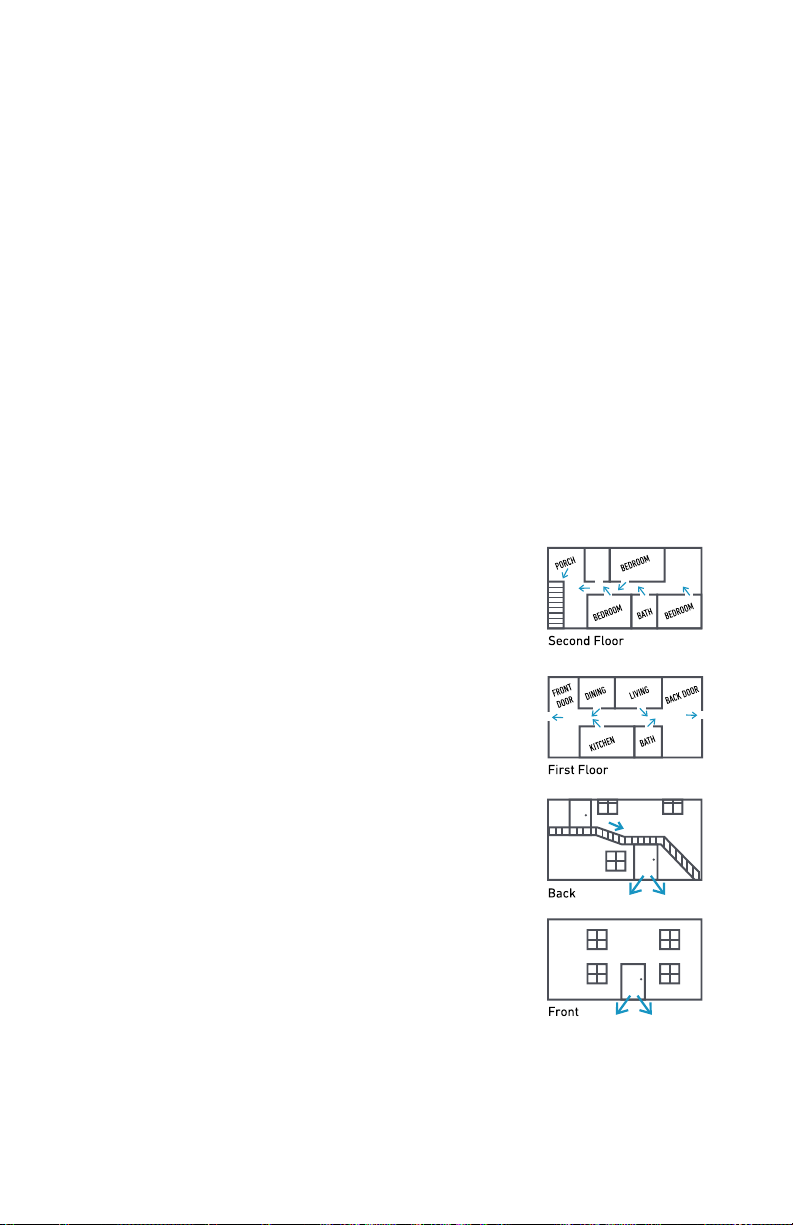
Emergency Evacuation Plan
Establish and regularly practice a plan of escape in the event of fire. The following steps
are recommended by the U.S. National Fire Protection Association:
• Position your detector or your interior and/or exterior sounders so that they can be
heard by all occupants.
• Determine two means of escape from each room. One path of escape should lead to the
door that permits normal exit from the building. The other may be a window, should your
path be impassable. Station an escape ladder at such windows if there is a long drop to
the ground.
• Sketch a floor plan of the building. Show windows, doors, stairs, and rooftops that can
be used to escape. Indicate escape routes for each room. Keep these routes free from
obstruction and post copies of the escape routes in every room.
• Assure that all bedroom doors are shut while you are asleep. This will prevent deadly
smoke from entering when you escape.
• Try the door. If the door is hot, check your alternate escape route. If the door is cool, open
it cautiously. Be prepared to slam the door if smoke or heat rushes in.
• When smoke is present, crawl on the ground. Do not walk upright, since smoke rises and
may overcome you. Clearer air is near the floor.
• Escape quickly; don’t panic.
• Establish a common meeting place outdoors, away from your house, where everyone
can meet and then take steps to contact the authorities and account for those missing.
Choose someone to assure that nobody returns to the house — many die going back.
Have questions? Call 0800 920 2420
28
Page 32
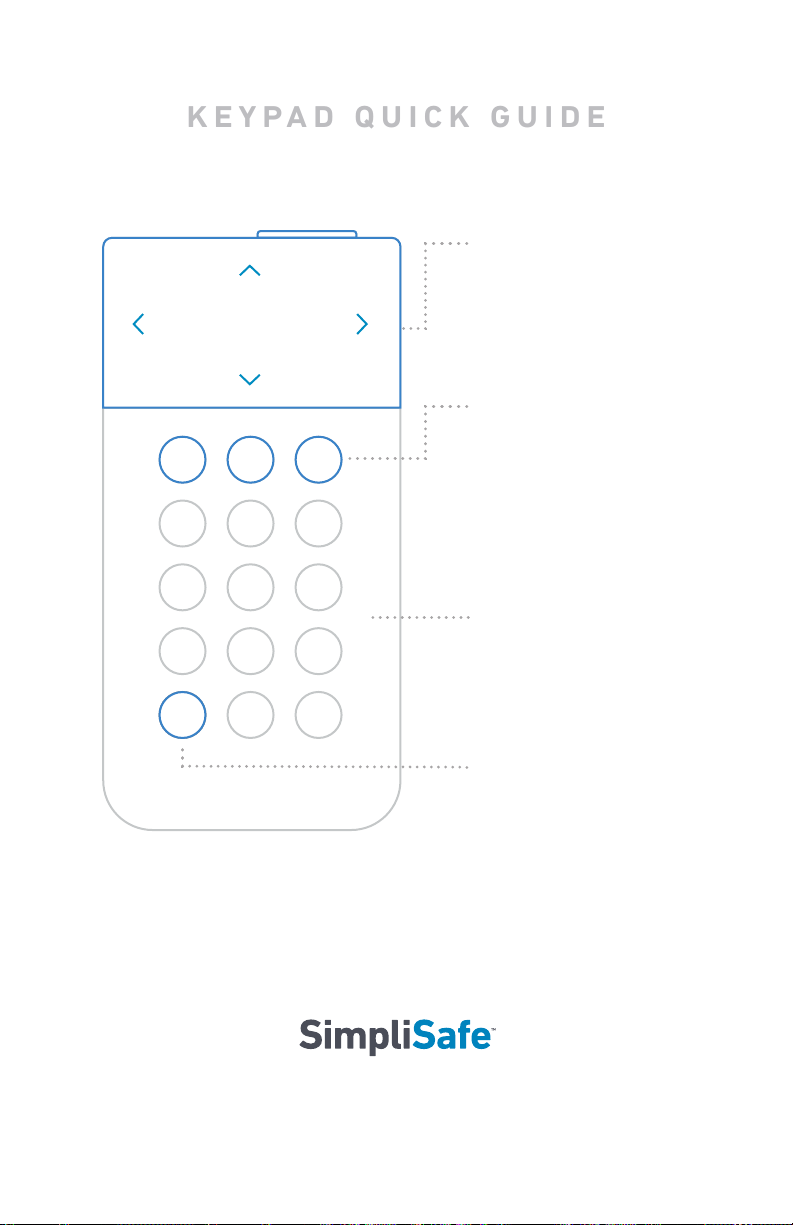
Menu Navigation
keypad quick guide
Press down on the sides
of the screen to navigate
the menu.
O, Home, Away
Your system has 3 modes:
O, Home, and Away.
Pressing Home or Away
will arm your system and
pressing O will disarm it.
Touch to Wake
You can “wake up” the
Keypad by touching the
body of the Keypad.
Menu
To adjust settings press
the menu button.
29
SimpliSafe Ltd
Suite 14c, Link 665 Business Centre, Todd Gall Road, Haslingden, Rossendale, United Kingdom, BB4 5HU
0800 920 2420
Owners Manual version W1-UK Issued Q2 2018. Printed in China.
SimpliSafe.co.uk
Have questions? Call 0800 920 2420
 Loading...