

Page 1
iSimple®
A Division of AAMP of America™
13190 56th Court Clearwater, FL 33760
Ph. 866-788-4237
support@isimplesolutions.com
©20010 AAMP of Florida, Inc.
www.isimplesolutions.com
Warranty One Year Limited Warranty
The quality controls used in the manufacture of this product will ensure your satisfaction. This warranty applies only to the original purchaser of this product from an authorized iSimple® dealer. This warranty covers any supplied or manufactured parts
of this product that, upon inspection by iSimple® authorized personnel, is found to have failed in normal use due to defects in material or workmanship. This warranty does not apply to installation expenses. Attempting to service or modify this unit,
operating this unit under conditions other than the recommended voltage will render this WARRANTY VOID.
Unless otherwise prescribed by law, iSimple® shall not be liable for any personal injury, property damage and or any incidental or consequential damages of any k ind (including water damage) resulting from malfunctions, defects, misuse, improper
installation or alteration of this product. All parts of this iSimple® product are guaranteed for a period of 1 year as follows:
Within the first 12 months from date of purchase, subject to the conditions above, iSimple® will repair or replace the product at our discretion, if it is defective in material or workmanship providing it is returned to an Authorized iSimpleTM dealer, with
PROOF OF PURCHASE from an authorized iSimple® dealer.
Warning: This equipment may be reset by unintentional electrostatic discharge during operation. Exposure to direct sunlight or extreme heat may cause damage or malfunction.
BATTERY CHARGING
While plugged in, the
JamKast™P
supports
battery charging for all dockable iPod models,
including newer models of the iPod touch and
iPod nano.
Optimal distance: <10 ft.
5
RDS FEATURES (Text on Radio)
The Radio Data System (RDS) is a special format
that embeds small amounts of digital information
in a FM radio signal. If your car stereo supports
RDS programming, the JamKast ™P
will show artist
and title information from the iPod on your
radio’s display window.
PLAY
To begin enjoying music using your JamKast™P
tune your car or home radio to the frequency
shown on the digital LCD display and press play
on your iPod. It’s just that simple!
Page 2
ISFM72
Caution :
Changes or modifications not expressly approved by the party responsible for compliance could void the user's authority to operate the equipment.
FCC Compliance Statement:
This device is verified to comply with Part 15 of the FCC Rules. Operation subject to the following two conditions: (1) this device may not cause
harmful interference, and (2) this device must accept any interference received, including interference that may cause undesired operation.
JamKast P
TM
Digital FM Transmitter
for the iPod classic, iPod nano & iPod touch
Instructions
12Volt Outlet
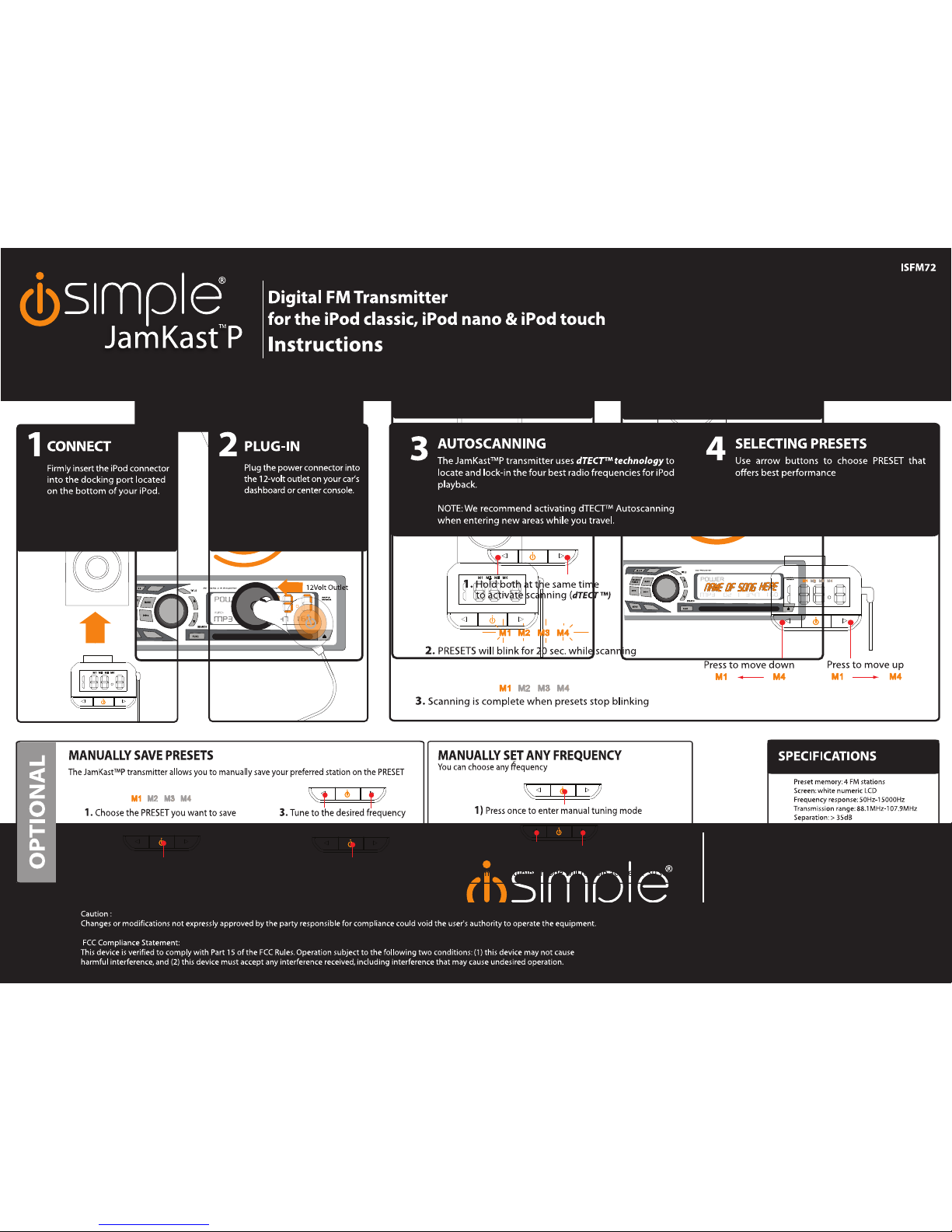
CONNECT
Plug the JamKast
tter into the
docking port on your
iPod or iPhone. The
JamKast™ iP will
automatically Turn On
when you press any
button.
CONNECT
Firmly insert the iPod connector
into the docking port located
on the bottom of your iPod.
1
PLUG-IN
2
3
Plug the power connector into
the 12-volt outlet on your car’s
dashboard or center console.
AUTOSCANNING
The JamKast™P transmitter uses dTECT™ technology to
locate and lock-in the four best radio frequencies for iPod
playback.
NOTE: We recommend activating dTECT™ Autoscanning
when entering new areas while you travel.
SELECTING PRESETS
Use arrow buttons to choose PRESET that
offers best performance
1.
Hold both at the same time
to activate scanning (
dTECT ™)
2.
PRESETS will blink for 20 sec. while scanning
Press to move up
3.
Scanning is complete when presets stop blinking
Press to move down
3 4
OPTIONAL
MANUALLY SAVE PRESETS
The JamKast™P transmitter allows you to manually save your preferred station on the PRESET
2.
Press once to enter manual tuning mode
4.
Press once to save
1.
Choose the PRESET you want to save
3.
Tune to the desired frequency
MANUALLY SET ANY FREQUENCY
You can choose any frequency
1)
Press once to enter manual tuning mode
3.
DONE (manual tuning mode will remain active for 30 sec.)
2)
Tune to desired frequency
Preset memory: 4 FM stations
Screen: white numeric LCD
Frequency response: 50Hz-15000Hz
Transmission range: 88.1MHz-107.9MHz
Separation: > 35dB
Operating current : 18.8+/- 3mA
Power: DC 5V
Power: 12V Power socket
Optimal distance : <10feet
Operating Range: up to 30 feet
Weight: < 17 gr.
SPECIFICATIONS
 Loading...