

Page 1
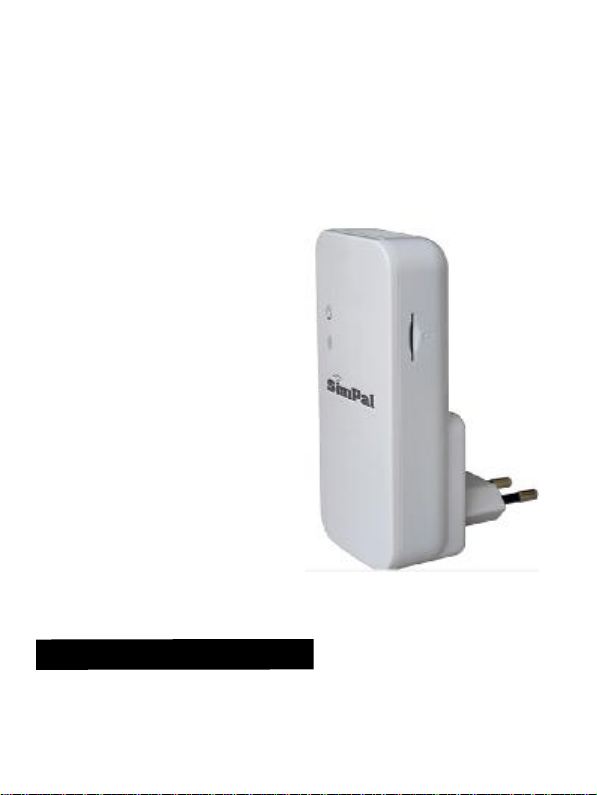
SimPal-
T2
GSM Temperature Alerter
User Manual
Manual version 1.1
Page 2

SIMPAL-T2 GSM Temperature Alerter USER MANUAL
SIMPAL-T2 GSM Temperature Alerter
Thank you for purchasing the SimPal-T2.
The SimPal-T2 GSM Temperature Alerter is a remote temperature alert
device consisting of a GSM module and a built-in temperature sensor. It
also supports external waterproof cable temperature sensor which has
higher accurate and wider temperature range. With the SIM card, all
settings of the alerter can be changed easily by SMS commands (Short
Message System).
SimPal-T2 reports environment temperature value to user’s mobile
phone by sending SMS. The authorized users set a temperature range,
the alerter will auto send SMS alert when the environment temperature
reaches the setting value. It can even detect a fire with its temperature
rapid changing alarm function.
With built-in power capacitor, SimPal-T2 will send SMS to report power
loss and restoring.
SimPal-T2 is easy to set up. After installing a SIM card and plugging it
into the wall socket and then it working. It mainly applied for house and
office usage and wildly uses in computer room, warehouse, baby room
and elderly room etc.
All services and functions need to be supported by the GSM network
and a SIM card.
This brochure suits for SimPal-T2 model.
Details of the functioning and advanced operation of this alerter are
described in this instruction manual.
Page 3

SIMPAL-T2 GSM Temperature Alerter USER MANUAL
For your safety ................................................................ 5
Exception clause ............................................................. 6
Chapter 1 Features and accessories ................................. 7
1.1 Main function ............................................................ 7
1.2 Package contents ...................................................... 8
1.4 Light indicator and “Beep” warning tone ................ 9
Chapter 2 Operation guide ............................................. 11
2.1 Install the SIM card and external temperature sensor
...................................................................................... 11
2.2 GSM Power on/ off .................................................. 11
2.3 Define the users ...................................................... 12
2.4 Change password .................................................... 14
2.5 Getting temperature value ....................................... 14
2.6 Over-temperature alarm ......................................... 15
Page 4

SIMPAL-T2 GSM Temperature Alerter USER MANUAL
2.7 Timed alarm of built-in sensor ................................ 16
2.8 Temperature difference alarm of built-in sensor ..... 19
2.9 External power supply notification ......................... 19
2.10 Weak GSM signal notification ............................... 20
2.11 LED indicators turning ON/OFF .......................... 20
2.12 Resetting the alerter .............................................. 21
Chapter 3 Maintenance .................................................. 22
Chapter 4 General Troubleshooting .............................. 23
Chapter 5 Main Technical Parameters .......................... 25
Appendix: SMS commands list ...................................... 26
Page 5

SIMPAL-T2 GSM Temperature Alerter USER MANUAL
1. Purchase a GSM SIM card (mobile phone card) from
GSM network service provider and install it in the
alerter. This SIM card number is referred as SimPal-T2
number on this brochure.
2. The user needs to activate the Caller ID Presentation
function of SIM card, and deactivate PIN code of the
SIM. Contact with GSM network service provider for
support.
3. Change the original password at the beginning use. Be
sure to keep the password and SIM card number
secret. Do not disclose this information to anyone
other than the authorized users.
For your safety
• Before using this alerter, make sure that the mobile phones device
allow using in the area, otherwise, do not put this alerter into
operation.
• This alerter was designed for indoor use. Don’t use it in wet,
chemically aggressive or dusty environment.
• Do not open the case unless maintenance needed.
• Do not keep shaking or fall down this alerter, otherwise it can be
damaged.
• This alerter is a wireless signal transmission device. Keep it away
from electronic equipment likely to interfere with the wireless signals,
in order to avoid signals interference.
• Switch off this alerter and mobile phone when entering areas
marked "Explosive", "Might explode" etc.
• Do not cast this alerter in a fire, as this may cause explosion.
Page 6

SIMPAL-T2 GSM Temperature Alerter USER MANUAL
• Keep the alerter and its accessories out of the children reach.
• Forbid to remove the power plug parts and plug into wall socket
separately.
Exception clause
1. We operate on a policy of continuous development. We reserve the
right to make changes and improvements to any of the alerter
described in this document without prior notice.
2. For the latest alerter information, please visit: http://www.simpal.cn.
We don’t guarantee for the document veracity, reliability or any
content except regulate in proper laws. Including no guarantee for
alerter suitable market or suitable area promise.
3. We hold no responsibility for the illegal use of this alerter.
4. We hold no responsibility for any loss of income or any special,
incidental, consequential or indirect damages howsoever caused.
5. The contents of this document are provided “as is”. Except as
required by applicable law, no warranties of any kind, either
expressed or implied, including, but not limited to the accuracy,
reliability or contents of this document. We reserve the right to revise
this document or withdraw it at any time without prior notice.
Page 7

SIMPAL-T2 GSM Temperature Alerter USER MANUAL
Chapter 1 Features and accessories
1.1 Main function
• This alerter uses a GSM SIM card.
• Remotely operated by SMS command: The alerter is programmed
and set by sending SMS commands.
• Input: 110V-250V/50Hz.
• Working temperature range: -10—+50 degree Celsius.
• Auto starts working by preset schedule.
• External temperature sensor supported: Get the environmental
temperature and send to mobile phone by SMS.
• SMS alarm when temperature rapid-changing or reaching the
pre-set value: When it detects the rapid-changing or the reach of
pre-set alert value of surroundings temperature, it can auto-send the
SMS alarm message to user’s mobile phone.
• Support 5 mobile phone users.
• Auto time-synchronization.
• SMS notification upon external power source changing.
Page 8

SIMPAL-T2 GSM Temperature Alerter USER MANUAL
1.2 Package contents
GSM Temperature Alerter(1 unit)
Temperature sensor(1 unit)
User manual(1 unit)
Page 9
SIMPAL-T2 GSM Temperature Alerter USER MANUAL
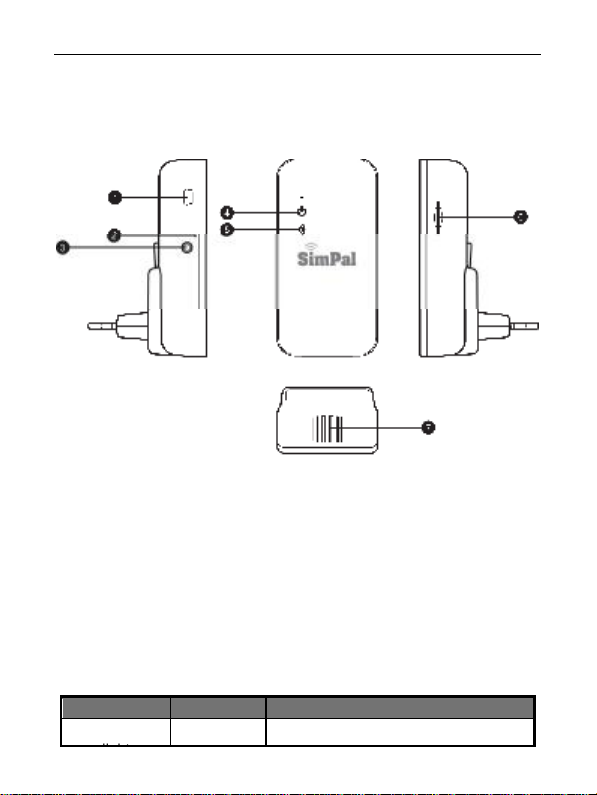
1.3 Alerter instructions
1 USB data port 4 Power indicator
2 Reset button 5 GSM indicator
3 Temperature sensor Port 6 SIM card slot
7 Built-in Temperature sensor
Figure 1: Alerter instructions
1.4 Light indicator and “Beep” warning tone
Indicator
Power (Blue)
Action Status
Turning off No power supply input
Page 10

SIMPAL-T2 GSM Temperature Alerter USER MANUAL
Indicator
GSM (Blue)
light
Note:
If the GSM signal is too weak, the alerter will send a SMS message
“Weak GSM signal” to the master user. The alerter should be placed at
another place with stronger signal for proper operation.
Action Status
Constant
light
Turning off
Flash
slowly
Flash fast Sending SMS or alerter defective.
Breath
flash
Power supply connected.
No SIM card, or the SIM card is
failed.
Searching GSM network.
Working in standby mode
Page 11

SIMPAL-T2 GSM Temperature Alerter USER MANUAL
Chapter 2 Operation guide
2.1 Install the SIM card and external temperature sensor
• Insert the SIM card to card slot, ensuring the golden contact is
upside, and beveled corner is same direction as icon show on SIM
card slot.
• Firmly push the SIM card until hearing a lock sound.
• Insert the external temperature sensor (if any) into the 3.5mm audio
socket until it is seized.
2.2 GSM Power on/ off
Power on:
Plugging the alerter in wall socket for AC power supply, the alerter will
start working. The power LED will constant light, the GSM LED will light
one second and then off 3-4 seconds. After recognizing the SIM card, the
GSM LED will flash slowly indicated that it is searching GSM network.
Once registered GSM network, it will beep ring and GSM LED is
breathing slowly.
Power off:
Plugging off the alerter from the wall socket, it will power off.
& Note:
o If the GSM indicator light constant OFF, which imply the SIM
card working abnormally, all functions of this alerter are
invalid.
o Check GSM network signal of the using place:
• The GSM network’s signal strength may affect the alerter
feature. Therefore, before using, the user should ensure
Page 12

SIMPAL-T2 GSM Temperature Alerter USER MANUAL
that this alerter is used in an area with a strong GSM
network signal.
• For the first time use, the user should perform a test-run
by sending SMS to the alerter. This allows the user to
check the GSM network connection of the alerter.
2.3 Define the users
Only one Master user and four Family users have authorization to use
the alerter. The other mobile phone users have no authorization to use
the alerter.
& Note for SMS commands
• The “#” symbol must not be ignored when typing an SMS
command.
• No allow any space within all commands.
2.3.1 Define the Master number
If the alerter is being used for the first time, or it has been reset to factory
settings, the Master user’s number must be programmed into the alerter.
The user must edit and send the following SMS to the alerter via his/her
mobile phone (the phone number will be the Master number) in order to:
Add a Master number to the alerter: #00# (1)
• Successful SMS reply
Welcome to use SimPal-T2.
Your Password is:1234.
After add a Master number to the alerter , The Master user can change
the master number to a new number. The Master user sends following
SMS message in order to:
Change the master user’s number: #10#NewMasterNumber# (2)
& NewMasterNumber should be the new Master user’s mobile
phone number.
Or the alerter should be reset to factory settings to remove old Master
Page 13

SIMPAL-T2 GSM Temperature Alerter USER MANUAL
number before setting the new one. (Refer to Chapter 2.12)
• Successful SMS reply
New master number set successfully.
Successful SMS reply will be sent to the new Master user. Then
the old Master user’s number will not be able to control the alerter
anymore.
2.3.2 Define the Family numbers
Up to 4 family users’ number can be stored on one alerter.
Family users have the authority to send SMS command and receive the
temperature alarm message (refer to command 8 and 9) as well. The
family users should remember and safeguard the alerter’s SIM number.
The Master number edit and send the following SMS to alerter in order
to:
Add a family number: #08#FamilyNumber# (3)
Add several family numbers:
#08#FamilyNumber1#...#FamilyNumber4# (4)
Check family number: #08# (5)
Delete a family number: #09#FamilyNumber# (6)
Delete all family numbers: #09# (7)
Enable alert message to family numbers: #05#1# (8)
Disable alert message to family numbers(Default): #05#0# (9)
• Successful SMS reply
& FamilyNumber should be the Family user’s mobile phone
number.
& The maximum digits that are allows for the phone number is
sixteen.
& Max allow to add 4 family numbers.
Family number: ****** set successfully.
Family number ****** deleted.
Page 14

SIMPAL-T2 GSM Temperature Alerter USER MANUAL
in Temp Sensor Alert Function: ON/ OFF
All family numbers have been deleted.
Family alert function ON/OFF.
2.4 Change password
Method
The Master user sends following SMS message in order to:
Change the password: #11#Oldpassword#Newpassword# (10)
& The password is a four digit number.
& The original password is 1234.
• Successful SMS reply
New password is ****.
2.5 Getting temperature value
Method
The Master user sends following SMS message to alerter in order to:
Get the built-in sensor’s temperature: #01# (11)
Get the external sensor’s temperature: #16# (12)
• Successful SMS reply
Temperature: **
Temp Alert Function: ON/ OFF
Temp Range: **~ **
Mains Power Loss Alert Function: ON/OFF
GSM Signal Strength: **
Temperature: **
PlugTemp Range: **~ **
Mains Power Loss Alert Function: ON/OFF
GSM Signal Strength: **
Page 15

SIMPAL-T2 GSM Temperature Alerter USER MANUAL
2.6 Over-temperature alarm
A range of temperature can be pre-set onto the alerter. In this case, if the
surroundings temperature is detected out of or back within the pre-set
temperature range, the alerter will auto-send the SMS alarm message to
users’ mobile phone. Such as: Temperature Alert ! Current temperature
reading: **
& Note
When “Timed alarm of built-in sensor” is enabled, the over-temperature
alarm function will disabled automatically.
2.6.1 Built-in sensor over-temperature alarm
Method
The Master user sends following SMS message to alerter in order to:
Enabled built-in sensor over-temperature alarm:
Set built-in sensor over-temperature alarm limits:
Disabled built-in sensor over-temperature alarm:
& MinTemp and MaxTemp: The values are whole numbers,
can be set within the range of -10 to 50 centigrade degree. The
difference of MinTemp and MaxTemp values should not be 0.
& Default MinTemp is 20 and MaxTemp is 30 centigrade
degree.
• Successful SMS reply
Temperature alert function ON/OFF.
Temperature alert range: **~ **
The alerter will send SMS message when it alarms:
BUILT-IN TEMPERATURE ALERT.
#03#MinTemp#MaxTemp# (14)
#02#0# (15)
#02#1# (13)
Page 16

SIMPAL-T2 GSM Temperature Alerter USER MANUAL
Current temperature reading: **
2.6.2 External sensor over-temperature alarm
Method
The Master user sends following SMS message to alerter in order to:
Enabled the external sensor over-temperature alarm:
Set external sensor over-temperature alarm limits:
Disabled external sensor over-temperature alarm:
Check the external sensor over-temperature alarm:
& MinTemp and MaxTemp: The values are whole numbers,
can be set within the range of -55 to 125 centigrade degree. The
difference of MinTemp and MaxTemp values should not be 0.
& Default MinTemp is 15 and MaxTemp is 20 centigrade
degree.
• Successful SMS reply
Plug in temperature sensor alert function ON/OFF
Plug in temperature sensor alert range: **-**
The alerter will send SMS message when it alarms:
CABLE TEMPERATURE ALERT.
Current temperature reading: **
2.7 Timed alarm of built-in sensor
2.7.1 Enable timing alarm of built-in sensor
A special temperature limits (MinTemp1 and MaxTemp1 on the command
21) can be set for a duration. Within this duration, if the surrounding
temperature detected by built-in sensor is beyond the limits value, the
#17#MinTemp#MaxTemp# (17)
#16#0# (18)
#16#1# (16)
#16# (19)
Page 17

SIMPAL-T2 GSM Temperature Alerter USER MANUAL
in sensor alarm:
alerter will send out alarm message. When beyond this duration, if the
surrounding temperature detected by built-in sensor is beyond another
limits value MinTemp2 and MaxTemp2, the alerter will send out alarm
message too.
Method
The Master user sends following SMS message in order to:
Enable timing over-temperature alarm of built-in sensor:
• Successful SMS reply
Schedule temperature alert function ON
2.7.2 Parameters settings for timing alarm
This setting will save the time and temperature parameters on the alerter
until the alerter is reset to factory settings.
Method
The Master user sends following SMS message in order to:
Set time period and temperature limits for built-in sensor alarm:
#07#WorkDay#StartTime#EndTime#MinTemp1#MaxTemp1#
MinTemp2#MaxTemp2# (21)
Check time period and temperature limits for built-
• WorkDay: one digit, the values lie in the range of “0” to “9”. Default
0.The following table contains the descriptions of each value:
Value Corresponding day
0 Everyday
1 Monday
2 Tuesday
3 Wednesday
4 Thursday
5 Friday
6 Saturday
7 Sunday
8 Monday to Friday
#06#1# (20)
#07# (22)
Page 18

SIMPAL-T2 GSM Temperature Alerter USER MANUAL
9 Saturday to Sunday
• StartTime and EndTime: Be consists of 4 digits (hh:mm) and works
on a 24 hour clock. The StartTime and EndTime should be in the
same day, and the EndTime must be later than StartTime. Default
settings: 0700 to 2100.
• MinTemp and MaxTemp: The values are whole numbers, can be set
within the range of -10 to 50 centigrade degree. The difference of
MinTemp and MaxTemp values should not be 0.
• MinTemp1 and MaxTemp1 are temperature limits within the
duration. Default MinTemp1 is 18 and MaxTemp1 is 24 centigrade
degree.
• MinTemp2 and MaxTemp2 are temperature limits beyond the
duration. Default MinTemp2 is 16 and MaxTemp2 is 24 centigrade
degree.
• For example: #07#0#0000#2130#18#24#16#24# , 0000 means time
00:00(hh:mm)AM, 2130 means time 9:30PM.
• Successful SMS reply
Schedule temperature alert: ON/ OFF
Everyday
Setting time: ****-****
Temp alert range: **-** degree
Other times temp alert range: **-** degree
The alerter will send SMS message when it alarms:
BUILT-IN TEMPERATURE ALERT.
Current temperature reading: **
2.7.3 Disable timing alarm of built-in sensor
Method
The Master user sends following SMS message in order to:
Disable timing alarm of built-in sensor (Default):
#06#0# (23)
Page 19

SIMPAL-T2 GSM Temperature Alerter USER MANUAL
• Successful SMS reply
Schedule temperature alert function OFF
2.8 Temperature difference alarm of built-in sensor
A time period value and temperature difference value can be pre-set onto
the alerter. In this case, if the surroundings temperature difference
reaches to the pre-set value within the pre-set time period, a SMS alarm
message will be auto-sent to user’s mobile phone.
Method
The Master user sends following SMS message in order to:
Enable the temperature difference alarm(Default):
Set time period and temperature difference value:
• Temp: The values lie in the range of 3 to 20 centigrade degree.
• Time: The values lie in the range of 1 to 10 minutes.
• Default Temp is 5 degree and Time is 3 minute.
Disable the temperature difference alarm: #13#0# (26)
• Successful SMS reply
Rapid temperature change function ON/OFF
Delta: **
Time: ** minutes
2.9 External power supply notification
The alerter will notify the user when the external AC power is lost or
resumed. The “Beep, Beep…” tones will be heart (if enabled), also a
SMS notification will be sent if the SIM card is available. Such as “Main
supply lost”. “Mains power restored”.
Method
The Master user sends following SMS message in order to:
Enable SMS notification upon the power supply changing (Default):
#14#Temp#Time# (25)
#13#1# (24)
Page 20

SIMPAL-T2 GSM Temperature Alerter USER MANUAL
No SMS notification upon the power supply changing: #04#0# (28)
• Successful SMS reply
Mains power SMS alert ON/OFF
2.10 Weak GSM signal notification
The alerter will default send a SMS notification to notify the user when
the GSM signal strength is too weak. The Master user can
enable/disable this SMS notification.
Method
The Master user sends following SMS message in order to set:
SMS notification upon weak GSM signal (Default):
No SMS notification upon weak GSM signal:
• Successful SMS reply
Weak GSM signal strength alert function ON/OFF.
The alerter will send SMS message when it alarms:
Weak GSM signal alert, the CSQ is **.
2.11 LED indicators turning ON/OFF
If the LED indicators are turning on, it will display in different ways to
show the working status. If it is turning off, it will make the alerter avoid
being found easily. The user sends the following SMS command to set
LED indicator’s mode:
Turn off LED indicator: #18#0# (31)
Turn on LED indicator (Default): 18#1# (32)
• Successful SMS reply
LED indicator turn ON/OFF.
#04#1# (27)
#15#1# (29)
#15#0# (30)
Page 21

SIMPAL-T2 GSM Temperature Alerter USER MANUAL
2.12 Resetting the alerter
• This function resets all programmed settings to their original values,
including cleaning all user number, timing parameter and
temperature parameter.
• If the setting status is wrong or the malfunctions can’t be corrected,
users can restore the alerter to its original status to make it work
normally.
& Note
This function needs to be used carefully as it also erases all setting
values.
Method
Method 1: Press the Reset button on the alerter for 5 seconds.
Method 2: The Master user sends following SMS message to the alerter
in order to:
Reset the alerter: #12#Password# (33)
• Successful SMS reply
******** reset to factory settings successfully.
Page 22

SIMPAL-T2 GSM Temperature Alerter USER MANUAL
Chapter 3 Maintenance
• If the alerter does not in use for long time, it should be
plugged off from the AC power source.
• Store and use the alerter in suitable temperature. Too
high or too low temperature will likely to damage it.
• Try to keep the alerter and all its accessories dry. Do not
store and use it in the bathroom, or other place with high
humidity. Do not allow pour water or other liquids into the
alerter, otherwise, it might cause malfunctions.
• Do not store and use the alerter in dusty.
• Do not use alcohol, acetone and other similar solvents to
clean it. Wipe it with soft-wet cloth.
• Do not attempt to open it except as instructed. If the
alerter does not work normally, try to resolve it as the
guide of the "general troubleshooting", if to the problem
can not be solved, contact with the dealer immediately.
Page 23

SIMPAL-T2 GSM Temperature Alerter USER MANUAL
Chapter 4 General Troubleshooting
Power
1
indicator light
turns off
GSM
2
indicator light
turns off
All functions
disable
3
(Indicator is
working)
The alerter
didn’t
4
response of
any
operation.
After power
on the alerter,
GSM
5
indicator
keeps
flashing.
General
Trouble
Possible Reason
No power input.
Can’t find or
identify the SIM
card.
Caller ID
presentation do not
active, insufficient
fee of the SIM card.
The alerter works
abnormally.
Network signal
weak or network
busy.
Solution
Check the alerter’s
external AC power is
available.
SIM card no install
properly: Plug off the
alerter and check the
SIM card again.
Contact network
provider to active SIM
card function. Pay for
the card to avoid
arrearages.
Plug it off from the AC
power, check SIM
card, or reset it to
factory setting.
If mobile phone’s
signal is weak too,
place the alerter at
other place with
strong signal and try
again.
No.
Page 24

SIMPAL-T2 GSM Temperature Alerter USER MANUAL
The master
number
6
already
exists.
Invalid format.
7
Please check
and try again.
No
8
authorization
user
General
Trouble
Possible Reason
SIM card PIN code
actives.
SIM card invalid.
Another master
number was set in
the alerter.
Invalid command.
Solution
Close the PIN code.
Contact with local
operator to check of
it.
Change Master
number or recover to
factory default
setting.
Refer to the user
manual.
Use the Master
mobile phone to try
the command #00#
No.
Note: If the problem can’t be solved with above guidelines, contact to
your local distributor or after service center.
Page 25

SIMPAL-T2 GSM Temperature Alerter USER MANUAL
Chapter 5 Main Technical Parameters
Power input of alerter
Operating temperature -10~+50℃℃
Store temperature -20~+60℃℃
Relative humidity 10-90%,without condensation
Communication
protocols
Data interface GSM SIM 1.8V/3.0V alerter
External temperature
sensor
GSM working band 850/900/1800/1900Mhz
110~250V/50HZ,
CEE 7/7 hybrid Schuko/French plug
GSM PHASE 2/2+
(including data operation)
-55℃~125℃
Page 26
SIMPAL-T2 GSM Temperature Alerter USER MANUAL
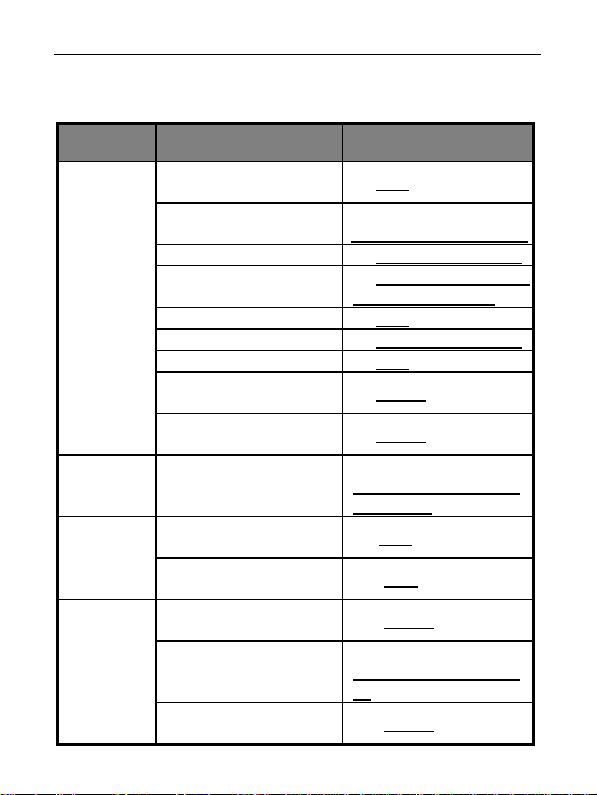
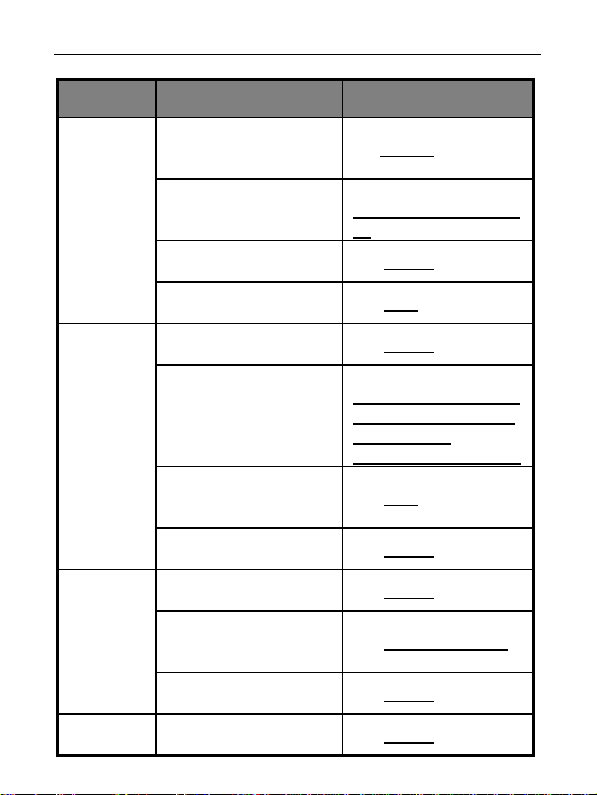
Appendix: SMS commands list
Category
Define the
users
Password Change the password
Getting
temperature
value
Over-
temperature
alarm
Function Command
Add a master number to
the alerter
Change the master user’s
number
Add a family number (3) #08#FamilyNumber#
Add several family
numbers
Check family number (5) #08#
Delete a family number (6) #09#FamilyNumber#
Delete all family numbers (7) #09#
Enable alert message to
family numbers
Disable alert message to
family numbers(Default)
Get the built-in sensor’s
Get the external sensor’s
Enabled built-in sensor
over-temperature alarm
over-temperature alarm
Disabled built-in sensor
over-temperature alarm
temperature
temperature
Set built-in sensor
limits
(1) #00#
(2)
#10#NewMasterNumber#
(4) #08#FamilyNumber1#
...#FamilyNumber4#
(8) #05#1#
(9) #05#0#
(10)
#11#Oldpassword#New
password#
(11)#01#
(12) #16#
(13) #02#1#
(14)
#03#MinTemp#MaxTem
p#
(15) #02#0#
Page 27
SIMPAL-T2 GSM Temperature Alerter USER MANUAL
Category
Timed alarm
Temperature
difference
alarm
SMS
notification
Function Command
Enabled the external
sensor over-temperature
Disabled external sensor
Check the external sensor
difference alarm(Default)
Disable the temperature
Enable SMS notification
alarm
Set external sensor
over-temperature alarm
limits
over-temperature alarm
over-temperature alarm
Enable timing alarm of
built-in sensor
Set time period and
temperature limits for
built-in sensor alarm
Check time period and
temperature limits for
built-in sensor alarm
Disable timing alarm of
built-in sensor (Default)
Enable the temperature
temperature difference
upon the power supply
Set time period and
value
difference alarm
(16) #16#1#
(17)
#17#MinTemp#MaxTem
p#
(18) #16#0#
(19) #16#
(20) #06#1#
(21)
#07#WorkDay#StartTim
e#EndTime#MinTemp1
#MaxTemp1#
MinTemp2#MaxTemp2#
(22) #07#
(23) #06#0#
(24) #13#1#
(25) #14#Temp#Time#
(26) #13#0#
(27) #04#1#
Page 28
SIMPAL-T2 GSM Temperature Alerter USER MANUAL
Category
Function Command
changing (Default)
No SMS notification upon
LED
indicator
Reset to
factory
settings
the power supply
changing
SMS notification upon
weak GSM signal
(Default)
No SMS notification upon
weak GSM signal
Turn off LED indicator (31) #18#0#
Turn on LED indicator
(Default)
Reset the alerter (33) #12#Password#
(28) #04#0#
(29) #15#1#
(30) #15#0#
(32) #18#1#
SIMPAL-T2
GSM Temperature Alerter
E1046
 Loading...