

Page 1
TNM-U-E-0106, Issue 1.1 © Simoco 2012
Simoco Group, Field House, Uttoxeter Old Road, Derby DE1 1NH
Tel: +44 (0) 1332 375500. Fax: +44 (0) 1332 375501. www.simocogroup.com
SCP9150 COVERT RADIO
B
EFORE USE
Ensure that a fully charged battery is fitted to the radio.
Ensure that the antenna is firmly screwed in to the antenna
socket.
Check that voice messages have been programmed into the
radio. (Six transmit voice status messages, power on and alarm
messages).
Check that the wiring harness and accessories are connected;
refer to connection diagram over page.
T
URNING THE RADIO ON AND OFF
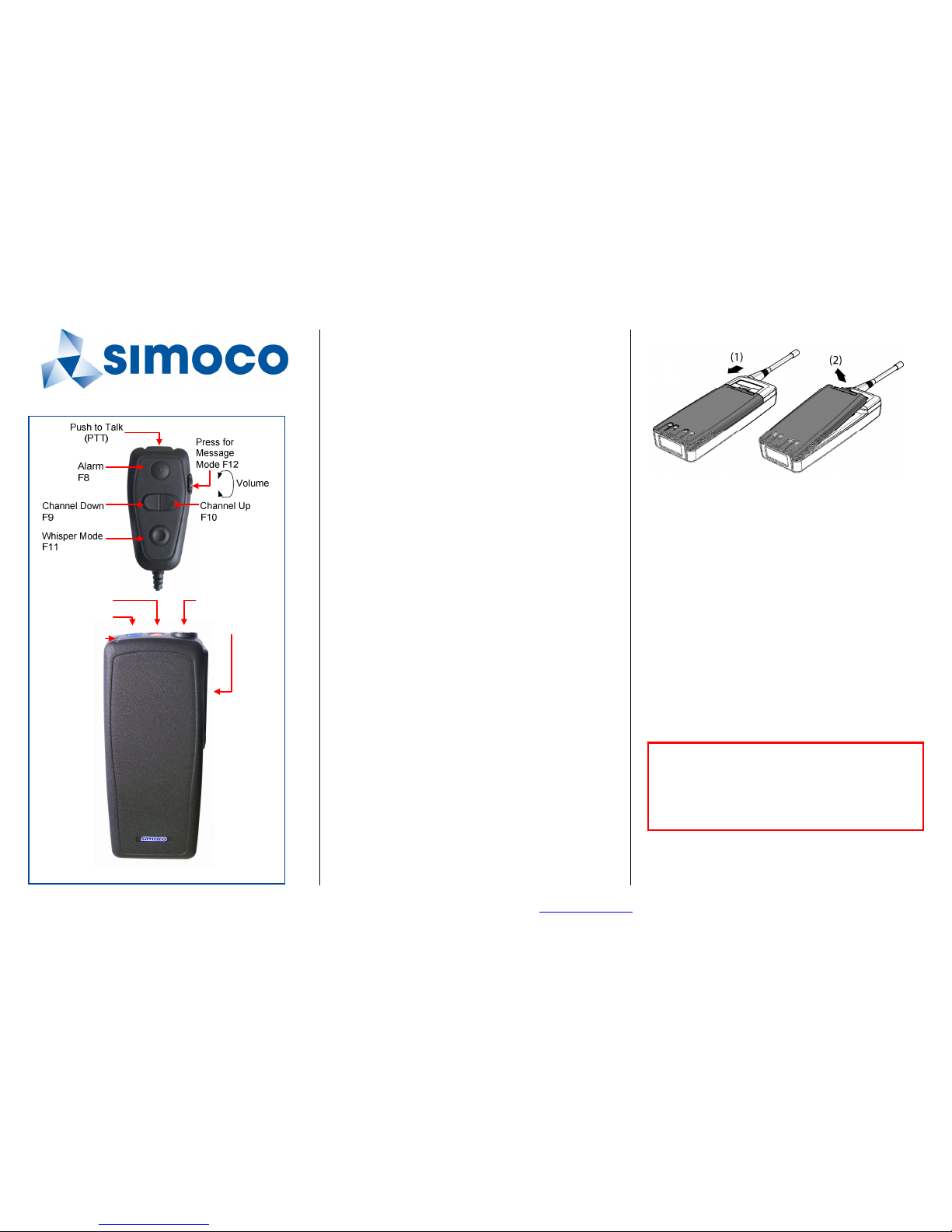
To turn the radio on, press the blue Power key on the radio briefly.
The LED next to the power key will flash green for a second to
confirm power is on and the power up voice message will be
announced.
When the radio is on, the LED will flash green briefly every 5
seconds (can be disabled in configuration).
To turn the radio off, press and hold the blue Power key until the
LED t urns red. A brief press of the blue Po wer key also
announces the currently selected radio channel.
TO R
ECEIVE CALLS
Select the required channel using the Channel Up/Down keys on
the controller, channels will be announced by voice (16 channels
available). If the channel is busy, the LED indicator flashes
yellow.
If the radio is receiving, the LED will be green.
On radios with selective mute, only the calls relevant to you are
heard.
Re-adjust the volume control as required for receiving.
TO M
AKE A CALL
Select the required channel using the Channel Up/Down keys on
the controller.
Press and hold the PTT key and speak into the microphone to
transmit (wait for the P25 Grant tone beep).
Release the PTT key to end the transmission. W hen transmitting,
the LED is illuminated red.
S
ENDING A PRE-RECORDED VOICE MESSAGE
To transmit a pre-recorded voice message, press the Message
Mode key (also volume knob). A voice message will announce
the current message.
Use the Channel Up/Down keys to select the required voice
message. Once the message has been selected, press the PTT
and the message will be transmitted to air. Message mode times
out after 4 seconds.
B
ATTERY
To remove battery: press down on the release (1) and lift battery
out (2).
If the battery is low, the LED flashes red and a voice message will
announce battery low or critical. The battery critical message
means the radio is about to shut off.
W
HISPER MODE
Whisper Mode is for situations where the user needs to transmit
with a quietly spoken voice, possibly so others cannot overhear
the user. W hen Whisper Mode is on, the microphone input
sensitivity is increased.
Whisper Mode is set with a function key, generally F11. This
mode operates as a toggle, i.e. to turn on Whisper Mode, press
the key once, and to turn if off, press it again.
C
ARE OF YOUR RADIO
To keep your Radio clean use a slightly DAMP soft cloth for all
exterior surfaces - DO NOT use chemical, aerosol or abrasive
cleaners.
To ensure effic ient operation, the battery contacts s hould be
periodically cleaned with a soft damp cloth.
Batteries must be disposed of in accordance with your local
Health & Safety Regulations. Do NOT incinerate or dispose of as
normal waste.
GENERAL WARNINGS:
Do NOT operate the radio if the antenna has become
disconnected or damaged.
Obey the 'Turn Off Two-way Radios' signs where these are
posted, e.g. on a petrol station forecourt.
Do NOT use or store the battery above +60 °C.
F
URTHER INFORMATION
For more operational information, refer to the SCP9150 P25 User
Manual (TNM-U-E-0098).
Power On/Off
Function Key 7 Antenna Socket
Accessory
Connector
LED Indicator
Page 2
TNM-U-E-0106, Issue 1.1 © Simoco 2012
Simoco Australasia, 1270 Ferntree Gully Road, Scoresby, Victoria, 3179, Australia.
Tel: +61 3 9730 3800. Fax: +61 3 9730 3968. www.simocogroup.com/australasia
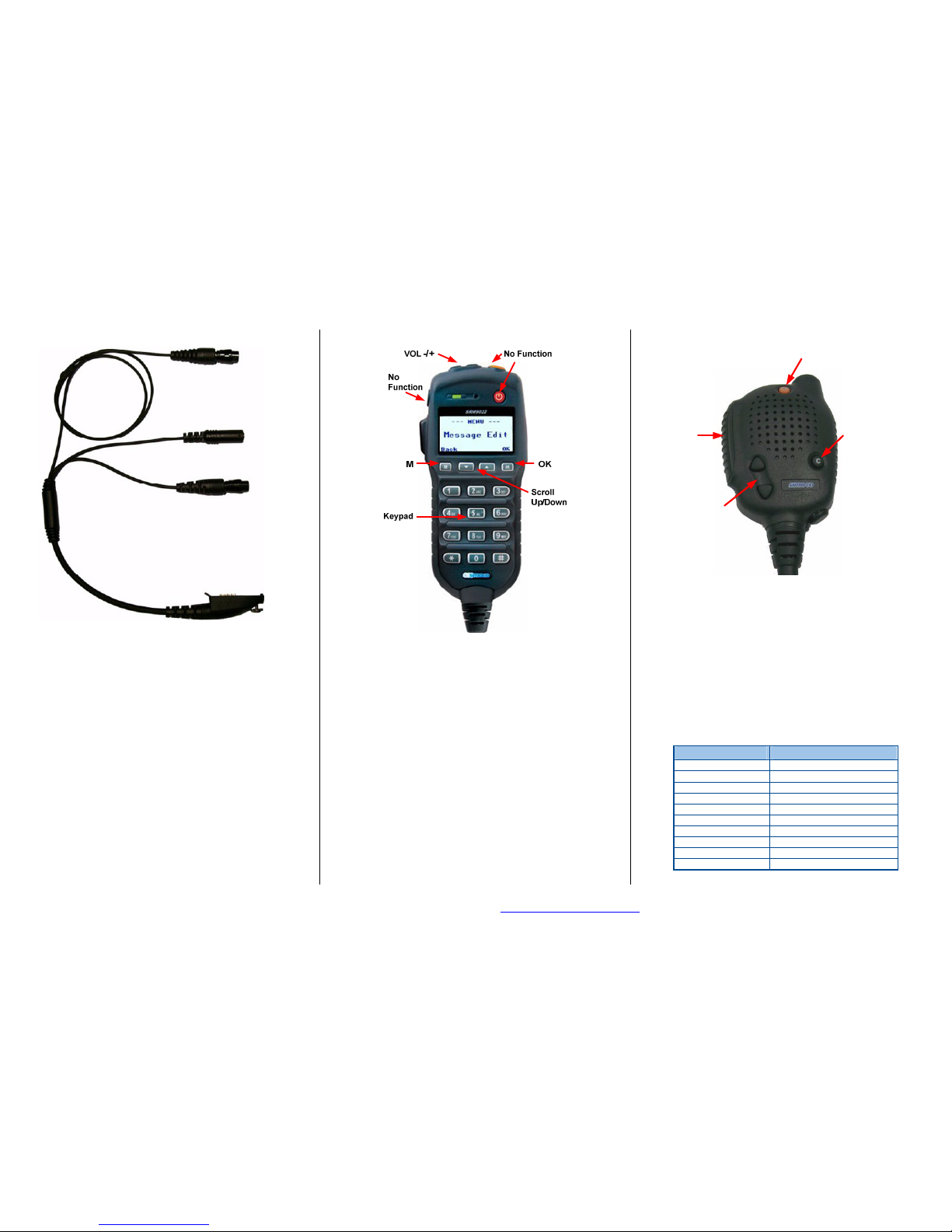
PAR-9150-RL1 Accessory Harness Connections.
The above diagram shows the connections between the covert
radio, RCU, earphones and Phonak Cobra ® covert microphone
kit.
The earphones socket is compatible with 3.5 mm stereo jack
personal earphones as commonly used with MP3 music players.
The Phonak Cobra ® socket is compatible with Phonak induction
loop wireless covert earpiece and neck loop microphone.
IF E
XPERIENCING PROBLEMS
The SCP9150 Radio is a high quality reliable product. In the
unlikely event of a problem, please check the following points
before contacting your supplier:
If the Radio fails to work, check that the battery is charged and
correctly fitted and that the radio is switched on.
If the radio does not receive or send calls, check that the antenna
is correctly fitted and the volume is turned up.
PAR-9150THS Test Handset
The Test Handset is used for recording and reviewing v oice
messages on the SCP9150 Covert Radio.
• Connect the Test Handset unit to the SCP9150.
• Turn on the SCP9150. The Main Menu will display.
• Press the M key and use the Up/Down keys to navigate to t he
Edit Message menu.
• Press OK to select Edit Message.
• The message number will be displayed (1-6 or
Alarm/Powerup). To select another message, use the scroll
keys. Note that new message will overwrite the old message.
• Press OK for the options of Play, Record and Delete.
• Use Up/Down keys to select Record and press OK.
• To start recording, press PTT and wait for the beep. After the
beep, speak to record the message, when finished, release
PTT. Message limit is 8 seconds.
• The menu will show the Play option. Press OK to review the
message.
• Once the message has finished replaying, either select
another message with the OK key or press Back to exit.
PAR-9180LMS4 Demonstration Controller
• The received audio volume is adjusted by the Up/Down keys
on the controller.
• To transmit, press the PTT on the controller.
• To preview a voice message, press the “C” key on the
controller. This will turn on the voice Message Mode.
• Use the Up/Down keys to select another message within 4
seconds of pressing the “C” key. After this time, Message
Mode will turn off.
• Channels are changed by holding down the SCP9150 blue
key and using the Up/Down keys on the controller.
• Whisper Mode is toggled on and off by the orange key on the
controller.
SCP9150 V
OICE MESSAGES
Message Meaning
Channel 1 –16 Channel selected
Whisper mode on Whisper mode selected
Whisper mode off Whisper mode is off
Encryption on Encryption is on
Encryption off Encryption is off
Battery low Battery is low, change it
Battery critical Battery is almost dead
Alarm mode on Radio is in Alarm mode
Keys Deleted Encryption keys deleted
Message mode off Message mode time out
To Radio Accessory Connector
To Remote Controller Unit
(RCU), 4 Pin Hirose Connector
To Earphones, 3.5mm Stereo
To Phonak "Cobra" Wireless
Set, 6 pin Hirose Connector
Message
On/Off
PTT
Whisper
On/Off
Volume
Up/Down
Scroll
Up/Down
 Loading...