

Page 1
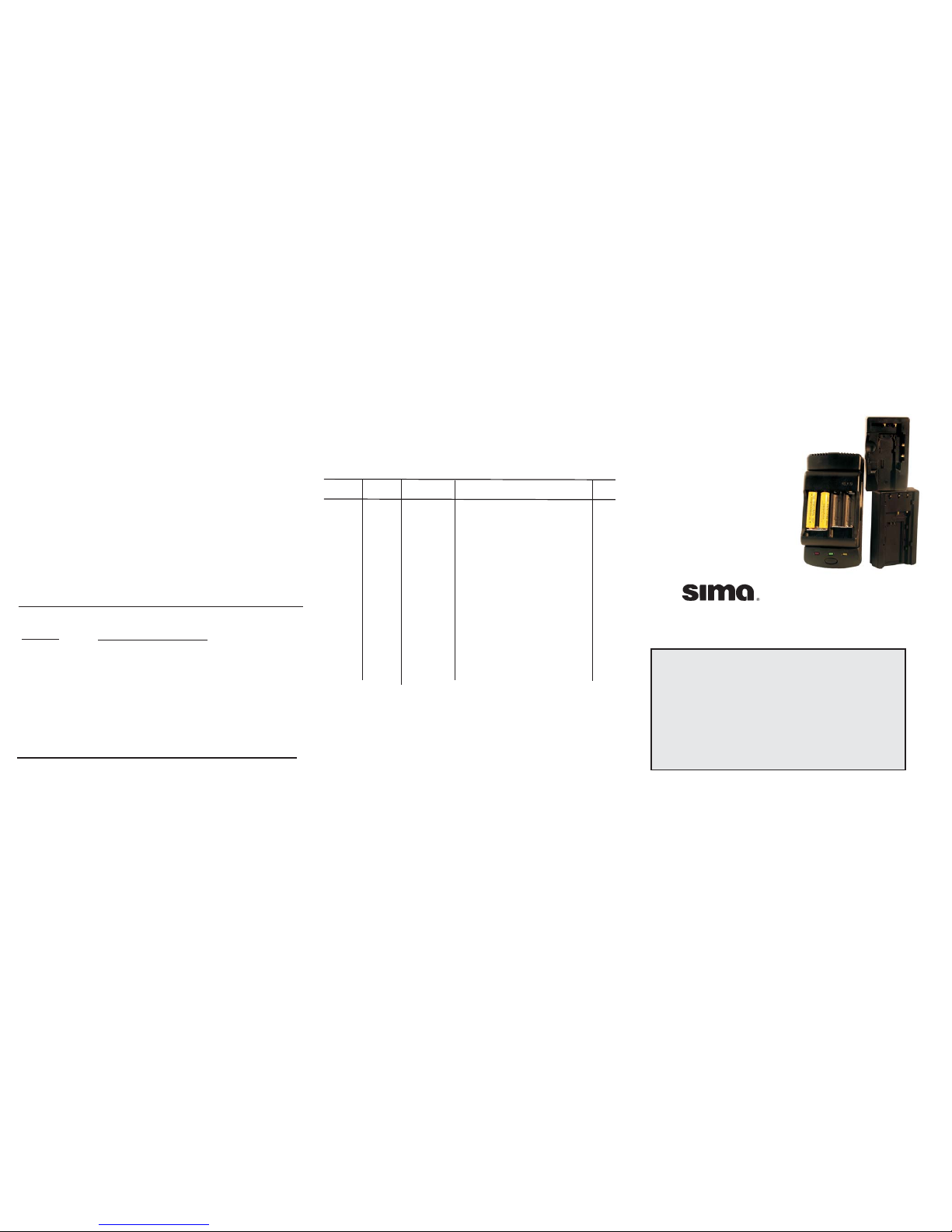
Universal for
use with Digital Cameras
Battery Charger
Model UDC-1
©2004 Sima Products Corporation
140 Pennsylvania Ave. Bldg #5 Oakmont, PA 15139
800-345-7462 Fax 412-828-9338 www.simacorp.com
PN21700
Works with these
digital cameras:
Sony Kodak
Fuji Canon
Sharp Pentax
Minolta Olympus
& more!
If you have trouble installing your battery
or if it is not listed on this chart,
do not call the store where you purchased the UDC-1.
Call Sima customer service at 800-345-7462
Warranty Statement
Sima Products Corporation (”Company”) warrants that if this product proves to be
defective to the original purchaser in material or workmanship within 90 days from the
date of original retail purchase, the company will, at the company’s option, either
repair or replace same without charge (but no cash refund will be made).
ship your unit, freight pre-paid, including reasonable proof
of date and place of purchase and description of problem to:
This Limited Warranty covers all defects in material and workmanship in
the product, except damage resulting from accident, misuse, abuse, attempted repair
by anyone other than the Company, neglect or from their normal and ordinary use of
the product. The Company accepts no liabilities or obligations for consequential or
incidental damage arising out of or in connection with the use or performance of the
product. The Limited Warranty provides you with specific legal rights, you may have
additional legal rights provided to you under the laws of your state or federal laws.
To enforce this warranty,
Exclusions:
Attn: Customer Service
c/o Sima Products Corporation
140 Pennsylvania Ave. Bldg #5
Oakmont, PA 15139
Safety and Maintenance
DO NOT use charger inside a drawer, closed cabinet, on a carpet
or cover with a cloth. The charger will become slightly warm in
normal use, but if contained, heat may damage the charger and
battery pack.
DO NOT
DO NOT
NEVER IMMERSE IN LIQUID!
DO NOT
DO NOT
DO NOT
atttempt to open the charger, there are no serviceable
parts. Doing so will void the warranty.
allow moisture of any kind to come in contact with the
charger.
store where it may be exposed to extreme temperatures;
avoid placing in direct sunlight. High temperatures can shorten the
life of electronic devices, damage batteries and warp metal or
plastics.
short circuit the output terminal or contacts.
drop the unit, a jolt can cause permanent damage and is
not covered by the warranty If the charger must be cleaned, be
sure it is unplugged. Wipe the unit with a clean cloth, lightly
dampened with mild detergent. Use a clean cloth, lightly dampened
with rubbing alcohol to clean the metal contacts.
Trouble Shooting
Problem
No Indicator
Lights with
battery mounted
Hissing noise in
Charging Mode
Possible Cause/Solution
Confirm the AC or cigarette adapter is firmly
connected at both ends. Confirm that wall outlet is
working. Check fuse in car cord (un-screw tip of
cigarette lighter adapter).
Battery is already fully charged.
Battery mounted incorrectly; remove and
re-mount battery. Clean battery/charger contacts.
Normal operation due to advanced switching
circuitry.
www.simacorp.com
800-345-7462
Includes 3 adapter trays to charge
Lithium - ion,
Ni-Cad
and NIMH batteries.
Also AA & AAA
Includes AC & DC adapters
Brand Volt Batt. type Model Number Tray
Canon 6V NiCad/NiMH BP-E77/711/714/718/722/729 Base
FUJIFILM 3.7V Lithium Ion NP-40/60/80/100/120 1
Hitachi 6V NiCad/NiMH VM-BP82/82A/83/84/84A Base
JVC 6V NiCad/NiMH BN-V11U/12U/14U/140U/22U/50U/60U Base
BN-V20U/25U Base
JVC 3.6V Lithium Ion BN-V712/714U 1
Kodak 3.6V Lithium Ion KLIC-3000/5000 1
PENTAX 3.7V Lithium Ion D-Li2/Li7 1
Panasonic 6V NiCad/NiMH PV-BP15/17/18/ VW-VBS1E/S2E Base
RCA 6V NiCad/NiMH BB-45/75L/060/120/FB120/1260 Base
RCA 3.6V Lithium Ion BB-75 2
RICOH 3.6V Lihium Ion DB-20/30/40 1
Sharp 6V NiCad/NiMH BT-80 Base
Sharp 3.6V Lithium Ion BT-L1/2/11/12 2
SONY 6V NiCad/NiMH NP-55/66/67/68/77/78/98 Base
SONY 3.6V Lithium Ion NP-FC10/11 2
SONY 3.6V Lithium Ion NP-F10/20/30/FS11/21/3 2
TOSHIBA 3.6V Lithium Ion NP-100/ PDR-BT1/2/2A/3 1
AA 1.2V NiCad/NiMH Minolta, Olympus, Nikon and others.
AAA 1.2V NiCad/NiMH Consult your owner’s manual.
AA/AAA
AA/AAA
Battery Chart
Page 2
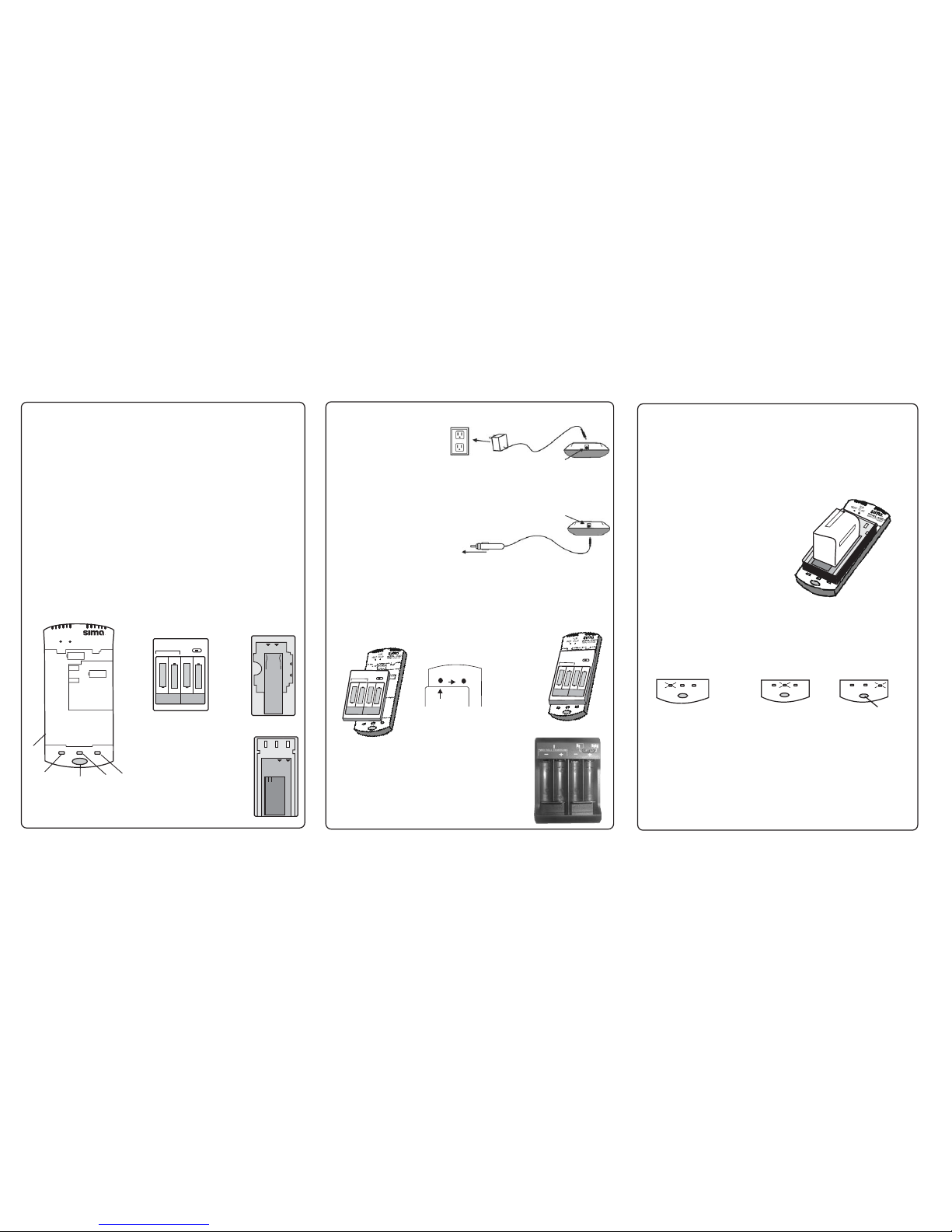
Mounting the Adapter Plates
Some battery models will require the use of an adapter plate (AA/AAA, 1 or 2).
Consult the battery chart in this manual to determine which adapter plate your
camera or camcorder battery requires.
Connect the 12V DC car cord plug
to the power input jack on the rear
of the UDC base. Plug the cigarette
lighter adapter into the cigarette
lighter socket of the vehicle. (See
diagram at right.) The green Full
indicator light will blink once.
To car cigarette lighter
How to Connect 120V AC Power Supply
Connect the AC adapter plug to
the Power Input jack on the rear
of the UDC base. Plug the AC
adapter into any standard 120V
AC household outlet. ( See
diagram at right.) The green Full
indicator light will blink once.
To 120V AC outlet
Power Input jack
How to Connect 12V DC Car Power Supply
Power Input jack
For AA/AAA
NEVER CHARGE ANY TYPE OF ALKALINE BATTERIES!
- The AA/AAA tray hasa2or4battery switch
located on the top right corner. When set for 2, it only
charges the 2 slots on the left hand side. Always charge
AA/AAA batteries in matched pairs (either 2 or 4 of the
same kind.) Be sure to follow polarity markings on the tray.
Charge NiCad, NiMH & AA/AAA batteries only.
TW
O
C
ELL
CH
A
RG
ING
-
+
-
+
-
+
-
+
+
-
+
-
To remove the tray, slide it to the left.
To install the adapter trays
Step 1. Place the adapter tray onto the base unit.
Step 2. Align the arrow on the tray to
the INSERT dot on the base unit.
INSERT
SLIDE
TOLOCK
Step 3. Slide the tray to the right.
It will snap firmly in place.
1
2
T
W
O
C
E
L
L
C
H
A
R
G
IN
G
-
+
-
+
-
+
-
+
+
-
+
-
3
Mounting the Batteries
To install the battery - Typically, you can install the battery onto the
charger plate the same way you install the battery onto your
camcorder.
Follow the guides on the battery and the
charger. The battery should slide easily into place. If it does not, do
not force the battery into place. Realign the guides and try
again.
Align the contacts on your battery with the appropriate
contacts on the charger.
The UDC-1 will automatically detect the battery type and
voltage from the tray.
Charging the Battery
As soon as the battery is properly mounted, charging begins as indicated
by the steady red light on the Charge Status indicator.(Fig. 1 below) If the
battery is dead, it may take up to 30 min for the Charge indicator to light up.
When charging is complete, the green Full Status indicator will turn on (fig. 2).
At this point, the battery can be removed for use. It is recommended that you
leave the battery connected to the charger for another 30 minutes to ensure a
full or “topped off” charge
Discharging the Battery
To maximize the full power of your NiCad and NiMH batteries, we
recommend discharging before recharging. To discharge, mount the battery on
the tray and press the Discharge button. (Fig. 3 above). The yellow Discharge
Status indicator will turn on. When discharging is complete, the
red Charge Status indicator will turn
on (Fig. 1).Depending on the amount of charge left in the battery, this may take
several hours. Note: Lith-ion batteries do not require discharging.
battery will
automatically begin to recharge and the
Charge
Full
Discharge
Charge
Full
Discharge
Charge
Full
Discharge
Fig. 2 Fig. 3
Fig. 1
Press to
discharge
Technical Specs
Input: 12V DC
Standby Current: 30mA
Charge Current: 800mA @ constant current mode
Charge Termination: Fixed voltage Lithium (4.2V for 3.6V, 8.4V for 7.2V)
NiCad/NIMH (delta V)
Size & Weight 5.25” x 2.75” x .75” 3.1 oz.
Features
j
j
j
j
j
Precision end-of-charge detection assures a full charge
”Top-off” function trickle charges to maintain a full charge.
LED indicator displays charger mode.
Defective battery detection.
Overcharge protection.
1.2.UDC Base Unit
Charge Status indicator
4 Full Indicator
5. Discharge status light
Discharge button
.
3.
Plate 2
Base Unit and Trays
Plate AA/AAA
Plate 1
TWOCELLCHARGING
-+
-+
-+-
+
+
-
+
-
4
1
3
2
SLIDE
TOLOCK
INSERT
MODEL : UDC
UNIVERSALDIGITAL CHARGER
ForCanon
6volt
ForHitachi
6volt
5
Introduction
Congratulations on buying the Sima UDC-1, a universal battery charger for
digital camera batteries. Using the AC or DC adapters included, you can quickly
and easily charge your AA/AAA, Nicad, NiMH or lithium ion batteries at home or
in the car. This package includes: UDC base unit, AA/AAA tray, Tray 1 &
Tray 2, 120V AC adapter, 12V DC car adapter and this instruction manual.
 Loading...