

Page 1
Operation
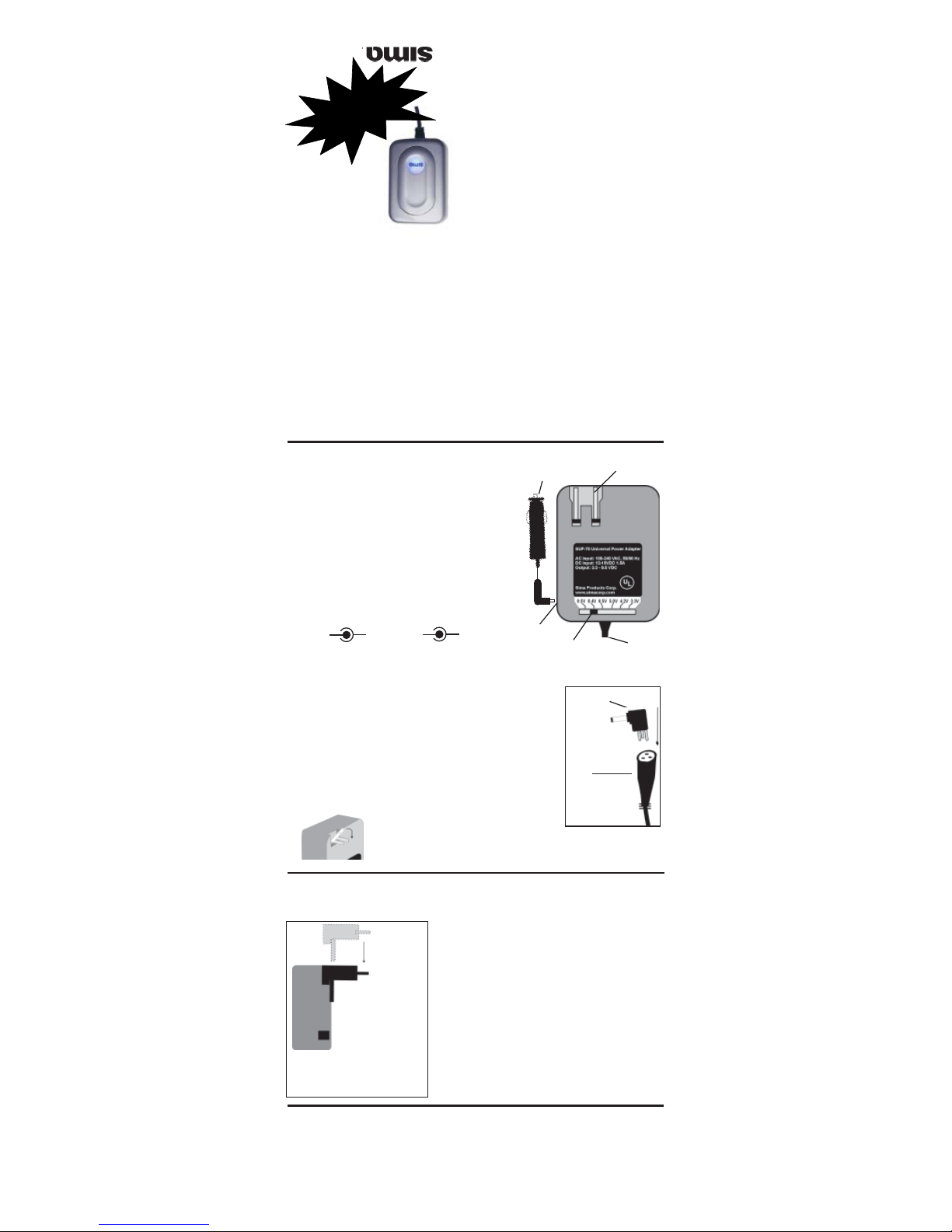
1. Set the output voltage switch, as illustrated in Fig. 1,
to the desired output for your device. Choose from
these settings: 3.3 / 4.2 / 5.0 / 6.5 / 8.4 or 9.5 V.
The SUP-70 comes with seven standard connectors. The
connectors allow you to match the size and polarity
of your device’s DC input jack. If your device requires
other types of connectors, contact Sima customer
service at 800-345-7462.
The connectors supplied with the SUP-70 are all set
in a center pin positive alignment ( Fig. A)
If your device requires a center pin negative
power source (Fig. B) do not use this adapter.
To determine the required current and correct polarity
for your device, refer to the manufacturer’s instruction
manual or specifications
2. Select the appropriate connector and attach it to the output socket
at the end of the output cord. The connectors are numbered as
follows: 1, 2, 4, 5, 13, & 17. To identify the correct connector for
your camera, see the list of digital cameras on the reverse side of
this sheet. If unsure, use the connector that fits the power jack of
your camera. The three-pin connectors are designed to fit into the
socket in only one position. Align the pins as shown at right in Fig.
2. Do not force.
3. Insert the connector into the power jack on your portable device.
4. Next, unfold the prong set, as shown in Fig.
3 at left, and plug the SUP-70 into a standard
AC wall outlet. (To use the 12V car plug, plug the car cord into the SUP70 as shown in Fig. 1 and plug the car cord into a car lighter or 12V
socket.) The blue power light on the front of the SUP-70 should turn on.
IMPORTANT: Your portable device must be rated between 3 - 10V DC and no more than 2100
mA of current to use the SUP-70. If the exact voltage for your device is not listed below and is
less than 10V, you can try setting the voltage switch to the nearest voltage – use the lower
setting first. If the device does not operate, disconnect the
connector from the device, reset the voltage switch to the
next higher setting and re-connect. Do not continue
trying higher settings as they may result in damage to
your device or the adapter.
The SUP-70’s current (mA) must be equal to or greater
than the current your portable device requires. Remember
1A = 1000mA, 0.5A = 500mA. Use the following chart to
determine the output current from the SUP-70:
Output Max. Output Max.
Voltage Current Voltage Current
3.3V = 2.1A 6.5V = 1.7A
4.2V = 2.0A 8.4V = 1.6A
5.0V = 1.9 A 9.5V = 1.5A
Resetting the Adapter
CAUTION: If the power light turns off, check the power source. If on, the output current may
be beyond the AC adapter’s specifications and the overload protection has been activated.
To reset the adapter:
1. Disconnect the AC adapter from the AC outlet and the device you are powering. Wait 10
seconds.
2. Plug the AC adapter into the AC outlet again. If the indicator remains off, there may be a
problem with the AC adapter. Contact Sima customer service for assistance.
Introduction
Congratulations on your purchase of the Sima SUP-70 Universal Power Adapter. It can
power digital cameras, camcorders and other portable electronic devices requiring 3.3 / 4.2 /
5.0 / 6.5 / 8.4 or 9.5V DC power. It is fully regulated using high efficiency switching technology
and features overload and short circuit protection. The SUP-70 comes with seven connectors
to fit digital cameras and other electronic devices. Additional connectors are available from
Sima. For connectors that are not included in this package, call 800-345-7462.
This package Includes:
7 Center pin positive connectors 1 12V car plug
1 SUP-70 1 EU adapter prong 1 Manual
Model SUP-70
For digital cameras and camcorders.
www.simacorp.com
90-day Limited Warranty
Sima Products Corporation warrants this
product against defects in materials and
workmanship for a period of 90 days from the
date of purchase. During the warranty period,
the product will be repaired or replaced at
Sima’s option. Mail the enclosed product
registration card within ten days of the original
purchase.
Conditions: Ship your unit, freight pre-paid,
including reasonable proof of date and place
of purchase and description of problem to:
Sima Products Corporation
Attn: Customer Service
140 Pennsylvania Ave.
Bldg. #5
Oakmont, PA 15139
This warranty is void if any defects are caused
by abuse, misuse, negligence or unauthorized
repairs.All liability for incidental or
consequential damages is specifically
excluded. Some states do not allow for the
exclusion or limitation of incidental or
consequential damages, so the above
limitation or exclusion may not apply to you.
This warranty gives you specific legal rights
and you may have other rights, which vary
from state to state.
Fig. 1
Output
line
Fold-in 120V AC prongs12V DC
car plug
12V DC
input
Output
Voltage Switch
The SUP-70 comes
with a prong set for
use in Europe.
Note: The prong set
does not convert
120V AC to 240 V AC.
EU Prong
Set
To attach, slide the EU prong set
down over top of the US prongs,
while they are folded in, as
shown above.
+ -
OK
Fig. A
- +
Fig. B
No
Fig. 3
Connector
Fig. 2
Output
Can’t find your plug?
Call Customer Service
800.345.7462
Universal Power
Adapter
Page 2

Safety warnings and Cautions
WARNING: To reduce the risk of fire or shock hazard, do not expose this product to rain or moisture.
CAUTION: To reduce the risk of electric shock, do not remove cover or back. No user serviceable parts
inside. Refer servicing to qualified personnel.
IMPORTANT SAFETY INSTRUCTIONS - SAVE THESE INSTRUCTIONS
This manual contains important safety and operating instructions for your AC power adapter. Before using
your adapter, read all instructions and cautionary markings on the product.
DANGER: To reduce the risk of fire or electric shock, follow these instructions.
FCC Statement This device complies with Part 15 of the FCC Rules. Operation is subject to the following
two conditions: (1) This device may not cause harmful interference, and (2) this device must accept any
interference received, including interference that may cause undesired operation. Your adapter is ETL listed to
UL standards and meets all applicable FCC standards.
WARNING: Changes or modifications to this unit not expressly approved by Sima may cause interference
and void the user’s authority to operate the equipment.
Note: This equipment has been tested and found to comply with the limits for a Class B digital device,
pursuant to Part 15 of the FCC Rules. These limits are designed to provide reasonable protection against
harmful interference in a residential installation. This equipment generates, uses and can radiate radio frequency
energy and, if not installed and used in accordance with the instructions, may cause harmful interference to
radio communications. However, there is no guarantee that interference will not occur in a particular installation.
If this equipment does cause harmful interference to radio or television reception, which can be determined
by turning the equipment off and on, the user is encouraged to try to correct the interference by one or more of
the following measures:1. Re-orient or relocate the receiving antenna. 2. Increase the separation between the
equipment and receiver. 3. Consult Sima customer service at 800-345-7462 if the problem still exists.
CAUTIONS: ·The adapter must attach to the power supply source with a built-in over-current protective
device (Max. 15A), such as a 15A fuse and branch circuit.· Make sure the adapter is disconnected from the AC
outlet and device before adjusting the voltage setting.·Do not use the adapter to power a device that exceeds
the maximum power rating.·
Note: The SUP-70’s voltage must be the same as the voltage your portable device requires.·The SUP-70’s
current (mA) must be equal to or greater than the current your portable device requires.
Specifications:
AC adapter input: 120V AC, 60 Hz
AC adapter output: 13.5V DC, 1.2A
SUP-70 input: 12-15V DC,
Output rating: 3.3 / 4.2 / 5 / 6.5 / 8.4 or 9.5V DC
DC cord length: 1 m
Operation Temp: 32 to 113 degrees F
Storage temp.: -4 to 140 degrees F
Dimensions: 4” x 2.1” x 1.4”
Plug # Size (diameter)
1 4.0mm x 1.7mm
2 4.75mm x 1.7mm
4 Sony L/M
5 Sony S/C
13 3.5mm x 1.35mm
14 5.5 mm x 2.1mm
17 Sony FC
Brand Model # Voltage Plug #
AGFA ePHOTO CL-30, CL-34, CL-50, 307, 780, 780C, 1280, 1680 6.5V 1
CANON IXUS, IXUS V,V2, V3, 100, 110, 230, 300, 330 4.2V 13
CANON A10, A20, A30, A40, 4.2V 1
CASIO QV-10A, QV-11, QV-70, QV-100, QV-120, QV-200, QV-300, QV-700,
QV770, QV-780, QV-2000UX, QV-2300UX, QV-2400UX, QV-2800UX,
QV-2900UX, QV-3000EX, QV-3000Plus, QV-3500EX, QV-4000E,
QV-5000SX, QV-5500SX, QV-7000SX, QV-8000SX 6.5V 1
EPSON PC 550, PC 600, PC 650, PC 700, PC 750Z, PC800Z, PC850Z, PC2100Z,
PC3000Z, PC3100Z 6.5V 2
FUJIFILM Finepix 50i,1300, 1400Z, 2300, 2400Z, 2700Z, 2800Z, 2900, 3800, 4800Z,
4900Z, 6800Z, 6900Z, DX-10, F401, F402, F601, M603, MX-500, MX-600Z,
MX-700, MX-1200, MX-1400, MX-1500, MX-1700Z, MX-2700, MX-2900Z,
S1 Pro, S2 Pro, S304, S602,S3100 5V 1
HP PhotoSmart 120, 315, 318, 320, 612, 620, 720, 850 6.5V 1
KODAK DC40, DC50, DC120, DC200, DC200 plus, DC210, DC210 plus, DC215,
DC220, DC240, DC240i, DC260, DC265, DC280, DC290, DC3200z,
DC3400z, DC5000z 6.5V 2
KODAK DC4800, LS443, DX7440, DX7590, DX7630, LS743 5V 1
KYOCERA Finecam S3, S3L, S4, S5 5V 1
MINOLTA Dimage 5, 7, 7Hi, 7i, 3D 1500, EX1500, 2300, 2330z, E201, RD3000,
S304, S404 6.5V 2
NIKON Coolpix 100, 300, 600,700, 750, 800, 900, 950, 990, 2000 6.5V 2
NIKON CoolPix 775, 880, 885, 995, 4300, 4500, 5000, 5700,8700 8.4V 2
OLYMPUS C-100, C-120, C-200Z, C-211, C-300Z, C-320L, C-700UZ, C-720UZ,
C-730UZ, C-960Z, C-990Z, C-2000Z, C-2020Z, C-2030, C-2040Z,
C-2100Z, C-2500L, C-3000Z, C-3020Z. C-3030Z, C-3040Z, C-4000Z,
C-4040Z, C-5050Z, D-200L, D-220L, D-320L,D-340L, D-340R, D-360L,
D-370L, D-400Z, D-450L, D-450Z, D-460Z, D-500L, D550Z, D-600L,
D-620L, E-10, E-20, E-20P, E-100 RS 6.5V 2
OLYMPUS C-1, C-1Z, C-2, C-40Z, C-220Z, D-40Z, D-100, D-150Z, D-230,D-395, D-580
D-540 3.3V 1
OLYMPUS C-50Z 4.2V 1
OLYMPUS Stylus 300, Stylus 410 4.8V 1
PANASONIC DMC-F7 5V 1
PANASONIC DMC-FZ1 8.4V 2
PANASONIC DMC-LC5, DMC-LC40 8.4V 2
PENTAX Optio 330RS, 430RS 4.2V 1
PREMIER DC620, 820, 1310, 1311, 1500, 2000 6.5V 2
RICOH Caplio PR1, Caplio PR10, Caplio PR120, RDC-2, RDC-2E, RDC-300,
RDC-300Z, RDC-4200, RDC-4300, RDC-5000, RDC-5300, RDC-6000,
RDC-7, RDC-i500, RDC-i700 5V 1
SANYO VPC-MZ1, VPC-AZ1 3.3V 1
SIMA CP-150 Image Bank (Digital Photo Storage Unit) 6.5V 1
SONY CD200, CD250, CD300, CD400, CD450, CD1000, F707, F717, FD85, 8.4V 4
FD87, FD90, FD92, FD95, FD97, FD100, FD200, S50, S70, S75, S85
SONY P1, P2, P3, P5, P9, P20, P30, P31, P50, P51, P71 4.2V 5
SONY Cybershot DSC P4, P8, P10, P32, P52, P72, P-73, P92, P93, V-1, W-1, 4.2V 17
SONY F-828 4.2 4
TOSHIBA PDR-M1, M3, M4, M5, M11, M21, M25, M60, M61, M65, M70, M71, M81 5V 1
Digital Camera/Camcorder SUP-70 Connector Plug Chart
Sima Products Corporation 140 Pennsylvania Ave. Bldg #5
Oakmont, PA 15139 USA 800-345-7462 www.simacorp.com
Made in Tawa n © 2005 Sima Products Corporation PN21713
 Loading...