

Page 1

1
XT-1
One Pedal, Infinite Guitars
User Manual (EN)
"Sim1 - Sound Imprinting' is a registered trademark property of
Sim1 Srl. All other product names and images, trademarks and
artists names are the property of their respective owners, which
are in no way associated or affiliated with Sim1. Product names
are used solely for the purpose of describing certain types of
tones achievable with Sim1’s modeling technology. Use of
these names does not imply any cooperation or endorsement".
Page 2

2
XT-1: One Pedal, Infinite Guitars!
Thank you for buying the new XT-1 by SIM1. This is the first guitar
profiling system that makes it possible to play your electric guitar with
the sound of any other existing guitar in the world.
This is made possible by our proprietary technology “Smart Tone
Shaping” (protected by patent) and what we call “Learning
procedure”. This procedure allows the SIM1’s XT-1 to shape the sound
of the guitar of your dreams around your own guitar sound. The XT-1
does this by matching the tone of your guitar/s (hereafter Source
Guitar) and the tone of the guitar you would like to emulate (hereafter
Target Guitar).
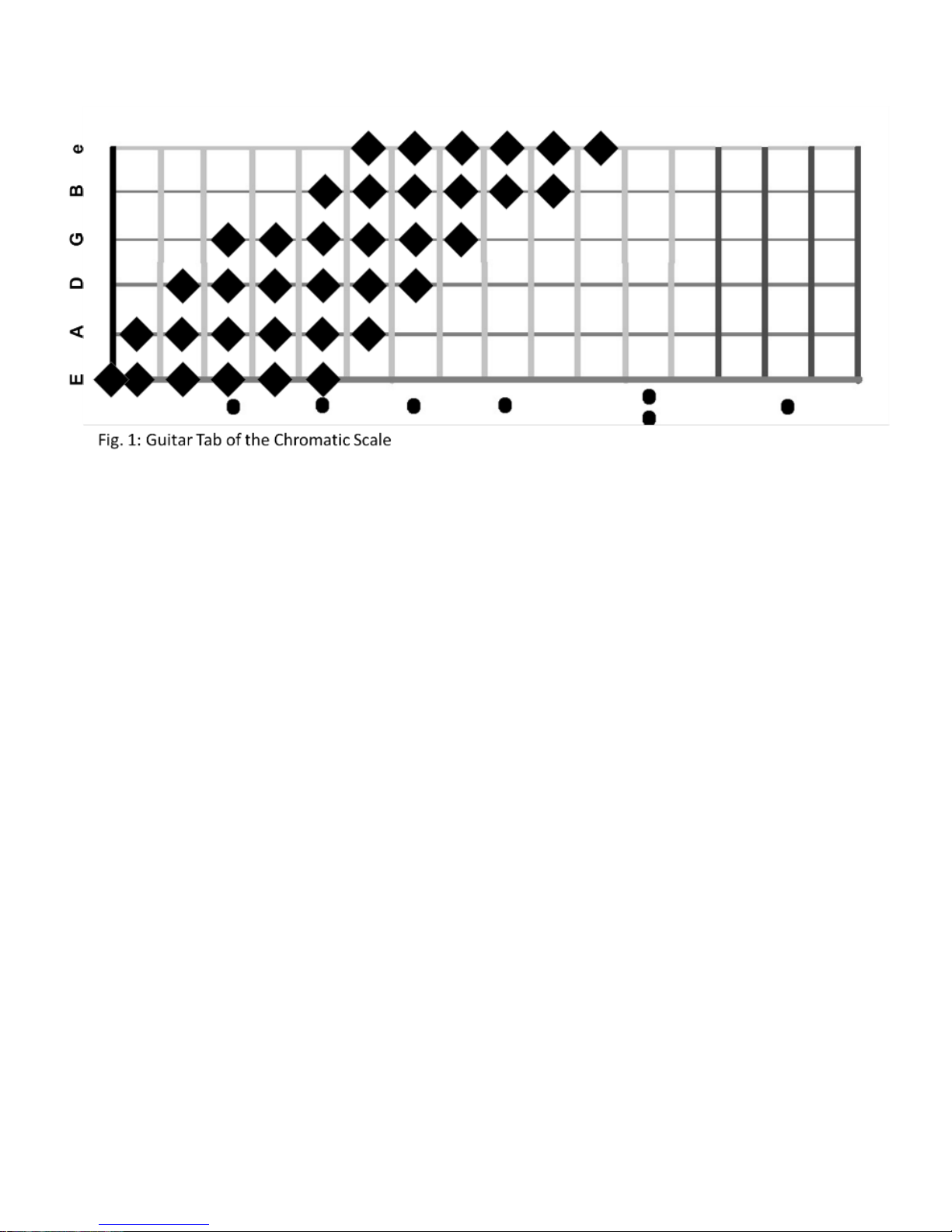
The Learning Procedure is achieved by recording inside the pedal an
ascending chromatic scale starting from the E (6 open string), making
a progression of 6 notes per string in 80 seconds (36 notes in total).
Read carefully the related chapter at pages 11-17 of this manual for
detailed instructions for this procedure.
Since most of guitars in the market have 2/3 pickups, the procedure
allows you to choose whether to record 1 or 3 pickups (neck, mid or
mid position, bridge). We recommend using a perfect matching
among the pickup of your source guitar and that one of the target
guitar. In this way the tone emulation will be 100% accurate!
There's nothing in the market with such a reproduced authentic
sound, which is the result of years of research. XT1 is the only pedal
able to grant to musicians an infinite variety of guitar sounds, without
any latency in terms of signal response, and without the need of any
invasive item to be placed on your guitar body.
SIM1’s Team
Page 3
3
Safety Instructions
In this instruction manual the exclamation point within a triangle
means “Caution!”. It is an alert to the user noting possible risks
related to the improper use of the device. Please read the
In this instruction manual the lightning within a triangle means
“Electrical caution!”. It is an alert to the user for potential risks of
electrical shocks related to an improper use of the device.
Before using this device, make sure to read all the instructions
manual.
Do not open or modify in any way the device or its AC adaptor.
For safety reasons place the device on the floor while using.
Never use or store the device in places that are:
• Subject to extreme temperature (e.g. direct sunlight
or near heating/radiators or any appliance which
produces heat);
• Damp places (e.g. baths, washrooms, wet floors);
• Exposed to rain;
• Dusty;
• Subject to high levels of vibrations.
Do not try to repair the device or replace parts within it. This violation
will invalidate the warranty. For any damage or inconvenience please
refer to SIM1 srl or an authorized SIM1 distributor/store.
Use only the specified AC adaptor, and make sure the line voltage at
the installation matches the input voltage specifications.
An AC adaptor, different from that one specified in the instruction
manual may use a different polarity, or may have a different voltage.
Its use might cause damage, malfunction, or electric shock.
Avoid damaging power cords and avoid using the unit with damaged
power cords. A damaged cord can easily cause an electrical shock or
fire hazard.
Page 4
4
This unit, in combination with an amplifier or headphones, may cause
permanent hearing loss, when operating for a long period with high
volume levels, or with an uncomfortable volume level. If you
experience any hearing loss or ear ringing, stop using the device and
immediately consult an audiologist.
Make sure that liquids of any kind are not spilled on the device. Do
not use or place the device near water.
Immediately turn off the device and remove the AC Adaptor from the
mains power source, and request assistance from a SIM1 Srl or an
authorized SIM1 distributor/store, when:
• The AC Adaptor or its cord are damaged;
• Objects or liquids have been spilled into the device;
• The device has been exposed to rain or moisture;
• The unit does not operate normally or changes in
performance in a significant way.
An adult should provide supervision during the children’s use of the
unit.
Protect the unit from strong impacts. Do not drop it.
Unplug the AC Adaptor when not in use for a long period of time.
Unplug the AC Adaptor during lightning storms.
Clean the device only with a dump cloth. Make sure to turn the unit
off before cleaning it.
The device and the AC Adaptor should be positioned where there is
adequate ventilation.
Never handle the unit or the AC Adaptor with wet hands when
plugging into or from the power mains source.
Before moving the unit, disconnect the AC Adaptor and all cords
coming from external devices.
Is strongly recommended to use only accessories specified by the
manufacturer.
This Product complies with the requirements of European Directive
2014/30/UE
Page 5

5
Product Specifications
Total pre-sets…………….…..………………………………………………………………30
Guitar Profiles pre-loaded………………………………………………………………12
AD Conversion.………………….……………………..……………………………….32 bit
DA Conversion…............................................................................32 bit
Sample Rate….………………….……………………..………………………...48/96 kHz
Input Impedance…………………………………………………………..…………..1 MΩ
Output Impedance (Standard Output-OUT)………….…………………..680 Ω
Output Impedance (Balanced Output-BAL)……...……………..……...10 kΩ
Recommended Load Impedance……………..................10 KΩ or Greater
Signal To Noise ratio……………………………………...……….….….......> 104 dB
Controls…….…….…On/Off switch, Up & Down switches, Bypass switch
USB Port………………………..………….………………………………………………….2.0
Indicators…………..………..….......Lcd Display (2 lines, 16 typefaces each)
Connectors………….……...¼ inch jacks (Input/Output/Balanced Output)
Connector AC Adaptor Jack ……………………………………………..5.5*2.1mm
Power Supply…….AC Adaptor 9V-1A - Negative inner - sold separately
Dimensions…………….….…....……………………..147 (W) 125 (D) 47 (H) mm
Weight………………..……………………………………………………..…………....750 g.
Accessories………………………………………………………………….User’s Manual
Options………………………………………….AC Adaptor, Wi-Fi connection key
Page 6
6
Panel description
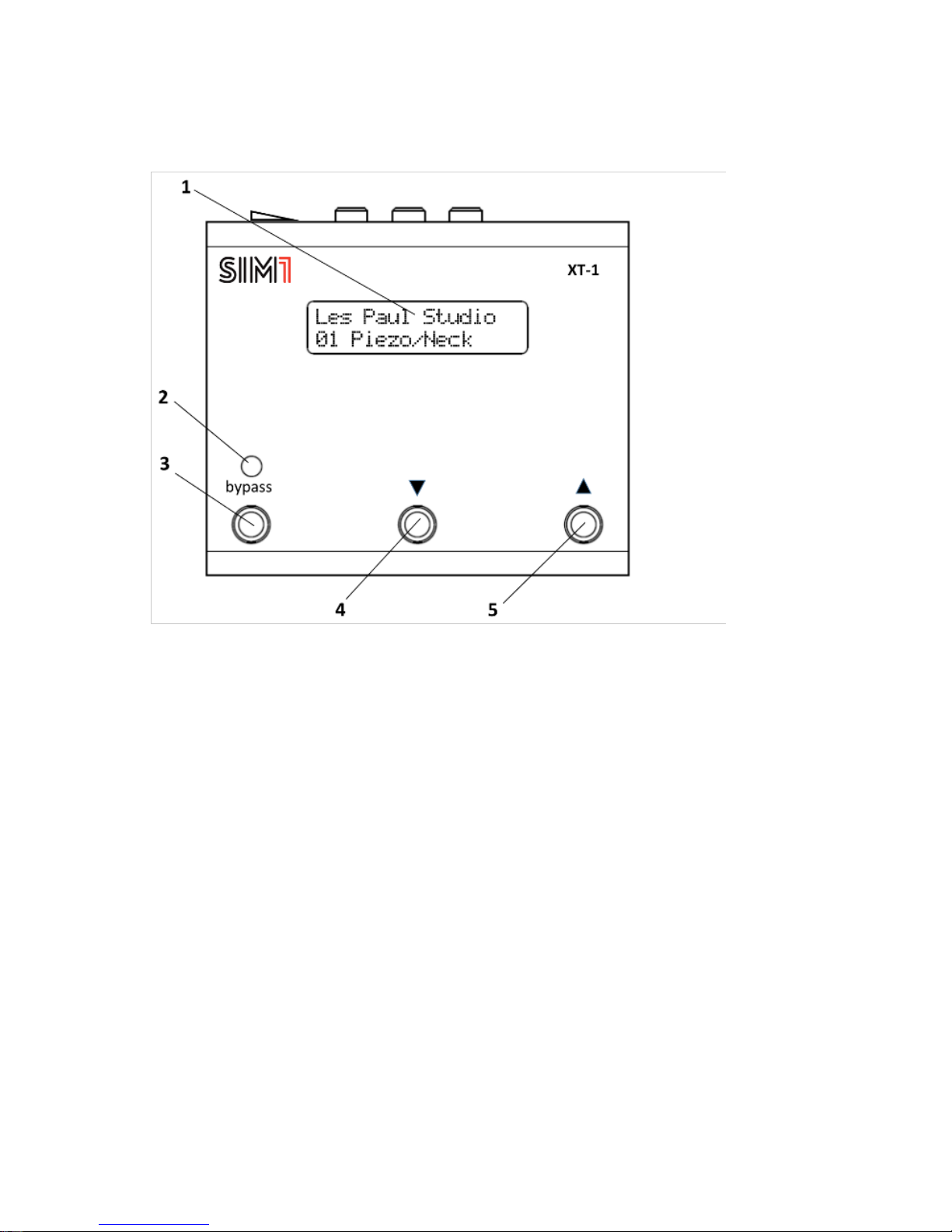
1. LED Display: Backlit display, consists of two lines of 16 characters
each. It shows all the information concerning the working procedures
of XT-1 and the guitars tones when in use (Guitar Brand and Model,
Bench number, Pick Up position).
2. Check Indicator: When the red light is on, it means that the device
is in the True Bypass mode.
3. Bypass Switch: Press this button to activate the True Bypass mode.
The display will show information about the source guitar, the one
configured with the target guitar in the channel in use.
4. Down Switch: Press this button to scroll down the guitar tones
configured in the XT-1 device.
5. Up Switch: Press this button to scroll up the guitar tones configured
in the XT-1 device.
Page 7
7
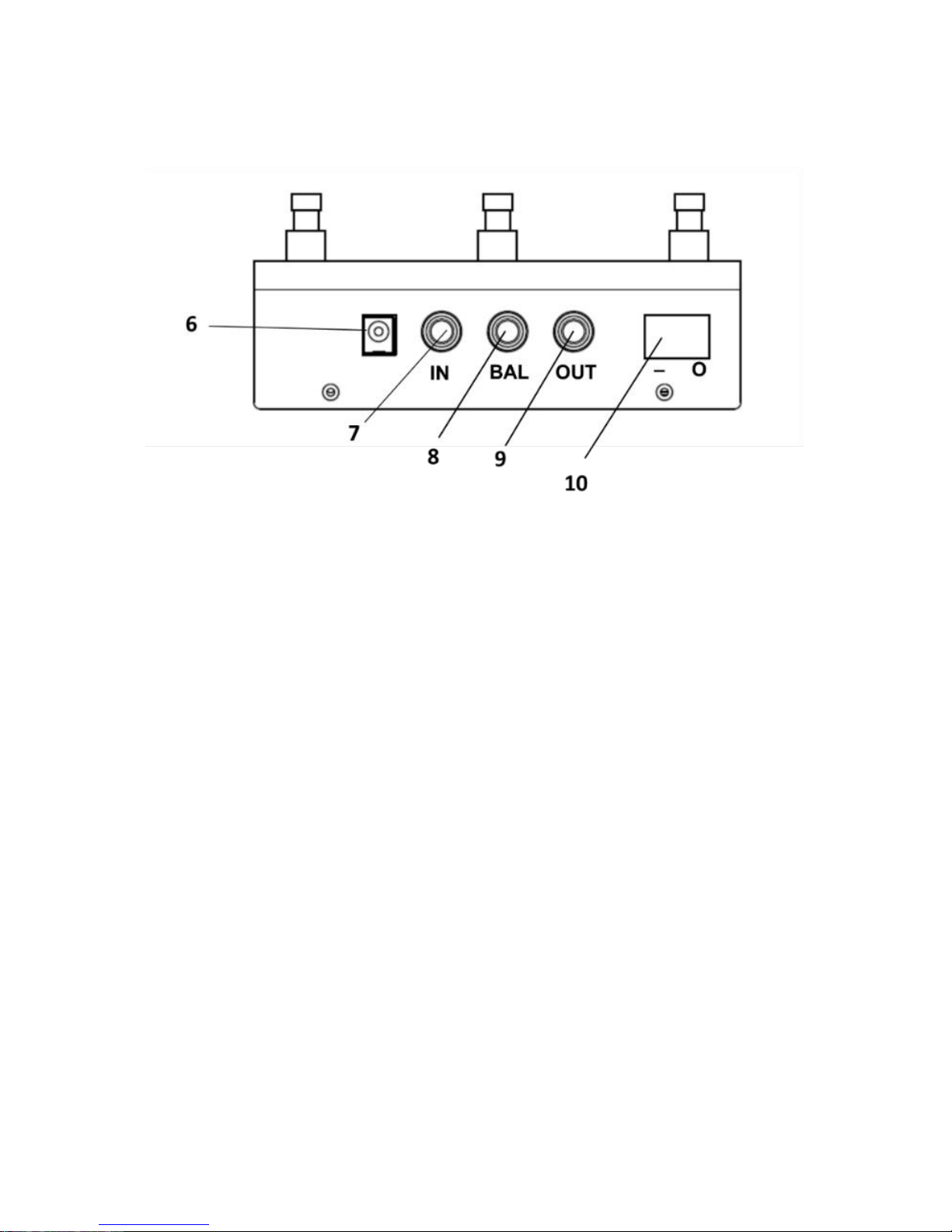
6. AC Adaptor Jack: An AC Adaptor (sold separately) must be
connected to this jack in order to use XT-1. For more information see
the Specifications manual section.
7. Input Jack: This jack accepts input signals coming from a guitar
8. Balanced Output Jack: This output jack must be connected to an
amplifier for acoustic guitars or directly to the PA (i.e. mixer).
9. Output Jack: This output jack must be connected to an amplifier for
electric guitar or other effect devices (i.e. overdrive/distortion).
10. On/Off Switch: Move this button to the «On» position, when the
device is connected to the Ac Adaptor to the power unit, to switch the
XT-1 on.
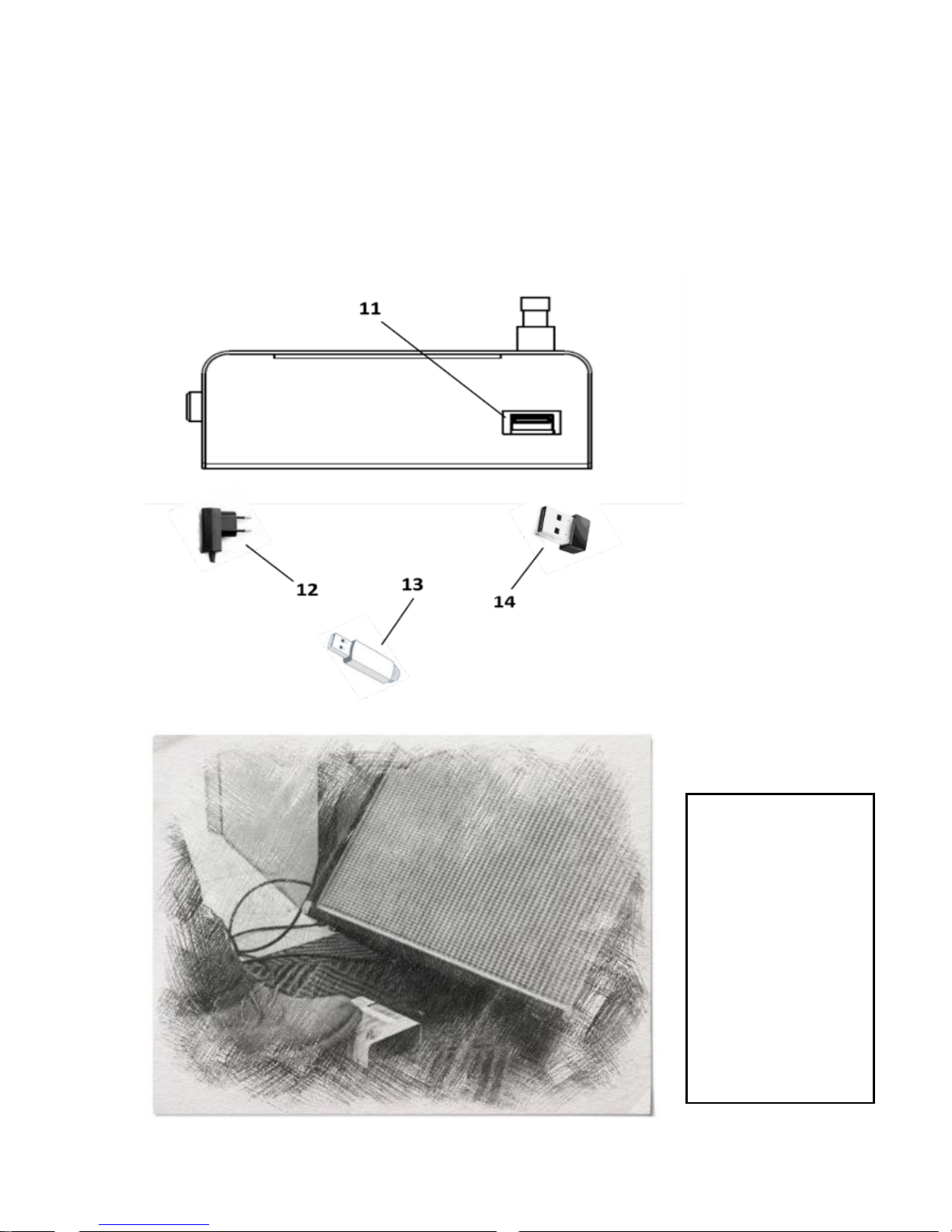
11. USB Port: Use the USB 2.0 Port to make the backup of the guitar
sounds included in the device, with the USB Key (13), or to synchronize
the device through the Configuration Software.
Accessories not included
12. Power Supply: 9V-1A Negative inner
Page 8
8
13. USB Storage stick: To store a backup of the sounds on the device
transport it to the configurator, make your own patch and store it back
to the pedal.
14. Wi Fi USB Key: To connect XT-1 to a mobile phone/tablet and
synchronize the device to the app for Android/IOS.
Connections
XT-1 is a floor
standing
device. It’s
recommended
to place it as
the very first
pedal of your
effect chain.
Page 9
9
Connections
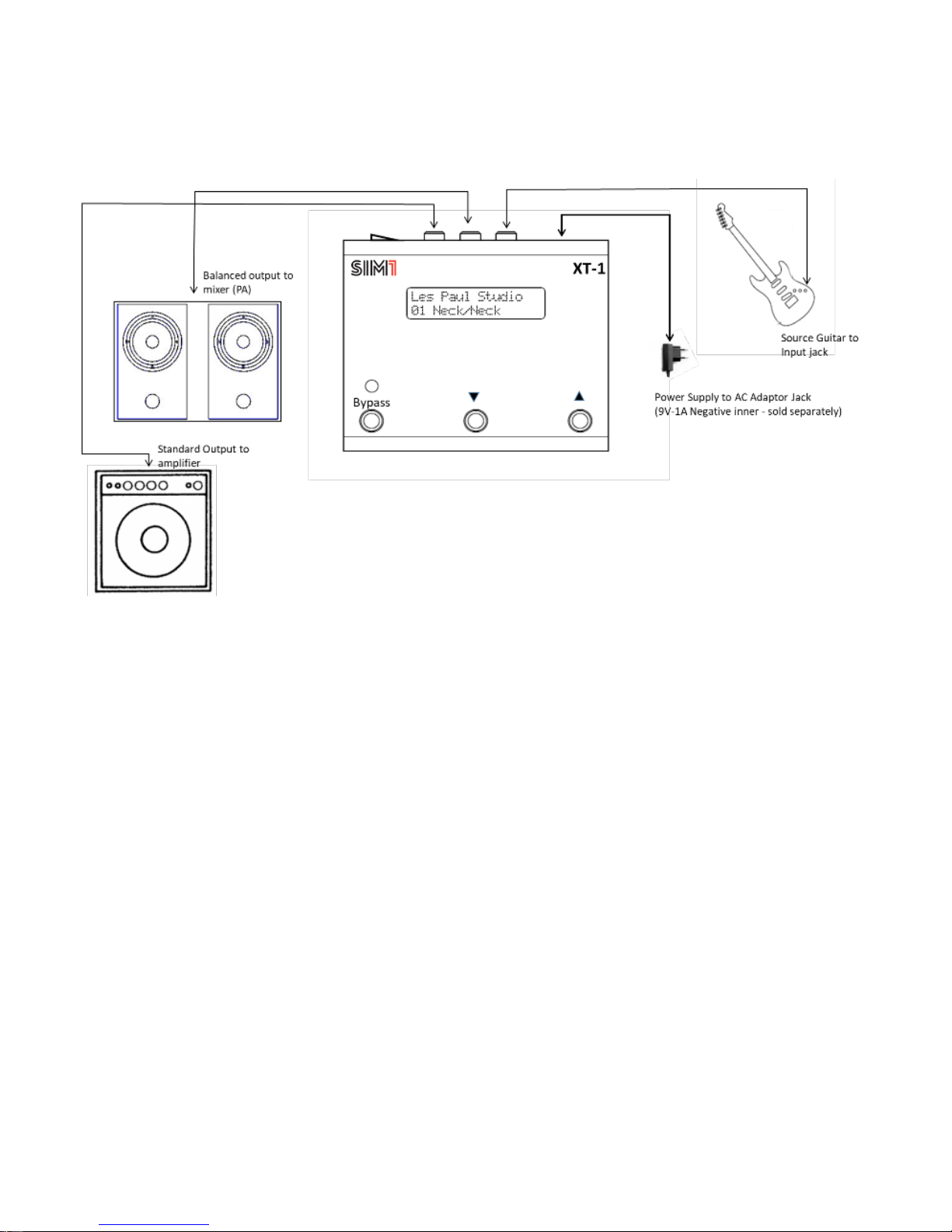
Place XT-1 on the floor and make sure that the on/off switch (10) is in
the off position (O), then connect the Power Supply 9V-1A (sold
separately) to the electric socket and to the XT-1.
Before connecting or disconnecting any device to XT-1 always make
sure that the on/off switch (10) is in the off position (O) and that the
volume control in your system are set to the minimum. This will help
to prevent any damage to system components.
The BALANCED OUTPUT (8), connected directly to the mixer of the PA,
is useful when playing, as a target instrument, the sound of acoustic
guitars. In this way the result will be more realistic and accurate. The
STANDARD OUTPUT (9) must be connected to the amplifier. Other
effects can be connected in cascade, both through the BALANCED
OUTPUT (8) or through the STANDARD OUTPUT (9).
Page 10

10
Use
Learning Procedure N.1: “Shop Mode” – Record the sound of a Source Guitar
& Reset the target sounds to those of Factory Default Settings
The “Learning Procedure” must be used for the XT-1 to recognize the sound of
your guitar (Source Guitar) and to make it possible for the emulation of all
target guitars included in the device. The “Shop Mode” allows you to record 1
or 3 pickup positions of the Source Guitar, and automatically assigns this Guitar
to all pre-sets of XT-1. At the same time all pre-sets sounds will be restored into
those ones of Factory Default.
1. Connect the Source Guitar to the Input Jack (7) of XT-1 and the Output Jack
(8/9) to the amplifier/Mixer as described in the “Connections Section”;
2. Switch the pedal On (10), and wait until the system finishes to load and the
name of the guitar placed in the first channel, it will appear in the display (1);
3. Make sure your Source Guitar is in tune;
4. Move the Pickup selector to the Neck position;
5. Hold simultaneously the three Switches of the pedal (3,4,5) for 5 seconds.
The system will ask you the number of pickups you would like to record (1 or
3).
6. Press the “Down Switch” (4) to record only 1 pickup or “Up Switch” (5) to
record 3 pickups. Then a countdown will start on the display (5 seconds to start
Learning PU Neck);
7. When the countdown is finished the device will start recording (Display:
Learning 1/80...2/80...3/80 - Hold Up To Abort). Play an ascending chromatic
scale starting from the E (6 open string), making a progression of 6 notes per
string (80 seconds to make 36 notes in total, 2 seconds per note is
recommended) – see the tab below.
Page 11
11
First option: Source Guitar with 1 pickup sound:
8. In case your Source Guitar has 1 pickup only, play the chromatic scale as
described in point 7 (fig. 1).
9. After 80 seconds of recording the system will make a “quality check”, based
on the good execution of the chromatic scale (the system controls if each of
the requested notes have been played for their adequate duration). Then you
will be asked to save, or not, the recording.
10. If you are not satisfied with the quality rating, then press the “Down switch”
(4) and repeat the chromatic scale (point 7).
11. If you are satisfied with the quality rating, then press the “Up switch” (5).
The system will make a computing process of the sounds loaded in the XT-1
(Display: Computing Progress 00%...100%).
12. At the end of the Computing Process, press the “Up switch” (5) again to
definitely end the Learning procedure.
13. At this point the Target Guitar profiles included in XT-1 will be associated
to the pickup you decided to record and will be modelled around the sound of
it. Scroll up and down the Switch selectors (4,5) to test the variety of sounds.
14. For any reason, during individual Pickup recording, it is possible to stop the
Learning Procedure, just holding for 2 seconds the Down Switch (4).
Page 12

12
Second option: Source Guitar with more than 1 pickup sound
15. In case your guitar has more than one pickup, move the selector to the Neck
Pickup position;
Then make the chromatic scale as described at point 7 (fig. 1).
16. After 80 seconds of recording the system will make a “quality check”, based
on the good execution of the chromatic scale (the system controls if each of
the requested notes have been played and their adequate duration). Then you
will be asked to save, or not, the recording
17. If you are not satisfied with the quality rating, then press the “Down switch”
(4)nand repeat the chromatic scale (point 7).
18. Repeat the procedure described at point 7 for the recording of the Mid
Pickup position (Display: 5 seconds to start Learning PU Mid – then: Recording
1/80...2/80...3/80 - Hold DOWN To Abort);
19. Repeat the procedure described at point 7 for the Bridge Pickup recording
as well. (Display: 5 seconds to start Learning PU Bridge – then: Recording
1/80...2/80...3/80 - Hold DOWN To Abort);
20. When the recording procedure of the three Pickup positions is finished, the
system will analyse the Source Guitar sounds (Display: Computing Progress
00%...100%)
21. At the end of the Computing Process, press the “Up switch” (5) again to
definitely end the Learning procedure.
22. At this point the Guitar tones included in XT-1 will be automatically
associated to the corresponding pickup of your guitar and will be modelled
around the sound of it. Scroll up and down the Switch selectors (4,5) to test the
variety of sounds.
23. For any reason, during each Pickup recording, it is possible to stop the
procedure, just by holding for 2 seconds the Down Switch (4).
With the Shop Mode XT-1 creates 3 Source Guitars (Guit1, Guit2 Guit3), each of
them corresponding to a different Pickup. The system will automatically assign:
- the Source Guit1 (Neck Pickup) to all the Target Guitars with the emulation of
a Neck/Piezo Pickup sound or Mic recorded sound;
Page 13

13
- the Source Guit2 (Mid Pickup) to all the Target Guitars with the emulation of
a Mid or Mid Position Pick Up sound;
- the Source Guit3 (Bridge Pickup) to all the Target Guitars with the emulation
of a Bridge Pickup sound;
For each Target Guitar Profile, while performing, is recommended to switch the
Pickup position of the Source Guitar to that one suggested on the display. This
allows to reach a sound as much close as possible to that one of the original
Target Guitar.
Kindly note that with this procedure all the other source guitars previously
stored in the pedal will be automatically cancelled.
Learning Procedure N.2 “Learn&Play Mode” - Record the sound of a Source
Guitar
The “Learn&Play Mode” allows to record 1 or 3 pickup positions of the Source
Guitar, and automatically assigns this Guitar to all pre-sets of XT-1. In this case
the pre-sets sounds won’t be changed into those ones of Factory Default.
1. Connect the Source Guitar to the Input Jack (7) of XT-1 and the Output Jack
(8/9) to the amplifier/Mixer as described in the “Connections Section”;
2. Switch the pedal on (10), and wait until the system will finish to load and the
name of the guitar placed in the first channel will appear in the display (1);
3. Make sure your Source Guitar is in tune;
4. Switch the pickup of your Source Guitar to the – Neck Pick Up;
5. Hold simultaneously the “bypass” and “down” switches of the pedal (3,4) for
5 seconds. The system will ask you the number of pickups you would like to
record (1-2 or 3).
6. Press the “Down Switch” to record only 1 pickup or “Up Switch” to record 3
pickups. Then a countdown will start on the display (5 seconds to start learning
PU Neck);
7. Repeat the procedure from point 8. to point 14. (Source Guitar with 1
pickup), or from point 15. to point 23., of the “Shop mode”, to complete the
learning procedure;
Page 14

14
8. Now the source guitars in use created will be named with a progressive
number (i.e. Guit4, Guit5, Guit6). The previous source guitars are still stored
into the device and they can be recalled through the Configuration Software or
through the App for IOS or Android.
Learning Procedure N.3 “Add-Source Mode” - Record and Store one pick-up
at a time as Source Guitar
The “Learn&Play Mode” allows to record 1 pickup positions of the Source
Guitar and store it to XT-1. In this case the target sounds on the pedal won’t be
automatically assigned to this Source Guitar. You should do it manually using
the “Configurator Software” or the App for IOS and Android.
1. Connect the Source Guitar to the Input Jack (7) of XT-1 and the Output Jack
(8/9) to the amplifier/Mixer as described in the “Connections Section”;
2. Switch the pedal on (10), and wait until the system will finish to load and the
name of the guitar placed in the first channel will appear in the display (1);
3. Make sure your Source Guitar is in tune;
4. Switch the pickup of your Source Guitar to that one you would like to store
in XT-1;
5. Hold simultaneously the “up” and “down” switches of the pedal (4,5) for 5
seconds.
6. A countdown will start on the display (2 seconds to start Learning);
7. Repeat the procedure of point 7. of the “Shop Mode” to complete the
learning procedure;
8. Now the new created Source Guitar will be named with a progressive
number, depending on the amount of Source Guitars present in the device (i.e.
Guit4, in case Guit1, Guit2, Guit3 were already stored).
Page 15

15
True Bypass
When the True bypass mode is activated the check indicator (2) will light in red
colour and the writing “True Bypass” will appear on the Display. Now the signal
is not processed in any way, and the sound will be the original one of the Source
Guitar. The second line of the display shows the guitar/pick up you are
supposed to play on the Source Guitar.
Pressing again the Bypass switch, the red light of the check indicator will turn
off and the sound will shift to that one of the target guitar in use.
USB Port
XT-1 is equipped with an USB Port 2.0, which must be used with the USB stick
to transfer the sounds (both source guitars and target guitars) from XT-1 to the
Configurator Software, make your own set up, and return them back to XT-1 to
make the upgrade of the device.
Back Up procedure
Insert the USB key (13) in the USB port (11), then hold for 5 seconds the Downs
Switch (4). At this point on the display will appear “Back Up in progress”. Leave
the USB Key inserted into unit until all the data will be loaded to the stick, and
“Done!” will appear on the display.
Now it’s possible to extract the stick and to insert it to the PC/MAC to import
the Back Up of your XT-1 on the Configurator Software.
Upgrade procedure
Once all data have been saved from the Configurator Software to the USB stick,
insert the key (13) in the USB port (11), then hold for 5 seconds the Up Switch
(5). At this point on the display will appear “Upgrade in progress”. Leave the
USB Key inserted into the unit until all the data is forwarded to XT-1, and
“Done!” will appear on the display. Now it’s possible to extract the stick.
Page 16

16
Reset Procedure
To reset the device to the factory default settings you must hold
simultaneously the Bypass and Up Switches (3-4) for 5 seconds. You will be
asked to confirm this procedure: press Up Switch (5) to definitively reset, Down
Switch (4) if you don’t want to reset. After the reset procedure all the Source
and Target Guitars inside XT-1 will be restored to those of factory default
setting. It’s strongly suggested to make a backup before making this procedure,
in order not to definitively lose Guitars (Source or Target).
Serial Number Code
To see the Serial Number Code, a special code different for all devices, hold for
5 seconds the Bypass Switch (3), and it will appear on the display. This code is
useful to register your device in the SIM1 Web-Store or App. This procedure
will allow you to use in your XT.1 pedal the new sounds you will buy, or you will
download for free from the community. Please note that if you do not input in
a correct way the Serial Number Code on the Web/App, the downloaded
sounds will not be correctly installed in your XT-1 device and they will not work
properly.
Designed & hand-built in Italy using
high quality components
Graphics or painting imperfections are due to
handcraft production
SIM1 srl
Legal Address: Via Ca' Rossa 54, 47121 Forlì (FC) - Italy
Operational Headquarter: Via Balzella 41/D, 47122 Forlì (FC) - Italy
www.sim-one.it [email protected]
 Loading...