

Page 1

SILITEK CORPORATION
User Manual
Version : 0.1
Keyboard Model : SK-2875
1
Page 2

CONTENTS
1. E.M.I. GUIDELINES
2. INTRODUCTION
3. OPERATION
3.1 USB Connection
3.2 Mode Indicators
3.3 Type Ahead Capability
3.4 Typematic Delay & Repeat Rate
3.5 Pseudo N-key Roll-over Capability
3.6 Diagnostic Test.
4. CABLE & CONNECTOR
5. TECHNICAL DATA
5.1 Electrical Characteristics
5.2 Mechanical Characteristics
5.3 Environmental Specificaitons
6. Block Diagram
7. KEYBOARD LAYOUTS
(See Attached)
FCC GUIDELINES 1
WARNING: This equipment has been tested and found to comply with the
limits for a Class B digital device, pursuant to Part 15 of the FCC
Rules. These limits are designed to provide reasonable protection
against harmful interference in a residential installation. This
equipment generates, Uses and can radiated radio frequency energy
and if not installed and used in accordance with the instructions,"
may cause harmful interference to radio communications. However, there
is no guarantee that interference will not occur in a particular
installation. If this equipment does cause harmful interference to
radio or television reception, which can be determined by turning the
equipment off and on, the user is encouraged to try to correct the
interference by one or more of the following measures:
- Reorient or relocate the receiving antenna.
2
Page 3

- Increase the separation between the equipment and receiver.
- Connect the equipment into an outlet on a circuit different from
that to which the receiver is connected.
- Consult the dealer or an experienced radio/TV technician for help.
Shielded interface cables must be used in order to comply with emission
limits.
Changes or modifications not expressly approved by the party responsible
for compliance could void the user's authority to operate the equipment.
Bescheinigung des Herstellers/Importeurs
in Ubereinstimmung mit den Bestimmungen der BMPT-AmtsblVfg 243/1991
funk-entstort ist. Der vorschriftsmaBige Betrieb mancher Gerate (z.B.
MeBsender) kann allerdings gewissen Einschrankungen unterliegen. Beach ten Sie deshalb die Hinweise in der Bedienungsanleitung
Dem Bundesamt fur Zulassungen in der Telekommunikation wurde das Inver kehrbringen dieses Gerates angezeigt und die Berechtigung Zur Uberpru fung der Serie auf die Einhaltung der Bestimmungen eingeraumt.
Silitek Corporation
Model : SK-2875
-----------------------------------------------------------------------------
(1) Silitek Corp. reserves the right to make changes or improvements
in the products described in this manual without notice at any time.
INTRODUCTION 2
Thank you for choosing this innovative product.
This keyboard is one of the SK-2875 series products, which are
104/105/106/109 keys enhanced keyboards for IBM PC/AT,PS2
with USB connector and its compatibles. It composites with a PS2
mouse and transfer through a USB port.
There are no software modifications or special interfaces needed.
It can be used in Win 98 /2000/ME/XP.
It uses the same as that described in the Personal Computer Guide
to Operations Handbook you received with your Personal Computer.
3
Page 4

OPERATION 3
3.1 USB This keyboard is designed to USB connection.
Connection All data transfer follow USB protocol requirements.
3.2 Mode There are three LEDs on the keyboard to indicate
Indicators ‘Caps Lock’, ‘Num Lock’ and ‘Scroll Lock’.
The LEDs are 'toggled'. The first depression of
the key turns on the LED. The second depression
turns the LED off and so on. LEDs are off on
power-up or software reset, but will flash during
power-on initialization.
3.3 Type Ahead The keyboard has been reserved for 8 bytes type ahead
Capability capability.Include status byte,reverse byte ,six bytes
of input.This means that you can depress 6 keys before
host can receive. If more keys are pressed before
the host allows keyboard output, the additional data
will lost.
3.4 Typematic With the exception of the Pause key, all keys are
Delay and typematic. When a key is pressed and held down, the
Repeat keyboard delays 0.5 sec. and begins sending a make
Rate code for that key at a rate of 10.9 characters per
second. (The delay is called typematic Delay and the
rate is called Repeat Rate.)
3.5 Pseudo The 'N' key roll-over capability where 'N' is the total
N key number of keys on the keyboard 'N' key roll is the
Roll-over number of keys that may be held depressed simultaneously
Capability and have the keyboard generate the appropriate code for
each pressed and released key without keyboard interruption.
Normally N equal to two.
3.6 Diagnostic The keyboard microprocessor will perform a diagnostic
Test self-test after Power-up or after the host system signals
the keyboard to perform a software Reset.
Initial steps are I/O port initialization, memory test on
internal RAM, USB interface initialization, read and save
vender options, keyboard initialization, timer 0 initialization,
USB enumeration, PS/2 mouse initialization.
4
Page 5
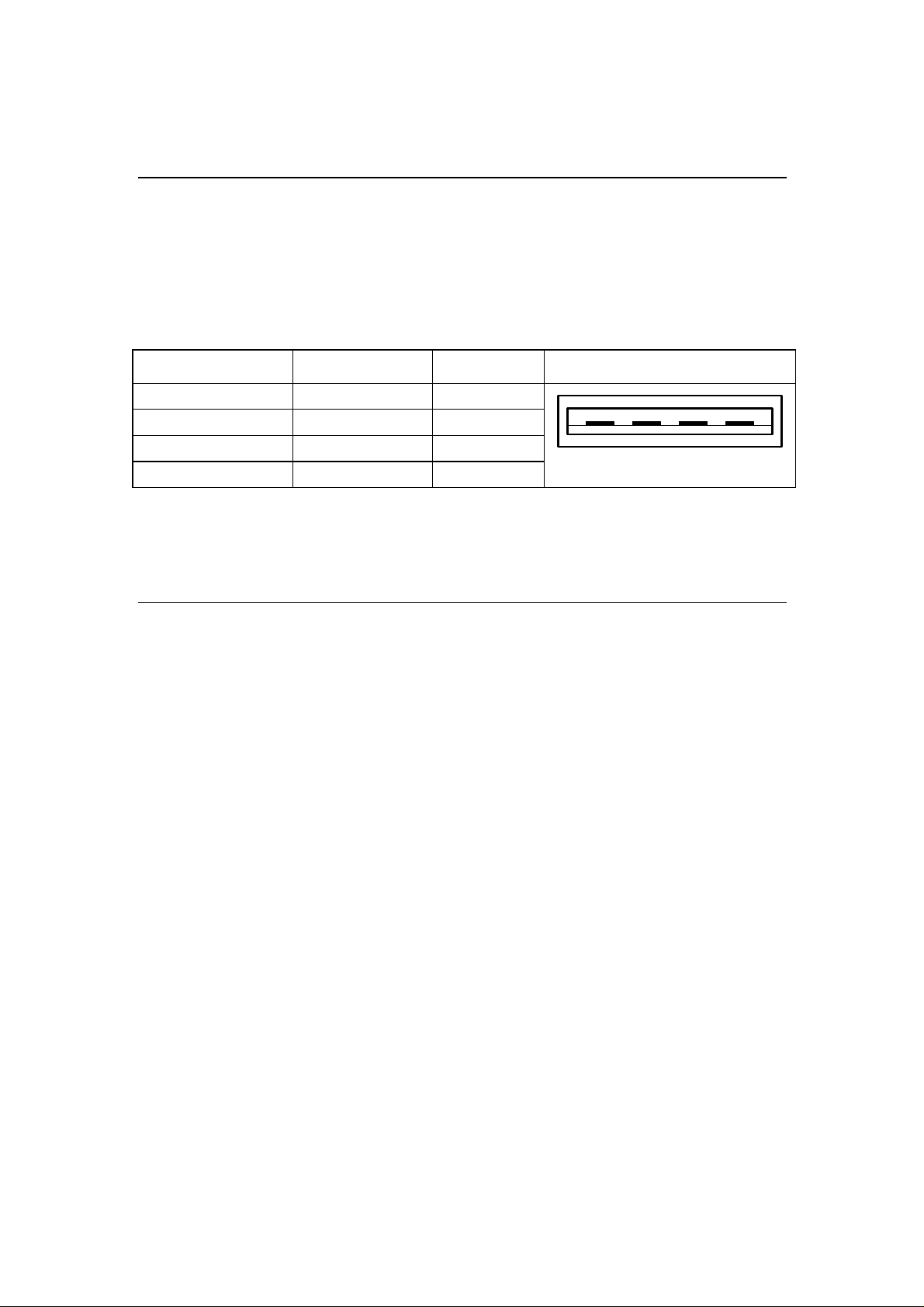
CABLE AND CONNECTOR 4
The keyboard cable is a 6-ft. long cable. The keyboard cable is
connected to the host unit through a USB connector.
The following figure lists the connector pins and their signals.
USB:
Contact number Signal name Line color USB Male Connector
1 GND Black
2 +Data Green
3 -Data White
4 VCC Red
TECHNICAL DATA 5
1 2 3 4
5.1 Electrical Input Power: +5 VDC, 50 mA max.
Characteristic Power Consumption: 0.25 watts max.
5.2 Environmental Operating Temperature: -10℃ to 50
Specifications Storage Temperature: -20 ℃ to 60
Relative Humidity: under 95% non-condensing
℃
℃
5
 Loading...