

Page 1
User Manual
Thank you for purchasing the Pulsar USB from SilentPower.
The Pulsar USB is a Galvanically Isolated USB-C Cable with ANC.
OUTLINED
Generic USB cables weren’t built for great audio.
They cram pow er a nd d at a li ne s si de by side, using poorquality conductors and minimal shielding – yo ur s ou nd i s
compromised before it even reaches your DAC.
The solution? The Pulsar USB.
It fully isolates the power and data lines to preserve si gn al
integrity, then cleans the power path with our proprieta ry
Act ive Noise Cancellation technology – reducing ripple and
cancelling all incoming interference.
Simply connect and unlock what yo ur syst em i s tr ul y
capable of.
FE ATURES
• Fully i so la te s both US B da ta a nd powe r li ne s
• Act ive Noi se C an ce llation tec hn ol og y reduces n oi se by 100x
(>40dB)
• Remov es ground loo ps b etwee n is ol at ion circu it s to s up press
interfe re nc e
• 5V/1.5A o ut pu t powers co nn ected aud io d evices wi th e as e
• Compati bl e wi th U SB 3.0 for high -s pe ed d ata trans fe r, up to
10Gbps
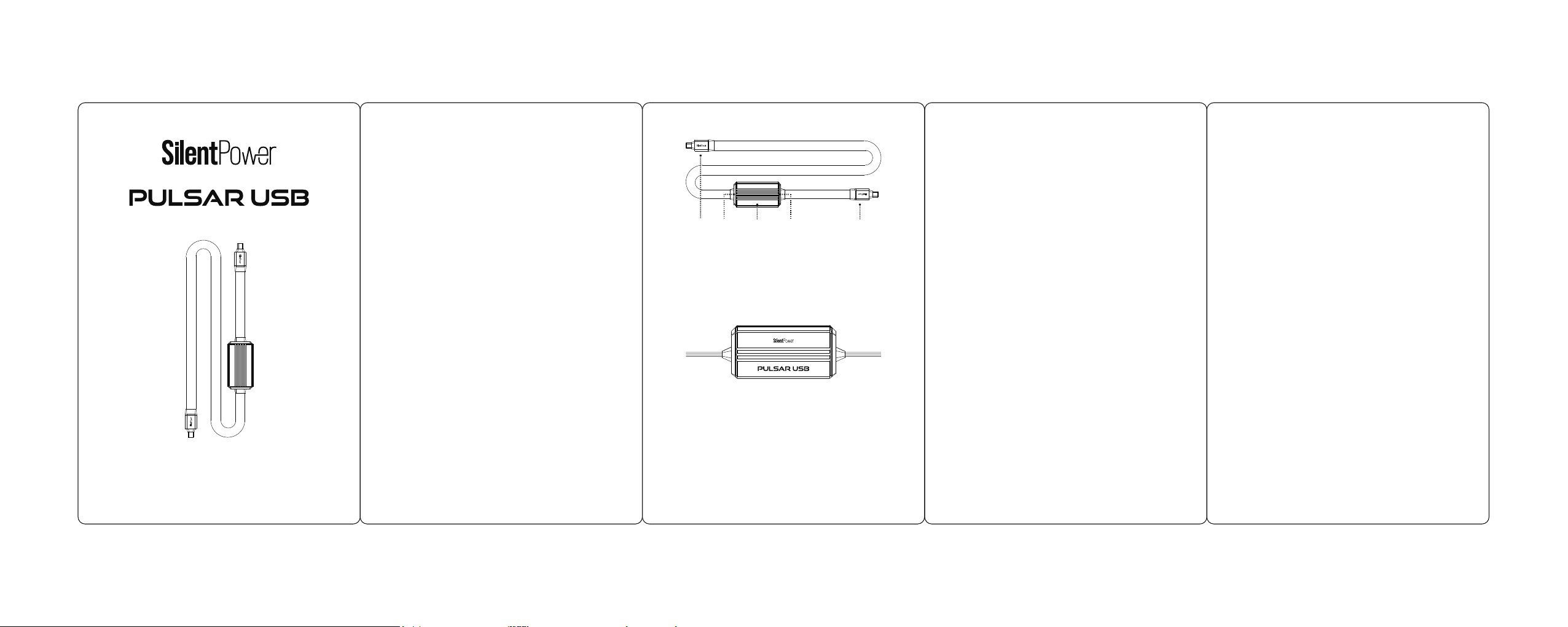
1. USB-C Male Input
This is the input side. Connect this to your USB audio source device (e.g.
PC, laptop, smartphone, tablet, streamer, DAP, etc.).
2. USB-C Input Status LED
This LED illuminates when the Pulsar is successfully connected to a USB
source via the input (1).
3. Active Noise Cancellation Module
The internal design of this module features our Active Noise Cancellation
(ANC) technology.
Unlike passive filters, ANC actively cancels EMI (Electromagnetic
Interference) or RFI (Radio Frequency Interference) from the power supply
by generating an identical signal in opposite phase - similar to how noisecancelling headphones work.
Power supply noise can occur at various frequencies for different reaosns. ANC cancels more of this
noise across the entire frequency spectrum than traditional filtration methods - all in a compact,
lightweight form that fits nearly between USB cables.
Ver1.0
silentpower.tech
Cautions
1. Avoid extreme heat, cold and humidity.
2. Avoid dropping or crushing the Pulsar USB.
Prolonged Heat Exposure
During normal use, your Pulsar USB may become quite warm.
This is normal and not a cause for concern. However, it is crucial
to ensure good ventilation while using this device.
SPECIFICATIONS
Input: USB-C Male
Output: USB-C Male
Pow er O ut pu t: 5V/1.5A
Cable Length: 1m
Insulation: HD Polyethylene
Shielding: Quad-Shield
Impedance: 90Ω; 1% Deviation
Dimensions: 13 6 x 86 x 4 5m m (5 .4 x 3.4 x 1.8”)
Net Weight: 1 87 g (6 .6 oz )
Limited War ra nt y: 12 m on th s*
*12 m onths t ypica l or as per mitte d/req uired b y local r esell er laws.
Spe cifica tions a re subj ect to cha nge wit hout no tice.
1
532 4
4. USB-C Output Status LED
This LED illuminates when the Pulsar is succesfully delivering a clean USB
output signal (5).
5. USB-C Male Output
This is t he o utput . Conne ct this t o th e USB dev ice you w ant to
isola te f rom noi se ( e.g. st reame r, US B DAC, et c.).
 Loading...