

Page 1

WARRANTY CARD
PRODUCT NAME Wireless Transceiver System PERIOD
MODEL NAME SP-7
PURCHASE DATE . . 200_
WARRANTY PERIOD . . 200_
1 YEAR
From the
date of
purchase.
CUSTOMER’S ADDRESS : NAME :
TEL :
AGENT’S ADDRESS : NAME :
TEL :
We grant 1 year warranty on the product commencing on the date of purchase.
Within the warranty period, the manufacturer will correct, free of charge, any
defect in the unit resulting from faults in materials or workmanship, either by
repairing or replacing the entire unit as manufacturer may choose.
This warranty does not cover: damages due to improper use, normal wear and
tear, or defects that have a negligible effect on the value or operation of the unit.
The warranty is void if repairs are undertaken by unauthorized persons and if
original Integrated Technologies, Inc., parts are not used. To obtain service
within the warranty period, bring in or ship the complete unit with your purchase
invoice to a Integrated Technologies, Inc., Customer Service Center.
WARRANTY SERVICE CARD
● Read this user’s guide carefully for safe operation and proper use of the
product.
● Features and specifications are subject to change without notification.
Silent Partner™
Mobile Zoom Camera
User’s Guide
SP-7
Integrated Technologies, Inc.
12425 Knoll Road | Suite 130 | Elm Grove, WI 53122
Toll Free: 866.865.2278 ext 1400
[email protected] rep firm
Page 2
MEMO
WARNING
- Do not immerse in water or keep in humid area.
- Do not place near TV, speakers , or other electronic devices.
- Before installation, check power supply and voltage to avoid
hazards and damage to the unit.
- Do not apply force or shock to the units.
- Do not disassemble the unit.
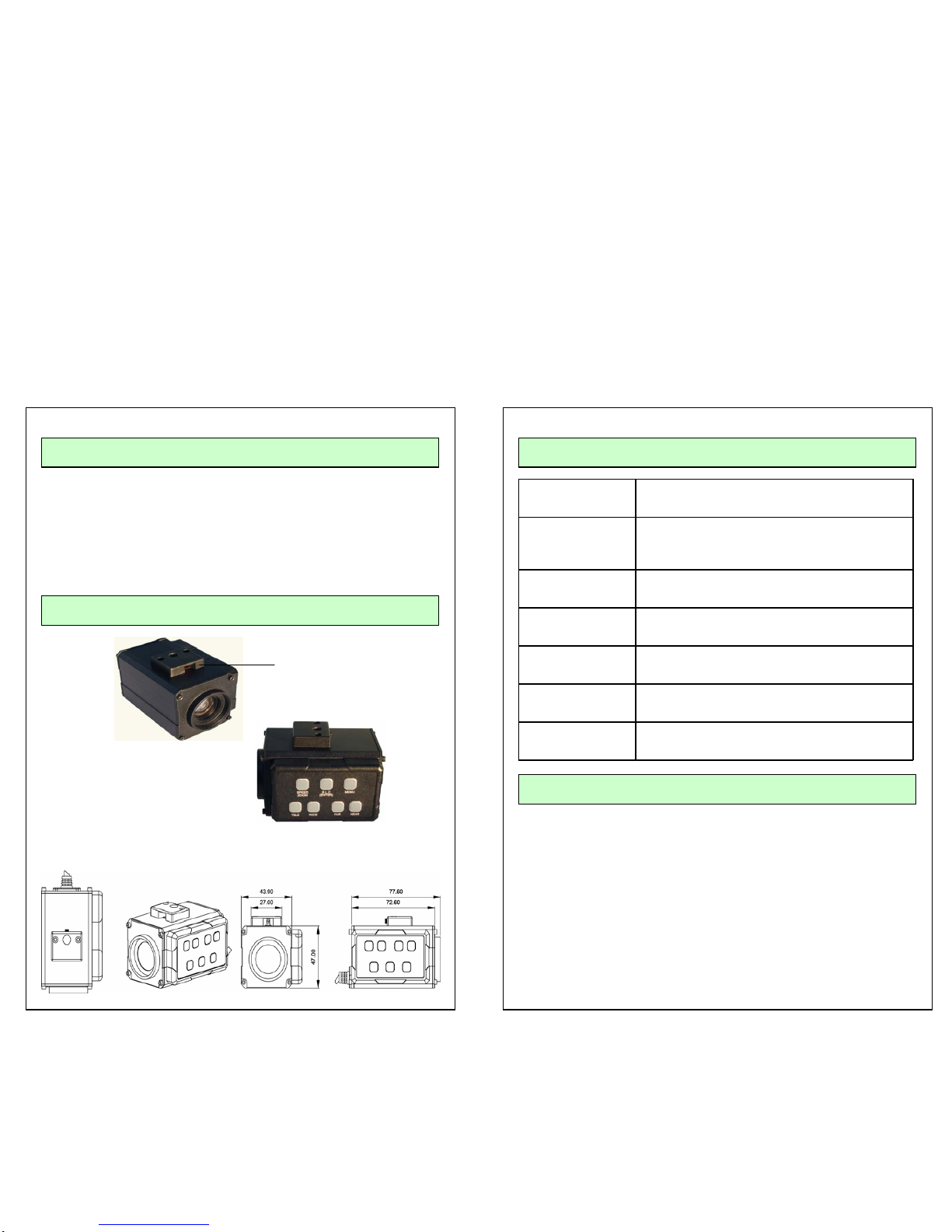
APPEARANCE
Red FLASHING
LED means Record
Dimensions (mm)
SPECIFICATIONS
Focusing
System
Auto (Sensitivity: Normal, Low), One-push AF,
Manual, Infinity, Interval AF, Zoom trigger AF
Picture
Effect
E-Filp, Nega Art, Black & White, Mirror Image
Camera control
interface
Zoom Tele , Zoom Wide
Storage
temperature
-20℃ to 60℃(-4℉ to 140 ℉)
Operating
temperature
0℃ to 50℃
Power
consumption
6 to 12V DC
Dimensions
(W Χ H Χ D)
43.9 Χ 77.6 Χ 47.0 (mm)
1 6
Page 3
PIN DESCRIPTIONSPECIFICATIONS
Signal Systems NTSC PAL
Number of total
pixels
Approx.380,000 pixels Approx.440000 pixels
Lens(Optical) 10 Χ optical Zoom, f=4.2mm to 42.0mm , F1.8 to
F2.9
Digital Zoom 12 Χ(120Χ
Χ with optical Zoom)
Horizontal
Resolution
ON/OFF(530TV Line Resolution mode ON
Angle of view(H) 46 (wide end ) to 4.6 (tele end)
Minimum working
distance
0.8m at tele end
Sync system Internal / External (V-lock)
Minimum
illumination
1.5lx(typical)(F 1.8 , 50IRE)
S/N ratio More than 50dB
Electronic shutter 1/1 to 1/10,000s, 22steps
White balance Auto, ATW, indoor , outdoor , One-push , Manual
Gain Auto/Manual (-3 to 29dB , 2dB steps)
AE control
Auto, Manual, Priority mode , Bright, EV
compensation, Back-light compensation
EV compensation -10.5 to 10.5 Db(1.5 Db steps)
Back-light
compensation
ON/OFF
Privacy zone
masking
On/ Off (24 positions , 8 position per screen)
14 colors + Mosaic
Flicker cancel Auto
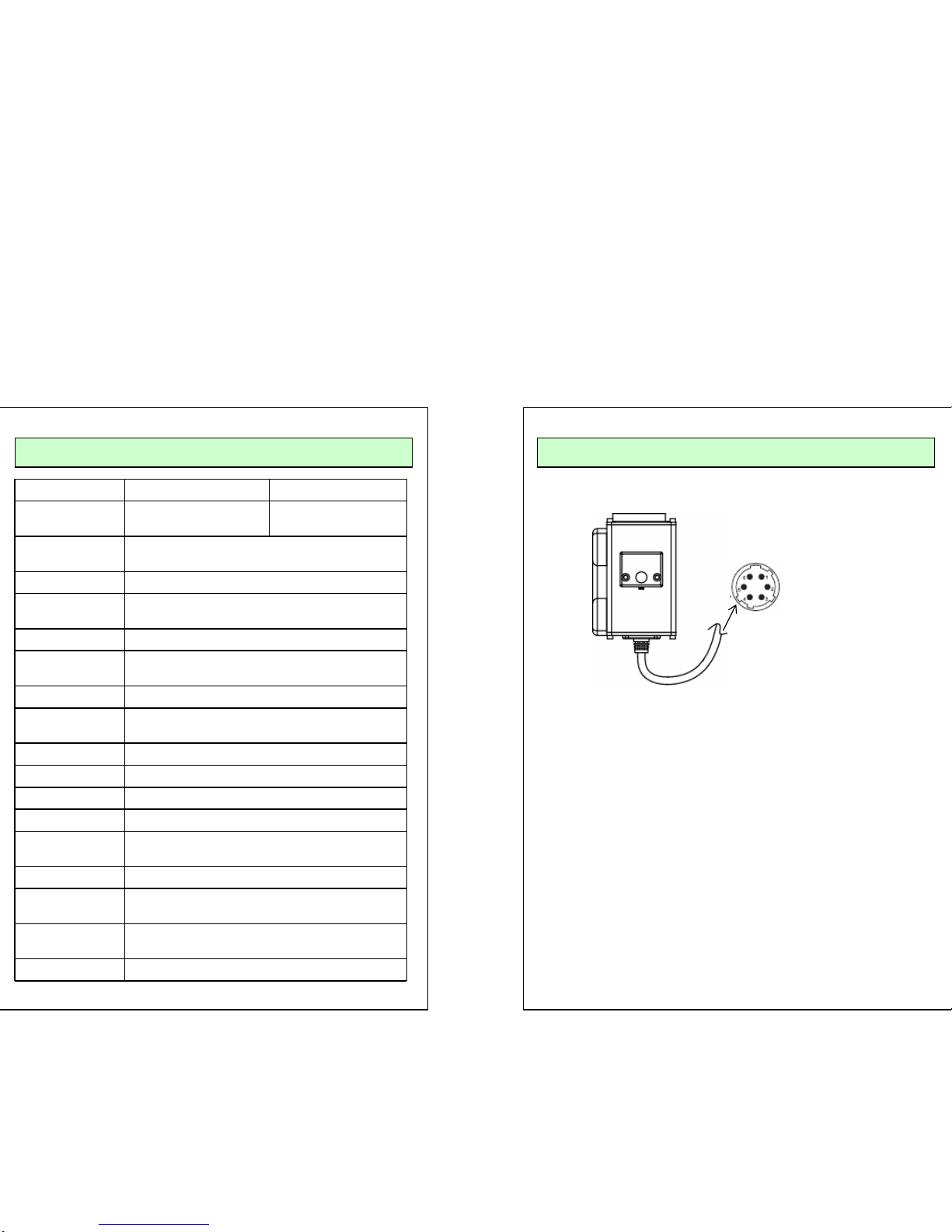
FRONT
1. VIDEO
2. GND
3. +12V
4. RXD
5. NOT IN USE
6. TXD
■ 10× Optical Zoom , Digital Zoom ON/OFF(×2 ~×12)
The 10× optical zoom lens built into PCC-7 is highly reliable in mobile
environment.
It feature Auto Focus, Auto Iris, and Zoom Tracking function.
■ High Resolution
The high resolution is achieved by using a high density Sony CCD, which
provides clean, noiseless, and reliable picture(530 TV lines) .
.
■ Electronic Flip Function
PCC-7 has the functions to flip the picture up/down and left/right electronically
■
Compact Size
■ Red LED for Video recording status display
■ One-touch Smart Zoom operation with programmable features
( Zoom position and dwell time )
5 2
Page 4
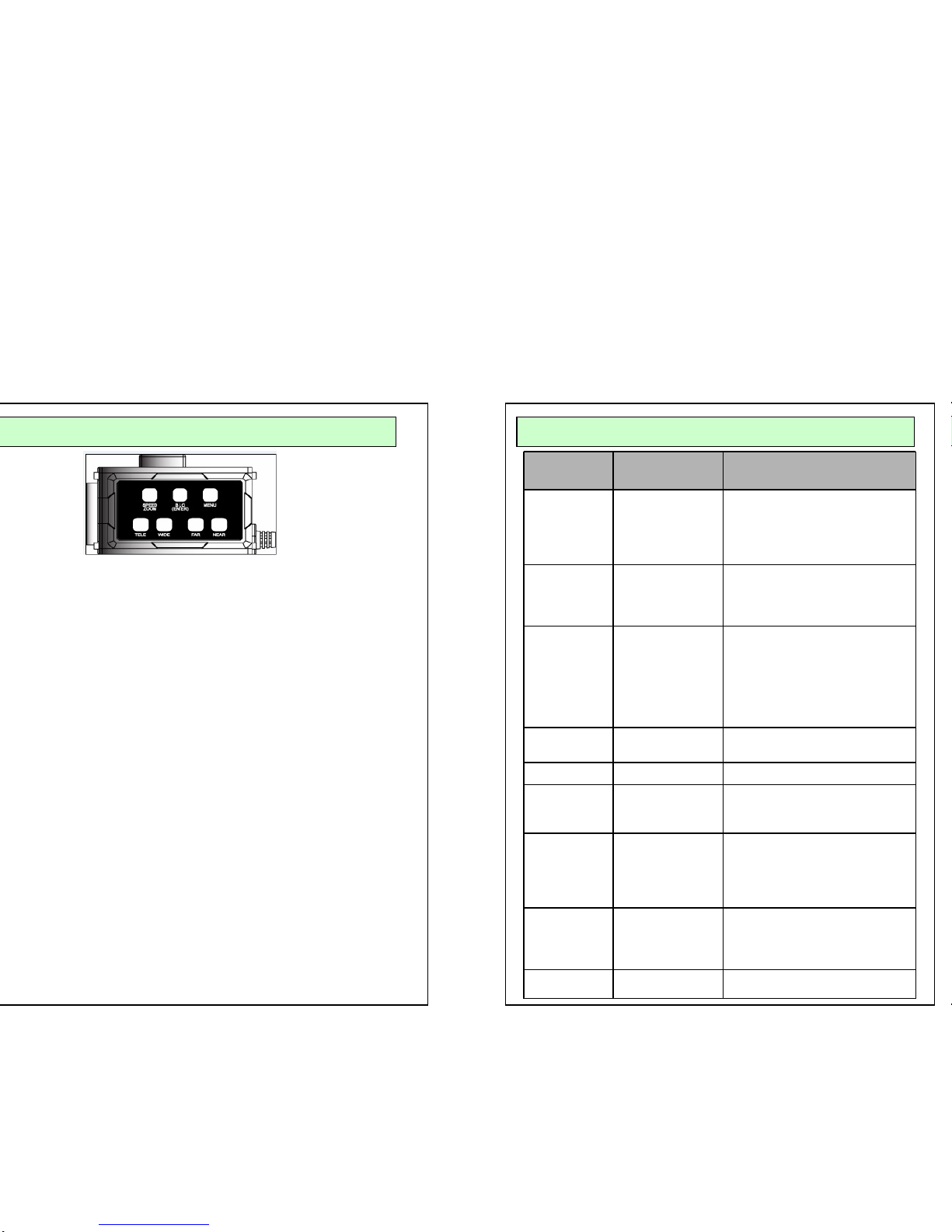
■ Speed Zoom
Normal operation : Smart Zoom – Two modes Auto / Semi Auto in the menu
Auto : when the zoom key is pressed, the camera will zoom into the
pre- programed position and stay for a number of seconds
that is also pre-programed before zooming out to default position.
Semi-Auto : When the zoom key is pressed, the camera will zoom into
the pre-programed position.
When the zoom key is pressed one more time, the camera
will zoom out to default position
■ B L C
Normal operation : Toggles back-light compensation mode on/off
■ MENU
Menu Operation : Press and hold down for 2~3 seconds to turn on OSD menu.
Pushing M button when OSD is displayed will enter into
sub-menus and pushing M button at sub-menu will exit
from sun-menu
■ FAR
■ WIDE
■
NEAR
■ TELE
Normal operation : Focus Far Menu Operation : Selection, Left
Normal operation : Focus Near Menu Operation : Selection, Right
Normal operation : Zoom Tale Menu Operation : UP
Normal operation : Zoom Wide Menu Operation : DOWN
KEY FUNCTION OPERATION OSD MENU STRUCTURE
Set up
menu
Function Summary
Focus
Set up
Mode
AF Sens
Rain Focus
Zoom Start
Zoom end
On/ Off
Low/ High
9.5cm ~ 10m
×1
×1 / D×120
WB Set up Mode
R Gain
B Gain
ATW / Manual / Auto / Indoor /
Outdoor
210
0~255
AE Set up Mode
Slow Shutter
IRIS
Gain
Bright
Shutter
Full Auto / Manual / IRIS PRIO/
PRIO/ Bright
Auto / …/….
Auto / …/….
Auto/ ..../….
Auto/ …./….
Auto/ …./….
D-Zoom Off , ×2, ×40 ,
Max
Back Light On/Off
Spot AE Mode
Position
On/ Off
X: 00~15
Y: 00~15
Special Sharpness
E- Filp
Mirror
Flickerless
Camera ID
0~ 15
On/ Off
On/ Off
On/ Off
0~255
Smart Zoom Smart Zoom
Zoom in
Zoom out
Dwell time
Auto/ Semi Auto
×1 , ×3
×1 , ×3
0~ 20sec
Init set On/off
3 4
 Loading...