

Page 1
MA510 Datum 21.03.2002 Art.Nr. 80778 Z.Nr. 8664085 Änd.Stand 88/02 1
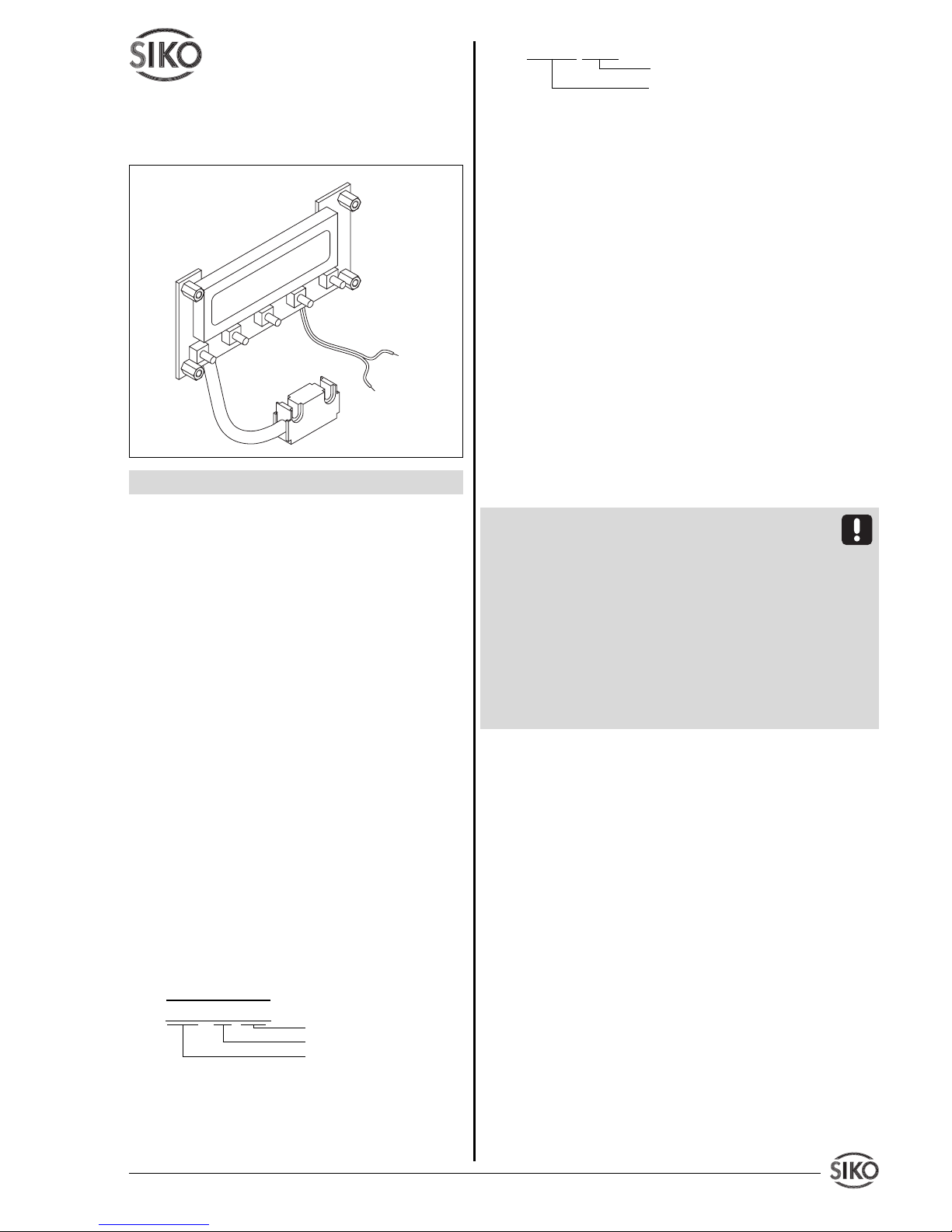
z.B. MA510-0023
Varianten-Nr.
Geräte-Typ
3. Mechanische Montage
Die Montage darf nur gemäß der angegebenen IPSchutzart vorgenommen werden. Das System muss
ggfs. zusätzlich gegen schädliche Umwelteinflüsse,
wie z.B. Spritzwasser, Lösungsmittel, Staub, Schläge, Vibrationen, starkeTemperaturschwankungen
geschützt werden.
3.1 Montage Magnetband
Die Montage muss plan zur Montagefläche bzw. der
zu messenden Strecke erfolgen. Welligkeiten verschlechtern immer die Messgenauigkeit.
Überall wo aufgrund unzureichender Befestigungsmöglichkeiten
keine geeignete Montage des Magnetbandes möglich ist, kann das
Magnetband Typ MB in eine als Zubehör lieferbare Profilschiene
(z.B. Typ PS) montiert werden.
Dadurch entsteht eine kompakte
Magnetbandeinheit.
Aus technischen Gründen muss bei der Länge,
gegenüber der Messstrecke, ein Zumaß von 25mm
berücksichtigt werden.
Achtung ! Um optimale Verklebungen zu erreichen müssen alle antiadhäsiven Fremdsubstanzen
(Öl, Fett, Staub usw.) durch möglichst rückstandslos verdunstende Reinigungsmittel entfernt werden. Als Reinigungsmittel eignen sich u.a. Ketone
(Aceton) oder Alkohole, die u.a. von den Firmen
Loctite und 3M als Schnellreiniger angeboten werden. Die Klebeflächen müssen trocken sein und es
ist mit höchstmöglichem Anpressdruck zu verkleben. Die Verklebungstemperatur ist optimal zwischen 20 und 30°C in trockenen Räumen.
Tip ! Bei Verklebung langer Bänder sollte die
Schutzfolie des Klebebandes über eine kurze Teilstrecke abgezogen werden, um das Band zu fixieren. Daraufhin erfolgt das Ausrichten des Bandes.
Nun kann über die restliche Länge die Schutzfolie,
unter gleichzeitigem Andruck des Bandes, seitlich
herausgezogen werden (als Hilfsmittel kann eine
Tapetenandrückwalze verwendet werden).
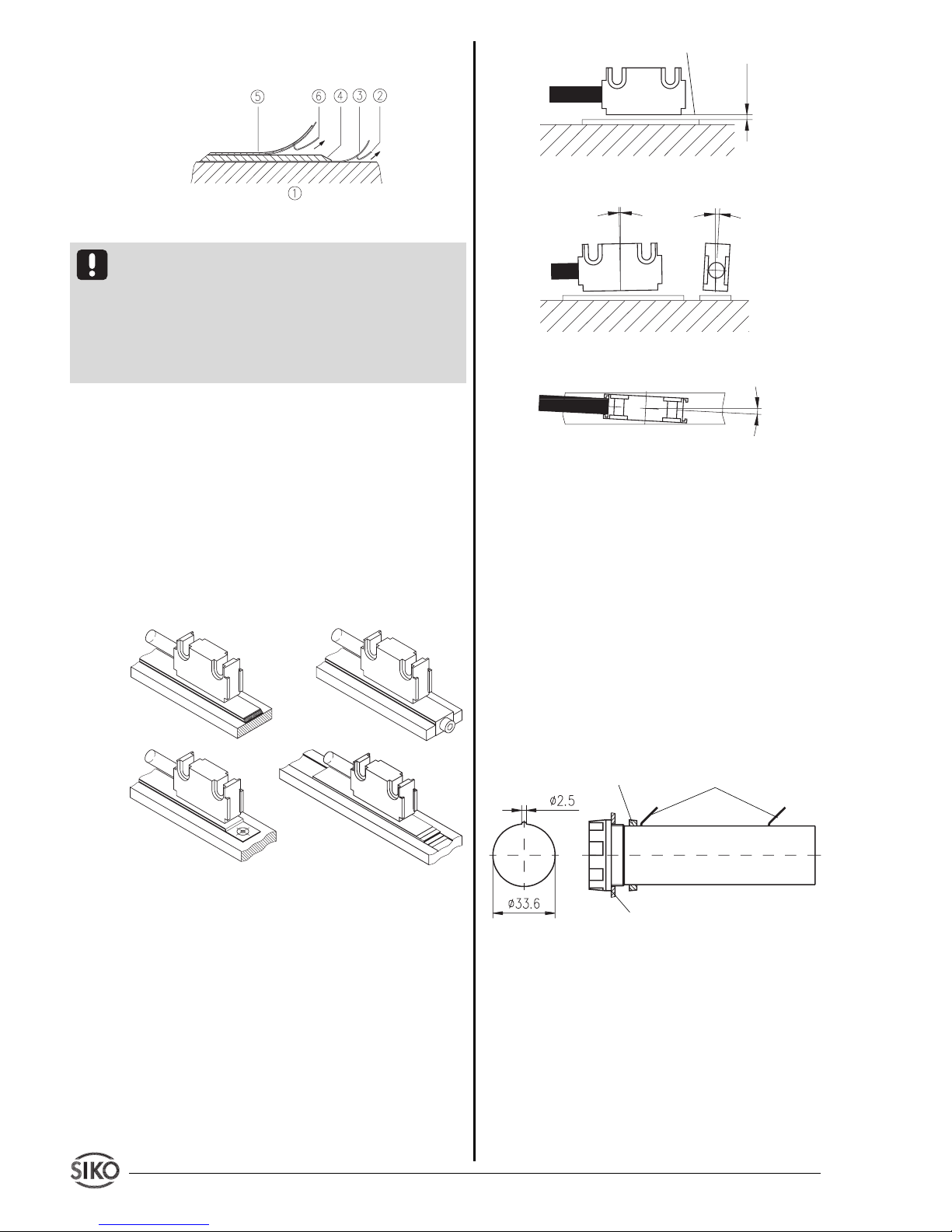
Montageschritte (Abb. 1)
• Befestigungsfläche (1) sorgfältig reinigen.
• Am Magnetband die Schutzfolie (2) des Klebebandes (3) entfernen.
• Magnetband (4) aufkleben.
• Magnetbandoberfläche sorgfältig reinigen.
• Am Abdeckband (5) die Schutzfolie (6) des
Klebebandes entfernen.
• Abdeckband aufkleben (an beiden Enden leicht
überlappen lassen).
Benutzerinformation
MA510
Magnetbandanzeige
DEUTSCH
1. Gewährleistungshinweise
• Lesen Sie vor der Montage und der Inbetriebnahme dieses Dokument sorgfältig durch. Beachten Sie
zu Ihrer eigenen Sicherheit und der Betriebssicherheit alle Warnungen und Hinweise.
• Ihr Produkt hat unser Werk in geprüftem und
betriebsbereitem Zustand verlassen. Für den Betrieb gelten die angegeben Spezifikationen und
die Angaben auf dem Typenschild als Bedingung.
• Garantieansprüche gelten nur für Produkte der
Firma SIKO GmbH. Bei dem Einsatz in Verbindung
mit Fremdprodukten besteht für das Gesamtsystem
kein Garantieanspruch.
• Reparaturen dürfen nur im Werk vorgenommen
werden. Für weitere Fragen steht Ihnen die Firma
SIKO GmbH gerne zur Verfügung.
2. Identifikation
Magnetband: Das Magnetband ist durch eine fort-
laufende Bedruckung identifizierbar.
Beispiel Magnetbandbedruckung:
Magnetbandanzeige: Das Typenschild zeigt den
Gerätetyp mit Variantennummer. Die Lieferpapiere
ordnen jeder Variantennummer eine detaillierte
Bestellbezeichnung zu.
Polbreite: 5mm
Bandgenauigkeit: 0.1mm
Seriennummer
1
0
NNNN 5000
Page 2
2 MA510 Datum 21.03.2002 Art.Nr. 80778 Z.Nr. 8664085 Änd.Stand 88/02
Abb. 6: Ausrichtung des Sensors
3.3 Montage Magnetbandanzeige
Die Montage erfolgt über die frontseitigen Abstandbolzen.
3.4 Montage Batteriehalter (Opton)
Die beiliegenden Batteriehalter sind zur Montage
auf einer Frontplatte geeignet. Wählen Sie bei der
Montage der Batteriehalterung einen Ort, der im
Dauerbetrieb möglichst keiner Erwärmung ausgesetzt ist, da Wärme die Selbstentladung stark beschleunigt.
Für den Frontplattenausschnitt gelten folgende
Abmessungen:
Abb. 7: Batteriehalterung (3Volt, 2xBaby/R14) Batterien sind nicht Bestandteil der Lieferung.
4. Elektrischer Anschluss
• Verdrahtungsarbeiten dürfen nur spannungslos
erfolgen!
• Litzen sind mit Aderendhülsen zu versehen.
• Vor dem Einschalten sind alle Leitungsanschlüsse
und Steckverbindungen zu überprüfen.
• Die überlappenden Enden des Abdeckbandes
gegen Ablösen sichern.
Abb. 1: Montage Magnetband
Achtung! Die Beeinflussung durch magnetische
Felder ist zu vermeiden. Insbesondere dürfen keine
Magnetfelder (z.B. Haftmagnete oder andere Dauermagnete) in direkten Kontakt mit dem Magnetband
geraten. In stromlosem Zustand werden Bewegungen oder Verstellungen des Magnetsensors von der
Folgeelektronik nicht erkannt und erfaßt.
Montagebeispiele
Die einfache Montageart, durch angeschrägtes
Schutzband (Abb. 2), ist nur in sehr geschützter
Umgebung zu empfehlen. Bei ungeschützer Umgebung besteht Abschälgefahr. In solchen Fällen sind
Montagearten, wie in Abb. 3 und 4 gezeigt, geeigneter.
Den optimalen Schutz bietet die Montage in einer
Nut (Abb. 5), die so tief sein sollte, dass das
Magnetband vollständig darin eingebettet werden
kann.
Abb. 2 Abb. 3
Abb. 4 Abb. 5
3.2 Montage Magnetsensor
Der Magnetsensor Typ L kann durch Verwendung
von 2 Schrauben M3 über die Ø3.1mm Durchgangslöcher befestigt werden.
• Kabel sind so zu verlegen, dass keine Beschädigungsgefahr durch Zug oder andere Maschinenteile
besteht. Falls nötig Schleppkette oder Schutzschlauch verwenden und Zugentlastung vorsehen.
• Abstandmaße zwischen Sensor und Magnetband
sowie Winkeltoleranzen beachten, diese müssen
über die gesamte Messstrecke eingehalten werden!
(siehe Abb.6)
Maximale Fluchtungsfehler
< 1°
< 3°
< 3°
aktive Seite
Abstand Sensor/Magnetband 0,1- 2mm
0,1...2mm
Frontplatte:
Blechdicke max. 3,2mm
Mutter
Flachstecker 2,8x0,5mm
max. 2,0m Kabellänge
+U
B
GND
Page 3
MA510 Datum 21.03.2002 Art.Nr. 80778 Z.Nr. 8664085 Änd.Stand 88/02 3
Achten Sie beim Wechsel der Batterien unbedingt
auf die richtige Polarität! Orientieren Sie sich an
den Kennzeichnungen am Batteriefach.
5. Inbetriebnahme
Die Bedienung und Programmierung der Anzeige
erfolgt mit den fünf frontseitigen Tasten.
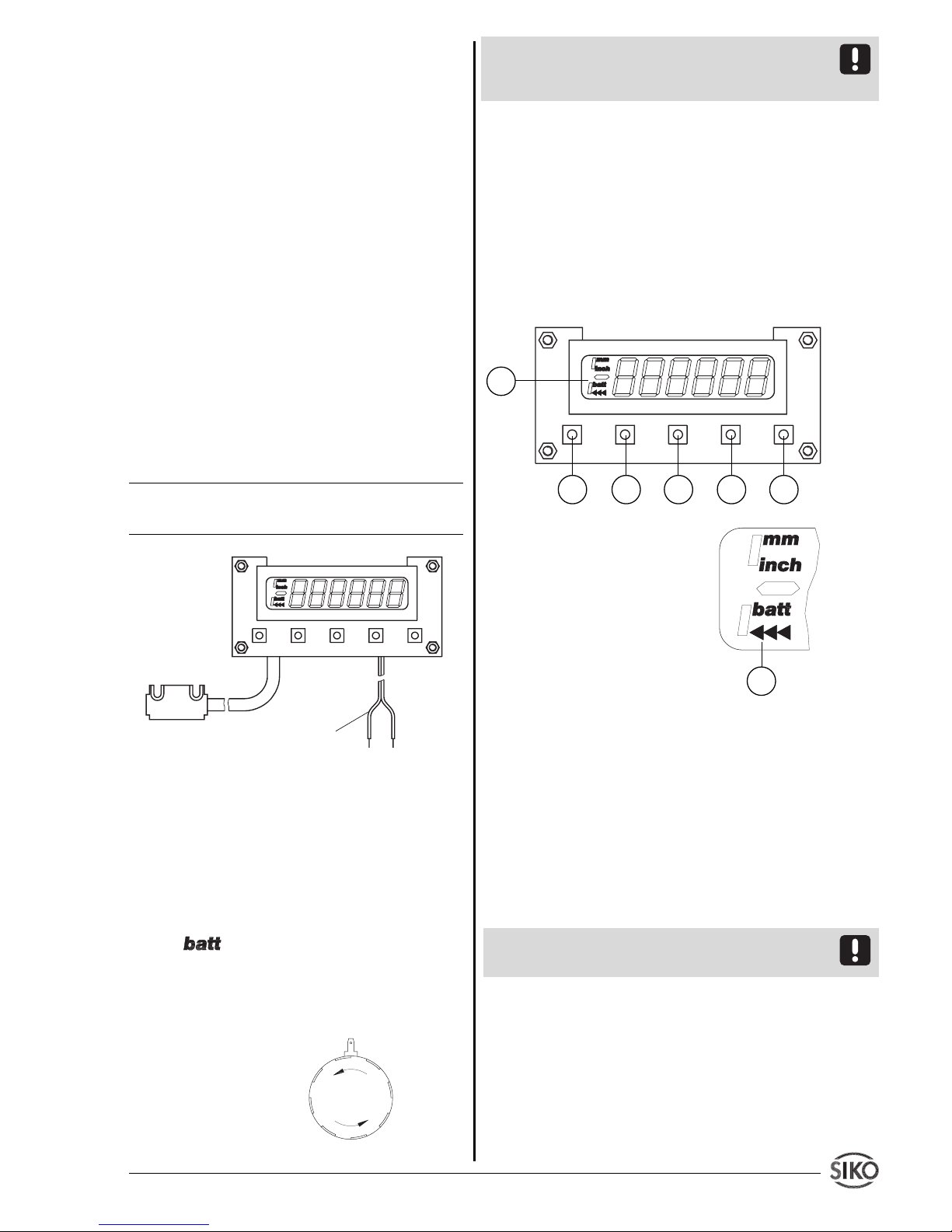
Tastenfunktionen
Die Tasten können je nach Betriebszustand weitere
Funktionen besitzen (siehe Kap. 6 und 8). Sie
werden einzeln, gemeinsam (je zwei) und zeitabhängig betätigt.
1. Programmiertaste
2. Auswahltaste 'Wert'
3. Auswahltaste 'Stelle'
4. Speichertaste
5. EIN / AUS
6. Anzeige: Batteriewechsel /
Kettenmaßfunktion / Vorzeichen
Abb. 10: Tastenfunktionen
Einschalten
Durch betätigen der Taste (5) wird das Gerät
eingeschaltet. Anschließend folgt ein Selbsttest,
wobei das Display folgende Werte anzeigt:
• Anzeige aller LCD-Segmente (ca. 1 s)
• Anzeige des Firmware-Standes ( z.B. 1_03)
• Anzeige des Wertes 0 – betriebsbereit!
(Falls der Parameter 'Istwertspeicher' aktiviert ist, wird beim
Einschalten der letzte Messwert angezeigt.)
Achtung ! Das Gerät schaltet sich nicht automatisch
ein, wenn Betriebsspannung angelegt wird.
Ausschalten
• Durch Betätigen der Taste (5) wird das Gerät
ausgeschaltet (mit Verzögerung, wenn Parameter
"_4_oFF" auf "EIn" programmiert ist).
• Anzeige schaltet automatisch nach der letzten
Messung oder nach einer voreingestellten Zeit ab.
(siehe Kap. 7 Parameter '_AUto_' und 'PErIod')
Hinweise zur Störsicherheit
Alle Anschlüsse sind gegen äußere Störeinflüsse
geschützt. Der Einsatzort ist aber so zu wählen,
dass induktive oder kapazitive Störungen nicht
auf die Anzeige oder deren Anschlussleitungen
einwirken können! Durch geeignete Kabelführung
und Verdrahtung können Störeinflüsse (z.B. von
Schaltnetzteilen, Motoren, getakteten Reglern oder
Schützen) vermindert werden.
Das System muss in möglichst großem Abstand von
Leitungen eingebaut werden, die mit Störungen
belastet sind; ggfs. sind zusätzliche Maßnahmen
wie Schirmbleche oder metallisierte Gehäuse
vorzusehen. Leitungsführungen parallel zu Energieleitungen vermeiden.
Stromversorgung
UB= 3 VDC
z.B. von Batterie mit Batteriehalter, siehe Kap. 3.4
Belegung Litzenfarbe
+ U
B
rot
GND schwarz
Abb. 8: Anschluss
Anschluss des Batteriefaches
Das Batteriefach wird entsprechend Kap. 3.4 montiert und angeschlossen.
Batteriewechsel
Erscheint in der Anzeige das blinkende 'Low-BattSymbol' so ist baldmöglichst ein Batteriewechsel vorzunehmen.
Zum Einsetzen bzw. Wechseln der Batterien ist des
Batteriefach durch Drehen der Frontkappe zu öffnen.
Abb. 9: Batteriewechsel
Anschlusskabel für
Spannungsversorgung
Sensor
1
2
3
4 5
6
6
Page 4
4 MA510 Datum 21.03.2002 Art.Nr. 80778 Z.Nr. 8664085 Änd.Stand 88/02
Betriebsarten
Es gibt zwei Betriebsarten:
1. Programmiermodus: Einmalige Einrichtung der
Anzeige auf die Anwendung.
2. Eingabemodus: Funktionen, die während der
normalen Anwendung benötigt werden.
6. Programmiermodus
Die Anzeige wird ab Werk mit einer Standardeinstellung oder gemäß Bestellung ausgeliefert. Zur
Änderung und Programmierung muss in den Programmiermodus geschaltet werden. Die Programmierung der Anzeige erfolgt üblicherweise nur
einmal bei der ersten Inbetriebnahme und Einrichtung der Anzeige bzw. Anwendung. Sie können die
Parameter jederzeit ändern oder kontrollieren. Die
von Ihnen gewählten Werte werden nicht flüchtig
gespeichert. Bezeichnung, Funktion und wählbare
Werte finden Sie auf den folgenden Seiten.
Eintritt in den Programmiermodus:
Betätigen der Taste (1) für mind. 5 s
Beenden des Programmiermodus:
keine Taste betätigen für mind. 30 s, oder mit der
Taste (1) bis zum Ende der Parameterliste durchtasten
Weiterschalten der Parameter:
mittels Taste (1)
Ändern der Parameter:
mit den Tasten (2) und (3)
Übernehmen/Speichern der Änderung:
mit der Taste (4), die Anzeige zeigt kurzzeitig die
Meldung " -SP- "
7. Parameterbeschreibung
Eine detaillierte Parameterliste mit allen Einstell-
parametern, und der Möglichkeit spezifische Konfigurationen zu notieren, finden Sie im Anhang
dieser Benutzerinformation.
(in deutscher Sprache, Parameter _SPr_ = "d")
Anzeige Bezeichnung / Beschreibung
"Auswahl"
_AUFL_ Auflösung: Legt die Auflösung der
Anzeige fest. Der Parameter "_FrEI"
läßt die Programmierung eines Rechenfaktor zu.
_FAC_ Rechenfaktor (nur möglich wenn Auf-
lösung = FrEI): Der zu programmierende Rechenfaktor wird verwendet, um
z.B. Winkelanzeigen zu realisieren. Die
maximal mögliche Auflösung von 1/
100mm dient als Grundlage. Der Rechenfaktor 'FAC' ergibt sich wie folgt:
FAC = anzuzeigender Messbereich /
Gesamtverfahrweg [1/100 mm]
Beispiel: Kreisscheibe mit Anzeigebereich 0 ... 180°; Anzeige in 1/10°;
Umfang der Kreisscheibe 942,48 mm
also Gesamtverfahrweg 471,24 mm;
FAC = 1800 / 47124 = 0,038200
_rEF_ Referenzwert: Absoluter Bezugspunkt
(Referenzpunkt) des Messsystems. Der
Wert wird gesetzt, wenn gemäß Kap.
8 referenziert wird.
_oFF_ Offset: Frei wählbarer Wert, der die
Anzeige beeinflußt. Offset kann z.B.
als Werkzeugkorrekturwert eingesetzt
werden.
_dP_ Nachkommastelle (nur möglich wenn
Auflösung = FrEI): Festlegung des Dezimalpunktes zur Anpassung an die
Auflösung.
_ZAEHL Zählrichtung: Zählrichtung des
Messsystems; hängt ab von der Sensormontage und kann nachträglich
verändert werden.
"AUF" Aufwärts
"Ab" Abwärts
_AUto_ Abschaltart: Betriebsart der automati-
schen Abschaltung.
"AUS" keine Abschaltung.
"EIn" mit automat. Abschaltung
PErIod Abschaltzeit : Zeit zwischen letzter
Messung oder Betätigung und dem
automatischen Abschalten.
_ISP_ Istwertspeicher:
"AUS" Istwertspeicher ausgeschaltet. Nach
dem Einschalten muss die Anzeige
referenziert (genullt) werden.
"EIn" Istwertspeicher eingeschaltet. Nach
dem Einschalten wird der letzte Mess-
wert wieder angezeigt.
_4_oFF Verzögerung Ausschalten:
Taste (5) muss zum ausschalten der
Messanzeige ca. 4s betätigt werden.
_F_AbS Freigabe Rücksetzfunktion: Rückset-
zen auf den Referenzwert mit der Ta-
ste (4) der frontseitigen Tastatur.
"AUS" Resetfunktion unwirksam
"EIn" Resetfunktion wirksam
_F_rEL Freigabe Kettenmaßfunktion: Um-
schaltung zwischen Absolutmaß und
Page 5
MA510 Datum 21.03.2002 Art.Nr. 80778 Z.Nr. 8664085 Änd.Stand 88/02 5
Voraussetzung: Im Programmiermodus muss der
Menüpunkt Freigabe Kettenmaßfunktion (_F_rEL)
mit Zustand "EIn" programmiert sein und die Anzeige befindet sich nicht im Programmiermodus (s.
Kap.6 'Beenden des Programmiermodus').
Referenzwert bzw. Offsetänderung
Freigabe Referenzwertänderung durch gleichzeitiges Betätigen der Tasten (1) + (2) einschalten.
Gleichzeitiges Betätigen von (1) + (3) schaltet die
Freigabe Offsetkorrektur ein.
Die Anzeige zeigt den Referenz- bzw. Offsetwert.
Mit den Pfeiltasten kann der Wert geändert werden.
Mit Drücken der Taste (4) wird der Wert übernommen und gespeichert.
Voraussetzung: Im Programmiermodus muss der
Menüpunkt Freigabe Referenzwertänderung (_F_rEF)
bzw. Freigabe Offsetwertänderung (_F_oFF) mit
Zustand "EIn" programmiert sein und die Anzeige
befindet sich nicht im Programmiermodus (s. Kap.6
'Beenden des Programmiermodus').
9. Istwertspeicher
Voraussetzung: '_ISP_' = "EIn"
Bei Abschalten des Gerätes wird der zuletzt ange-
zeigte Messwert nichtflüchtig gespeichert.
10. Verlängern von Magnetbändern
Manche Anwendungsfälle können die Verlängerung
des Magnetbandes erfordern. Mit einfachen Hilfsmitteln besteht die Möglichkeit das Magnetband
zu trennen und wieder zusammenzusetzen.
Es ist jedoch selbst bei exakter Vorgehensweise damit
zu rechnen, dass die Genauigkeit an der Trennstelle
beeinträchtigt wird (Fehler min. 0,1...0,2mm).
Hilfsmittel
• Magnetlupe, -folie oder Metallstaub
• Lineal oder geeignetes Werkzeug
• Kompassnadel
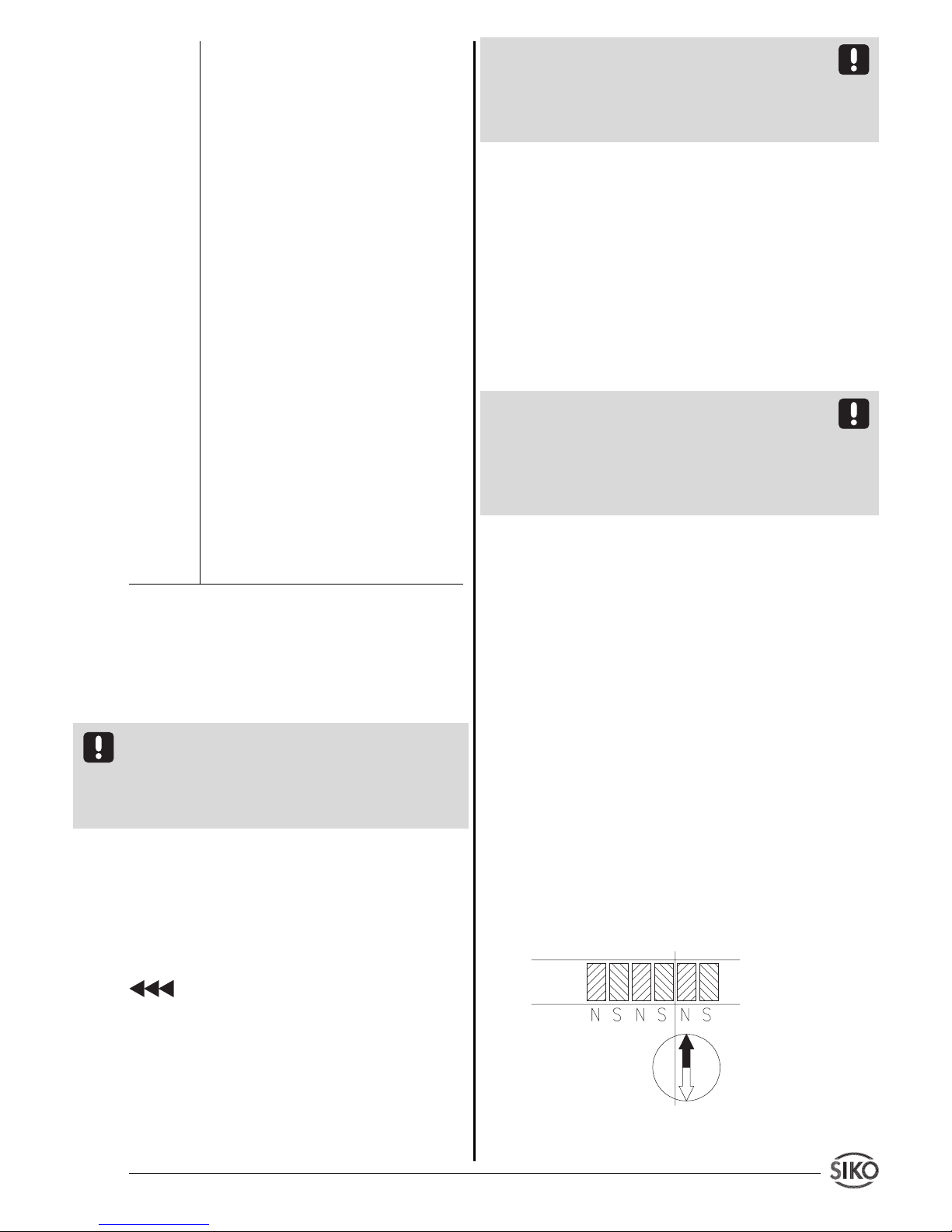
Abb. 11: Ermittlung der Polarität. Trennung des
Magnetbandes.
Nullung mit anschließendem Relativ-
maß.
"AUS" Kettenmaßfunktion unwirksam
"EIn" Kettenmaßfunktion wirksam
_F_rEF Freigabe Referenzwertänderung: Ein-
gabe Änderungsmöglichkeit des Refe-
renzwertes.
"AUS" Funktion unwirksam
"EIn" Funktion wirksam
_F_oFF Freigabe Offsetkorrektur: Eingabe-/
Änderungsmöglichkeit des Offsetwer-
tes.
"AUS" Funktion unwirksam
"EIn" Funktion wirksam
_SPEEd Beinflussung des Stromverbrauches
durch Veränderung des Prozessortak-
tes.
"HoCH" Volle Prozessorgeschwindigkeit
"nIE" Reduzierte Prozessorgeschwindigkeit
mit geringerem Stromverbrauch
_SPr_ Sprache: Bestimmt die Sprache, in der
die Menüpunkte in der Anzeige er-
scheinen.
"d" Deutsch
"E" Englisch
8. Eingabemodus
Rücksetzfunktion (Referenzieren)
• Betätigung der Taste (4) setzt die Anzeige auf
den Referenzwert zurück.
Voraussetzung: Im Programmiermodus muss der
Menüpunkt Freigabe Rücksetzfunktion (_F_AbS)
mit Zustand "EIn" programmiert sein und die Anzeige befindet sich nicht im Programmiermodus (s.
Kap.6 'Beenden des Programmiermodus').
Kettenmaßfunktion
Einschalten durch gleichzeitiges Betätigen der
beiden Tasten (2) + (3).
• Die Anzeige wird auf Null gesetzt.
• In der Anzeige erscheint das blinkende Symbol
.
• Ausschalten durch gleichzeitiges Betätigen
der beiden Tasten (2) + (3). Das Absolutmaß wird
wieder angezeigt.
• Während des Kettenmaßbetriebs kann die Anzeige durch Betätigung der Taste (4) ebenfalls auf Null
gesetzt werden. Das Absolutmaß im Hintergrund
wird dadurch nicht verändert.
Page 6
6 MA510 Datum 21.03.2002 Art.Nr. 80778 Z.Nr. 8664085 Änd.Stand 88/02
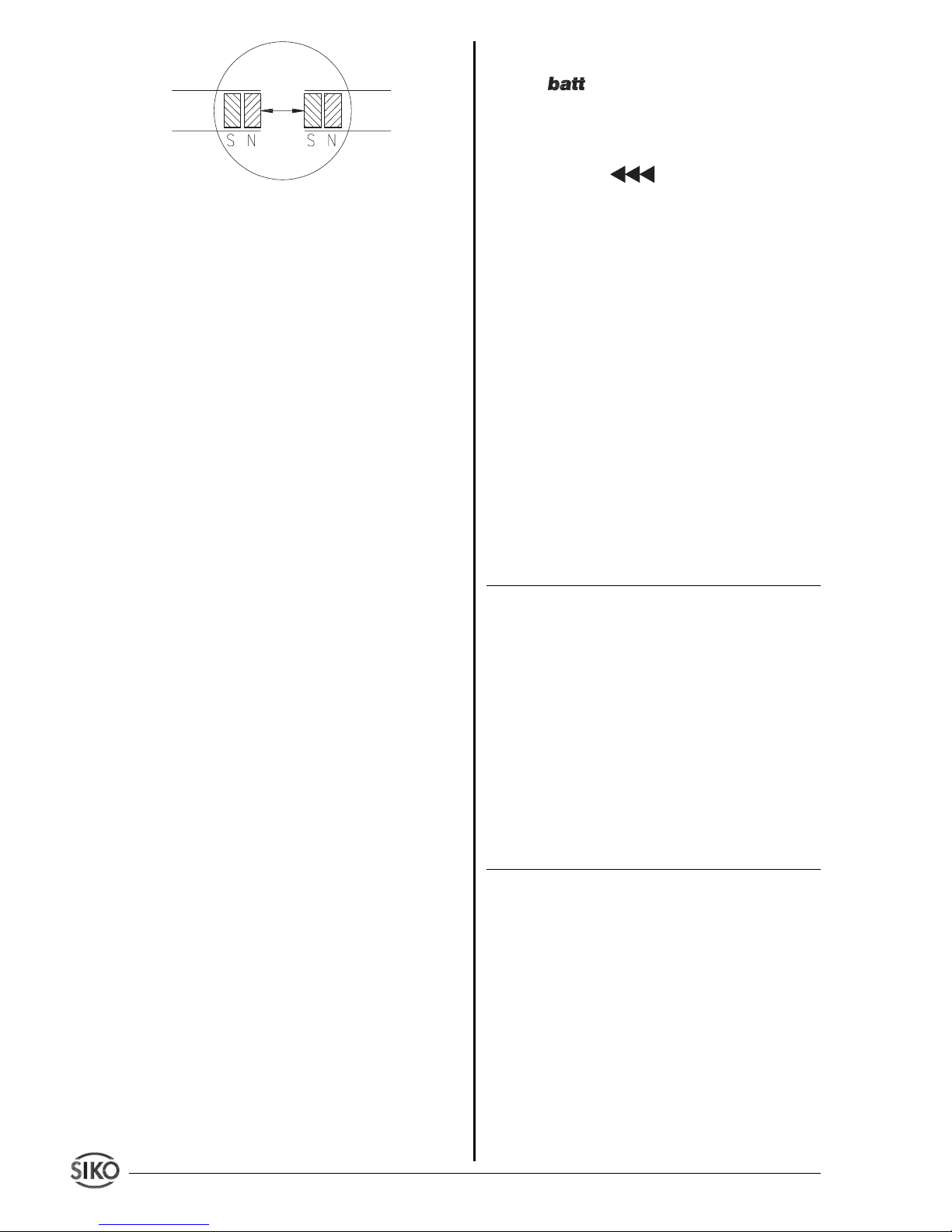
Abb. 12: Ermittlung der Polarität. Ansetzen des
Magnetbandes
Vorgehensweise
• Falls ein Abdeckband vorhanden ist, muss dieses
zuerst entfernt werden.
• Polteilung durch Bestreuen des Magnetbandes
mit Metallstaub oder mit Hilfe einer Magnetlupe
oder Magnetfolie ermitteln.
• Wenn erforderlich mit Kompassnadel kontrollieren, wo sich die Pole am Magnetband befinden
(Abb. 11).
• Lineal anlegen und Magnetband mit scharfem
Messer rechtwinklig abtrennen. Anschließend auch
Trägerband entsprechend kürzen.
• Vorherige Schritte am anzusetzenden Band wiederholen.
• Vor dem Ansetzen die Polarität überprüfen. Die
beiden Enden müssen sich anziehen (ggfs. Kompassnadel benutzen). Falls gleiche Polarität, ein
Band um einen halben Polabstand kürzen (Abb. 12).
• Beide Bänder stoßend montieren und Abdeckband aufkleben.
11. Wartung des Magnetbandes
Die Oberfläche des Magnetbandes ist bei starker
Verschmutzung durch Staub, Späne, Feuchtigkeit,
usw., von Zeit zu Zeit mit einem weichen Lappen zu
reinigen.
12. Fehlerbehandlung
Die Anzeige kann Fehlerzustände erkennen und sie
im Anzeigefeld kenntlich machen:
Meldung: Full
Beschreibung: Anzeigenüberlauf
Abhilfe: Parameter kontrollieren und ggf. anpas-
sen, Anzeige referenzieren.
Meldung: Anzeige blinkt.
Beschreibung: Referenzierung fehlt.
Abhilfe: Anzeige referenzieren.
Meldung: Anzeige blinkt.
Beschreibung: Sensorsignal fehlerhaft oder nicht
vorhanden.
Abhilfe: Sensorposition überprüfen.
Symbol: blinkt
Beschreibung: Batteriespannung unterschreitet
die zulässigen Werte.
Abhilfe: Batterie austauschen.
Meldung / Effekt: blinkt / Anzeige läßt sich
nicht referenzieren.
Beschreibung: Anzeige befindet sich noch im
Kettenmaßmodus.
Abhilfe: Kettenmaßmodus entsprechend Kap.8
verlassen oder folgende Schritte durchführen:
1. Eintritt in den Programmiermodus
2. Parameter '_FrEL' auf "EIN" programmieren
3. Programmiermodus verlassen
4. Kettenmaßmodus entsprechend Kap.8 verlassen
5. Eintritt in den Programmiermodus
6. Parameter '_FrEL' auf "AUS" programmieren
7. Programmiermodus verlassen
13. Anwendungsbeispiele
Längenmessung
Anforderungen: Anzeigegenauigkeit 1/10 mm.
Anzeige soll über Fronttaste genullt werden können
Bezeichnung Anzeige progr. Wert
Auflösung _AUFL_ 0.1
Referenzwert _rEF_ 00000.0
Offset _oFF_ 00000.0
Nachkommastelle _dP_ 0.0
Zählrichtung _ZAEHL AUF
Abschaltart _AUto_ AUS
Istwertspeicher _ISP_ AUS
Verz. Ausschalten _4_oFF AUS
Freigabe Reset _F_Abs EIn
Freig. Kettenmaß _F_rEL AUS
Freig. Ref. _F_rEF AUS
Freig. Offset _F_oFF AUS
Prozessortakt _SPEEd HoCH
Sprache _SPr_ d
Winkelmessung
Anforderungen: Anzeigebereich 0 ... 360°; Anzei-
gegenauigkeit 1/10°. Anzeige soll über Fronttaste
genullt werden können. Automatische Abschaltung
des Gerätes nach 10min.
Gegeben: Kreischeibe mit ø300 mm; Gesamtumfang: U = p x 300 mm = 942,48 mm
Der zu programmierende Faktor berechnet sich wie
folgt: FAC = Gesamtanzeigebereich [1/10°] / Umfang [1/100 mm]:
3600 / 94248 = 0,038200
Page 7

MA510 Datum 21.03.2002 Art.Nr. 80778 Z.Nr. 8664085 Änd.Stand 88/02 7
Bezeichnung Anzeige progr. Wert
Auflösung _AUFL_ FrEI
Rechenfaktor _FAC_ 0.03820
Referenzwert _rEF_ 00000.0
Offset _oFF_ 00000.0
Nachkommastelle _dP_ 0.0
Zählrichtung _ZAEHL AUF
Abschaltart _AUto_ EIn
Abschaltzeit PErIod 600
Istwertspeicher _ISP_ AUS
Verz. Ausschalten _4_oFF AUS
Freigabe Reset _F_Abs EIn
Freig. Kettenmaß _F_REL AUS
Freig. Ref. _F_rEF AUS
Freig. Offset _F_oFF AUS
Prozessortakt _SPEEd HoCH
Sprache _SPr_ d
Page 8

8 MA510 Datum 21.03.2002 Art.Nr. 80778 Z.Nr. 8664085 Änd.Stand 88/02
Anhang: Parameterliste
Anzeige Bezeichnung/Wertebereich Grundeinstellung eigene Einstellung
_AUFL_ Aulösung (mm, In=inch) 0.1
1, 0.1, 0.05, 0.01, In 0.01, In 0.001,
FrEI
_FAC_ Rechenfaktor (nur bei Auflösung 0.00000
"FrEI") 0.00001 ... 9.99999
_rEF_ Referenzwert -999999 ... (+)999999 00000.0
_oFF_ Offsetwert -999999 ... (+)999999 00000.0
_dP_ Nachkommastelle (nur bei 0.0
Auflösung "FrEI") 0. bis 0.000
_ZAEHL Zählrichtung AUF , Ab Ab
_AUto_ Abschaltart AUS , EIn AUS
PErIod Abschaltzeit (in Minuten) (nur bei 009
Abschaltart 'EIn') 009 ... 999
_ISP_ Istwertspeicher EIn, AUS AUS
_4_oFF Verzögerung Ausschalten EIn, AUS AUS
_F_AbS Freigabe Resetfunktion EIn, AUS EIn
_F_rEL Freig. Kettenmaßfunktion AUS
EIn, AUS
_F_rEF Freig. Ref.-wertänderung AUS
EIn, AUS
_F_oFF Freig. Offsetwertänderung AUS
EIn , AUS
_SPEEd Prozessorgeschwindigkeit: _ nIE_
_HoCH_ , _ nIE_
_SPr_ Sprache d, E d
Page 9
MA510 Datum 21.03.2002 Art.Nr. 80778 Z.Nr. 8664085 Änd.Stand 88/02 9
ENGLISH
1. Warranty information
• In order to carry out installation correctly, we
strongly recommend this document is read very
carefully. This will ensure your own safety and the
operating reliability of the device.
• Your device has been quality controlled, tested
and is ready for use. Please observe all warnings and
information which are marked either directly on the
device or specified in this document.
• Warranty can only be claimed for components
supplied by SIKO GmbH. If the system is used
together with other products, there is no warranty
for the complete system.
• Repairs should be carried out only at our works.
If any information is missing or unclear, please
contact the SIKO sales staff.
2. Identification
Magnetic strip: identification by printing on the
strip.
Example Magnetic strip printing:
Electronic display: The particular type of unit and
type number can be seen from the identification
plate. Type number and the corresponding version
are indicated in the delivery documentation.
User Information
MA510
Electronic Display
e.g. MA510-0023
version number
type of unit
3. Installation
For mounting, the degree of protection specified
must be observed. If necessary, protect the unit
against environmental influences such as sprayed
water, dust, knocks, extreme temperatures.
3.1 Mounting the magnetic strip
The mounting surface / measuring track must be
flat. Buckles or bumps will lead to measuring
inaccuracies.
For applications which do not allow properly glueing of the magnetic
strip, it can be inserted into a profile rail (accessory) - eg. rail type
PS thus forming a compact mounting unit.
For technical reasons the strip should be approx.
25mm longer than the actual measuring distance.
Attention! To guarantee optimal adhesion oil,
grease dust etc. must be removed by using cleansing agents which evaporate without leaving residues. Suitable cleansing agents are eg. ketones
(acetone) or alcohols; Messrs. Loctite and 3M can
both supply such cleansing liquid. Make sure that
the surface to be glued is dry and apply the strip
with maximum pressure. Glueing should preferably
be undertaken at temperatures between 20 to 30°C
and in dry atmosphere.
Advice! When applying long pieces of magnetic
strip do not immediately remove the complete
protective foil, but rather peel back a short part
from the end sufficient to fix the strip. Now align
the strip. As the protective strip is then peeled
back and out press the tape firmly onto the
mounting surface. A wall paper roller wheel could be
used to assist in applying pressure onto the magnetic strip when fixing it in position.
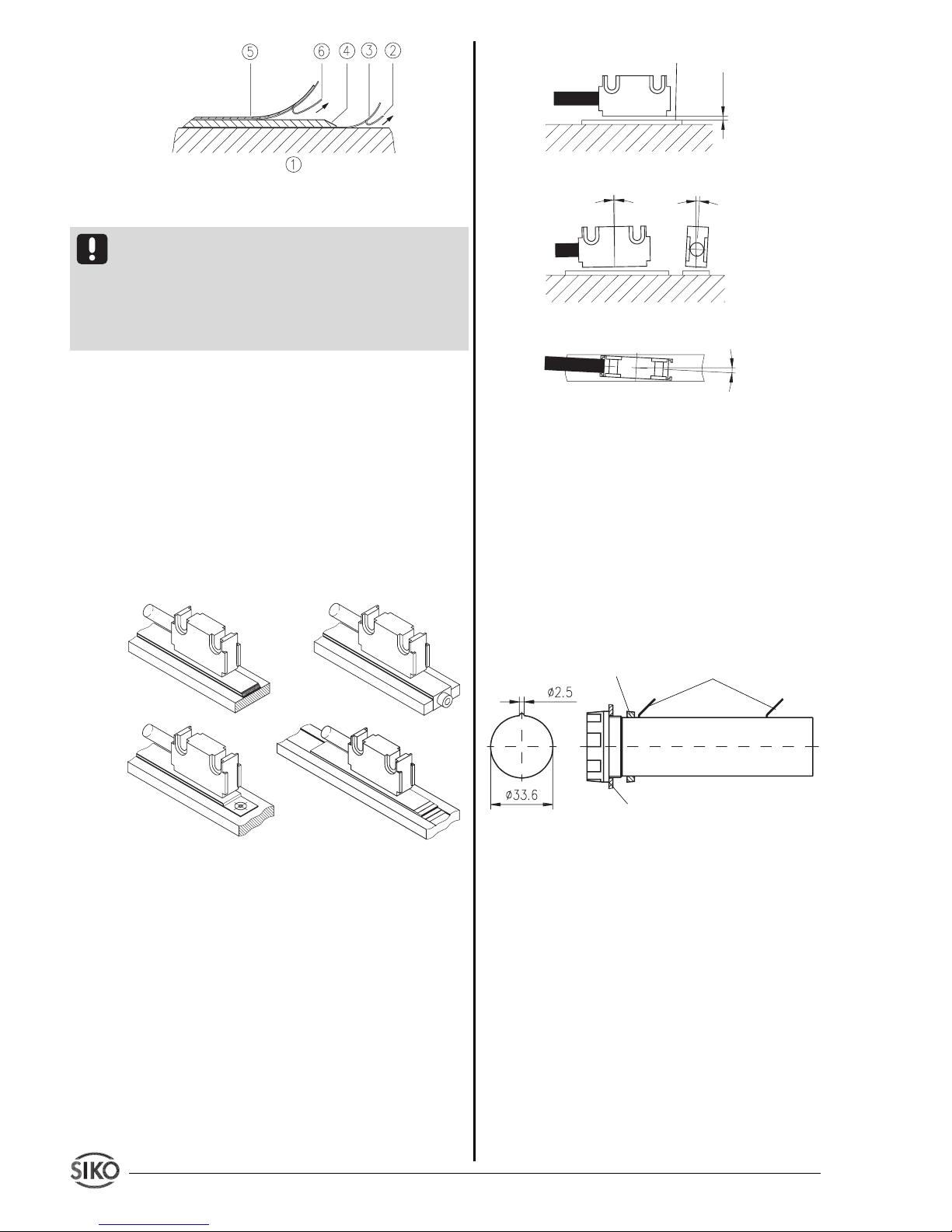
Mounting steps (see fig. 1)
• Clean mounting surface (1) carefully.
• Remove protective foil (2) from the adhesive
side of the magnetic strip (3).
• Stick down the magnetic strip (4).
• Clean surface of magnetic strip carefully.
• Remove protective foil (6) from adhesive tape on
the cover strip (5).
• Fix cover strip (both ends should slightly overlap).
• Also fix cover strip’s ends to avoid unintentional peeling.
pole pitch: 5mm
accuracy: 0.1mm
serial number
1
0
NNNN 5000
Page 10
10 MA510 Datum 21.03.2002 Art.Nr. 80778 Z.Nr. 8664085 Änd.Stand 88/02
Fig. 1: Mounting of the magnetic strip
Attention ! Do not expose the system to magnetic
fields. Any direct contact of the magnetic strip
with magnetic fields (eg. adhesive magnets or
other permanent magnets) is to be avoided. Sensor
movements during power loss are not captured by
the follower electronics.
Mounting examples
Mounting with chamfered ends (fig. 2) is not
recommended unless the strip is installed in a safe
and protected place without environmental influences. In less protected mounting places the strip
may peel. There we recommend mounting accord.
to fig. 3 and 4.
Mounting in a groove (fig. 5) best protects the
magnetic strip. The groove should be deep enough
to totally embed the magnetic strip.
Fig. 2 Fig. 3
Fig. 4 Fig. 5
3.2 Mounting the sensor
Use two M3 screws to fix the magnetic sensor L via
the ø 3.1mm through holes.
• Cable layout should avoid damages due to cable
strain or other machine parts. If necessary use a
drag chain or protective hose and provide for strain
relief.
• When mounting the magnetic sensor, ensure
that the gap between strip and sensor and the max.
admissable deviation are maintained over the total
measuring length! (see fig. 6)
Fig. 6: Mounting of sensor
3.3 Mounting the display
For mounting use distance sleeveson front of the unit.
3.4 Mounting of the battery box (option)
The battery box supplied together with the display
are for panel mounting. The battery box should be
mounted at a 'cold' site: heat accelerates the selfdischarge of batteries.
Below are the dimensions for panel mounting:
Fig. 7: Battery box (3Volt, 2xBaby/R14) Batteries are
not supplied together with the MA510.
4. Electrical connection
• Wiring must only be carried out with power off!
• Provide standed wires with ferrules.
• Check all lines and connections before switching
on the equipment.
Interference and distortion
All connections are protected against the effects of
interference. The location should be selected to
ensure that no capacitive or inductive interferences can affect the sensor or the connection
lines! Interference can be caused by motors,
panel:
thickness max. 3,2mm
nut
flat connector 2,8x0,5mm
cable length max. 2,0m
+U
B
GND
Max. deviation
< 1°
< 3°
< 3°
active side
Gap between sensor and magnetic strip:
0,1...2mm
Page 11
MA510 Datum 21.03.2002 Art.Nr. 80778 Z.Nr. 8664085 Änd.Stand 88/02 1 1
switch gear, cyclic controls and contactors. Suitable wiring layout and choice of cable can minimise
the effects of interference.
The sensor should be positioned well away from
cables with interference; if necessary a protective
screen or metal housing must be provided. The
running of wiring parallel to the mains supply
should be avoided.
Power supply
UB= 3 VDC
eg. of battery with battery box, see chapter 3.4
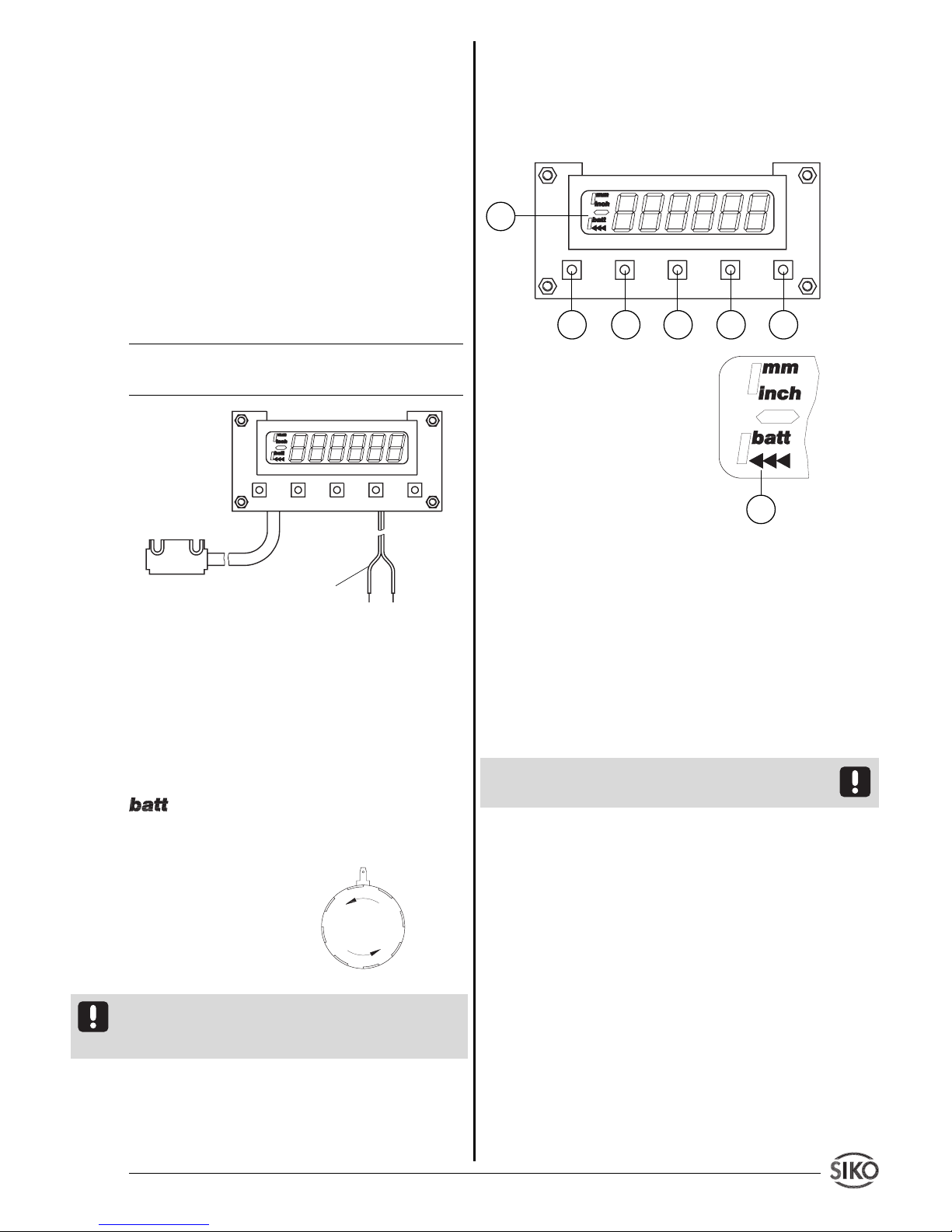
Designation Color
+ U
B
red
GND black
Fig. 8: Connection
Connection of the battery box
The battery box is mounted and connected accord.
to chapter 3.4.
Change of batteries
When display shows blinking 'low-batt symbol'
batteries should be exchanged as soon as
possible.
Unscrew cap to insert / remove batteries.
Fig. 9: Change of batteries
When exchanging the batteries take care that their
polarity is correct ! Take the marking on the bottom
of the box as orientation.
5. Commissioning
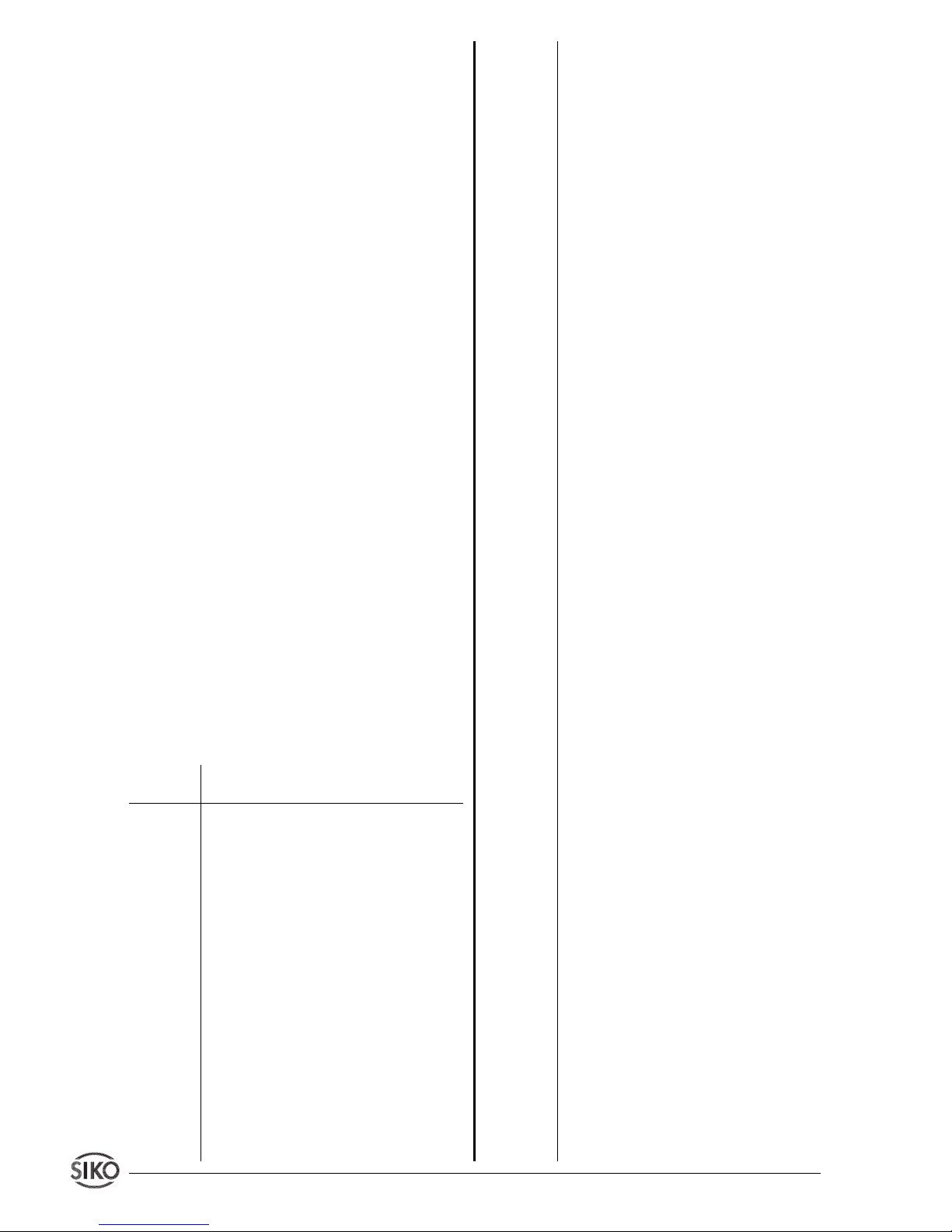
Five membrane keys on the front panel are used for
programming and operation of the display.
Keys' function
Depending on the operating mode the keys may
have additional functions (see 'Programming mode'
and 'Input mode'). The keys are pressed singly or in
pairs (two together).
1. Programming
2. Select 'value'
3. Select 'digit'
4. Store value
5. ON / OFF
6. Display: battery change /
incremental measurement
function / sign
Fig. 10: Display and membrane keypad
Switch on
Use key (5) to switch on the display. MA510 runs
an auto test sequence and shows the following
values:
• all LED segments (for approx. 1 s)
• the software version (eg. 1_03)
• value 0 – now the display is ready for use!
(The last measured value is displayed if the parameter 'Last value memory' is programmed to 'on'.)
Attention ! MA510 does not automatically switch
on when the operating voltage is applied.
Switch off
• Press key (5) to switch off the unit (switch-off
delayed, if parameter "_4_oFF" has been programmed to "on" before).
• After the last measurement the display switches
off automatically (see chapter 7 Parameter '_AUto_
and 'PErIod').
Operating modes
There are two operating modes:
1. Programming mode: to program the display at
initial installation.
2. Input mode: to enter parameters/select functions
used during standard operation.
cable for power supply
Sensor
1
2
3
4 5
6
6
Page 12
12 MA510 Datum 21.03.2002 Art.Nr. 80778 Z.Nr. 8664085 Änd.Stand 88/02
6. Programming mode
The display is either pre-programmed to standard
values at our works or, if the order defines customer-specific parameters, these will be pre-programmed at SIKO. Enter programming mode for parameter modification/programming. Normally programming is only necessary at initial installation.
Parameters can be modified and checked at any
time. They are stored in a non-volatile memory.
Each parameter’s designation, function and value
range is shown in tables on the following pages.
To enter into programming mode:
Press key (1) for at least 5 s
To leave programming mode:
Automatically, if no key has been pressed during
approx. 30 s, or press key (1) until the end of
the parameter list is reached.
To scroll parameter information:
Use key (1)
To change parameters:
Use keys (2) and (3)
To store modified parameters:
Press key (4), then message "-SA-" will be briefly
displayed.
7. Parameter description
At the end of this user information brochure you
will find a detailed parameter list showing all
programmable parameters and offering space for
customer-specific programming values .
(in English, parameter _LAn_ = "E")
Display Designation / description
"choice"
_rES_ Resolution: Determines the resolution
of the display. Parameter "FrEE" al-
lows the programming of a calcula-
ting factor.
_FAC_ Calculation factor (only available, if
'Resolution' has been programmed to
"FrEE" before): Used to obtain for ex-
ample an angle display. Basis is the ma-
ximal possible resolution of 1/100 mm.
The calculation factor "FAC" which has
to be programmed results from:
FAC = meas. range / total travel di-
stance [1/100 mm]
Example: Angle measurement on a cir-
cular disk with a display range of 0
... 180°; display in 1/10°; circumfe-
rence of the circular disk 942,48 mm;
hence total travel distance 471,24
mm; FAC = 1800 / 47124 = 0,38200
_rEF_ Reference value: Absolute reference
point of the measuring system. This
value is set by referencing the system
according to chapter 8.
_oFF_ Offset: Can be any value; used to in-
fluence the value displayed, eg. tool
correction value.
_dP_ Decimal point (only available if 'Reso-
lution' has been programmed to 'FrEE'
before): Determination of the decimal
point according to the resolution.
_dIr_ Counting direction of the measuring
system: depends on the sensor’s
mounting position and can be chan-
ged subsequently.
"UP" Upward
"dn" Downward
_AUto_ Switch-off method: State of the au-
tomatic switch-off:
"oFF" no switch-off.
"on" automatically switch-off
PErIod Switch-off time : Time since last mea-
surement / sensor move after which
the display will switch-off.
_rSto__ Last value memory:
"oFF" Last value memory off. When switched
on, the display must be calibrated
(zeroed).
"on" Last value memory on. When switched
on, the last measured value is dis-
played.
_4_oFF Delayed switch-off:
Key (5) must be pressed for approx.
4s to switch off the display.
_F_AbS Access reset function: resetting to
reference value via key (4) on front
of the display.
"oFF" Reset function off
"on" Reset function on
_F_rEL Access incremental measurement: to
switch from absolute dimension and
zero-setting to subsequent relative
dimension
"oFF" Increm. meas. function off
"on" Increm. meas. function on
_F_rEF Access reference value: to enter /
change reference value
"oFF" Reference value function off
Page 13
MA510 Datum 21.03.2002 Art.Nr. 80778 Z.Nr. 8664085 Änd.Stand 88/02 1 3
Press key (4) to store the new value.
Precondition: In programming mode menu points
'Reference value input enable' (_F_rEF) 'Offset input enable' (_F_oFF) respectively must be programmed to "on", but unit must not be left in programming mode (see chapter 6 ‚'To leave pro-
gramming mode').
9. Last value memory
Precondition: '_rSto_' = "on"
When switched off the last measured value is stored
in a non-volatile memory.
10. Joining magnetic strips together
For some applications it may be necessary to
extend the magnetic strip. The magnetic strip can
be cut and rejoined using standard tools.
But however carefully this is done the accuracy of
the strip at the join will be impaired (error of at
least 0,1 ... 0,2 mm).
The following tools / accessories are required:
• magnet magnifier, magnetic foil or metal dust
• rule or suitable tool
• compass needle
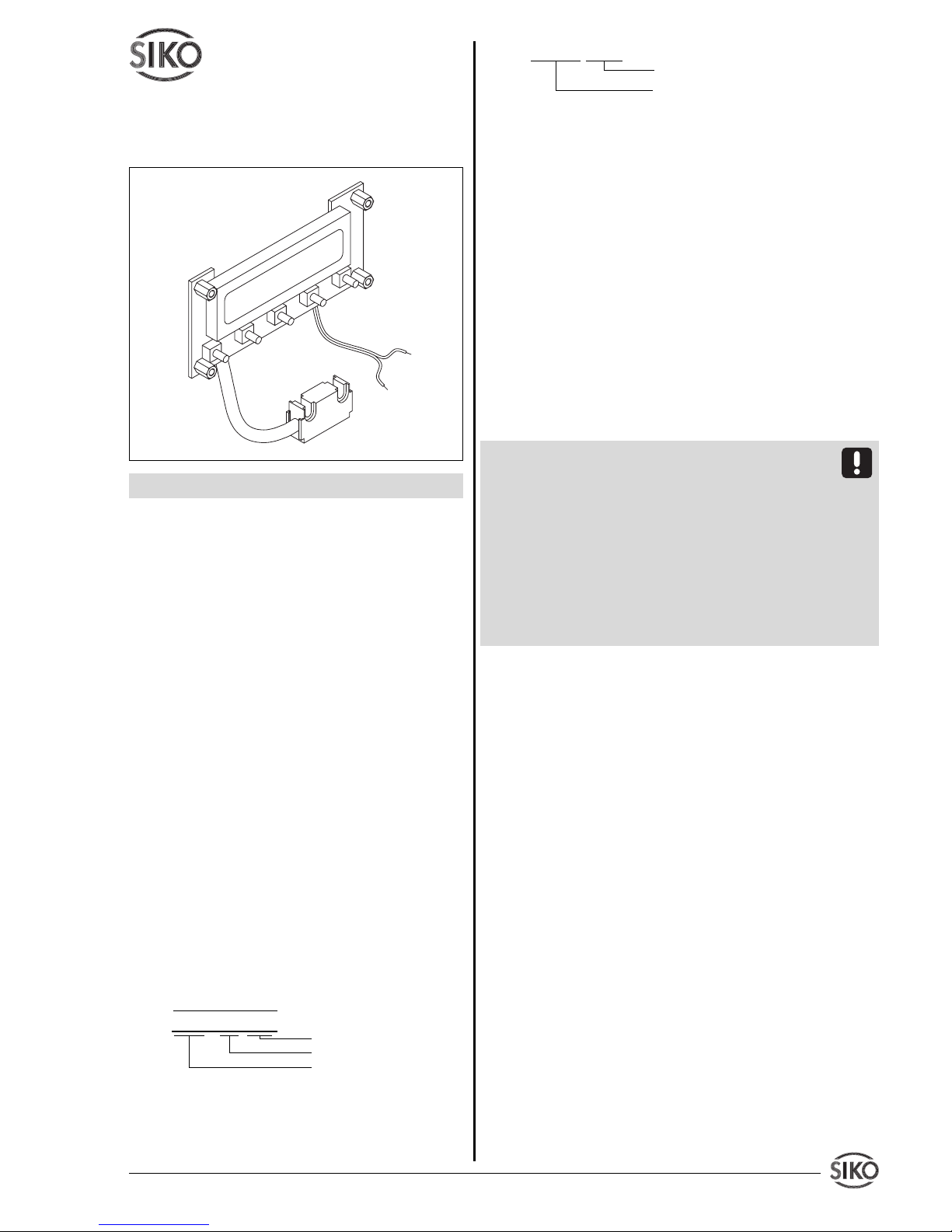
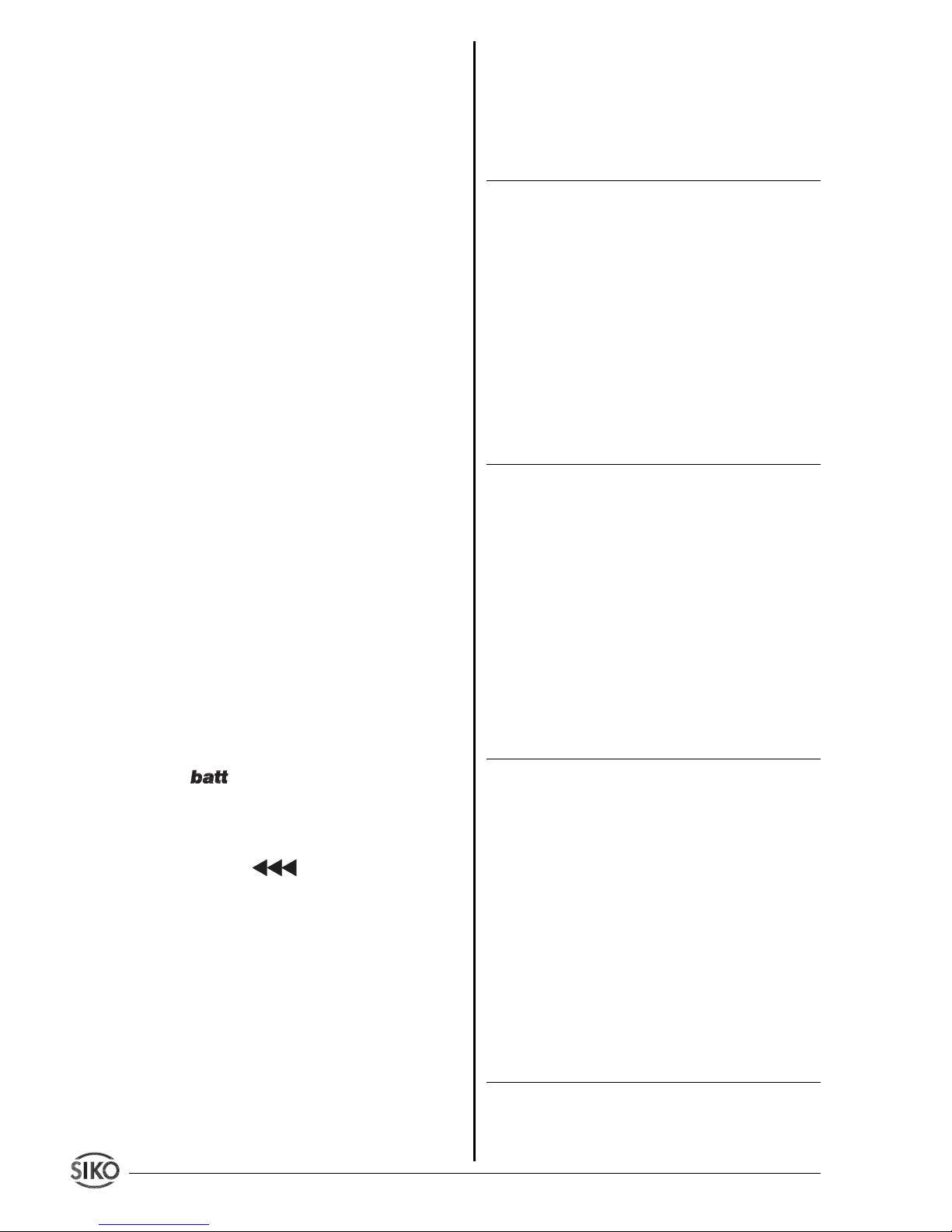
Fig. 11: Determination of the pole position. Cutting
the magnetic strip
Fig. 12: Determination of the pole position. Joining
the magnetic strip
Steps
• If there is a cover strip, this is to be removed first.
• To determine the pole division either use metal
dust, a magnet magnifier or magnetic foil.
• If necessary, use a compass needle to determine the
location of the poles on the magnetic strip (fig.11).
"on" Reference value function on
_F_oFF Access offset value: to enter / change
offset value
"oFF" Offset value function off
"on" Offset value function on
_SPEEd To alter power consumption by chan-
ging processor´s speed.
"HI" Full processor speed
"Lo" Reduced processor speed with low
power consumtion
_LAn_ Language: to choose the language in
which the menu points are to be dis-
played
"d" German
"E" English
8. Input mode
Reset function via keyboard
• Press key (4) to set the display to the reference
value.
Precondition: Parameter 'Reset enable' (_F_AbS) in
programming mode must be programmed to "on",
but unit must not be left in programming mode (see
chapter 6 'To leave programming mode').
Incremental measurement
Press the two arrow keys (2) + (3) simultaneously
to activate incremental measurement function.
• The display is zeroed.
• The Display shows the blinking
• Leave incremental measurement function by another
simultaneous press of the two arrow keys (2) + (3). The
absolute measuring value is displayed again.
• While in the incremental measurement modethe
display can also be set to zero by pres-sing key (4).
This does not change the absolute measurement in
the background.
Precondition: Menu point 'Incremental measurement enable' (_F_rEL) in programming mode must
be programmed to "on", but unit must not be left
in programming mode (see chapter 6 ‚'To leave
programming mode').
Reference and/or offset value modification
Press the two keys (1) + (2) simultaneously to enter
a new reference value.
Press the two keys (1) + (3) simultaneously to enter
a new offset value.
The display then shows the reference/offset value,
which can be changed via the two arrow keys.
Page 14
14 MA510 Datum 21.03.2002 Art.Nr. 80778 Z.Nr. 8664085 Änd.Stand 88/02
• Use a rule and a sharp knife to cut the magnetic
strip at a right angle. Then also cut the carrier strip
accordingly.
• Previous steps are to be repeated with the other
part of strip.
• Check polarity before joining the two parts.
Both ends must attract each other (if necessary,
use compass needle). In case both ends have the
same polarity, shorten one end by a half pole
division (fig. 12).
• Join the two ends closely together and add the
cover strip.
11. Maintenance of the magnetic strip
We recommend cleaning the magnetic strip’s surface from time to time with a soft rag. This avoids
dirt (dust, chips, humidity ...) sticking to the
strip.
12. Trouble shooting
Error states are recognized and shown in the
display:
Message: full
Description: display overrun
Action: check parameters and adjust them if neces-
sary; set display to reference value
Message: display blinking
Description: faulty / no sensor signal
Action: check gap between sensor and magnetic
strip
Message: display blinking.
Description: missing referencing.
Action: set display to reference value
Symbol: blinking
Description: battery voltage below the admissable
values.
Action: Change the batterie.
Message / Effect: blinking / MA510 cannot
be referenced
Description: Display is still in incremental measurement function
Action: Leave incremental measurement function
as descriped in chapter 8 or proceed as follows:
1. Enter into programming mode
2. Program parameter '_FrEL' to "on"
3. Leave programming mode
4. Leave incremental measurement function as
descriped in chapter 8
5. Enter programming mode again
6. Program parameter '_FrEL' to "oFF"
7. Leave programming mode
13. Application Examples
Length measurement
Required: Display accuracy 1/10 mm. Display shall
be zeroed via function key
Designation Display Progr. value
Resolution _rES_ 0.1
Reference value _rEF_ 00000.0
Offset _oFF_ 00000.0
Decimal point _dP_ 0.0
Counting direction _dIr_ UP
Switch-off method _AUto_ oFF
Last value memory _rSTo_ oFF
Delayed switch-off _4_oFF oFF
Access: reset _F_Abs on
Access: increm. meas. _F_rEL oFF
Access: ref. value _F_rEF oFF
Access: offset _F_oFF oFF
Processor speed _SPEEd HI
Language _LAn_ E
Angle measurement
Required: display range 0 ... 360°; display accu-
racy 1/10° . Display shall be zeroed via function
key. Automatically switch-off after 10min.
Conditions: circular disk with Ø 300 mm; resulting
total circumference: U = p x 300 mm = 942,48 mm
The programmable factor is calculated as follows:
FAC = total display range [1/10°] / circumference
[1/100 mm]
3600 / 94248 = 0,038200
Designation Display Progr. value
Resolution _rES_ FrEE
Calculating factor _FAC_ 0.03820
Reference value _rEF_ 00000.0
Offset _oFF_ 00000.0
Decimal point _dP_ 0.0
Counting direction _dIr_ UP
Switch-off method _AUto_ on
Switch-off time PErIod 600
Last value memory _rSTo_ oFF
Delayed switch-off _4_oFF oFF
Access: reset _F_Abs on
Access: increm. meas. _F_rEL oFF
Access: ref. value _F_rEF oFF
Access: offset _F_oFF oFF
Processor speed _SPEEd HI
Language _LAn_ E
Page 15

MA510 Datum 21.03.2002 Art.Nr. 80778 Z.Nr. 8664085 Änd.Stand 88/02 1 5
Appendix: Parameter list
Display Designation / value range Standard programm. your programming
_rES_ resolution (mm, In=inch) 0.1
1, 0.1, 0.05, 0.01, In 0.01, In 0.001,
FrEE
_FAC_ calculation factor (only if resolution 0.00000
has been programmed to "FrEE")
0.00001 ... 9.99999
_rEF_ reference value 00000.0
-999999 ... (+)999999
_oFF_ offset value -999999 ... (+)999999 00000.0
_dP_ decimal point (only if resolution has 0.0
been programmed "FrEE") 0. to 0.000
_dIR_ counting direction UP, dn dn
_AUto_ switch-off method on , oFF oFF
PErIod switch-off time (in minutes)(only for 009
switch-off methods 'on') 009... 999
_rSTo__ last value memory on , oFF oFF
_4_oFF Delayed switch-off: on, oFF oFF
_F_AbS access reset function: on , oFF on
_F_rEL access increm. measurement: oFF
on , oFF
_F_rEF access reference value: oFF
on , oFF
_F_oFF access offset value: oFF
on , oFF
_SPEEd Processor speed: HI , Lo Lo
_LAn_ language d, E d
Page 16

16 MA510 Datum 21.03.2002 Art.Nr. 80778 Z.Nr. 8664085 Änd.Stand 88/02
SIKO GmbH
Dr.-Ing. G. Wandres
Werk / Factory:
Weihermattenweg 2
D-79256 Buchenbach
Postanschrift / Postal address:
Postfach 1106
D-79195 Kirchzarten
Telefon / Phone 07661/394-0
Telefax / Fax 07661/394-388
eMail [email protected]
Internet www.siko.de
 Loading...