

Page 1
MA10/3 Datum 12.06.02 Art.Nr. 80786 Z.Nr. 8664086 Änd.Stand 161/02 1
gesystem für Stückzahlmessung. Parameter und
Anzeigewert werden nichtflüchtig gespeichert (EEPROM).
4. Mechanische Montage
Die Montage darf nur gemäß der angegebenen IPSchutzart vorgenommen werden. Das System muss
ggf. zusätzlich gegen schädliche Umwelteinflüsse,
wie z.B. Spritzwasser, Staub, Schläge, Temperatur
geschützt werden.
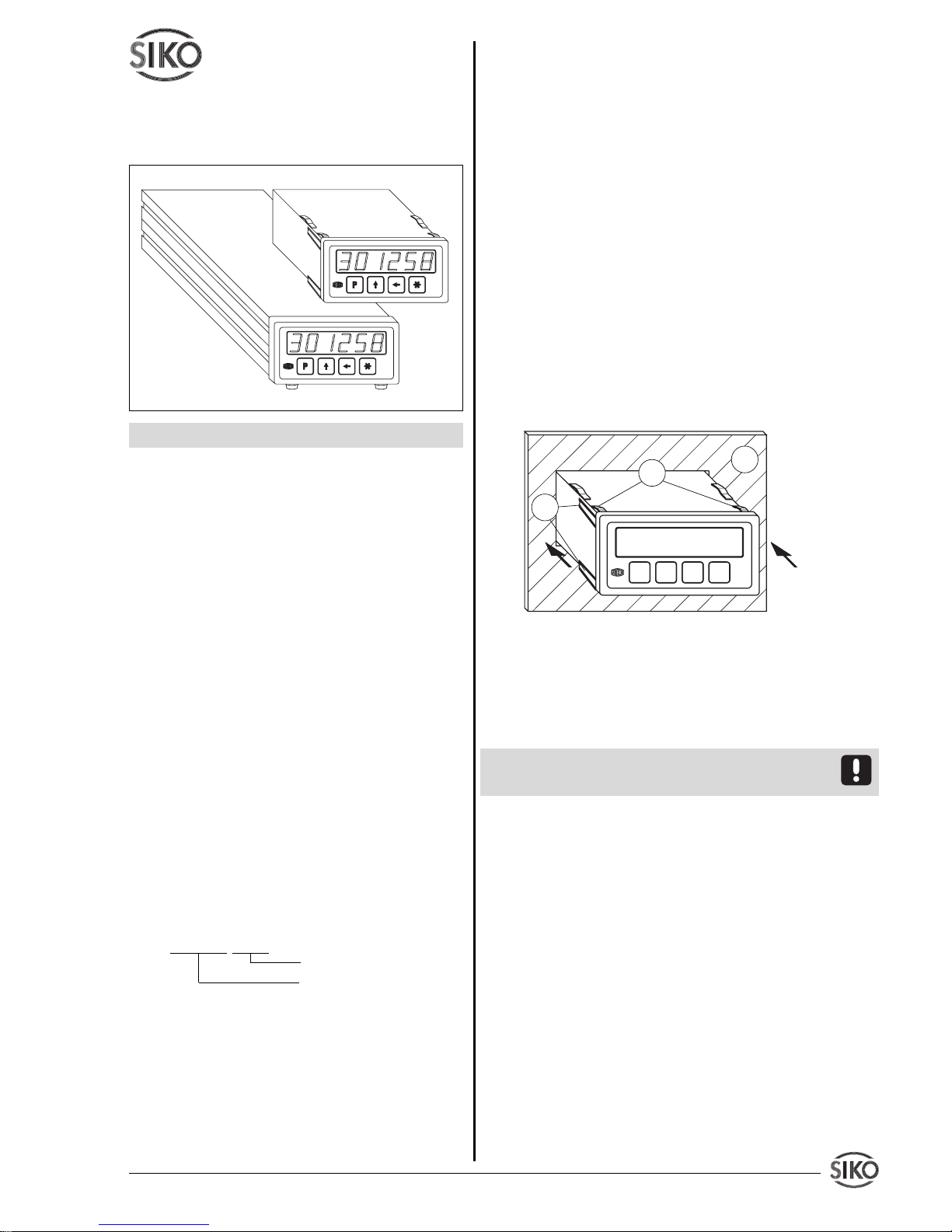
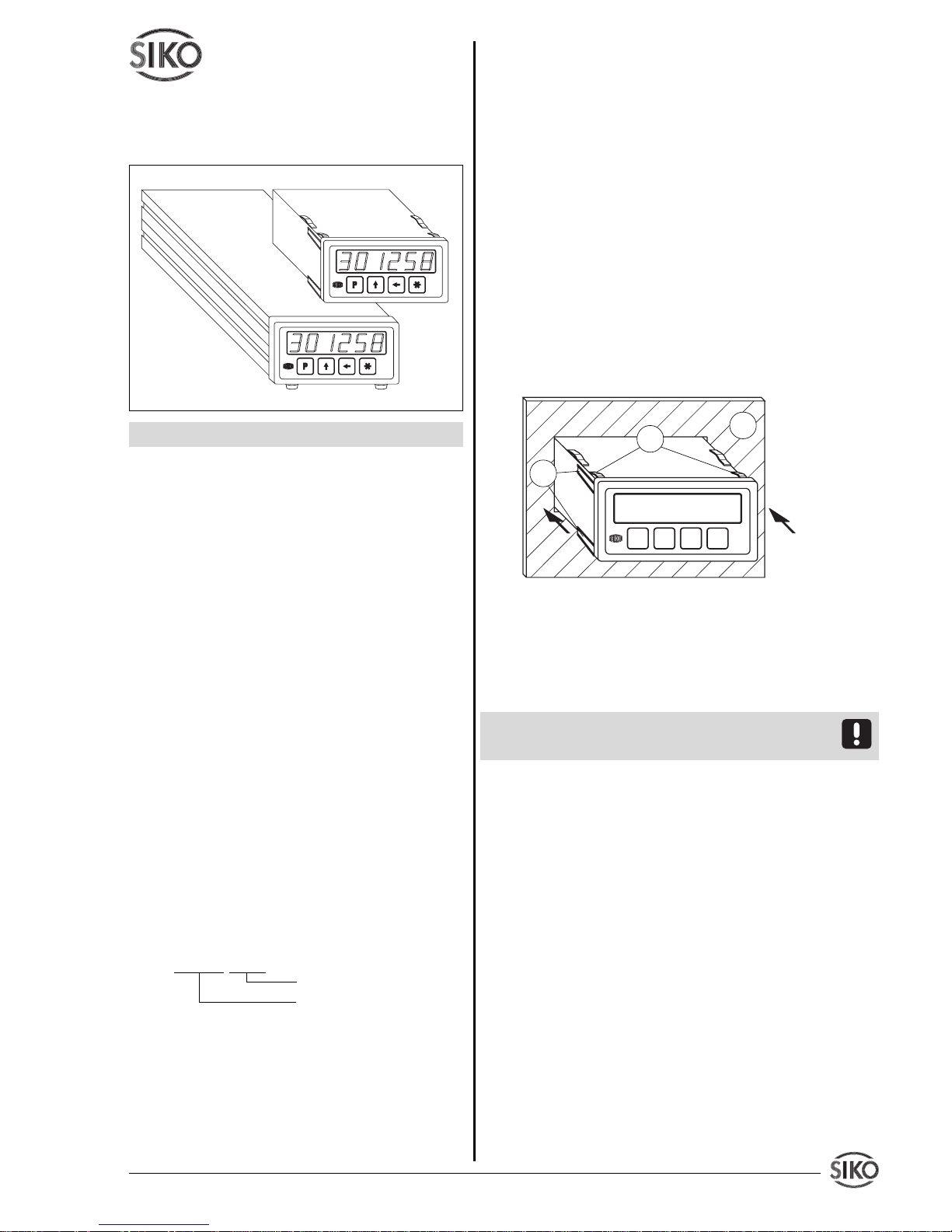
Einbaugehäuse EG
• Gerät in Schalttafelausschnitt (1) schieben bis
die Panel-Clips (2) das Gehäuse lose halten.
• Die seitliche Zentrierung (3) leicht andrücken
und das Gehäuse in den Ausschnitt (1) schieben bis
die Panel-Clips (2) vollständig einrasten.
Abb. 1: Einbau
Tischgehäuse TG
Zum Anschrauben des Gerätes können die Gummifüße entfernt werden.
Achtung ! Die max. Einschraubtiefe von 6.5 mm
muss unbedingt beachtet werden!
5. Elektrischer Anschluss
• Anschlussverbindungen dürfen nicht unter
Spannung geschlossen oder gelöst werden !!
• Verdrahtungsarbeiten dürfen nur spannungslos
erfolgen.
• Litzen sind mit Aderendhülsen zu versehen.
• Vor dem Einschalten sind alle Leitungsanschlüsse
und Steckverbindungen zu überprüfen.
Hinweise zur Störsicherheit
Alle Anschlüsse sind gegen äußere Störeinflüsse
geschützt. Der Einsatzort ist aber so zu wählen,
dass induktive oder kapazitive Störungen nicht
auf den Geber oder deren Anschlussleitungen
einwirken können ! Durch geeignete Kabelfüh-
rung und Verdrahtung können Störeinflüsse (z.B.
Benutzerinformation
MA10/3
Elektronische Messanzeige
DEUTSCH
1. Gewährleistungshinweise
• Lesen Sie vor der Montage und der Inbetriebnahme dieses Dokument sorgfältig durch. Beachten Sie
zu Ihrer eigenen Sicherheit und der Betriebssicherheit alle Warnungen und Hinweise.
• Ihr Produkt hat unser Werk in geprüftem und
betriebsbereitem Zustand verlassen. Für den Betrieb gelten die angegeben Spezifikationen und
die Angaben auf dem Typenschild als Bedingung.
• Garantieansprüche gelten nur für Produkte der
Firma SIKO GmbH. Bei dem Einsatz in Verbindung
mit Fremdprodukten besteht für das Gesamtsystem
kein Garantieanspruch.
• Reparaturen dürfen nur im Werk vorgenommen
werden. Für weitere Fragen steht Ihnen die Firma
SIKO GmbH gerne zur Verfügung.
2. Identifikation
Das Typenschild zeigt den Gerätetyp mit Variantennummer. Die Lieferpapiere ordnen jeder Variantennummer eine detaillierte Bestellbezeichnung zu.
z.B. MA10/3-0023
Varianten-Nr.
Geräte-Typ
3. Kurzbeschreibung
Die Anzeige MA10/3 ist eine elektronische Messanzeige. Zusammen mit einem Inkrementalgeber oder
einem Winkelkodierer (SSI) bildet die MA10/3 ein
elektronisches Mess- und Anzeigesystem, bzw. mit
einem elektronischen oder mechanischen Signalgeber bildet die MA10/3 ein elektronisches Anzei-
EG
TG
1
2
3
Page 2
2 MA10/3 Datum 12.06.2002 Art.Nr. 80786 Z.Nr. 8664086 Änd.Stand 161/02
von Schaltnetzteilen, Motoren, getakteten Reglern
oder Schützen) vermindert werden.
Erforderliche Maßnahmen:
• Nur geschirmtes Kabel verwenden. Den Kabelschirm beidseitig auflegen. Litzenquerschnitt der
Leitungen min. 0,14 mm2, max. 0,5 mm2.
• Die Verdrahtung von Abschirmung und Masse
(0V) muss sternförmig und großflächig erfolgen.
Der Anschluss der Abschirmung an den Potentialausgleich muss großflächig (niederimpedant) erfolgen.
• Das System muss in möglichst großem Abstand
von Leitungen eingebaut werden, die mit Störungen belastet sind; ggfs. sind zusätzliche Maßnah-
men wie Schirmbleche oder metallisierte Gehäuse vorzusehen. Leitungsführungen parallel zu Ener-
gieleitungen vermeiden.
• Schützspulen müssen mit Funkenlöschgliedern
beschaltet sein.
Spannungsversorgung
Die Spannungswerte sind abhängig von der Geräteausführung und sind den Lieferpapieren oder dem
Typenschild zu entnehmen.
z.B. 230 VAC -10% ... +6%
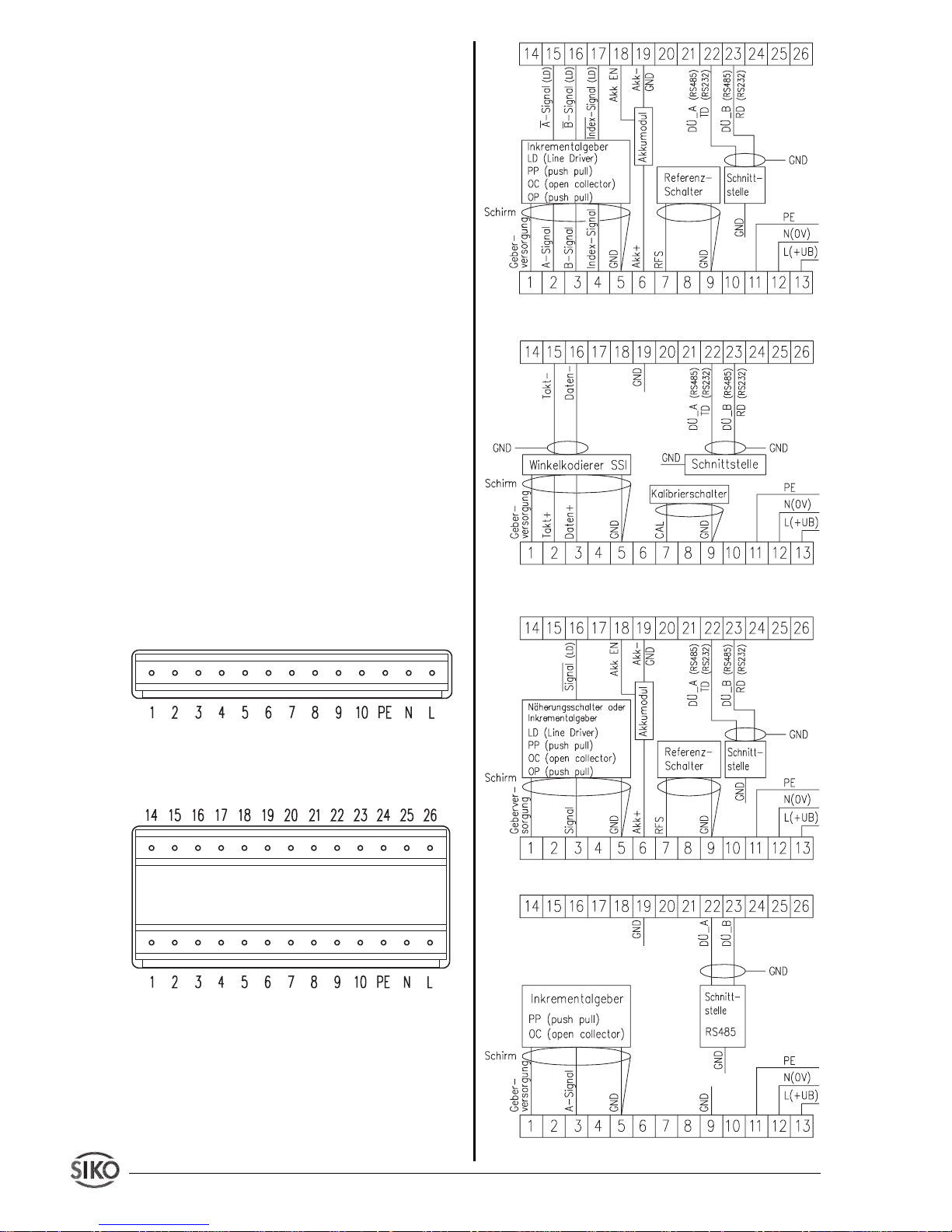
5.1 Anschluss Einbaugehäuse EG
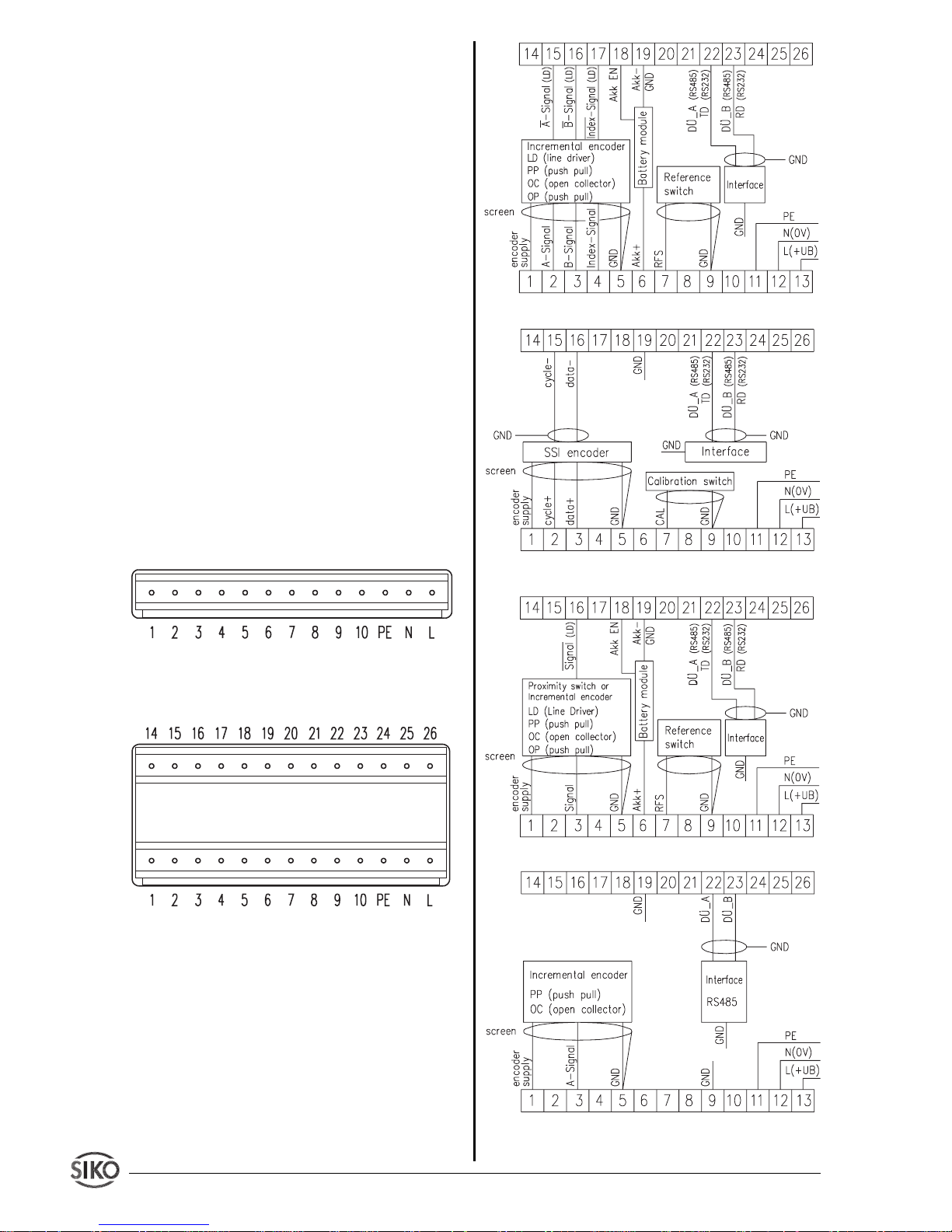
Abb. 2: Anschlussbelegung EG (PP-, OC-Geberanschluss, ohne Schnittstelle, ohne Akku) für Inkremental, Drehzahl, Stückzahl
Abb. 3: Anschlussbelegung EG mit Optionen (Akku,
LD-Geberanschluss, Schnittstellen) für Inkremental,
Absolut, Drehzahl, Stückzahl
Abb.4 : Anschlussschema Inkremental
Abb.5 : Anschlussschema Absolut SSI
Abb.6 : Anschlussschema Stückzahl
Abb.7 : Anschlussschema Drehzahl
Page 3
MA10/3 Datum 12.06.02 Art.Nr. 80786 Z.Nr. 8664086 Änd.Stand 161/02 3
5.2 Anschluss Einbaugehäuse EG/E3
(1) (9-poliger D-SUB Stift)
Pin Belegung
1 L (24VAC) ; +UB (24VDC)
2 N(24VAC) ; 0V (24VDC)
3PE
4 GND
5 RFS
6 L (24VAC) ; +UB (24VDC)
7 N(24VAC) ; 0V (24VDC)
8PE
9 N.C.
(2) (9-poliger D-SUB Stift)
Pin Belegung
1 GND
2A
3B
4I
5 Geberversorgung
6 - 9 N.C.
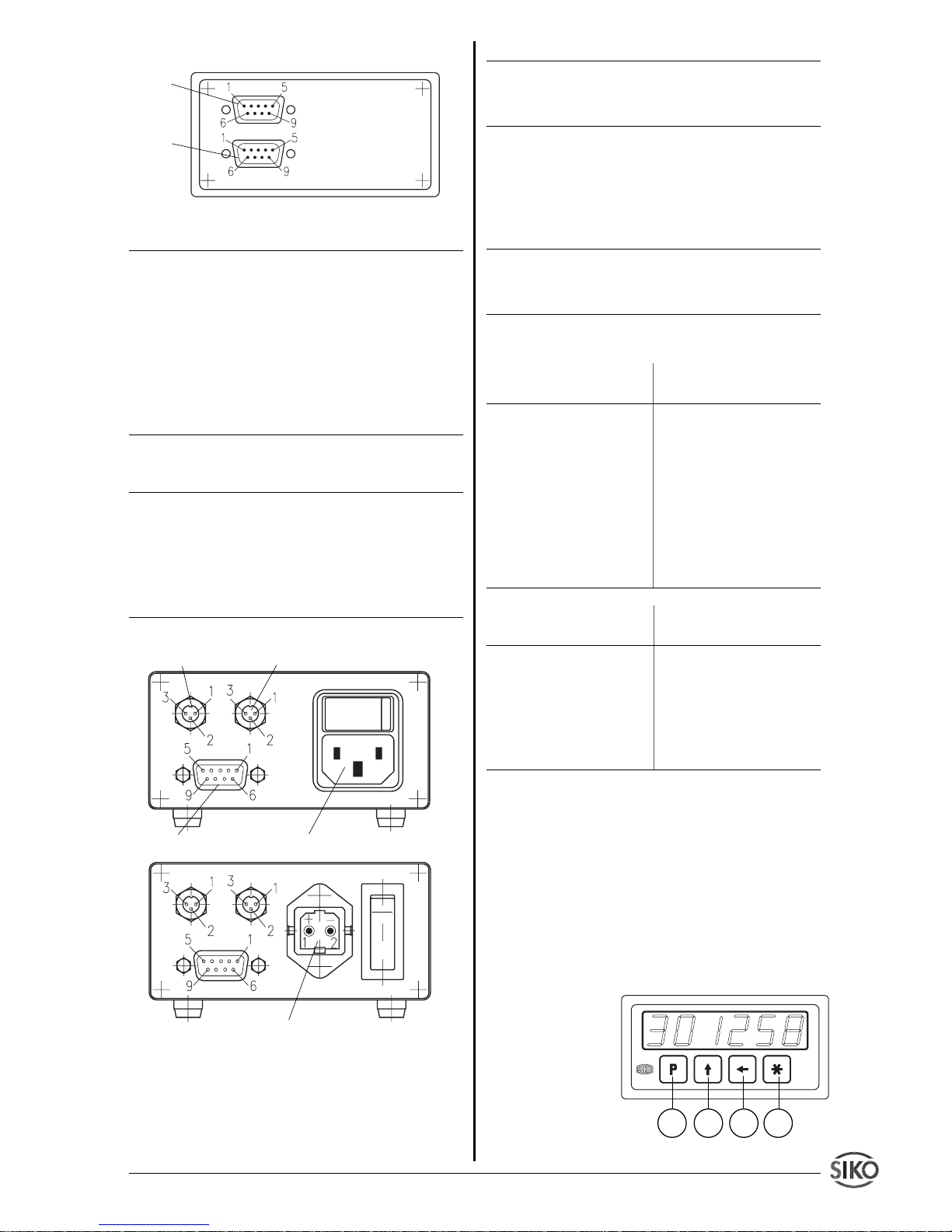
5.3 Anschluss Tischgehäuse TG
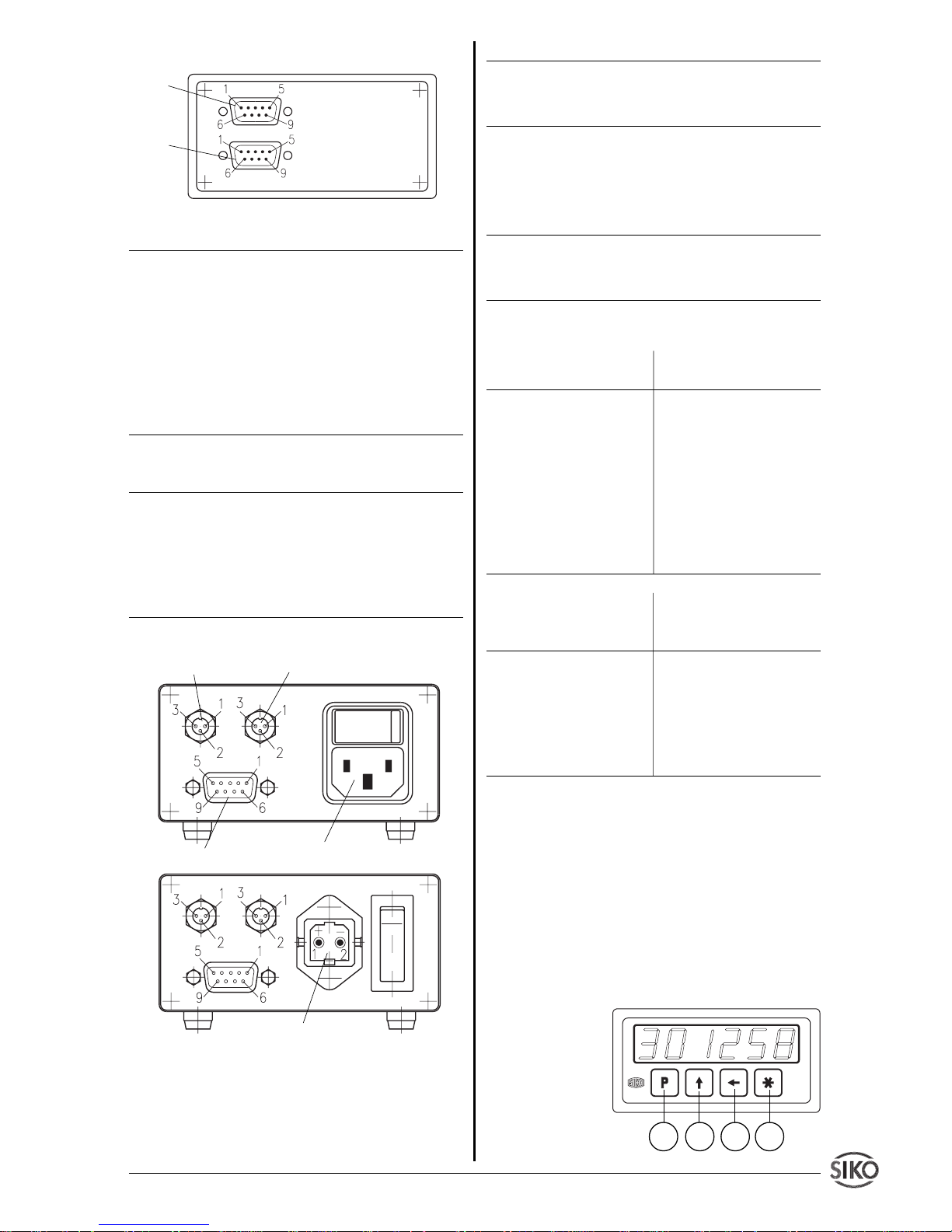
Abb. 8: Anschlussbelegung TG
Option Referenz-/Kalibrierschalter-Anschluss
Der Anschluss erfolgt mittels beiliegendem Kupplungsstecker an der rückseitigen Flanschdose (Abb.
8) gemäß nachfolgender Belegung.
Nr. Belegung
1 RFS / CAL
2 GND
3+U
B
Option serielle Schnittstelle
Der Anschluss erfolgt mittels beiliegendem Kupplungsstecker an der rückseitigen Flanschdose (Abb.
8) gemäß nachfolgender Belegung.
Nr. Belegung
1 GND
2 RXD / DÜB
3 TXD / DÜA
Geberanschluss (9-poliger D-SUB Buchse)
Inkremental LD+OP Absolut SSI
Pin Belegung Pin Belegung
1 +UB 1 +UB
2 A-Signal 2 Takt+
3 B-Signal 3 Daten+
4 I-Signal 4 N.C.
5 GND 5 GND
6 N.C. 6 N.C.
7 /A-Signal 7 Takt8 /B-Signal 8 Daten9 /I-Signal 9 N.C.
Inkremental PP+OC Stückzahl / Drehzahl
Pin Belegung Pin Belegung
1 +UB 1 +UB
2 A-Signal 2 A-Signal
3 B-Signal 3 N.C.
4 I-Signal 4 N.C.
5 GND 5 GND
6-9 N.C. 6-9 N.C.
6. Inbetriebnahme
Die Bedienung und Programmierung der Anzeige
erfolgt mit den vier frontseitigen Folientasten.
Tastenfunktionen
Die Tasten können je nach Betriebszustand weitere
Funktionen besitzen (siehe 'Programmiermodus'
und 'Eingabemodus'). Die Betätigung erfolgt einzeln oder gemeinsam (je zwei) und zeitabhängig.
1. Programmiertaste
2. Auswahltaste
'Wert'
3. Auswahltaste
'Stelle'
4. Speichertaste
Abb. 9: Tastenfunktionen
Referenzschalter Schnittstelle
Geber
Spannungsversorgung 230VAC, 110VAC
Spannungsversorgung 24VDC
1
2
3
4
(1)
(2)
Page 4
4 MA10/3 Datum 12.06.2002 Art.Nr. 80786 Z.Nr. 8664086 Änd.Stand 161/02
Einschaltverhalten
Nach ordungsgemäßem Anschluss erfolgt durch
Einschalten der Betriebsspannung :
• Anzeige aller LED-Segmente (ca. 1,5 s)
• Anzeige der Firmware-Version, falls vorhanden mit
Nummer der Sonderausführung (z.B. 1.04)
• Anzeige des zuletzt gespeicherten Istwertes (nur
bei Inkrem. und Stückzahl, wenn bei Istwertspeicher _ISP_ "EIn" programmiert ist)
• Anzeige des Positionswertes (nur bei SSI)
Programmierung
Anschließend sind die maschinenspezifischen Parameter programmierbar. Die Programmierung wird
üblicherweise nur bei der ersten Inbetriebnahme
durchgeführt.
Betriebsarten
Es gibt zwei Betriebsarten:
1. Programmiermodus: Einmalige Einrichtung der
Anzeige auf die Anwendung.
2. Eingabemodus: Funktionen, die während der
normalen Anwendung benötigt werden. (nicht bei
Drehzahl)
7. Programmiermodus
Zur Änderung und Programmierung der Parameter
der Anzeige muss per Tastatur in den Programmiermodus geschaltet werden (s. weiter unten 'Eintritt
in den Programmiermodus'). Die Programmierung
der Anzeige erfolgt üblicherweise nur einmal bei der
ersten Inbetriebnahme und Einrichtung der Anzeige bzw. Anwendung.
Die Messanzeige MA10/3 wird bereits ab Werk mit
einer Standard-Voreinstellung ausgeliefert. Falls
bei Bestellung eine spezielle Vor-Programmierung
(Konfiguration) definiert wurde, so sind die Parameter bereits ab Werk entsprechend programmiert;
ein Konfigurationsblatt liegt dann der Anzeige bei.
Änderung oder Kontrolle der Parameter
Sie können die Parameter jederzeit ändern oder
kontrollieren. Die von Ihnen gewählten Werte werden nicht flüchtig gespeichert. Bezeichnung, Funktion und wählbare Werte finden Sie auf den
folgenden Seiten.
Eintritt in den Programmiermodus:
Betätigen der Taste für mind. 10 s
Beenden des Programmiermodus:
keine Taste betätigen für mind. 30s oder mit der
Taste bis zum Ende der Parameterliste weiterschalten
Weiterschalten der Parameter:
mit der Taste
Ändern der Parameter:
mit den Tasten +
Übernehmen/Speichern der Änderung:
mit der Taste
Nur Inkremental: Bei Verwendung des Magnetsensors MSK320 müssen einige Werte fest eingestellt
werden.
Bezeichnung Anzeige Winkel- Linear-
Anzeige Anzeige
mit MRI01 mit MB320
Anzeige pro Umdre- _APU_ 3600 100
hung
Anzeigedivisor _AdI_ 11
Strichzahl _Str_ 512 (Polzahl 25
x 8 z.B. 64 Pole
x 8 = 512)
Nachkommastelle _dP_ 0.0 0.0
Referenzschalter _rFS_ HAnd HAnd
Freigabe Rücksetzen _F_SEt EIn EIn
über Tastatur
Bezeichnung Anzeige Wertebereich Inkr. SSI Drehz. Stückz.
Anzeige pro Umdrehung _APU_ 0...59 999 X X
Wert, um den sich die Anzeige nach
genau einer Umdrehung des Gebers
erhöht oder erniedrigt.
Anzeigedevisor _Adl_ 1; 10; 100; 1000 X X
Divisor, um den die Anzeigegenauigkeit gegenüber der Messgenauigkeit
vermindert wird.
Bsp.: Messauflösung, ist bedingt durch
nicht ganzzahlige Übersetzung auf
1/1000 mm programmiert. Für die Anzeigegenauigkeit genügt aber 1/10 mm.
Als Anzeigedivisor wird demnach
100 gewählt.
Page 5
MA10/3 Datum 12.06.02 Art.Nr. 80786 Z.Nr. 8664086 Änd.Stand 161/02 5
Bezeichnung Anzeige Wertebereich Inkr. SSI Drehz. Stückz.
Geberstrichzahl _Str_ 0...59 999 X X
Drehrichtung _drEH_ "I" im Uhrzeiger- X X
Zählrichtungssinn des Messsystems sinn positiv
"E" entgegen dem
Uhrzeigersinn
positiv
Indexsignal _Ind_ "0" Signalform '0'; X
Referenzsignal, das nur einmal pro Rechtecksignal mit
Geberumdrehung auftritt. positiver Logik.
"I" Signalform 'I';
Rechtecksignal mit
negativer Logik.
Nachkommastelle _dP_ 0. bis 0.0000 X X X
Setzen des Dezimalpunktes.
Frei programmierbarer Faktor _FAC_ 00.0000 ... 99.9999 X
Der Faktor dient zum Umrechnen auf
die gewünschte Anzeigeeinheit. Bei
Faktor 1.0000 ist die Anzeige in Umdr./
min abgestimmt (s. Anwendungsbeispiele).
Zykluszeit _CYC_ 0,1; 0,5; 1; 1,5; 2; X
Die Anzeige wird nach der angege- 3; 5; 10 s
benen Zykluszeit aufgefrischt. Bei kleiner Zykluszeit (sinnvoll bei hohen Dreh-
zahlen und großer Impulszahl) werden
Änderungen schnell angezeigt --> evtl.
unruhige Anzeige. Bei großer Zykluszeit
(sinnvoll bei niedrigen Drehzahlen und
kleiner Impulszahl) werden Änderungen
nur langsam sichtbar --> stabilere
Anzeige.
Referenzschalter _rFS_ "Schl" Schließer- X
Kontaktart des Referenzpunktgebers, kontakt, normalerder als mechanischer Schalter oder weise geöffnet
Näherungsschalter ausgeführt sein
"oEFF" Öffnerkon-
kann. takt,normalerweise
geschlossen
"HAnd" Referen-
zierung mit Taster
an beliebiger Stelle
(masseschaltend)
Freigabe Rücksetzen über Tastatur _F_SEt "EIn" Rücksetzen X X X
Mit der -Taste kann die Anzeige auf wirksam
Tastatur den Referenz-/Kalibrier+Offset- "AUS" Rücksetzen
wert gesetzt werden (im Eingabemodus). unwirksam
Freigabe Kettenmaßf. _F_rEL "EIn" Kettenmaß X X X
Umschaltung zwischen Absolutmaß wirksam
und Nullung mit anschließendem
"AUS" Kettenmaß
Relativmaß. unwirksam
Freigabe Referenzwertänderung _F_rEF "EIn" Ref.-Wert- X X
Eingabe-/Änderungsmöglichkeit des änderungsfunktion
Referenzwertes. wirksam
Page 6
6 MA10/3 Datum 12.06.2002 Art.Nr. 80786 Z.Nr. 8664086 Änd.Stand 161/02
Bezeichnung Anzeige Wertebereich Inkr. SSI Drehz. Stückz.
"AUS" Ref.-Wert-
änderungsfunktion
unwirksam
Freigabe Kalibrierwertänderung _F_CAL "EIn" Kal.-Wert- X
Eingabe-/Änderungsmöglichkeit des änderungsfunktion
Kalibrierwertes. wirksam
"AUS" Kal.-Wert-
änderungsfunktion
unwirksam
Freigabe Offsetwertänderung _F_oFF "EIn" Offset- X X X
Eingabe-/Änderungsmöglichkeit des korrektur wirksam
Offsetwertes.
"AUS" Offset-
korrektur unwirksam
Datenformat _For_ "no"Geberdaten links- X
bündig (MSB zuerst)
"trEE" Tannenbaum-
format (12 Multiturn
+ 13 Singleturnbits
Datenformat)
Geberbits _G_bit 0...29 X
Eingabe der gesamten Geberbitzahl
Singleturnbits _S_bit 0...19 X
Eingabe der Singleturnbitzahl
Ausgabekode _AUSG_ "bin" Geberdaten im X
Binärcode
"GrAY" Geberdaten
im Graycode
Time out Funktion _t_out "EIn" Kabelbruch- X
erkennung wirksam
"AUS" Kabelbrucher-
kennung unwirksam
Gebernullung _SEt_ X
mit der Sterntaste kann der Geber im
Programmiermodus softwaremäßig genullt (+ Offset + Kalibrierwert) werden.
Geber Positionswert _GdAt_ X
Anzeige der tatsächlichen Geberposition.
Istwertspeicher _ISP_ "EIn" Istwertspei- X X
Der zuletzt angezeigte Messwert wird cher eingeschaltet:
bei Ausschalten der Betriebsspannung nach Einschalten der
im nichtflüchtigen Speicher abgelegt. Betriebsspannung
wird der zuletzt angezeigte Messwert
wieder angezeigt.
"AUS" Istwertspeicher ausgeschaltet:
nach Einschalten der
Betriebsspannung
muss die Anzeige
referenziert (genullt)
werden.
Page 7
MA10/3 Datum 12.06.02 Art.Nr. 80786 Z.Nr. 8664086 Änd.Stand 161/02 7
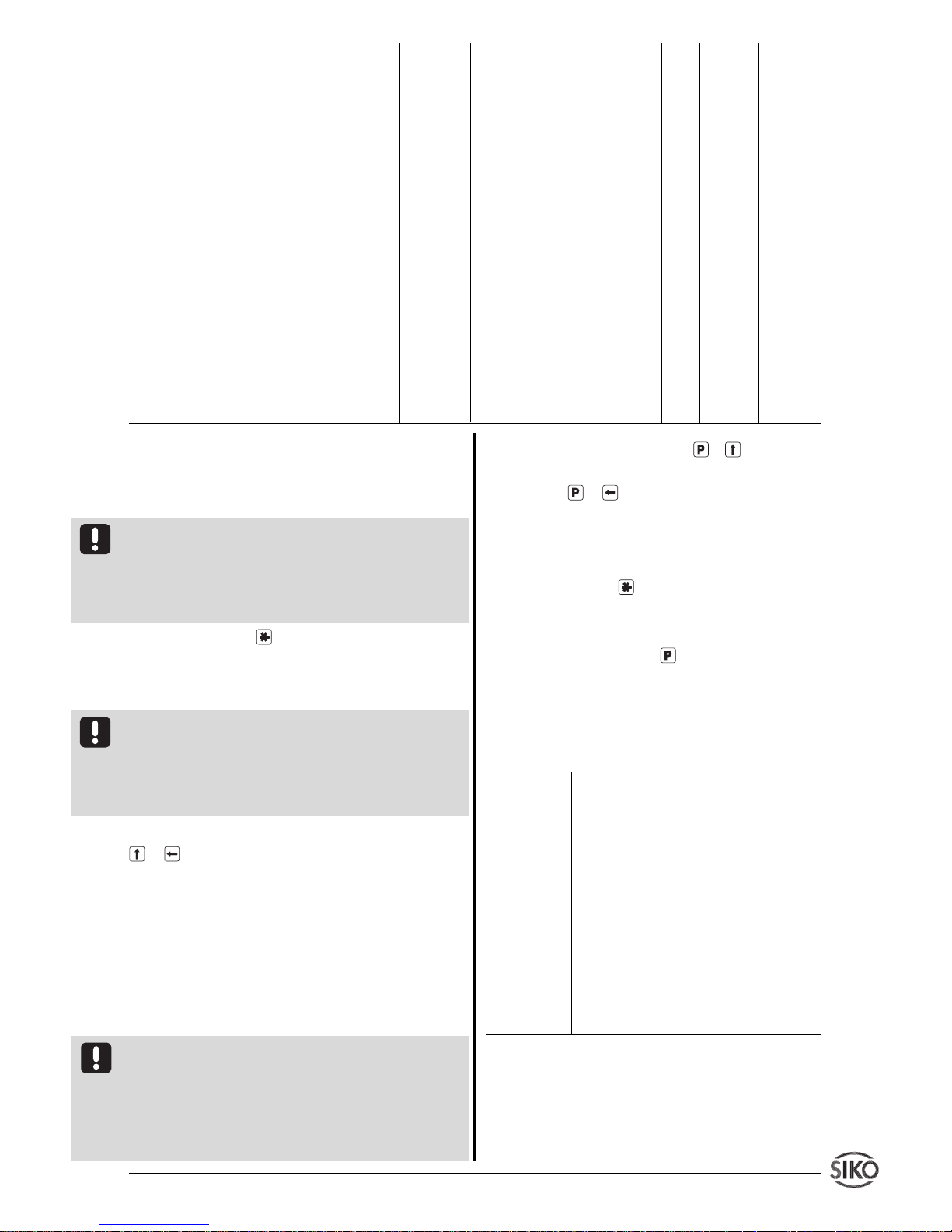
8. Eingabemodus (nicht bei Drehzahl)
Resetfunktion (Rücksetzen auf Referenz-/Kabli-
brier + Offsetwert)
Voraussetzung: Im Programmiermodus muss der
Menüpunkt Freigabe Rücksetzfunktion (_F_SEt)
mit Zustand 'EIn' programmiert sein und die Anzeige befindet sich nicht im Programmiermodus (s.
Kap. 7 'Beenden des Programmiermodus').
• Betätigung der -Taste setzt die Anzeige auf
den Referenz-/Kalibrier- + Offsetwert zurück.
Kettenmaßfunktion
Voraussetzung: Im Programmiermodus muss der
Menüpunkt Freigabe Kettenmaßfunktion (_F_rEL)
mit Zustand "EIn" programmiert sein und die Anzeige befindet sich nicht im Programmiermodus (s.
Kap. 7 'Beenden des Programmiermodus').
• Gleichzeitiges Betätigen der beiden Pfeiltasten
+ schaltet die Kettenmaßfunktion ein/aus.
• Die Anzeige wird auf Null gesetzt und die eingeschaltete Kettenmaßfunktion mit einem blinkenden Dezimalpunkt gekennzeichnet.
• Nochmaliges gleichzeitiges Betätigen der beiden Pfeiltasten schaltet die Kettenmaßfunktion
aus, das Absolutmaß wird wieder angezeigt.
Referenz-/Kablibrierwert bzw. Offsetänderung
Voraussetzung: Im Programmiermodus muss der
Menüpunkt Freigabe Referenz-/Kalibrierwertänderung
(_F_rEF/_F_CAL) bzw. Freigabe Offsetwertänderung
(_F_oFF) mit Zustand "EIn" programmiert sein und
die Anzeige befindet sich nicht im Programmiermodus (s. Kap. 7 'Beenden des Programmiermodus').
• Gleichzeitiges Betätigen von + schaltet die
Referenz-/Kalibrierwerteingabe, gleichzeitiges Betätigen von + die Offsetwerteingabe ein.
• Die Anzeige zeigt den aktuellen Referenz-/Kali-
brier- bzw. Offsetwert. Mit den Pfeiltasten kann der
Wert geändert werden.
• Mit Drücken der -Taste wird der Wert über-
nommen und gespeichert.
• Falls ca. 30 Sekunden keine Tastatureingabe
erfolgt oder nochmals die -Taste gedrückt wird,
schaltet die Messanzeige wieder in den Anzeigemode zurück.
8.1 Parameterbeschreibung _rEF_, _CAL_,
_oFF_
Anzeige/ Beschreibung
"Auswahl"
_rEF_ Referenzwert Abso-
luter Bezugspunkt des Messsystems. Der
Wert wird gesetzt, wenn gemäß Abschnitt 9 referenziert wird.
_CAL_ Kalibrierwert
Absoluter Bezugspunkt des Messsystems.
Der Wert wird gesetzt, wenn gemäß
Abschnitt 9 kalibriert wird.
_oFF_ Offset (Versatzmaß)
Frei wählbarer Wert der die Anzeige beeinflußt. Z.B. zur Werkzeugkorrektur.
Bezeichnung Anzeige Wertebereich Inkr. SSI Drehz. Stückz.
Akku Zuschaltung für Nachlauf- _ACCU_ "EIn" Akkumodul X X
sicherung wird verwendet
Bei Verwendung eines externen SIKO
"AUS" Akkumodul
Akkumoduls als Nachlaufsicherung ist nicht verwendet
dies zu kennzeichnen.
Baudrate _bAUd_ 300; 600; 1200; X X X X
Einstellen der Baudrate bei Schnittstel- 2400; 4800; 9600;
lenbetrieb (nur in Verbindung mit der 19200;SN_1 (SIKO-
Option Schnittstelle). NETZ1); SN_3
(SIKONETZ3)
Adresse im Busbetrieb _Adr_ 1...31 X X X X
Einstellen der jeweiligen Geräteadresse
im Busbetrieb.
Sprache _SPr_ "dEUt" Deutsch X X X X
Bestimmt die Sprache, in der die Menü- "EnGL" Englisch
punkte in der Anzeige erscheinen.
keine Funktion für Anwender _CodE_ X X X X
Page 8
8 MA10/3 Datum 12.06.2002 Art.Nr. 80786 Z.Nr. 8664086 Änd.Stand 161/02
9. Referenzierung / Kalibrierung
(nicht bei Drehzahl)
Eine Referenzierung der Anzeige ist generell erforderlich:
• bei der Inbetriebnahme des Messsystems.
• wenn Istwertspeicher (_ISP_) = "AUS" program-
miert wurde (nicht SSI).
• nach stromloser Verstellung der Messeinheit
(nicht SSI).
Bei der Referenz-/Kalibrierung wird der programmierte Referenz-/Kalibrierwert (+Offsetwert) zur
Anzeige gebracht. Wenn also der Referenz-/Kalibrierwert und der Offsetwert 0 betragen, kann die
Anzeige "genullt" werden.
Manuelle Referenzierung / Kalibrierung
Manuelle Referenz-/Kalibrierung erfolgt wahlweise
durch:
• Betätigen eines Referenz-/Kalibrierschalters gemäß seiner Funktion, d.h. RFS / CAL auf Masse.
• Betätigung der Taste . Die Taste muss als
Rücksetztaste (_F_SEt = "EIn") programmiert sein.
9.1 Automatische Referenzierung (nur Inkremental)
Die automatische Referenzierung erfolgt immer über
einen Referenzpunktgeber, der Referenzpunktgeber
wird dabei immer automatisch an definierter Stelle
(Referenzpunkt) angefahren. Als Referenzpunktgeber können verwendet werden:
• mechanischer Nockenschalter
• masseschaltender Näherungsschalter mit NPN-
Ausgang
Referenzbedingung: (bei Öffner/ Schließer)
Signal_A * Signal_B * Index * Referenzsch.
Allgemeine Hinweise zur automatischen Referenzierung
Durch die elektronische Verknüpfung der Signale
eines Referenzpunktgebers (z.B. Nocken- oder Endschalter) mit dem Indexsignal des angeschlossenen
Inkrementalgebers, wird die Messanzeige referenziert, also in eine eindeutige Ausgangsstellung
gebracht. Bei Montage des Referenzpunktgebers
ist der Inkrementalgeber so zu justieren, dass das
Indexsignal erst auftritt, wenn der Referenzpunktschalter sicher angesprochen hat.
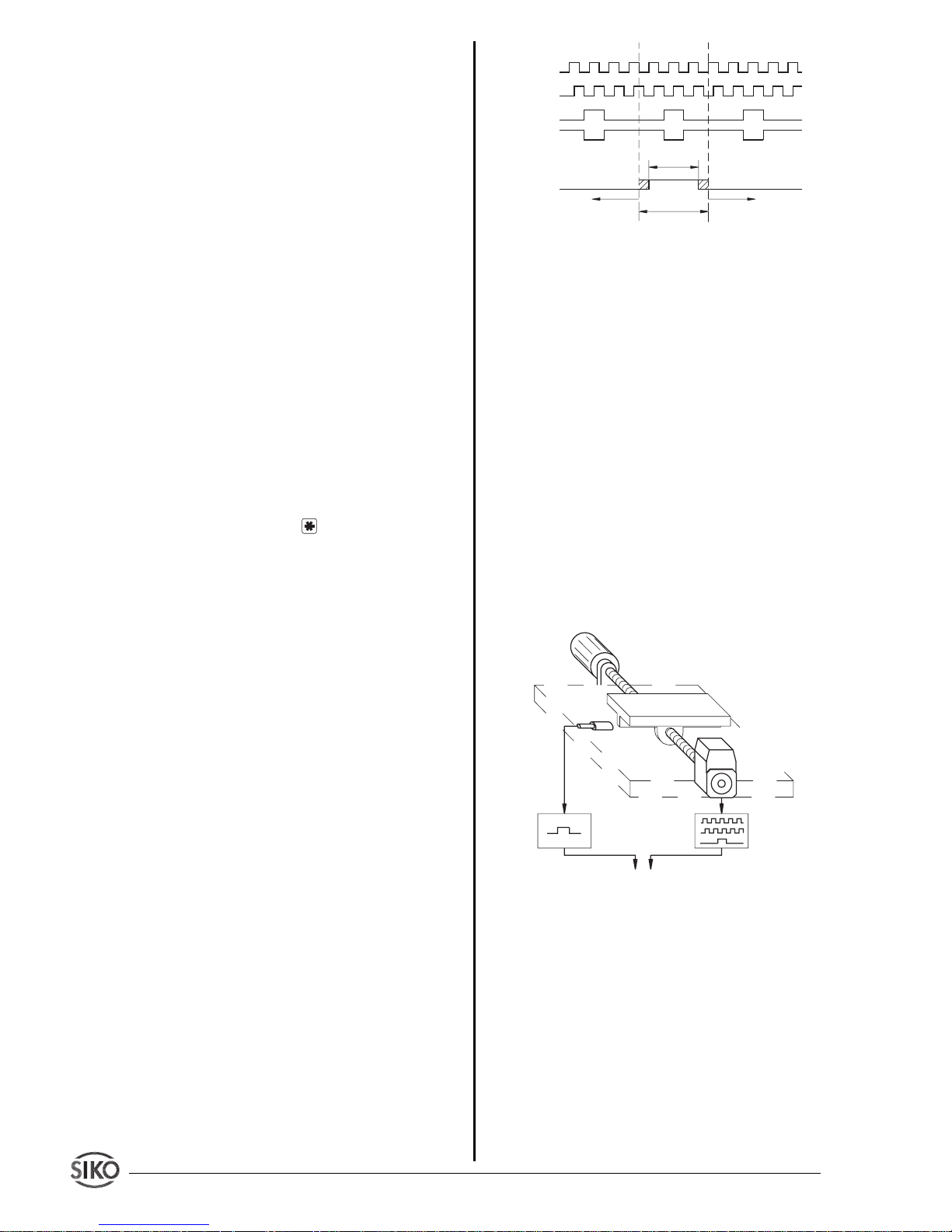
Der Kontakt des Referenzpunktgebers darf nur während maximal einer Umdrehung des Inkrementalgebers aktiv sein (siehe Abb.10).
Abb. 10 : Signaltypen für Referenzierung
Hinweis zur Referenzpunktjustage:
Fahren Sie die Antriebsspindel exakt an die Stelle, die
dem Referenzwert entspricht, den Sie zuvor nach
Abschnitt 8 programmiert haben. Der mechanisch
montierte Referenzpunktgeber muss jetzt gemäß Abb.
10 sicher betätigt (aktiv) sein.
Nach Lösen des Klemmrings bzw. der Kupplung des
Inkrementalgebers läßt sich dieser verdrehen, ohne
die Antriebsspindel mitzubewegen. Jetzt können
Sie z.B. mit einem Spannungsmesser das Indexsignal des Gebers suchen (Spannungswechsel) und
durch Verdrehen der Geberwelle den Referenzpunkt
justieren. Wenn sich Index- und Referenzpunktgeber-Signal gemäß Abb. 11 zueinander befinden
wird der Klemmring bzw. die Kupplung des Inkrementalgebers wieder festgezogen.
Abb. 11 : Prinzipaufbau Referenzierung
10. Anwendungsbeispiele (nur Drehzahl)
10.1 Anzeige in Umdrehungen pro Minute (min-1)
Bedingungen:
• Strichzahl muss der des Gebers entsprechen.
• Zykluszeit muss der Geberstrichzahl und der
Drehzahl angepaßt werden (Geber mit kleiner Strichzahl --> hohe Zykluszeit; Geber mit großer Strichzahl
--> kleine Zykluszeit).
Auflösung 1 U/min: Faktor = 1.0000
Auflösung 0,1 U/min: Faktor = 10.0000
Inkrementalkarte der MA10/3
Antrieb
Antriebsspindel
Referenzpunktgeber
Inkrementalgeber
eine
Umdrehung
Signal A
Signal B
Indexsignal
Typ O
Typ I
Referenzpunktgeber-Signal
sicher
passiv
sicher
passiv
sicher
aktiv
Page 9
MA10/3 Datum 12.06.02 Art.Nr. 80786 Z.Nr. 8664086 Änd.Stand 161/02 9
Explizit gilt: Für jeweils um eine Zehnerpotenz
kleinere Faktoren ergibt sich die entsprechend
geringere Auflösung.
10.2 Anzeige in Hz (s-1)
Bedingungen:
• Strichzahl muss auf "0" programmiert werden;
die Messanzeige wertet die eingelesenen Inkremente 1:1.
Auflösung 10 Hz: Zykluszeit = 0,1 s
Auflösung 1 Hz: Zykluszeit = 1 s
Auflösung 0,1 Hz: Zykluszeit = 10 s
10.3 Anwendungsbeispiele aus der Praxis
Anhand dreier Anwendungsbeispiele sollen die Programmierung und Anwendung der MA10/3 Drehzahl
erläutert werden, um den Umgang mit der programmierbaren Messanzeige zu erleichtern.
Beispiel 1:
Eine Schreinerei hat eine Plattensäge und einen
vorhandenen Drehgeber mit 16 Impulsen. An der
Welle des Drehgebers ist ein Messrad mit 200 mm
Durchmesser befestigt. Mit Hilfe des Drehgebers
und des Messrades soll der Plattendurchsatz in m/
min angezeigt werden. Gefordert ist außerdem eine
Auflösung von 10 cm/min (entspricht einer Nachkommastelle).
1. Berechnung des Faktors:
Umfang Messrad = p * Durchmesser =
3,141593 * 200 mm = 628,32 mm = 0,62832 m.
Da eine Auflösung von 10 cm/min (0,1 m/min)
gefordert ist, muss der Faktor 10x größer gewählt
werden.
Faktor = 10 * 0,62832 = 6,2832
2. Eingabe der Parameter:
Parameter Eingabe Bemerkung
_Str_ 16 Geberstrichzahl eingeben
_dP_ 0.0 Anzahl der Nachkommastellen
(hier eine)
_FAC_ 6.2832 Eingabe des errechneten Fak-
tors
_CYC_ 10 Da ein Geber mit niedriger Im-
pulszahl angeschlossen wird,
ist es zwingend notwendig, eine
höhere Zykluszeit einzustellen,
da anderenfalls die Anzeige
unkontrolliert springen würde.
Die Anzeige erscheint träger,
ist damit jedoch genauer.
Beispiel 2:
Eine Papierfabrik möchte die Geschwindigkeit einer Papierbahn erfassen. Auf einer Welle, an der die
Papierbahn abgelenkt wird, ist ein Inkrementalgeber mit 500 Impulsen befestigt. Die Welle hat einen
Umfang von 500 mm und die Messanzeige soll auf
m/s programmiert werden, wobei eine Auflösung
von 1 mm/s (3 Nachkommastellen) vorgesehen ist.
1. Berechnung des Faktors:
Faktor = 0,5 m/60 s = 0,00833 m/s
(Der Teiler 60 ist erforderlich, da die Mess- anzeige
standardmäßig auf Umdrehungen pro Minute eingestellt ist).
Da die Auflösung 1mm/s betragen soll, muss der
Faktor 1000x größer gewählt werden.
Faktor = 0,00833 * 1000 = 8,3333
2. Eingabe der Parameter:
Parameter Eingabe Bemerkung
_Str_ 500 Geberstrichzahl eingeben
_dP_ 0.000 3 Nachkommastellen eingeben
_FAC_ 8.3333 Eingabe des errechneten Fak-
tors
_CYC_ 0.1 ... 1 Da der Geber eine hohe Strich-
zahl hat und die Papierbahn in
der Regel mit hoher Geschwindigkeit transportiert wird ist die
Einstellung einer Zykluszeit von
0,1s bis 1s empfehlenswert.
Beispiel 3:
An einer Maschine soll die Drehzahl des Motors
bestimmt werden. Der Motor hat bei Nennbetrieb
eine Drehzahl von 3000 min-1. Auf der Welle des
Motors sitzt ein Inkrementalgeber mit 275 Impulsen. Die Drehzahl soll von zwei unterschiedlichen
Stationen mit zwei MA10/3 Drehzahl überwacht
werden.
Die eine Station hat steuernden Charakter und
benötigt die Anzeige in Umdrehungen pro Minute
ohne Nachkommastelle, die andere Station verwertet die Anzeige in Umdrehungen pro Sekunde mit
einer Nachkommastelle.
Für die erste Station:
1. Berechnung des Faktors:
Faktor = U/min = 1,000
Faktor = 1.0000 (Standardeinstellung U/min)
2. Eingabe der Parameter:
Parameter Eingabe Bemerkung
_Str_ 275 Geberstrichzahl eingeben
_dP_ 0. keine Nachkommastelle
_FAC_1 .0000 Eingabe des errechneten Fak-
tors
_CYC_ 0.1 ... 1 Je nach Drehzahl und gewünsch-
ter Anzeigeempfindlichkeit
Page 10
10 MA10/3 Datum 12.06.2002 Art.Nr. 80786 Z.Nr. 8664086 Änd.Stand 161/02
Für die zweite Station:
1. Berechnung des Faktors:
Faktor = 1 U/min = 1 U/60 s = 0,0166
Da eine Anzeige mit einer Nachkommastelle gefordert wird, muss der Faktor 10x größer gewählt
werden.
Faktor = 10 * 0,0166 = 0,1666
2. Eingabe der Parameter:
Parameter Eingabe Bemerkung
_Str_ 275 Geberstrichzahl eingeben
_dP_ 0.0 Eine Nachkommastelle einge-
ben
_FAC_ 0.1666 Eingabe des errechneten Fak-
tors
_CYC_ 0.1 ... 1 Je nach Drehzahl und gewünsch-
ter Anzeigeempfindlichkeit
10.4 Empfohlene Zykluszeiten bei bestimmten
Geberstrichzahlen
Die Zykluszeiten können je nach Drehzahl und
persönlichem Empfinden ausgewählt werden. Richtwerte siehe folgende Tabelle :
Geberstrichzahl _Str_ Zykluszeit _CYC_
1 - 30 10
30 - 80 5
80 - 150 3
150 - 300 2
300 - 400 1,5
400 - 600 1
600 - 1000 0,5
> 1000 0,1
11. Fehlerbehandlung
Die Anzeige kann Fehlerzustände erkennen und sie
im Anzeigefeld kenntlich machen:
Meldung: Full
Beschreibung: Anzeigenüberlauf
Abhilfe: Parameter kontrollieren und ggf. anpas-
sen. Anzeige referenzieren/kalibrieren.
Meldung: Anzeige blinkt
Beschreibung: Gerät wurde eingeschaltet mit Ist-
wertspeicher _ISP_ auf "AUS".
Abhilfe: Anzeige referenzieren/kalibrieren.
Meldung: Anzeige 00000 blinkend im Display
Abhilfe: Betriebsspannung zu niedrig; Spannungs-
versorgung überprüfen.
12. Befehlsliste - Standardprotokoll
Inkremental, Stückzahl, Drehzahl :
Parameter: 300...19200 Baud, kein Parity,
8 Bit, 1 Stopbit
Ausgabe: ASCII
Wertebereiche: 2/3 Byte: 0...65535 / 0... ± 2
23
SSI :
Der Standardmode dient zu Testzwecken, automatischer Konfiguration und zur Rechnerkopplung.
Über die serielle Schnittstelle RS232 läßt sich die
MA10/3 direkt an einem PC oder Terminal betreiben. Die Schnittstelle muss folgende Einstellung
haben:
4800 Baud, kein Parity, Wortlänge 8 Bit, 1Stopbit,
kein Handshake.
Generell funktioniert die Übertragung so, dass der
PC (oder das Terminal) einen Großbuchstaben, falls
erforderlich mit zusätzlichen Parametern, absendet. Die MA10/3 sendet daraufhin eine Antwort mit
abschließendem <CR>.
Befehl Länge Antwort Beschreibung
Ax 2/7 "xxxxxx>" Gerätetyp/Softwareversion
x=0: Hardwareversion
x=1: Softwareversion
x=2: Gerätetyp (INC,SSI...)
B 1/9" ±xxxxxxx>" binärer Zählerwert
(SSI-Binärwert)
Ey 2/9 "±xxxxxxx>" 3-Byte-Wert ausgeben
y = Adresse (1...5)
xxxxxxx = dezimaler Wert
y=1: Positionswert
y=2: Referenz-/Kalibrierwert
y=2: Faktor (_FAC_) (nur bei
Drehzahl)
y=3: Offsetwert
y=4: Kettenmaß Offsetwert
y=5: SSI-Nullungswert (nur
bei SSI)
Fy±xxxxxx 9/1 "> " 3-Byte-Wert eingeben
y = Adresse (2...5)
xxxxxxx = dezimaler Wert
y=2: Referenz-/Kalibrierwert
y=2: Faktor (_FAC_) (nur bei
Drehzahl)
y=3: Offsetwert
y=4: Kettenmaß Offsetwert
y=5: SSI-Nullungswert (nur
bei SSI)
Gy 2/6 "xxxxx>" 2-Byte-Wert ausgeben
y = Adresse (0...7)
xxxxx = dezimaler Wert
y=0: Anzeigewert pro Umdrehung
y=1: Strichzahl
y=2: Nachkommastellen
y=3: Baudrate
y=4: Geberbits (nur bei SSI)
y=5: Singleturnbits (nur bei
Page 11

MA10/3 Datum 12.06.02 Art.Nr. 80786 Z.Nr. 8664086 Änd.Stand 161/02 11
SSI)
y=7: ADI
Hy_xxxxx 8/ 1 "> " 2-Byte-Wert eingeben
(nicht Stückzahl) y = Adresse
xxxxx = dezimaler Werty=0:
Anzeigewert pro Umdrehung
y=1: Strichzahl
y=2: Nachkommastellen
y=4: Geberbits (nur bei SSI)
y=5: Singleturnbits (nur bei
SSI)
Iabcd 5/1 ">" Freigaben Fronttasten
(nicht Drehzahl) a: Rücksetzen
b: Kettenmaß
c: Referenz-/Kalibrierwerteingabe
d: Offsetwerteingabe (0=aus,
1=ein)
Jxyz 4/1 ">" Akku, Sprache, Istwertspei(nicht SSI) cher
x: Akku (0=aus, 1=ein) (nicht
Drehzahl)
y: Sprache (0=deutsch,
1=englisch)
z: Istwertspeicher (0=aus,
1=ein) (nicht Drehzahl)
K 1/0 "" Software-RESET
L 1/1 ">" Nullsetzen des Zählers
(nicht SSI)
Mabc 4/1 ">" SSI Format eingeben
(nur SSI) a: Format (0=kein, 1= Tanne)
b: Ausgang (0=gray, 1=binär)
c: keine Verwendung bei SSI
Mabc 4/1 ">" Drehformat eingeben; Zy(nur Drehzahl) klus (_CYC_)
a: 0
b: 0
c: 0 - 100 msec
1 - 500 msec
3 - 1,5 sec
4 - 2 sec
5 - 3 sec
6 - 5 sec
7 - 10 sec
N 1/1 "xxyyzz" Ausgabe flag_register
xx: flag_register_3 (HEX)
yy: flag_register_2 (HEX)
zz: flag_register (HEX)
S 1/1 ">" Gerät in Grundzustand zurück-
setzen
Tx 2/1 ">" Drehrichtung
(nur Inkrem.+SSI) x=0: Zähler i
x=1: Zähler e
Ux 2/1 ">" Indexart
(nur Inkrem.) x=0: Index 0
x=1: Index I
Vx 2/1 ">" Referenzschalter Typ (Ein(nur Inkrem.) gangspin)
x=0: Referenzschalter Schliesser
x=1: Referenzschalter Öffner
x=2: Rücksetzen von Hand
W 1/3 "xyz" Positionswert binär
xyz = 3 Byte im 2-er-Komplement MSB...LSB
Xxyyy 5/1 ">" Displaytest
x: Digitnummer
(0...5, >5=Test aus)
yyy: ASCII-Nummer des Zeichens
Yx 2/1 ">" Anzeigedivisor eingeben
(nur Inkrem.+SSI) x=0: ADI = 1
x=1: ADI = 10
x=2: ADI = 100
x=3: ADI = 1000
Z 1/9 "±xxxxxxx>" Positionswert ausgeben
13. Parameterliste
"Inkremental" Auswahl Eigene Einstellungen
_APU_ 0...59 999
_Adl_ 1; 10; 100; 1000
_Str_ 0...59 999
_drEh_ I ; E
_Ind_ O ; I
_dP_ 0. bis 0.0000
_rFS_ Schl ; oEFF ; HAnd
_F_SEt EIn ; AUS
Page 12
12 MA10/3 Datum 12.06.2002 Art.Nr. 80786 Z.Nr. 8664086 Änd.Stand 161/02
_F_rEL EIn ; AUS
_F_rEF EIn ; AUS
_F_oFF EIn ; AUS
_ISP_ EIn ; AUS
_ACCU_ EIn ; AUS
_bAUd_ 300; 600; 1200; 2400; 4800;
9600; 19200; SN_1; SN_3
_Adr_ 1...31
_SPr_ dEUt ; EnGL
"Absolut-SSI" 1 2 3
_APU_ 0...59 999
_Adl_ 1; 10; 100; 1000
_drEh_ I ; E
_dP_ 0. bis 0.0000
_F_SEt EIn ; AUS
_F_rEL EIn ; AUS
_F_CAL EIn ; AUS
_F_oFF EIn ; AUS
_For_ no ; trEE
_G_bit 0...29
_S_bit 0...19
_AUSG_ bin ; GrAY
_t_out EIn ; AUS
_bAUd_ 300; 600; 1200; 2400; 4800;
9600; 19200; SN_1; SN_3
_Adr_ 1...31
_SPr_ dEUt ; EnGL
"Drehzahl" 1 2 3
_Str_ 0...59 999
_dP_ 0. bis 0.0000
_FAC_ 00.0000 ... 99.9999
_CYC_ 0,1; 0,5; 1; 1,5; 2; 3; 5; 10 s
_bAUd_ 300; 600; 1200; 2400; 4800;
9600; 19200; SN_1; SN_3
_Adr_ 1...31
_SPr_ dEUt ; EnGL
"Stückzahl" 1 2 3
_F_SEt EIn ; AUS
_F_rEL EIn ; AUS
_F_rEF EIn ; AUS
_F_oFF EIn ; AUS
_ISP_ EIn ; AUS
_ACCU_ EIn ; AUS
_bAUd_ 300; 600; 1200; 2400; 4800;
9600; 19200; SN_1; SN_3
_Adr_ 1...31
_SPr_ dEUt ; EnGL
Page 13
MA10/3 Datum 12.06.02 Art.Nr. 80786 Z.Nr. 8664086 Änd.Stand 161/02 13
ENGLISH
1. Warranty information
• In order to carry out installation correctly, we
strongly recommend this document is read very
carefully. This will ensure your own safety and the
operating reliability of the device.
• Your device has been quality controlled, tested
and is ready for use. Please observe all warnings and
information which are marked either directly on the
device or specified in this document.
• Warranty can only be claimed for components
supplied by SIKO GmbH. If the system is used
together with other products, there is no warranty
for the complete system.
• Repairs should be carried out only at our works.
If any information is missing or unclear, please
contact the SIKO sales staff.
2. Identification
Please check the particular type of unit and type
number from the identification plate. Type number
and the corresponding version are indicated in the
delivery documentation.
e.g. MA10/3-0023
version number
type of unit
3. Summary description
The electronic display MA10/3 is used together
with an incremental or absolute encoder (SSI) and
thus forms an electronic measuring /display system, respectively with and electronical or mechanical signal transmitter used as electronic batch
User Information
MA10/3
Electronic Display
counter. Parameters and display value are taken
into a non-volatile store (EEPROM).
4. Installation
For mounting, the degree of protection specified
must be observed. If necessary, protect the unit
against environmental influences such as sprayed
water, dust, knocks, extreme temperatures.
Built-in housing EG
• Push the device into the panel (1) until the
panel clips (2) hold the housing loosely.
• Press the lateral centering (3) slightly down and
push the housing into the cut-out (1) until the
panel clips (2) snap completely.
Fig. 1: Installation
Bench housing TG
The rubber feet can be removed in order to screw
down the unit.
Attention !Maximum screw insert depth of 6.5
mm must be strictly adhered to!
5. Electrical connection
• Switch off current before connecting or dis-
conneting unit !!
• Any wiring must only be carried out without
power.
• Provide stranded wires with ferrules.
• Check all lines and connections before switching
on the equipment.
Interference and distortion
All connections are protected against the effects of
interference. The location should be selected to
ensure that no capacitive or inductive interferences can affect the display or the connection
lines! Suitable wiring layout and choice of cable
can minimise the effects of interference (eg. interference caused by SMPS, motors, cyclic controls
and contactors).
EG
TG
1
2
3
Page 14
14 MA10/3 Datum 12.06.2002 Art.Nr. 80786 Z.Nr. 8664086 Änd.Stand 161/02
Necessary measures:
• Only screened cable should be used. Screen
should be connected to earth at both ends. Wire
cross section is to be at least 0,14 mm2, max. 0,5
mm2.
• Wiring to screen and to ground (0V) must be via
a good earth point having a large surface area for
minimum impedance.
• The unit should be positioned well away from
cables with interference; if necessary a protective
screen or metal housing must be provided. The
running of wiring parallel to the mains supply
should be avoided.
• Contactor coils must be linked with spark suppression.
Power supply
Operating voltage depends on execution and is
indicated in the delivery documentation or on the
identification plate.
e.g. 230 VAC -10% ... +6%
5.1 Connection of Built-in housing EG
Fig. 2: Pin outs EG (PP-, OC-output circuit, without
interfaces and without battery) for incremental, speed
measurement, batch counter
Fig. 3: Pin outs EG for options (battery, LD-output
circuit, interfaces) for incremental, absolute, speed
measurement, batch counter
Fig.4 : Connection diagramm incremental
Fig.5 : Connection diagramm absolute SSI
Fig.6 : Connection diagramm batch counter
Fig.7 : Connection diagramm speed measurement
Page 15
MA10/3 Datum 12.06.02 Art.Nr. 80786 Z.Nr. 8664086 Änd.Stand 161/02 15
5.2 Connection of Built-in housing EG/E3
(1) (9 pole DSUB connector)
Pin Description
1 L (24VAC) ; +UB (24VDC)
2 N(24VAC) ; 0V (24VDC)
3PE
4 GND
5 RFS
6 L (24VAC) ; +UB (24VDC)
7 N(24VAC) ; 0V (24VDC)
8PE
9 N.C.
(2) (9 pole DSUB connector)
Pin Description
1 GND
2A
3B
4I
5 Encoder supply
6 - 9 N.C.
5.3 Connection of bench housing TG
Fig. 8: Pin outs TG
Reference/Calibration switch connection
via a socket at the rear; pin connections are to be
made as follows (fig. 8):
No. Description
1 RFS / CAL
2 GND
3+U
B
Interface connection
via a socket at the rear; pin connections are to be
made as follows (fig. 8):
No. Description
1 GND
2 RXD / DÜB
3 TXD / DÜA
Encoder connection (9 pole DSUB socket)
Incremental LD+OP Absolute SSI
Pin Description Pin Description
1 +UB 1 +UB
2 A-signal 2 cycle+
3 B-signal 3 data+
4 I-signal 4 N.C.
5 GND 5 GND
6 N.C. 6 N.C.
7 /A-signal 7 cycle8 /B-signal 8 data9 /I-signal 9 N.C.
Incremental PP+OC Batch counter/speed
measurement
Pin Description Pin Description
1 +UB 1 +UB
2 A-signal 2 A-signal
3 B-signal 3 N.C.
4 I-signal 4 N.C.
5 GND 5 GND
6-9 N.C. 6-9 N.C.
6. Commissioning
Four membrane keys on the front panel are used for
programming and operation of the display.
Keys' function
Depending on the operating mode the keys may
have additional functions (see 'Programming mode'
and 'Input mode'). The keys are pressed singly or in
pairs (two together).
1. Programming
2. Select 'value'
3. Select 'digit'
4. Store value
Fig. 9: Key functions
Reference switch
Interface
Encoder Power 230VAC, 110VAC
Power 24VDC
(1)
(2)
1
2
3
4
Page 16
16 MA10/3 Datum 12.06.2002 Art.Nr. 80786 Z.Nr. 8664086 Änd.Stand 161/02
When switched on
When switched on and correctly connected, the
MA10/3 displays :
• all LED segments (for approx. 1,5 s)
• the software version, and a possible special type
number (eg.: 1.04)
• the last position value (only incremental and
batch counter, if actual value memory _Sto_ has
been programmed to "on" before)
• positional value (only SSI)
Programming
Subsequently the specific parameters of the machine need to be programmed. Normally programming
is only carried out once, ie. initial setting for your
application.
Operating modes
There are two operating modes:
1. Programming mode: to program the display at
initial installation.
2. Input mode: to enter parameters/select functions
used during standard operation. (without speed
measurement)
7. Programming mode
Use the keyboard to enter into programming mode
and to modify/program parameters (see below: 'To
enter into programming mode'). Normally programming is only necessary at initial installation.
The MA10/3 is pre-programmed to standard values
at our works. If the order defines customer-specific
parameters (configuration), these will be pre-programmed at SIKO; in this case the MA10/3 will be
supplied with a configuration sheet showing the
pre-programmed values.
Parameter modification and controlling
Parameters can be modified and checked at any
time. They are stored in a non-volatile memory.
Each parameter's designation, function and value
range is shown on the following pages.
To enter into programming mode:
press key for at least 10 s
To leave programming mode:
automatically, if no key has been pressed during
approx. 30 s or if you press until the end of the
parameter list is reached.
To scroll the parameters:
press key
To change parameters:
use keys +
To store the modified parameters:
press key
Only incremental: When combined with magnetic
sensor MSK320 some values must be fixed programmed.
Designation Display Angle Linear
display display
with MRI01 with MB320
Display after 1 rev. _dPr_ 3600 100
Display divisor _d_di 11
Encoder pulses per _incr_ 512 (number of 25
rev. poles x 8 eg. 64
poles x 8 = 512)
Positions after the _dP_ 0.0 0.0
comma
Reference switch _trS_ E_rES E_rES
Access: redet via _r_SEt on on
keyboard
Designation Display Value range Incr. SSI Speed. Batch.
Display after 1 rev. _dPr_ 0...59 999 X X
Value by which the display increases/decreases after 1 revolution of the encoder.
Display divisor _d_di 1; 10; 100; 1000 X X
Divisor by which the display accuracy is
reduced compared to the measuring
accuracy.
Example.: Due to an integer value ratio,
the measuring resolution is programmed
to 1/1000mm. The display, however,
needs a resolution of 1/10 mm only. ->
The display divisor is programmed to 100.
Encoder pulses per revolution _incr_ 0...59 999 X X
Counting direction _dir_ "c" clockwise X X
Counting direction of the system increasing values
"cc" anti-clockwise
increasing values
Page 17
MA10/3 Datum 12.06.02 Art.Nr. 80786 Z.Nr. 8664086 Änd.Stand 161/02 17
Designation Display Value range Incr. SSI Speed. Batch.
Index signal _Ind_ "0" Signal shape '0': X
Reference mark on the encoder disk; square signal with
appears only once per revolution. positive logic
"I" Signal shape 'I':
square signal with
inverted logic
Positions after the comma _dP_ 0. to 0.0000 X X X
Determination of the decimal point position
Free programmable value _FAC_ 00.0000 ... 99.9999 X
To calculate the desired display unit. If
factor 1.0000 is chosen, RPM will be
displayed (see application example).
Cycle time _CYC_ 0,1; 0,5; 1; 1,5; 2; X
The display is refreshed after the pro- 3; 5; 10 s
grammed cycle time. If short cycle times
have been programmed (recommended
for high speed applications and high
pulse counts), modifications are quickly
displayed --> display risks to be unstable.
If long cycle times have been programmed (recommended for low speed
applications and low pulse counts),
modifications are displayed with a
certain lag only --> more stable display.
Reference switch _trS_ "n.o." closing contact, X
Type of reference value transmitter; can which is normally open
either be a mechanical contact or a "n.cl" opening
proximity switch. contact, which is
normally closed
"E_rES" calibration
via 'star'-key at any
position (contact to
earth)
Access: reset via keyboard _r_SEt "on" Reset unlocked X X X
Press key to set the display to the "oFF" Reset locked
reference or offset value (in input mode)
Access: incremental measurement _r_rEL "on" incremental X X X
To switch from absolute measurement measurement on
and zero-zetting to relative measure- "oFF" incremental
ment measurement off
Access: change of reference value _r_rEF "on" reference value X X
To enter / change reference value unlocked
"oFF" reference
value locked
Access: change of calibration value _r_CAL "on" calibration X
To enter / modify the calibration value. value unlocked
"oFF" calibration
value locked
Access: change of offset _r_oFF "on" offset correc- X X X
To enter / change offset value tion on
"oFF" offset correc-
tion oFF
Page 18
18 MA10/3 Datum 12.06.2002 Art.Nr. 80786 Z.Nr. 8664086 Änd.Stand 161/02
Designation Display Value range Incr. SSI Speed. Batch.
Data format _For_ "no" Encoder data left- X
justified (MSB first)
"trEE" pine-tree
format (12 multiturn+
13 singleturn bits
data format)
Encoder bits _E_bit 0...29 X
To enter encoder's total bit value.
Single-turn bits _S_bit 0...19 X
To enter single-turn bit value.
Output code _outP_ "bin" Encoder's data X
in binary code
"GrAY" Encoder's
data in Gray code
Time-out function _t_out "on" Cable break X
recognition on
"oFF" Cable break
recognition off
Zeroeing of encoder _SEt_ X
For zero-setting (+ offset + calibration
value) of the encoder via 'arrow' key.
Encoder's position value _EdAt_ X
To display encoder's actual position.
Actual value store _Sto_ "on" Actual value X X
When switched off, the last displayed memory on: when
value is stored in a non-volatile memory. switched on, the last
measured value is
displayed.
"oFF" Actual value
memory off: when
switched on, the
display must be
calibrated (zeroed).
Activation battery for continuity _ACCU_ "on" battery module X X
protection is used
If an external SIKO battery module is
"oFF" battery module
used as continuity protection, this must is not used
be programmed accordingly.
Baud rate _bAUd_ 300; 600; 1200; X X X X
Determination of the baud rate in case 2400; 4800; 9600;
of interface operation (only to be pro- 19200;SN_1 (SIKO-
grammed for MA10/3 with option NETZ1); SN_3
'interface'). (SIKONETZ3)
Address for bus operation _Adr_ 1...31 X X X X
To determine the device-specific address.
Language _LAn_ "GEr" German X X X X
To choose the language displayed. "EnGL" English
Internal parameter; not to be pro- _CodE_ X X X X
grammed by user
Page 19
MA10/3 Datum 12.06.02 Art.Nr. 80786 Z.Nr. 8664086 Änd.Stand 161/02 19
8. Input mode (not speed measurement)
Reset (to reference/calibration and offset value)
Precondition: Parameter 'Access: reset via key-
board' (_r_SEt) in programming mode must have
been programmed to 'on'; but reset can not be
carried out in programming mode (see chapter. 7
'To leave programming mode').
• Press key to set the display to reference/
calibration or offset value.
Incremental measurement
Precondition: Parameter 'Access: incremental mea-
surement' (_r_rEL) in programming mode must have
been programmed to "on", but the display must not
be in programming mode now (see chapter 7 'To
leave programming mode').
• Press the two arrow keys + simultaneously
to switch on/off incremental measurement function.
• The display is zeroed and the blinking decimal
point signals that incremental measurement function
is 'on'.
• Leave incremental measurement function by
another simultaneous pressing of the two arrow
keys; now the absolute measuring value is displayed again.
Reference/calibration and/or offset value modification
Precondition: Menu points 'Access: reference/
calibration value' (_r_rEF/_r_CAL) and/or 'Access:
offset value' (_r_oFF) respectively must have been
programmed to 'on' in programming mode, but the
display must not be in programming mode (see
chapter 7 'To leave programming mode').
• Press the two keys + simultaneously to
enter a new reference/calibration value, or key
+ to correct the offset value.
• The display then shows the actual reference/
calibration and/or offset value, which can be
changed via the two arrow keys.
• Press key to store the new value.
• If no key has been pressed for approx. 30 s or if
you press again key , the MA10/3 will return to
display mode.
8.1 Parameter description _rEF_, _CAL_,
_oFF_
Display/ Description
"choice"
_rEF_ Reference value
Absolute datum point of the measuring
system. This value is set after system
reference accord. to chapter 9.
_CAL_ Calibration value
Absolute datum point of the measuring
system. This value is set after system
calibration accord. to chapter 9.
_oFF_ Offset (displacement)
Can be any value; used to influence the
value displayed, eg. tool correction va-
lue.
9. Referencing / Calibration
(not speed measurement)
The display must always be referenced:
• before the first use of the measuring system.
• if the actual value memory (_Sto_) was program-
med to "oFF" (not SSI).
• in case of a displacement during power failure
(not SSI).
During reference/calibration the counter is set to
the programmed reference/calibration value (+
offset value) The display can thus be zeroed, if
reference/calibration and offset value were previously programmed to 0.
Manual referencing / calibration
Manual reference/calibration can either be made
by:
• activating a reference switch according to its
function, ie. RFS / CAL to ground.
• or by pressing key , which must be program-
med as reset key (_r_SEt = "on").
9.1 Automatic referencing (only Incremental)
Automatic referencing is always made via a reference point transmitter, which is automatically
approached at a defined position (reference value). Suitable reference point transmitters are:
• mechanical cam switches
• proximity switches with NPN-output (connec-
ted to earth)
Referencing condition: (for opening/ closing
contact)
Signal_A, signal_B, index signal and reference
value transmitter signal must be active (linked).
Page 20
20 MA10/3 Datum 12.06.2002 Art.Nr. 80786 Z.Nr. 8664086 Änd.Stand 161/02
electronic display MA10/3
drive
driving spindle
ref. point
transmitter
incremental
encoder
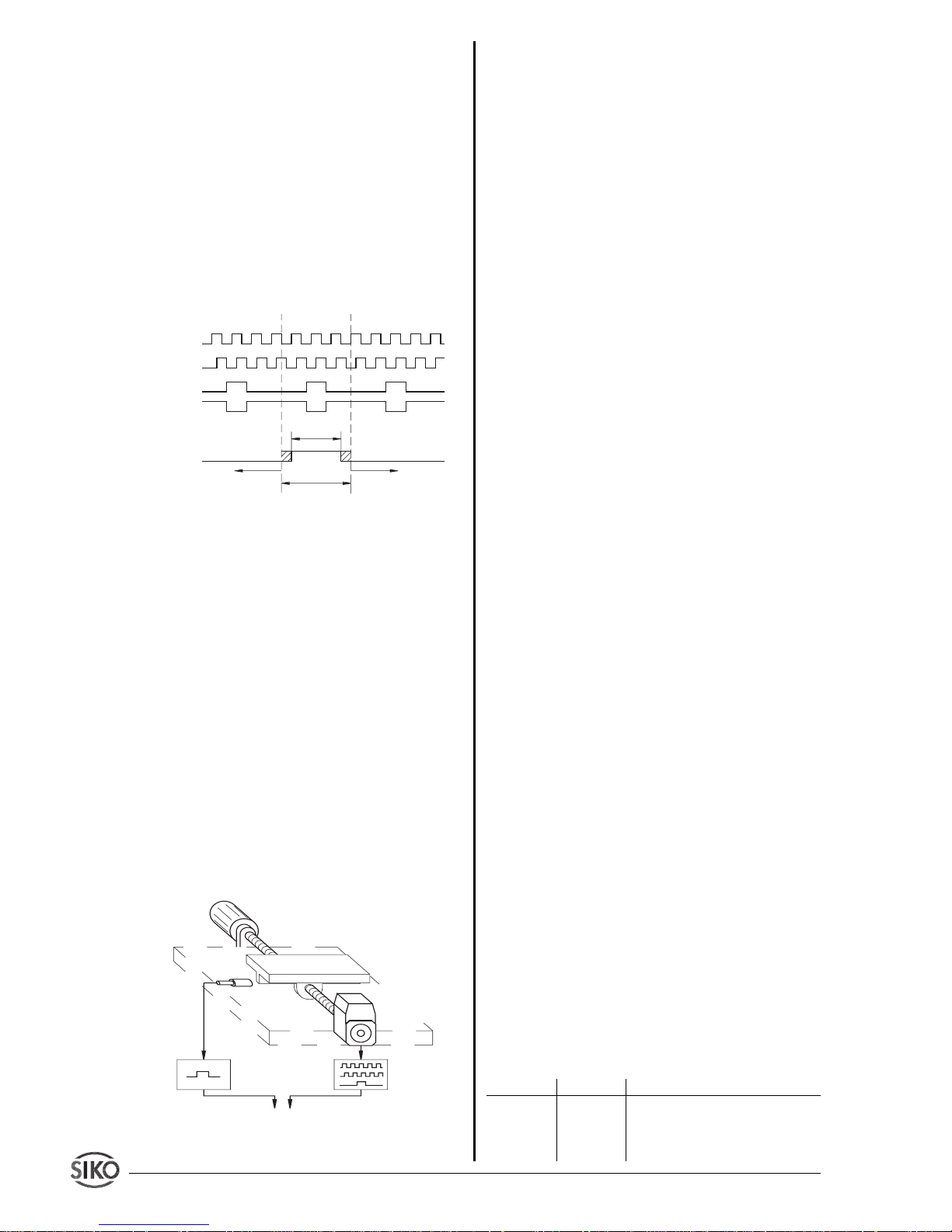
General information on automatic reference
Electronic linking of the signals from a reference
point transmitter (eg. cam switch or limit switch)
with the index pulse (index marker) of the connected encoder will calibrate the measuring display, ie.
a start position is defined. During mounting of the
reference point transmitter, please adjust the incremental encoder in such a way that the index pulse
appears when the reference point switch is activated.
The contact of the reference point transmitter must
only be active for less than one revolution of the
encoder (see fig. 10).
Fig. 10 : Signal types for referencing
Information concerning the setting of the reference point:
Move the spindle exactly to the position which
corresponds to the reference value pro-grammed
before accord. to chapter 8. The mechanically
mounted reference point transmitter must now be
definitely active (see fig. 10).
The encoder can be turned without causing any
movement of the driving spindle, if you untighten
the clamping ring or coupling. You can now search
the index signal of the encoder (voltage change)
by using for example a voltmeter and carry out the
adjustment of the reference point. When the index
and reference point transmitter signals are positioned as described in fig. 11, the clamping ring
and the coupling of the incremental encoder are
retightened.
Fig. 11 : Referencing setup
10. Application examples (only speed
measurement)
10.1 How to display revolutions/minute (min-1)
Precondition:
• Value programmed under "Encoder pulses per
rev." (_incr_), must be identical to the pulse
number of the encoder.
• Cycle time is to be adapted to the encoder's
increments and the speed (encoder with few incre-
ments --> high cycle time; encoder with many
increments --> low cycle time).
Resolution 1 U/rpm: Factor = 1.0000
Resolution 0,1 U/rpm: Factor = 10.0000
That means: with each decreasing power of 10 of
the factor, the resolution decreases by 0,1 mm.
10.2 How to display Hz (s-1)
Precondition:
• Parameter 'Encoder pulses per rev." must be
programmed to "0"; display interpretes incoming
values 1:1.
Resolution 10 Hz: cycle time = 0,1 s
Resolution 1 Hz: cycle time = 1 s
Resolution 0,1 Hz: cycle time = 10 s
10.3 Some practise application examples
The following three application examples show
programming / application of the MA10/3 'Speed'.
Please study these application examples; this will
facilitate and clarify the display's handling.
Example 1:
Use of the MA10/3 on a plate saw together with an
incremental encoder with 16 pulses. A measuring
wheel with 200 mm circumference is fixed on the
encoder's shaft.Via encoder and measuring wheel
the plate's feed rate is to be displayed in m/min. A
resolution of 10cm/min (corresponds to one position after the comma) is required.
1. Calculation of the factor:
Circumference measuring wheel = p * diameter =
3,141593 * 200 mm = 628,32 mm = 0,62832 m.
As resolution is to be 10 cm/min (0,1 m/min) , a
10-times higher factor must be chosen.
Factor = 10 * 0,62832 = 6,2832
2. Parameter programming:
Parameter Value Explanation
_incr_ 16 Enter "Encoder pulses per revo-
lution"
_dP_ 0.0 Positions after the comma (one
one turn
signal A
signal B
index signal
type O
type I
signal ref.point
transmitter
definitely
passive
definitely
passive
definitely
active
Page 21
MA10/3 Datum 12.06.02 Art.Nr. 80786 Z.Nr. 8664086 Änd.Stand 161/02 21
for this application)
_FAC_ 6.2832 Enter calculated factor.
_CYC_ 10 Connected encoder has a low
pulse count; therefore, it is
absolutely necessary to program a higher cycle time; otherwise an unstable display will
result. The display becomes
more sluggish, but also more
precise.
Example 2:
Use of the MA10/3 on a paper-working machine to
capture the speed of a paper web. An incremental
encoder with 500 pulses is fixed on a shaft deflecting the paper web. The shaft has a circumference
of 500 mm and m/s are to be displayed via the
MA10/3. Required resolution = 1 mm/s (corresponds to 3 positions after the comma).
1. Calculation of the factor:
Factor = 0,5 m/60 s = 0,00833 m/s
(Divisor 60 is necessary, because the MA10/3's
standard programming is turns/minute).
As resolution is to be 1mm/s, a 1000-times higher
factor must be chosen.
Factor = 0,00833 * 1000 = 8,3333
2. Eingabe der Parameter:
Parameter Value Explanation
_incr_ 500 Enter "Encoder pulses per revo-
lution"
_dP_ 0.000 Three positions after the com-
ma
_FAC_ 8.3333 Enter calculated factor.
_CYC_ 0.1 ... 1 For this application the cycle
time is irrelevant, because an
encoder with a high pulse number is used and paper webs are
normally transported at high
speed --> Pre-programmed standard value for cycle time must
not be changed.
Example 3:
Speed of a motor on a machine is to be determined.
During operation at normal rating the motor has a
speed of 3000 rpm. An incremental encoder with
275 pulses is fixed on the motor's shaft. Speed is to
be controlled by two independent stations using
MA10/3 'Speed'.
For one station turns/minute without a position
after the comma are to be displayed; for the other
station turns/second and one position after the
comma.
For the first station:
1. Calculation of the factor:
Factor = rpm = 1,000
Factor = 1.0000 (preprogrammed standard unit =
rpm)
2. Parameter programming:
Parameter Value Explanation
_incr_ 275 Enter "Encoder pulses per revo-
lution"
_dP_ 0. No positions after the comma
_FAC_1 .0000 Enter calculated factor.
_CYC_ 0.1 ... 1 Depends on speed and desired
display sensivity.
For the second station:
1. Calculation of the factor:
Factor = 1 rpm = 1 U/60 s = 0,0166
As the value is to be displayed with one position
after the comma, a 10-time higher factor must be
chosen.
Factor = 10 * 0,0166 = 0,1666
2. Parameter programming:
Parameter Value Explanation
_incr_ 275 Enter "Encoder pulses per revo-
lution"
_dP_ 0.0 Enter one position after the
comma
_FAC_ 0.1666 Enter calculated factor.
_CYC_ 0.1 ... 1 Depends on speed and desired
display sensivity.
10.4 Cycle times recommended for certain pulse
counts
Cycle times should be programmed according to
speed and individual requirements. Standard values can be seen from the following table:
Encoder pulses _incr_ Cycle time _CYC_
1 - 30 10
30 - 80 5
80 - 150 3
150 - 300 2
300 - 400 1,5
400 - 600 1
600 - 1000 0,5
> 1000 0,1
Page 22
22 MA10/3 Datum 12.06.2002 Art.Nr. 80786 Z.Nr. 8664086 Änd.Stand 161/02
11. Trouble shooting
Error states are recognized and shown in the
display:
Message: Full
Description: display overrun
Action: control parameters and adjust them if
necessary; reference/calibration display
Message: Blinking display
Description: device was switched on with actual
value store _Sto_ programmed to "oFF"
Action: carry out reference/calibration
Message: Blinking display of value 00000
Action: operating voltage too low; check voltage
supply.
12. Standard protocol: list of commands
Incremental, Batch counter, Speed measurement :
Parameter: 300 to 19200 baud, no parity,
8 bits, 1 stop bit
Data code: ASCII
Value range: 2/3 Byte: 0...65535 / 0... ± 2
23
SSI :
The standard mode serves for test purposes, automatic configuration and for computer connection.
Using the series interface RS232 the MA10/3
display can be directly connected to PC or a
terminal. The interface must have the following
characteristics:
4800 Baud, no parity, 1 Stopbit, no handshake.
The transmission functions generally so that the PC
(or terminal) sends Capital Letters, if necessary
with additional parameters. The MA10/3 transmits
its answer with automatic Carriage Return <CR>.
Command
Length Reply Description
Ax 2/7 "xxxxxx>" unit type / software version
x=0: hardware version
x=1: software version
x=2: unit type (INC,SSI...)
B 1/9" ±xxxxxxx>" binary counter value
Ey 2/9 "±xxxxxxx>" transmit 3-byte value
y = address (1...5)
xxxxxxx = decimal value
y=1: position value
y=2: reference/calibration
value
y=2: factor (_FAC_) (only
speed measurement)
y=3: offset value
y=4: increm. measurem.
y=5: disc value at the moment
of zeroing (only SSI)
Fy±xxxxxx 9/1 "> " enter 3-byte value
y = address (2...5)
xxxxxxx = decimal value
y=2: reference/calibration
value
y=2: factor (_FAC_) (only
speed measurement)
y=3: offset value
y=4: increm. measurem.
y=5: disc value at the moment
of zeroing (only SSI)
Gy 2/6 "xxxxx>" transmit 2-byte value
y = address (0...7)
xxxxx = decimal value
y=0: display value after 1
revol.
y=1: number of pulses
y=2: positions after the comma
y=3: baud rate
y=4: encoder bits (only SSI)
y=5: singleturn bits (only SSI)
y=7: ADI
Hy_xxxxx 8/ 1 "> " enter 2-byte value
(not batch counter) y = address
xxxxx = decimal value
y=0: display value after 1
revol.
y=1: number of pulses
y=2: positions after the comma
y=4: encoder bits (only SSI)
y=5: singleturn bits (only SSI)
Iabcd 5/1 ">" release frontal keys
(not speed meas.) a: reset
b: incremental measurem.
c: input reference/calibration
value
d: input offset value (0=off,
1=on)
Jxyz 4/1 ">" battery, language, actual
(not SSI) value store
x: battery (0=off, 1=on) (not
speed meas.)
y: language (0=German,
1=English)
z: actual value store (0=off,
1=on) (not speed meas.)
K 1/0 "" software RESET
L 1/1 ">" zero-zetting of the counter
(not SSI)
Mabc 4/1 ">" enter SSI format
(only SSI) a: format (0=none, 1= tree)
b: code (0=gray, 1= binary)
c: not used with SSI
Mabc 4/1 ">" Enter cycle times (_CYC_)
(only speed meas.) a: 0
b: 0
c: 0 - 100 msec
1 - 500 msec
3 - 1,5 sec
4 - 2 sec
5 - 3 sec
6 - 5 sec
7 - 10 sec
N 1/1 "xxyyzz" issue flag_register
xx: flag_register_3 (HEX)
yy: flag_register_2 (HEX)
Page 23
MA10/3 Datum 12.06.02 Art.Nr. 80786 Z.Nr. 8664086 Änd.Stand 161/02 23
13. Parameter List
"Incremental" Selection Your own programming use
_dPr_ 0...59 999
_d_dir 1; 10; 100; 1000
_incr_ 0...59 999
_dir_ c ; cc
_Ind_ O ; I
_dP_ 0. to 0.0000
_trS_ n.o. ; n.cl ; E_rES
_r_SEt on ; oFF
_r_rEL on ; oFF
_r_rEF on ; oFF
_r_oFF on ; oFF
_Sto_ on ; oFF
_ACCU_ on ; oFF
_bAUd_ 300; 600; 1200; 2400; 4800;
9600; 19200; SN_1; SN_3
_Adr_ 1...31
_LAn_ GEr ; EnGL
"Absolute SSI" 1 2 3
_dPr_ 0...59 999
_d_di 1; 10; 100; 1000
_dir_ c ; cc
_dP_ 0. to 0.0000
_r_SEt on ; oFF
_r_rEL on ; oFF
_r_CAL on ; oFF
_r_oFF on ; oFF
_For_ no ; trEE
_E_bit 0...29
_S_bit 0...19
_outP_ bin ; GrAY
_t_out on ; oFF
zz: flag_register (HEX)
S 1/1 ">" Reset device to standard pro-
gramming
Tx 2/1 ">" counting direction
(only Increm.+SSI) x=0: counting direction 'i'
x=1: counting direction 'e'
Ux 2/1 ">" type of index signal
(only Increm.) x=0: index 0
x=1: index I
Vx 2/1 ">" type of reference switch
(only Increm.) (input pin)
x=0: ref. switch 'closing contact'
x=1: ref. switch 'opening contact'
x=2: manual reset
W 1/3 "xyz" binary position value xyz = 3
bytes in two's complement
MSB...LSB
Xxyyy 5/1 ">" display test
x: digit number
(0...5, >5= display test off)
yyy: ASCII-number of the sign
Yx 2/1 ">" enter display divisor
(only Increm.+SSI) x=0: ADI = 1
x=1: ADI = 10
x=2: ADI = 100
x=3: ADI = 1000
Z 1/9 "±xxxxxxx>" issue position value
Page 24
24 MA10/3 Datum 12.06.2002 Art.Nr. 80786 Z.Nr. 8664086 Änd.Stand 161/02
_bAUd_ 300; 600; 1200; 2400; 4800;
9600; 19200; SN_1; SN_3
_Adr_ 1...31
_LAn_ GEr ; EnGL
"Speed measurement" 1 2 3
_incr_ 0...59 999
_dP_ 0. to 0.0000
_FAC_ 00.0000 ... 99.9999
_CYC_ 0,1; 0,5; 1; 1,5; 2; 3; 5; 10 s
_bAUd_ 300; 600; 1200; 2400; 4800;
9600; 19200; SN_1; SN_3
_Adr_ 1...31
_LAn_ GEr ; EnGL
"Batch counter" 1 2 3
_r_SEt on ; oFF
_r_rEL on ; oFF
_r_rEF on ; oFF
_r_oFF on ; oFF
_Sto_ on ; oFF
_ACCU_ on ; oFF
_bAUd_ 300; 600; 1200; 2400; 4800;
9600; 19200; SN_1; SN_3
_Adr_ 1...31
_LAn_ GEr ; EnGL
SIKO GmbH
Dr.-Ing. G. Wandres
Werk / Factory:
Weihermattenweg 2
D-79256 Buchenbach
Postanschrift / Postal address:
Postfach 1106
D-79195 Kirchzarten
Telefon / Phone 07661/394-0
Telefax / Fax 07661/394-388
eMail [email protected]
Internet www.siko.de
 Loading...