

Page 1

1
USB 2.0 SlimHub 4000P
Quick Installation Guide
04-0237A
Introducing the
USB 2.0 SlimHub 4000P
The USB 2.0 SlimHub 4000P is designed to support USB 2.0
equipped PC computers. This streamlined, mini-size 4-port USB
2.0 hub expands USB connectivity to your computer. One
switching power adapter is included.
Features and Benefits
• Compliant with USB Specifications, Revision 2.0
• Provides 4 high-speed USB 2.0 ports for USB device
connections
• Supports high-speed (480Mbps), full-speed (12Mbps), and
low-speed (1.5Mbps) data transfer modes
• Per port over-current detection and protection
• Supports simultaneous operation of multiple high-speed USB
2.0 and USB 1.1 devices
• Hot-swapping feature allows you to attach/detach USB
devices without first powering your computer off
• Works with various types of USB 2.0 and USB 1.1 devices
simultaneously including hubs, removable drives, digital
cameras, scanners, CD-RWs, DVD-RAMs, PC video cameras,
printers, CF/SM/MMC/SD/Memory Stick memory card
readers, and more
Note: USB 1.1 devices are limited to USB 1.1 speeds even when
they are connected to USB 2.0 host adapter or USB 2.0 hubs.
System Requirements
• PC computer with one available USB 2.0 port
• Windows 98 SE/ME/2000/XP
Page 2
2
Package Contents
• One USB 2.0 SlimHub 4000P
• One switching power adapter
• This quick installation guide
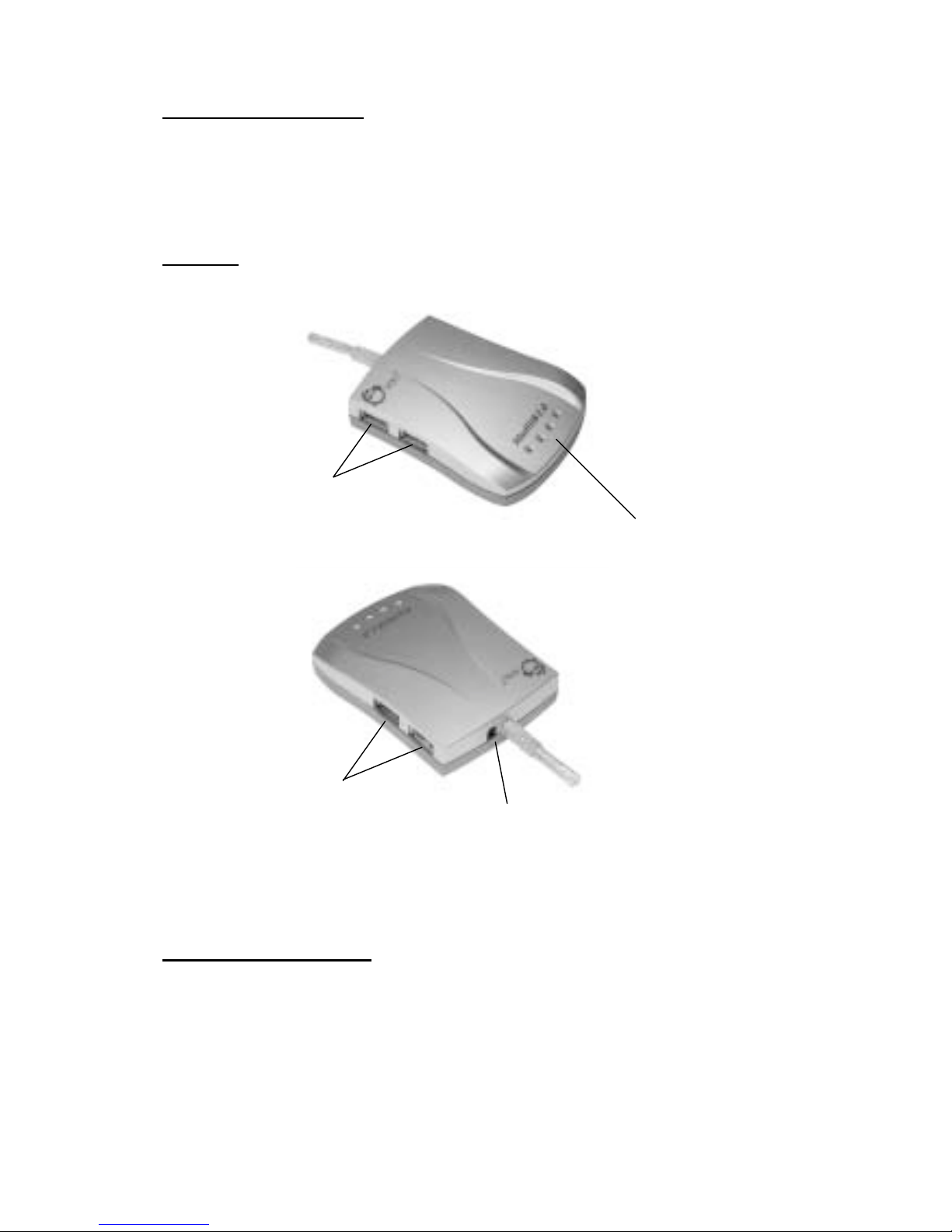
Layout
USB 2.0 Ports
1 & 2
USB 2.0 Ports
3 & 4
Power Adapter Jack
Power/Activity LEDs
Figure 1. Hub layout
Safety Precautions
• Do not open the case of the hub, or the warranty will be
voided.
• Use the power adapter that comes with the hub only.
• Disconnect the power adapter if the hub will not be in use for
a long period of time.
Page 3

3
• Do not expose the hub to high humidity, high temperature,
direct sunlight, excessive dust/moisture, or strong magnetic
field.
• Do not touch the hub or cable with wet hands to prevent any
electric shock. Should the hub becomes wet, unplug it from
it's power source before handling.
• Any modifications done to the hub by unauthorized
personnel will result in voiding the warranty.
• Any damage, electric shock, fire or loss of function
resulting from any unauthorized modifications done to the
hub will not be the responsibility of the manufacturer.
• Always back up data periodically. Any error or loss of data
will not be the responsibility of the manufacturer.
Installation
Important: In order for this USB 2.0 SlimHub 4000P to work
properly, the driver for your existing USB 2.0 host adapter has to
have support for USB 2.0 hub. However, USB 2.0 host adapters
sold earlier than January 2002 may not come with driver which can
support USB 2.0 hub. Please contact your USB 2.0 host adapter
manufacturer if you are not sure about this. In most cases, they
should have an updated driver for you to download.
Assuming your USB 2.0 adapter is correctly set up with the correct
driver, this hub should automatically be detected and installed
when connected.
Windows 98 SE/ME/2000/XP Installation
1. Insert the power adapter into the power jack in the back of
the hub.
2. Boot up to Windows and connect the hub's USB cable to an
available USB 2.0 port in your system.
3. Windows 98 SE/ME/2000/XP automatically detects and
installs the correct driver for this hub.
4. The USB hub is now ready for device connection. Please
refer to your device's manual for installation procedure.
Page 4

4
Technical Support
QUESTIONS? SIIG’s Online Support has the answers! Simply
visit our web site at
www.siig.com
and click on Support/Drivers.
Our online support database is updated daily with new drivers
and solutions. The answers to your problems could be just a few
clicks away.
Return Merchandise Authorization (RMA)
SIIG warrants to the original buyer of the product that the hardware
is free of defects in materials and workmanship for a period of one,
two or five years from the date of purchase. If your product fails to
be in good working order during the warranty period, you may
return it to SIIG for repair or replacement at SIIG's option.
To return the product, you need to follow these steps:
Step 1: Contact SIIG's RMA Department
To obtain an RMA number, SIIG's RMA Department can be reached
by phone at (510)413-5333 or fax at (510)657-5962 or email at
[email protected]. In order to issue an RMA number, the product
serial number is required. This number can be found on the side of
the box and on the back of the product.
Step 2: Complete the RMA form
• Fill out your Return Merchandise Authorization (RMA) form,
and include it in the package with the product.
• Properly pack the product for shipping. All software,
cable(s) and other accessories that came with the original
package must be included.
• Clearly write your RMA number on the top of the returned
package and on the accompanying RMA form.
SIIG will refuse to accept any shipping package, and will not
be responsible for a product returned without an RMA number
posted on the outside of the shipping carton.
Step 3: Ship the Product
You are responsible for the cost of shipping back to SIIG at the
following address:
SIIG, Inc. RMA#_______________
6078 Stewart Ave.
Fremont, CA 94538
SIIG will ship the repaired or replaced product via UPS Ground or
US Mail at no cost to you.
Page 5

PRODUCT NAME MODEL NUMBER
USB 2.0 SlimHub 4000P US2248
FCC RULES: TESTED TO COMPLY WITH FCC P A RT 15, CLASS B
OPERATING ENVIRONMENT : FOR HOME OR OFFICE USE
FCC COMPLIANCE STATEMENT:
This device complies with part 15 of the FCC Rules. Operation is subject to
the following two conditions: (1) This device may not cause harmful
interference, and (2) this device must accept any interference received,
including interference that may cause undesired operation.
FCC NOTICE:
This equipment has been tested and found to comply with the limits for a
Class B digital device, pursuant to part 15 of the FCC Rules. These limits are
designed to provide reasonable protection against harmful interference in a
residential installation. This equipment generates, uses, and can radiate radio
frequency energy and if not installed and used in accordance with the
instructions, may cause harmful interference to radio communications.
However, there is no guarantee that interference will not occur in a particular
installation. If this equipment does cause harmful interference to radio and
television reception, which can be determined by turning the equipment off
and on, the user is encouraged to try to correct the interference by one or more
of the following measures:
• Reorient or relocate the receiving antenna
• Increase the separation between the equipment and the receiver
• Connect the equipment into an outlet on a circuit different from that to
which the receiver is connected
• Consult the dealer or an experienced radio or TV technician for help
Caution:
Any changes or modifications not expressly approved by the party
responsible for compliance could void the user's authority to operate
this equipment
THE PARTY RESPONSIBLE FOR
PRODUCT COMPLIANCE
SIIG, Inc.
6078 Stewart Ave.
Fremont, CA 94538-3152
USB 2.0 SlimHub 4000P is a trademark of SIIG, Inc.
SIIG and SIIG logo are registered trademarks of SIIG, Inc. Microsoft and Windows are
registered trademarks of Microsoft Corporation. All other names used in this publication are
for identification only and may be trademarks of their respective companies.
January, 2002 Copyright ©2002 by SIIG, Inc. All rights reserved.
Page 6

CE Declaration of Conformity
Manufacturer's Name SIIG, Inc.
Manufacturer's Address 6078 Stewart Avenue
Fremont, CA 94538
USA
Declares, that the product
Product Names: USB 2.0 SlimHub 4000P
Model Number(s): US2248
Product Options: N/A
Conforms to the following Product Specifications:
EMC EN55022/CISPR22 Class B
EN50082-1:1992 IEC 801-2:1991 2kV CD, 8kV AD
IEC 801-3:1984 27-500MHz, 3V/M
IEC 801-4:1988 0.5kV Signal Lines,
1kV Power Lines
Application of Council Directive(s):
The product herewith complies with the requirements of the EMC
Directive 89/336/EEC
THE PARTY RESPONSIBLE FOR PRODUCT COMPLIANCE:
Ivell Trading Ltd.
Ivell House
Commerce Way
Colchester,
Essex
CO2 8HL
Telephone: 01206 799520
 Loading...