

Page 1
Full Motion Easy-Adjust
Universal Tablet Mount
Installation Guide
Introduction
The Full Motion Easy-Adjust Universal Tablet Mount
enables you to mount smartphones or tablets
onto desktops or other smooth surfaces easily
and quickly.
Specifications
• Product weight: 1.10 lbs
• Device holder adjustment: 4.7" to 8.2"
• Loading weight capacity: <= 2.20 lbs
• C-clamp adjustment: 0.27" to 1.49"
• Height (from base to center of holder): 18"
LOT Number Sticker
For future product return or exchange, this LOT number
is required. Please keep it for your reference.
04-1030B
LOT Number Part Number
1
Page 2

Key Features and Benefits
• Full motion articulating tablet desktop
mount frees your hand from holding the
devices and maximizing the conveniences
while reading or watching videos
• Retractable holding bracket expands up to
8.2" with side openings allows easy device
installing/removing and cable connection
• Fits most 7" to 12" tablets, including iPad,
iPad Mini, iPad Air and Samsung Tab series
• Supports multi- direction 360° rotate, swivel,
and tilt for the best ergonomic viewing
position
• Articulating aluminum arm allows up to
13" height adjustment
• Includes both C-clamp and heavy-duty
suction cup for easy and secure installation
onto most surfaces without drilling
Conveniently located C-clamp knob
accessible from the top for easy setup
• Protective pads fully integrated into device
holder and clamp protects device from
scratching, falling or slipping
2
Page 3
Package Contents
• Full Motion Easy-Adjust Universal Tablet
Mount - Black/White
• C-clamp
• Suction cup
• Wire clip (x4)
• 3-in-1 allen key
• Installation Guide
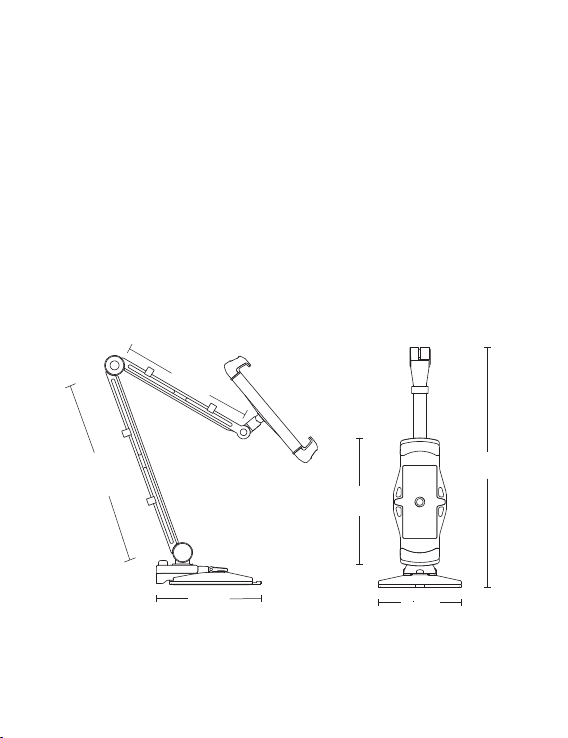
Layout
6.89"
9.92"
4.72"~8.27"
4.53"
Figure 1: Full Motion Easy-Adjust Universal Tablet Mount
3.94"
11.61"
3
Page 4
Installation Instructions
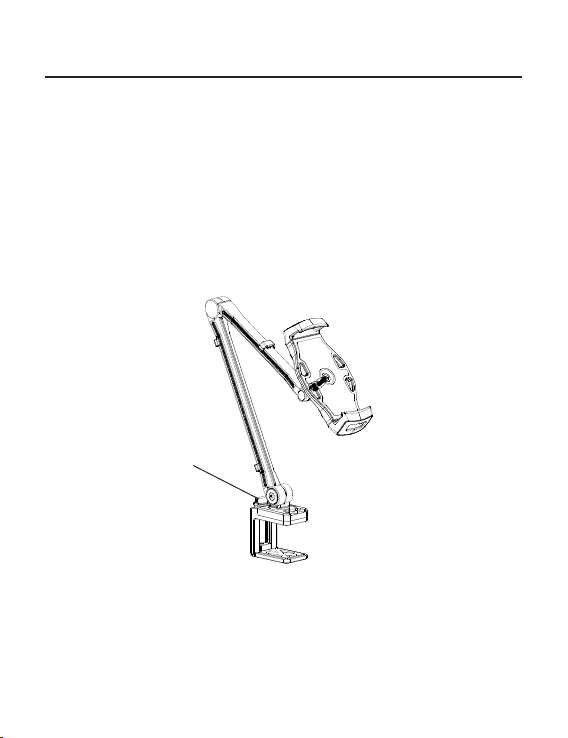
C-clamp Mount
1. Position the C-clamp to the desktop and
adjust it according to the thickness of the
desktop by turning the clamp screw.
2. Tighten the C-clamp to the desktop by
turning the clamp screw clockwise.
clamp screw
Figure 2
4
Page 5
Suction Cup Mount
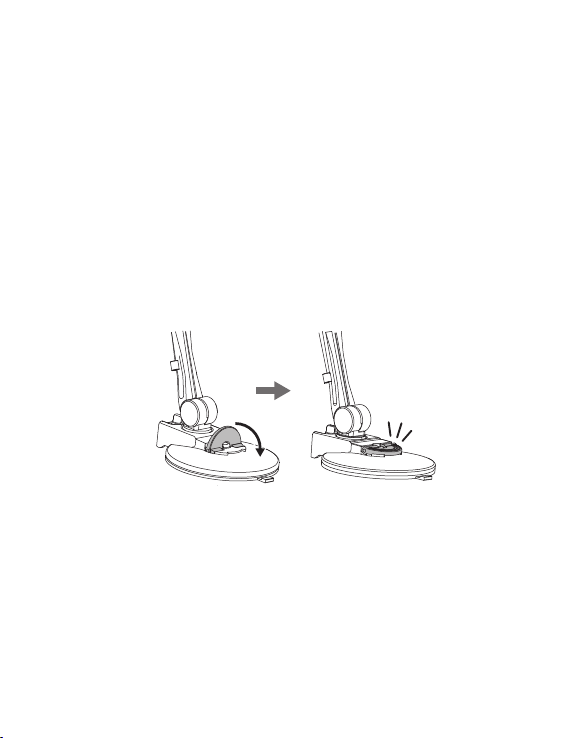
1. Disconnect the wall stand from the C-clamp
by releasing the bolt.
2. Connect the wall stand into the hole of
suction cup.
3. Use the included bolt and fasten it.
4. Place the wall stand on a smooth flat surface
and press the semi-circle locker to secure
the mount.
Figure 3
5
Page 6
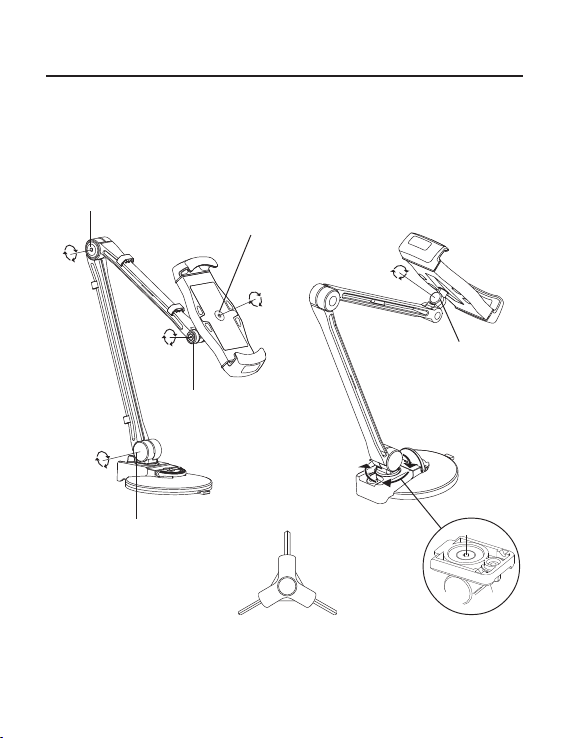
Adjustment & Cable Management
Rotation
Adjust to the desired position using the included
3-in-1 allen key.
3mm
2.5mm
o
230
o
o
360
180
180
o
300
2.5mm
o
o
3mm
3-in-1 allen key
360
2.5mm
4mm
Figure 4
6
Page 7
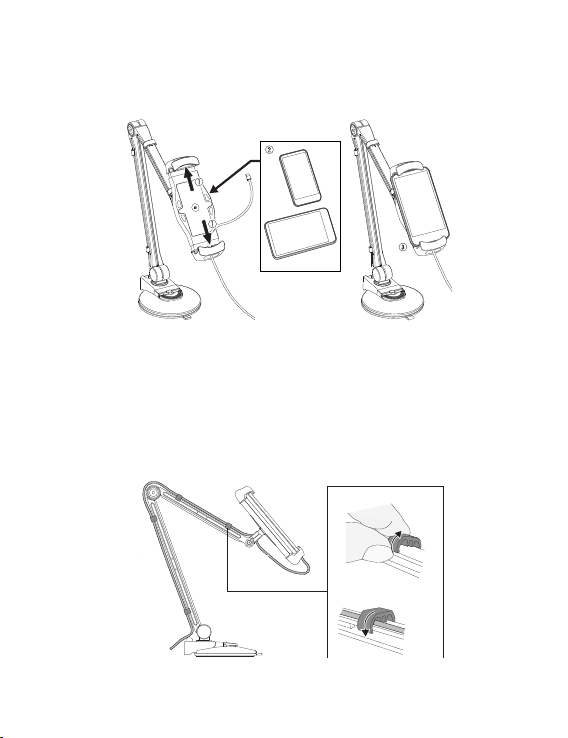
Device Holder
Adjust the width to fit your tablet or smartphone.
Figure 5
Cable Management
Arrange the cables into the cable covers and
down the tube using the included wire clips.
Figure 6
7
Page 8
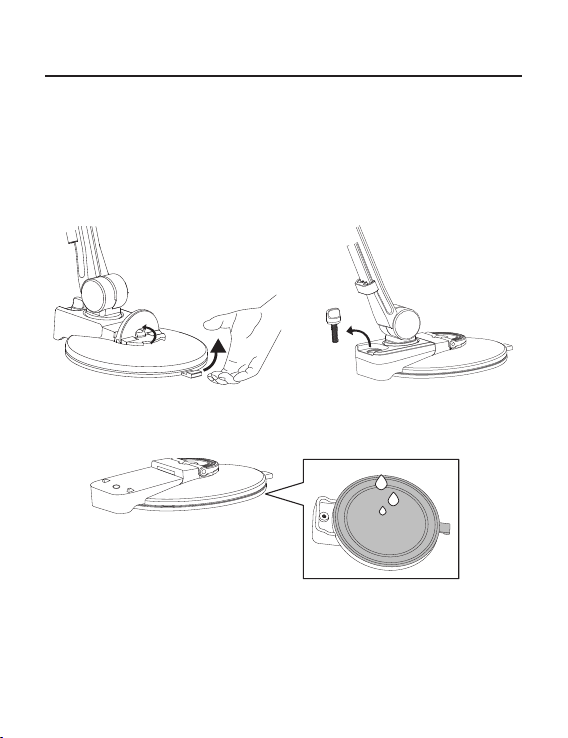
Maintenance
After a period of time, the suction cup will lose
holding strength due to the accumulation of dirt
and dust. It is recommended to remove and clean
the suction cup with cold water every 2 months
to maintain proper holding strength.
1
3
Figure 7
8
2
Page 9

Notice
• DO NOT assemble/disassemble the Tablet
Mount by yourself
• DO NOT wash with hot water
• DO NOT place the suction cup on a rough
surface or one prone to vibration or
movement, as these conditions may cause
the mount to fall unexpectedly
• Keep out of reach of children
9
Page 10

Blank Page
10
Page 11

Technical Support and Warranty
QUESTIONS? SIIG’ s Online Support has answers! Simply visit our web site at
www.siig.com and click Support. Our online support database is updated daily with
new drivers and solutions. Answers to your questions could be just a few clicks away. You
can also submit questions online and a technical support analyst will promptly respond.
SIIG offers a 2-year manufacturer warranty with this product. This warranty covers the
original purchaser and guarantees the product to be free of any defects in materials or
workmanship for two (2) years from the date of purchase of the product.
SIIG will, at our discretion, repair or replace (with an identical product or product having
similar features and functionality) the product if defective in materials or workmanship.
This warranty gives you specific legal rights, and you may also have other rights which
vary from state to state. Please see our web site for more warranty details.
If you encounter any problems with this product, please follow the procedures below.
A) If it is within the store's return policy period, please return the product to the store
where you purchased from.
B) If your purchase has passed the store's return policy period, please follow the steps
below to have the product repaired or replaced.
Step 1: Submit your RMA request.
Go to www.siig.com, click Support, then RMA to submit a request to SIIG RMA or
fax a request to 510-657-5962. Your RMA request will be processed, if the product
is determined to be defective, an RMA number will be issued.
Step 2: After obtaining an RMA number, ship the product.
• Properly pack the product for shipping. All accessories that came with the
original package must be included.
• Clearly write your RMA number on the top of the returned package. SIIG will
refuse to accept any shipping package, and will not be responsible for a product
returned without an RMA number posted on the outside of the shipping
carton.
• You are responsible for the cost of shipping to SIIG. Ship the product to the
following address:
SIIG, Inc.
6078 Stewart Avenue
Fremont, CA 94538-3152, USA
RMA #:
• SIIG will ship the repaired or replaced product via Ground in the U.S. and
International Economy outside of the U.S. at no cost to the customer.
11
Page 12

About SIIG, Inc.
Founded in 1985, SIIG, Inc. is a leading manufacturer of IT connectivity solutions
(including Serial ATA and Ultra ATA Controllers, FireWire, USB, and legacy
I/O adapters) that bridge the connection between Desktop/Notebook systems
and external peripherals. SIIG continues to grow by adding A/V and Digital
Signage connectivity solutions to our extensive portfolio.
SIIG products offer comprehensive user manuals, many user-friendly features,
and are backed by an extensive manufacturer warranty. High quality control
standards are evident by the overall ease of installation and compatibility of
our products, as well as one of the lowest defective return rates in the industry.
SIIG products can be found in computer retail stores, mail order catalogs,
through major distributors, system integrators, and VARs in the Americas and
the UK, and through e-commerce sites.
Full Motion Easy-Adjust Universal Tablet Mount - Black/White
FCC RULES: TESTED TO COMPLY WITH FCC PART 15, CLASS B
OPERATING ENVIRONMENT: FOR HOME OR OFFICE USE
This device complies with part 15 of the FCC Rules. Operation is subject
to the following two conditions: (1) This device may not cause harmful
interference, and (2) this device must accept any interference received,
including interference that may cause undesired operation.
THE PARTY RESPONSIBLE FOR PRODUCT COMPLIANCE
SIIG, Inc.
6078 Stewart Avenue
Fremont, CA 94538-3152, USA
Phone: 510-657-8688
Full Motion Easy-Adjust Universal Tablet Mount - Black/White is a trademark of SIIG, Inc.
SIIG and the SIIG logo are registered trademarks of SIIG, Inc. All other names used in this
publication are for identification only and may be trademarks of their respective owners.
May, 2016 Copyright © 2016 by SIIG, Inc. All rights reserved
PRODUCT NAME
FCC COMPLIANCE STATEMENT:
 Loading...