

Page 1
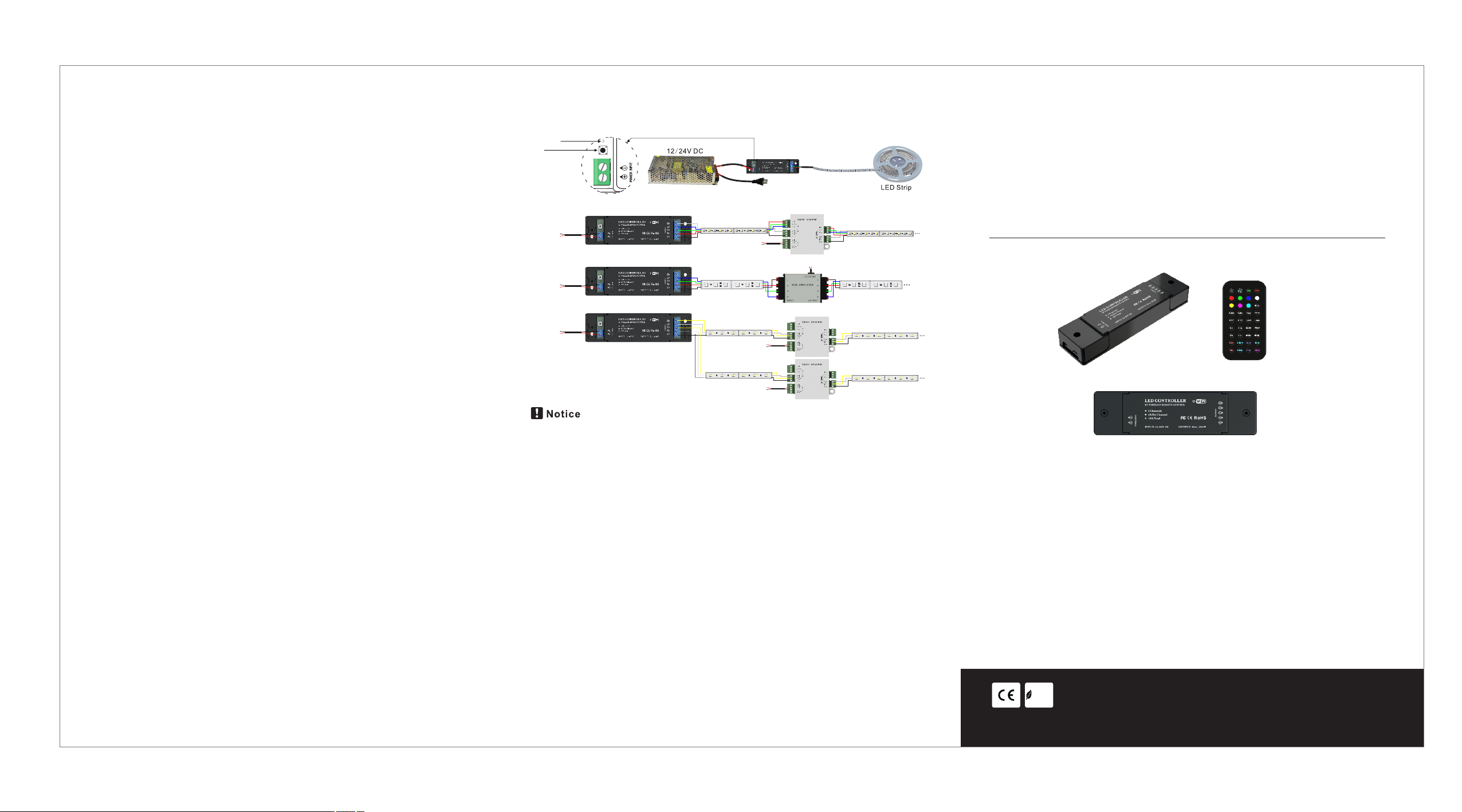
Wiring diagram:
◎LED CONTROLLER
This device complies with part 15 of the FCC Rules. Operation is subject to the
following two conditions: (1) This device may not cause harmful interference,
and (2) this device must accept any interference received, including
interference that may cause undesired operation.
Any Changes or modifications not expressly approved by the party responsible
for compliance could void the user's authority to operate the equipment.
Note: This equipment has been tested and found to comply with the limits for a
Class B digital device, pursuant to part 15 of the FCC Rules. These limits are
designed to provide reasonable protection against harmful interference in a
residential installation. This equipment generates uses and can radiate radio
frequency energy and, if not installed and used in accordance with the
instructions, may cause harmful interference to radio communications.
However, there is no guarantee that interference will not occur in a particular
installation. If this equipment does cause harmful interference to radio or
television reception, which can be determined by turning the equipment off and
on, the user is encouraged to try to correct the interference by one or more of
the following measures:
-Reorient or relocate the receiving antenna.
-Increase the separation between the equipment and receiver.
-Connect the equipment into an outlet on a circuit different from that to which
the receiver is connected.
-Consult the dealer or an experienced radio/TV technician for help.
This equipment complies with FCC radiation exposure limits set forth for an
uncontrolled environment. This equipment should be installed and operated
with minimum distance 20cm between the radiator & your body.
LED L ight
ID le arnin g key
W
B
G
5m RGBW S trip
12- 24V D C
RJ45
RF & WI FI
R
+
W
W
W
B
G
R
+
W
B
B
B
G
G
G
R
R
R
+
+
+
DC 12/24 V
5m RGBW S trip
W
W
W
B
B
B
G
G
G
R
R
R
+
+
+
DC 12/2 4V
12- 24V D C
RJ45
B
G
R
+
5m RGB S trip
B
B
G
G
R
R
+
+
B
G
R
+
B
G
R
+
5m RGB S trip
B
B
G
G
R
R
+
+
B
G
R
+
RF & WI FI
12- 24V D C
RJ45
WIF I
5m WW/W S trip
WW
WW
WW
W
W
W
WW W WW W WW W WW W WW W WW W
+
+
+
DC12/2 4V
5m WW/W S trip
WW
WW
WW
W
W
W
WW W WW W WW W WW W WW W WW W
+
+
+
DC12/2 4V
WW
W
+
WW
W
+
5m WW/W S trip
WW
WW
WW
W
W
W
WW W WW W WW W WW W WW W WW W
+
+
+
5m WW/W S trip
WW
WW
WW
W
W
W
WW W WW W WW W WW W WW W WW W
+
+
+
1.Pleas e use DC12- 24V power s upply to su pply cont roller; please do n’t use civ il high-v oltage
power sup ply;
2.Outpu t power can ’t exceed m aximum ou tput powe r in order to a void dama ging cont roller;
3.If wire less netw ork signa l is lost dur ing using p rocess, and the con troller c an’t be con nected:
a) Exit sof tware, an d close sof tware;
b) Reboot c ontroll er, discon nect powe r supply, and conne ct power su pply agai n;
WIFI 4-in-1 Dimming Controller
INSTRUCTIONS
W
B
G
R
+
WW
W
+
WW
W
+
Features
1.Be suitab le for 10S7.1 , Android 4.0 + sy stem;
2.Can get sof tware of Apple a nd Android sys tem free, no pl ug-ins;
c) Enter se tting, sh ut down wir eless net work, the n turn on wir eless net work;
d) After con nect wire less netw ork again , turn on int egrated AP P contr ol softwa re, then en ter
into Play LED5.
3.Individ ualized int erface desi gn, humaniz ed interfac e,easy to use ;
4.There are s ingle color, bi-color, RG B and RGBW corr espond to dim ming contro ller,
CCT con tr oller, RGB c on troller, RG BW contro ll er respec ti vely.
RoHS
COMP LIANT
To ensure prope rly use and ins tall the ligh t, please car efully read a nd keep
this instru citon manua l for future re ference.
Page 2
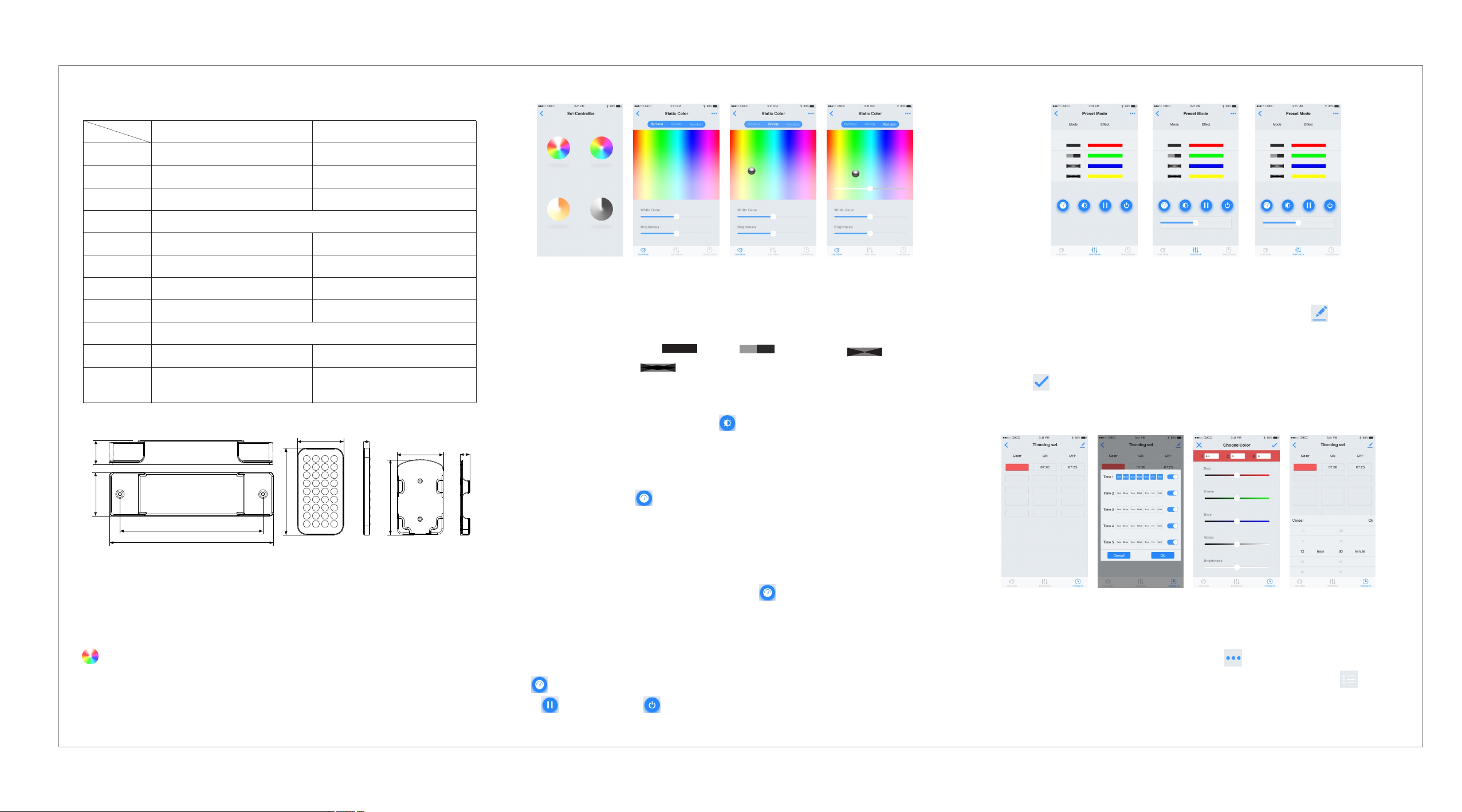
Technical Parameter:
Parameters
Versio n
Input v olt age
Outpu t cha nne l
Outpu t cur ren t
Outpu t pow er
Prote cti on gr ade
Remot e dis tan ce
With controller or not
Color t ype
Packing dimension
Wei ght
Model
LC-RG BW-WiF i-0 2
WiFi
12V-24 V DC
4 chann els
4A for eac h cha nne l,1 6A in to tal
192W( 12V )-3 84W (24 V)
IP20
30m
No
RGB,R GBW, RGB ,W/ WW LE D str ip
Dim ensi on of ext erna l cart on
Packi ng qt y.
LC-RG BW-WiF i-0 4
WiF
12V-24 V DC
4 chann els
192W( 12V )-3 84W (24 V)
IP20
30m (un der e mpt y con dit ion)
Yes
407* 304.5*298m m
48pcs
Dimension(mm):
57mm
22mm
40mm
107 mm
130.9mm
150mm
7.65mm
98.18mm
60.5mm
13mm
APP function description
1.How to re alize dim ming via APP (take RG BW contro ller as an ex ample)
After ins tall corr espondi ng contro l softwar e,ensur e turn on you r WI-FI of mo bile devi ce,and
choose ac cess poin t(such as P layLED5 ),succe ssfully c onnecte d. First tu rn on integ rated AP P
control s oftware ,then ent er into Pla yLED5. En ter into ma in interf ace figur e(1), tou ch
.enter in to figure 2 i nterfac e, touch in terface o f Back figu re 1; touch S tatic Col or, enter in to
static mo de; you can c hoose the c olors you l ike via fin ger, gravi ty sense or r andom cho ose the
colors, a nd RGBW lam p will pres entthe co lor you cho ose. Choo se color vi a finger, gr avity
sense, ra ndom ball a s figure 2, figure3 ,figure 4 r especti vely.
figur e1
figur e2 figur e3 figur e4
2.How to sw itch norm al mode via AP P
Click Mode Se lect to swi tch to mode sele ct interfa ce(figu re5),an d slide lis t up and dow n to
choose co lor mode .
a)Choos e 4 modes in Mode( 1. :stati c,2. :jump change, 3. :brigh t and
dark gr adual c hange ; 4. :hybr id grad ua l cha ng e).In effe ct,yo u can c ho ose e ffect of
single co lor or mult iple colo rs.
b)In Mode 1:w hen effe ct choos e s in gle colo r b ar, the color cho sen when th e l amp is on is valid
when ch oose mu ltipl e color bar.The n click ,the lamp br ight ca n be adjuste d when slide
bar(7) ap pear;
c)In mode 2: when effect cho se sing le colo r ba r,the colo r chosen wh en the the la mp is on will
from out to br ight, fr om bright to out; whe n ch oo se multip le color bar, jump betwe en differ ent
color lumps. Th en cl ic k ,s li de ba r app ear ( figure 6), jump change spee d of lamp can b e
adjuste d.
d)In mode3 : E ffe ct choose sin gle color b ar, the colo r c hosen when th e lamp is on wi ll from dark
to brig ht ,then from b ri ght to da rk; whe n choos e multipl e color b ar,one col or bloc k of lamp will
from d ark to brigh t,and from b right to dar k. Afte r the p roces s fini sh , next color block of l amp wi ll
be br ig ht,re pe at ab ove g ra dual process . The n cli ck , jump ch ange sp eed o f lam p can b e
adjuste d when slid e bar appea r.
e) In m ode 4: when E ffect choos esingle color bar,the color chosen when t he lam p is on will from
dark to bri gh t, then fro m bright to da rk;when ch oose mul ti ple color bar, th e color blo ck will
became da rk,then b ecame bri ght, and th e gradual c hange pro cess will b e repeate d. Then c lick
, the lamp ju mp change s peed can be a djusted w hen slide b ar appear.
f) is pause f unction , is on/off functi on.
figur e5 figur e6 figur e7
3.How to re alize tim ing funct ion via AP P
Click Timi ng settin g of lower ri ght corne r in figure 2 ,enter in to figure 8 ,click of t op right
corner in f igure8, a nd figure 9 a ppear, the i nterfac e is used to se t timing cy cle, clic k chosen
week,se t and click O K; Click ic on below Co lor in figu re 8, and fig ure 10 popu p,the col or can be
set, clic k to confir m; click ON o r OFF in inte rface 8, fi gure 11 po pup, and th e start in g time
and closi ng time of ti ming func tion can be s et.
figur e8 fi gu re9 fig ure10 figur e11
4.How to re alize mus ic contro l via APP
Enter in to integ ra ted in te rface of A PP(figu re12),c lick in top ri ght corn er of the in terfa ce ,
figure 1 3 p op-up ; c lick Mus ic Mode t o e nter i nt o music i nterfac e(figur e 14), cl ic k to pop
up local mu sic menu, c hoose mus ic and you ca n play.
 Loading...