

Page 1
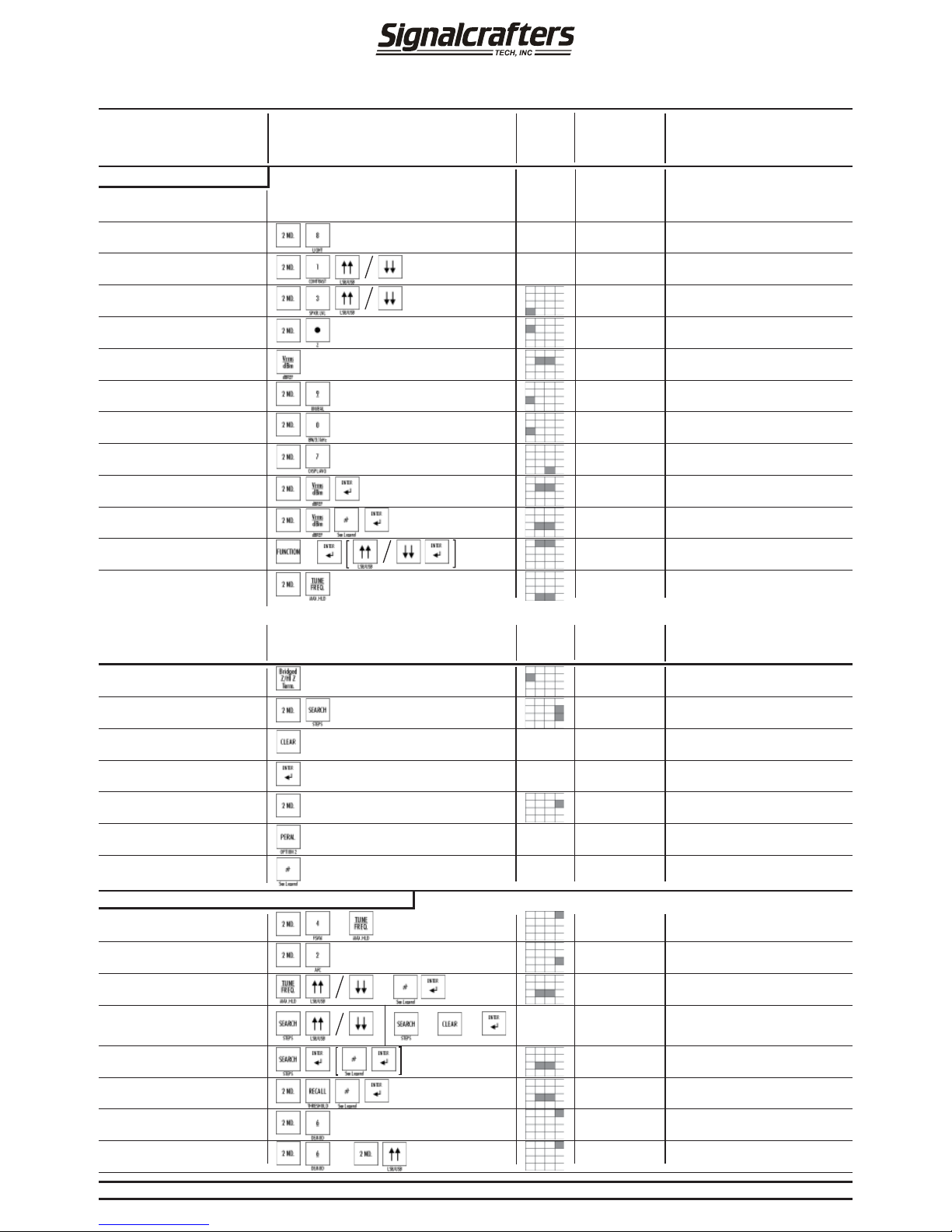
ACTION
SCREEN
AREA
LOCATOR
*
NOTES
[ ] Notes on Display
MODE / RESULT
SCREEN
DISPLA YS
Power ON/OFF
Press ON/OFF Switch
Lower Left-Hand Front Panel
ON - Main Screen
OFF - Blank Screen
(See Notes)
Setup / Operation
Back Light ON/OFF
Contrast
On - Bright Screen
Off - Dark Screen
(See Notes)
Adjust
↑↑⁄↓↓ to Desired Level
[Use Up/Down Key]
Speaker Level
Line Graph
Adjust
↑↑⁄↓↓ to Desired Contrast
[Use Up/Down Key]
Z ( Impedance )
50, 75, 135,
or 600
Steps Through Each Z (Impedance)
Vrms / dBm dBm or Vrms
Switches Between Volts and dBm
Balanced or Unbalanced Input
BAL or
UNBAL
BAL: [Use + Red/- Blk Balanced Inputs]
UNBAL: [Use Lower Unbal. BNC Inputs]
(See Notes)
ACTION
SCREEN
AREA
LOCATOR
*
NOTES
[ ] Notes On Display
MODE / RESULT
SCREEN
DISPLA YS
Set / Change a Bandwidth
Display Averaging
↑↑⁄↓↓ to Increase / Decrease Display
Averaging Samples
dB Reference
Reading Becomes Reference
Enter dB Reference
Set Clock / Date
Maximum Hold
Repeat to Turn Off
[Warning: Max Hold Is On]
Bridged Z / Hi Z Termination
In Internal Attenuator, Allows Bridged Z
to be Programmed
Steps
Freq./Level Steps. Change ↑↑⁄↓↓.
Repeat Action Changes Step
Clear
Returns To Previous Value Prior T o
Using
↑↑⁄↓↓ or # Keys
Enter Enters Input
2nd
10 Second Time-Out
Perm / Opt 2 Key
Reserved For Future Use
Numeric Keys
Use 1-0, +/-, and . As Required To Enter
Values
Frequency Selective Voltmeter (FSVM)
C O N T I N U E D
Enter FSVM Mode
AFC On / Off
Tune Frequency
Threshold
Include +/- if Required. Value Disappears
Search From Existing Frequency
1.) Search Up/Down From Existing
Frequency [Searching]
2.) To Stop Searching
Search Within a Range
Last <ENTER> Starts Search
[Search Complete]
Enter Demod Mode
Select AM, USB, LSB, or DSB
OR
OR
12
OR
OR
[Repeat For Start, Stop,
and Threshold]
x5
[Repeat]
MODEL 110MODEL 110
MODEL 110MODEL 110
MODEL 110
Quick Reference Guide
Repeat ↑↑⁄↓↓ - Enter for Each Parameter
[Use Enter and Up/Dwn For Time]
Default Mode
[Warning Will Appear if Max Hold is On]
[Use Up/Dwn Key or Enter Value]
* - Screen area locators are approximate
N/A
N/A
N/A
N/A
N/A
N/A
N/A
N/A
25, 100, 1950,3100
5MHz and Wide
Line Graph
Reference Level
Reference Level
Date and Time
MAXHLD
N (Z) or High
“Value”
2ND
FSVM
On/Off
“Value”
“Value”
“Value”
AM, DSB,
USB, or LSB
AM, DSB,
USB, or LSB
Repeat Action to Toggle Through
Modulation Types
Repeat to Toggle Through Modulation
Types
Repeat Action to Turn On/Off
Must Be in FSVM Mode First
Selects Input Bandwidth in FSVM Mode
Selects Input Bandwidth in Wide Mode
Enter Level Desired Including +/- and
.
OR
For USB/DSB/LSB
Refer To User Guide for Details and Additional Information
For SN 200 and higher
Page 2
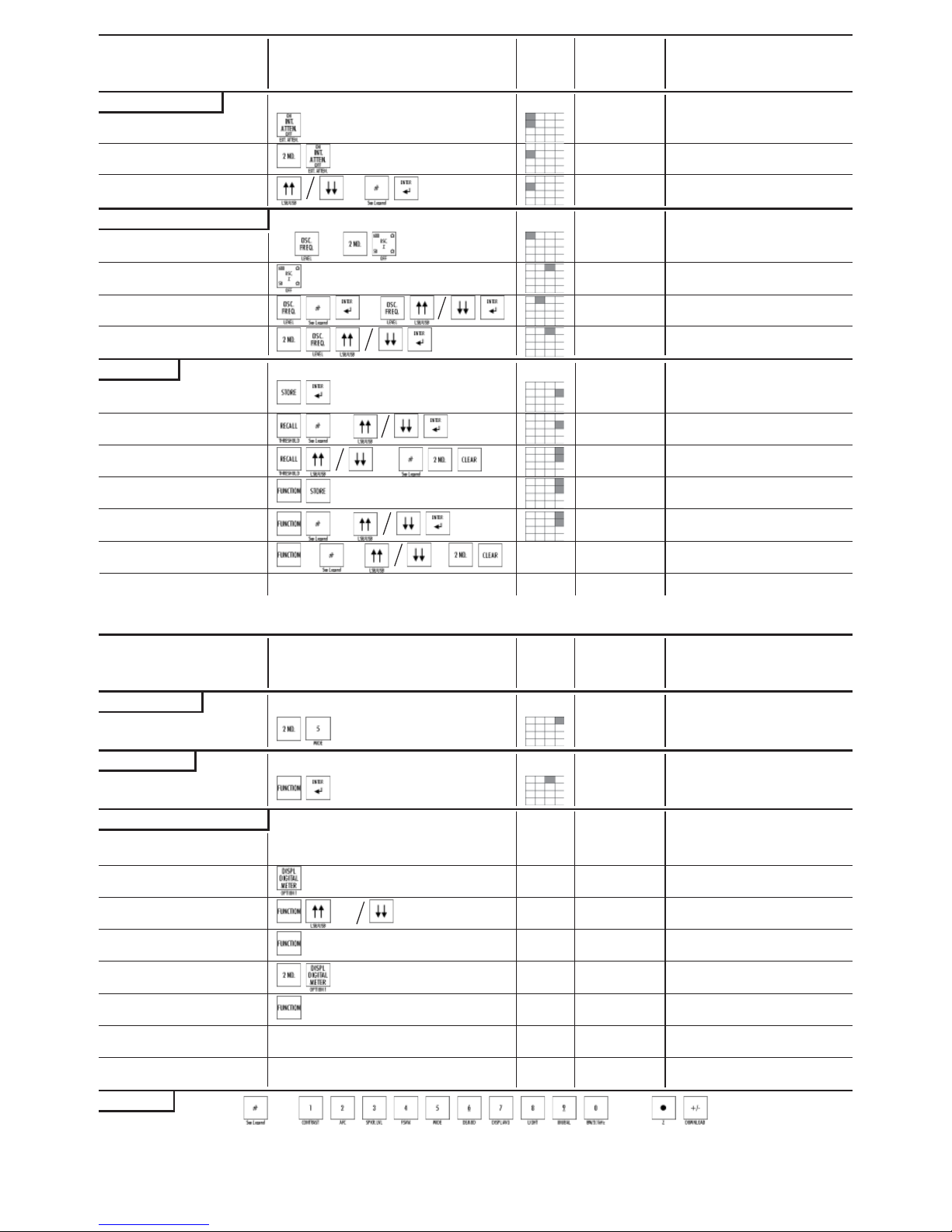
External Attenuator
ACTION
SCREEN
AREA
LOCATOR
*
NOTES
[ ] Notes On Display
MODE / RESULT
SCREEN
DISPLA YS
Quick Reference Guide
ATTENUATOR
Internal Attenuator
[Use Lower BNC] or [Use + RED / BLACK Balanced Input]
Set External Attenuator Value
OSCILLATOR (OSC.)
Turn Oscillator On/Off
On/Off
Oscillator Z (Output Impedance)
50 Ohms or
600 Ohms
Switches Between 50 Ohms or 600
Ohms. Oscillator Need Not Be On.
Set Oscillator Frequency
Change Oscillator Frequency
Frequency Entered
Set Oscillator Level
Change Oscillator Level
Level Entered
MEMORY
Store A Reading
Store Up To 99 Readings
Recall A Reading
WIDEBAND
Enter Wideband Mode
Flat Meter Operation. [True RMS]
Frequency Over Range
FUNCTION
Default
↑↑⁄↓↓ or #’s To Scroll or Set a Set Up
[Set Add. to Recall or Store to Save]
ACTION
SCREEN
AREA
LOCATOR
*
NOTES
[ ] Notes on Display
MODE / RESULT
SCREEN
DISPLA YS
SCREEN / DISPLAY
Standard Display
Default Screen
Analog Meter Display
Auto Ranging On / Off
Power Calculator Display
Power Calculator Parameters
(User Defined)
(User Defined)
LEGEND
Number Keys (# Keys) Include All Numeric Keys As Well As the Decimal Point Key and/or +/- Key If Required.
=
and/or
OR
OR
OR
[Use Upper Int. Attenuator BNC Input]
[Use Up / Down Key or Enter Value]
[Use Up / Down Key or Enter Value]
[Use Up / Down Key]
Recalled Value. Press CLR to Release
Off Reduces Battery Drain. When On,
[Use Up / Down Key or Enter Value]
[Stored In
Memory]
Analog Meter Parameters
Manual Scale
Auto Scale
Digital Analog
Meter
Steps Through Each Parameter
[Change As Required]
Steps Through Each Parameter
[Change As Required]
(On)
(Off)
“Value”
“Value”
On/Off
On
Off
Store A Set-Up
Function Times Out After 5 Seconds Up
to 24 Set-Ups. [Setup Saved]
Recall A Set-Up
Clear a Reading
OR
OR
[Recalled Value Press CLR to Release]
Then [Stored Value Cleared]
Number
See User’s Guide
Clear Set-Up
OR
Download To A Computer
Refer To Remote M110 Software For Instructions
(
)
[Set-Up Cleared]
Default Values
* - Screen area locators are approximate
Refer To User Guide for Details and Additional Information
“Values”
“Values”
“Values”
Flashing
Boxes
Full
Display
Flashing
Boxes
Full
Display
N/A
N/A
Repeat to Return to Default Display
In Analog Meter Display Only
Press Digital Display Meter Key to
Return to Analog or Default Displays
Repeat
Repeat
Signalcrafters Tech, Inc.
57 Eagle Rock Ave.
East Hanover, NJ, 07936
Tel: (973) 781 - 0880 (800) 523 - 5815
Fax: (973) 781 - 9044
 Loading...