

Page 1
- 2 -
Dual Power
Operating Manual
Intelligent Balance Charger
80W
LiPo/LiFe/LiIon:
NiMH/NiCd:
Pb:
Charge Power:
Charge Rate:
Discharge Rate:
1 - 6S
1 - 16S
2 - 20V
80W
0.1-10.0A
0.1- 2 . 0 A
Please read this
operating manual completely
and carefully as it contains a
wide variety of specific programming
and safety information.
The selection of the correct
operating parameters is the
responsibility of the user. Keep this
manual in a safe place, and be sure
to pass it on to the new owner if
you ever sell your Sigma EQ Touch II.
Page 2
- 3 - - 4 -
Connection
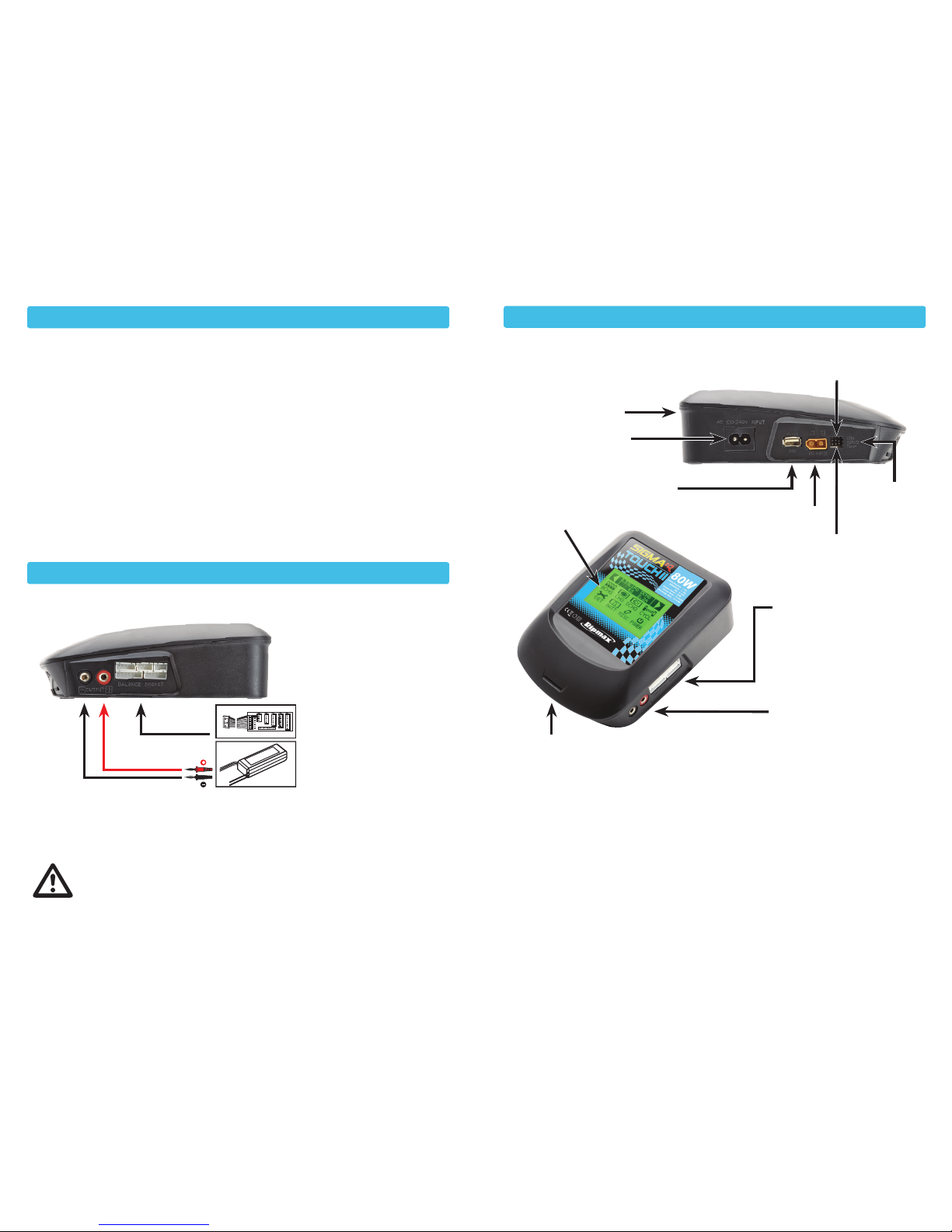
Connection Diagram for Balance Charging/Storage/Discharge Mode
CAUTION! Always ensure the battery you are charging meets the
specifications of this charger and that the charger settings are correct.
Failure to do so can result in excess heat and product malfunction.
This can lead to user injury or property damage.
Only operate on a fire resistant surface for both the charger & battery.
Always charge in a well ventilated area.
CAUTION! Always power ON the charger before connecting a battery to it or damage to
the charger and the battery may result.
1. Connect the Charger to an appropriate power source (AC or DC but NEVER both)
2. Make program selections in the charger for battery charging
3. Connect balance adaptor board to the charger balance socket
4. Connect the battery to the charger (connect main charging connectors before
connecting cell-balancing connectors, where used)
5. Start Battery Charging
Exterior
Performance Parameters
WARNING! Read the ENTIRE
instruction manual to become
familiar with the features of the
product before operating.
WARNING! Never leave the
charger unattended, exceed
maximum charge rate, charge
with non-approved batteries or
charge batteries in the wrong
mode. Failure to do so may
result in excessive heat, fire,
explosions and injury.
AC Input Voltage ...................................................................................................... 100~240V
DC Input Voltage ............................................................................................................11~18V
Charge Current ........................................................................................................... 0.1~10A
Discharge Current .....................................................................................................0.1~2.0A
Charge Power ....................................................................................................................80W
Discharge Power ............................................................................................................... 10W
Balance Current ............................................................................................................ 350mA
Balance Tolerance.........................................................................................................±0.01V
Charging Capability NiMH/NiCd...............................................................................1~16 Cells
Charging Capability LiPo/LiFe/LiIon .........................................................................1~6 Series
Pb Battery Voltage ...........................................................................................................2~20V
Discharge LiPo/LiFe/LiIon...................................................................................2.0~4.2V/Cell
Weight ............................................................................................................................... 591g
Dimensions..................................................................................................140 x 180 x 56mm
Sigma EQ Touch II Charger as viewed from the left hand side
Balance Connector sockets:
High performance
integrated LiXX balancer
for 2S to 6S packs using a
suitable balance board
and leads, if not XH
Output sockets: Connect the
battery to be charged using
the supplied charge lead
connected to the 4.0mm
sockets.
CAUTION! Ensure correct
polarity!
Temperature Probe Socket
USB Update Socket
Servo
Test Socket
(- + Signal)
DC Input
11~18V
AC Input
100~240V
Cooling
Fan
USB
Output 5V
Touch Screen
Cooling
Air Inlet
Page 3
- 5 - - 6 -
Main Screen Main Screen (Continued)
POWER
MISC
BATT
Ω
SET
CYCLE
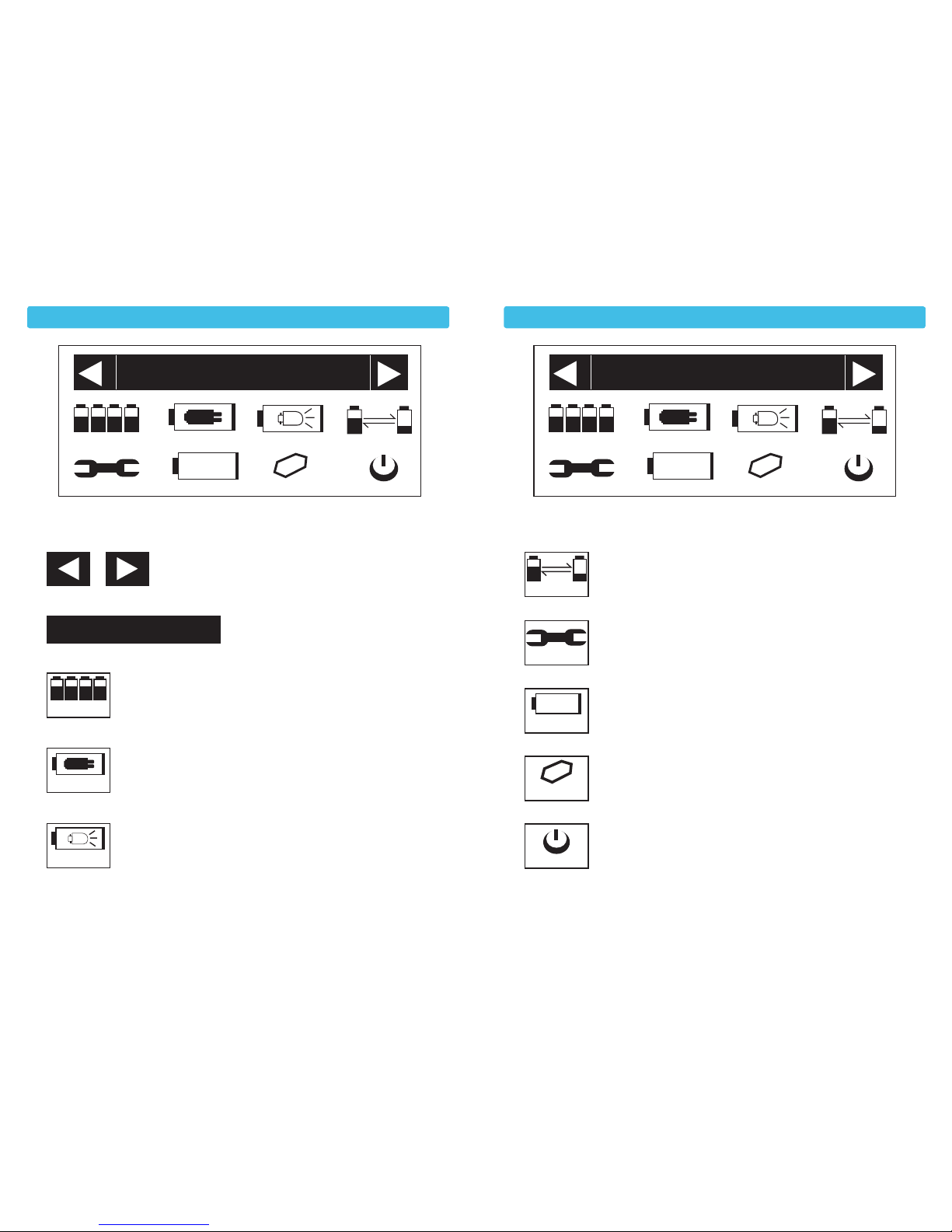
1) Select the charger’s stored memories.
2)
3) Enter into the balance charging mode.
(For Lithium batteries with balance connector only).
4) Enter into the charging mode.
5) Enter into the discharging mode.
6) Enter into the cycle mode. (For NiMH/NiCD only).
7) Enter into the setup mode.
(To adjust overall parameters and customise).
8) Enter into the battery’s checking mode.
(For Lithium batteries with balance connector only).
9) Enter into the external function mode.
(For Servo testing and USB output monitor).
10) Enter into digital power mode.
(To power external devices only).
* LS>Last working mode entered.
Enter the memory into the charging/
balance charging/ discharging/cycle.
LSLS > > LiPoLiPo CHCH GG
6S6S 22 .. 2A2A
BCHGBCHG CHCH GG DCHGDCHG CYCLCYCL EE
SESE TT
BABA TTTT
ΩΩ
POWEPOWE RR
MISCMISC
BCHG
DCHG
CHG
LS > LiPo CH G
6S 2.2A
Page 4
- 7 - - 8 -
Getting Started Balancing/Charging/Discharging/Cycling
User Set Up
USER S ETUP (5/5 )
PB DCHG Cu
t 1
.50V
Ni MH DCHG Cu
t 1
.00V
Ni CD DCHG Cut 0.80V
LiIo CHG Cut 4.10V
LiIo DCHG C u
t 3
.10V
BACK
NEXT
:
:
:
:
:
USER S ETUP (4/5 )
LiPo CHG Cu
t 4
.20V
LiPo DCHG Cu
t 3
.20V
LiFe CHG Cut 3.60V
LiFe DCHG C ut 2 .00V
PB CHG Cu
t 2
.40V
BACK
NEXT
:
:
:
:
:
USER S ETUP (3/5 )
Nixx Cycle M ode C-> D
Nixx Cycle C nt 2 T
Cycle Wastertime
5
Min
Ni MH DeltaV 7mv
NiCd DeltaV 10mv
BACK
NEXT
:
:
:
:
:
USER S ETUP (2/5 )
Input Cu
t 1
0.0V
Safety Timer
2
40min
Int.Cut-Of
f 8
0℃
Temp.Cut-Of
f 6
0℃
Max Out CAPA 10.1A H
BACK
NEXT
:
:
:
:
:
USER S ETUP (1/5)
Back Ligh
t 8
0%
LCD Contras
t 4
0
Button Sound ON
Buzzer Sound ON
Max Out Wat t 80W
BACK
NEXT
:
:
:
:
:
Save and Back
INC DEC
20%-80%
30-60
on/off
on/off
50-80W
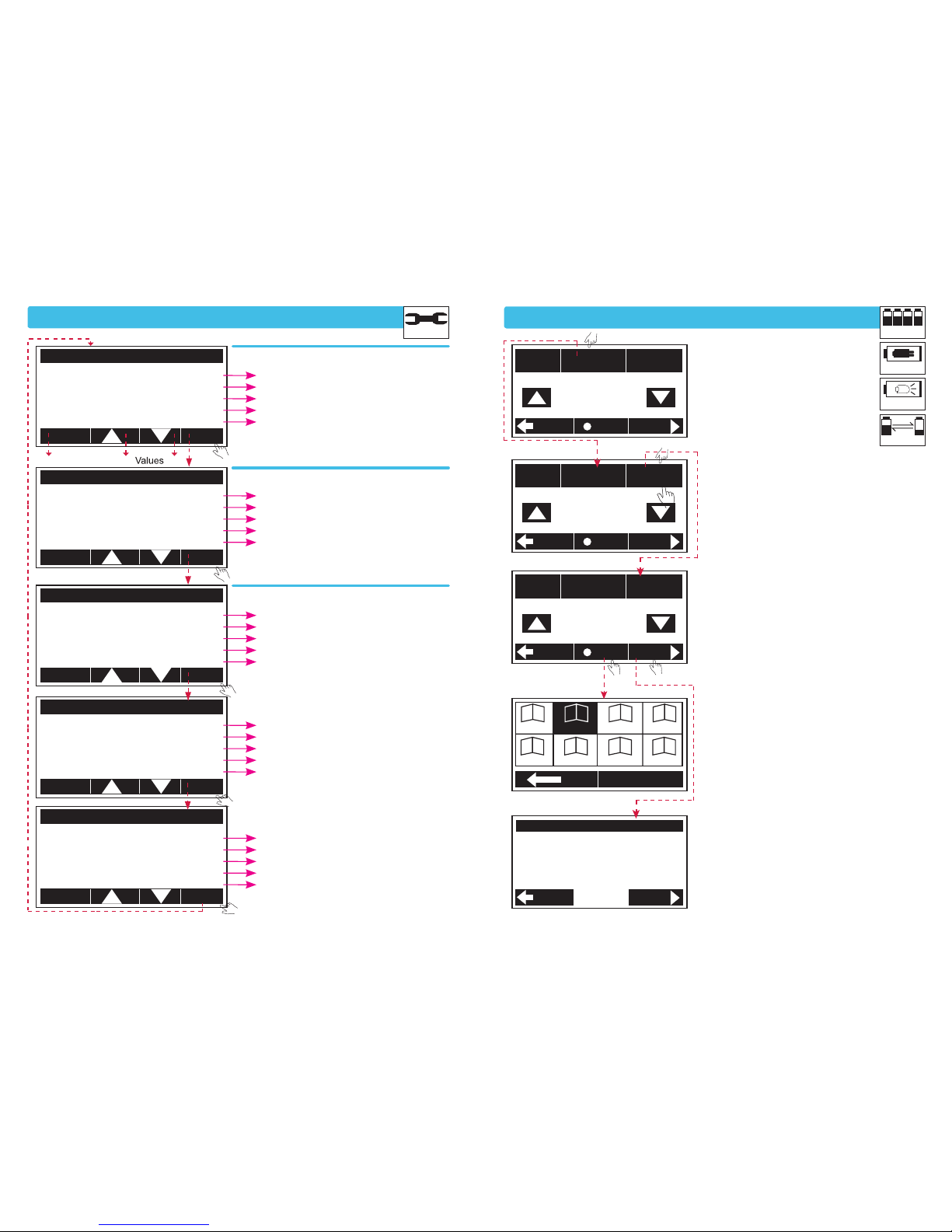
1) Battery type - WARNING!
It is important to get this
selection correct.
2) Number of cells.
(Automatic for BCHG)
Take care when selecting
cell count.
3) Charge/Discharge Current.
4) Save the above settings to
a memory.
5) Input Voltage / Battery Check,
(if not OK, check connections).
10.0-18.0V-(Cuts operation)
10-600min-(Total operation time)
50-80-(Internal temperature)
50-80-(when using sensor)
500mAh-50Ah-(Limits total charge capacity)
C->D/D->C
1-5T
5-60Min
5-25mV
5-20mV
4.00-4.25V
3.00-4.00V
3.50-3.70V
1.80-3.30V
2.00-2.50V
1.20-2.00V
0.80-1.50V
0.50-1.50V
4.00-4.15V
3.00-3.90V
M11 M12 M13M 14
M15M 16 M17M 18
OK
BACK
START
LiPo
CHG Confirm
-Connect -
Input Vol ... OK
Mainport ... OK
Bala Port ... OK
TYPE
LiPo
CELLS
6S
CURR
2.2 A
Set
Charge Current
2.2 A
SAVE
BACK
STAR T
TYPE
LiPo
CELLS
6S
CURR
2.2 A
Number Of C ells
6 (s)
SAVE
BACK
START
TYPE
LiPo
CELLS
6S
CURR
2.2 A
Set B attery type
LiPo
SAVE
BACK
START
SET
Display and Sound
Safety and Protection Settings
Custom Settings
Touch The Line To Select
Select From Main Screen
DCHG
CHG
BCHG
CYCLE
Page 5
- 9 - - 10 -
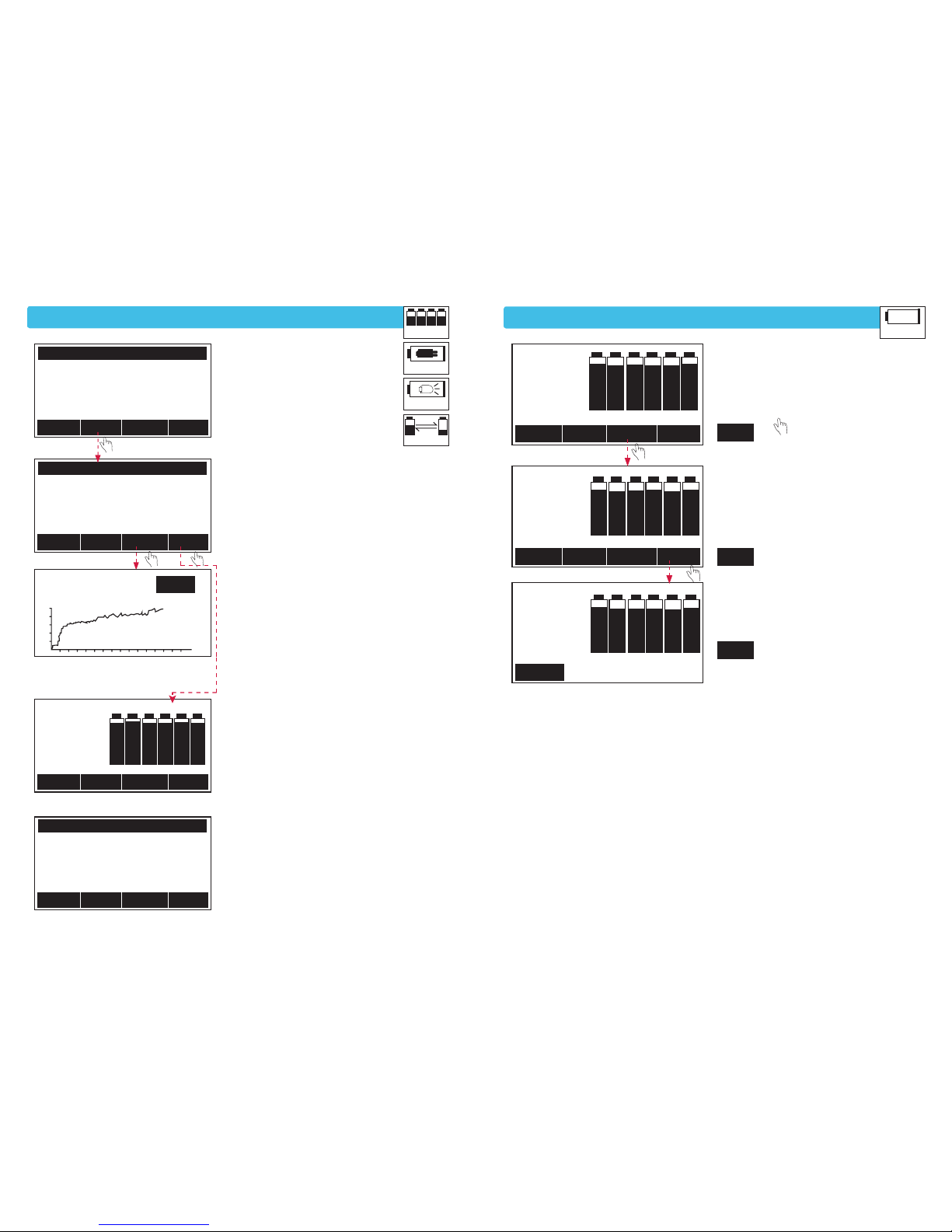
Starting Balancing/Charging/Discharging/Cycling
Battery’s Checking Program
GRAPHDATASTOP CELL
1) 4.124
2) 4.130
3) 4.113
4) 4.122
5) 4.135
6) 4.117
GRAPHDATASTOP CELL
LiPo
BCHG
6S
00: 00:45
Inpu t Volt 12.51 V
End Volt
. 2
5.20V
CA PA Cut-Of
f 1
0.0A h
Safety
Timer 240min
Temp.Cut-Of
f 6
0℃
:
:
:
:
:
GRAPHDATASTOP CELL
LiPo
BCHG
6S
00: 00:20
Voltage 24.76V
Curren
t 2
.16A
Capacity 7mAh
Int Temp. 3 3
℃
Ext Temp. 2 9℃
:
:
:
:
:
GRAPHDATASTOP CYCLE
Nixx
Cycle
record
C1 : 9 D1 : 0 mA h
C2 : 0 D2 : 0 mA h
C3 : 0 D3 : 0 mA h
C4 : 0 D4 : 0 mA h
C5 : 0 D5 : 0 mA h
GRAP HST OP CELL
LiPo
BCHG
6S
00:00:45
24.75V
00:01:4 1
BACK
1) Charging/Discharging Data.
Displays Status.
2) Charge/Discharge.
Set Data (Continued).
3) Graph of total Charge/
Discharge progress.
4) Individual Cell Voltage
(Lithium batteries with balance
connector only).
5) NiMH/ NiCD Cycle. Charge/
Discharge Capacity per Cycle.
STOP
1) 4.108
2)
4.097
3) 4.103
4)
4.104
5) 4.102
6)
4.108
00.00.09
VO L
LiPo
1) 08m
2) 15m
3) 06m
4) 09m
5) 14m
6) 04m
IRLiPo
1) 4.110
2) 4.097
3)
4.103
4) 4.105
5) 4.103
6) 4.109
LiPo
VO L
BALA
BAC
K
BAC
K
BALA
BALA
Ω
Ω
Ω
Ω
Ω
Ω
1) Select LiPo/
LiFe/Lilo and Voltage
of a pack. Will display
Individual cell.
2) Select IR and it will
display, individual cell
resistance of a pack.
3) Balancing. Will start
Independent, balancing
of connected pack.
DCHG
CHG
BCHG
CYCLE
BATT
Ω
Lithium batteries with balance connector only
Page 6
- 11 - - 12 -
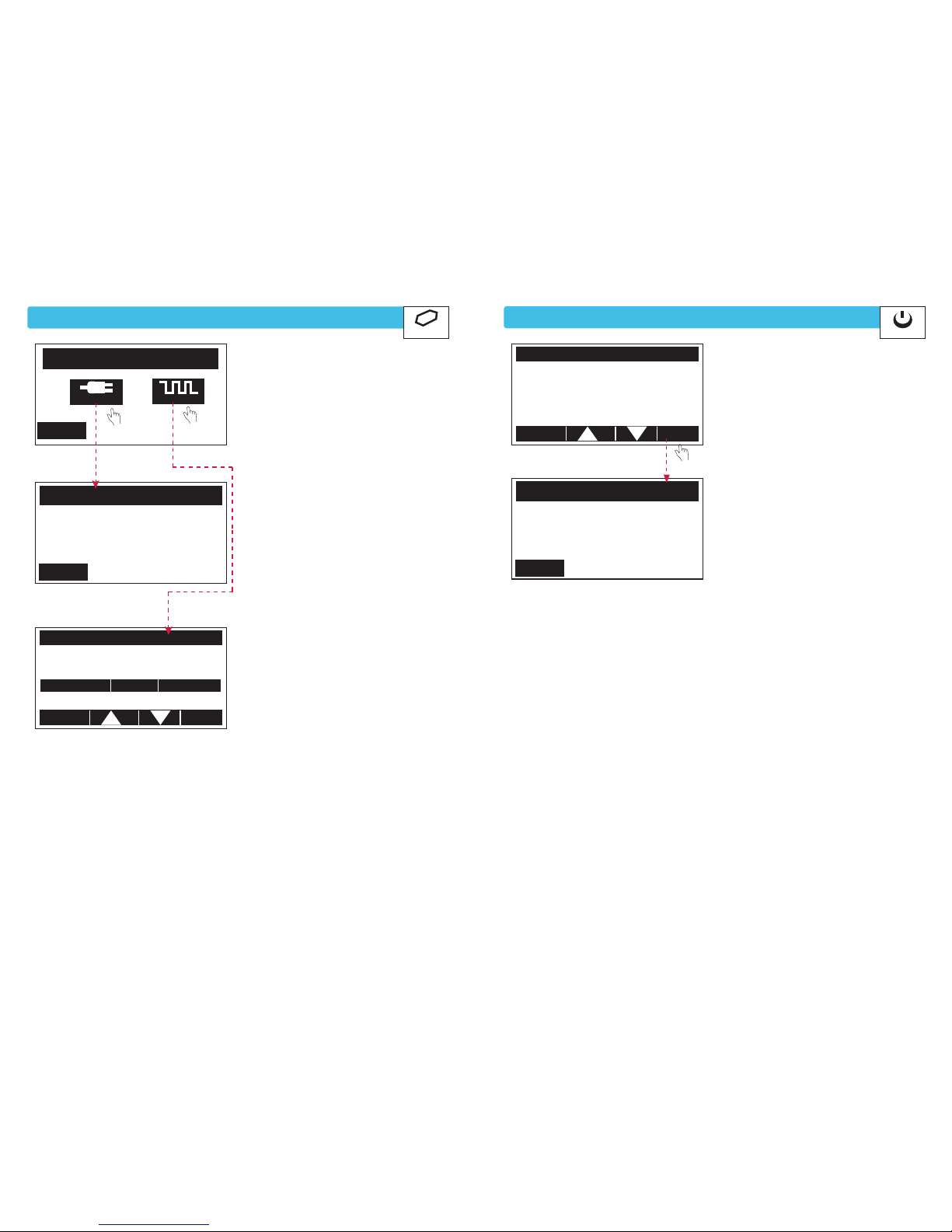
External Function Program
Digital Power Program
--- PPM
OUT
Monitor---
:
:
VOLTAGEP PM CURRENT
4.98V 1500 US 0.00 A
AU TO
BACK
MAX OUT PPM
MIN OUT PPM
210 0
900
BACK
SERV O/ ESC USB M onito
r
SERVO
USB
BACK
---U SB MONITOR---
Voltage 4.98V
Curren
t 0
.00 A
Capacity 0 .00 AH
Out W at
t 0
.00 W
Run Time 00:00:1 3
:
:
:
:
:
:
1) Select USB Monitor or
Servo Tester.
1) Set Voltage / Current /
Watt / Run Time.
(For powering external devices by
using charger as a power supply).
2) USB Output Monitor.
2) Digital Power Working,
Monitors Output.
3) Servo Tester
(Manual or Auto Test).
ST OP
DIGITAL P OWER WORKING
Inpu t Volt 12.52 V
OUT Volt 24.60 V
OUT Curr 0 .00A
OUT Watt 0.00W
Run Time 0
0:00:13
:
:
:
:
:
:
DIGITAL POWER S
ETTING
Ou
t V
olt . 1 2.0V
Curren
t 5
.0A
Max . Wat t 80W
Run Time 2 40Min
BACK
STAR T
:
:
:
:
:
POWER
MISC
Page 7
- 13 - - 14 -
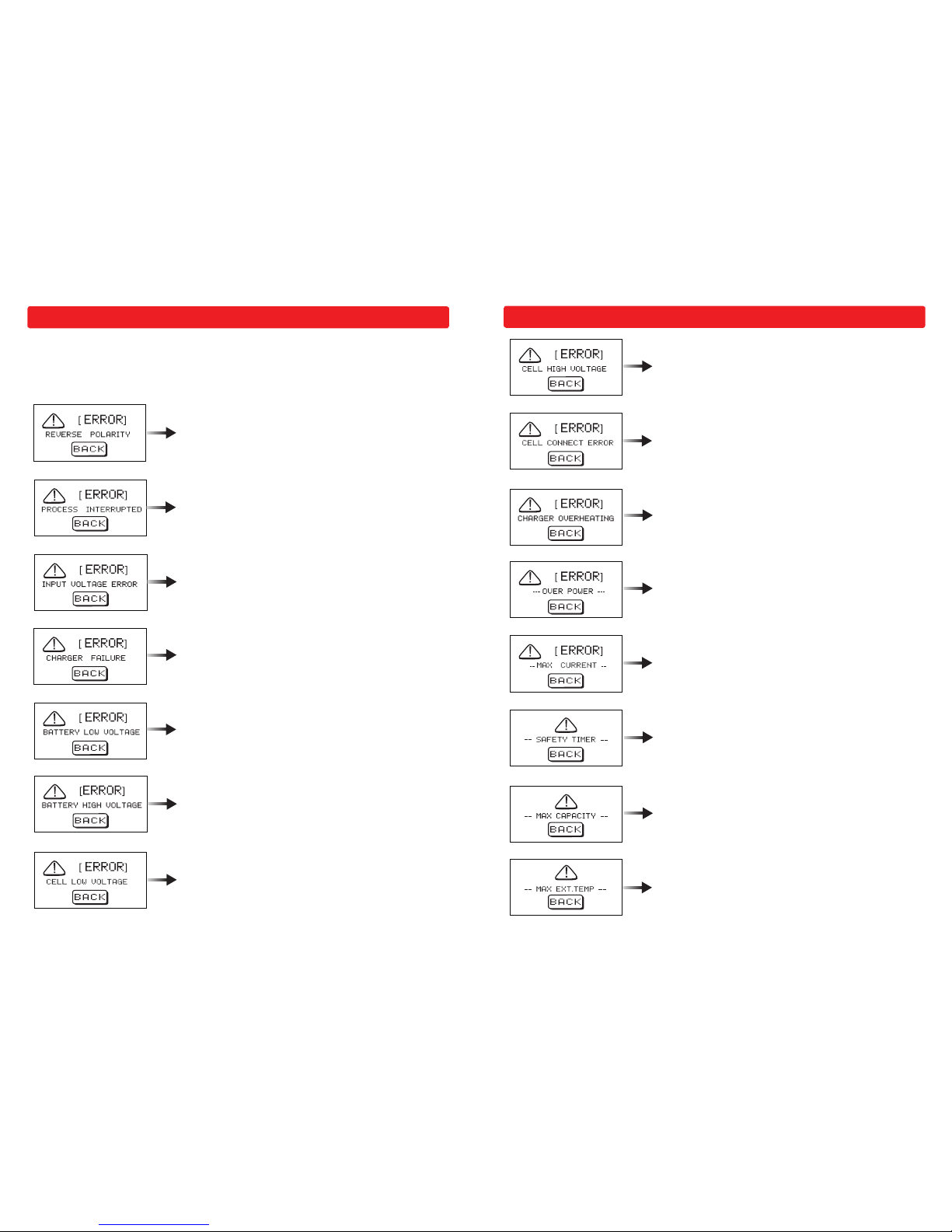
Warning and Error Messages
The Sigma EQ Touch II is protected against many fault and operator errors, by a MultiProtection System. Faults/Errors are displayed on the LCD screen and they interrupt the
active process to protect the unit and the battery.
The battery has been connected with incorrect polarity.
The battery is not connected or the connection has been
interrupted.
Input Voltage Error. It is below or over the limit of 11~18V.
Charger Fault.
Total Voltage Too Low.
Total Voltage Too High.
An individual Cell Voltage is Too Low.
Warning and Error Messages (Continued)
An Individual Cell Voltage is Too High.
Balance Port Connector Error.
Charger is Overheating.
Power Exceeds the Limit in Digital Power Mode.
Current Exceeds the Setting in Digital Power Mode.
The Maximum Safe Time Limit has been Exceeded.
The Maximum Capacity Limit has been Exceeded.
External Temperature is Too High.
Page 8
Warranty and Service
We warrant this product for a period of one year (12 months) from the date of purchase.
This guarantee applies to materials or operational defects, which are present at the time
of purchasing the product. During that period we will repair or replace, without service
charge, any product deemed defective due to those causes.
You will be required to present proof of purchase (invoice or receipt). This warranty does
not cover the damage due to wear, overloading, incorrect handling or use of incorrect
accessories. This does not affect your statutory rights.
Instruction for disposal of WEEE by users in the European Union
Electrical equipment marked with the crossed wheelie bin symbol must not
be discarded in the standard household waste. Instead, it should be taken
to a suitable specialist disposal location or your dealer.
All rights including translation reserved. Reproduction by any method, e.g. photocopy, microfilming, or the
capture in electronic data processing systems require the prior written approval by the editor. Reprinting,
also in part, is prohibited. These operating instructions represent the technical status at the time of printing.
Changes in technology and equipment reserved.
Sigma EQ Touch II
This product complies with the essential requirements of all appropriate
EU directives. A copy of the declaration of conformity can be obtained from
Ripmax Ltd, www.ripmax.com
Distributed by Ripmax Ltd., 241 Green Street, Enfield. EN3 7SJ. United Kingdom
- 15 -
 Loading...