

Page 1
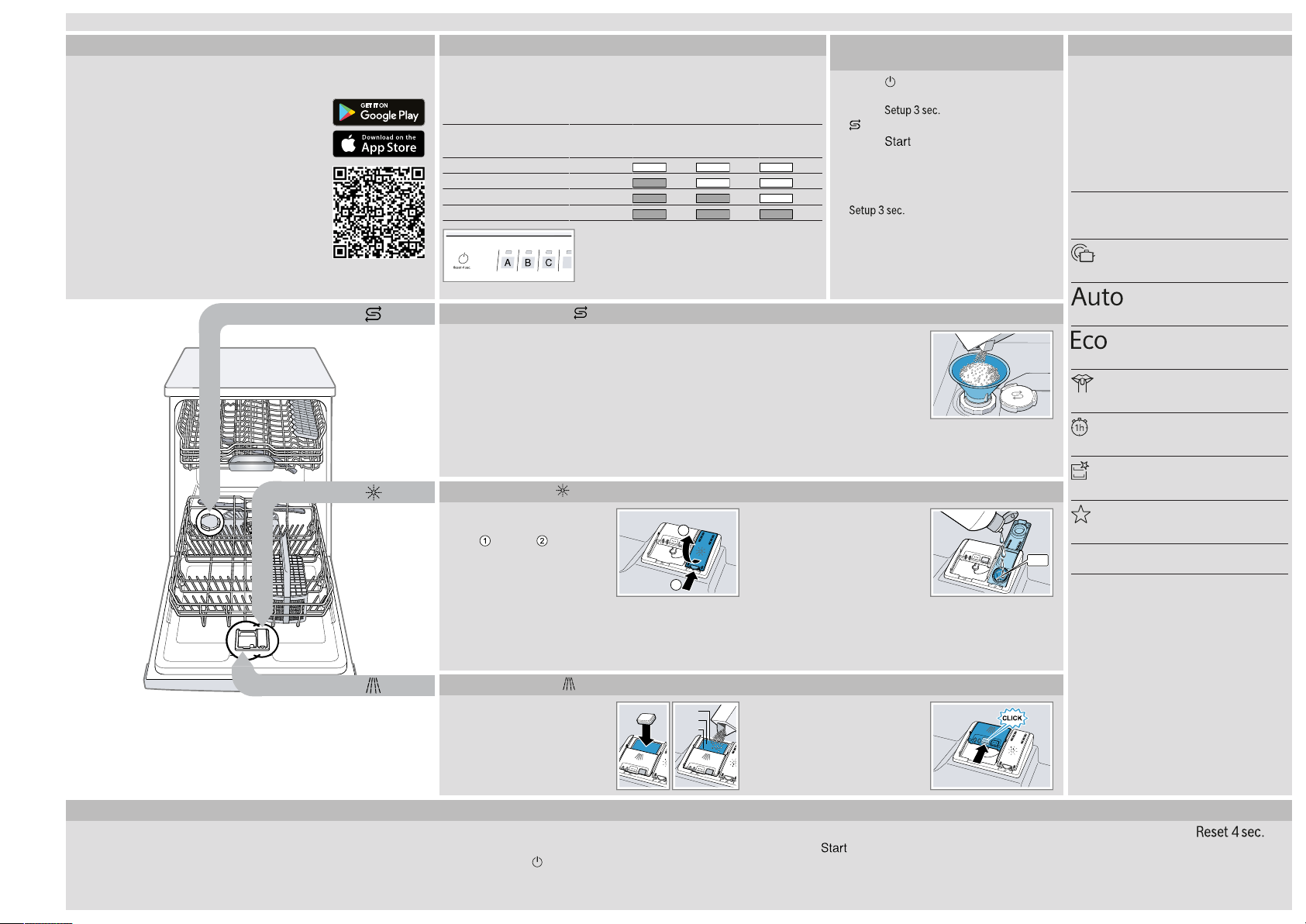
Before using for the first time, read the instruction manual and the safety information it contains.
1
2
max
15 ml
25 ml
50 ml
en
Setting up Home Connect
Tip:Connect your appliance to a mobile device. You can con-
veniently change all settings using the HomeConnect app.
1.
Install the HomeConnect app on your mobile device and follow the instructions.
Overview of water hardness settings
You can find an overview of the water hardness values that can be
selected here.
A table of country-specific units can be found in the instruction
manual.
Hardness
mmol/l Level LED A LED B LED C
range
2.
Scan the QR code with the HomeConnect
app.
Soft 0 - 1.1 0
Medium 1.2 - 2.9 1
Hard 3.0 - 3.7 2
Hard 3.8 - 6.2 3
Adding special salt
To avoid damage to the appliance, only add special
salt to the dispenser for special salt just before the
programme starts.
1.
Unscrew the lid of the dispenser for special salt
and remove.
2.
On initial start-up: Fill the dispenser right up with
water.
Quick reference guide Dishwasher
Adding rinse aid
1.
Press the catch on the lid
of the dispenser for rinse
aid and lift .
Setting the water softening system
1.
Press .
2.
To open the appliance settings,
press for 3 seconds.
a flashes.
3.
Press repeatedly until the right
water hardness has been set.
0, 1, 2 or 3 LEDs will light up accordingly.
4.
To save the settings, press
3.
Add the special salt to the
dispenser. The water in the
dispenser is displaced and
forced out. Never add detergent.
4.
Place the lid back on the dispenser and turn to
close.
2.
Add rinse aid up to the
max mark.
for 3 seconds.
Programmes
The programme data has been measured in the laboratory according to
European standard EN60436.
The consumption figures depend on
the programme and additional function selected.
The runtime will change if the rinse
aid system is switched off or rinse aid
needs to be added.
Programme 1) Duration [h:min]
Intensive 70°
Auto 45-65°
Eco 50°
Silence 50
1
Speed 65°
Machine Care
Favourite
1
Suitable programme for running at night: it
takes longer, but is extremely quiet.
2) Energy [kWh]
3) Water [l]
1) 2:05 -2:15
2) 1.300 -1.400
3) 11.5 -13.5
1) 1:40-2:45
2) 0.900-1.500
3) 7.0-15.5
1) 4:35
2) 0.736
3) 9.5
1) 4:00
2) 1.050
3) 11.2
1) 1:00
2) 1.300
3) 10.5
1) 2:10
2) 1.350
3) 15.2
1) 0:15-0:15
2) 0.050-0.050
3) 4.0-4.0
How to use your appliance
1.
Load the tableware.
Only clean tableware that is suitable for dishwashers. Remove large remnants of food from
the tableware. Check that the spray arms can ro-
9001758424 (020722) SN13EC78CS
*9001758424*
Adding detergent
1.
Add the detergent to the
dry detergent dispenser.
tate freely.
2.
Add detergent.
3.
Switch on the appliance .
3.
Close the lid of the dispenser for rinse aid.
a The lid clicks into position.
2.
Close the lid of the detergent dispenser.
a The lid clicks into position.
4.
Select the programme.
5.
Start the programme .
6.
Remove the tableware at the end of the programme.
7.
To cancel the programme, press for
approx. 4seconds.
The programme is cancelled and ends after approx. 1minute.
Page 2
Cleaning filters
1
2
1
2
1
2
1
2
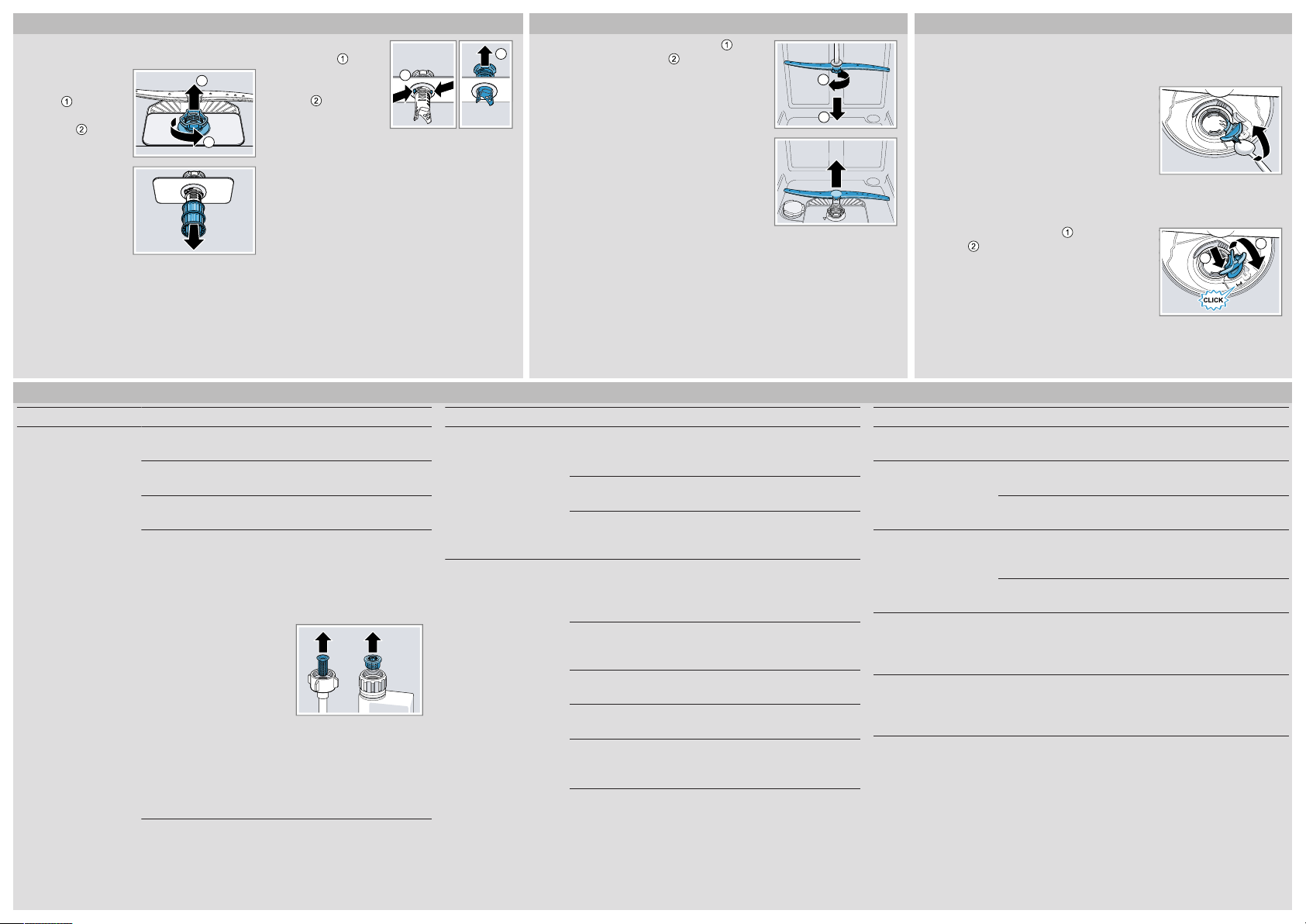
1.
After each wash check the filters for
residue.
2.
Turn the coarse
filter anticlockwise and remove the filter
system .
3.
Pull down the micro filter to remove.
Troubleshooting
Fault Cause and troubleshooting
Display for water supply
lights up
Supply hose is kinked.
▶
Install the supply hose without kinks.
Water tap is turned off.
▶
Turn on the water tap.
Water tap is jammed or furred up.
▶
Turn on the water tap.
The filters in the water connection of the supply or AquaStop
hose are blocked.
1.
Switch off the appliance.
2.
Pull out the mains plug.
3.
Turn off the water tap.
4.
Unscrew the water connection.
5.
Remove the filter from the supply hose
6.
Clean the filter.
7.
Re-insert the filter in the supply hose.
8.
Screw the water connection back on.
9.
Check the water connection for leaks.
10.
Restore the power supply.
11.
Switch the appliance on.
4.
Press the locking
catches together and lift
the coarse filter
out .
5.
Clean the filter elements under running
water.
6.
Re-assemble the filter system.
7.
Insert the filter system into the appliance
and turn the coarse filter clockwise.
Make sure that the arrow markings
match up.
Fault Cause and troubleshooting
Display for water supply
lights up
Remnants of food on
tableware.
Cleaning spray arms
1.
Unscrew the upper spray arm and
pull down to remove .
2.
Pull up the lower spray arm to remove.
3.
Check the outlet nozzles on the spray arms for blockages under running water and remove any foreign bodies.
4.
Insert the lower spray arm.
a The spray arm clicks into position.
5.
Insert the upper spray arm and screw it firmly in place.
Wastewater hose is blocked or kinked.
1.
Reposition the wastewater hose without kinks.
2.
Remove residues.
Siphon connection is still sealed.
▶
Check the connection to the siphon and open if necessary.
Cover of the wastewater pump is loose.
▶
Secure the cover of the Wastewater pump so it clicks into
position.
Tableware is placed too close together or basket is overfilled.
1.
Arrange tableware with sufficient space in between.
The spray jets must reach the surfaces of the tableware.
2.
Avoid points of contact.
Spray arm rotation is blocked.
▶
Arrange tableware so that it does not obstruct spray arm rotation.
Spray arm nozzles are blocked.
▶
Clean the Spray arms.
Filters are soiled.
▶
Clean the filters.
Filters are inserted incorrectly and/or not engaged.
1.
Insert the filters properly.
2.
Engage the filters.
Clean wastewater pump
1.
Disconnect the appliance from the power supply.
2.
Remove the filter system.
3.
Scoop out any water.
4.
Prise off the pump cover using a
spoon and grip it by the crosspiece.
5.
Lift the pump cover inwards at an angle and remove.
6.
Remove any remnants of food and foreign bodies in the area
of the impeller.
7.
Insert the pump cover and press
down .
a The pump cover clicks into position.
8.
Install the filter system.
Fault Cause and troubleshooting
Remnants of food on
tableware.
Removable streaks are
present on glasses, glassware with a metallic appearance and cutlery.
Rust spots on cutlery. Cutlery is not sufficiently rust-resistant. Knife blades are often
Detergent residue is
present in the detergent
dispenser or the tablet
collecting tray.
All LEDs light up or flash
or the rinse programme
does not continue running.
Washing programme selected too weak.
▶
Select a more intensive washing programme.
Amount of rinse aid to be dispensed is set too high.
▶
Set the rinse aid system to a lower setting.
No rinse aid has been added.
▶
Add rinse aid.
more severely affected.
▶
Use rust-resistant tableware.
Cutlery may also rust if washed together with rusting items.
▶
Do not wash rusting items.
Spray arms were blocked by tableware so detergent was not
rinsed out.
▶
Check that the spray arms are not blocked and can rotate
freely.
Electronics have detected a fault.
▶
Press the main switch button for approx. 4seconds.
The appliance is reset and restarted.
 Loading...