

Next Generation
Signal Enhancement
RF / SBR Series
OOPPEERRAATTIIOONN && IINNSSTTAALLLLAATTIIOONN MMAANNUUAALL
RR44--3300--SSM
Single Sub Band Repeater For Indoor Applications (FCC ID: S3CR4-30-S8)
MR800 ((BBaanndd SSeelleeccttiivvee)) RReeppeeaatteerr
June 2007
The information contained herein is proprietary to Shyam Telecom Limited.
Unauthorized access, copy and replication are prohibited. This document must not
be copied in whole or part by any means or it shall not be disclosed or d ivulged to
any third Party without the prior written consent of Shyam Telecom Limited.
Proprietary Information
All Rights Reserved Shyam Telecom Limited Page
1/34

Next Generation
Signal Enhancement
Contents
1. Document History............................... ... ... ... .... ... ... ... ... ... ... ... .... ... ... ... ... ...... ... 3
2. Disclaimer .................................. ... ...... ... ... ... ... .... ... ... ... ... ... ... ... .... ... ... ... ... ... ... 3
3. Safety Instructions and Warnings................................................................ 3
3.1. Personnel Safety ............................................................................... 3
3.2. Equipment Safety .............................................................................. 3
3.3. Electrostatic Sensitivity ...................................................................... 4
4. Introduction............................. ... ... ... ... ... ... ... ... .... ... ... ... ... ... ... ... .... ... ... ... ... ...... 6
4.1. Purpose ............................................................................................. 6
4.2. Scope................................................................................................. 6
4.3. Definitions .......................................................................................... 6
4.4. References ........................................................................................ 7
4.5. General .............................................................................................. 7
5. Functional Description Of R4 Band Selective Repeater............................. 8
5.1. General Description ........................................................................... 8
6. To Get started-Basic Software Control Of the System............................. 11
6.1. General ............................................................................................ 11
6.2. Terminal Set-up ............................................................................... 11
6.3. Block Diagram Description..................
7. R4 Repeater Specifications ........................................................................ 21
7.1. Electrical Specifications-RF ............................................................. 21
7.2. Electrical Specification Power Requirement .................................... 21
7.3. External Electrical Interface ............................................................. 21
7.4. Mechanical Specification ................................................................. 21
7.5. Environmental Specification............................................................. 22
7.6. Contents of Delivery......................................................................... 22
8.Installation..................................................................................................... 23
8.1. Preparation Sheet- Pre Installation .................................................. 23
8.2. Engineering Consideration............................................................... 24
8.3. Installation Tools.............................................................................. 26
8.4. Installation Procedure ...................................................................... 26
8.5. Gain Setting ..................................................................................... 27
8.6. Commissioning System ................................................................... 28
8.7. Dos & Don’t Dos .............................................................................. 28
8.8. Checklist – Post Installation............................................................. 29
9. System Maintenance. ... ... ... ... .... ... ... ... ... ... ... ... .... ... ... ... ... ... ... ... ....... ... ... ... ... . 30
9.1. General ............................................................................................ 30
9.2. Preventative Maintenance ...............................................................30
9.3. In-Building Coverage Problems ....................................................... 30
All Rights Reserved Shyam Telecom Limited Page
2/34

Next Generation
Signal Enhancement
1. Document History
Document
Number
R4 Band
Document
Name
Selective
Document
date
June
2007
Author Edited
by
Approved by Revision
Repeater
Revision Revised Section Date/Sign
2. Disclaimer
Every attempt has been made to make this material complete, accurate, and
up-to-date. Users are cautioned, however, that Shyam Telecom Limited
reserves the right to make changes without notice and shall not be
responsible for any damages including consequential, caused by reliance of
the contents presented, including, but not limited to, typographical,
arithmetical, or listing errors.
Product name(s) referenced in this document may be trademarks or
registered trademarks of their respective companies, and are hereby
acknowledged.
In areas with unstable power grids (mains) all repeaters must be installed
with a voltage regulator ensuring a constant voltage level at the repeater
power input. A maximum voltage deviation should remain within the input
range to the repeaters for warranty purposes.
All antennas must be installed with lighting protection. Damage to internal
modules, as a result of lightning is not covered by the warranty.
3. Safety Instructions and Warnings
3.1. Personnel Safety
Before installing or replacing any equipment, the entire manual should be
read and understood. The user needs to supply the appropriate AC power to
the Repeater. Incorrect AC power settings can damage the repeater and
may cause injury to the user.
Throughout this manual, there are "Caution" warnings, "Caution" calls
attention to a procedure or practice, which, if ignored, may result in injury or
damage to the system or system component or even the user. Do not
perform any procedure preceded by a "Caution" until the described
conditions are fully understood and met.
3.2. Equipment Safety
When installing, replacing or using this product, observe all safety
precautions during handling and operation. Failure to comply with the
following general safety precautions and with specific precautions described
elsewhere in this manual violates the safety standards of the design,
manufacture, and intended use of this product. Shyam Telecom Limited
assumes no liability for the customer's failure to comply with these
precautions. This entire manual should be read and understood before
operating or maintaining the repeater system.
All Rights Reserved Shyam Telecom Limited Page
3/34

Next Generation
Signal Enhancement
CAUTION
Calls attention to a procedure or practice which, if not followed, may result
in personal injury, damage to the system or damage to individual
components. Do not perform any procedure preceded by a
CAUTION until described conditions are fully understood and met.
WARNING! This equipment complies with FCC & IC radiation exposure limits
set forth for an uncontrolled environment. This transmitter must not be colocated or operating in conjunction with any other antenna or transmitter.
The unit with server antenna must be installed to provide minimum 40 cm
separation distance between the server antenna and the body of user or
near by person. The donor antenna used for this transmitter must be fixedmounted on outdoor permanent structures with a separation distance o f at
least 1.5 meters from all persons during normal operation.
The RF electric performance of the repeater conforms to FCC requirement o f
the inter modulation and spurious emission. It avoids interference problems.
3.3. Electrostatic Sensitivity
CAUTION
ESD = ELECTROSTATIC DISCHARGE SENSITIVE DEVICE
Observe electrostatic precautionary procedures.
Semiconductor transmitters and receivers provide highly reliable
performance when operated in conformity with the intentions of their design.
However, a semiconductor may be damaged by an electrostatic charge
inadvertently imposed by careless handling.
Static electricity can be conducted to the semiconductor chip from the centre
pin of the RF input connector, and through the AC connector pins. When
All Rights Reserved Shyam Telecom Limited Page
4/34

Next Generation
Signal Enhancement
unpacking and otherwise handling the Repeater, follow ESD precautionary
procedures including the use of grounded wrist straps, grounded workbench
surfaces, and grounded floor mats.
All Rights Reserved Shyam Telecom Limited Page
5/34

Next Generation
Signal Enhancement
4. Introduction
4.1. Purpose
The purpose of this document is to describe the electrical and mechanical
specifications, operation and maintenance of the R4 Band Selective
Repeater.
4.2. Scope
This document is the product description of the Shyam R4 Band Selective
Repeater for Indoor applications.
4.3. Definitions
AGC
ALC
APC
BCCH
BTS
BSEL
CDMA
CMC
CMB
CSEL
Automatic Gain Control
Automatic Level Control
Automatic Power Control
Broadcast Control Channel
Base Transceiver Station
Band Selective
Coded Division Multiple Access
Configuration & Monitoring Console software
Combiner Unit
Channel Selective
DCS Digital Communication System
DL Downlink signal (from base station via repeater to
mobile station)
EGSM
ETSI
GSM
LAC
LED
LNA
LO
MS
Extended Global System for Mobile Communication
European Telecommunications Standard Institute
Global System for Mobile communication
Location Area Code of the BTS site
Light Emitting Diode
Low Noise Amplifier
Local Oscillator
Mobile Station
MSC Mobile Switching Center
NMS
Network Management System
PCN Personal Communication Network
PCS
Personal Communication System
PSU Power Supply Unit
RF
RMS
RSSI
RTC
UL (Uplink)
Radio Frequency
Remote Management System
Received Signal Strength Indication
Real Time Clock
Uplink signal direction (from mobile station via
repeater to base station)
All Rights Reserved Shyam Telecom Limited Page
6/34
Next Generation
Signal Enhancement
4.4. References
[1] ETS 300 086.
Radio Equipment and Systems Land mobile service Technical
characteristics and test conditions for radio equipment with an internal or
external RF connector intended primarily for analogue speech.
[2] ETS 300 609-4.
Digital cellular telecommunications system (phase 2): Base Station
Systems (BSS) equipment specification: Part 4: Repeaters.
[3] ETS 300 342-3
Radio Equipment and Systems (RES); Electro-Magnetic Compatibility
(EMC) for European Digital Cellular Telecommunications systems. Base
Station Radio and ancillary equipment and Repeaters meeting phase 2
GSM requirements.
4.5. General
Mobile Communications Systems are planned as cellular systems and each
cell of the base station is required to provide RF coverage over a certain
geographical area as per defined RF power levels. Due to the RF
propagation properties, even using high radiated RF powers or complicated
antenna systems, there are zones within the coverage area where the RF
signal strength from base station remains inadequate for establishing the
desired connectivity to mobile users.
Repeaters traditionally are deployed in the Mobile Communication Network
to fill in the “Dead Zones” caused by blocking of signals by geographic
topologies such as mountains, valleys, dense foliage, high rising urban
landscapes and other man-made structures. The distance from the base
station also adversely affects the RF signal strength. The user views
repeaters as a means to extend base station coverage so as to reduce the
number of base stations and thereby accelerate network availability.
Repeater systems are installed after meticulous planning between BTSs and
the mobile users to provide RF coverage in the shadowed regions. Repeater
systems are available for different applications and ultimate choice shall
depend on some of the factors mentioned below:
• Area to be provided with coverage.
• Indoor/outdoor coverage.
• Availability of BTSs in the vicinity.
• Antenna isolation to be achieved.
All Rights Reserved Shyam Telecom Limited Page
7/34
Next Generation
Signal Enhancement
5. Functional Description Of R4 Band Selective Repeater
5.1. General Description
The R4 Band Selective Repeater System is designed to provide indoor
coverage and can handle signals in single sub band in any one of the service
bands, used around the World by various service operators. It provides
highly selective amplification in the pre-set band. The details of operating
service frequency bands are given below:
S.NO. Service Band DL Frequency (MHz) UL Frequency (MHz)
1. SMR 800
2. Cellular
3. SMR 900
4. EGSM
5. GSM 900
6. DCS
7. PCS
8. UMTS
851-869 806-824
869-894 824-849
935-941 896-902
925-960 880-915
935-960 890-915
1805-1880 1710-1785
1930-1990 1850-1910
2110-2170 1920-1980
[The Customer is advised to refer to the packing note giving the details of
frequency band set & the bandwidths of different sub bands equipped in the
repeater: Only SMR800 Band is subject to this FCC Application w/ FCC ID: S3CR4-30-S8]
• The repeater adopts duplex mode and bi-directional amplification for
U/L & D/L signals between the base station and mobile users. It has
been designed for outdoor applications to meet the requirements of
large number of users in the targeted area.
• It conforms to ETSI standards & safety requirements.
• The system can be incorporated with optional Remote Management
System (RMS). It enables status monitoring, remote configuration &
speedy maintenance.
• The system can be customized to meet the requirement of user for
coverage by making provision for radiating required RF power in the
DL/UL paths to achieve the coverage. The System is incorporated
with monitoring facility through USB port with easy GUI interface.
• It intercepts signals from the BTS through a DONOR antenna (highly
directional outdoor antenna) and distributes the signals to mobile
users after amplification through SERVER antennas (omni
directional) system in the D/L.
• In the U/L, the signals from the mobile users are picked up by
SERVER antenna and retransmitted to the BTS after processing &
amplification in the repeater.
All Rights Reserved Shyam Telecom Limited Page
8/34
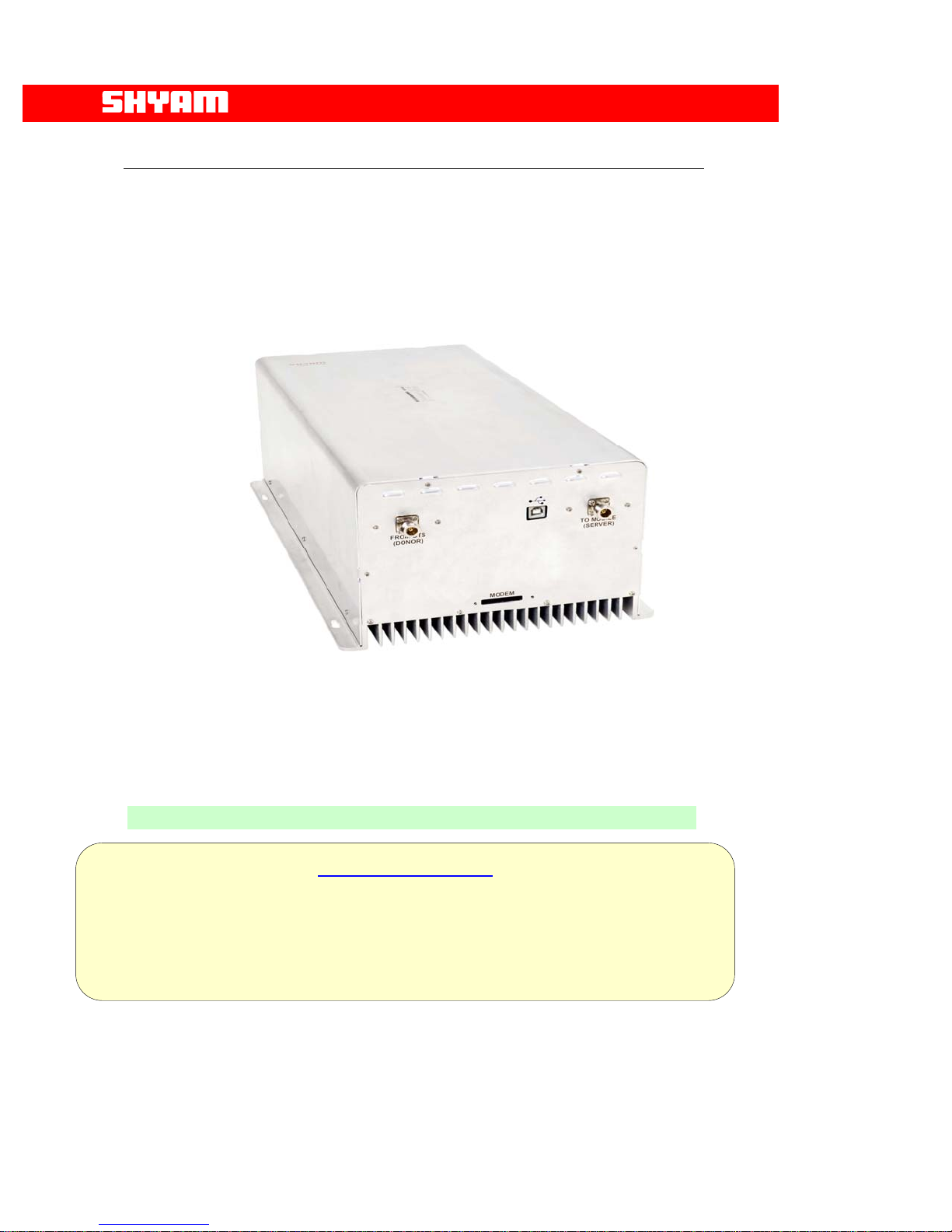
The repeater consists of the following modules/units:
• LNA
• Converter modules
• Power amplifiers
• Power supply modules
• Duplexer filters for transmit/receive directions
• Supervisory module
• A metallic case houses the repeater. Arrangement is made for heat
dissipation especially for amplifiers, which generate more heat. The
choice of suitable metal as the case material gives a lightweight
design with good heat conduction. The housing is not waterproof
since it is to be used for indoor application.
Next Generation
Signal Enhancement
Ceiling
Antenna
R4 Unit
Figure 1: Indoor Coverage (Typical Application)
All Rights Reserved Shyam Telecom Limited Page
9/34

R4-30SMR800
Next Generation
Signal Enhancement
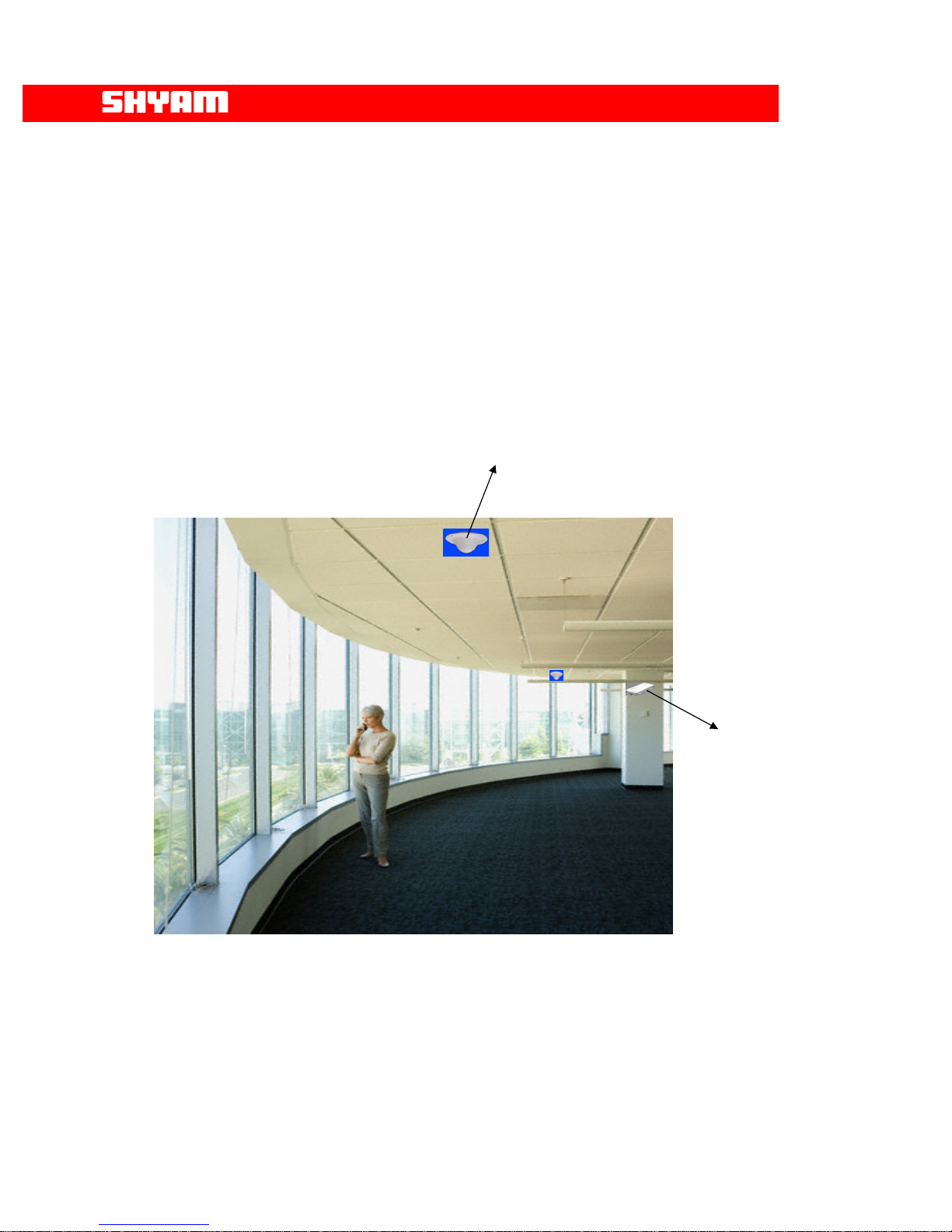
Ceiling
Antenna
Figure 2: Indoor Coverage In a Office Premises
All Rights Reserved Shyam Telecom Limited Page
10/34

Next Generation
Signal Enhancement
6. To Get started-Basic Software Control Of the System
6.1. General
The system is equipped with a supervisory module that allows the monitoring
and control of various parameters such as RF power, attenuation,
temperature, status of door and alarm conditions etc.
The communication interface between the local terminal and the control
module can be set up using the Configuration & Monitoring Console software
(CMC), which is an easy to use GUI for simple control and monitoring. This
way, the parameters can be easily observed and adjusted from the display
terminal.
This can be performed either via a terminal (PC/laptop) locally, or via remote
login through the wireless modem (Optional) located in the repeater. USB
port is provisioned in the equipment for connecting PC/laptop.
6.2. Terminal Set-up
The system is delivered with software loaded in order to perform
configuration as per requirement. It also enables monitoring the status.
Configuration of parameters can be carried out locally with the help of laptop
/ PC connected to the repeater by means of local USB serial interface or
remotely via wireless modem (Optional) mounted inside the repeater. The
laptop/PC should be loaded with the CMC software available on the supplied
CD along with the USB driver.
I) LOGIN Repeater
After running the Configuration & Monitoring Console (CMC), user needs
to login the repeater, sequence as under, may be followed:
• Click the “LOGIN” on the command bar.
• Select the user type (ADMINSTRATOR or SUPERVISOR).
• Enter the password.
• Finally click the “OK”.
A message “Logged in successfully” will appear on the screen after
successful login. There are two types of users viz. ADMINISTRATOR and
SUPERVISOR. If user logged in as an ADMINISTRATOR, all the
functions can be performed through the CMC. By default, the password
for both users is “SHYAM”.
SUPERVISOR is allowed to perform monitoring of the status & alarms but
no change in configuration is permitted. However, the SUPERVISOR can
change password if so desired.
All Rights Reserved Shyam Telecom Limited Page
11/34

Next Generation
Signal Enhancement
II) CONFIGURATION (Figure 4)
Configuring system means setting the parameters for operation as per the
requirement at site. The configuration is carried out after the physical
installation is completed.
Click on the command bar to display the configuration and monitoring
window, which allows access to all the configurable repeater parameters.
User can login for configuration & monitoring of repeater parameters.
• START command is for initiating the dialogue.
• SET command is for updating the repeater parameters.
Information as detailed below, is configured after the “CONFIGURATION”
window is activated:
i. Repeater ID: User can assign a unique repeater ID to each repeater
installed. Up to 10 characters are allowed in this field.
ii. Repeater Location: User can assign the address of location where
repeater is installed. Up to 30 characters are allowed in this field.
iii. Sub Bands (UL/DL Frequency Bands): The frequency bandwidth
with frequency details, of the loaded sub band in UL & DL paths are
specified.
Figure 3: Login Repeater
All Rights Reserved Shyam Telecom Limited Page
12/34

Next Generation
Signal Enhancement
iv. Output Power: Maximum Output Power limits in UL & DL paths are
set. A “PA Power high” alarm will be generated when PA power
exceeds the upper limit.
Figure 4: Configuration Window
v. RSSI Alarm (Down Link): Lower and Upper RSSI Limits in DL are set
in the factory. A RSSI High alarm will be generated when RSSI
exceeds the set upper limit, and a RSSI Low alarm will be generated
when RSSI goes below the set lower limit. Upper range can be set
from -35 to -55dBm. Lower range can be set from -75 to -95dBm
vi. PA On/Off: User can set uplink and/or downlink PA as ON or OFF
independently for testing/maintenance purpose at the time of
installation for both the bands.
After completing the installation it must be in ON condition only.
vii. Attenuation: This field is specified with the attenuation inserted in the
system, both in the DL & UL directions to set the desired RF power.
viii. Save Parameters as Text File:
SAVE: Configured parameters can be saved as text file by
clicking at SAVE for later reference.
ix. Open Text File:
OPEN: Saved configured text file can be opened and
displayed on the configuration window by clicking at
OPEN.
All Rights Reserved Shyam Telecom Limited Page
13/34

Next Generation
Signal Enhancement
Figure 5: Monitoring/Alarm Window
III) MONITORING (Figure 5)
In this window, the status of the system is monitored for the following
parameters/conditions:
STATUS
S.NO. Parameters/Conditions Remarks
1. Start and Stop Frequency of
sub band, equipped.
2. RSSI (DL) for the Band
3. RSSI (UL) for the Band
4. Attenuation DL
The specified frequency bands in
DL & UL are displayed.
Real time DL signal level is
indicated.
Real time UL signal level is
indicated.
Indicates attenuation inserted in
the system in DL path.
5. Attenuation UL
Indicates attenuation inserted in
the system in UL path.
6. Output Power DL
RF output power in DL path is
displayed.
All Rights Reserved Shyam Telecom Limited Page
14/34

Next Generation
Signal Enhancement
7. Output Power UL
RF output power in UL path is
displayed.
8. PA Temperature DL
9. PA Temperature UL
10. APC (DL)
Real time value of temperature of
PA in DL path.
Real time value of temperature of
PA in UL path.
The APC action in the DL path is
indicated.
11. APC (UL)
The APC action in the UL path is
indicated.
12. System Temperature
Real time system temperature is
indicated.
13. Power supply
Values of derived voltages are
displayed,
IV) ALARMS (Figure 5)
Details of alarms displayed are given below:
S.NO. Alarm Indication Remarks
1. PA OFF (Manual) The alarm indicates the PA OFF
(Manual) condition in the DL &/or UL
paths.
2. PA OFF (Auto)
The alarm indicates the PA OFF
(Auto) condition in the DL &/or UL
paths.
3. PA Power Low DL
When PA Power in DL path goes
below the set limit, is indicated
through the alarm.
4. PA Power High DL
When PA Power in DL path exceeds
the upper limit, is indicated through
the alarm.
5. DL PA Temperature High When PA Temperature in DL path
exceeds limit, alarm is generated.
6. UL PA Temperature High
When PA Temperature in UL path
exceeds limit, alarm is generated.
7. LNA Alarm
The alarm indicates the failure of LNA
in DL/UL paths.
8. VSWR Alarm
The alarm indicates the mismatch
condition at the DL/UL RF ports
resulting in exceeding the VSWR
limits (1.5:1).
9. Synthesizer fail for the
sub band.
The failure of relevant synthesizer in
DL/UL direction is indicated through
the alarm.
10. RSSI low (DL)
The alarm indicates that the RSSI
strength has gone lower than the set
limit in the DL direction.
11. RSSI high (DL)
The alarm indicates that the set upper
limit of RSSI in the DL direction has
exceeded.
12. AC fail
Indicates the failure of AC mains to
the system.
All Rights Reserved Shyam Telecom Limited Page
15/34

Next Generation
Signal Enhancement
13. DC fail
Indicates the failure of DC derived
voltages in the system.
14. System Temperature
Indicates the rise in temperature of
the system.
15. Door Open
Indicates the opening of the door of
the repeater.
Monitoring interval is 3 seconds i.e. after every 3 seconds data on the
monitoring window is refreshed.
A red indication is for Alarm present.
A green indication is for No alarm.
V) Establishing Communication (Figure 6)
The system has provision of establishing communication on “LOCAL” &
“Remote” basis. In COMMUNICATION window, user can select serial
communication port of the computer and type of connection between
repeater and computer.
a. LOCAL CONNECTION
In this type of connection, user computer COM Port and repeater’s
USB port are connected directly using cable. Sequence is as under:
• Click the “COMM.” on the command bar to display the
COMMUNICATION window.
• Select the Connection Type as “LOCAL”
• Select the computer’s Comm. Port where the repeater is
connected.
• Click “OK”.
b. REMOTE CONNECTION
In this type of connection, User communicates from/to remote location
with the repeater using wireless Modem / Cell phone.
To connect:
• Click the “COMM.” on the command bar to display the
COMMUNICATION window.
• Select the Connection Type as “REMOTE”.
• Select the computer’s Comm. Port where the wireless Modem
is connected.
• Click “OK”.
• Now click the DIALUP on the command bar to display the
DIALUP window.
• Enter / Select the repeater phone number.
• Click the “DIAL” and wait (maximum 60 seconds) for
connection.
A message “CONNECTED” will appear on the screen after the GSM
Connection is established.
Click the “DISCONNECT” on the DIALUP window to
disconnect remote communication with the repeater.
All Rights Reserved Shyam Telecom Limited Page
16/34

Next Generation
Signal Enhancement
Figure 6: Communication Window
VI) Instant Alarms by SMS (Figure 7)
The provision exists in the system for getting the alarm information
through “Instant Alarms by SMS” which is carried out by Wireless
Modem. Following information is desired to be fed for enabling this
facility:
• SMS Service Center Number
• RMS Phone Number
• Maintenance Phone Number
VII) Security Settings (Figure 8)
The system has two levels of permitting Log in to the repeater to avoid
unauthorized operation. The levels are: ADMINISTRATOR &
SUPERVISOR.
Each level has a specific password. The password for each level can be
changed at intervals. ADMINISTRATOR has rights to perform all
functions Viz. Configuration, Monitoring etc. Whereas the SUPERVISOR
is allowed to perform limited functions like monitoring of alarms,
establishing communication etc.
All Rights Reserved Shyam Telecom Limited Page
17/34

Next Generation
Signal Enhancement
Figure 7: Instant Alarms by SMS
All Rights Reserved Shyam Telecom Limited Page
18/34
Figure 8: Security Settings

Next Generation
Signal Enhancement
a. DONOR Antenna
Donor antenna of appropriate bandwidth & gain interfaces the BTS on
one side and repeater system on other side through RF cable.
Figure 10: Donor Antenna (Patch Panel)
It receives signals from the base station and transforms electromagnetic
waves into RF signals in the DL and vice versa in the UL. The antenna
with more than 10-12 dB gain transfers received signals to the repeater
and transmits uplink signals amplified by the repeater.
b. Duplexer
The main function of duplexer is to isolate the uplink frequency from the
downlink frequency, i.e. isolate transmit path from receive path. Two
duplexer units are provided in the repeater, one in the Donor antenna
side and other in the server antenna side. Each duplexer
transfers/receives signals from respective antenna for further connectivity
to low noise amplifier. The bandwidth of the duplex filter depends on the
operator’s frequency band (25MHz, 15MHz, 10MHz, 9MHz, or full
Band etc.).
c. Low Noise Amplifier (LNA)
This module is provided after duplexer before the converter. The LNA
provides compensation for the losses suffered by the stream of weak
signals as it passes through splitter/combiner & duplexer (passive
devices). Two LNAs are provided, one each in the UL & DL directions.
d. Converter Module
The basic block of converter module comprises of L.O., frequency mixer,
filter and intermediate amplifier. The low noise amplified signals are
converted to IF in frequency mixer with frequency fed from LO. The
All Rights Reserved Shyam Telecom Limited Page
19/34

signals are passed through sharply tuned filters. Two converters, one in
DL path & other in the UL path are equipped.
e. Power Amplifier
It is the core module of repeater. It includes driver stage and final stage. It
is installed directly on the heat sink of the repeater. Driver stage and final
stage of power amplifier are in the same unit. Two power amplifiers with
specific frequency bandwidths & gain are provided, one each in the UL &
DL directions.
f. Controller Module (Supervisory)
The man-machine communication between the cellular operator and the
repeater is established through this module. One of the two options as
given below can be used for achieving this objective:
• USB interface
• Wireless modem (Optional)
Remote controlling function of repeater can be achieved by inserting
Wireless modem.
different locations to be monitored.
g. POWER SUPPLY
The power supply unit incorporated in the repeater is of high efficiency
and reliability. Different DC voltages required for the operation of
electronic circuitries are derived in this unit. The standard input voltage is
100 to 240 V AC, 47 Hz to 63 Hz. When the power supply varies in this
range and the frequency in 47 to 63Hz, its output DC derived voltages
remain constant within 1% of nominal value.
h. SERVER Antenna
Server antenna transmits signals from the repeater station to mobile
users and transport received uplink signals from the mobile users to the
base station. Based on the coverage area, a set of select panel
antennas with suitable gains & N type connecters is installed at preplanned spots.
Next Generation
Signal Enhancement
This arrangement also enables status of repeaters at
All Rights Reserved Shyam Telecom Limited Page
20/34

Next Generation
Signal Enhancement
7. R4 Repeater Specifications
7.1. Electrical Specifications-RF
S.NO. Parameter Specified limits/Remarks
1. Frequency band in DL
851 MHz to 869 MHz
path.
2. Frequency band in UL
806 MHz to 824 MHz
path.
3. Number of RF Sub
One
bands
4. RF composite power DL
+30dBm
5. Spurious Emission
≤ 36 dBm from 9 KHz to 1 GHz
≤ -30 dBm from 1 GHz to 12.75 GHz
6. Automatic Power
25 dB
Control
7. Repeater Gain
8. Attenuation range for
80 dB
31 dB in 1 dB step (Software control)
gain adjustment in DL &
UL
9. Gain flatness over band
10. Gain variation with
±2 dB
± 1.5 dB
temperature
11. Total delay in the signal
5.5 microseconds
path/direction
12. Noise figure
13. Impedance
5 dB Max.
50 Ohms
14. Return loss 16 dB
15. RMS interface Wireless modem (optional), USB port
7.2. Electrical Specification Power Requirement
Parameters Specified/Limits
Input AC Voltage Range
Power Consumption
+30dBm
100-240 V, 47/63 Hz
100 watts
7.3. External Electrical Interface
Parameters Specification
RF port UL
RF port DL
N-type (F)
N-type (F)
7.4. Mechanical Specification
Dimensions (w x h x d)
Weight
520x275x180 mm (20x11x7 inches)
15 Kg. (33 Lbs.)
Housing Indoor application
Housing Color
Cooling
Grey
Convection
All Rights Reserved Shyam Telecom Limited Page
21/34

7.5. Environmental Specification
Conditions Specification
Operating Temperature
Storage Temperature
Enclosure
o
C to +550C (230F to +1310F)
-5
0
C to +750C (-220F to +1670F)
-30
As per Indoor Application
7.6. Contents of Delivery
ITEMS QUANTITY
Repeater R4
PC interface cable for USB port
Power cable 3 pin – 3 meter length
Operation & Installation manual
CD containing the application software
Wireless Modem (Optional)
Mounting Clamps with Nuts-bolts
1 set
Next Generation
Signal Enhancement
1
1
1
1
1
1
All Rights Reserved Shyam Telecom Limited Page
22/34

Next Generation
Signal Enhancement
8. Installation
8.1. Preparation Sheet- Pre Installation
1. General
Application: Indoor
Service Band: Frequency Band DL Frequency Band UL-
Number Of Sub Bands: One
Sub Band: Frequency Band DL- UL-
2. Technical requirements
S.NO. Requirement Remarks
1. RF Power available at site where donor
antenna is to be installed
2. Estimated cable loss from donor antenna
to the repeater unit
3. Estimated DL RF power to the input to the
repeater
4. Desired RF Power in DL
5. Proposed gain settings in DL path
7. Attenuator to be inserted in DL path
8. Estimated cable loss from repeater unit to
server antenna port
9. ERP at server antenna
10. Desired RF Power in UL
11. Proposed gain settings in UL path
12. Attenuator to be inserted in UL path
3. Proposed site Address:---------------------------
4. User’s Address & other particulars:---------------------------------
Date: Prepared by:-------------
All Rights Reserved Shyam Telecom Limited Page
23/34

8.2. Engineering Consideration
a. Site Selection
Site selection is one of the most critical decisions affecting the overall
performance of the system. A repeater must be located where it can
receive the maximum signal from the donor site in order to maximize the
repeater’s output and performance, a signal strength greater than or equal
to -75dBm is desired.
Examples of repeater (and accompanying antenna) locations include (but
are not limited to): the roof of a building adjacent to the affected area, with
the antennas mounted at the highest point in the building; the top of the hill
that is obstructing the donor site’s coverage, with the antennas mounted
on poles at ground level or as the situation permits.
Distance from both the donor site as well as from the new area to be
covered must be taken into consideration. The repeater unit should be
located close to the donor site to receive maximum signal strength and at
the same time is located in the vicinity of area where coverage is desired.
In addition, the donor antenna associated should have line of sight with
BTS site to reduce the effects of fading.
Another important issue when choosing a repeater location is the
availability of AC mains for operation of the system. Sites where repeater
unit is installed should be easily accessible for the maintenance team.
b. Antenna Selection and Placement
Proper selection of the repeater’s donor and server antennas is crucial in
designing the repeater system. Appropriate antenna characteristics help to
provide proper isolation between the server (coverage) and donor
antennas, which helps to prevent feedback. An isolation of at least 15dB
more than the gain setting of the repeater is required to avoid the
possibility of oscillations.
Specific ways to achieve proper isolation include: using high gain,
directional antennas with good Front to Back ratios (25dB or better);
physical separation of the repeater’s donor and server antennas; and
external shielding between antennas. A high gain antenna will help
minimize overall path loss to achieve the desired output power. Donor
antenna gains are typically 10 to 12 dB, while server antennas with proper
gains are installed.
• The antennas should have proper frequency band of operation.
• Adequate separation is to be ensured from the power lines to
avoid damage to the equipment and humans.
• Antenna with proper characteristics to maintain adequate
isolation to avoid oscillations. Normally, isolation should be 15 dB
more than the gain set for the repeater. It should have good front
to back ratio.
• The beam width for the DONOR antenna should be as small as
possible.
• The beam width for SERVER antenna is 60 degree to 120
degree.
Next Generation
Signal Enhancement
All Rights Reserved Shyam Telecom Limited Page
24/34

Next Generation
Signal Enhancement
• There should be adequate vertical & horizontal separation
between the DONOR & SERVER antennas to avoid interference
and noise.
Separation can be determined by the mathematical formulas:
Vertical Separation:
Isolation (dB) = 28 + 40 log (D/ʎ in m)
Horizontal Separation:
Isolation (dB) = 22 + 20 log (D/ʎ in m) – (Gain of donor antenna
+ gain of server antenna)
D-Distance between donor & server antennas in m
ʎ- wavelength in m
The following table is an approximate guide to antenna
separation.
The use of highly directional antennas with good front to back
ratios can help to reduce isolation requirements.
VERTICAL ANTENNA
SEPARATION
HORIZONTAL ANTENNA
SEPARATION
Separation (m.) Isolation (dB) S eparation (m.) Isolation (dB)
5 75.0 5 45.5
10 87.1 10 51.7
20 99.1 50 65.5
30 106.2 100 71.5
40 111.2 150 75.1
50 115.0 250 77.6
Vertical and Horizontal Antenna Separation @ 900 MHz
The antenna separation table demonstrates that vertical separation yields
better results than horizontal separation. However, when desired isolation
cannot be met due to insufficient separation, external shielding can help; for
example, mounting the antennas on either side of a rooftop penthouse or
using some type of grounded metal screen or wire mesh (so called chicken
wire) between antennas.
The following example illustrates the various signal levels and antenna
gains needed to form a properly functioning repeater system.
Received Signal Level -72 dBm
Donor Antenna gain 12 dBi
Cable loss (100 ft. of 7/8 inch) 2 dB
Input to Repeater -62 dBm
Gain of Repeater set 80 dB
Output of Repeater +18 dBm
Cable loss (100 ft. of 7/8 inch) 2 dB
Server Antenna Gain 9 dBi
Repeater ERP +26 dBm
All Rights Reserved Shyam Telecom Limited Page
25/34

Next Generation
Signal Enhancement
c) Overlapping Coverage
Ideally, the repeater system will be engineered with minimal overlapping
coverage between the donor base station and the repeater. However, the
mobile users will occasionally receive signals from both the donor and the
repeater at similar levels. This situation is comparable to a mobile
receiving multiple signals at varying times due to multi-path propagation.
The R4 repeater contributes a maximum signal delay of 5.5 microseconds
in each direction.
d) Call Processing
The mobile communication system perceives calls handled by the repeater
as actually being handled by the donor site (BTS); the repeater is just an
extension of the base station’s coverage. Therefore, the donor handles call
initiation, power control messages, hand-over requests, etc., for mobiles in
the repeater area. When the base station assigns a channel to the mobile,
that channel is sent through the repeater and then reradiated under the
same frequency. Since the repeater is technically part of the base station,
no hand-over takes place when a mobile moves from the repeater’s
coverage area to that of the base station. When the mobile moves from
the repeater’s area to a neighboring site, the base station handles the
hand-off in the same way as for a mobile in the base station area.
8.3. Installation Tools
You will need the following basic tools for installation:
a.
Standard wrenches/screwdrivers/cable stripper/cable cutter/pliers set
for installing the R4 repeater Unit and antennas. (Refer to the
manufacturer’s recommendations for installing the antennas).
b.
RF coaxial cable connection tools for installing connectors.
c. Multi-meter.
d. Mobile handset loaded (e.g. Nokia) with Net engineering software to
be used for signal level measurement.
e.
Magnetic compass for measuring the azimuth of the BTS and
repeater site.
f.
Magnetic compass for measuring the azimuth of the BTS and
repeater site.
8.4. Installation Procedure
The R4 repeater has been designed for indoor applications. The repeater
unit shall be mounted at the place from where it is not exposed to the direct
Sunlight & excessive moisture.
In case of wall mounting, minimum physical separation between the repeater
housing & the wall should be 50 mm.
Furthermore, the repeater shall be mounted in a way so that there is free
access to the individual units, while the cover of the repeater is open.
The repeater is mounted at the pre-selected site firmly placed with clamps
and other mechanical accessories. Following connections as detailed below
are carried out:
All Rights Reserved Shyam Telecom Limited Page
26/34
Formatted: Bullets and Numbering

Next Generation
Signal Enhancement
• RF cable routed from DONOR antenna is connected at the BTS port
as indicated.
• RF cable routed to SERVER antenna is connected at TX/RX port for
signal distribution.
• For energizing the system, the cable from AC mains is connected at
AC mains port, range 100-240 V.
• USB port is provided for carrying out configuration and monitoring.
Following points need considerations for laying of RF cable:
1. RF coaxial cable installation must comply with local or National Electrical
Codes. The cable shall have nominal 50-Ohm impedance. Pull and
route the RF coaxial cables as per the site installation plan.
2. Fix the supplied connectors to the RF coaxial cable and verify the
following:
• The center conductor to outer shield of RF coaxial cable indicates
an “Open Circuit” condition.
• Check for any short circuit between center conductor and outer
shield.
• Place short between the center conductor and outer shield using a
piece of wire temporarily and check the other end of conductor for
any break in the RF cable.
8.5. Gain Setting
The repeater gain setting is one of the vital parameters since it also
decides the area required to be provided with RF coverage. The noise
contribution has to be minimum while setting the gain hence it should be set
with utmost care. The variation in gain up to 31 dB in steps 1 dB is possible
to be achieved with the help of attenuator provided in the system. The gain
setting for Uplink and Downlink path is independent of each other.
For example, if repeater has a maximum gain of 80 dB and the required
repeater gain is 60 dB, the attenuation of 20 dB is required to be
incorporated by inserting attenuator of this value.
Signals intercepted by DONOR antenna from BTS and transmitted to the
repeater are termed as Downlink/Forward signals and the signals
originated by mobile users and intercepted by SERVER antenna for
application to repeater are termed as Uplink/Reverse signals.
a. Forward Gain Setting
The process of setting the forward gain is very simple. Forward signal
level strength can be measured using NET engineering software in any
NOKIA handset e.g. NOKIA 6210 or any other engineering mobile
handset.
Alternatively, RF output power of repeater can be measured using the
visual indication shown on the display panel of the repeater.
Once the RF output power has been determined, the attenuation will
have to be modified to reach the desired output signal level.
All Rights Reserved Shyam Telecom Limited Page
27/34

The gain of repeater is set using software control through local USB
serial port or optional wireless modem
b. Reverse Gain Setting
For reverse gain setting, a 31 dB variable attenuator is provided; the
required value can be inserted for the desired gain. The gain is set to
such a value so as to cause minimum interference at the base station
but high enough to ensure a strong signal.
8.6. Commissioning System
Note:-Repeater should not be connected to Power without termination
of the antenna connection. The termination can be performed either
by the antenna connection as well as a dummy load or the 50
terminated connection of a measuring instrument (Power Meter,
Spectrum analyzer with appropriate PAD)
After setting the gain, verify the parameters:
1. DL RF power radiated in the set frequency band.
2. Received RF power in the DL.
3. UL RF power radiated in the set frequency band.
4. Received RF power in the UL.
5. Record the value of attenuation introduced for setting the gain.
8.7. Dos & Don’t Dos
1. The site should be accessible for the maintenance purposes.
2. Arrangement is to be made to avoid unauthorized access to the
repeater.
3. The repeater is designed for indoor applications; the housing is not
waterproof. It should be installed from where it is not exposed to direct
sunlight & excessive moisture.
4. Stable power supply for repeater unit should be ensured.
5. The route of Cables to/from antennas should be short to limit the cable
losses and should be free from sharp bends & kinks.
6. Local standard of cabling should be followed.
7. The donor antenna should have proper line of sight with the BTS from
where the signals are to be intercepted for maximum signal strength and
to reduce the effect of fading.
8. The selection of BTS should be made taking other BTSs in the same
vicinity in to consideration to avoid interference.
9. Gain of the repeater should be set after taking antenna isolation in to
consideration.
10. The estimation of coverage area should be confirmed.
11. The system should be made over for normal traffic after actual
measurement of:
a) RF power in the DL
b) RF power in the UL
c) Antenna Isolation
Next Generation
Signal Enhancement
Ω
All Rights Reserved Shyam Telecom Limited Page
28/34

Next Generation
Signal Enhancement
d) Gain settings in DL & UL
12. Feedback regarding performance of the system must be obtained from
the user.
8.8. Checklist – Post Installation
Before the system is configured for normal traffic, points as indicated in the
checklist may be verified for trouble free performance.
Service Band:
Frequency Band (DL):
Frequency Band (UL):
A. Repeater Installation
S.NO. Point(s) To be Verified Remarks
1. Ensure isolation between server and donor
antennas, it has to be 15 dB + Gain set of the
repeater.
2. Actual isolation measured
3. Ensure proper grounding of the unit
4. Cable from donor antenna connected to donor
antenna port
5. Cable from server antenna connected to the
relevant port in the unit
6. Mains cable connected to the repeater unit
7. Cable protection ensured and outdoor
connections are waterproof
B. Repeater Set Up
S.NO. Point(s) To be Verified Remarks
1. Number of sub bands equipped
2. Sub band(s)- Bandwidth set
3. Repeater switched ON
4. Any error (alarms) observed
5. Gain set
6. Power level in DL
7. Attenuation in DL
8. Power level in UL
9. Attenuation in UL
10. Observation on CMC software & GUI
11. Repeater Secured & locked
Any Other Remark/Comment:
Date Of Installation: ------------------------ Repeater ID: ------------------------------Site Address: --------------------------------------------------------------
Name of the Installer: -----------------------------------------------------
All Rights Reserved Shyam Telecom Limited Page
29/34

Next Generation
Signal Enhancement
9. System Maintenance
9.1. General
The system normally operates without any operator intervention or
maintenance. If, in the unlikely event of a unit failure, the field replaceable
units (antenna unit, cables) should be checked for faults and the system
restored. A faulty unit can be removed and replaced with a spare while the
rest of the system (other repeaters) is still operating. Soldering or local
repair of the modules should be avoided. Faulty module/unit should be
replaced with genuine spares from Shyam Telecom Limited only.
The power supply of the faulty unit should be isolated from AC mains and
DC power before any module is replaced. In the event of a system
malfunctioning, the status of the antenna systems should be checked as
well as the continuity of the cabling before replacing any modules within the
repeater.
9.2. Preventative Maintenance
The R4 repeater does not require any preventative maintenance.
9.3. In-Building Coverage Problems
If the coverage area appears to be smaller than the installation site plan,
there are only a few possibilities that limit the signal level in the area.
i. Physical obstructions degrading the signal level – Visually inspect
the area of weak coverage. If possible, rearrange objects that may be
interfering with the signal path. Pay particular attention to large metallic
objects that reflect or block the signals to the weak coverage area. If
weak coverage area still persists, check the following:
a. Inspect the indoor RF coaxial cable and its connection with
connector
b. Indoor antenna direction and its tilting
• Repeater gain setting
II) Defective Indoors coaxial cable/Antenna – Check the RF coaxial
cable and antenna. If necessary, replace each individually with a known
functional unit, and verify the respective signal level. This can be
achieved by observing the signal strength indicator on a mobile handset
that has an unobstructed line-of-sight view, 15 – 20 feet (4 – 5 m) from
the indoor antenna. If the signal level increases at this test location, reverify the signal level in the weak coverage area. If the signal level
remains marginal, inspect the repeater unit.
III) Repeater Unit Defective – Replace the repeater unit with a known
operational unit. Verify the signal level at the unobstructed test location.
If the signal level increases, re-verify the weak coverage area. If the
weak coverage area remains marginal, an additional indoor antenna or
repeater with more RF power may be required to cover the additional
area. If repeater unit is found to be defective, please contact our
Technical support team. The repeater unit serial number must be
available to establish a return authorization. If replacing any part, Shyam
authorized service dealer should replace it and no soldering/ repairing of
PCBs should be carried out in the field for reliable service thereafter.
All Rights Reserved Shyam Telecom Limited Page
30/34

Next Generation
Signal Enhancement
IV) Signal Quality Problems
Under certain conditions, the signal level on the mobile handset may
indicate adequate signal strength, but the quality of the signal is
degraded (i.e. distortion). The signal level at the donor antenna is
probably too strong. Under these conditions, the service provider’s
exterior signal level is adequate, in such condition, reduce the forward
path signal using the forward attenuation in the repeater and minimize
the forward signal level in step of 1dB until the problem subsides.
But ensure that the In-Building signal level remains adequate for the
coverage area.
V) Antenna Isolation
Antenna isolation is defined by the path loss or attenuation, between the
donor and server antennas. It is important to ensure that the antennas
are sufficiently separated, such that the signal transmitted by donor
antenna is not received by server antenna and vice versa. For optimal
performance, the separation of the two antennas must provide a path
loss of at least 15 dB greater than the set gain of the repeater.
In most cases, isolation will be achieved by properly locating the donor
and server antennas, respectively. The optimal location for the donor
antenna is high above the roofline, and exterior to the building. The
indoor coverage antenna (server) should be installed inside, near or
below the ceiling. Following guidelines should ensure adequate isolation
between antennas.
a. Never mount the donor or server antenna near a window, where
signals can easily pass through the glass.
• b) Mount the donor antenna as high as physically possible to the
exterior of the building, maximizing the vertical separation between
the donor and server antennas. The donor antenna should point
towards the base station site.
• c) Install the antennas taking advantage of any existing building
structure such as brick walls, metal roofs, or multiple wall structures
to additionally attenuate the path between them.
d) Whenever using directional antennas inside the building to cover
corridors and hallways, point the indoor antenna away from the
donor antenna location.
• e) In extreme cases, the building configuration may not allow for
such separation and isolation. If additional isolation is required,
coaxial attenuator may be inserted between the donor antenna and
the repeater or reduce the forward path signal using the attenuation
DIP switch with the likely compromise to the overall coverage within
the building.
All Rights Reserved Shyam Telecom Limited Page
31/34

TYPICAL PRODUCT APPLICATION
Donor Antenna
12dBi gain
RF
Signal
-62dBm
Cable loss
Next Generation
Signal Enhancement
R4 Repeater
Input
Gain
Cable loss
Repeater
O/P +32dBm
EIRP +33 dBm
Figure 11: R4 Application Link Budget
All Rights Reserved Shyam Telecom Limited Page
32/34
Server Antenna
3dBi gain

For Technical Support, please contact at any of the following addresses:
For Americas
Next Generation
Signal Enhancement
Shyam Telecom Inc.
6, KILMER ROAD, SUIT D,
EDISON, New Jersy-08817 (USA)
For Europe
Shyam Telecom GmbH.
Frohsinnstrasse 16, 63739 Aschaffenburg, Germany
Tel: + 49-6021-45901-0 Fax: + 49-6021-45901-29
For ASEAN & Others
Shyam Telecom Ltd.
246, Phase IV, UDYOG VIHAR,
GURGAON – 122015 (INDIA)
Tel: +91-124-4311600 FAX: +91-124-4018117
Email: contact@shyamtelecom.com
All Rights Reserved Shyam Telecom Limited Page
33/34
 Loading...