

Page 1
SPECIFICATIONS
WWW.SHUTTLE.E U
L
20
N
FANLESS
1-LITRE
SUITABLE
FOR 24/7
OPERATION
integrated graphics is based on Intel's powerful 11th gen. Intel UHD Graphics that supports
◼
◼
PRODUCT
BAREBONE
XPC slim
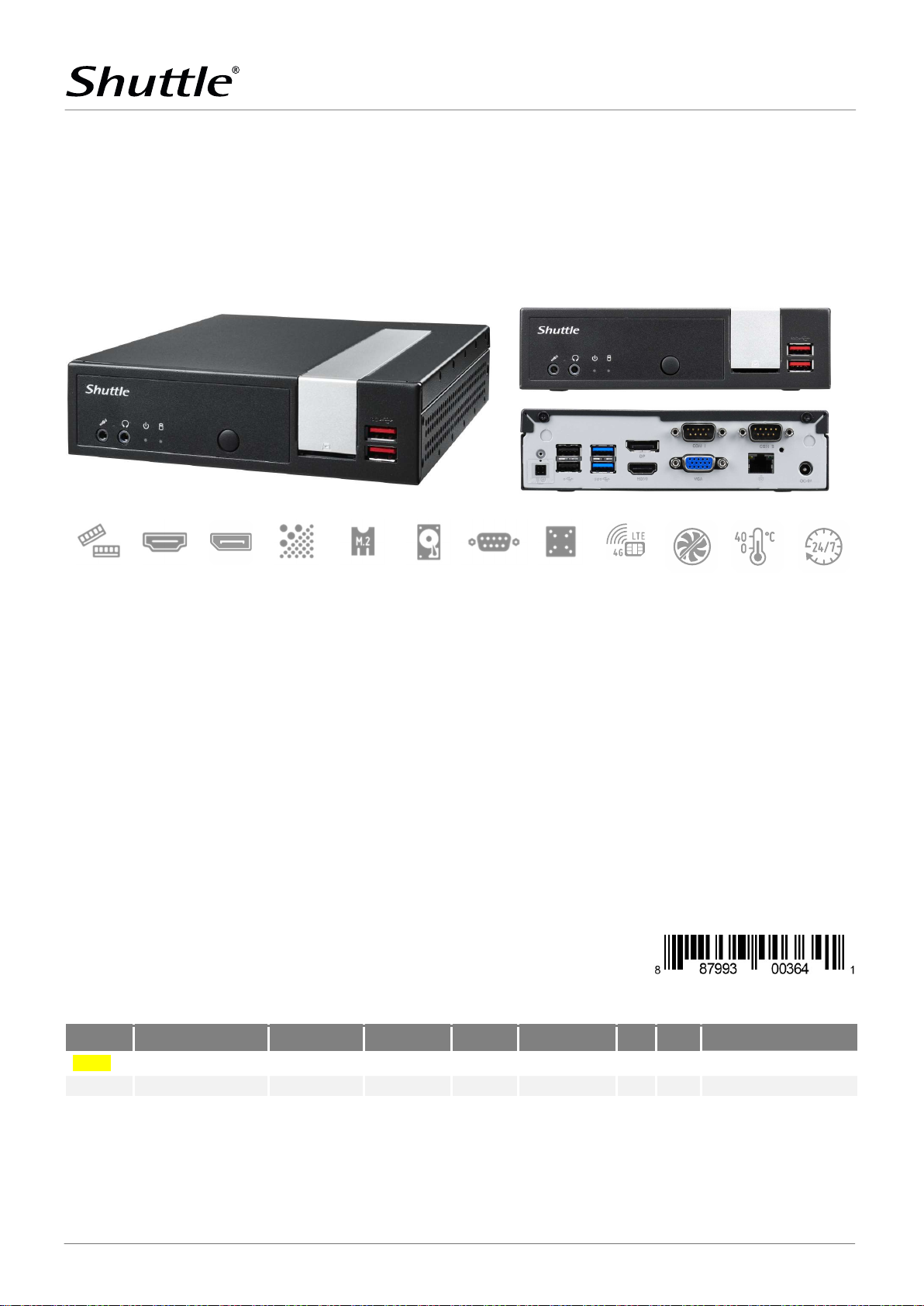
The Shuttle XPC slim Barebone DL20N Series is the successor to Shuttle's DL10J. These
fanless Slim PC barebones with an energy-efficient 10 nm Intel "Jasper Lake" processor
are suitable for building particularly slim PC systems with drives and operating system as
well as client/server setups for pure network-based applications. The optional Shuttle accessory WWN03 allows for an LTE module to be installed for mobile internet access. The
hardware acceleration for 4K videos. Combined with an SSD or M.2 drive, these Slim-PCs
works virtually noiseless.
16 GB
SUPPORT
HDMI 2.0b DISPLAY-
PORT 1.4a
4K UHD NVMe SSD
SUPPORT
2.5" HDD/SSD
SUPPORT
SLIM DESIGN
Slim 1.35-litre metal chassis, black ◼ Noiseless, fanless cooling system ◼ Dimensions: 190 x 165 x 43 mm (LWH) ◼ Including VESA mount
(75/100 mm) ◼ Supports 24/7 Nonstop Operation ◼ Operating temperature: 0~40 °C (non-condensing)
OPERATING SYSTEM
◼ An operating system is not included
◼ Supports Windows 10, Windows 11 and Linux (64-bit)
PROCESSOR
◼ Intel Celeron N4505, Dual Core, 2,0-2,9 GHz, 4 MB Cache
◼ Soldered 10nm SoC processor "Jasper Lake" with 10 W TDP
GRAPHICS
◼ Integrated Intel Gen. 11 UHD graphics with 4K support
◼ Supports three independent displays
MEMORY SUPPORT
2x 260-pin SO-DIMM slot ◼ Supports up to 16 GB DDR4-2933
DUAL COM VESA MOUNT LTE
PC
STORAGE – SATA / M.2
◼ 1x 2.5" bay for SATA hard disk or SSD
◼ 1x M.2-2280M slot (supports PCIe x2 NVMe or SATA)
◼ 1x M.2-2230E slot (supports optional WLAN cards)
CONNECTORS
◼ HDMI 2.0b ◼ DisplayPort 1.4a ◼ D-Sub/VGA ◼ SD card reader
◼ 2x USB 3.2 Gen2 (red) ◼ 2x USB 3.2 Gen1 (blue) ◼ 2x USB 2.0 ◼ 1x in-
ternal USB 2.0 ◼ 1x Intel Gigabit LAN (RJ45, i211) ◼ 2x COM port (1x
RS232/422/485) ◼ 2x audio (line out, mic) ◼ Connector for external
power button ◼ "Always-on" Jumper ◼ DC-input 12 V or 19 V
POWER SUPPLY
◼ External 40W/19V power adapter (DC-in supports 12 V and 19 V)
OPTIONAL ACCESSORIES
◼ Rackmount kit (PRM01) ◼ Cable for external power button (CXP01)
◼ DIN-Rail kit (DIR01) ◼ LTE-kit (WWN03) ◼ Stand (PS02)
◼ WLAN kit with two external antennas (WLN-M/-M1)
OPTIONAL
FANLESS Max.
40 °C
24/7
SUPPORT
MODELS OF THE DL20N SERIES
Product Intel Processor Cores/Threads CPU Clock L3 Cache GPU clock EUs TDP UPC Code
DL20N
DL20N6
Shuttle Computer Handels GmbH · Fritz-Strassmann-Str. 5 · 25337 Elmshorn · Germany
Tel. +49 (0) 4121-47 68 60 · Fax +49 (0) 4121-47 69 00 · [email protected]
Celeron N4505 2 / 2 2.0 ~ 2.9 GHz 4 MB 450 ~ 750 MHz 16 10 W 887993003641
Pentium Silver N6005 4 / 4 2.0 ~ 3.3 GHz 4 MB 450 ~ 900 MHz 32 10 W 887993003665
1 | 8
Page 2
SPECIFICATIONS
WWW.SHUTTLE.E U
1.3 L
.
5
c
m
ta
l
l
1
9
PRODUCT FEATURES
PRODUCT
1
6
Only 4.3 cm
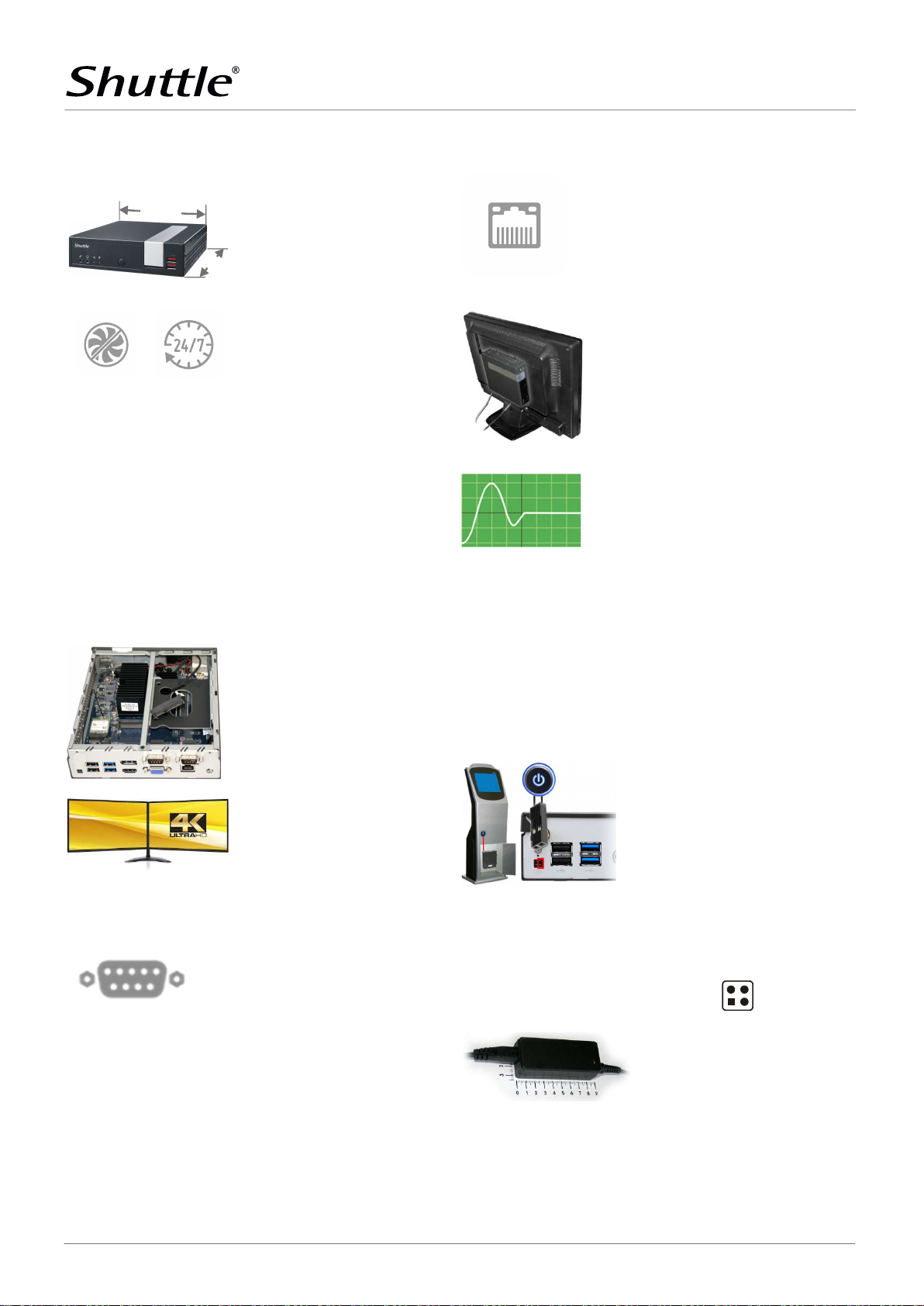
Slim, stylish & robust chassis
The Shuttle XPC slim Barebone
DL20N features a slim 1.3-litre steel
chassis, giving it the appropriate stability required for professional applications. The decorative silver stripe
lets it also easily find a place in both
home and office environments.
Fanless, quiet
and 24/7 approved
The Shuttle XPC slim Barebone
DL20N is officially approved for 24/7
permanent operation. It uses a passive thermal module which makes
the system not only quiet, but also
dust-free and virtually maintenancefree. Thanks to its low power consumption and completely fanless
cooling, this PC runs highly reliably
making it perfectly suitable for digital signage and POI/POS applications.
Conditions for permanent use:
- Free circulation of air amongst the
PC must be guaranteed
- Ventilation holes must be clear
- If a hard disk is installed, this must
also be approved for permanent operation by its manufacturer.
Easy assembly
With pre-installed SATA cable and no
daughterboards the interior of the
Shuttle XPC slim Barebone DL20N is
very tidy and it won't take long to set
it up.
Dual 4K Display support
The DL20N features two digital video
outputs: HDMI 2.0b and DisplayPort
1.4a which both can run at 4K (3840
x 2160 / 2160p) high resolution at
60 Hz frames per second. Further-
more, the DL20N supports an additional D-Sub/VGA port.
Two serial COM ports
The Shuttle XPC slim Barebone
DL20N features two serial RS232
COM ports on the back panel. Both
ports support 5 V / 12 V auxiliary
voltage and the left port is switchable to RS422 or RS485 mode. COM
ports are a common interface for applications in industrial automation,
scientific analysis and POS.
Intel Gigabit LAN Network
The Shuttle XPC slim Barebone
DL20N supports Gigabit LAN with Intel network adapters, which are popular for their excellent performance
and driver compatibility and are the
preferred choice for professional environments.
VESA mount
The supplied 75/100mm VESA mount
allows for installation on to walls or
monitors which is particularly interesting for the industry segment,
company buildings and public institutions. Other than this, the chassis
bears numerous threaded holes (M3)
enabling it to be fitted almost anywhere.
Power-on after Power-fail
The BIOS setup provides a "Power-On
after Power-Fail" function that can
be found under "Power Management
Configuration". As the name indicates, this function determines the
PC's behaviour after power failure: (1)
unconditional power-on, (2) restore
former status (3) keep system
turned off (4) Power-On by LAN or (5)
Power-On by Real-Time-Clock. As a
matter of the nature of this function,
it may fail after short power failures.
This is why the Shuttle XPC slim
Barebone DL20N also comes with a
hardware-based solution. By removing Jumper JP1 the system will start
unconditionally once power is applied.
External power button by separate remote line
If, because of space constraints (e.g.
in case of fixed installation), the machine cannot be switched on by
pressing the front power button, it
can be powered on by a separate remote line. You will find an appropriate four-pin connector at the back
panel of the DL20N (pitch 2.54 mm).
Furthermore, this connector provides a Clear CMOS function and +5V
DC voltage supply for external devices.
+5V voltage (2)
Clear CMOS (1)
(4) Power Button
(3) Ground
Compact 19V power adapter
The external fanless 40 W power
adapter can easily be hidden behind
the desk thanks to its dimunitive
size. The power adapter has 19V
(max. 2.1A), but the DL20N can also
be operated with a 12V (max. 3.33A)
power source.
Shuttle Computer Handels GmbH · Fritz-Strassmann-Str. 5 · 25337 Elmshorn · Germany
Tel. +49 (0) 4121-47 68 60 · Fax +49 (0) 4121-47 69 00 · [email protected]
2 | 8
Page 3
SPECIFICATIONS
WWW.SHUTTLE.E U
Front and Back Panel
PRODUCT
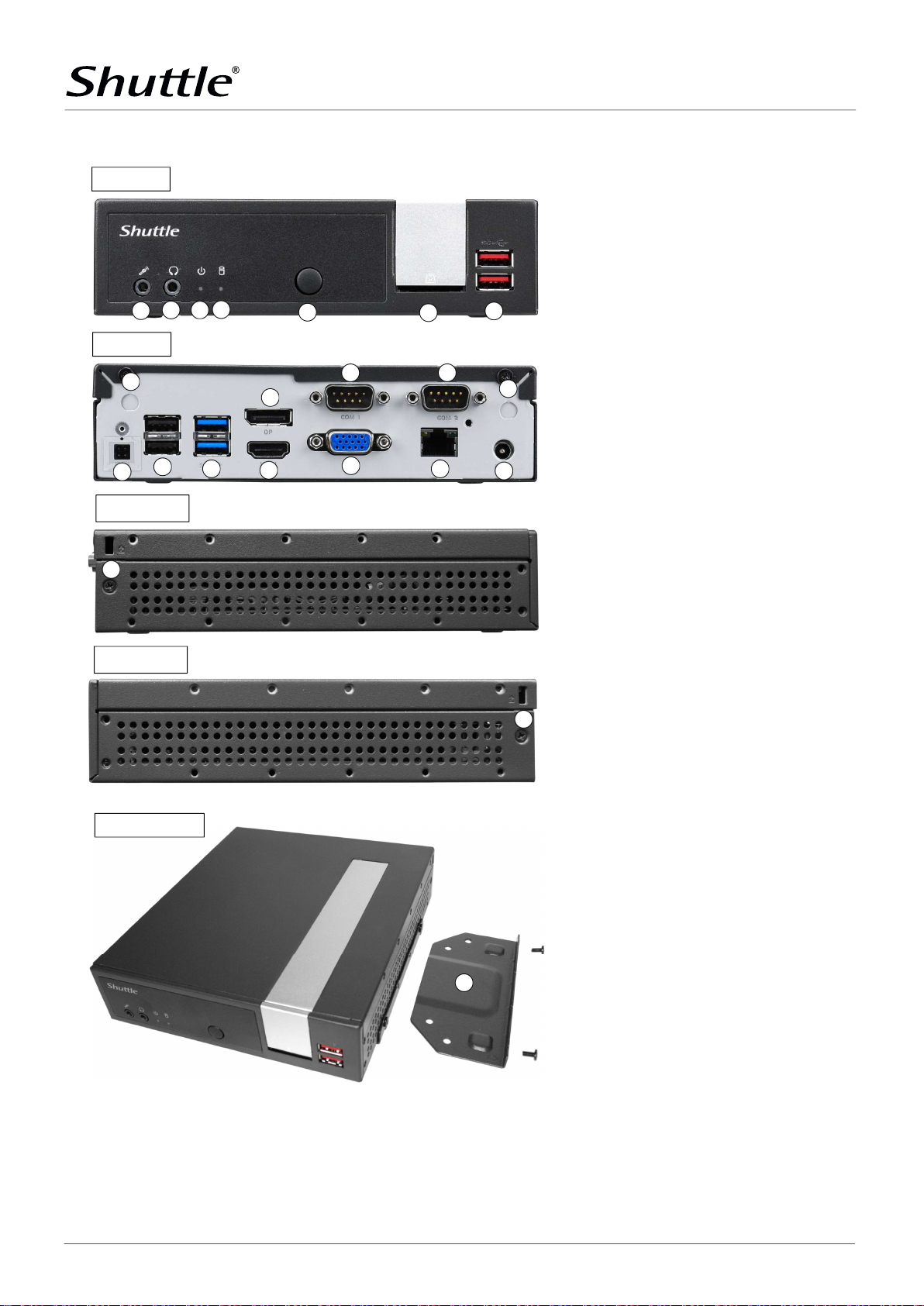
Front panel
Back panel
Left Side
. Microphone input
. Headphones output
. LED indicator for power state
. LED indicator for storage activity
. Power button
. SD card reader
. x USB . Gen port (red)
. x perforation for optional WLAN antennas
. COM port supports RS/RS/RS
. COM port supports RS
. -pin connector (. mm pitch)
for external power button, Clear CMOS button
and V DC voltage
. x USB . port (black)
. x USB . Gen port (blue)
. DisplayPort .a audio/video output
. HDMI .b port audio/video output
. D-Sub / VGA video output
. RJ Gigabit LAN port
. DC-in connector for power adapter
Right Side
VESA mounting
. Hole for the Kensington Lock
. VESA mount (two parts with screws)
Shuttle Computer Handels GmbH · Fritz-Strassmann-Str. 5 · 25337 Elmshorn · Germany
Tel. +49 (0) 4121-47 68 60 · Fax +49 (0) 4121-47 69 00 · [email protected]
3 | 8
Page 4
SPECIFICATIONS
WWW.SHUTTLE.E U
REQUIRED COMPONENTS
OPTIONAL ACCESSORIES FROM SHUTTLE
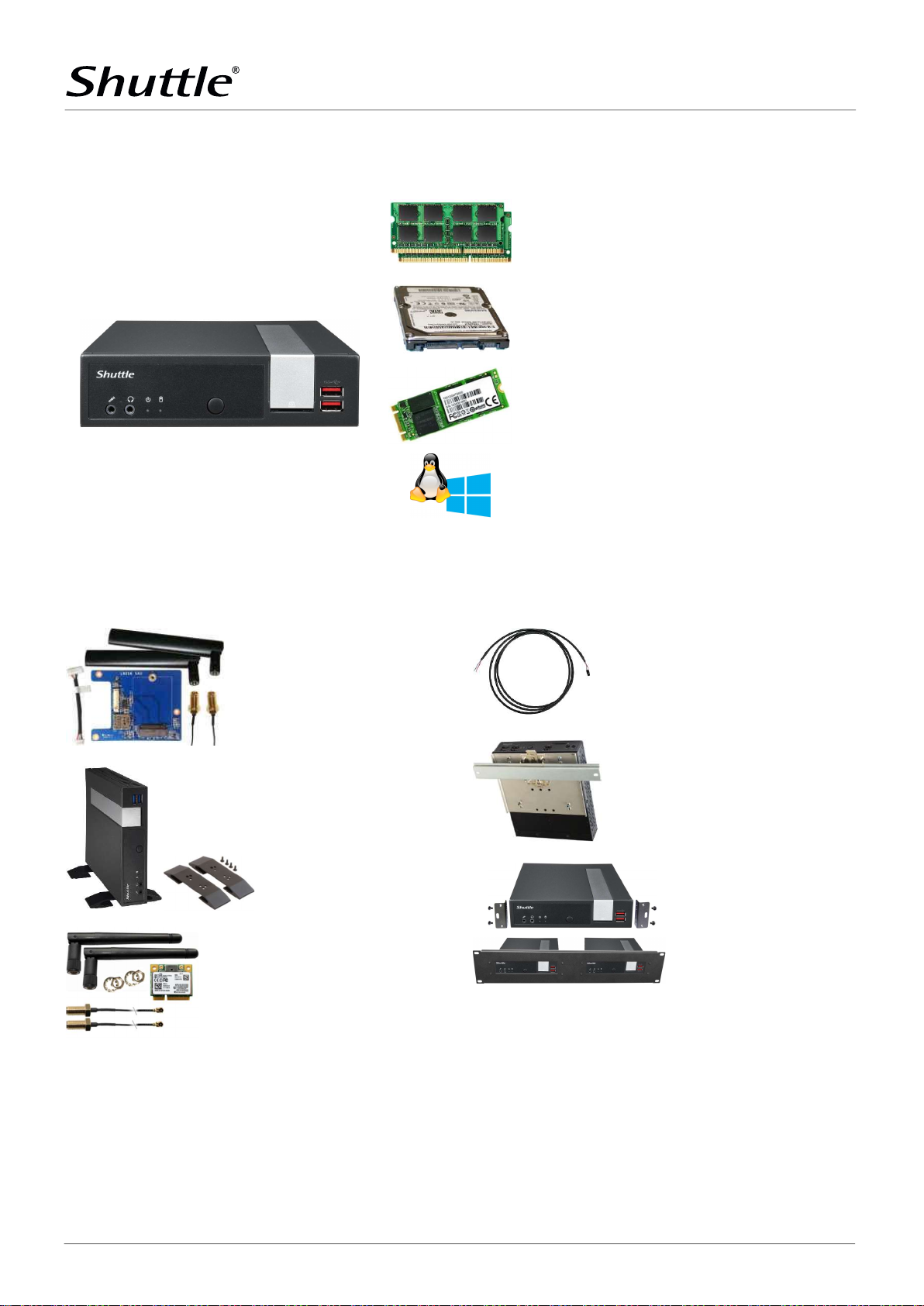
The following components need to be added to make it a fully-configured Mini PC
PRODUCT
Memory Modules
Up to two DDR4-2933
SO-DIMM memory modules ( 2x 8 GB or 1x 16 GB)
Total capacity: max. 16 GB
Shuttle XPC slim Barebone DL20N
LTE Adapter Kit WWN03
allows the installation of an
M.2 LTE card and nano SIM
card
(occupies the 2.5” bay)
2.5" Storage Drive
SATA hard disk or Solid State Disk (SSD)
(max. height: 12.5 mm)
M.2 SSD (optional)
M.2-2280/2260/2242
SSD storage (SATA or PCIe/NVMe)
Operating System
Windows 10, Windows 11 or Linux (64-bit only)
Cable CXP01
Cable for external push button
switch (without button)
Vertical Stand PS02
for vertical operation
WLAN-Accessory WLN-M
M.2-2230 card supports
IEEE 802.11 b/g/n/ac
including 2 antennas
DIN-Rail Kit DIR01
This mounting kit allows the installation on a standard 35
mm DIN-Rail
Rack Mount Kit PRM01
2U front plate to install two
1.3L Shuttle XPCs in a 19" cabinet.
Shuttle Computer Handels GmbH · Fritz-Strassmann-Str. 5 · 25337 Elmshorn · Germany
Tel. +49 (0) 4121-47 68 60 · Fax +49 (0) 4121-47 69 00 · [email protected]
4 | 8
Page 5
SPECIFICATIONS
WWW.SHUTTLE.E U
DL20N
-
Serie
DL10J
Intel "Jasper Lake", TDP= 10W, 10 nm
Intel
"Gemini Lake", TDP=10W, 14 nm
2x SO DIMM (260
-
pins)
2x SO DIMM (260
-
pins)
Supports 2.5” SATA drive
Supports 2.5” SATA drive
M.2-2280 supports PCIe X2 and
SATA M.2-2280 supports PCIe X2 and
SATA
Intel i211
Intel i211
Realtek RTL8188EE
On/Off button
On/Off button
HDMI 2.0b
HDMI 1.4b
40 W
(19V, 2.1 A)
40 W (19V, 2.1 A)
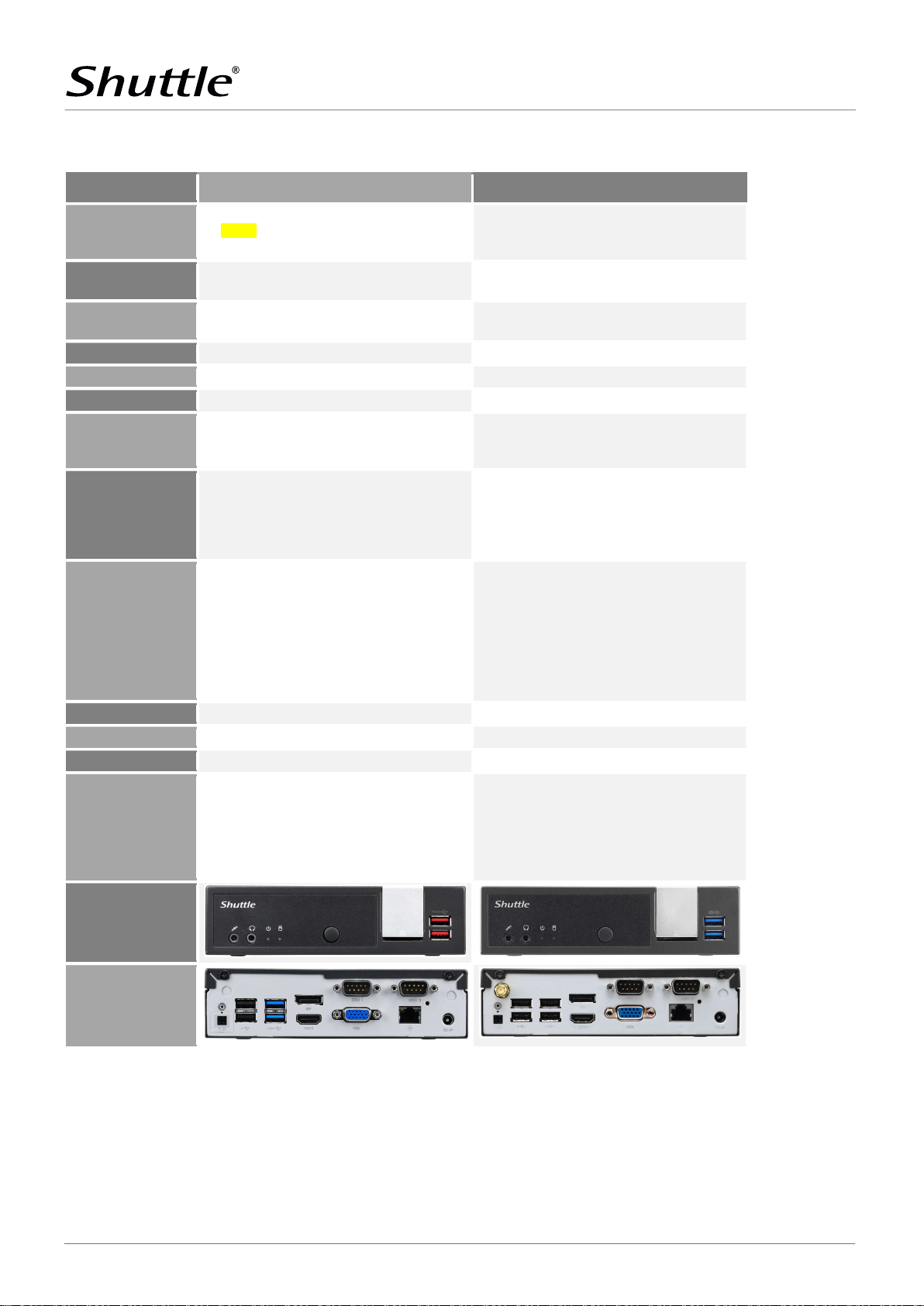
Shuttle Product Comparison: DL20N-Serie versus DL10J
MODEL
PRODUCT
Processor
RAM Suppport
2.5 bay
M.2-2280 slot
Audio
GIGABIT LAN
WLAN
Front Panel
Back Panel
DC-in port
Power Adapter
VESA Mount
Optional Accessories
DL20N: Celeron N4505, 2-core, 2.0/2.9 GHz
DL20N6: Pentium N6005, 4-core, 2.0/3.3 GHz
max. 16 GB DDR4-2933
max. height: 12.5 mm
Realtek ALC897 / ALC662 / ALC888S Realtek ALC269
M.2-2230E Slot supports an optional WLAN card
(Accessory WLN-M / WLN-M1)
Power LED, HDD LED
2x USB 3.2 Gen 2 (red)
SD card reader
2x Audio
DisplayPort 1.4a
D-Sub/VGA (no hot plug)
2x USB 3.2 Gen 1 (blue)
2x USB 2.0
RJ45 Gigabit LAN
2x COM (1x RS422/485)
4-pin power-on connector
Supports 12 V and 19 V Supports 12 V and 19 V
included included
PS02: vertical stand
CXP01: cable for ext. power button
PRM01: 2U rack-mount kit
DIR01: DIN-Rail mounting kit
WLN-M/-M1: WLAN kit with external antennas
WWN03: LTE kit for 2.5” drive bay
Intel Celeron J4005, 2-core, 2.0/2.7 GHz
max. 8 GB DDR4-2400
max. height: 12.5 mm
1x External Antenna
Supports 802.11-n (1T1R)
Power LED, HDD LED
2x USB 3.2 Gen 1 (blue)
SD card reader
DisplayPort 1.2
D-Sub/VGA (no hot plug)
4x USB 2.0
RJ45 Gigabit LAN
2x COM (1x RS422/485)
4-pin power-on connector
1x external WLAN antenna
PS02: vertical stand
CXP01: cable for ext. power button
PRM01: 2U rack-mount kit
DIR01: DIN-Rail mounting kit
WWN01: LTE kit for M.2-2230 slot
2x Audio
Front View
Back View
Shuttle Computer Handels GmbH · Fritz-Strassmann-Str. 5 · 25337 Elmshorn · Germany
Tel. +49 (0) 4121-47 68 60 · Fax +49 (0) 4121-47 69 00 · [email protected]
5 | 8
Page 6
SPECIFICATIONS
WWW.SHUTTLE.E U
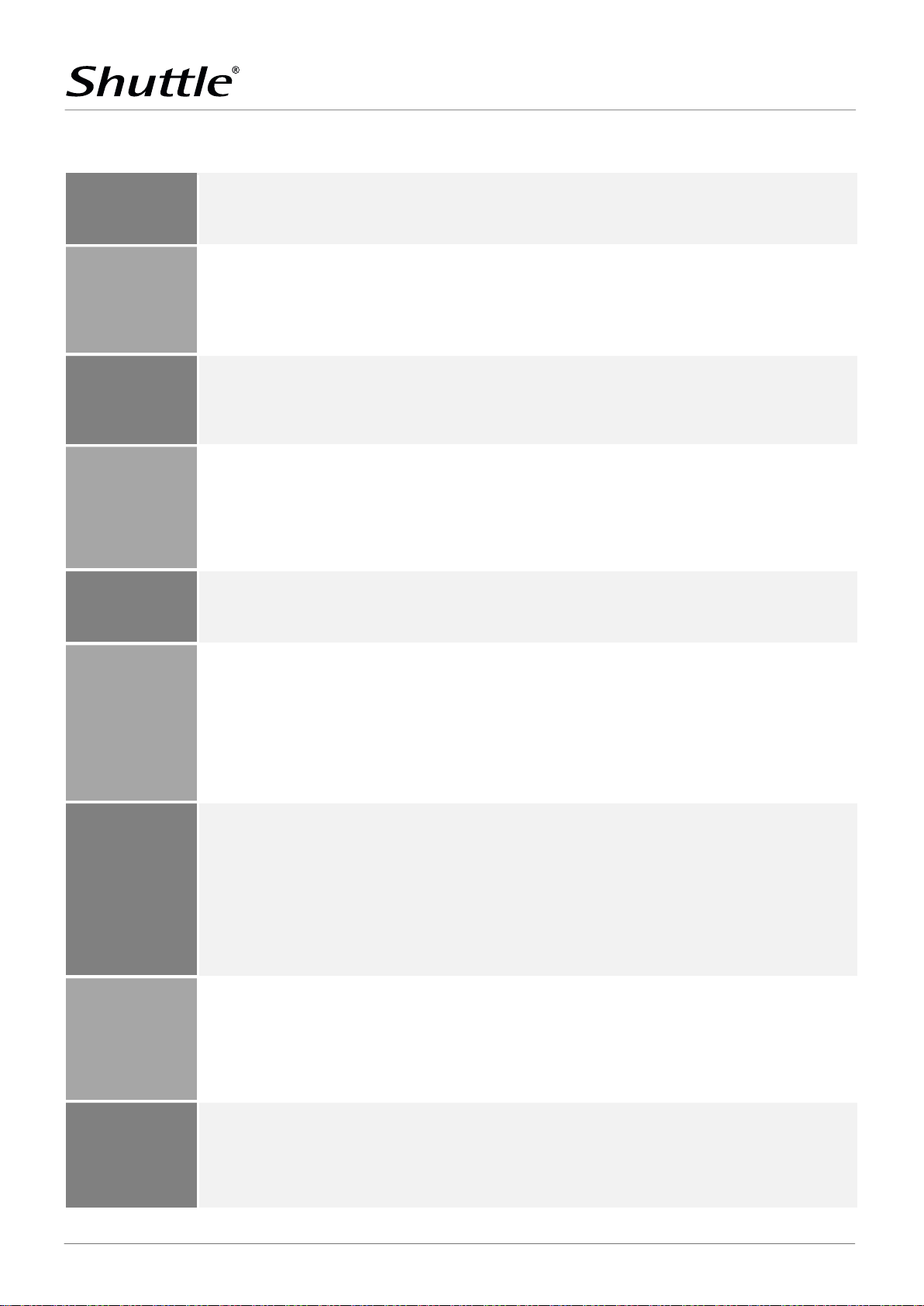
Completely fanless, virtual
l
y noiseless
This device is
approved for 24/7 permanent operation.
Slim PC
with black chassis made of steel
Operation Position
This system comes without operating system.
It is compatible with
Intel® Celeron® Processor N4505, Dual Core
The Graphics Processing Unit (GPU) is integrated in the processor
16 MB Flash ROM with AMI's Aptio UEFI BIOS Firmware
2x SO-DIMM slots with 260 pins
SHUTTLE XPC SLIM BAREBONE DL20N — SPECIFICATIONS
PRODUCT
FANLESS & SILENT
24/7 NONSTOP
OPERATION
CHASSIS
OPERATION POSITION
OPERATION SYSTEM
Passive cooling through convective heat transfer
Perfect to be used in noise-sensitive environments
Fanless means less dust and thus virtually no maintenance required
Requirements:
- Free air circulation around the PC must be guaranteed.
- Ventilation holes must be kept clear.
- Any installed disk must also be approved for permanent
operation by its manufacturer
Dimensions: 190 x 165 x 43 mm (LWH) = 1.35-litre
Weight: 0.8 kg net and 1.95 kg gross
Two holes for Kensington Lock and numerous
threaded holes (M3) at both sides of the chassis
1) Horizontal
2) Vertical with mounted feet.
These feet can be purchased as optional accessory PS02.
3) Vertical (e.g. VESA-mounted behind an appropriate monitor)
In vertical position, the front USB ports should point upward.
Ventilation holes must not be blocked to ensure sufficient cooling.
- Windows 10 (64-bit)
- Windows 11 (64-bit)
- Linux (64-bit)
PROCESSOR
INTEGRATED GRAPHICS
UEFI FIRMWARE
CPU clock frequency: 2.0 GHz, max. Turbo frequency: 2.9 GHz
Code name: "Jasper Lake"
10 nm structure, FCBGA1338 package (soldered)
CPU cores / Threads: 2 / 2
L2 Cache: 4 MB
Thermal Design Power (TDP): 10 W
Supports x86-64, AES-NI, VT-x (EPT), VT-d, SSE4.2, AES
System-on-Chip processor (SoC) with integrated graphics processor, no chipset required
Intel® UHD Graphics (11th Gen), GPU frequency: 450~750 MHz
Supports DirectX 12, OpenGL 4.5, OpenCL 1.2, Intel Quick Sync Video, Intel Clear Video (HD)
Execution Units (EU): 16
Triple Display Support via three video outputs:
- HDMI 2.0b: max. 4096 x 2160 @ 60 Hz
- DisplayPort 1.4a: max. 4096 x 2160 @ 60 Hz
- D-Sub/VGA: max. 1920 x 1200 resolution @ 60 Hz
Supports two digital displays and one analog display simultaneously.
The D-Sub/VGA connector does not support the Hot Plug feature.
Based on the Unified Extensible Firmware Interface (UEFI)
Supports Power-fail-resume / AC power-on state / always-on / always-off [3]
Supports Wake-on-LAN (WOL) from S3, S4, S5 ACPI states
Supports boot up from external flash memory cards
With embedded Firmware TPM v2.0 (fTPM) [5]
CMOS battery (type CR2032)
Supports DDR4-2933 (PC4-23466U) SDRAM at 1.2V
MEMORY SUPPORT
Shuttle Computer Handels GmbH · Fritz-Strassmann-Str. 5 · 25337 Elmshorn · Germany
Tel. +49 (0) 4121-47 68 60 · Fax +49 (0) 4121-47 69 00 · [email protected]
Supports Dual Channel mode
Supports max. 16 GB per DIMM
Maximum total size: 16 GB (either 1x 16 GB or 2x 8 GB)
Supports two unbuffered DIMM modules (no ECC)
6 | 8
Page 7
SPECIFICATIONS
WWW.SHUTTLE.E U
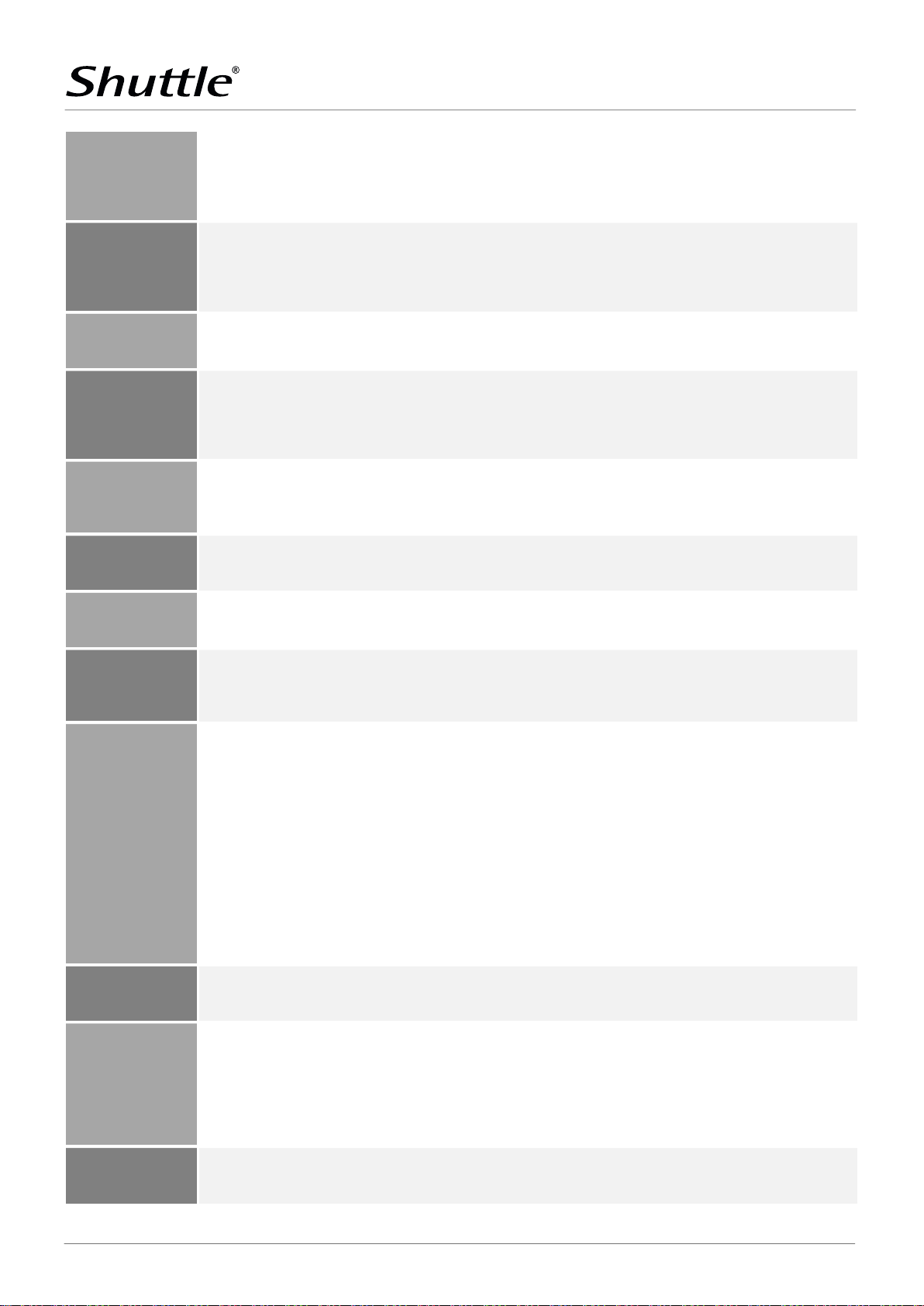
Supports one drive in 6.35 cm / 2.5" format (hard disk or SSD)
M.2-2280M expansion slot
Interfaces: PCI
-
Express Gen. 2.0 X1 und USB 2.0
Realtek
ALC897 / ALC662 / ALC888S
Audio Codec
Integrated card
reader
RJ45 connector supports Gigabit LAN at 10/100/1000 Mbit/s.
Power button
2x USB 3.2 Gen 2 Type A (red)
HDMI 2.0b
digital video and audio output
Connectors COM1/COM2 for serial ports (occupied)
External 40 W AC/DC power adapter (fanless)
DC Connector: 5.5 / 2.5 mm (outer/inner diameter)
2.5” DRIVE BAY
PRODUCT
Serial ATA III Interface with up to 600 MB/s transfer speed
Max. height 12.5 mm
Pre-installed SATA cable (data/power)
Supports Unified Extensible Firmware Interface (UEFI)
M.2-2280M
SSD SLOT
M.2-2230E SLOT FOR
OPTIONAL WLAN CARD
AUDIO
CARD READER
WIRED NETWORK
LEDS & BUTTONS
FRONT PANEL
CONNECTORS
Interfaces: PCI-Express Gen. 3.0 X2 and SATA v3.0 (max. 6 Gbit/s)
Supports M.2 cards with a width of 22 mm
and a length of 42, 60 or 80 mm (type 2242, 2260, 2280)
Supports SATA SSDs (BM-Key) or NVMe PCIe SSDs (M-Key)
Supports M.2 cards with a width of 22 mm and a length of 30 mm (type 2230)
Supports WLAN expansion cards (optional Shuttle accessory: WLN-M / -M1)
Two analog audio connectors (3.5 mm):
1) Line out (head-phones)
2) Microphone input
Digital multi-channel audio output: via HDMI and DisplayPort
supports standard SD, SDHC and SDXC memory flash cards
Supports boot from SD card
Controller: Realtek RTS5227S Media Processor
Intel i211 Ethernet Controller with MAC, PHY and PCIe interface
Supports Wake-on-LAN
Power LED (blue)
HDD LED (yellow)
SD card reader
Audio line-out (headphones)
Microphone input
BACK PANEL
CONNECTORS
OTHER ONBOARD
CONNECTORS
POWER SUPPLY
DC INPUT CONNECTOR
DisplayPort 1.4a digital video and audio output
D-Sub/ VGA analog video output (15-pin) - no hot plug
2x USB 3.2 Gen 1 Type A (blue)
2x USB 2.0 Type A
Gigabit network (LAN, RJ45)
2x RS232 serial port, 9-pin D-Sub (support of an auxiliary voltage of 5/12 V,
the left port is switchable to RS422 / RS485) [4]
DC input for the external power adapter
4-pin connector (2.54 mm pitch) supports
- external power-on button
- Clear CMOS function
- +5V DC voltage for external components
2x perforation for optional Wireless LAN antennas
Jumper JP2 for power-on-after-power-fail (hardware solution) [3]
USB 2.0 header (4-pin) required for WWN03 accessory
AC Input: 100 ~ 240 V AC, 50 ~ 60 Hz
DC Output: 19 V / 2.1 A
Automatic AC voltage adjust
Dimensions: ca. 95 x 42 x 29 mm (LWH)
DC cable length: ca. 170 cm
AC cable length: ca. 170 cm (with 2-pin Europlug)
The DC-input of the computer supports an external power source
with either 12 V ±5% (max. 2.1 A) or 19 V ±5% (max. 3.33 A).
Shuttle Computer Handels GmbH · Fritz-Strassmann-Str. 5 · 25337 Elmshorn · Germany
Tel. +49 (0) 4121-47 68 60 · Fax +49 (0) 4121-47 69 00 · [email protected]
7 | 8
Page 8
SPECIFICATIONS
WWW.SHUTTLE.E U
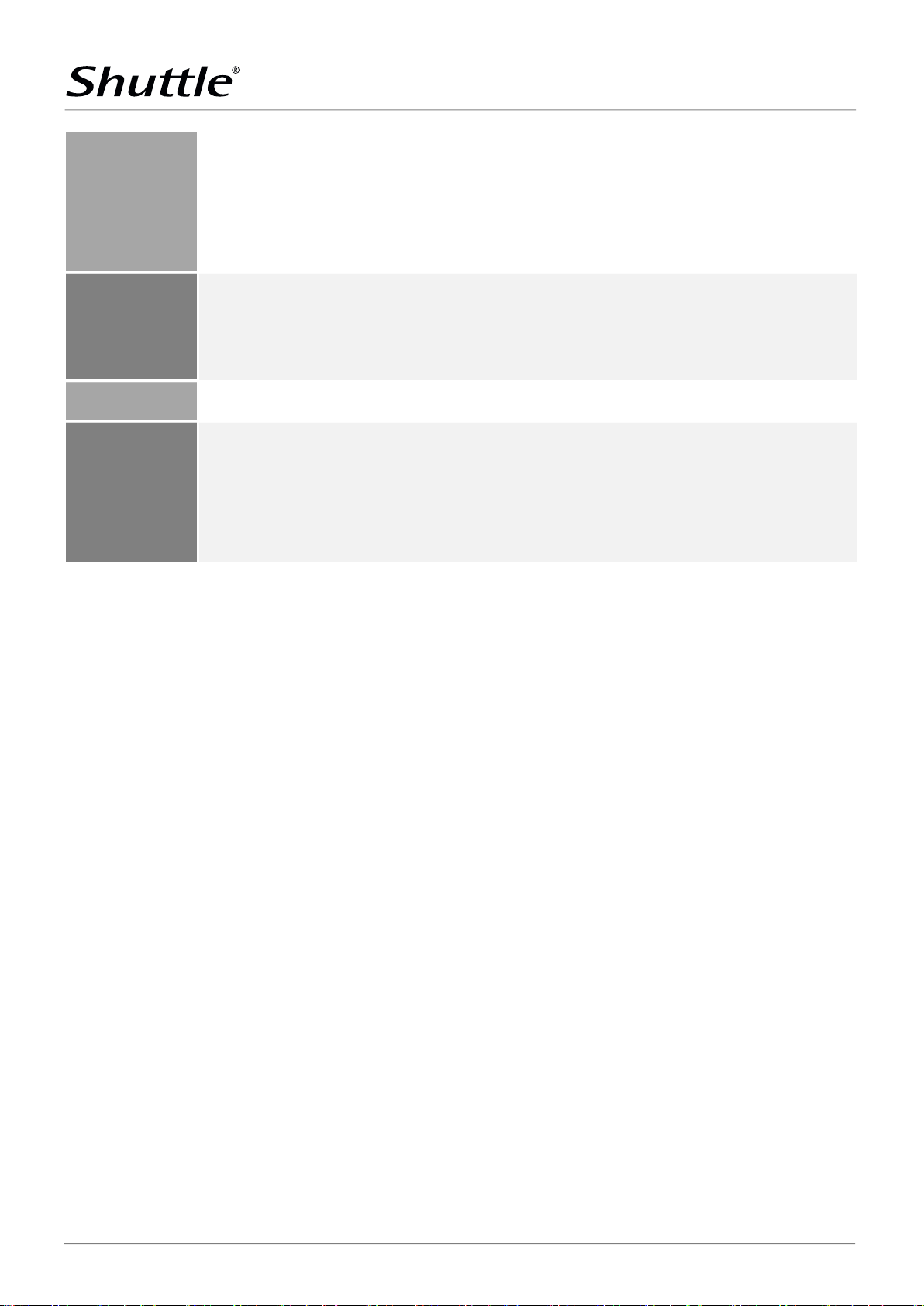
Multi-language user guide (EN, DE, FR, ES,
JP, KR, SC, TC)
EMI: FCC, CE, BSMI, RCM, VCCI
[1] Optional LTE support
SUPPLIED
ACCESSORIES
OPTIONAL
ACCESSORIES
ENVIRONMENTAL
SPECIFICATIONS
PRODUCT
VESA mount for 75 / 100 mm standard (two metal brackets)
Four screws M3 x 5 mm (screws together VESA mount and PC)
Four screws M4 x 10 mm (to affix VESA mount on the PC)
Four screws M3 x 4 mm (to mount a 2.5" storage into the bay)
Two screws M3 x 5 mm (to mount some M.2 cards)
Driver DVD (Windows 64-bit)
External 40 W power adapter with power cord (Europlug)
PS02: optional stand for vertical operation
CXP01: adapter cable for external power button
PRM01: 2U rack-mount front plate for two Shuttle XPC slim PCs
DIR01: DIN-Rail mounting kit
WLN-M/-M1: WLAN module in M.2-2230 format with two external antennas supports WLAN and Bluetooth
WWN03: LTE kit with adapter card, 2 antennas and antenna cables. Supports one M.2 LTE module and one nano SIM card [1]
Operating temperature range: 0 ~ 40 °C
Relative humidity range: 10 ~ 90 % (non-condensing)
Safety: CB, BSMI, ETL
Other: RoHS, Energy Star, ErP
CERTIFICATIONS /
COMPLIANCE
This device is classed as a technical information equipment (ITE) in class B and is intended for use in living room and office.
The CE-mark approves the conformity by the EU directives:
(1) 2004/108/EC relating to electromagnetic compatibility (EMC),
(2) 2006/95/EC relating to Electrical Equipment designed for use within certain voltage limits (LVD),
(3) 2009/125/EC relating to ecodesign requirements for energy-related products (ErP)
Shuttle provides the optional "Shuttle Accessory WWN03" which consists of an adapter card, two antennas plus 20 cm antenna cables. The WWN03
adapter card occupies the 2.5" drive bay, so that no more 2.5" SATA device can be installed. The 3G/LTE card must have M.2-3042 Key B format with
MHF IV (I-PEX4) connectors for the antenna. In addition, it supports one Nano-SIM card (Mini and Micro format is not supported). The required 3G/LTE
card and SIM card are not included in WWN03.
[2] How to convert DisplayPort into HDMI/DVI
The DisplayPort output can be converted to HDMI or DVI by an additional, passive adapter cable. For example:
DELOCK 82590: 1 m, DisplayPort (male, 20p) to HDMI-A (male, 19p)
DELOCK 82435: 5 m, DisplayPort (male, 20p) to DVI-D (male, 24p)
The integrated graphics automatically detects the connected display and puts out the appropriate electric signal - either through DisplayPort (without
an adapter) or HDMI/DVI (with an adapter).
However, a monitor with a DisplayPort connector cannot be connected to the HDMI port with a simple, passive adapter.
[3] Power-on-after-power-fail
The BIOS setup provides a "Power-on-after-power-fail" function that can be found under "Power Management Configuration". As the name indicates, this
function determines the PC's behaviour after power failure: (1) unconditional power-on, (2) restore former status or (3) keep system turned off. As a
matter of the nature of this function, it may fail after short power failures. This is why the Shuttle XPC slim Barebone DL10J also comes with a hardwarebased solution. By removing Jumper JP1 (on the mainboard behind the D-Sub/VGA port) the system will start unconditionally once power is supplied.
[4] Serial Ports
This PC features two serial RS232 ports with 9-pin D-Sub connectors on the back panel. The left COM port (COM1) can also be configured as RS422 and
RS485 in the BIOS setup.
Pin 9 of the D-Sub COM-Port is a multi-functional signal. Based on the Jumper JP2 configuration on the mainboard, it can be configured as Ring Indicator
(RI) or external power supply with a voltage level of either 5 V or 12 V. Each COM port can be configured separately. The maximum current is 500 mA per
connector.
[5] TPM Function
This product features Firmware-TPM (fTPM) v2.0. Besides this, it is prepared for a hardware TPM chip which can be fitted by factory on request if required.
© 2021 Shuttle® Computer Handels-GmbH — All information subject to change without notice. Optional components and accessories are not included. Pictures for illustration purposes only.
Shuttle Computer Handels GmbH · Fritz-Strassmann-Str. 5 · 25337 Elmshorn · Germany
Tel. +49 (0) 4121-47 68 60 · Fax +49 (0) 4121-47 69 00 · [email protected]
8 | 8
 Loading...