

Page 1
www.showtech.com.au
Battery-powered Wi-Fi / W-DMX hub
www.showtech.com.au
Page 2
INTRODUCTION
K2 is a battery-powered Wi-Fi / W-DMX hub that puts the power of handheld
lighting control within reach.
FEATURES
- Ultra-compact battery-powered Wi-Fi + W-DMX control interface
- Provides cable-free control of APOLLO and other W-DMX-equipped xtures
- Built-in battery allows more than 8 hours continuous operation
- Enables handheld lighting system control via Koala smartphone apps
- Conveniently connect to wired cable runs with XLR tail accessory
- W-DMX G4 Transceiver onboard and native Koala iphone App wi- compatibility
FUNCTIONS & SPECIFICATIONS
Protocol:
Input voltage:
Output voltage (to battery):
Power connections:
Data connections:
Housing:
Finish:
IP rating:
Dimensions:
Weight:
W-DMX
and Wi-Fi
5V DC
3.7V DC
Micro USB
Wireless
Plastic
Matt blacke
IP20
129 x 85 x 25 mm
0.25 KG
Wi-Fi transmission: up to 80 meters
W-DMX transmission: up to 200 meters
Charging time: 5.5 hours
Operating time: up to 8 hours per charge
PACKAGE CONTENTS
- K2 Wi-Fi/W-DMX hub
- USB-to-micro-USB charging cable
- XLR adapter cable (DMX In/Out)
- Carrying case
- Warranty Card
- User Manual
2
7
Page 3
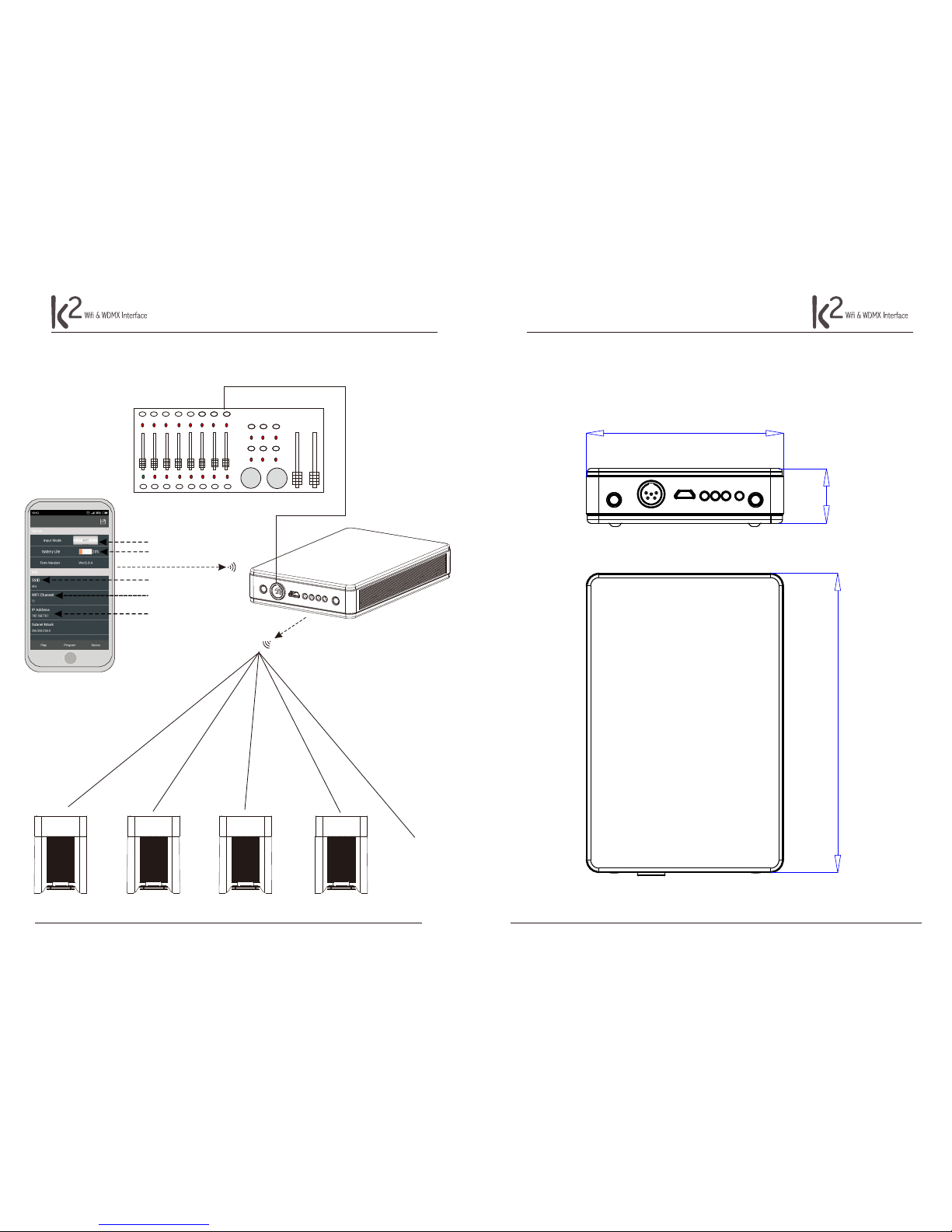
DIMENSIONS
3
85
23.5
129
ILLUSTRATION of WIFI or DMX CONTROL
6
D MX 51 2Controller
WIFI
DMX cable
1
2
3
4
5
1. Input Mode: WIFI or DMX control
2. Battery Life indicator
3. SSID: Edit WIFI network name
4. WIFI Channels: 1-16
5. IP Address selection
... subsequent
xtures
W-DMX
Fixture #1
W-DMX
Fixture #2
W-DMX
Fixture #3
W-DMX
Fixture #4
BASIC WIFI APP PARAMETERS
Page 4
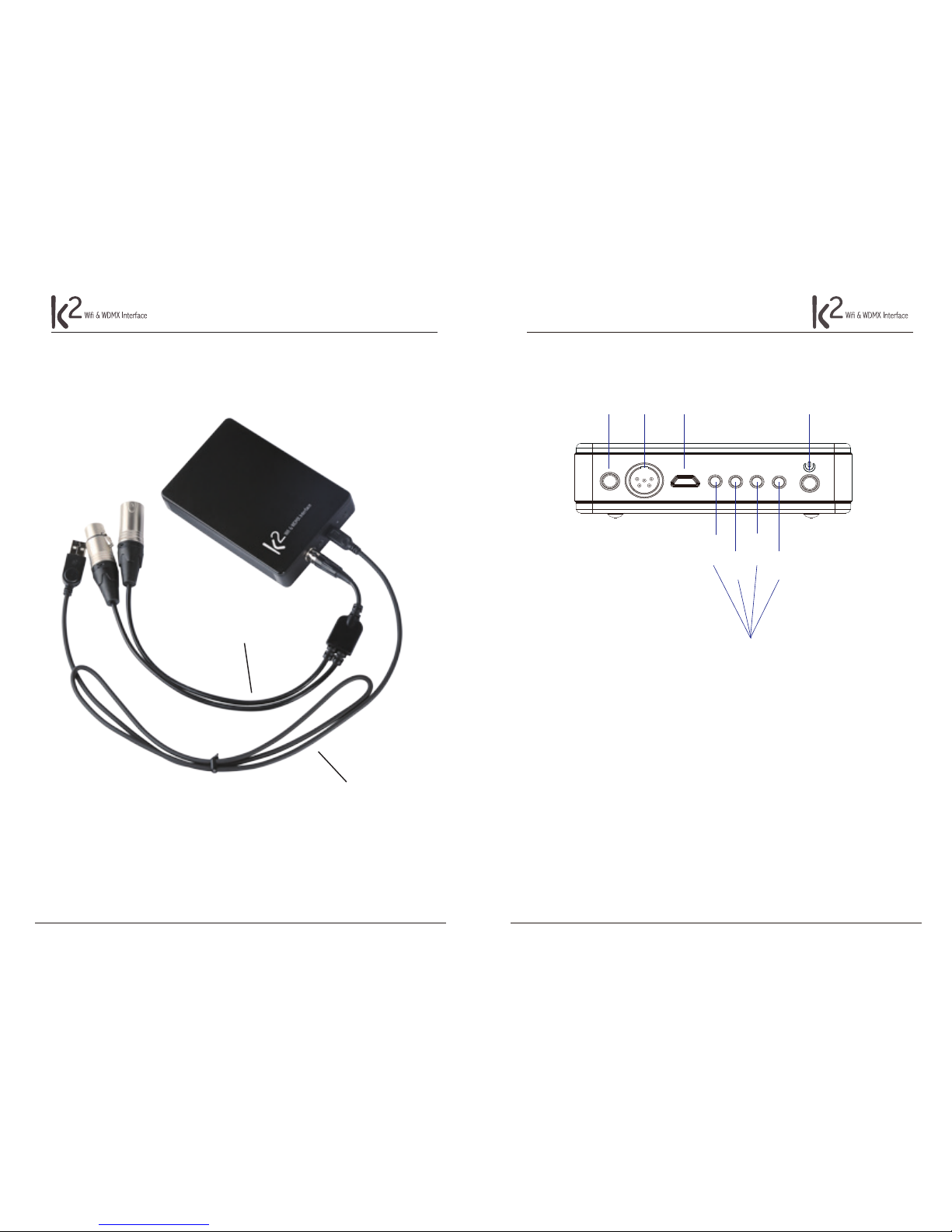
OVERVIEW (cables)
4
XLR adapter cable (DMX IN/OUT)
Charging cable (USB to micro USB)
OVERVIEW
5
Status
Indicators
Wi-
Pairing
DMX
Signal
Wi-Fi
Signal
Battery
Life
Power On/O
Power
Charger
Wireless
Reset DMX
I. BUTTON FUNCTIONS
1. Wireless Reset Button: press to initiate pairing with wireless devices
2. Power On/O: press 3 seconds to turn power on/o
3. Power On/O + Wireless Reset: press simultaneously to switch between wired DMX and WIFI modes
II. STATUS INDICATORS
1. Battery Life color key (green ~ orange ~ red):
Orange: Battery life is between 20%-50%
Red: Battery life is below 20%
Flashing: Charging
2. Wi-Fi signal (blue):
Steady on: receiving wi signal
Flashing: no wi signal detected
3. DMX signal (red):
Steady on: receiving DMX signal
Flashing: no DMX signal detected
4. Wireless pairing (orange):
Press Wireless Reset: indicator ashes 5 seconds during pairing
Green: Battery life is between 50%-100%
 Loading...