

Page 1
Wave i4 DC
EN
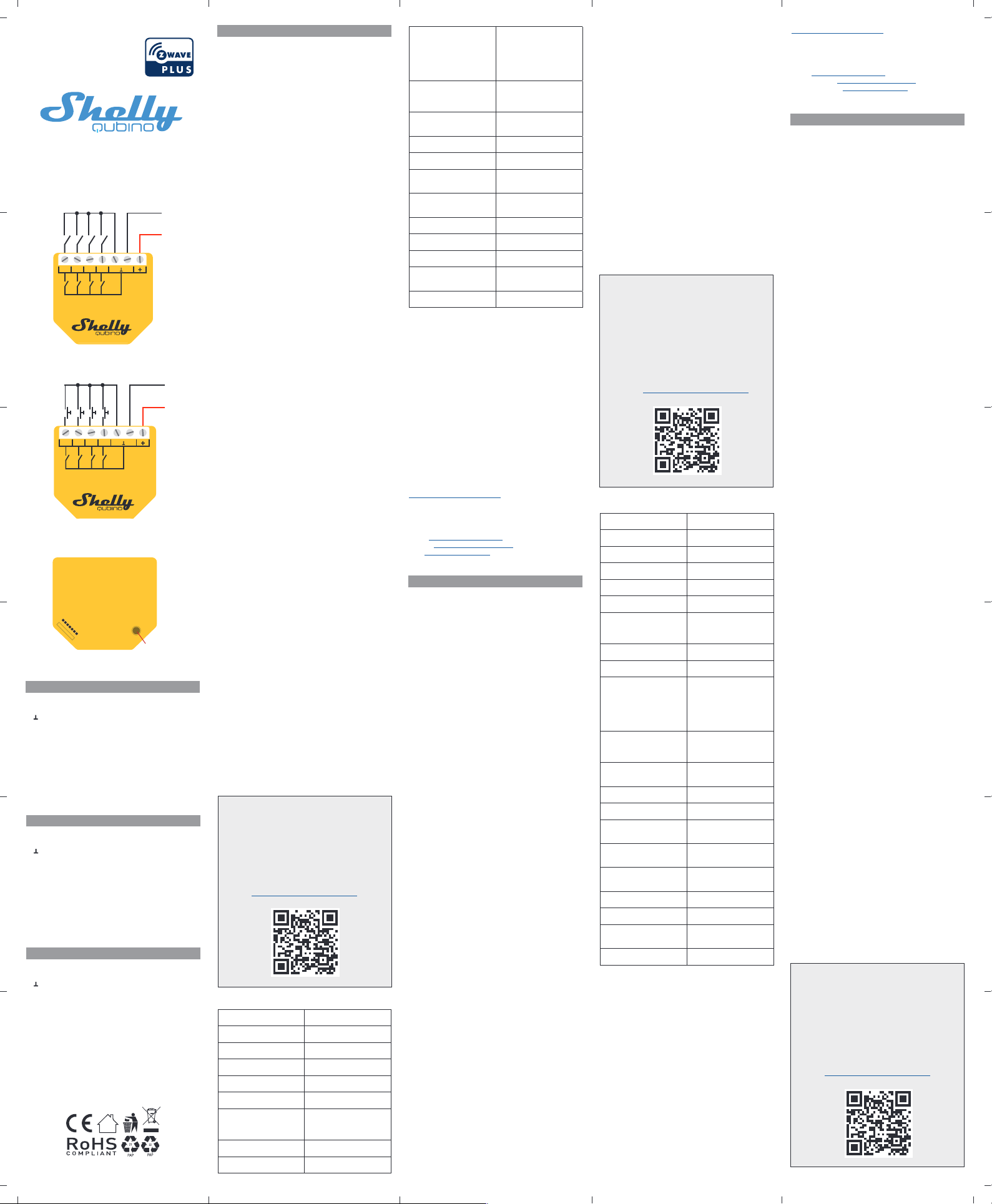
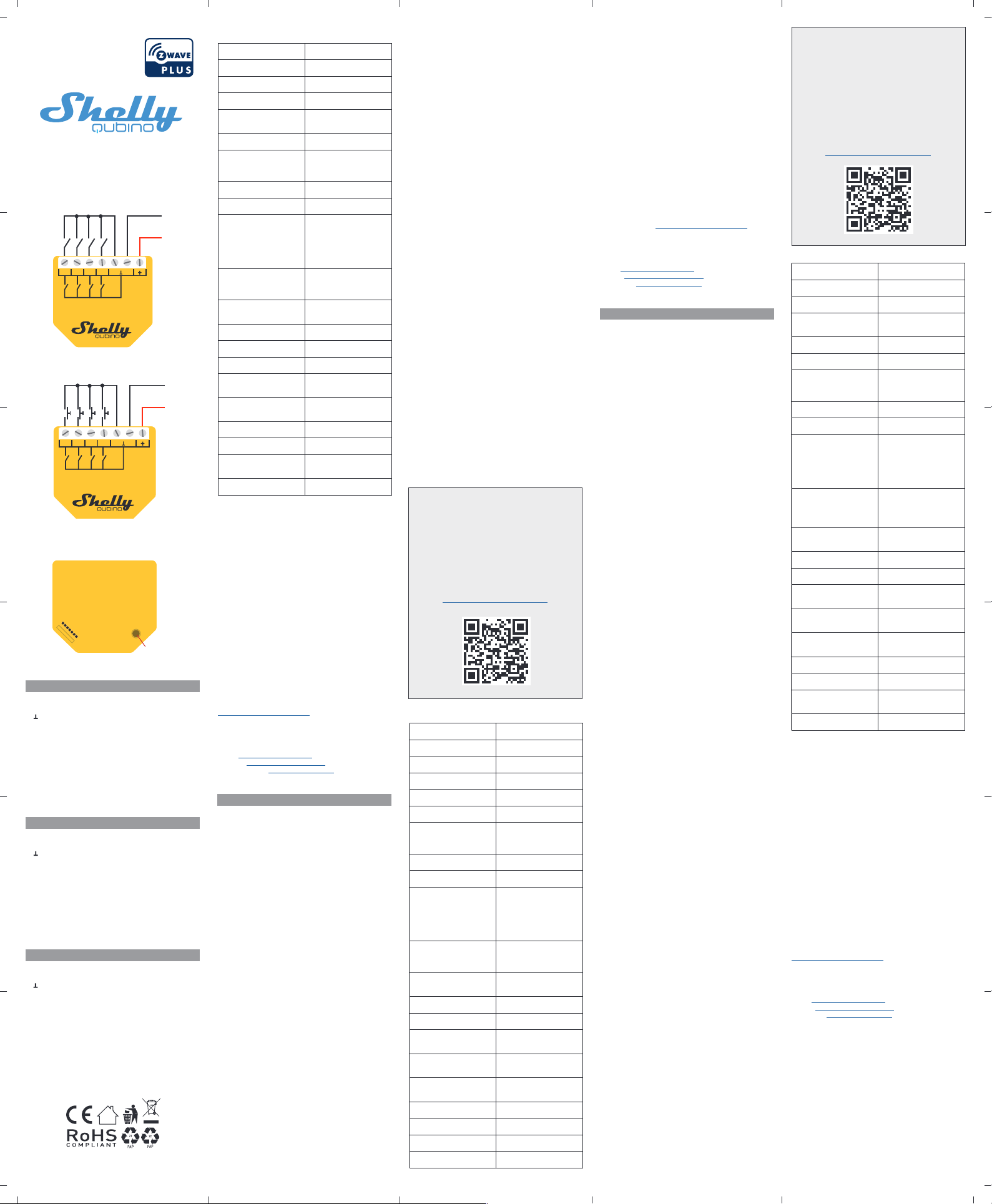
LEGEND
Device terminals:
• : Ground terminal
• +: Positive terminal
• SW1: Switch/push-button input terminal
• SW2: Switch/push-button input terminal
• SW3: Switch/push-button input terminal
• SW4: Switch/push-button input terminal
Wires:
• GND: Ground wire
• +: Positive wire
Button:
• S: S button (Fig. 3)
+
GND
SW4 SW3 SW 2
SW1
DC 5- 24 V
+
GND
SW4 SW 3SW 2
SW1
DC 5 -24 V
S
EN
USER AND SAFETY GUIDE
Z-Wave™ 4 digital inputs controller
READ BEFORE USE
This document contains impor tant technical and safety information about the Device, its safe use and installation.
⚠CAUTION! Before beginning the installation, please read ca-
refully and entirely this guide and an y other documents accompanying the Device. Failure to follow the installation procedures
could lead to malfunction, danger to your health and life, violation of law or refusal of legal and/or commercial guarantee (if
any). Shelly Europe Ltd. is not responsible for any loss or damage in case of incorrect installation or improper operation of this
device due tofailu reof following the user and safety instructions
in this guide.
TERMINOLOGY
Gateway – A Z-Wave™ gateway, also referred to as a Z-Wave™
controller, Z-Wave™main controller, Z-Wave™ primary controller,
or Z-Wave™ hub, etc.,is a device that serves as a central hubfor
a Z-Wave™ smart home network. The term “gate way” is used
in this document.
S button - The Z-Wave™ Service button, which is located on
Z-Wave™ devices and is used for various functions such as inclusion (adding), exclusion (removing), and resettingthedevice
to its factory default settings. The term “S button” is used in
this document.
Device – In this document, the term “Device” is used to refer to
the Shelly Qubino device that is a subject of this guide.
ABOUT SHELLY QUBINO
Shelly Qubino is a line of innovative microprocessor-managed
devices, which allow remote control of electric circuits with
a smartphone, tablet, PC, or home automation system. They
work on Z-Wave™ wireless communication protocol, using a
gateway, which is required or the confguration o devices.
When the gateway is connected to the internet, you can control
Shelly Qubino devices remotely from anywhere. Shelly Qubino
devices can be operated in any Z-Wave™ network with other
Z-Wave™ certifed devices rom other manuacturers. All mains
operated nodes within the network will act as repeaters regardless of vendor to increase reliability of thenetwork. Devicesare
designed to work with older generations of Z-Wave™ devices
and gateways.
ABOUT THE DEVICE
The Device isa 4-digital inputs module (5-24 VDC) that controls
other devices within the Z-Wave network. It enables manual activation or deactivation of scenes with a switch/push-button.
INSTALLATION INSTRUCTIONS
The Device can be retroftted into a standard in-wall console,
behind switches or other places with limited space.
For the installation instructions, refer to the wiring schemes
(Fig. 1-2) in this user guide.
⚠CAUTION! Danger of electrocution. Mounting/installation of
the Device to the power grid has to be performed with caution,
by a qualifed electrician.
⚠WARNING! Danger of electrocution. Every change in the
connections has to be done after ensuring there is no voltage
present at the Device terminals.
⚠CAUTION! Danger of electrocution. Makesurethe voltage at
the wires is not higherthan24 V DC. Use only stabilized voltage
to power supply the Device.
⚠CAUTION! Do not open the Device. It does not contain any
parts that can be maintained by the user. For safety and licens-
ing reasons, unauthorized change and/or modifcation o the
Device is not permitted.
⚠CAUTION! Use the Device only with a power grid and appli-
ances that comply with all applicable regulations. A short circuit in the power grid or any appliance connected to the Device
may damage it.
⚠CAUTION! Do not shorten the antenna.
⚠RECOMMENDATION: Place the antenna as far away as
possible from metal elements as they can cause signal interference.
⚠CAUTION! Connect the Device only in the way shown in
these instructions. Any other method could cause damage
and/or injury.
⚠CAUTION! Do not install the Device where it can get wet.
⚠CAUTION! Do not use the Device if it has been damaged!
⚠CAUTION! Do not attempt to service or repair the Device
yourself!
⚠RECOMMENDATION: Connect the Device using solid sin-
gle-core cables or stranded cables with ferrules.
⚠CAUTION! Befo re starting the mounting/installation of the
Device, check that the breakers are turned off and there is no
voltage on their terminals. This can be done with a mains voltage tester or multimeter. When you are sure that there is no
voltage, you can proceed to connecting the wires.
⚠CAUTION! Use only DC circuit. Do not use mixed AC and DC
circuits.
⚠CAUTION! Do not insert multiple wires in a single terminal.
⚠CAUTION! Do not allow children to play with the push-but-
tons/switches co nnected to the Device. Keep the devices for
remote control of Shelly Qubino (mobile phones, tablets, PCs)
away from children.
SPECIFICATIONS
Power supply AC No
Power supply DC 5-24 V DC
Power consumption < 0.3 W
Overload protection No
Power measurement (W) No
Number of inputs 4
Distance up to 40 m indoors (131
ft.) (depends on local
condition)
Z-Wave™ repeater Yes
CPU Z-Wave™ S800
Z-Wave™ frequency bands 868,4 MHz; 865,2 MHz;
869,0 MHz; 921,4 MHz;
908,4 MHz; 916 MHz; 919,8
MHz; 922,5 MHz; 919,7921,7-923,7 MHz; 868,1
MHz; 920,9 MHz
Maximum radio frequency
power transmitted in frequency band(s)
< 25 mW
Size (H x W x D) 37x42x16 ±0.5 mm /
1.46x1.65x0.63 ±0.02 in
Weight 17 g / 0.6 oz
Mounting Wall console
Screw terminals max.
torque
0.4 Nm / 3.5 lbin
Conductor cross section 0.5 to 1.5 mm² / 20 to 16
AWG
Conductor stripped length 5 to 6 mm / 0.20 to 0.24 in
Shell material Plastic
Color Yellow
Ambient temperature -20°C to 40°C / -5°F to
105°F
Humidity 30 % to70%RH
OPERATIONAL INSTRUCTIONS
I the SW is confgured as aswitch (deault), each toggle of the
switch will trigger the predefned scene.
I the SW isconfgure das a push-button in the Device settings,
each press o the push-button will trigger the predefned scene.
IMPORTANT DISCLAMER
Z-Wave™ wireless communication may not always be 100%
reliable. This Device should not be used in situations in which
life and/or valuables are solely depend ent on its functioning. If
the Device is not recognized by your gateway or ap pears incorrectly, you may need to change the Device type manually and
ensure that your gateway supports Z-WavePlus™ multi-channel
devices.
ORDERING CODE: QNSN-0D24XXX
XX – Values defne product version per region.
DECLARATION OF CONFORMITY
Hereby, Shelly Europe Ltd. (former Allterco Robotics EOOD)
declares that the radio equipment type Wave i4 DC is in compliance with Directive 2014/53/ EU, 2014/35/EU, 2014/30/EU,
2011/65/EU. The full text of theEU declaration of Conformity is
available at the following internet address:
https://shelly.link/Wavei4DC-DoC
MANUFACTURER
Shelly Europe Ltd.
Address: 103 Cherni vrah Blvd., 1407 Sofa, Bulgaria
Tel.: +359 2 988 7435
E-mail: [email protected]
Support: https://support.shelly.cloud/
Web: https://www.shelly.com
Changes in the contact data are published by the Manufacturer
at the ofcial website.
DE
BENUTZER- UND SICHERHEITSHANDBUCH
Z-Wave™ Controller mit 4 digitalen
Eingängen
BITTE VOR GEBRAUCH DURCHLESEN
Dieses Dokument enthält wichtige technische und sicherheitstechnische Informationen über das Gerät und seine sichere
Verwendung und Installation.
⚠ACHTUNG! Bevor Sie mit der Installation beginnen, lesen
Sie bitte die Begleitdokumentation sorgfältig und vollständig
durch. Die Nic ht beachtung der empfohlenen Verfahren kann zu
Fehlfunktionen, Lebensgefahr oder Gesetzesverstößen führen.
Shelly Europe Ltd. haftet nicht für Verluste oder Schäden im
Falle einer falschen Installation oder Bedienung dieses Geräts.
TERMINOLOGIE
Gateway - Ein Z-Wave™-Gateway, auch als Z-Wave™-Control-
ler, Z-Wave™-Hauptcontroller, Z-Wave™-Primärcontroller oder
Z-Wave™-Hub usw. bezeichnet, ist ein Gerät, das als zentraler
Hub für ein Z-Wave™-Smart-Home-Netzwerk dient. In diesem
Dokument wird der Begriff “Gateway” verwendet.
S-Taste - Die Z-Wave™ Service-Taste, die sich auf Z-Wave™Geräten befndet und ür verschiedene Funktionen wie die Au-
nahme (Hinzufügen), der Ausschluss (Entfernen) und das Zurücksetzen des Geräts auf die Werkseinstellungen verwendet
wird. In diesemDokument wird der Begriff “S-Taste” verwendet.
Gerät - In diesem Dokument bezieht sich derBe griff“Gerät” auf
das Shelly Qubino Gerät, das Gegenstand dieses Handbuchs
ist.
ÜBER SHELLY QUBINO
Shelly Qubino ist eine Reihe innovativer, mikroprozessorgesteuerter Geräte, die die Fernsteuerung von Stromkreisen mit
einem Smar tphone, Tablet, PC oder einem Hausautomatisierungssystem ermöglichen. Sie arbeiten mit dem drahtlosen
Z-Wave™-Kommunikationsprotokoll und verwenden ein Gate-
way, das ür die Konfguration der Geräte erorderlich ist. Wenn
das Gateway mit dem Internet verbunden ist, können Sie die
Shelly Qubino Geräte von überall aus fernsteuern. Shelly Qubino Geräte können in jedem Z-Wave™ Netzwerk mit anderen
Z-Wave™ zer tifzierten Geräten anderer Hersteller betrieben
werden. Alle netzbetriebenen Knotenpunkte innerhalb des
Netzwerks werden unabhängig vom Hersteller als Repeater
fungieren, um die Zuverlässigkeit des Netzwerks zu erhöhen.
Die Geräte sind so konzipiert, dasssiemit älteren Generationen
von Z-Wave™-Geräten und Gateways funktionieren.
ÜBER DAS GERÄT
Das Gerät ist ei n Modul mit 4 digitalen Eingängen (5-24 V DC),
das andere Geräte innerhalb des Z-Wave-Netzwerks steuert.
Es ermöglicht die manuelle Aktivierung oder Deaktivierung von
Szenen mit einem Schalter/Taster.
INSTALLATIONSANLEITUNG
Das Gerät kann nachträglich in eine Standard-Unterputzdose,
hinter Schaltern oder an anderen Stellen mit wenig Platz eingebaut werden.
Die Installationsanweisungen fnden Sie in den Schaltplänen
(Abb. 1-2) in diesem Benutzerhandbuch.
⚠VORSICHT! Gefahr eines Stromschlages. Die Montage/
Installation des Geräts an das Stromnetzmu ss von einem qual-
ifzierten Elektriker mit Vorsicht durchgeührt werden!
⚠VORSICHT! Es besteht Stromschlaggefahr. Bei jeder
Änderung der Anschlüsse muss sichergestellt werden, dass an
den Klemmen des Geräts keine Spannung anliegt!
⚠ACHTUNG! Stromschlaggefahr. Stellen Sie sicher, dass die
Spannung an den Drähten nicht höher als 24 V DC ist. Verwenden Sie nureine stabilisierte Spannung, um das Gerät mitStrom
zu versorgen.
⚠VORSICHT! Öffnen Sie das Gerät nicht. Es enthält keine
Teile, die vomBenutzergewartetwerden können. Aus Sicherheits- und Zulassungsgründen ist das eigenmächtige Verändern
und/oder Modifzieren des Gerätes nicht gestattet.
⚠VORSICHT! Verwenden Sie das Gerät nur mit einem Strom-
netz und Geräten, dieallen geltenden Vorschriften entsprechen.
Ein Kurzschluss im Stromnetz oder in einem an das Gerät angeschlossenen Gerätes kann dieses beschädigen!
⚠VORSICHT! Kürzen Sie die Antenne nicht!
⚠EMPFEHLUNG: Stellen Sie die Antenne möglichst weit von
metallischen Gegenständen auf, da diese Signalstörungen verursachen können.
⚠VORSICHT! Schließen Sie das Gerät nur auf diein dieser An-
leitung beschriebene Weise an. Jede andere Methode kann zu
Schäden und/oder Verletzungen führen!
⚠VORSICHT! Installieren Sie das Gerät nicht an einem Ort, an
dem es nass werden kann!
⚠VORSICHT! Verwenden Sie das Gerät nicht, wenn es bes-
chädigt ist!
⚠VORSICHT! Versuchen Sie nicht, das Gerät selbst zu warten
oder zu reparieren!
⚠EMPFEHLUNG: Schließen Sie dasGerät mit massiven einad-
rigen Kabeln oder Litzenkabeln mit Aderendhülsen an.
⚠VORSICHT! Bevor Sie mit der Installation/Montage des
Geräts beginnen, prüfen Sie, ob die Leitungsschutzschalter
(Sicherungen) ausgeschaltet sind und keine Spannung an den
Klemmen anliegt. Dies kann mit einem Phasenprüfer oder Multimeter erfolgen. Wenn Sie sicher sind, dass keine Spannung
anliegt, können Sie mit dem Anschluss der Drähte fortfahren.
⚠VORSICHT! Verwenden Sie nur einenGleichstromkreis.Ver-
wenden Sie keine gemischten AC- und DC-Stromkreise.
⚠VORSICHT! Schließen Sie nicht mehrere Drähte an eine
einzige Klemme an.
⚠VORSICHT! Erlauben Sie Kindern nicht, mitden an das Gerät
angeschlossenen Tasten/Schaltern zu spielen. Halten Sie die
Geräte zur Fernsteuerung des Shelly Qubino (z.B.: Mobiltelefone, Tablets, PCs) von Kindern fern.
SPEZIFIKATION
Stromversorgung AC Nein
Stromversorgung DC 5-24 V DC
Stromverbrauch < 0.3 W
Überlastungsschutz Nein
Leistungsmessung (W) Nein
Anzahl der Eingänge 4
Entfernung Bis zu 40 m in Innenräumen
(131 ft.) (abhängig von den
örtlichen Gegebenheiten)
Z-Wave™ Repeater Ja
CPU Z-Wave™ S800
Z-Wave™ Frequenzbänder 868,4 MHz; 865,2 MHz;
869,0 MHz; 921,4 MHz;
908,4 MHz; 916 MHz; 919,8
MHz; 922,5 MHz; 919,7921,7-923,7 MHz; 868,1
MHz; 920,9 MHz
Maximale übertragene
Funkfrequenzleistung in
Frequenzband(en)
< 25 mW
Größe (H × B × T) 37x42x16 ±0.5 mm /
1.46x1.65x0.63 ±0.02 in
Gewicht 17 g / 0.6 oz.
Montage Wandkonsole
Schraubklemmen max.
Drehmoment
0.4 Nm / 3.5 lbin
Querschnitt des Leiters 0,5 bis 1,5 mm²/20 bis 16
AWG
Länge des abisolierten
Leiters
5 bis 6 mm/0,20 bis 0,24 in
Gehäusematerial Kunststoff
Farbe Gelb
Umgebungstemperatur -20 °C bis 40 °C/-5 °F bis
105 °F
Luftfeuchtigkeit 30% bis 70% RH
BETRIEBLICHE ANWEISUNGEN
Wenn der SW als Scha lter ko nfguriert ist (Standard), wird
bei jedem Umschalten des Schalters die vordefnierte Szene
ausgelöst.
Wenn der SW in den Geräteeinstellungen als Taster konfguriert ist, wird bei jedem Druck au den Taster die vordefnierte
Szene ausgelöst.
WICHTIG
Die Z-Wave™ drahtlose Kommunikation ist nicht immer 100 %
verlässlich. Dieses Gerät soll nicht in Situationen verwendet
werden, in denen menschliches Leben oder Wertgegenstände
allein von seinemFunktion abhängen. Falls das Gerätvon Ihrem
Gateway nicht erkannt oder falsch angezeigt wird, müssen Sie
eventuell den Gerätetyp manuell eingeben und sicherstellen,
dass Ihr Gateway Z-Wave Plus™- Multikanalgeräte unterstützt.
BESTELLCODES: QNSN-0D24XXX
XX - Werte geben die Produktversion bezogen auf die Region
an.
KONFORMITÄTSERKLÄRUNG
Hiermit erklärt Shelly Europe Ltd. (ehemals Allterco Robotics
EOOD), dass der Funkanlagentyp Wave i4 DC der Richtlinie
2014/53/EU, 2014/35/EU, 2014/30/EU, 2011/65/EUentspricht.
Den vollständigen Text der EU-Konormitätserklärung fnden
Sie unter folgender Internetadresse:
For more detailed installation instructions,
use cases, and comprehensive guidance
on adding/removing the Device to/from
a Z-Wave™ network, factory reset, LED
signalization, Z-Wave™ command classes,
parameters, and much more, refer to the
extended user guide at:
https://shelly.link/Wavei4DC-KB
EXTENDED USER GUIDE
https://shelly.link/Wavei4DC-DoC
HERSTELLER
Shelly Europe Ltd.
Adresse: 103 Cherni vrah Blvd., 1407 Sofa, Bulgarien
Tel.: +359 2 988 7435
E-Mail: [email protected]
Kundensupport: https://support.shelly.cloud/
Ofzielle Website: https://www.shelly.com
Änderungen der Kontaktdaten werden vom Hersteller auf des-
sen ofziellen Website veröentlicht.
IT
GUIDA ALL’USO E AL LA SICUREZZA
Controllore Z-Wave™ a 4 ingressi digitali
LEGGERE PRIMA DELL’USO
Questo documento contiene impor tanti informazioni tecniche
e di sicurezza sul Dispositivo e sul suo uso e installazione in
sicurezza.
⚠ATTENZIONE! Prima di iniziare l’installazione, leggere
attentamente e completamente questa guida e tutti gli altri
documenti allegati al Dispositivo. La mancata osservanza delle
procedure di installazione potrebbe caus ar e malfunzionamenti,
pericoli per la salute e la vita, violazione delle leggi o la rinuncia
alla garanzia legale e/o commerciale (se presente). Shelly Europe Ltd. non si assume alcuna responsabilità per eventuali perdite o danniin caso di installazione errata o utilizzoimproprio del
Dispositivo a causa della mancata osservanza delle istruzioni
per l’uso e la sicurezza del Dispositivo fornite in questa guida.
TERMINOLOGIA
Gateway – Un gateway Z-Wave™, anch e chiamato controller
Z-Wave™, controller principale Z-Wave™, hub Z-Wave™, ecc., è
un dispositivo che funge da hub centrale per una rete domestica intelligente in tecnologia Z-Wave™. In questo documento si
utilizzerà semplicemente il termine “gateway”.
Pulsante S – E’ il pulsante di Servizio Z-Wave™, che si trova sui
dispositivi Z-Wave™ e viene utilizzato per varie funzioni come
per l’inclusione (aggiunta), l’esclusione (rimozione) e il ripris-
tino delle impostazioni predefnite di abbrica del dispositivo.
In questo documento si utilizzerà semplicemente il termine
“pulsante S”.
Dispositivo - In questo documento, il termine “Dispositivo” è
utilizzato per riferirsi al dispositivo Shelly Qubino che è oggetto
di questa guida.
A PROPOSITO DI SHELLY QUBINO
Shelly Qubino è una linea di dispositivi in novativi gestiti da
microprocessore, che consentono il controllo remoto dei circuiti elettrici con smartphone, tablet, PC o sistema domotico.
Funzionano su protocollo di comunicazione wireless Z-Wave™,
utilizzando un gateway, necessario per la confgurazione dei
dispositivi. Quando il gateway è connesso a Internet, puoi
controllare i dispositivi Shelly Qubino in remoto da qualsiasi
luogo. I dispositivi Shelly Qubino possono essere utilizzati in
qualsiasi rete Z-Wave™ con altri di spositivi certifcati Z-Wave™
di altri produttori. Tutti i nodi gestiti dalla rete all’interno della
rete fungeranno da ripetitori indipendentemente dal fornitore
per aumentare l’afdabilità della rete. I dispositivi sono progettati per funzionare con le generazioni precedenti di dispositivi
e gateway Z-Wave™.
A PROPOSITO DEL DISPOSITIVO
Il Dispositivo èun modulo con 4 ingressi digitali (5-24V CC) che
controlla altri dispositivi all’interno della rete Z-Wave. Consente
l’attivazione o la disattivazione manuale delle scene tramite un
interruttore/pulsante.
ISTRUZIONI PER L’INSTALLAZIONE
Il Dispositivo può essere installato a post eriori in una normale
scatola a incasso, dietro interruttori o in altri luoghi con spazio
limitato.
Per le istruzioni di installazione, fare riferimento agli schemi di
cablaggio (Figura 1-2) presenti in questo manuale utente.
⚠ATTENZIONE! Pericol o di folgorazione. Il montaggio/in-
stallazione del Dispositivo alla rete elettrica deve essere ese-
guito con cautela da un elettricista qualifcato.
⚠ATTENZIONE! Pericolo di olgorazione. Ogni modifca dei
collegamenti deve essere effettuata dopo essersi assicurati
che non ci sia tensione ai morsetti dell’apparecchio.
⚠ATTENZIONE! Pericolo di folgorazione. Assicurarsi che la
tensione ai fli non sia su periorea 24 V CC. Utilizzare solo tensione stabilizzata per alimentare il Dispositivo.
⚠ATTENZIONE! Non aprire il Dispositivo. Il Dispositivo non
contiene parti che possano essere manutenute dall’utente.
Per motivi di sicurezza e di licenza, non è consentito apportare
modifche e/o cambiamenti non autorizzati al Dispositivo.
⚠ATTENZIONE! Utilizzare il Dispositivo solo con una rete
elettrica e con apparecchi conformi a tutte le norme vigenti.
Un cortocircuito nella rete elettrica o in qualsiasi apparecchio
collegato al Dispositivo può danneggiarlo.
⚠ATTENZIONE! Non accorciare l’antenna.
⚠RACCOMANDAZIONE: Posizionare l’antenna il più lontano
possibile da elementi metallici in quanto essi potrebbero causare interferenze di segnale.
⚠ATTENZIONE! Collegare il Dispositivo solo nel modo indica-
to in questeistruzioni.Qualsiasi altro metodo potrebbe causare
danni e/o lesioni.
⚠ATTENZIONE! Non installare il Dispositivo in un luogo che
possa bagnarsi.
⚠ATTENZIONE! Non utilizzare il Dispositivo se è stato dan-
neggiato!
⚠ATTENZIONE! Non tentare di riparare o riparare il Dispos-
itivo da soli!
⚠RACCOMANDAZIONE: Collegare il Dispositivo utilizzando
cavi unipolari solidi o cavi a trefoli con ghiere.
⚠ATTENZIONE! Prima di iniziare l’installazione/montaggio
del Dispositivo, controllare chegliinterruttori siano spenti e che
non ci sia tensione sui loro terminali. Questo può essere fatto
con un indicatore di tensione di rete o un multimetro. Quando
siete sicuri che non c’è tensione, potete procedere al collega-
mento dei fli.
⚠ATTENZIONE Utilizzare solo il circuito CC. Non utilizzare
circuiti misti CA e CC.
⚠ATTENZIONE Non inserire più fli in un unico morsetto.
⚠ATTENZIONE! Non permettere ai bambini di giocare con i
pulsanti/interruttori collegati al Dispositivo. Tenere i disposit ivi
per il controllo remoto di Shelly Qubino(telefonicellulari, tablet,
PC) lontano dai bambini.
Detailliertere Installationsanweisungen,
Anwendungsfälle und um fassende Anleitun-
gen zum Hinzufügen/Entfernen des Geräts
zu/aus einem Z-Wave™-Netzwerk, zum
Zurücksetzen auf die Werkseinstellungen,
zur LED-Signalisierung, zu Z-Wave™-Befe-
hlsklassen, Parametern und vielem mehr
fnden Sie im erweiterten Benutzerhandbuch
unter:
https://shelly.link/Wavei4DC-KB
ERWEITERTEN
BENUTZERHANDBUCH
DE
LEGENDE
Geräteklemmen:
• : Erdungsklemme (Minus)
• +: Positive Klemme (Plus)
• SW1: Eingangsklemme für Schalter/Taster
• SW2: Eingangsklemme für Schalter/Taster
• SW3: Eingangsklemme für Schalter/Taster
• SW4: Eingangsklemme für Schalter/Taster
Drähte:
• GND: Erdungsdraht (Minus)
• +: Positiver Draht(Plus)
Taste:
• S: Die S-Taste(Abb. 3)
IT
LEGENDA
Terminali del Dispositivo:
• : Terminale di terra
• +:Terminale positivo
• SW1: Terminale di ingresso per il pulsante/interuttore
• SW2: Terminale di ingresso per il pulsante/interuttore
• SW3: Terminale di ingresso per il pulsante/interuttore
• SW4: Terminale di ingresso per il pulsante/interuttore
Fili:
• GND: Filo di terra
• +: Filo positivo
Pulsante:
• S: Pulsante S (Fig. 3)
Fig.1/
Abb.1/
Imagen 1/
Image 1
Fig.2/
Abb.2/
Imagen 2/
Image 2
Fig.3/
Abb.3/
Imagen 3/
Image 3
B4123 V 0.0.3 1/2
Per istruzioni di installazione più dettagliate, casi d’uso e una guida completa su
come aggiungere/rimuovere il dispositivo
da/in una rete Z-Wave™, ripristino alle
impostazioni di fabbrica, segnalazioni LED,
classi di comandi Z-Wave™, parametri e
molto altro, consultare il manuale utente
esteso disponibile al seguente indirizzo:
https://shelly.link/Wavei4DC-KB
MANUALE UTENTE ESTESO
Page 2
Wave i4 DC
+
GND
SW4 SW3 SW 2
SW1
DC 5- 24 V
+
GND
SW4 SW 3SW 2
SW1
DC 5 -24 V
S
SPECIFICHE
Alimentazione elettrica CA No
Alimentazione elettrica CC 5-24 V CC
Consumo di energia < 0.3 W
Protezione da sovraccarico No
Misurazione della potenza
(W)
No
Numero di ingressi 4
Distanza fno a 40 m al chiuso
(131 piedi) (dipende dalle
condizioni locali)
Ripetitore Z-Wave™ Sì
Processore Z-Wave™ S800
Bande di frequenza
Z-Wave™
868,4 MHz; 865,2 MHz;
869,0 MHz; 921,4 MHz;
908,4 MHz; 916 MHz; 919,8
MHz; 922,5 MHz; 919,7921,7-923,7 MHz; 868,1
MHz; 920,9 MHz
Potenza massima in radiofrequenza trasmessa nelle
bande di frequenza
< 25 mW
Dimensioni (A x L x P) 37x42x16 ±0.5 mm /
1.46x1.65x0.63 ±0.02 in
Peso 17 g / 0.6 oz.
Montaggio Quadro elettrico
Morsetti a vite max. coppia 0.4 Nm / 3.5 lbin
Sezione del conduttore da 0,5 a 1,5 mm² / da 20 a
16 AWG
Longitud pelada del
conductor
da 5 a 6 mm / da 0,20 a
0,24 in
Materiale guscio Plastica
Colore Giallo
Temperatura ambiente da -20°C a 40°C / da -5°F
a 105°F
Umidità 30% a 70% RH
ISTRUZIONI OPERATIVE
Se il SWè confgurato come interruttore(impostazione prede-
inita), ogni toggle dell’interruttore attiverà la scena predefnita.
Se il SW è confgurato come pulsante nella confgurazione
del Disp ositivo, ogni pressione del pulsante attiverà la scena
predefnita.
AVISO IMPORTANTE
La comunicazione wireless Z-Wave™ potrebbe non essere
sempre afdabile al 100%. Questo Dispositivo non deve essere utilizzato in situ azioni in cui la vita e/o gli oggetti di valore dipendono esclusivamente dal suo funzionamento. Se il
Dispositivo non viene riconosciuto dal gateway o viene visual-
izzato in modo errato, po tre bbe essere necessario modifcare
manualmente il tipo di dispositivo e assicurarsi che il gateway
supporti i dispositivi multicanale Z-Wave Plus™.
CODICE DI ORDINAZIONE: QNSN-0D24XXX
XX - I valori defniscono la versione del prodotto per regione.
DICHIARAZIONE DI CO NFORMITÀ
Con la presente, Shelly Europe Ltd. (exAllterco Robotics EOOD)
dichiara che il tipo di apparecchiatura radio Wave i4 DC è conforme alla Direttiva 2014/53/UE, 2014/35/UE, 2014/30/UE,
2011/65/UE. Il testocompleto della dichiarazione di conformità
UE è disponibile al seguente indirizzo internet:
https://shelly.link/Wavei4DC-DoC
PRODUTTORE
Shelly Europe Ltd.
Indirizzo: 103 Cherni vrah Blvd., 1407 Sofa, Bulgarien
Tel.: +359 2 988 7435
E-mail: [email protected]
Supporto: https://support.shelly.cloud/
Sito web ufciale: https://www.shelly.com
Le modifche ai dati di contatto sono pubblicat e dal Produttore
sul sito Web ufciale.
SP
MANUAL DE USO Y SEGURIDAD
Controlador de 4 entradas digitales
Z-Wave™
LEA ANTES DE UTILIZAR
Este documento contiene información técnica y de seguridad
importante sobre el Dispositivo, su uso y su instalación segura.
⚠¡ATENCIÓN! Antes de utilizar el Dispositivo, lea aten tamente
y por completo esta guía y cualquier otro documento que acompañe al Dispositivo. El incumplimiento de los procedimientos de
instalación podría provocar un mal funcionamiento, peligro para
su salud y su vida,violación de la ley o denegación de la garantía
legal y/o comercial (si la hubiera). Shell y Europe Ltd. no se responsabiliza de ninguna pérdida o daño en caso de instalación
incorrecta o funcionamiento inadecuado de este dispositivo por
no haber seguido las instrucciones de uso y seguridad de esta
guía.
TERMINOLOGIA
Gateway – Un gateway Z-Wave™ controlador domotico
Z-Wave™ tambien denominado controlador Z-Wave™, controlador principal Z-Wave™ o hub Z-Wave™ etc. es el dispositivo
que sirve de centro de control parauna red de hogar inteligente
Z-Wave™. Se utilizara el término “gateway” en este documento.
Botón S – El botón de servicio Z-Wave™, que se encuentra en
los dispositivos Z-Wave™, se utiliza para diversas funciones
como la inclusión (añadir), exclusión (eliminar) y el restablec-
imiento del dispositivo a su confguración predeterminada de
fábrica. El término “Botón S” se utiliza en este documento.
Dispositivo - en este documento, el término “Dispositivo” hace
referencia al dispositivo Shelly Qubino sobre el que trata este
manual.
SOBRE SHELLY QUBINO
Shelly Qubino es una línea de dispositivos controlados por
microprocesador, que permiten el control remoto de circuitos
eléctricos desde un dispositivo móvil, tablet, ordenador o sistema domótico. Funcionan bajo el protocolo de comunicación
inalámbrica Z-Wave™ a través de un gateway, necesaria para
la co nfguración de los dispositivos. Cuando el gateway esta
conectado a internet puedes controlar los dispositivos Shelly
Qubino de forma remota desde cualquier parte. Los dispositivos Shelly Qubino pueden ser utilizados en cualquier red
Z-Wave™ con otros dispositivos cer tifcados Z-Wave™ de otros
fabricantes. Todos los nodos que esten operativos en la red
funcionarán como repetidores sin importar su fabricante para
mejorar la fabilidad de la red. Los dispositivos estan diseña-
dos para funcionar co n generaciones antiguas de dispositivos
Z-Wave™ y gateways.
SOBRE EL DISPOSITIVO
El Dispositivo es un módulo de 4 entradas digitales (5-24 V CC)
que controla otros dispositivos dentro de la red Z-Wave. Permite la activación o desactivación manual de escenas a través
de un interruptor/pulsador.
INSTRUCCIONES DE INSTALACIÓN
El Dispositivo puede instalarse en una cosola de pared estándar, detrás de los interruptores o en otros lugares con poco
espacio.
Para las instrucciones de instalación, consulte los esquemas
de cableado (Fig. 1-2) de esta guía del usuario.
⚠¡ATENCIÓN! Peligro dedescarga eléctrica. El montaje/insta-
lación del Dispositivo a la red eléctrica debe ser realizado con
cuidado, por un electricista cualifcado.
⚠¡ATENCIÓN! Peligro de descarga eléctrica. Cualquier modi-
fcación de las conexiones debe realizarse después de asegurarse de que no hay tensión en los terminales del Dispositivo.
⚠¡ATENCIÓN! Peligro de electrocución. Asegúrese de que la
tensión de loscables no supere los 24 VCC. Utilice sólo tensión
estabilizada para alimentar el Dispositivo.
⚠¡ATENCIÓN! No abra el Dispositivo. No contiene ninguna
pieza que pueda ser mantenida por el usuario . Por razones de
seguridad y licencia, no se permite el cambio y/o modifcación
no autorizados del Dispositivo.
⚠¡ATENCIÓN! Utilice el Dispositivo sólo con una fuente de
alimentación y un equipo que cumplan con todas las normas
aplicables. Un cortocircuito en la red eléctrica o en cualquier
aparato conectado al Dispositivo puede dañarlo.
⚠¡ATENCIÓN! No cortar la antena.
⚠¡RECOMENDACIÓN: Ubicar la antena tan lejos como sea
posible de elementos metálicos que puedan causar interfencias en la señal.
⚠¡ATENCIÓN! Conecte el Dispositivo sólo de la manera in-
dicada en estas instrucciones. Cualquier otro método puede
causar daños y/o lesiones.
⚠¡ATENCIÓN! No instale el Dispositivo en un lugar donde
pueda mojarse.
⚠¡ATENCIÓN! No utilice el Dispositivo si está dañado.
⚠¡ATENCIÓN! No intente manipular o o reparar el Dispositivo
usted mismo.
⚠¡RECOMENDACIÓN: Conecte el Dispositivo con cables uni-
polares sólidos o cables trenzados con casquillos.
⚠¡ATENCIÓN! Antes de iniciar la instalación/mon taje del Dis-
positivo, compruebe que los disyuntores están desconectados
y que no haya tensión en sus bornes. Esto puede hacerse con
un medidor de fase o un multímetro. Cuando esté seguro de
que no haya tensión, puede proceder a conectar los cables.
⚠¡ATENCIÓN! Utilice sóloel circuito de CC. Noutilicecircuitos
mixtos de CA y CC.
⚠¡ATENCIÓN! No inserte varios cables en un mismo terminal.
⚠¡ATENCIÓN! No permita que los niños jueguen con los bo-
tones/interruptores conectados al Dispositivo. Mante nga los
dispositivos que permiten el control remoto de Shelly Qubino
(teléfonos móviles, tabletas, ordenadores) fuera del alcance
de los niños.
ESPECIFICACIONES
Fuente de energía CA No
Fuente de energía CC 5-24 V CC
Consumo de energía < 0.3 W
Protección de sobrecarga No
Medición de potencia (W) No
Número de entradas 4
Distancia Hasta 40 m en interiores
(131 pies) (depende de las
condiciones locales)
Repetidor Z-Wave™ Sí
Procesador Z-Wave™ S800
Bandas de frecuencia
Z-Wave™
868,4 MHz; 865,2 MHz;
869,0 MHz; 921,4 MHz;
908,4 MHz; 916 MHz; 919,8
MHz; 922,5 MHz; 919,7921,7-923,7 MHz; 868,1
MHz; 920,9 MHz
Máxima potencia de radiofrecuencia transmitida en
banda(s) de frecuencia
< 25 mW
Tamaño (Alto x Ancho x
Profundidad)
37x42x16 ±0.5 mm /
1.46x1.65x0.63 ±0.02 in
Peso 17 g / 0.6 oz.
Montaje Consola de pared
Máx. torque tornillos de las
terminales
0.4 Nm / 3.5 lbin
Sección transversal del
conductor
0,5 a 1,5mm² / 20 a 16AWG
Longitud pelada del
conductor
5 a 6 mm / 0,20 a 0,24 in
Material de la carcasa Plástico
Color Amarillo
Temperatura ambiente -20°C a 40°C / -5°F a 105°F
Humedad 30%a70% RH
INSTRUCCIONES OPERATIVAS
Si el SW está confgurado como un interruptor (por deecto),
cada pulsación del interruptor activará la escena predefnida.
Si el SW está confgurado como un pulsador en los ajustes
del Dispositivo, cada pulsación del pulsador activará la escena
predefnida.
AVISO IMPORTANTE
La comunicación inalámbrica Z-Wave™ puede no ser siempre
100% confable. Este Dispositivo no debe ser utilizado en situaciones en las que la vida y/o los objetos de valor dependan
únicamente de su funcionam iento. Si su gateway no reconoce
el Dispositivo o aparece incorrectamente, es posible que deba
cambiar el tipo de Dispositivo manualmente y asegurarse de
que su gateway admita dispositivos multicanal Z-Wave Plus™.
CÓDIGO PARA PEDIDOS: QNSN-0D24XXX
Los valores XX – defnen la versión del producto por región
DECLARACIÓN DE CONFORMIDAD
Por la presente, Shelly Europe Ltd. (antes Allterco Robotics
EOOD) declara por medio de la presente que el equipo de radio tipo Wave i4 DC cumple con las directivas 2014/53/UE,
2014/35/UE, 2014/30/UE, 2011/65/UE. El texto completo de la
declaración de conformidadde la UE está disponibleen la siguiente dirección web: https://shelly.link/Wavei4DC-DoC
FABRICANTE
Shelly Europe Ltd.
Adresse : 103, Boulevard “Cherni vrah”, 1407 Sofa, Bulgarie
Tél : +359 2 988 7435
Email : [email protected]
Soutien: https://support.shelly.cloud/
Site ofciel : https://www.shelly.com
Les modifcations des coordonnées,aites par le abricant, sont
publiées sur le site ofciel.
FR
NOTICE D’UTILISATION ET CONSIGNES DE
SÉCURITÉ
Contrôleur Z-Wave™ à 4 entrées
numériques
À LIRE AVANT UTILISATION
Ce document contient des informations techniques et des consignes de sécurité impor tantes concernant le Dispositif, son
utilisation et son installation.
⚠ATTENTION ! Avant de commencer l’installation, veuillez
lire attentivement et entièrement cette notice d’utilisation. Le
non-respect des procédures recommandées peut entraîner un
dysfonctionnement, représenter un danger ou être une violation
de la loi. Shelly Europe Ltd. n’est pas responsable des pertes ou
des dommage s causés lors d’une installation ou utilisation inadéquate de ce Dispositif.
TERMINOLOGIE
Passerelle : une passerelle Z-Wave™, également appelée con-
trôleur Z-Wave™, contrôleur principal Z-Wave™, contrôleur primaire Z-Wave™ ou hub Z-Wave™, etc. est un dispositif qui sert
de point central pour un réseau domestique Z-Wave™. Le terme
“passerelle” est utilisé dans ce document.
Bouton S : le bouton de service Z-Wave™, qui se trouve sur les
dispositifs Z-Wave™ et qui est utilisé pour diverses fonctions
telles que l’intégration(ajout), la suppression (retrait) et laréinitialisation du dispositif aux paramètres d’usine par défaut. Le
terme “bouton S” est utilisé dans ce document.
Dispositif : dans ce document, le terme “Disposi tif” désigne le
produit Shelly Qubino qui fait l’objet de ce guide.
À PROPOS DE SHELLY QUBINO
Shelly Qubino est une gamme des dispositifs innovants gérés
par microprocesseur, qui permettent de contrôler à distance
des circuits électriques à l’aide d’un téléphone portable, d’une
tablette, d’un PC ou d’un système domotique. Ils fonctionnent
sur le protocole de communication sans fl Z-Wave™, à l’aide
d’une passerelle, qui est nécessaire pour une confguration des
dispositifs. Lorsque la passerelle est connectée à l’Internet,
vous pouvez contrôler les dispositifs Shelly Qubino à distance,
d’où que vous soyez. Les dispositifs Shelly Qubino peuvent
fonctionner dans n’importe quel réseau Z-Wave™ avec d’autres
dispositis cer tifés Z-Wave™ provenant d’autres abricants.
Tous les nœudsdu réseau alimentés par le secteur serviront de
répéteurs, quel que soitle ournisseur, afn d’accroîtrela fabilité
du réseau. Les dispositifs sont conçus pour fonctionner avec
les anciennes générations des disposit ifs et de passerelles
Z-Wave™.
À PROPOS DU DISPOSITIF
Le Dispositif est un moduleà 4 entrées numériques (5-24 V DC)
qui contrôle d’autres dispositifs au sein du réseau Z-Wave. Il
permet d’activer ou de désactiver manuellement des scènes à
l’aide d’un interrupteur/bouton-poussoir.
INSTRUCTIONS D’INSTALLATION
Le Dispositi peut être installé dans une boîte d’encastrement,
derrière des interrupteurs ou dans d’autresendroitsoù l’espace
est limité.
Pour les instructions d’installation, se référer aux schémas de
câblage (Images 1-2) dans cette notice d’utilisation.
⚠ATTENTION ! Risque d’électrocution. Le montage/l’installa-
tion du Dispositifsur le réseau électrique doit êtreeffectué avec
prudence, par un électricien qualifé.
⚠ATTENTION ! Risque d’électrocution. Chaque modifcation
des connexions doit être effectuée après que vous vous soyez
assurés qu’il n’y ait aucune tension aux bornes du Dispositif.
⚠ATTENTION ! Danger d’électrocution. Assurez-vous que
la tens ion au niveau des fls n’est pas supérieure à 24 V DC.
Utilisez uniquement une tension stabilisée pour alimenter le
Dispositif.
⚠ATTENTION ! Ne pas ouvrir le Dispositif. Il ne contient au-
cune pièce pouvant être entretenue par l’utilisateur. Pour des
raisons de sécurité et de licence, il est interdit de modifer le
Dispositif sans autorisation.
⚠ATTENTION ! N’utilisez le Dispositif qu’avec un réseau élec-
trique et des appareils conformes à toutes les réglementations
applicables. Un court-circuit sur le réseau électrique ou tout
appareil connecté au Dispositif peut l’endommager.
⚠ATTENTION ! Ne raccourcissez pas l’antenne.
⚠RECOMMANDATION : Placez l’antenne le plus loin possible
de tout élément métallique afn d’éviter les inter érences avec
le signal.
⚠ATTENTION ! Suivez les instructions indiquées pour con-
necter le Dispositif. Toute autre méthode pourrait engendrer
des dommages et/ou des blessures.
⚠ATTENTION ! N’installez pas le Dispositif dans un endroit
susceptible d’être exposé à l’humidité.
⚠ATTENTION ! N’utilisez pas le Dispositif s’il a été endom-
magé !
⚠ATTENTION ! N’essayez pas d’entretenir ou de réparer le
Dispositi vous-même !
⚠RECOMMANDATION : Branchez le Dispositif à l’aide de
câbles monoconducteurs ou des câbles toronnés avec embouts.
⚠ATTENTION ! Avant de commencer l’installation/le montage
du Dispositi, vérifez que le disjoncteur soit éteint et qu’il n’y ait
pas de tension aux bornes. Ceci peut être fait avec un testeur
de phase ou un multimètre. Lorsque vous êtes sûrs qu’il n’y a
pas de tension, vouspouvez procéder au raccordement des fl s.
⚠ATTENTION ! N’utiliser que le circuit DC. N’utilisez pas de
circuits mixtes alternatifs (AC) et continus (DC).
⚠ATTENTION ! Ne pas insérer plusieurs fls dans une seule
borne.
⚠ATTENTION ! Ne laissez pas les enfants jouer avec les
boutons/interrupteurs connectés au Dispositif. Gardez hors
de por tée des enfants les dispositifs permettant de contrôler
Shelly Qubino à distance (depuis un téléphone portable, ordinateur, une tablette).
CARACTÉRISTIQUES
Pour des instructions d’installation plus
détaillées, des cas d’utilisation et des
conseils complets sur l’ajout/le retrait de
l’appareil d’un réseau Z-Wave™, la réinitialisation d’usine, la signalisation par LED,
les classes de commande Z-Wave™, les
paramètres et bien plus encore, consultez
le guide d’utilisation approfondi à l’adresse
suivante :
https://shelly.link/Wavei4DC-KB
GUIDE DE L’UTILISATEUR
APPROFONDI
Alimentation électrique AC Non
Alimentation électrique DC 5-24 V DC
Consommation électrique < 0.3 W
Protection contre les
surcharges
Non
Mesure de la puissance (W) Non
Nombre d’entrées 4
Distance Jusqu’à 40 m à l’intérieur
(131 ft.) (en fonction des
conditions locales)
Répéteur Z-Wave™ Oui
CPU Z-Wave™ S800
Bandes de fréquences de
Z-Wave™
868,4 MHz; 865,2 MHz;
869,0 MHz; 921,4 MHz;
908,4 MHz; 916 MHz; 919,8
MHz; 922,5 MHz; 919,7921,7-923,7 MHz; 868,1
MHz; 920,9 MHz
Puissance max. de la
radiofréquence transmise
dans la (les) bande(s) de
fréquences
< 25 mW
Dimensions (H x L x P) 37x42x16 ±0.5 mm /
1.46x1.65x0.63 ±0.02 in
Poids 17 g / 0.6 oz.
Montage Boîte d’encastrement
Serrage max. des dominos
électriques
0.4 Nm / 3.5 lbin
Diamètre du câble De 0,5 à 1,5 mm²/de 20 à
16 AWG
Longueur dénudée du câble De 5 à 6 mm/de 0,20 à
0,24 in
Matériau du boîtier Plastique
Couleur Jaune
Température ambiante de -20 °C à 40 °C/de -5 °F
à 105 °F
Humidité 30% à 70% RH
INSTRUCTIONS OPÉRATIONNELLES
Si le SW est confguré comme un interrupteur (par déaut) ,
chaque basculement de l’interrupteur déclenche la scène
prédéfnie.
Si le SW est confguré comme un bouton-poussoir dans les
paramètres du dispositif, chaque pression sur le bouton-pous-
soir déclenche la scène prédéfnie.
CLAUSE IMPORTANTE DE NON-RESPONSABILITÉ
La communication Z-Wave™ sans fl n’est pas toujours fable
à 100 %. Par conséquent, ce Dispositif ne doit pas être utilisé
dans des situations où des vies et/ou des objets de valeur
dépendent uniquement de son fonctionnement. Si le Disposi-
ti n’est pas reconnu par votre contrôleur où s’il est afché de
façon incorrecte, vous devrez peut-être changer manuellement
le type de Dispositif et vous assurer que votre contrôleur de
passerelle peut fonctionner avec des dispositifs de commutation multicanaux Z-Wave Plus™.
CODES DES COMMANDES : QNSN-0D24XXX
XX – les valeurs défnissent la version du produit par région.
DÉCLARATION DE CONFORMITÉ
Par la présente, Shelly Europe Ltd. (anciennement Al lterco
Robotics EOOD) déclare que l’équipement radio de type Wave
i4 DC est conforme à la directive 2014/53/UE, 2014/35/UE,
2014/30/UE, 2011/65/UE. Le textecomplet de la déclaration de
conformité de l’UE est disponible à l’adresse internet suivante:
https://shelly.link/Wavei4DC-DoC
FABRICANT
Shelly Europe Ltd.
Adresse : 103, Boulevard “Cherni vrah”, 1407 Sofa, Bulgarie
Tél : +359 2 988 7435
Email : [email protected]
Soutien: https://support.shelly.cloud/
Site ofciel : https://www.shelly.com
Les modifcations des coordonnées,aites par le abricant, sont
publiées sur le site ofciel.
Para obtener instrucciones de instalación
más detalladas, casos de uso y una guía
completa sobre cómo añadir/eliminar el
Dispositivo a/de una red Z-Wave™, resta-
blecer valores de fábrica, señalización LED,
clases de comandos Z-Wave™, parámetros
y mucho más, consulte la Guía de usuario
extendida disponible en:
https://shelly.link/Wavei4DC-KB
GUÍA DE USUARIO EXTENDIDA
SP
LEYENDA
Terminales del Dispositivo:
• : Terminal de tierra
• +:Terminalpositivo
• SW1: Terminal de entrada interruptor/pulsador
• SW2: Terminal de entrada interruptor/pulsador
• SW3: Terminal de entrada interruptor/pulsador
• SW4: Terminal de entrada interruptor/pulsador
Cableado:
• GND: Cable de tierra
• +: Cable positivo
Botón:
• S: Botón S (Imagen 3)
FR
LÉGENDE
Bornes du Dispositif :
• : Borne de terre
• +: Borne positive
• SW1: Borne d’entrée pour interrupteur/bouton-poussoir
• SW2: Borne d’entrée pour interrupteur/bouton-poussoir
• SW3: Borne d’entrée pour interrupteur/bouton-poussoir
• SW4: Borne d’entrée pour interrupteur/bouton-poussoir
Fils:
• GND: Fil de terre
• +: Fil positif
Bouton :
• S: Le bouton S (Image 3)
Fig.1/
Abb.1/
Imagen 1/
Image 1
Fig.2/
Abb.2/
Imagen 2/
Image 2
Fig.3/
Abb.3/
Imagen 3/
Image 3
B4123 V 0.0.3
2/2
IT
LEGENDA
Terminali del Dispositivo:
• : Terminale di terra
• +:Terminale positivo
• SW1: Terminale di ingresso per il pulsante/interuttore
• SW2: Terminale di ingresso per il pulsante/interuttore
• SW3: Terminale di ingresso per il pulsante/interuttore
• SW4: Terminale di ingresso per il pulsante/interuttore
Fili:
• GND: Filo di terra
• +: Filo positivo
Pulsante:
• S: Pulsante S (Fig. 3)
 Loading...