

Page 1
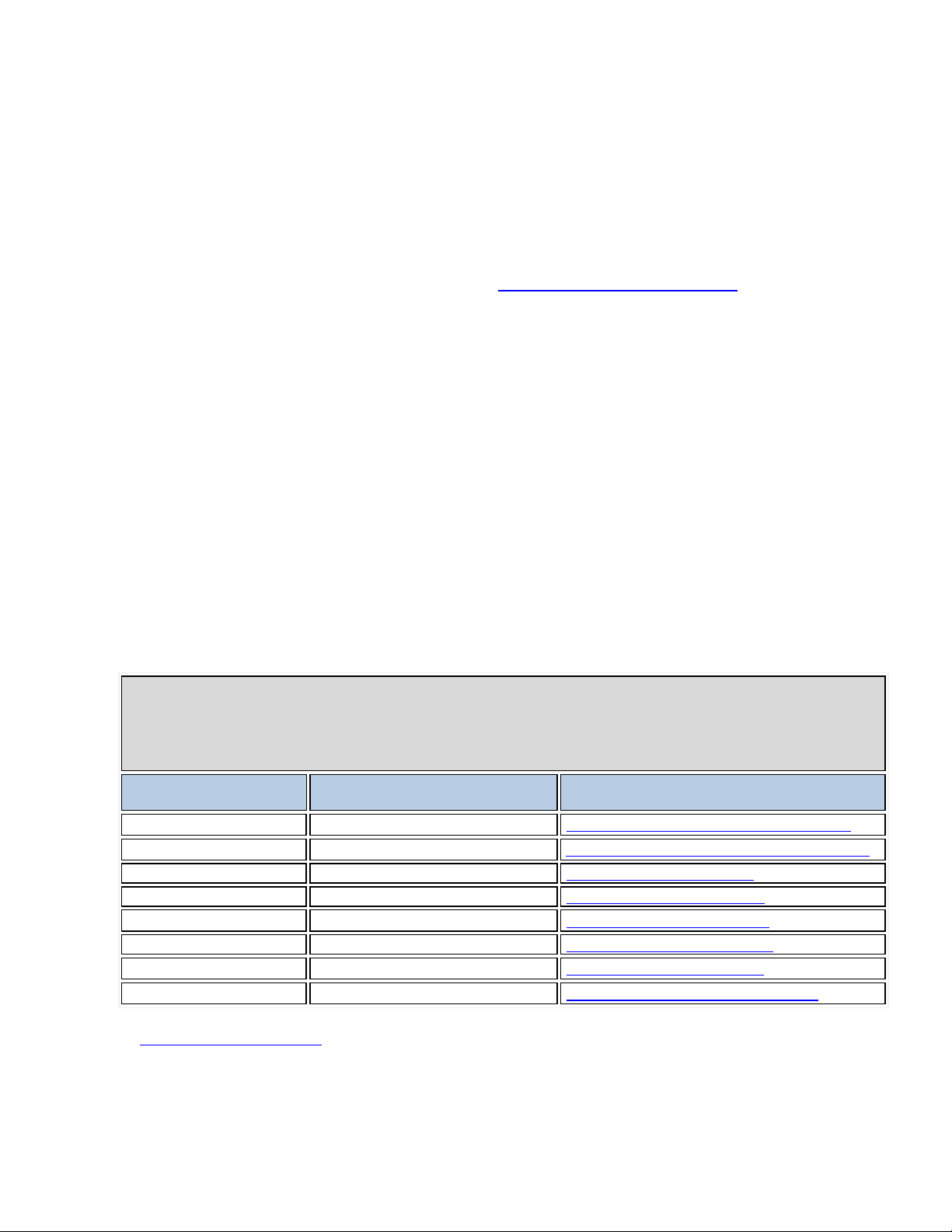
VPAT™
Voluntary Product Accessibility Template®
Criteria
Supporting Features
Remarks and explanations
Section 1194.21
Supports with Limitations
Software Applications and Operating Systems
Section 1194.22
Supports with Limitations
Web-based Internet Information and Applications
Section 1194.23
Not applicable
Telecommunications Products
Section 1194.24
Not applicable
Video and Multi-media Products
Section 1194.25
Supports with Limitations
Self-Contained, Closed Products
Section 1194.26
Not applicable
Desktop and Portable Computers
Section 1194.31
Supports with Limitations
Functional Performance Criteria
Section 1194.41
Supports with Limitations
Information, Documentation and Support
Compliant with minor exceptions
Voluntary Product Accessibility Template
Version 1.3
Date: July 1, 2013
Name of Products: Models MX-2310U, MX-3111U, MX-2615N, MX-2616N, MX-3115N, MX-3116N
Contact for more Information: VPAT Support Team
®
Sharp MX-2310U and MX-3111U
Sharp MX-2615N and MX-3115N
Sharp MX-2616N and MX-3116N
The purpose of the Voluntary Product Accessibility Template, or VPAT™, is to assist
Federal contracting officials and other buyers in making preliminary assessments
regarding the availability of commercial “Electronic and Information Technology”
products and services with features that support accessibility. It is assumed and
recommended that offerers will provide additional contact information to facilitate more
detailed inquiries.
The first table of the Template provides a summary view of the Section 508 Standards.
The subsequent tables provide more detailed views of each subsection. There are three
columns in each table. Column one of the Summary Table describes the subsections of
subparts B and C of the Standards. The second column describes the supporting
features of the product or refers you to the corresponding detailed table, e.g., “equivalent
facilitation." The third column contains any additional remarks and explanations
regarding the product. In the subsequent tables, the first column contains the lettered
paragraphs of the subsections. The second column describes the supporting features of
the product with regard to that paragraph. The third column contains any additional
remarks and explanations regarding the product.
Return to the top of the page.
Summary Table
VPAT™
Page 1 of 14
Page 2
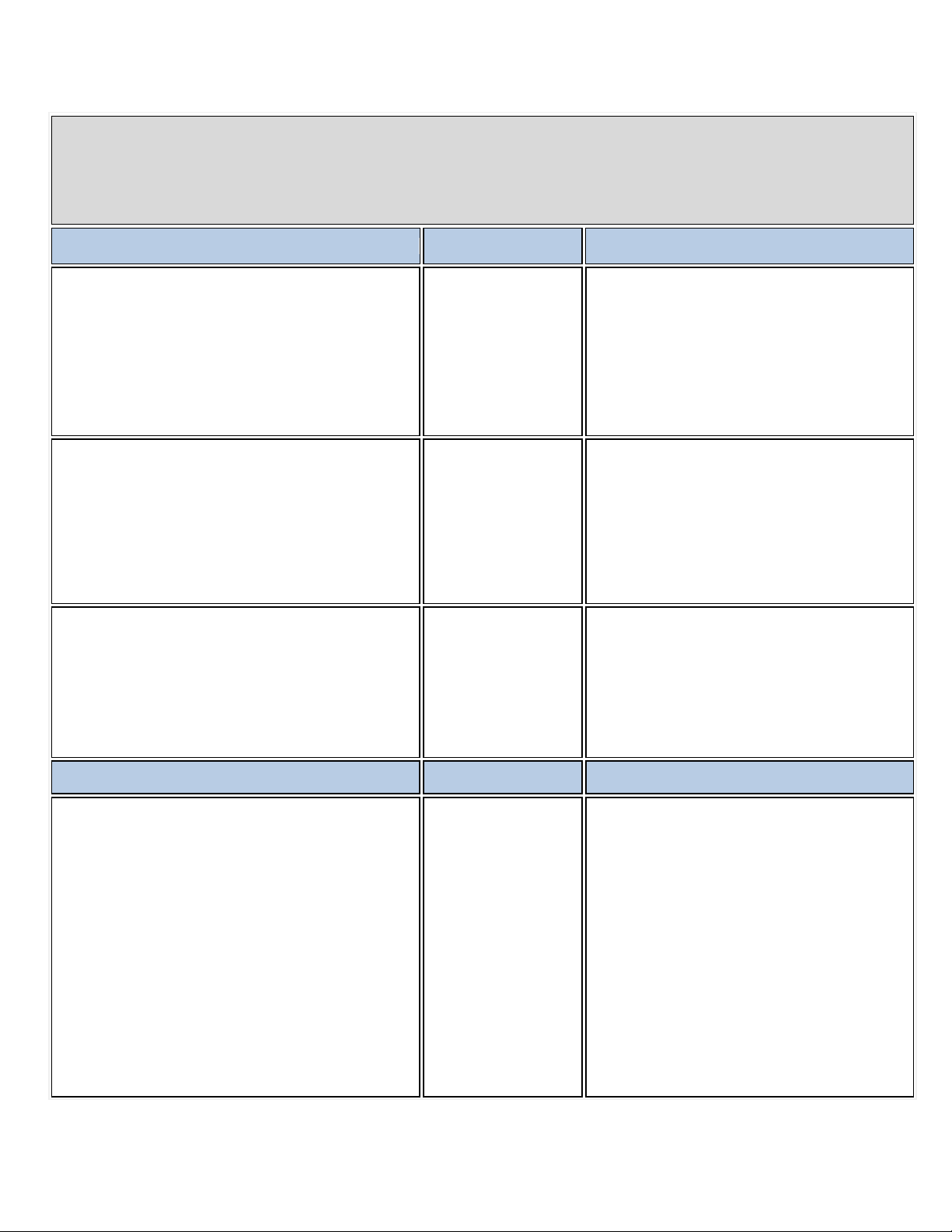
Section 1194.21 Software Applications and Operating Systems – Detail
Voluntary Product Accessibility Template®
Criteria
Supporting Features
Remarks and explanations
(a) When software is designed to run on a system that has
Regarding Sharp imaging (one of the functions
Monitor.
(b) Applications shall not disrupt or disable activated
and is available to the product developer.
Sharpdesk software runs on Microsoft™ OS
screen indication of the current focus
If the focus changes, the target will change in
icon button is focused.
l be available to Assistive Technology. When an image
When Sharpdesk software displays image
The information conveyed by the image can be
a keyboard, product functions shall be executable from a
keyboard where the function itself or the result of
performing a function can be discerned textually.
VPAT™
Supports
of Sharpdesk® document management
software), some mouse commands do not
have a corresponding keyboard command.
(ex. range specification of image data).
All buttons and links can be focused using
keyboard in PRINTER DRIVER/ Printer Sta tus
features of other products that are identified as
accessibility features, where those features are developed
and documented according to industry standards.
Applications also shall not disrupt or disable activated
features of any operating system that are identified as
accessibility features where the application programming
interface for those accessibility features has been
documented by the manufacturer of the operating system
(c) A well-defined onshall be provided that moves among interactive interface
elements as the input focus changes. The focus shall be
programmatically exposed so that Assistive Technology
can track focus and focus changes.
Criteria
(d) Sufficient information about a user interface element
including the identity, operation and state of the element
shal
represents a program element, the informat ion conv ey ed
by the image must also be available in text.
and utilities.
PRINTER DRIVER/Printer Status Monitor are
Supports
not designed to disrupt or disable other
functions by design.
some ways. Ex. the frame color will change if a
thumbnail is focused. The text will be bold if
Supports with
focused.
Limitations
If the focus changes, the target will change in
some ways. Ex. the frame line will change if an
Supporting Features Remarks and explanations
data, text describing the image is also
displayed (ex. thumbnails are labeled with the
name of each file in Desktop).
available in text in Printer Driver.
Supports with
Limitations
The information conveyed by icon of printer
condition can be available in Printer Driver.
But, the information conveyed by mimic image
of MFP cannot be available in text in Printer
Status Monitor.
Page 2 of 14
Page 3
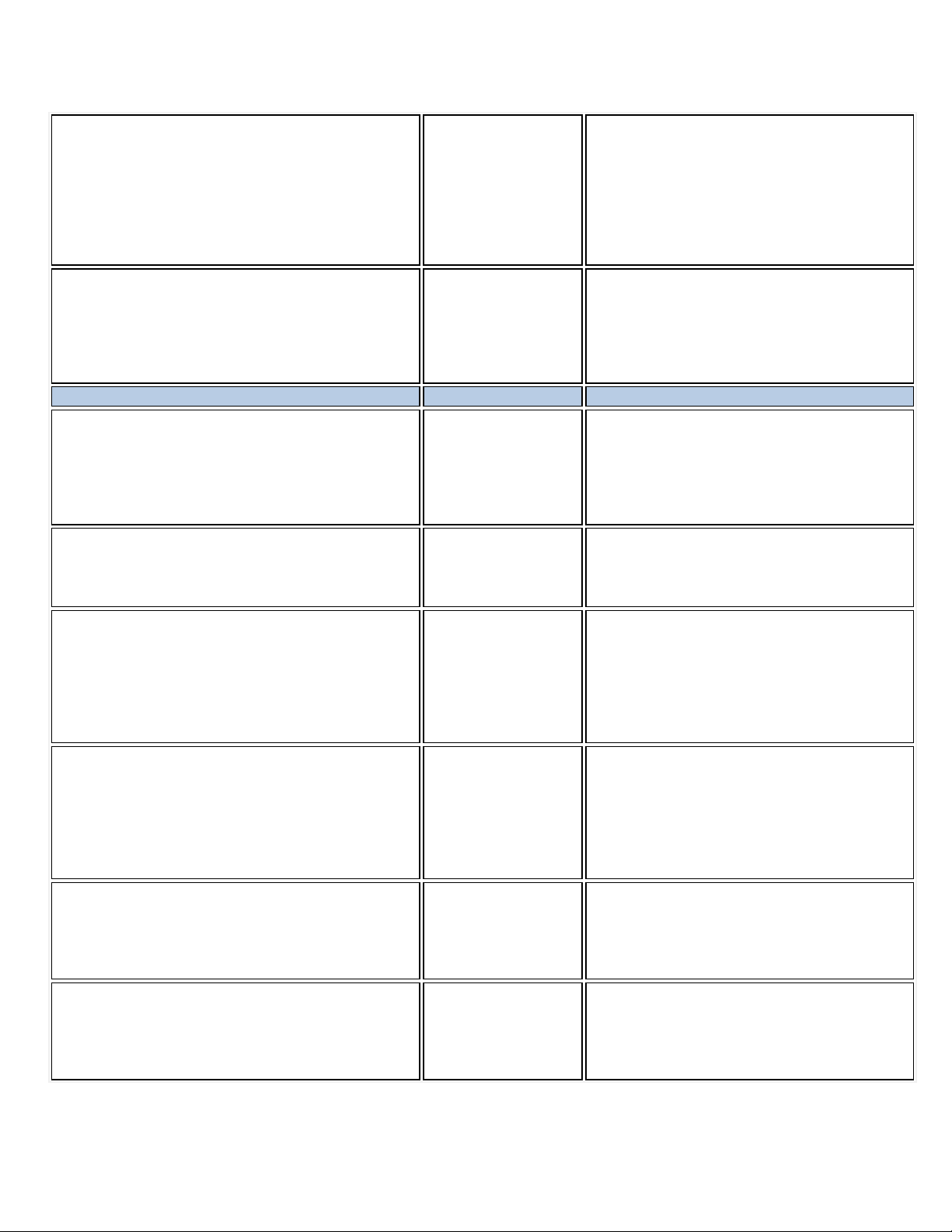
(e) When bitmap images are used to identify controls,
If an icon, an indicator and an element have
Status Monitor.
(f) Textual information shall be provided through operating
Sharpdesk software displays text contents
OS.
Criteria
Supporting Features
Remarks and explanations
Sharpdesk software doesn’t override the said
attributes
Sharpdesk software doesn’t have animations.
don’t have animations.
Color coding is not the only means in
means.
In Sharpdesk document management software
Function.
(k) Software shall not use flashing or blinking text, objects,
or other elements having a flash or blink frequency greater
Sharpdesk software doesn’t flash or blink text
not designed to flash or blink.
Sharpdesk software, PRINTER DRIVER/
status indicators, or other programmatic elements, the
meaning assigned to those images shall be consistent
throughout an application's performance.
system functions for displaying text. The minimum
information that shall be made available is text content,
text input caret location, and text attributes.
(g) Applications shall not override user select ed contrast
and color selections and other individual display attrib ut e s.
(h) When animation is displayed, the information shall be
displayable in at least one non-animated presentation
mode at the option of the user.
Supports
Supports
Supports
Supports
the same image, each of them has the same
meaning in Sharpdesk software.
When an icon, an indicator and an element
have the same image, each of them has the
same meaning in PRINTER DRIVER/ Printer
using functions of the OS.
PRINTER DRIVER/ Printer Status Monitor
displays text contents using functions of the
selections and attributes.
PRINTER DRIVER/ Printer Status Monitor
don’t override the said selections and
PRINTER DRIVER/ Printer Status Monitor
(i) Color coding shall not be used as the only means of
conveying information, indicating an action, prompting a
response, or distinguishing a visual element.
(j) When a product permits a user to adjust color and
contrast settings, a variety of color selections capable of
producing a range of contrast levels shall be provid ed.
than 2 Hz and lower than 55 Hz.
(l) When electronic forms are used, the form shall allow
people using Assistive Technology to access the
information, field elements, and functionality required for
completion and submission of the form, includ ing all
directions and cues.
Supports
Supports
Supports
Supports
Sharpdesk software.
PRINTER DRIVER/ Printer Status Monitor
doesn’t have the information conveying
function which use color coding as the only
(Sharp imaging) users can select a color from
variety of color selections.
PRINTER DRIVER/ Printer Status Monitor
doesn’t have adjust color and contrast setting
contents.
PRINTER DRIVER/ Printer Status Monitor are
Printer Status Monitor doesn't use electronic
forms.
Page 3 of 14
Page 4
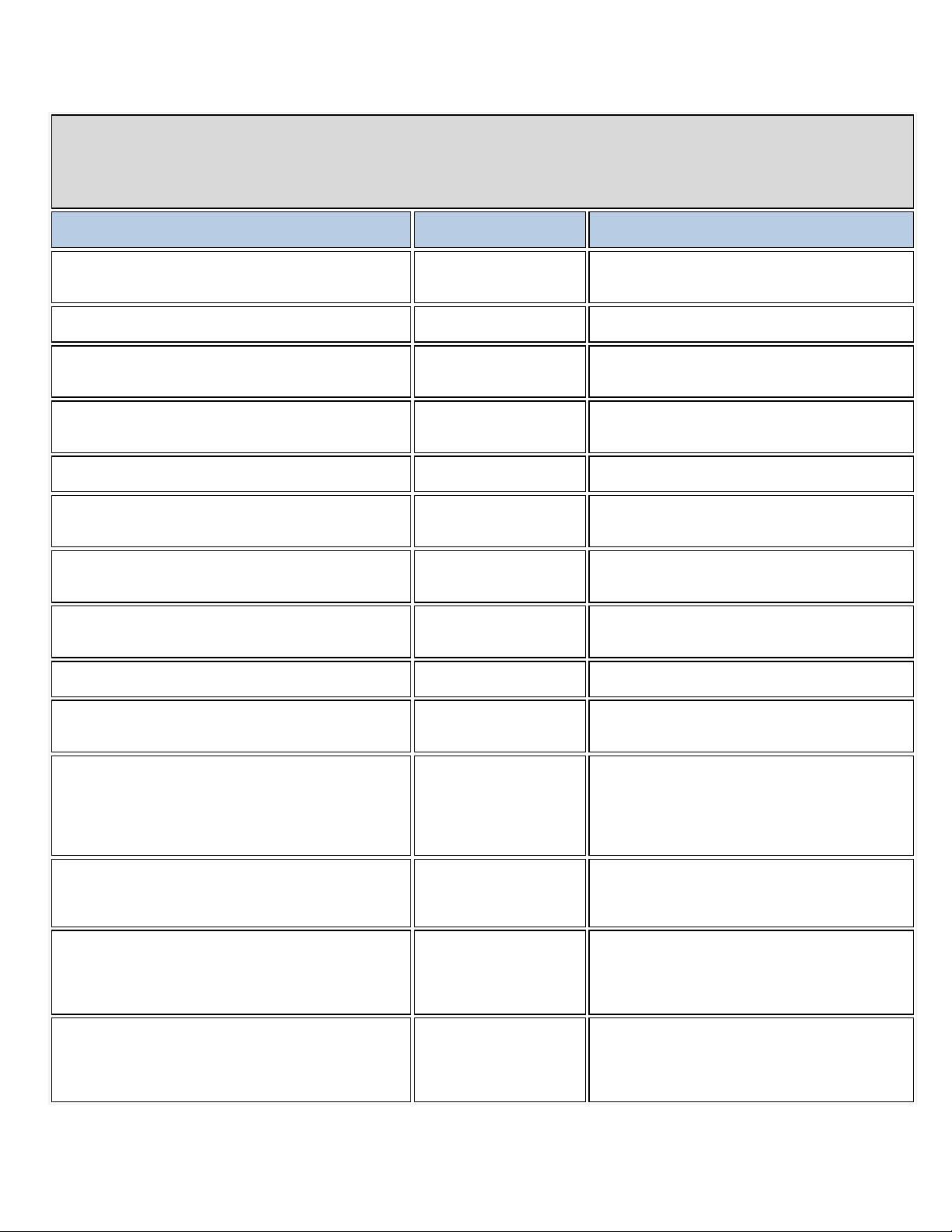
Section 1194.22 Web-based Internet information and applications – Detail
Voluntary Product Accessibility Template®
Criteria
Supporting Features
Remarks and explanations
(a) A text equivalent for every non-text element shall be
content).
Support
(b) Equivalent alternatives for any multimedia
presentation shall be synchroniz ed w ith the presentation.
No multimedia presentations (video/speech and
sound) are used.
(c) Web pages shall be designed so that all information
example from context or markup.
Support
The web pages are designed so that all information
Support
The documents are organized so that their contents
sheet.
(e) Redundant text links shall be provided for each active
region of a server-side image map.
(f) Client-side image maps shall be provided instead of
side image maps except where the regions cannot
be defined with an available geometric shape.
Support
Column headers have different tags from cells so
row headers are used.
(h) Markup shall be used to associate data cells and
logical
levels of row or column headers.
(i) Frames shall be titled with text that facilitates frame
identification and navigation
(j) Pages shall be designed to avoid causing the screen
than 55 Hz.
(k) A text-only page, with equivalent information or
cannot be accomplished in any other way. The content of
primary page changes.
(l) When pages utilize scripting languages to display
text that can be read by Assistive Technology.
Support
onal text that can be read by Assistive
(m) When a web page requires that an applet, plug-in or
(l).
(n) When electronic forms are designed to be completed
and functionality required for completion and submission
of the form, including all directions and cues.
Support
Using Assistive Technology, all field elements and
VPAT™
provided (e.g., via "alt", "longdesc", or in element
conveyed with color is also available without color, for
(d) Documents shall be organized so they are readable
without requiring an associated style sheet.
server-
(g) Row and column headers shall be identified for data
tables.
header cells for data tables that have two or more
For every non-text element, text for screen readers
is provided.
conveyed with color is also available without color.
are readable without requiring an associa ted sty le
No image maps are used.
No image maps are used.
that column headers can be distinguishable. N o
No data tables that have two or more logical levels
of row or column headers are used.
No frames are used.
to flicker with a frequency greater than 2 Hz and lower
functionality, shall be provided to make a web site
comply with the provis ion s of this part, w hen co mpli an ce
the text-only page shall be updated whenever the
content, or to create interface elements, the information
provided by the script shall be identified with functi ona l
other application be present on the client syste m to
interpret page content, the page must provide a link to a
plug-in or applet that complies with §1194.21(a) through
on-line, the form shall allow people using Assistive
Technology to access the information, field elements,
No videos are used.
The web pages comply with the provisions of this
part.
The web pages utilizing scripting languages also
provide functi
Technology.
No applets, plug-ins and other appl icat ion s are
needed to interpret the web page contents.
functionality required for completion and
submission of the electronic forms are accessible.
Page 4 of 14
Page 5
(o) A method shall be provided that permits users to skip
repetitive navigation links.
Support
The user interfaces are designed to allow users to
easily skip the repetitive navigation links.
(p) When a timed response is required, the user shall be
alerted and given sufficient time to indicate more time is
required.
Voluntary Product Accessibility Template®
Criteria
Supporting Features
Remarks and explanations
(a) Telecommunications products or systems which
which do not themselves provide a TTY functionality shall
and off to allow the user to intermix speech with TTY use.
Not Applicable
(b) Telecommunications products which include voice
signal protocols.
Not Applicable
(c) Voice mail, auto-attendant, and interactive voice
response telecommunications systems shall be usable by
TTY users with their TTYs.
Not Applicable
(d) Voice mail, messaging, auto-attendant, and interactive
a response from a user within a time interval, shall give an
ime for the user to indicate more time is
required.
Not Applicable
(e) Where provided, caller identificat ion and si mil ar
users of TTYs, and for users who cannot see displays.
Not Applicable
(f) For transmitted voice signals, telecommunications
intermediate step of 12 dB of gain shall be provided.
Not Applicable
(g) If the telecommunications product allows a user to
every use.
Not Applicable
Note to 1194.22: The Board interprets paragraphs (a) through (k) of this section as consistent with the
following priority 1 Checkpoints of the Web Content Accessibility Guidelines 1.0 (WCAG 1.0) (May 5 1999)
published by the Web Accessibility Initiative of the World Wide Web Consortium: Paragraph (a) - 1.1, (b) -
1.4, (c) - 2.1, (d) - 6.1, (e) - 1.2, (f) - 9.1, (g) - 5.1, (h) - 5.2, (i) - 12.1, (j) - 7.1, (k) - 11.4.
No user interfaces that require a timed response
from users are provided.
Return to the top of the page.
Section 1194.23 Telecommunications Products – Detail
provide a function allowing voice communication and
provide a standard non-acoustic connection point for
TTYs. Microphones shall be capable of being turned on
communication functionality shall support all commonly
used cross-manufacturer non-proprietary standard TTY
VPAT™
voice response telecommunications systems that require
alert when the time interval is about to run out, and shall
provide sufficient t
telecommunications functions shall also be available for
products shall provide a gain adjustable up to a minimum
of 20 dB. For incremental volume control, at least one
adjust the receive volume, a function shall be provided to
automatically reset the volume to the default level after
Page 5 of 14
Page 6
Criteria
Supporting Features
Remarks and explanations
(h) Where a telecommunications product delivers output
by an audio transducer which is normally held up to the
hearing technologies shall be provided.
Not Applicable
(i) Interference to hearing technologies (including hearing
shall be reduced to the lowest possible level that allows a
telecommunications product.
Not Applicable
(j) Products that transmit or conduct information or
compression, format transformation, or similar techniques
restore it upon delivery.
(k)(1) Products which have mechanically operated
the controls or keys.
Not Applicable
(k)(2) Products which have mechanically operated
(22.2N) maximum.
Not Applicable
(k)(3) Products which have mechanically operated
adjustable to 2 seconds per character.
Not Applicable
(k)(4) Products which have mechanically operated
or sound.
Not Applicable
ear, a means for effective magnetic wireless coupling to
aids, cochlear implants, and assistive lis tening devices)
user of hearing technologies to utilize the
communication, shall pass through cross-manufacturer,
non-proprietary, industry-standard codes, translation
protocols, formats or other information necessary to
provide the information or communication in a usable
format. Technologies which use encoding, signal
shall not remove information needed for access or shall
controls or keys shall comply with the following: Controls
and Keys shall be tactilely discernible without activating
controls or keys shall comply with the following: Controls
and Keys shall be operable with one hand and shall not
require tight grasping, pinching, twisting of the wrist. The
force required to activate controls and keys sha ll be 5 lbs.
Not Applicable
controls or keys shall comply with the following: If key
repeat is supported, the delay before repeat shal l be
adjustable to at least 2 seconds. Key repeat rate shall be
controls or keys shall comply with the following: The
status of all locking or toggle controls or keys shall be
visually discernible, and discernible either through touch
Return to the top of the page.
Page 6 of 14
Page 7
Section 1194.24 Video and Multi-media Products – Detail
Voluntary Product Accessibility Template®
Criteria
Supporting Features
Remarks and explanations
a) All analog television displays 13 inches and larger,
videotape, and DVD signals.
Not Applicable
(b) Television tuners, including tuner cards for use in
program playback circuitry.
Not Applicable
(c) All training and informational video and multimedia
regardless of format, that contain speech or other audio
content, shall be open or closed captioned.
Not Applicable
(d) All training and informational video and multimedia
be audio described.
Not Applicable
(e) Display or presentation of alternate text
selectable unless permanent.
Not Applicable
and computer equipment that includes analog
television receiver or display cir cuitry , sha ll be
equipped with caption decoder circuitry which
appropriately receives, decodes, and displays closed
captions from broadcast, cable, videotape, and DVD
signals. As soon as practicable, but not later than July
1, 2002, widescreen digital television (DTV) displays
measuring at least 7.8 inches vertically, DTV sets with
conventional displays measuring at least 13 inches
vertically, and stand-alone DTV tuners, whether or not
they are marketed with display screens, and computer
equipment that includes DTV receiver or display
circuitry, shall be equipped with caption decoder
circuitry which appropriately receives, decodes, and
displays closed captions from broadcast , cable,
computers, shall be equipped with secondary audio
VPAT™
productions which support the agency's mission,
information necessary for the comprehension of the
productions which support the agency's mission,
regardless of format, that contain visual information
necessary for the comprehension of the content, shall
presentation or audio descriptions sha ll be user-
Return to the top of the page.
Page 7 of 14
Page 8
Section 1194.25 Self-Contained, Closed Products – Detail
Voluntary Product Accessibility Template®
Criteria
Supporting Features
Remarks and explanations
(a) Self contained products shall be usable by people
Current Technology provides no equivalent to touch-
not required to use the product.
(b) When a timed response is required, the user shall
[For System Operation Function]
users timeout
user can adjust it to have enough time
before timeout. Also timeout functi on can be stopp ed if
read
Criteria
Supporting Features
Remarks and explanations
(c) Where a product utilizes touchscreens or contact -
controls or keys, shall comply with the following:
(1) Controls and keys shall be tactilely discernible
[For Operation Panel]
easily and different shapes and colors are used for the
keys so as to be distinguished easier.
k-(2) Controls and keys shall be operable with one
hand and shall not require tight grasping, pinching, or
controls and keys shall be 5 lbs. (22.2 N) maximum.
VPAT™
screen display panels. However, note the following:
[For Whole System]
(1) Frequency of over 2.5KHz isn't used for beeping
sound.
with disabilities without requiring an end-user to
attach Assistive Technology to the product. Personal
headsets for private listening are not Assist iv e
Technology.
be alerted and given sufficient time to indicate more
time is required.
sensitive controls, an input method shall be provided
that complies with §1194.23 (k) (1) through (4).
k) Products which have mechanically operated
Limited Support
Supports with Limitations
Supports
[For Operation Panel]
(2) A measure is provided to emit a beeping sound
from base point for the operations requiring end-users
to switch plural options (including set values and
setting modes) in a routine rotation.
[For System Operation Function]
(3) Assistive Technology for people with disabilities is
Though there is no function to notice end-
in advance, end-
necessary. And display time of message can be
adjusted and the user shall be given sufficient time to
kwithout activating the controls or keys.
twisting of the wrist. The force required to activate
Supports
Supports
(1) Major keys are recognized not only by vision but
also by other senses.
(2) Frequent used keys are aligned to be recognized
[For Whole System]
(1) The force required to activate controls and keys is
Page 8 of 14
Page 9
22.2N or lower.
end-users' fingertip.
k-(3) If key repeat is supported, the controls, an
[For Input through key, touch panel]
up to 2 seconds per letter or disable it.
k-(4) The status of all locking or toggle controls or
through touch or sound.
(d) When biometric forms of user identification or
also be provided.
(e) When products provide auditory output, the audio
through an industry standard connector that will allow
anytime.
(f) When products deliver voice output in a public
dB. Where the ambient noise level of the environment
volume to the default level after every use.
(g) Color coding shall not be used as the only means
element.
adjust color and
Contrast levels can be adjusted.
input method shall be delay before repeat shall be
adjustable.
(2) Controls and keys can be operated with one hand
and do not require tight grasping, or twisting of the
wrist.
[For Input through key]
(3) Upper side of each key is concaved to be fitted on
(1) Key repeat function can set repeat start time (t1)
and repeat interval (t2), or these functions are nonactivated.
Supports
(2) Key repeat function can control repeat start time
(t1) up to 2 seconds or disable it.
(3) Key repeat function can control repeat speed (t2)
keys shall be visually discernible, and discernable
control are used, an alternative form of identification
or activation, which does not require the user to
possess particular biological c harac t eri sti cs, sh all
signal shall be provided at a standard signal level
for private listening. The product must provide the
ability to interrupt, pause, and restart the audio at
Criteria
area, incremental volume control shal l be provide d
with output amplification up to a level of at least 65
is above 45 dB, a volume gain of at least 20 dB
above the ambient level shall be user selectable. A
function shall be provided to automatically reset the
of conveying information, indicating an action,
prompting a response, or distinguishing a visual
Supports Power Key is discernible through touch.
Not Applicable No biometric forms of user identification are used.
Not Applicable No auditory output will be provided.
Supporting Features Remarks and explanations
Not Applicable No voice output will be delivered in a public area.
Not Applicable Color coding is not used without description.
(h) When a product permits a user to
contrast settings, a range of color selections capable
of producing a variety of contrast levels shall be
provided.
Supports
Page 9 of 14
Page 10
(i) Products shall be designed to avoid causing the
Conforms
[For Touch Panel]
(j) Products which are freestanding, non-portable, and
48 inches in length, centered on the operable control,
the 48 inch length (see Figure 1 of this part).
(j)-(2)Where any operable control is 10 inches or
the floor.
Applicable.
(j)-(3) Where any operable control is more than 10
maximum and 15 inches minimum above the floor.
Voluntary Product Accessibility Template®
Criteria
Supporting Features
Remarks and explanations
(a) All mechanically operated controls and keys shall
comply with §1194.23 (k) (1) through (4).
(b) If a product utilizes touchscreens or touchthat complies with §1194.23 (k) (1) through (4).
Not Applicable
(c) When biometric forms of user identification or
control are used, an alternative form of identification or
activation, which does not require the user to possess
provided.
Not Applicable
(d) Where provided, at least one of each type of
with publicly available industry standards
Not Applicable
screen to flicker with a frequency greater than 2 Hz
and lower than 55 Hz.
Supports
intended to be used in one location and which have
operable controls shall comply with the following:
(j)-(1)The position of any operable control shall be
determined with respect to a vertical plane, which is
and at the maximum protrusion of the product within
less behind the reference plane, the height shall be
54 inches maximum and 15 inches minimum above
inches and not more than 24 inches behind the
reference plane, the height shall be 46 inches
(j)-(4)Operable controls shall not be more than 24
inches behind the reference plane (see Figure 2 of
this part).
Return to the top of the page.
Supports
Supports
Supports
Supports
Applicable
Operable control is 5 inches behind the reference
plane.
The height is 37 inches above the floor.
Document Feeder also meets the requirement in (j)-2
because it can be stopped at any position.
Section 1194.26 Desktop and Portable Computers – Detail
operated controls, an input method shall be provi ded
particular biological characteristics, shall also be
expansion slots, ports and connectors sha ll comply
Return to the top of the page.
VPAT™
Not Applicable
Page 10 of 14
Page 11
Voluntary Product Accessibility Template®
Criteria
Supporting Features
Remarks and explanations
by people who are blind or visually impaired shall be
Current Technology provides touch-
ognized not only by vision but
a row, standard operation portion is read by something
apes and colors are used for the
tion can be recognized by touch, and
(9) When it closes, the user can grasp it with the sense
Section 1194.31 Functional Per for mance Crit eria – Detail
VPAT™
screen display panels. However, note the
following:
[For Operation Panel]
(1) Major keys can be rec
also by other senses.
(2) When input is determined or invalid, operation
status is confirmed by a beeping sound. For operation
of setting copy ratio or copy density easier by people
who are visually impaired, the special beeping sound
at center point such as 100% is provided.
(a) At least one mode of operation and information
retrieval that does not require user vision shall be
provided, or support for Assistive Technology used
provided.
Limited Support
(3) When similar shape of operation parts is aligned in
such as vision and touch.
(4) 10 keys are aligned the same as telephone keys
including # and * keys, on top of that, key 5 with a dot.
[For Input through Key and Touch Panel]
(5) Certain time of touching for activation of key
function can be adjusted up to two seconds.
(6) Frequent used keys are aligned to be recognized
easily, and different sh
keys so as to be distinguished easier.
[For Draft setting on Platen]
(7) Setting documents on the tray can be done even
without relying on vision because setting portion has a
stopper.
[For Paper Setting]
(8) The tray opera
this enabled end-users to open and close tray and set
paper with one hand.
of touch or the sense of hearing.
Page 11 of 14
Page 12

[For Automatic Document Feeder]
or door etc. can be recognized by
sound should go off to prevent unintentional operation.
(20) Recovering from Auto Power shutoff mode can be
(10) Allow users to understand the location for setting
the document.
(11) Allow users to adjust the document guides for
Letter Size paper by click without sight.
(12) Allow wheelchair users to open it by one hand
because of free stop.
[For Appearance]
(13) Operation area f
touch.
[For System Operation]
(14) When user presses unauthorized key, a beeping
[For Main Power Switch]
(15) Power On/Off status can be recognized by touch.
(16) Power Switch can be recognized by touch.
(17) Locate it away from other key so as not to be
pressed mistakenly.
[For Fax]
(18) Provide users alternative measures other than
vision to know such as sound when fax receives
messages.
[For Touch Panel]
(19) Adjusting the time for key reception is possible.
[For System Operation Function]
done smoothly without relying on vision.
Page 12 of 14
Page 13
Criteria
[For Operation Panel]
contrast between paper and tray in order to find papers
and guides in order to adjust guides to original easily.
(c) At least one mode of operation and information
provided
(d) Where audio information is important for the use
hearing devices shall be provided.
(e) At least one mode of operation and information
by people with disabilities shall be provided.
[For Automatic Document Feeder]
be gripped by one hand with less force from the top as
well as the bottom for easy opening and closing.
(b) At least one mode of opera tion and information
retrieval that does not require visual acuity grea ter
than 20/70 shall be provided in audio and enlarged
print output working together or independently, or
support for Assistive Technology used by people
who are visually impaired shall be provided.
retrieval that does not require user hearing sha ll be
provided, or support for Assistive Technology used
by people who are deaf or hard of hearing shall be
of a product, at least one mode of operation and
information retrieval shall be provided in an
enhanced auditory fashion, or support for assistive
Supporting Features Remarks and explanations
(1) Usual letter size is be 5mm or larger.
(2) The size for Key top letters including 10 key
numbers, START, CA are 7.5 mm or larger.
Supports
Not Applicable Any operations do not require user hearing.
Not Applicable No audio information will be provided.
(3) Difference in color lightness is 4 or more.
(4) Color of Output tray is dark gray for making
easily on the tray.
(5) Color of Original guides on the Document feeder
tray is dark gray for making contrast between original
retrieval that does not require user speech shall be
provided, or support for Assistive Technology used
(f) At least one mode of operation and information
retrieval that does not require fine motor control or
simultaneous actions and that is operable with
limited reach and strength sha l l be provide d.
Not Applicable No function requiring user speech will be provided.
(1) Allows end-users to close it with one hand easily
from the maximum open/close angle.
(2) Door etc. can be opened/closed with one hand.
(3) When end-user presses unauthorized key, a
beeping sound should go off to prevent unintentional
operation.
Supports
(4) Adjusting the time for key reception is possible.
[For Whole System]
(5) All operations can be done with one hand and do
not require tight grasping, or twisting of the wrist.
(6) Paper drawer having Easy-grip handles which can
Page 13 of 14
Page 14
Section 1194.41 Information, Documentation and Support – Detail
VPAT™
Voluntary Product Accessibility Template®
Criteria
Supporting Features
Remarks and explanations
(a) Product support documentation provided to
formats upon request, at no additional charge
Supports
(b) End-users shall have access to a description of
upon request, at no additional charge.
Supports
Supports
Paper and PDF
images
end-users shall be made available in alternate
the accessibility and compatibility features of
products in alternate formats or alternate met hods
(c) Support services for products shall
accommodate the communication needs of endusers with disabilities.
Return to the top of the page.
Paper and PDF
Paper and PDF
Compatible telephone support
Online (HTML, PDF), Supports Screen Readers
Additionally, MY Sharp which provides text, sound, and
Design and Specifications subject to change without notice. Sharp, Sharp OSA, Sharpdesk, My Sharp and all related trademarks are
trademarks or registered trademarks of Sharp Corporation and/or its affiliated companies. Windows, Windows NT, Windows Server and
Windows Vista are trademarks or registered trademarks of Microsoft Corporation. All other trademarks are the property of their respective
owners.
SHARP ELECTRONICS CORPORATION
Sharp Plaza, Mahwah, NJ 07495-1163
1-800-BE-SHARP • www.sharpusa.com
Page 14 of 14
 Loading...