

Page 1
System package 10 Hotfix3
Date: 30. November 2020
Version: 003
MOVI-C®
Page 2
MOVI-C system package 10 – Hotfix3
installation information
30. November 2020 page 2 / 12
Content:
1 Error description: No SSI encoder can be used on an option card (CES11A, CSB31A,
CSS31A) on the single-axis module MDA90A with MOVILINK® DDI interface and firmware
version v04.00. ......................................................................................................................... 3
2 Error description: "Parameter tree: all nodes with the same name and device type incorrectly
work on the same data". ........................................................................................................... 4
3 Error description: ”Parameter tree: No communication with device” .......................................... 5
4 Error description: "MOVIGEAR® DFC, DFC CIA and DSI (firmware version V4.00): Brake
chopper Overcurrent message after switching the main supply". .............................................. 8
5 Error description: ” Fieldbuses on CONTROLLER UHX25A and UHX45A do not support an
application cycle > 1ms.” .......................................................................................................... 9
Page 3
MOVI-C system package 10 – Hotfix3
installation information
30. November 2020 page 3 / 12
1 Error description: No SSI encoder can be used on an option card
(CES11A, CSB31A, CSS31A) on the single-axis module MDA90A with
MOVILINK® DDI interface and firmware version v04.00.
Affected devices:
MDA90A single-axis module with MOVILINK® DDI interface in the following variants:
SEW standard variant MDA90A-…-S00:
Part number: 18272576 with firmware version 04.00.
CiA402 variant MDA90A-…-E00:
Part number: 18272592 with firmware version 04.00.
This device was manufactured from 15.05.2019 until 07.06.2019. After this time the firmware version
was changed to 04.01 in order to solve the problem.
Problem description:
f a second encoder connection (CES11A CSS31A, CSB31A) is used on the axis and an SSI encoder
is attached (all other encoder types are functional), error 14.16 "Encoder 2: Permanent high level in
data line - critical" occurs when encoder 2 is used for position control. Or error 14.17 "Encoder 2:
Permanent high level in data line" if encoder 2 is not included in the position control.
The SSI encoder does not supply a position value.
Associated MOVISUITE® version:
- v2.1.237.0 / SP10-B7.3
Solution:
Run the hotfix MOVISUITEstandardSP10-SP0HF3-002.exe. This will update the firmware stored in
MOVISUITE v2.1.237.0 to version 04.01. The subsequent firmware update of the affected devices (by
a SEW-EURODRIVE employee) solves the problem.
Hint:
To install the hotfix you need administrator rights on the PC and the MOVISUITE® software must not
be started.
Page 4
MOVI-C system package 10 – Hotfix3
installation information
30. November 2020 page 4 / 12
Hint:
Items 2. to 5. were part of Hotfix 1 and Hotfix 2, which have been replaced by
Hotfix 3.
2 Error description: "Parameter tree: all nodes with the same name and
device type incorrectly work on the same data".
Problem description:
The error occurs when you are working in a project and have nodes that have the same device type,
the same software module, and the same subcomponents.
If you change a parameter in the software node below PLC_A, this change will also be changed at the
independent software node below PLC_B.
This happens during the “Planning” and “Startup” phases.
The parameter is actually only saved in the node in the project / device on which the parameter tree
was first opened.
Result:
If a parameter in the software node below PLC_A is changed, this change is also made to the
independent software node below PLC_B if the corresponding parameter tree has been opened before.
Affected MOVISUITE® versions:
- v2.1.237.0 / SP10-B7.3
Solution:
Execute the hotfix:
- MOVISUITEstandardSP10-SP0HF3-002.exe
Hint:
You need administrator rights on the PC and the MOVISUITE® software must not be started.
Afterwards, a changed parameter is only stored in the corresponding node and device.
Page 5
MOVI-C system package 10 – Hotfix3
installation information
30. November 2020 page 5 / 12
3 Error description: ”Parameter tree: No communication with device”
Problem description:
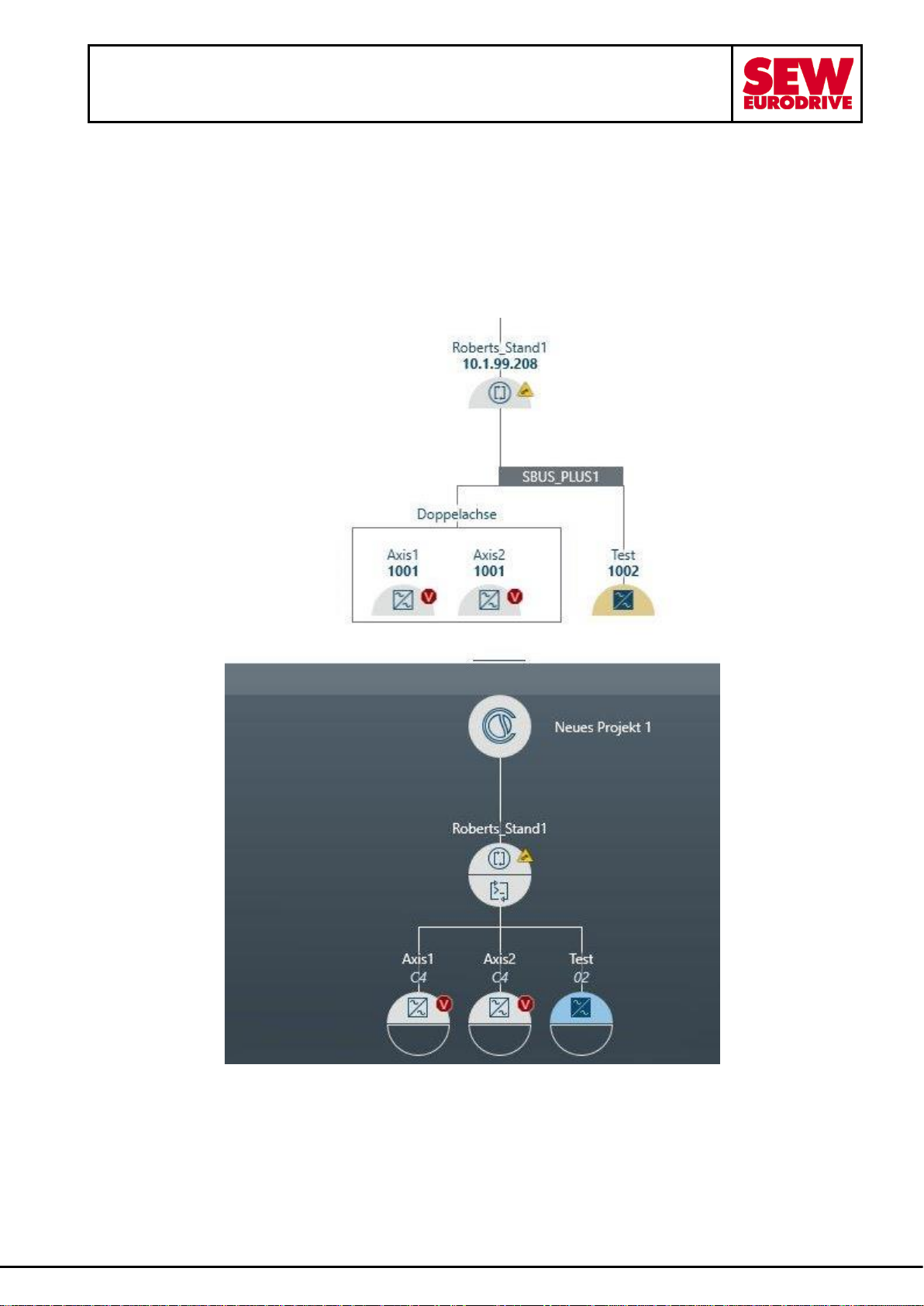
When connecting a newly added device to an existing device from the network view, no parameter
values are displayed in the configuration. This incident occurs sporadically. An example explains this:
1. A MOVISUITE® project with controller, MDA90A and double axis was created and a device data
backup was performed.
Page 6
MOVI-C system package 10 – Hotfix3
installation information
30. November 2020 page 6 / 12
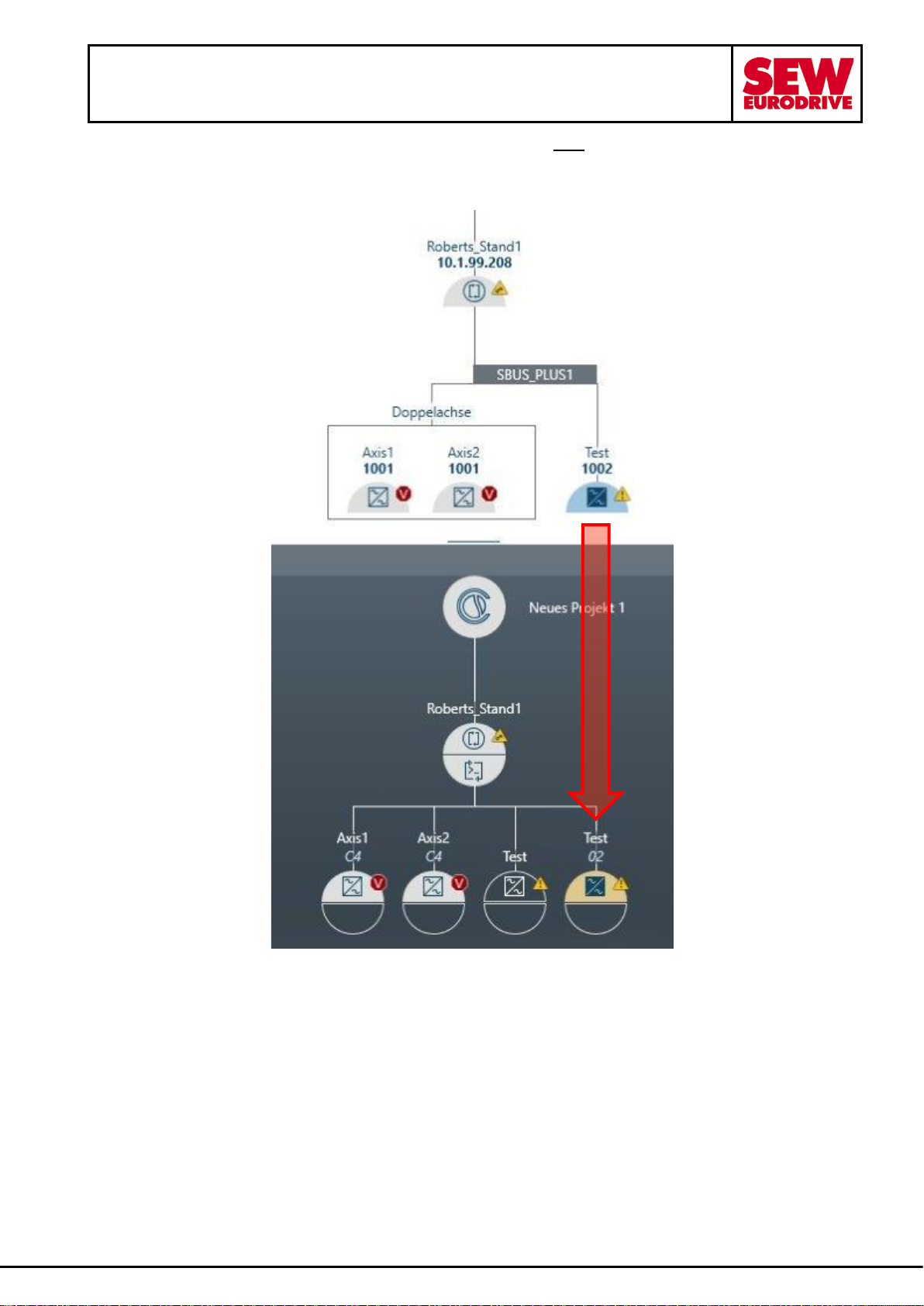
2. Drag the "Test" device into the function view and create a new device. Also set up the connection.
Do not change the name when assigning the name to the new device (by a click outside the input
field it disappears)
Page 7
MOVI-C system package 10 – Hotfix3
installation information
30. November 2020 page 7 / 12
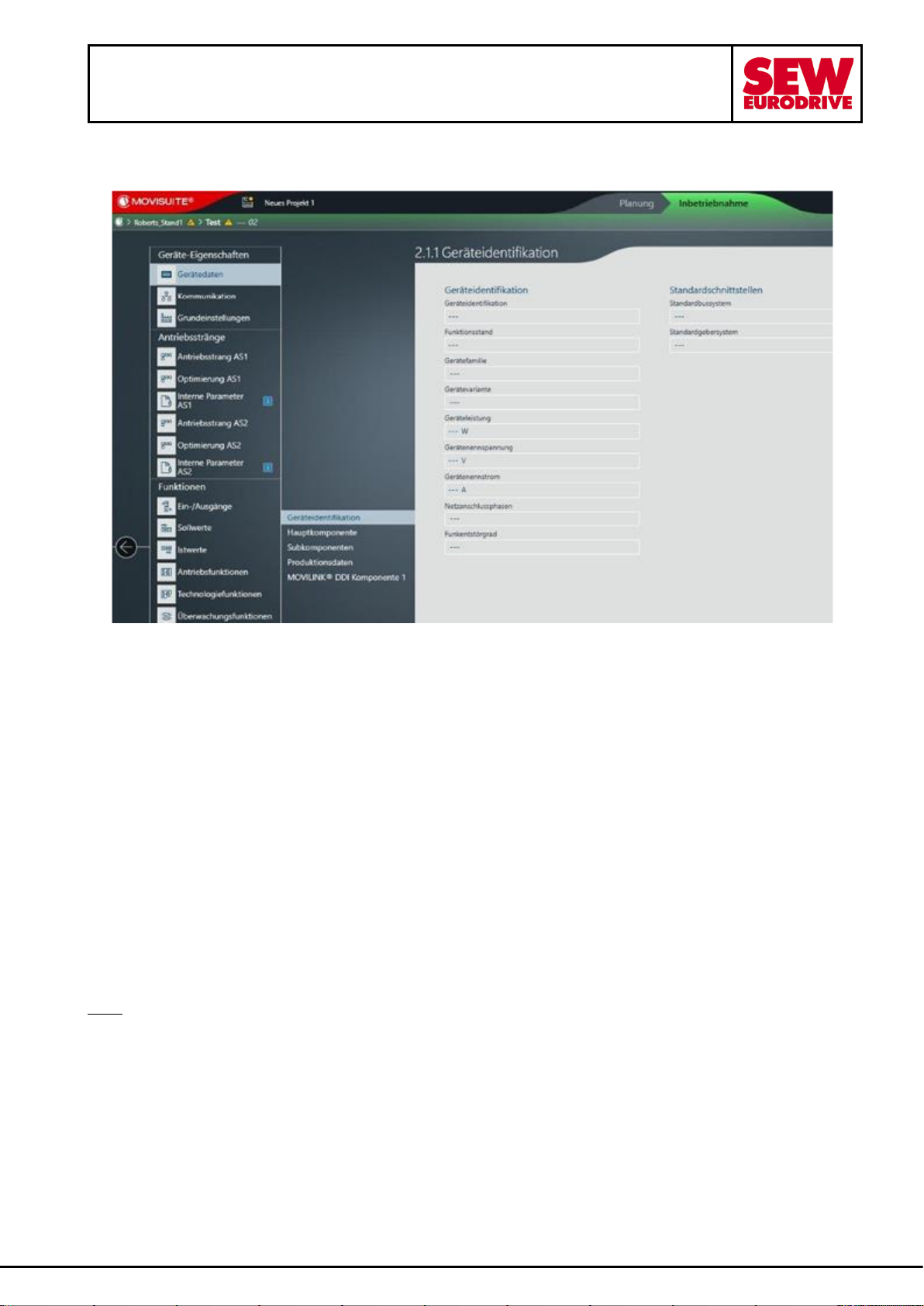
3. Open the configuration of the new device (rightmost). Here the error can be recognized immediately
by the dashes:
Hint:
When the communication connection to the left "Test" device is re-established, the parameters are
displayed again.
Result:
When connecting a newly added device to an existing device from the network view, no parameter
values are displayed in the configuration.
Affected MOVISUITE® versions:
- v2.1.237.0 / SP10-B7.3
Solution:
Execute the hotfix:
- MOVISUITEstandardSP10-SP0HF3-002.exe
Hint:
You need administrator rights on the PC and the MOVISUITE® software must not be started.
When a new device is added, the parameter values are displayed correctly in the configuration.
Page 8
MOVI-C system package 10 – Hotfix3
installation information
30. November 2020 page 8 / 12
4 Error description: "MOVIGEAR® DFC, DFC CIA and DSI (firmware
version V4.00): Brake chopper Overcurrent message after switching
the main supply".
Affected devices:
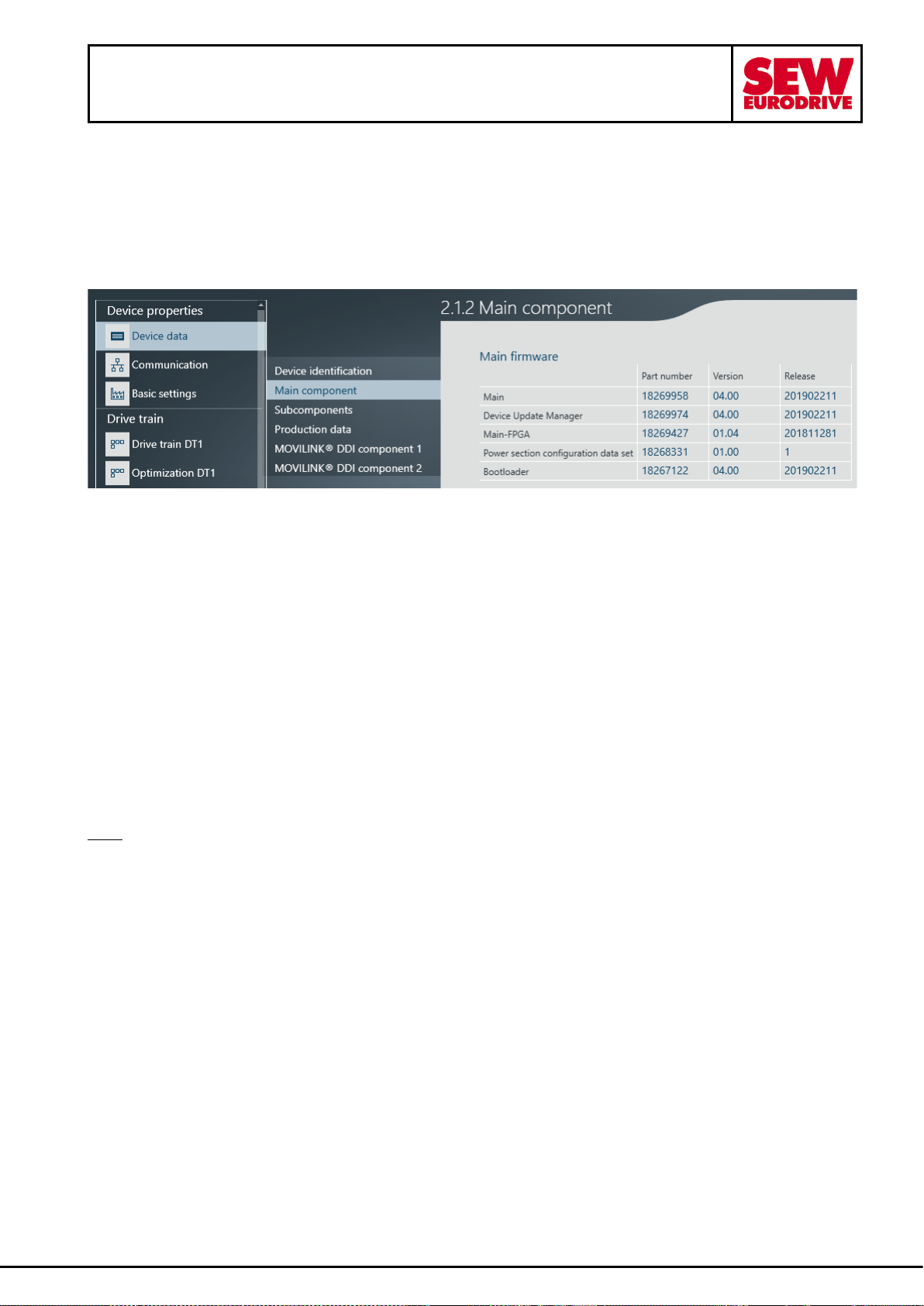
MOVIGEAR® DFC, DFC CIA and DSI, DSI CIA units with a firmware version V4.00 and a main FPGA
firmware version < V1.06. In this example you see a "Main-FPGA" version V1.04:
Problem description:
After switching the devices off and on, error 4.1 "Brake chopper overcurrent" occurs sporadically.
The fault occurs after switching the mains supply off and on, if the device remains supplied with 24V.
No error is reported if the device is not supplied with 24V and the mains supply is switched off and on.
The error affects devices with firmware version V4.00. The device firmware must be updated by SEWEURODRIVE employees. After the update, the main firmware version V4.00 is still displayed, only the
FPGA firmware is updated to V1.06.
Associated MOVISUITE® version:
- v2.1.237.0 / SP10-B7.3
Solution:
Run the hotfix MOVISUITEstandardSP10-SP0HF3-002. This updates the firmware stored in
MOVISUITE v2.1.237.0. The problem is solved by the subsequent firmware update of the affected
devices ( done by a SEW-EURODRIVE employee).
Hint:
To install the hotfix you need administrator rights on the PC and the MOVISUITE® software must not
be started. Do not use the uninstall function because files were permanently replaced when installing
Hotfix.
Page 9
MOVI-C system package 10 – Hotfix3
installation information
30. November 2020 page 9 / 12
5 Error description: ” Fieldbuses on CONTROLLER UHX25A and
UHX45A do not support an application cycle > 1ms.”
Affected devices:
The CONTROLLER UHX25A and UHX45A with firmware version V3.00 are affected.
Problem description:
When adjusting the application cycle, timeouts of the F-data occur and thus also timeouts of the process
data within a few minutes from start-up.
A possible workaround:
The cycle time of the fieldbus data must be maintained at 1ms.
Associated MOVISUITE® version:
- v2.1.237.0 / SP10-B7.3
Solution:
Execute Hotfix MOVISUITEstandardSP10-SP0HF3-002 and then update with the firmware V3.01
installed by Hotfix at the affected UHX25A or UHX45A CONTROLLER’s.
Hint:
To install hotfix you need administrator rights on the PC and the MOVISUITE® software must not be
started. Do not use the uninstall function because files were permanently replaced when installing
Hotfix.
Page 10
MOVI-C system package 10 – Hotfix3
installation information
30. November 2020 page 10 / 12
Instructions: Update of a UHX25A or UHX45A CONTROLLER from firmware 3.00 to 3.01:
Export firmware V3.01 from MOVISUITE®:
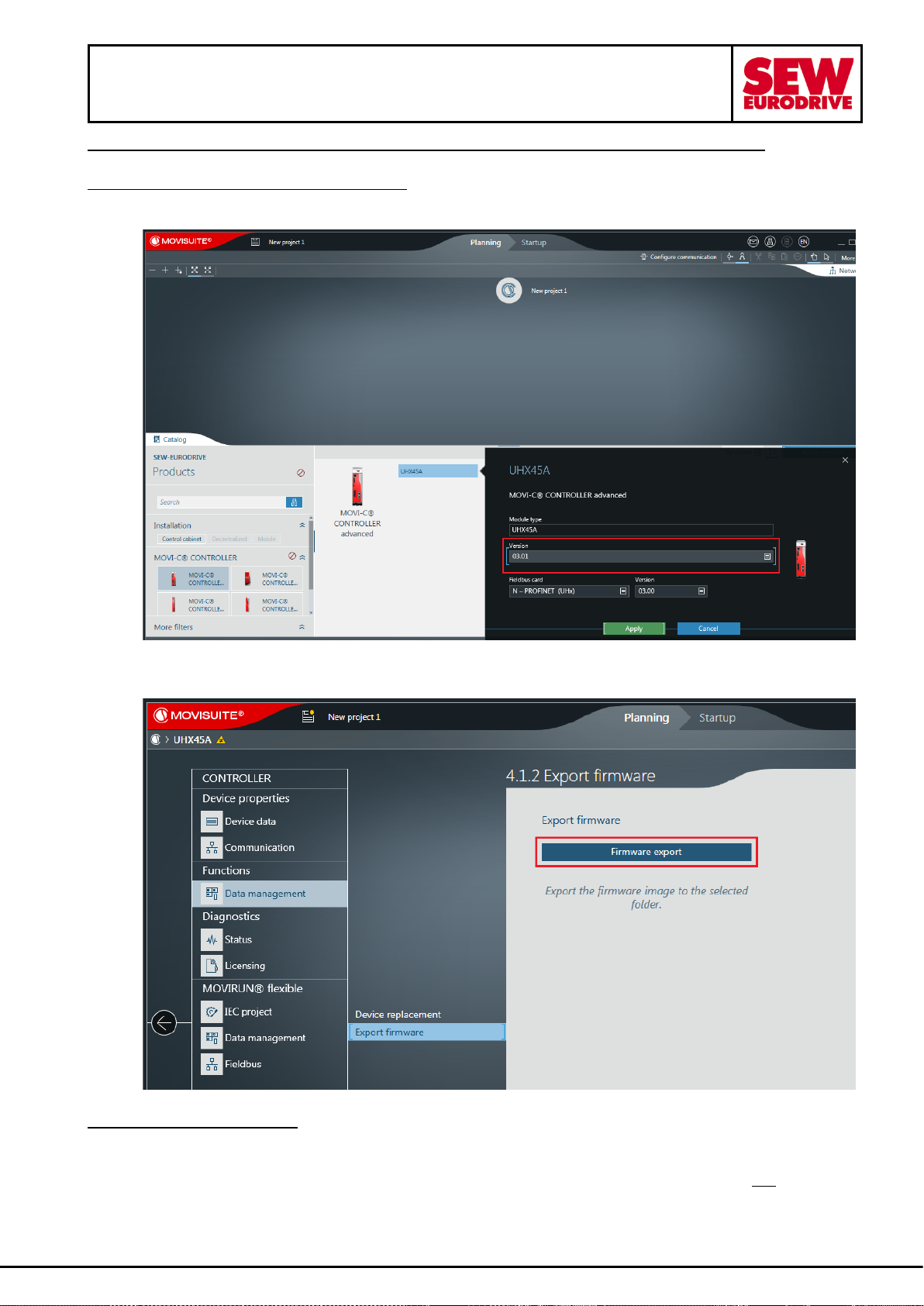
1. After installing Hotfix add, in a new MOVISUITE® project, the corresponding controller with
firmware version V3.01.
2. Now you can export and unpack the firmware V3.01 in the CONTROLLER configuration area >
Functions > Data management > Export firmware
Update the CONTROLLER:
3. Disconnect the CONTROLLER from power and insert the SD memory card into an appropriate
reader and backup all files and folders 1 to 1 to the PC (data backup before firmware update).
4. Copy the unpacked firmware to the memory card and replace existing files. Do not delete the
SD card before. There may be important data or licenses on it.
5. Insert the memory card back into the CONTROLLER and switch on the power again.
Page 11
MOVI-C system package 10 – Hotfix3
installation information
30. November 2020 page 11 / 12
Update MOVISUITE® project:
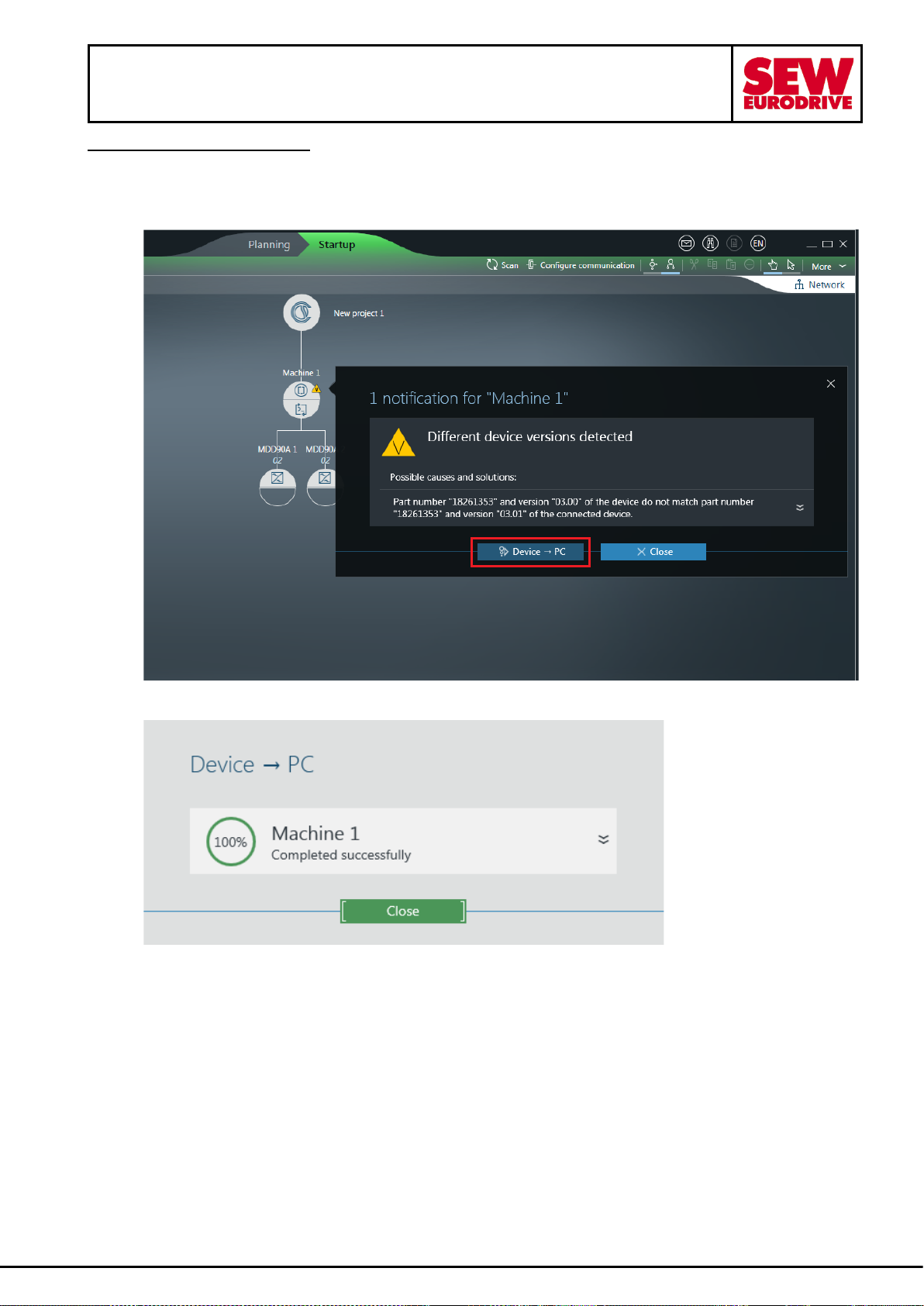
6. Open the associated project in MOVISUITE®. Create an archive as a backup. Then establish a
physical connection to the CONTROLLER and switch to the "Startup" mode. A "V" appears on
the CONTROLLER. Click on it. The message "Different device versions detected" appears, click
on the "Device -> PC" button.
…
7. A success message appears after the update. Close it.
Page 12
MOVI-C system package 10 – Hotfix3
installation information
30. November 2020 page 12 / 12
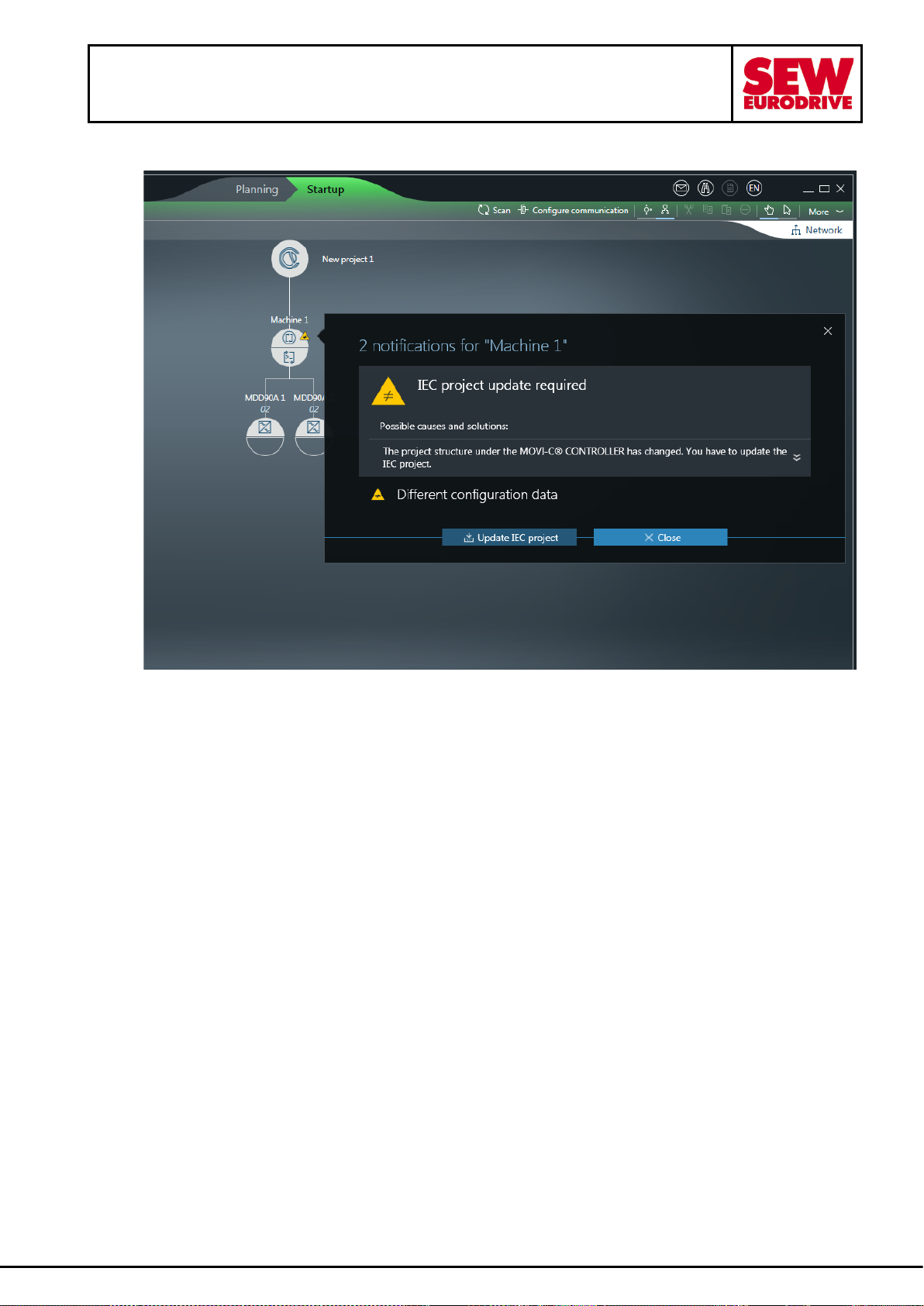
8. At the end of the migration, perform an ordinary IEC project update. This will also update the
configuration data. Finally save the MOVISUITE® project.
 Loading...