

Page 1
AIRLIF
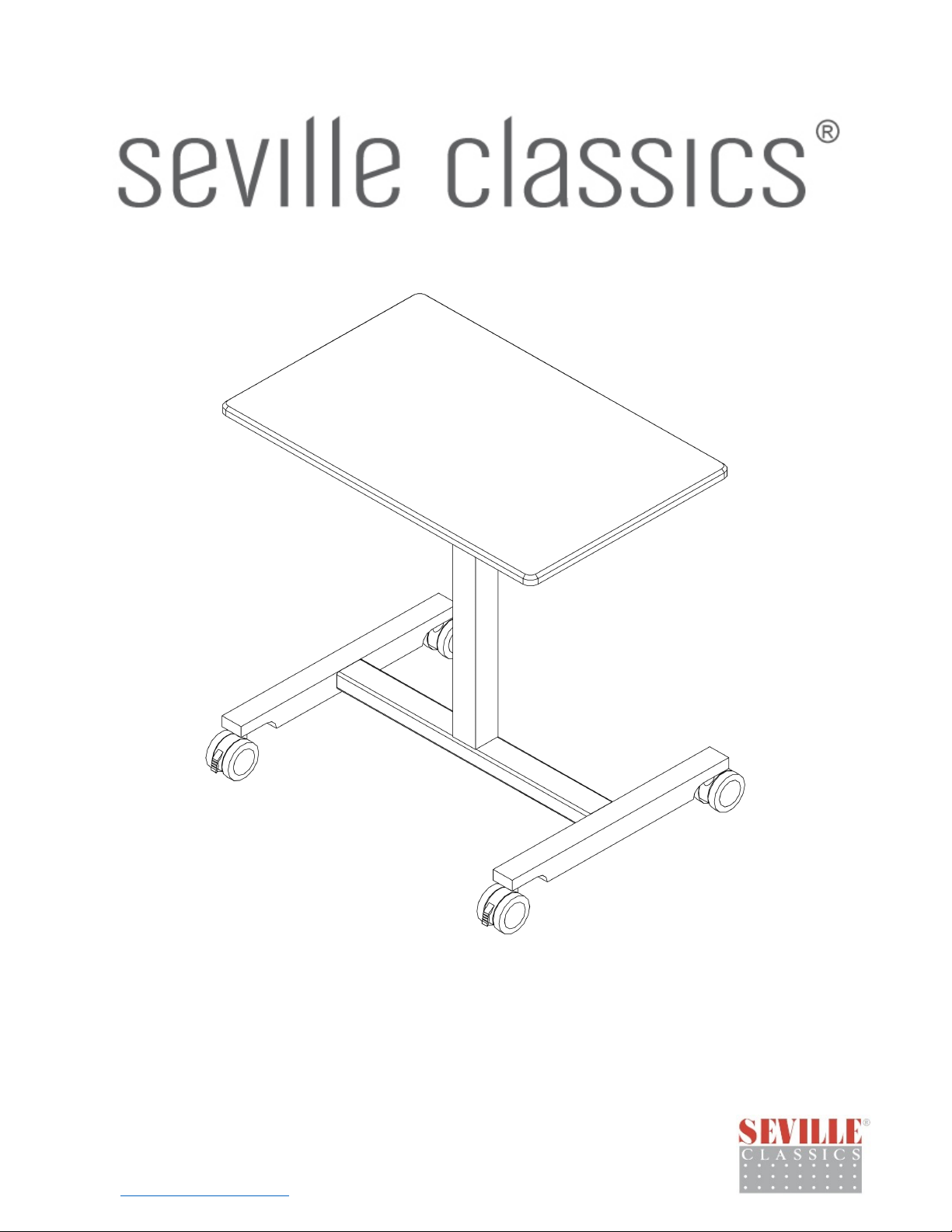
T™ Classic Laptop Mobile Desk Cart
Model #: OFF42630
Thank you for choosing Seville Classics! We hope that you enjoy your new sit-stand desk.
Please read through this user guide for parts list, assembly instructions, frequently asked
questions and further contact information.
Classics
Seville
Torrance, CA 90501 USA
www.sevilleclassics.com
OFF42630V2.7
Page 2
Parts List
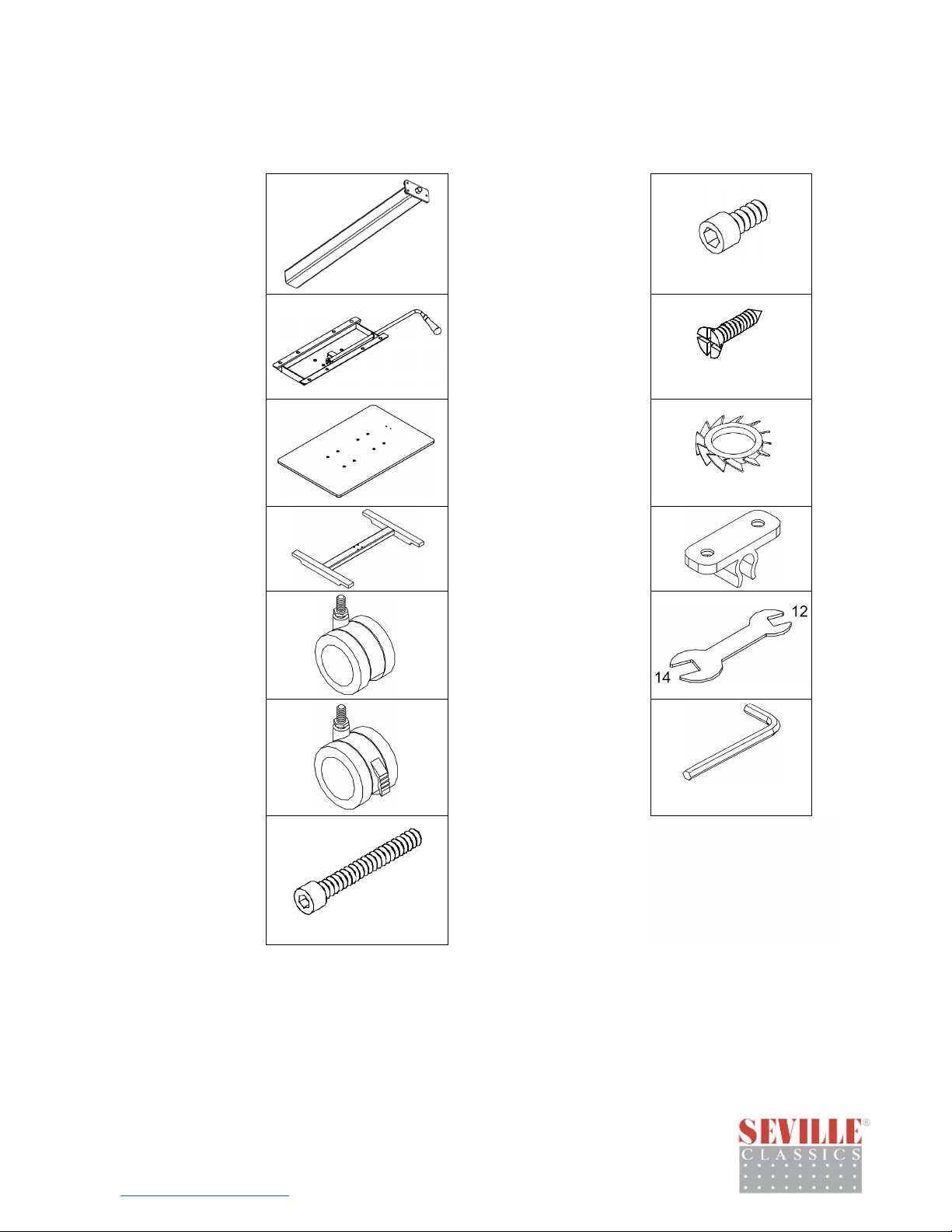
A. Column
B. Mounting
Plate
C. Top
D. Base
E. Casters (2)
H. Medium bolt
I. Screws (2)
J. External-tooth
locking washer (4)
K. Lever clip
L. Wrench
(11)
M6X12
M4X12
M4X12
F. Locking
casters (2)
G. Long bolts
(4)
Please make sure y
If you’re missing
Seville Classics
Torran
www.sevilleclassics.com
ce, CA 90501 USA
parts, contact us for replacements at (800) 323-5565 or
send an email to [email protected]
M. 5 mm Allen key
5 mm
M6X45
ou have all the parts on this list.
OFF42630V2.7
1
Page 3
Assembly
p 1. Remove
Ste
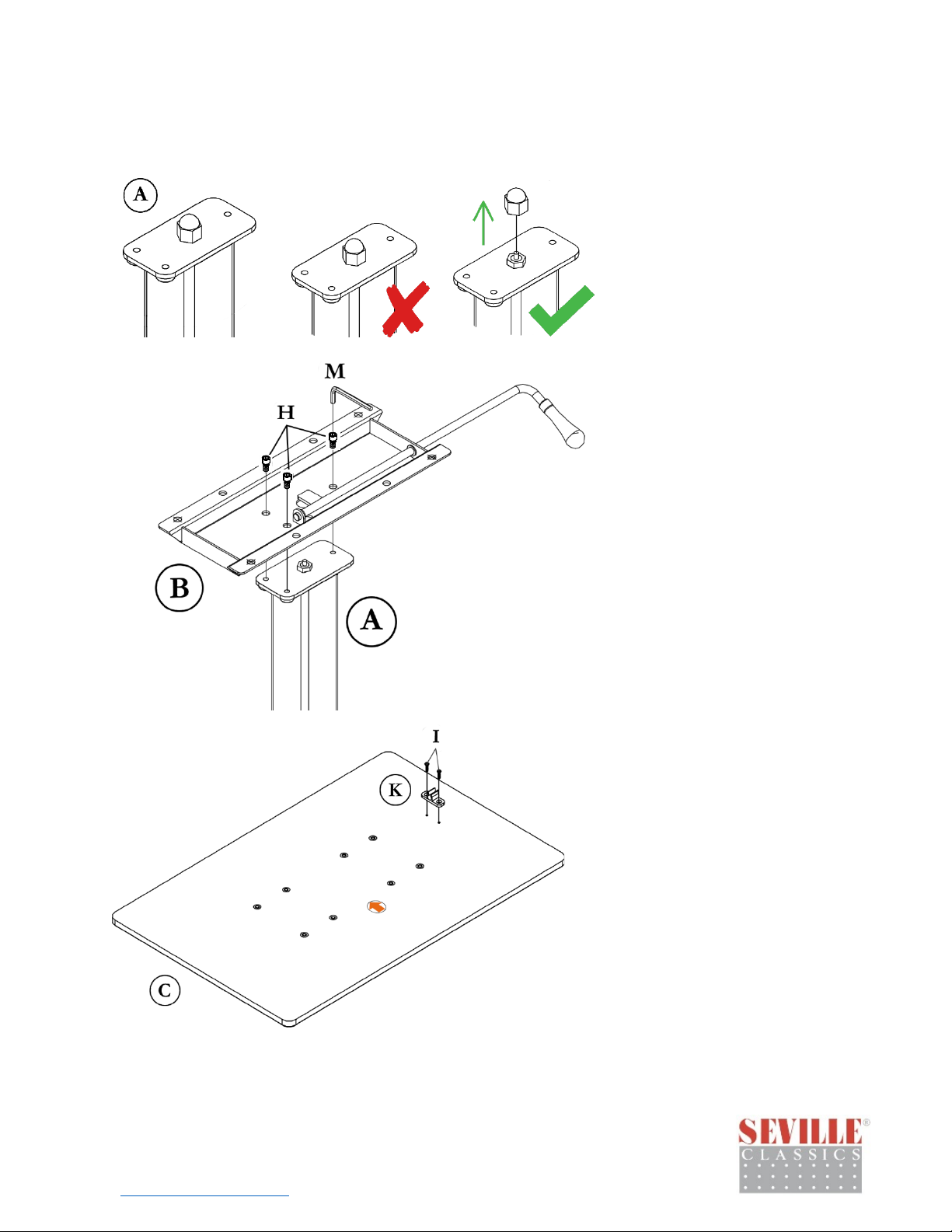
Column Cap
Too
l required: None
Set the column (A) on the floor
with the column plate facing up.
Pull off the plastic cap.
p 2. Install
Ste
Mounting Plate
Too
l required:
5 mm Allen key (M)
Align the three holes in the
mounting plate (B) with the
three holes on the column plate
(A). Affix the mounting plate to
the column with three medium
bolts (H) through the top.
Tighten bolts with 5 mm Allen
key (M) until snug.
ille Classics
Sev
Torrance, CA 90501 USA
www.sevilleclassics.com
2
Step 3.
I
nstall Lever Clip
Too
l required:
Phillips screwdriver
Place the top (C) face-down on a
soft surface, like carpet. Align
the holes in the lever clip (K)
with the small holes on the desk.
Affix lever clip (K) to the top (C)
with a Phillips screwdriver and
two screws (I).
Tighten until snug.
OFF42630V2.7
Page 4
Step 4. Install
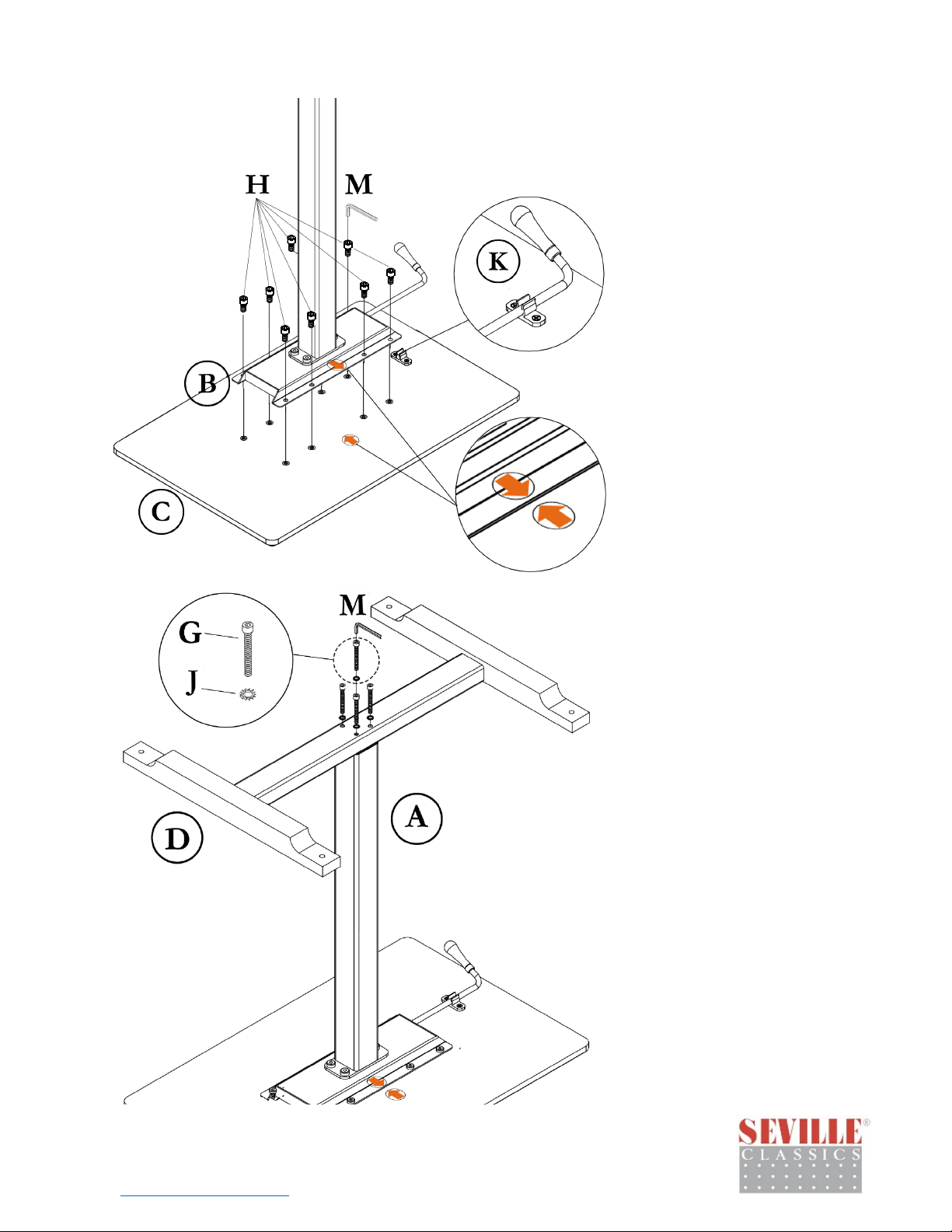
Column to Desktop
Tool: 5 mm Allen key (M)
Turn the column assembly
upside down.
IMPORTANT: Make sure the
arrow stickers on the mounting
plate (B) and the top (C) are on
the same side.
Align the holes on the mounting
plate (B) with the remaining
holes in the desk top (C). Align
the lever with the lever clip (K).
Affix the column assembly (B) to
the desk with eight medium
bolts (H). Tighten bolts with the
Allen key (M) until snug.
Step 5. Install Base
to Column
Tool required:
5 mm Allen key (M)
Align the holes in the base (D)
with the holes in the bottom of
the column (A). Affix with four
long bolts (G) through external-
tooth locking washers (J).
Tighten bolts with a 5 mm Allen
key (M) until snug.
Classics
Seville
Torrance, CA 90501 USA
www.sevilleclassics.com
OFF42630V2.7
3
Page 5
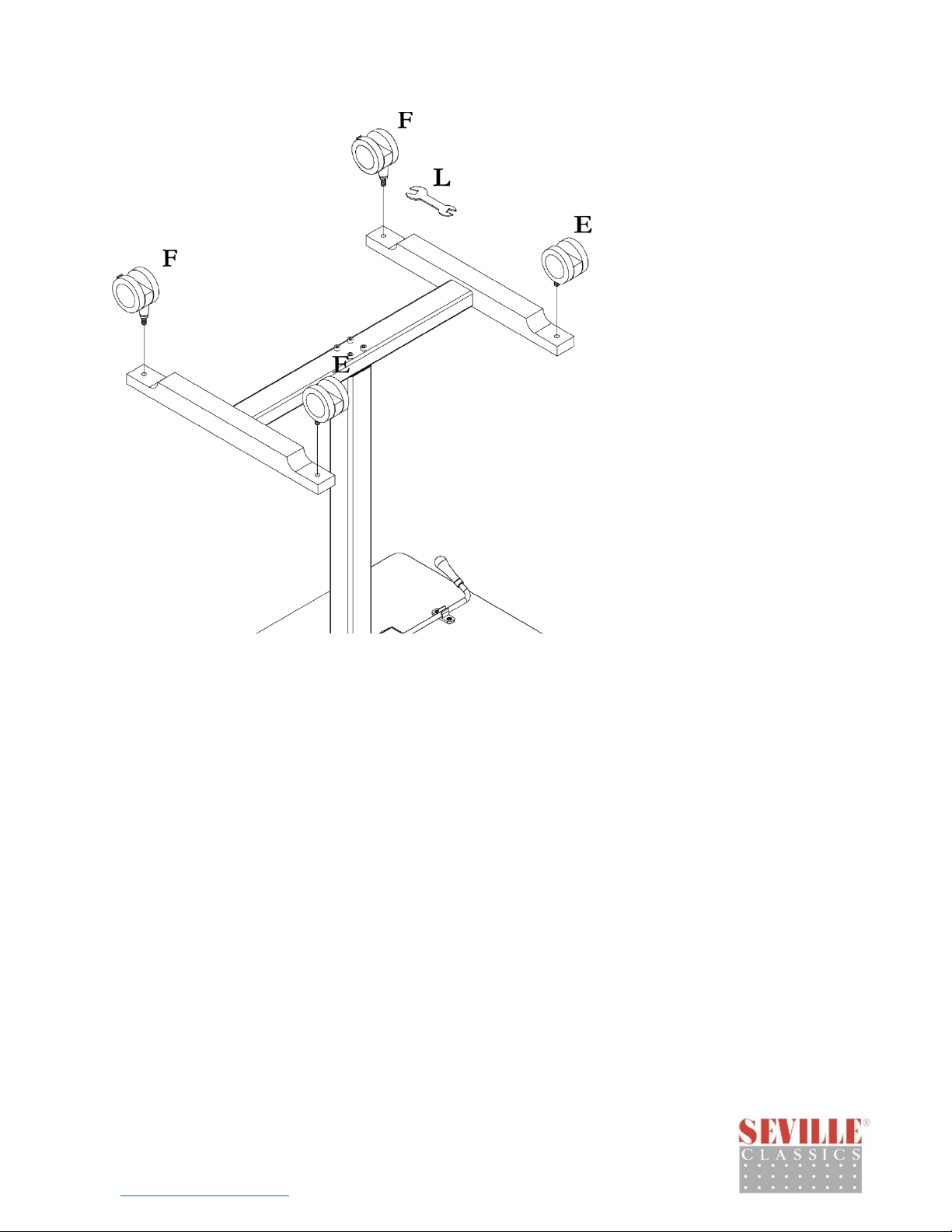
p 6. Install
Ste
Casters
Too
ls required: Wrench (L)
Begin with the two locking
casters (F). Mount the locking
casters to the legs on the same
side as the adjustment lever
handle. Screw in the casters by
hand as far as possible, then
tighten until snug with the
included wrench (L).
Mount the remaining two
casters (E) to the remaining legs
of the desk. Tighten until snug
with the included wrench (L).
Flip the desk on to its wheels.
Congr
ille Classics
Sev
Torrance, CA 90501 USA
www.sevilleclassics.com
atulations! Enjoy Your New AIRLIFT™ Desk!
OFF42630V2.7
4
Page 6

Use
FA
Q. Can I use it without the wheels?
Instructions
1. Roll desk into desired position.
2. Lock casters to prevent the table from rolling.
3. To lift, pull up on the adjustment lever.
4. To lower, pull up on the adjustment lever while pressing down on the table top.
5. Release adjustment lever to lock in table height.
Qs
A. No. The desk base does not sit flat and is unstable wit
Q. How high and how low can my desk go?
A. Maximum height is 41.7 inches. Minimum height is 29.9 inches.
Q. Can I assemble the desk so the lever is on the left?
A. No. The desk may only be assembled in accordance with the directions above.
Q. Help! My desk won't adjust its height!
A. Make sure the plastic cap on the column is removed before assembly, otherwise the lever
won't work and the height won't adjust.
Saf
ety
Do not tip the desk over or place upside down.
Do not place more than 35 lbs. on the desk top.
Cust
omer Service Information
hout wheels.
Telephone: (800) 323-5565
Fax: (310) 533-3899
Hours: 8:30 AM – 4:30 PM (PST)
Sev
ille Classics
Torrance, CA 90501 USA
www.sevilleclassics.com
Email: [email protected]
Homepage: www.SevilleClassics.com
OFF42630V2.7
5
 Loading...