

Page 1

TruVolume HDMI
Volume Leveler
Operation Manual
SES-NORMAL-HDMI
Page 2

SAFETY PRECAUTIONS
1. To prevent re or shock hazard, do not expose this equipment to an environment of high
humidity and/or dust. Do not use in an unprotected outdoor installation or any area
classied as overly damp or wet.
2. The temperature for installation should be kept between 0°C ~ 60°C. Avoid direct sunlight exposure or extreme changes of temperature over a short period of time.
3. Do not disassemble the unit or put it on an unstable base
4. Do not drop it and avoid heavy impact.
5. Ventilation: Any openings in the enclosure are provided for ventilation and to ensure
reliable operation of the unit and to protect it from overheating. These openings, if any,
must not be blocked or covered. This unit should not be placed in a built-in installation
unless proper ventilation is provided.
6. Cleaning: Unplug the unit from the mains outlet before cleaning. Do not use liquid cleaners or aerosol cleaners, only use a damp cloth.
7. Do not overload outlets and extension cords as this may result in a risk of re or electric
shock.
8. Enclosure Entry of any kind is dangerous. Never push objects of any kind, including
liquids, into this unit through openings as they may touch dangerous voltage points or
short-out parts that could result in a re or electric shock.
9. Service: Do not attempt to open or service this unit yourself as opening or removing
covers may expose you to dangerous voltage of other hazards.
10. There are no user-serviceable parts inside the unit. If the unit requires service please
contact your authorized dealer, or an authorized repair service company.
Page 3

Table of Contents
1. Introduction .................................................................. 1
2. Applications ................................................................. 1
3. Package Contents ......................................................... 1
4. System Requirements ................................................... 1
5. Features ....................................................................... 2
6. Specifications ................................................................ 2
7. Operation Controls and Functions ................................. 3
7.1 Top Panel
7.2 Left Side Panel
7.3 Right Side Panel
8. Connection and Installation .......................................... 4
Acronym Complete Term
CEC Consumer Electronics Control
DVI Digital Visual Interface
HDCP High-bandwith Digital Content Protection
HDMI High-Definition Multimedia Interface
SRS Sound Retrieval System
Page 4

1. Introduction
The SESCOM Volume Leveler is an advanced HDMI™ to HDMI audio repeater
and decoder that incorporates SRS TruVolume™ technology. This device, which
prevents annoying fluctuations during commercials or bursting sounds from action
scenes always maintains a perfect volume level. The SESCOM TruVolume Leveler
is the best choice for maintaining a perfect volume level.
2. Applications
Watching movies and TV
Entertainment systems
Listening to your favorite music
3. Package Contents
SRS TruVolume™ HDMI Volume Leveler
5V DC power adaptor
User Manual
4. System Requirements
Input sources such as DVD/ Blu Ray players, Set Top Boxes with HDMI cables
and output devices like amplifiers or TV’s with HDMI cables.
1
Page 5

5. Features
Supports HDMI (with Deep Color Video), HDCP v1.1 and DVI v1.0
Supports HD input/output up to 1080p(24/60)Hz.
Has a repeater function with HDMI signal amplification and equalization.
Supports 2 channel HDMI audio input to HDMI output.
Integrated HDCP encryption for transmitting protected audio and video
content.
Supports CEC bypass.
Regulates and automatically adjusts the volume level of TV/Satellite/Radio
broadcasts
Dynamically boosts low/high frequencies, using an advanced modeling
engine making the entire listening experience come alive, regardless of the
audio level.
HDMI cable distance testing showed that with 1080p/8bit resolution, the
Input source can be up to 15meters away, and with 1080p/12bits it can
be 10 meters away.
HDMI cable distance testing showed that with 1080p/8bit resolution, the
Output source can be up to 10 meters away, and with 1080p/12bits it can
be 15 meters away.
Easy to set up and install, no software required
6. Specifications
Input Port 1 x HDMI
HDMI Input Audio Format 2 channels (PCM 32K/44.1K/48K only)
Output Port 1 x HDMI
HDMI Output Audio Format 2 channels
Power Supply 5V / 1A DC (US/EU standard, CE/FCC/UL certified)
Dimensions(mm) 100 (W) x 70 (D) x 20 (H)
Weight(g) 90
Chassis Material Plastic
Silkscreen Color White Letters on Black
Operating Temperature 0°C ~ 40°C / 32°F ~ 104°F
Storage Temperature 20°C~60°C / -4°F ~ 140°F
Power Consumption 3W
Relative Humidity 20~90% RH (non-condensing)
2
Page 6
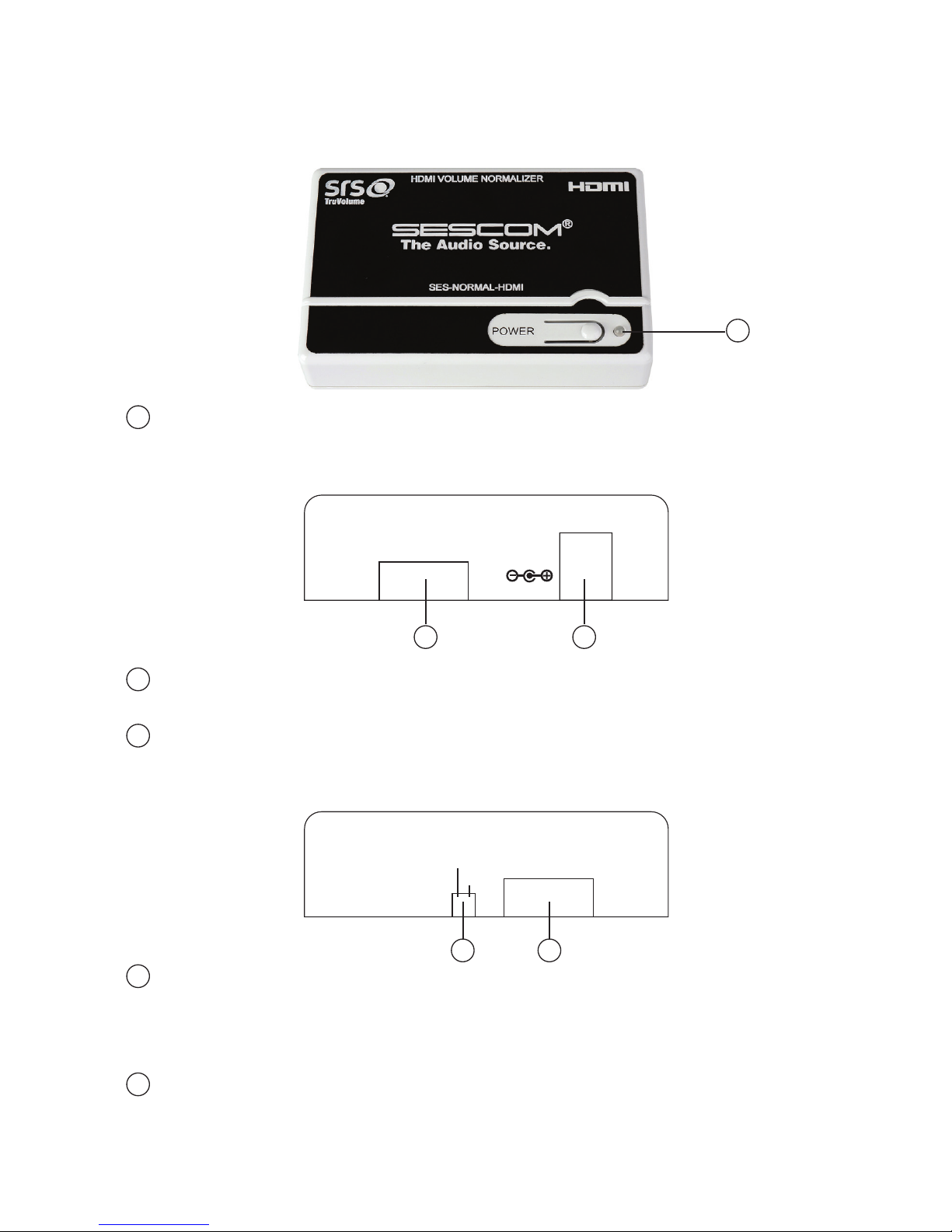
7. Operation Controls and Functions
7.1 Top Panel
1
POWER: Press this button to turn the device on. When the Volume Leveler
is on, pressing it again will put it in standby mode.
7.2 Left Side Panel
1 2
DC 5V
HDMI IN
HDMI in: This slot is where you plug in your source equipment such as a
Set Top Box or DVD player with its HDMI cable.
DC 5V: This slot is where you plug in the power adaptor and connect it to
an AC outlet.
7.3 Right Side Panel
1
OFF
ON
SRS TruVolume
2
SRS TruVolume OFF/ON: Use this switch to turn the SRS TruVolume function
on or off. When switched on the SRS TruVolume will regulate your audio
signal and when switched off the SRS TruVolume will not, so the signal will
bypass the device.
HDMI OUT: This slot is where you connect the device to an external
display, such as a TV or monitor, with an HDMI cable.
3
1
1
1
2
2
HDMI OUT
Page 7
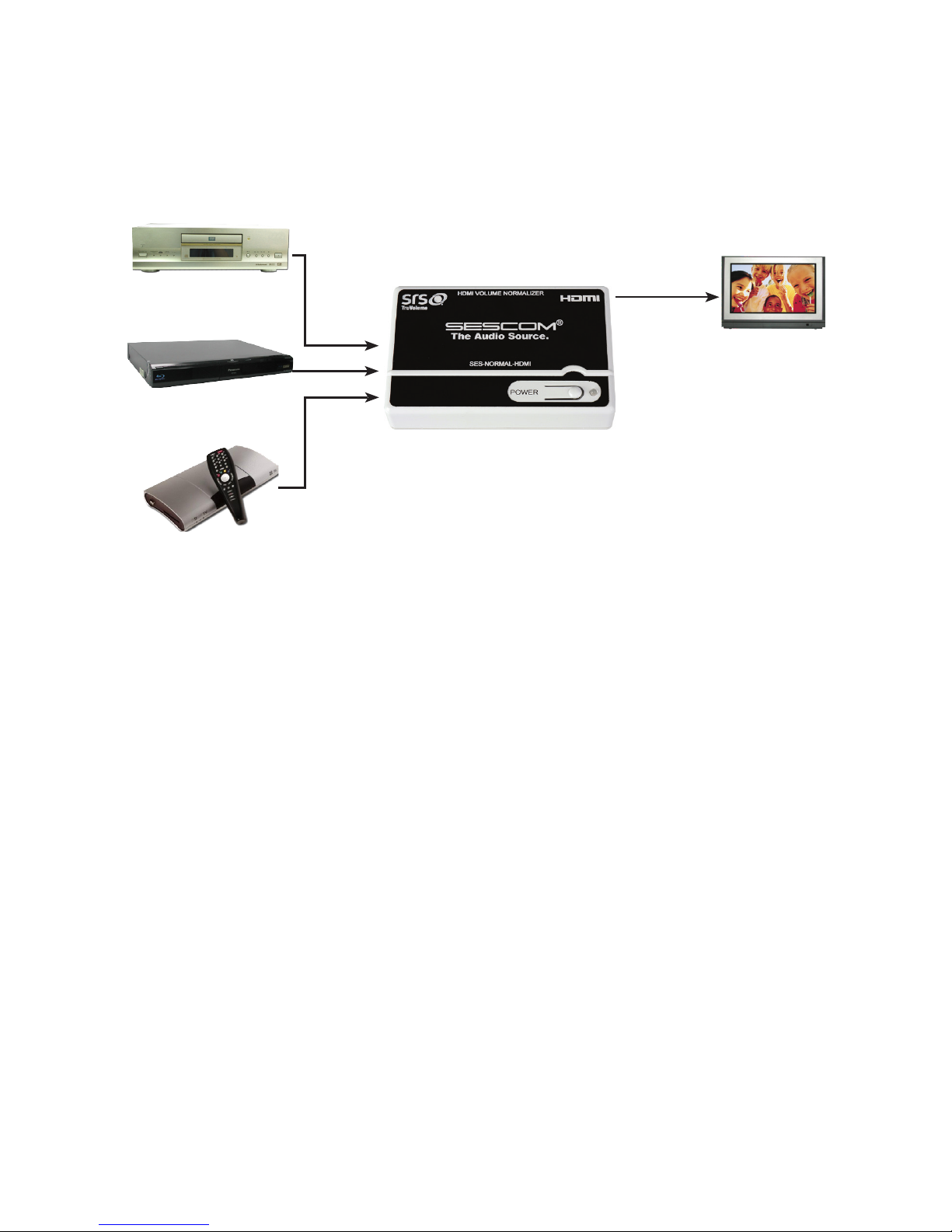
8. Connection and Installation
DVD
Blue Ray
Set-Top-Box
TV
4
Page 8

SESCOM.COM (845) 246-1915
 Loading...