

Page 1
01688-REVA�080414�PORTUGUESE
(01688 is 01834 translated)
MODEL:
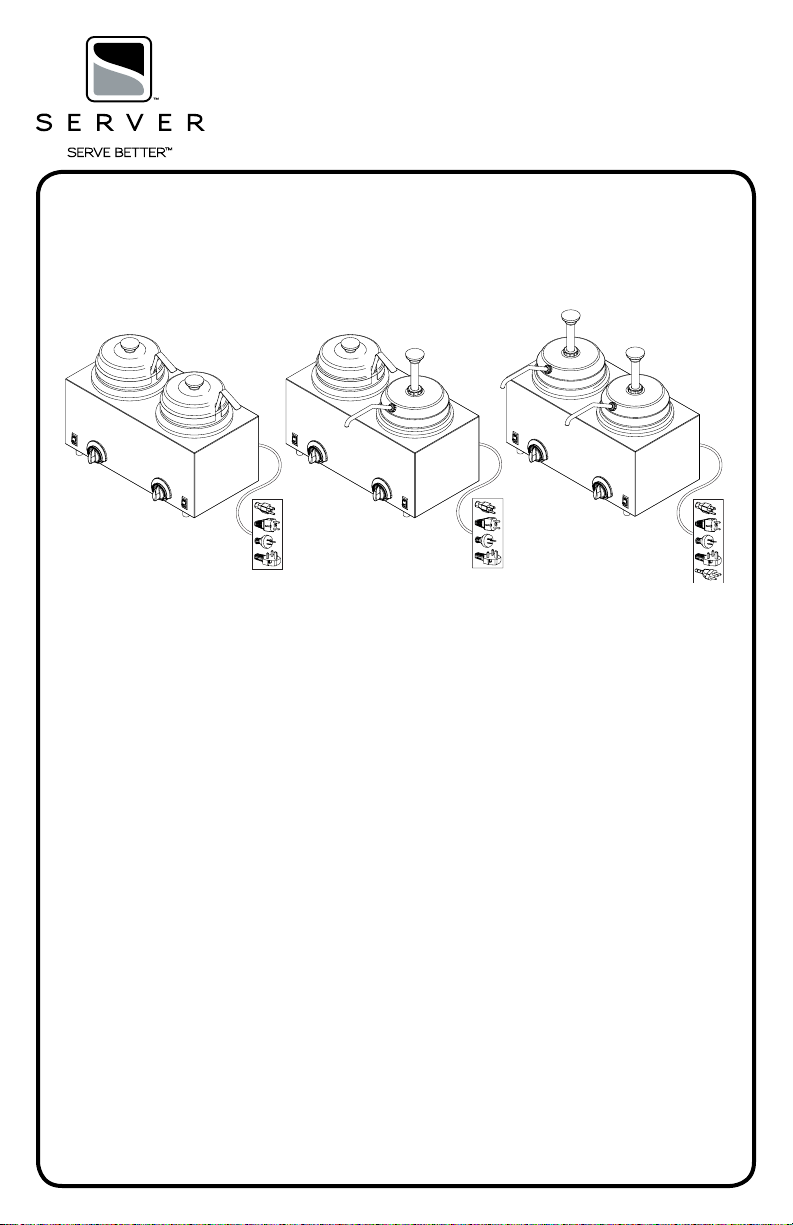
TWIN FOOD SERVER/FOOD SERVER WITH PUMP
TWIN FS
120V
Series 13C
81220
230V Continental Europe
Series 13C
81250
230V Australia
Series 13C
81420
230V United Kingdom
Series 13C
84910
TWIN FS/FSP
120V
Series 13C
81290
230V Continental Europe
Series 13C
80280
230V Australia
Series 13C
80850
230V United Kingdom
Series 13C
84950
TWIN FSP
120V
Series 13C
81230
230V Continental Europe
Series 13C
81260
230V Australia
Series 13C
81460
230V United Kingdom
Series 13C
84990
230V Brazil
Series 13C
86943
Page 2
SAFETY GUIDELINES WHEN
USING THIS UNIT:
C EWarning- Electrical shock could occur:
• This unit must be earthed or grounded.
• This requires all three prongs (terminals) on
cord plug to be plugged into power source.
According to food and safety regulations, most foods
must be stored and/or served at certain temperatures or
they could become hazardous. Check with local food and
safety regulators for specic guidelines.
Be aware of the product you are serving and the
temperature the product is required to maintain.
Server Products, Inc. can not be responsible for
the serving of potentially hazardous product.
Stainless steel is one of the best materials for food
serving and storage, but there are many products which
can corrode it. If you notice corrosion beginning on
any stainless steel surface, you may need to change
the cleansing agent, sanitizing agent, or the cleaning
procedures you are using.
• Products containing: acids, alkalines, chlorine,
or salt can corrode stainless steel.
• Sauerkraut and Au Jus sauces corrode stainless
steel. Server Products, Inc. regrets that we can not
honor Warranty claims on stainless steel parts that
have been affected by sauerkraut
or Aus Jus.
SAFETY GUIDELINES WHEN
CLEANING THIS UNIT:
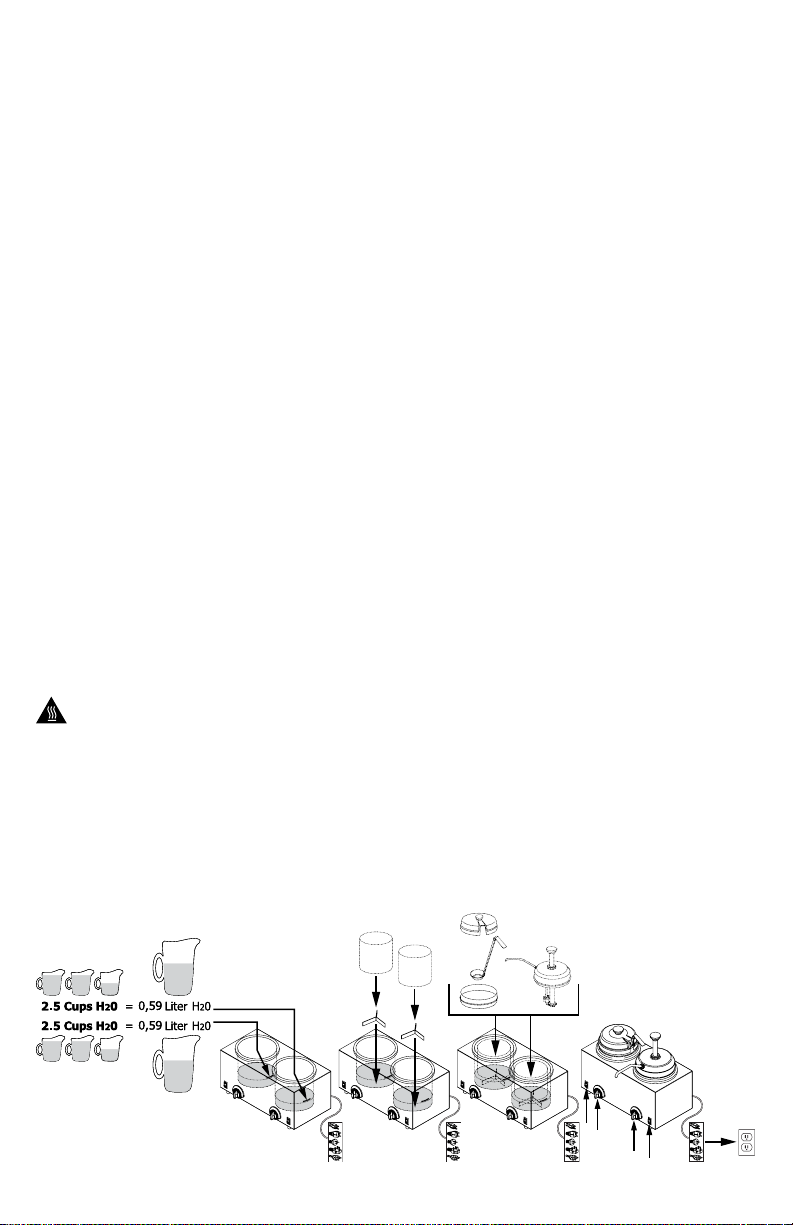
UNIT SET-UP
ALWAYS CLEAN UNIT (AND PUMPS) THOROUGHLY
BEFORE EACH USE. SEE UNIT TAKE-DOWN, SAFETY
GUIDELINES AND CLEANING. SEE SEPARATE PUMP
MANUAL FOR PUMP INSTRUCTIONS.
1 FILL WATER VESSEL BASINS OF UNIT WITH
WATER.
• Fill to embossed water level line inside water
vessel basin
• 2.5 cups (20 oz) water
• DO NOT OVER FILL.
2 INSTALL SPACERS AND PRODUCT TINS(#10 CANS)
OR STAINLESS STEEL JARS INTO WATER VESSEL
BASINS.
• Product being served must always be inside
product tin(#10 can) or stainless steel jar and
never placed directly into water vessel.
3 INSTALL PUMP(S) OR LID(S) AND ADAPTER(S)
INTO/ONTO PRODUCT TINS(#10 CANS) OR
STAINLESS STEEL JARS.
4 PLUG CORD INTO POWER SOURCE.
5 PRESS SWITCH(ES) TO THE “ON” POSITION.
6 SET THERMOSTAT KNOBS TO RECOMMENDED
PRODUCT SERVING TEMPERATURES.
• To heat unit faster, thermostat knobs may be
rotated to maximum setting TEMPORARILY.
Server Products Inc. claims no responsibility
for actual serving temperature of product. It is
the responsibility of the user to ensure that any
product is held and served at a safe temperature.
FOR PRODUCTS BEING SERVED WHICH REQUIRE
RETHERMALIZATION OR NEED TO ACHIEVE SAFE
HOT FOOD HOLDING, SEE RETHERMALIZATION AND
HOT FOOD HOLDING.
Ensure unit is “OFF” and unplugged.
Caution- Hot:
• If unit has already been in use, unit may still
be hot. Allow unit to cool before continuing.
C EWarning- Electrical shock could occur:
• Electrical components of unit could be
damaged from water exposure or any liquid.
• Never immerse unit into water or any liquid.
• Never use any water jet or pressure sprayer
on unit.
Page 3
RETHERMALIZATION AND
HOT FOOD HOLDING
(National Sanitation Foundation)
NSF International and
(American National Standards Institute)
ANSI list this unit as a “Rethermalization
and Hot Food Holding unit (Standard 4)”
Rethermalization of food products is achieved by this
appliance when it elevates the food product temperature
from a refrigerated 40°F (4°C) to a safe food cooked
temperature of 165°F (74°C) within a period of 2 hours.
Hot Food Holding is achieved with this appliance when
it maintains a product temperature at or above 150°F
(66°C), in all locations throughout the product, for a
minimum of 2 hours, even if any lid, cover, or pump is
removed. The lid, cover, or pump is recommended to
help maintain product temperature.
PRE-HEAT FOR AT LEAST 30 MINUTES WITH:
• correct amount of water in water vessel basins
• pump(s) or lid(s) installed
• thermostat knob(s) set at maximum setting
MAXIMUM CAPACITY OF FOOD PRODUCT MUST BE
LIMITED TO:
• 96 oz. (#10 can) or 3 quarts (12 cups)
• DO NOT OVER FILL.
AFTER PRE-HEAT:
• Thermostat knob must remain set at maximum
setting for entire duration of Hot Food Holding
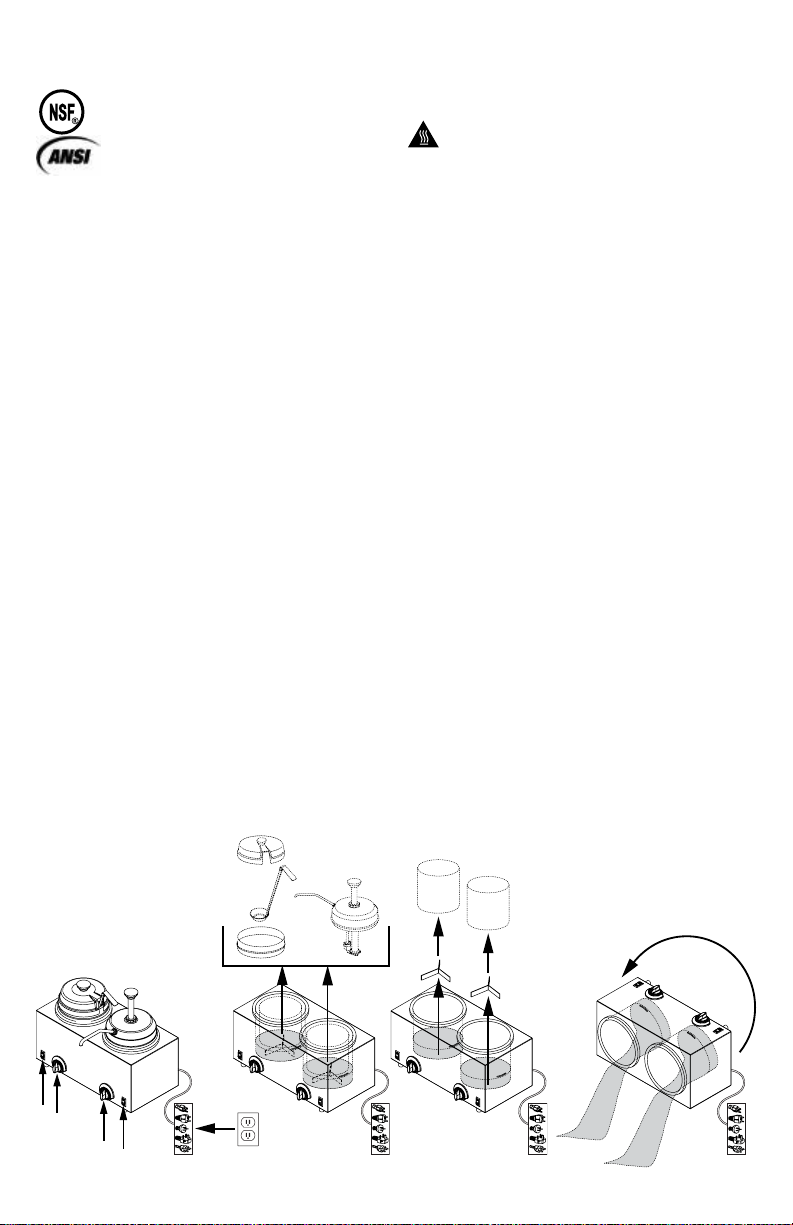
UNIT TAKE-DOWN
1 PRESS SWITCHES TO “OFF” POSITION.
2 UNPLUG CORD.
Caution- Hot:
• If unit has already been in use, unit may
still be hot. Allow unit to cool before
continuing.
3 REMOVE PUMP(S) OR LID(S) AND ADAPTER(S)
FROM PRODUCT TINS(#10 CANS) OR STAINLESS
STEEL JARS.
4 REMOVE PRODUCT TINS(#10 CANS) OR
STAINLESS STEEL JARS AND SPACERS FROM
WATER VESSEL BASINS.
5 EMPTY WATER OUT OF WATER VESSEL BASINS.
• Tip unit over a drain to pour water out.
SEE SEPARATE PUMP MANUAL FOR PUMP
INSTRUCTIONS.
Page 4

UNIT CLEANING
BEFORE FIRST USE AND AFTER USE DAILY OR
REGULARLY, DISASSEMBLE AND CLEAN PARTS.
FOR SAFE AND PROPER CARE, AND TO PREVENT
CORROSION, OF PARTS, IT IS IMPORTANT TO
CLEAN, RINSE, SANITIZE, AND DRY PARTS DAILY OR
REGULARLY. FAILURE TO COMPLY WITH ANY OF THESE
INSTRUCTIONS MAY VOID UNIT WARRANTY.
1 SEE UNIT TAKE DOWN. SEE SEPARATE PUMP
MANUAL FOR PUMP INSTRUCTIONS.
2 ENSURE UNIT IS “OFF” AND UNPLUGGED.
C EWarning- Electrical shock could occur:
• Electrical components of unit could be
damaged from water exposure or any liquid.
• Never immerse unit into water or any liquid.
• Never use any water jet or pressure sprayer
on unit.
3 WASH ALL REMOVABLE PARTS WITH
DISHWASHING DETERGENT AND HOT WATER.
RINSE THOROUGHLY AND DRY WITH A CLEAN
SOFT CLOTH.
• A general purpose, nonabrasive cleaner may be
used on hard to remove food deposits.
• A mildly abrasive NYLON or brass brush may be
used to remove any stubborn food or mineral
deposits on interior surfaces of unit.
• Do not use abrasive cleansers, scrapers, steel
pads, steel wool, or other cleaning tools that can
scratch surfaces.
• Do not use caustic cleansers nor cleansing agents
with high concentrations of acid, alkaline or
chlorine. These agents can corrode metal parts.
• Fully rinsing all parts can help prevent corrosion.
• Various elements and minerals, such as chlorides
in tap water, can accumulate on stainless steel
parts and create corrosion.
• To prevent corrosion on any stainless steel parts,
it is important to fully dry with a clean soft cloth
regularly.
4 WIPE EXTERNAL SURFACES OF UNIT WITH A
CLEAN DAMP CLOTH. DRY WITH A CLEAN SOFT
CLOTH.
• A nontoxic glass cleaner may be used for cleaning
any stainless steel parts.
5 SANITIZE ALL PARTS FOLLOWING LOCAL
SANITIZATION REQUIREMENTS. ALL PARTS IN
CONTACT WITH FOOD MUST BE SANITIZED.
• Allow parts to fully air dry after sanitization.
GENERAL SERVICE, REPAIR,
OR RETURNS
Before sending any item to Server Products for service,
repair, or return, contact Server Products customer
service to request a Return Authorization Number.
Merchandise must be sent to Server Products with this
number.
Merchandise being returned for credit must be in new
and unused condition and not more than 90 days old
and will be subject to a 20% (percent) restocking
charge. Electrical parts (thermostats, heating elements,
etc.) are not returnable.
Server Products maintains a fully staffed service
department with highly skilled factory trained personnel.
Service is extremely prompt. Under normal
circumstances, a repaired unit is shipped out the day
after it is received. Labor charges are reasonable.
SERVICE
Contact your dealer or Server Products Inc.
customer service department for the following:
ORDERING REPLACEMENT PARTS
Be prepared to give this information:
• Model Letters/Name/Numbers
• Part Numbers- P/N
• Series Numbers/Letters
• Part Description
This information and other important data is stamped
on the lid or cylinder of pumps or on the bottom or
back side of every unit.
Servicing Cord
Specic tools are required for safe and proper power
supply cord removal and installation. If cord must be
replaced, only a representative of the OEM (original
equipment manufacturer) or a qualied technician may
replace cord. Cord must meet code designation H05
RN-F requirements.
SERVER PRODUCTS
LIMITED WARRANTY
All Server Products equipment is backed by a
two-year limited warranty against defects in materials
and workmanship. For complete warranty information
go to: www.server-products.com
UNIT TROUBLESHOOTING
Possible Problem:
• Unit does not heat.
Possible Solutions:
• Ensure cord is securely plugged in.
• Ensure power is available from source.
• Ensure unit is on.
• Ensure thermostat knobs are set correctly.
Server Products Inc.
3601 Pleasant Hill Road
Richfield, WI 53076 USA
262.628.5600
800.558.8722
262.628.5110
www.server-products.com
 Loading...