

Page 1

CHIMERA
MANUAL V
.1.2
1
CHIMERA™ OPTO COMPRESSOR
Thank you for your purchase of the Serpent Audio Chimera™. This unit is proudly 100%
designed and built in the USA. As an owner of a High Quality Serpent Audio piece of gear you
can expect years of great use and customer service from us and our equipment. This is
possible through our dedication to solid design, high-end components, and research from our
industry pros.
For any questions or repairs please contact us at: [email protected]
THANK YOU
www.serpentaudio.com
Page 2

CHIMERA
MANUAL V
.1.2
2
TABLE OF CONTENTS:
DESCRIPTION / OVERVIEW 3
SPECIFICATIONS 3
FRONT PANEL CONTROLS 4
INSTALLATION 7
MAINTENANCE AND CLEANING 7
WARRANTY 7
www.serpentaudio.com
Page 3

CHIMERA
MANUAL V
.1.2
3
1. DESCRIPTION / OVERVIEW:
The Chimera™ is a single channel 500 series compatible Opto compressor, and can be used for mono
applications, or can be paired with a second Chimera™ for stereo applications. The Chimera™ contains
a transformer input & output, as well as all discrete circuitry and a Class AB transistor output circuit. At
the heart of the Chimera™ is the T4B optical cell, which utilizes an Electroluminescent (EL) panel and
photo resistor cells to achieve gain reduction.
2. SPECIFICATIONS:
Maximum Current Consumption: 70mA @ +/-16V
Input: Transformer Balanced Input
Output: Transformer Balanced Output
Maximum Input Level: +16dbu
Maximum Output Level: +19dbu
Maximum Output Load: 600 Ohm
Attack Time: 1.5ms or Less (Program Dependent)
Release Time: Program Dependent
Gain: 50db (+/-1dbu)
Gain Reduction Element: T4B Optical Cell
Frequency Response: (20Hz-20KHz)
Noise Floor: -80dbu
www.serpentaudio.com
Page 4

CHIMERA
MANUAL V
.1.2
4
3. FRONT PANEL CONTROLS:
COMP / BYPASS:
This is a true hardwire relay bypass. The unit is engaged when the toggle switch is in the up “COMP”
position and bypassed when the toggle switch is in the down “BYPASS” position.
Note: Use this to quickly and easily hear what the Chimera™ is doing to your audio. Also use
this to help balance and adjust unity gain through the unit.
VU / GR:
The Chimera™ VU meter can be used to indicate both gain reduction and the output signal level
(+4dbu=0VU). To monitor gain reduction, set the toggle switch in the up “G/R” position. To monitor the
output signal level, set the toggle switch to the down “VU” position.
Note: The VU meter is directly connected to the output signal, so some additional distortion from
the VU meter itself will occur when the toggle switch is set to monitor the output level. It is
recommended to set the toggle switch to monitor gain reduction during final mix downs or printing
to avoid any additional distortion.
GAIN:
A fully adjustable rotary potentiometer, the “GAIN” knob is used to adjust the overall output signal level.
This can also be used to adjust make-up gain when compression is occurring. Turning the knob
clockwise will increase the amount of output gain occurring. Turning the knob fully counterclockwise will
result in no signal level present at the output.
PEAK (Peak Reduction):
A fully adjustable rotary potentiometer, the “PEAK” knob is used to adjust the amount of compression
taking place within the unit. Turning the knob clockwise will increase the amount of compression
occurring. Turning the knob fully counterclockwise will result in no compression.
FLAT / HF (High Frequency Boost):
The High Frequency Boost “HF” control affects the frequencies going to the internal sidechain (In any
compressor, the internal sidechain is what controls the compression taking place). Please note, this
control does not filter the audio frequencies themselves, but rather the frequencies that are triggering
compression to occur. High Frequency mode is engaged by placing the toggle switch into the right “HF”
position. While in HF mode, frequencies above 1KHz will be compressed more than lower frequencies,
perfect for vocal and/or de-essing duties.
COMP / LIMIT:
The “COMP / LIMIT” switch affects the overall compression curve within the internal sidechain. The
Default setting is “COMP”. When the toggle switch is set to the right “LIMIT” setting, a higher
compression ratio will result. The effects of limit mode are most noticeable when the unit is in heavy gain
reduction.
LINK:
The Chimera can be stereo linked with a second unit for stereo applications. The units are linked via the
500 series card edge, so no additional cables are required. Stereo mode is enabled by placing the Link
toggle switch on both units to the right “LINK” position.
www.serpentaudio.com
Page 5

CHIMERA
MANUAL V
.1.2
5
LINK ADJUST:
The “LINK ADJ” is used to calibrate two Chimera™ units for stereo use, however it also effects the
amplification of the signal level within the internal sidechain.
Note: Over amplification of the sidechain signal may result in compression artifacts and / or
oscillation of the internal sidechain (will be evident when in “HF” mode and “PEAK” knob is turned
fully clockwise). The “LINK ADJ” can be adjusted by inserting a small phillips head screw driver
into the hole located on the front panel above the “LINK ADJ” text and following the instructions
below. To calibrate the internal sidechain to factory default settings for mono use, please follow
step 1 below. To calibrate the internal sidechain for both mono & stereo use, please follow both
Steps 1 & 2 below.
Step 1: Sidechain Calibration:
1) Turn the “LINK ADJ” screw fully clockwise.
2) Set the “G/R / VU” toggle switch to the “G/R” position.
3) Set “FLAT / HF” toggle switch to the “FLAT” position.
4) Set “OFF / LINK” toggle switch to the “OFF” position.
5) Set the “Peak” knob to the fully counterclockwise “0” position.
6) Send a 1KHz test tone to the unit and adjust the “GAIN” knob so that the signal reads -10db in
your DAW.
7) Turn the “PEAK” knob until the VU meter indicates -4db of compression (DAW should now read
approx. -14db)
8) Slowly turn the “LINK ADJ” screw counterclockwise until the VU meter indicates only -1db of
compression (DAW should now read approx. -11db)
Note: If compression artifacts / oscillation still occur when “HF” mode is engaged and the Peak
knob is turned fully clockwise, simply continue to turn the “LINK ADJ” screw counterclockwise
until compression artifacts cease. The goal is to have the “Link ADJ” screw turned as fully
clockwise as possible but just to the point where compression artifacts do not occur. Generally,
following the steps above for a 3db drop will produce this result.
Step 2: Stereo Calibration (Two Chimera units required):
1) Set the “G/R / VU” toggle switch to the “G/R” position on both units.
2) Set “FLAT / HF” toggle switch to the “FLAT” position on both units.
3) Set “OFF / LINK” toggle switch to the “OFF” position on both units.
4) Set the “PEAK” knob to the fully counterclockwise “0” position on both units.
5) Send a 1KHz test tone to both units and adjust the “GAIN” knobs on both units so that the signals
both read -10db in your DAW.
6) Turn the “PEAK” knobs on both units until both VU meters indicate -4db of compression (DAW
should now ready approx. -14db on both channels)
7) Turn the “OFF / LINK” toggle switch on both units to the “LINK” position.
8) Determine which of the two units is indicating more gain reduction on the VU meters. On only the
unit that is indicating more gain reduction, slowly turn the “LINK ADJ” screw counterclockwise on
that unit until both units indicate the same amount of gain reduction on the VU meters.
9) The units are now calibrated for stereo use.
www.serpentaudio.com
Page 6
CHIMERA
MANUAL V
.1.2
6
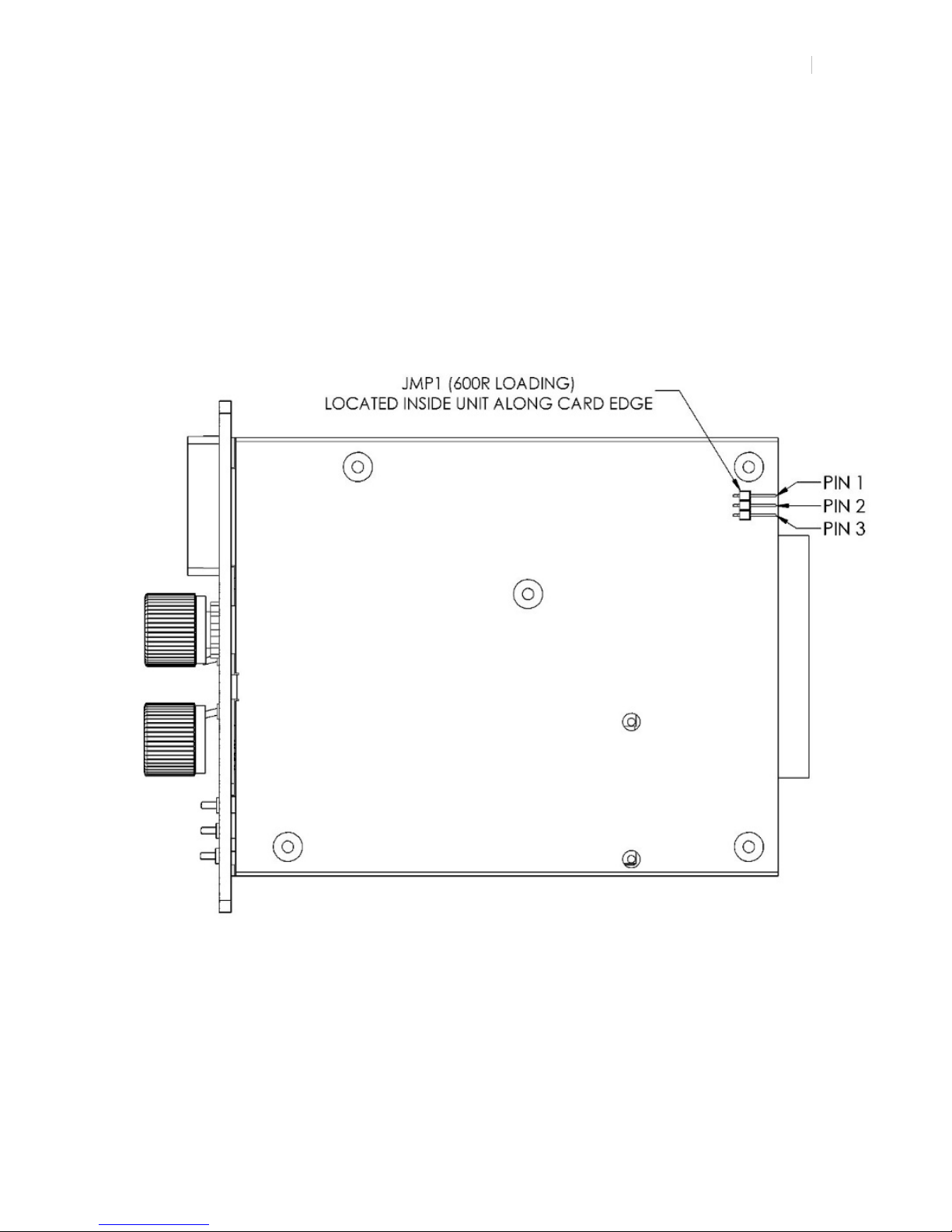
600R Loading Jumper:
The Chimera™ allows for easily terminating the output signal with a 600R load for optimal signal transfer
for use with both vintage and modern gear.
Note: When connecting the Chimera’s output to vintage/600R equipment (typically known as
“bridging”), the loading jumper should be disabled (connected to pins 2 & 3). When connecting
the output to modern impedance equipment, the Loading jumper should be enabled (connected
to Pins 1 & 2). The Chimera™ is factory set with the jumper enabled. See diagram below.
www.serpentaudio.com
Page 7

CHIMERA
MANUAL V
.1.2
7
4. INSTALLATION:
The Chimera™ is a 500 series compressor. It requires one channel in a 500 series compatible rack. Be
sure to safely and securely seat the edge card of the Chimera into the edge connectors of your 500 rack.
Note: The Chimera™ can also be used in a 51x rack. If you do we suggest that you place a small
piece of card board into the bottom 2 fingers of the 51x edge connector in to insure that you have
the Chimera in the proper alignment to be compliant with the standard VPR alliance.
5. MAINTENANCE AND CLEANING:
Normal cleaning and maintenance practices should be followed with the Chimera™ as all of your other
studio gear. The Chimera uses high quality components, and sealed pro-audio switches and pots, so the
switches and pots do not require any regular cleaning.
6. WARRANTY:
The Chimera™ is covered under a limited warranty from manufacturer defect for a period of 1 year from
date of purchase by the original owner, subject to factory inspection. Warranties are tracked by serial
number. Warranties are non-transferrable.
Warranty does not cover loss or theft, nor does coverage extend to damage caused by misuse, abuse,
neglect, unauthorized modification or tampering, improper storage conditions, power surges, lightening,
or other natural disasters. Warranty does not cover wear and tear items (such as pots and switches) or
cosmetic wear. Shipping and transport damages are not covered under warranty.
In the event of required maintenance within the warranty period, unit should be returned to Serpent Audio
(or authorized repair facility). Inbound freight charges are the responsibility of the end user. Warranty
does not cover return overnight or express shipping charges.
Serpent Audio does not authorize field repairs. Any modifications/attempted repairs by unauthorized
personnel or tampering/ removal of the warranty seal or serial number label will void the warranty.
Repairs outside of the warranty period will be subject to parts and labor charges determined at the time of
repair.
Serpent Audio reserves the right to alter the hardware, software, documents, and design of its products
without notice.
Email: [email protected]
www.serpentaudio.com
 Loading...