

Page 1
Page 2

SEQUENTIAL MG40AA
Publications Department January, 1985
MODEL 400
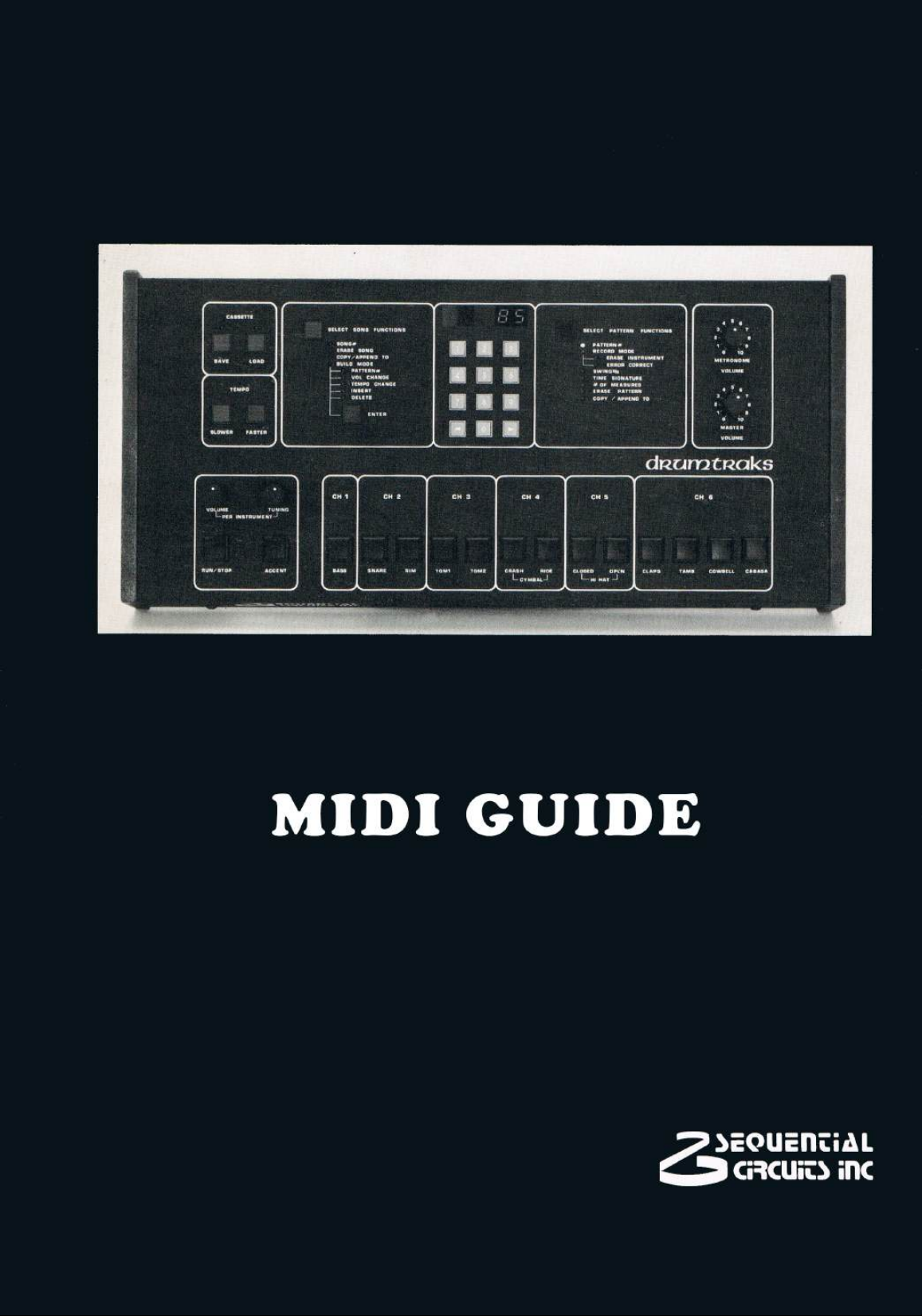
DRUMTRAKS
MIDIGUIDE
©1985 by SEQUENTIAL
All rights reserved.
New layout, edited and reprinted 2010 on VINTAGE PLANET
Page 3

Page 4

SEQUENTIAL MG40AA
Publications Department January, 1985
MODEL 400
DRUMTRAKS
MIDIGUIDE
page
1 INTRODUCTION 2
2 STANDARD VERSION 0_4 3
POWER-ON DEFAULT CONDITIONS 3
HIDDEN FUNCTIONS 4
MIDI IMPLEMENTATION (0_4) 6
Table 2.1 MIDI Key Assignment 9
Figure 2.1 MIDI Drum Key Assignment 9
Table 2.2 Data Dump Format 10
Table 2.3 Song Pointers 10
Table 2.4 Pattern Pointers 11
Table 2.5 Song Data 11
Table 2.6 Pattern Data 12
Table 2.7 Miscellaneous Parameters 13
3 OPTIONAL VERSION 0.5 14
POWER-ON DEFAULT CONDITIONS 15
HIDDEN FUNCTIONS 15
PROGRAMMING DRUM TUNINGS 17
“Pitch Keys” 17
Figure 3.1 MIDI Key Assignment 17
PITCH wheel 18
PROGRAMMING DRUM VOLUMES WITH MOD WHEEL 19
MIDI IMPLEMENTATION (0_5) 20
Table 3.1 MIDI Drum Key Assignment 25
Table 3.2 MIDI Pitch Key Assignment 25
Table 3.3 Data Dump Format 26
Table 3.4 Song Pointers 26
Table 3.5 Pattern Pointers 26
Table 3.6 Song Data 27
Table 3.7 Pattern Data 28
Table 3.8 Miscellaneous Parameters 29
Page 5

2 MC400A
1 INTRODUCTION
This MIDIGUIDE provides more recent information than is contained in the
Drumtraks Operation Manual (CM400).
The two most important applications for the Drumtraks' MIDI are 1) for
synchronizing external sequencers, and 2) for creating Drumtraks patterns using
MIDI-equipped keyboards, eliminating the need to "overdub" different volumes
and tunings.
As there have been changes to the Drumtraks' software since it’s introduction in
December 1983, this MIDIGUIDE contains control summaries for two software
versions. 0_4 is the most recent software version with which Drumtraks are
shipped, and replaces 0_3, fixing some operational bugs. 0_4 is a standard
software version, and may be installed under warranty, free of charge.
0_5 allows Drumtraks’ volumes and tunings to be programmed from
MIDI-equiped keyboards using the PITCH and MOD Wheels, or with a new "pitch
key" system. 0_5 is a software option, and must be purchased through Sequential
or any authorized Sequential service center.
Should you require more than the standard operational instructions for a specific
application, the MDI implementations for both software versions describe the
Drumtraks' MIDI vocabulary.
Page 6

2 STANDARD VERSION 0_4
Released in May, 1984, the 0_4 software adds the following features to the
Drumtraks:
CLK OUT is enabled during pattern recording.
CLK IN can be used during recording.
Clock Out is active during CLK IN.
MIDI Mode 1 can be selected from the front panel.
MIDI Mode 3 can be selected from the front panel.
New Memory Clear operation. This is now more difficult to do by accident.
Songs can be started from any step while in Build Mode.
Except for these additions, operation of the Drumtraks by itself or over MIDI, is
the same as described in the Drumtraks Operation Manual (CM400). For your
convenience, a summary of all the Drumtraks’ front panel “hidden functions” is
provided on the following page.
POWER-ON DEFAULT CONDITIONS
When the Drumtraks power is switched on, the Drumtraks is in MIDI Mode 1
(OMNI On/MONO Off). The Basic Channel remains where it was last set,
unaffected by the power being switched off. (The Drumtraks is set to Channel 15
at the factory).
“Pads Out” and the external clock input are initially disabled, and can be enabled
with the front panel controls (see following page)
MC400A 3
Page 7

"HIDDEN" FUNCTIONS ( Software version 0_4 )
* Clear All Memory
Hold [7], [8], [9], [INC], [DEC], [FASTER] and [SLOWER].
* Enable External Clock Input
Hold both [TEMPO] switches.
Press [ENTER].
This selects 24 ppq clock input rate, lighting the far right decimal point.
If desired, press [DEC] once for 48 ppq, or twice for 96 ppq.
Each time [DEC] is pressed, the lit decimal point moves
left one digit.
* Enable MIDI Clock Input
Hold both [TEMPO] switches.
Press [ENTER].
Press [DEC] three times.
This lights the decimal point between the two left display digits.
* Disable External or MIDI Clock Input
Hold both [TEMPO] switches.
Press [ENTER].
* Enable "Pads Out"
Hold [ENTER].
Press 4.
Manually play the drums you want transmitted over MIDI.
If "Pads Out" is enabled and drums are played, either manually or during pattern
playback, "note on" and "note off" MIDI data is transmitted on the Basic Channel.
If another Drumtraks receives this data, it plays the same drums. If, on the other
hand, a synthesizer receives this data, it plays notes corresponding to the drums
played. (See EXTERNAL INSTRUMENT CONTROL in the Drumtraks
Operation Manual).
4 MC400 A
Page 8

* Disable "Pads Out"
Hold [ENTER].
Press 5.
* Select MIDI Mode 1 (OMNI On/MONO Off)
Hold [ENTER].
Press 6.
When in Mode 1, the Drumtraks transmits Note On/Off data on the Basic
Channel, and receives MIDI data from all 16 channels.
* Select MIDI Mode 3 (OMNI Off/MONO Off)
Hold [ENTER].
Press 9.
When in Mode 3, the Drumtraks transmits and receives MIDI Note On/Off data
and Mode change commands on the Basic Channel only.
* Change Basic Channel
Hold [ENTER].
Press 0.
The current Basic Channel is displayed.
Press [INC] or [DEC] to raise or lower the Basic Channel.
The Basic Channel only affects Note On/Off data when "Pads Out" is enabled (see
above). The Drumtraks is set to Channel 15 at the factory. This is NOT a default
setting (the Channel number is non-volatile), so if you change the Basic Chennel,
there is no need to change it each time the power is swiched on.
MC400A 5
Page 9

MIDI IMPLEMENTATION (VERSION 0_4)
May, 1984
Unless otherwise specified, status/data bytes are given in hex and binary.
TRANSMITTED DATA
Status Second Third Fourth Fifth Sixth
NOTE ON - only sent when “Pads Out” is enabled (see page 4).
9NH K V K 00H
1001 nnnn 0kkk kkkk 0vvv vvvv 0kkk kkkk 0000 0000
For key values see Table 2.1, page 9
V=01H-7FH, depending on programmed volume only
(accent and song volume changes are ignored).
All Note Ons are followed immediately
with a Note Off (V=0), with no new
status byte, i.e. five bytes sent for each
pad played.
SONG SELECT
F3H S
1111 0011 0sss ssss
When a song is selected, that song number is sent.
S=00H-63H (0-99 decimal)
START
FAH
1111 1010
When playback of any song or pattern starts, this is sent immediately before the
first Timing Clock.
TIMING CLOCK
F8H
1111 1000
During playback of any song or pattern, this is sent at a 24-per-quarter-note rate.
Not sent when the external clock input is enabled.
PATTERN MARKER
F0H 01H 7FH F7H
1111 0000 0000 0001 0111 1111 1111 0111
(SYS EX SCI ID PM EOX)
Sent after the last clock of a drum pattern.
STOP
FCH
1111 1100
Sent whenever a song or pattern is stopped.
6 MC400A
Page 10

Status Second Third Fourth Fifth Sixth
PROGRAM DUMP
F0H 01H 06H D F7H
1111 0000 0000 0001 0000 0110 Data 1111 0111
(SYSEX SCI ID 400 ID EOX)
Data is 7680 song and pattern data
bytes, formatted as 15,360 four-bit
nibbles, right justified, LS nibble sent
first. For data packing information, see
Tables 2.2 through 2.6.
REGOGNIZED RECEIVED DATA
NOTE ON
9NH K V
1001 nnnn 0kkk kkkk 0vvv vvvv
Channel number. This is ignored if in Mode 1, and checked for match with
channel number in Mode 3.
For key values, see Table 2.1
V(Velocity) = 01H-7FH (1-127 decimal)
Note that although the Drumtraks 0_4 software transmits Note-Offs following
each Note-On, it does not need to receive a Note Off following a received Note
On. Nonetheless, sending Note Offs after Note Ons is recommended practice.
SONG SELECT
F3H S
1111 0011 0sss ssss
00H-62H (0-98 decimal)
Switches to song mode and selects song #. Also must already be in either song
stop or pattern stop modes.
START
FAH
1111 1010
Only if in song mode, this starts playback from start of current song. Selects MIDI
playback clock.
TIMING CLOCK
F8H
1111 1000
Recognized whenever in playback of a song or pattern while MIDI clock is
selected (either by front panel or by Start status).
STOP
FCH
1111 1100
Stops song playback. MIDI clock inputs are ignored.
MC400A 7
Page 11

Status Second Third Fourth Fifth Sixth
OMNI MODE ON
FNH 7DH 00H
1111 nnnn 0111 1101 0000 0000
Mono Mode is always off, so when Omni Mode On is received, Mode 1 (Omni
On/Mono Off) is selected.
OMNI MODE Off
FNH 7CH 00H
1111 nnnn 0111 1100 0000 0000
When received, Mode 3 (Omni Off/Mono Off) is selected.
PROGRAM DUMP REQUEST
F0H 01H 00H F7H
1111 0000 0000 0001 0000 0000 1111 0111
(SYSEX SCI ID REQUEST EOX)
ID
This initiates a complete program dump of song and pattern data. See Tables 2.2
through 2.6.
PROGRAM DUMP RECEIVE
F0H 01H 06H D F7H
1111 0000 0000 0001 0000 0110 Data 1111 0111
(SYSEX SCI ID 400 ID EOX)
Data is 7680 song and pattern data
bytes, formatted as15,360 four-bit
nibbles, right justified, LS nibble sent
first. For data packing information, see
Tables 2.2 through 2.6.
8 MC400A
Page 12
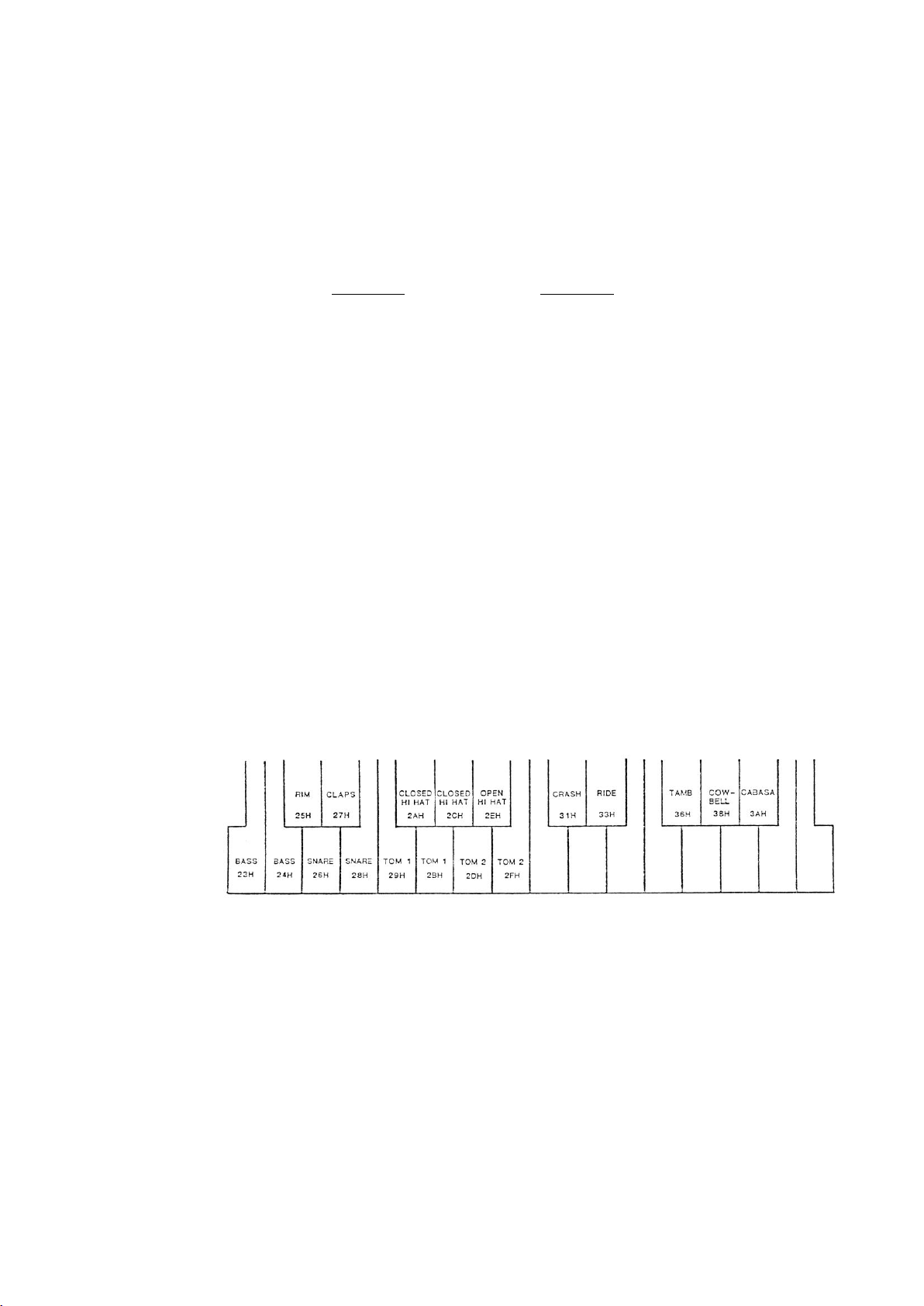
TABLE 2.1
MIDI KEY ASSIGNMENTS
Instrument keys are numbered 23H-3AH.
For reference, 3CH = middle C
Key Value Instrument
23H, 24H BASS
25H RIM
26H, 28H SNARE
27H CLAPS
29H, 2BH TOM 1
2AH, 2CH CLOSED HI-HAT
2DH, 2FH TOM 2
2EH OPEN HI-HAT
31H CRASH CYMBAL
33H RIDE CYMBAL
36H TAMBOURINE
38H COWBELL
3AH CABASA
Transmit: Keys 24H, 28H, 2BH, 2CH and 2FH are sent for the duplicated sounds.
Receive: Keys not listed are ignored.
Figure 2.1
MIDI Drum Key Assignment
MC400A 9
Page 13

TABLE 2.2
400 DATA DUMP FORMAT
Bytes (Hex) Description
00H – C7H Song Pointers (see Table 2.3)
C8H – 18FH Pattern Pointers (see Table 2.4)
190H – 191H Pointer to Space After Song 99
192H – N Song Data (see Table 2.5)
N+1 – M-1 Unused Memory
M – 1DFFH Pattern Data (see Tables 2.6 and 2.7)
A dump into the 400 dumps all pointer tables, song data, pattern data, and unused
memory. All data must be maintained correctly, or the 400 could “crash”(for
example if song or pattern pointers are not updated when changes are made in the
lengths of songs or patterns).
TABLE 2.3
SONG POINTERS
Bytes (Hex) Description
00H – 01H Pointer to Song 00. Always equals 2392H. Pointer
stored in LS – then – MS format.
02H – 03H Pointer to Song 01.
“
“
C6H – C7H Pointer to Song 99.
NOTE: Data memory for songs and patterns is from 2392H through 3FFFH, with
songs at the start, patterns at the end and unused memory in the middle.
10 MC400A
Page 14

TABLE 2.4
PATTERN POINTERS
Bytes (Hex) Description
C8H – C9H Pointer to Pattern 00. Pointer is stored in LS - then
- MS format.
CAH – CBH Pointer to Pattern 01.
“
“
18EH – 18FH Pointer to Pattern 99.
TABLE 2.5
SONG DATA
Relative Byte Number Byte Description
0 0ttt tttt 00H-7FH - initial absolute tempo for
this song.
or 1000 0000 No initial tempo
steps 0ppp pppp Pattern number
P=00H-63H(0-99 decimal)
or 1000 vvvv V=0H-FH - relative volume decrease
or 1001 vvvv V=0H-FH - relative volume increase
1010 tttt T=0H-FH - relative tempo decrease
1011 tttt T=0H-FH - relative tempo increase
or 1000 0000 Empty Step (deleted, but not
reprogrammed)
END 1100 0000 End of Song
NOTE: An empty song still has two bytes programmed: the initial tempo (byte 0)
and the END byte.
MC400A 11
Page 15

TABLE 2.6
PATTERN DATA
Relative Byte Number Byte Description
0 d2nnn nnnn N = 01H-63H (1-99 decimal)
Number of beats per measure
(“numerator” of time signature)
1 d1sss eeee E=0-9, Error Correct (see Table 2.7)
S=0-5, Swing (see Table 2.7)
2 d0mmm mmmm M= 00H-63H (1-99 decimal)
Number of measures
D = 0-7, beat value (see Table 2.7)
(“denominator” of time signature)
(event storage)
two-byte event (normal)
tttt tttt T = 00H-FFH (0-255 decimal)
Time (1/96 note, 24 ppq)
00ea dddd e = Clock extend (time overflow)
a = Accent On/Off
D = Drum number (0H=CH, see
Table 2.7)
Three-byte event (dynamic)
tttt tttt
01ea dddd Same as above
vvvv pppp V = 0H-FH, Volume for this event
P = 0H-FH, Pitch for this event
END tttt tttt Time for End
1000 xxxx X = Don’t care
NOTE: An empty pattern still has five bytes programed: the three-byte prologue
and two-byte END.
12 MC400A
Page 16

TABLE 2.7
MISCELLANEOUS PARAMETER TABLES
ERROR CORRECT
Value Note
0 1/2
1 1/4
2 1/6
3 1/8
4 1/12
5 1/16
6 1/24
7 1/32
8 1/48
9 1/96
SWING
Value %
0 50
1 54
2 58
3 62
4 66
5 70
BEAT NOTE (denominator)
Value Note
0 1/2
1 1/4
2 1/6
3 1/8
4 1/12
5 1/16
6 1/24
7 1/32
DRUM NUMBER
Number Drum
0H BASS
1H SNARE
2H RIM
3H TOM 1
4H TOM2
5H CRASH CYMBAL
6H RIDE CYMBAL
7H CLOSED HI-HAT
8H OPEN HI-HAT
9H CLAPS
AH TAMBOURINE
BH COWBELL
CH CABASSA
MC400A 13
Page 17

2 OPTIONAL VERSION 0_5
Standard software versions 0_3 and 0_4 allowed drum patterns to be programmed
from an external MIDI-equipped keyboard. If the keyboard was velocity sensitive,
the volumes of each of the drum sounds were controlled by the velocity with
which each “drum key” was played.
Version 0_5 takes the Drumtraks a step further. First, sixteen keys (in the upper
octaves of the keyboard) are assigned as “pitch keys”, allowing individual drum
tunings to be programmed in real-time, eliminating the need to perform awkward
“tuning overdubs” to achieve drum rolls and other interesting effects.
Secondly, PITCH and MOD wheels now control drum tunings and volumes, in
order to program those in real–time, which means that the used MIDI keyboard
doesn’t need to be velocity sensitive.
Other features of 0_5:
Changes front panel “Pads Out” enable function.
Adds an enable/disable External MIDI Drum Key Data function.
Eliminates the need to hit drum switches after enabling MIDI “Pads
Out”.
Improves the Drumtraks’ sync pulse width when operating at 48ppq.
Enables MIDI Clock Out when External Clock Input is enabled.
Removes error-correct problems sometimes encountered at the end of
drum patterns.
Eliminates the need to send a MIDI “Stop” prior to a MIDI “Start” to
restart the Drumtraks if the pattern is already playing. (0_3 interprets
a MIDI “Start” as “Continue”.
CLK OUT is enabled during pattern recording.
CLK IN can be used during recording.
Clock is output when using CLK IN.
MIDI Mode 1 can be selected from the front panel.
MIDI Mode 3 can be selected from the front panel.
New Memory Clear operation. (More difficult to now do by accident).
Songs can be started from any step when in Build Mode.
Except for these additions, operation of the Drumtraks itself or over MIDI is the
same as described in the Drumtraks Operation Manual (CM400). For your
convenience, a summary of all of the Drumtraks’ front panel “hidden functions” is
provided on the following page.
14 MC400A
Page 18

POWER-ON DEFAULT CONDITIONS
When the Drumtraks power is switched on, the Drumtraks is in MIDI Mode 1
(OMNI On, MONO Off). The Basic Channel remains where it was last set,
unaffected by the power being switched off (Drumtraks are set to Channel 13 at
the Factory).
The Drumtraks’ External “Drum Key” Data Input is initially enabled and “Pads
Out” and the External Clock Input” are disabled. These can be disnabled or
enabled with the hidden functions below.
HIDDEN FUNCTIONS (0_5)
* Clear All Memory
Hold [7], [8], [9], [INC], [DEC], [FASTER] and [SLOWER].
* Enable External Clock Input
Hold both [TEMPO] switches.
Press [ENTER].
This selects 24 ppq clock input rate, lighting the far right decimal point.
If desired, press [DEC] once for 48 ppq, or twice for 96 ppq.
Each time [DEC] is pressed, the lit decimal point moves
left one digit.
* Enable MIDI Clock Input
Hold both [TEMPO] switches.
Press [ENTER].
Press [DEC] three times.
This lights the decimal point between the two left display digits.
* Disable External or MIDI Clock Input
Hold both [TEMPO] switches.
Press [ENTER].
* Enable/Disable "Pads Out"
Hold [ENTER].
Press 4.
This toggles the Output enable/disable (disabled at power-on).
MC400A 15 13If "Pads Out" is enabled, drums are played either manually or during pattern playback, "note on" and "note off" MIDI data is transmitted on the Basic Channel. If another Drumtraks receives
Page 19

If "Pads Out" is enabled and drums are played, either manually or during pattern
playback, "note on" and "note off" MIDI data is transmitted on the Basic Channel.
If another Drumtraks receives this data, it plays the same drums. If, on the other
hand, a synthesizer receives this data, it plays notes corresponding to the drums
played. (See EXTERNAL INSTRUMENT CONTROL in the Drumtraks
Operation Manual).
* Disable/enable Drum Key Data Input
Hold [ENTER].
Press 5.
This toggles the input enable/disable (enabled at power-on). If you intend to play
the Drumtraks from an external keyboard, using the assigned “pitch keys”, it is
recommended you disable this function to prevent drums fro sounding twice. (For
details, see operating instructions on page 17)
* Select MIDI Mode 1 (OMNI On/MONO Off)
Hold [ENTER].
Press 6.
When in Mode 1, the Drumtraks transmits Note On/Off data on the Basic
Channel, and receives MIDI data from all 16 channels.
* Select MIDI Mode 3 (OMNI Off/MONO Off)
Hold [ENTER].
Press 9.
When in Mode 3, the Drumtraks transmits and receives MIDI Note On/Off data
and Mode change commands on the Basic Channel only.
* Change Basic Channel
Hold [ENTER].
Press 0.
The current Basic Channel is displayed.
Press [INC] or [DEC] to raise or lower the Basic Channel.
The Basic Channel only affect Note On/Off data when "Pads Out" is enabled (see
above). The Drumtraks is set to Channel 15 at the factory. This is NOT a default
setting (the Channel number is non-volatile), so if you change the Basic Chennel,
there is no need to change it each time the power is swiched on.
16 MC400A
Page 20
PROGRAMMING DRUM TUNINGS
In previous software versions, a velocity sensitive MIDI keyboard could be used
to program drum dynamics, to give the Drumtraks patterns a “human feel”. Tom
rolls and other effects requiring multiple tunings, required “tuning overdubs” and
took a considerable time to accomplish. The 0_5 software introduces three new
techniques which makes pattern recording much easier via MIDI.
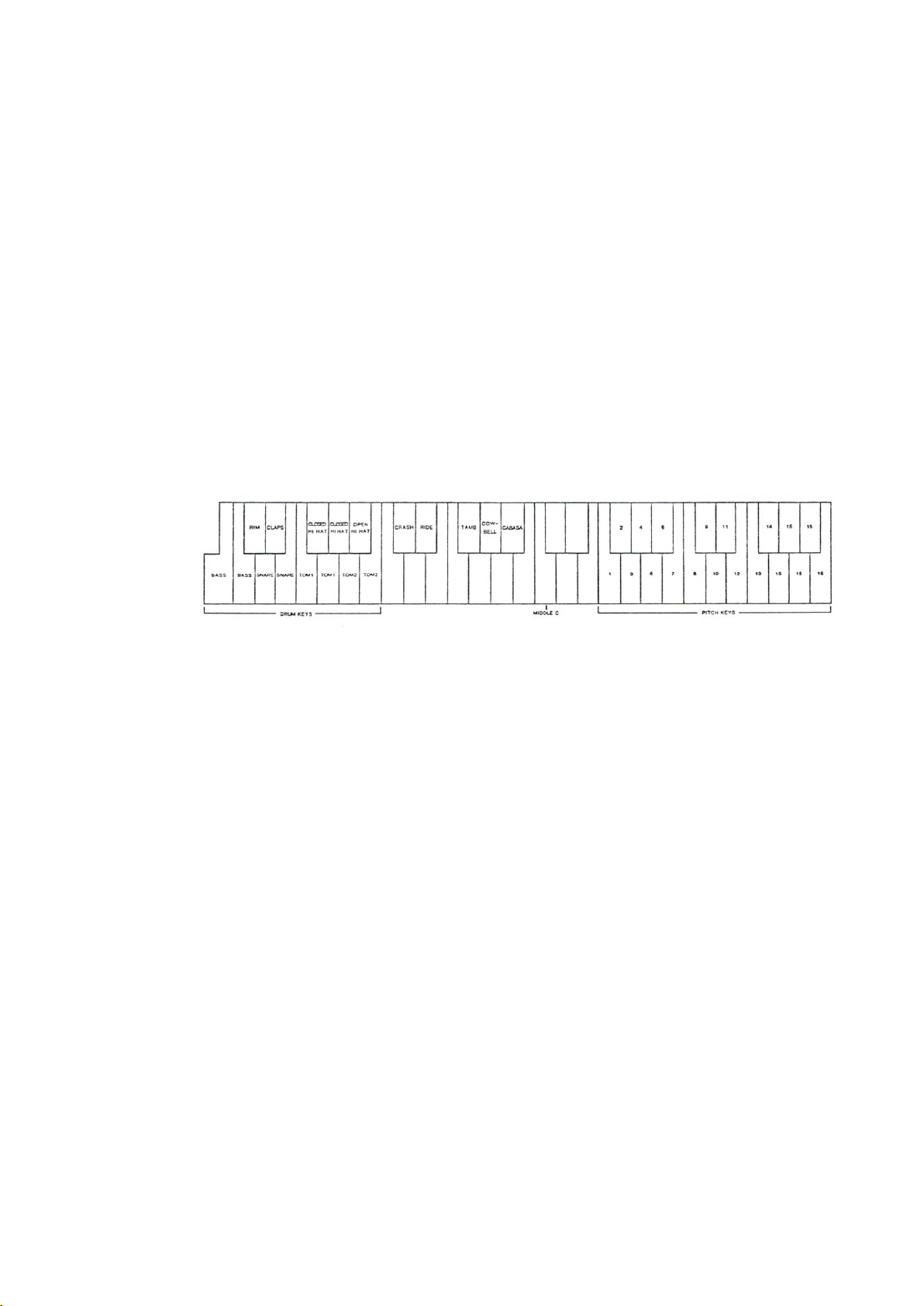
Pitch Keys
The Drumtraks still recognizes seventeen “drum keys” in the lower octaves of a
MIDI keyboard as before, but now also recognizes sixteen keys in the third and
fourth octaves as “pitch keys”. These select the sixteen tunings of each drum
sound. Drums and tunings are assigned to keys as shown in the following
illustration.
Figure 3.1
MIDI Pitch Key Assignment
Connect MIDI OUT of the MIDI keyboard to the Drumtraks’ MIDI In.
Hold [ENTER]
Press [5]
This disables the Drumtraks’ Drum Key Data Input (enabled on
power-on)
Play the drum keys
The Drumtraks produces no sound. When it does, repeat the
previous two steps. The Drumtraks Drum Key Data Input was
probably disabled to begin with, so the ENTER/5 disabled it.
Play the pitch keys
The Drumtraks produces no sound, but the tuning value of the
depressed keys appears in the left display. This feature makes it
easier to find the desired pitch keys on a larger (than four octave)
keyboard.
The Drumtraks requires one or two drum keys (in the lower octaves) to be held
(selecting the instrument) while playing the pitch keys.
MC400A 17
Page 21

Play and hold one drum key.
Play the pitch keys (refer to figure 3.1 above).
The drum sound is played again at the tuning corresponding to the
pitch key played.
If the keyboard if velocity-sensitive, the drum sound’s dynamics
are controlled by the force each pitch key is played with.
You can also play any combination of two drum keys simultaneously, provided
they do not belong to the same audio channel (1-6). For example, Claps and
Cowbell can not play simultaneously.
Repeat the previous two steps, holding different drum keys.
With a little practice, useful effects such as Tom rolls can be recorded into
patterns easily.
PITCH Wheel
A second method for programming drum tunings in real-time is to move your
keyboard’s Pitch Wheel while holding one of the standard drum keys in the
keyboard’s lower octaves.
If necessary, enable your keyboard’s wheels over MIDI (see your
Sequential instrument’s MIDI GUIDE or operation manual).
Play the drum keys on your keyboard.
If the Drumtraks produces no sound:
Hold [ENTER]
Press [5]
This enables the Drumtraks’ MIDI Drum Key Data Input (if
disabled).
The Drumtraks and your MIDI keyboard are now prepared.
Move the Pitch Wheel.
A tuning value of 0-15 appears in the Drumtraks’ left display,
corresponding to the Pitch Wheel position.
Play and hold some drum keys.
The tuning of all drum keys played and held are now set to the
value which appears in the Drumtraks’ left display.
Release all held drum keys.
The display no longer shows the tuning. Any drums played (other
than those played in the previous step) still play at their original
tuning.
After the PITCH wheel is moved, the Drumtraks assigns the new tuning to all
drum keys played as long as they are all held.
18 MC400A
Page 22

PROGRAMMING DRUM VOLUMES WITH MOD WHEEL
Drum volumes can be programmed live into a pattern from a MIDI keyboard with
a MOD Wheel. This is an alternative for owners of non-velocity-sensitive
instruments.
If necessary, enable your keyboard’s wheels over MIDI (see your
Sequential instrument’s MIDI GUIDE or operation manual).
Play the drum keys on your keyboard.
If the Drumtraks produces no sound:
Hold [ENTER]
Press [5]
This enables the Drumtraks’ MIDI Drum Key Data Input (if
disabled).
The Drumtraks and your MIDI keyboard are now prepared.
Move the Mod Wheel.
A tuning value of 0-15 appears in the Drumtraks’ left display,
corresponding to the Mod Wheel position.
Play and hold some drum keys.
The volumes of all drum keys played and held are now set to the
value which appears in the Drumtraks’ left display.
Release all held drum keys.
The display no longer shows the volume. Any drums played
(other than those played in the previous step) still play at their
original volume.
For more volume settings, repeat the previous three steps.
NOTE: If the keyboard is velocity-sensitive, key velocity overrides the MOD
Wheel.
MC400A 19
Page 23

MIDI IMPLEMENTATION (VERSION 0_5)
January, 1985
Unless otherwise specified, status/data bytes are given in hex and binary, while
numbers in descriptions are in decimal.
TRANSMITTED DATA
Status Second Third Fourth Fifth
NOTE ON (only sent when “Pads Out” is enabled - see page 15).
9NH P 40H K V
1001 nnnn 0ppp pppp 0100 0000 0kkk kkkk ovvv vvvv
Pitch Key On
For pitch key values see Table 3.2, page 25
“Dummy” velocity byte
Drum Key On
For key values, see table 3.1, page 25).
Drum key velocity.
V=01H-7FH, depending
on programmed volume
only (accent and song
volume changes are
ignored).
Sixth Seventh Eighth Ninth
K 0H P 0H
0kkk kkkk 0000 0000 0ppp pppp 0000 0000
Drum key Off (key On with velocity=0)
Zero velocity
Pitch Key Off (Key On with velocity=0)
Zero velocity
All Note Ons are followed immediately with a Note Off (V=0), with no new status
byte, i.e. nine bytes sent for each note played.
SONG SELECT
F3H S
1111 0011 0sss ssss
When a song is selected, that song number is sent.
S=00H-63H (0-99 decimal)
START
FAH
1111 1010
When playback of any song or pattern starts, this is sent immediately before the
first Timing Clock.
20 MC400A
Page 24

TRANSMITTED DATA
Status Second Third Fourth Fifth
TIMING CLOCK
F8H
1111 1000
During playback of any song or pattern, this is sent at a 24-per-quarter-note rate.
Not sent when the external clock input is enabled.
PATTERN MARKER
F0H 01H 7FH F7H
1111 0000 0000 0001 0111 1111 1111 0111
(SYS EX SCI ID PM EOX)
Sent after the last clock of a drum pattern.
STOP
FCH
1111 1100
Sent whenever a song or pattern is stopped.
PROGRAM DUMP
F0H 01H 06H D F7H
1111 0000 0000 0001 0000 0110 Data 1111 0111
(SYSEX SCI ID 400 ID EOX)
Data is 7680 song and pattern data
bytes, formatted as 15,360 four-bit
nibbles, right justified, LS nibble sent
first. For data packing information, see
Tables 3.3 through 3.7.
REGOGNIZED RECEIVED DATA
NOTE ON (no tuning information)
9NH K V
1001 nnnn 0kkk kkkk 0vvv vvvv
N is the channel number. This is ignored if in Omni On mode and checked for
match with channel number in Omni Off mode.
K=23H-54H. For key tables see Tables 3.1 nd 3.2
If MIDI Drum Key Date Input is diabled, the drum is not played.
V(velocity)=01H-7FH
MC400A 21
Page 25

REGOGNIZED RECEIVED DATA
Status Second Third Fourth Fifth
NOTE ON (including tuning information).
9NH P 40H K V
1001 nnnn 0ppp pppp 0100 0000 0kkk kkkk ovvv vvvv
Pitch Key On
P=41H-554H. For Pitch Key assignment, see Table 3.2, page 25
“Dummy” velocity byte
Drum Key On. K=23h-3AH.
For key values, see table 3.1, page 25).
Drum key velocity.
Sixth Seventh Eighth Ninth
K 0 P 0
0kkk kkkk 0000 0000 0ppp pppp 0000 0000
Drum key Off (key On with velocity=0)
Zero velocity
Pitch Key Off (Key On with velocity=0)
Zero velocity
NOTE OFF
9NH K 00H
1001 nnnn 0kkk kkkk 0000 0000
Zero Velocity
NOTE OFF
8NH K V
1001 nnnn 0kkk kkkk 0vvv vvvv
Zero Velocity
OMNI MODE ON
FNH 7DH 00H
1111 nnnn 0111 1101 0000 0000
When received, Mode 1 (Omni On/Mono Off) is selected.
OMNI MODE OFF
FNH 7CH 00H
1111 nnnn 0111 1100 0000 0000
When received, Mode 3 (Omni Off/Mono Off) is selected.
22 MC400A
Page 26

REGOGNIZED RECEIVED DATA
Status Second Third Fourth Fifth
SONG SELECT
F3H S
1111 0011 0sss ssss
S=00H-62H (0-98 decimal)
Switches to song mode and selects song # (must be 00H-62H). Also must already
be in either song stop or pattern stop modes.
START
FAH
1111 1010
Only if in song mode, this starts playback from start of current song. Selects MIDI
playback clock.
TIMING CLOCK
F8H
1111 1000
Recognized whenever in playback of a song or pattern while MIDI clock is
selected (either by front panel or by Start status).
CONTINUE
FBH
1111 1011
Resumes playback from the point where playback was stopped with a MIDI
“Stop”. If playback was stopped from the Drumtraks’ RUN/STOP switch (or
footswitch), Continue causes playback to start from the beginning.
STOP
FCH
1111 1100
Stops song playback. MIDI clock inputs are ignored.
PROGRAM DUMP REQUEST
F0H 01H 00H F7H
1111 0000 0000 0001 0000 0000 1111 0111
(SYSEX SCI ID REQUEST ID EOX)
This initiates a complete program dump of song and pattern data. See Tables 3.3
through 3.7.
PROGRAM DUMP RECEIVE
F0H 01H 06H D F7H
1111 0000 0000 0001 0000 0110 Data 1111 0111
(SYSEX SCI ID 400 ID EOX)
Data is 7680 song and pattern data bytes,
formatted as 15,360 four-bit nibbles, right
justified, LS nibble sent first. For data packing
information, see Tables 3.3 through 3.7.
MC400A 23
Page 27

REGOGNIZED RECEIVED DATA
Status Second Third Fourth Fifth
MOD WHEEL CHANGE
BNH 01H M
1011 nnnn 0000 0001 000m mmmm
Successive MOD wheel changes can be received without repeating the status byte
PITCH WHEEL CHANGE
ENH Vls Vms
1110 nnnn 0vvv vvvv 0vvv vvvv
LS byte
MS byte
Successive PITCH wheel changes can be received without repeating the status
byte.
24 MC400A
Page 28

TABLE 3.1
MIDI DRUM KEY ASSIGNMENT
Key Key number Instrument
B, C0 23H, 24H BASS
C#0 25H RIM
D0, E0 26H, 28H SNARE
D#0 27H CLAPS
F0, G0 29H, 2BH TOM 1
F#0, G#0 2AH, 2CH CLOSED HI-HAT
A0, B0 2DH, 2FH TOM 2
A#0 2EH OPEN HI-HAT
C#1 31H CRASH CYMBAL
D#1 33H RIDE CYMBAL
F#1 36H TAMBOURINE
G#1 38H COWBELL
A#1 3AH CABASA
TABLE 3.2
MIDI PITCH KEY ASSIGNMENT
Key Key number Pitch (decimal)
F#2 41H 00
G2 42H 01
G#2 43H 02
A2 44H 03
A#2 45H 04
B2 46H 05
C3 47H 06
C#3 48H 07
D3 49H 08
D#3 4AH 09
E3 4BH 10
F3 4CH 11
F#3 4DH 12
G3 4EH 13
G#3 4FH 14
A4-C4 50H-54H 15
MC400A 25
Page 29

TABLE 3.3
400 DATA DUMP FORMAT
Bytes (Hex) Description
00H – C7H Song Pointers (see Table 3.4)
C8H – 18FH Pattern Pointers (see Table 3.5)
190H – 191H Pointer to Space After Song 99
192H – N Song Data (see Table 3.6)
N+1 – M-1 Unused Memory
M – 1DFFH Pattern Data (see Table 3.7 and 3.8)
A dump into the 400 dumps all pointer tables, song data, pattern data and unused
memory. All data must be maintained correctly, or the 400 could “crash” (for
example if songs or pattern pointers are not updated when changes are made in the
lengths of songs or patterns).
TABLE 3.4
SONG POINTERS
Bytes (Hex) Description
00H – 01H Pointer to Song 00. Always equals 2392H. Pointer
stored in LS - then - MS format.
02H – 03H Pointer to Song 01
“
“
C6H – C7H Pointer to Song 99
NOTE: Data memory for songs and patterns is from 2392H through 3FFFH, with
songs at the start, patterns at the end and unused memory in the middle.
TABLE 3.5
PATTERN POINTERS
Bytes (Hex) Description
C8H – C9H Pointer to Pattern 00. Pointer is stored in LS - then
- MS format.
CAH – CBH Pointer to Pattern 01
“
“
18EH – 18FH Pointer to Pattern 99
26 MC400A
Page 30

TABLE 3.6
SONG DATA
Relative Byte Number Byte Description
0 0ttt tttt 00H-7FH - initial absolute tempo for
this song.
or 1000 0000 No initial tempo
steps 0ppp pppp Pattern number
P=00H-63H(0-99 decimal)
or 1000 vvvv V=0H-FH - relative volume decrease
or 1001 vvvv V=0H-FH - relative volume inecrease
1010 tttt T=0H-FH - relative tempo decrease
1011 tttt T=0H-FH - relative tempo increase
or 1110 0000 Empty Step (deleted, but not
reprogrammed)
END 1100 0000 End of Song
NOTE: An empty song still has two bytes programmed: the initial tempo (byte 0)
and the END byte.
MC400A 27
Page 31

TABLE 3.7
PATTERN DATA
Relative Byte Number Byte Description
0 d2nnn nnnn N = 01H-63H (1-99 decimal)
Number of beats per measure
(“numerator” of time signature)
1 d1sss eeee E=0-9, Error Correct (see Table 3.8)
S=0-5, Swing (see Table 3.8)
2 d0mmm mmmm M= 00H-63H (1-99) decimal)
Number of measures
D = 0-7, beat value (see Table 3.8)
(“denominator” of time signature)
(event storage)
two-byte event (normal)
tttt tttt T = 00H-FFH (0-255 decimal)
Time (1/96 note, 24 ppq)
00ea dddd e = Clock extend (time overflow)
a = Accent On/Off
D = Drum number (0H=CH, see
Table 3.8)
Three-byte event (dynamic)
tttt tttt
01ea dddd Same as above
vvvv pppp V = 0H-FH, Volume for this event
P = 0H-FH, Pitch for this event
END tttt tttt Time for End
1000 xxxx X = Don’t care
NOTE: An empty pattern still has five bytes programed: the three-byte prologue
and two-byte END.
28 MC400A
Page 32

TABLE 2.7
MISCELLANEOUS PARAMETER TABLES
ERROR CORRECT
Value Note
0 1/2
1 1/4
2 1/6
3 1/8
4 1/12
5 1/16
6 1/24
7 1/32
8 1/48
9 1/96
SWING
Value %
0 50
1 54
2 58
3 62
4 66
5 70
BEAT NOTE (denominator)
Value Note
0 1/2
1 1/4
2 1/6
3 1/8
4 1/12
5 1/16
6 1/24
7 1/32
DRUM NUMBER
Number Drum
0H BASS
1H SNARE
2H RIM
3H TOM 1
4H TOM2
5H CRSH CYMBAL
6H RIDE CYMBAL
7H CLOSED HI-HAT
8H OPEN HI-HAT
9H CLAPS
AH TAMB
BH COWBELL
CH CABASSA
MC400A 29
 Loading...