

SeQual 6323A-OM-10, 6323A-10, Integra Ten 6323A-OM-10, Integra Ten 6323A-10 Instruction Manual
Page 1
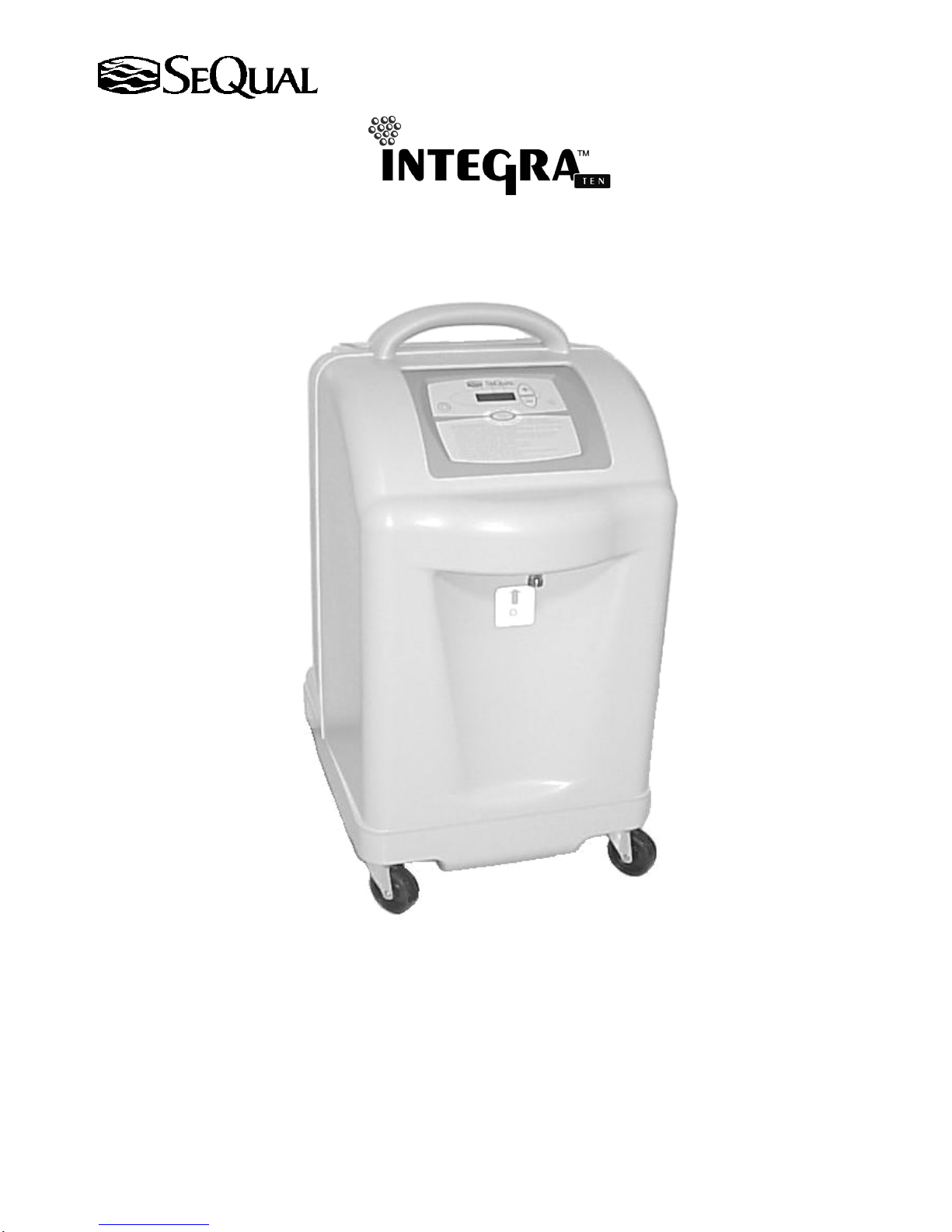
Oxygen Concentrator
INTEGRA E-Z
INSTRUCTION MANUAL
Model 6323A-OM-10
Model 6323A-10
P/N 7040 Rev A
July 2005
Page 2

Table of Contents
Warnings and Cautions.............................................................................................................................. 3
Indications for Use..................................................................................................................................... 4
Contraindications....................................................................................................................................... 4
Introduction................................................................................................................................................ 4
Important Safety Instructions..................................................................................................................... 4
Symbols Used in Instruction Manual and on Oxygen Concentrator.......................................................... 5
Oxygen Concentrator Information............................................................................................................. 6
Using Oxygen Concentrators........................................................................................................ 6
Recommended Operating Environment Guidelines ..................................................................... 6
The Proper Location...................................................................................................................... 7
Before Operating Your Oxygen Concentrator.............................................................................. 7
Operating Your Oxygen Concentrator.......................................................................................... 8
Installation Instructions.............................................................................................................................. 9
Select a Location........................................................................................................................... 9
Inspect Inlet Air Filter ................................................................................................................... 9
On/Off Button............................................................................................................................... 9
Warm-up Period............................................................................................................................ 9
Flow Rate Adjustment .................................................................................................................. 9
Power Management Feature....................................................................................................................... 10
Operating Conditions................................................................................................................................. 10
Control Panel Display................................................................................................................... 10
Display of Operating Conditions .................................................................................................. 11
Usage............................................................................................................................................. 11
Non-Usage .................................................................................................................................... 11
Maintenance............................................................................................................................................... 12
Trouble Shooting Guide............................................................................................................................. 13
Technical Data ........................................................................................................................................... 14
Electromagnetic Compatibility .................................................................................................................. 15
Disposal of Equipment and Accessories.................................................................................................... 15
SeQual Technologies Inc. Part No: 7040
2
Page 3
Warnings and Cautions
Warning and Caution notices used in this manual apply to hazards or unsafe practices that could result in personal
injury or property damage.
Federal law (U.S.A.) restricts this device to sale by or on the order of a physician.
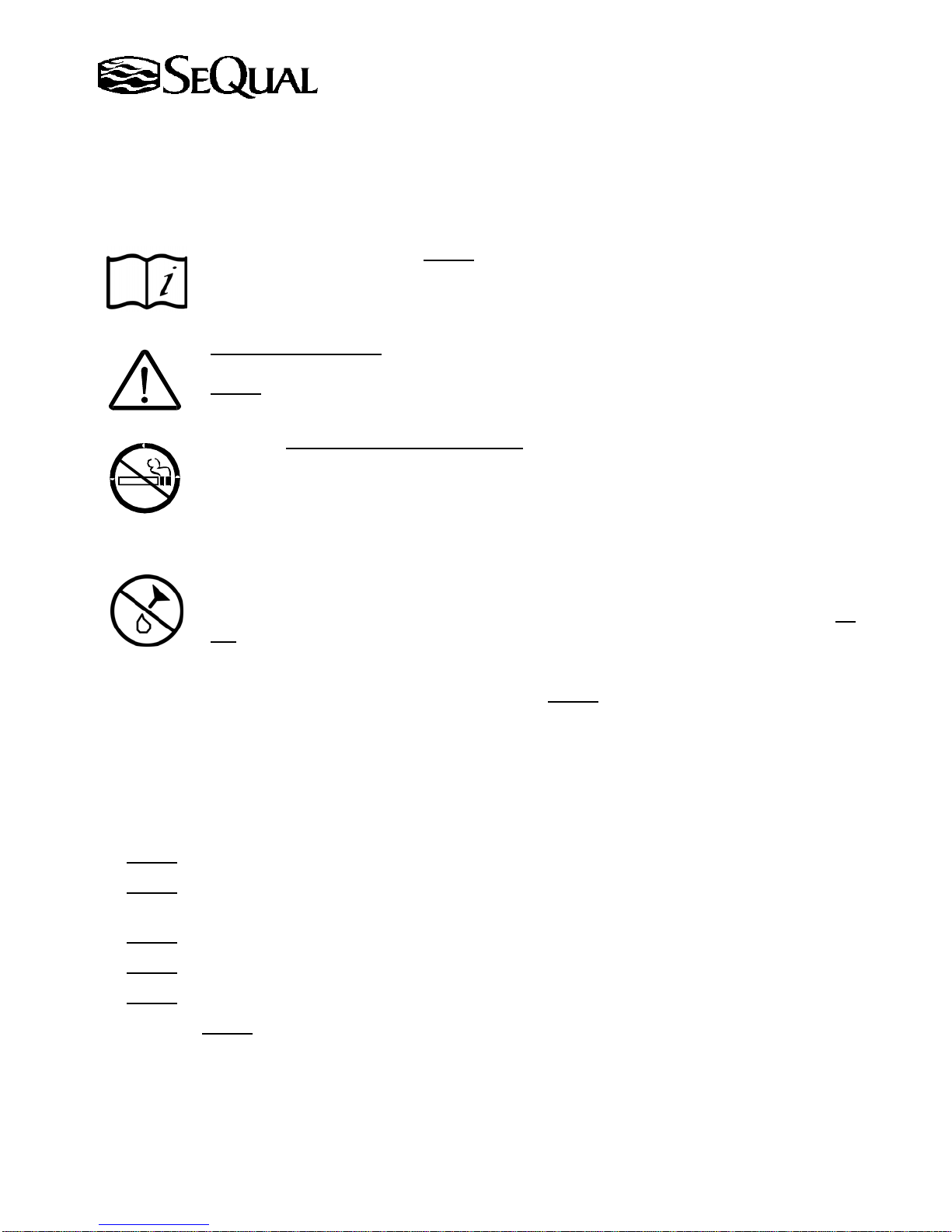
"Read Instruction Manual" Do Not operate this oxygen concentrator without first reading and
understanding this manual. If you are unable to understand the warnings and instructions, contact
your local SeQual dealer or authorized service representative before attempting to use this
oxygen concentrator.
"Caution or Attention” In certain circumstances, oxygen therapy can be hazardous, therefore, it
is advisable to seek medical advice before using the oxygen concentrator.
Do Not
rate, unless otherwise instructed by your physician.
Warning: "No Smoking or Naked Flames" The use of oxygen therapy requires that special
care be taken to reduce the risk of fire. Material that burns in air and even some material that will
not burn in air are easily ignited and burn rapidly in high concentrations of oxygen. For safety
concerns, all possible sources of ignition must be kept away from the oxygen concentrator and
preferably out of the room in which it is being used. Smoking in the proximity of an operating
oxygen concentrator is dangerous, and can permanently damage the device and void the warranty.
"Use No Oil or Grease" A spontaneous and violent ignition may occur if oil, grease or other
petroleum substances come into contact with oxygen under pressure. Keep these substances
away from the oxygen concentrator, tubing and connections and any other oxygen source. Do
Not use any petroleum based or other lubricants unless recommended by SeQual Technologies
Inc.
• Keep oxygen concentrator and cord away from hot surfaces. Do Not use the oxygen concentrator if it has a
damaged cord or plug; contact qualified service personnel for examination and repair.
deviate from prescribed flow rates. Adjust the flow setting only to your prescribed flow
• Air intake of the oxygen concentrator should be located in a well-ventilated area.
• Oxygen concentrator should be located so as to avoid pollutants and fumes.
• If oxygen concentrator has been dropped, damaged or exposed to water, contact qualified service personnel
for examination or repair.
• Do Not
• Do Not
drop or insert any object into any opening.
block the air opening of the oxygen concentrator or place it on a soft surface, such as a bed or couch,
where the bottom air opening may become blocked.
• Do Not
• Do Not
• Do Not
• Warning: Do Not
cover unit with a blanket, towel, quilt, etc.
place objects (pillow, blanket) under unit. Maintain at least ½ inch clearance under unit.
overfill the humidifier, if used. Fill with distilled water only to the level shown by the manufacturer.
remove the cover. Cover should only be removed by qualified service personnel.
• Warning: An alternate source of supplemental oxygen is recommended in the event of a power outage, alarm
condition, or mechanical failure.
SeQual Technologies Inc. Part No: 7040
3
Page 4

Indications for Use
The SeQual Integra E-Z Oxygen Concentrator is intended to provide supplemental oxygen. It is not intended for
life supporting, or life sustaining applications nor does it provide any patient monitoring capabilities.
Contraindications
An oxygen concentrator is not appropriate for any patient who would experience adverse health consequences as
the result of such temporary interruption.
In certain circumstances oxygen therapy can be hazardous. It is advisable to seek medical advice before using this
oxygen concentrator.
Warning: Federal law restricts this device to sale by or on the order of a physician.
Introduction
Your physician has prescribed supplemental oxygen as part of a treatment plan. Long-term oxygen therapy is
now widely accepted as the standard treatment for chronic hypoxia caused by chronic obstructive pulmonary
disease. Oxygen therapy has become more versatile in recent years due to the development of oxygen
concentrators. The new devices make it easier for physicians to select a mode of oxygen therapy that suits the
patient's lifestyle.
An oxygen concentrator has been prescribed to provide you with a source for supplemental oxygen. SeQual's
Integra E-Z Oxygen Concentrator is an electronically operated oxygen concentrator that separates oxygen from
room air. It does not remove oxygen from a room any more than by simply breathing the same room air. You
breathe the added oxygen through nasal prongs of a cannula (small soft plastic tubes that fit just inside your
nostrils).
Your physician has prescribed a specific oxygen flow rate setting to meet your individual needs. This flow rate is
determined by the amount of oxygen needed.
Recommended oxygen flow rates should be adjusted only
under the advice of a physician.
This oxygen concentrator is not intended for life supporting or life sustaining applications.
As with any electrically powered device, the user may experience periods of non-operation as the result of
electrical power interruption, or the need to have the oxygen concentrator serviced by a technician. This
instruction manual will inform you about the use and care of the Integra E-Z Oxygen Concentrator and will serve
as a reference as you use your oxygen concentrator.
Important Safety Instructions are shown under the following headings:
Warning: Important safety information for hazards that might cause serious injury.
Caution: Information for preventing damage to the oxygen concentrator.
Do Not:
Information to which you should pay special attention.
Important: Clarifying information, specific instructions, commentary, sidelights, or interesting points.
SeQual Technologies Inc. Part No: 7040
4
Page 5
Symbols Used in Instruction Manual and on Oxygen Concentrator
Refer to this section for an explanation of the symbols and the warnings that accompany them.
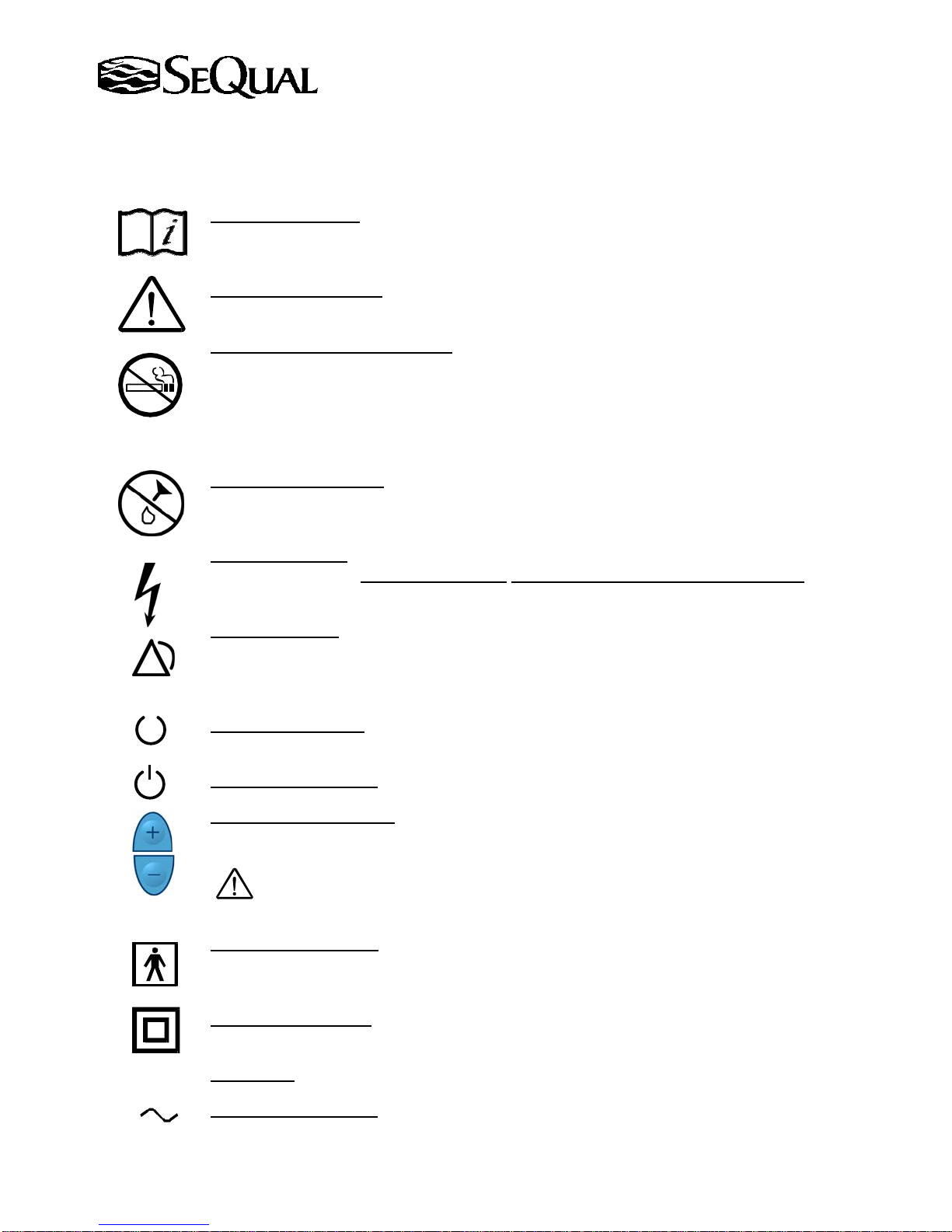
"Read Instructions"
This symbol, when used alone or in conjunction with any of the following
symbols, indicates the need to consult the operating instructions provided with the product. A
potential risk exists if the operating instructions are not followed.
"Attention or Caution"
Consult accompanying documents This symbol indicates important
information that requires the user to take special precautions when certain conditions are present.
"No Smoking or Naked Flames"
The use of oxygen therapy requires that special care be taken to
reduce the risk of fire. Materials that burn in air and even some material that will not burn in air
are easily ignited and burn rapidly in high concentrations of oxygen. For safety concerns, all
possible sources of ignition must be kept away from the oxygen concentrator and preferably out of
the room in which it is being used. Smoking in the proximity of an operating oxygen concentrator
is dangerous, and can permanently damage the device and void the warranty.
"Use No Oil or Grease"
Indicates important information about the possibility of spontaneous
and violent ignition that may occur if oil, grease or other petroleum based substances come into
contact with oxygen under pressure.
"Electrical Shock”
risk of electric shock, do not remove cover.
Indicates the presence of an electric shock hazard. Warning: To reduce the
There are no user serviceable parts inside. Refer
servicing to a SeQual dealer or authorized service representative.
"Audible Alarm"
An audible indicator is provided to announce, in a tone distinctly different
from the sounds generated by the oxygen concentrator during normal operation, a reduction in
oxygen concentration, a large unintentional change in flow or when the mains power has been
interrupted.
"Normal Operation"
Green light is on indicating the concentrator is running under normal
operating conditions.
"ON/OFF" (condition)
Push button starts concentrator running.
"Flow Rate Adjustment"
increments of 0.5 LPM with each press of the "+" and "-" flow rate adjustment buttons,
respectively.
Warning: The prescribed flow rate setting should only be adjusted under the advice of a
physician.
"Type BF Equipment" F type applied part complying with the specified requirements of IEC
60601-1 to provide a higher degree of protection against electrical shock than provided by type B
applied part.
"Class II Equipment"
basic insulation only, but in which additional safety precautions are provided.
"Amperes"
A
"Alternating Current"
SeQual Technologies Inc. Part No: 7040
The controlled quantity of oxygen increases or decreases in
Equipment in which protection against electrical shock does not rely on
5
Page 6
)
Oxygen Concentrator Information
SeQual's Integra E-Z Oxygen Concentrators are quiet, reliable and low maintenance sources of oxygen. The
Integra E-Z is designed and constructed to consistently provide high concentrations of oxygen in a lightweight,
compact cabinet that is easy to maneuver.
Using Oxygen Concentrators
Warning: Don't change the flow rate without consulting your physician.
Warning: Avoid alcohol and sedatives when using oxygen, they can slow your breathing.
DANGER: Never use petroleum-based products. Use water-based lubricants to moisten lips or
nostrils if needed.
"No Smoking or Naked Flames" The use of oxygen therapy requires that special care be taken to
reduce the risk of fire. Materials that burn in air and even some material that will not burn in air
are easily ignited and burn rapidly in high concentrations of oxygen. For safety concerns, all
possible sources of ignition must be kept away from the oxygen concentrator and preferably out of
the room in which it is being used. Smoking in the proximity of an operating oxygen concentrator
is dangerous, and can permanently damage the device and void the warranty.
Recommended Operating Environment Guidelines
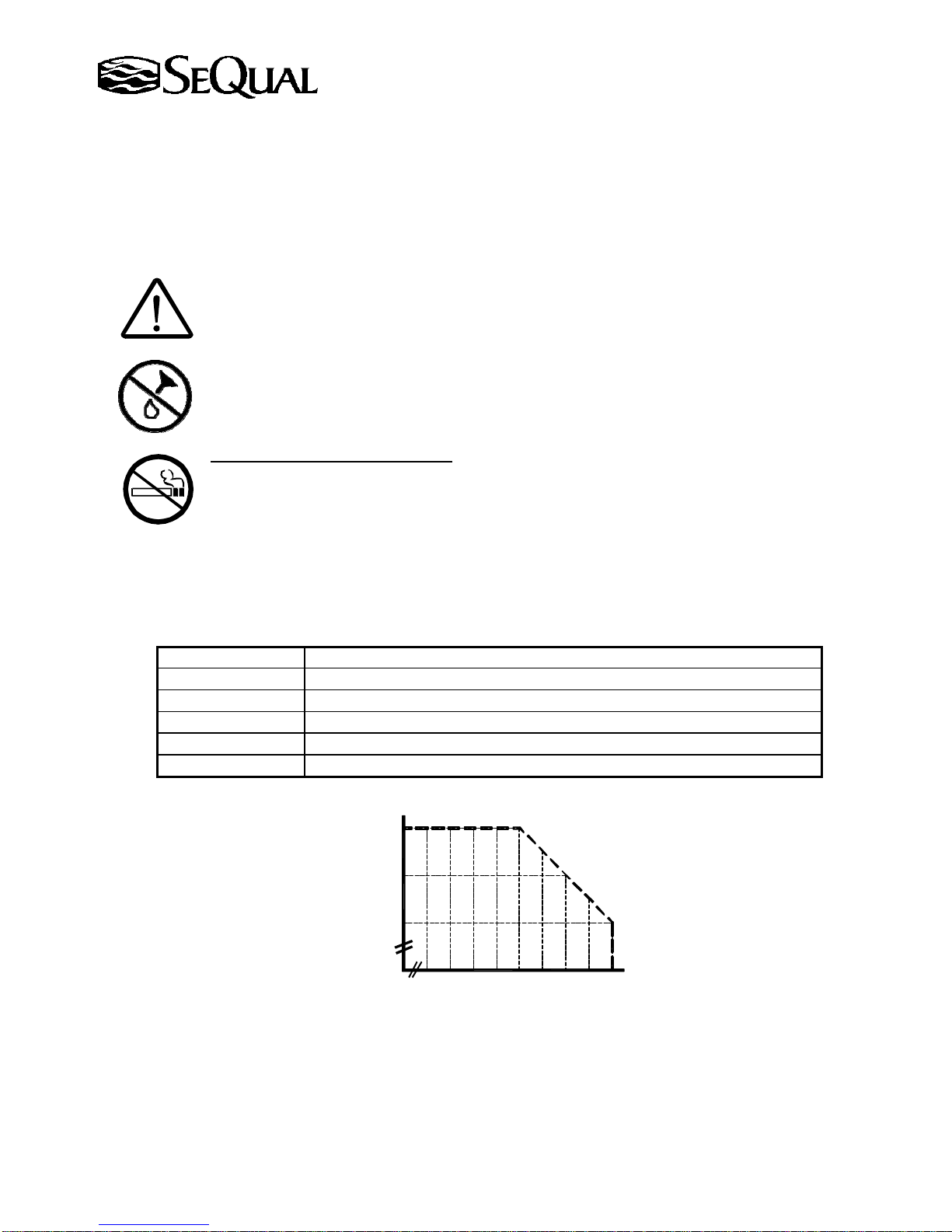
Temperature 50º F to 104ºF (10ºC to 40ºC
Electrical Use no extension cords or electrical outlets controlled by a switch.
Placement No closer than 3 inches (7.6 cm) from the wall, draperies and furniture.
Environment Smoke, pollutant, and fume free. Relative Humidity: 10% - 95%
Operating Time Up to 24 hours per day.
Flow Rate From 0.5 LPM to 10.0 LPM
40
Important: For rated performance at 10 LPM do not operate the Oxygen concentrator above the indicated
boundaries. Operating at flow rates less than 10 LPM will tolerate higher temperature/humidity conditions.
SeQual Technologies Inc. Part No: 7040
35
30
Temperature, °C
0
0
55 60 65 70 75 80 85 90 95
Relative Humidity, %
6
Page 7
The Proper Location
Usage in environments other than those described on the previous page may result in the need for increased
oxygen concentrator maintenance. Select a location in a well ventilated space that avoids fumes and pollutants
and allows the oxygen concentrator to draw in room air through the intake filter on the top of the cabinet without
being restricted. Make sure the oxygen concentrator is at least three to six (3 - 6) inches (7.6 – 15.2 cm) away
from walls, furniture and especially curtains or draperies that can impede or block adequate airflow to the oxygen
concentrator. Do Not
cover unit with a blanket, towel, quilt, etc. Do Not place objects under unit. Maintain at
least ½ inch clearance under unit. Keep the oxygen concentrator at least five (5) feet (1.5 m) away from hot,
sparking objects or open sources of flame. Do Not
locate the unit near any heat source or heat register.
Before Operating Your Oxygen Concentrator
There are many different types of oxygen tubing, cannulas or facemasks and humidifiers that can be used with
this oxygen concentrator. You should contact your local SeQual dealer/provider or authorized service
representative for recommendations on which of these oxygen accessories will best fit your needs. They will also
be able to give you advice on the proper maintenance and cleaning of these accessories.
• Humidifier - If your physician has prescribed a humidifier, follow the manufacturer’s instructions for
attachment. Add distilled water to the level suggested in the manufacturer's instructions
humidifier to the oxygen outlet port of the oxygen concentrator. Do Not
overfill. Only use a humidifier
recommended by your SeQual dealer/provider or authorized service representative. A humidifier suitable for
use with the Integra Oxygen Concentrator is the Salter Labs High Flow Bubble Humidifier (ref 7900). Use of
certain humidifiers not specified for use with this oxygen concentrator may impair performance.
• Oxygen Tubing - Connect the oxygen tubing to the outlet port of the humidifier. When no humidifier is
prescribed, the oxygen tubing can be attached directly to the oxygen outlet port. Connect the other end of the
tube to the nasal cannula or facemask, if not already attached. Important: The tube fitting may be tight - Do
Not use oil or grease to lubricate. To ensure there is enough pressure to deliver oxygen, the
length of the tubing should not exceed 50 feet (15.2m). Maximum extension tubing length is
dependent upon environmental conditions, tubing type, liter flow and any accessories used
between DISS fitting and nasal cannula/mask. Shorter tubing lengths will be required in some
cases. The internal diameter of the tubing should be no less than 3/16-inch (0.48 cm). A maximum suitable
50’ extension is Salter Labs Tubing (ref 2050). Tubing not specified for use with this oxygen concentrator
may impair the performance.
• Cannula or facemask -Your physician will have prescribed a cannula or facemask to deliver oxygen. In
most cases they are already attached to the oxygen tubing. If not, follow the instructions included with the
cannula or facemask to attach them to the oxygen tubing. Use accessories recommended by your SeQual
dealer/provider or authorized service representative. A cannula suitable for use with the 10L Integra E-Z is
the Salter Labs High Flow Cannula (ref 1600HF). A facemask suitable for use with the 10L Integra E-Z is the
Salter Labs Facemask (ref 8110). Use of cannulas or facemasks not specified for use with this oxygen
concentrator may impair the performance.
• Alarm System - The oxygen concentrator has an alarm system with a red visual alarm indicator light and
buzzer. The alarm system will activate in the event of an internal fault or power outage. The red
and/or yellow light may stay on for up to ten (10) minutes after start-up, OM models only.
This is a normal condition during the initial warm-up period.
and attach the
SeQual Technologies Inc. Part No: 7040
7
Page 8
• If the oxygen concentrator is equipped with an oxygen concentration monitor (OM model), this monitor
indicates if the oxygen concentrator is performing to the correct specifications. At normal therapeutic oxygen
concentration levels, the green light is activated. At lower than normal therapeutic oxygen levels, the yellow
light is activated. The red light activates and the unit alarms if the system malfunctions or when service is
needed. The oxygen concentrator will continue to run at lower levels of therapeutic oxygen but may shut
down under other system malfunctions. If the red light turns on, you should discontinue use of the oxygen
concentrator and refer to the troubleshooting section of this manual or contact your SeQual dealer/provider or
authorized service representative to schedule a service call.
Operating Your Oxygen Concentrator
Your SeQual dealer/provider or authorized service representative will demonstrate how to operate the oxygen
concentrator. This manual serves as a supplemental reference to help you operate and maintain the unit. If you
have any further questions or problems call your SeQual dealer or authorized service representative.
General Precautions – Retain the product’s safety and operating instructions for future reference. Follow all
operating and usage instructions. Observe all warnings on the product and in the operating instructions. To
reduce the risk of fire, bodily injuries, and damage to the oxygen concentrator, observe all safety precautions.
Do Not
appliance should be plugged into the wall outlet. Voltage requirements are marked on the label
on back of unit.
Important: Read “Important Safety Guidelines” section of this manual before plugging-in the power cord.
Do Not
Warning: Improper use of the power cord and plug may result in a fire or electrical shock hazard.
• Check to see if the power cord is plugged in and there is power to the outlet.
• Check that the oxygen concentrator is not placed near a heat register.
Important: SeQual’s products operate safely when used according to their marked electrical ratings and product
usage instructions. The power cord used with the Integra E-Z Oxygen Concentrator must meet the requirements
of the country where the product is used.
use the unit if the power cord is damaged.
connect to an extension cord or electrical outlet controlled by a switch. No other
SeQual Technologies Inc. Part No: 7040
8
Page 9
Installation Instructions
1. Select a Location
Caution: Locate oxygen concentrator in a well-ventilated space that provides adequate airflow
and check if air is being prevented from entering the oxygen concentrator by furniture, draperies
or clothing.
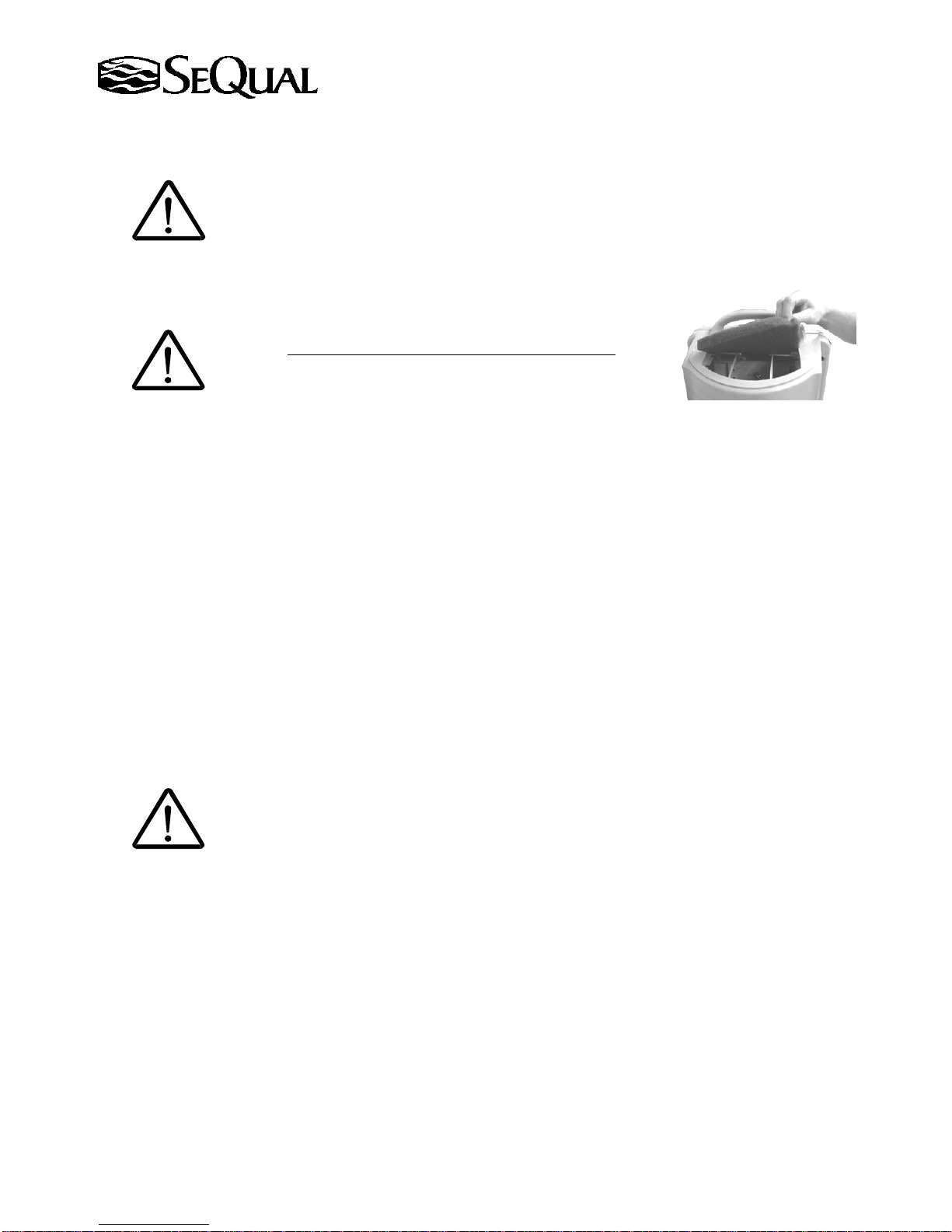
2. Inspect Inlet Air Filter
Air filter cleaning instructions are located in the maintenance section of this manual.
Caution: Always check to see if the inlet air filter is clean
3. ON/OFF Button
Insert the plug into the electrical wall outlet. Push the On/Off button; the green light will illuminate to
indicate the unit is running.
4. Warm-up Period
After initially turning on the unit, allow three (3) to ten (10) minutes for the unit to reach its specified
performance. If the unit is equipped with an oxygen concentration monitor (OM models only), the red, yellow
and green light will intermittently illuminate while the unit is warming up. For details on warm-up refer to the
Display of Operating Conditions table on Page 11.
Note: After an initial startup or after a power interruption the unit may automatically reduce the flow rate
briefly before returning to the set flow rate.
5. Flow Rate Adjustment
Adjust the flow rate to prescribed setting supplied by your physician. Press the Plus
the Minus "−" button to decrease the flow rate until the proper level is displayed.
Warning: The prescribed flow rate setting should only be adjusted under the advice of a
physician.
.
"+" button to increase or
SeQual Technologies Inc. Part No: 7040
9
Page 10
Power Management Feature
In the event of a Power Interruption:
Warning: Because the duration of a power interruption is unknown, seek an alternate supply of oxygen
during the power interruption. Resume use of the Integra E-Z when power is restored.
If a power outage occurs, the Integra E-Z will activate both an audible and a visual red light alarm to inform you that
the Integra E-Z is not operating. The Integra E-Z must be located where the alarms can be seen and heard.
If the duration of the interruption is shorter than twenty seconds and the unit has not been turned off, the Integra E-Z
will resume operation twenty seconds after the initial interruption.
Important:
During the power interruption:
• The user can press the ON/OFF button to silence the alarms and turn the unit off.
• If the unit was not turned off the Integra E-Z will automatically resume operation once power is restored..
• If the unit was turned off during the power interruption, the user must press the ON/OFF button again, after
the power is restored, to turn the unit on.
Operating Conditions
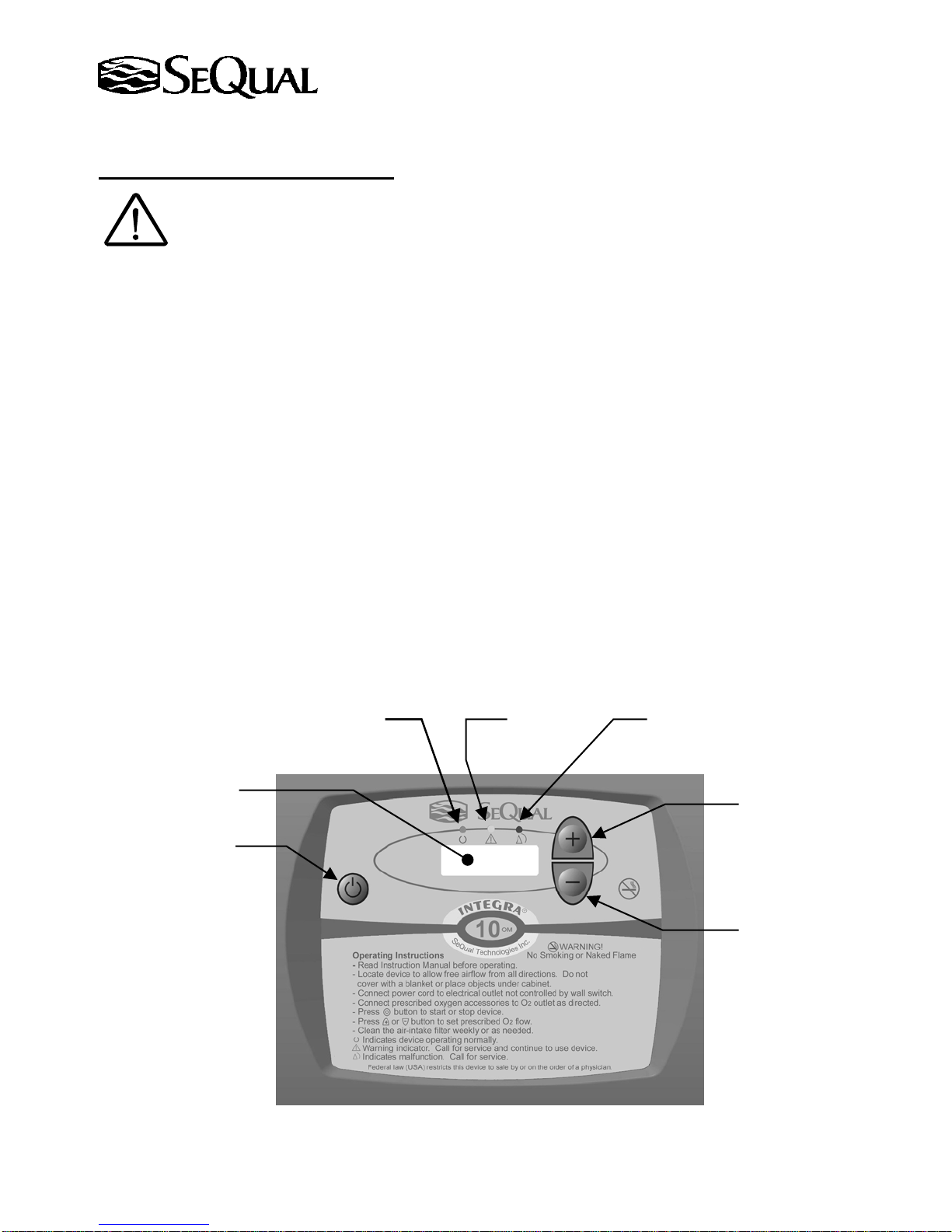
1. Control Panel Display – If the concentrator is an OM Model (equipped with an oxygen monitor), the
oxygen concentration is being continuously monitored while the Integra E-Z is running and oxygen is being
produced.
conditions are described in the table on the following page.
LCD Flow Indicator
If the concentration level falls below preset levels, an indicator light will activate. Operating
Green Light
(LPM)
Red Light Yellow Light
Increase Flow Button
On/Off Button
SeQual Technologies Inc. Part No: 7040
Decrease Flow Button
10
Page 11
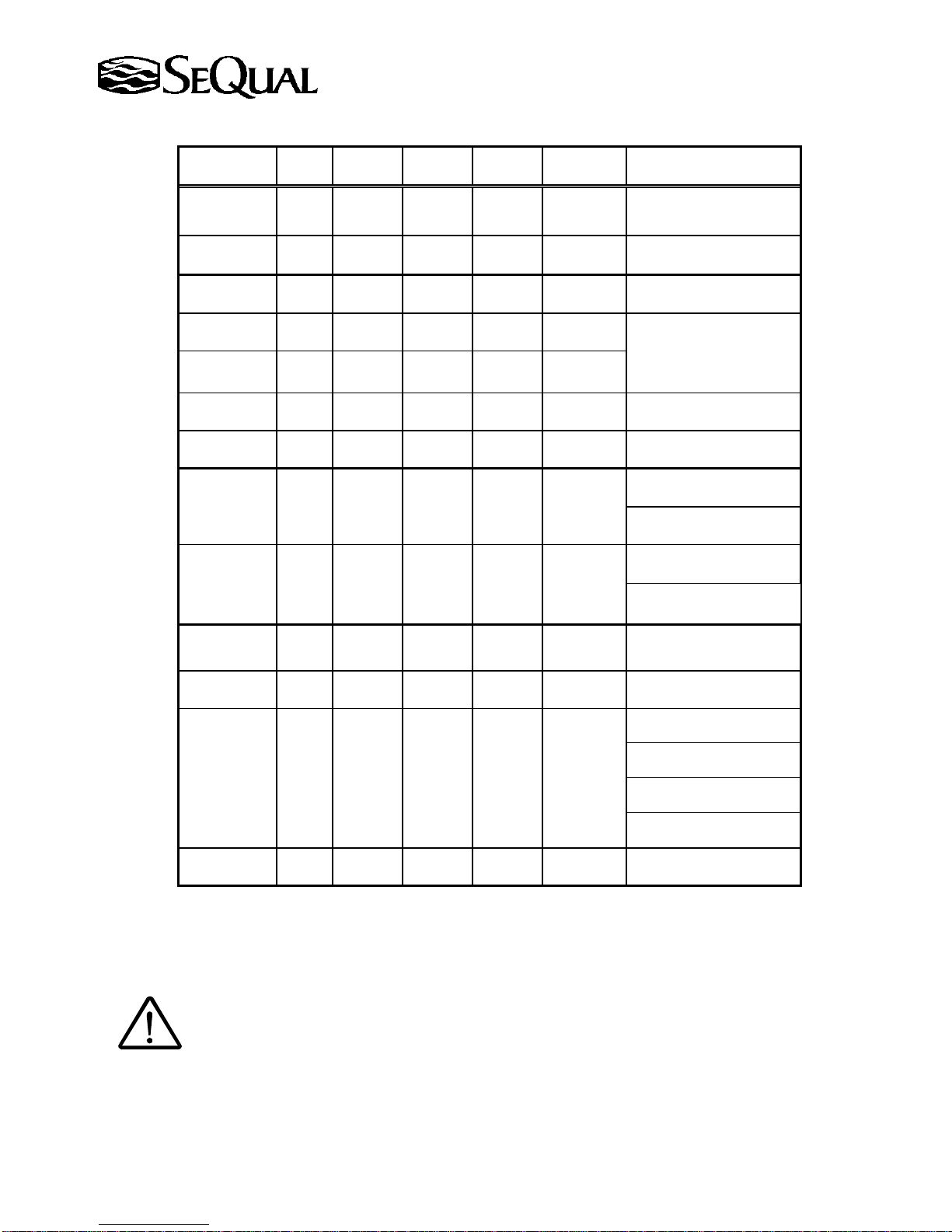
2. Display of Operating Conditions
Flow Rate
Shown?
No Off Off Off Off
Green
Light
Yellow
Light
Red
Light
Audible
Alarm
Unit
State
Not
Energized
No Off Off Off Off Energized
Yes On On On
Yes On On On
Yes On On Off
On for 3
seconds
Periodic
Periodic
Beep
Beep
Started
Running
Running
Running
Yes On Off Off Off Running
Yes Off On Off
Periodic
Beep
Not
Running
Yes Off Flashing Off Off Running
Yes Off Off Flashing On Running
Operating Condition
Unit not running / Flow
Indicator Display Not Lit
Unit not running / Flow
Indicator Display Lit
Unit is Starting
Unit is warming up*
Normal Operating
Condition
Unit turned
On/Off/On Quickly
Oxygen Concentration
Below Normal Level *
Flow Rate Not Correct
O
2
10% off target flow
Oxygen Concentration
Abnormal Level *
Flow Rate Abnormal
O
2
30% off target flow
1
1
Yes Off On Off Off Running Button Stuck
Yes On On Off Off Running
9V Battery Low Voltage
(if enabled)
Unit is overheating
Compressor Malfunction
Power Interruption
No Off Off Flashing On
Running
Not
Internal Fuse Blown
No
* These conditions are displayed only on units equipped with oxygen monitor.
1
Call the Service Provider if abnormal conditions are detected and cannot be remedied.
2
During System Malfunction condition the Green and Yellow lights may be On or Off.
On or
Off
On or
Off
On On Running
System Malfunction
3. Usage - Use recommended oxygen delivery accessories.
Warning: Use of certain administration accessories not specified for use with this oxygen
concentrator may impair the performance.
4. Non-Usage - When not using the oxygen concentrator, press the On/Off button to turn it off.
2
SeQual Technologies Inc. Part No: 7040
11
Page 12
Maintenance
Routine Maintenance: Routine maintenance consists of cleaning the air inlet filter at regular intervals to keep the
unit functioning for years. The user can easily achieve this maintenance. When other than routine maintenance is
needed, contact your SeQual dealer/provider or authorized service representative.
Warning: Unplug the oxygen concentrator from the power outlet before cleaning or routine
maintenance. Use a damp cloth for cleaning. Do Not directly apply liquid spray cleaners or
aerosol cleaners.
• Cabinet and Power Cord
The cabinet and power cord can be cleaned with a mild detergent solution applied with a damp cloth and
towel dried.
• Air Inlet Filter
Room air is drawn into the oxygen concentrator through the air inlet filter located on the top backside of the
cabinet. Cleaning the air inlet filter is the most important activity you will perform to keep your oxygen
concentrator performing properly. Check this air filter daily and clean it at least once a week.
1. Remove the filter from the cabinet.
2. Wash the filter in warm water using a mild detergent solution.
3. Rinse the filter thoroughly and squeeze out the excess water.
4. Allow the filter to air dry.
Caution: The filter should be free of liquid water and dry to the touch before reinstallation, as
5. Reinsert the filter in the cabinet.
• Oxygen Delivery Accessories - Follow the instructions supplied by the manufacturer.
excess moisture may impair the proper operation of the oxygen concentrator.
Caution: The air inlet filter should be replaced as needed. If the oxygen concentrator is used in a
dusty environment, the filter may need to be replaced more often. Do Not
operate the oxygen
concentrator for more than 30 minutes without a filter installed.
SeQual Technologies Inc. Part No: 7040
12
Page 13
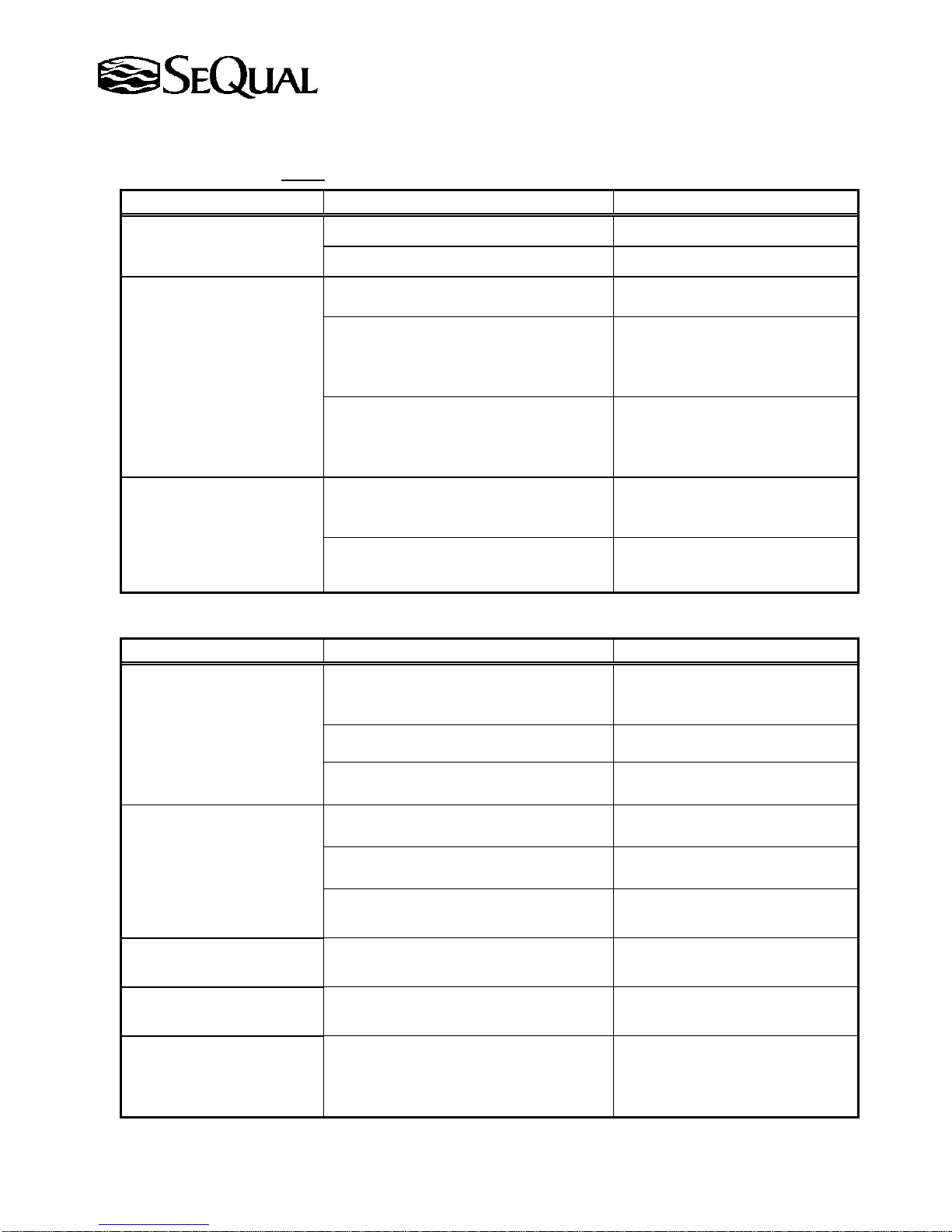
Trouble Shooting Guide
Table 1: Concentrator is not Running
Symptom Probable Cause Remedy
Cannot Start Unit
Flow Indicator Blank
Back Light Off
Audible Alarm
Blinking Red Light
Flow Indicator Blank
Back Light Off
Audible Alarm
Blinking Red Light
Flow Indicator Blank
Back Light On
Power cord not plugged into wall outlet. Plug in power cord.
Internal Fuse Blown Service required.
Power cord pulled from wall outlet. Plug in power cord.
Power outage.
No power at wall outlet.
Unit overheating
Compressor malfunction Service required.
Push On/Off Button to turn off
unit.
Push On/Off Button to restart unit
when power comes back on.
Ensure the unit is not plugged
into a wall switched outlet.
Check house circuit breaker or
fuse - reset or replace as needed.
Remove any obstruction(s) from
air openings and refer to page 6
“The Proper Location”.
Table 2: Concentrator Running
Symptom Probable Cause Remedy
Clean or replace humidifier
No oxygen / flow
Humidifier or tubing blocked or kinked
(see Alarm Indications in
Air Inlet Filter blocked Clean air inlet filter.
Table on Page 11)
Internal component malfunction Service required.
Restriction in humidifier or tubing. Repair or replace as required.
Low oxygen / flow
Air Inlet Filter restricted Clean air inlet filter.
(see Alarm Indications in
Table on Page 11)
Internal component worn or
malfunctioning
Yellow Light On Button is stuck Service required.
Flow Rate not visible on
Flow Indicator Display
LCD malfunction Service required.
Audible Alarm
Red Light On
Flow Indicator Blank
System malfunction
Back Light On
Note: If abnormal operating conditions are detected and cannot be remedied, contact your Service Provider
and/or tubing.
Remove tube kink.
Service required.
Remove power cord from wall
outlet.
Service required.
SeQual Technologies Inc. Part No: 7040
13
Page 14
±
(
(
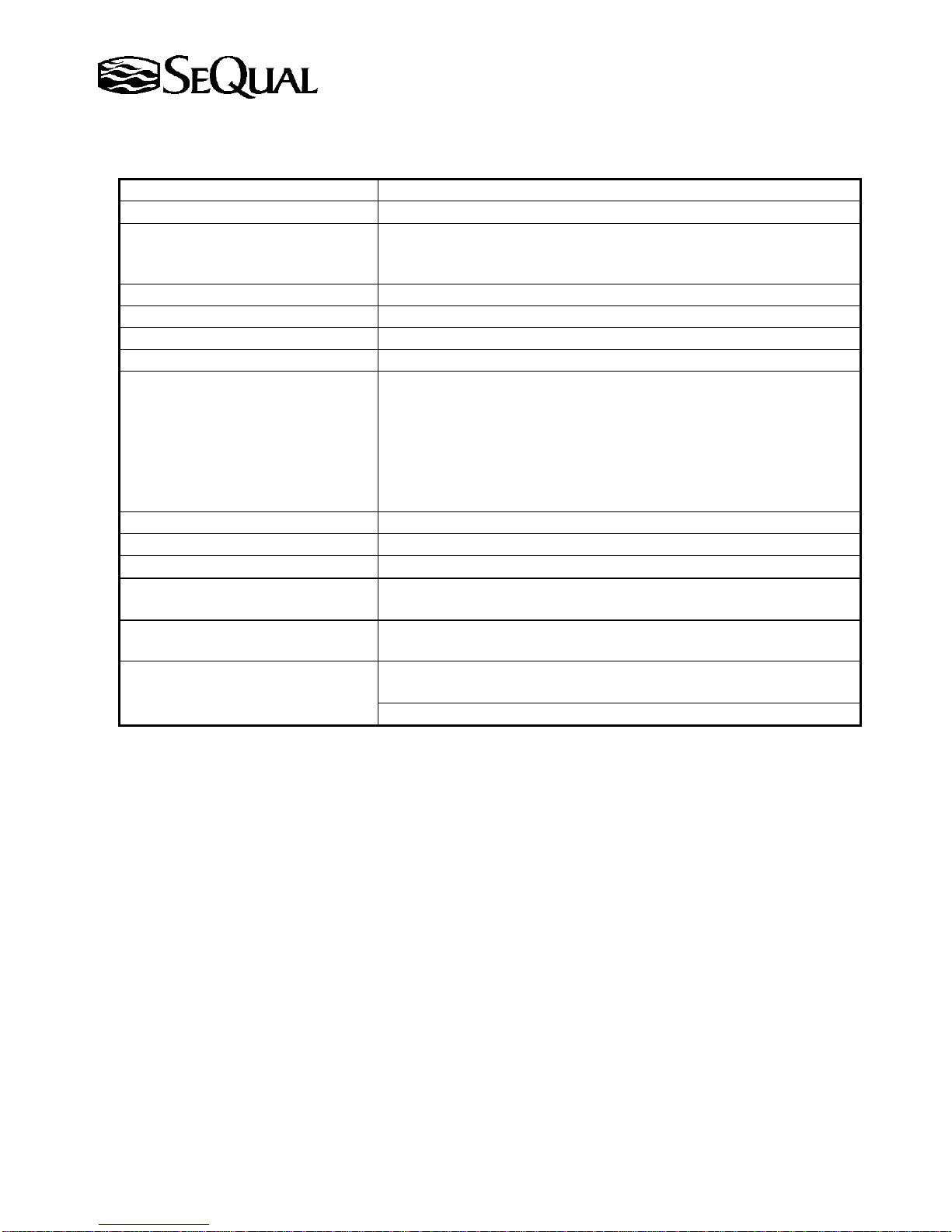
Technical Data
Flow Rate 0.5 to 10.0 LPM
Oxygen Concentration
1.0 to 10.0 LPM 91
Green Light = Normal Operation
Oxygen Concentration Indicator
Yellow Light Flashing = Below Normal Operation (85%*)
Red Light Flashing = Abnormal Operation (70%**)
Oxygen Outlet Pressure Nominal 6.0 psi (41.4 kPa) 1 - Maximum 11.0 psi (75.8 kPa)
Electrical Power 115V~, 60Hz, 5.0A Nominal, 220-240V~, 50Hz, 2.2A Nominal
Operating Temperature
Dimensions (H x W x D)
50° F to 104° F
26.5 in.
66 cm) H ×14.7in. (37 cm) W × 19.5 in. (50 cm) D
Power Interruption
Power Surge (simulated circuit breaker)
Compressor Malfunction
Audible Alarm Indicators
Excessive Internal Temperature
Outlet Pressure [35-36 psig (241.2-248.1 kPa) relief valve]
Abnormal Oxygen Flow Rate >±30% target flow
Low Therapeutic Oxygen Output** <70% oxygen
Back-up Alarm Power 9V Battery
Filters Cabinet Air Inlet, Compressor Inlet and HEPA
Device Classification
Transport/Storage Requirements
Back pressure Effect on
Flow Indicator
IEC Class II, Type BF Applied Part, Continuous Operation
Temperature: -4° F (-20° C) to +140° F (+60° C)
Humidity: Up to 95% Non-Condensing
0 psig (0 kPa): 10.0 LPM
1 psig (7 kPa): 10.0 LPM Nominal
Temperature: 50° F to 104° F (10° C to 40° C) Independent of
OSCI Operation*
Atmospheric Pressure.
85±3% and 70±5% oxygen concentration measurement accuracy
3% at sea level
10° C to 40° C)
*Where equipped. Subject to ±3% system concentration accuracy, and for backpressures up to 7kPa.
**Where equipped. Subject to ±5% system concentration accuracy, and for backpressures up to 7kPa.
1
Outlet pressure may decline to 5.0 psig (34.5 kPa) nominal at 10,000 ft altitude.
The system performance may decline above 10,000 ft (3048m).
SeQual Technologies Inc. Part No: 7040
14
Page 15
Electromagnetic Compatibility
This equipment has been tested and found to comply with the limits for medical devices to the
IEC 60601-1-2: 1994 Electromagnetic Compatibility standard. These limits are designed to provide reasonable
protection against harmful interference in a typical medical installation. This equipment generates, uses and can
radiate radio frequency energy and, if not installed according with the instructions, may cause harmful
interference to other devices in the vicinity. However, there is no guarantee that interference will not occur in a
particular installation. If this equipment does cause harmful interference to other devices, which can be
determined by turning the equipment off and on, the user is encouraged to try to correct the interference by one or
more of the following measures:
• Reorient or relocate the receiving device.
• Increase the separation distance between the equipment.
• Connect the equipment into an outlet on a circuit different from that which the other device(s) are
connected.
• Consult the manufacturer or service technician for help.
Disposal of Equipment and Accessories
Follow local governing ordinances and recycling plans regarding disposal of device components.
Authorized European Representative: Manufacturer:
MeddiQuest Limited SeQual Technologies Inc.
Business & Technology Centre 11436 Sorrento Valley Road
Bessemer Drive San Diego, CA 92121 USA
Stevenage SG1 2DX (858) 202-3100
United Kingdom
Tel: + 44 1763 222505
Fax: + 44 1763 222049
CE Marked For Model
6323A-OM-10 (Europe)
6323A-10
220-240V~, 50Hz
0470
SeQual Technologies Inc. Part No: 7040
15
 Loading...