

Page 1
User Manual
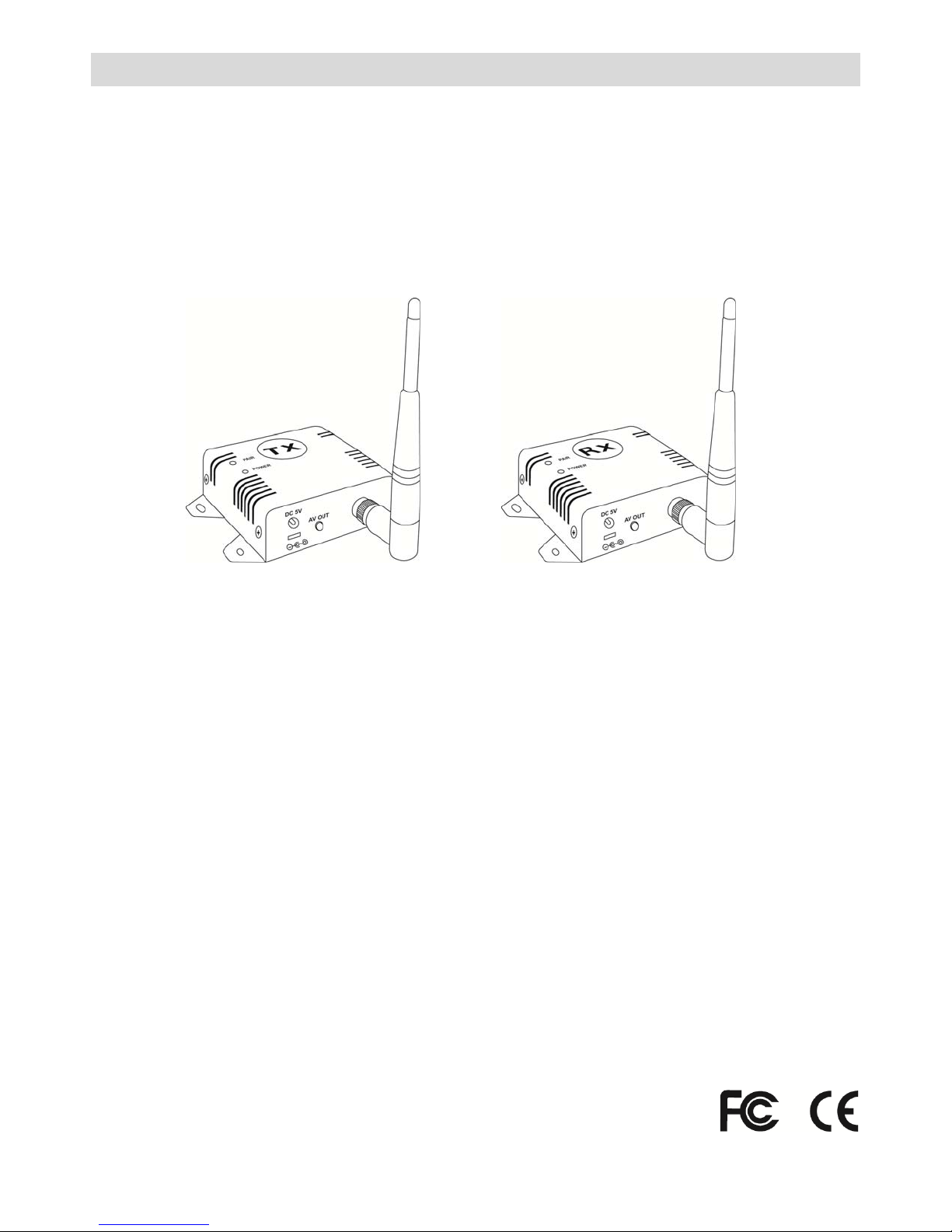
2.4GHz Digital Audio/Video Transmitter & Receiver Kit
KW24K
KW2425 KW2420
A) Introduction
The 2.4GHz Digital Audio/Video 4C H Transmitte r & Rec eiver Kit is a digital wi reless MPEG4 audio/v i deo system that
uses 2.4GHz Frequency Hopping technology and GFSK (Gaussian Frequency-Shift Keying) modulation, and random
ID codes to protect personal privacy and prevent unauthorized access to the system. There are over one billion
hopping sequences to minimize interference and deliver consistently an excellent video and audio quality for up to
500ft / 150m away.
Using this 2.4GHz Digital Audio/Video 4CH Transmitter & Receiver Kit, you can enjoy greater convenience and
security in many ways.
Connect a camera to a wireless security system.
Monitor your sleeping baby, playing children, the elderly, or the disabled on TV using your existing camcorder.
See who is outside the door on TV through your camera or miniature CCD camera.
Monitors and records meetings from another room.
And many more!
B) Features
Interference-free (Wi-fi, Bluetooth, Microwave-oven, Cordless phones, etc.)
Real time monitoring and recording
MPEG4 compression
Auto-pairing; Data rate up to 6Mbps
Transmission distance up to 500ft / 150m (clear line of sight)
Video resolution of 720x480 @ 30fpts (NTSC) or 768x576 @ 25fps (PAL)
3dBi omni-directional antenna
5V DC
1 R201211-V07
Page 2
C) Package Contents
p
)
p
)
Please check the following items inside the box for 2.4GHz Digital Audio/Video Kit, and contact your dealer if anything
is missing.
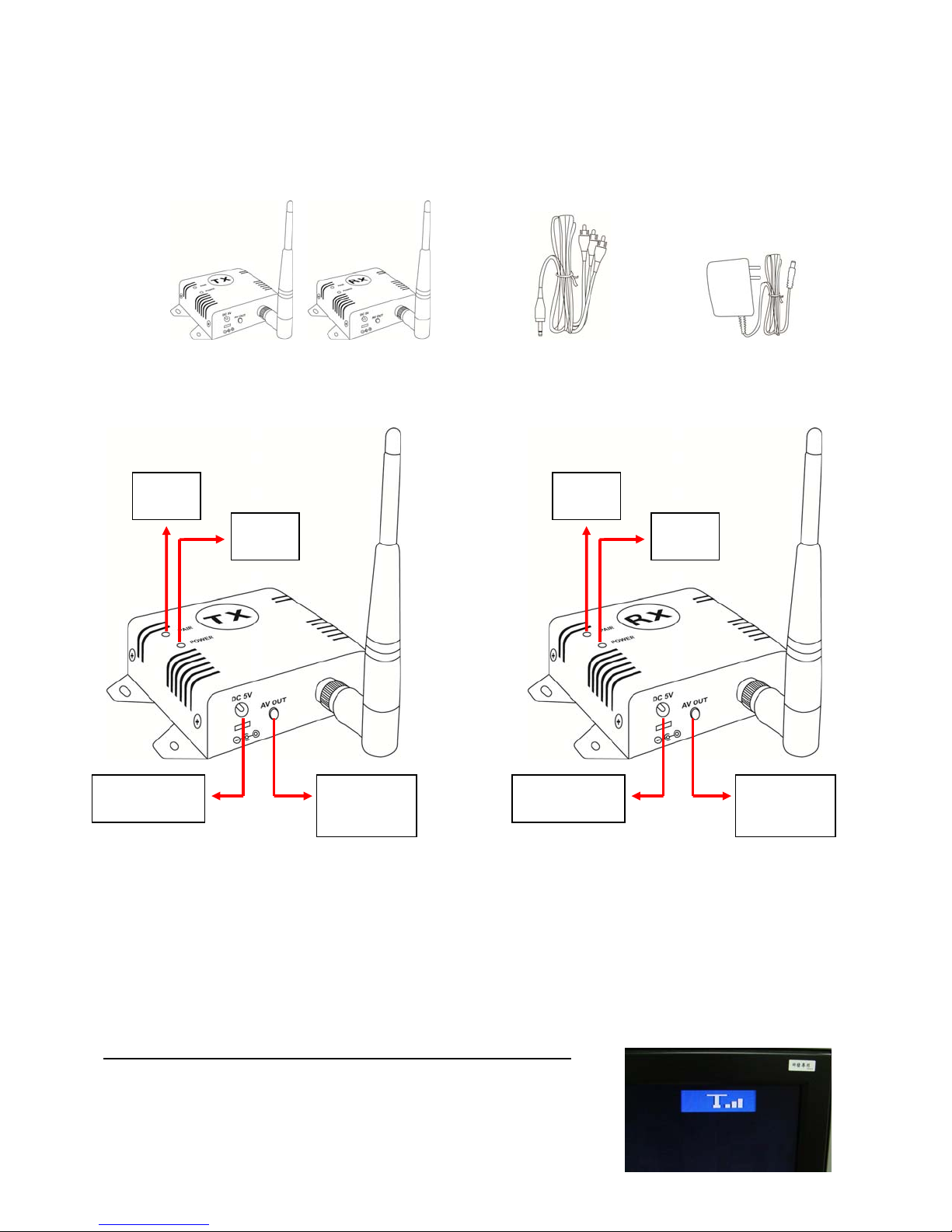
One (1) set of 2.4GHz Digital Audio/Video 4CH Transmitter-Tx and Receiver- Rx
Two (2) Antennas
Two (2) Audio/Video Cables (3.5mm plug to 3 RCA plug)
Two (2) Power Adaptor (100V ~ 240V AC, 5V DC / 1A in Jack)
Transmitter-Tx and Receiver-Rx (with Antenna) Audio/Video Cable x2 5V DC x2
D) Product Parts
Pairing
button
Power
LED
Pairing
button
Power
LED
DC Jack for
power adaptor
A/V Jack for
Output (Tx)
or In
ut (Rx
E) Pairing the Transmitter-Tx & Receiver-Rx
Before shipment these products have been matched by ID co de, so you can immediately u se them out of the box. To re-pair them,
you have to follow the instructions below:
1. Power on the Tx and Rx by inserting the power adaptor jack.
2. Press the pair button of Tx or Rx and do not release until the power LED begins to flash.
3. The devices will enter into pairing state and automatically link to one another by ID code.
4. Do not unplug the power during the paring process.
5. When pairing is completed, the power LED for both devices will stop flashing and stay lit.
* This system uses 5V DC. Do not use any other power supply.
Please note:
Pressing the pairing buttons on the Tx and Rx at the same time is not necessary. Put
one device in pairing mode, then the other. When pairing the Tx and Rx, place them
about 10ft / 3m apart. The di splay picture will show the signal strength in the top right
corner on the picture.
DC Jack for
power adaptor
A/V Jack for
Output (Tx)
or In
ut(Rx
2 R201211-V07
Page 3
F) Specifications
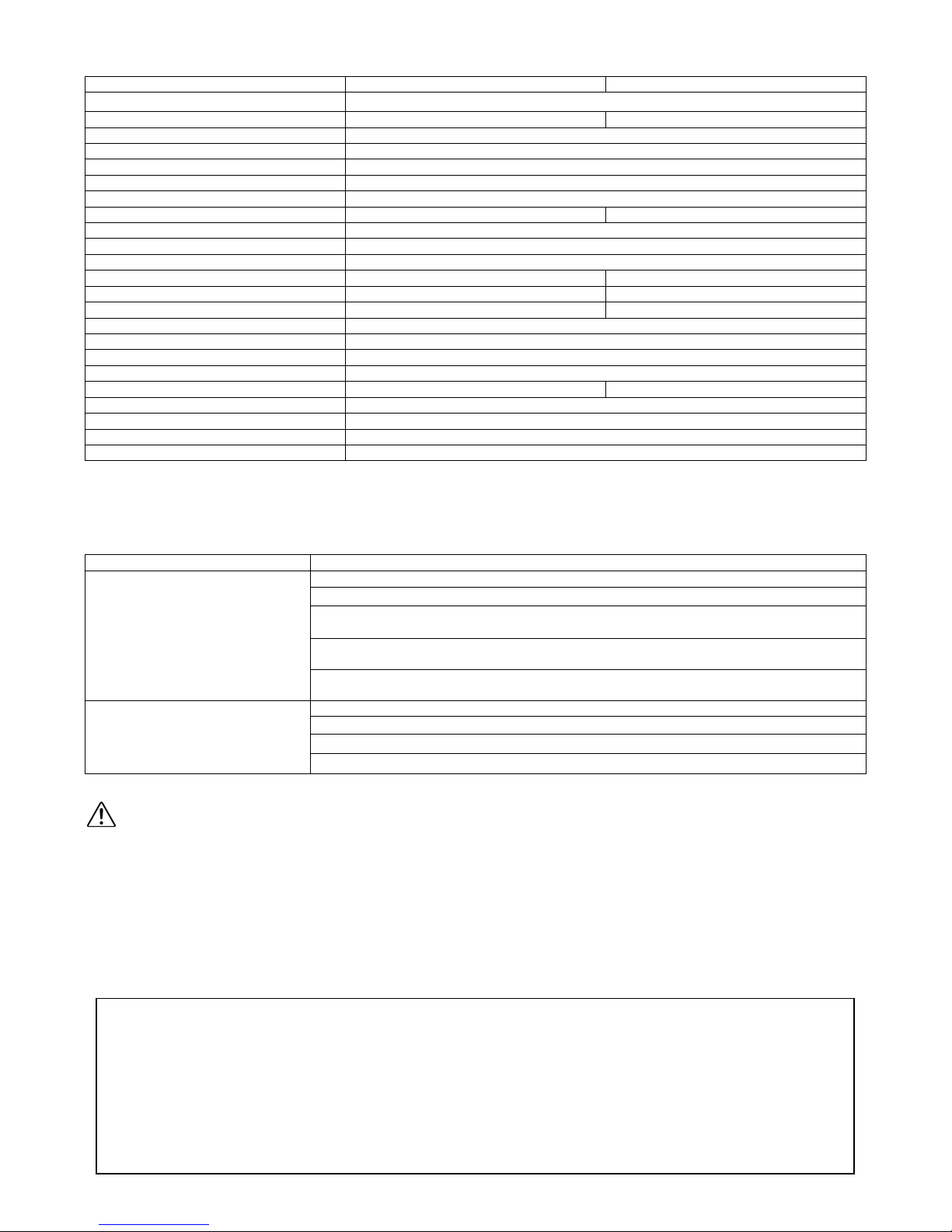
V
Transmitter - Tx Receiver - Rx
Model KW24K - Kit
KW2425 - Tx KW2420 - Rx
Video Type NTSC / PAL
Video Compression MPEG4
Video Resolution 720x480 @ 30fpts (NTSC) or 768x576 @ 25fps (PAL)
Operating Frequency Band 2.400GHz~2.4835 GHz
Data Rate Up to 6Mbps
Receiver Sensitiv it y -- -85dBm
Transmission Channels 80 channels auto selection
Modulation 16QAM/QPSK/BPSK
Video Bit Rate Up to 12Mbps
ideo Input Level 1V p-p, 75 ohms 1±0.2V p-p, 75 ohm
Audio Input Level 1V p-p, 600 ohm (STEREO) 1±0.2V p-p, 600 ohm (STEREO)
Audio/Video Port In, 1x Video, 2x Audio (L/R) Out, 1x Video, 2x Audio (L/R)
Random ID Code Up to 4 million sets
Antenna Omni-directional, 3dBi
Operational Range Up to 500ft / 150 (clear line of sight)
PA Output Power 16dBm
Maximum Transmission Power 100mW --
Power Consumption 1.9W
Power Supply 5V DC, 1.2A for AC Adaptor
Dimension 76mm x 73mm x 24mm
Weight 82g
*Specifications are subject to change without notice
G) Troubleshooting
Problems Possible Solution
Check all cable connections
Make sure power plugs are pushed all the way in
Check power switches on the remote TV or DVR and Video source (Camera, Camcorder,
No picture or sound
Interference: picture or au dio
etc.)
Check if the POWER LED of the Tx and Rx are lighted. The LINK LED should be lit under
normal operation.
If their LINK LED are not lit, re-pair the devices by following the instructio ns in section E of
this manual.
Adjust Tx and Rx antenna orientation
Try to place Tx and Rx closer to one another.
If using a microwave oven, turn it off.
Remove microwave oven from path between Tx and Rx.
Cautions
1. Be sure the Tx and Rx are connected to the equipment correctly (e.g. Connect the transmitter to the camera, and the receiver
to the TV or DVR).
2. When DC plug is pulled out from Tx or Rx, wait a few seconds before inserting it again.
3. Adjust antenna to decrease interference (vertical or horizontal).
4. For optimal reception, place the devices in an un-o bstructed environment (open space) and/or in direct line of site. Place the
device as high as possible to avoid obstacle s and at leas t 5ft / 1.5m from one another.
5. If for some reason the devices stop working, try to turn power off and back on again after 30 seconds for them to re-link.
6. It is suggested not to exceed 10 pairs of Tx and Rx in any one location.
LIMITED ONE (1) YEAR WARRANTY AND EXCLUSIONS
Manufacturer warrants to the original consumer purchaser and not for the benefit of anyone else that this product at the time of its sale by Manufacturer
is free of defects in materials and workmanship under normal and proper use for one (1) year from the purchase da te. Manufacturer's only obligation is
to correct such defects by repair or replacement, at its option, if with i n su ch on e ( 1) year period the product is returned prepaid, with proof of purchase
date, and a description of the problem. This warrant excludes and there is disclaimed liability for labor for removal of this product or reinstallation. This
warranty is void if this product is installed improperly or in an improper environment, overloaded, misused, opened, abused, or altered in any manner, or
is not used under normal operating conditions or not in accordance with any labels or instructio ns . There are no other implied warranties of any
kind, including merchantability and fitness or a particular purpose, but if any implied warranty is required by the applicable jurisdiction, the
duration of any such implied warrant, including merchantability and fitness of or a particular purpose, is limited to one (1) year. Manufacturer is not
liable for incidental, indirect, spec ial, or consequential damages, including without limitation, damage to, or loss of use of, any equipment,
loss sales or profits or delay or failure to perform this warranty obligation. The remedies, provided therein are the exclusive remedies under this
warranty, whether based on contract, tort or otherwise.
3 R201211-V07
Page 4
H) Related Products
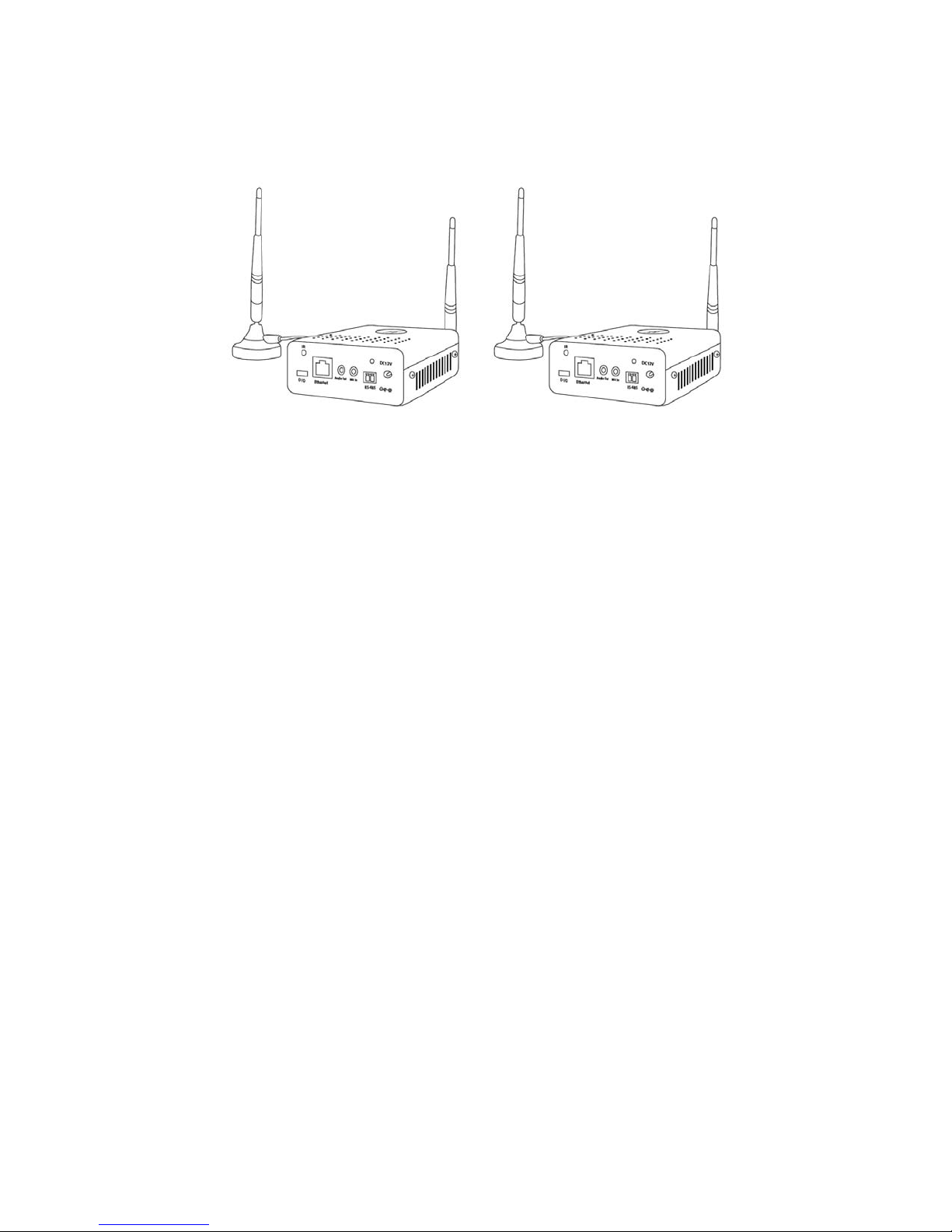
2.4GHz Digital Audio/Video/Data Transmitter & Receiver Kit
Model: KW5905
Transmitter-Tx Receiver-Rx
Features:
2-in-1 digital audio to video data kit
With coded/decoded to secure your images
H.264 compression @ 30fps
RS-485 for PTZ
Two-way audio communication
5dBi omni-directional antenna
12V DC
4 R201211-V07
 Loading...