

Page 1
HDC-33
Copyright © 2013. All Rights Reserved. R201312-V04
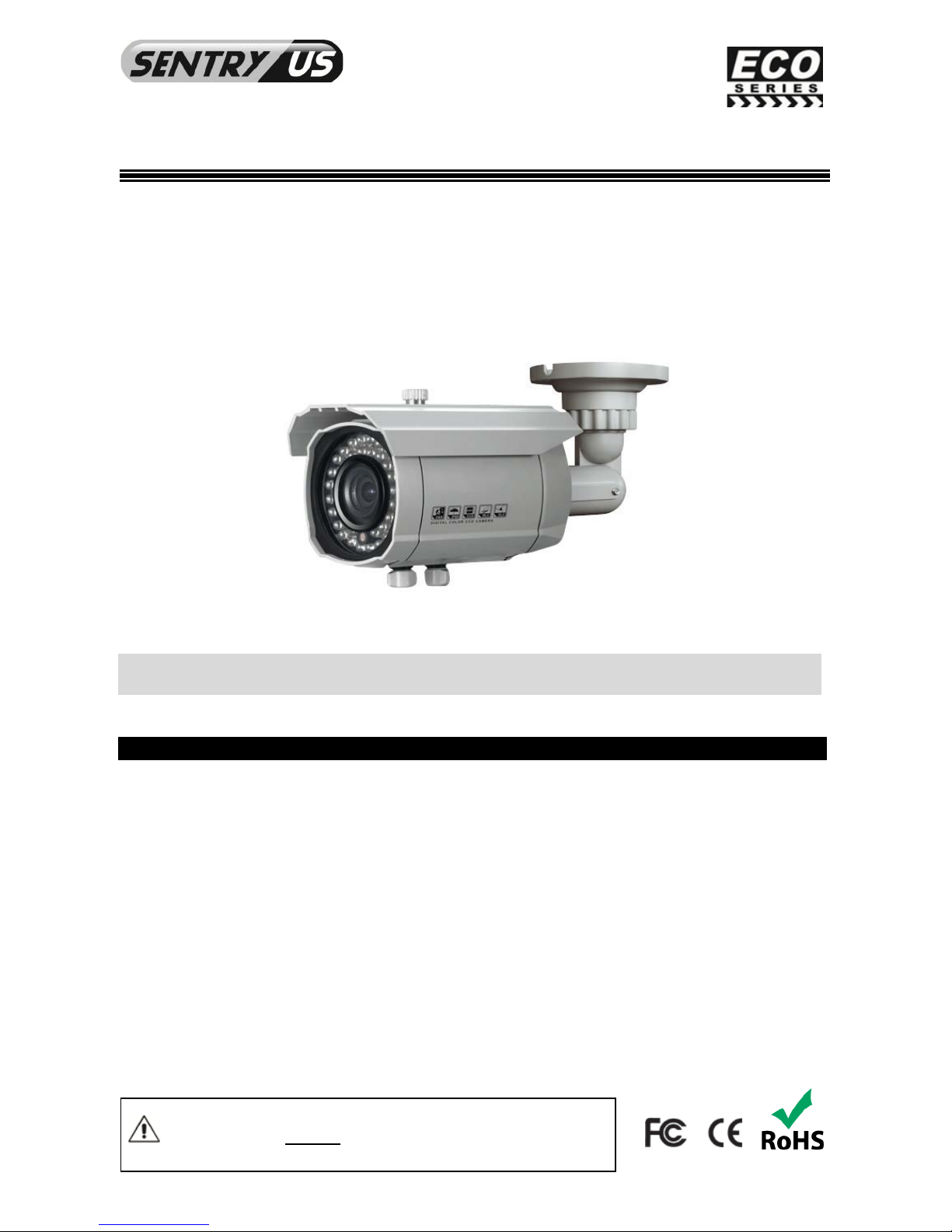
HDB42-4AVF
HD SDI 1080P ICR OSD 42 IR
Bullet Camera
USER MANUAL
FEATURES
• SDI 1080p - 1920 x 1080, 30 fps, 2.0 Megapixel
• 1/2.8” 2.0 Megapixel Progressive Scan CMOS
• 3.3mm~12mm Auto Iris Vari-focal Lens
• 1.0 Lux @ F1.2
• 42 IR LED
• IR distance up to 100ft / 30m
• 600mA max
• 12V DC
• IP66 Rating
Please read the Manual before attempting to use this product.
Specifications and appearance are subject to change without notice.
Page 2
2
Disposal of Old Electrical & Electronic Equipment (Applicable in the European Union and other
European countri e s wit h sep arate collection system s. )
This symbol on the product or on its packaging indicates that this product shall not be treated as household waste.
Instead it shall be handed over to the applicable collection point for the recycling of electrical and electronic
equipment. By ens urin g thi s pro duc t is dispo se d of co rr ectly, you will help prevent pot en tial neg ative
consequences for the environment and human health, which could otherwise be caused by inappropriate waste
handling of this product. The recycling of materials will help to conserve natural resources. For more detailed
information about recycling of this product, please contact your loc al cit y offic e , you r hou se hol d wast e disp os al
service or the shop whe re you pu rch ased the product.
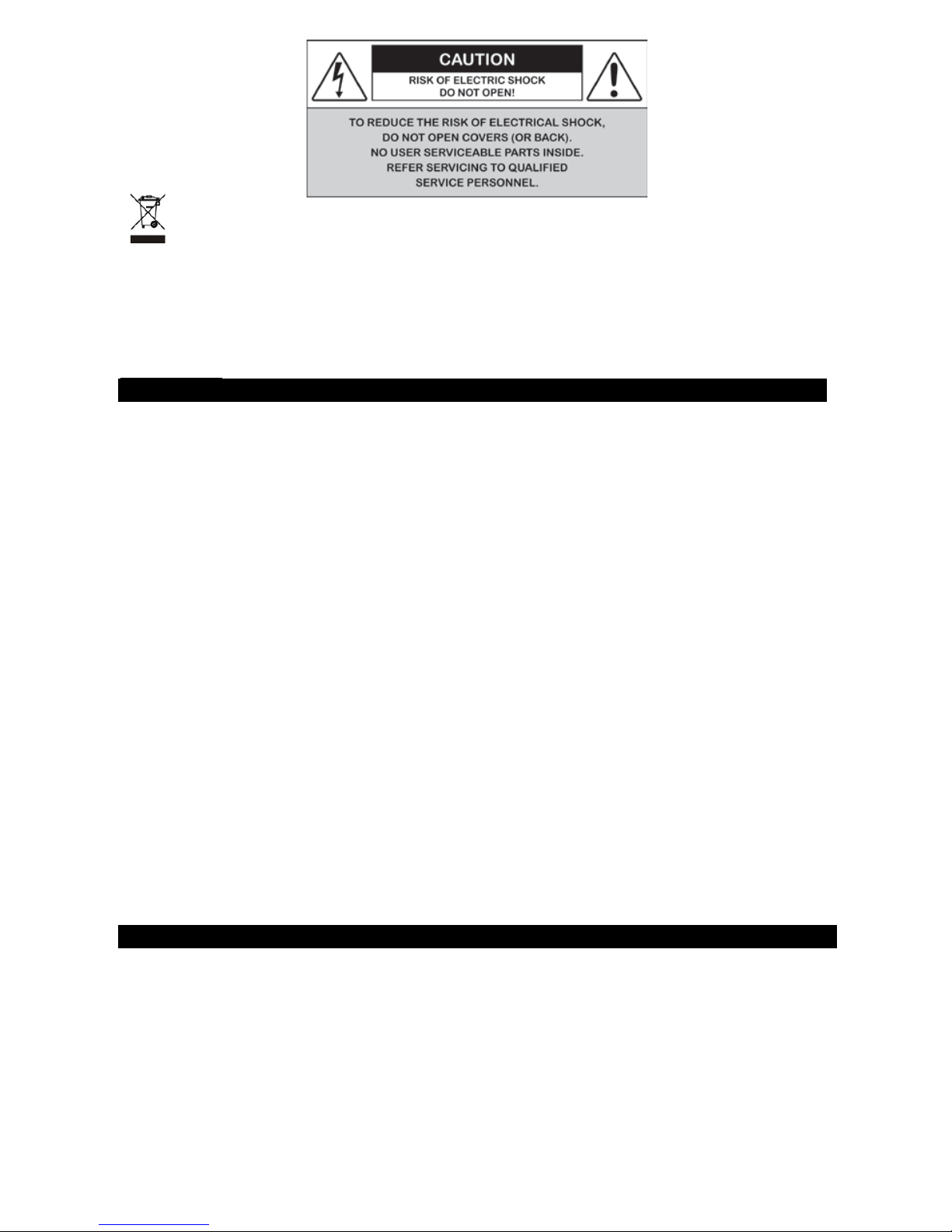
CAUTION
1. Never point the camera toward the sun
Do not expose the lens directly to the sun or to strong light as this may damage the pick-up device.
2. Handle this camera with care
Avoid any shock or bumping of the camera. Improper handling could damage the camera.
3. Require s a proper operating environment
This camera is designed for indoor use. The allowable temperature range for operation of this camera is
between -4°F ~ 140°F / -20°C ~ 60°C.
4. Clean the front face or lens
It is recommended that the surface be cleaned every 3~6 months. Cleaning sho ul d be do ne b y using a
chamois, a very fine soft cloth, lens tissue, or cotton tipped applicator and ethanol to carefully remove any
fingerprint or dust.
5. Check the power so ur ce vo lt ag e
The power source voltage should be within the specified range. (Camera must meet the specifications).
Camera must be conne cte d to a surge pro tect or at all tim es.
6. Objects and liquid entry
Never push objects of any kind into this camera as this may touch dangerous voltage points of short out parts
that could result in a fire or electric shock. Never spill any kind of liquid on the video product.
7. Servicing
Do not attempt to service this video product by yoursel f as opening or removing covers ma y ex pos e you to
dangerous volta ge or oth er ha z ar ds. Refer all service to qualif ied serv ici n g per son nel .
8. Damage requiring service
Unplug this video product from the wall outlet and refer service to qualified servicing personnel under the
following conditions:
a. When the power supply cord or plug is damaged.
b. If liquid has been spilled, or objects have fallen into the video product.
c. If the video product has been exposed to rain or water.
d. If the video product has been dropped or the cabinet has been damaged.
e. When the video product exhibits a distinct change in performance.
LIMITED WARRANTY
Sentry US products are covered under warranty for one (1) years from the date of purchase. The warranty will
automatically be voided if any of the following occurs:
1. Camera sticker is removed
If the camera sticker is removed, we will not be able to confirm any information regarding when and where the
product was purchased. We have no other way to verify the purchase record without the serial number on the
camera sticker; therefore, it should not be removed.
2. Camera is modified in any way
If the camera is scratched, damaged, or modified in a manner not described in this manual, the warranty will be
voided immediately. It is the customer’s responsibility to keep the camera in good condition.
3. Video or power cable is cut
The video cable and the power cable should not be tampered with. Cutting or modifying of the cables will result
in termination of the warranty.
Page 3
3
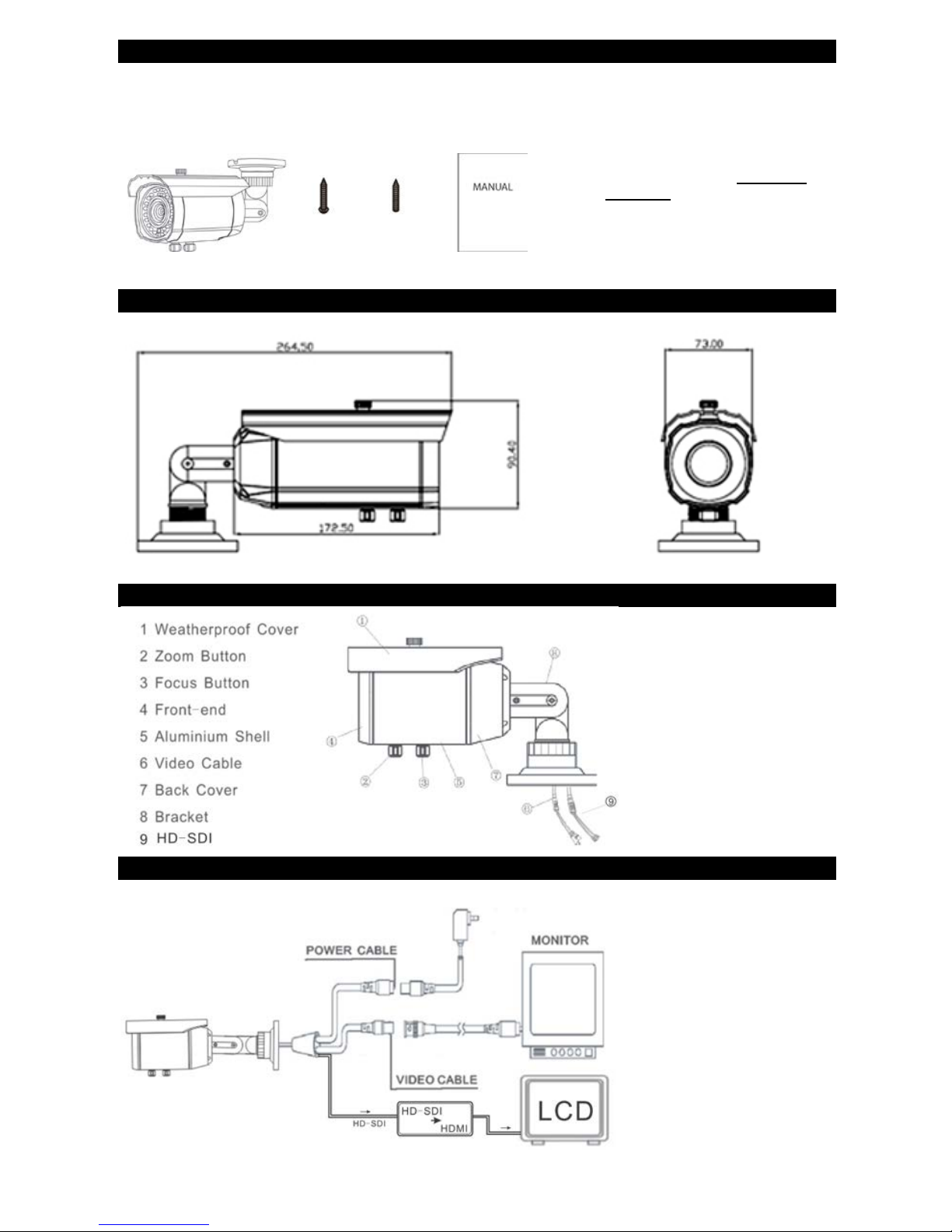
PACKAGE CONTENTS
1. One (1) HDB42-4AVF Camera
2. One (1) Mounting Scre w
3. One (1) Wall Anchor
4. One (1) User Manual
DIMENSIONS (Unit: mm)
PARTS AND FUNCTIONS
INSTALLATION AND CONNECTION
1.
2. 3. 4.
* For any returns, please include all
components list ed ab ove with
original packaging in Resalable
Condition. Absolut ely No
Returns will be accepted if any
component is missing/damaged.
Page 4

4
OSD
EXPOSURE
Electronic Shutter Auto
Auto, 1/25 ~ 1/50,00 0
AGC Middle
Low / Middle / High
Auto Slow Shutter
Off
Auto
x2-x30
Image Brightness 44
0 ~ 100
Digital Wide Range
Off / Low / Middle / High
Transparent
Off / Low / Middle / High
BLC
Off
BLC
Gain at backlight are a/ Area / Preset / Return
HLC
Area for choose
Area for display
Level / Mode / Black mask / Preset / Return
Return
LENS
DC Lens
Indoor / Outdoor
Video Lens
Manual Lens
WHITE BALANCE
AWB
Manual White Balance
Blue 50 0~100
Red 50 0~100
Outdoor
Indoor
AWC-SET
D/N
Auto Switch
Delay 5sec
0~60
D-N (AGC) 80
0~100
N-D (AGC) 50
0~100
Return
Color Mode
B&W Mode
Color Sync
On/Off
Smar t IR
Level 8 0~15
Area
Return
Page 5

5
IR LED
On/Off
IR PWM 0
0~100
Return
Outer Switch
NR
2D Noise Reduction
On/Off
3D Noise Reduction
On: S-Level 0
0~100
On: E-Level 0
0~100
Off
Level 80
0~100
Smart Noise Reduction
On/Off
Return
FUNCTIONS
Camera Headline
On/Off
Digital Effect
Image Freeze
On/Off
Mirror
Off / Horizonal Mirror / Vertical Mirror / Rotation
Digital Zoom
Off
On
PIP: On / Off
Digital Zoom: x2~x64
Flip Horizontal & Vertical
Preset
Return
Negative Film
On/Off
Return
Motion Detection
Off
On
Area of choice: Area 1~3
Area for display: On/Off
Sensitivity 30: 0~60
Inspection On/O ff
Preset
Return
Privacy Mask
Off
On
Area of choice: Area 1~8
Area for display: On/Off
Color 1~16
Preset
Return
Language
CHN1 (Traditional Chinese character)
CHN2 (Simplified Chinese character)
ENG (English)
Spot Repair
Real-time Dead Pixels Repair
Page 6

6
On/Off
Level 30
0~60
Static Dead Pixels Repair
On/Off
Start
Level 25
0~60
Auto Slow Shutter x4
X2~x30
Return
RS485
Camera ID
0~255
ID Display
On/Off
Baud Rate
2400, 4800, 9600, 19200, 38400
Return
Version
120320
Return
IMAGE ADJUSTMENT
Sharpness
Sharpness
On/Off
Level 60
0~100
Resolution
On/Off
Return
Monitor
LCD
Gamma: Auto
B-GAIN 60: 0~100
R-GAIN 60: 0~100
Return
CRT
Black Level 0: -30~30
B-GAIN 50: 0~100
R-GAIN 50: 0~100
Return
Menu
Font Color: 8 variable
Font Outline: On/Off
Return
Edge Illumination Compensation
On/Off
NTSC/PAL
PAL/NTSC
Return
RESET
Factory Settings
Reset
Return
EXIT
Page 7
7
CONDITIONS & TESTING
1) Working Condi ti o n
Temperature: -10°C~50°C (Recom mendation: - 5°C ~ 40°C)
Humidity: 10 %∼85 %
2) Storage Co nd ition
Temperature: -20°C~60°C
Humidity: 0 %∼ 90 %
3) High Temperature storage Test
Leaving the packed product at Temperature of 60°C for 72 Hours, then leaving it at Normal
Temperature for 8 Hours, after doing that, there should be no Problem in Performance.
4) Low Temperature storage Test
Leaving the packed product at Temperature of -20°C for 72 Hours, then leaving it at Normal
Temperature for 8 Hours, after doing that, there should be no Problem in Performance.
TROUBLESHOOTING
Item
Problem
Solution
1
No picture or unstabl e
Check the connection of video line or power line
2 The image is so blurred
1. Checking is there something dirt on the lens, then
use customized lens paper or cotton buds with alcohol
drenched to clean.
2. Check the focus length and OSD settings.
3
The image is so dim
Adjust the CNT of monitor and iris.
4
No motion detection frame and privacy
shaded frame
Check the option button, whether it’s ON or OFF. Or
check the menu parameters.
5
Screen color cast in the special environment
Adjust WEB mode or direction.
6
The screen glittering
The camera might face to the sun, TV set or computer.
7
Functions are disorder and could not adjust
Restore default settings.
8
The camera works abnormal; the surface
over-heat; has peculiar smell, smoke etc.
Please cut off the power supply immediately. Secondly,
check the connection of power supply. Then send the
camera to professionals for maintenance.
Page 8
8
SPECIFICATION
Model HDB42-4AVF
Image Sensor
HD Sony M X-122 1/2.8" progressive scan CMOS
Total Pixel
2010(H) x 1108(V) = 2,227,080
Effective Pixel
1944(H) x 1092(V) = 2,122,848
Resolution
Digital: 1080 (30 frame), 720 (60 frame)
Max: 1100TVL (1080 frame)
Min. Illumination
Color:1.0 Lux @ F1.2, B&W: 0.5 Lux
Color DSS: 0.002 Lux, B&W: 0.0008 Lux
Video output
HD SDI, Analog: NTSC/PAL CVBS (w/o WDR)
IR LED
42 IR LED
IR Distance
Up to 100ft / 30m
Lens
3.3~12mm Auto Iris Vari-focal Lens
Lens Type
DC/VD Manual
S/N Ratio
> 50dB (AGC Off)
AGC
Off / Low / Middle / High
Shutter Speed
Auto / Manual (1/50(60 ) ~ 1/6 0, 000 sec)
Digital Slow Shutter
Off / On (x64)
Brightness
0~100 optional
WDR/BLC
Off / BLC / WDR / Transparent (fog-through)
Auto Electronic Control Exposure
Off / On
Day & Night
Auto/Manual Color/B&W Outer Control
White Balance
Auto / Manual / Indoor / Outdoor
DNR (Digital Noise Reduction)
1~100 optional
Mirror
Off / On
Sharpness
0~100 optional
BLC
Off / On
Digital Zoom
x2 ~ x64
Privacy Mask
8 area
Motion Detection
Off / On 3 Area
Language
Chinese / English
Power Source
12V DC
Power Consumption
600mA max
Power Input
Connector
Operation Temperature
-4°F ~ 140°F / -20°C ~ 60°C
Dimensions
10.41(L) x 2.87(W) x 3.56(H) inches
264.5(L) x73(W) x 90.4(H) mm
Net Weight
1.72 lbs / 780 g
* Specifications are su bject t o ch ang e witho ut noti ce.
MADE IN CHINA www.sentryus.com HDC-33
Copyright © 2013. All Rights Reserved. R201312-V04
 Loading...