

Sentry CPS-10 w/ Batt, CPS-10 w/o Batt, CPS-10HP w/ Batt, CPS-10HP w/o Batt, CPS-11 w/ Batt Installation, Operation & Maintenance Manual
...Page 1

Original Instructions
Installation, Operation
&Maintenance Manual
Sentry CPS Sampler
Corrosion Sampler
S-SW-IOM-00252-17 12-18
Page 2

2 Sentry Equipment Corp
Do not install, maintain, or operate this equipment without reading,
understanding, and following the appropriate Sentry Equipment Corp
instructions. Otherwise, injury, damage, or both may result.
Copyright
© 2018 by Sentry Equipment Corp. All rights reserved. All product and company names
are property of their respective owners. This document contains proprietary information.
No part of this document may be photocopied or reproduced without the prior written
consent of Sentry Equipment Corp.
Limit of Liability
Sentry Equipment Corp, its employees, agents, and the authors and contributors to this
document speci cally disclaim all liabilities and warranties, express or implied (including
warranties of merchantability and tness for a particular purpose), for the accuracy,
currency, completeness, and/or reliability of the information contained herein and/or
for the tness for any particular use and/or for the performance of any material and/or
equipment selected in whole or part with the user of/or in reliance upon information
contained herein. Selection of materials and/or equipment is at the sole risk of the user of
this publication.
Note
The information contained in this document is subject to change without notice.
Table of Contents
Safety Information ......................... 3
General Safety Precautions ................. 4
General Description ........................ 5
Installation. . . . . . . . . . . . . . . . . . . . . . . . . . . . . . . . . 10
Operation .................................. 12
Maintenance ............................... 14
Consumables .............................. 19
Spare Parts. . . . . . . . . . . . . . . . . . . . . . . . . . . . . . . . . 20
Standard Warranty ......................... 21
Customer Support .......................... 22
Page 3
Sentry CPS Sampler 3
Safety Information
Please read the entire manual before attempting to unpack, set up, or operate this
product. Pay careful attention to all Warnings, Cautions, and Notes. Failure to do so could
result in serious personal injury and/or equipment damage.
Use of Hazard Information
If multiple hazards exist, the signal word corresponding to the greatest hazard shall be
used.
De nitions
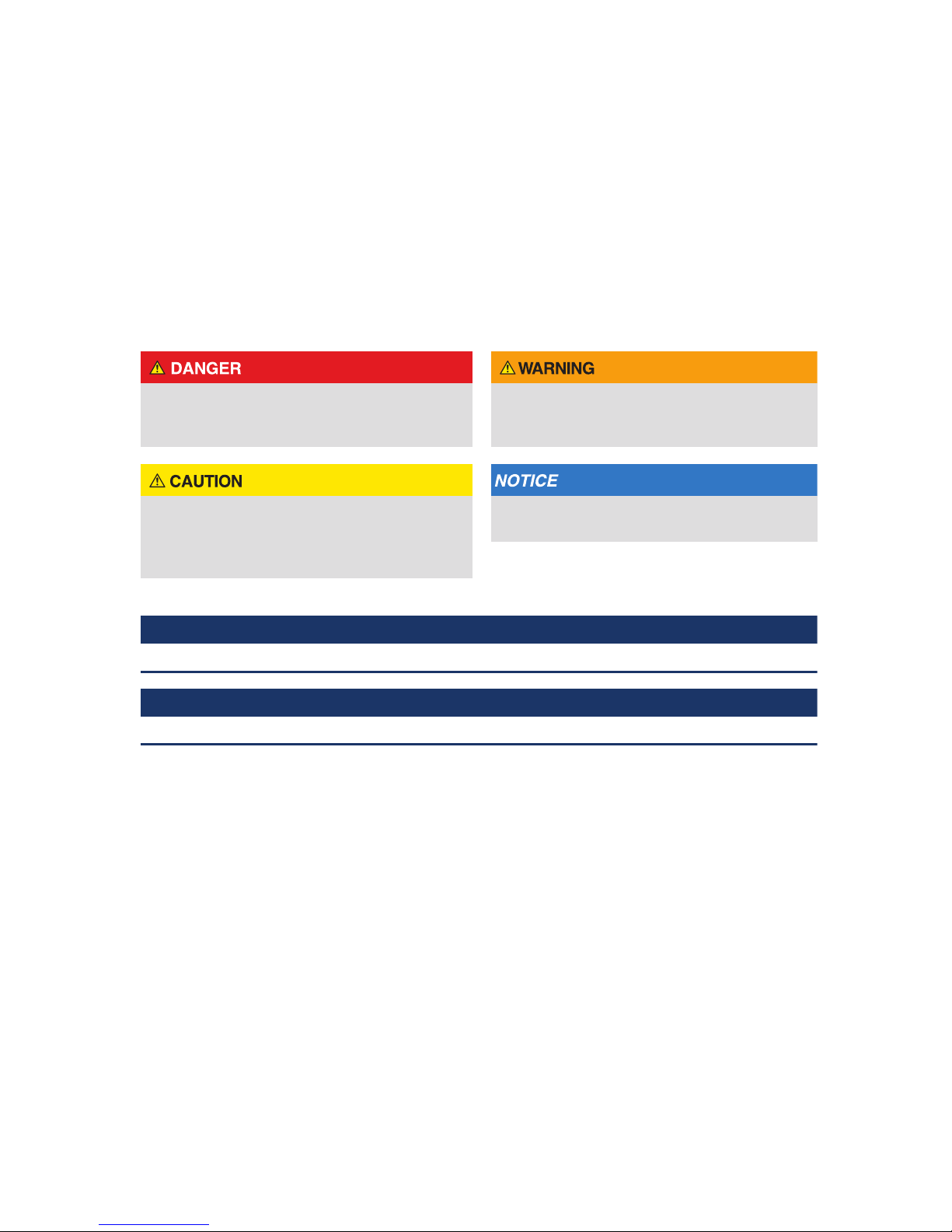
DANGER indicates a hazardous situation
which, if not avoided, will result in death or
serious injury.
WARNING indicates a hazardous situation
which, if not avoided, could result in death or
serious injury.
CAUTION, used with the safety alert symbol,
indicates a hazardous situation which, if not
avoided, could result in minor or moderate
injury.
NOTICE is used to address practices not
related to personal injury.
 NOTE
Information that requires special emphasis.
 TIP
Alternate techniques or clarifying information.
SHALL:
This word is understood to be mandatory.
SHOULD:
This word is understood to be advisory.
Page 4

4 Sentry Equipment Corp
General Safety Precautions
Product Selection, Installation, and Use
Improper selection, installation, or use can cause personal injury or property damage. It is solely
the responsibility of users, through their own analysis and testing, to select products suitable
for their speci c application requirements, ensure they are properly maintained, and limit their
use to their intended purpose.
Follow proper local, state, and federal regulations for proper installation and operational
requirements.
Always use caution and common sense when working with any chemical. Read the product
label and Material Safety Data Sheets (MSDS) carefully and follow the instructions exactly.
Potential Equipment Hazards
Hot surfaces! This equipment may have very hot surfaces. If an operator contacts a hot surface,
injury may occur. Use protective clothing to prevent injury. If other equipment comes in contact
with a hot surface, damage to the equipment may occur. Ensure the area around this equipment
is kept clear to prevent this damage from occurring.
High pressures! This equipment may contain uids at very high pressures. Prior to installing,
removing, or maintaining this equipment, ensure that the equipment is isolated from all
connecting piping, the equipment is depressurized, the contents have been drained, and the
equipment is cool.
Page 5
Sentry CPS Sampler 5
General Description
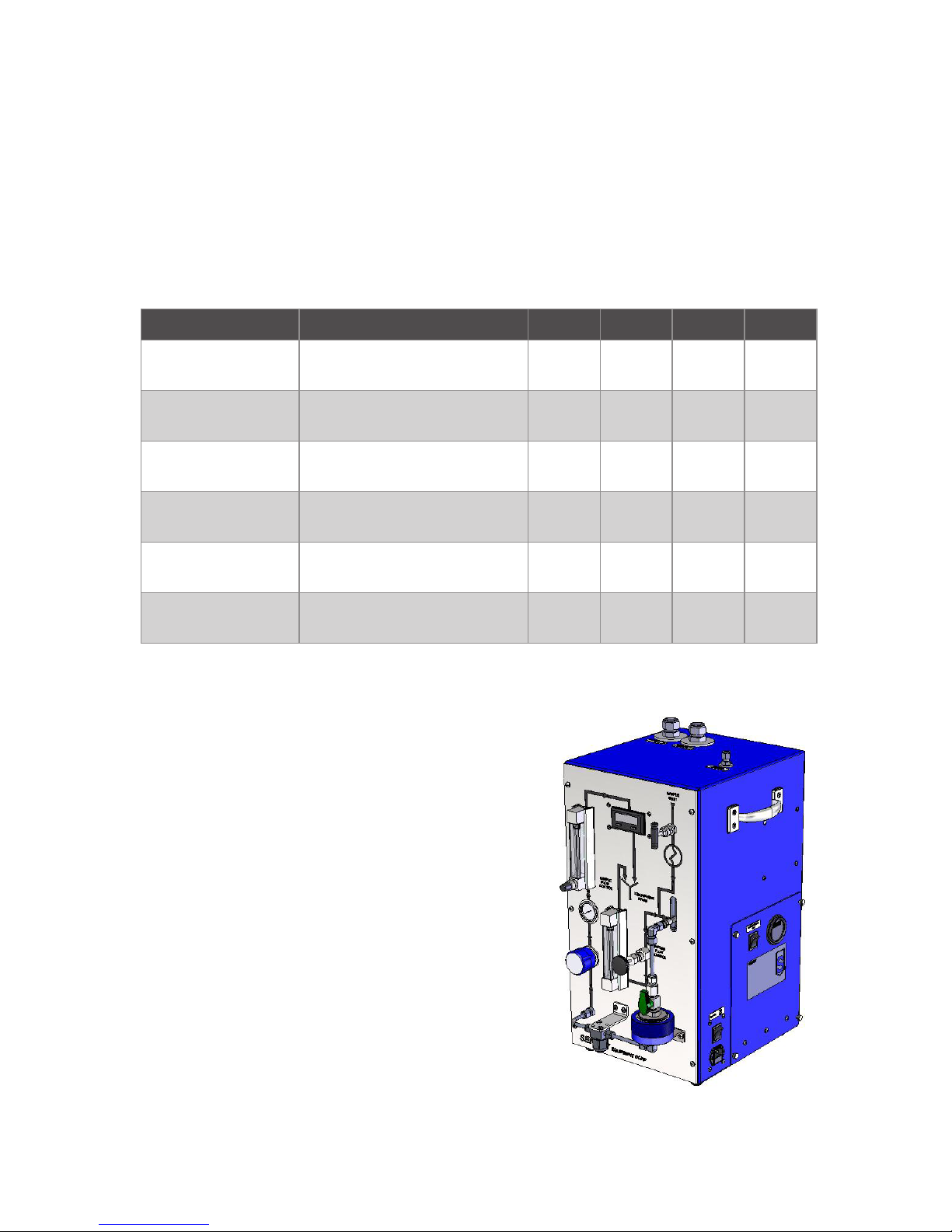
The Sentry® CPS Sampler is a stand-alone unit for collecting and eventual quantifying of
particulate and ionic matter (corrosion products) circulating in the secondary piping of
nuclear power plants and condensate/feedwater systems of fossil-fueled plants. The CPS
sampler collects sample material on lters. The lters are removed for laboratory analysis.
Accurate ow totalizing assures precise species concentration determination. The CPS
sampler is available in several single line congurations. Verify which model you have
when referring to this manual. Some of the illustrations may or may not include options,
which you have.
Model Description psig Barg °F °C
CPS-10 w/ Batt Single Stream w/ bypass &
battery
2850 196 131 55
CPS-10 w/o Batt Single Stream w/ bypass,
w/o battery
2850 196 131 55
CPS-10HP w/ Batt Single Stream w/ bypass &
battery
5000 344 131 55
CPS-10HP w/o Batt Single Stream w/ bypass,
w/o battery
5000 344 131 55
CPS-11 w/ Batt Single Stream w/ bypass &
cooler w/ battery
2850 196 1000 537
CPS-11 w/o Batt Single Stream w/ bypass &
cooler w/o battery
2850 196 1000 537
Power:
90 - 264 VAC, 47 - 63 Hz, 120 VA
Cooling Water (Model-11 only):
5 gpm (1136 L/H) minimum;
7 gpm (1590 L/H) maximum at 90°F (32°C)
Component arrangement as seen
by the operator from the front
Figure 1. Corrosion Products
Sampler (CPS-11)
Page 6
6 Sentry Equipment Corp
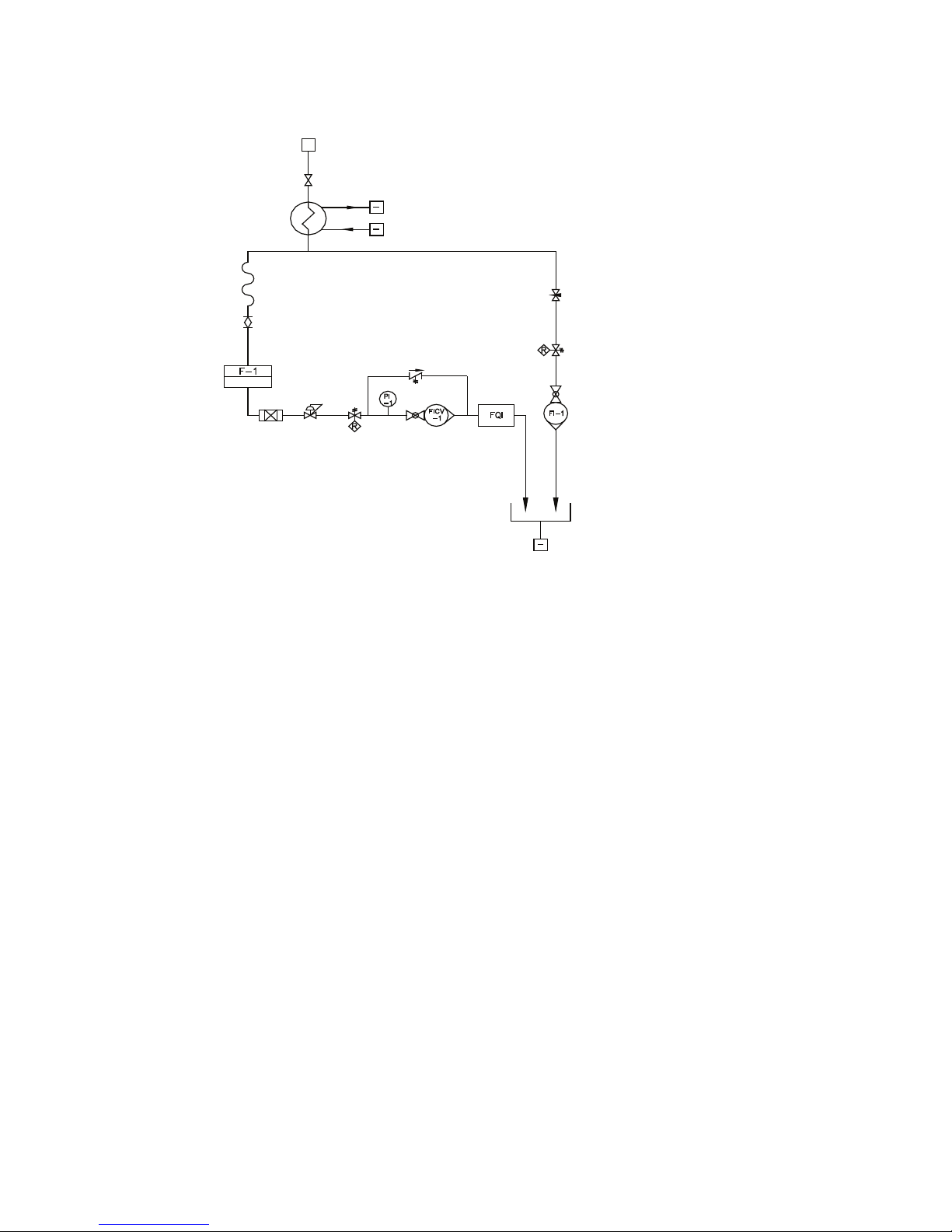
Figure 2. Corrosion Products Sampler Flow Schematic with bypass and cooler
Sample Drain
Cooling Water
Cooling Water
V-1
Sample Inlet
Isolation Valve
Sample
Cooler
Sample
Inlet
(Optional Bypass)
V-2
V-3
Bypass Flow
Control Valve
TSV (opt.)
Bypass Flow
Indicators
0 - 1800 cc/min
RV-1 (opt.)
F-1 PR-1 TSV-1
(opt.)
Flow
Indicator
w/ Control
Valve
Flow
Totalizer
Flexible
Hose*
Filter
Isolation
Valve
Filter Holder
*Flexible hose not supplied on HP models
The CPS sampler can automatically maintain a sample ow rate up to 330 cc/min in
the branch to the sample lter. Typically, greater ow rates are required to maintain
incoming sample line velocities of 5-6feet per second as recommended by EPRI. This ow
requirement is especially important, given the sole purpose of CPS sampling is to measure
sample constituents that can easily plate out on the sample tubing if the sample velocities
are below 5-6ft/s. The optional bypass loop can provide a path for 1500cc/min of sample
ow in addition to the ow to the sample lter branch.
The constant ow feature is accomplished by using a pressure regulator downstream of
the collection lter. The regulator maintains the inlet of the ow control valve at constant
pressure. Since the control valve outlet pressure is constant, CPS sampler ow is constant.
A sample throughput totalizer that is resettable, with ± 3% full-scale accuracy, measures
the total volume of liquid sample passing through the lter holder.
Page 7
Sentry CPS Sampler 7
Standard Filter Holder
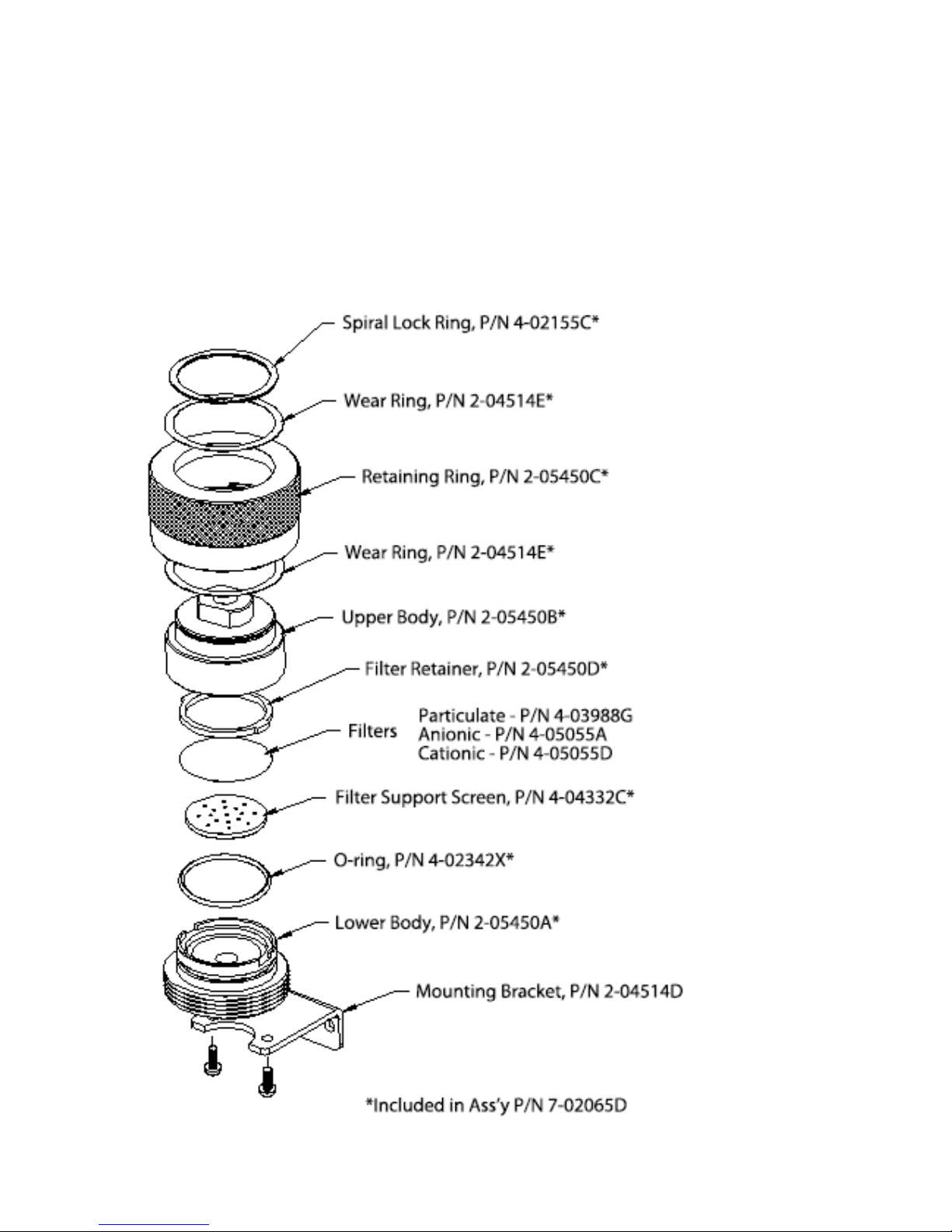
The Sentry Standard Filter Holder (refer to Figure 3) was developed to allow the operators
of Corrosion Product Samplers to install multiple lter papers in their samplers without
leakage and without the need for tools to open and close the housing. It is designed
such that varying stack heights of lter papers do not interfere with the housing’s sealing
capabilities. All wetted metal surfaces are of T316SS construction. The lter holder accepts
47mm diameter membrane lters. Replacement lters can be ordered through Sentry
Equipment.
Figure 3. Filter Holder Assembly for Standard Units
Page 8
8 Sentry Equipment Corp
HP High Pressure Filter Holder
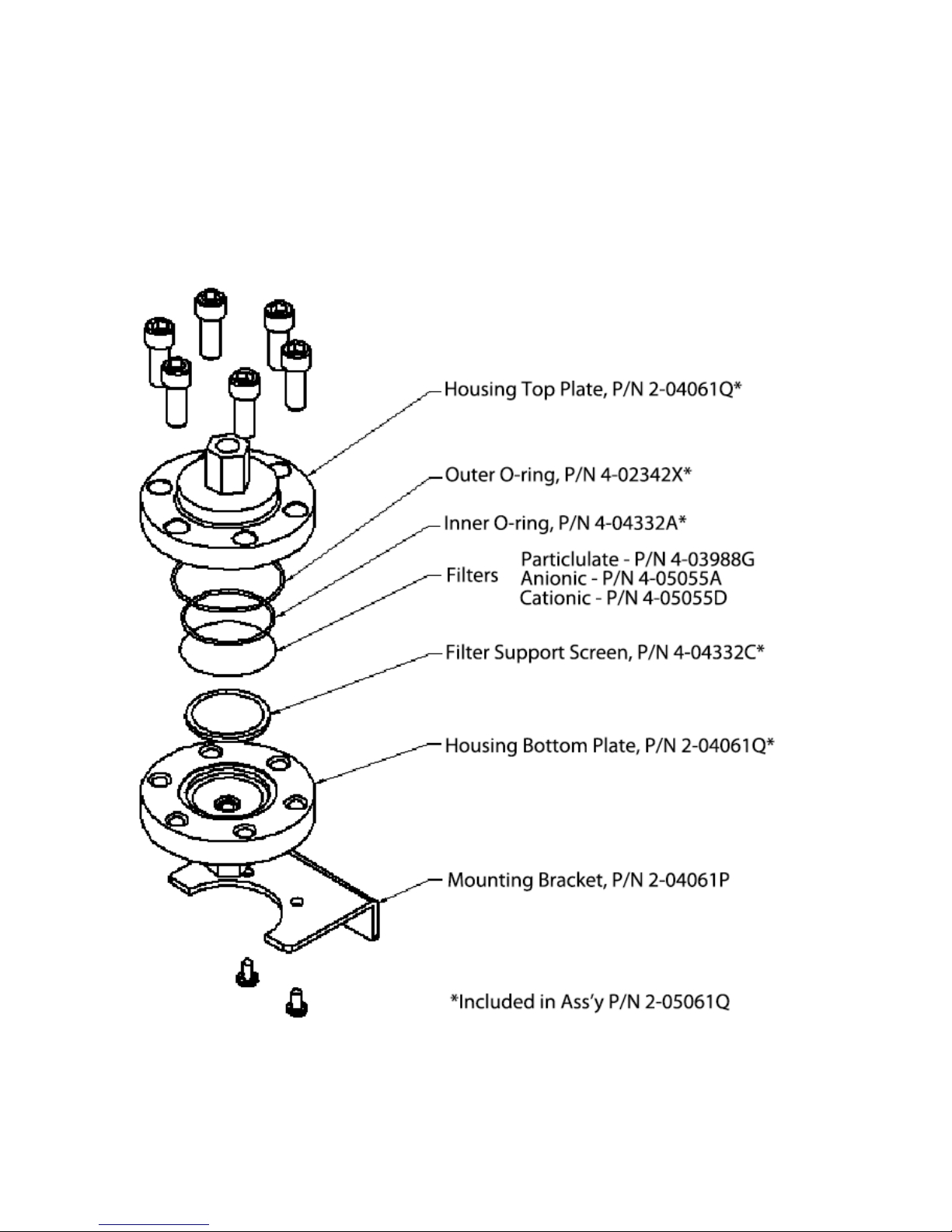
The HP High Pressure Filter Holder (refer to Figure 4) was developed for high-pressure
applications. A 5/16inch hex Allen wrench is required to allow the operators of Corrosion
Products sampler to open and close the housing for lter replacement. Stacking more
than three lter papers is not recommended or leakage will occur. All wetted metal
surfaces are of Stainless Steel construction. The lter holder accepts 47mm diameter
membrane lters. Replacement lters can be ordered through Sentry Equipment.
Figure 4. HP High Pressure Filter Housing
Page 9

Sentry CPS Sampler 9
Filter Membranes (Technical Information)
Particulate Filter Sentry p/n 4-03988G
Usage Collection of undissolved particles
Bubble Point at 23°C > 2.2 bar
Gravimetric Extractables 2.5%
Porosity 79%
Refractive Index 1.51
Filter Diameter 47 mm
Filter Surface plain
Max. Operating Temp 75°C
Filter Color white
Filter Material Mixed Cellulose Esters
Filter Type Screen Filter
Filter Pore Size 0.45 μm
Wettability Hydrophilic
Qty/Pkg 100
Thickness 180 μm
Anion Exchange Filter Sentry p/n 4-05055A
Usage Collection of dissolved negatively charged ions
(anions) (i.e., Cl-, Br-, OH-)
Filter Diameter 47 mm
Filter Surface plain
Filter Color white
Filter Material Cellulose
Filter Type Screen Filter
Ion Exchange Capacity 1.7 μeq/cm
2
Thickness 230 μm
Cation Exchange Filter Sentry p/n 4-05055D
Usage Collection of dissolved positively charged ions
(cations) (i.e., Fe+, Cu+, Na+, Mg+)
Filter Diameter 47 mm
Filter Surface plain
Filter Color white
Filter Material Cellulose
Filter Type Screen Filter
Ion Exchange Capacity 50.0 μeq/cm
2
Thickness 200 μm
Page 10

10 Sentry Equipment Corp
Liquid Totalizer
The liquid totalizer is a Pelton-type microturbine meter designed for low ow rates in
water systems.
The totalizer can display ow rate, total volume and is resettable by the customer. The
instrument has an accuracy of ±3.0% of its full scale value, which is 500cc/min.
Installation
Lifting hazard. Use proper lifting techniques when handling this equipment.
The CPS sampler is designed to be portable to allow for sampling in numerous locations.
Select a location that provides adequate support, operator accessibility, close proximity
to the sample being analyzed, access to cooling water (if required) and access to a gravity
drain. Samples in excess of 131°F/55°C will require cooling. It is highly recommended that
the CPS sampler be installed in a high-pressure portion of the sample line to ensure the
sample ow rate meets the EPRI guidelines for representative sampling.
Standard Customer Connections
Sample Inlet: 1/4” Compression tting
Sample Outlet/Drain: 3/4” O.D. Tube Stub (SS) (See note below)
Cooling Water Inlet/Outlet (if installed): 3/4” Compression ttings
 NOTE
Since the liquid euent is at atmospheric pressure, the method of connection can be either soft
(using hose clamps provided by others) or rigid tubing.
Filter Replacement - Standard Filter Housing (Refer to Figure 3)
Verify that the pressure regulator is fully closed (turned fully counterclockwise), the bypass
ow control valve is fully closed, the sample inlet valve is fully closed and the lter inlet
isolation valve is fully closed.
Open the collection lter housing and remove the lter retainer and any lter papers. The
lter housing is opened by unscrewing the blue anodized retaining ring and removing the
upper body. No tools are necessary.
Re-install the upper body and retaining ring and hand tighten only. Because the seal is
made around the circumference of the housing and not the face, it is not necessary to
use extreme force to close the lter holder. When the lter holder is properly assembled
and tightened, the bottom edge of the retaining ring will be ush with the bottom of the
lower housing.
Page 11

Sentry CPS Sampler 11
Filter Replacement - HP High Pressure Filter Housing (Refer to Figure 4)
Verify that the pressure regulator is fully closed (turned fully counterclockwise), the bypass
ow control valve is fully closed, the sample inlet valve is fully closed and the lter inlet
isolation valve is fully closed.
Open the collection lter housing and remove the lter papers. The lter housing is
opened by removing the six cap screws with a 5/16inch hex Allen wrench.
Re-install the housing top plate. Place the six cap screws in their original locations and
give each bolt a few turns, rst one, then the one opposite, working around the housing
in a star pattern. Try not to tighten adjacent bolts consecutively. Tighten with a 5/16inch
hex Allen wrench. Because the seal is made around the housing face, it is recommended
to tighten the bolts using the opposite star pattern method. When the lter holder is
properly assembled and tightened, it will not leak.
Establish cooling water ow to the sample cooler (if required).
Assure that cooling water is owing before establishing sample ow.
Open all uid sample supply valves. Open the inlet isolation valve. Open the lter inlet
isolation valve and adjust both the pressure regulator and sample ow control valve to
simultaneously give 14psig on the downstream pressure gauge and near 75cc/min on
the ow indicator.
The system should be primed with liquid and ow started gradually. This will prevent trapped
air or gas from being forced through the sensor at a high velocity that may damage the ow
totalizer. If the ow through the unit exceeds 120% of the maximum rate (full scale), the ow
totalizer may be damaged.
Page 12

12 Sentry Equipment Corp
Operation
For units with a battery option, the battery must be fully charged by connecting the unit to AC
power before the rst use.
Sampling
Do not open the lter housing without rst isolating the sample inlet.
The lter housing is opened, as explained in “Installation”, by removing the upper body.
The lter element is centered on the lower half of the housing. When using anionic and
cationic lters, it is recommended that particulate lters be placed both above and below
the anionic and cationic lters. This will help prevent corrosion, which has been found to
occur between these lters and the stainless steel housings.
Replace the upper body and tighten.
Assure that cooling water is owing before establishing sample ow.
Sample is introduced into the CPS sampler from customer supplied piping at full system
pressure. Start sampling by rst assuring the lter element is in the CPS lter housing and
the housing is securely closed. Verify that the pressure regulator is fully closed (turned fully
counterclockwise), the bypass ow control valve is fully closed, the sample inlet valve is
fully closed and the lter inlet isolation valve is fully closed. Reset the totalizer reading, by
pressing the RST button while on the totalized volume screen.
Open all uid sample supply valves. Open the inlet isolation valve. Open the bypass ow
control valve to set the desired bypass ow rate. Open the lter inlet isolation valve and
adjust both the pressure regulator and sample ow control valve to simultaneously give
14 psig on the downstream pressure gauge and near 75 cc/min on the ow indicator.
Readjust bypass ow control valve as necessary to achieve desired total ow rate.
Maintain sample ow until the desired volume has passed through the lter. Typically
this is somewhere between 150 & 1000liters. The ideal volume should be determined by
trial and error as excessive ow may actually remove deposits from the lter media. After
collecting the required sample volume, the inlet isolation valve at the top of the lter
housing is closed.
The displayed reading is the total volume that passed through the lter housing (in liters).
Do not open the lter housing without rst isolating the sample inlet.
Page 13

Sentry CPS Sampler 13
The lter housing should be disassembled as shown in Figure 3 or Figure 4 and the
sample lter assembly transported to the chemistry department for subsequent chemical
and radioisotope analysis. The sample lter assembly should be bagged based on
contamination levels and plant rules.
The Corrosion Products Sampler can be provided with two (2) optional Thermal Shut O
Valves (TSV-1). The TSV is a device designed to shut o sample ow to components down
stream from the TSV if a thermal excursion (high temperature) occurs in the sample. The
TSV is equipped with an indicating reset button. When the valve is in the tripped mode
(closed), the red indicating band on the reset button is visible. If the valve is received in
the tripped position it must be reset to allow sample ow. This is accomplished by pushing
in the reset button until it latches. In conditions where ambient temperatures are above
the valve trip point, it will be necessary to hold the reset button in until cooled sample
allows the valve to latch.
If the TSV trips during sampling operations, isolate the analyzers on the line or lines
aected. Correct the problem causing the excessive sample temperature and reset
the TSV. It may be necessary to hold the reset button in momentarily until all high
temperature sample is ushed from the system. After the TSV is reset, reinitialize sample
ow to the analyzers.
Display
The display has two screens; the Total Volume screen and the Flow Rate screen. Pressing
the T/R button will toggle between the two screens. An R on the left side of the screen
indicates the Flow Rate screen. The Totalized Volume is displayed in liters. Pressing the RST
button while the Totalized Volume is displayed will reset the Totalized Volume. Contact
Sentry Equipment for instructions if you do not want the totalized volume operator
resettable.
 NOTE
Do not introduce instrument air into the totalizer. Keep the amount of air entering the totalizer
to a minimum. Minimizing air entering the totalizer will minimize totalizer error.
Page 14

14 Sentry Equipment Corp
Maintenance
The CPS sampler requires little maintenance. Flushing with ltered demineralized water
after each use can minimize problems. The lter holder, pressure regulator and ow
indicator require some occasional inspection and maintenance. If the CPS sampler is not
being used during freezing temperatures, it is recommended that the unit be drained to
prevent damage.
Do not ow any gas through the ow meter. Do not blow unit dry with compressed air. This may
damage the micro-turbine assembly. Do not exceed the pressure and temperature ranges for the
unit.
Battery Maintenance
For units with a battery option, the battery voltage level can be checked by pressing the
Battery Condition Test button. The meter will display the current condition of the battery
charge. To prevent damage to the battery, the unit must be connected to AC power to
recharge the battery when the meter reads 3 bars or less.
Do not allow the battery voltage to drop below 11.5 VDC. Permanent damage to the battery may
result. Also, due to the self-discharge characteristics of this type of battery, the manufacturer
recommends recharging the battery at least once a month for optimal battery life.
Figure 5. Battery Shelf Life and Storage
Page 15

Sentry CPS Sampler 15
Procedure to Verify CPS Flow Meter Calibration
1. Set ow rate of CPS sampler near 75cc/min. Use the display to set ow rate. Flow Rate
and Totalized Volume screens can be toggled by pressing the T/R button. An R on the
left hand side of the screen indicates the Flow Rate screen.
2. Verify ow rate using the 250cc graduated cylinder and stopwatch. Ensure there is no
air in the sample line.
3. Conrm the displayed ow rate on the CPS sampler matches the graduated cylinder
measurement within ± 3%.
 NOTE
Averaging ow rate over an extended period of time will reduce the signicance of human
errors.
4. Use the 4000cc graduated cylinder and reset the displayed total volume. Pressing the
RST button resets the Total Volume. Fill graduated cylinder to 2000cc. Maintain a ow
rate near 75cc/min. Ensure there is no air in the sample line.
5. When displayed total volume reaches 2000cc, stop ow through CPS sampler and
read value on graduated cylinder.
6. Verify the displayed total volume is within ± 4% or ± 80cc of 2000cc. If values are not
within the stated range, repeat test.
7. If values exceed 16%, it is probable that damage to the sensor has occurred. If values
are between 4% and 16%, recalibration is necessary.
Recalibrating Flow Meter
 NOTE
It is necessary to document programmed values prior to reprogramming the totalizer. Failure to
do so will result in incorrect scaling and error in totalized volume. The factory calibrated values
are located on the ow sensor unit.
If the totalizer/display stated value is within 16% of the actual value and a recalibration
is desired, the totalizer and ow rate multipliers can be adjusted for a more accurate
reading. Follow the procedure below. Ensure there is no entrapped air in the sample line.
Entrapped air will cause excess error in the totalizer reading. If the totalizer/display stated
value is not within 16% of the actual value, it is probable that the ow sensor has been
damaged and will require replacement.
1. Disconnect power from the unit. Verify the display screen is on.
2. Place unit into calibration mode. On some models, using the meter calibration switch
located on the CPS sampler will do this. Otherwise, remove the cover from the Flow
Totalizer display enclosure, and then connect the female push-on disconnect (located
at terminal 5 on the Flow Totalizer display) to the male push-on disconnect (located at
TB1-1 in the electrical enclosure).
Page 16

16 Sentry Equipment Corp
3. The ow totalizer/display is now in programming mode. Screen indication is on the
left side of the display. Press both buttons at the same time to go to the next screen
selection.
4. Verify that the values on screens 1 and 3 match the values noted on the ow sensor. If
values match, proceed to step 8.
5. If you do not have the necessary recorded values, it will be necessary to program
accordingly. You will rst need the Full Scale Pulsed Output Value.
a. Screen 1 – 83.3333R/(Full Scale Pulse Output)
b. Screen 2 – 00.0000
c. Screen 3 – (500/(Full Scale Pulse Output))
d. Screen 4 – 0.000
e. Screen 5 – Not Used – 1
f. Screen 6 – Reset Enable – R
6. If you do not have the Full Scale Pulse Output value, connect a digital multimeter with
frequency capability onto the back of the display/totalizer to pin INA (3). Set ow to
500cc/min. Record frequency value. This is your Full Scale Pulsed Output value.
7. Once you have the necessary recorded values, continue by following the steps below.
8. Connect Power to the unit.
9. Take unit out of calibration mode. On some models, using the meter calibration switch
located on the CPS sampler will do this. Otherwise, disconnect the male and female
push-on disconnects and replace enclosure cover.
10. Set ow rate of CPS sampler near 75cc/min. Use the display to set ow rate. Flow Rate
and Totalized Volume screens can be toggled by pressing the T/R button. An R on the
left hand side of the screen indicates the Flow Rate screen.
11. Verify ow rate using the 250cc graduated cylinder and stopwatch. Ensure there is no
air in the sample line.
 NOTE
Averaging ow rate over an extended period of time will reduce the signicance of human
errors.
12. Record the actual value and the displayed value. The ow rate adjustment value is
calculated by dividing the actual value by the displayed value. Repeat step 11 two
more times and average the values from the readings.
13. Use the 4000cc graduated cylinder and reset the displayed total volume. Pressing the
RST button resets the total volume. Fill graduated cylinder to 2000cc. Maintain a ow
rate near 75cc/min. Ensure there is no air in the sample line.
Page 17

Sentry CPS Sampler 17
14. When displayed total volume reaches 2000cc, stop ow through CPS sampler and
read the value on graduated cylinder.
15. Record the actual value and the displayed value. The totalizer adjustment value is
calculated by dividing the actual value by the displayed value. Repeat steps 13-14 two
more times and average the values from the readings.
16. Place unit into calibration mode. On some models, using the meter calibration switch
located on the CPS sampler will do this. Otherwise, remove the cover from the Flow
Totalizer display enclosure. Connect the female push-on disconnect (located at
terminal 5 on the Flow Totalizer display) to the male push-on disconnect (located at
TB1-1 in the electrical enclosure).
17. Adjust the number on screen 1 by the percentage that the value is o. For example:
Old screen 1 value = 25.7998, display total volume = 5L, Actual total volume = 4.95L,
New screen 1 value = 25.5418 [old screen 1 value(actual total volume ÷ display total
volume)]
18. Adjust the number on screen 3 by the percentage that the value is o.
19. Take unit out of calibration mode. On some models, using the meter calibration switch
located on the CPS sampler will do this. Otherwise, disconnect the male and female
push-on disconnects and replace enclosure cover.
Page 18

18 Sentry Equipment Corp
Replacing Totalizer/Display Battery
 NOTE
It is necessary to document programmed values prior to replacement of the totalizer battery.
Failure to do so will result in incorrect scaling and error in totalized volume. The factory
calibrated values are located on the ow meter.
The totalizer/display battery will last up to ve years under normal circumstances.
The factory calibrated values for the ow meter are located on the ow meter. It is
recommended to record the programming values of the totalizer prior to experiencing a
dead battery. If you do not have these values, it will be necessary to recalibrate the ow
meter. To replace the battery and reset the ow totalizer, follow the below procedure.
1. Disconnect power from the unit.
2. Remove dead battery by sliding o battery cover, pulling out the old battery and
installing the new battery, noting the polarity.
3. Verify the display screen is on.
4. Place unit into calibration mode. On some models, using the meter calibration switch
located on the side of the CPS sampler will do this. Otherwise, use a jumper to connect
terminal 5 to terminal 4 on TB1 located in the electrical enclosure.
5. Using your recorded programming values, reenter these values into the display on the
appropriate screen.
6. Take unit out of calibration mode. On some models, using the meter calibration switch
located on the side of the CPS sampler will do this. Otherwise, disconnect terminal 5
from terminal 4 on TB1 located in the electrical enclosure.
Filter Holder
Refer to Figure 3 & Figure 4 for identication of lter assembly components.
The lter retainer is designed to prevent distortion of the lter papers when opening and
closing the lter housing. The retainer can be easily removed by grasping the locating ears
between your thumb and forenger.
Periodically inspect the o-ring for wear. Replace as necessary.
The lter support is made of a delicate microscopic screen; handle it with care. Inspect it
before each use for dents and punctures. Replace if damaged.
On the Standard Filter Housing, keep the threads on both the retaining ring and the lower
housing clean. Dirt may cause galling of the threads. Occasionally the inside surfaces may
become lmed. Clean with commercial grade detergent soap and water.
Page 19

Sentry CPS Sampler 19
Regulator Protection Filter (F-1)
A 7-µm lter is located between the sample collection lter and the pressure regulator.
This lter is designed to provide protection to the regulator should sample be introduced
into the CPS sampler without a collection lter in place or if there should be any leakage
around the collection lter. It is mounted on the front of the CPS sampler to provide easy
access. If you are unable to achieve the recommended pressure of 14.5 psig /1 bar, clean
or replace the lter element by loosening the union nut and removing the bonnet.
Thermal Shuto Valve (TSV-1)
The Thermal Shuto Valve provides for automatic shutdown of the sample ow in the
event the sample temperature goes beyond a preset limit. As an added precaution this
option requires a manual restart after shutdown. There are two TSVs provided with this
system. One provides over temperature protection for the Flow Totalizer loop and the
other for the by-pass loop.
Pressure Regulator (PR-1)
Little if any maintenance is required. If you are unable to achieve the recommended
pressure of 14.5 psig/1 bar, and it has previously been determined that sucient sample
pressure is available at the CPS sampler inlet, remove the center cap from the regulator
knob and loosen the locknut retaining the knob. While holding the valve stem, turn the
knob counterclockwise approximately ½ turn. Retighten the locknut and verify that
this procedure has improved the performance. Additional adjustment may be required.
Replace center cap.
Consumables
The lter papers inserted into the lter holder (item 4 of Figure 6) and the lter elements
for the regulator protection lter (item 12 of Figure 6) are consumable items. Replacement
lters may be purchased from Sentry Eqiupment using the following part numbers (you
may also refer to Figure 3 & Figure 4 ).
Sentry Part No. Description
4-03988G Filter, 0.45 µm pore, white, plain surface
4-05055A Filter, 2µm pore, Anionic
4-05055D Filter, 4–12µm pore, Cationic
4-00361E Filter, 7 µm pore, regulator protection
Page 20

20 Sentry Equipment Corp
Spare Parts
The following is a list of recommended spare parts available for the Corrosion Products
Sampler (see Figure 6). Spare parts are available from Sentry Equipment Parts Department:
(262) 567-7256.
Item Description Part Number
1 Inlet Valve 4-01297B
2 Flex Hose (standard press. only) 4-01146H
3 Filter Isolation Valve:
Standard
HP High Pressure
4-03654A
4-05264B
4 Standard Filter Housing (particulate)
O-ring
HP High Pressure Filter Housing (particulate)
Inner O-ring (TFE Encapsulated)
Outer O-ring
7-02065D
4-02342X
2-04061Q
4-04332A
4-02342X
5 Regulator:
Standard
HP High Pressure
Replacement Diaphragm
4-01433T
4-01433G
4-00367B
6 Pressure Gauge 4-04139J
7 Sample Flow Indicator 6-02671C
8 Totalizer:
Flow meter
Display
Cable (Flow meter to Display)
4-05953D
4-05953E
4-05953F
9 Bypass Flow Control Valve 4-01237F
10 Bypass Flow Indicator 4-04112B
11 Sample Cooler 7-00759A
12 Filter (regulator inlet)
Replacement Element
4-01669E
4-00361E
13 Power Cord, 120 VAC 4-05953A
14 Battery Charger 6-04631W
15 N/A N/A
16 12 VDC SLA Battery 4-05953G
17 Voltage Indicator 4-05953H
18 Diode 4-05953L
19 Voltage Indicator Switch 4-05953J
20 Flow Meter Disconnect Switch 4-05953K
Page 21

Sentry CPS Sampler 21
Item Description Part Number
21 Totalizer/Display Battery 4-05953P
22 Power Input Fuse, 10A 4-05953V
23 Battery In-line Fuse, 10A 4-05953X
24 TSV, Thermal Shut o Valve (120°F) 7-01137E
25 Relief Valve, 30 psi Fixed Cracking Pressure 4-01233L
 NOTE
Some components not applicable to all models.
Figure 6. Spare Parts
Page 22

22 Sentry Equipment Corp
Standard Warranty
Sentry Equipment Corp (“Seller”) warrants products manufactured by it and supplied
hereunder (“Products”) to be free from defects in workmanship and, to the extent
materials are selected by Seller, to be free from defects in materials, in each case for a
period as de ned in the table below:
Product Line Product Category Warranty Period
Sentry® 1. Automatic Sampling
2. Corrosion Monitoring
3. Manual Sampling
4. Sample Conditioning
5. Sampling & Analysis Systems
6. Replacement Parts (without expiration dates)
Eighteen months
from date of
shipment or twelve
months from
startup, whichever
occurs rst
Waters
Equipment
1. Sampling & Analysis Systems
2. Replacement Parts (without expiration dates)
Twelve months from
date of shipment
To view the full warranty, go to
www.sentry-equip.com/warranty.
Page 23

Sentry CPS Sampler 23
Customer Support
With proven sampling expertise since 1924, Sentry products and services provide business
operations the critical insights to optimize process control and product quality. We deliver
true representative sampling and analysis techniques to customers around the globe,
empowering them to accurately monitor and measure processes for improved production
e ciency, output, and safety. Standing behind our commitments, we are determined to
tackle any application, anywhere.
We know that running an e cient operation isn’t easy. It requires thorough, careful
analysis of controlled, real-time data achieved through reliable, accurate, and repeatable
process monitoring and measuring. By e ectively conditioning, sampling, and measuring
gas, liquid, slurry, powder, solids, steam, or water within their production environments,
our customers obtain the critical insights they need to control and optimize their
processes.
Yet, controlling your processes also means reliable customer support throughout the life
cycle of your equipment.
Customer Service—General information, warranty claims, order management.
Installation Service—For systems that require specialized expertise upon installation.
Technical Support—Troubleshooting, training, and technical manuals.
Field Service & Retro ts—When a problem needs immediate attention.
Replacements Parts & Consumables—Order your replacement parts and consumables.
Sentry ProShield Services—Select from four ProShield Guardian service plans
providing di erent levels of support to protect your large system investments with
regularly scheduled maintenance.
To learn more, go to
www.sentry-equip.com/support.
Page 24

sentry-equip.com
966 Blue Ribbon Circle North, Oconomowoc, WI 53066 U.S.A. | +1-262-567-7256 | support@sentry-equip.com
Serving customers
in more than 50 countries
across six continents worldwide.
 Loading...