

Page 1

SENTROL ZX300/ZX310
Expandable Security System Control
Installation/
Programming
1
Page 2

2
Page 3

Table of Contents
ZX300/ZX310 Wiring Diagram......................................................................................5
Control Board T erminal Descriptions.........................................................................6
Zone Wiring.................................................................................................................... 7
Class ‘B’ End-Of-Line Resistor Supervised Zones ......................................................7
Non-Supervised Closed Circuit Loop (No EOL Resistor Supervision)........................7
ZXEX08 Zone Expander Module............................................................................. ... 7
Wireless Devices ..........................................................................................................8
Control Station Addressing and Supervision............................................................9
SSD, LCD, and VFD Control Stations......................................................................... 9
ICON Control Stations..................................................................................................9
LED Control Stations..............................................................................................9
Unsupervised and Supervised Control Stations..................................................... 9
T ABLE OF CONTENTS
Control Station Troubleshooting..............................................................................10
12 VDC Outputs .........................................................................................................11
Operating the System ................................................................................................13
Powering Up The Control ...........................................................................................13
Testing ...............................................................................................................13
Installer Arming and Disarming ..................................................................................13
Trouble Conditions .....................................................................................................1 3
Clearing Trouble Messages .......................................................................................13
Installer on Premises..................................................................................................13
Programming the Control.................................................................................................14
Introduction ...............................................................................................................14
Local Programming ....................................................................................................1 4
Programming Zone Names....................................................................................... 14
Installer Level Programming .....................................................................................15
Menu Options .............................................................................................................15
Program Function Map....................................................................................15
Entering a New Value at a Location................................................................15
Programming the Account Code and Telephone Number Digits....................16
Additional Programming Notes .......................................................................16
Program User Codes.......................................................................................16
Restore Factory Defaults ................................................................................16
Hours Until Next Comm Test...........................................................................1 7
Program RF Data............................................................................................17
Programming RF Zone Devices Into the RF Gateway ...................................17
Programming RF User Devices Into the RF Gateway....................................18
Programming RF Devices Into the Control Panel...........................................18
3
Page 4

T ABLE OF CONTENTS
Specifications And Features .....................................................................................19
List of Compatible Accessories................................................................................22
SIA and Contact ID Formats......................................................................................23
Agency Requirements ...............................................................................................25
National Fire Protection Association (NFPA) Rules................................................27
FCC Compliance.........................................................................................................30
4
Page 5

ZX300/ZX310 Wiring Diagram
WIRING DIAGRAM
7167-1459:114
FIGURE 1 Suggested UL Household Burglar Alarm and/or Fire (ƒƒ) Alarm Hookup
5
Page 6
TERMINAL DESCRIPTIONS
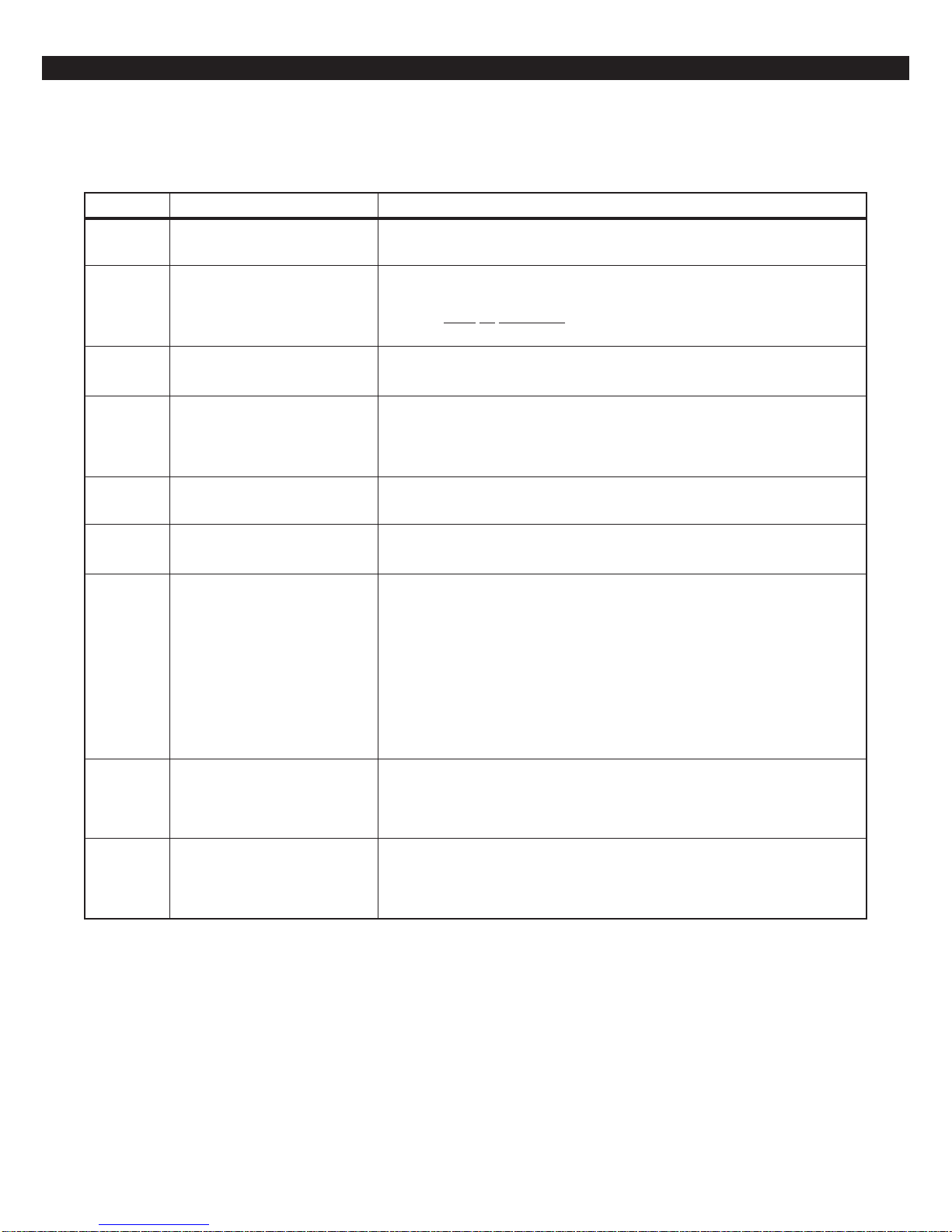
Control Board Terminal Descriptions
TERMINAL FUNCTION DESCRIPTION
AC
BELL
NEG
KP+12V
GREEN
DAT A
WHITE
DAT A
NEG
Zone 1
Zone 2
Zone 3
Zone 4
NEG
Zone 5
Zone 6
NEG
Zone 7
Zone 8
AC Input
Supervised Bell Output
(power-limited)
Common Negative
Keypad Power
(power-limited)
Local Data Bus In
Local Data Bus Out
Zone Inputs
Connect a 16.5 VAC 15 VA UL Class II transformer minimum using 18 gauge
minimum 2 conductor wire. Do not exceed 50 feet.
(+)12 VDC. Combined alarm current should not exceed 1.0 amps.
Overcurrent protected at 1.35 amps (PTC2). A 1500 Ohm EOL resistor
(CR854)
a bell output fault will occur.
BLACK WIRE - (-)12 VDC. Negative connection for Control Stations, ODM,
RF receiver, zone expander, motion detectors, bell output, and other devices.
RED WIRE - (+)12 VDC 500 mA continuous power connection for Control
Stations, ODM, zone expander, and RF Gateway. Overcurrent protected at
1.35 amps (PTC1). CAUTION: Use the KP+12V and the +12V AUX
terminals when calculating total current drain.
GREEN WIRE - Connection for Control Stations, zone expander, ODM and RF
receiver. Use 22 gauge wire up to 1000 ft. Use 18 gauge wire up to 2000 ft.
WHITE WIRE - Connection for Control Stations, zone expander, ODM and RF
receiver. Use 22 gauge wire up to 1000 ft. Use 18 gauge wire up to 2000 ft.
Each loop requires a 1500 Ohm end-of-line resistor (P/N CR854). A common
negative is shared among all zones. The need for end-of-line resistors may be
eliminated on all Burglar defined zones through programming.
must be connected between the Bell and Neg terminals; otherwise
2WS
+12V AUX
Two-Wire
Smoke Terminal
Auxiliary Power
(power-limited)
Current limited 100 mA terminal. Connection for two-wire/four-wire smoke
detectors, glass break detectors, and devices requiring resettable power. The
maximum series loop resistance for a two-wire smoke loop is 20 ohms. The
maximum Alarm Impedance is 500 ohms.
(+)12 VDC 500 mA continuous power. Overcurrent protected at 1.35
amps (PTC1). Used for powering motion detectors, CO detectors, and other
accessories. CAUTION: Use the KP+12V and the +12V AUX terminals when
calculating total current drain.
6
Page 7

Zone Wiring
ZONE WIRING
Class ‘B’ End-of-Line Resistor
Supervised Zones
A Class ‘B’ zone must be supervised with a 1500
Ohm 1/2 Watt end-of-line resistor (P/N CR854). This
resistor should be installed in series at the furthest
point from the control. This configuration must be
used whenever both Form A and Form B devices
are connected and provides a high degree of protection against compromise or tampering. The control monitors the voltage level across the zone and
uses the zone voltage levels in Table 1 to determine
whether the zone is normal, open, or shorted. The
operation of a zone is programmable (see Programming Record Book). Maximum total loop wire and
contact resistance (not including EOLs) must not
exceed 100 Ohms for the loop to function properly . The 1500 Ohm EOL resistor is optional for
Form A connections but is required for Form B.
Normally
Open
Non-Supervised Closed Circuit
Loop (No EOL Resistor
Supervision)
The EOL resistor is not required on Burglar zones.
A conventional closed circuit loop may be connected
directly to a zone and the zone will have either a
short or an open condition. See Programming
Record Book for programming an unsupervised
zone. Fire zones may not be installed as unsupervised. Only Burglar defined zones may be wired nonsupervised.
NOTE
For UL Listed systems, EOL Supervision is required.
ZXEX08 Zone Expander Module
This module provides an additional 8 zones (zones
9-16) for the ZX300/ZX310 control. These zones are
wired the same as the 8 on-board zones and the
JP1 jumper must be in place.
1500Ω 1/2W
Primary Zone
Normally
Closed
Figure 2 Zone Wiring
CONDITION NOMINAL LOOP RESISTANCE VOL TAGE READING
Mount the module in a ZX310 enclosure as shown
in the ZXEX08 insert using the screws and standoffs provided. For mounting with the ZX300 or in a
remote location, use a suitable enclosure, like the
EB1511.
Connect the module to the ZX300/ZX310 local data
bus using either the "quick connection" or the data
bus terminals on the module. The "Active" LED
flashes to indicate the module is communicating with
the control.
NOTEONLY BURGLAR DEFINED ZONES MAY
Zone Open Infinite Ohms 9.75 - 13.85 V
Zone Normal 1500 Ohms 2.82 - 9.74 V
Zone Shorted 0 Ohms 0.00 - 2.81 V
Table 1 Zone Troubleshooting Chart
7
Page 8

WIRELESS DEVICES
Wireless Devices
The ZX300/ZX310 provides an option for including
Wireless (or RF) Devices. The RF Devices may consist of RF Zone Devices (Universals, Door Contacts, Glassbreaks, PIRs and Smoke Detectors) and
RF User Devices (Handhelds). These RF Devices
require that an RF Gateway be attached to the system. The ZX300/ZX310 is compatible with either a
model 4710 or 4720 RF Gateway which are UL listed
for household fire and burglary and commercial fire.
If a 4720 RF Gateway is used, it must be set to address ‘1’. Refer to the RF Gateway instructions for
address selection.
• 4710 RF Gateway - provides up to 8 RF Zone
Devices and up to 8 RF User Devices. It can
only provide for zones 9-16.
• 4720 RF Gateway - provides up to 16 RF Zone
Devices and up to 8 RF User Devices. It can
provide for zones 1-16.
Mount the RF Gateway as described in the RF Gateway instructions. Wire the local data bus to the terminals: +12V - RED; DATA A - GREEN; DATA B WHITE; NEG - BLACK. Set Address switch. Reinstall the cover.
See Installer Level Programming - Programming RF
Data Into the RF Gateway . An RF User Device must
be mapped to a valid user passcode by programming.
The RF Gateway and RF Zone Devices should be
temporarily mounted in their desired locations until
they have been tested with the Control Panel. These
devices may need to be re-oriented or moved to
achieve optimal reception. After testing has been
completed, they should be permanently mounted.
ceived Signal Strength of the last transmission sent
by the RF Zone Device. See results below:
Strong Signal (5 Control Station beeps): a strong or
high level RF signal was measured by the receiver
for that location of the transmitter. This is a good
location for the transmitter and receiver.
Acceptable (3 Control Station beeps): a normal or
acceptable level of RF signal was measured by the
receiver for that location of the transmitter. This is a
good location for the transmitter and receiver.
Low Signal (1 Control Station beep): a low or
acceptable level of RF signal was measured by the
receiver for that location of the transmitter. Make
multiple test transmissions, making sure that obstructions between the transmitter and receiver are normal but minimized (hands away from units, metal
ladders away from receiver, etc.) during these tests.
The transmitter and/or receiver will need to be relocated to obtain ACCEPTABLE level readings.
No Signal (1 long Control Station beep): no RF signal or an extremely low RF signal was measured by
the receiver for that location of the transmitter. Bring
the transmitter to the RF Gateway and activate the
transmitter. The red LED on the RF Gateway should
blink. If it does not, then the transmitter is not working. If the red LED does blink, but the signal strength
is still NO SIGNAL, then a programming error exists. Check the programming of the zone in the RF
Gateway. If the signal strength is STRONG or ACCEPT ABLE, then the transmitter and/or receiver will
need to be relocated to obtain ACCEPTABLE level
readings. Be sure to power down the control to clear
out all signal strength levels before testing the transmitter at its new location.
After testing has been completed, the RF Gateway
and RF Zone Devices should be permanently mounted.
not
To test the Received Signal Strength of each RF
Zone Device, use Test 6 - RF Signal Strength Test.
From the Control Station press the “8” key , followed
by the Installer Code (9632) and then press the “6”
key . Next press the RF Zone Device Number (1-16).
The Control Station will display and sound the Re-
NOTE
Series 4000 RF Gateways and transmitters
which are not UL labeled are not allowed in
UL Certificated installations.
8
Page 9
CONTROL STATION ADDRESSING AND SUPERVISION
Control Station Addressing and
Supervision
All LCD Control Stations are shipped from the factory as Control Station #1 (#3 for Icon Control Stations) and supervised. They may be set to other addresses and to unsupervised as described below.
SSD, LCD, and VFD Control
Stations
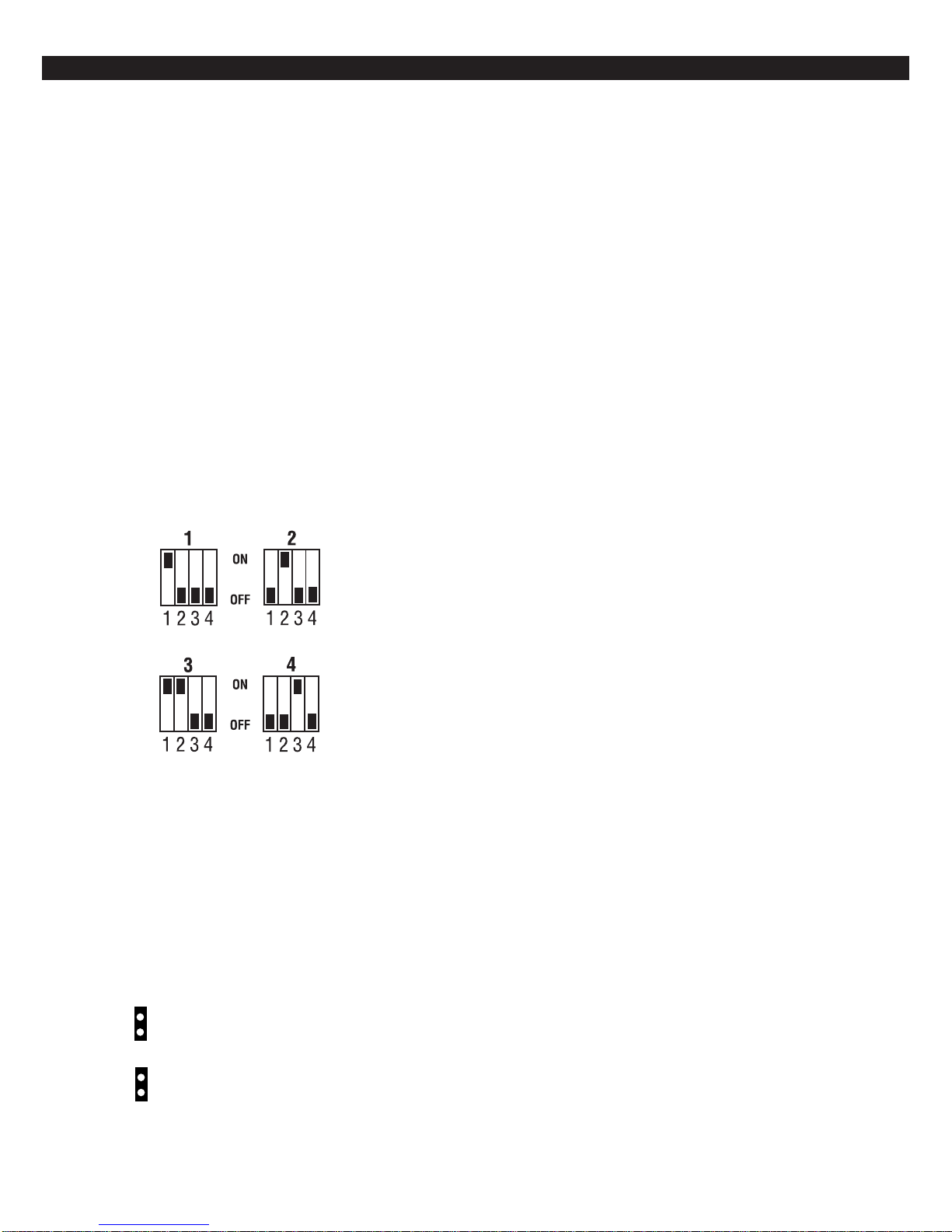
These Control Stations have a four position DIP
switch on the circuit board to set the address and
supervision. To change the Control Station to unsupervised, move DIP switch 4 to the ON position. To
change the address, the DIP switch setting must be
positioned according to Figure 3.
LED Control Stations
These Control Stations have two jumpers on the circuit board to set the address and supervision. To
change the address of Control Station #1 to Control
Station #2, remove JP2 (see Figure 4). To change a
Control Station to unsupervised, remove JP1 (see
Figure 4).
Supervised and
Unsupervised Control
Stations
Figure 3 Control Station DIP Switch Settings
ICON Control Stations
These Control Stations have two jumpers on the circuit board to set the address and supervision. To
change the address of Control Station #3 to Control
Station #4, remove JP2 (see Figure 4). To change a
Control Station to unsupervised, remove JP1 (see
Figure 4).
Remove JP1 to unsupervise
JP1
Remove JP2 for keypad 2 (LED) or
keypad 4 (ICON)
JP2
A supervised Control Station is reported as missing
when the system fails to get any response from it.
If more than one supervised Control Station is set to
a particular address, then none of those Control Stations will function properly. Only one supervised
Control Station may be used at an address.
An unsupervised Control Station can be removed
from the system without the system detecting that it
is missing. The advantage of an unsupervised Control Station is that a system can have as many Control Stations as the power supply can support. Multiple unsupervised Control Stations may be used at
any address. When unsupervised SSD, LCD, and
VFD Control Stations are used, they must be set to
address 3 or 4. By adding additional power supplies,
like the HCP12SULC, Control Stations may be added
up to a total of 18 bus devices on the system.
For UL listed systems, unsupervised Control Stations are not allowed.
If an unsupervised Control Station is set to the same
address as a supervised Control Station, then the
unsupervised Control Station will not function. Do
not mix a supervised Control Station with unsupervised Control Stations at the same address.
Figure 4 LED & ICON Control Station Jumpers
9
Page 10
CONTROL ST A TION TROUBLESHOOTING
Control Station Troubleshooting
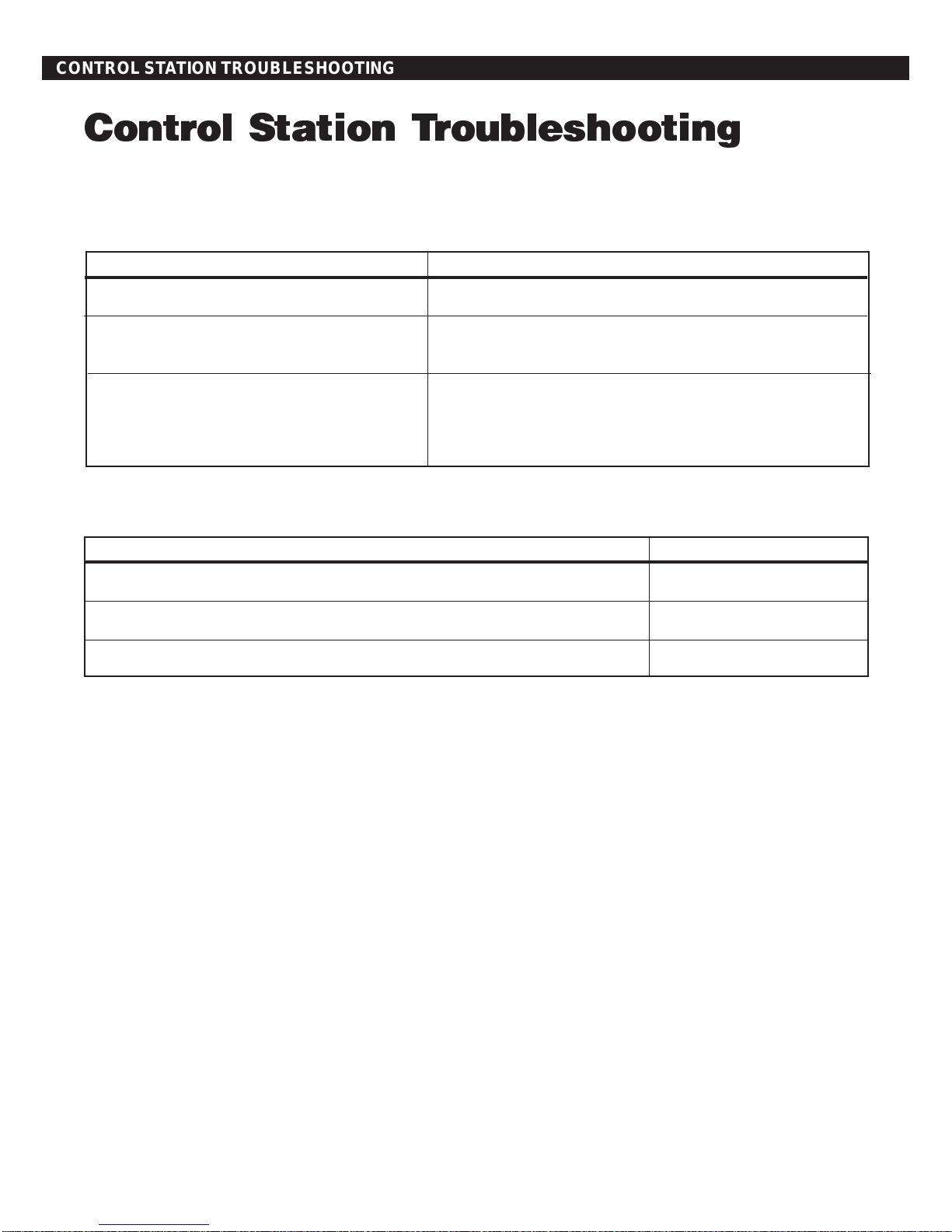
If a Control Station is incorrectly wired, it will not accept keystroke entries. The following symptoms may appear:
SYMPTOM CONDITION
No Control Station display or LEDs Black or Red Wire removed or cut
No response from key presses Green Wire removed or cut
Two supervised Control Stations at the same address
LEDs flash and may display White Wire removed or cut
“No Communication From Control” code Green/White Wires reversed
Green & White Wires shorted together
The nominal voltage at the control (with a single Control
Station connected) should measure as follows:
TERMINAL VOLTAGE
from Common Negative to GRN DATA ~ 9.3 VDC
from Common Negative to WHT DATA ~ 10.7 VDC
from Common Negative to KP+12V ~13.8 VDC
10
Page 11

12 VDC Outputs
The control is supplied with one keypad power
output, one auxiliary power output, one bell output, and one programmable (PGO1) low current
output. (See Figure 1). The low current output on
the control can supply 10 mA @ 3VDC.
Additional outputs can be added with the ZXODM
Output Driver Module. The module receives its
data from the local data bus and provides ten additional programmable outputs. The ODM outputs
provide +12 VDC on activation and must be limited to 40 mA of current draw.
The ODM comes defaulted from the factory as
ODM1. Y ou may use multiple ODMs provided that
power restrictions are followed. All ODMs must
be addressed as ODM1 and they all will provide
identical ouputs. Connect the ODM to the control
as shown in Figure 5. Use the twelve (12) wire
cable provided with the ODM for the outputs as
shown.
12 VDC OUTPUTS
Output conditions can be programmed as one of
many conditions. Refer to the Programming
Record Book for programming information and restrictions.
Figure 5 ZXODM Wiring Diagram
NOTE
The outputs on this module have limited transient immunity and should
not leave the enclosure. Mount module via the double-sided tape provided on the back of the ODM to the
inside of the control enclosure.
11
Page 12

12 VDC OUTPUTS
Outputs may be wired to indicator devices or relay
module triggers (like the MPI-206) provided the 40
mA current draw condition is not exceeded. Figure
6 shows a wiring example for a relay to ODM 1 Output 2. Figure 7 shows a wiring example of ODM 1
Output 1 to trigger an LED.
MPI-206
+12V NEG
Red Wire
TG+
Black Wire
TG - COM NC NO
Pink Wire
Connects to J3 (part of 12-wire cable)
Neg
TAN WIRE
BLACK WIRE
* A 470-1000Ω resistor may be used
Output 1
Figure 7 Output Connected to an LED
NOTE
NOTE
The LED and current limiting resistor shown in Figure 7 are not supplied.
*
Figure 6 Output Connected to a Relay
NOTE
Do not exceed 250 mA of total current through the Red (+12V) and
Black wires (Negative) of the twelve
wire cable. Add 18 gauge wire from
the appropriate control panel terminals for total current drains in excess
of 250 mA.
12
Page 13

Operating the System
Powering Up The Control
OPERA TING THE SYSTEM
The control comes from the manufacturer with a factory set (default) program. The factory default code
for user passcode No. 1 is “1234”. This passcode is
authorized to perform all user level functions. The
default setting for the installer passcode is “9632”.
The installer passcode performs the installer level
functions. For purposes of discussion, the installer
and the end user are both considered system users, but have different levels of authorization (see
the Programming Record Book).
When a Control Station is powered-up, it briefly displays a test pattern followed by its data bus address.
The Control Station will then begin displaying information from the control panel. During the first fifteen seconds after power-up, the control panel will
instruct the Control Station to display the panel’s
software revision and flash the AWAY, STAY and
NIGHT LEDs.
If the system is armed when it is powered up, violations from all the Burglar zones are ignored for three
minutes. This allows all armed PIRs to stabilize with
out causing false alarms.
tem was armed by the installer passcode. For a
detailed description of arming and disarming procedures, see the appropriate User Guide.
Trouble Conditions
The possible trouble conditions are:
AC Power Failure Fire Trouble
Low Battery Silenced Fire Alarm
Memory Error Zone Missing
Communication Failure RF Point Not Reporting
Missing Keypad Smoke Trouble
RF Jamming RF Point Tamper
Bell Fault RF Point Low Battery
Telco Line Fault RF User Device Low Battery
Zone Trouble
If RF Jamming is detected for at least 90 seconds,
then all RF Burglar zones will be faulted.
Clearing Trouble Messages
Testing
The ZX300/ZX310 provides the following testing capabilities: Walk Test, Battery Test, Bell Test, Communicator T est, Keypad T est and RF Signal Strength
Test. Refer to the appropriate User Guide for instructions on performing these tests. Always ensure that a Walk Test (and an RF Signal Strength
Test when applicable) is performed on a new installation.
Installer Arming and
Disarming
The installer passcode may be used to arm the system. It may be used to disarm, but only if the system was armed by the installer passcode. It may be
used to silence alarms and to silence trouble conditions. When it is used to silence a Burglar alarm, it
will not disarm or cancel the alarm unless the sys-
Most trouble conditions are cleared automatically
when the condition that initiated the trouble is restored or is eliminated. Three trouble conditions
(Memory Error, Smoke Trouble and Missing Keypad)
may be cleared manually by pressing and holding
the Clear key for three seconds (until two beeps are
heard). This action is also required to turn off the
Duress output after it has been activated and to
cause an "Installer Off Premises" event. A Bell Silenced trouble condition can only be cleared by performing a smoke reset operation.
Installer On Premises
The first time that an Installer level passcode is used
to perform a function, an "Installer On Premises"
event is logged to be reported. Before leaving the
premises, press and hold the CLEAR key for three
seconds and an "Installer Off Premises" event will
be logged to be reported.
13
Page 14

PROGRAMMING THE CONTROL
Programming the Control
Introduction
The control may be programmed locally from any
SSD, LCD, VFD, or ICON control station. Programming with an LED Control Station is not supported.
Local Programming
There are two levels of Control Station programming:
User level and Installer level.
User Level
User level programming provides the ability to add,
change, or delete user passcodes. A user passcode
with authority level 1 is required to access the user
level programming. See the appropriate User Guide
for more information regarding user level programming.
Installer Level
Programming Zone Names
Zone names may be programmed on LCD and VFD
Control Stations without going into Installer Level
Programming. To program zone names:
1. Press the CLEAR and ENTER keys simultaneously . The control station prompts you to enter the zone number you wish to program/
change.
2. Enter a number corresponding to the Zone ID
and press Enter. Once a valid Zone ID is selected, the control displays the Zone ID and the
current Zone Name with the cursor on the first
character. Press the key associated with each
character. Each keypress changes the display
to the next character listed for that key . A maximum of 10 characters, including spaces, may
be used for each zone name.
The following table lists the characters available
for the Zone name.
yeK sretcarahC
Installer level programming allows total
customization of the control’s operating features.
The installer passcode (User 9) is required to access installer level programming. Anyone attempting installer level programming should be familiar
with the contents of this publication prior to programming the control panel.
NOTE
If the installer code is lost or forgotten, it may be impossible to program
the control locally.
1#@?>=<;:9876543210
2#CBA
3#FED
4#IHG
5#LKJ
6#ONM
7#SRQP
8#VUT
9#_^]¥[ZYXW
0#/.-,+*)('&%$#"!ecaps
cinaPtfeLnoitisopenotfelrosrucehtsevom
cinaPthgiRnoitisopenothgirrosrucehtsevom
3. If the ENTER or CLEAR key is pressed and no
changes have been made, the control station
returns to the Zone ID prompt. If the CLEAR
key is pressed and changes have been made,
all changes are cleared and the control station
displays the original Zone Name. To save
changes to the Zone Name, press the ENTER
key. The control station returns to the Zone ID
prompt. Press the CLEAR key to return to
Ready mode.
14
Page 15

INST ALLER LEVEL PROGRAMMING
Installer Level Programming
Menu Options
Entering a New Value at a Location
This section will describe Installer Level Programming as performed locally from a Control Station.
For upload/download capabilities, please contact
Technical Support at 800.800.2027.
To enter Installer Level Programming, press the
PROGRAM (9) key and enter the installer passcode
(default = 9632). The Control Station will then prompt
you to select a programming option from 1 to 9
where:
1 = RESERVED FOR FUTURE USE
2 = RESERVED FOR FUTURE USE
3 = PROGRAM FUNCTION MAP
4 = RESERVED FOR FUTURE USE
5 = PROGRAM USER CODES
6 = RESTORE FACTORY DEFAULTS
7 = SET HOURS UNTIL NEXT COMM TEST
8 = RESERVED FOR FUTURE USE
9 = PROGRAM RF DATA
Program Function Map
While the Control Station is displaying the value at
a location, you can enter digits to change the value
at that location. The new value is displayed as you
enter the digits. Other keys work as follows:
ENTER - if pressed after new digits are
entered, the displayed value is
stored at the current location.
- if pressed with no new digits
entered, then it will go to the
next location.
Right Panic Key - if pressed, it will go back one
location and ignore any digits
entered.
CLEAR - if pressed after new digits are
entered, the new digits will be
erased and the original value
will be re-displayed at the location.
- if pressed with no new digits
entered, then it will return to
the LOCATION prompt.
Press the ’9‘ key and enter the installer passcode to
enter programming mode. Press the ‘3’ key to enter
Program Function Map mode. The Control Station
will prompt you for a location to be programmed.
See the Programming Record Book for location numbers, definitions, and valid entries for the locations.
From this mode, you may program the entire Function Map except for User Codes. (See Installer Level
Programming - Program User Codes).
From the LOCATION prompt, enter digits for the
desired location number. The digits entered will be
displayed. If more than three digits are entered, the
first digit entered will be discarded. If you make a
mistake, you may press the CLEAR key to clear out
the location and start over. When the desired location number is displayed, press the ENTER key . The
Control Station will then display the current value
programmed at that location.
OFF CANCEL - if pressed, momentarily dis-
plays the present location
number (SSD Control Station).
NOTE
When you press the ENTER key to
store the new value, the system will
store the value as entered. It is the
responsibility of the programmer to
enter a value within the specified
range. If the value entered is out of
the range, then undesirable operation
may occur.
NOTEWHEN YOU PRESS THE ENTER KEY TO
STORE THE NEW VALUE, THE SYSTEM
WILL STORE THE VALUE AS ENTERED.
IT IS THE RESPONSIBILITY OF THE
PROGRAMMER TO ENTER A VALUE WITHIN
THE SPECIFIED RANGE. IF THE VALUE
15
ENTERED IS OUT OF THE RANGE, THEN
UNDESIRABLE OPERATION MAY OCCUR.
Page 16

INST ALLER LEVEL PROGRAMMING
Programming the Account Code and
Telephone Number Digits
When the location being programmed is an account
code or telephone number digit the value will be displayed as an “H” followed by a single digit. The “H”
indicates that this location is a Hexadecimal field.
The valid entries for these locations are “0” through
“F”, where A - F correspond to 10 - 15 respectively.
To program a digit, enter digits as normal. To enter
an A - F, enter a ‘1’ followed by a ‘0’ through ‘5’.
As in programming normal fields, if too many digits
are entered, the first digit entered will be discarded.
The ENTER, OFF CANCEL, Right Panic, and
CLEAR keys will work the same as described above.
Additional Programming Notes
To exit out of Edit Function Map mode and return
the Control Station to the idle state, press the CLEAR
key from the LOCATION prompt. (You may need to
press the CLEAR key several times to get to the
LOCATION prompt). When the installer passcode
is used for the first time, an "Installer on Premises"
event is logged to be reported. Before leaving, the
CLEAR key must be pressed and held for 3 seconds to log an "Installer off Premises" event to be
reported.
When programming the value at the last programming location, the Control Station will return to the
LOCATION prompt if the ENTER key is pressed.
3. Enter the ID number then press the ENTER key.
4. Enter the new four-digit passcode. The Control
Station will beep twice and return to the User ID
prompt.
5. Enter a new ID number or press the CLEAR key
to return to the Ready mode.
T o view an existing passcode, press the ENTER key
after each digit is displayed. If the new passcode
being entered is a duplicate of an existing one, the
Control Station will sound an error tone and return
to the first digit location so that you may try again.
If you wish to make a User passcode inoperable,
enter “0,0,0,0” as the new four-digit passcode.
Restore Factory Defaults
This function provides a means to completely wipe out
the panel’s memory and restore it to a factory default
state. If successfully completed, the panel will:
• default the entire Function Map (including User
Passcodes and Zone Names)
• clear the Event Log
• clear all alarm, trouble and armed conditions
• not affect RF Data in the RF Gateway
Press the ’9‘ key and enter the installer passcode to
enter programming mode. Press the ‘6’ key to enter
Restore Factory Defaults mode. The Control Station will prompt you to re-enter the installer passcode
for verification.
Program User Codes
The installer passcode has the authority to edit user
passcodes locally . The control may be programmed
with up to 8 user passcodes and the installer
passcode (USER 9). See the Programming Record
Book for instructions on setting the authority level
for the 8 user passcodes. To program or change a
user or installer passcode:
1. Press the ‘9’ key and enter the installer passcode
to enter programming mode.
2. Press the ‘5’ key to Program User Codes. The Control Station will prompt you to enter the User ID of
the passcode that you wish to program/change.
If it is entered correctly, the Control Station will go
into a locked out state for a few seconds and then
may display the No Communication condition before displaying the panel revision and returning to
the Ready mode.
16
Page 17

INST ALLER LEVEL PROGRAMMING
Hours Until Next Comm Test
The scheduling of Automatic Communications T ests
requires programming the number of “Days Between
Comm T ests”. If “Days Between Comm T ests” is zero,
then no automatic comm tests will occur. Otherwise, a comm test will occur on an interval determined by the “Days Between Comm Tests”.
The time that an auto comm test occurs will be the
same time on each comm test day. That time is
automatically set via a random number whenever
the system is powered-up. The time can also be adjusted by setting the ”Hours Until Next Comm Test“.
Press the ’9‘ key and enter the installer passcode to
enter programming mode. Press the ‘7’ key to set
the Hours Until Next Comm Test. The Control Station will display zero (0).
Enter a number between 1 and 255. If a mistake is
made, press the CLEAR key to start over. If a number greater than 255 is entered, the first digit entered will be discarded. When the desired number
of hours is displayed, press the ENTER key. The
Control Station will return to idle. To exit out of this
function without setting the number of hours, press
the CLEAR key.
Programming RF Zone Devices Into the
RF Gateway
Press the ‘9’ key and enter the installer passcode to
enter programming mode. Press the ‘9’ key to Program RF Data. The Control Station prompts you to
select an RF Device to program.
Enter 1 thru 16 to select an RF Zone and press ENTER. The Control Station displays the eight digits
that are currently programmed in the RF Gateway
for that zone. The digits are displayed one at a time.
For each digit, you may program a new value by
pressing a digit key. The Control Station will automatically move to the next digit. To move to the next
digit without changing the current digit, press the
ENTER key.
The first digit to enter is the Supervision setting
where:
0 = Unsupervised
1 = Reserved
2 = Reserved
3 = 4 Hours
4 = 24 Hours
The next seven digits to enter come directly off of a
label on the RF Device.
Program RF Data
In order for an RF Zone Device or RF User Device
to be received by the RF Gateway, the address of
the RF Device must be programmed into the RF
Gateway. The ZX300/ZX310 can support up to 16
RF Zones and 8 RF User Devices. The RF Zones
are programmed into the RF Gateway as devices 116 corresponding to zones 1-16. The RF User Devices are programmed into the RF Gateway as devices 17-24 in any order (there is no correlation between these devices and the Control Panel’s configuration data). The 4710 RF Gateway is restricted to
devices 9-16 for zones 9-16 and devices 17-24 for
eight RF User Devices.
If you make a mistake while entering the eight digits, press the CLEAR key and the Control Station
returns to the first digit.
After the last digit is entered, the data is sent to the
RF Gateway and is confirmed and the Control Station returns to the RF Device selection prompt. If
the data is successfully loaded into the RF Gateway , the Control Station beeps twice. If the RF Gateway does not respond, the Control Station sounds
an error tone and briefly displays an error message.
Check the data bus connections to the RF Gateway. If the 8 digit number entered for the RF Zone
is already stored in the RF Gateway for another zone,
the Control Station sounds an error tone and briefly
displays a message indicating the duplicate zone.
From the RF Device prompt, select another RF Zone
Device or press the CLEAR key to exit.
17
Page 18

INST ALLER LEVEL PROGRAMMING
Programming RF User Devices Into the RF
Gateway
Press the ‘9’ key and enter the installer passcode to
enter programming mode. Press the ‘9’ key to Program RF Data. The Control Station prompts you to
select an RF Device to program.
Enter 17 thru 24 to select an RF User Device and
press ENTER. The Control Station displays the eight
digits that are currently programmed in the RF Gateway for that device. The digits are displayed one at
a time. For each digit, you may program a new value
by pressing a digit key. The Control Stations will
automatically move to the next digit. To move to the
next digit without changing the current digit, press
the ENTER key.
Enter ‘1’ for the first digit.
The second digit to enter defines the operation of
the key(s) on the RF User Device, where:
SEC KEY KEY KEY KEY
DIGIT A B C D
1 AWAY STAY NIGHT OFF/CANCEL
2 AWAY STAY ACCESS OFF/CANCEL
3 AWAY STAY PANIC/HOLDUP OFF/CANCEL
4 AWAY STAY AUX/MED OFF/CANCEL
5 AWAY STAY NOT USED OFF/CANCEL
6 AWAY PANIC/HOLDUP NOT USED OFF/CANCEL
7 STAY PANIC/HOLDUP NOT USED OFF/CANCEL
8 STAY PANIC/HOLDUP AUX/MED OFF/CANCEL
9 AWAY NOT USED NOT USED OFF/CANCEL
The next six digits to enter come directly off of a
label on the RF User Device.
If you make a mistake while entering the eight digits, press the CLEAR key and the Control Station
returns to the first digit.
Check the data bus connections to the RF Gateway. If the 8 digit number entered for the RF User
Device is already stored in the RF Gateway for another device, the Control Station sounds an error
tone and briefly displays a message indicating the
duplicate device.
From the RF Device prompt, select another RF User
Device or press the CLEAR key to exit.
Programming RF Devices Into the Control
Panel
After the RF Devices have been programmed into
the RF Gateway, they must also be programmed in
the Control Panel. The programming options for the
Control Panel’s Function Map are described in the
Programming Record Book. When RF Devices are
used in an installation, be sure to consider the following:
For an RF Zone Device, the zone data must be programmed for the selected zone. The Zone T ype and
Zone Attributes locations are programmed as usual.
The Zone Supervision must be programmed to 7
(wireless zone).
For an RF User Device, a user passcode must be
created (see Installer Level Programming - Program
User Codes) that consists of the last four digits of
the RF Device’s address. An appropriate authority
level must also be programmed for that user.
NOTE
Once all the above steps are performed, the Control Station may
sound a Trouble tone. The Control Station will display ”TroubleRF Point Not Reporting“ for each
RF Zone. These conditions are
cleared as a proper transmission
is received from each wireless
Zone Device.
After the last digit is entered, the data is sent to the
RF Gateway and is confirmed and the Control Station returns to the RF Device selection prompt. If
the data is successfully loaded into the RF Gateway , the Control Station beeps twice. If the RF Gateway does not respond, the Control Station sounds
an error tone and briefly displays an error message.
If the Trouble condition does not
clear, then there is an error in the
programming of the Gateway or
control or the RF Gateway is not
responding to the RF signal from
the sensor.
18
Page 19

SPECIFICA TIONS AND FEATURES
Specifications And Features
Recommended Batteries
ZX300/ZX310 Control Board
(supplied separately)
• Eight (8) two-wire zones, each supervised with
a 1500 Ohm end-of-line resistor. Expandable to
16 two-wire zones with ZXEX08 zone expander.
• Two-wire smoke detector zone on control (can
be used in place of zone 8).
• Three (3) Control Station activated panic zones.
• Nominal current drain for control board only 50
mA.
• Watchdog microprocessor monitoring.
• Superior six (6) stage lightning/transient protec-
tion.
• One assignable high current alarm output. (Su-
pervised Bell Output).
• One assignable low current output (10 mA @ 3
VDC).
• Expandable to eleven (11) low current outputs
via an output driver module.
• Continuous battery monitoring.
• Low voltage detection monitoring @ 11.3 volts
threshold.
• Automatic system shutdown if voltage falls be-
low 9.8V.
• Operating temperature range inside the enclo-
sure: 32
• Two or four-wire smoke zones available.
• Keypad Programmable.
• Loop response time: 320 msec (general pur-
pose hardwired zones), 1600 msec (two-wire
smoke zone).
°F to 122°F (0°C to +50°C).
Power Supply
• Fully regulated 13.8 volt 900 mA supply avail-
able with a 16.5 VAC 35 VA transformer.
• Optional 16.5V 25 VA transformer provides 500
mA power.
• Reverse polarity protection on battery inputs.
• Float charging circuit: 13.8 volts DC.
• Rechargeable 12 VDC 7 Ah sealed lead acid.
Use two (2) batteries to meet CSFM and Household Fire requirement of 24-hour standby at 450
mA.
• Rechargeable 12 VDC 17.2 Ah sealed lead acid. Use
one (1) battery to meet CSFM requirement of 24 hours
of standby at 450 mA.
Recommended Transformers
(supplied separately)
• UL Listed Class II plug-in; 16.5 VAC 15 VA sec-
ondary; 120 V 60 Hz primary connected to 24hour unswitched outlet.
• Optional UL Listed Class II plug-in 16.5 VAC 25
VA secondary, 120 V 60 Hz primary connected
to 24-hour unswitched outlet.
• For UL Commercial Burglary, the transformer to
be used is a 16.5 V AC 35 VA UL Class II Basler
BE 116220.
Enclosure
• Twenty (20) gauge metal cabinet with knockout
for optional cam lock. Dimensions: 9"W x 10"H
x 2.875"D (228.6 mm x 254 mm x 73.02 mm).
• Optional EX1414 20 gauge locking metal cabinet
with two keys. Dimensions 14"W x 14"H x 3.5"D
(356 mm x 356 mm x 89 mm).
• TC1100 T amper Resistant Enclosure: extra high
security cover (uses EX1414 option).
• Optional pre-configured assembly: ZX310
(ZX300 Control Board mounted into the EX1414
enclosure).
Digital Communicator
• DTMF Touchtone™ or Rotary (pulse) dialing.
Rotary speed: 10pps, (selectable U.S. style 60%
break, 40% make or International style 67%
break, 33% make).
• Ringer equivalence: 0.0B.
• Transmission formats include: Contact ID, SIA
Level 1, Pager.
19
Page 20

SPECIFICA TIONS AND FEA TURES
• Reports to most major Central Station receiv-
ers.
• Primary phone number can have up to 20 dig-
its.
• Secondary phone number can have up to 20
digits.
• Pager phone number can have up to 20 digits.
• Reporting capabilities: two 6-digit account num-
bers, report by zone, opening and closing reports, force arm/bypass reports, restoral reports,
trouble reports, cancel reporting, low battery , AC
failure/restoral.
• Dual and split reporting capability.
• Pager capability with 16-digit programmable
message and 2-digit coded messages.
• Disable call waiting.
Control Stations
• Color-coded four-wire data bus connection.
• 19-Button keypad with audible feedback.
• Three (3) Control Station panic button zones.
• Surface mountable; mounts to any standard
single or double gang electrical box.
• Built-in piezo sounder.
• Easy-to-read arming level: AWAY, STAY, and
NIGHT backlit LEDs.
• Backlit keys with door.
• Unsupervised Control Stations allows up to 18
Control Stations.
ZXICON Control Station
• Two seven-segment display digits.
• Plain English icons.
• Addressable as Control Station #3 or #4. Jumper
change makes Control Station unsupervised.
• Nominal current drain: 50mA.
• Size: 5.0"H x 4.5"W x 1.0"D (127 mm x 114.3
mm x 25.4 mm).
ZXLCD Control Station
• Backlit display.
• Two lines x 16 characters LCD display.
• Addressable with DIP switches, supervised/un-
supervised.
• Plain English display.
• Nominal current drain: 20mA - 110mA.
• Up to four (4) supervised Control Stations per
system.
• Size: 5.33"H x 6.08"W x 1.024"D (135.4 mm x
154.4 mm x 26.0 mm).
ZXLED12 Control Station
• Twelve (12) LEDs annunciate general purpose
zones 1 through 12.
• Ready, trouble, and fire alarm LEDs.
• Addressable as Control Station #1 or #2. Jumper
change makes Control Station unsupervised.
• Nominal current drain: 23mA - 31mA.
• Size: 5.0"H x 4.5"W x 1.0"D (127 mm x 114.3
mm x 25.4 mm).
ZXLED8 Control Station
• Eight (8) LEDs annunciate zones 1 through 8.
• Ready and trouble LEDs.
• Addressable at Control Station #1 or #2. Jumper
change makes Control Station unsupervised.
• Nominal current drain: 23mA - 31mA.
• Size: 5.0"H x 4.5"W x 1.0"D (127 mm x 114.3
mm x 25.4 mm).
ZXSSD Control Station
• Three 0.56" (14.2 mm) seven segment display
digits.
• Ready and trouble LEDs.
• Up to four (4) supervised Control Stations per
system.
• Addressable with DIP switches, supervised/un-
supervised.
• Nominal current drain: 23mA - 116mA.
• Size: 5.0"H x 4.5"W x 1.0"D (127 mm x 114.3
mm x 25.4 mm).
20
Page 21

SPECIFICA TIONS AND FEATURES
ZXVFD Control Station
• Two lines x 16 characters VFD display.
• Addressable with DIP switches, supervised/
unsupervised.
• Plain English display.
• Nominal current drain: 20mA - 170mA.
• Up to four (4) supervised Control Stations per
system.
• Size: 5.33"H x 6.08"W x 1.024"D (135.4 mm x
154.4 mm x 26.0 mm).
Optional Accessories
• ZXEX08 Zone expander module expands the
control to 8 additional zones.
Nominal current drain :1 1mA
• ZXODM: Output Driver Module: Provides ten (10)
fully programmable 40 mA + 12 VDC outputs.
Nominal current drain: 10 - 13 mA with no outputs
connected.
• ZX310 - ZX300 Control Board mounted in EX1414
enclosure. (The ZX310 assembly is required for UL
Commercial Burglary applications).
• F2600 Transformer Enclosure: Ensures that the
AC plug-in transformer remains securely fixed to
the AC wall outlet
• T-1625 Transformer: UL Listed Class II plug-in 16.5
V AC 25 VA secondary .
• T-1635 Optional Transformer: UL Listed Class II
plug-in 16.5 V AC 35 VA secondary .
• HCP-12SUL Power Supply: Provides a 12 or 24
VDC power limited output with a current rating of
2.0 A continuous while the AC primary power
source is present.
• CR860 Dual Battery Harness: Allows for an
additional 12 VDC 7 Ah sealed lead acid battery
connection to the control to meet additional standby
requirements.
• CR861 Battery Harness: Allows for 12 VDC 17.2
Ah sealed lead acid battery connection to the
control to meet additional standby requirements.
• EB1511 Auxiliary Enclosure: 15" x 11" x 4" enclo-
sure with cam lock allows wall mounting of accessories and batteries.
• EX1414 Optional Larger Enclosure: 14" X 14" x
3.5".
• AE912 Raucous Sounder: Current consumption:
28 mA @ 12 VDC.
• MPI-266 Battery Cut-Off Module: Disconnects
battery from deep discharges.
• MPI-267 Power Disconnect Module: Disconnects
battery from deep discharges.
• MPI-268 Earth Ground Fault Detector: Current
consumption: less than 20 mA.
• MPI-206 General Purpose Relay Module.
• 4710 RF Gateway (8 RF Zone Devices, 8 RF User
Devices). Nominal Current Drain: 80 mA.
• 4720 RF Gateway (16 RF Zone Devices, 8 RF User
Devices). Nominal Current Drain: 80 mA.
• 4110 Universal Transmitter and battery .
• 4545 Shatter Pro Glassbreak Detector with
Transmitter and batteries.
• 4655 Sharpshooter PIR with Transmitter and
battery .
• 4004 Four Button Wireless Key Transmitter and
Battery .
• 4310S, ST, SLT Wireless Smoke Detectors (UL
217) with T ransmitter and Battery.
• 4330S, ST, SLT , SLTM Wireless Smoke Detectors
(UL 268) with T ransmitter and Battery.
• 4113 Three Point Universal T ransmitter and
Battery .
• 4010 Single Button Panic Transmitter and Battery.
• 4011 Dual Button Panic/Medical T ransmitter and
Battery .
• ZXLCDD1 LCD Keypad Demonstrator.
• ZXICOND1 ICON Keypad Demonstrator.
• TC1100 Tamper Enclosure.
Output Provisions
• Low Current Trigger Outputs: One output on
main board (10 mA), expandable to 11 with
ZXODM Output Driver Module (40 mA each).
• Maximum combined continuous current drain at
KP+12V, 2WS, +12V AUX and PGO1 is 0.6
amps with 16.5 VAC 35 VA transformer.
• Current Limits: The current at Bell Output is
limited to 1.35 amps (PTC2). The 12V Auxiliary
current is limited by PTC2 to 2.5 amps. Reverse
battery protection is limited to 2.5 amps (PTC3).
21
Page 22

COMP ATIBLE ACCESSORIES
List Of Compatible Accessories
ESL Two-Wire Smoke
Detectors
429 AT, C, CT, CRT, CST: Standby Current: 70 µA max.
(Max. of 10 detectors per zone)
521 B, BXT , CRXT: Standby Current: 70 µA max. (Max.
10 detectors per zone)
711U, 712U, 713-5U, 713-6U: Standby Current: 70
µA max. (Max. 10 detectors per zone)
721U, 721UT, 721UD, 722U, 722UD: Standby Current:
70 µA max. (Max. 10 detectors per zone)
731U, 732U: Standby Current: 70 µA max. (Max. 10 detectors per zone)
ESL Four-Wire Smoke
Detectors
445 A T: Standby Current: 500µA @ 6 V ; 1.5 mA @ 15 V
445 C, CR, CRT, CS, CSH, CST, CSR, CSRT: Standby
Current: 40 µA @12 V ; 100 µA @ 24 V
449 CTE: Standby Current: 10 mA max.
449 C, CT , CRT , CST , CSRT , CSRH, CSST: Standby Cur-
rent: 70 µA max.
System Sensors Two-Wire
Smoke Detectors
1 100 Ionization 2100T Photoelectric
1400 Ionization 2400 Photoelectric
1400TH Ionization 2400A T Photoelectric
2100 Photoelectric 2400TH Photoelectric
(Max. 6 detectors per zone)
System Sensors Four-Wire
Smoke Detectors
1 112, 11 12 Ionization 2412B Photoelectric
1412B Ionization 2412THB Photoelectric
1451 Ionization 2412A T Photoelectric
21 12, 212 Photoelectric 2451 Photoelectric
21 12, 2124T Photoelectric 2451TH Photoelectric
21 12, 2124TSR Photoelectric
Wheelock
34T-12R Horn: Input voltage: 9-15.6 VDC; Rated Current:
0.125 A
EH-DL1-R Electronic Horn: Input voltage 12/24 VDC;
Input Current; (@ 12 VDC) 0.015 A/(@24 VDC) 0.017 A
EH-DL2-R Electronic Horn: Input voltage: 12 VDC; Input
Current: 0.047 A
EH-EL1-R Electronic Horn: Input voltage: 12/24 VDC;
Input Current: (@12 VDC) 0.015 A/(@ 24 VDC) 0.017 A
EH-EL2-R Electronic Horn: Input voltage: 12 VDC; Input
Current: 0.047 A
AES-DL2-R Multi-tone Electronic Signal: voltage: 12
VDC; Current (High): 0.050 A; Current (Low): 0.025 A
AES-EL2-R Multi-tone Electronic Signal: voltage: 12
VDC; Current (High): 0.0100 A; Current (Low): 0.050 A
MIZ-12-R Mini horn: voltage: 12 VDC; Current: 0.010 A
MIZ-12-W Mini-horn: voltage: 12 VDC;
Current 0.010 A
CH-BF2-R Fire Chime: Input voltage: 12 VDC; Input
Current: 0.020 A
CH-CF2-W Fire Chime: Input voltage: 12 VDC; Input
Current: 0.020 A
CH-DF2-R Fire Chime: Input voltage: 12 VDC; Input
Current: 0.020 A
46T-G4-12-R DC V ibrating Bells: Shell Size: 4 Inches;
Input voltage: 12 VDC; Input Current: 0.125 A
46T-G6-12-R DC V ibrating Bells: Shell Size: 6 Inches;
Input voltage: 12 VDC; Input Current: 0.125 A
46T-G10-12-R DC V ibrating Bells: Shell Size: 10 Inches;
Input voltage: 12 VDC; Input Current: 0.080 A
Compatible Central Station
Receivers
UL permits communication with the following UL Listed Central Station receivers:
Manufacturer Model Number
Ademco 685
Fire Burglary Instruments CP-220
Osborne-Hoffman Quick Alert II
Sur-Gard MLR2-DG
Silent Knight 9000
22
Page 23

SIA AND CONT ACT ID FORMATS
SIA and Contact ID Formats
This section cross-references many of the reporting
options and equivalent codes sent by Sentrol-manufactured controls when transmitting in the SIA and
Contact ID (CID) formats.
Simplified example of data sent in CID format:
SSSS 18 Q XYZ AA CCC
SSSS = 4-digit hexadecimal subscriber #
18 = CID que for automation systems
Simplified example of data sent in SIA format:
XXXXXX EE CCC
XXXXXX = 6-digit hexadecimal subscriber #
EE = Event data code
CCC = Zone, sensor, or user ID
Q = Event qualifier; 1 = new event or opening; 3
= new restore or closing; 6 = previously re-
ported event
XYZ = Event code (3 decimal digits)
AA = Area number (00 for all events)
CCC= Zone, sensor, or user # (3 decimal digits)
EVENT TYPE CID CODE SIA CODE EVENT SOURCE
Zone Fire Alarm 1110 FA Zone (1 - 16)
Zone Burglar Alarm 1130 BA Zone (1 - 16)
Zone Holdup Alarm 1120 HA Zone (1 - 16)
Zone Auxiliary Alarm 1100 MA Zone (1 - 16)
Zone CO Detect Alarm 1162 GA Zone (1 - 16)
Left Key Fire Alarm 1115 FA 500 + Keypad (1 - 4)
Center Key or RF Device Holdup Alarm 1120 HA 500 + Keypad (1 - 4)
Right Key or RF Device Auxiliary Alarm 1100 MA 500 + Keypad (1 - 4)
Duress 1121 PA USER (1 - 8)
Burglar Alarm Cancelled 3406 BC User (1 - 9) or Keyswitch (11 - 26)
Recent Closing 3459 CR Quick (0), User (1 - 9), or Keyswitch (11 -26)
User On Premises 1458 JP User (1 - 8)
Exit Alarm 1374 EA Zone (1 - 16)
Zone CCM Alarm 1150 UA Zone (1 - 16)
Zone Swinger Trouble 1377 BD Zone (1 - 16)
Zone Fire Trouble 1373 FT Zone (1 - 16)
Zone Other Trouble 1370 UT Zone (1 - 16)
Zone No Response on Bus 1333 E T Zone (1 - 16)
RF Point Not Reporting 1381 US Zone (1 - 16)
Smoke Detector Maintenance 1393 YX Zone (1 - 16)
RF Sensor Tamper 1383 TA Zone (1 - 16)
RF Point Low Battery 1384 XT Zone (1 - 16)
Zone Fire Bypass 1571 FB Zone (1 - 16)
Zone Burglar Bypass 1573 BB Zone (1 - 16)
Zone 24-Hour Bypass 1572 UB Zone (1 - 16)
Zone Other Bypass 1570 UB Zone (1 - 16)
Zone Fire Alarm Restore 3110 F R Zone (1 - 16)
Zone Burglar Alarm Restore 3130 BR Zone (1 - 16)
Zone Holdup Alarm Restore 3120 HR Zone (1 - 16)
Zone Auxiliary Alarm Restore 3100 MR Zone (1 - 16)
Zone CO Detect Alarm Restore 3162 GR Zone (1 - 16)
Zone CCM Alarm Restore 3150 UR Zone (1 - 16)
23
Page 24

SIA AND CONTACT ID FORMATS
EVENT TYPE CID CODE SIA CODE EVENT SOURCE
Zone Swinger Trouble Restore 3377 BE Zone (1 - 16)
Zone Fire Trouble Restore 3373 FJ Zone (1 - 16)
Zone Other Trouble Restore 3370 UJ Zone (1 - 16)
Zone No Response Restore 3333 ER Zone (1 - 16)
RF Point Reporting Again 3381 UR Zone (1 - 16)
Smoke Detector Clean 3393 YZ Zone (1 - 16)
RF Sensor Tamper Restore 3383 TR Zone (1 - 16)
RF Point Low Battery Restore 3384 XR Zone (1 - 16)
Zone Fire Bypass Restore 3571 FU Zone (1 - 16)
Zone Burglar Bypass Restore 3573 BU Zone (1 - 16)
Zone 24-Hour Bypass Restore 3572 UU Zone (1 - 16)
Zone Other Bypass Restore 3570 UU Zone (1 - 16)
User AWAY Arm 3401 CL User (1 - 9)
User Other Arm 3456 CG User (1 - 9)
Quick Arm 3408 CL No Data
Keyswitch Arm 3409 CS Keyswitch (11 - 26)
User Disarm 1401 OP User (1 - 9)
Keyswitch Disarm 1409 OS Keyswitch (11 - 26)
Walk Test Mode Begin 1607 TS User (1 - 9)
Installer On Premises 1466 LB No Data
Keypad Missing 1330 E T 500 + Keypad (1 - 4)
AC Failure 1301 AT No Data
Panel Low Battery 1302 YT No Data
Bell Fault 1321 YA No Data
RF Jamming 1344 XQ No Data
RF User Device Low Battery 1384 XT User (1 - 8)
Memory Error 1303 YF No Data
Walk Test Mode End 3607 TE User (1 - 9)
Installer Off Premises 3466 LX No Data
Keypad Missing Restore 3330 ER 500 + Keypad (1 - 4)
AC Restore 3301 AR No Data
Panel Low Battery Restore 3302 YR No Data
Bell Restore 3321 Y H No Data
RF Channel Clear 3344 XH No Data
Failed to Communicate Restore 3354 Y K No Data
Auto-Comm Test (Not Normal) 1608 RY No Data
Auto-Communicator Test 1602 R P No Data
Remote Program End 3412 RS No Data
Remote Program Aborted 1412 RU No Data
Manual Communicator Test 1601 RX No Data
24
Page 25

Agency Requirements
AGENCY REQUIREMENTS
Underwriters Laboratories
(UL) Notes In This Manual
• Key “0” (Access) - The control has not been investigated to UL 294 Access Control System requirements.
• Unsupervised Burglary Zones - UL does not permit the use of unsupervised zones.
• For UL Commercial Burglary, minimum transformer should be 16.5 VAC 35 VA.
UL Notes About Program
Functions
• Entrance Delay Time (1 and 2) - Maximum of 45
seconds.
• AW A Y Exit Delay T ime - Maximum of 60 seconds.
• Burglar Alarm Cutof f T ime - 4 minutes minimum
for household BA/FA and 15 minutes for commercial burglar alarm and police station connected burglar alarm system.
• Fire Cutoff T ime - Minimum of 4 minutes for residential fire.
• Communicator Enable - Police station connected
burglar alarm installations: The communicator
must be enabled.
• Days Between Comm. Tests - Commercial installations: automatic test performed every 24
hours.
• Time Between Dial Attempts - UL certified accounts: no more than 45 seconds between attempts.
• Dial Type - Will not be programmed for foreign
pulse.
• Dial Attempts Before Shutdown - Five dial attempts minimum, ten dial attempts maximum.
• Double Press Arming/Press & Hold Arming These functions will be disabled. Four digit
passcodes will be used.
• Enable Force Arming - This function will be disabled.
• Enable Bypassing - This function will be disabled.
• Burglar Alarm Output - Will be programmed to
STEADY.
• Fire Alarm Output - Will be programmed to TEMPORAL.
• Burglar Loop Audible Lockout - This function will
be disabled.
• Enable Bell Test Upon Arming - This function
will be enabled for Grade A Local Central Station Connected installations.
• Enable Keypad Sounder for BA Zones - The system will have an audible alarm output upon
alarm.
UL Notes About Zone Planning
• Burglar Loops - Will be defined as Alarm on
Open/Alarm on Short.
• Fire, Holdup, CO Detectors, and Auxiliary Emergency Zones - Will not be defined as bypassable.
• Special Functions/Alarms - Burglar zones will
have an audible output.
• Medical Emergency - At least one Control Station will be used as part of the system.
UL Notes About RF Devices
For UL Burglary installations with wireless devices,
an output programmed as “RF Annunciator” is required and an audible device must be connected to
it. After a trouble condition is silenced with an OFF +
passcode, this output will pulse 3 times at 4 hour
intervals if a wireless device has a low battery or a
wireless point has been tampered.
25
Page 26

AGENCY REQUIREMENTS
UL and ULC Listings
APPLICATION LISTING
Household Burglary UL 1023
Household Fire UL 985
Household Burglary/Household Fire Combination UL 1023 / UL 985
Local Burglar Alarm Grades A, B and C Central Station UL 609
Police Station Connect Burglar Alarm Unit UL 365
Digital Alarm Communicator System UL 1635
Central Station Burglar Alarm Unit UL 1610
California State Fire Marshal 7167-1459:114
Residential Burglar System ULC 5310
Local Burglar Alarm ULC 5303
Central Station ULC 5301
Commercial Burglary ULC 5302
Burglar Alarm Units Central & Monitoring ULC 5304
Table 2 UL and ULC Listings
UL has established certain requirements which pertain to
the installation, use, and programming of this equipment.
The local Authority Having Jurisdiction (AHJ) and/or UL may
have other requirements which apply to the installation of
responsibility of the installing dealer to check with the AHJ
and/or UL before installing this system. The following table
details guidelines that must be followed in order to comply
with the UL listings as stated above.
this system that are not detailed in this manual. It is the
Max. Continuous
Application Listing
Current Drain
(mA) w/ 7 AH
Battery
Household Burglary UL1023 400 4 4 N/A UL listed signaling device
Household Fire CSFM 400 24 4 Required UL listed signaling device
Household Burglary/ UL 1023 400 4 4 Required UL listed signaling device
Fire Combination UL 985 2 4
Central Station Burglary UL 1610 400 4 4 N/A TC 1100 Tamper Resistant
(Grade C) UL 1635 cover with a ZX310
Central Station Burglary UL 1610 400 4 4 N/A TC 1100 Tamper Resistant
(Grade B) UL 1635 cover with a ZX310 and a
Local Burglary UL 609 400 4 4 N/A TC 1100 Tamper Resistant
(Grade A) cover with a ZX310 and a
Police Station Burglary UL 365 400 4 4 N/A TC 1100 Tamper Resistant
Connection (Grade A) cover with a ZX310 and a
Maximum combined continuous current drain (standby) refers to terminals KP+12V, 2WS SWNEG, +12V AUX, and PGO1. Under alarm conditions, the combined output
current drain should not exceed 950 mA with 16.5 VAC 35 VA transformer. For 24 hr standby, UL Household Fire & CSFM, two 7 Ah batteries are required.
Minimum
Battery
Standby
Time In
Hours
Control
Stations
Smoke Detector
ESL 429 & 700
series, System
Sensors 1400 &
2400 series
Auxiliary Equipment Required
UL Listed audible device
(AB12M recommended)
UL Listed audible device
(AB12M recommended)
UL Listed audible device
(AB12M recommended)
Table 3 Agency Power and Configuration Requirement
26
Page 27

National Fire Protection Association
NFP A RULES
(NFPA) Rules
The National Fire and Burglar Alarm Association
(NFP A) has established rules to follow pertaining to
fire prevention and the installation of fire detection
equipment.
Smoke Detector Locations
For residential applications, install smoke detectors
in each bedroom and outside each separate sleeping area in the immediate vicinity of the bedrooms
and on each additional story of the family living unit
including basement and excluding crawl spaces and
unfinished attics. In new construction, a smoke detector should also be installed in each sleeping area.
For family living units with one or more split levels
(i.e.: adjacent levels with less than one full story
separation between levels), a smoke detector required by the above is sufficient for an adjacent lower
level, including basements. EXCEPTION: Where
there is an intervening door between one level and
the adjacent lower level, install a smoke detection
on the lower level. For commercial applications, install smoke detectors in each separate work area,
including hallways and storage areas.
Testing
This system should be tested weekly. All switches,
contacts, and accessories must be UL Listed devices. This equipment should be installed in accordance with the National Fire Protection Association
Standard No. 72 (National Fire Protection Association, Batterymarch Park, Quincy MA 02269). Control panel specifications are subject to change without notice.
Consult smoke detector specifications and local and national
codes for coverage descriptions.
4 in.(0.1m) Minimum
CEILING
Acceptable Here
Never Here
Top of Detector
Acceptable Here
NOTE: All measurements are to
the closest edge of the detector
4 in.(0.1m) Minimum
12 in.(0.3m) Maximum
SIDE WALL
Install ceiling-mounted smoke detectors in the center of the room or hall, not less than 4 inches from
any wall. When mounting the detector on a wall,
place the top of the detector 4 to 12 inches from the
ceiling.
Do not install smoke detectors where normal ambient temperatures are above 100
½F. (37.8½C.)
Do not position smoke detectors in front of air conditioners, heating registers, ceiling fans, or other locations where normal air circulation will keep smoke
from entering the detector.
Heat from a fire rises to the ceiling, spreads out
across the ceiling surface and begins to bank down
from the ceiling. Corners where the ceiling and walls
meet create air spaces in to which heat has difficulty penetrating. Usually, these dead air spaces
measure about four (4) inches (0.1m) along the ceiling from the corner and four (4) inches (0.1m) down
the wall. Do not place heat or smoke detectors in
these dead air spaces.
Living
Basement
Indicates required smoke detector
Indicates smoke detector is optional
if door is not provided between living
and recreational rooms.
Indicates smoke detector
required in new construction.
Dining Kitchen
TV
Room
Living
Bedroom
Bedroom BedroomHall
Recreation
Bedroom BedroomHall
DiningLiving
Basement
A smoke detector should be located
on each story.
Bedroom
Bedroom
In family living units with more than one sleeping
area, a smoke detector should be provided to
protect each sleeping area in addition to the
detectors required in bedrooms.
FIGURE 8 Smoke Detector Placement
27
Page 28

NFP A RULES
CO Detector Locations
Selecting a suitable location is critical to the operation of CO detectors. You should install an detector
in every bedroom and on each level of a dwelling. At
a minimum, one detector should be placed outside
the sleeping areas. See Figure 9.
Use the following guidelines to select a suitable location for the installation of CO detectors:
• Mount detectors on a ceiling or wall at least 5
feet up from the floor.
• Mount detectors at least 5 feet from outside
doors and windows.
• Mount at least 5 feet from open flame appliances
such as furnaces, stoves, and fireplaces.
• Mount at least 5 feet from any cooking appli-
ance.
• For sloped, gabled, or peaked ceilings, locate
the detector 3 feet from the highest point.
• Locate in a suitable environment as follows:
- Temperature between 40 degrees F and 100
degrees F.
- Humidity between 15 and 90% non-condens-
ing.
• Locate away from air conditioners, heating reg-
isters, and any other ventilation source that may
interfere with CO gas entering the detector.
• Do not mount where furniture or draperies may
obstruct the airflow.
• Mount detectors on a firm permanent surface.
NFP A RULES
FIGURE 9 CO Detector Placement
28
Page 29

Notes
______________________________________________________________________
______________________________________________________________________
______________________________________________________________________
______________________________________________________________________
______________________________________________________________________
______________________________________________________________________
NOTES
______________________________________________________________________
______________________________________________________________________
______________________________________________________________________
______________________________________________________________________
______________________________________________________________________
______________________________________________________________________
______________________________________________________________________
______________________________________________________________________
______________________________________________________________________
______________________________________________________________________
29
Page 30

FCC COMPLIANCE
FCC Compliance
Part 68 Notification
This equipment complies with Part 68 of the Federal Communications Commissions (FCC) rules. All
connections to the telephone network must be made
through standard telephone company plugs and
jacks, RJ-31X or equivalent, in such a manner as to
allow for easy and immediate disconnection of the
equipment. If the connecting cord is unplugged from
the jack there shall be no interference to the telephone equipment still connected to the telephone
network.
The FCC registration number and Ringer Equivalence Number (REN) can be found printed on the
wiring connection label located inside the Control
Box Enclosure. If requested, provide this information to your telephone company . The REN is useful
to determine the quantity of devices that may be connected to your telephone line and still have all of
those devices ring when your number is called. In
most, but not all areas, the sum of the RENs of all
devices should not exceed five (5.0).
In the unlikely event that the equipment should ever
fail to operate properly, it should be disconnected
from the telephone jack to determine if the problem
is with the telephone network or with the equipment.
If a problem is found with the equipment, leave disconnected until it is repaired or replaced.
In the unlikely event that the equipment should ever
cause harm to the telephone network, the telephone
company may temporarily discontinue your service.
If possible, they will notify you in advance. However, if advance notice isn’t practical, the telephone
company may temporarily discontinue service without prior notification. In the case of temporary discontinuance, the telephone company shall promptly
notify the telephone subscriber who will be given
the opportunity to correct the situation. The customer also has the right to bring a complaint to the
FCC if he feels the disconnection is not warranted.
Your telephone company may make changes in its
facilities, equipment, operations, or procedures that
could affect the proper operation of your equipment.
If they do, you will be given advance notice so as to
give you an opportunity to maintain uninterrupted
service.
You should notify the telephone company if this
equipment is removed from the premises and the
telephone jack is no longer needed.
Part 15 Notification
This equipment has been tested and found to comply with the limits for a Class B digital device, pursuant to part 15 of the FCC Rules. These limits are
designed to provide reasonable protection against
harmful interference when the equipment is operated in a residential environment. This equipment
generates, uses, and can radiate radio frequency
energy and, if not installed and used in accordance
with the instruction manual, may cause harmful interference to radio communications. However, there
is no guarantee that interference will not occur in a
particular installation. If this equipment does cause
harmful interference to radio or television reception,
which can be determined by turning the equipment
off and on, the user is encouraged to try to correct
the interference by one or more of the following
measures:
• Reorient or locate the receiving antenna.
• Increase the separation between the equipment
and receiver.
• Connect the equipment into an outlet on a circuit
different from that to which the receiver is connected.
• Consult the dealer or an experience radio/TV tech-
nician for help.
CAUTION: Changes or modifications not expressly
approved by the manufacturer could void the user’s
authority to operate the equipment.
Canadian Notice
The Canadian Department of Communications label identifies certified equipment. This certification
means that the equipment meets certain telecommunications network protective, operational and
safety requirements. The Department does not guarantee the equipment will operate to the user’s satisfaction. Before installing this equipment, users
should ensure that it is permissible to be connected
to the facilities of the local telecommunications com-
30
Page 31

FCC COMPLIANCE
pany. The equipment must also be installed using
an acceptable method of connection. In some cases,
the company’s inside wiring associated with a single
line individual service may be extended by means
of a certified connector assembly (telephone extension cord). The customer should be aware that compliance with the above conditions may not prevent
degradation of service in some situations. Repairs
to certified equipment should be made by an authorized Canadian maintenance facility designated by
the supplier. Any repairs or alterations made by the
user to this equipment, or equipment malfunctions,
may give the telecommunications company cause
to request the user to disconnect the equipment.
Users should ensure for their own protection that
the electrical ground connections of the power utility, telephone lines and internal metallic water pipe
system, if present, are connected together. This
precaution may be particularly important in rural areas.
CAUTION: Users should not attempt to make such
connections themselves, but should contact the appropriate electric inspection authority, or electrician,
as appropriate.
LOAD NUMBER (LN) assigned to each termi-
The
nal device denotes the percentage of the total load
to be connected to a telephone loop which is used
by the device, to prevent overloading. The termination on a loop may consist of any combination of
devices subject only to the requirement that the total of the Load Numbers of all the devices does not
exceed 100. The LOAD NUMBER for the system is
2.
This equipment is a Class B Digital apparatus which
complies with the radio interference regulations,
CRC c. 1374.
Limitations
The ZX300/ZX310 is part of a system designed to
warn against unauthorized entry or of other situations. However, it is not a guarantee of protection
against the occurrence of those events. Any alarm
system is subject to compromise or failure to warn
for various reasons. Unauthorized access can be
gained through unprotected points or by disarming
or bypassing protected points. Sensing devices are
power driven and will not operate without power.
Telephone lines over which alarm signals are transmitted may be out of service or rendered inoperable
by an intruder. Smoke detectors have limitations
and cannot detect all types of fires, or sense smoke
which is out of the effective range of the detector.
All Rights Reserved
No part of this publication may be reproduced, stored
in a retrieval system, or transmitted in any form, or
by any means - electronic, mechanical, photocopying, recording, or otherwise without the prior written
permission of the manufacturer. The material in this
publication is for information purposes and subject
to change without notice. The manufacturer assumes no responsibility for any errors which may
appear in this publication. Printed in USA.
ƒƒ SPECIAL NOTE referencing use of
the word “Fire” in this manual.
Use of this control for fire detection and/or annunciation may not be permitted by certain states, counties, municipalities, or local jurisdiction. It is the responsibility of the installing alarm company to check
with their local AHJ (Authority Having Jurisdiction)
or State Fire Marshal’s office prior to using this control for fire detection.
UNDERWRITERS LABORATORIES INC.
This Product is Listed by
and Bears the Mark:
See Page 26 for listing information
31
Page 32

32
X-3908-0999
1030242B
 Loading...