

Page 1
SENTON Enterprises Limited 信 通 企 業 有 限 公 司
Flat 10, 17/F, Fo Tan Industrial Centre, 香港沙田火炭坳背灣街 26-28 號
26-28 Au Pui Wan Street, Fo Tan, Shatin, N.T., Hong Kong 富騰工業中心 17 樓 10 室
Tel: (852) 2687-1712 Fax: (852) 2687-4125 電
E-mail address: [email protected] 傳真: (八五二) 二六八七 四一二五
IMPORTANT SERVICE INFORMATION
Read this manual before attempting to setup or use this instrument. It contains
important information regarding safe installation and use. Keep this manual for
future reference. Also save the carton, packing and proof of purchase
accelerate any needed action.
WARNING
To prevent fire or shock hazard, do not expose this product to rain or any type of
excess moisture. If accidentally dropped into water, the AC adapter should
immediately be unplugged from the wall along with the telephone line cord.
THIS SYMBOL IS INTENDED TO ALERT THE USER OF THE
PRESENCE OF IMPORTANT OPERATING AND
MAINTENANCE (SERVICING) INSTRUCTIONS IN THE
OWNER'S MANUAL.
CARTON CONTENTS
• 4313382 Base and Handset
• Rechargeable Ni-Cd Battery Pack
• Telephone Line Cord (Long and Short)
• Wall Mount Screws and Hardware
• AC Adapter
• User’s Manual
•
Warranty Card
4313382
(9VDC, 200mA, Center Positive)
話: (八五二) 二六八七 一七一二 (四線)
to simplify and
112905A-1 1
Page 2

SENTON Enterprises Limited 信 通 企 業 有 限 公 司
Flat 10, 17/F, Fo Tan Industrial Centre, 香港沙田火炭坳背灣街 26-28 號
26-28 Au Pui Wan Street, Fo Tan, Shatin, N.T., Hong Kong 富騰工業中心 17 樓 10 室
Tel: (852) 2687-1712 Fax: (852) 2687-4125 電
話: (八五二) 二六八七 一七一二 (四線)
E-mail address: [email protected] 傳真: (八五二) 二六八七 四一二五
SAVE THESE INSTRUCTIONS
IMPORTANT SAFETY
INSTRUCTIONS
When using your telephone equipment, basic safety precautions should always be followed to reduce
the risk of fire, electric shock, and injury to persons, including the following:
1. Read and understand all instructions.
2. Follow all warnings and instructions marked on he product.
3. Unplug this product from the wall outlet before cleaning. Do not use liquid cleaners or aerosol
cleaners. Use a damp cloth for cleaning.
4. Do not use this product near water, for example, near a bathtub, wash bowl, kitchen sink, or laundry
tub, in a wet basement or near a swimming pool.
5. Do not place this product on an unstable cart, stand, or table. The product may fall, causing serious
damage to the product.
6. Slots and openings in the cabinet and the back or bottom are provided for ventilation, to protect it
from overheating. These openings should never be blocked or covered. The openings should never
be blocked by placing the product on the bed, sofa, rug, or other similar surface. This product
should never be placed near or over a radiator or heat register. This product should not be placed in
a built-in installation unless proper ventilation is provided.
7. This product should be operated only from the type of power source indicated on the marking label.
If you are not sure of the type of power supply to your home, consult your dealer or local power
company.
8. Do not allow anything to rest on the power cord. Do not locate this product where the cord will be
abused by persons walking on it.
9. Do not overload wall outlets and extension cords as this can result in the risk of fire or electric
shock.
10. Never push objects of any kind into this product through cabinet slots as they may touch dangerous
voltage points or short out parts that could result in a risk of fire or electric shock. Never spill liquid
of any kind on the product.
11. To reduce the risk of electric shock, do not disassemble this product, but take it to a qualified service
contractor when some service or repair work is required. Opening or removing covers may expose
you to dangerous voltages or other risks. Incorrect reassembly can cause electric shock when the
appliance is subsequently used.
12. Unplug this product from the wall outlet and refer servicing to qualified service personnel under the
following conditions:
A. When the power supply cord or plug is damaged or frayed.
B. If liquid has been spilled into the product.
C. If the product has been exposed to rain or water.
D. If the product does not operate normally by following the operating instructions. Adjust only
those controls that are covered by the operating instructions. Improper adjustments of other
controls may result in damage and will often require extensive work by a qualified technician
to restore the product to normal operation.
E. If the product has been dropped or the cabinet has been damaged.
F . If the product exhibits a distinctive change in performance.
13. Avoid using a telephone (other than a cordless type) during an electrical storm. There may be a
remote risk of electric shock from lightning
14. Do not use the telephone to report a gas leak in the vicinity of the leak.
INSTALLATION
PRECAUTIONS
1. Never install telephone wiring during a lightning storm.
2. Never install telephone jacks in wet locations unless the jack is specifically designed for wet
locations.
3. Never touch uninsulated telephone wires or terminals unless the telephone line has been
disconnected at the network interface.
4. Use caution when installing or modifying telephone lines.
112905A-1 2
Page 3

SENTON Enterprises Limited 信 通 企 業 有 限 公 司
Flat 10, 17/F, Fo Tan Industrial Centre, 香港沙田火炭坳背灣街 26-28 號
26-28 Au Pui Wan Street, Fo Tan, Shatin, N.T., Hong Kong 富騰工業中心 17 樓 10 室
Tel: (852) 2687-1712 Fax: (852) 2687-4125 電
E-mail address: [email protected] 傳真: (八五二) 二六八七 四一二五
MAINTENANCE
1. Use a damp cloth to clean the plastic cabinet. A mild soap will help to remove grease or oil. Never
use polish, solvents, abrasives or strong detergents since these can damage the finish.
2. Your phone should be situated away from heat sources such as radiators, heaters, stoves or any other
appliance that produces heat.
CAUTION
Risk of explosion if battery is replaced by an incorrect type. Dispose of used batteries according to the
instruction. read and follow these instructions:
1. Use only the 3.6V, 450mAh, Ni-Cd battery pack .
2. Do not dispose of the battery in a fire. The cell may explode. Check with local codes for possible
special disposal instructions.
3. Do not open or mutilate the battery. Released electrolyte is corrosive and may cause da mage to the
eyes or skin. It may be toxic if swallowed.
4. Exercise care in handling the battery in order not to short the battery with conducting material such
as rings, bracelets and keys. The battery or conductor may overheat and cause burns.
5. Recharge only the battery provided with or identified for use with this product. The battery may leak
corrosive electrolyte or explode if it is not the correct type.
6. Do not attempt to rejuvenate the battery provided with or identified for use with this product by
heating them. Sudden release of the battery electrolyte may occur causing burns or irritation to
eyes or skin.
7. When inserting the battery into this product, the proper polarity or direction must be observed.
Reverse insertion of batteries can cause charging that may result in leakage or explosion.
8. Do not store this product, or the battery provided with or identified for use with this product, in
high-temperature areas. Batteries that are stored in a freezer or refrigerator for the purpose of
extending shelf life should be stabilized at room temperature prior to use after cold storage.
9. Disconnect telephone lines before installing batteries.
話: (八五二) 二六八七 一七一二 (四線)
INDUSTRY CANADA CERTIFIED
RINGER EQUIVALENCE NUMBER
NOTICE: The Ringer equivalence number (REN) assigned to each terminal device provides an
indication of maximum number of terminals allowed to be connected to a telephone interface. The
termination on an interface may consist of any combination of devices subject only to the requirement
that the sum of the ringer equivalence numbers of all the devices does not exceed 5.
INDUSTRY CANADA NOTICE
NOTICE: The Industry Canada label identifies certified equipment. This certification means that the
equipment meets certain telecomm unication network protective, operational and safety requirements. The
Department does not guarantee the equipment will operate to the user’s satisfaction.
Before installing this equipment, users should ensure that it is permissible to be connected to the facilities
of the local telecommunications company.
The equipment must also be installed using an approved method of connection. The
customer should be aware that compliance with the above conditions may not prevent degradation of
service in some situations.
Repairs to certified equipment should be made by an authorized Canadian maintenance facility
designated by the supplier. Any repairs or alterations made by the user to this equipment, or equipment
malfunctions, may give the telecommunications company cause to request the user to disconnect the
equipment.
112905A-1 3
Page 4
SENTON Enterprises Limited 信 通 企 業 有 限 公 司
Some cordless phones operate at frequencies that may cause interference to nearby TVs and VCRs;
o minimize or prevent such interference, the base of the cordless phone should not be placed near
or on top of a TV or VCR; and, if interference is experienced, moving the cordless telephone
Flat 10, 17/F, Fo Tan Industrial Centre, 香港沙田火炭坳背灣街 26-28 號
26-28 Au Pui Wan Street, Fo Tan, Shatin, N.T., Hong Kong 富騰工業中心 17 樓 10 室
Tel: (852) 2687-1712 Fax: (852) 2687-4125 電
E-mail address: [email protected] 傳真: (八五二) 二六八七 四一二五
User should ensure for their own protection that the electrical ground connections of the power utility,
telephone lines and internal metallic water pipe system, if present, are connected together. This precaution
may be particularly in rural areas.
CAUTION: User should not attempt to make such connections themselves, but should contact the
appropriate electric inspection authority, or electrician, as appropriate.
This device complies with Part 15 of the FCC Rules. Operation is subject to the following two
conditions: (1) This device may not cause harmful interference, and, (2) his device must accept
any interference received, including interference that may cause desired operation. Privacy of
communications may not be ensured when using this phone.
Changes or modifications not expressly approved in writing by Northwestern Bell Phones may
void the user's authority to operate this equipment.
t
farther away from the TV or VCR will often reduce or eliminate the interference.
AC ADAPTOR:
Use only with Class 2 Transformer, 9VDC output ,
200mA, center pin positive.
話: (八五二) 二六八七 一七一二 (四線)
112905A-1 4
Page 5
SENTON Enterprises Limited 信 通 企 業 有 限 公 司
W
N
Flat 10, 17/F, Fo Tan Industrial Centre, 香港沙田火炭坳背灣街 26-28 號
26-28 Au Pui Wan Street, Fo Tan, Shatin, N.T., Hong Kong 富騰工業中心 17 樓 10 室
Tel: (852) 2687-1712 Fax: (852) 2687-4125 電
E-mail address: [email protected] 傳真: (八五二) 二六八七 四一二五
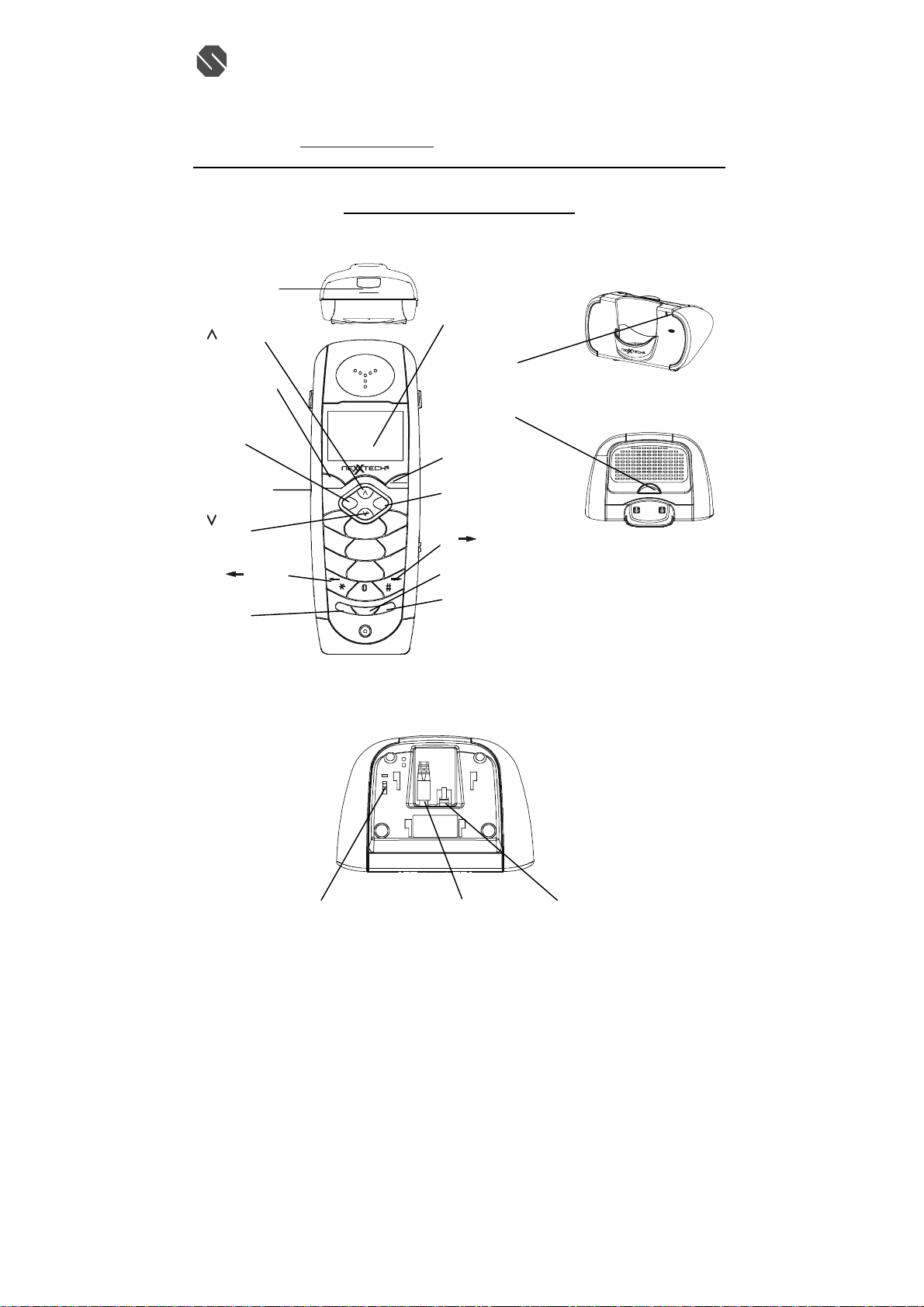
4313382 CONTROLS DIAGRAM
MSG WTG/
EW CALL
LED
Indicator
(UP) Button
TALK Button
SAVE/MEMO
Button
Handset Jack
(DOWN)
Button
Button
(*)/
MUTE/MENU
Button
TALK
MEMO SAVE
1
4
GHI
7
PQRS
M
E
M
U
MSG WTG
NEW CALL
LCD Display
IN USE/CHARGE
LED Indicator
PAGE Button
SCAN/OPTION
Button
SCAN
OPTION
CALLS
3
DEF
2
ABC
6
MNO
5
JKL
9
XYZ
8
TUV
OPER
E
T
E
N
L
E
U
D
EDIT
A
P
/
T
E
E
R
FLASH
CALLS Button
# /
FLASH/EDIT Button
RE/PA/Delete Button
Base Unit
(Rear View)
T
P
L
I
N
E
C
D
V
9
2
0
0
m
A
TONE/PULSE Switch DC 9V Jack LINE Jack
話: (八五二) 二六八七 一七一二 (四線)
Button
I
N
U
S
E
C
H
G
2
.
4
G
H
z
C
o
r
d
l
e
s
s
p
h
o
e
n
PAGE
112905A-1 5
Page 6

SENTON Enterprises Limited 信 通 企 業 有 限 公 司
Flat 10, 17/F, Fo Tan Industrial Centre, 香港沙田火炭坳背灣街 26-28 號
26-28 Au Pui Wan Street, Fo Tan, Shatin, N.T., Hong Kong 富騰工業中心 17 樓 10 室
Tel: (852) 2687-1712 Fax: (852) 2687-4125 電
E-mail address: [email protected] 傳真: (八五二) 二六八七 四一二五
DESCRIPTIONS
Handset Controls:
LCD Display - Shows call information, phone status, prompts and Phonebook items.
MSG WTG/NEW CALL indicator - Red LED blinks when you have new message(s) and call(s).
TALK Button - Press this button to place a call, answer a call, or end a call.
SAVE/MEMO Button – Allows you to retrieve a memory (name and phone number) for the personal
Phonebook (up to 20 memories). Saves the changes on the listed items.
* /
Button - Press to move left on the large LCD Display.
# /
Button - Press to move right on the large LCD Display.
FLASH/EDIT Button - (FLASH) Momentarily hangs up the phone to access custom calling features
such as Call waiting or Three-way calling provided by you local phone company (EDIT) Press to edit
listed items..
(Up)/ (Down) Button -Allows you to adjust the handset volume (3 steps) in TALK mode. It also
allows you to view the caller list or /and Phone.
Microphone - Used for speaking with callers.
Headset Jack – A jack located on the side of the handset used for connecting your headset to enjoy a
hands-free communication.
RE/PA/Delete(Redial/Pause/Delete) Button – (Redial)Press to redial the last number you
dialed.(Pause)Press to insert pause while dialing. (Delete) Press and hold down to delete items.
Calls Button - Press to see the caller list.
SCAN/OPTION Button – While in Talk mode. It is used to manually select one of the 40 operating
channels when you experience interference on the handset. During you view the caller list, press to place
a long distance call or to place a local call.
MUTE /MENU – While in standby mode, this button allows you to set the handset in Programming
mode. In talk mode, this button allows you to tem porarily disable the handset microphone.
Receiver – Allows you to hear calls.
BASE UNIT CONTROLS:
Base Unit Charge Terminals - Used for charging handset batteries. We recommend that you clean these
contacts periodically with an alcohol-moistened cloth or cotton swab.
IN USE/CHARGE LED Indicator -Lights up steadily when the phone is in talk mode and turns off
112905A-1 6
話: (八五二) 二六八七 一七一二 (四線)
Page 7
SENTON Enterprises Limited 信 通 企 業 有 限 公 司
Flat 10, 17/F, Fo Tan Industrial Centre, 香港沙田火炭坳背灣街 26-28 號
26-28 Au Pui Wan Street, Fo Tan, Shatin, N.T., Hong Kong 富騰工業中心 17 樓 10 室
Tel: (852) 2687-1712 Fax: (852) 2687-4125 電
E-mail address: [email protected] 傳真: (八五二) 二六八七 四一二五
when the handset is not in use. Also lights up steadily when paging the handset. Lights up steadily when
the handset is being charged on the base and turns off when the handset is removed from its cradle.
PAGE Button - Allows you to locate the handset when it is not on the base, or to alert the person near the
handset.
TONE/PULSE Switch - A switch located on the rear of the base unit, which allows you to set the dialing
mode to either Tone dialing or Pulse (rotary) dialing.
DC 9V jack - A jack located on the rear side of the base unit used for connecting the AC adaptor to the
base unit.
LINE jack – Accepts line cord to make connection with modular type telephone outlet.
INSTALLATION
CAUTION: USE ONLY THE NICKEL CADMIUM(Ni-Cd) BATTERY TYPE INCLUDED
WITH THIS UNIT. USE OF OTHER BATTERY TYPES MAY CAUSE INJURIES OR DAMAGE.
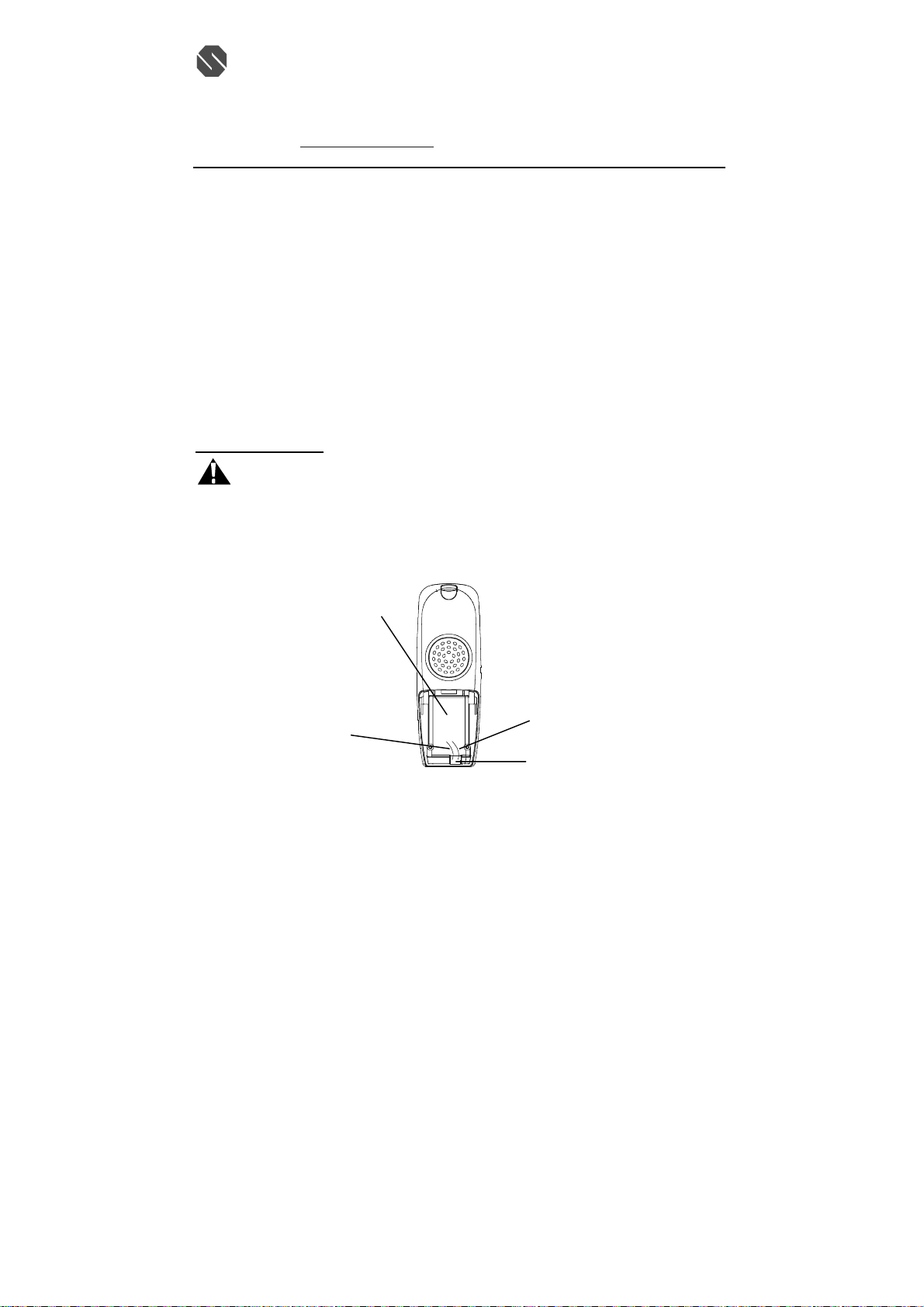
1. Remove the battery compartment cover of the handset by pressing the top of the cover and sliding it
down.
2. Connect the Ni-Cd battery pack plug along the slot into the handset’s battery connector as shown
below.
Handset
Battery
Compartment
Red
wire
(Figure 1)
3. Insert the Ni-Cd battery into the battery compartment.
4. Replace the battery compartment cover by sliding it up towards the handset.
NOTE: Use the type and size of Ni-Cd battery pack, 3.6V, 450mAh. It is recommended that the Ni-Cd
battery pack should be fully charged overnight prior to initial use.
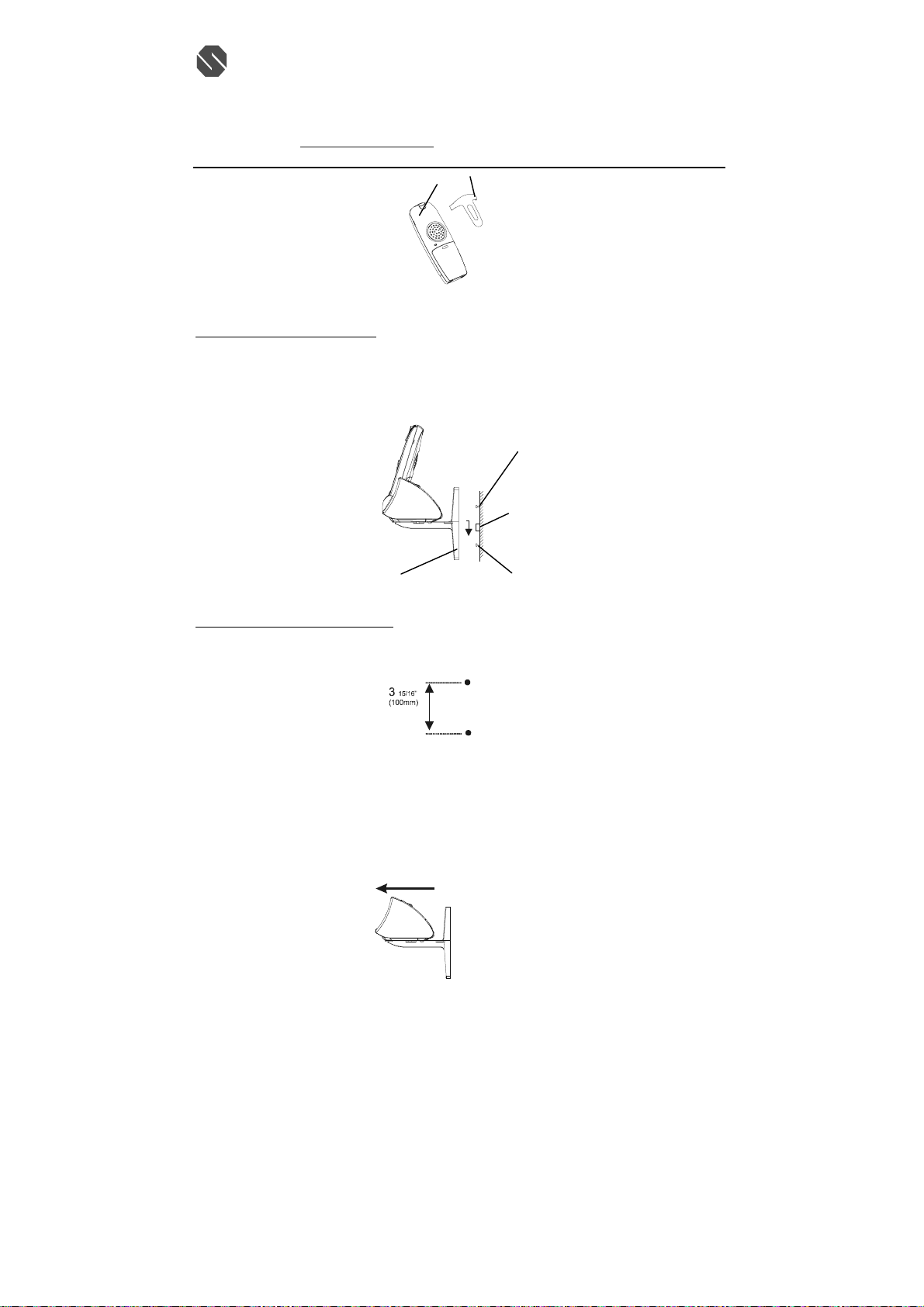
Belt Clip Installation
With the back of handset facing up, insert one side of the belt clip hook into the matching slots at the top
side of handset as shown in Figure2. Slide the other hook until it locks into place from the opposite side
of the handset.
112905A-1 7
話: (八五二) 二六八七 一七一二 (四線)
Black
Wire
Battery
Connector
Page 8
SENTON Enterprises Limited 信 通 企 業 有 限 公 司
k
t
t
Flat 10, 17/F, Fo Tan Industrial Centre, 香港沙田火炭坳背灣街 26-28 號
26-28 Au Pui Wan Street, Fo Tan, Shatin, N.T., Hong Kong 富騰工業中心 17 樓 10 室
Tel: (852) 2687-1712 Fax: (852) 2687-4125 電
E-mail address: [email protected] 傳真: (八五二) 二六八七 四一二五
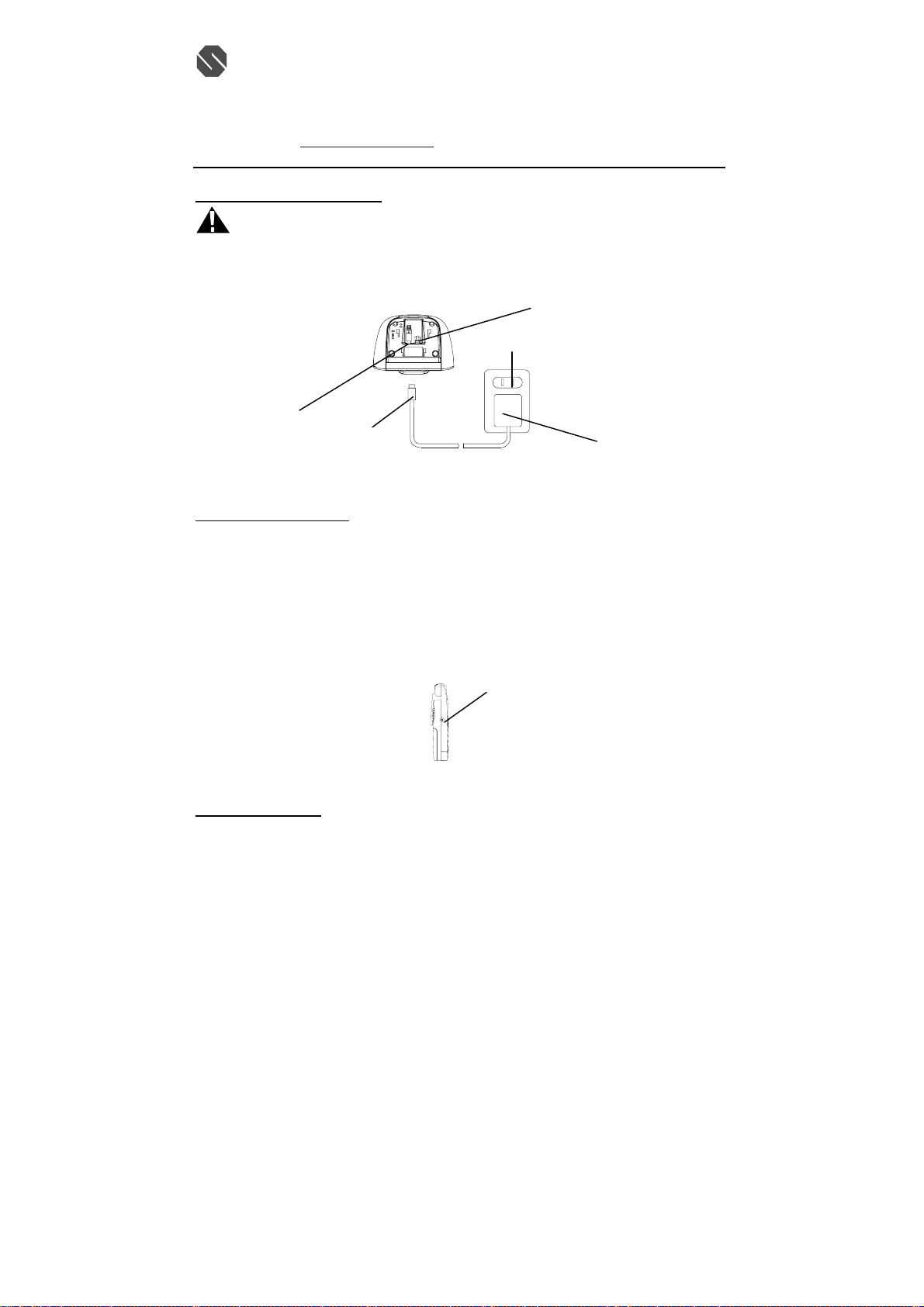
WALL USE:
Wall Mounting (Standar d Wall Jack)
1. Install the wall mount bracket at the position as shown in Figure 3.
2. Connect the short telephone line cord to the TEL LINE jack..
3. Connect the opposite end of the telephone line cord to the modular wall jack.
4. Align the wall mounting slots with studs located on the modular wall plate and slide base down to
lock in place.
Wall Mounting (No Standard Wall Jack)
Wall Mount Bracket
Belt clip hoo
(Figure 2)
(Figure 3)
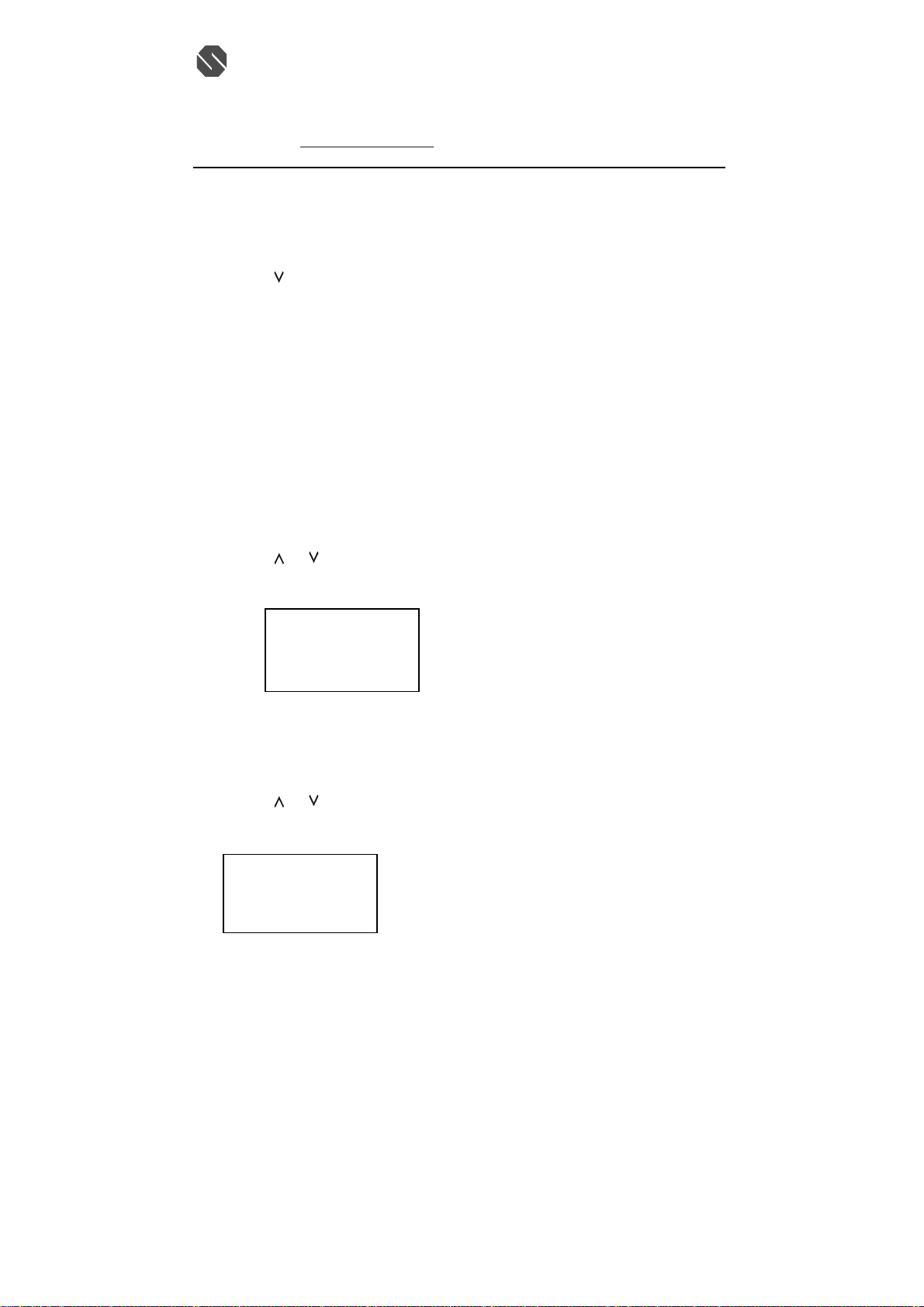
1. Drill two holes with a vertical distance between the two marked positions of 3
shown in Figure 4.
2. Drive a scr ew into each of the holes. Tighten them to the end of the screw lines, only leaving the
smooth part of the screw head outside the wall.
3. Hand the unit onto the screws, then slide it down firmly to fasten the base securely .
Uninstalling the Wall Mount Bracket
To remove the wall mount bracket from the base unit, pull it front as shown in Figure 5.
(Figure 4)
112905A-1 8
(Figure 5)
話: (八五二) 二六八七 一七一二 (四線)
Wall Moun
Stud
Telephone
Modular
Jack
Wall Moun
Stud
"
15/16
(100mm)as
Page 9
SENTON Enterprises Limited 信 通 企 業 有 限 公 司
t
k
Flat 10, 17/F, Fo Tan Industrial Centre, 香港沙田火炭坳背灣街 26-28 號
26-28 Au Pui Wan Street, Fo Tan, Shatin, N.T., Hong Kong 富騰工業中心 17 樓 10 室
Tel: (852) 2687-1712 Fax: (852) 2687-4125 電
E-mail address: [email protected] 傳真: (八五二) 二六八七 四一二五
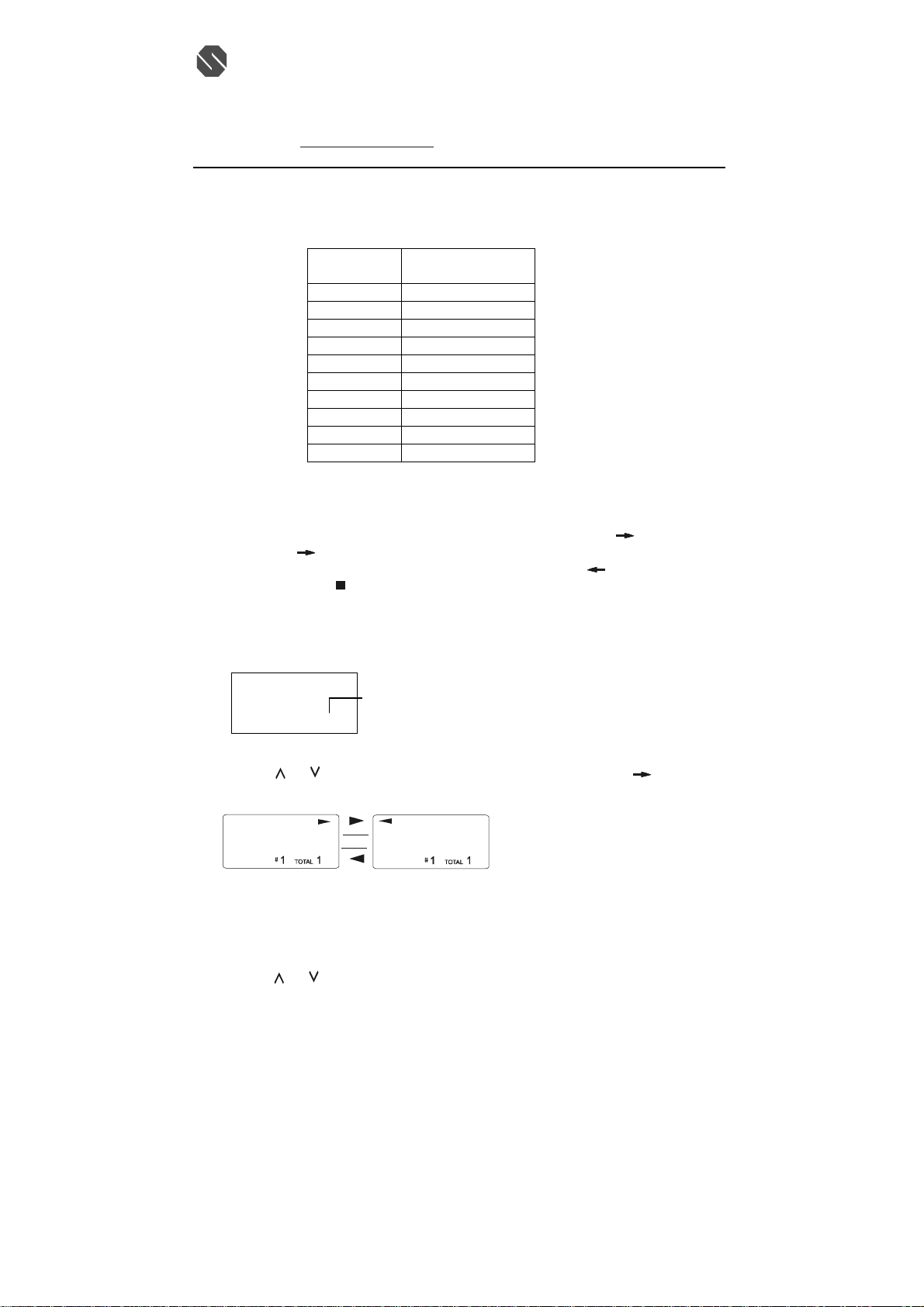
POWER CONNECTION
CAUTION: You must use a Class II, 120 Volt AC/9 Volt DC adaptor that delivers at least 200mA.
The center tip must be positive and the plug must correctly fit the unit’s DC 9V jack.
1. Plug the AC adaptor into a standard AC outlet.
2. Insert the small plug inot the DC 9 jack on the rear of the base unit as shown in Figure 6.
T
P
A
m
0
0
2
C
D
V
9
L
E
I
N
DC 9V Jack
AC Adaptor
Plug
HEADSET CONNECTION
One of the special features of your phone is that your handset could utilize a headset(not included) for
hands-free communication. Insert the small plug at the end of your headset cord to the headset jack at the
side of the handset as shown in Figure 7. Follow the procedures discussed in “Placing a Call” when to
place and receive a call.
Note: The headset jack of your cordless telephone is compatible with 2.5mm headset plugs only. When
you plug in the headset into the headset jack, it automatically mutes the microphone and speaker of the
handset. Unplug the headset to return the handset to normal use.
(Figure 6)
(Figure 7)
INITIAL SETUP
Please follow these steps before using the cordless telephone for the first time.
1. Ensure that the handset battery pack is installed and charged fully for at least 14 hours.
2. Ensure that all connections (line cord and adaptor cord) are properly inserted into rear of the base
unit.
SETTING THE TONE/PULSE MODE
Select the appropriate dialing service by moving the TONE/PULSE switch at the rear of the base unit:
· TONE for Tone service , or
· PULSE for Rotary service.
112905A-1 9
話: (八五二) 二六八七 一七一二 (四線)
Telephone Line Jack
AC Outle
9VDC Adaptor
Handset Jac
Page 10

SENTON Enterprises Limited 信 通 企 業 有 限 公 司
Flat 10, 17/F, Fo Tan Industrial Centre, 香港沙田火炭坳背灣街 26-28 號
26-28 Au Pui Wan Street, Fo Tan, Shatin, N.T., Hong Kong 富騰工業中心 17 樓 10 室
Tel: (852) 2687-1712 Fax: (852) 2687-4125 電
E-mail address: [email protected] 傳真: (八五二) 二六八七 四一二五
SETTING THE HANDSET RINGER ON/OFF MODE
The handset must be set to ring ON mode in order to ring when receiving an incoming call. See Programs
Operation section on “RING ON/OFF SETTING”.
TELEPHONE OPERATION
PLACE A CALL
1. Pick up the handset and press the TALK button. The Call Timer starts to count. The base unit IN
USE LED indicator will light up.
2. Listen for a dial tone.
3. Dial the telephone number. The phone numbers appear on the LCD Display as you enter the
number.
4. When finished with your call, press the TALK button or place the handset on the base unit. The base
IN USE LED indicator will turn off.
NOTE: The call timer will start to count once you press the TALK button.
RECEIVE A CALL
NOTE: If you are expecting incoming calls, the handset must be programmed to RING ON mode.
If the handset is on the base
1. When the phone rings, simply pick up the handset from the base cradle if the unit is set to
auto-answer ON mode. If the unit is set to auto-answer OFF mode, press the TALK button. See the
“AUTO ANSWER ON/OFF SETTING” section to set auto-answer mode. The LCD Display will
show “TALK”.
2. Start your conversation.
3. To end your conversation, either press the TALK button or place the handset on the base unit. The
base IN USE LED indicator will turn off.
If the handset is out of the base:
1. When the phone rings, press the TALK button on the handset. The LCD Display will show “ TALK”
and the base unit IN USE LED will light up.
2. Start your conversation.
3. To end your conversation, either press the TALK button or place the handset on the base unit. The
base IN USE indicator will turn off.
LAST NUMBER REDIAL
A. AFTER HEARING A BUSY TONE WHEN PLACING A CAL.
1. If you get a busy tone, press handset TALK button to hang up.
2. Press the handset TALK button again and listen for a dial tone.
3. Press the handset RE/PA/DELETE button. This will automatically redial the last telephone number
you called (up to 32 digits).
4. When finished with your call, press the TALK button or place the handset on the base unit. The base
IN USE LED indicator will turn off.
B. WHEN THE HANDSET IS OFF THE BASE UNIT AND IN STANDBY MODE
1. Press the TALK button on the handset and listen for a dial tone.
2. Press the RE/PA/DELETE button. This will automatically redial the last telephone number you
called (up to 32 digits).
3. When finished with your call, press the TALK button or place the handset on the base unit. The base
IN USE LED indicator will turn off.
:
話: (八五二) 二六八七 一七一二 (四線)
112905A-1 10
Page 11
SENTON Enterprises Limited 信 通 企 業 有 限 公 司
Flat 10, 17/F, Fo Tan Industrial Centre, 香港沙田火炭坳背灣街 26-28 號
26-28 Au Pui Wan Street, Fo Tan, Shatin, N.T., Hong Kong 富騰工業中心 17 樓 10 室
Tel: (852) 2687-1712 Fax: (852) 2687-4125 電
E-mail address: [email protected] 傳真: (八五二) 二六八七 四一二五
SAVING IN THE PHONEBOOK
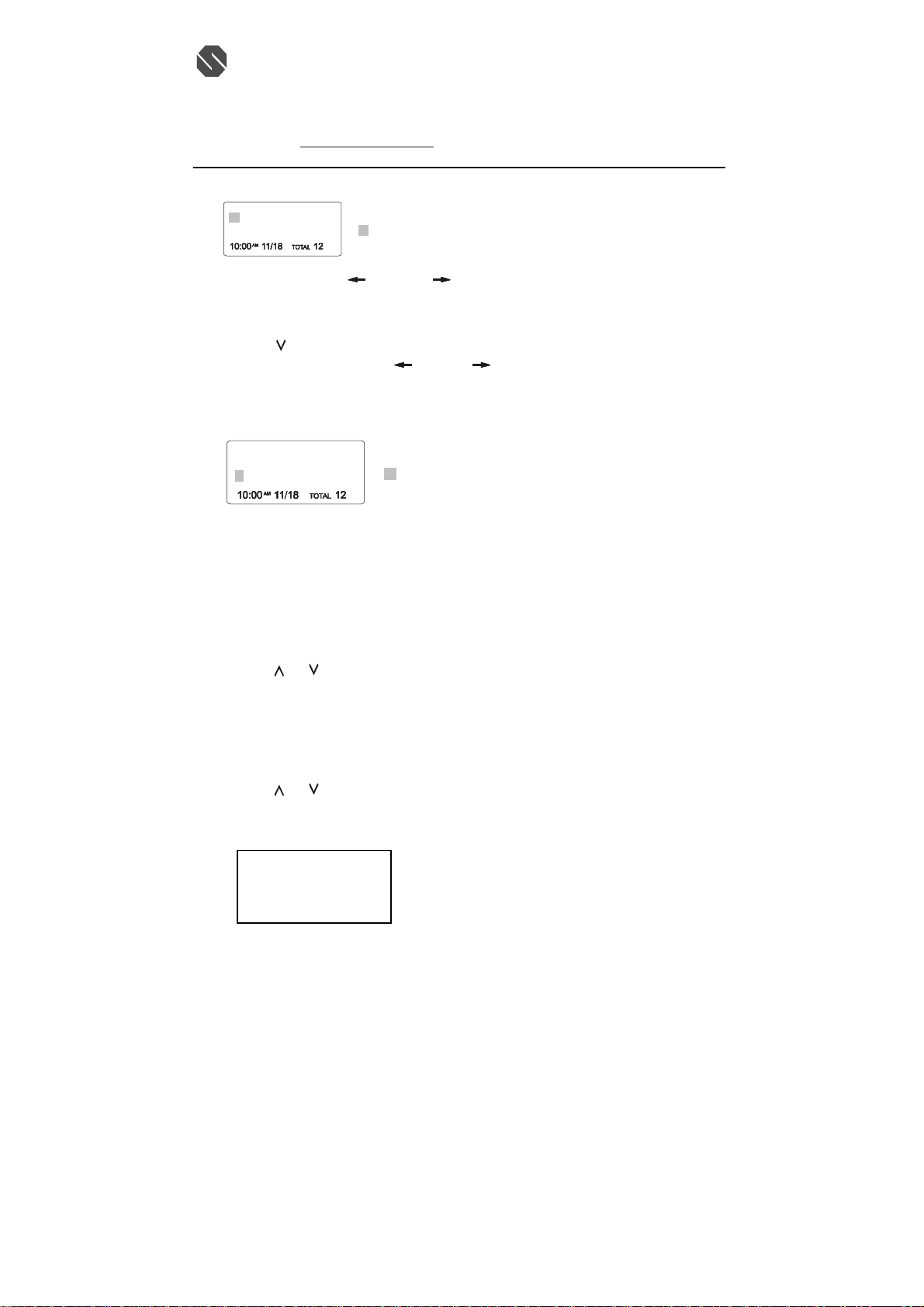
1. Press the SAVE/MEMO button.
2. Press the FLASH/EDIT button.
3. Use the TELEPHONE KEYPAD button (0-9) to enter the name, (see the “TELEPHONE KEYPAD
CHARACTERS SETTING” section) you can store up to 15 characters.
4. Press the
5. Enter the telephone number using the TELEPHONE KEYPAD button (0-9). You can store up to 16
digits.
6. Press the SAVE/MEMO button to save into memory
7. Press the SAVE/MEMO button to go back to standby mode.
NOTE: If there are no memory locations left in the phonebook, the unit will display “ MEMORY FULL”.
To continue with memory programmi ng, you must delete or edit existing speed dial numbers.
If no active buttons are pressed for 20 seconds, the LCD Display will automatically return to STANDBY
mode.
It will not save a duplicate telephone number or a name without the corresponding telephone number in
the Phonebook.
A. PREFERRED CALLS(VIP)
You an assign PREFERRED CALL which will generate a special ringer sound at start of the second ring
to any welcome caller in the Phonebook.
1. Press the SAVE/MEMO button.
2. Press the
3. Press the MUTE/MENU button once. The LCD Display will show “VIP”.
4. Press the SAVE/MEMO button to save the preferred call and go back to STANDBY mode.
B. BLOCKED CALLS
You can assign a BLOCKED CALL which will disable the ringer sound from the second ring to any
caller in the Phonebook.
1. Press the SAVE/MEMO button.
2. Press the
3. Press the MUTE/MENU button twice. The LCD Display will show “REJ”.
4. Press the SAVE/MEMO button to save the preferred call and go back to STANDBY mode.
JOHN SMITH
button once.
or button to find the one you need.
VIP
JOHN SMITH
888-555-1212
#
1 TOTAL20
or button to find the one you need.
REJ
888-555-1212
#
2 TOTAL20
話: (八五二) 二六八七 一七一二 (四線)
112905A-1 11
Page 12
SENTON Enterprises Limited 信 通 企 業 有 限 公 司
N
Flat 10, 17/F, Fo Tan Industrial Centre, 香港沙田火炭坳背灣街 26-28 號
26-28 Au Pui Wan Street, Fo Tan, Shatin, N.T., Hong Kong 富騰工業中心 17 樓 10 室
Tel: (852) 2687-1712 Fax: (852) 2687-4125 電
E-mail address: [email protected] 傳真: (八五二) 二六八七 四一二五
TELEPHONE KEYPAD CHARACTERS
The TELEPHONE KEYPAD buttons (0-9) are used to enter the characters when entering na mes. Press
the appropriate KEYPAD button to get the following characters.
For example, If you want to enter the character “C” , press the “2” KEYPAD button, the first character
displayed will be “A” . Press the “2” button again to display “B”, and press again to display the letter “C”.
To enter the next character, pr ess the appropriate button. If , however , the next character is on the same
button as the previous character, you will first need to press the SHIFT RIGHT
the SHIFT RIGHT
you can go back to the incorrect character by pressing the SHIFT LEFT
character inside the cursor “
VIEWING THE PHONEBOOK
This Phonebook lets you scroll through the list to find the person you need for one touch dialing. You can
store up to 20 names and telephone numbers in the Memory.
1. Press the SAVE/MEMO button.
2. Press the
NOTE: To exit the Phonebook at anytime, Press the SAVE/MEMO button.
EDITING NAME AND NUMBER IN THE PHONEBOOK
1. Press the SAVE/MEMO button.
2. Press the
3. Press the FLASH/EDIT button to edit the name.
PHONE BOOK
name or telephone number is more than 11 digits.
ALEX BROWIN
6045551212
KEYPAD
BUTTON
1 Space &
2 A B C 2
3 D E F 3
4 G H I 4
5 J K L 5
6 M N O 6
7 P Q R S 7
8 T U V 8
9 W X Y Z 9
0 0
button a second time will produce a space. If you want to change any character,
”, press the RE/PA/DEL button.
o. of memory store
TOTAL 20
CHARACTERS
,
or button to find the one you need , press the SHIFT RIGHT button if the
ALEX BROWIN
6045551212
or button to find the one you want to edit.
話: (八五二) 二六八七 一七一二 (四線)
( ) * . 1
button. Pressing
button. To delete the
112905A-1 12
Page 13
SENTON Enterprises Limited 信 通 企 業 有 限 公 司
Flat 10, 17/F, Fo Tan Industrial Centre, 香港沙田火炭坳背灣街 26-28 號
26-28 Au Pui Wan Street, Fo Tan, Shatin, N.T., Hong Kong 富騰工業中心 17 樓 10 室
Tel: (852) 2687-1712 Fax: (852) 2687-4125 電
E-mail address: [email protected] 傳真: (八五二) 二六八七 四一二五
ALEX BROWIN
4. Press the SHIFT LEFT
5. Press the
6. Press and hold the SHIFT LEFT
7. Press the SAVE/MEMO button to confirm.
IMPORTANT: It is not advisable to save a telephone number without the corresponding name in the
Phonebook. This will lead to improper displays on Private and Out of Area calls.
NOTE: When no active buttons are pressed for 20 seconds, the LCD Display will automatically return to
ST ANDBY mode.
PLACING CALLS FROM THE PHONEBOOK
1. Press the SAVE/MEMO button.
2. Press the
3. Press the TALK button to dial out the telephone number.
4. Start your conversation.
5. To end your conversation, either press the TALK button or place the handset on the base unit.
NOTE: Be sure to check that the line is not in use by another extension.
DELETING A STORED NUMBER
1. Press the SAVE/MEMO button.
2. Press the
3. Press the RE/PA/DELETE button. The unit will ask you to delete the selected telephone number and
4. Press again the “RE/PA/DELETE button to delete. The LCD Display will show “ERASED”.
5. Press the SAVE/MEMO button to return to STANDBY mode.
6045551212
want to change.
To erase, press the RE/PA/DELETE Button
To add, use the TELEPHONE KEYPAD buttons(0-9).
button to edit the number.
want to change.
To erase, press and hold the RE/PA/DELETE button.
To add, use the TELEPHONE KEYPAD buttons (0-9).
ALEX BROWIN
6045551212
or button to find the one you want to call.
or button to find the one you want to delete.
the LCD Display will show “ERASE ITEM?”.
ERASE ITEM?
604-555-1212
#
cursor is blinking
or RIGHT button to move the cursor to the letter or number you
or RIGHT button to move the cursor to the number you
cursor is blinking
1
20
TOTAL
話: (八五二) 二六八七 一七一二 (四線)
112905A-1 13
Page 14

SENTON Enterprises Limited 信 通 企 業 有 限 公 司
Flat 10, 17/F, Fo Tan Industrial Centre, 香港沙田火炭坳背灣街 26-28 號
26-28 Au Pui Wan Street, Fo Tan, Shatin, N.T., Hong Kong 富騰工業中心 17 樓 10 室
Tel: (852) 2687-1712 Fax: (852) 2687-4125 電
E-mail address: [email protected] 傳真: (八五二) 二六八七 四一二五
MIXED MODE DIALING (Temporary Pulse to Tone Dialing)
1. If you only have pulse (rotary dialing) service in your area and want to access Tone services (Bank
by Phone , etc.), ensure that the Tone/Pulse switch on the rear of the base unit is set to the Pulse
position.
2. Press the TONE (*) button once to switch from Pulse to Tone dialing temporarily. Pulse dialing
mode resumes when the call is ended.
PAUSE FUNCTION
• In some cases, such as PABX or long distance service, a pause may be needed in the dialing
sequence. Pressing the handset RE/PA/DELETE button inserts the programmed time interval
between dialed numbers.
FLASH FUNCTION
• Used to access custom calling features such as Call Waiting or Three-Way Calling provided by your
local phone company. Flash can also be used to restore a dial tone to make a new call.
CHANNEL SELECTION (40 Channels)
• Your cordless telephone lets you select a channel from the 40 frequencies available to transmit
signals between the base unit and handset. If the existing channel becomes noisy or starts having
interference, you can either move closer to the base unit or press the SCAN/OPTION button on the
handset until a better reception is found.
OUT OF RANGE WARNING
• The handset and base unit communicate up to a certain maximum range. The distance can be
affected by weather, power lines, or even other cordless telephone.
• If you are far away from the base unit, the handset beeps and “ OUT RANGE” is shown on the
LCD Display to warn you that the background noise level is too high for proper communication
between the handset and the base unit.
• When you hear this sound and see the “OUT RANGE” display, you should move closer to the base
unit. Otherwise, the call will automatically cut off after 20 seconds.
LOW BATTERY WARNING
• When the handset battery voltage level is low, the handset LCD Display shows “LOW BATTERY”.
• Return the handset on the base cradle to charge.
PAGING FUNCTION
• If you have misplaced the handset or need to alert person nearly the handset, press the PAGE button
on the base unit. Each press of this button will activate the handset to beep for 20 seconds and LCD
Display shows “PAGING” while it is being paged by the base unit。
NOTE: Even if the handset is in RING OFF mode, the base unit can page the handset.
CALLER ID OPERATION
GETTING TO KNOW YOUR NEW PHONE
IMPORTANT: Subscription to Caller ID (CID)/Call Waiting ID services from your local phone company
is required for using the Caller ID/Call Waiting ID features of the 4313382. Your new 4313382 telephone
gives you the ultimate in cordless telephone sound quality with the luxury of Caller ID and Call Waiting
ID.
話: (八五二) 二六八七 一七一二 (四線)
112905A-1 14
Page 15
SENTON Enterprises Limited 信 通 企 業 有 限 公 司
Flat 10, 17/F, Fo Tan Industrial Centre, 香港沙田火炭坳背灣街 26-28 號
26-28 Au Pui Wan Street, Fo Tan, Shatin, N.T., Hong Kong 富騰工業中心 17 樓 10 室
Tel: (852) 2687-1712 Fax: (852) 2687-4125 電
E-mail address: [email protected] 傳真: (八五二) 二六八七 四一二五
If this is your first cordless telephone, you will soon discover that your cordless is similar to regular
telephones, except without the cord. If you have owned a cordless in the past, you will discover that the
4313382 telephone is the most powerful and full-functioned Call Waitin g ID cordless telephone on the
market, some key features are:
• 40 name and number Caller ID/Call Waiting ID memory (Call List)
• 20 name and number programmable memory (Phonebook)
• Hearing – aid compatibility
• Automatic or manual selection of the clearest of 40 channels
Unlike regular telephones, your cordless telephone does not work during power failures. We do not
recommend you to use a cordless telephone as the only phone in your residence
INTRODUCTION TO CALLER ID AND CALL WAITING ID
The 4313382 Caller ID/Calling Waiting ID devices allow you to take advantage of the Caller
identification delivery service offered by your local telephone company. For more information, you can
refer to the following Question and Answer table:
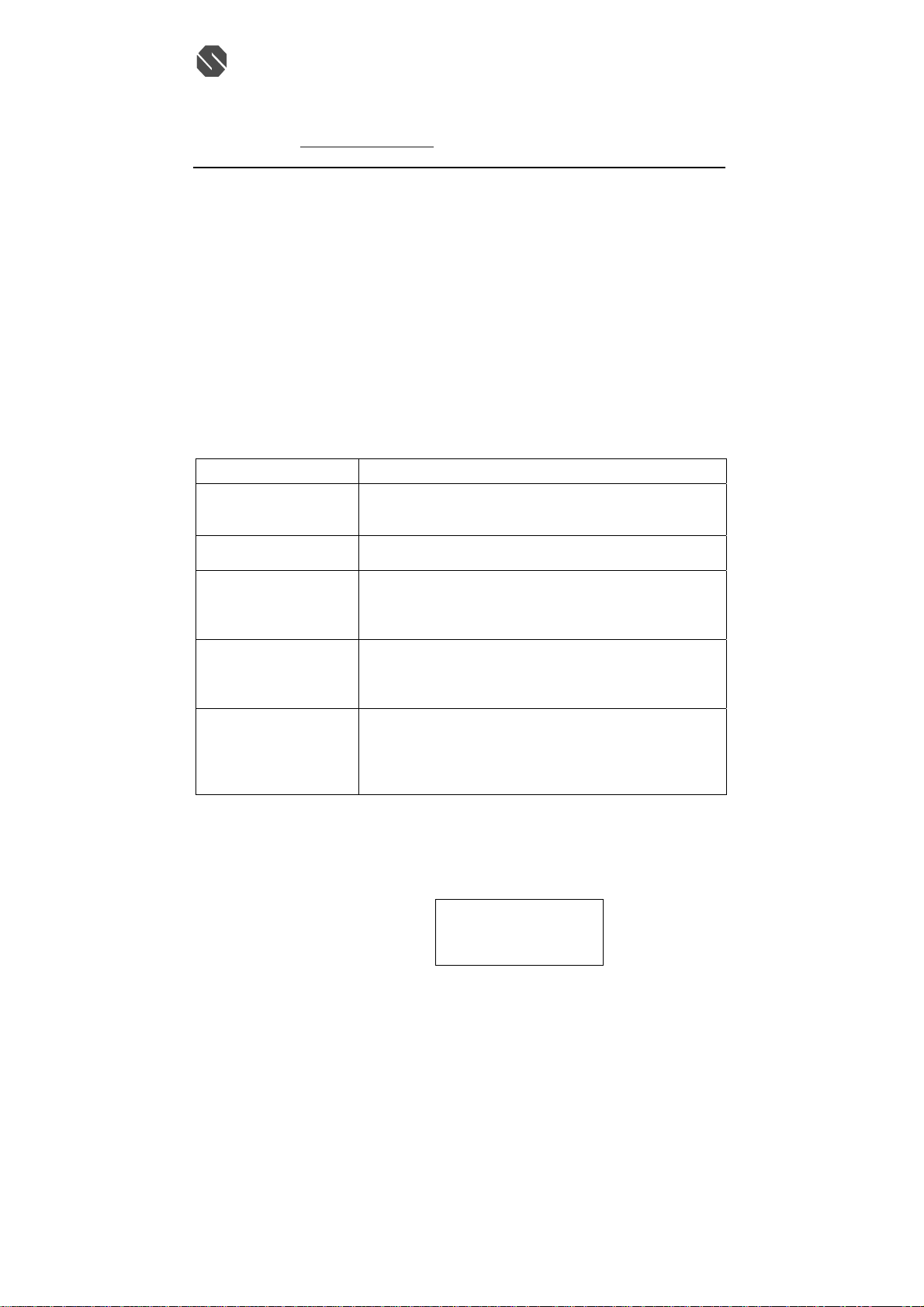
QUESTIONS ANSWERS
What is Caller ID? Caller ID is a device that identifies the calling party before you
answer a call. This device can be used to screen unwanted calls and
eliminate harassment from annoying calls.
What is Caller W aiting ID? Call Waiting ID is a device that can also identifies the call waiting
party before you answer a call.
How does Caller ID and
Call Waiting ID work?
Who provides Caller ID
service?
How can I activate my
Caller ID?
RECEIVING NEW CALL
• When you receive a new call, the call information is stored under CALLER ID List. The “NEW”
segment of LCD Display and NEW CALL LED indicator will flash if there is new call(s).
• When you receive a call, the system displays the caller information sent by the telephone company,
called a Call Record. The Call Record consists of the following information:
a. The caller’s name(if available)
b. The caller’s telephone number
c. The time and date of a call
d. A call record number
• If there is no call records, the LCD display shows “NO CALLS”.
When used with Caller ID/Call Waiting service, the Caller ID/Call
Waiting ID device displays the name (if available), and the telephone
number (if available) of the person calling before you answer your
telephone.
Your local telephone company. However, not all local telephone
companies provide Caller ID service. Please call you local phone
company to confirm that the service is available before you install the
device.
For you Caller ID unit to function, you must first arrange with your
local telephone company to have Caller ID/Call Waiting ID service
installed on you line. There is an extra charge added to your monthly
telephone bill for this service. Before using this unit, please read this
instruction manual carefully.
JOHN SMITH
555-555-1212
10:00
話: (八五二) 二六八七 一七一二 (四線)
AM
12/15
NEW
#8
112905A-1 15
Page 16
SENTON Enterprises Limited 信 通 企 業 有 限 公 司
N
f
8:05
38
m
p
Flat 10, 17/F, Fo Tan Industrial Centre, 香港沙田火炭坳背灣街 26-28 號
26-28 Au Pui Wan Street, Fo Tan, Shatin, N.T., Hong Kong 富騰工業中心 17 樓 10 室
Tel: (852) 2687-1712 Fax: (852) 2687-4125 電
E-mail address: [email protected] 傳真: (八五二) 二六八七 四一二五
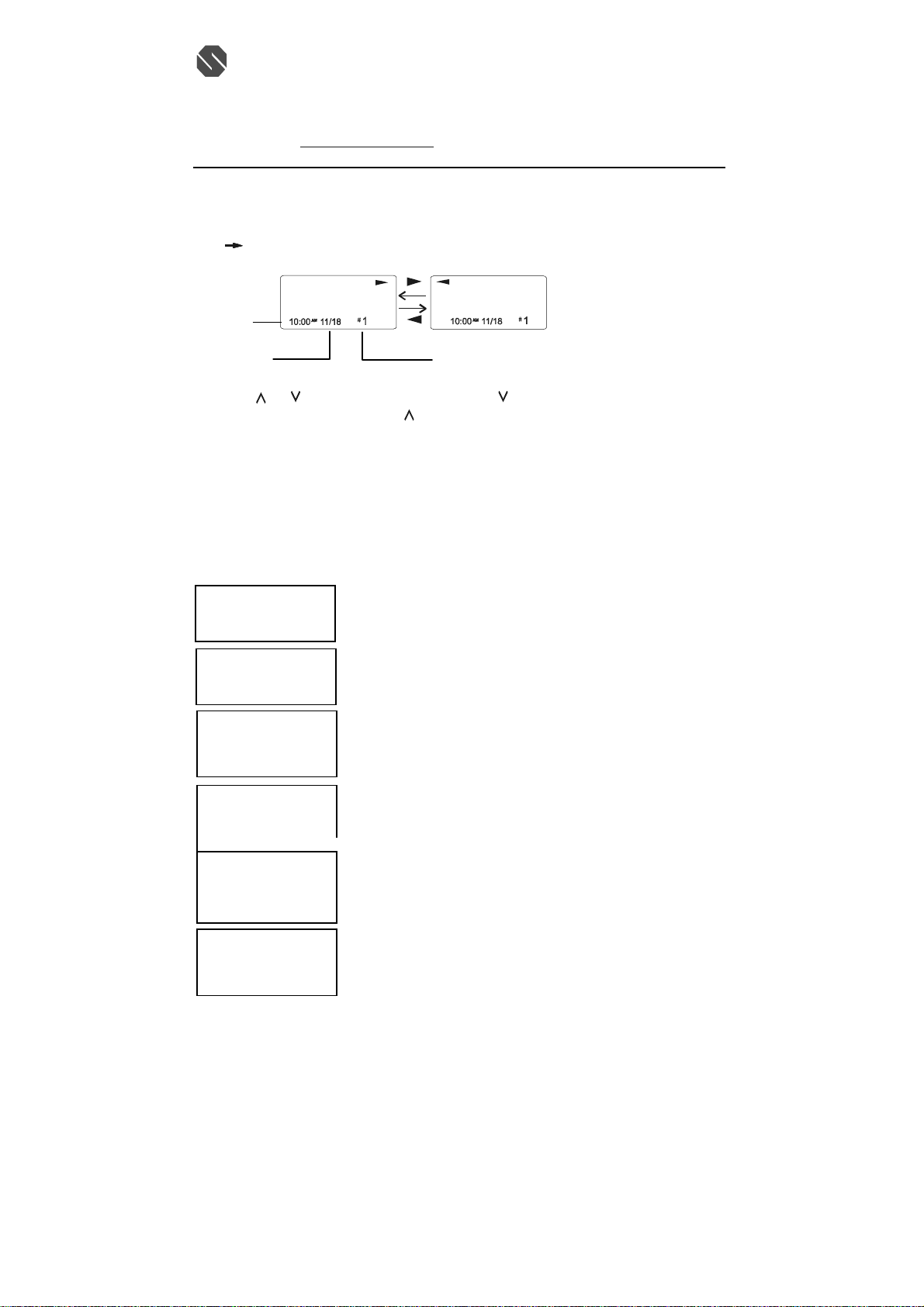
VIEWING THE CALLER ID LIST
1. In standby mode, press CALLS button to enter Caller ID list. If there is new call(s), the new call(s)
will be displayed at first. If the name or number is more than 11 characters, press the SHIFT RIGHT
button to view the rest of the display.
Month/Date
2. Press
last call received to the first. The
received to the last.
3. Press CALLS button to finish.
NOTE: If no active buttons are pressed for 20 seconds, the LCD Display will automatically return to
STANDBY mode.
CALLER ID DISPLAY
JOHN SMITH
555-555-1212
AM
555-555-1212
8:05AM 12/25 #38
UNAVAILABLE
----------------------------
11:23AM 12/25
PRIVATE
----------------------------
11:23AM 12/25
ERROR
AM
9:07
12/25
MSG
RING: ON
9:07AM 12/25
ALEX BROWIN
6045551212
ALEX BROWIN
6045551212
umber of calls recorded
or button to scroll to the next call. The button will go through the calls from the
button will allow you to view the calls from the first call
LCD Display shows name and number, time and date o
the call.
NEW
NEW
2
0
#
#
TOTAL
TOTAL
#
LCD Display shows number-only service.
“UNAVAILAB LE” will be displayed when Caller ID
information is not available. This call was made from a
telephone company that does not offer Caller ID
20
services(including international calls).
“PRIVATE” will be shown when a call is received fro
a blocked number. For privacy reasons, some states
allow callers the option to prevent their telephone data
from being displayed on the other party’s Caller ID
40
display.
Display shows when the Caller ID information was
received incorrectly or only part of the data was
received.
NOTE: When an error is received, none of the date from
8
This call is saved in memory
Display shows when a voice mail message has been
received and is stored by message waiting service
39
rovided by the phone company.
12/25
話: (八五二) 二六八七 一七一二 (四線)
112905A-1 16
Page 17
SENTON Enterprises Limited 信 通 企 業 有 限 公 司
d
W
L
Flat 10, 17/F, Fo Tan Industrial Centre, 香港沙田火炭坳背灣街 26-28 號
26-28 Au Pui Wan Street, Fo Tan, Shatin, N.T., Hong Kong 富騰工業中心 17 樓 10 室
Tel: (852) 2687-1712 Fax: (852) 2687-4125 電
E-mail address: [email protected] 傳真: (八五二) 二六八七 四一二五
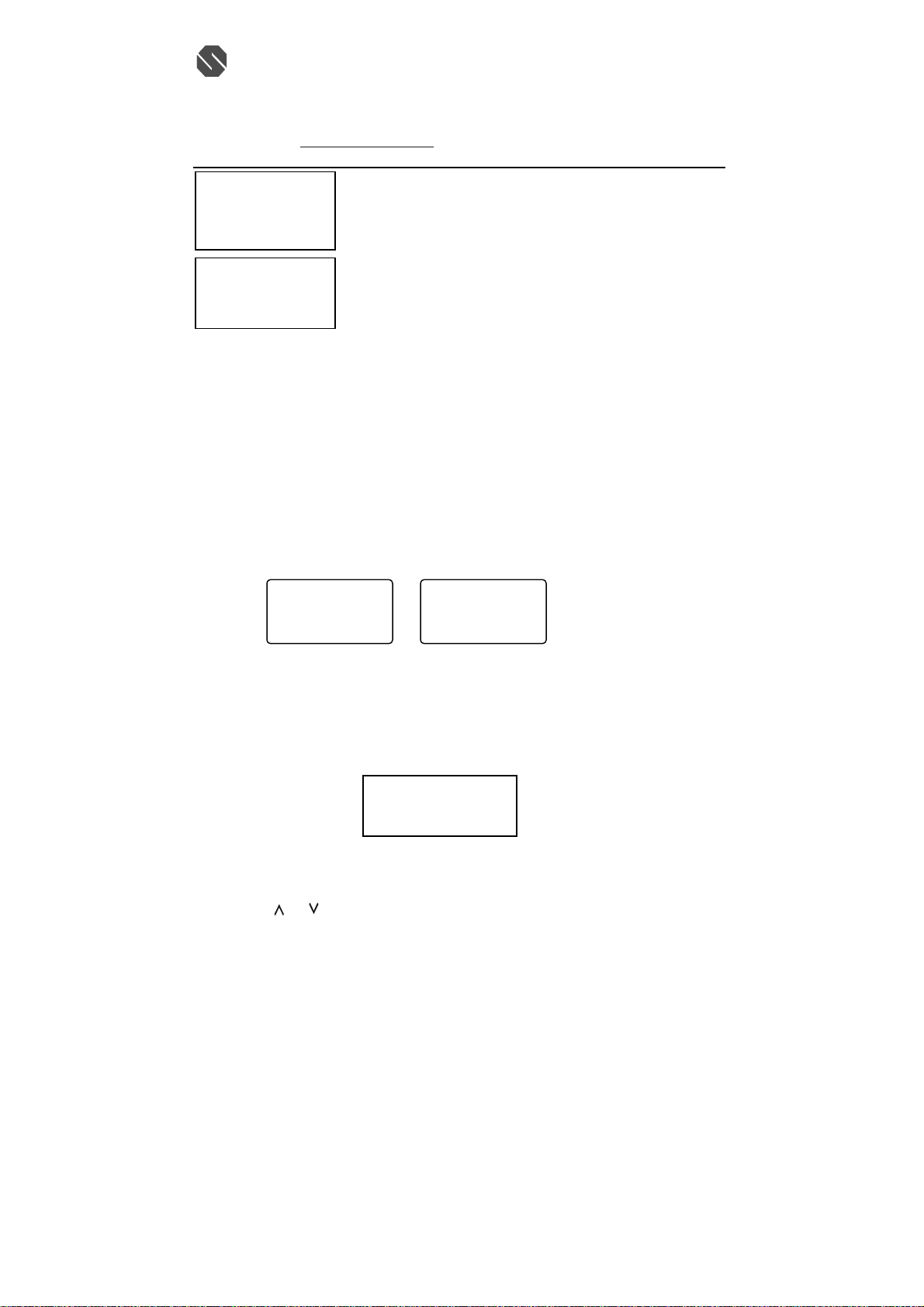
VIP
JOHN SMITH
888-555-1212
9:07AM 12/25
NO CALLS
9:07AM 12/25
NEW1 TOTAL
0
NEW
TOTAL
NOTE: If a call is received from the same number more than once since the records were last viewed, no
new entry is made, but the repeat call icon “RPT” and the number of repeat calls is displayed.
CALL WAITING
When you subscribe to Call Waiting service from your local telephone Company, this telephone will
display the name and number of the second caller while you are having a conversation.
1. When a second call comes in while you are having a conversation, you will hear a notification tone
from the handset and volume is momentarily muted. The LCD Display will automatically shows the
name and number of the second caller.
2. Press the FLASH/EDIT button to answer the second caller. The first caller’s name and number will
be displayed.
3. When you have finished, press the FLASH/EDIT button to continue with your conversation with the
first caller.
JIM CARRY
MIN
00
2’ND CALLER
MESSAGE WAITING
If you have subscribed to Voice Mail message service and if you have requested Visual Message
Indication from your local telephone company, the MSG WTG/NEW CALL LED indicator will blink and
the LCD Display will show “MSG” when there is voice message(s) for you from your telephone company.
To remove the MESSAGE WAITING indicator, see the “ Message Waiting Setting” section..
PLACING A CALL FROM THE CALLER LIST
1. Press the CALLS button.
2. Press the
or to select the call record you wish to call back.
3. If the nu mber displayed is not correct (needing 7,10,11 digits), press the OPTION button to select
call number.
Display shows when the incoming call is a priority call.
10
This is displayed when CALLS button is pressed an
0
there is no Caller ID date stored.
ALEX BROWN
800-2-10-8950
SEC
18
800-2-10-8950
MIN
18
00
1’ST CALLER
MSG
RING: ON
9:07AM 12/25
0
NE
TOTA
話: (八五二) 二六八七 一七一二 (四線)
SEC
39
112905A-1 17
Page 18
SENTON Enterprises Limited 信 通 企 業 有 限 公 司
Flat 10, 17/F, Fo Tan Industrial Centre, 香港沙田火炭坳背灣街 26-28 號
26-28 Au Pui Wan Street, Fo Tan, Shatin, N.T., Hong Kong 富騰工業中心 17 樓 10 室
Tel: (852) 2687-1712 Fax: (852) 2687-4125 電
E-mail address: [email protected] 傳真: (八五二) 二六八七 四一二五
4. Press TALK button to dial out or press CALLS button to cancel dialing.
5. To end you conversation, either press the TALK button or place the handset on the base unit.
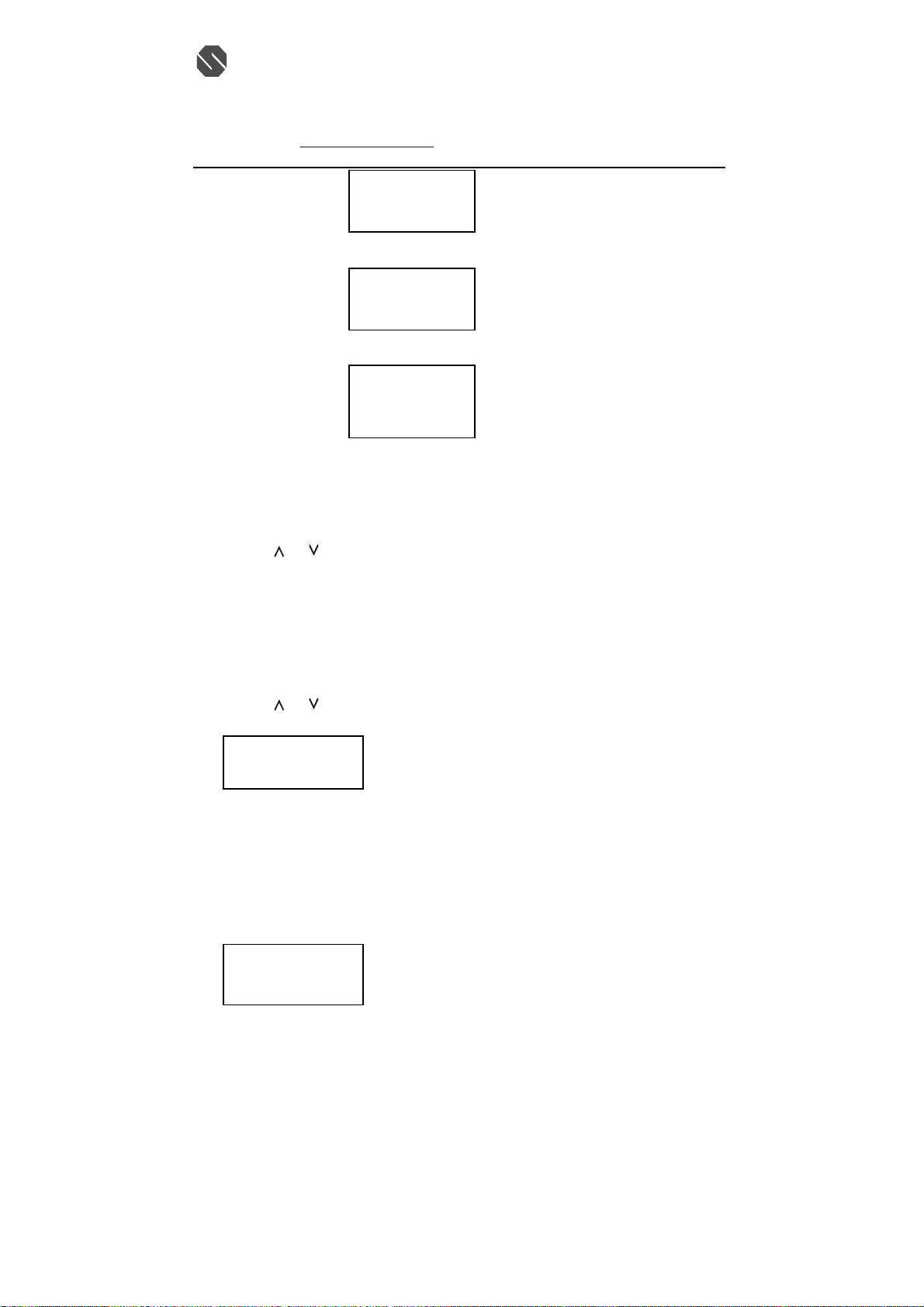
SAVING THE NAME AND NUMBER FROM THE CALLER LIST INTO PHONE BOOK
1. Press the CALLS button.
2. Press the
3. Press SAVE/MEMO button. The LCD Display shows “SAVE”.
4. Press CALLS button to return to standby mode.
NOTE: When call records with 10 digits is stored in the phonebook, a “1” is inserted in front of the
number. If you must dial out a 10-digit number for local calls, you must edit the number to exclude that
digit to dial out correctly.
SELECTIVE DELETING IN THE CALLER LIST
1. Press the CALLS button
2. Press the
3. Press RE/PA/DELETE button. The LCD Display will show “ERASE ITEM?”
ERASE ITEM?
10:00AM 12/25 #6
4. To delete the selected call record, press RE/PA/DELETE button.
5. Press the CALLS button to return to STANDBY mode.
DELETING ALL RECORDS IN THE CALLER LIST
1. Press the CALLS button.
2. Press and hold RE/PA/DELETE button. The LCD Display will show “ ERASE ALL?”
3. To delete all Caller ID records, press RE/PA/DELETE button. The LCD Display will show “ERASE
ALL” and return to standby mode.
ERASE ALL?
10:00AM 12/25 #6
or button to scroll to the call record you wish to store into the phonebook.
or button to scroll to the call record you wish to delete.
555-1212
555-1212
JOHN SMITH
555-555-1212
9:07AM 12/25 #8
Press OPTION button
JOHN SMITH
555-1212
9:07AM 12/25 #8
Press OPTION button
JOHN SMITH
15555551212
9:07AM 12/25 #8
話: (八五二) 二六八七 一七一二 (四線)
112905A-1 18
Page 19
SENTON Enterprises Limited 信 通 企 業 有 限 公 司
Flat 10, 17/F, Fo Tan Industrial Centre, 香港沙田火炭坳背灣街 26-28 號
26-28 Au Pui Wan Street, Fo Tan, Shatin, N.T., Hong Kong 富騰工業中心 17 樓 10 室
Tel: (852) 2687-1712 Fax: (852) 2687-4125 電
E-mail address: [email protected] 傳真: (八五二) 二六八七 四一二五
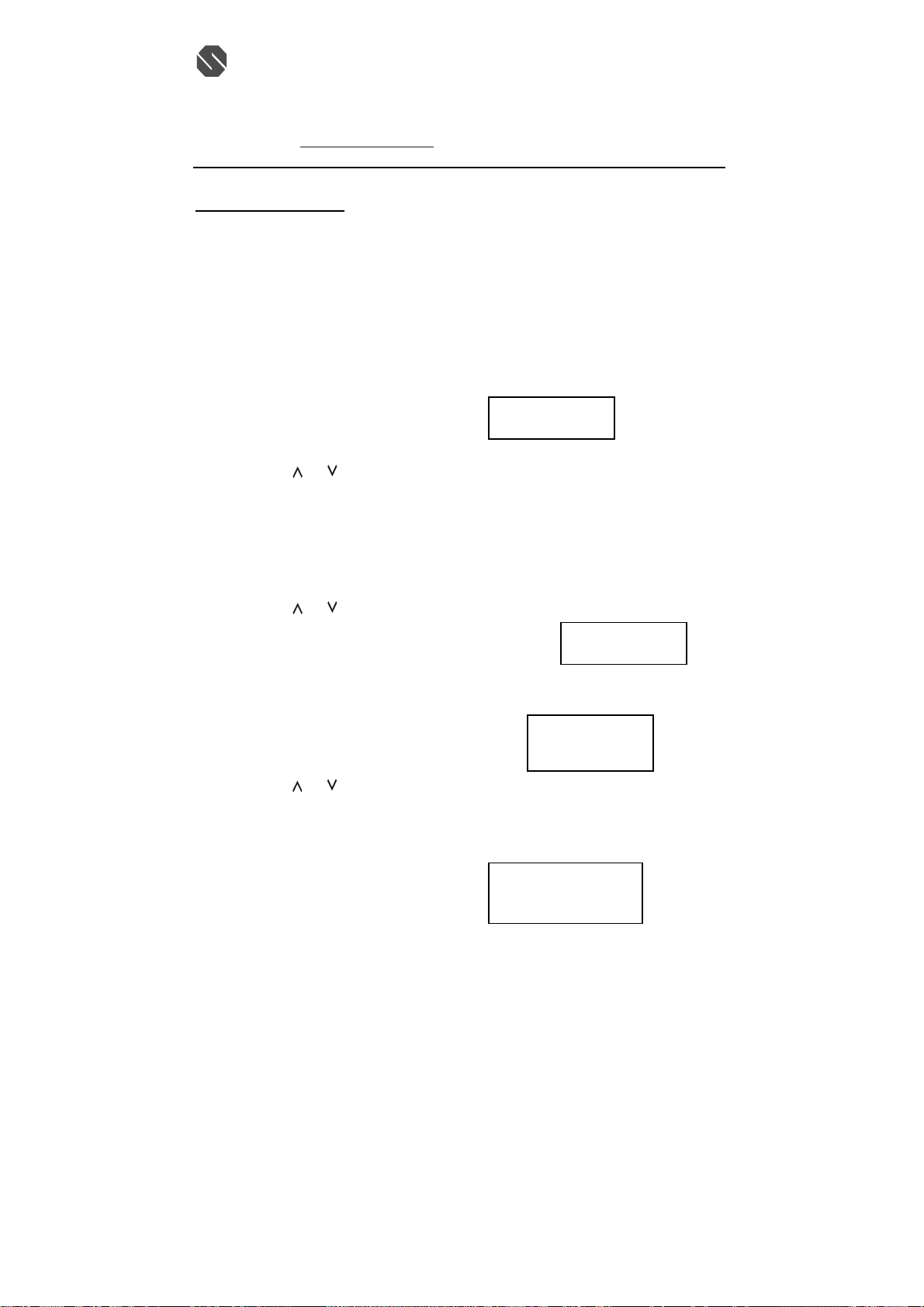
PROGRAMS OPERATION
This unit contains the following special Programs:
A. RING ON/OFF
B. LANGUAGE
C. FIRST RING ON/OFF
D. TIME SET
E. AREA CODE
F. CONTRAST
G. PBX NUMBER
A. RING ON/OFF
To turn on or off the ringing sound.
1. Press and hold the MUTE/MENU button.
2. Press the TELEPHONE KEYPAD #1 button.
3. Press the FLASH/EDIT button.
4. Press the
5. Press the SAVE/MEMO button to save the setting.
6. Press the MUTE/MENU button to go back to standby mode.
B. LANGUAGE
This telephone offers English, Spanish and French languages for your convenience.
1. Press and hold the MUTE/MENU button.
2. Press the TELEPHONE KEYPAD #2 button.
3. Press the FLASH /EDIT button.
4. Press the
5. Press the SAVE/MEMO button to save the setting.
6. Press the MUTE/MNUE button to go back to standby mode.
C. FIREST RING ON /OFF
You can turn off the first ring of the telephone so that it does not ring until caller ID
information has been displayed.
1. Press and hold the MUTE/MENU button.
2. Press the TELEPHON KEYPAD #3 button.
3. Press the FLASH/EDIT button.
4. Press the
5. Press the SAVE/MEMO button to save the setting.
6. Press the MUTE/MENU button to go back to standby mode.
D. TIME SET
Set the date and time.
1. Press and hold the MUTE/MENU button.
2. Press the TELEPHONE KEYPAD #4 button.
3. Press the FLASH/EDIT button.
4. Use the TELEPHONE KEYPAD button to enter the month, date, hour and minute.
The cursor moves automatically after entering each item.
Press the TELEPHONE KEYPAD #1 for AM setting, or
Press the TELEPHONE KEYPAD #2 for PM setting.
H. PBX MODE ON/OFF
I. PAUSE TIME
J. MSG WAITING
K. AUTO ANSWER ON/OFF
L. PRIVATE RING ON/OFF
M. UNAVAILABLE RING ON/OFF
or button to select ON or OFF. RING ON is the preset mode.
or button to select the language you desire. English is the preset language.
or button to select the ON or OFF. FIRST RING ON is the preset mode.
話: (八五二) 二六八七 一七一二 (四線)
RING:ON
#
1
13
TOTAL
ENGLISH
#
2
13
TOTAL
FIRST RING
On
#
3
13
TOTAL
TIME SET
AM
10:03
12/25 #4
TOTAL
13
112905A-1 19
Page 20
SENTON Enterprises Limited 信 通 企 業 有 限 公 司
Flat 10, 17/F, Fo Tan Industrial Centre, 香港沙田火炭坳背灣街 26-28 號
26-28 Au Pui Wan Street, Fo Tan, Shatin, N.T., Hong Kong 富騰工業中心 17 樓 10 室
Tel: (852) 2687-1712 Fax: (852) 2687-4125 電
E-mail address: [email protected] 傳真: (八五二) 二六八七 四一二五
5. When the final setting is programmed, the time and date are automatically saved.
6. Press the MUTE/MENU button to go back to STANDBY mode.
NOTE: The date and time will automatically set, if you have subscribed to the Caller ID service
from your local telephone company.
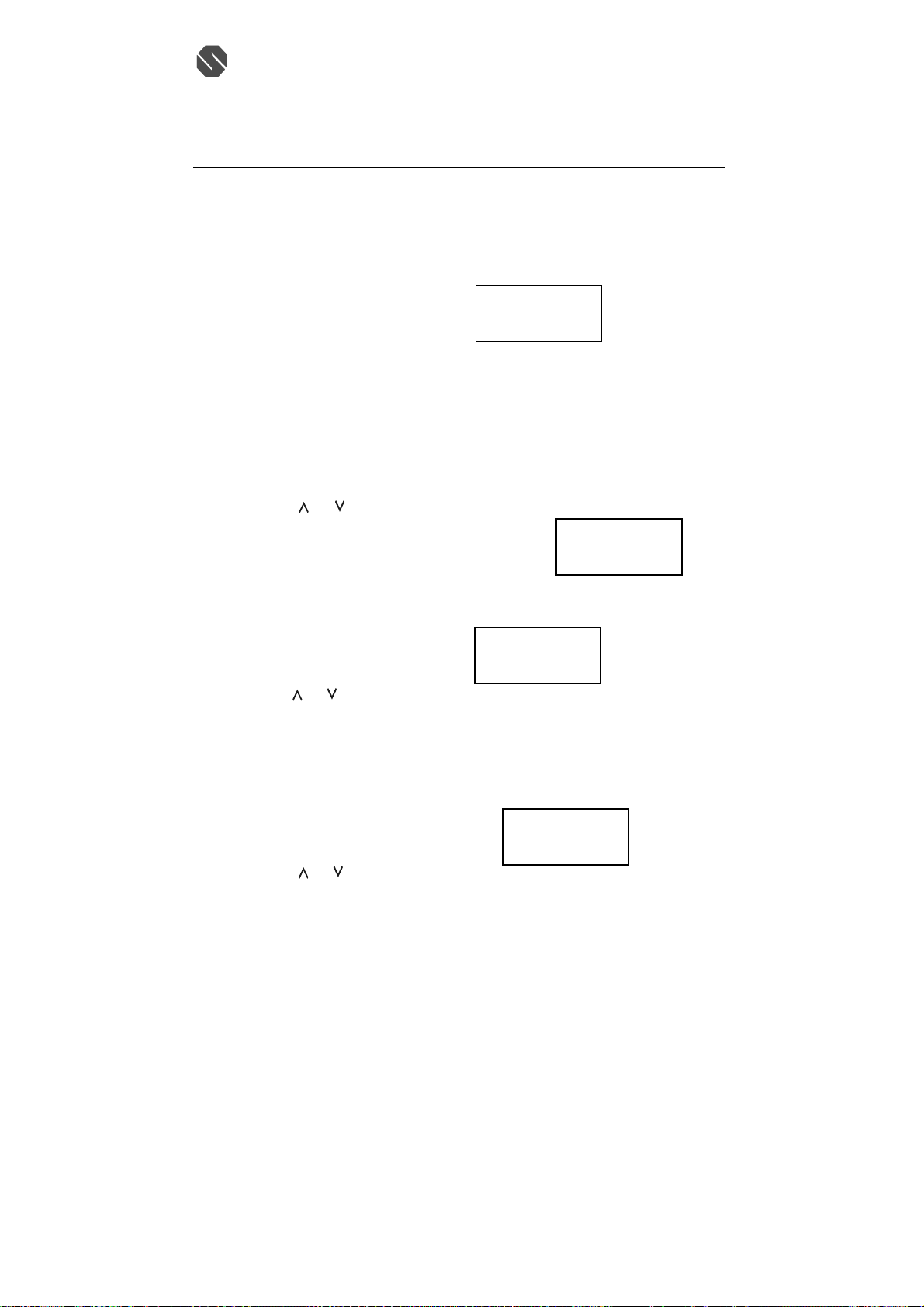
E. AREA CODE
1. Press and hold the MUTE/MENU button.
2. Press the TELEPHON KEYPAD #5 button.
3. Press the FLASH/EDIT button.
4. Use the TELEPHONE KEYPAD buttons to enter the three digit area code.
5. Press the SAVE/MEMO button to save the setting.
6. Press the MUTE /MENU button to go back to standby mode.
F. CONTRAST
This unit enables you to select 3 brightness levels for the Large LCD Display.
1. Press and hold the MUTE/MENU button.
2. Press the TELEPHON KEYPAD #6 button.
3. Press the FLASH/EDIT button.
4. Press the
or button to adjust the brightness of the display. Level 2 is the preset
brightness.
5. Press the SAVE/MEMO button to save the setting.
6. Press the MUTE /MENU button to go back to standby mode.
G. PBX NUMBER
This unit enables you to preset the PBX number (such as an 8 or 9) while you are using a
switchboard system.
1. Press and hold the MUTE/MENU button.
2. Press the TELEPHON KEYPAD #7 button.
3. Press the FLASH/EDIT button.
4. Press the
5. Press the SAVE/MEMO button to save the setting.
6. Press the MUTE /MENU button to go back to standby mode.
H. PBX MODE
This unit enables you to turn ON/OFF the PBX system depending on the telephone system you are
using.
1. Press and hold the MUTE/MENU button.
2. Press the TELEPHON KEYPAD #8 button.
3. Press the FLASH/EDIT button.
4. Press the
PBX MODE OFF- set for direct line access. The preset PBX mode is off.
PBX MODE ON- When connected to a switchboard system.
5. Press the SAVE/MEMO button to save the setting.
6. Press the MUTE/MENU button to go back to STANDBY mode.
NOTE: When placing a call in PBX mode ON, this telephone will automatically add the PBX
number and a pause time before the dialed telephone numbers.
or button to select PBX number.(9 is the preset PBX number)
or button.
話: (八五二) 二六八七 一七一二 (四線)
AREA CODE
- - -
#
5
13
TOTAL
CONTRAST
2
#
6
TOTAL
PBX NO.
9
#
7
13
TOTAL
PBX MODE
OFF
#
8
13
TOTAL
13
112905A-1 20
Page 21
SENTON Enterprises Limited 信 通 企 業 有 限 公 司
R
Flat 10, 17/F, Fo Tan Industrial Centre, 香港沙田火炭坳背灣街 26-28 號
26-28 Au Pui Wan Street, Fo Tan, Shatin, N.T., Hong Kong 富騰工業中心 17 樓 10 室
Tel: (852) 2687-1712 Fax: (852) 2687-4125 電
E-mail address: [email protected] 傳真: (八五二) 二六八七 四一二五
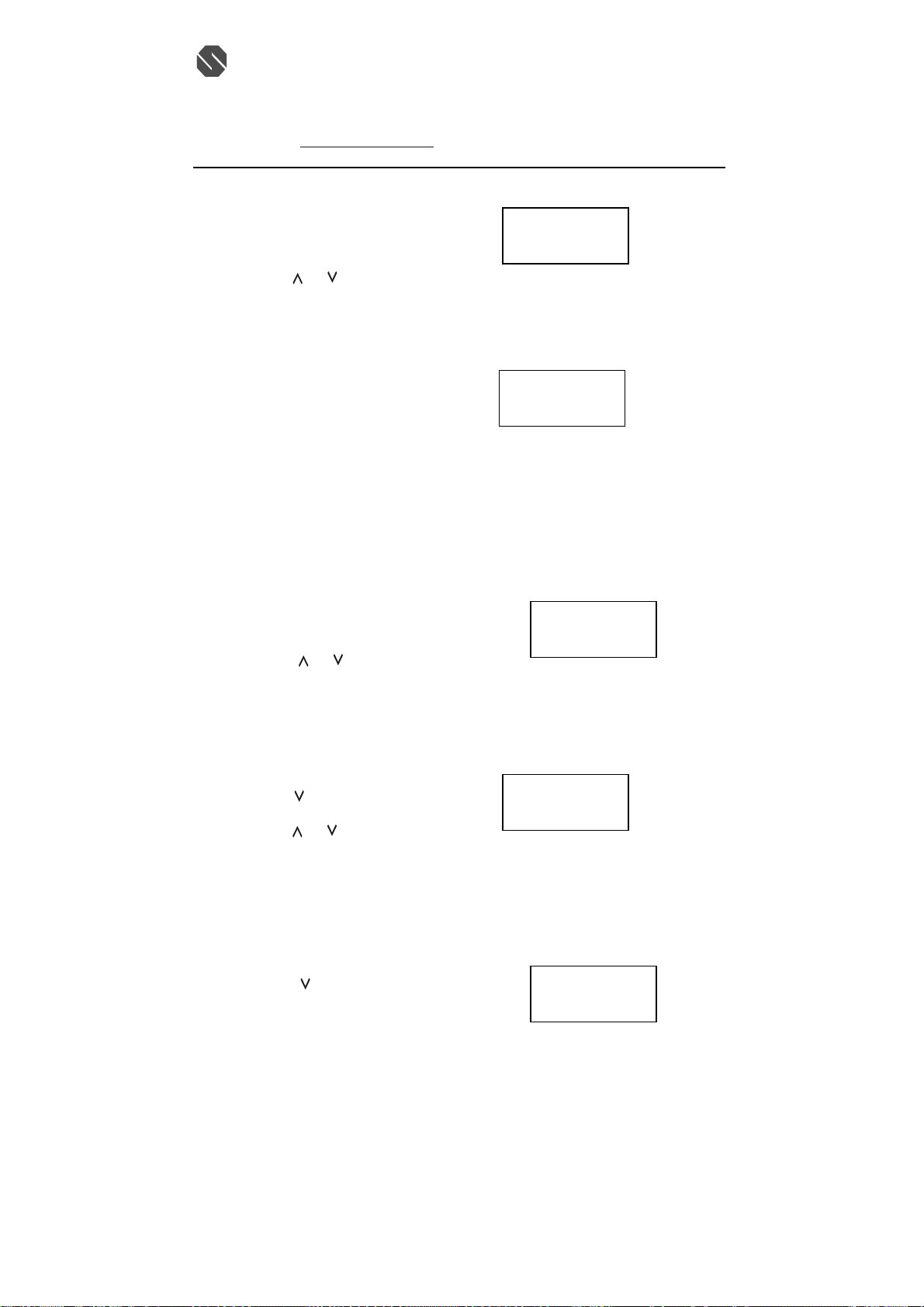
I. PAUSE TIME
This unit enables you to adjust the pause time when placing a call using a switchboard system or
dialing long distance calls.
1. Press and hold the MUTE/MENU button.
2. Press the TELEPHON KEYPAD #9 button.
3. Press the FLASH/EDIT button.
4. Press the
or button to adjust the pause time.
The preset pause time is 2 seconds.
5. Press the SAVE/MEMO button to save the setting.
6. Press the MUTE/MENU button to go back to STANDBY mode.
J. MSG WAITING (Message Waiting)
To turn off the Message Waiting LCD/LED indicator.
1. Press and hold the MUTE/MENU button.
2. Press the TELEPHON KEYPAD #0 button.
3. Press the FLASH/EDIT button.
4. Press the SAVE/MEMO button, the Message Waiting LCD/LED indicator turn off.
5. Press the MUTE/MENU button to go back to STANDBY mode.
IMPORTANT: Message Waiting LCD/LED indicator will automatically turn on, If you have subscribed
to Voice Mail message service and if you have Visual Message indication from your local telephone
company.
K. AUTO ANSWER ON/OFF
Turn on or off the auto answer feature. When in on mode, the phone will automatically answer an
incoming call if the handset is lifted from the base unit.
1. Press and hold the MUTE/ MENU button.
2. Press the TELEPHON KEYPAD * button.
3. Press the FLASH/EDIT button.
4. Press the
AUTO ANSWER ON is the preset mode.
5. Press the SAVE/ MEMO button to save the setting.
6. Press the MUTE/MENU button to go back to STANDBY mode.
L. PRIVATE RING ON/OFF
Turn on or off ring or all calls where the caller has blocked their caller ID.
1. Press and hold the MUTE/MENU button.
2. Press the
3. Press the FLASH/EDIT button.
4. Press the
PRIVATE RING ON is the preset mode.
5. Press the SAVE/MEMO button to save the setting.
6. Press the MUTE/MENU button to go back to standby mode.
NOTE: The phone will ring once when set to OFF mode unless first ring is set to OFF mode.
M. UNAVAILABLE RING ON/OFF
Turn on or off ring or all calls where the caller has blocked their caller ID.
1. Press and hold the MUTE /MENU button.
2. Press the
3. Press the FLASH/EDIT button.
112905A-1 21
or button to select ON or OFF.
button twice.
or button to select ON or OFF.
button once.
話: (八五二) 二六八七 一七一二 (四線)
PUASE TIME
2
#
9
13
TOTAL
MSG WAITING
delete
#
10
TOTAL
13
AUTO ANSWE
On
#
11
TOTAL
13
RRIVATE RNG
On
#
12
TOTAL
13
UNAVAIL RNG
On
#
13
TOTAL
13
Page 22

SENTON Enterprises Limited 信 通 企 業 有 限 公 司
Flat 10, 17/F, Fo Tan Industrial Centre, 香港沙田火炭坳背灣街 26-28 號
26-28 Au Pui Wan Street, Fo Tan, Shatin, N.T., Hong Kong 富騰工業中心 17 樓 10 室
Tel: (852) 2687-1712 Fax: (852) 2687-4125 電
E-mail address: [email protected] 傳真: (八五二) 二六八七 四一二五
4. Press the or button to select ON or OFF.
UNAVAIL RING ON is the preset mode.
5. Press the SAVE/MEMO button to save the setting.
6. Press the MUTE/MENU button to go back to standby mode.
NOTE: The phone will ring once when set to OFF mode unless first ring is set to OFF mode.
65,536 Combination Security Coding
The cordless telephone have a digital coding security system to prevent unauthorized use of your
telephone line by other cordless phones nearly. The cordless telephone have 65,536 possible security code
combinations. Each combination of the code is randomly genera ted every time the handset is picked up.
Resetting Security Code and Channel
Communication between the handset and the base unit may not be possible in any of the following
situations:
1. After a power failure.
2. After relocating the base unit by disconnecting the AC adapter.
3. After replacing the handset battery.
4. The handset goes out of range from the base unit.
To reset, place the handset on the cradle of the base unit for five seconds.
IMPROVING CORDLESS RECEPTION
Follow these guidelines to improve cordless sound quality:
• Select an area to install the unit where it is closest to the center of your home or office. This will
improve the operating range of the unit.
• Keep the base unit away from electrical equipment. Radio Frequency Interference (RFI) is
sometimes generated by these appliances, which can cause a degradation in cordless reception.
• Keep the handset batteries charged as much as possible. Weak handset batteries can limit the range
of cordless operation.
MAXIMIZING BATTERY LIFE
Repeated use or recharge of Ni-Cd batteries without periodic full discharge results in reduced useable
charge time. When you notice the usable charge duration decreasing, fully discharge the Ni-Cd battery
and recharge as described:
DISCHARGING
1. Unplug the telephone line cord from the 4313382.
2. Make sure that the adapter is connected.
3. Lift the handset out of the base cradle.
4. Press the TALK button of the handset and start discharging.
Once the Symbol LOW Battery appears on LCD Display, it means that the battery level is low. Let it fully
discharge for 12 hours. Once the Ni-Cd battery is fully discharged, you may now charge the battery to its
full capacity.
CHARGING
1. Make sure the adapter and telephone line cord are connected to the 4313382.
2. Place the handset on the base cradle. The CHARGE LED indicator of the base unit will light
steadily.
3. Leave the handset charging on the base for 12 hours continuously to get a maximum charge.
4. The 4313382 is now ready for regular use. Discharge and charge the Ni-Cd battery again once you
notice a decrease in the useable charge time.
話: (八五二) 二六八七 一七一二 (四線)
112905A-1 22
Page 23

SENTON Enterprises Limited 信 通 企 業 有 限 公 司
Flat 10, 17/F, Fo Tan Industrial Centre, 香港沙田火炭坳背灣街 26-28 號
26-28 Au Pui Wan Street, Fo Tan, Shatin, N.T., Hong Kong 富騰工業中心 17 樓 10 室
Tel: (852) 2687-1712 Fax: (852) 2687-4125 電
E-mail address: [email protected] 傳真: (八五二) 二六八七 四一二五
MAINTENANCE
1. Your phone should be situated away from heat sources such as radiators, heaters, stoves or any other
appliance that produces heat.
2. Use a slightly damp cloth to clean the plastic cabinet. A mild soap will help to remove grease or oil.
Never use polish, solvents, abrasives or strong detergents since these can damage the finish.
TECHNICAL INFORMATION
This cordless phone uses radio frequencies to allow mobility. There are certain difficulties in using radio
frequencies with a cordless telephone. While these are normal, the following could affect the operation of
your system.
NOISE: Electric pulse noise is present in most homes at one time or another. This noise is most intense
during electrical storms. Certain kinds of electric equipment such as light dimmers, fluorescent bulbs,
motors, and fans also generate noise pulses. Because radio frequencies are susceptible to these noise
pulses, you may occasionally hear them in your handset. Generally, they are minor annoyances and
should not be interpreted as defects in your system.
RANGE: Because radio frequencies are used, location of the base unit can affect operating range. Try
several locations in your home or business and pick the one that gives you the clearest signal.
INTERFERENCE: Some electronic devices operate in and/or generate interference near the operating
frequencies of your cordless telephone. While several protection circuits are used to prevent unwanted
signals, there may be periods when these unwanted signals cause interference. If interference occurs
frequently, it can be minimized or eliminated by lowering the height of your base antenna or by relocating
the base unit. You can check for interference before selecting the final base unit location by plugging in
the phone.
112905A-1 23
話: (八五二) 二六八七 一七一二 (四線)
Page 24
SENTON Enterprises Limited 信 通 企 業 有 限 公 司
Flat 10, 17/F, Fo Tan Industrial Centre, 香港沙田火炭坳背灣街 26-28 號
26-28 Au Pui Wan Street, Fo Tan, Shatin, N.T., Hong Kong 富騰工業中心 17 樓 10 室
Tel: (852) 2687-1712 Fax: (852) 2687-4125 電
話: (八五二) 二六八七 一七一二 (四線)
E-mail address: [email protected] 傳真: (八五二) 二六八七 四一二五
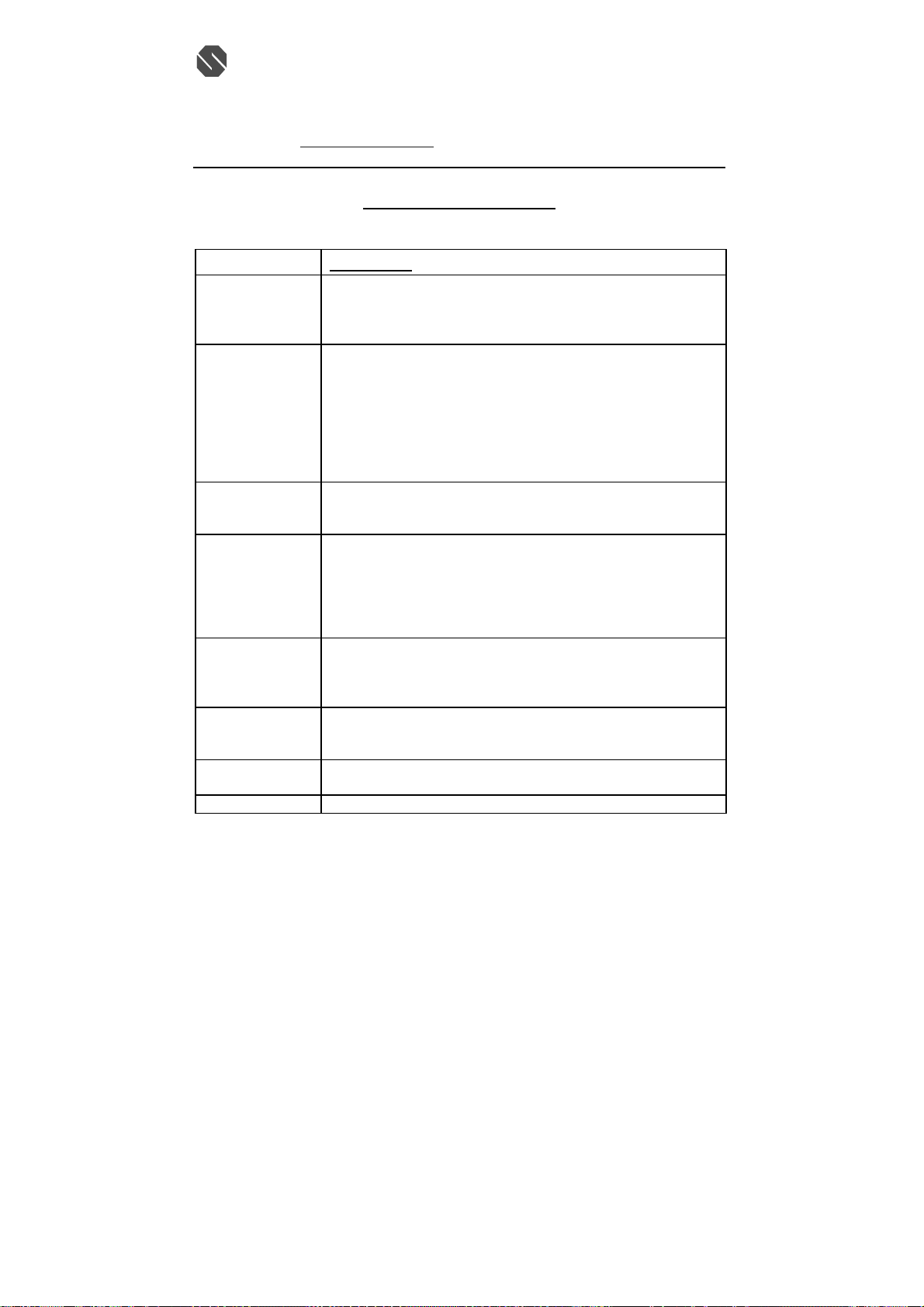
TROUBLESHOOTING
A. TELEPHONE UNIT TROUBLESHOOTING TABLE
SYMPTOM
No dial tone • Check the telephone line cord connectors at both ends that they are
Does not ring
No power on the
handset unit
Does not charge • Check the Ni-Cd battery pack for proper connection inside the battery
Range is limited • Move the base unit so that it is centrally located in your residence or
Calls received flutters
or fades
Interference on
reception
Excessive static • Refer to the section “Improving Cordless Reception”.
SOLUTION
pushed in firmly until they click.
• If you had a power failure or had unplugged the base unit, replace the
handset on the base unit for two to five seconds to reset the system.
• Check the RING ON/OFF mode on the handset. Set to RING ON mode
to enable the handset ringer.
• Check the telephone line cord connectors at both ends that they are
pushed in firmly until they click.
• You may have exceeded the Ringer Equivalence Number(REN) limit of
how many phones can be connected to the same line. The REN total of
all devices(printed on the bottom label of each unit)should not exceed
five(5). Disconnect the appropriate units to lower the REN total.
• Check the Ni-Cd battery pack for proper connection inside the battery
compartment on the handset.
• The handset rechargeable Ni-Cd pack may need charging.
compartment on the handset.
• Made sure the charging contacts on both the base unit and the handset
are in contact during charging.
• The charging contacts and terminals may need cleaning with an
alcohol-dampened swab.
office and make sure that the base unit is not located near appliances.
• The handset Ni-Cd battery may be weak. Recharge the Ni-Cd battery.
• Refer to the section “ Improving Cordless Reception”.
• The handset rechargeable Ni-Cd battery pack may need charging.
• Choose an alternate channel using the SCAN/OPTION button on the
handset.
• Refer to the section “Improving Cordless Reception”.
112905A-1 24
Page 25
SENTON Enterprises Limited 信 通 企 業 有 限 公 司
R
Flat 10, 17/F, Fo Tan Industrial Centre, 香港沙田火炭坳背灣街 26-28 號
26-28 Au Pui Wan Street, Fo Tan, Shatin, N.T., Hong Kong 富騰工業中心 17 樓 10 室
Tel: (852) 2687-1712 Fax: (852) 2687-4125 電
E-mail address: [email protected] 傳真: (八五二) 二六八七 四一二五
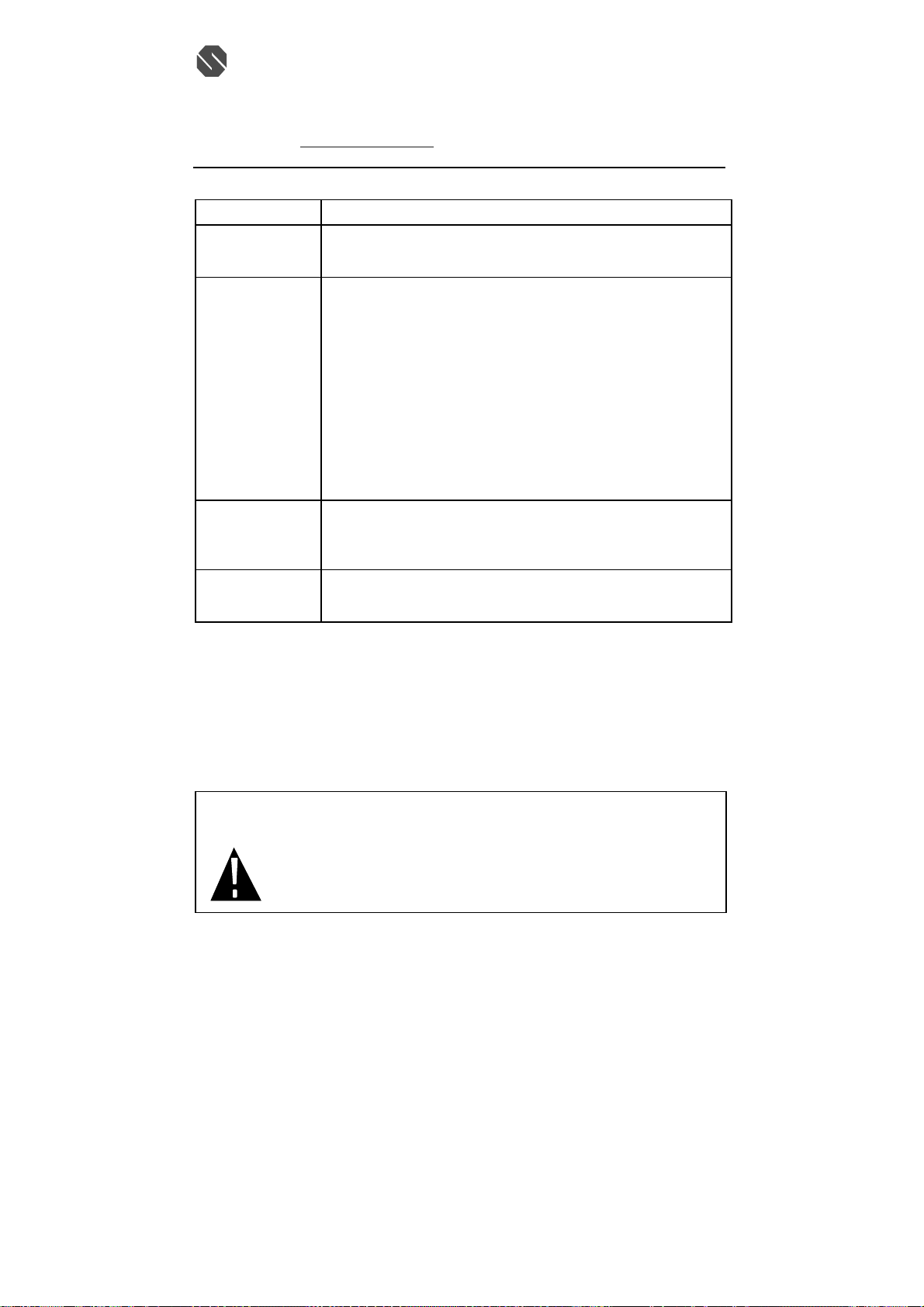
B. CALLER ID SYSTEM TROUBLESHOOTING TABLE
SYMPTOM SOLUTION
The Caller ID panel
is blank
The Caller ID does
not show the caller’s
name and/or phone
number
Random characters
and/or “NO DATA”
appear on the LCD
display
Cannot get call
Waiting identification
on the LCD panel
AC ADAPTOR: USE ONLY WITH CLASS 2 POWER SOURCE, OUTPUT
THIS SYMBOL IS INTENDED TO ALERT THE USER OF
• Check the power connection.
• Check the telephone line cord connections.
• Check the batteries for proper installation.
• The Caller ID unit will not function until you have Caller ID service
provided by your local phone company. Call your local phone company
to have Caller ID installed on your telephone line.
• If you pick up the phone before the second ring, the caller information
will not be correctly received. If you have telephone answering
device(T AD) connected with the unit, set the T AD to answer after two
rings or more.
• If it is a blocked call or an out-of-area call, the caller’s name and/or
phone number will not appear on the display.
• If only the caller’s phone number appears on the display, it may be Single
Data Message Format (SDMF) call, as opposed to a Multiple Data
Message Format (MDMF) call. Please call your local phone company to
see which service you have.
• On rare occasions, the Caller ID information sent by the telephone
company may have an error in the transmission. This is not the fault of
your Caller ID unit. It can only capture and store the data that was
received.
• Subscription to Caller ID Call Waiting (CIDCW) is required from your
local phone company for the CIDCW function to operate properly. Call
you local phone company for details.
9VDC, 200mA .
THE PRESENCE OF IMPORTANT OPERATING AND
MAINTENANCE (SERVICING) INSTRUCTIONS IN THE
OWNE
’S MANUAL.
112905A-1 25
話: (八五二) 二六八七 一七一二 (四線)
Page 26

SENTON Enterprises Limited 信 通 企 業 有 限 公 司
Flat 10, 17/F, Fo Tan Industrial Centre, 香港沙田火炭坳背灣街 26-28 號
26-28 Au Pui Wan Street, Fo Tan, Shatin, N.T., Hong Kong 富騰工業中心 17 樓 10 室
Tel: (852) 2687-1712 Fax: (852) 2687-4125 電
E-mail address: [email protected] 傳真: (八五二) 二六八七 四一二五
話: (八五二) 二六八七 一七一二 (四線)
4313382/112905A-1
112905A-1 26
 Loading...