

Page 1
Installation
1
Install
Wireless MicroRadarTM Sensor Installation Quick Start Guide: VSN240-M
See Important Safety Warnings on
Opposite Side
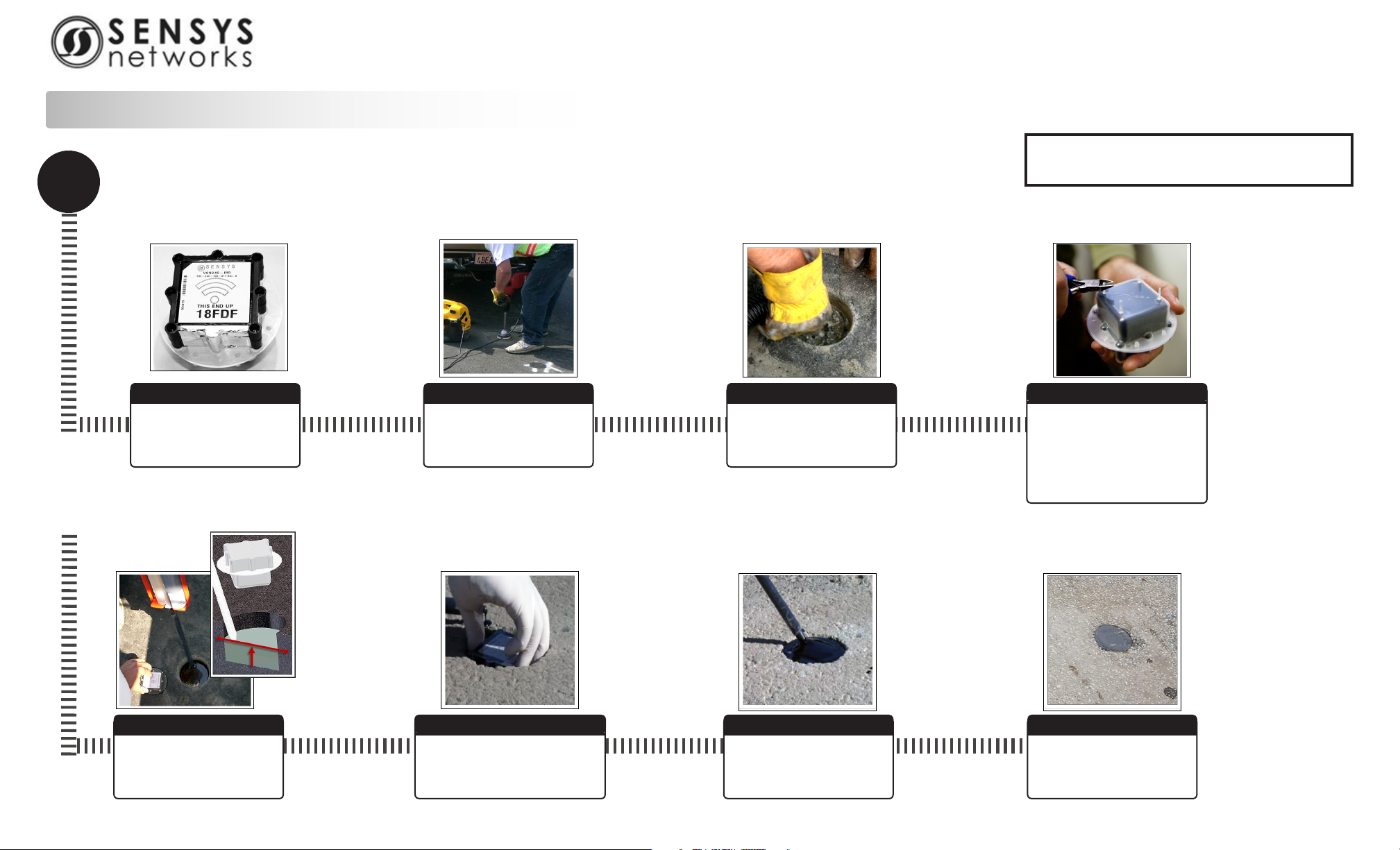
Sensor in Shell
Ensure sensor label is visible
and record sensor number.
Apply Epoxy
Fill EMPTY HOLE half way with
epoxy.
Core
Core hole 4” diameter,
2 1/2” depth.
Place Sensor
Ensure sensor is 1/4” or less
below surface, level, label up, and
arrow points in direction of traffic.
Clear Debris from Hole
Vacuum or brush hole clear of
debris. Ensure hole is dry.
Apply Epoxy
Fill hole with epoxy. Level to
road surface.
Trim Shell Legs
Trim the sensor shell legs to
level as needed. Ensure that
the sensor and shell reach the
required height of 1/4” or less
below road surface.
Installed Sensor
Allow 5 - 10 minutes to cure.
Removal, see reverse side
Page 2
Removal
1
2
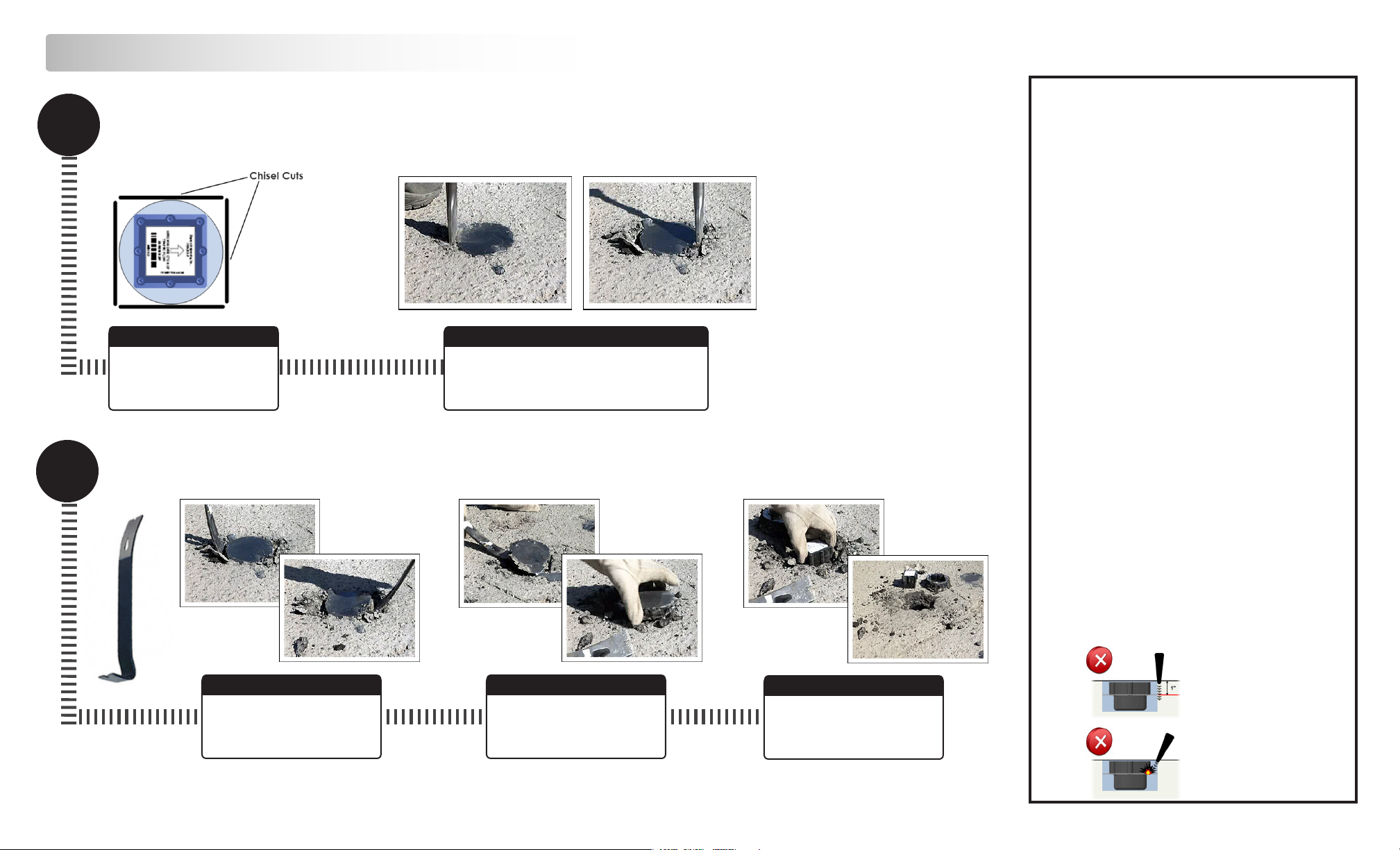
Chisel
Fit a hammer drill with 1” at
blade. Mark 4 cuts around
Remove
Prepare
sensor location.
Chisel
Chisel 4 cuts 1’ in depth. Deeper cuts will result
in the removal the entire sensor core plug. Chisel
straight down. Observe all cautions (at right).
Wireless MicroRadarTM Sensor Installation Quick Start Guide: VSN240-M
Warnings
Lithium Thionyl Chloride Batteries
Sensys Networks uses Lithium Thionyl Chloride batteries in the following
products:
• Sensors (VSN240-F, VSN240-T, VSN240-S)
• Repeaters (RP240-B, RP240-BH, RP240-B-LL, RP240-BH-LL)
Lithium batteries are widely used in electronic products because they contain
more energy per unit -weight than conventional batteries. However, the same
properties that deliver high energy density also contribute to potential hazards
if the batteries are damaged. Improper use or handling of the batteries may
result in leakage or release of battery contents, explosion or re.
Following are the recommendations of the battery manufacturer for proper
use and handling of batteries in the Sensys Networks devices mentioned
above:
• DO NOT charge or attempt to recharge the batteries (batteries are
NOT rechargeable)
• DO NOT crush or puncture batteries
• DO NOT short-circuit the batteries
• DO NOT force over-discharge of the batteries
• DO NOT incinerate or expose batteries to excessive heating
• DO NOT expose battery contents to water
• DO dispose of batteries and devices containing batteries in accor-
dance with local regulations
Sensys Networks sensors contain no serviceable parts and should never be
disassembled. Installation and removal of sensors from pavement should
only be done by trained personnel and care should be taken to insure that the
sensor casing is not punctured or crushed.
FCC Notice: Changes or modications not expressly approved by the party
responsible for compliance could void the user’s authority to operate the
equipment.
1. This device complies with part 15 of the FCC Rules. Operation is subject to
the following two conditions: (1) This device may not cause harmful inter ference, and (2) this device must accept any interference received,
including interference that may cause undesired operation.
2. This device complies with Industry Canada license-exempt RSS
standard(s). Operation is subject to the following two conditions: (1)
this device may not cause interference, and (2) this device must accept
any interference, including interference that may cause undesired opera tion of the device.
Pry Upward
Insert 3’ pry bar. Pry upward
with moderate force. Alternate
prying using all drill cuts.
Remove Shell Top
Carefully work the shell top
loose and remove it. Do not
make contact with the sensor.
Remove Sensor
Pull sensor from shell. Clear all
dust and debris from it. Leave
base of shell in road.
Sensys Networks, Inc • 1608 4th Street, Berkeley, C 94710 • (510) 548-4620 • www.sensysnetworks.com
DO NOT EXCEED
1” DEPTH
DO NOT CONTACT
SENSOR
Installation, see reverse side
 Loading...