

Page 1
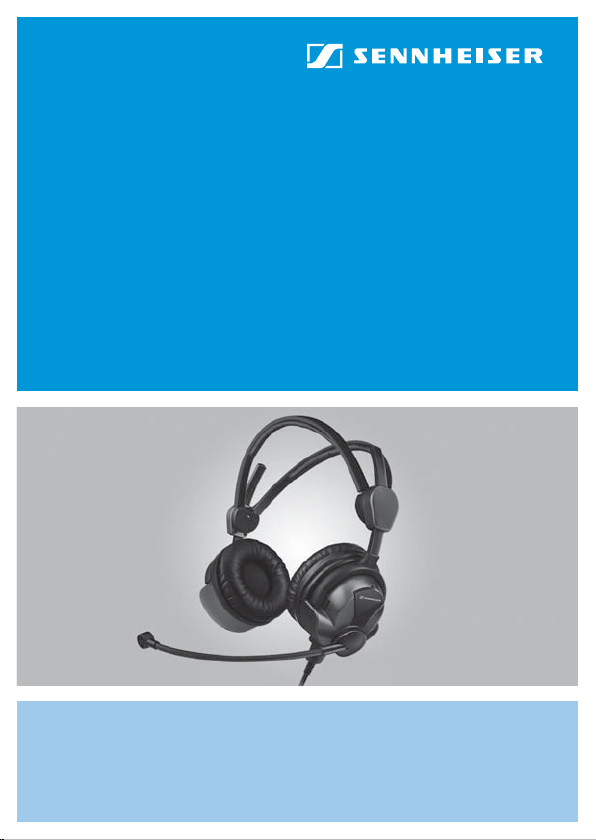
HMEC 26
Instruction manual
Page 2

Page 3

Safety instructions
y Please read these instructions carefully and
completely before using the headset.
y Make these instructions easily accessible to all users
at all times.
y Always include these instructions when passing the
headset on to third parties.
y During flight operation, do not use the headset for
telephone calls.
y With the NoiseGard™ active noise compensation
switched on, typical aircraft sounds (for example,
those from engines, propellers, warning alarms, etc.)
may sound different to you. Before operating any
aircraft, make sure that, with NoiseGard™ switched
on, you can hear and recognize these sounds. Set the
volume to safe levels that do not interfere with your
ability to hear informational sounds and warning
alarms.
y The headset is capable of producing sound pressure
levels exceeding 85 dB(A). In many countries 85 dB(A)
is the maximum legally permissible level for
continuous noise exposure during the working day.
Exposure to sounds of higher volume levels or for
longer durations can permanently damage your
hearing!
y Never repair or attempt to repair a defective headset
yourself. Contact your Sennheiser agent or the
Sennheiser Service Department.
1
Page 4

y Only replace those parts of the headset whose
replacement is described in this manual. All other
parts of the headset must be replaced by your
Sennheiser agent.
y Protect the headset from humidity. Use only a slightly
damp cloth to clean the headset. For information on
how to clean the headset, contact your Sennheiser
agent.
Intended use of the headset
Intended use includes:
• having read this instruction manual especially the
chapter “Safety instructions”.
• using the headset in jet aircraft and within the
operating conditions as described in this instruction
manual.
Improper use
Improper use means using the headset other than as
described in this instruction manual, or under operating
conditions which differ from those described herein.
2
Page 5

The HMEC 26 headset
The HMEC 26 headset with NoiseGard™ active noise
compensation features dynamic, closed headphones. The
noise-compensating condenser microphone ensures
excellent speech transmission even in noisy
environments. Designed for use in aircraft cockpits.
Features
y NoiseGard™ active noise compensation reduces
ambient noise by up to 18 dB – consequently the radio
volume can be decreased
y Lightweight
y Extremely comfortable to wear due to the patented
two-piece automatic headband and soft earpads
y Peak level protection (cannot be switched off)
safeguards you from volume peaks above 110 dB
y “Flip-away” headphone allows single-sided listening
y Flexible microphone boom, can be worn on either left
or right-hand side
y Noise-compensating condenser microphone ensures
excellent speech transmission
y Single-sided cable, easy to replace
y With NoiseGard™ switched off, the headset can be
used as a conventional headset
y Power supply for NoiseGard™ from aircraft DC power
supply system (on suitably equipped aircraft) or
batteries/rechargeable batteries
y “Auto shut-off” extends battery life
y TalkThrough function (HMEC 26-T only)
3
Page 6
y ETSO approval C57a/C58a
Delivery includes
y 1 HMEC 26 headset
y 1 cable clip
y 1 wind and pop screen
y 1 instruction manual
y 1 carry bag
y 1 EASA Form 1
Operation
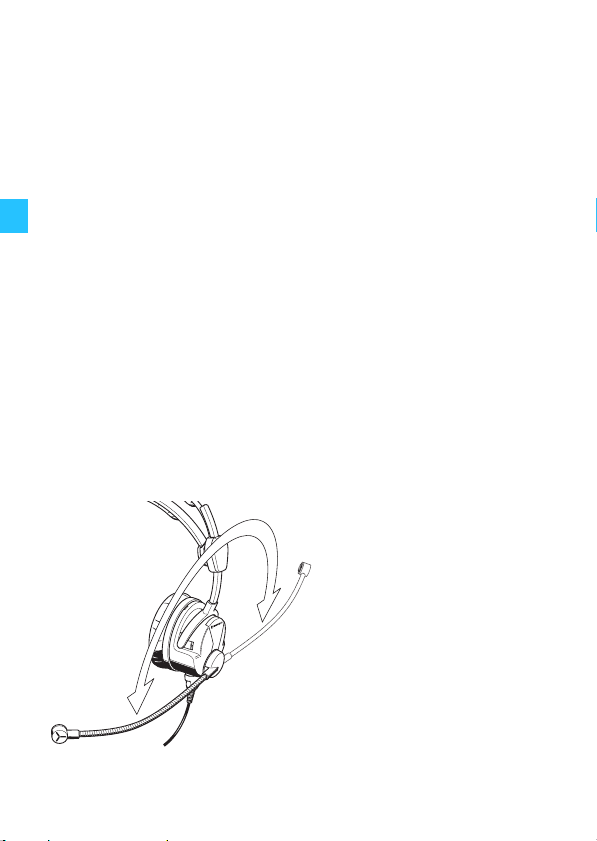
Turning the microphone boom
The microphone boom can be rotated. This allows the
headset to be worn with the microphone boom positioned
on either the left or right-hand side of the head.
4
Page 7
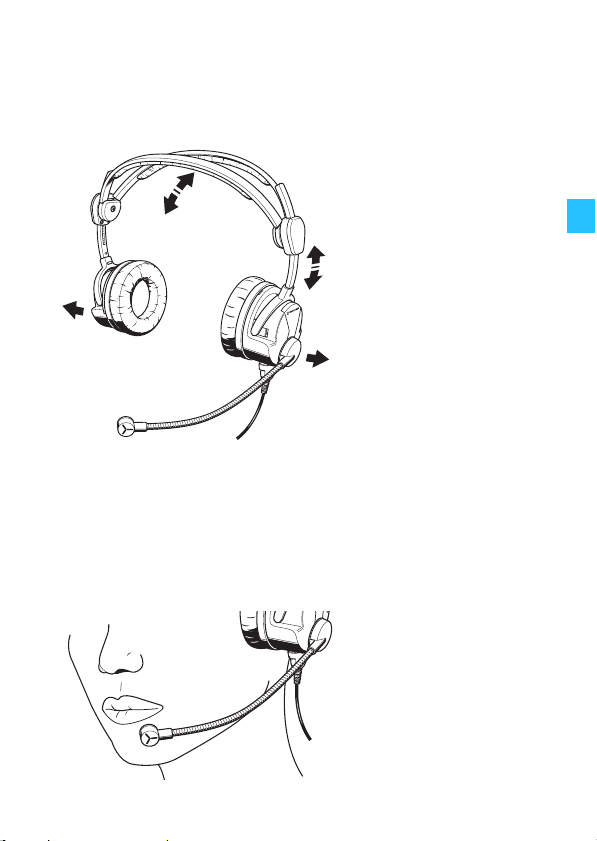
Putting on the headset
When putting on the headset, the patented two-piece
headband adjusts automatically.
Positioning the microphone
Bend the flexible microphone boom so that the microphone is placed at the corner of the mouth. Maintain a
distance of approx. 2 cm between microphone and mouth.
Always use the supplied wind and pop screen.
5
Page 8
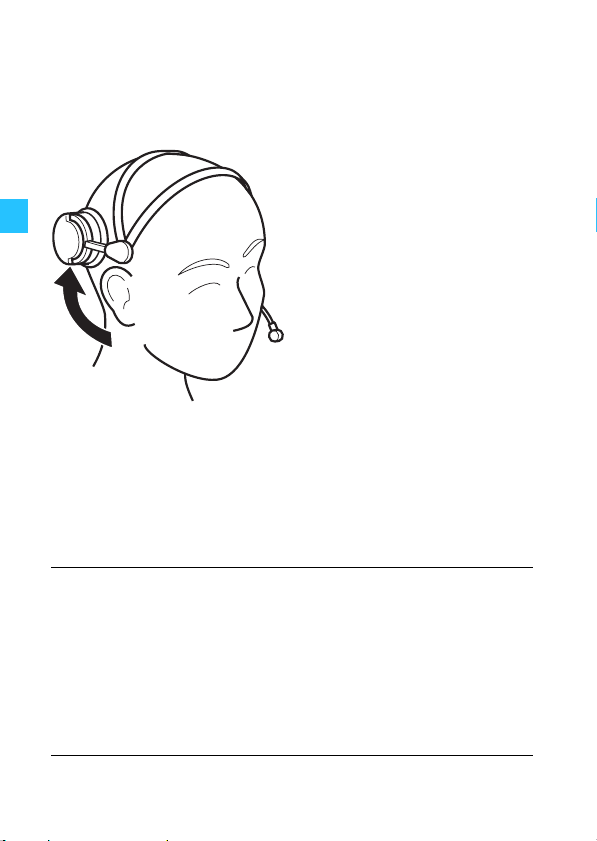
Flipping away one earcup
The headset features a “flip-away” earcup for singlesided listening.
Adjusting the volume directly on the audio system
Connect the headset to the corresponding sockets of your
audio system. Adjust the volume directly on the audio
system.
CAUTION!
6
Hearing damage due to high volumes!
This headset is capable of producing high
sound pressure levels. Higher volumes or
longer durations can damage your hearing!
Set the volume to a medium level. Make sure
that you can hear critical sounds such as
warning alarms.
Page 9
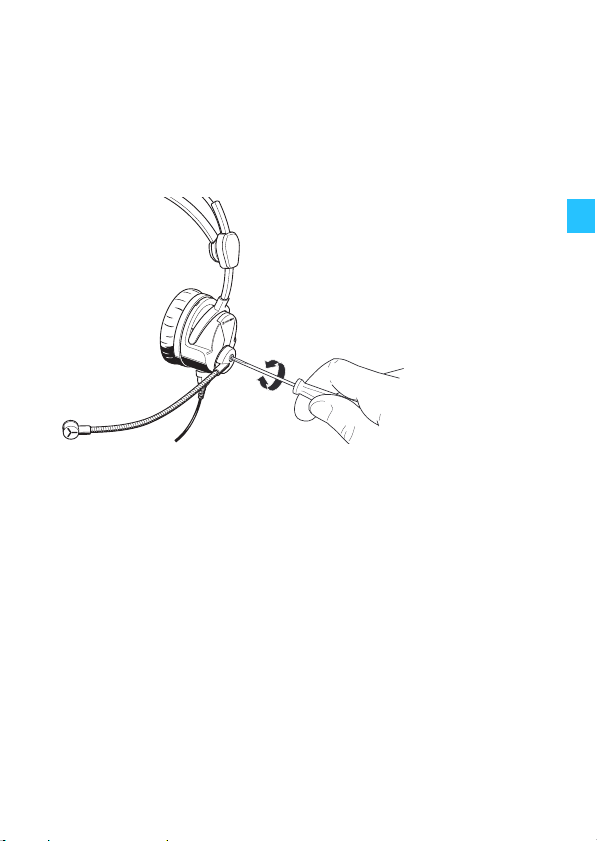
Adjusting the microphone sensitivity
The microphone sensitivity has been factory pre-set to
80 mV/Pa as per RTCA DO-214. You can change the
microphone sensitivity by turning a small screwdriver in
the direction of the arrow.
+
–
7
Page 10
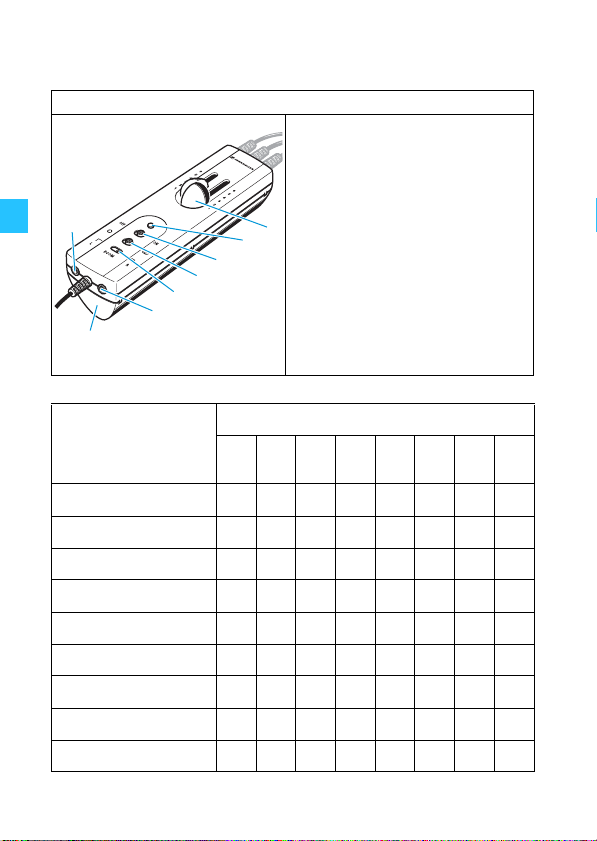
The operating controls of the HMEC 26
Operating control I
Volume controls
LED
NoiseGard™ ON/OFF
switch
Mono/stereo switch
BOOM switch L/R
3.5 mm jack socket
Battery compartment
2.5 mm jack socket
Headset with
operating
control I
HMEC 26-BV-K xxxxxxxx
HMEC 26-BV-KP xxxxxxxx
HMEC 26-BV-CP x x x x x
HMEC 26-B-K x x x
HMEC 26-B-CP x x x
HMEC 26-V-KP xxxxx
HMEC 26-V-RP xxxxx
HMEC 26-V-CP x x x x
HMEC 26-V-KX xxxxx
8
Operating element
Page 11
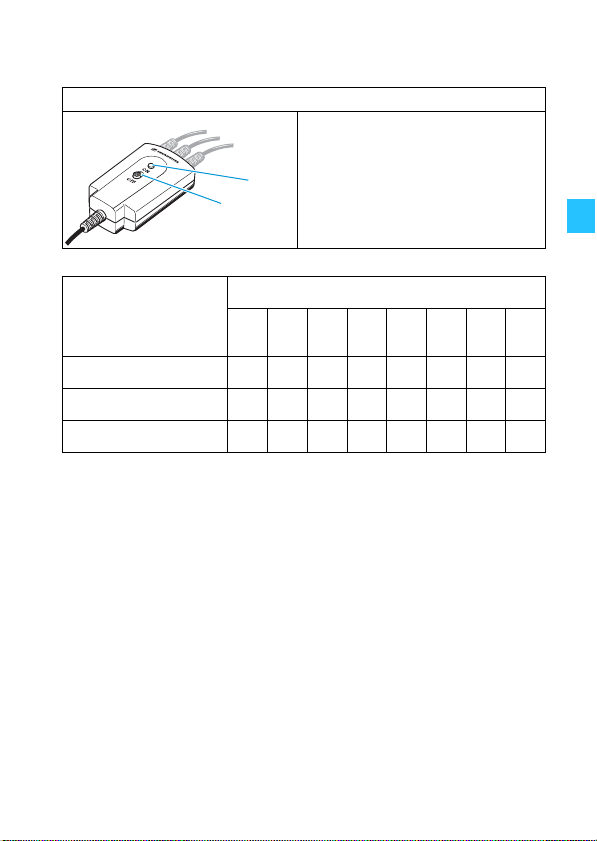
Operating control II
LED
NoiseGard™ ON/OFF
switch
Headset with
Operating element
operating
control II
HMEC 26-CP x x
HMEC 26-KP x x
HMEC 26-NP x x
9
Page 12

Using the headset
Switching NoiseGard™ on/off
The NoiseGard™ ON/OFF switch allows you to switch
the NoiseGard™ active noise compensation on or off. With
NoiseGard™ switched off, the headset can be used as a
conventional headset.
왘 Set the NoiseGard™ ON/OFF switch to the desired
position:
ON: NoiseGard™ is switched on. The LED lights up,
indicating the battery charge status (see
page 11) or power supply via the aircraft DC
power supply system.
OFF: NoiseGard™ is switched off. The LED is off.
Adjusting the volume
The two slide volume controls allow you to adjust the
volume for the left and right channel separately.
CAUTION!
왘 Use the two volume controls to adjust the desired
volume.
10
Hearing damage due to high volumes!
This headset is capable of producing high
sound pressure levels. Higher volumes or
longer durations can damage your hearing!
Set the volume to a medium level. Make sure
that you can hear critical sounds such as
warning alarms.
Page 13
Switching between mono and stereo mode
The mono/stereo switch allows you to switch between
mono (
) and stereo () mode, depending on the
audio system.
왘 Set the mono/stereo switch to the desired
position: mono (
) or stereo ().
Changing the left and right stereo channel
The position “R” or “L” of the BOOM switch
corresponds to the position of the microphone on the left
or right side of the mouth. When the microphone boom is
rotated to permit left or right side microphone
orientation, the BOOM switch allows you to correctly
assign the audio channels (L/R) to the appropriate
headphone sides. This enables the correct orientation of
the volume controls and any stereo audio signals. To
move the BOOM switch, use a pointed tool.
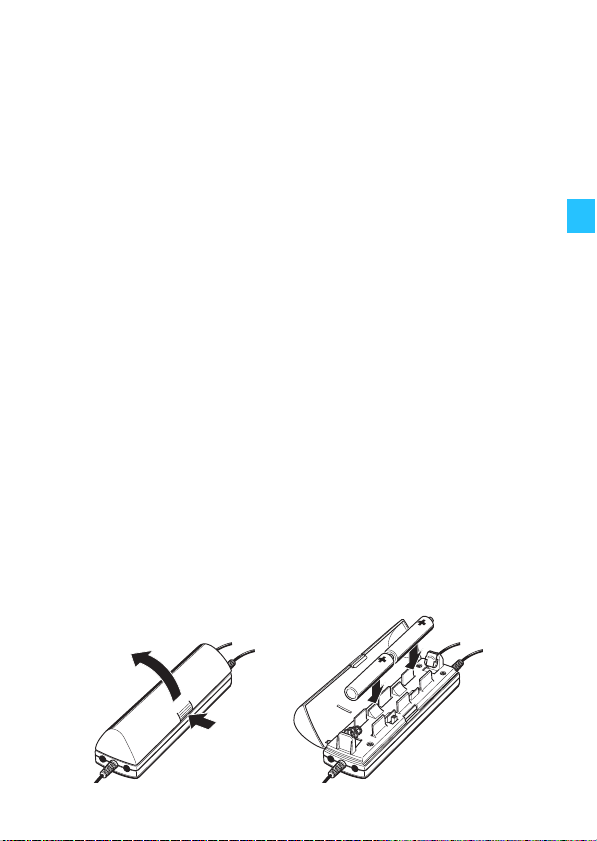
Powering NoiseGard™ via two (rechargeable) batteries
왘 Insert two 1.5 V AA alkaline batteries (IEC LR 6) or
two 1.2 V AA rechargeable batteries (IEC LR 6).
Observe correct polarity when inserting the batteries.
11
Page 14
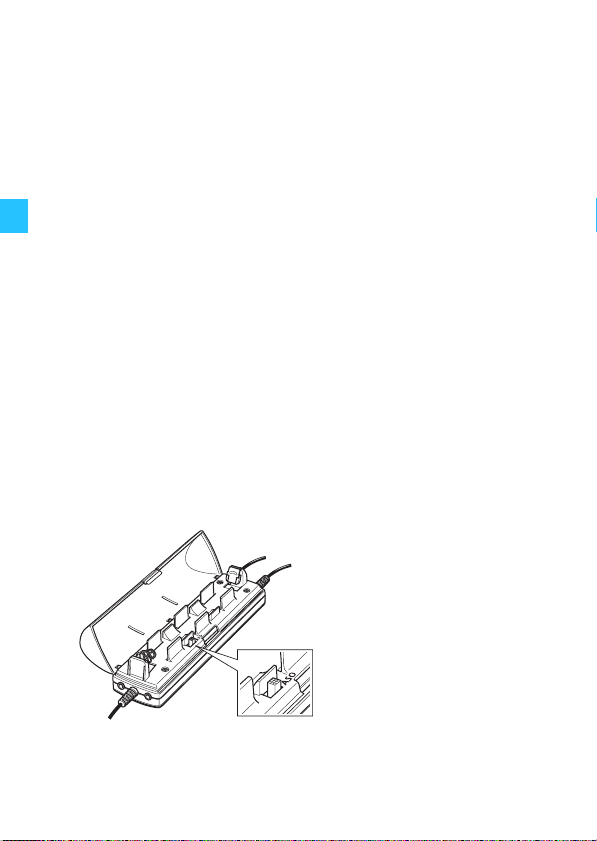
The operating time with batteries/rechargeable batteries
is approx. 60 hours.
With NoiseGard™ switched on (see page 10), the LED
provides information on the remaining battery/
rechargeable battery capacity.
LED lights up yellow: The battery capacity is
sufficient.
LED lights up red: The batteries are flat.
Replace the batteries.
Activating the “auto shut-off” function
The battery-saving “auto shut-off” function automatically switches the NoiseGard™ electronics off when the
headset is disconnected from the audio system or when
the aircraft avionics are switched off. The headset is delivered ex-works with the function deactivated. You can
activate “auto shut-off” as follows:
왘 Set the switch to the position ASO.
12
Page 15
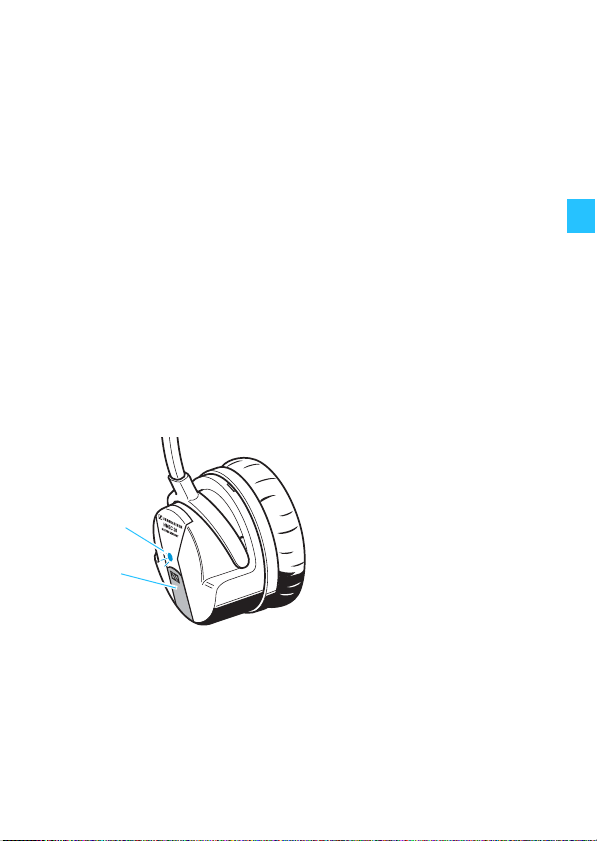
Switching the TalkThrough function on/off
(HMEC 26-T only)
The headset provides excellent attenuation of ambient
noise. In order to allow you to communicate undisturbed
with your surroundings while wearing the headset, the
HMEC 26-T features a TalkThrough function.
왘 Press the TalkThrough button to switch the
TalkThrough function on. The LED lights up. Press
the TalkThrough button again to switch TalkThrough
off.
Note:
The TalkThrough function can only be used when the
NoiseGard™ active noise compensation is switched
on.
13
Page 16
Connecting a mobile telephone
The 2.5 mm jack socket allows you to connect a mobile
telephone. For this purpose, the NoiseGard™ active noise
compensation must be switched on and the microphone
connector must be connected to the aircraft radio/audio.
A suitable adapter for your mobile telephone with
2.5 mm jack socket is available from your Sennheiser
agent.
CAUTION!
Danger of accident due to reduced attention!
Making telephone calls or operating the
mobile telephone limits your attention and
may cause accidents.
During flight operation, do not use the
headset for telephone calls!
왘 Connect the audio cable to the 2.5 mm jack socket
on the operating control I and to the corresponding
jack socket on your mobile telephone.
You can adjust the volume of the mobile telephone via
the headset’s operating control. However, the functions
of the mobile telephone cannot be controlled via the
headset’s operating control.
왘 Operate your mobile telephone as usual and observe
the instructions of the manufacturer.
The latest information on cell phone compatibility is
available on the internet site at www.sennheiser.com.
왘 Search under “Products”, “Aviation” and “more info
…”.
14
Page 17

Connecting an additional audio player
The 3.5 mm jack socket allows you to connect and
listen to an audio player (not supplied) through the
headset. For this purpose, the NoiseGard™ active noise
compensation must be switched on.
CAUTION!
Danger of accident due to reduced attention!
Listening to music or operating an audio
device limits your attention and may cause
accidents.
During flight operation, do not use the
headset for listening to additional audio
sources!
CAUTION!
Hearing damage due to high volumes!
This headset is capable of producing high
sound pressure levels. Higher volumes or
longer durations can damage your hearing!
Set the volume to a medium level. Make sure
that you can hear critical sounds such as
warning alarms.
왘 Connect the audio cable to the 3.5 mm jack socket
on the operating control I and to the corresponding
jack socket on your audio player.
15
Page 18
Care and maintenance
Cleaning the headset
Use a soft, slightly damp cloth to clean the headset from
time to time. If the headset is very dirty, use a cloth
dampened with mild, soapy water. Do not use any
solvents or cleansing agents.
CAUTION!
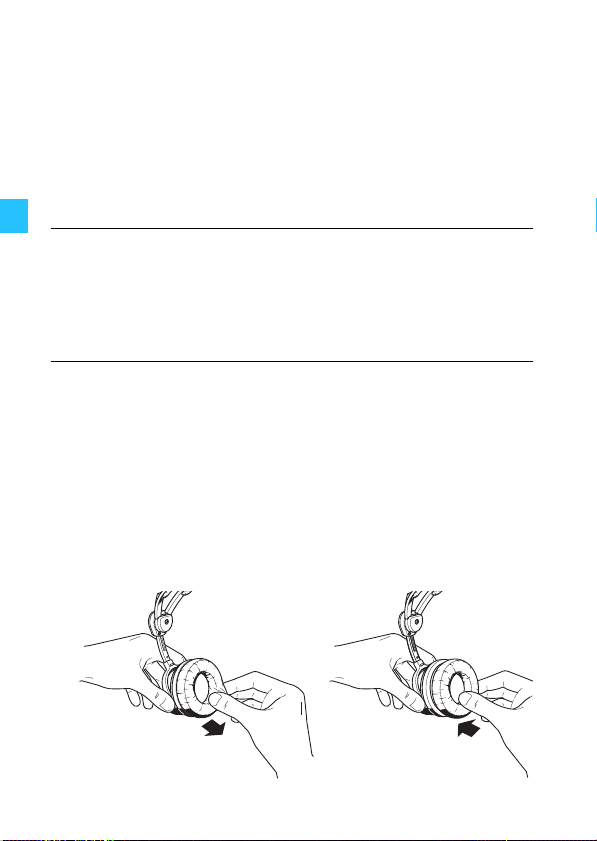
Replacing the earpads
For reasons of hygiene, the earpads should be replaced
from time to time.
왘 Grasp the edge of the earpad and pull sharply.
왘 Attach the new earpad to the earcup by pressing
firmly around the earpad until you hear all 12 latches
lock into place.
16
Danger of short-circuit due to the ingress of
water!
Water entering the housing of the headset
can cause a short-circuit and damage the
electronics.
Page 19

Accessories and spare parts
By changing the cables, you can simply retrofit different
operating controls (see page 8 and 9) or connectors (see
page 19) to your headset.
y Cable -CP Cat. No. 500852
y Cable -V-CP Cat. No. 500846
y Cable -B-CP Cat. No. 500837
y Cable -BV-CP Cat. No. 500838
y Cable -KP Cat. No. 500842
y Cable -V-KP Cat. No. 500848
y Cable -B-K Cat. No. 502183
y Cable -BV-K Cat. No. 500839
y Cable -BV-KP Cat. No. 504030
y Cable -NP Cat. No. 500855
y Cable -V-RP Cat. No. 500853
y Cable -V-KX Cat. No. 502437
y Audio cable, length 0.6 m,
with two 3.5 mm stereo jack plugs Cat. No. 520316
y Audio cable, length 0.6 m,
with two 2.5 mm jack plugs Cat. No. 520317
y Headband padding, 1 pair Cat. No. 515629
y Earpads, leatherette, 1 pair Cat. No. 529766
y Earpads, leatherette, 100 pairs Cat. No. 529767
y Hygiene pads HZH 26, 200 pairs Cat. No. 502595
y Wind and pop screen, 1 item Cat. No. 515297
y Wind and pop screen, any quantity Cat. No. 514127
y Carry bag Cat. No. 077408
17
Page 20
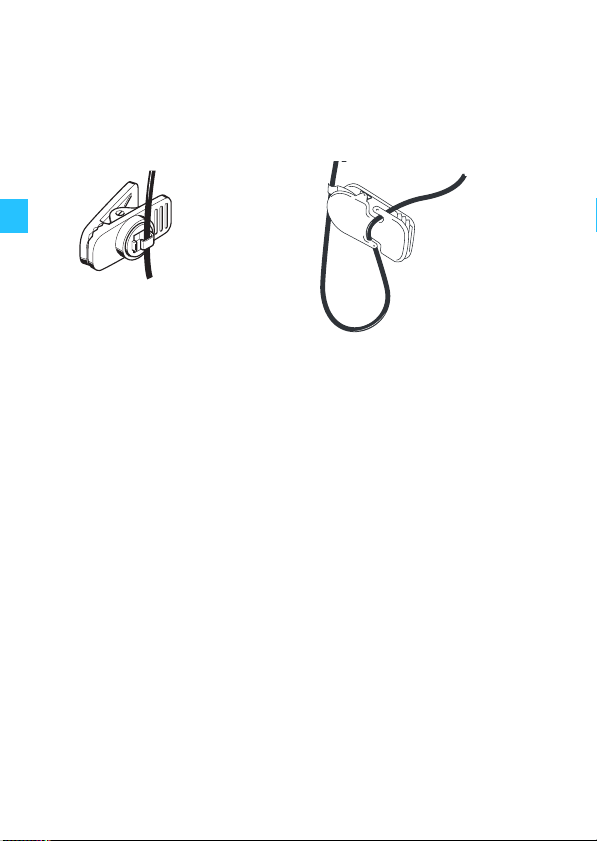
y Cable clip MZQ 2002 Cat. No. 044740
y Cable clip HZC 08 Cat. No. 525787
Cable clips
HZC 08 MZQ 2002
(for round or flat cable)(for round cable only)
18
Page 21

Product variants
Model Cat. No.
HMEC 26* 502397
HMEC 26-T* 502404
HMEC 26-CP 502402
HMEC 26-V-CP 502405
HMEC 26-B-CP 502398
HMEC 26-BV-CP 502400
HMEC 26-KP 502403
HMEC 26-V-KP 502406
HMEC 26-B-K 502399
HMEC 26-BV-K 502401
HMEC 26-NP 502397 + 500855
HMEC 26-V-RP 502397 + 500853
HMEC 26-V-KX 502397 + 502437
HMEC 26-BV-KP 502397 + 504030
Single-sided round cable, 1.85 m
XLR-5 connector
¼“ (6.3 mm) jack plug
(headphones)
PJ-068 equivalent (microphone)
8-pin Neutricon connector
6-pin Redel connector
* The headsets can be combined with all cables (see page 17).
Part Number
026-35
026-C5
026-35-999-3211
026-35-999-3251
026-35-999-2291
026-35-999-2281
026-35-999-3111
026-35-999-3161
026-35-999-1191
026-35-999-1171
026-35-999-3811
026-35-999-3661
026-35-999-4161
026-35-999-2171
x x x x
x x x x
x x x x x
x x x x x
x x x x x
x x x x x
x x x x x
x x x x x
x x x x
x x x x
x x x x x x
x x x x x x
XLR-3 connector
Aircraft powered
Battery powered
Operating control I (page 8)
Operating control II (page 9)
19
Page 22

Specifications
Headphones
Transducer principle dynamic, closed
Ear coupling supra-aural
Frequency response 20–14,000 Hz
Impedance 600 Ω mono/1.200 Ω stereo
Characteristic SPL 92 dB SPL at 1 kHz, 1 mW, mono
95 dB SPL at 1 kHz, 1 V
Max. SPL 120 dB SPL at 1 kHz
Active noise compensation ≥ 18 dB (100 – 300 Hz)
THD < 1 % at 1 kHz, 95 dB SPL
Contact pressure approx. 3.6 N
Microphone incl. preamplifier
Type MKE 46
Transducer principle pre-polarized condenser
microphone,
noise-compensating
Frequency response 100–6,000 Hz
Output voltage adjustable from 17–100 mV/Pa,
80 mV/Pa -2 dB
(factory pre-set)
800 mV -2 dB at 114 dB SPL
Terminating impedance 150–2,200 Ω
Supply voltage 8–16 V DC
20
Page 23
General data
j
Temperature range operation: –15 °C to +55 °C
storage: –55 °C to +70 °C
Weight without cable approx. 210 g
Power supply for 2x 1.5 V AA alkaline battery
NoiseGard™ (IEC LR 6) or
2x 1.2 V AA rechargeable
battery (IEC LR 6)
with approx. 60 hrs operating time
or
12–35 V DC via
aircraft DC power supply system
(on suitably equipped aircraft),
max. 35 mA
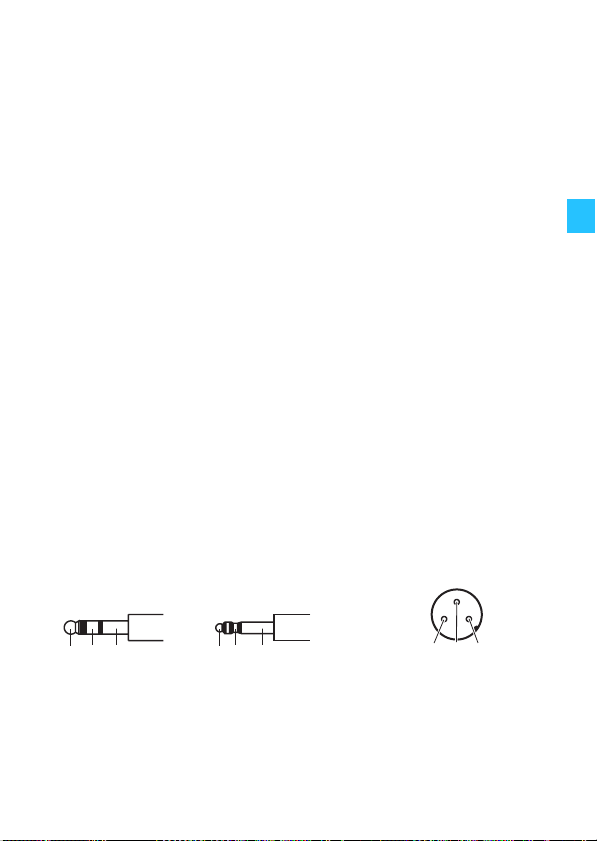
Connector assignment
HMEC 26-V-KX
¼" (6.3 mm)
ack plug
12 3
Audio Hi left
1
Audio Hi right
2
Audio Lo
3
PJ-068
equivalent
12 3
not assigned
1
Microphone Hi
2
Microphone Lo
3
XLR-3 connector
13 2
NoiseGard
1
2
DC–
3
not assigned
TM
(DC+)
21
Page 24
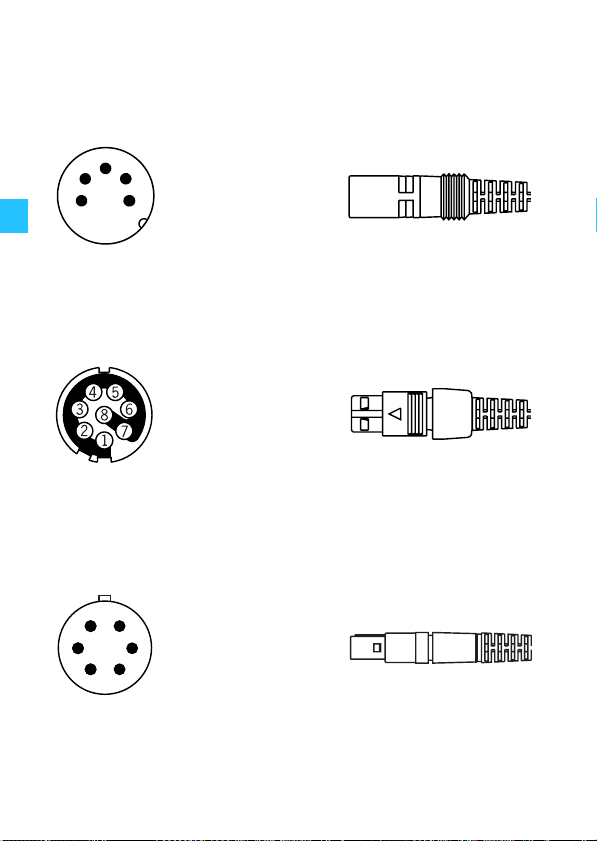
HMEC 26-CP, -V-CP, -B-CP, -BV-CP
Solder side
1
3
2
4
1
2
3
5
4
5
Audio Hi
Audio Lo / DC–
Microphone Hi
Microphone Lo
NoiseGard
TM
(DC+)
HMEC 26-NP
Solder side
1 Audio Hi
2 Audio Lo
3 not assigned
4 Microphone Lo
5 Microphone Hi
6 not assigned
7 DC–
8 NoiseGard
TM
(DC+)
HMEC 26-V-RP
Solder side
TM
1 NoiseGard
6
1
2
3
2 Audio Lo / DC–
3 Audio Hi left
5
4 Audio Hi right
4
5 Microphone Hi
6 Microphone Lo
(DC+)
22
Page 25
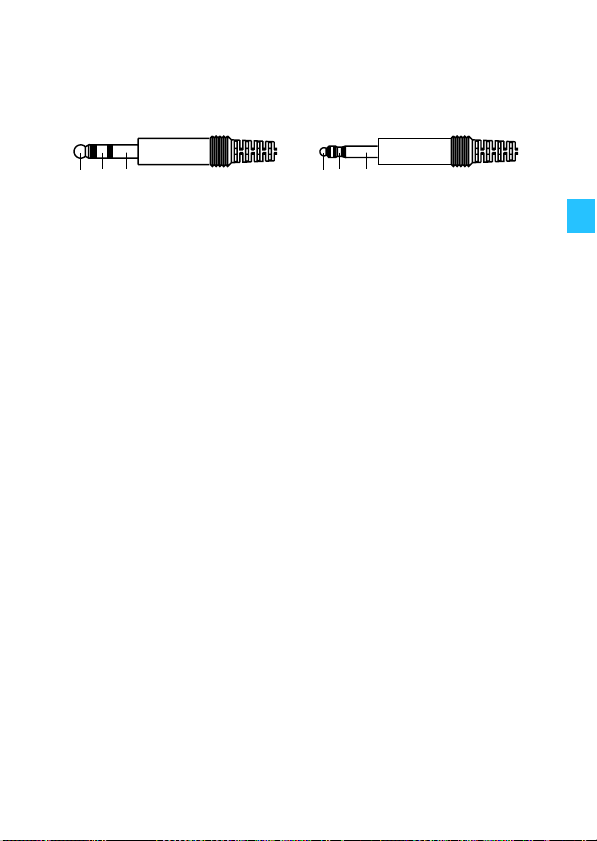
HMEC 26-KP, -V-KP, -BV-KP, -B-K, -BV-K
1/4" (6.3 mm) jack plug PJ-068 equivalent
12 3
HMEC 26-KP
1 Audio Hi 1 NoiseGard™ (DC+)
2 not assigned 2 Microphone Hi
3 Audio Lo / DC– 3 Microphone Lo
HMEC 26-V-KP / -BV-KP
1 Audio Hi left 1 NoiseGard™ (DC+)
2 Audio Hi right 2 Microphone Hi
3 Audio Lo / DC– 3 Microphone Lo / DC–
HMEC 26-B-K
1 Audio Hi 1 not assigned
2 not assigned 2 Microphone Hi
3 Audio Lo 3 Microphone Lo
HMEC 26-BV-K
1 Audio Hi left 1 not assigned
2 Audio Hi right 2 Microphone Hi
2 Audio Lo 2 Microphone Lo
12 3
23
Page 26
Manufacturer Declarations
Warranty
Sennheiser electronic GmbH & Co. KG gives a warranty of
5 years on this product.
For the current warranty conditions, please visit our web
site at www.sennheiser.com or contact your Sennheiser
partner.
CE Declaration of Conformity
This equipment is in compliance with the essential requirements and other relevant provisions of
Directive 2004/108/EU. The declaration is avail-
able on the internet site at www.sennheiser.com.
Before putting the device into operation, please observe
the respective country-specific regulations!
24
Page 27

Page 28

Sennheiser electronic GmbH & Co. KG Printed in Germany
Am Labor 1, 30900 Wedemark, Germany Publ. 01/09
www.sennheiser.com 523983/A01
 Loading...